

2026 İçin En İyi 10 Proje Yönetimi Talep Takip Sistemi

10 En İyi Proje Yönetimi Biletleme Sistemleri Kısa Listesi


Doğru proje yönetimi biletleme sistemi, proje çalışmalarını ve sorunlarını takip etmeyi, iş akışlarınızı hızlandırmayı ve ekibin üretkenliğini artırmayı çok daha kolay hâle getirebilir. Böyle bir sistem olmadan genel ilerleme ve kimin ne üzerinde çalıştığı konusunda kafanız karışabilir.
Görev takibi, ekip iş birliği ve sorun çözümü özellikleri sunan en iyi proje yönetimi biletleme sistemleri için seçtiklerim aşağıda yer alıyor. İster küçük ekipleri ister büyük ve karmaşık projeleri yönetiyor olun, size en uygun seçeneği bulmanıza yardımcı olmak için proje yöneticisi olarak edindiğim deneyim ve uzmanlığı kullanarak çeşitli araçları değerlendirdim ve inceledim.
Why Trust Our Software Recommendations
Our team has been testing and reviewing software since 2012. As project managers ourselves, we know how difficult—and important—it is to choose the right software.
For this guide, we evaluated tools using hands-on testing and independent research, scoring tools using our selection criteria. We also draw on insights from industry thought leaders and practicing project management experts.
Our reviews reflect our human editorial judgment, not a sales pitch.
Expert reviewers:
Proje Yönetimi Biletleme Sistemleri Karşılaştırma Tablosu
Bu karşılaştırma tablosu, en iyi proje yönetimi biletleme sistemi seçimlerim için fiyatlandırma ayrıntılarını özetlemektedir:
| Tool | Starting Price | Website | |
|---|---|---|---|
| Best for secure remote connectivity | 4.6 out of 5 | $120.90/month 30-day free trial | Website |
| Best for all-in-one project management and collaboration | 4.5 out of 5 | $45/month 14-day free trial + free demo available | Website |
| Best for team collaboration | 4.4 out of 5 | $9.99/user/month Free plan + 14-day free trial + free demo available | Website |
| Best for high-velocity service management | 4.0 out of 5 | $21.50/user/month Free plan + 14-day trial available | Website |
| Best for issue tracking | 4.2 out of 5 | Pricing upon request Not available | Website |
| Best for omnichannel message consolidation | 4.6 out of 5 | $25/user/month 14-day free trial | Website |
| Best for AI-enhanced customer service | — | $25/user/month 14-day free trial + free demo available | Website |
| Best for centralized customer service | — | ₹420/user/month Free plan + 15-day trial + demo available | Website |
| Best for visual project management | — | $5/user/month Free plan + free trial available | Website |
| Best for reducing idea-to-production cycle time | — | $29/user/month Free plan available | Website |
En İyi Proje Yönetimi Biletleme Sistemi İncelemeleri
En iyi proje yönetimi biletleme sistemlerinin her biri için ayrıntılı değerlendirmelerim aşağıda yer alıyor. Her yazılımın avantajlarını ve dezavantajlarını, temel özelliklerini ve ideal kullanım alanlarını ele alıyorum.

Best for secure remote connectivity

TeamViewer is a remote connectivity software that provides secure remote access and support solutions. It is best for secure remote connectivity due to its thorough security features, including end-to-end encryption and multi-factor authentication, ensuring safe and reliable remote connections.
Why I picked TeamViewer: I chose TeamViewer for the list because of its strong emphasis on security and its comprehensive suite of remote connectivity tools. TeamViewer stands out from other remote connectivity solutions due to its advanced security measures and wide range of features that cater to various industries. I believe TeamViewer is best for secure remote connectivity because it offers end-to-end encryption, multi-factor authentication, and compliance with international security standards, making it a trusted choice for businesses of all sizes.
Standout Features and Integrations
Features include remote access and support, remote management, and augmented reality support. It also provides centralized monitoring and management of IT systems, asset management, and endpoint protection.
Integrations include Microsoft Teams, Salesforce, Freshworks, Microsoft Intune, Jira, ServiceNow, SAP, Google Workspace, Slack, and Zendesk.
Pros and Cons
Pros:
- Advanced remote support tools
- Wide range of integrations
- Strong security features
Cons:
- Requires stable internet connection
- Higher cost for advanced features

ProofHub
Best for all-in-one project management and collaboration

ProofHub simplifies project management and team collaboration in one platform. It excels at integrating various project management tools to facilitate teamwork and project delivery.
Why I picked ProofHub: I selected ProofHub for its comprehensive approach to project management, offering a suite of tools in one package, which distinguishes it from other project management systems. ProofHub is best for all-in-one project management and collaboration because it provides a unified platform for task management, scheduling, discussion, and document management, which supports team synergy and project oversight.
Standout Features and Integrations
Features include task lists, kanban boards, Gantt charts, and custom workflows for project planning and execution. It also offers time tracking, file sharing, and proofing tools for efficient team collaboration.
Integrations include Slack, Box, Dropbox, Google Calendar, Google Drive, One Drive, FreshBooks, and QuickBooks.
Pros and Cons
Pros:
- Extensive feature set for project tracking, collaboration, and reporting
- Flat-rate pricing model that includes unlimited users
- Unified platform for various project management needs
Cons:
- Potential learning curve due to the extensive range of features
- No native time-tracking
Best for team collaboration
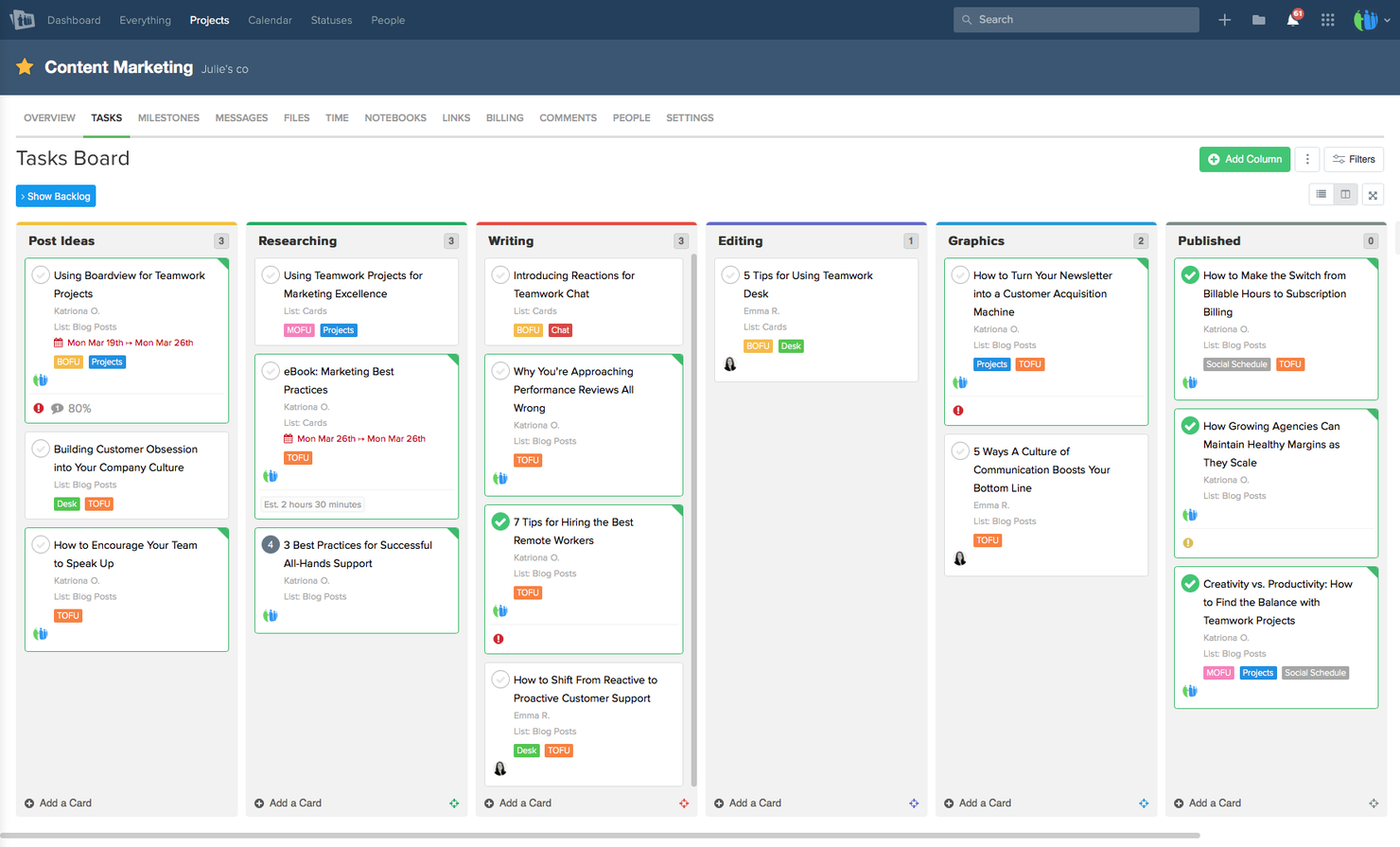
Teamwork.com is a project management platform designed to help teams manage their projects and client work efficiently. It includes ticketing system capabilities and team collaboration features.
Why I picked Teamwork.com: I chose Teamwork.com for the list because it stands out as a collaborative and feature-specific solution for managing client work across various industries, including agencies, consulting services, IT services, and architecture & engineering. I believe Teamwork.com is best for client deliverable features integrated project management due to its varied feature set such as time tracking and resource management, which are crucial for delivering client work effectively and maximizing team productivity.
Standout Features and Integrations
Features include project management essentials, time tracking, resource management, and customizable project templates. It also offers advanced features such as workload and capacity management, advanced budgeting, and powerful reporting tools.
Integrations include Slack, Zapier, MS Teams, Google Drive, QuickBooks, and HubSpot.
Pros and Cons
Pros:
- Wide range of native integrations
- Customizable templates and advanced reporting
- Full project management features
Cons:
- May require some training to fully utilize all features
- Yearly billing may not be flexible for all teams
Best for high-velocity service management

Jira Service Management is designed to connect Dev, IT, and business teams to deliver exceptional service. It is best for high-velocity service management because it accelerates collaboration across changes, incidents, and requests while managing risk.
Why I picked Jira: I chose Jira for its service management capabilities, which stand out in the crowded field of project management tools. Jira's ability to connect Dev and Ops teams on a single platform makes it unique. I believe it is best for high-velocity service management due to its focus on accelerating collaboration and managing risk effectively.
Standout Features and Integrations
Features include customizable templates and dynamic forms, pre-configured request types, and workflows. It also provides scalability for both small teams and large enterprises.
Integrations include Confluence, Bitbucket, Trello, Slack, Microsoft Teams, GitHub, AWS, Google Cloud, Azure, Okta and more.
Pros and Cons
Pros:
- Wide array of integrations
- Scalable for all team sizes
- Customizable templates
Cons:
- Higher learning curve
- Slightly complex setup
nTask
Best for issue tracking

nTask is a project management software designed to improve productivity and collaboration for teams and businesses of varying sizes. It offers key functions such as project management, task management, team collaboration, issue tracking, time tracking, risk management, and meeting management.
Why I picked nTask: When you're managing projects, nTask's issue-tracking feature is a big help. It lets your team identify, report, and manage any problems that come up during a project's lifecycle. This feature is crucial in a project management ticketing system because it helps you keep track of issues and resolve them promptly, reducing downtime and ensuring that projects stay on schedule. You can assign issues to team members, set priorities, and track the status of each issue.
Standout Features and Integrations
Features include project management, which provides tools to plan, execute, and monitor projects effectively, ensuring that teams can achieve their goals efficiently. Task management allows users to create, assign, and track tasks, so everyone knows what needs to be done and when, enhancing team coordination. Gantt charts help visualize project timelines and dependencies
Integrations include Google Calendar, Google Meet, Outlook Calendar, Apple Calendar, Microsoft Teams, GitHub, Trello, Google Tasks, Microsoft Office 365, Gmail, Evernote, and Asana.
Pros and Cons
Pros:
- Good issue tracking capabilities
- Helps you visualize timelines and dependencies
- Includes meeting management features
Cons:
- Reporting features could be more detailed
- Lacks advanced features for very large teams

Front
Best for omnichannel message consolidation
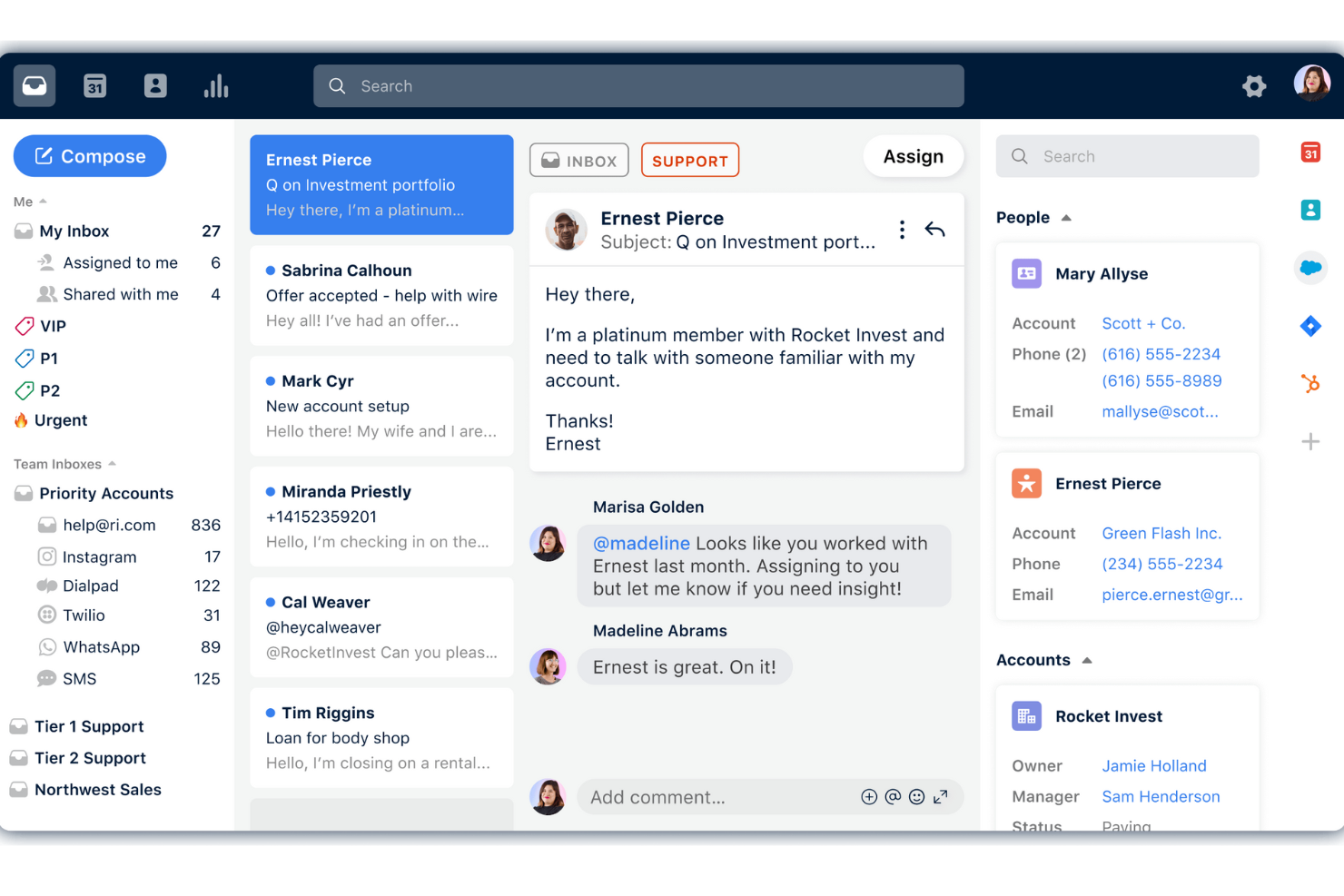
Front is a customer communication tool designed to help businesses build stronger customer relationships and improve operational efficiency. It offers a range of features including omnichannel inbox management, live chat with AI chatbots, collaboration tools, workflow automation, and analytics.
Why I picked Front: One of the most notable aspects of Front is its omnichannel support, which consolidates messages from various channels such as email, SMS, live chat, and social media into a single, unified inbox. This feature is particularly beneficial for teams that handle high volumes of customer interactions across multiple platforms, as it prevents communication silos and ensures that no message is missed.
Standout Features and Integrations
Features include AI chatbots and agent assistance that provide instant resolutions to common inquiries, improving agent productivity and customer satisfaction. Furthermore, the platform's workflow automation capabilities, including no-code automation, smart routing, and tagging, help in automatically categorizing and assigning tickets, reducing response times and increasing overall efficiency.
Integrations include Asana, ClickUp, Vooma, Krisp, Chatra, Dialpad, Drift, FullContact, Gainsight, HubSpot, Bugpilot, and Salesforce.
Pros and Cons
Pros:
- Good automation features
- Centralized customer communication
- Excels in facilitating team collaboration
Cons:
- Reporting features are not available for the Starter plan
- Could have more customization options


Zendesk is a versatile customer service solution that offers a wide range of features to businesses in various industries. Its AI and automation features along with its prioritization on workforce engagement make it a standout option for project management ticketing software. In addition, Zendesk stands out for personalized and efficient customer support experiences.
Why I picked Zendesk: I chose Zendesk for this list because of its advanced AI capabilities that enhance customer service. Zendesk stands out with its ability to integrate AI into customer interactions, making support more efficient and personalized. This makes it a good option for businesses looking to leverage AI in their customer service operations.
Standout Features and Integrations
Features include messaging and live chat, AI and automation, a help center, and workforce engagement tools.
Integrations include tools like Salesforce, Slack, Google Analytics, Shopify, Mailchimp, HubSpot, Trello, Asana, Microsoft Teams, and Zoom.
Pros and Cons
Pros:
- Full range of customer support features
- Wide range of integrations
- Helpful AI capabilities
Cons:
- Limited customization options
- Higher cost for advanced features


Zoho Desk is a platform that centralizes customer service operations. It is recognized as the best for centralized customer service because it consolidates customer interactions from various channels into a single, accessible location.
Why I picked Zoho Desk: I selected Zoho Desk for its standout ability to centralize customer service operations, which is helpful for businesses looking to maintain consistency in customer interactions. I judged it to be best for centralized customer service because it effectively brings together support channels, ensuring that the customer experience is positive and is overall cohesive and responsive.
Standout Features and Integrations:
Features include AI-powered help desk ticketing, multi-channel ticketing, a customer self-service portal, and advanced reporting tools that cater to a diverse range of customer service needs.
Integrations include Mailchimp, Salesforce, Trello, Slack, Google Workspace, Dropbox, Google Drive, RingCentral, Twilio and Microsoft Office 365. Zoho also integrates with social media platforms like Facebook and Twitter.
Pros and Cons
Pros:
- Extensive customization and integration options
- AI-powered assistance for support
- Unified customer service platform
Cons:
- Potential learning curve for new users
- Higher starting price compared to some alternatives

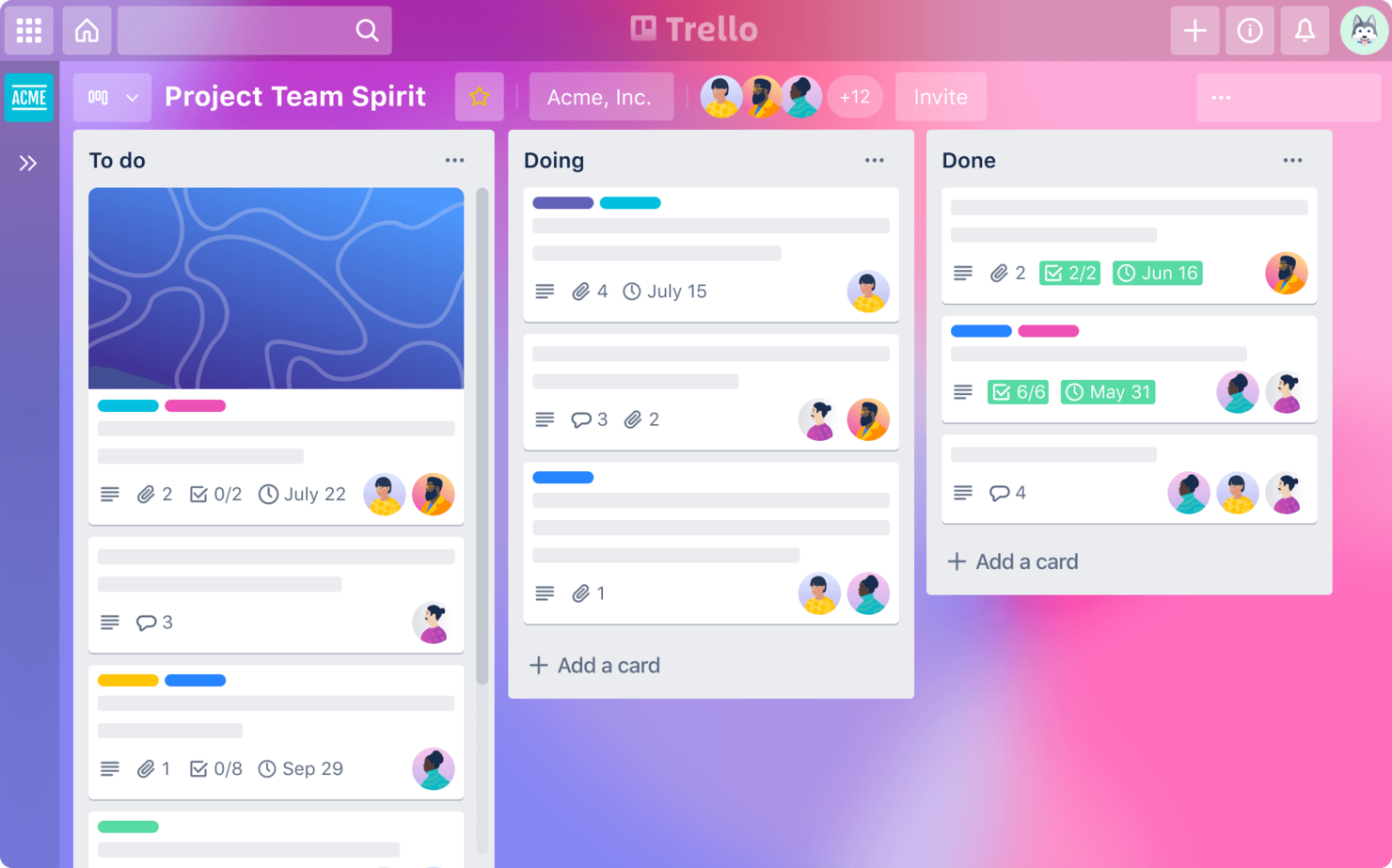
Trello is a project management tool that uses boards, lists, and cards to help teams organize and prioritize projects. It is best for visual project management due to its intuitive, drag-and-drop interface that allows users to easily visualize project progress and workflows.
Why I picked Trello: I chose Trello for its exceptional visual project management capabilities. Trello stands out from other project management tools because of its user-friendly, card-based interface that makes it easy to see the status of tasks at a glance. I believe Trello is best for visual project management because it allows teams to quickly and easily organize tasks, track progress, and collaborate in a visually intuitive way.
Standout Features and Integrations
Features include customizable boards, lists, and cards, built-in automation with Butler, and a variety of views such as Calendar and Timeline.
Integrations include Slack, Google Drive, Dropbox, Microsoft Teams, Jira, Confluence, Evernote, Salesforce, and GitHub.
Pros and Cons
Pros:
- Extensive integrations
- Customizable workflows
- User-friendly interface
Cons:
- Basic reporting tools
- Limited advanced features


GitLab is a web-based DevOps lifecycle tool that streamlines the process from idea to production. It is best for reducing the idea to production cycle time due to its integrated set of features that cover the entire software development lifecycle.
Why I picked GitLab: I chose GitLab for the list because it offers a single application for the entire DevOps lifecycle, which is unique compared to other tools that may require integrations or multiple platforms. I believe GitLab is best for reducing the idea-to-production cycle time because it provides a seamless workflow with built-in tools for planning, coding, testing, deploying, and monitoring, all within the same environment.
Standout Features and Integrations
Features include its integrated CI/CD pipelines, issue tracking, source code management, and advanced security scanning capabilities. These features enable teams to collaborate effectively, automate their workflows, and ensure code quality and security.
Integrations include JIRA, Jenkins, Slack, Trello, Kubernetes, Docker, Sentry, Prometheus, and Elastic Stack.
Pros and Cons
Pros:
- Strong focus on security and compliance
- Complete CI/CD pipelinesComplete CI/CD pipelines
- Integrated DevOps lifecycle management
Cons:
- Some features may be overwhelming for small teams
- Can be complex to set up for new users
Diğer Proje Yönetimi Biletleme Sistemleri
Aşağıda, en iyi listeme giremeyen ancak göz atmaya değer ek proje yönetimi biletleme sistemlerinin bir listesi yer alıyor.
- GoodDay
For diverse project methodologies
- Smartsheet
For flexible project planning
- Asana
For AI-driven workflow automation
- Wrike
For real-time collaboration
- Intercom
For customer communication
- Freshservice
For IT service management
- Airtable
For a user-friendly interface and powerful customization
- Bitrix24
For an all-in-one business suite
- Pivotal Tracker
For Agile project management
- monday.com
For visual project tracking
- ClickUp
For customizable workflows
- Manage Engine ServiceDesk Plus
For integrated IT and business workflows


İlgili Proje Yönetimi Yazılımı İncelemeleri
Burada aradığınızı hâlâ bulamadıysanız, test edip değerlendirdiğimiz diğer ilgili araçlara göz atın:
- Proje Yönetimi Yazılımı
- Kaynak Yönetimi Yazılımı
- İş Akışı Otomasyonu Yazılımı
- Zaman Takibi Yazılımı
- Görev Yönetimi Yazılımı
- İş Birliği Araçları
- Gantt Şeması Oluşturucu
- Üretkenlik Araçları
- Proje Takibi Yazılımı
- Proje Planlama Yazılımı
How I Evaluate Project Management Ticketing Systems
I split my evaluation into two layers: baseline must-haves—like ticket lifecycle management tied to project workflows—and differentiators that separate good tools from great ones.
Core Functionality (Table Stakes For This List)
When I'm selecting tools for my list, I rank each one on a scale from 0 (does not offer the functionality) to 5 (excels in this area) for each core functionality listed below. Then, I calculate the tool's total score into a percentage. Each tool needs to achieve a minimum total score of 75% to be considered for inclusion.
- Ticket Creation & Management: I evaluate how each tool handles ticket fields, types, and lifecycle stages—whether you can log a bug, a change request, and a client task as distinct ticket types with relevant metadata.
- Project-Based Organization: Each tool should let you group tickets under specific projects or boards, so a product launch and an infrastructure migration aren't dumped into the same backlog.
- Workflow & Status Customization: I look for the ability to define custom statuses and transitions that match how your team actually works, whether that's a Kanban pull system or a gated waterfall approval flow.
- Assignment & Prioritization: Tools should support assignees, priority levels, due dates, and dependencies—so when a QA ticket blocks a release task, that relationship is visible and trackable.
- Collaboration & Commenting: Threaded comments, @mentions, file attachments, and activity logs matter here. I check whether stakeholders can discuss a ticket in context rather than chasing updates across email and chat.
- Reporting & Dashboards: I evaluate whether the tool offers dashboards that surface ticket volume, cycle time, workload distribution, and project progress without requiring a separate BI tool to make sense of the data.
Once I have a list of tools that meet the criteria, I consider what sets each platform apart.
Differentiating Factors (What Sets Vendors Apart)
Here's how I compare and contrast different vendors:
Standout Features
Automation rules that auto-assign, escalate, or transition tickets based on triggers save hours of manual triage—especially for teams processing dozens of incoming requests per sprint. I also evaluate whether a tool offers a client-facing portal, since giving external stakeholders a way to submit and track tickets cuts down on status update emails. For professional services teams, native time tracking on tickets is a big differentiator because it ties logged hours directly to project deliverables and billing.
Beyond Features
Integration depth matters a lot here. I check whether a tool connects natively to dev platforms like GitHub or GitLab, plus communication tools like Slack, so tickets stay linked to commits and team conversations. Pricing structure is another key factor—guest or viewer seats for external stakeholders shouldn't inflate your costs when clients only need limited access. I also look at security certifications like SOC 2 and SSO support, since enterprise teams often can't even pilot a tool that lacks role-based access controls and audit logging.
Proje Yönetimi Biletleme Sistemi Nasıl Seçilir?
Uzun özellik listeleri ve karmaşık fiyatlandırma yapıları arasında kaybolmak kolaydır. Kendinize özgü yazılım seçim süreciniz üzerinde çalışırken odağınızı korumanıza yardımcı olmak için aklınızda bulundurmanız gereken faktörlerin bir kontrol listesini burada bulabilirsiniz:
| Faktör | Dikkate Alınması Gerekenler |
|---|---|
| Ölçeklenebilirlik | Sistemin ekibinizle birlikte büyüyebildiğinden emin olun. Artan kullanıcı veya proje sayısını sorunsuz şekilde karşılayabilen çözümleri tercih edin. |
| Entegrasyonlar | İş akışlarını iyileştirmek ve manuel veri girişini azaltmak için Slack veya Jira gibi ekibinizin hâlihazırda kullandığı araçlarla bağlantı kurup kuramadığını kontrol edin. |
| Özelleştirilebilirlik | Sistemi süreçlerinize uyacak şekilde uyarlayabildiğinizden emin olun. Özelleştirilebilir iş akışları, alanlar ve kontrol panelleri sunan çözümleri tercih edin. |
| Kullanım Kolaylığı | Ekibiniz sistemi hızlıca kavrayabilmelidir. Eğitim süresini en aza indirmek için sezgisel arayüzler ve kolay işe alıştırma süreçleri sunan çözümleri tercih edin. |
| Bütçe | Bütçe kısıtlarınızı netleştirin. Aracın zaman içinde uygun maliyetli kalacağından emin olmak için başlangıç maliyetlerini ve yinelenen ücretleri değerlendirin. |
| Güvenlik Önlemleri | Güçlü güvenlik özellikleriyle verilerinizi koruyun. Şifreleme, düzenli yedekleme ve GDPR gibi standartlara uygunluk sunan sistemleri tercih edin. |
| Destek | Güvenilir müşteri desteği çok önemlidir. Sorunların hızlıca çözülmesi için 7/24 destek veya özel müşteri yöneticisi sunan çözümleri tercih edin. |
| Raporlama | Sistemin raporlama özelliklerini değerlendirin. Kapsamlı analizler ve özelleştirilebilir raporlar, ilerlemeyi izlemenize ve bilinçli kararlar almanıza yardımcı olabilir. |
Proje Yönetimi Bilet Sistemlerindeki Eğilimler
Proje yönetimi bilet sistemleri gelişiyor. Geleceklerini şekillendiren temel eğilimler şunlardır.
- Yapay zekâ ve makine öğrenimiyle entegrasyon: Satıcılar, yapay zekâyı ve makine öğrenimini bilet sistemlerine entegre ediyor. Bu, rutin görevlerin otomatikleştirilmesi ve bilet eğilimlerinin tahmin edilmesi gibi konularda yardımcı olabilir.
- Daha iyi mobil erişilebilirlik: Araçlar mobil uygulamalarını geliştiriyor ve birçoğu artık hareket hâlindeyken biletleri yönetmenize olanak tanıyor. Bu özellik, uzaktan çalışan ekipler için de oldukça kullanışlıdır.
- Kullanıcı deneyimine odaklanma: Bilet sistemlerinde kullanıcı deneyimine giderek daha fazla önem veriliyor. Sistemler daha sezgisel ve kullanıcı dostu hâle geliyor. Bu da daha yüksek benimseme oranları ve üretkenlik sağlayabilir.
- Daha fazla iş birliği özelliği: Satıcılar, ekiplerin doğrudan bilet arayüzü içinde birlikte çalışabilmesi için gerçek zamanlı iş birliği özelliklerine öncelik veriyor. Bu, daha iyi iletişim kurulmasını ve sorunların daha hızlı çözülmesini sağlar.
- Bilet yönetimi için öngörücü analizler: Daha fazla araç, bilet hacimlerini tahmin etmek ve kalıpları belirlemek gibi konularda yardımcı olmak için öngörücü analiz özellikleri sunuyor. Bu, kaynakların daha iyi planlanmasını ve yönetilmesini sağlar.
Proje Yönetimi Bilet Sistemi Nedir?
Proje yönetimi bilet sistemi, ekiplerin bir proje kapsamındaki iş taleplerini ve sorunları takip edip yönetmesine yardımcı olmak üzere tasarlanmış dijital bir platformdur. Proje yöneticileri, ekip üyeleri ve paydaşlar tarafından görevleri düzenlemek, sorunları bildirmek, ilerlemeyi takip etmek ve hesap verebilirliği sürdürmek için kullanılır.
Bir proje yönetimi bilet sisteminin bileşenleri arasında bilet göndermeye yönelik bir arayüz, sorunları kategorilere ayırıp önceliklendiren bir sistem, görev atama araçları ve ilerlemeyi ve çözümü takip etmeye yönelik özellikler bulunur. Bu altyapı, etkili iletişimi ve iş birliğini destekler; ekiplerin proje zorluklarını hızlıca ele alıp çözmesine yardımcı olur.
Özellikler
Bir proje yönetimi bilet sisteminde aranması gereken on temel özellik aşağıda verilmiştir.
- Kullanıcı dostu arayüz: Hızlı benimseme için anlaşılır ve sezgisel bir tasarım gereklidir. Bu, ekip üyelerinin sistemde kolayca gezinmesine yardımcı olur ve üretkenliği korumak açısından kritik öneme sahiptir.
- Özelleştirme seçenekleri: İş akışlarını, alanları ve durumları özelleştirebilme olanağı, sistemi benzersiz süreçlerinize uyarlamanızı sağlar.
- Entegrasyon özellikleri: Araç, kullandığınız diğer araçlar ve platformlarla etkileşim kurabilmeli, merkezi bir operasyon merkezi olarak çalışmalı ve farklı yazılımlar arasında geçiş yapma ihtiyacını azaltmalıdır.
- İş birliği: Ekip üyeleri arasında anında iletişim kurmaya yönelik özelliklere erişebilmelisiniz. Bu, sorunların hemen tartışılmasına ve çözülmesine olanak tanıyarak proje ilerlemesini hızlandırabilir.
- Görev önceliklendirme: Taleplere aciliyet ve önem atayabilmelisiniz. Bu, ekiplerin önce en kritik sorunlara odaklanmasına yardımcı olur ve önemli son teslim tarihlerine ulaşmanızı sağlar.
- Raporlama ve analiz: Araç, performans ve ilerleme ölçümleri hakkında içgörüler sunmalıdır. Bu, projelerin başarısını değerlendirmenize ve süreçleri iyileştirmek için veriye dayalı kararlar almanıza yardımcı olur.
- Mobil erişilebilirlik: Bu özellik, ekip üyelerinin masalarından uzaktayken güncel kalmalarını ve taleplere yanıt vermelerini sağlar; böylece ivmenin korunmasına yardımcı olur.
- Otomatik bildirimler: Bunlar, güncellemeler ve değişiklikler için uyarılar içerir. Böylece herkesi talebin ilerleyişi hakkında bilgilendirebilir ve hiçbir şeyin gözden kaçmadığından emin olabilirsiniz.
- Zaman takibi: Görevlere harcanan zamanı izleyebilmeli ve farklı görevlere ne kadar emek harcandığını şeffaf bir şekilde görebilmelisiniz. Bu, kaynak tahsisi ve faturalandırmaya yardımcı olur.
- Güvenlik özellikleri: Güvenilir güvenlik özellikleri proje verilerinin korunmasına yardımcı olur; bu da müşteri güvenini ve mevzuata uyumu sürdürmek açısından kritik öneme sahiptir.
Faydalar
Bir proje yönetimi talep sistemini uygulamanın beş temel faydası aşağıda verilmiştir.
- Sorun takibinin iyileştirilmesi: Bir talep sistemi, sorunları verimli bir şekilde takip etmenizi ve hiçbir şeyin gözden kaçmadığından emin olmanızı sağlar. Bu, proje takvimlerinin korunmasına ve ilerlemenin istikrarlı şekilde sürdürülmesine yardımcı olur.
- Daha fazla sorumluluk bilinci: Sorumlulukları açıkça atayabilir ve ekip üyelerini görevlerinden sorumlu tutabilirsiniz. Bu, yüksek düzeyde üretkenliğin korunmasına ve herkesin görevlerinin farkında olmasına yardımcı olur.
- Daha iyi önceliklendirme: Görevleri aciliyet ve önem temelinde önceliklendirebilir, önce kritik sorunlara odaklanabilir ve iş yüklerini etkili bir şekilde yönetebilirsiniz.
- Daha iyi iletişim: İletişimin merkezileştirilmesi, karşılıklı e-posta yazışmalarına ve toplantılara duyulan ihtiyacı azaltır. Bu, zamandan tasarruf sağlar ve ilgili tüm bilgileri erişilebilir tek bir yerde tutar.
- Raporlama içgörüleri: Talep sistemleri genellikle proje performansı ve ekip üretkenliği hakkında içgörüler sağlayan raporlama özellikleriyle birlikte gelir. Bu raporlar, bilinçli kararlar almak ve sürekli iyileştirme sağlamak açısından son derece değerlidir.
Maliyetler ve Fiyatlandırma
Aşağıda tipik plan seçeneklerinin, ortalama fiyatlarının ve her plana dahil edilen yaygın özelliklerin dökümü yer almaktadır.
| Plan Türü | Ortalama Fiyat | Yaygın Özellikler |
|---|---|---|
| Ücretsiz | $0 | Sınırlı sayıda kullanıcı için erişim, temel görev yönetimi ve talep takibi |
| Temel | $10 - $25/kullanıcı/ay | Daha iyi görev yönetimi, raporlama araçları, e-posta entegrasyonu ve temel destek |
| Profesyonel | $25 - $75/kullanıcı/ay | Proje planlama araçları, otomasyon, gelişmiş raporlama ve öncelikli destek |
| Kurumsal | $75+/kullanıcı/ay | Özel entegrasyonlar, özel destek, gelişmiş güvenlik ve analiz |
SSS
Proje yönetimi bilet sistemleri ve bunların nasıl çalıştığı hakkında sahip olabileceğiniz sık sorulan soruların bazı yanıtlarını burada bulabilirsiniz:
Bir proje yönetimi bilet sistemi diğer araçlarla entegre edilebilir mi?
Evet, birçok proje yönetimi bilet sistemi e-posta platformları, müşteri ilişkileri yönetimi (CRM) sistemleri ve iş birliği araçları gibi diğer yazılım araçlarıyla entegrasyon özellikleri sunar. Bu, daha bağlantılı bir iş akışı sağlar ve belirli süreçlerin otomatikleştirilmesine yardımcı olabilir.
Bir proje yönetimi bilet sistemi her büyüklükteki işletme için uygun mudur?
Bilet sistemleri her büyüklükteki işletme için faydalı olabilir. Daha küçük ekipler düzenli kalmak için daha basit sistemlerden yararlanabilirken, daha büyük kuruluşlar daha fazla sayıda bileti ve karmaşık projeleri yönetmek için gelişmiş özelliklere sahip daha kapsamlı çözümlere ihtiyaç duyabilir.
Bir proje yönetimi bilet sistemi müşteri hizmetlerini nasıl iyileştirir?
Harici talepleri yöneten ekipler için bilet sistemi, müşteri sorunlarına zamanında yanıt ve çözüm sunmaya yardımcı olabilir. Müşteri etkileşimlerini izlemenize ve hiçbir talebin gözden kaçırılmadığından emin olmanıza olanak tanır; bu da daha yüksek müşteri memnuniyeti sağlar.
Bir proje yönetimi bilet sistemi ile geleneksel proje yönetimi yazılımı arasındaki fark nedir?
Bir miktar örtüşme olsa da proje yönetimi bilet sistemleri, özellikle bir proje sırasında ortaya çıkan talepleri veya sorunları ele almak için tasarlanmıştır. Geleneksel proje yönetimi yazılımları genellikle proje görevlerinin ve kilometre taşlarının planlanmasına, zamanlanmasına ve ilerlemesinin izlenmesine odaklanır.
Ekibimi yeni bir proje yönetimi bilet sistemini kullanması için nasıl eğitebilirim?
Yeni bir sistem için eğitim, ekip üyelerinin uygulayarak öğrenebileceği uygulamalı oturumları içermelidir. Kullanım kılavuzları, video eğitimleri ve SSS gibi eğitim materyallerine erişim sağlamak da faydalıdır. Ekibiniz içinde, diğerlerine yardımcı olabilecek ve benimsenmeyi teşvik edebilecek bir sistem sorumlusu atamayı düşünün.