

Os 10 melhores sistemas de gestão de agências com IA analisados em 2026

Melhor sistema de gestão de agências de IA


As ferramentas de gestão de agências de IA ajudam as agências a acompanhar o trabalho dos clientes, os prazos dos projetos e as operações internas, automatizando tarefas repetitivas, melhorando a visibilidade e simplificando a colaboração. Quer esteja a gerir vários clientes, prioridades em constante mudança ou uma equipa híbrida, a plataforma certa baseada em IA pode trazer estrutura ao caos.
Testei e analisei os principais softwares de gestão de agências de IA para identificar ferramentas que apoiam verdadeiramente equipas dinâmicas. Desde o acompanhamento de projetos e a alocação de recursos até à elaboração automatizada de relatórios e à comunicação com os clientes, cada ferramenta deste guia foi concebida para ajudar as agências a realizar um excelente trabalho — mais rapidamente e com menos dores de cabeça.
Why Trust Our Software Recommendations
Our team has been testing and reviewing software since 2012. As project managers ourselves, we know how difficult—and important—it is to choose the right software.
For this guide, we evaluated tools using hands-on testing and independent research, scoring tools using our selection criteria. We also draw on insights from industry thought leaders and practicing project management experts.
Our reviews reflect our human editorial judgment, not a sales pitch.
Expert reviewers:
Tabela de comparação de sistemas de gestão de agências de IA
Esta tabela de comparação resume os detalhes de preços das minhas principais escolhas de sistemas de gestão de agências de IA:
| Tool | Best For | Trial Info | Price | ||
|---|---|---|---|---|---|
| 1 | Best for AI-driven decision-making | 14-day free trial | From $17/user/month | Website | |
| 2 | Best with real-time resource allocation insights | 14-day free trial | From $10/user/month (billed annually) | Website | |
| 3 | Best for client-to-invoice project billing | Free plan + 14-day trial + demo available | From $5/user/month | Website | |
| 4 | Best for workflow tracking across client projects | Free demo available | Pricing upon request | Website | |
| 5 | Best for AI-powered agency management | Free demo available | Pricing upon request | Website | |
| 6 | Best for onboarding projects | 14-day free trial | From $49/user/month (billed annually) | Website | |
| 7 | Best for process automation | Not available | From $15/user/month | Website | |
| 8 | Best for CRM integration | 30-day free trial | From $25/user/month | Website | |
| 9 | Best for agency profitability | 14-day free trial | From $10/user/month (billed annually) | Website | |
| 10 | Best for insurance industry | Free demo available | Pricing upon request | Website |


Análises dos melhores sistemas de gestão de agências de IA
Seguem-se os meus resumos detalhados dos melhores sistemas de gestão de agências de IA que entraram na minha seleção. As minhas análises apresentam uma visão detalhada das principais funcionalidades, vantagens e desvantagens, integrações e casos de utilização ideais de cada ferramenta, para o ajudar a encontrar a melhor opção para si.

Scoro
Best for AI-driven decision-making

Scoro is designed for teams looking to elevate their agency management with AI-driven insights and automation. It caters to businesses needing project tracking, resource allocation, and financial oversight. By addressing the complexities of AI integration, Scoro appeals to those seeking efficiency and agility in their operations.
Why I Picked Scoro
I picked Scoro for its integration of AI capabilities that enhance decision-making and operational efficiency. The AI engine, ELI, stands out by interpreting complex business data and providing actionable insights. Additionally, Scoro's advanced quoting and resource planning features support precise financial management and resource allocation.
Scoro Key Features
In addition to its AI-powered insights, I also found several features that enhance its functionality:
- Time Tracking: Allows you to monitor billable and non-billable hours, ensuring accurate billing and resource allocation.
- Reporting and Dashboards: Provides real-time visibility into project progress and financial health, aiding in informed decision-making.
- Invoicing: Automates billing processes, reducing manual entry and errors while ensuring timely payments.
- Collaboration Tools: Facilitates seamless communication within teams, keeping everyone aligned and informed.
Scoro Integrations
Integrations include Google Calendar, Microsoft Exchange, Xero, QuickBooks, Sage Intacct, Exact Online, Expensify, Stripe, HubSpot, and Jira.
Pros and Cons
Pros:
- Strong financial management tools
- Advanced resource planning capabilities
- AI powered business insights
Cons:
- Steep learning curve initially
- Higher pricing for small teams
New Product Updates from Scoro

Scoro Adds Time Mobile App and ELI Improvements
Scoro adds the Scoro Time mobile app for iOS/Android to track time anywhere and expands ELI with attachments, smarter filtering, and trigger-based actions. For more information, visit Scoro's official site.

Best with real-time resource allocation insights
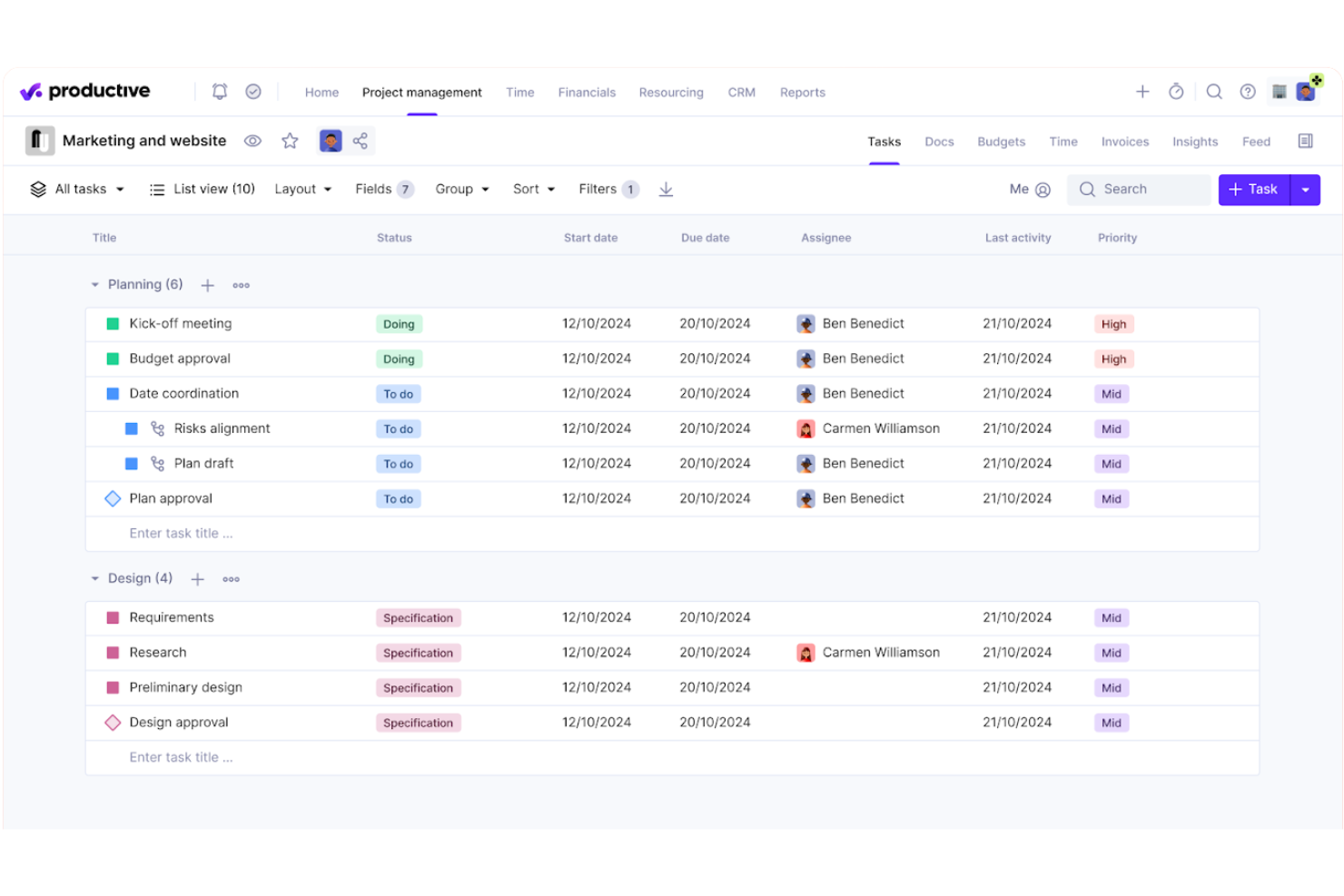
Productive is a professional services automation platform built for agencies that combines project management, resource planning, time tracking, and financial oversight—including budgeting, invoicing, and profitability reporting—in a single system.
Who Is Productive Best For?
Productive is a strong fit for digital agencies and consultancies that need to manage people, projects, and finances without stitching together multiple tools.
Why I Picked Productive
Productive earns its spot on my shortlist because of how clearly it surfaces resource data across an active portfolio. The resource planning view shows team availability, workload, and scheduled time off together, so I can catch allocation gaps before they become delivery problems. I also like the AI Reporting layer, which pulls margin and cost data instantly, and the Scenario Builder for modelling capacity before committing to new work.
Productive Key Features
- AI Assistant: Lets you draft project specs, generate content, and summarize documents right inside the platform.
- Recurring budgets: Support setting up repeating budgets for retainers or long-term projects.
- HRIS and invoicing integrations: Connect to tools like BambooHR, Personio, QuickBooks, and Xero to sync financials and HR data.
- Customizable reporting: Build dashboards and reports using custom fields for detailed insights into agency operations.
Productive Integrations
Productive offers native integrations with Slack, QuickBooks, HubSpot, Google Calendar, Xero, Jira, BambooHR, Personio, CharlieHR, BreatheHR, and Sage. An API is available for custom integrations.
Pros and Cons
Pros:
- Scenario modeling for resource planning
- Built-in AI assistant for automations
- Real-time insights into project profitability
Cons:
- Some features locked behind higher plans
- Report customization requires advanced setup
New Product Updates from Productive
Productive Adds Voice Dictation, Slack Connector, Proposals, and Overtime
Productive adds voice dictation, a Slack Connector, proposal controls, and overtime tracking. These updates support faster AI interactions, client proposals, and time management. For more information, visit Productive’s official site.
Hive
Best for client-to-invoice project billing
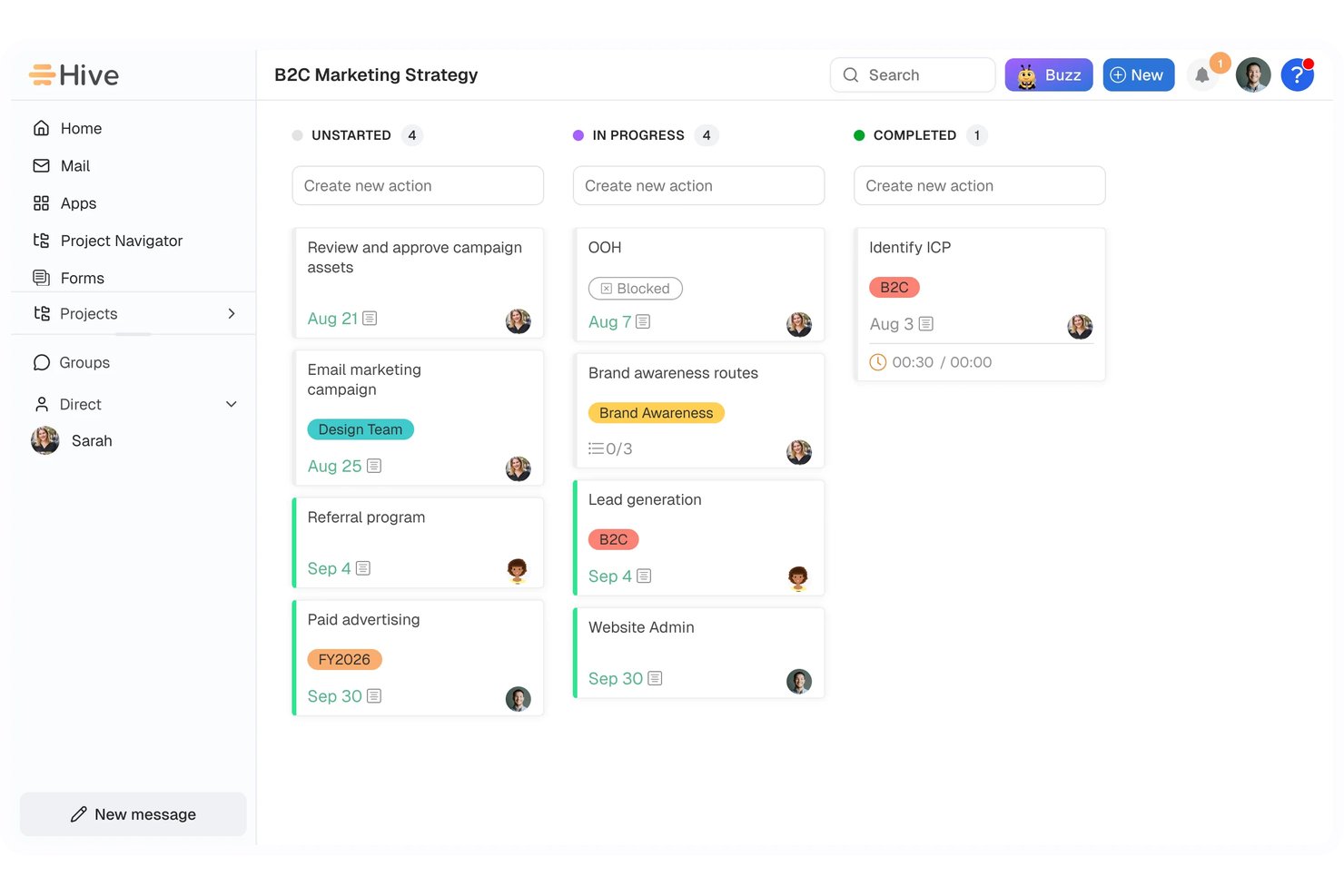
Hive is an AI-powered project and client management platform that combines task planning, CRM, resource scheduling, workflow automation, time tracking, and integrated invoicing through its Finance module.
Who Is Hive Best For?
Hive is a strong fit for agency owners and operations managers who need project delivery and client billing connected in a single workspace.
Why I Picked Hive
I've included Hive in my top picks because its Finance module creates a direct path from logged project hours to a sent invoice, which is exactly what I want from a client-to-invoice billing setup. When a project wraps, billable time flows into a worksheet, gets reviewed, and converts into a customer invoice without leaving the workspace. I also like that CRM margin checks let you price an opportunity and verify gross margin before the work even starts, keeping profitability visible from proposal to payment.
Hive Key Features
- Buzz AI workflow builder: Describe a process in plain English and Buzz generates a multi-step workflow for your review before it runs.
- Proofing and approvals: Mark up documents, video, and live pages directly in Hive and manage the full review and sign-off process in one place.
- CRM pipeline coach: Get an AI-generated summary of pipeline risks, opportunities, and recommended next steps based on your live deal data.
- 13-week cash forecast: Finance projects cash position using your billing pipeline, accounts receivable, accounts payable, and planned adjustments.
Hive Integrations
Hive lists over 1,000 integrations, including native connections to QuickBooks, Slack, Jira, GitHub, Google Drive, Dropbox, Microsoft Teams, and Zoom. It also offers an API and integrations through Zapier or an iPaaS, including HubSpot and FreshBooks.
Pros and Cons
Pros:
- Workflow recipes reduce repeat coordination
- Capacity views clarify team workload
- Client work connects directly to billing
Cons:
- Time and expense updates require manual steps
- Staffing recommendations aren’t AI-driven

Accelo
Best for workflow tracking across client projects

Accelo is a PSA platform that uses AI to connect project management, resource planning, time tracking, financial reporting, and client billing for agencies managing multiple engagements at once.
Who Is Accelo Best For?
Accelo is a strong fit for mid-size agencies and professional services firms managing multiple client engagements simultaneously across project, retainer, and support work.
Why I Picked Accelo
Accelo is one of my top picks because I love how it connects every stage of client work in one place, from the moment a quote is approved through to the final invoice. My team uses Accelo to track project milestones, dependencies, and scope in real time, and the AI surfaces project risks before they become delivery problems. I also rely on the scope creep tracking to catch out-of-scope work early and log change orders before unplanned hours quietly eat into margins.
Accelo Key Features
- AI-assisted resourcing: Assign team members to project tasks based on skill, availability, and workload using AI-powered recommendations.
- Automated timesheets: Accelo captures time spent on tasks and emails automatically, reducing manual time entry across active projects.
- Retainer tracking: Monitor retainer utilization and performance across recurring client accounts alongside one-time project work.
- Project templates: Launch new client projects from pre-built templates with auto-populated tasks, timelines, and role assignments.
Accelo Integrations
Accelo offers 30+ native integrations, including Salesforce, HubSpot, Jira, Slack, Google Workspace, Microsoft 365, QuickBooks, Xero, Sage Intacct, and GitHub. It also connects with Zapier and provides a RESTful API for custom integrations.
Pros and Cons
Pros:
- Automated time capture logs billable hours
- AI flags scope creep and margin risk
- Connects quote-to-cash workflow in one platform
Cons:
- Implementation requires weeks of guided onboarding
- Mobile app lacks full desktop functionality
New Product Updates from Accelo

Accelo Rebuilds Mobile App for Project and Time Management
Accelo rebuilds its mobile app with task management, new work creation, and mobile timesheets for Forecast customers. This helps teams keep project and time data current while working away from a desktop. For more information, visit Accelo’s official site.

Best for AI-powered agency management
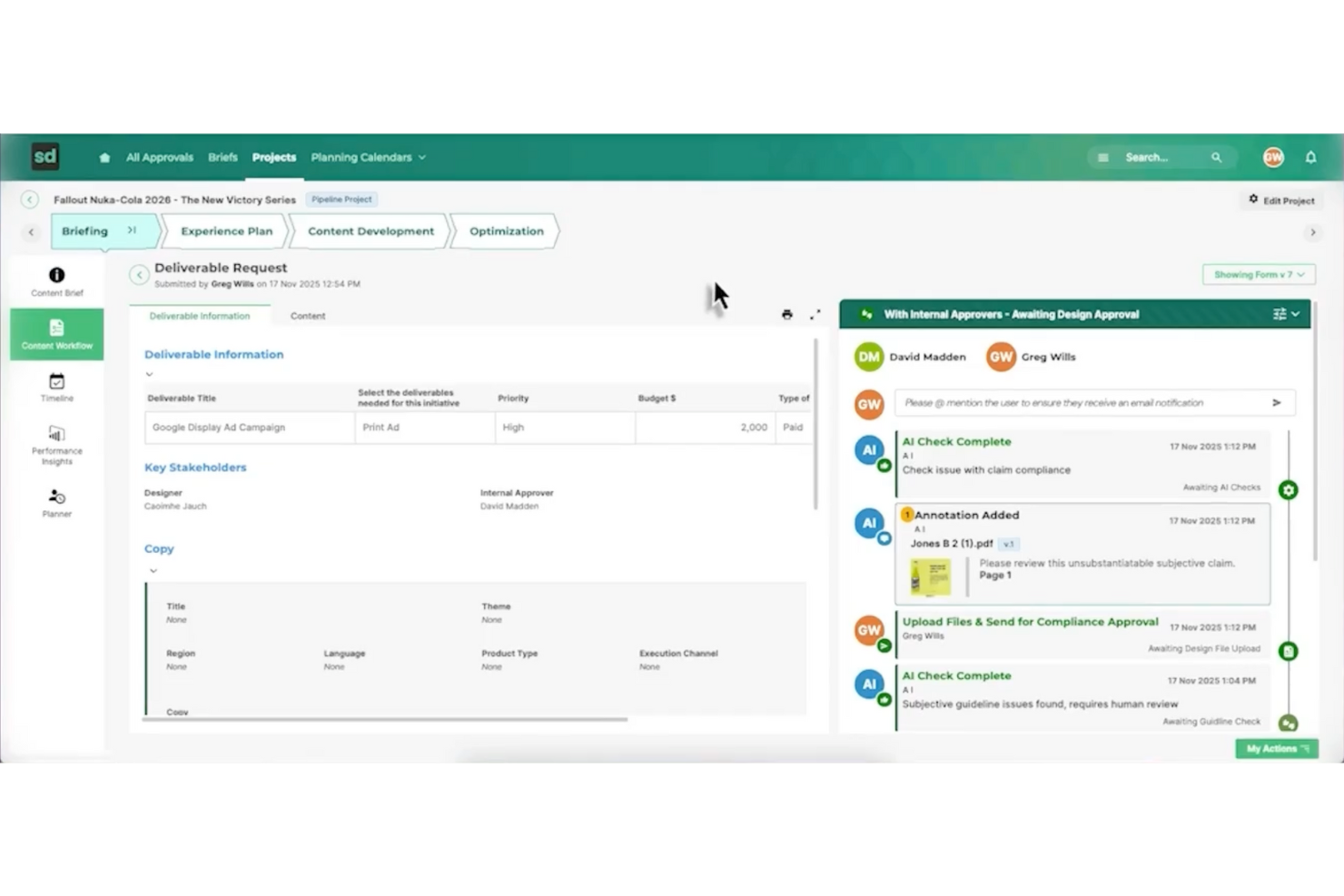
Screendragon is an AI agency management system built for marketing and creative operations that need AI-driven workflow automation. It offers a no-code platform that helps teams manage tasks, approvals, and project flows in one place. With real-time visibility into work progress, Screendragon supports better day-to-day coordination and more efficient project execution.
Why I Picked Screendragon
I picked Screendragon for its unique ability to seamlessly integrate AI-driven workflow automation with project and resource management. This system excels at automating complex workflows without programming knowledge, a significant advantage for teams aiming to improve efficiency. Additionally, its real-time insights and enterprise-grade security add functionality that directly addresses the needs of agencies managing multiple projects and teams. These features make Screendragon a compelling choice for anyone seeking a comprehensive AI agency management solution.
Screendragon Key Features
In addition to AI-driven workflow automation, Screendragon offers:
- Visual Workflow Builder: Allows you to create and customize workflows visually, simplifying the process of managing complex tasks.
- Dynamic Custom Forms: Enables your team to design forms that adapt to your specific operational needs, ensuring data collection is both relevant and efficient.
- Advanced Permission Controls: Provides robust security measures by allowing you to set detailed access permissions, safeguarding sensitive information.
- Proofing and Version Control: Facilitates creative workflows by enabling easy review and version tracking of creative content, ensuring consistency and quality.
Screendragon Integrations
Integrations include Adobe Creative Cloud, Slack, Microsoft Teams, SharePoint, Salesforce, JIRA, Workday, Oracle, SAP, and Google Workspace.
Pros and Cons
Pros:
- Project and resource management features help centralize work details
- Collaborative tools that improve team coordination and project visibility
- Flexible customization lets teams tailor workflows and project structures
Cons:
- Reporting and manual report creation can feel limited or complex
- The admin console and settings may be confusing for new users
New Product Updates from Screendragon
Screendragon Unveils New AI Hub
Screendragon introduced AI Hub, a new capability that lets teams build and manage AI agents directly within workflows. The update helps marketing teams automate tasks, maintain governance controls, and scale AI-driven operations more efficiently. For more information, visit Screendragon's official site.
Best for onboarding projects
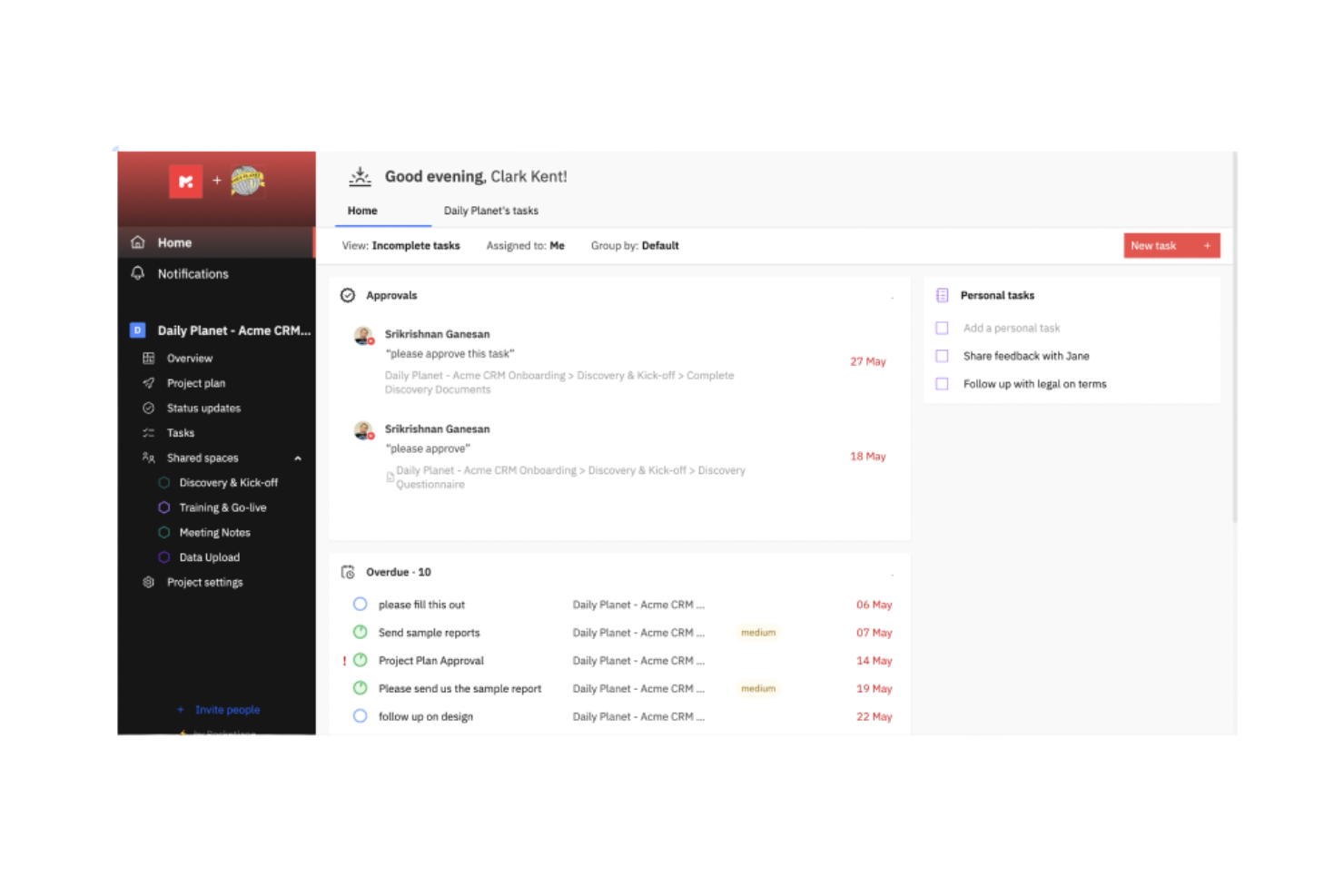
Rocketlane is a project management and customer onboarding software designed for businesses that want to enhance their project delivery and client interactions. It serves professional services teams by providing tools for efficient project tracking and customer collaboration.
Why I picked Rocketlane: Rocketlane specializes in onboarding projects, offering features like collaborative project planning and customer-facing dashboards. Its standout function is the AI-driven client updates, which keep your clients informed without manual effort. The platform also provides real-time financial insights to help your team manage resources effectively. The ability to automate time logging and integrate project data ensures that your onboarding processes are both efficient and transparent.
Standout Features & Integrations:
Features include AI-driven automations that simplify task allocation and resource planning. Time tracking is integrated to provide real-time insights into project profitability. Additionally, the tool offers collaborative workspaces that enhance communication between your team and clients.
Integrations include Salesforce, HubSpot, Slack, Microsoft Teams, Google Workspace, Trello, Asana, QuickBooks, Jira, and Zoom.
Pros and Cons
Pros:
- Detailed reporting tools
- Efficient onboarding support
- Easy to navigate interface
Cons:
- Limited day view on the schedule
- Occasional lag with large data

Creatio
Best for process automation
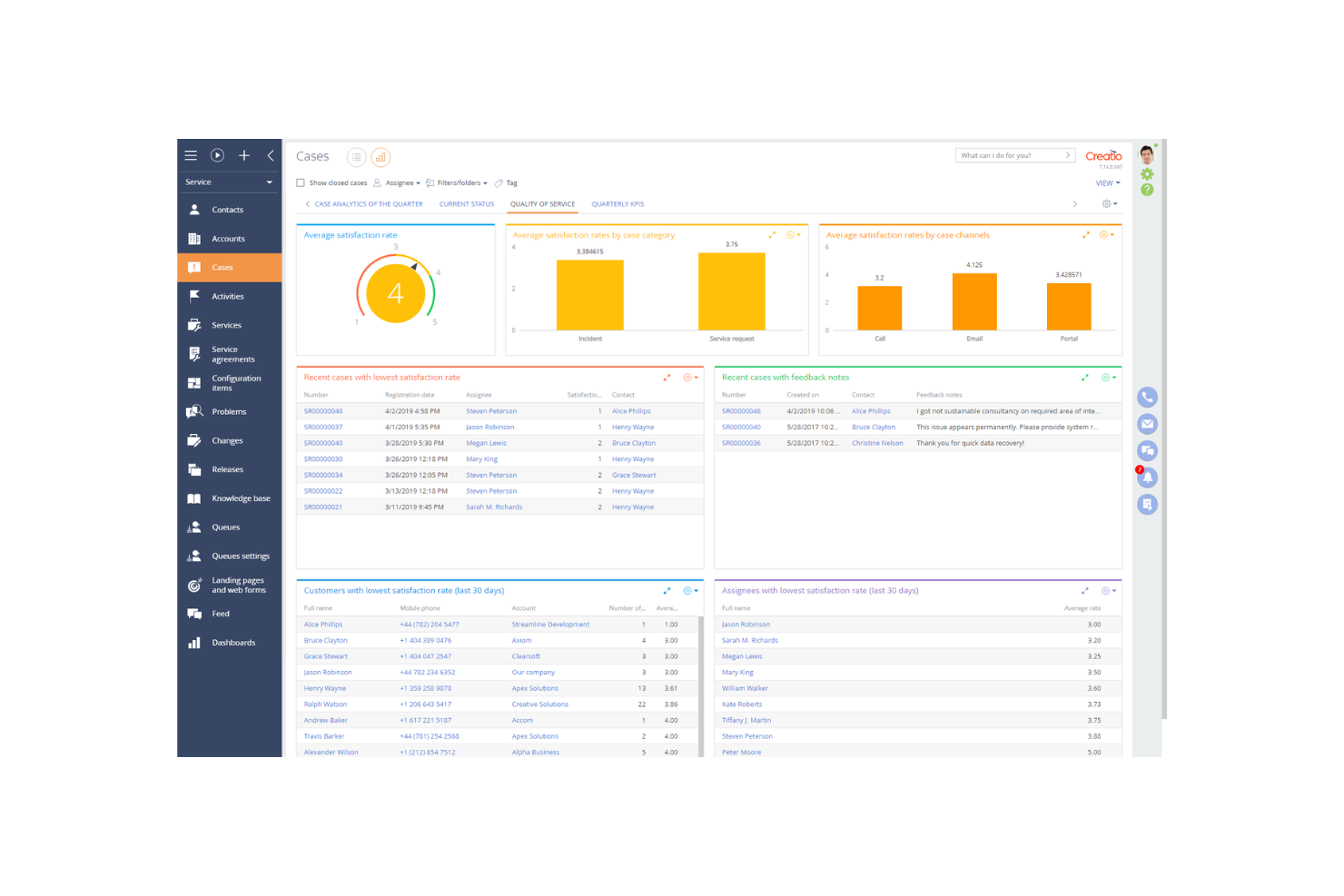
Creatio is a low-code platform designed for businesses looking to automate processes and enhance customer relationship management. It primarily serves mid-sized to large enterprises, offering tools for sales, marketing, and service automation.
Why I picked Creatio: Creatio excels in process automation, providing a platform that allows you to create workflows without extensive coding knowledge. The drag-and-drop interface simplifies the creation of custom processes. With its robust CRM capabilities, your team can manage customer interactions effectively. The platform's flexibility ensures it adapts to various business needs, making it a versatile choice for automation.
Standout Features & Integrations:
Features include the low-code process designer that simplifies workflow creation. The CRM tools offer a comprehensive view of customer interactions and data. Additionally, the marketing automation features help you manage campaigns and track results efficiently.
Integrations include Microsoft Outlook, Google Workspace, Mailchimp, Zapier, DocuSign, LinkedIn, Slack, QuickBooks, Facebook, and Twilio.
Pros and Cons
Pros:
- Flexible process automation
- Strong CRM capabilities
- Low-code platform for easy customization
Cons:
- Requires training for full utilization
- Complexity in initial setup

Best for CRM integration
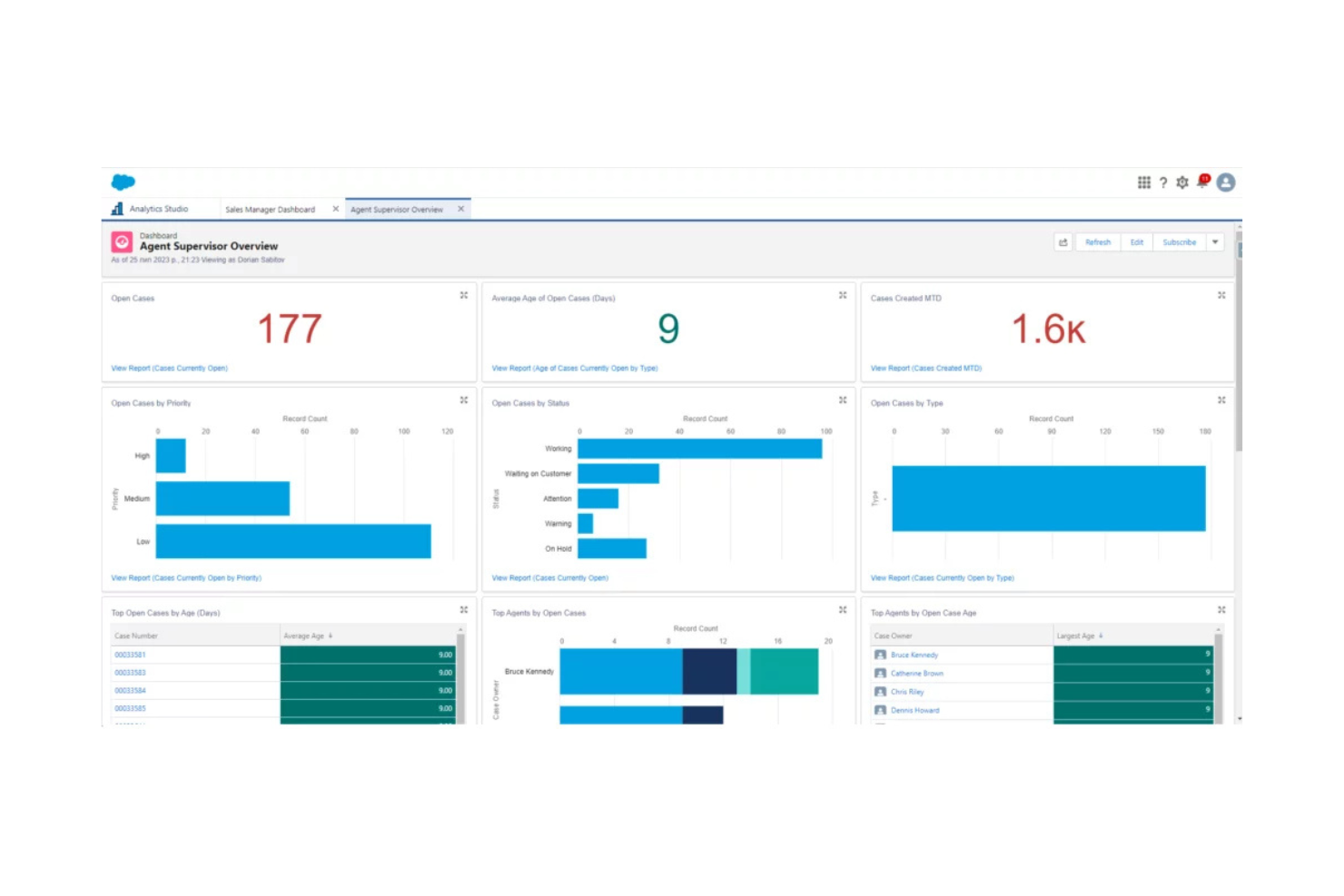
Salesforce is a cloud-based customer relationship management (CRM) platform used by businesses across various industries to manage customer interactions, sales, and data analytics. It helps companies improve customer service, automate sales processes, and enhance team collaboration.
Why I picked Salesforce: Salesforce excels in CRM integration, offering a platform that connects with numerous business tools to streamline your operations. The customizable dashboards give you insights into customer data and sales performance. With its automation capabilities, your team can handle repetitive tasks efficiently. The platform's scalability ensures it grows with your business, adapting to changing needs.
Standout Features & Integrations:
Features include customizable dashboards that let you track key metrics and performance indicators. The automation tools help manage repetitive tasks, freeing up your team for more strategic work. Additionally, the platform's scalability ensures it can grow with your business, adapting to your evolving needs.
Integrations include Mailchimp, QuickBooks, Slack, Dropbox, Google Workspace, Microsoft Outlook, LinkedIn Sales Navigator, DocuSign, Zoom, and HubSpot.
Pros and Cons
Pros:
- Extensive customization options
- Strong data analytics capabilities
- Highly scalable for growing businesses
Cons:
- Requires training for new users
- Can be complex to set up
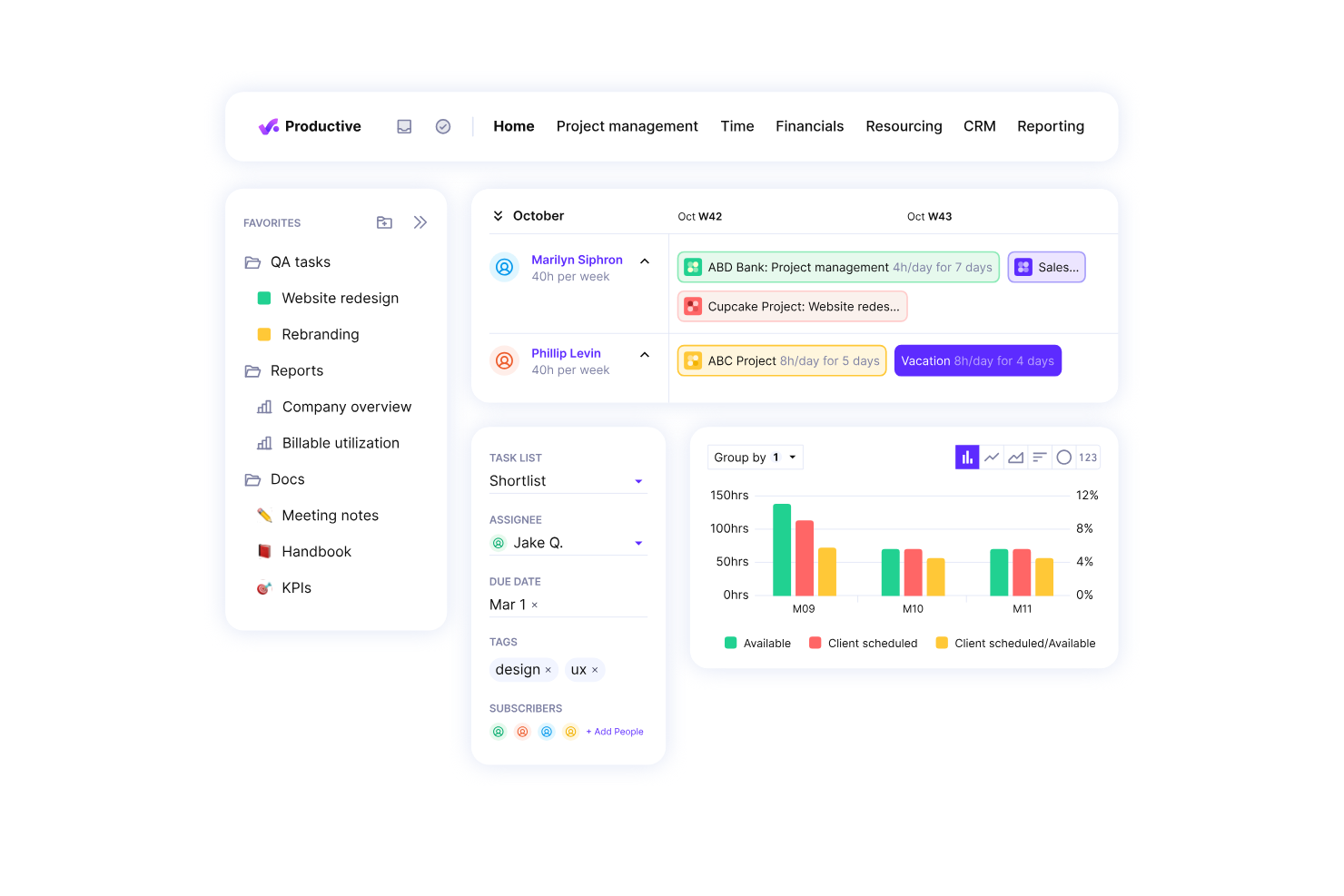
Productive.io is a professional services automation software designed for agencies and service businesses. It excels in resource planning, project management, and financial management, making it ideal for those focused on improving profitability.
Why I picked Productive.io: Productive.io is tailored for agencies aiming to boost profitability. It offers real-time profitability tracking, which helps your team make informed decisions quickly. Features like budgeting and invoicing are integrated, allowing you to handle financial aspects efficiently. The platform's growth forecasting tools ensure you can plan for future success without missing a beat.
Standout Features & Integrations:
Features include detailed project tracking that helps you monitor progress at every stage. The budgeting tools allow for precise financial planning, ensuring that your projects remain profitable. Additionally, the time tracking feature integrates seamlessly with your workflow to provide accurate billing.
Integrations include Xero, Slack, QuickBooks, Jira, Trello, Google Workspace, Microsoft Teams, Asana, HubSpot, and Zoom.
Pros and Cons
Pros:
- Effective resource planning
- Real-time profitability tracking
- Detailed financial insights
Cons:
- Complex setup for large teams
- May require training for new users


Applied Systems provides software solutions specifically designed for the insurance industry, offering tools for agency management, policy administration, and customer engagement. It serves insurance agencies and brokers by streamlining their operations and improving client interactions.
Why I picked Applied Systems: Applied Systems is tailored for the insurance industry with its comprehensive agency management capabilities. It offers policy management features that help your team handle client policies efficiently. The customer engagement tools ensure you maintain strong relationships with your clients. Its emphasis on industry-specific needs makes it a reliable choice for insurance professionals.
Standout Features & Integrations:
Features include automated policy management that simplifies handling client policies. The client communication tools enhance engagement by offering multiple channels for interaction. Additionally, the reporting feature provides insights into agency performance, helping you make informed decisions.
Integrations include Microsoft 365, Salesforce, DocuSign, QuickBooks, Vertafore, IBM, Oracle, Adobe Sign, Google Workspace, and Slack.
Pros and Cons
Pros:
- Strong client communication tools
- Efficient policy management
- Tailored for insurance agencies
Cons:
- Complex for new users
- Pricing details not transparent
Outros sistemas de gestão de agências de IA
Eis algumas opções adicionais de sistemas de gestão de agências de IA que não entraram na minha seleção, mas que ainda assim vale a pena conhecer:
- EZLynx
For insurance quoting
- Equisoft
For financial services
- monday.com
For team collaboration
- Attio
For contact management


How I Evaluate AI Agency Management Systems
Every tool on this list needs to deliver AI that actually moves the needle—automating client workflows, surfacing project risks, or forecasting capacity—not just slapping a chatbot on a dashboard. I split my evaluation into two layers: the core functionality a platform must have to qualify, and the differentiating factors that separate good options from great ones.
Core Functionality (Table Stakes For This List)
When I'm selecting tools for my list, I rank each one on a scale from 0 (does not offer the functionality) to 5 (excels in this area) for each core functionality listed below. Then, I calculate the tool's total score into a percentage. Each tool needs to achieve a minimum total score of 65% to be considered for inclusion.
- Agency Project Management: I look for multi-client workspace organization, milestone tracking, and dependency mapping that lets teams run concurrent engagements without cross-project confusion.
- AI Automation Engine: Each tool should automate real agency workflows like generating meeting notes, creating follow-up tasks, or drafting status updates rather than offering basic rule triggers.
- Resource & Capacity Management: I evaluate how well the platform tracks team utilization across active retainers and projects, including workload views that flag overallocation before it causes burnout.
- Time Tracking & Billing: The tool needs to connect billable hours to client invoicing, supporting common agency billing models like retainers, fixed-fee, and time-and-materials engagements.
- AI Forecasting & Insights: I check whether AI surfaces useful predictions around budget burn, delivery risk, or capacity shortfalls—not just dashboards that repackage data you already have.
- Client Collaboration Portal: Agencies need a client-facing layer for approvals, feedback, and reporting. I look for portals that reduce back-and-forth emails and keep stakeholders informed.
Once I have a list of tools that meet the criteria, I consider what sets each platform apart.
Differentiating Factors (What Sets Vendors Apart)
Here's how I compare and contrast different vendors:
Standout Features
Predictive risk alerts are a major differentiator. I look for tools that flag scope creep or timeline slippage early enough to adjust before a client escalation hits. Profitability intelligence matters just as much, especially platforms tracking margins per client or project in real time. I also evaluate whether a tool offers AI agent workflows that autonomously handle multi-step tasks like drafting weekly client reports from live project data.
Beyond Features
Integration ecosystems matter a lot for agencies. I check whether a platform connects natively with accounting tools like QuickBooks or Xero and creative tools like Figma, since broken sync between billing and project data creates real headaches. AI trust and data governance is another factor I weigh—agencies handle sensitive client work, so I look for clear policies on how AI models use that data. Pricing model alignment also deserves attention, particularly whether client or collaborator seats are included or billed separately.
Como escolher um sistema de gestão de agências de IA
É fácil perder-se em longas listas de funcionalidades e estruturas de preços complexas. Para o ajudar a manter-se focado enquanto avança no seu processo específico de seleção de software, eis uma lista de fatores a ter em conta:
| Fator | O que considerar |
|---|---|
| Escalabilidade | A ferramenta pode crescer com a sua agência? Considere se consegue lidar com o aumento das cargas de trabalho e do número de utilizadores sem comprometer o desempenho. Procure opções que ofereçam planos de preços escaláveis. |
| Integrações | Integra-se com as ferramentas que já utiliza? Avalie a facilidade de ligação a plataformas existentes, como sistemas de CRM, ferramentas de e-mail e de gestão de projetos. |
| Personalização | Pode adaptar o software aos seus fluxos de trabalho? Verifique se permite modificar painéis, relatórios e processos de acordo com as necessidades da sua agência. |
| Facilidade de utilização | A interface é intuitiva para a sua equipa? Uma curva de aprendizagem acentuada pode atrasar a adoção. Teste o software para garantir que é fácil de utilizar por todos os membros da equipa. |
| Implementação e integração inicial | Com que rapidez pode começar? Considere os recursos necessários para a configuração e a formação. Procure software com um processo de integração inicial simples e suporte disponível. |
| Custo | Enquadra-se no seu orçamento? Compare o custo total de utilização, incluindo taxas de subscrição, custos de configuração e quaisquer custos ocultos. Procure valor, em vez de se focar apenas nos preços baixos. |
| Medidas de segurança | Protege os seus dados? Avalie as medidas de segurança implementadas, como a encriptação e os controlos de acesso, para garantir que as informações dos clientes e da agência permanecem seguras. |
| Disponibilidade do suporte | A ajuda está facilmente acessível? Verifique se o fornecedor disponibiliza suporte 24 horas por dia, 7 dias por semana, chat em direto ou gestores de conta dedicados para prestar assistência quando surgem problemas. |
O que é um sistema de gestão de agências com IA?
Um sistema de gestão de agências com IA é uma solução de software concebida para ajudar as agências a gerir os seus projetos, recursos e interações com os clientes de forma eficiente. Estas ferramentas são geralmente utilizadas por gestores de projetos, líderes de equipa e executivos de agências para aumentar a produtividade e a colaboração.
As funcionalidades de controlo do tempo, atribuição de tarefas e comunicação com os clientes ajudam a gerir cargas de trabalho, cumprir prazos e manter a satisfação dos clientes. De um modo geral, estas ferramentas permitem às agências operar de forma mais eficaz e apresentar melhores resultados aos seus clientes.
Funcionalidades de um sistema de gestão de agências com IA
Ao selecionar um sistema de gestão de agências com IA, procure as seguintes funcionalidades principais:
- Gestão de projetos: Ajuda a organizar e supervisionar projetos do início ao fim, garantindo que as tarefas são concluídas atempadamente.
- Controlo do tempo: Monitoriza o tempo dedicado às tarefas, fornecendo informações sobre a produtividade e ajudando a efetuar uma faturação precisa.
- Atribuição de tarefas: Permite delegar responsabilidades de forma clara, garantindo que os membros da equipa sabem o que têm de fazer.
- Comunicação com os clientes: Facilita as interações com os clientes, mantendo-os informados e envolvidos ao longo de todo o ciclo de vida do projeto.
- Relatórios e análises: Fornece informações sobre o desempenho dos projetos e as operações da agência, ajudando a tomar decisões baseadas em dados.
- Personalização: Permite adaptar o software aos fluxos de trabalho e às necessidades específicas da sua agência, melhorando a facilidade de utilização.
- Integrações: Liga-se a outras ferramentas utilizadas pela sua agência, simplificando as operações e centralizando os dados.
- Medidas de segurança: Protege informações sensíveis através de encriptação e controlos de acesso, garantindo a privacidade dos dados.
- Automação: Reduz as tarefas manuais através da automatização de processos repetitivos, libertando tempo para o trabalho estratégico.
Benefícios de um sistema de gestão de agências com IA
A implementação de um sistema de gestão de agências com IA proporciona vários benefícios à sua equipa e à sua empresa. Eis alguns dos benefícios que pode esperar:
- Eficiência melhorada: As funcionalidades de automatização reduzem as tarefas manuais, permitindo que a sua equipa se concentre no trabalho estratégico.
- Melhor colaboração: As ferramentas de atribuição de tarefas e comunicação com clientes ajudam a sua equipa a trabalhar em conjunto e a manter os clientes informados.
- Tomada de decisões melhorada: Os relatórios e as análises fornecem informações sobre o desempenho, ajudando-o a tomar decisões fundamentadas.
- Maior produtividade: O controlo do tempo ajuda a identificar estrangulamentos, garantindo que os recursos são utilizados de forma eficaz.
- Ajuste personalizado: A possibilidade de personalização permite adaptar o sistema às necessidades da sua agência, tornando-o mais fácil de utilizar.
- Operações centralizadas: As integrações ligam as suas ferramentas existentes, simplificando os processos e mantendo os dados num único local.
Custos e preços de um sistema de gestão de agências com IA
A seleção de um sistema de gestão de agências com IA requer uma compreensão dos vários modelos de preços e planos disponíveis. Os custos variam consoante as funcionalidades, o tamanho da equipa, os complementos, entre outros fatores. A tabela abaixo resume os planos mais comuns, os seus preços médios e as funcionalidades normalmente incluídas nas soluções de sistemas de gestão de agências com IA:
Tabela de comparação de planos para sistemas de gestão de agências com IA
| Tipo de plano | Preço médio | Funcionalidades comuns |
|---|---|---|
| Plano gratuito | $0 | Gestão básica de projetos, atribuição de tarefas e integrações limitadas. |
| Plano pessoal | $5-$25/user/month | Gestão de projetos, controlo do tempo, atribuição de tarefas e relatórios básicos. |
| Plano empresarial | $30-$60/user/month | Relatórios avançados, comunicação com clientes, integrações e opções de personalização. |
| Plano empresarial de grande dimensão | $75-$150/user/month | Personalização completa, suporte premium, funcionalidades de segurança avançadas e análises abrangentes. |
Perguntas frequentes sobre sistemas de gestão de agências de IA
Eis algumas respostas a perguntas comuns sobre sistemas de gestão de agências de IA:
Como integro um sistema de gestão de agências de IA com as ferramentas existentes?
A integração de um sistema de gestão de agências de IA com as suas ferramentas atuais envolve verificar a compatibilidade com o seu ecossistema de software. A maioria dos sistemas disponibiliza APIs ou integrações incorporadas com ferramentas populares, como CRM, plataformas de correio eletrónico e software de gestão de projetos. Certifique-se de avaliar a facilidade de integração e o suporte técnico disponibilizado pelo fornecedor.
O que devo ter em consideração relativamente à segurança dos dados?
A segurança dos dados é crucial ao escolher um sistema de gestão de agências de IA. Procure sistemas com encriptação robusta, controlos de acesso e conformidade com regulamentos de proteção de dados, como o RGPD. Informe-se sobre os protocolos de segurança do fornecedor e sobre a forma como este lida com violações de dados, para garantir que as informações dos seus clientes permanecem seguras.
Os sistemas de gestão de agências de IA conseguem lidar com equipas remotas?
Sim, muitos sistemas de gestão de agências de IA suportam o trabalho remoto, disponibilizando acesso baseado na nuvem, aplicações móveis e funcionalidades de colaboração. Estas ferramentas ajudam a manter a sua equipa ligada, permitindo-lhe gerir projetos, comunicar e aceder a dados a partir de qualquer lugar. Verifique se existem funcionalidades que melhorem a colaboração e a conectividade remotas.
Como é que os sistemas de gestão de agências de IA melhoram a comunicação com os clientes?
Estes sistemas melhoram a comunicação com os clientes ao centralizarem as informações de contacto, acompanharem as interações e disponibilizarem ferramentas de comunicação, como modelos de correio eletrónico e chat. Isto ajuda a sua equipa a manter um contacto consistente com os clientes, garantindo atualizações e respostas atempadas, o que melhora a satisfação e a retenção dos clientes.
Que nível de personalização é possível?
O nível de personalização varia entre sistemas, mas a maioria disponibiliza opções para adaptar painéis, fluxos de trabalho e relatórios. Avalie a facilidade de personalização do sistema para que este responda às necessidades específicas da sua agência. Alguns sistemas podem exigir assistência técnica para personalizações mais avançadas, pelo que deve ter em consideração as capacidades da sua equipa.
Quais são os desafios comuns durante a implementação?
Os desafios comuns incluem a migração de dados, a formação dos utilizadores e a adaptação dos fluxos de trabalho ao novo sistema. Para os minimizar, certifique-se de que o seu fornecedor disponibiliza recursos abrangentes de integração, como tutoriais, webinars e suporte. Planeie um período de transição durante o qual a sua equipa possa familiarizar-se com o novo sistema sem pressão.