

De 10 beste kalenderprogrammene vurdert i 2026

Kortliste over den beste kalenderprogramvaren


Det kan være vanskelig å administrere teamets timeplan. Møter, tidsfrister og oppgaver hoper seg opp, noe som gjør det utfordrende å holde oversikt over alt. Det er her kalenderprogramvare kommer inn i bildet, ved å hjelpe deg med å organisere, prioritere og samarbeide mer effektivt.
Etter min erfaring kan riktig kalenderverktøy gjøre arbeidsdagen mye enklere. Jeg har testet og vurdert ulike alternativer for å gi deg en objektiv liste over den beste tilgjengelige kalenderprogramvaren. Målet mitt er å hjelpe deg med å finne det som passer best for teamets behov.
I denne artikkelen finner du de beste anbefalingene for kalenderapper og skrivebordsversjoner, alle med unike funksjoner som kan løse utfordringene dine med planlegging.
Hvorfor du kan stole på våre programvareanbefalinger
Teamet vårt har testet og anmeldt programvare siden 2012. Vi er selv prosjektledere, så vi vet hvor vanskelig og hvor viktig det er å velge riktig programvare.
I denne guiden har vi vurdert verktøyene gjennom praktisk testing og uavhengig research og gitt dem poeng ut fra våre utvelgelseskriterier. Vi bygger også på innsikt fra ledende eksperter i bransjen og erfarne prosjektledere.
Anmeldelsene våre bygger på vår egen redaksjonelle vurdering. De er ikke et salgsargument.
Ekspertanmeldere:
Sammenligningstabell for kalenderprogramvare
Denne sammenligningstabellen oppsummerer prisopplysningene for mine beste utvalgte kalenderprogrammer:
| Tool | Best For | Trial Info | Price | ||
|---|---|---|---|---|---|
| 1 | Best for team collaboration | Free demo available | From $119/month | Website | |
| 2 | Best for scheduling meetings | 14-day free trial + free plan + free demo available | From $10/seat/month (billed annually) | Website | |
| 3 | Best for group polls | Free plan available | From $6.95/user/month (billed annually) | Website | |
| 4 | Best for appointment booking | Free plan available | From $5/user/month (billed annually) | Website | |
| 5 | Best for time blocking | 14-day free trial | $7.56/month | Website | |
| 6 | Best for simple scheduling | 7-day free trial + free plan available | From $9/user/month (billed annually) | Website | |
| 7 | Best for minimalist design | Free trial available | From $49.99/year | Website | |
| 8 | Best for email integration | Free plan available | From $12.50/month (billed annually) | Website | |
| 9 | Best for Apple users | Free plan available | Pricing upon request | Website | |
| 10 | Best for AI scheduling | 14-day free trial available | From $16/user/month (billed annually) | Website |
Anmeldelser av den beste kalenderprogramvaren
Nedenfor finner du mine detaljerte sammendrag av den beste kalenderprogramvaren som kom med på kortlisten min. Anmeldelsene mine gir en detaljert gjennomgang av de viktigste funksjonene, fordelene og ulempene, integrasjonene og ideelle bruksområdene for hvert verktøy, slik at du kan finne det beste alternativet for deg.

Teamup
Best for team collaboration

Teamup is a shared calendar tool for groups and organizations to manage events and schedules collaboratively. It gives teams a less complex centralized platform to coordinate activities and share calendars compared to traditional scheduling tools.
Why I picked Teamup: The tool fosters team collaboration by allowing multiple users to access and manage shared calendars. You can set up sub-calendars for different projects or departments for better team organization. Its color-coded calendar system helps you quickly identify and categorize events, making scheduling more intuitive. With customizable access permissions, you can ensure that each team member has the right level of access to the information they need.
Standout Features and Integrations:
Features include the ability to view calendars in multiple formats, such as day view, week, month, and year, providing flexibility in how to view tasks. You can also set up email reminders to keep everyone on track with upcoming events. The calendar link sharing option makes it easy to distribute schedules without requiring user accounts.
Integrations include Slack, Google Calendar, Microsoft Outlook, Apple Calendar, Zapier, OttoKit, and more.
Pros and Cons
Pros:
- Customizable access permissions
- Great for managing shift schedules
- Easy calendar link sharing
Cons:
- Limited integrations
- Short free trial for higher plans

Calendly
Best for scheduling meetings

Calendly is an online scheduling tool for professionals and teams needing to organize meetings without the back-and-forth of email. It simplifies the process of setting appointments by allowing users to share their availability and letting invitees book meetings for time slots that work for them.
Why I picked Calendly: It works great for scheduling meetings efficiently, saving you and your team valuable time. You can create custom meeting types, each with its own settings and availability. The tool allows you to set buffer times between meetings to prevent back-to-back scheduling. Time zone detection ensures your meetings are accurately scheduled for all participants.
Standout Features and Integrations:
Features include personalized booking links, which make it easy for others to schedule time with you. You can also set up automated reminders to reduce no-shows and cancellations. The tool offers various meeting duration options, giving you flexibility in how you allocate your time.
Integrations include Zoom, Microsoft Teams, Slack, Salesforce, HubSpot, Google Analytics, Stripe, PayPal, Mailchimp, Zapier, and more.
Pros and Cons
Pros:
- Automated reminders reduce no-shows
- Personalized booking links
- Buffer times between meetings
Cons:
- High pricing for small teams
- Limited features on free plan

Doodle
Best for group polls
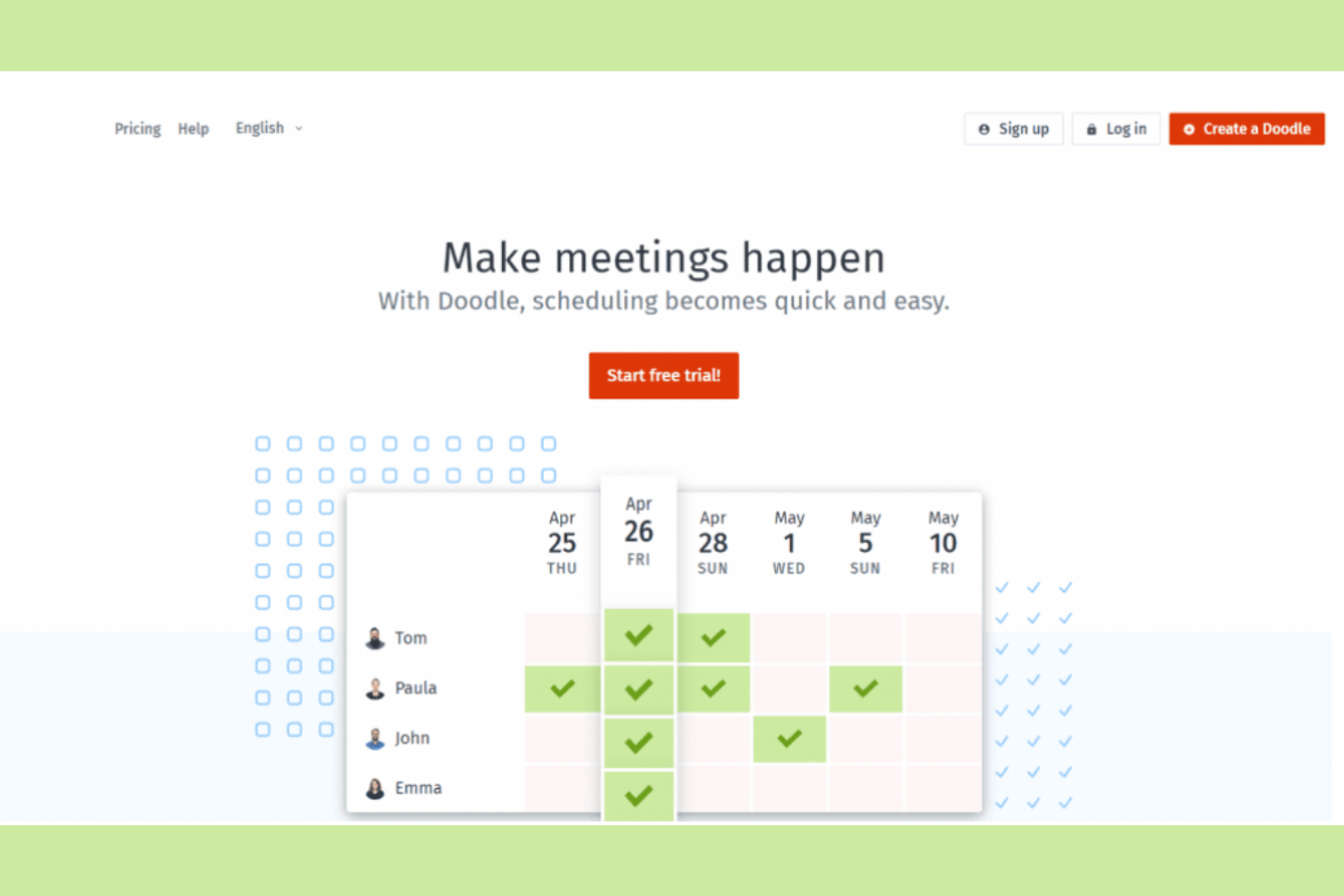
Doodle is a scheduling tool that makes it easier to find the best time for group meetings. Teams and organizations use it to coordinate schedules without the hassle of multiple emails.
Why I picked Doodle: It organizes group polls for scheduling, so you and your team can find common availability. You can create polls quickly, allowing participants to vote on their preferred times. The tool's straightforward interface makes setting up and managing polls easy. With options for time zone adjustments, you can coordinate with international teams effectively.
Standout Features and Integrations:
Features include the ability to create polls for event scheduling to find mutually convenient times. You can also set deadlines for responses to ensure timely scheduling. The tool provides a calendar view to help you visualize potential meeting times at a glance.
Integrations include Google Calendar, Microsoft Outlook, Zoom, Webex, Microsoft Teams, iCloud, Zapier, Stripe, and more.
Pros and Cons
Pros:
- Integrates with payment processors
- Offers branded booking pages
- Efficient group scheduling polls
Cons:
- No poll-taking reminders
- Add-heavy in free version

Setmore
Best for appointment booking
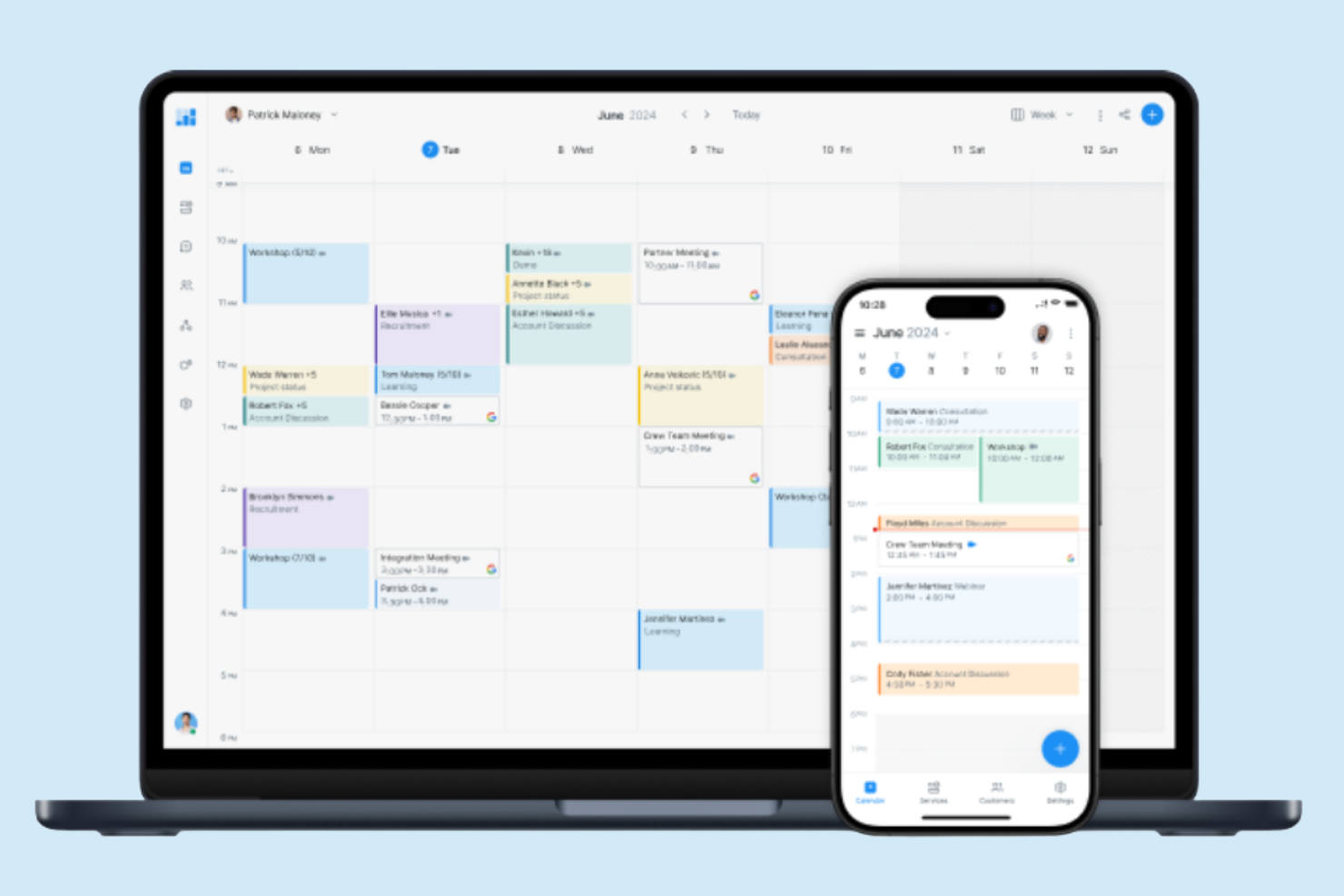
Setmore is an online scheduling platform for small businesses and professionals who need to manage appointments and bookings efficiently. It offers users a straightforward way to handle customer appointments, helping optimize the booking process and improve operational efficiency.
Why I picked Setmore: It's made for appointment booking, making it a great choice for businesses that rely on scheduled services. You can create a customizable booking page that clients can access to book their appointments directly. The tool also provides automated reminders to reduce no-shows and cancellations. With its user-friendly interface, you can manage staff calendars and sync appointments across devices.
Standout Features and Integrations:
Features include the ability to coordinate schedules within your team using individual calendars. You can also set up recurring appointments for regular clients, saving you time on scheduling. The platform offers analytics to give you insights into your booking patterns and client interactions.
Integrations include Google Calendar, Microsoft Outlook, Zendesk, Zoom, Facebook, Slack, QuickBooks, Salesforce, Stripe, PayPal, Mailchimp, and more.
Pros and Cons
Pros:
- Great for advance payment
- Offers one-click video meetings
- Customizable booking pages
Cons:
- Free tier limitations
- Restricted analytics

Best for time blocking
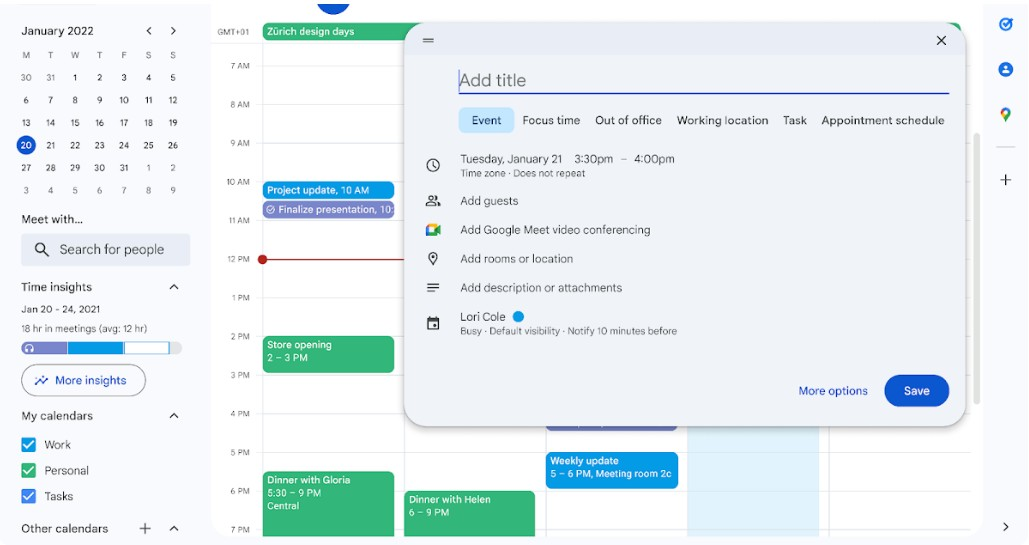
Google Calendar is a versatile scheduling tool that individuals and teams use to manage appointments, meetings, and deadlines. Businesses use it for its integration with other Google Workspace applications, such as Google Tasks and Google Docs, and better productivity and collaboration.
Why I picked Google Calendar: This tool helps you manage your time efficiently with features geared toward time blocking. You can set up different calendars for work and personal events, making it easier to focus on specific tasks. Google Calendar also allows you to organize your schedule by using visual prompts to quickly identify different types of events.
Standout Features and Integrations:
Features include creating multiple calendars for different aspects of your life, color-coding events for easy identification, and setting recurring events and reminders to keep track of ongoing tasks across teams.
Integrations include Google Meet, Gmail, Google Drive, Microsoft Outlook, Apple Calendar, Zoom, Slack, Trello, Asana, Salesforce, and more.
Pros and Cons
Pros:
- Paid plan includes Google Workplace
- Supports multiple calendars
- Suggests times for group meetings
Cons:
- Limited time zone display
- No dedicated desktop app

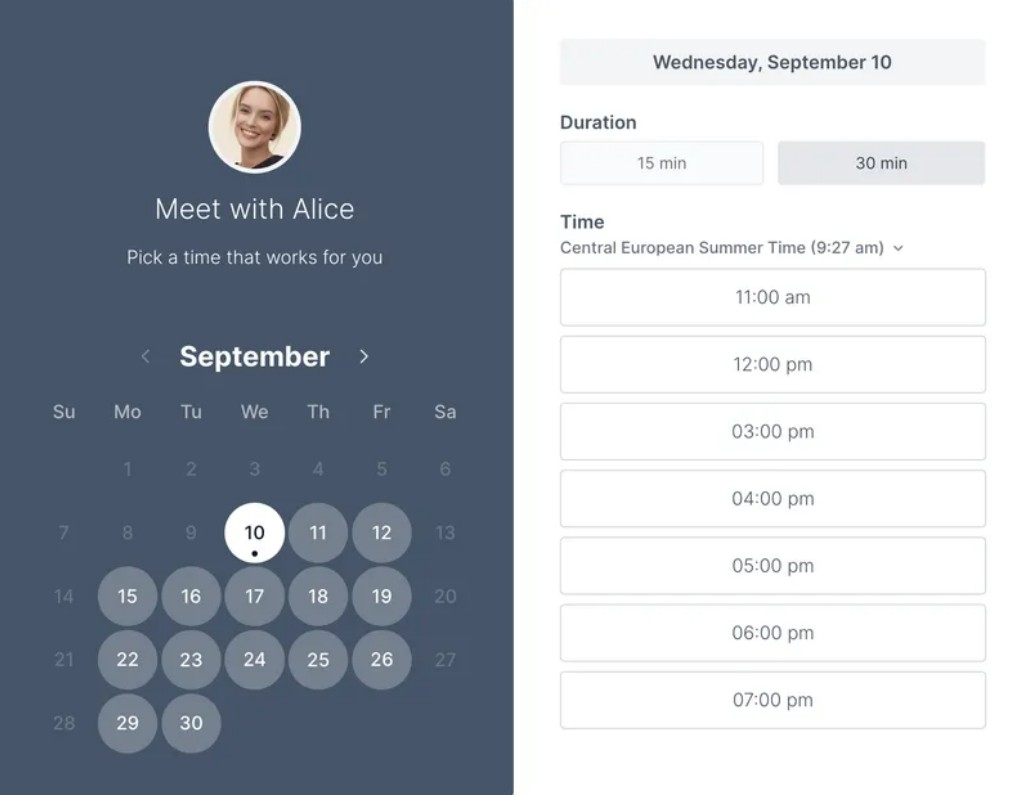
Koalendar is an intuitive scheduling tool for individuals and small teams that need an easy way to organize meetings and appointments. It makes setting up schedules straightforward for better time management.
Why I picked Koalendar: You can quickly create booking links to share with others, allowing them to view your availability and book appointments directly. The tool's clean interface ensures you can manage your schedule without distractions, and email reminders help keep track of upcoming appointments.
Standout Features and Integrations:
Features include customizable booking pages that let you control how others see your availability. You can also set buffer times between meetings to prevent back-to-back scheduling or use the automatic time zone detection to coordinate meetings with people in different regions.
Integrations include Google Calendar, Microsoft Outlook, Zoom, Shopify, Microsoft Teams, Apple Calendar, Zapier, Webhooks, WordPress, and more.
Pros and Cons
Pros:
- Email notifications for appointments
- Automatic language detection for guests
- Built-in payment options
Cons:
- Focus on basic scheduling
- Lacks deep integrations

Best for minimalist design

Tweek is a simple and elegant calendar application for users who appreciate a minimalist approach to scheduling appointments and other tasks. Individuals and teams appreciate its clean interface and straightforward functionality.
Why I picked Tweek: It offers a minimalist design that reduces clutter and focuses on the essentials when scheduling. You can quickly jot down tasks and appointments without getting slowed down by unnecessary features. The tool's weekly planner layout gives a clear view of your commitments, helping you focus on the big picture. Tweek is ideal if you want to manage your time without distractions.
Standout Features and Integrations:
Features include a weekly view that allows you to see all your tasks at a glance. The tool also offers a simple task management system where you can prioritize and check off completed items. You have the option to customize your planner with different colors.
Integrations include Google Calendar, Apple Calendar, and more.
Pros and Cons
Pros:
- Customizable themes
- Quick task entry and management
- Minimalist and clean design
Cons:
- Limited functions for big teams
- No integrations with the free version

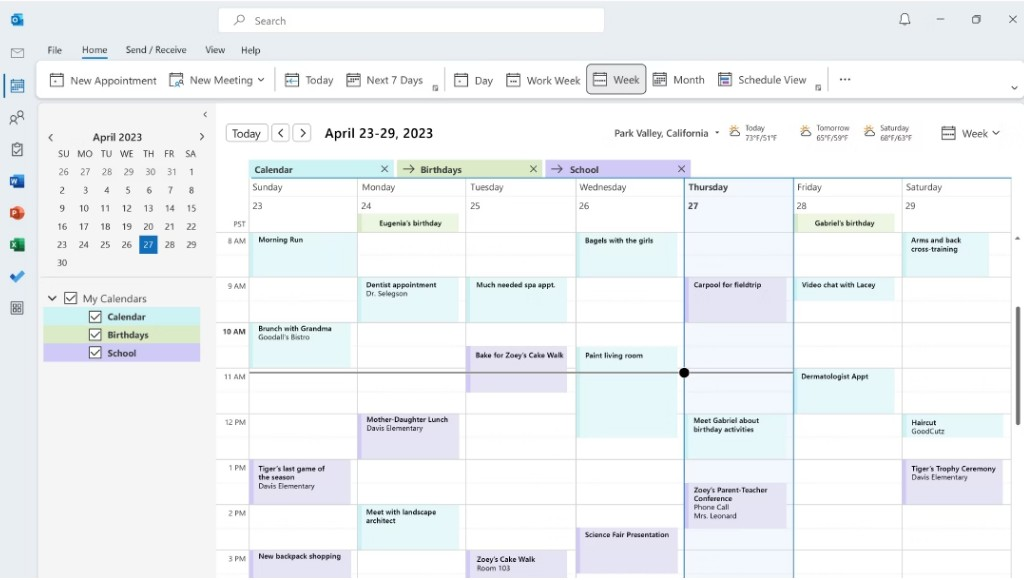
Microsoft Outlook Calendar is a scheduling tool that professionals and businesses rely on to organize meetings, appointments, and events. It serves as a central hub for managing personal and work schedules by connecting with email and other productivity tools.
Why I picked Microsoft Outlook Calendar: This calendar integrates well with your email, making scheduling more efficient for you and your team. You can create events directly from your inbox, reducing the need to switch between apps. Sharing calendars allows for better team coordination and knowledge of each other's schedules. With its intuitive interface, managing multiple calendars and setting reminders becomes a breeze.
Standout Features and Integrations:
Features include the ability to categorize events with colors, set up meetings with a scheduling assistant, and manage multiple time zones for global teams. The user-friendly interface allows you to quickly navigate through your schedule and make adjustments to calendar events. You can also customize calendar views to focus on daily, weekly, or monthly agendas.
Integrations include Microsoft Teams, OneDrive, SharePoint, Zoom, Slack, Trello, Asana, Salesforce, Google Calendar, and more.
Pros and Cons
Pros:
- Direct email to event conversion
- Customizable calendar views
- Smart email integration
Cons:
- Requires Microsoft 365 subscription
- Integrates with Microsoft's to-do list
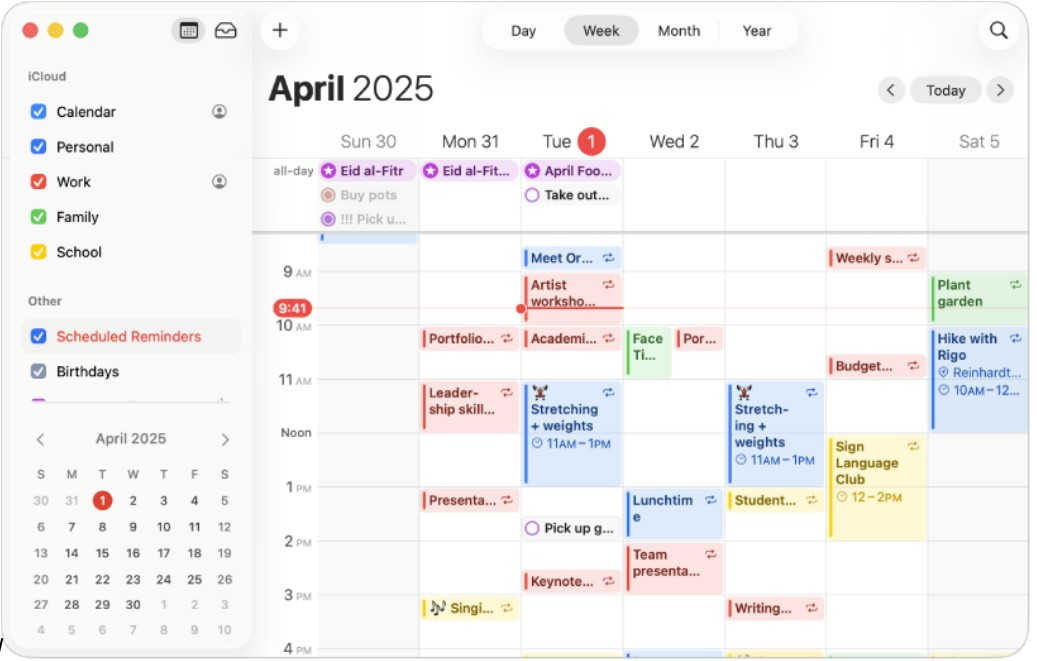
Apple Calendar is a straightforward calendar application for Apple device users, offering essential scheduling and event management functions. It caters to individuals and teams who rely on Apple's ecosystem to organize their daily activities and want real-time sync across devices.
Why I picked Apple Calendar: This tool integrates flawlessly with Apple's ecosystem, making it ideal for users of other Apple products. You can sync your calendar across your iPhone, iPad, and Mac, ensuring you always have access to your schedule. The interface is clean and intuitive, allowing you to create and manage events with ease.
Standout Features and Integrations:
Features include the ability to set and customize event alerts, view your calendar in day, week, or month format, and manage shared calendars for team coordination. You can also use the natural language input feature to quickly add events. The calendar supports time zones, which is great for scheduling international meetings.
Integrations include iCloud, Siri, Apple Maps, Mail, Contacts, FaceTime, Zoom, Microsoft Exchange, Google Calendar, and more.
Pros and Cons
Pros:
- Pre-installed on Apple devices
- Free for all users
- Syncs across Apple devices
Cons:
- Only available on Apple devices
- No premium plan available

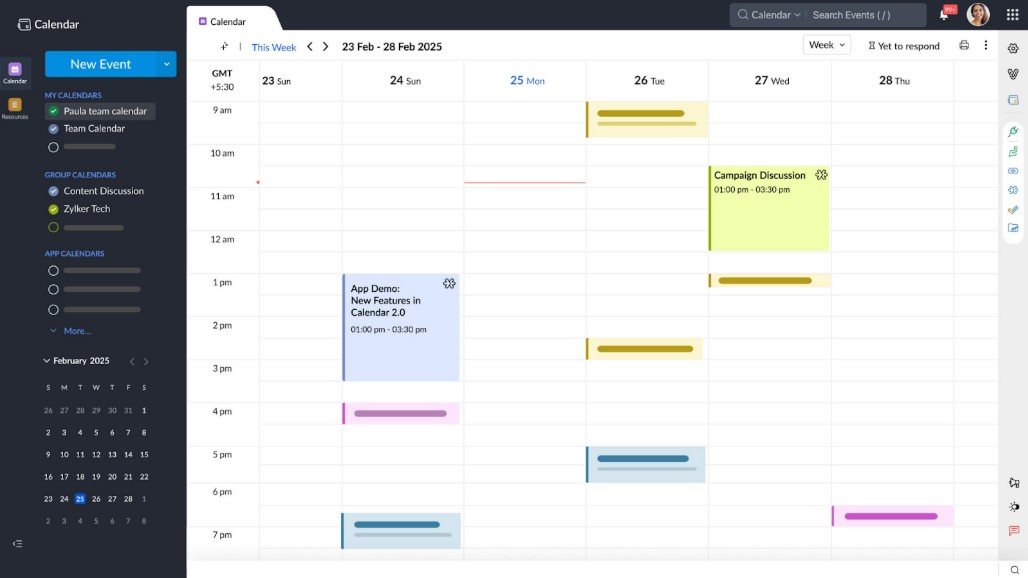
Calendar is an intelligent scheduling tool to optimize time management for professionals and businesses. It provides solutions for scheduling meetings, managing events, and analyzing time usage.
Why I picked Calendar: It uses AI to improve scheduling efficiency, making it perfect for busy teams. AI-powered insights help you understand how you and your team spend time, allowing for better planning. You can also automate meeting scheduling by sharing availability and letting others book directly. The tool's smart suggestions help minimize scheduling conflicts and maximize productivity.
Standout Features and Integrations:
Features include advanced analytics that give you insights into your time allocation. You can set up personalized scheduling links to optimize the booking process. The tool also provides customizable reminders to allow follow-up with upcoming commitments.
Integrations include Google Calendar, Apple Calendar, Zoom, Salesforce, HubSpot, Zapier, Microsoft Teams, and more.
Pros and Cons
Pros:
- Advanced time analytics
- Offers browser extensions
- AI-driven scheduling insights
Cons:
- Support can be slow for lower plans
- Paid professional tier model only
Annen kalenderprogramvare
Her er noen flere alternativer innen kalenderprogramvare som ikke kom med på kortlisten min, men som likevel er verdt å sjekke ut:
- Fantastical
For natural language input
- Morgen
For AI-driven task management
- SimplyBook.me
For business management
- YouCanBookMe
For personalized bookings
- Appointy
For small businesses
- OnceHub
For lead generation
- Zoho Calendar
For Zoho users
- Motion
For task automation
- Square Appointments
For class bookings
- Acuity
For client self-scheduling
- ClickUp
For project management
- Clockwise
For AI-driven team scheduling


How I Evaluate Calendar Software
I look at calendar software in two layers: the core scheduling, syncing, and sharing a tool must nail, and the differentiators—like Gantt views and workload overlays—that matter to project teams.
Core Functionality (Table Stakes For This List)
When I'm selecting tools for my list, I rank each one on a scale from 0 (does not offer the functionality) to 5 (excels in this area) for each core functionality listed below. Then, I calculate the tool's total score into a percentage. Each tool needs to achieve a minimum total score of 65% to be considered for inclusion.
- Calendar View Options: I check whether the tool offers day, week, month, and agenda views with filtering and color-coding so teams can zoom in on a sprint or zoom out on a quarterly roadmap.
- Task Scheduling & Assignment: Each tool should let you create tasks with dates, durations, assignees, and dependencies—like scheduling a QA review to start only after a design handoff wraps.
- Team Calendar Sharing: I evaluate how teams share and collaborate on calendars, including role-based permissions that let a project lead edit schedules while stakeholders get view-only access.
- External Calendar Sync: Two-way sync with Google Calendar, Outlook, and iCal matters here—project deadlines should flow into a team member's personal calendar without manual re-entry.
- Deadline Notifications & Reminders: Tools should offer multi-channel alerts (email, in-app, mobile push) with configurable timing so your team gets a heads-up before a milestone review, not after.
- Timeline & Gantt Views: I look for interactive Gantt charts that map task dependencies, milestones, and critical paths—helpful when you need to show leadership how a delayed API integration ripples across the release schedule.
Once I have a list of tools that meet this criteria, I consider what sets each platform apart.
Differentiating Factors (What Sets Vendors Apart)
Here's how I compare and contrast different vendors:
Standout Features
Multi-project overlay is a big one—when you're running three launches at once, seeing all timelines in a single view helps you spot conflicts before they become blockers. I also evaluate workload management features that show team capacity right on the calendar, so you know whether a developer is double-booked before assigning another task. Automated scheduling is worth checking too, especially tools that rebalance timelines when a deadline shifts mid-sprint.
Beyond Features
Integrations matter a lot here. I check whether a tool connects natively with the PM platforms your team already uses—Jira, Asana, monday.com—so calendar updates flow both ways without manual syncing. Scalability is another factor I evaluate, especially how well a tool handles growth from a single team to multiple departments running concurrent projects. Mobile access rounds things out; project managers who split time between meetings and their desk need full scheduling capability from their phone, not a stripped-down companion app.
Slik velger du kalenderprogramvare
Det er lett å gå seg vill i lange funksjonslister og kompliserte prismodeller. For å hjelpe deg med å holde fokus mens du arbeider deg gjennom den unike prosessen med å velge programvare, får du her en sjekkliste over faktorer du bør ha i tankene:
| Faktor | Hva du bør vurdere |
|---|---|
| Skalerbarhet | Kan programvaren vokse sammen med teamet ditt? Vurder om den kan håndtere flere brukere, arrangementer og mer data etter hvert som behovene dine øker. Unngå verktøy som kan begrense fremtidig vekst. |
| Integrasjoner | Fungerer den sammen med de eksisterende verktøyene dine? Sørg for at den kan kobles til programvare som e-post, CRM og apper for prosjektstyring, slik at arbeidsflyter og datadeling blir mer effektive. |
| Tilpasningsmuligheter | Kan du tilpasse den til arbeidsflyten din? Se etter fleksible innstillinger som lar deg justere visninger, varsler og tillatelser slik at de passer teamets spesifikke behov. |
| Brukervennlighet | Er den brukervennlig for alle? Velg et verktøy som teammedlemmene raskt kan lære seg uten omfattende opplæring. Unngå overdrevent kompliserte systemer som gjør det vanskelig å ta verktøyet i bruk. |
| Implementering og oppstart | Hvor raskt kan du komme i gang? Se etter ressurser som veiledninger, brukerstøtte og tydelig dokumentasjon, slik at du kan begynne å bruke verktøyet effektivt. |
| Kostnad | Passer det inn i budsjettet ditt? Sammenlign prisplaner, inkludert skjulte gebyrer eller nødvendige tillegg. Vurder verdien du får for kostnaden, ikke bare prislappen. |
| Sikkerhetstiltak | Er dataene dine beskyttet? Se etter funksjoner som kryptering, tilgangskontroller og samsvar med personvernregler for å holde informasjonen din trygg. |
| Tilgjengelig brukerstøtte | Får du hjelp når du trenger det? Kontroller hvilke brukerstøttekanaler som er tilgjengelige, for eksempel livechat, e-post eller telefon, samt svartidene, slik at du kan løse problemer raskt. |
Hva er kalenderprogramvare?
Kalenderprogramvare er et digitalt verktøy som hjelper enkeltpersoner og team med å planlegge og administrere arrangementer og avtaler. Fagpersoner som prosjektledere, ledere og administrativt ansatte bruker disse verktøyene til å organisere tiden sin og forbedre produktiviteten. Funksjoner som planlegging, påminnelser og integrasjoner gjør det enklere å administrere tiden effektivt, koordinere med andre og holde oversikt over oppgaver. Disse verktøyene gir en sentralisert måte å holde oversikt over tidsplaner og forpliktelser på.
Funksjoner
Når du velger kalenderprogramvare, bør du se etter følgende viktige funksjoner:
- Planlegging: Gjør det mulig for brukere å sette opp møter og avtaler raskt, slik at man unngår tidskonflikter.
- Påminnelser: Sender varsler for å holde brukerne informert om kommende arrangementer og tidsfrister.
- Gjentakende arrangementer: Støtter oppsett av arrangementer som gjentas automatisk, slik at man sparer tid på å legge dem inn på nytt.
- Integrasjoner: Kobler til annen programvare, for eksempel e-post- og CRM-verktøy, for å optimalisere arbeidsflyter.
- Støtte for tidssoner: Justerer tidspunkt for arrangementer basert på deltakernes plassering, noe som legger til rette for global koordinering.
- Tilpassbare visninger: Lar brukerne justere kalendervisningen etter egne preferanser og behov.
- Tilgangstillatelser: Gir kontroll over hvem som kan se eller redigere kalenderoppføringer, noe som gir bedre sikkerhet.
- Analyse: Gir innsikt i tidsbruk og planleggingsmønstre for å forbedre tidsstyringen.
- Mobiltilgang: Sørger for at brukerne kan administrere tidsplanene sine mens de er på farten, via mobile enheter.
- Fargekoding: Gjør det mulig for brukerne å kategorisere arrangementer visuelt, slik at tidsplanene blir enklere å lese.
Fordeler
Implementering av kalenderprogramvare gir flere fordeler for teamet og virksomheten din. Her er noen av fordelene du kan se frem til:
- Bedre organisering: Hjelper med å holde oversikt over avtaler og tidsfrister, slik at risikoen for å gå glipp av viktige arrangementer reduseres.
- Tidsbesparende: Automatiserer planlegging og påminnelser, slik at tid frigjøres til viktigere oppgaver.
- Bedre samarbeid: Gjør det mulig for teammedlemmer å dele kalendere og koordinere tidsplaner, noe som forbedrer samarbeid og kommunikasjon.
- Økt produktivitet: Gir innsikt i tidsstyring, slik at brukerne kan fordele ressurser mer effektivt.
- Fleksibilitet: Tilbyr mobiltilgang og tilpassbare visninger, slik at brukerne kan administrere tidsplanene sine hvor som helst.
- Bedre planlegging: Støtter gjentakende arrangementer og fargekoding, noe som gjør det enklere å planlegge langsiktige prosjekter.
- Sikkerhet: Sørger for databeskyttelse gjennom tilgangstillatelser og holder sensitiv informasjon trygg.
Kostnader & priser
Valg av kalenderprogramvare krever en forståelse av de ulike prismodellene og abonnementene som er tilgjengelige. Kostnadene varierer basert på funksjoner, teamstørrelse, tillegg og mer. Tabellen nedenfor oppsummerer vanlige abonnementer, gjennomsnittsprisene deres og typiske funksjoner som er inkludert i kalenderprogramvareløsninger:
Sammenligningstabell for abonnementer for kalenderprogramvare
| Abonnementstype | Gjennomsnittspris | Vanlige funksjoner |
|---|---|---|
| Gratisabonnement | $0 | Grunnleggende planlegging, begrensede integrasjoner og grunnleggende påminnelser. |
| Personlig abonnement | $4.75-$12/måned | Avansert planlegging, flere kalendervisninger og e-postpåminnelser. |
| Bedriftsabonnement | $14-$70/måned | Verktøy for teamsamarbeid, integrasjoner med andre apper og avansert analyse. |
| Virksomhetsabonnement | $125-$1,250/måned | Tilpassbare tilgangstillatelser, dedikert kundestøtte og sikkerhetsfunksjoner på virksomhetsnivå. |
Vanlige spørsmål om kalenderprogramvare
Her er noen svar på vanlige spørsmål om kalenderprogramvare:
Kan kalenderprogramvare integreres med andre verktøy vi allerede bruker?
Ja, det meste av kalenderprogramvaren kan integreres med vanlige verktøy som e-postplattformer, CRM-systemer og apper for prosjektstyring. Denne tilkoblingen bidrar til å effektivisere arbeidsflyten ved å gjøre det mulig å utveksle data mellom kalenderen og andre systemer. Sjekk integrasjonsalternativene for hver programvare for å sikre kompatibilitet med de eksisterende verktøyene dine.
Er det enkelt å migrere eksisterende data til den nye kalenderprogramvaren?
Ja, mange kalendereverktøy tilbyr importfunksjoner som hjelper deg med å overføre eksisterende data. Se etter programvare med enkle datamigreringsprosesser, for eksempel CSV-importer eller direkte integrasjon med nåværende kalendersystemer. Før du migrerer, bør du sikkerhetskopiere dataene dine for å unngå tap under overføringen.
Hvilke sikkerhetstiltak bør jeg forvente fra kalenderprogramvare?
Forvent at kalenderprogramvare tilbyr grunnleggende sikkerhetsfunksjoner, for eksempel kryptering og tilgangskontroller. Disse sikkerhetstiltakene beskytter dataene dine mot uautorisert tilgang. For virksomheter som håndterer sensitiv informasjon, bør du se etter programvare som overholder personvernregler og tilbyr ekstra sikkerhetsfunksjoner som tofaktorautentisering.