

10 beste faktureringsprogrammer for frilansere i 2026

10 Kortliste over beste faktureringsprogramvare for frilansere


Den beste faktureringsprogramvaren for frilansere hjelper deg med å gå fra registrerte timer, milepæler eller løpende avtaler til betalte fakturaer uten å måtte legge inn prosjektinformasjon flere ganger.
Jeg har brukt over 15 år på å lede digitale prosjekter og kundetjenester, så jeg vet hvor raskt oppfølging av fakturering kan gå ut over tiden som er tilgjengelig for leveranser. Jeg evaluerte 20 verktøy for kundeportaler, betalingsoppfølging, gjentakende fakturering, arbeid på tvers av landegrenser og arbeidsflyter fra tilbud til betaling. Her er de beste alternativene.
Why Trust Our Software Recommendations
Our team has been testing and reviewing software since 2012. As project managers ourselves, we know how difficult—and important—it is to choose the right software.
For this guide, we evaluated tools using hands-on testing and independent research, scoring tools using our selection criteria. We also draw on insights from industry thought leaders and practicing project management experts.
Our reviews reflect our human editorial judgment, not a sales pitch.
Expert reviewers:
Sammenligningstabell for faktureringsprogramvare for frilansere
Sammenlign priser og viktige funksjoner i de beste faktureringsverktøyene som kom med på kortlisten min.
| Tool | Best For | Trial Info | Price | ||
|---|---|---|---|---|---|
| 1 | Best for hourly billing with next-day payouts | Free demo + 10-day free trial available | From $43/user/month (billed annually) | Website | |
| 2 | Best for agencies billing multiple clients | 7-day free trial | From $600/year | Website | |
| 3 | Best free invoicing with a built-in client portal | Not available | Free forever plan | Website | |
| 4 | Best for billing across borders from India | Free plan + free demo available | From $8/month (billed annually) | Website | |
| 5 | Best for branded client portal | 7-day free trial | From $19/month | Website | |
| 6 | Best for late fee automation on overdue invoices | Free plan available | From $11.67/month (billed annually) | Website | |
| 7 | Best for proposal-to-payment workflow | Free demo + 30-day free trial available | From $12/month (billed annually) | Website | |
| 8 | Best for retainer-based invoicing | Free plan available | From $11.95/month | Website | |
| 9 | Best for billing with contract bundling | Free demo + 7-day free trial | From $9/user/month (billed annually) | Website | |
| 10 | Best for built-in mileage tracking | Free plan + 14-day free trial available | From $16/month (billed annually) | Website |
Anmeldelser av faktureringsprogramvare for frilansere
Her er mine beste anbefalinger av faktureringsprogramvare for frilansere, med anmeldelser som dekker funksjoner, priser og hvilke brukere de passer best for, slik at du kan velge det beste alternativet.

TimeSolv
Best for hourly billing with next-day payouts
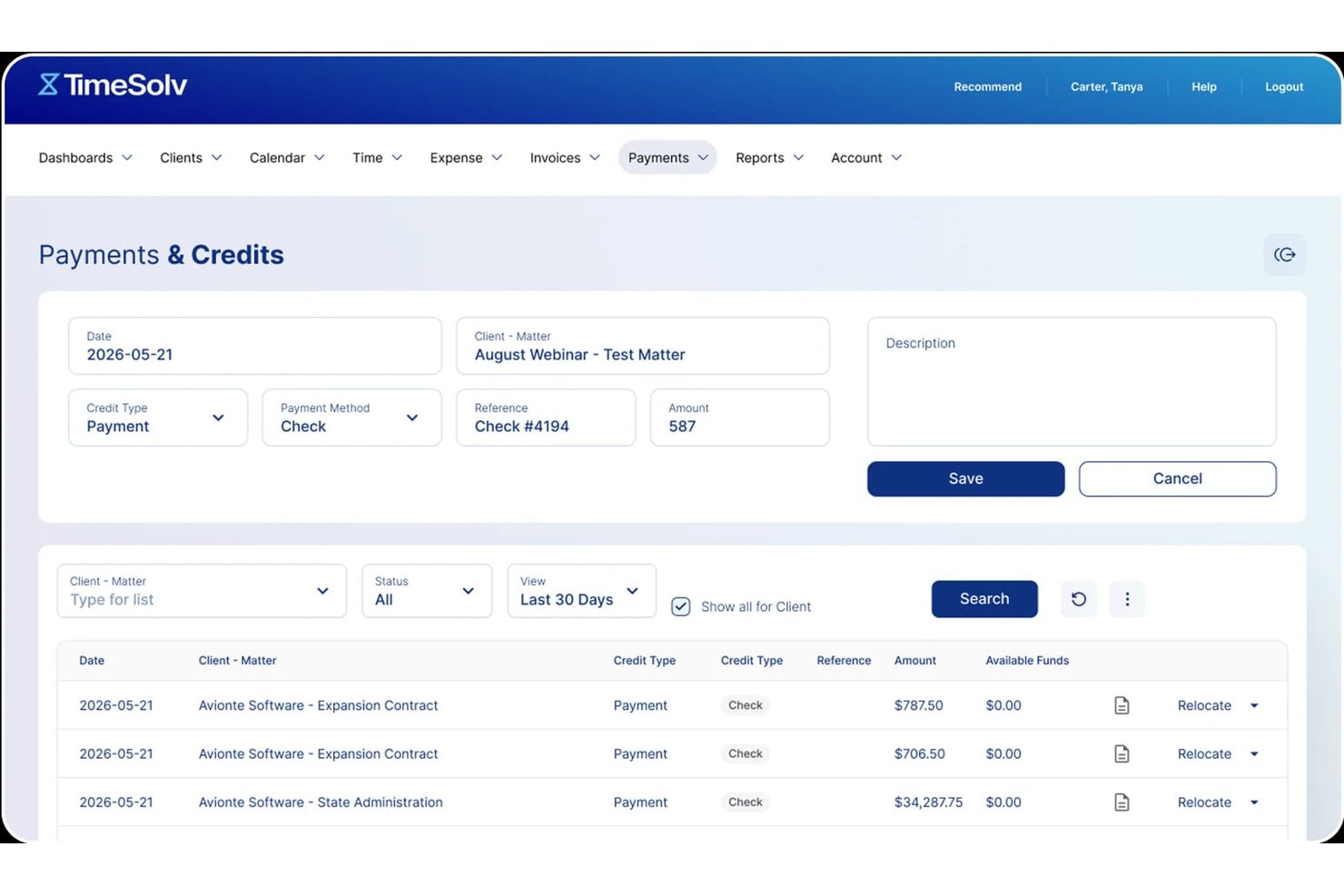
TimeSolv is a billing platform that lets you create customizable invoices, collect payments via card or ACH, manage client portals, and automate recurring billing.
Who Is TimeSolv Best For?
TimeSolv is a strong fit for consultants and professional services freelancers who bill by the hour and need a structured system for time capture, client management, and invoice collection.
Why I Picked TimeSolv
I picked TimeSolv as one of the best because its built-in TimeSolvPay processor funds card and ACH payments the next business day, which is a real advantage when cash flow matters. I also love how it generates invoices directly from time entries, so every billable hour you've logged automatically populates the invoice without manual entry. The automated late-fee calculation on overdue invoices is a feature I rely on heavily, since it applies simple or compound interest without any extra steps.
TimeSolv Key Features
- Client portal: Clients can view invoice history, download receipts, and make payments through a branded self-service portal.
- Split invoicing: Divide a single invoice among multiple parties by percentage or fixed amount, with separate recipient views and per-party payment tracking.
- Batch invoicing: Generate and send multiple invoices at once, with an AutoMail option for physical mailing and export formats including PDF, Word, and Excel.
- Offline time and expense entry: Log time and expenses via the mobile or desktop app, with automatic sync when you're back online.
TimeSolv Integrations
TimeSolv offers native integrations with QuickBooks, Xero, AccountEdge, Microsoft 365, Outlook, OneDrive, Dropbox, 8amLawPay, and PointOne. A public API for custom integrations is also available.
Pros and Cons
Pros:
- Late-fee automation handles overdue invoices
- Offline time entry captures billable work
- Next-day payment funding supports cash flow
Cons:
- Tax and currency handling lacks documentation
- Legal terminology confuses non-legal freelancers

Best for agencies billing multiple clients
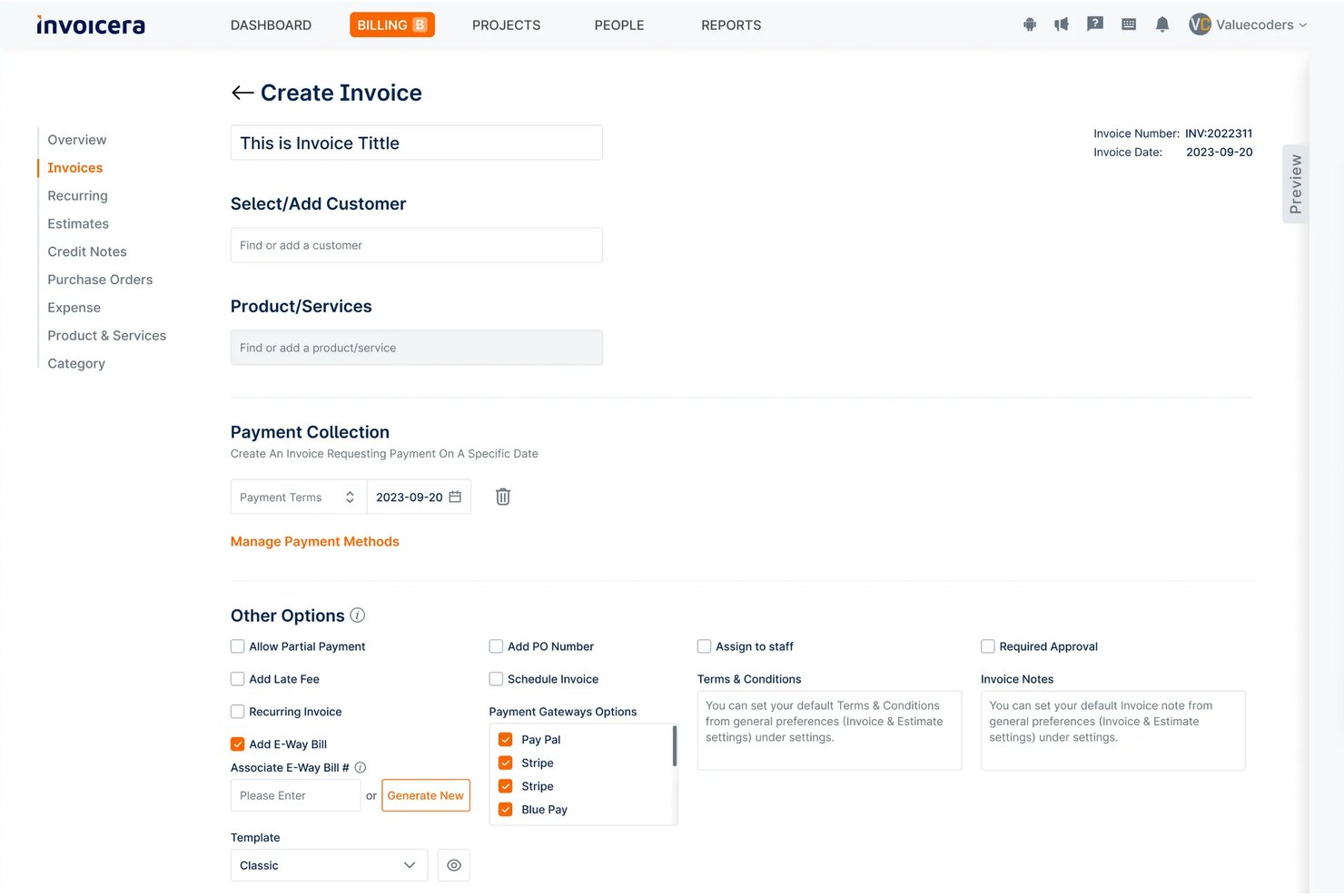
Invoicera is a billing operations platform that handles multi-client invoicing, time-to-invoice workflows, recurring billing, expense tracking, and payment collection across 25+ payment gateways.
Who Is Invoicera Best For?
Invoicera fits freelance agency owners who manage billing across multiple clients, staff, and entities under one organization.
Why I Picked Invoicera
Invoicera earns its spot on my shortlist because of how well it handles billing across multiple clients with very different arrangements. I like that you can run fixed-milestone, time-based, and retainer billing simultaneously, each client on their own terms, without manual workarounds. The branded client portal is a practical touch: each client can view statements, download invoices, and pay directly without needing an Invoicera login. Add per-client late-fee toggling and configurable reminder ladders, and managing a full client roster stops feeling like a spreadsheet exercise.
Invoicera Key Features
- Multi-step approval workflow: Route invoices through single- or multi-step approval chains with role-based assignments, value thresholds, and a timestamped approver trail on each invoice.
- Mixed billing models: Combine fixed-milestone, time-based, and usage-based charges into a single invoice run, with each line sourced from its own billing rule.
- Multi-entity billing: Run separate legal entities from one account, each with its own branding, invoice numbering, tax profile, currency, and approval authority.
- AI-assisted line-item drafting: Generate customer-readable line-item descriptions and reminder copy using AI suggestions, each requiring human review before sending.
Invoicera Integrations
Invoicera offers integrations with QuickBooks, Xero, Stripe, Razorpay, Jira, and 25+ payment gateways, including PayPal. Its XML API supports custom connections for invoices, clients, expenses, projects, tasks, and time entries.
Pros and Cons
Pros:
- Approved hours become invoice lines with reviewer trails
- Clients pay through a branded self-service portal
- Mixed billing models handle varied client arrangements
Cons:
- No built-in 1099 or self-employment tax support
- Organization-focused setup suits teams, not solo freelancers

Best free invoicing with a built-in client portal
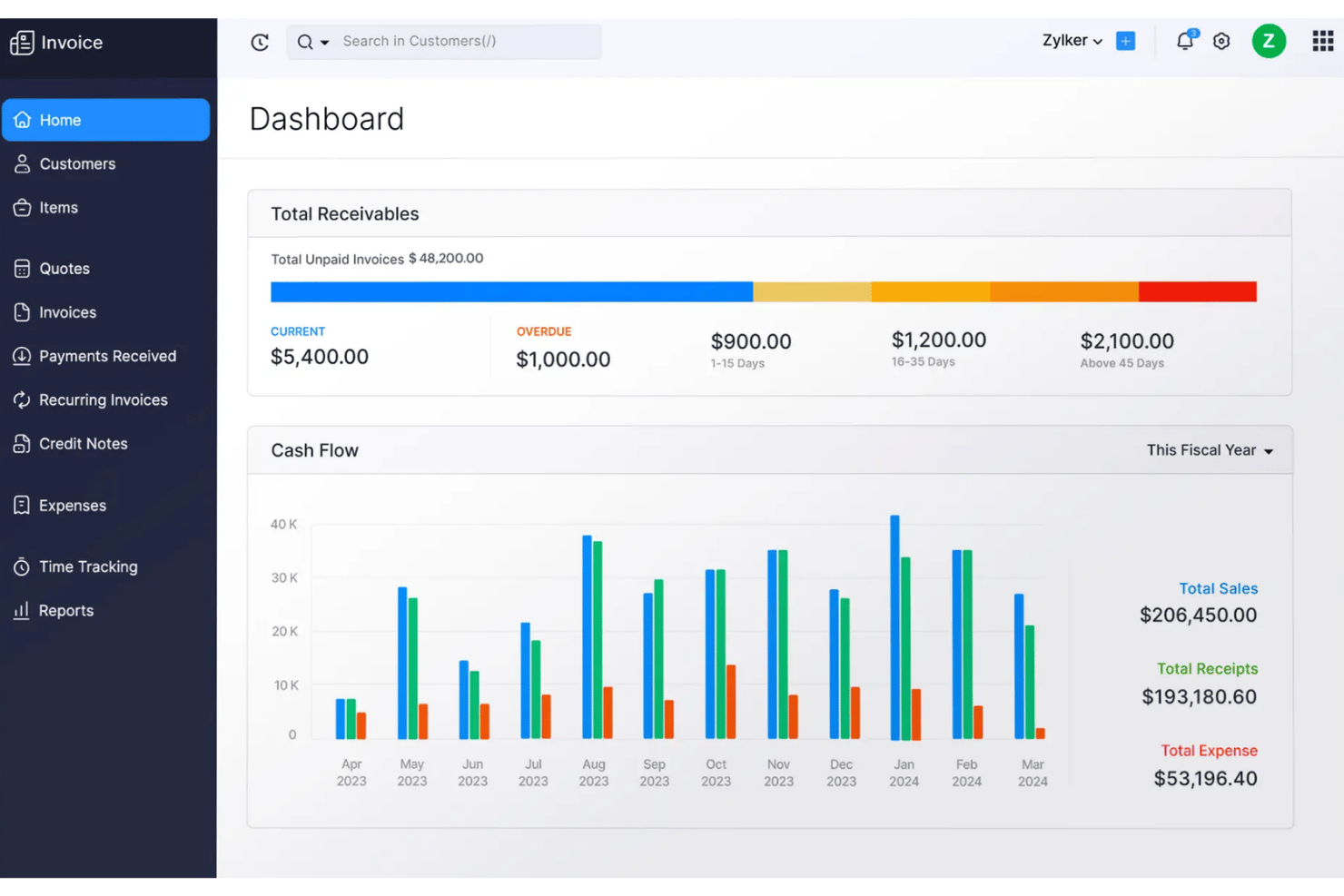
Zoho Invoice is a free invoicing software for freelancers and small businesses that covers invoice creation, client quotes, time and expense tracking, recurring billing, multi-currency support, and a self-service client portal.
Who Is Zoho Invoice Best For?
Zoho Invoice is a strong fit for solo freelancers and independent contractors who need a full-featured invoicing setup at zero cost.
Why I Picked Zoho Invoice
Zoho Invoice earns its spot on my shortlist because it lets you create and send unlimited invoices. I also love that the quote-to-invoice conversion is built directly into that portal workflow, so clients can comment, approve, and trigger the next step without any back-and-forth over email. On top of that, Zia (Zoho's AI assistant) flags invoices likely to be paid late and drafts follow-up messages automatically.
Zoho Invoice Key Features
- Multi-currency invoicing: Assign a currency per client contact and let Zoho pull live exchange rates automatically, so your invoice always reflects the right amount.
- Recurring invoice profiles: Set up automated billing schedules with auto-charge on saved cards, so repeat clients get invoiced without manual intervention.
- 30+ built-in reports: Access sales summaries, accounts receivable aging, top customer breakdowns, and tax reports directly from your dashboard.
- Role-based user permissions: Invite a second user, restrict their access to specific clients or functions, and keep sensitive billing data compartmentalized.
Zoho Invoice Integrations
Zoho Invoice offers 50+ integrations, including PayPal, Stripe, HubSpot, WhatsApp, Slack, Pipedream, Dropbox, Evernote, Skyvia, and the entire Zoho suite.
Pros and Cons
Pros:
- Automated reminders flag likely late payments
- Tracked time becomes invoice line items
- Client portal supports quote approval and payment
Cons:
- Limited layout control frustrates detailed branding
- Invoice and project limits constrain agency growth

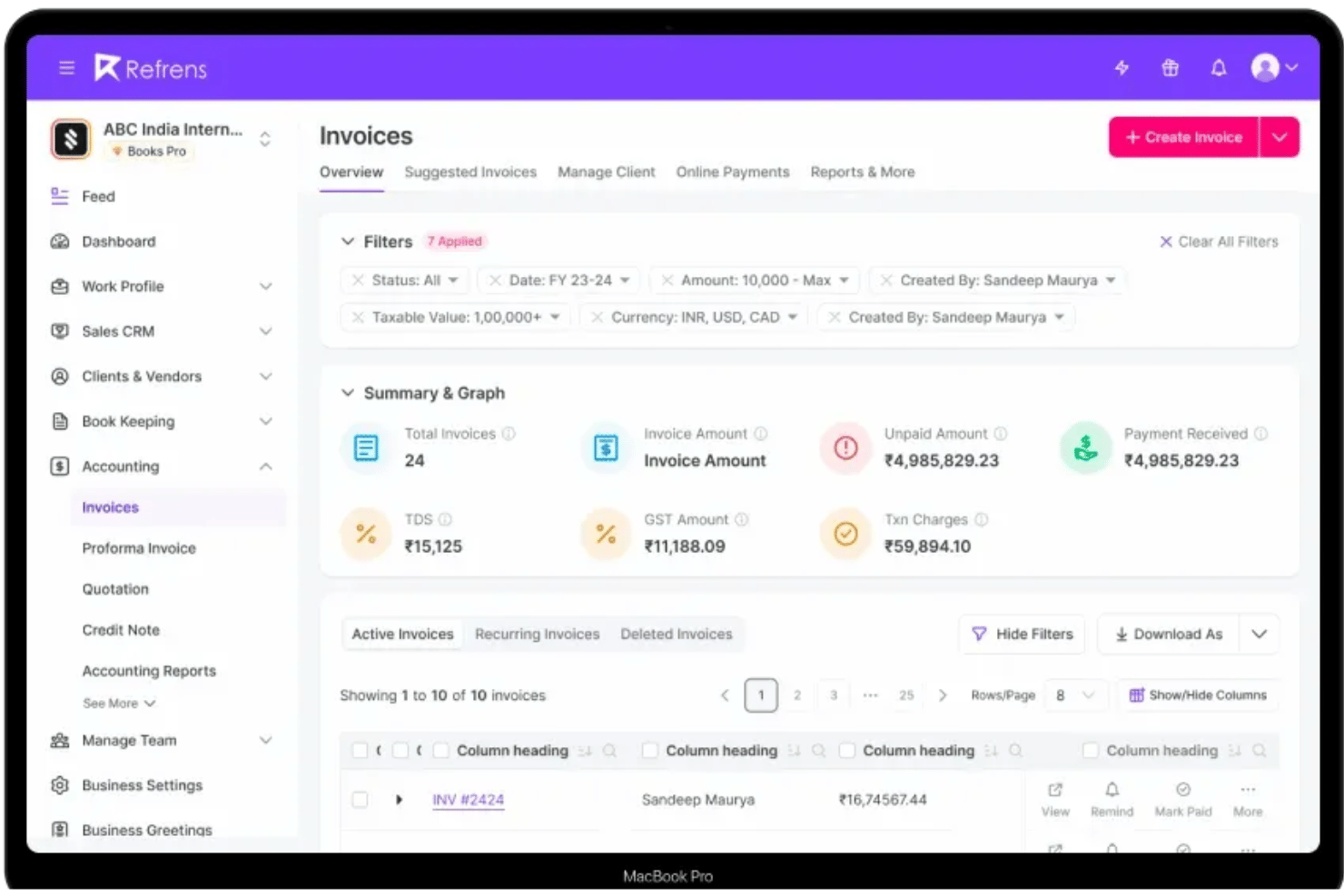
Refrens is an invoicing platform that covers quotation creation, invoice customization, expense tracking, payment collection, double-entry accounting, and a built-in sales CRM.
Who Is Refrens Best For?
Refrens is a strong fit for India-based solo entrepreneurs and small agencies that bill international clients and need invoicing, expense tracking, and accounting in one place.
Why I Picked Refrens
I picked Refrens as one of the best because no other tool on this list is built specifically around collecting international payments from an Indian bank account. The international payment flow accepts card, ACH, and wire transfers from clients in 100+ countries, then settles payouts in INR within one to two business days. I also like that multi-currency invoicing and GST-compliant tax formats are both handled inside the same platform, so there's no need to reconcile documents across separate tools.
Refrens Key Features
- Quotation-to-invoice conversion: Create client-facing quotations and convert them to professional invoices in one click, with real-time tracking of when clients open and approve documents.
- Double-entry accounting: Log manual journals, reconcile bank statements, and generate Balance Sheet, P&L, and cash flow reports directly inside the platform.
- AI OCR expense scanning: Forward bills via WhatsApp or email, and Refrens automatically scans and creates expense entries using OCR.
- Sales CRM with lead pipelines: Manage leads through a built-in pipeline, capture them via lead forms, and convert them into quotations and invoices.
Refrens Integrations
Refrens has documented integrations with Shopify, Pabbly Connect, Google Ads, Google Meet, Airtable, Attentive, and IndiaMART. It also offers an API for customer connections.
Pros and Cons
Pros:
- Expense OCR captures bills for rebilling
- Quotes convert directly into client invoices
- Cross-border payments support Indian freelancers
Cons:
- Free documents retain Refrens branding
- No native timer for billable hours

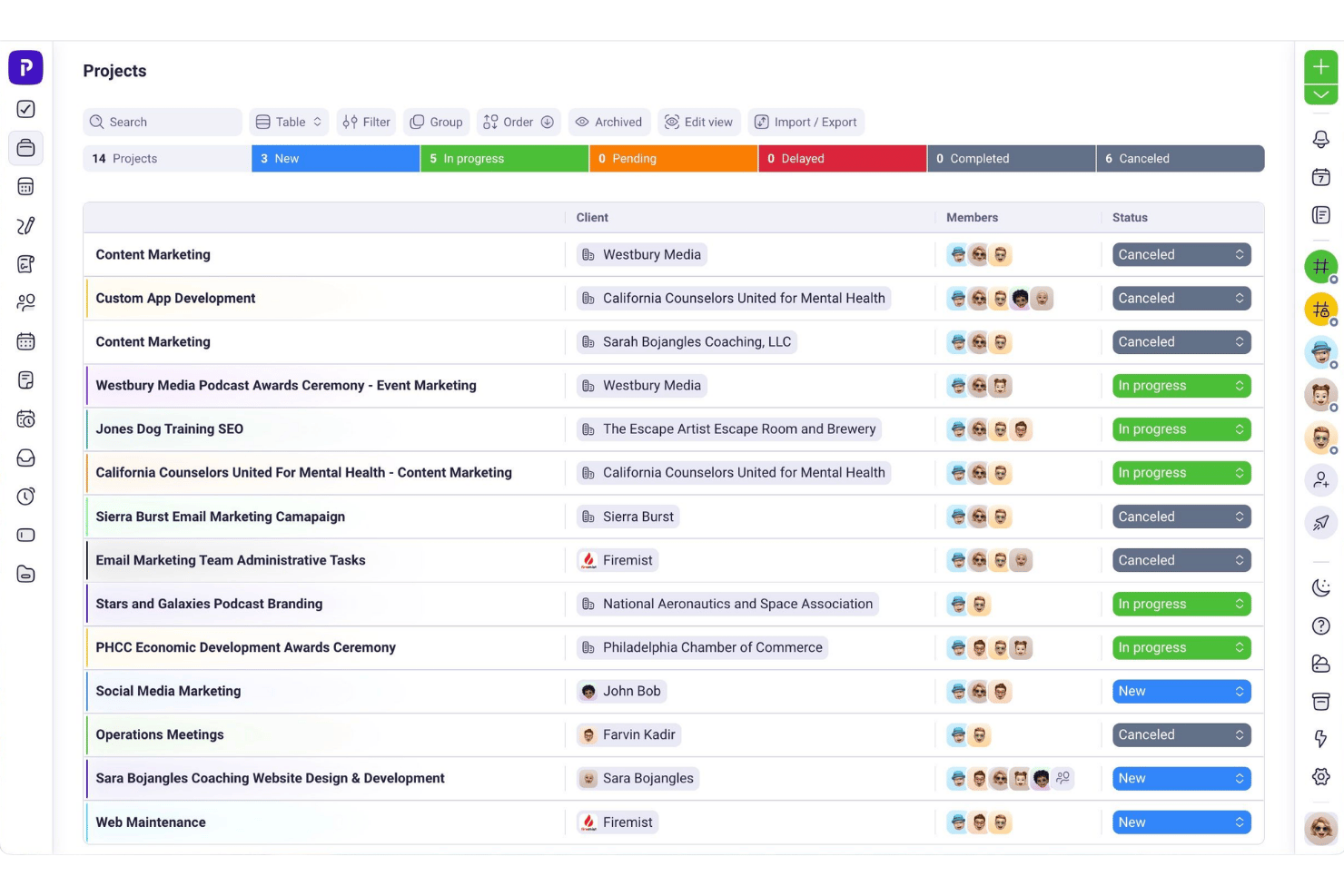
Plutio is an all-in-one invoicing platform that combines invoice creation, time tracking, proposals, contracts, e-signatures, and a branded client portal.
Who Is Plutio Best For?
Plutio is a strong fit for solo creatives and agency owners who want to run proposals, contracts, time tracking, and invoicing from one branded workspace.
Why I Picked Plutio
I've included Plutio in my top picks because the branded client portal genuinely sets it apart from other invoicing tools for freelancers. Clients log in to a custom-branded workspace to view invoices, project files, and messages, so every touchpoint reflects your brand rather than Plutio's. I also love that signed proposals automatically trigger invoice creation, cutting out the manual handoff between closing a deal and billing for it.
Plutio Key Features
- Time-to-invoice conversion: Pull tracked time directly from timesheets into invoice line items with one click, eliminating manual re-entry of billable hours.
- Multi-processor payment support: Accept payments through Stripe, PayPal, and Square simultaneously, with options for credit card, ACH, Apple Pay, and Google Pay.
- Recurring billing: Set invoices to repeat on a custom schedule, with automated workflows handling follow-up reminders between billing cycles.
- Payment schedule splitting: Break a single invoice into deposits or milestone-based partial payments, giving clients a structured payment plan.
Plutio Integrations
Plutio integrates with Slack, Stripe, PayPal, Square, Zoom, QuickBooks, Outlook, Microsoft Teams, Google Meet, and Google Calendar. It provides a REST API and webhooks for custom integrations. Zapier is also available.
Pros and Cons
Pros:
- Timesheets convert directly into billable invoice lines
- Signed proposals automatically create projects and invoices
- Dedicated portal keeps client work organized
Cons:
- Overdue invoices lack automatic late-fee calculations
- Expense receipt capture isn't built in

Best for late fee automation on overdue invoices
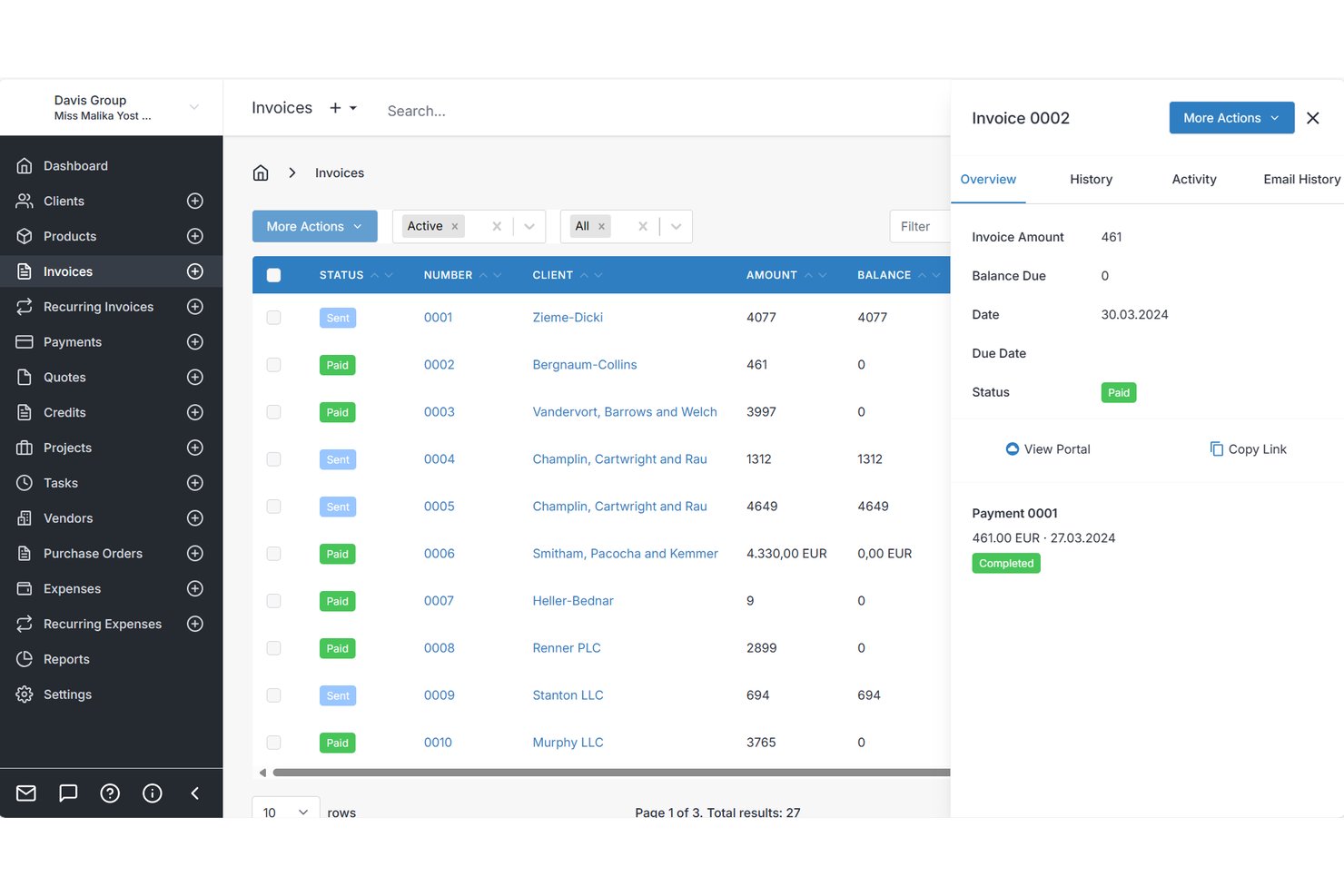
Invoice Ninja is an invoicing platform for freelancers that covers invoice creation, online payment collection, recurring billing, expense tracking, and client-facing self-service portals.
Who Is Invoice Ninja Best For?
Invoice Ninja is a strong fit for independent contractors who need a full billing setup without paying for it right away.
Why I Picked Invoice Ninja
I picked Invoice Ninja as one of the best because of how it handles overdue invoices automatically. You can configure automatic late fees to apply to unpaid invoices once they pass their due date, so you're not manually chasing clients or calculating penalties yourself. Paired with automated reminder emails on the Pro plan, the system handles the entire follow-up cycle without you touching it.
Invoice Ninja Key Features
- Client self-service portal: Clients log in via a magic link to view invoices, approve quotes, make payments, and download statements without creating an account.
- Multi-gateway payment collection: Connect 15+ payment gateways simultaneously, so clients can pay using their preferred method.
- Billable time and expense tracking: Log time against projects, track expenses by vendor and category, and convert both to invoice line items in one click.
- Recurring invoice auto-billing: Set up recurring invoices on any cycle and charge stored client payment profiles automatically, with no manual send required.
Invoice Ninja Integrations
Invoice Ninja integrates with 1000+ tools via Zapier, including Jotform, Trello, Xero, Google Sheets, Gmail, Outlook, Slack, MailChimp, Make, n8n, and Pabbly. A REST API for custom integrations is also available.
Pros and Cons
Pros:
- Billable time converts directly into invoices
- Passwordless client portal supports self-service payments
- Automatic late fees reduce overdue follow-up
Cons:
- Multi-company handling draws reviewer criticism
- Reviewers report occasional bugs and glitches

Best for proposal-to-payment workflow
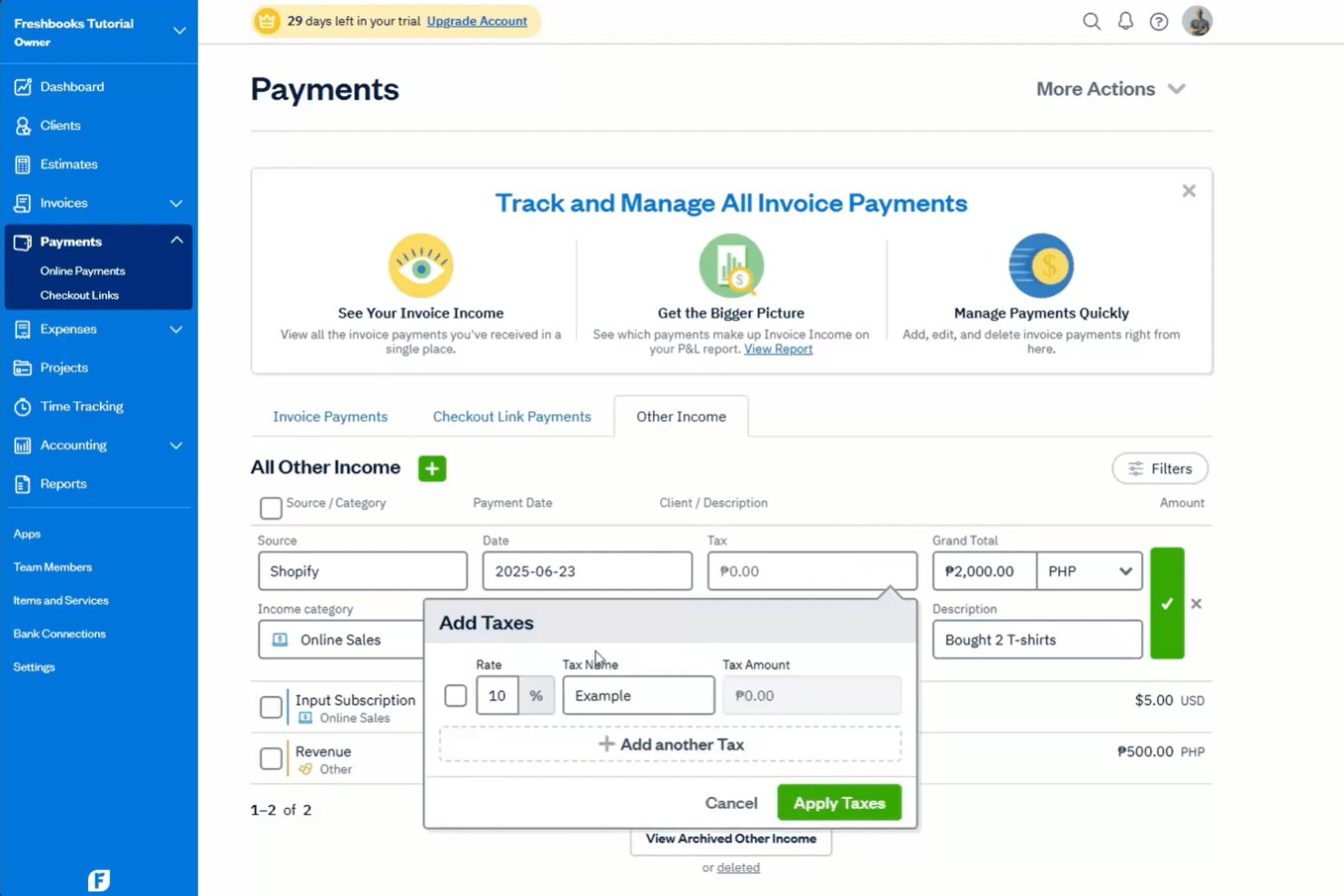
FreshBooks is a freelance invoicing platform that covers proposals, eSignatures, time and expense tracking, recurring billing, and online payment collection in one place.
Who Is FreshBooks Best For?
FreshBooks suits solo creatives who need to take a client from signed proposal to paid invoice without juggling multiple tools.
Why I Picked FreshBooks
FreshBooks earns its spot on my shortlist because it covers the entire client engagement cycle, from sending a proposal to collecting final payment, without requiring a second tool. I particularly like how an accepted proposal converts directly into a project and then an invoice with one click, keeping billable time and expenses attached throughout. On top of that, automated payment reminders and late fee rules mean I'm not manually chasing overdue balances.
FreshBooks Key Features
- Multi-currency invoicing: Bill clients in hundreds of currencies across 16 languages, with per-client currency defaults and currency-filtered reporting.
- Automated late fees: Set late fee rules to apply automatically to overdue invoices without manually following up with clients.
- Receipt scanning: Capture and attach receipts directly from the mobile app, with line-item bill scanning available on Premium and above.
- Retainer billing: Set up client retainers with fixed pricing, scheduled hours, and dedicated retainer reporting on Plus and above.
FreshBooks Integrations
FreshBooks offers 100+ integrations, including Wagepoint, Lendflow, Pipedrive, Todosit, Calendly, Clio, and Freshdesk. A public API for custom integrations is also available.
Pros and Cons
Pros:
- Time and expenses attach to invoices
- Automatic reminders track overdue payments
- Proposals convert directly into invoices
Cons:
- Advanced reporting requires higher-tier plans
- Billable-client caps restrict growing practices
Avaza
Best for retainer-based invoicing
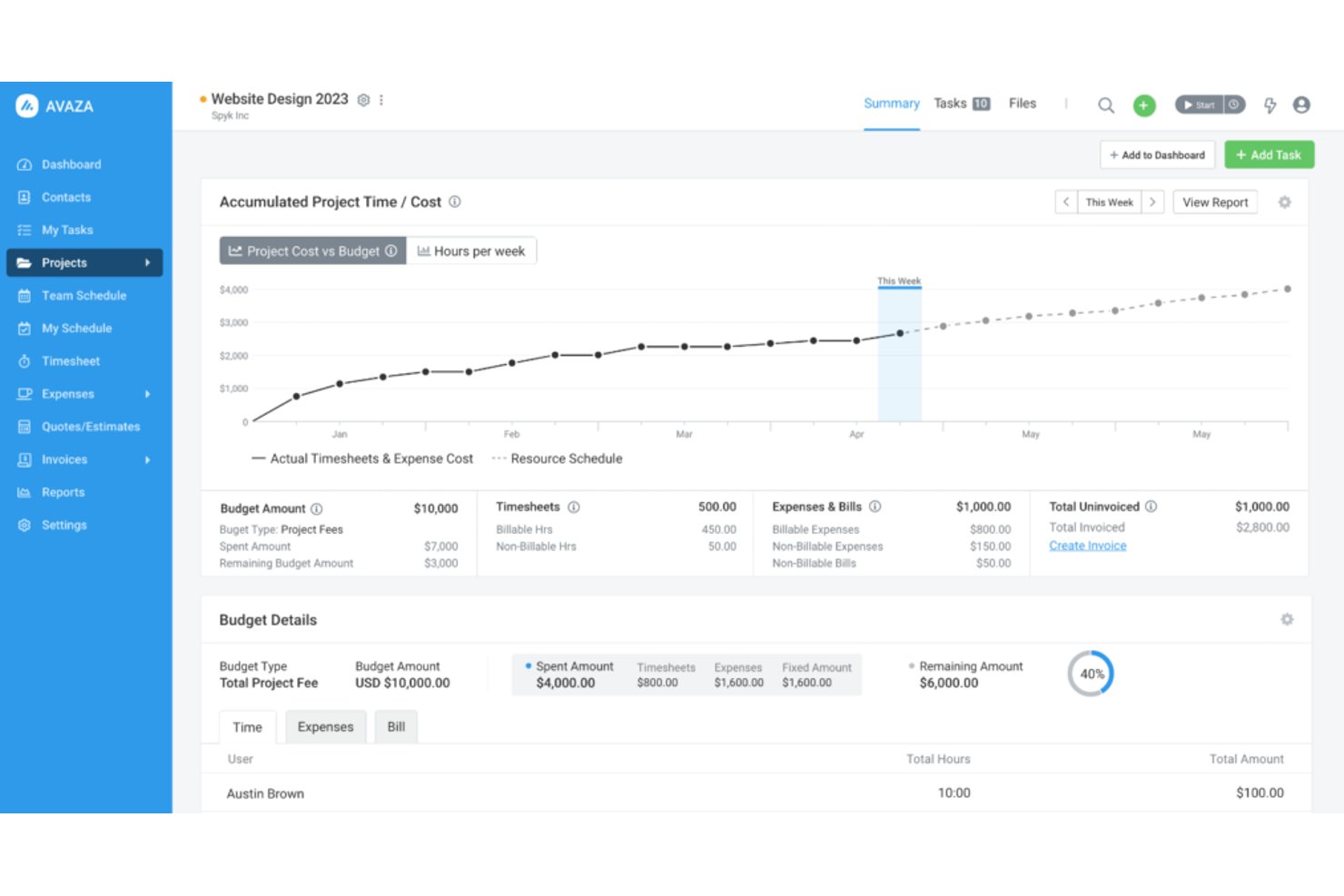
Avaza is an invoicing and project management platform that combines time tracking, expense management, recurring billing, retainer subscriptions, and client portal access in a single tool.
Who Is Avaza Best For?
Avaza suits freelance consultants who bill clients on retainer and need time tracking, expense management, and invoicing in one place.
Why I Picked Avaza
I picked Avaza as one of the best because its retainer subscription system is genuinely hard to replicate at this price point. You can set up a recurring retainer invoice, hold the prepaid amount as client credit, and then draw down against that credit on regular invoices as work is delivered. I also like that recurring invoice profiles can automatically pull in unbilled time and expenses each cycle, so retainer clients who go over their hours get billed accurately without manual reconciliation.
Avaza Key Features
- Invoice template label overrides: Every text label on an invoice can be renamed, letting you match local terminology or client preferences without editing the template from scratch.
- Client portal with estimate approval: Clients log in to view invoices, approve or reject estimates, and pay outstanding balances online without needing to contact you.
- Uninvoiced items report: A dedicated report surfaces all unbilled time, expenses, and fixed amounts across projects so nothing slips through between billing cycles.
- e-Invoicing via Peppol network: Send compliant electronic invoices directly through the Peppol and DBNAlliance networks, available on paid plans for supported regions including AU, NZ, UK, and much of the EU.
Avaza Integrations
Avaza offers integrations with Xero, QuickBooks Online, Stripe, Salesforce, Slack, Google Drive, GitHub, and Dropbox. It also supports an open API and Zapier for custom integrations.
Pros and Cons
Pros:
- Clients approve estimates through portal
- Recurring invoices include unbilled work
- Retainer credit supports prepaid billing
Cons:
- Limited audit trail for invoice changes
- No automatic late-fee calculation

Bonsai
Best for billing with contract bundling
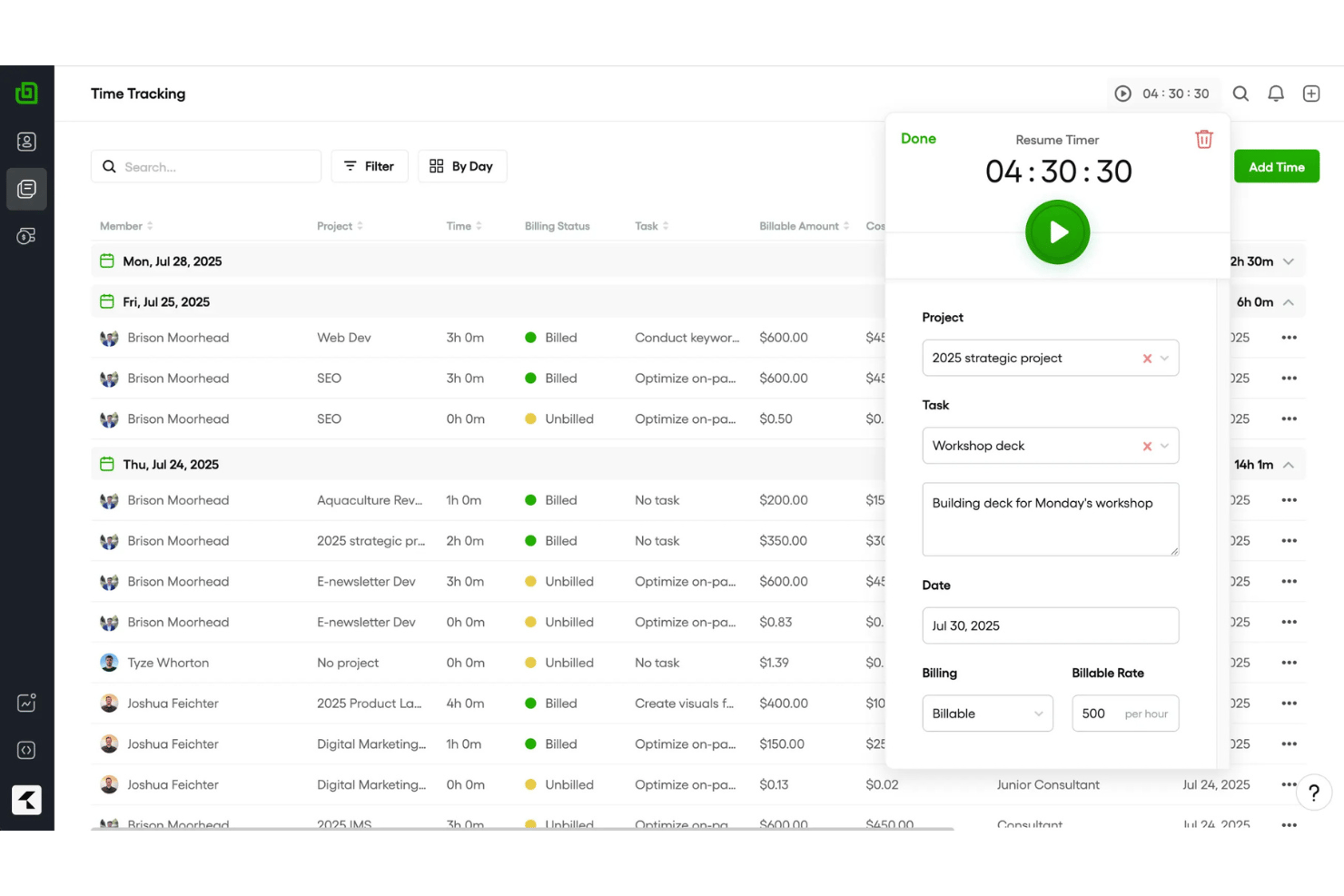
Bonsai by Zoom is a freelance business management platform that covers invoicing, contracts, proposals, time tracking, expense management, and client CRM in one connected workflow.
Who Is Bonsai Best For?
Bonsai suits creative freelancers and independent contractors who need contracts and invoicing under one roof.
Why I Picked Bonsai
I've included Bonsai in my top picks because it's the only tool I've used where contracts, proposals, and invoices live in a single connected workflow. When a client signs a contract, that agreement feeds directly into the invoice, so there's no copying terms or chasing down scope details later. I also like that time entries and expenses attach straight to invoices, which means hourly billers can generate an accurate, itemized bill without manual data entry.
Bonsai Key Features
- Branded client portal: Clients access a custom-branded portal via a secure link to view invoices, files, and contracts, and pay directly in-portal.
- Multi-currency billing: Bonsai supports 100+ currencies with automatic conversion and localized formatting, plus multi-tax rate support for mixed jurisdictions.
- Recurring and retainer invoices: Set up subscription or retainer invoices that auto-bill on a schedule, with editable series you can stop or adjust at any time.
- QuickBooks and Xero sync: Two-way invoice data sync with QuickBooks Online and Xero keeps your books current without manual data entry.
Bonsai Integrations
Bonsai offers native integrations with QuickBooks Online, Xero, Calendly, Zoom, Zapier, and HiBob. It also provides an API and MCP server for custom connections.
Pros and Cons
Pros:
- Time and expenses attach to invoices
- Clients pay through branded portal
- Contract terms flow into invoices
Cons:
- Reminders stop after sixteen days
- Payout delays affect cash flow
Hiveage
Best for built-in mileage tracking
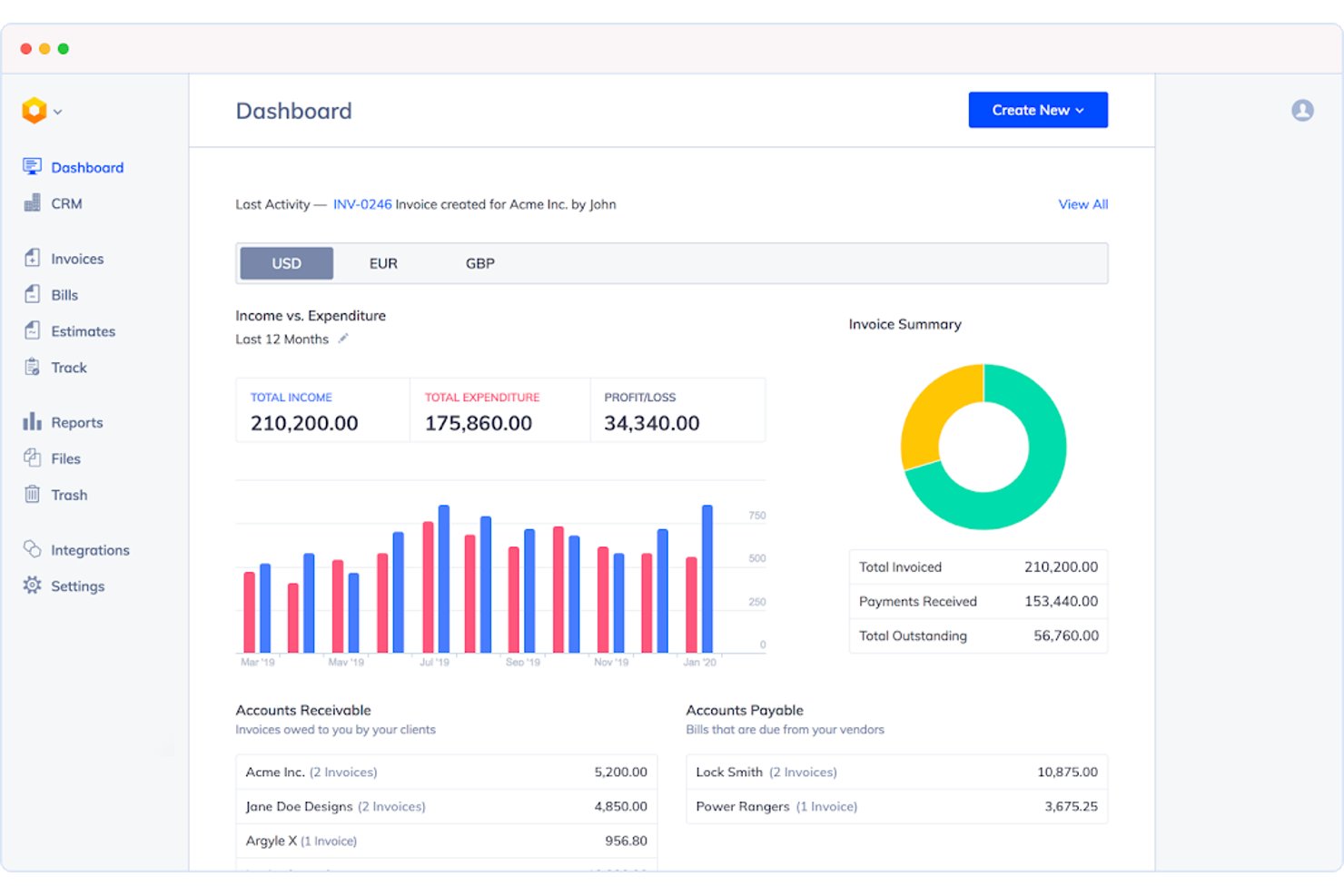
Hiveage is an invoice generator app that covers the full billing cycle—estimates, time and expense tracking, mileage logging, recurring billing, and online payment collection—in a lightweight, non-accounting platform.
Who Is Hiveage Best For?
Hiveage is a strong fit for field-based contractors who bill for both time and travel as part of their standard client work.
Why I Picked Hiveage
Hiveage earns its spot on my shortlist because it's one of the few freelance invoicing tools with built-in mileage tracking alongside time and expense logging. I like that you can log a trip, assign a rate, and convert it directly into an invoice line item without any manual workarounds. The built-in real-time timer works the same way, letting you track hours per task and bill them instantly.
Hiveage Key Features
- Recurring billing modes: Set invoices to save as draft, auto-send, or auto-charge saved client cards at daily, weekly, monthly, or custom intervals.
- Estimate-to-invoice conversion: Build detailed estimates with time and expense line items, collect online client acceptance, then convert to an invoice in one click.
- Multi-currency invoicing: Assign a preferred currency per client with locale-specific formatting and unlimited saved tax entries, including compound taxes.
- Real-time invoice status tracking: Invoices are labeled draft, sent, viewed, partial, paid, or overdue, with a dashboard showing outstanding balances at a glance.
Hiveage Integrations
Hiveage supports 12+ payment gateway integrations, including PayPal, Stripe, Braintree, Square, Authorize.net, 2Checkout, and WePay. It also supports Zapier and REST API for custom connections.
Pros and Cons
Pros:
- Estimates convert directly into accepted invoices
- Free tier includes unlimited time and expenses
- Built-in mileage converts trips into invoice lines
Cons:
- Automatic reminders require a paid tier
- Client limits pressure growing freelancers
Annen faktureringsprogramvare for frilansere
- Moxie
For real-time invoice tracking
- Paymo
For billing hours tracked across projects
- 17hats
For quotes, contracts, and invoices in one flow
- Indy
For flexible payment options
- Harvest
For turning timesheets into invoices
- ZipBooks
For invoicing with a quality score guide
- Xero
For freelancers scaling into an agency
- Dubsado
For automated client payment workflows
- Stripe Invoicing
For invoicing across 100+ payment methods
- Harlow
For billing with no payment markups


How I Evaluate Invoicing Software for Freelancers
I split my evaluation into core functionality every tool must nail—like converting tracked time into a sendable invoice—and the differentiators that determine which tool fits your specific billing workflow.
Core Functionality (Table Stakes for This List)
When I'm selecting invoicing apps for my list, I rank each one on a scale from 0 (does not offer the functionality) to 5 (excels in this area) for each core functionality listed below. I then calculate the tool's total score into a percentage, and use that to help me assess its overall fit for the list.
- Invoice creation and customization: I check whether you can build branded, itemized invoices with saved templates, custom fields, and flexible tax and discount controls.
- Payment collection and tracking: Each tool should accept multiple online payment methods and show real-time invoice status, including partial payments and automated overdue reminders.
- Client and invoice management: I look for organized client profiles with full invoice history and quick rebilling, so you're not recreating details for repeat engagements.
- Time and expense tracking: Logged billable hours and expenses should convert directly into invoice line items without manual re-entry across separate tools.
- Recurring and automated billing: I evaluate how each tool handles scheduled invoices for retainers or ongoing contracts, including mid-cycle edits and auto-send options.
- Multi-currency and tax support: Tools should apply the correct currency and tax rate per client location, which matters as soon as you bill across more than one region.
Once I have a list of tools that meet the criteria, I consider what sets each platform apart.
Differentiating Factors (What Sets Vendors Apart)
Here's how I compare and contrast different vendors:
Standout Features
Late fee automation is a big one for me. I check whether a tool can calculate and apply fees on overdue invoices without manual follow-up. Proposal and contract bundling also matters—tools like Bonsai and FreshBooks let you attach e-signable agreements directly to a quote, so the client moves from scope approval to payment in one flow. I also evaluate client self-service portals, where clients can view, approve, and pay invoices on their own. That alone cuts back-and-forth on every billing cycle.
Beyond Features
Payment processing fees and payout speed matter more than most freelancers expect. A few percentage points per transaction add up fast on high-value project invoices, and some tools charge different rates for card vs. ACH payments. I also check how easily each platform scales from solo use to a small agency—adding a contractor or VA shouldn't force you onto an enterprise tier. Finally, I look at accounting integrations. Direct sync with tools like QuickBooks or Xero prevents duplicate data entry and reconciliation errors when tax season hits.
Slik velger du riktig faktureringsprogramvare for frilansere
Vurder hvor godt programvaren støtter arbeidsflyten din og dekker de spesifikke behovene dine før du bestemmer deg.
| Hvis prioriteten din er … | Se etter … |
|---|---|
| Fakturering av prosjektarbeid på timebasis | En prøveperiode som konverterer én timeliste til spesifiserte fakturaposter |
| Administrering av løpende avtaler | Planlagt fakturering med tydelige regler for justeringer midt i perioden |
| Redusere oppfølging av betalinger | Statusoppdateringer for fakturaer, påminnelser om forfalte betalinger og oversikt over delbetalinger |
| Fakturering av internasjonale kunder | Valuta-, skatte- og valutakursstyring på kundenivå |
| Gi kunder selvbetjent tilgang | En portal som støtter gjennomgang, godkjenning og betaling av fakturaer |
Slik vurderer du kortlisten din
- Gjennomfør en definert testoppgave: Opprett én timebasert faktura, én milepælsfaktura og én gjentakende faktura innen 30 minutter, og kontroller deretter hver linje.
- Test betalingsavstemming: Registrer en delbetaling og en forsinket betaling i løpet av en sju dagers prøveperiode, og bekreft deretter gjenværende saldo og statushistorikk.
- Be om dokumentasjon av gebyrer: Be om den gjeldende oversikten over gebyrer for kort, bankoverføring, valutaomregning og utbetalinger som et nedlastbart dokument.
- Få skattehåndteringen skriftlig: Be om en supportsak som forklarer hvordan plattformen håndterer ulike skattesatser, fakturavalutaer og kundelokasjoner.
- Velg hva du vil prioritere: Bestem om du foretrekker et spesialisert faktureringsverktøy med færre prosjektstyringsfunksjoner, eller en bredere plattform for arbeidsstyring med flere innstillinger for fakturering.
Hva er faktureringsprogramvare for frilansere?
Faktureringsprogramvare hjelper frilansere med å opprette, sende og følge opp fakturaer for kundeoppdrag. Den kan gjøre registrerte timer, prosjektmilepæler, utgifter eller løpende avtaler om til spesifiserte fakturagrunnlag. Mange verktøy støtter også nettbetalinger, innstillinger for skatt og valuta, betalingspåminnelser, kundeportaler og fakturahistorikk. Disse funksjonene gir deg ett sted for å håndtere fakturering fra godkjent arbeid til betalingsavstemming.
Funksjoner i faktureringsprogramvare for frilansere
Se etter disse viktige funksjonene når du velger en faktureringsplattform:
- Oppretting og tilpasning av fakturaer: Utform merkevaretilpassede, spesifiserte fakturaer med lagrede maler for rask og konsekvent fakturering.
- Innbetaling på nett: Ta imot betalinger med kredittkort, bankoverføringer eller digitale lommebøker direkte gjennom fakturaen.
- Betalingssporing og påminnelser: Følg fakturastatus fra ett enkelt kontrollpanel og automatiser oppfølging av kundebetalinger.
- Kundehåndtering: Lagre kontaktopplysninger, skatteopplysninger og fakturahistorikk i kundeprofiler for automatisk utfylling av nye fakturaer.
- Tids- og utgiftsregistrering: Registrer fakturerbare timer, utgifter og kjørelengde, og gjør dem deretter direkte om til fakturalinjer.
- Gjentakende fakturering: Planlegg og automatiser gjentakende fakturaer for løpende avtaler eller abonnementer med fleksible planleggingsinnstillinger.
- Støtte for flere valutaer og skatt: Fakturer internasjonale kunder med nøyaktige priser i flere valutaer og regionsspesifikke skatteinnstillinger.
- Tilgang til kundeportal: Gi kundene et sikkert kontrollpanel der de kan se historikk, godkjenne kostnader og betale fakturaer.
- Integrasjoner med regnskapssystemer: Synkroniser fakturerings- og betalingsdata med plattformer som QuickBooks eller Xero for enkel avstemming.
- Arbeidsflyter for tilbud og kontrakter: Gjør godkjente tilbud og kontrakter direkte om til aktive fakturaer.
Fordeler med faktureringsprogramvare for frilansere
Riktig faktureringsprogramvare kan hjelpe deg på flere måter. Her er noen av fordelene du kan se frem til:
- Raskere oppretting av fakturaer: Tilpassbare maler, lagrede kundeopplysninger og felt for spesifisert fakturering hjelper deg med å opprette nøyaktige fakturaer uten å legge inn den samme informasjonen på nytt.
- Mer pålitelig betalingssporing: Statusoppdateringer for fakturaer, registrering av delbetalinger, betalingslenker og automatiske påminnelser viser hva kundene skylder, og når det er nødvendig å følge opp.
- Enklere fakturering av tid og utgifter: Tidsregistrering og utgiftsoppføringer kan gjøre godkjente timer og kostnader om til fakturalinjer uten manuell kopiering.
- Mer konsekvent gjentakende fakturering: Planlagte fakturaer, automatisk utsending og innstillinger for å endre beløp eller sette faktureringen på pause støtter løpende avtaler og kontinuerlige kontrakter.
- Bedre internasjonal fakturering: Innstillinger for flere valutaer, skatteinnstillinger på kundenivå og tydelige skattefelt hjelper deg med å klargjøre fakturaer for kunder i ulike regioner.
- Enklere selvbetjening for kunder: Kundeportaler lar kundene gjennomgå fakturaer, godkjenne kostnader, laste ned dokumentasjon og betale uten gjentatte utvekslinger på e-post.
- Ryddigere økonomiadministrasjon: Integrasjoner med regnskapssystemer kan synkronisere fakturaer, betalinger, utgifter og kundeoppføringer med plattformer som QuickBooks eller Xero.
Kostnader og priser for faktureringsprogramvare for frilansere
Det er avgjørende å forstå prismodellene og de tilgjengelige abonnementene for å finne riktig faktureringsverktøy. Kostnadene varierer basert på funksjoner, teamstørrelse, tillegg og alternativer for betalingsbehandling. Tabellen nedenfor oppsummerer vanlige abonnementer, gjennomsnittspriser og typiske faktureringsfunksjoner som tilbys av ulike plattformer.
Sammenligningstabell for abonnementer for faktureringsprogramvare for frilansere
| Plantype | Gjennomsnittspris | Vanlige funksjoner |
|---|---|---|
| Gratisabonnement | $0/måned | Grunnleggende oppretting av fakturaer, begrensede kunderegistre, betalingslenker og enkel fakturaoppfølging. |
| Personlig abonnement | $5–$25/måned | Tilpassede fakturamal, kundeadministrasjon, betalingspåminnelser og enkel tidsregistrering. |
| Forretningsabonnement | $20–$60/bruker/måned | Gjentakende fakturering, utgiftsoppfølging, nettbaserte betalinger, integrasjoner med regnskapsprogrammer og støtte for flere valutaer. |
| Storbedriftsabonnement | $60–$150/bruker/måned | Avansert rapportering, kundeportaler, automatisering av arbeidsflyter, prioritert brukerstøtte og teamadministrasjon. |
Fakturaprogramvare for frilansere – vanlige spørsmål
Her er svarene på vanlige spørsmål du kanskje har om å finne den beste fakturaplattformen:
Kan fakturaprogramvare håndtere delbetalinger?
Ja, mange plattformer registrerer delbetalinger og viser det gjenværende beløpet. Se etter fakturastatuser som skiller mellom ubetalte, delvis betalte, betalte og forfalte fakturaer. Plattformen bør også beholde betalingsdatoer, beløp og transaksjonsnotater. Denne registreringen hjelper deg med å avstemme innbetalinger mot individuelle fakturaer. Før du velger et verktøy, bør du registrere en testbetaling og bekrefte at saldoen oppdateres riktig. Sjekk også om automatiske påminnelser stopper etter en delbetaling eller fortsetter til fakturaen har en saldo på null.
Kan frilansere bruke fakturaprogramvare for internasjonale kunder?
Ja, mange fakturaplattformer støtter internasjonal fakturering gjennom flere valutaer og kundespesifikke skatteinnstillinger. Sjekk om du kan tilordne en valuta til hver kunde i stedet for å endre en global kontoinnstilling. Du bør også undersøke hvordan valutakurser håndteres, gebyrer for valutaomregning, skattefelt og betalingsmetoder som er tilgjengelige i kundens region. Noen plattformer viser skatteberegninger uten å sende inn eller betale inn skatt for deg. Bekreft at verktøyets registreringer oppfyller regnskapsførerens krav før du bruker det til grenseoverskridende fakturaer.
Bør frilansere velge fakturaprogramvare eller regnskapsprogramvare?
Velg fakturaprogramvare når du hovedsakelig trenger å opprette fakturaer, kreve inn betalinger og følge med på saldoer. Velg regnskapsprogramvare når du også trenger kategorisering av utgifter, bankavstemming, økonomiske rapporter eller dokumentasjon til skatteforberedelser. Noen plattformer kombinerer begge funksjonene, mens andre kobles til verktøy som QuickBooks eller Xero. Gå gjennom den månedlige arbeidsflyten din før du bestemmer deg. Hvis du allerede har regnskapsprogramvare, kan et spesialisert fakturaverktøy med en direkte integrasjon forhindre duplisering av kunde-, faktura- og betalingsoppføringer.
Hva bør frilansere kontrollere før de sender sin første faktura?
Før du sender din første faktura, bør du kontrollere kundeopplysningene, fakturanummeret, tjenestebeskrivelsen, betalingsvilkårene, skattebehandlingen, valutaen og totalbeløpet. Send en testfaktura til deg selv hvis plattformen støtter dette. Åpne dokumentet på både stasjonære og mobile enheter for å kontrollere formateringen. Bekreft at betalingslenken fungerer, og at kundene kan laste ned eller skrive ut fakturaen. Du bør også gå gjennom innstillingene for påminnelser, ordlyden om purregebyr og kontoen der betalingene vil bli satt inn.