

10 beste AI-estimeringsprogramvarer vurdert i 2026

Beste AI-estimeringsprogramvare


Den beste AI-estimeringsprogramvaren hjelper deg med å generere nøyaktige kostnads- og tidsestimater for komplekse prosjekter, og den kan analysere historiske data, justere for variabler og redusere manuell gjetting. Hvis du fortsatt er avhengig av utdaterte regneark, magefølelse eller inkonsekvente formler, opplever du sannsynligvis budsjettoverskridelser, overskredne tidsfrister og problemer med å begrunne estimater.
AI-verktøy lar deg automatisere beregninger, forbedre prognosenes nøyaktighet og identifisere risikoer tidlig. Jeg har testet over 30 verktøy for prosjektestimering og satt sammen en liste over topprangerte alternativer som tilbyr pålitelige prognoser, fleksible funksjoner og skalerbare integrasjoner tilpasset virkelige prosjektbehov.
Hvorfor du kan stole på våre programvareanbefalinger
Teamet vårt har testet og anmeldt programvare siden 2012. Vi er selv prosjektledere, så vi vet hvor vanskelig og hvor viktig det er å velge riktig programvare.
I denne guiden har vi vurdert verktøyene gjennom praktisk testing og uavhengig research og gitt dem poeng ut fra våre utvelgelseskriterier. Vi bygger også på innsikt fra ledende eksperter i bransjen og erfarne prosjektledere.
Anmeldelsene våre bygger på vår egen redaksjonelle vurdering. De er ikke et salgsargument.
Ekspertanmeldere:
Sammenligningstabell for AI-estimeringsprogramvare
Denne sammenligningstabellen oppsummerer prisdetaljene for mine beste utvalgte AI-estimeringsprogrammer:
| Tool | Best For | Trial Info | Price | ||
|---|---|---|---|---|---|
| 1 | Best with AI-powered workflow customization | Free plan + 14-day trial available | From $9/user/month (billed annually) | Website | |
| 2 | Best for custom rate card matrices | Free demo available | Pricing upon request | Website | |
| 3 | Best for cost estimation | Free demo + free trial available | From $2,599/user/year | Website | |
| 4 | Best for large projects | Free demo available | From $129/month | Website | |
| 5 | Best for home improvement | 7-day free trial available | From $25/job | Website | |
| 6 | Best for automatic takeoffs | 7-day free trial available | From $299/user/month (billed annually) | Website | |
| 7 | Best for AI-driven insights | 7-day free trial available | From $35/user/month (billed annually) | Website | |
| 8 | Best for design collaboration | 7-day free trial available | From $39/month (billed annually) | Website | |
| 9 | Best for 3D modeling | Free demo + free trial available | Pricing upon request | Website | |
| 10 | Best for digital takeoffs | 15-day free trial available | From $795/user/year | Website |


Anmeldelse av den beste AI-estimeringsprogramvaren
Les min detaljerte oppsummering av hvert av mine utvalgte programmer blant den beste AI-estimeringsprogramvaren. Jeg gjennomgår viktige funksjoner, fordeler & ulemper, integrasjoner og bruksområder, slik at du kan finne det beste alternativet for deg.

Best with AI-powered workflow customization
monday AI Workspace is a customizable work management platform that layers AI automation onto project boards, workflow builders, and collaboration tools to help teams organize and track complex work across functions.
Who Is monday AI Workspace Best For?
It's a strong fit for cross-functional teams at mid-size to large organizations that need a flexible, AI-assisted platform to manage complex workflows across multiple departments.
Why I Picked monday AI Workspace
monday AI Workspace earns its spot on my list because of how deeply you can customize the AI layer around an estimating workflow. I use the AI Workflow Builder to automate estimate request intake, routing, and approval sequences without writing a single line of code. Paired with AI Columns, my team can auto-categorize scope line items and flag inconsistencies directly within the estimate board, cutting down on the back-and-forth that usually slows down preconstruction reviews.
monday AI Workspace Key Features
- Formula columns: Automate calculations on estimating boards for material quantities or cost totals.
- Vibe App Builder: Build custom estimating or project tracking tools in minutes using a no-code interface.
- Native dashboard reporting: Pull estimate data from multiple boards into visual reports for tracking budgets or scope variances.
- Third-party AI tool integration: Connect external AI assistants like ChatGPT or Claude to workspace boards for extra data processing.
monday AI Workspace Integrations
monday AI Workspace offers hundreds of native integrations through its built-in integrations and marketplace, including Slack, Salesforce, HubSpot, Google Drive, Microsoft Teams, Outlook, Jira, GitHub, DocuSign, and Zoom. It also supports Zapier and provides an API for custom integrations.
Pros and Cons
Pros:
- AI columns flag scope inconsistencies automatically
- No-code automation for estimate routing
- Highly flexible AI workflow builder
Cons:
- AI features locked behind higher-tier plans
- No native construction-specific takeoff tools
New Product Updates from monday AI Workspace
monday AI Workspace Adds Human Approval Routing
monday AI Workspace adds a human-in-the-loop approval block to AI Workflows, sending approval requests and routing workflow paths based on responses. For more information, visit monday AI Workspace's official site.

Best for custom rate card matrices
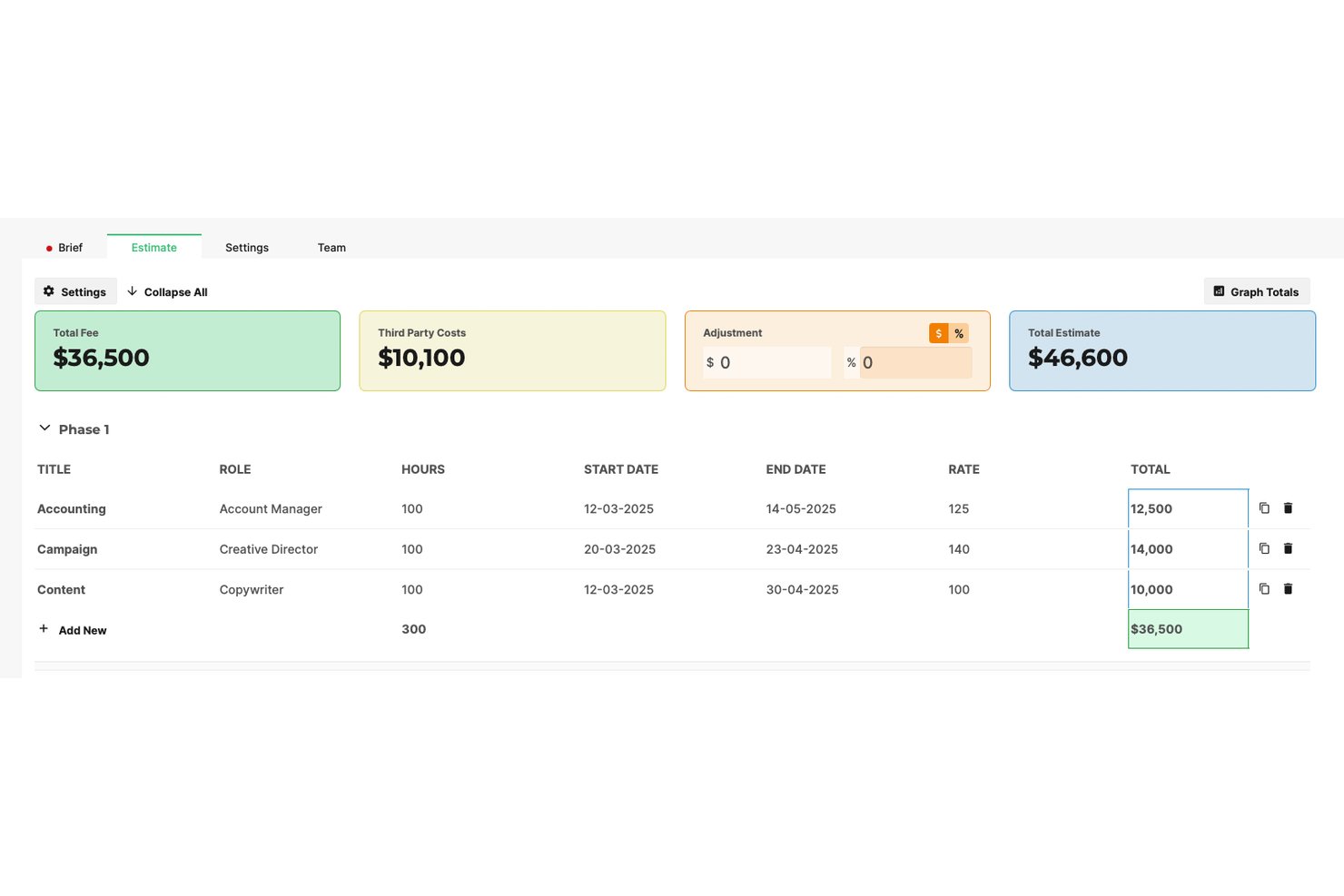
Screendragon is a workflow management platform for marketing and creative operations teams that combines connected estimating, custom rate card management, resource planning, and AI-powered workflow automation.
Who Is Screendragon Best For?
Screendragon suits mid-market to enterprise agencies and in-house marketing teams managing complex scopes, multi-role budgets, and high-volume client work.
Why I Picked Screendragon
I picked Screendragon because its rate card matrix engine goes further than most estimating tools I've seen. You can structure rates by role, by deliverable, or by client within the same project, which I find useful when scopes cross multiple disciplines. I also like the fallback rate logic: if a team member's role isn't on the active rate card, the system applies a pre-set default rate instead of logging a $0 cost, which prevents silent budget gaps.
Screendragon Key Features
- AI Hub and AI Foundry: Build and deploy custom AI agents within your creative workflow.
- Dynamic digital briefs: Use configurable templates with conditional logic for capturing scope details.
- Auto-routed approvals: Automatically route estimates and documents for time-stamped signoff.
- Pipeline management: Schedule and forecast resources for pending or tentative projects.
Screendragon Integrations
Screendragon offers native integrations with HubSpot, Microsoft Power BI, Ziflow, Brandfolder, Workato, and Smartsheet. An API is available for custom integrations.
Pros and Cons
Pros:
- Fall-back rate logic prevents silent budget gaps
- Multi-role budget structuring within single projects
- Custom rate card matrices for complex scopes
Cons:
- AI takeoff from drawings not supported
- Not purpose-built for construction estimating
New Product Updates from Screendragon
Screendragon Unveils New AI Hub
Screendragon introduced AI Hub, a new capability that lets teams build and manage AI agents directly within workflows. The update helps marketing teams automate tasks, maintain governance controls, and scale AI-driven operations more efficiently. For more information, visit Screendragon's official site.

STACK
Best for cost estimation

STACK is a construction estimating and takeoff software for contractors, subcontractors, and suppliers. It lets you perform takeoffs, estimate costs, and manage construction projects.
Why I picked STACK: The tool provides cost estimation features that are essential for accurately budgeting projects. You can upload plans, measure quantities, and build estimates with AI features like auto-counting symbols, detecting quantities, and pulling construction cost data from preloaded items. Its cloud-based nature lets your team access data from anywhere.
Standout features & integrations:
Features include a digital plan room that lets you organize and manage your project documents in one place and customizable templates that help you standardize your estimating process.
Integrations include Procore, QuickBooks, Sage, and Autodesk.
Pros and Cons
Pros:
- Supports real-time collaboration
- Customizable templates available
- Accurate cost estimation
Cons:
- Can be overkill for small projects
- Limited offline capabilities


ConstructConnect is a construction estimating software tool for large projects and enterprises. It offers features that help with project planning, bidding, and networking.
Why I picked ConstructConnect: This tool provides extensive project data, and the detailed analytics help you make informed decisions and reduce risks in project planning. With a focus on large projects, ConstructConnect facilitates collaboration across multiple stakeholders. Estimating tools include AI-assisted features like automatic item counting to cut takeoff time. Its comprehensive features make sure you have the right tools for effective project management.
Standout features & integrations:
Features include bid management tools that let you create and track bid packages and project intelligence that delivers daily updated data on active opportunities.
Integrations include Salesforce.
Pros and Cons
Pros:
- Comprehensive planning tools
- Detailed project analytics
- Supports large-scale operations
Cons:
- May be overkill for small projects
- Complex for new users


Hover is a visualization and measurement tool for home improvement professionals. It provides detailed exterior measurements and 3D models so you can offer accurate quotes and visual presentations.
Why I picked Hover: Hover uses AI to create a scaled 3D model of the space. From there, you can pull measurements, generate faster takeoffs, and explore design options with photorealistic visuals. The user-friendly interface lets you easily navigate and utilize its features without extensive training.
Standout features & integrations:
Features include the ability to convert photos into 3D models, photoreal design previews for exterior and interior spaces, and material list generation that connects to supplier catalogs.
Integrations include Xactimate, JobNimbus, AccuLynx, and Salesforce.
Pros and Cons
Pros:
- Ideal for home improvement projects
- Provides precise exterior measurements
- Converts photos into 3D models
Cons:
- Limited customization options
- May require high-quality photos


Togal.AI is a construction software solution for contractors and estimators who need takeoff capabilities. It automates the takeoff process, so you can generate quantities and estimates for your projects.
Why I picked Togal.AI: The tool's automatic takeoff feature reduces time spent on manual measurements. You can upload project plans and get instant quantities, which speeds up project turnaround. AI features like Togal.CHAT let you ask questions about plans and get instant answers. Its simplicity means your team can start using it with minimal training.
Standout features & integrations:
Features include instant analysis of drawing file types, AI-driven automations that reduce manual tasks, and collaboration tools that let team members work on takeoffs together.
Integrations include ServiceTitan.
Pros and Cons
Pros:
- Detailed reporting capabilities
- Cloud-based data access
- Fast automatic takeoff process
Cons:
- Can be costly for small teams
- May not suit small projects


Kreo is a construction software solution for architects, engineers, and project managers who need detailed insights and analytics. It offers tools for project planning, design, and estimating that help improve decision-making for construction projects.
Why I picked Kreo: The tool provides AI-driven insights that help you make data-informed decisions. You can access detailed project analytics that help maintain accuracy in estimates and designs. The platform lets your team collaborate on complex projects.
Standout features & integrations:
Features include customizable templates that let you build material and component databases and scenario modeling capabilities that help your team evaluate different project approaches.
Integrations include Contractor Foreman and Microsoft Excel.
Pros and Cons
Pros:
- Ideal for complex projects
- Supports scenario modeling
- Provides advanced project analytics
Cons:
- Not suited for simple projects
- Requires learning curve for analytics


Handoff is a construction management tool for remodelers, handymen, and fix-and-flip professionals. It lets you automate estimating processes and supports project management, client management, and invoicing.
Why I picked Handoff: The tool offers instant AI estimates and you can quickly generate accurate project proposals. The client management features help you maintain detailed records and improve communication with clients. Handoff also makes it easier to handle administrative tasks, and you can create and manage proposals and invoices.
Standout features & integrations:
Features include an AI agent that handles back-office tasks that reduce manual work for your estimating team and homeowner financing options, which can help you close deals faster.
Integrations include QuickBooks.
Pros and Cons
Pros:
- Supports detailed project management
- Streamlines client management
- Instant AI estimates
Cons:
- Limited customization options
- Meant for smaller projects


Beam AI is a construction management tool for architects and engineers that need 3D modeling and design. It offers features that help visualize complex projects and increase collaboration.
Why I picked Beam AI: The tool lets you create detailed 3D models, and you can easily manipulate design elements to maintain precision and creativity in your projects. The platform supports collaboration and lets you share and refine models. You can upload site plans and let the software’s AI generate takeoffs, quantities, and scope details. Features like BeamGPT can answer questions about codes, specs, or notes in your plans, which saves hours of review.
Standout features & integrations:
Features include advanced rendering capabilities that provide realistic visualizations of your designs and parametric modeling, which lets you adjust dimensions and parameters easily.
Integrations include Autodesk, Procore, PlanGrid, and Microsoft Teams.
Pros and Cons
Pros:
- Collaborative workspace for teams
- Supports parametric design adjustments
- 3D modeling capabilities
Cons:
- Can be expensive for small firms
- May need high-performance hardware


eTakeoff is a digital takeoff software for contractors and estimators. It lets users take accurate measurements and generate detailed estimates and improves project efficiency and accuracy.
Why I picked eTakeoff: The tool's digital takeoff capabilities let your team quickly measure and estimate project requirements. You can annotate and organize plans easily, which makes it simple to manage complex projects. AI-powered tools like SnapAI can detect and trace plan elements automatically. You can also customize views and reports to fit your specific needs.
Standout features & integrations:
Features include a library of measurement tools that let you perform precise calculations and customizable reporting which helps you tailor outputs to your requirements.
Integrations include Togal.AI.
Pros and Cons
Pros:
- Comprehensive measurement tools
- Customizable views and reports
- Precise digital takeoff capabilities
Cons:
- Basic collaboration features
- Can be resource-intensive
Annen AI-estimeringsprogramvare
Her er noen flere alternativer for AI-estimeringsprogramvare som ikke kom med på kortlisten min, men som likevel er verdt å undersøke:
- WorkPack
For construction teams
- zzTakeoff
For small contractors
- CountBricks
For construction material counting tasks
- Jobber
For field service
- NetSuite
For financial management
- Housecall Pro
For service businesses
- Procore
For construction management
- Autodesk Construction Cloud
For BIM integration
- Houzz Pro
For design professionals


How I Evaluate AI Estimating Software
Every tool on this list goes beyond slapping an AI label on a spreadsheet—I look for platforms where AI actually speeds up takeoffs, sharpens cost predictions, or catches scope gaps that manual review would miss. I split my evaluation into core functionality every tool must deliver and differentiating factors that separate good options from great ones.
Core Functionality (Table Stakes For This List)
When I'm selecting tools for my list, I rank each one on a scale from 0 (does not offer the functionality) to 5 (excels in this area) for each core functionality listed below. Then, I calculate the tool's total score into a percentage. Each tool needs to achieve a minimum total score of 65% to be considered for inclusion.
- AI-Powered Takeoff: I look for tools that auto-detect and measure elements from uploaded plans—like counting doors, calculating wall lengths, or quantifying concrete volumes—without manual tracing.
- Automated Cost Estimation: Each tool should apply labor, material, and equipment rates to quantified items using AI, not just let users plug numbers into a blank spreadsheet row by row.
- Historical Data Learning: I evaluate whether the platform learns from past projects to refine future estimates, such as flagging when a unit cost deviates from patterns in your completed project library.
- Document & Plan Ingestion: The tool should accept the file types estimators actually work with—PDFs, CAD, BIM/IFC, and Excel—and parse them for AI processing rather than requiring manual re-entry.
- Estimate Customization & Assemblies: I check whether users can build reusable assemblies (like a standard wall assembly with studs, drywall, and insulation) that AI can suggest and apply across new projects.
- PM & ERP Integration: Tools should connect estimates to downstream workflows in platforms like Procore, Sage, or Autodesk Construction Cloud so data flows into scheduling and budgeting.
Once I have a list of tools that meet the criteria, I consider what sets each platform apart.
Differentiating Factors (What Sets Vendors Apart)
Here's how I compare and contrast different vendors:
Standout Features
Confidence scoring is a big one for me—I want to see whether the AI flags low-certainty measurements so estimators know exactly where to focus manual review. Risk and contingency modeling adds another layer, especially when the AI can spot patterns like historical overruns on similar scopes and recommend contingency buffers. I also evaluate bid comparison analytics, where the tool benchmarks your estimate against past wins and losses to help sharpen pricing strategy before submission.
Beyond Features
AI model transparency matters a lot in this space. I check whether vendors disclose how their models are trained and whether users can correct misclassifications to improve accuracy over time. Data security is equally important—estimators upload proprietary bid data and drawings, so I look for clear policies on whether customer data trains shared models, plus certifications like SOC 2 or ISO 27001. I also evaluate trade specialization, since a tool built for MEP estimating will have very different prebuilt assemblies and cost databases than one designed for general contracting.
Slik velger du AI-estimeringsprogramvare
Det er lett å gå seg vill i lange funksjonslister og komplekse prisstrukturer. For å hjelpe deg med å holde fokus når du leter etter programvare, får du her en sjekkliste over faktorer du bør ha i tankene:
| Faktor | Hva du bør vurdere |
|---|---|
| Skalerbarhet | Vil programvaren vokse med virksomheten din? Vurder om den kan håndtere større prosjekter og flere brukere etter hvert som teamet ditt utvides. |
| Integrasjoner | Kobles den til de nåværende verktøyene dine? Kontroller kompatibiliteten med prosjektstyrings-, regnskaps- og andre verktøy du er avhengig av. |
| Tilpasningsmuligheter | Kan den tilpasses arbeidsflytene dine? Se etter muligheter for å justere maler, rapporter og kontrollpaneler slik at de passer til prosessene dine. |
| Brukervennlighet | Er grensesnittet brukervennlig? Sørg for at teamet ditt kan navigere i det uten omfattende opplæring og produktivitetsfall. |
| Implementering og introduksjon | Hvor raskt kan du komme i gang? Vurder tilgjengeligheten av opplæringsressurser og støtte for å fremskynde overgangen. |
| Kostnad | Passer den inn i budsjettet ditt? Sammenlign prisplaner og vurder totale eierkostnader, inkludert skjulte gebyrer og tilleggskostnader. |
| Sikkerhetstiltak | Hvordan beskytter den dataene dine? Vurder samsvar med bransjestandarder som GDPR, og se etter funksjoner som kryptering og regelmessige sikkerhetsoppdateringer. |
| Tilgjengelig kundestøtte | Kan du få hjelp når du trenger det? Se etter støttealternativer døgnet rundt, responstider og tilgjengeligheten av brukerfellesskap eller fora. |
Hva er AI-estimeringsprogramvare?
AI-estimeringsprogramvare er et verktøy som bruker kunstig intelligens til å automatisere og forbedre nøyaktigheten ved estimering av prosjektkostnader. Byggeledere, hovedentreprenører og arkitekter bruker disse verktøyene for å spare tid og redusere feil i budsjettering og planlegging.
Funksjoner som automatiserte mengdeberegninger, dataoppdateringer i sanntid og integrasjon med prosjekt- og byggeledelsessystemer hjelper deg med å levere raskere og mer pålitelige estimater for prosjektene dine og forbedre prosjektresultatene generelt.
Funksjoner i programvare for AI-kostnadsestimering
Når du velger programvare for AI-kostnadsestimering, bør du se etter følgende viktige funksjoner:
- Automatiserte mengdeberegninger: Måler og kvantifiserer automatisk prosjektelementer for å spare tid og redusere manuelle feil.
- Dataoppdateringer i sanntid: Gir umiddelbar tilgang til den nyeste prosjektinformasjonen, slik at du raskt kan ta velinformerte beslutninger.
- Integrasjonsmuligheter: Kobles sømløst til eksisterende verktøy for prosjektstyring og regnskap for å effektivisere arbeidsflytene dine.
- Tilpassbare maler: Lar brukerne tilpasse rapporter og estimater til spesifikke prosjektbehov og virksomhetens standarder.
- 3D-modellering: Tilbyr visuelle fremstillinger av prosjekter for å bidra til nøyaktig utforming og presentasjoner for kunder.
- Scenariomodellering: Lar deg evaluere ulike prosjekttilnærminger for å finne den mest effektive og kostnadseffektive veien videre.
- Avansert analyse: Gir innsikt som hjelper deg med å forbedre prosjektestimater og beslutningstaking.
- Skybasert tilgang: Lar team få tilgang til prosjektdata fra hvor som helst og legger til rette for fjernarbeid og samarbeid.
- Sikkerhetstiltak: Beskytter og krypterer sensitive prosjektdata og overholder bransjestandarder.
- Brukervennlig grensesnitt: Gjør programvaren enkel å ta i bruk, slik at team raskt kan begynne å bruke den uten omfattende opplæring.
Fordeler med programvare for AI-kostnadsestimering
Implementering av programvare for AI-kostnadsestimering gir flere fordeler for teamet og virksomheten din. Her er noen av fordelene du kan se frem til:
- Økt nøyaktighet: Automatiserte mengdeberegninger og dataoppdateringer i sanntid bidrar til å redusere menneskelige feil og forbedre nøyaktigheten i prosjektestimatene.
- Tidsbesparelser: Automatiserte prosesser og brukervennlige grensesnitt frigjør tid for teamet, slik at det kan konsentrere seg om mer strategiske oppgaver.
- Forbedret samarbeid: Skybasert tilgang og integrasjonsmuligheter lar team samarbeide mer effektivt, uansett hvor de befinner seg.
- Bedre beslutningstaking: Avansert analyse og scenariomodellering gir innsikt som hjelper teamet med å velge de beste prosjekttilnærmingene.
- Forbedrede kundepresentasjoner: Funksjoner som 3D-modellering tilbyr visuelle verktøy som hjelper deg med å kommunisere prosjektplaner og utforminger tydelig til kundene.
- Datasikkerhet: Sikkerhetstiltak beskytter sensitive prosjektdata mot uautorisert tilgang.
- Fleksibilitet: Tilpassbare maler lar deg tilpasse programvaren til dine spesifikke prosjektbehov og byggeselskapets standarder.
Kostnader og priser for programvare for AI-kostnadsestimering
Kostnadene for programvare for AI-kostnadsestimering varierer basert på funksjoner, teamstørrelse, tillegg og mer. Tabellen nedenfor oppsummerer vanlige abonnementer, priser og inkluderte funksjoner i programvare for AI-kostnadsestimering:
Sammenligningstabell for abonnementer for programvare for AI-kostnadsestimering
| Abonnementstype | Gjennomsnittspris | Vanlige funksjoner |
|---|---|---|
| Gratisabonnement | $0 | Grunnleggende verktøy for mengdeberegning, begrenset prosjektlagring og grunnleggende rapportering. |
| Personlig abonnement | $10-$30/bruker/måned | Automatiserte mengdeberegninger, oppdateringer i sanntid og integrasjon med grunnleggende verktøy. |
| Bedriftsabonnement | $40-$80/bruker/måned | Tilpassbare maler, avansert analyse og skybasert tilgang. |
| Abonnement for store virksomheter | $100-$150/bruker/måned | Fullstendige integrasjoner, 3D-modelleringsfunksjoner og dedikert kundestøtte. |
Vanlige spørsmål om AI-basert kalkuleringsprogramvare
Her er noen svar på vanlige spørsmål om AI-basert kalkuleringsprogramvare:
Hvordan kan AI brukes til kostnadsberegning i bygg og anlegg?
AI-funksjoner for kostnadsberegning i bygg og anlegg lar deg analysere data, forutsi kostnader og optimalisere ressursbruken. Disse verktøyene kan lære av historiske data, noe som forbedrer nøyaktigheten over tid, gjør det mulig for teamet ditt å ta informerte beslutninger og hjelper deg med å oppnå bedre prosjektresultater.
Er AI-verktøy for kostnadsberegning vanskelige å implementere?
De fleste AI-verktøy for kostnadsberegning er utviklet for enkel implementering og tilbyr brukervennlige grensesnitt og støtteressurser. Du bør regne med noe innledende oppsett og opplæring, men mange verktøy tilbyr veiledninger og kundestøtte for å hjelpe teamet ditt med å komme smidig i gang.
Hvordan ivaretar AI-verktøy for kostnadsberegning datasikkerheten?
AI-verktøy for kostnadsberegning iverksetter ulike sikkerhetstiltak for å beskytte dataene dine. Se etter funksjoner som kryptering, samsvar med bransjestandarder og regelmessige sikkerhetsoppdateringer. Det er viktig å vurdere sikkerhetsprotokollene til hvert enkelt verktøy for å sikre at dataene dine forblir trygge.
Kan AI-basert kalkuleringsprogramvare integreres med eksisterende systemer?
Mange AI-verktøy for kostnadsberegning tilbyr integrasjon med populære prosjektstyrings- og regnskapsprogrammer. Dette lar teamet ditt effektivisere arbeidsflyten og opprettholde konsistens på tvers av plattformer. Kontroller kompatibiliteten med de nåværende systemene dine for å sikre at integrasjonene er tilgjengelige.