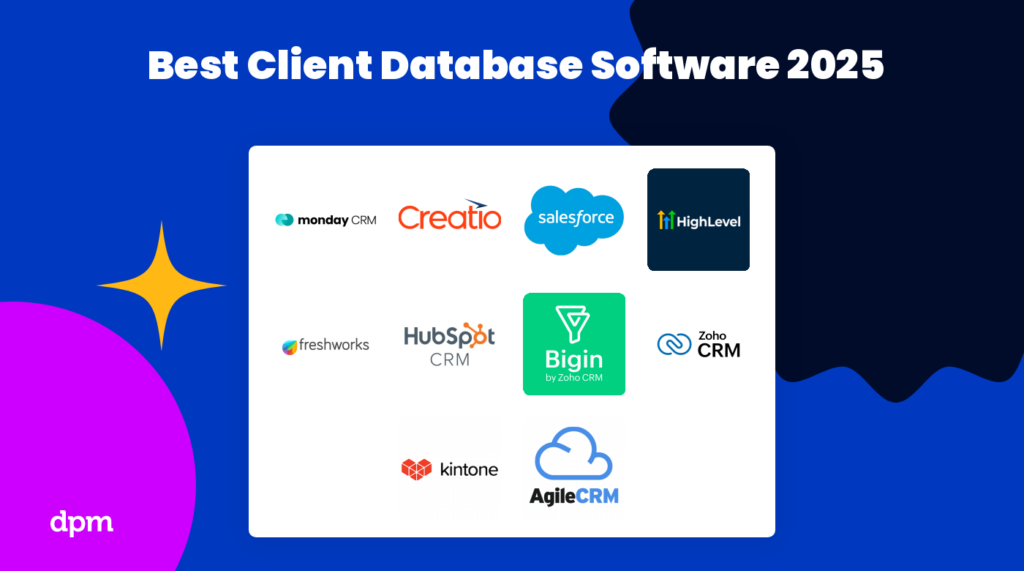
I 10 migliori software per database dei clienti e database della clientela per il 2026

10 Selezione dei migliori software per database clienti


Vuoi raccogliere, archiviare e gestire le informazioni sui tuoi clienti e hai bisogno dello strumento giusto per farlo. Tuttavia, l’ampia gamma di software per database clienti disponibili può rendere molto impegnativa la selezione dei migliori. Ci penso io!
In questo articolo utilizzo la mia esperienza personale nella gestione di una varietà di clienti e nell’utilizzo di molte piattaforme diverse per database clienti per compilare un elenco dei migliori strumenti per database clienti disponibili sul mercato.
Perché fidarsi dei nostri consigli sui software
Il nostro team testa e recensisce software dal 2012. In quanto project manager noi stessi, sappiamo quanto sia difficile — e importante — scegliere il software giusto.
Per questa guida, abbiamo valutato gli strumenti attraverso test pratici e ricerche indipendenti, assegnando un punteggio agli strumenti in base ai nostri criteri di selezione. Ci basiamo inoltre sulle competenze di leader di pensiero del settore e di professionisti attivi nella gestione dei progetti.
Le nostre recensioni riflettono il nostro giudizio editoriale umano, non un discorso di vendita.
Revisori esperti:
Tabella comparativa: software per database clienti \u0026 database dei clienti
Ecco una tabella riepilogativa con le informazioni essenziali: confronta facilmente prova gratuita, demo e prezzi.
| Tool | Best For | Trial Info | Price | ||
|---|---|---|---|---|---|
| 1 | Ideale per la visibilità sulla pipeline di vendita | Prova gratuita disponibile | Da $12/utente/mese (fatturazione annuale) | Website | |
| 2 | Software CRM basato su cloud che aiuta le aziende a gestire vendite, marketing e assistenza clienti | Prova gratuita di 30 giorni + demo gratuita disponibile | Da $25/utente/mese (fatturato mensilmente o annualmente) | Website | |
| 3 | Il miglior software per database clienti e consumatori per capacità di intelligenza artificiale | Prova gratuita di 15 giorni | Da $14/utente/mese fatturati annualmente. Dispone anche di una versione gratuita fino a 3 utenti. | Website | |
| 4 | Miglior database clienti per piccole imprese | Piano gratuito disponibile e prova gratuita di 15 giorni | A partire da $7/utente/mese (fatturato annualmente) | Website | |
| 5 | Tabelle personalizzate e ricercabili dove puoi creare il tuo database clienti e tenere traccia delle interazioni. | Piano gratuito + demo gratuita disponibile | Da $5/utente/mese | Website | |
| 6 | Database clienti e CRM che consente al tuo team di utilizzare punteggio dei lead basato su AI, telefono, email, acquisizione di attività e molto altro ancora | 21 giorni di prova gratuita | A partire da $12/utente/mese | Website | |
| 7 | Crea database clienti personalizzati con un costruttore di app drag-and-drop e automazioni del flusso di lavoro | 30 giorni di prova gratuita (senza carta di credito richiesta) | A partire da $24/utente/mese (minimo 5 utenti) | Website | |
| 8 | Gestisci e chiudi trattative raccogliendo informazioni da diverse fonti inclusi fogli di calcolo, LinkedIn o anche un biglietto da visita | 15 giorni di prova gratuita | Da $12/utente/mese | Website | |
| 9 | Ideale per massimizzare le conversioni, aumentare la fidelizzazione dei clienti e prendere decisioni migliori basate sui dati | Demo gratuita + prova gratuita di 14 giorni disponibile | Da $14/utente/mese (fatturazione annuale) | Website | |
| 10 | Software per la gestione di vendite e progetti con automazione, dati e analisi, integrato direttamente in Gmail | Prova gratuita di 14 giorni | Da $15/utente/mese | Website |


Recensioni dei migliori software per database clienti
Ecco una breve descrizione di ciascuno dei programmi software per database inclusi in questa lista dei 10 migliori.
Ideale per la visibilità sulla pipeline di vendita
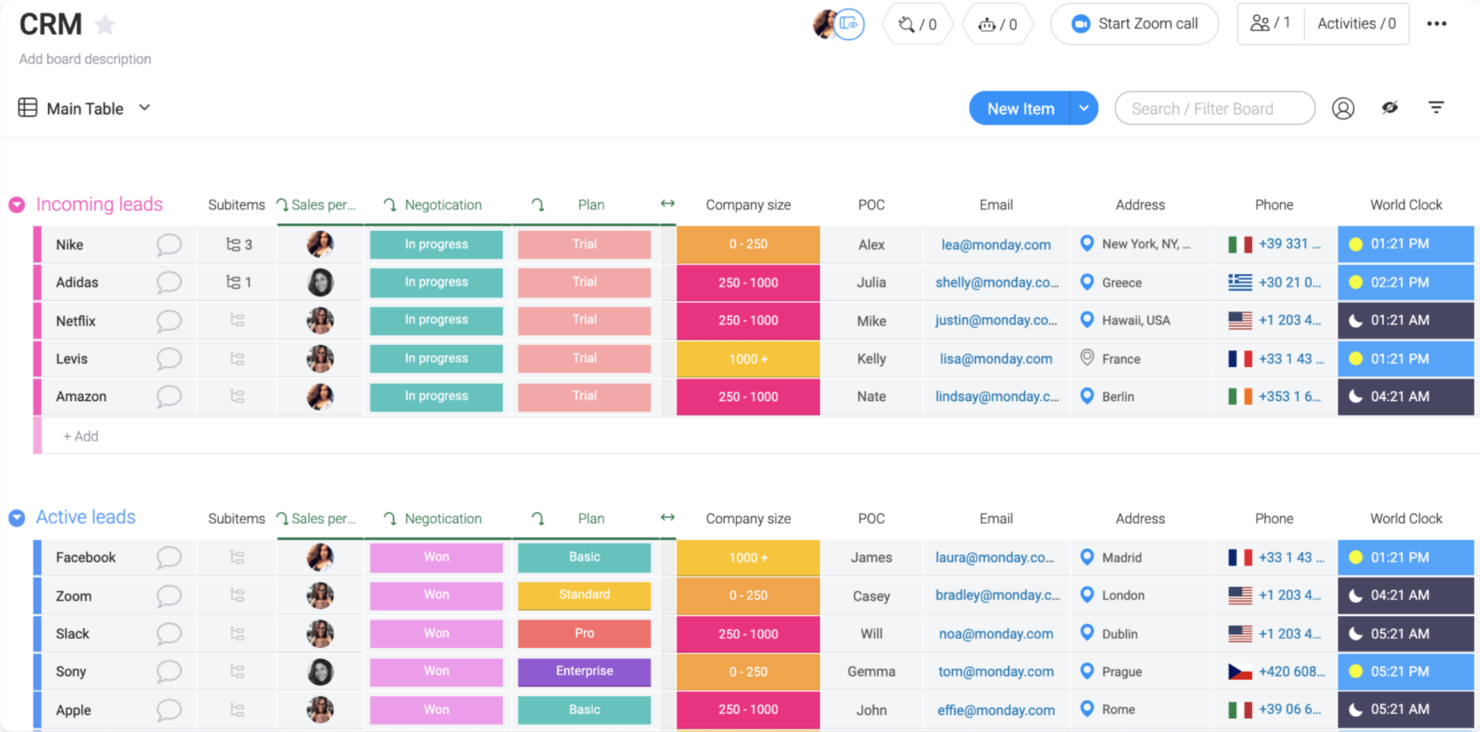
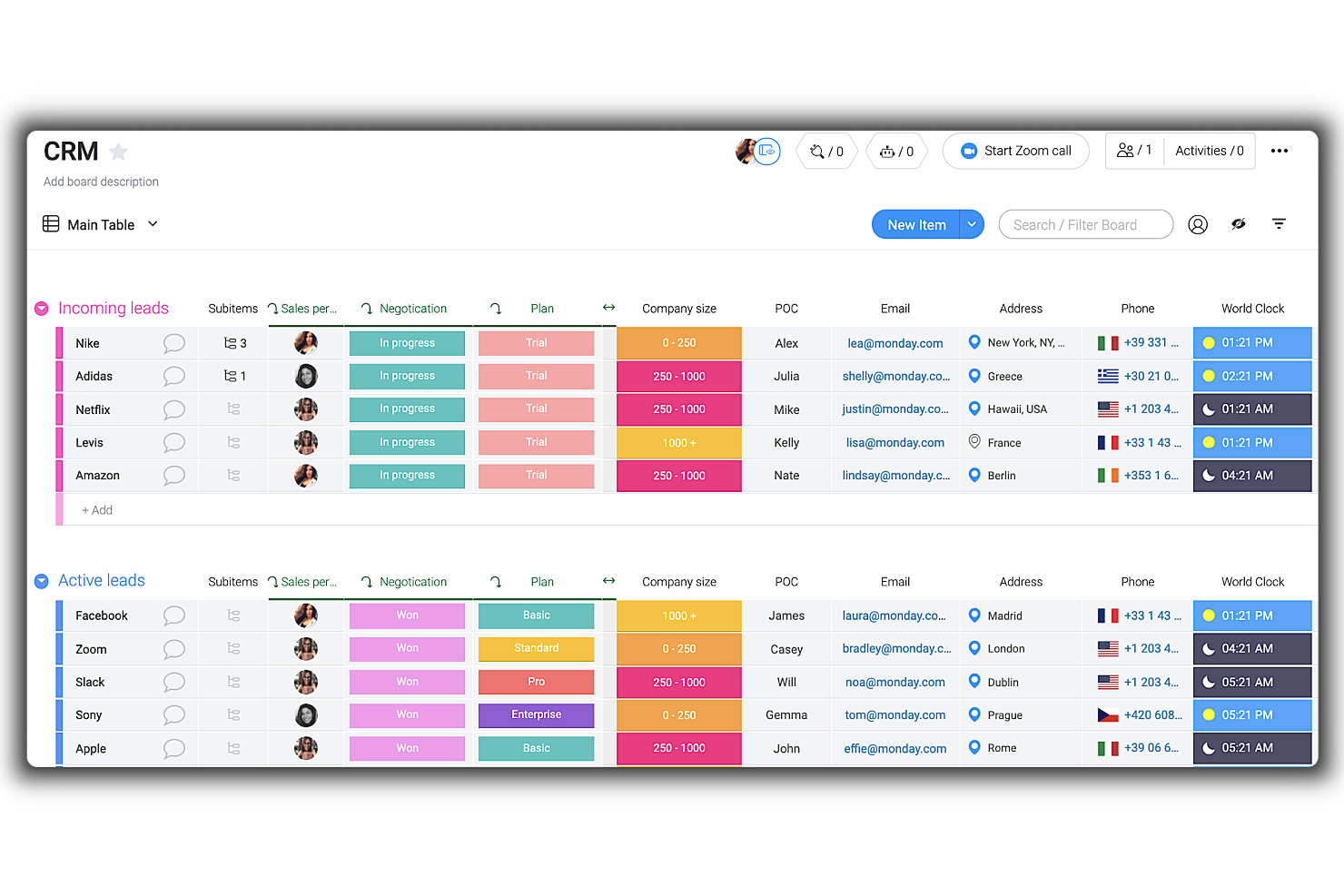
Monday sales CRM è uno strumento personalizzabile progettato per offrire alle aziende una chiara visibilità sulla propria pipeline di vendita. Centralizza la comunicazione con i clienti, automatizza i processi di vendita e offre una panoramica completa delle trattative, supportando la sua proposta di valore unica come miglior strumento per la visibilità della pipeline di vendita.
La natura altamente personalizzabile di questo strumento e le sue capacità di automazione sono fondamentali per adattare il sistema alle esigenze specifiche dell'azienda e ottimizzare le interazioni con i clienti. Una cosa che mi ha colpito è la facilità con cui gli utenti possono adattare il CRM ai propri flussi di lavoro senza bisogno di risorse di sviluppo, insieme a canali di comunicazione centralizzati per tutte le interazioni con i clienti.
Come molti altri strumenti, sta integrando l'IA nella sua piattaforma. Pertanto, monday.com utilizza l'IA per aiutare nella composizione delle email, attingendo da interazioni precedenti e da modelli di successo per migliorare la comunicazione. Il CRM offre inoltre la possibilità di inviare email di massa, la gestione delle attività per registrare tutte le interazioni con i clienti e il monitoraggio delle prestazioni tramite metriche chiave e KPI.
Dashboard personalizzabili, previsioni di vendita, definizione degli obiettivi, organizzazione strutturata dei dati, acquisizione di lead, automazioni senza codice e gestione visiva della pipeline di vendita sono ulteriori funzionalità che supportano i team di vendita nella gestione delle relazioni con i clienti e delle attività commerciali.
Monday sales CRM offre integrazioni con una vasta gamma di strumenti software per centralizzare i dati e automatizzare i processi di lavoro. Le principali integrazioni includono strumenti di comunicazione e collaborazione, come Outlook, Slack, Google Drive e Trello. Inoltre, per strumenti non elencati, gli utenti possono utilizzare l'API aperta per collegare il loro software preferito alla piattaforma CRM.
New Product Updates from monday CRM

monday CRM Adds Meta Conversions API Integration
monday CRM now lets you connect Meta Conversions API and sync lead status back to Meta, improving targeting and conversions via a new Meta integration automation recipe. For more information, visit monday CRM's official site.
Software CRM basato su cloud che aiuta le aziende a gestire vendite, marketing e assistenza clienti
Salesforce CRM è un sistema CRM basato su cloud che aiuta le aziende di tutte le dimensioni a migliorare il servizio clienti, i processi di vendita e le campagne di marketing. Consente agli utenti di archiviare tutti i dati dei clienti in un'unica posizione sicura e di accedervi da qualsiasi luogo con una connessione Internet. Questo permette di tracciare facilmente i clienti, analizzare i dati, creare report, gestire account, monitorare lead e molto altro. Include funzionalità come gestione dei lead, gestione dei contatti, gestione degli account, generazione di report e analisi. Altre funzionalità comprendono l'accesso mobile, così gli utenti possono accedere al sistema da qualsiasi dispositivo, l'integrazione con le email per inviare messaggi direttamente dal sistema e il monitoraggio delle attività che tiene traccia di attività come chiamate ed email inviate.
Salesforce consente alle aziende di gestire in modo efficace grandi quantità di dati, inclusi i dati di contatto dei clienti e i registri delle vendite. I dati possono essere organizzati in campi personalizzati, permettendo agli utenti di cercare rapidamente elementi specifici o visualizzare riepiloghi di dati su più campi. Inoltre, offre potenti strumenti di analisi che permettono agli utenti di individuare le principali tendenze nei loro dati. La funzione di segmentazione di Salesforce consente alle aziende di raggruppare i clienti in base a diversi criteri come posizione, cronologia degli acquisti e dati demografici. Questo rende più semplice per le aziende indirizzare gruppi specifici con campagne di marketing personalizzate e offerte speciali.
Salesforce offre funzionalità di segmentazione avanzate come la segmentazione dinamica che aggiorna automaticamente i segmenti in base alle nuove informazioni sui clienti. Con la crescita dell'azienda, gli utenti possono aggiungere funzionalità o servizi aggiuntivi senza dover acquistare altro software o hardware. Inoltre, poiché è basato su cloud non richiede costi di configurazione o manutenzione, rendendolo un'opzione interessante per aziende con budget o risorse limitati. Dispone di potenti misure di sicurezza come la crittografia e l'autenticazione a due fattori che garantiscono che tutti i dati dei clienti siano sempre protetti e al sicuro.
Le funzionalità includono gestione delle vendite, automazione del marketing, servizio clienti e supporto, collaborazione, personalizzazione, accesso mobile, integrazione, analisi & reportistica e sicurezza dei dati integrata.
Le integrazioni comprendono Google Workspace, Slack, Quickbooks, MailChimp, LinkedIn, Docusign, JIRA, HelloSign, Code Science, Active Campaign e Dropbox.
New Product Updates from Salesforce CRM

Salesforce CRM Adds Automated CMS Access Expiration
Salesforce CRM adds automated access expiration and a new view-only support role for Point of Sale CMS users. These controls reduce manual access cleanup and help teams limit unnecessary permissions. For more information, visit Salesforce CRM’s official site.
 .
.
Zoho CRM
Il miglior software per database clienti e consumatori per capacità di intelligenza artificiale
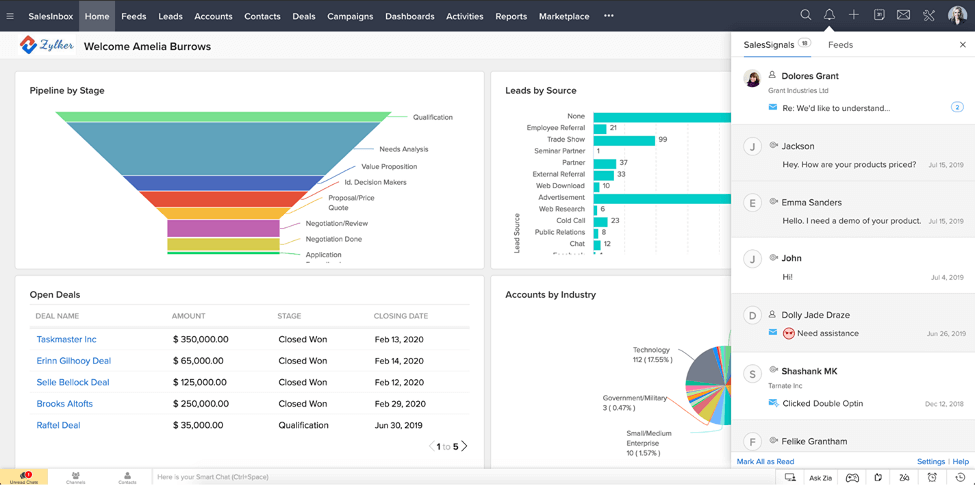
Zoho CRM è un software di gestione database clienti basato su cloud, facile da usare, con un'interfaccia semplice e flussi di lavoro altamente personalizzabili per generare, qualificare e coltivare lead trasformandoli in trattative e clienti fedeli.
Gli utenti possono tracciare la cronologia degli acquisti, le preferenze di prodotto e le informazioni personali su una timeline di attività che risale al primo contatto e alla fonte del lead. Lo strumento comprende filtri e campi avanzati per la fase della trattativa, la sorgente della campagna, lo stato dell'email, le note aggiunte e persino la percentuale di redditività.
È possibile scegliere tra report predefiniti o modelli di dashboard, oppure crearne di propri per visualizzare il comportamento dei clienti e le metriche sotto forma di grafici, KPI e funnel. I membri del team possono esportare i report in file Excel, CSV o PDF, incorporare dashboard su un sito web e/o renderli accessibili su un canale Slack.
Le funzionalità mobile consentono di registrare facilmente i dettagli dei potenziali clienti ovunque ci si trovi, visualizzare listini prezzi e accordi, e pubblicare aggiornamenti importanti sul forum del team o in chat. Un'altra funzione interessante è l'assistente alle vendite basato su intelligenza artificiale in grado di compilare automaticamente i campi vuoti nel CRM.
Zoho CRM dispone di oltre 40 integrazioni native e più di 500 integrazioni di terze parti che includono Google (G Suite), Microsoft Office 365, MailChimp, RingCentral, Quickbooks, Zapier, Xero e altre app popolari.
Zoho CRM parte da $14/mese con una prova gratuita di 15 giorni e offre anche una versione gratuita fino a 3 utenti.
New Product Updates from Zoho CRM

Zoho CRM Adds Workflow Automation for Subform Actions
Zoho CRM now lets you automate subform events with workflow rules, triggering actions when rows are added, edited, or deleted based on conditions. For more information, visit Zoho CRM's official site.
 .
.
Miglior database clienti per piccole imprese
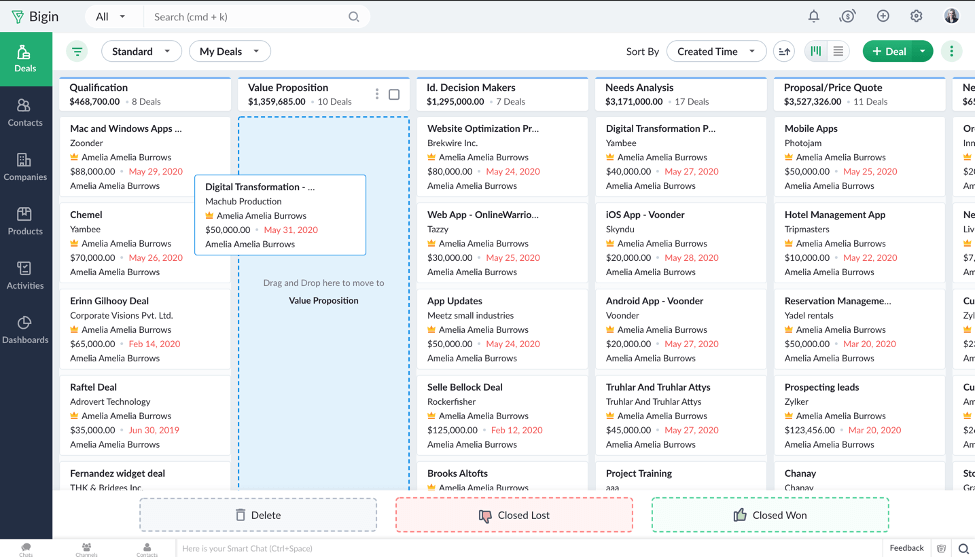
Bigin by Zoho CRM offre un database di clienti e contatti come una delle sue funzionalità principali. La piattaforma è un software di gestione delle relazioni con i clienti (CRM) snello che risponde alle esigenze delle piccole imprese. È intuitivo e facile da usare, e ti aiuta a tenere traccia delle anagrafiche dei clienti, gestire le comunicazioni con loro e automatizzare alcune parti del ciclo di vendita.
Il database centrale del software conserva in modo sicuro le informazioni di contatto di tutti i tuoi clienti. Puoi popolare il database importando dati da un foglio di calcolo esistente e raccogliere nuovi dati creando moduli personalizzati tramite il sistema. È possibile configurare campi personalizzati per rispecchiare al meglio le attività della tua azienda e assicurarti di raccogliere i dati giusti per ogni scheda cliente. Se necessario, puoi anche esportare i dati dal sistema.
Oltre a un database clienti, il software offre strumenti di comunicazione multicanale per aiutarti a gestire le interazioni telefoniche, email e sui social media con i clienti. Puoi impostare automazioni dei flussi di lavoro per spostare nuovi potenziali clienti lungo il funnel di vendita e monitorare le trattative in ogni fase grazie al builder di pipeline. Sono inoltre disponibili report personalizzati e una dashboard di analisi per aiutarti a monitorare i tuoi indicatori di performance.
I piani a pagamento partono da $7/utente/mese ed è disponibile una prova gratuita di 14 giorni.
New Product Updates from Bigin by Zoho CRM

Bigin iOS Adds Interactive WhatsApp Templates and Quick Replies
Bigin’s iOS app now supports interactive WhatsApp templates and Quick Replies, making it easier to preview and send instant messages to customers. For more information, visit Bigin by Zoho CRM's official site.
 .
.
ClickUp
Tabelle personalizzate e ricercabili dove puoi creare il tuo database clienti e tenere traccia delle interazioni.
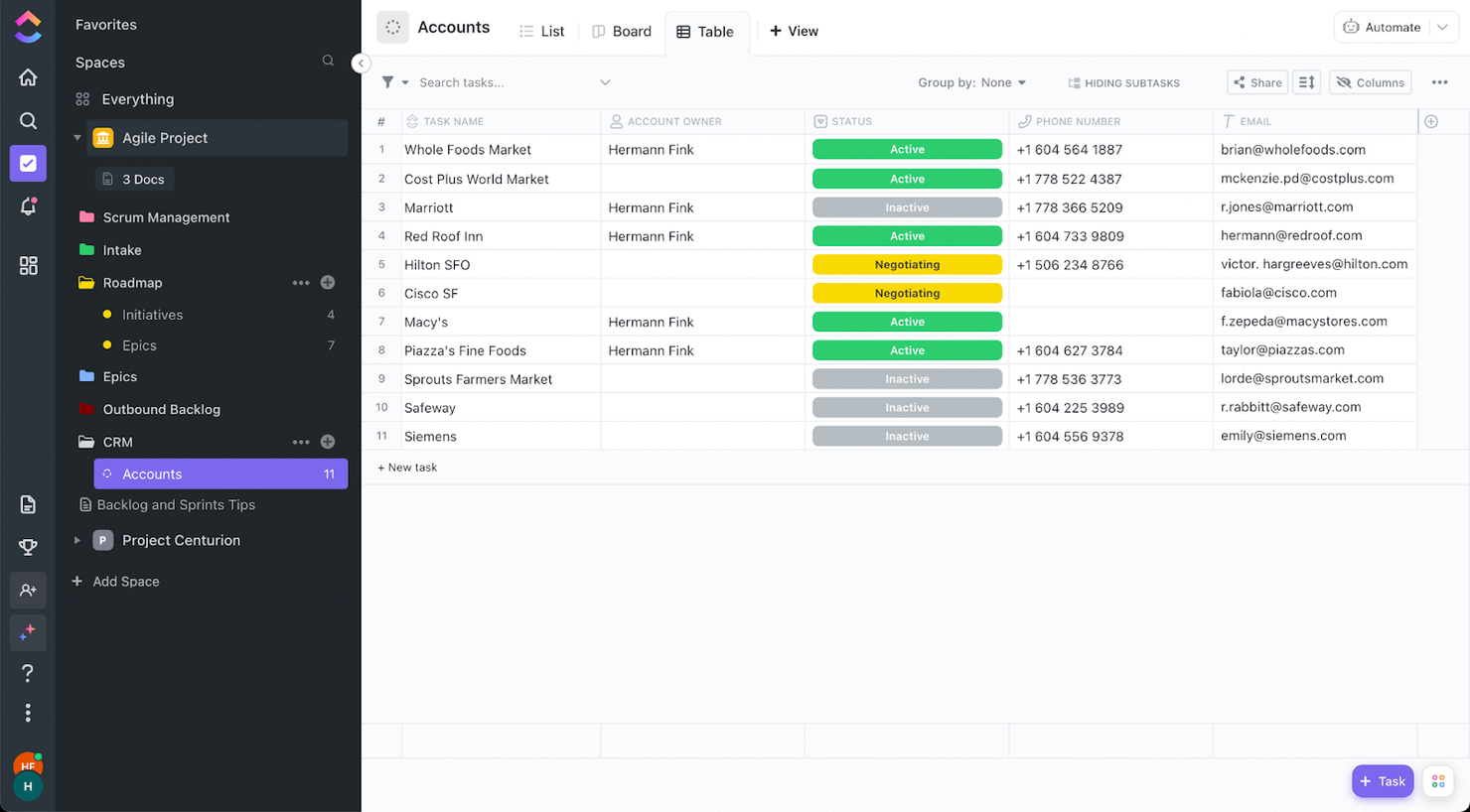
ClickUp è una piattaforma di gestione dei progetti che mira a sostituire molte delle app che attualmente utilizzi. Proprio per questa idea, offre uno strumento iper-personalizzabile in grado di soddisfare tutte le tue esigenze se decidi di investirci del tempo.
Se desideri avere il database dei tuoi clienti nello stesso luogo in cui gestisci i tuoi progetti, aggiungi una lista al tuo spazio e dai un nome. Ti consiglio di utilizzare la visualizzazione tabella perché, dopo aver aggiunto qualche campo e fatto delle modifiche, puoi trasformarla in una vista tipo CRM per i clienti.
Le sue funzionalità vanno ben oltre un semplice foglio di calcolo. Ogni elemento nel tuo database clienti si può aprire. All'interno di ogni record puoi registrare le interazioni con i clienti, aggiungere allegati e altro ancora. Ho già detto che puoi cercare i tuoi clienti nell'angolo in alto a sinistra della visualizzazione?
ClickUp offre integrazioni native con Slack, G Suite, Dropbox e molti altri strumenti, oltre a più di 1.000 integrazioni tramite Zapier.
ClickUp è gratuito con spazio di archiviazione limitato per un numero illimitato di utenti. I piani a pagamento partono da $5/utente/mese e prevedono una prova gratuita.
New Product Updates from ClickUp
ClickUp Adds Meetings Hub, Super Agent Templates, and ZoomInfo Integration
ClickUp adds a searchable Meetings Hub, new ways to clone and template Super Agents, and a ZoomInfo integration through the App Center. These updates improve meeting retrieval, agent reuse, and access to sales intelligence. For more information, visit ClickUp’s official site.
Database clienti e CRM che consente al tuo team di utilizzare punteggio dei lead basato su AI, telefono, email, acquisizione di attività e molto altro ancora
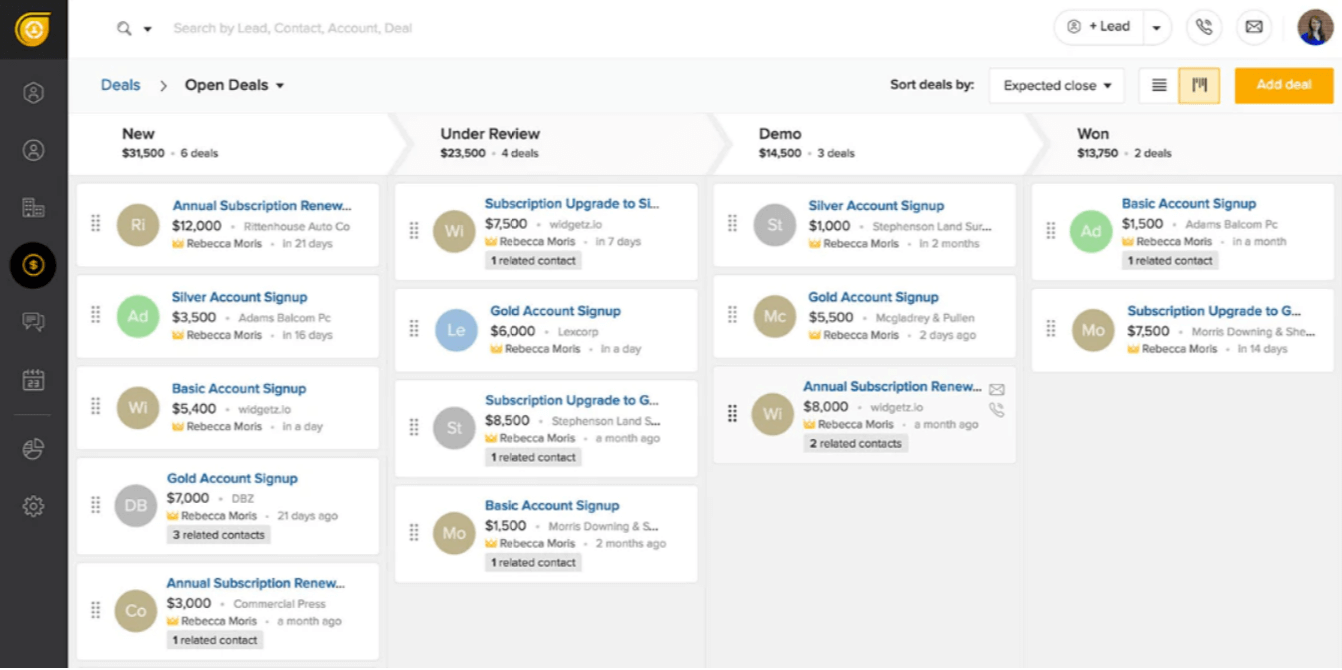
Con oltre 150.000 clienti e utenti, Freshsales mira a semplificare le soluzioni CRM. Per raggiungere questo obiettivo, offre punteggio dei lead basato su AI; acquisizione di chiamate, email e attività; assistenza nell'acquisizione di lead di vendita; gestione della pipeline di vendita; monitoraggio degli eventi (sito web e app); e molto altro ancora.
Freshsales eccelle nella segmentazione delle email, nello smistamento e nella visualizzazione per rilevanza. Questo strumento classifica le conversazioni in modo tale da renderle facili da recuperare e ordinare per cliente, e sfrutta anche al massimo i registri delle conversazioni (testo, chiamata, chat, email).
Le integrazioni native includono Freshdesk, Freshchat, Freshconnect, Freshcaller, Google Calendar, Mailchimp, Segment, Office 365 Calendar, Hubspot, Freshsales for Web, PieSync, Google Apps, Quickbooks, Google Contacts, Xero e molte altre tramite Zapier. Altre integrazioni includono Calendly, Facebook, GetAccept, Clenty, Justcall, Toky, 24sessions, Integromat, Akito, Trello, Magento e molto altro ancora.
Configurare e imparare a usare il software è stato piuttosto dispendioso in termini di tempo, facendo perdere qualche punto nella sezione Usabilità dei criteri di valutazione. In particolare, la migrazione da un'altra piattaforma CRM presenta diverse criticità.
Freshsales parte da $15/utente/mese e offre una prova gratuita di 21 giorni.
Kintone
Crea database clienti personalizzati con un costruttore di app drag-and-drop e automazioni del flusso di lavoro
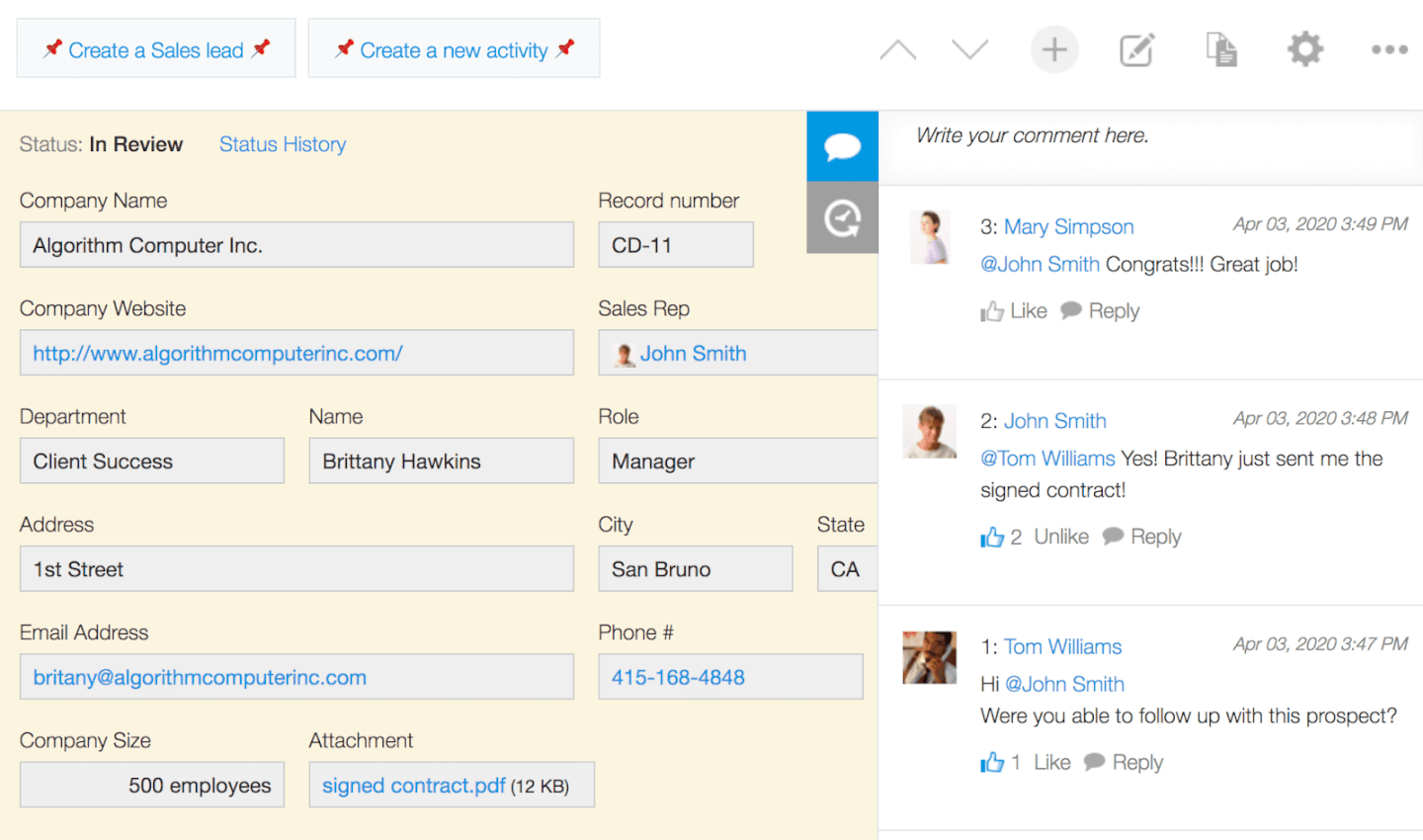
Kintone è uno strumento personalizzabile per la gestione di database clienti, utilizzato da team di Volvo Trucks North America, Japan Airlines, Shiseido e oltre 23.000 organizzazioni in tutto il mondo. Il loro approccio unico ai database clienti consente di creare una vasta gamma di “app” personalizzabili, partendo da zero, da modelli predefiniti oppure da fogli di calcolo già esistenti, per la gestione dei dati, dei processi aziendali e dei flussi di lavoro. Le app Kintone possono essere personalizzate per la gestione di progetti, CRM di vendita, database clienti e registri di attività, note spese, liste di cose da fare condivise, gestione attrezzature, feedback sui prodotti e molto altro.
Kintone permette di costruire app per database clienti trascinando e rilasciando gli elementi desiderati nella pagina: campi di testo avanzati, campi data, menu a tendina, campi numerici con calcoli integrati, spazi per allegati, menu di selezione utente o gruppo, dati collegati da altre app, tabelle e altro ancora.
Una volta creata l’app desiderata, puoi utilizzarla per gestire facilmente qualsiasi dato o attività che tu e il tuo team dovete monitorare. Con notifiche personalizzate, promemoria e dettagliate impostazioni dei permessi, la tua soluzione di database clienti può avere l’aspetto e il funzionamento che preferisci.
Ciò che rende Kintone particolarmente vantaggioso per i database clienti è la personalizzazione: gli utenti possono adattare le informazioni che il CRM registra e conserva, aggiornare e modificare campi o interi flussi di lavoro senza dover contattare il reparto IT e creare promemoria automatici per avvisare i membri del team vendite di scadenze importanti.
Le funzionalità di comunicazione integrate di Kintone permettono inoltre al tuo team di discutere di clienti o attività direttamente nel database e in thread tematici o relativi ai progetti. Gli “spazi” dedicati organizzano tutte le informazioni di cui il team ha bisogno sui clienti in un unico posto, inclusi database clienti, richieste e interazioni, e altro ancora.
Kintone ti consente di ampliare le sue funzionalità sia con plugin nativi gratuiti creati dal team Kintone, sia tramite integrazioni con altri strumenti come Slack, Gmail, Google Calendar, Outlook, Tableau, Dropbox, Salesforce, HubSpot, Eventbrite, WordPress, QuickBooks, MailChimp e molti altri, attraverso un piano a pagamento con Zapier o tramite integrazioni API.
Kintone costa $24/utente/mese con un requisito minimo di 5 utenti. È disponibile una prova gratuita di 30 giorni (senza necessità di carta di credito) e prezzi scontati per enti non profit ed educatori. Il team Kintone offre anche la realizzazione gratuita di un’app personalizzata all’interno del processo di prova gratuita.

noCRM.io
Gestisci e chiudi trattative raccogliendo informazioni da diverse fonti inclusi fogli di calcolo, LinkedIn o anche un biglietto da visita
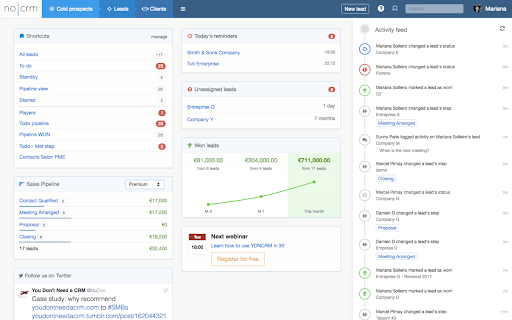
Il 'No' nel nome del software è una rappresentazione scherzosa della loro dedizione alla semplicità funzionale e a un onboarding senza sforzo. Pur mantenendo la facilità d’uso come elemento centrale, questo software consente agli utenti di definire i campi dei lead, personalizzare con widget, creare attività di vendita su misura e molto altro.
Fedele al suo nome e alla promessa di marketing, NoCRM è estremamente facile da usare e adottare. Offre anche una 'NoCRM Academy' ricca di risorse video per aiutare gli utenti a imparare a fondo lo strumento. Per questo motivo, ha ottenuto un punteggio molto alto nella categoria Usabilità dei nostri criteri di valutazione.
Le integrazioni includono G Suite, Quickbooks, PieSync, FreshBooks, RingCentral, Aircall, Xero, Tilkee, ActiveDEMAND e oltre 750 altre tramite Zapier.
L’unico vero svantaggio è la mancanza di strumenti per la creazione di campagne di email marketing. Sarà quindi necessario integrare queste funzionalità da soluzioni esterne.
NoCRM.io parte da $12/utente/mese e offre una prova gratuita di 15 giorni.

Ideale per massimizzare le conversioni, aumentare la fidelizzazione dei clienti e prendere decisioni migliori basate sui dati

Pipedrive è un software CRM per le vendite che ti aiuta a tenere traccia in modo efficace dei dati di clienti e contatti. Dispone anche di una pipeline di vendita visiva e drag-and-drop che ti consente di monitorare le opportunità in ogni fase del processo di vendita. La pipeline è personalizzabile, puoi crearne una da zero oppure utilizzare uno dei modelli preconfigurati offerti dal sistema.
Puoi aggiungere contesto alle schede dei clienti inserendo note, e la funzione smart data del sistema raccoglie ulteriori dati dal web per arricchire i tuoi record. Questo ti aiuta a mantenere le informazioni aggiornate, fornendo anche dati contestuali aggiuntivi che altrimenti potresti non avere.
Oltre alle funzionalità di pipeline di vendita e gestione dei record, il software include anche uno strumento per le email. Puoi collegare il tuo account email e inviare e ricevere messaggi direttamente dalla piattaforma, riducendo il passaggio tra app e centralizzando la comunicazione con i clienti. Sono inclusi anche strumenti di reportistica e analisi che ti offrono dati sulle performance di vendita e approfondimenti su quali opportunità è più probabile che si concludano, il tempo medio di chiusura trattativa e altro ancora.
Pipedrive si integra con altri strumenti di gestione contatti e vendite come Pipechat, Microsoft Teams, Trello, Slack, Zapier e altri. I piani partono da $21,90 per utente, al mese, ed è disponibile una prova gratuita di 14 giorni.

Streak
Software per la gestione di vendite e progetti con automazione, dati e analisi, integrato direttamente in Gmail

Streak CRM si integra direttamente con Gmail, così gli utenti possono gestire e monitorare la loro pipeline di vendita, i contatti e le email direttamente in G Suite. È anche possibile impostare promemoria per seguire facilmente attività e clienti.
Puoi importare ed esportare dati di clienti e potenziali clienti in qualsiasi formato, inclusi numeri, testo, elenchi, caselle di controllo, tag, formule, contatti e altro, rendendo lo strumento utile per tracciare e fare report sui dati. Streak CRM compilerà automaticamente dati come ‘Data di creazione’ o ‘Data dell’ultima email’.
Un’altra caratteristica interessante è la possibilità di condividere automaticamente email, note e registri delle chiamate con il tuo team, così puoi riprendere da dove gli altri hanno lasciato. Streak CRM offre anche un’app mobile, per semplicità d’uso e accesso.
L’API aperta di Streak CRM si integra con G Suite e Zapier per collegare Streak a qualsiasi app o strumento che usi già.
Streak CRM offre un piano base completamente gratuito. I piani a pagamento partono da $15/utente/mese.
Recensioni di altri software per database clienti
Ecco alcuni altri strumenti che non sono entrati tra i migliori, ma che meritano comunque la tua attenzione.
- Agile CRM
Un servizio SaaS basato su cloud che offre abilitazione alle vendite, automazione del marketing, servizio clienti e altro ancora
- Ontraport
Conserva ogni clic, acquisto e azione del cliente durante le tue campagne e utilizza landing page e moduli per attrarre nuovi clienti
- Salesforce Financial Services Cloud
Un sistema robusto di database clienti che aiuta a prevedere le vendite, migliorare la soddisfazione del servizio, l'automazione dei compiti e molto altro
- GoHighLevel
Ideale per la gestione centralizzata dei clienti di agenzia
- Tray.io
Un ottimo database per le piccole imprese, Tray.io offre programmi post-vendita come elaborazione post-vendita, onboarding, rilevamento del churn, ecc.
- Pipeline Deals
Piena visibilità sui conti dei clienti pre e post-vendita per gestire risultati chiave, dettagli di progetto, traguardi e scadenze
- All Clients
Un software di database basato sul web pensato per utenti non tecnici; include flussi di lavoro, funnel, modelli di email responsive e altro ancora
- Creatio CRM
Ideale per automazione no-code con viste cliente a 360 gradi
- Salesflare
Ideale per l'inserimento dati automatizzato


Come valuto il software di database clienti per le piccole imprese
Quando un project manager di agenzia partecipa a una chiamata con un cliente e ha bisogno di un contesto immediato—progetti passati, note, contatti—valuto due livelli: le caratteristiche di base indispensabili e i fattori che differenziano e distinguono gli strumenti.
Funzionalità di base (Prerequisiti per questa lista)
Quando seleziono gli strumenti per la mia lista, li valuto ciascuno su una scala da 0 (non offre la funzionalità) a 5 (eccelle in quest'area) per ogni funzionalità principale elencata qui sotto. Poi calcolo il punteggio totale dello strumento in percentuale. Ogni strumento deve ottenere un punteggio minimo totale del 65% per essere considerato per l'inclusione.
- Archiviazione centralizzata dei dati cliente: Cerco profili che memorizzano contatti, campi personalizzati e la cronologia dei progetti, così che il tuo team possa visualizzare un quadro completo del cliente in un'unica schermata.
- Tracciamento delle interazioni e comunicazioni: Ogni strumento dovrebbe registrare email, chiamate e note delle riunioni sulla timeline del cliente—non sepolte in una casella di posta separata o in un'app esterna.
- Collegamento progetti-clienti: Valuto quanto direttamente è possibile collegare una scheda cliente ai progetti e alle consegne attive—ad esempio, visualizzare tutto il lavoro aperto per un cliente con contratto continuativo.
- Gestione di documenti e file: Contratti, SOW e brief dovrebbero essere allegati alle schede cliente con tracciamento delle versioni, così non devi mai cercare tra le cartelle condivise durante una riunione.
- Segmentazione e filtraggio dei clienti: Verifico la presenza di tag, campi personalizzati e filtri salvati che permettano di ordinare i clienti per stato del progetto, tipologia di account o livello di coinvolgimento.
- Accessibilità per le piccole imprese: I livelli di prezzo, l'impegno per l'onboarding e la disponibilità delle funzionalità devono adattarsi a team da uno a venti membri senza richiedere budget o configurazioni di livello aziendale.
Dopo aver individuato gli strumenti che soddisfano questi criteri, considero ciò che rende ogni piattaforma unica.
Fattori differenzianti (Cosa distingue i fornitori)
Ecco come confronto e metto a confronto i vari fornitori:
Caratteristiche distintive
Le automazioni dei flussi di lavoro fanno davvero la differenza—quando una fase di progetto cambia, lo strumento dovrebbe far partire attività di follow-up o notifiche al cliente automaticamente. Cerco anche l'accesso al portale clienti, che consente ai clienti di controllare lo stato dei progetti e approvare consegne in autonomia, invece di scrivere sempre per avere aggiornamenti. Reportistica e insight sui clienti completano il quadro. Dashboard che mostrano la redditività dei progetti e la frequenza di coinvolgimento per account aiutano i piccoli team a capire dove concentrare l’attenzione.
Oltre le funzionalità
Il supporto all'integrazione è fondamentale. Verifico se uno strumento si collega nativamente a piattaforme di gestione progetti come Asana o Monday e se si sincronizza con Gmail o Outlook, poiché i piccoli team non possono permettersi di copiare dati manualmente tra i sistemi. Un altro fattore che considero è il tempo di attivazione—gli strumenti con importazione da CSV, configurazione guidata e modelli preimpostati permettono a un'agenzia di tre persone di iniziare a lavorare in un giorno invece che in una settimana. Anche la trasparenza dei prezzi incide molto nella mia valutazione, soprattutto se le funzionalità principali restano disponibili con i piani entry-level mentre il team cresce.
Come scegliere un software per database clienti
È facile perdersi in lunghi elenchi di funzionalità e strutture tariffarie complesse. Per aiutarti a rimanere concentrato mentre affronti il tuo particolare processo di selezione del software, ecco un elenco di controllo dei fattori da tenere a mente:
| Fattore | Cosa considerare |
| Scalabilità | Assicurati che il software possa crescere insieme alla tua azienda. Cerca opzioni che supportino un numero crescente di utenti, una maggiore capacità di archiviazione dei dati e funzionalità avanzate man mano che la tua base clienti si espande. |
| Integrazioni | Scegli un software che si colleghi perfettamente agli strumenti già utilizzati dal tuo team, come CRM, piattaforme di marketing via email e sistemi di fatturazione, per semplificare i flussi di lavoro. |
| Personalizzazione | Scegli una soluzione che ti permetta di adattare campi, disposizioni e visualizzazioni utente alle tue esigenze specifiche di monitoraggio dei clienti e alle tue preferenze di reportistica. |
| Semplicità d’uso | Cerca un software intuitivo che riduca al minimo i tempi di apprendimento, consentendo al tuo team di gestire i dati dei clienti senza frustrazione o formazione approfondita. |
| Budget | Scegli un software in linea con il tuo budget, tenendo conto di eventuali componenti aggiuntivi, livelli di utenza e costi futuri di espansione, per evitare di spendere troppo per funzionalità non necessarie. |
| Misure di sicurezza | Dai priorità alla protezione dei dati con una crittografia solida, aggiornamenti di sicurezza regolari e controlli degli accessi basati sui ruoli, per proteggere le informazioni sensibili dei clienti. |
| Strumenti di reportistica | Scegli un software che offra report e analisi completi, consentendoti di ottenere informazioni sulle tendenze dei dati dei clienti, sulle metriche di coinvolgimento e altro ancora. |
| Assistenza clienti | Seleziona un fornitore con opzioni di assistenza accessibili e reattive (ad esempio, chat dal vivo e assistenza telefonica) per aiutarti con la configurazione, la risoluzione dei problemi e le domande ricorrenti. |
Tendenze del software per database dei clienti per 2026
Nella mia ricerca, ho raccolto innumerevoli aggiornamenti di prodotto, comunicati stampa e registri delle versioni di diversi fornitori di software per la gestione dei clienti. Ecco alcune delle tendenze emergenti che sto tenendo d'occhio:
- Analisi basate sull'intelligenza artificiale: sempre più fornitori utilizzano l'intelligenza artificiale nelle piattaforme di gestione dei dati dei clienti per analizzare i dati e fornire informazioni utili, ad esempio consigliando i momenti ideali per interagire o identificando i clienti di alto valore. Questa tendenza aiuta le aziende a prendere decisioni più intelligenti e a personalizzare le interazioni con i clienti in modo più efficace.
- Analisi predittiva: gli strumenti predittivi stanno diventando sempre più popolari e consentono alle aziende di prevedere le esigenze dei clienti sulla base dei dati storici. Ad esempio, le soluzioni CRM per i clienti evidenziano ora i clienti pronti per una vendita aggiuntiva o a rischio di abbandono, aiutando i team a interagire proattivamente con loro.
- Progettazione incentrata sulla privacy: con leggi più severe sulla privacy dei dati, le piattaforme di gestione dei database si concentrano sempre più su funzionalità orientate alla privacy, come controlli di accesso degli utenti personalizzabili e crittografia dei dati integrata. Questo aiuta gli utenti a rispettare normative come il GDPR e a proteggere le informazioni dei clienti.
- Analisi del sentiment: il monitoraggio del sentiment viene ora integrato nelle applicazioni di database online per valutare la soddisfazione dei clienti attraverso interazioni e feedback. Alcuni software online per la gestione dei clienti offrono persino una valutazione automatizzata del sentiment a partire da e-mail o messaggi di chat, aiutando le aziende a dare priorità ai ricontatti.
- Riconoscimento vocale e testuale: i fornitori stanno aggiungendo funzionalità di riconoscimento vocale e testuale per acquisire le interazioni con i clienti nei loro sistemi di gestione dei clienti. Ciò consente di trascrivere automaticamente le chiamate e documentare le chat, facilitando la registrazione e la revisione delle interazioni senza inserimenti manuali.
Che cos'è il software per database dei clienti?
Il software per database dei clienti è uno strumento per archiviare, organizzare e gestire le informazioni sui clienti. In genere include funzionalità per registrare i dati di contatto, la cronologia delle interazioni, le preferenze e le transazioni. Questo software fornisce alle aziende un sistema strutturato per tenere traccia delle informazioni sui clienti in un'unica posizione centralizzata.
I vantaggi dell'utilizzo degli strumenti per database dei clienti includono una migliore gestione delle relazioni con i clienti, un'organizzazione efficiente dei dati e un servizio clienti personalizzato potenziato attraverso efficaci processi di onboarding dei clienti. Consentono strategie di comunicazione mirate basate sulle informazioni sui clienti, supportano il processo decisionale basato sui dati e aiutano a identificare le opportunità di vendita. Inoltre, fanno risparmiare tempo semplificando la gestione delle informazioni sui clienti e garantiscono una maggiore sicurezza per i dati sensibili dei clienti.
Funzionalità del software per database dei clienti
Quando selezioni un software per database dei clienti, presta attenzione alle seguenti funzionalità chiave:
- Organizzazione dei contatti: fornisce un database centralizzato dei contatti per archiviare e organizzare i dettagli dei clienti, garantendo un accesso rapido e semplice alle informazioni sui clienti.
- Monitoraggio delle interazioni con i clienti: registra tutte le interazioni con i clienti, consentendo al software per la gestione dei contatti di vendita di monitorare i ricontatti e mantenere una cronologia completa delle comunicazioni.
- Segmentazione: consente agli utenti di raggruppare i clienti in base a dati demografici o comportamenti di acquisto, rendendo molto più semplice l'organizzazione del database dei contatti di vendita e marketing e la comunicazione mirata.
- Promemoria automatici: invia promemoria per ricontatti e attività, aiutandoti a rispettare il programma.
- Archiviazione dei documenti: consente di archiviare i documenti in un unico luogo, una funzione fondamentale per un programma di gestione dei clienti che gestisce grandi quantità di documentazione sui clienti.
- Campi personalizzabili: consente di adattare il software alle tue esigenze specifiche creando campi personalizzati.
- Report e analisi: fornisce informazioni preziose sulle tendenze dei dati dei clienti e sulle metriche delle prestazioni, particolarmente importanti per gli strumenti di gestione dei clienti che si concentrano sul monitoraggio del coinvolgimento dei clienti.
- Importazione/esportazione dei dati: semplifica il trasferimento dei dati da altre opzioni di soluzioni di database online, garantendo l'integrazione con gli strumenti esistenti ed evitando i silos di dati.
- Controllo degli accessi basato sui ruoli: consente di controllare l'accesso ai dati sensibili dei clienti, una funzionalità spesso inclusa nei software di gestione dei clienti per garantire la sicurezza delle informazioni.
- Funzionalità di integrazione: collega il software ad altri strumenti, come software per database di e-mail e sistemi contabili, rendendo il software per la creazione di database altamente versatile per un flusso di lavoro fluido tra i reparti.
Vantaggi del software per database dei clienti
L'implementazione di un software per database dei clienti può offrire diversi vantaggi al tuo team e alla tua azienda. Eccone alcuni che puoi aspettarti:
- Organizzazione migliorata: Mantiene tutte le informazioni sui clienti in una base dati centralizzata dei contatti, facilitando l'accesso ai dettagli, alla cronologia delle interazioni e alle note quando necessario.
- Relazioni migliori con i clienti: Tiene traccia delle interazioni e imposta promemoria per i ricontatti, una funzione utile per le aziende che utilizzano software per l'organizzazione dei clienti per rimanere in contatto e costruire solide relazioni con i clienti.
- Risparmio di tempo: Automatizza attività di routine come l'inserimento dei dati e gli avvisi di ricontatto, liberando tempo per attività di maggior valore.
- Collaborazione di team migliorata: Consente a più membri del team di accedere e aggiornare i record all'interno di un software di database basato sul web, garantendo che tutti siano informati e allineati sulle esigenze dei clienti.
- Decisioni basate sui dati: Offre analisi e report per rivelare le tendenze dei clienti e supportare un processo decisionale migliore.
- Maggiore sicurezza dei dati: Fornisce accesso basato sui ruoli e crittografia, elementi essenziali per mantenere la riservatezza dei dati all'interno di un database software che archivia informazioni sensibili sui clienti.
- Scalabilità: Cresce insieme alla tua attività, supportando nel tempo un numero maggiore di utenti e contatti, risultando ideale sia per le piccole sia per le grandi organizzazioni alla ricerca della migliore soluzione di database dei contatti per le proprie esigenze.
Costi e prezzi del software per database dei clienti
La scelta di un software per database dei clienti richiede la comprensione dei vari modelli e piani tariffari disponibili. I costi variano in base alle funzionalità, alle dimensioni del team, ai componenti aggiuntivi e ad altri fattori. La tabella seguente riassume i piani più comuni, i relativi prezzi medi e le funzionalità tipicamente incluse nei software per la gestione dei clienti:
Tabella di confronto dei piani per il software per database dei clienti
| Tipo di piano | Prezzo medio | Funzionalità comuni |
| Piano gratuito | $0 | Archiviazione di base dei contatti, importazione/esportazione dei dati limitata e report di base. |
| Piano personale | $5-$25/utente/mese | Gestione dei contatti, monitoraggio delle interazioni, personalizzazione limitata e analisi di base. |
| Piano aziendale | $30-$50/utente/mese | Segmentazione avanzata dei clienti, automazione delle attività, sicurezza migliorata, campi personalizzabili e supporto per i team. |
| Piano per grandi aziende | $60-$100/utente/mese | Archiviazione illimitata, integrazioni personalizzate, report e analisi avanzati, supporto prioritario e funzionalità per la conformità. |
Domande frequenti sul software per database clienti
Approfondire la conoscenza dei database aziendali è un buon punto di partenza. Anche se può sembrare un argomento di base, una rapida panoramica è utile per prepararsi mentalmente prima di addentrarsi nelle specifiche del software. Ecco alcune domande frequenti per iniziare.
Che cos'è un database clienti?
Quali sono alcuni dei diversi tipi di software per database?
Quali tipi di dati dei clienti possono essere raccolti?
Qual è il miglior software per database Windows?
Che cos'è la segmentazione dei contatti?
Quali sono alcune delle difficoltà nella gestione dei database?