I 10 migliori software per il monitoraggio del tempo per commercialisti nel 2026

10 Miglior software per il monitoraggio del tempo per commercialisti: selezione


Monitorare il tempo in modo efficiente può essere una vera sfida per i commercialisti. Con così tante attività da gestire, è facile perdere traccia delle ore fatturabili. Il software per il monitoraggio del tempo può aiutare te e il tuo team a gestire questo aspetto, assicurandovi che ogni minuto impiegato venga conteggiato.
Ho testato e recensito in modo indipendente una serie di strumenti per il monitoraggio del tempo pensati per i commercialisti. Nella mia esperienza, questi strumenti non solo migliorano la precisione, ma fanno anche risparmiare tempo prezioso.
In questo articolo troverai le mie scelte migliori per il software di monitoraggio del tempo. Ti illustrerò le loro funzionalità, i vantaggi e il modo in cui possono adattarsi al tuo flusso di lavoro. Che tu faccia parte di un piccolo studio o di un grande team di contabilità, qui troverai sicuramente una soluzione adatta a te.
Perché fidarsi dei nostri consigli sui software
Il nostro team testa e recensisce software dal 2012. In quanto project manager noi stessi, sappiamo quanto sia difficile — e importante — scegliere il software giusto.
Per questa guida, abbiamo valutato gli strumenti attraverso test pratici e ricerche indipendenti, assegnando un punteggio agli strumenti in base ai nostri criteri di selezione. Ci basiamo inoltre sulle competenze di leader di pensiero del settore e di professionisti attivi nella gestione dei progetti.
Le nostre recensioni riflettono il nostro giudizio editoriale umano, non un discorso di vendita.
Revisori esperti:
Tabella comparativa dei software per il monitoraggio del tempo per commercialisti
Questa tabella comparativa riassume i dettagli sui prezzi delle mie migliori scelte di software per il monitoraggio del tempo per commercialisti:
| Tool | Best For | Trial Info | Price | ||
|---|---|---|---|---|---|
| 1 | Ideale per la fatturazione multi-entità e la redditività | Prova gratuita di 14 giorni + demo gratuita disponibile | A partire da $17/utente/mese | Website | |
| 2 | Ideale per tracciare ore fatturabili | Demo gratuita + prova gratuita di 14 giorni disponibile | A partire da $4.49/utente/mese | Website | |
| 3 | Ideale per integrazioni flessibili | Piano gratuito + prova gratuita di 30 giorni + demo gratuita disponibile | Da $9/utente/mese (fatturato annualmente) | Website | |
| 4 | Ideale per report dettagliati e analisi dei dati | Piano gratuito + prova gratuita di 30 giorni + demo gratuita disponibile | A partire da $6/utente/mese (fatturato annualmente) | Website | |
| 5 | Ideale per le funzionalità di reportistica | Piano gratuito + prova gratuita di 7 giorni disponibile | A partire da $3.99/utente/mese (con fatturazione annuale) | Website | |
| 6 | Ideale per integrazione con payroll | Prova gratuita + demo gratuita disponibile | Da $20/mese + $8/utente/mese (fatturazione annuale) | Website | |
| 7 | Ideale per il monitoraggio automatico | Prova gratuita di 14 giorni + demo gratuita disponibile | A partire da $9/utente/mese (fatturazione annuale) | Website | |
| 8 | Ideale per la gestione dei progetti | Prova gratuita di 14 giorni + piano gratuito + demo gratuita disponibile | Da $8/utente/mese (fatturazione annuale) | Website | |
| 9 | Ideale per il monitoraggio delle presenze | Prova gratuita di 14 giorni + piano gratuito + demo gratuita disponibile | A partire da $3.99/utente/mese (fatturato annualmente) | Website | |
| 10 | Ideale per studi contabili | Demo gratuita disponibile | Da $59/utente/mese (fatturazione annuale) | Website |


Recensioni dei migliori software per il monitoraggio del tempo per commercialisti
Di seguito trovi i miei riepiloghi dettagliati dei migliori software per il monitoraggio del tempo per commercialisti inclusi nella mia selezione. Le mie recensioni offrono uno sguardo approfondito alle funzionalità principali, ai pro e & contro, alle integrazioni e ai casi d’uso ideali di ogni strumento, per aiutarti a trovare quello più adatto a te.

Scoro
Ideale per la fatturazione multi-entità e la redditività
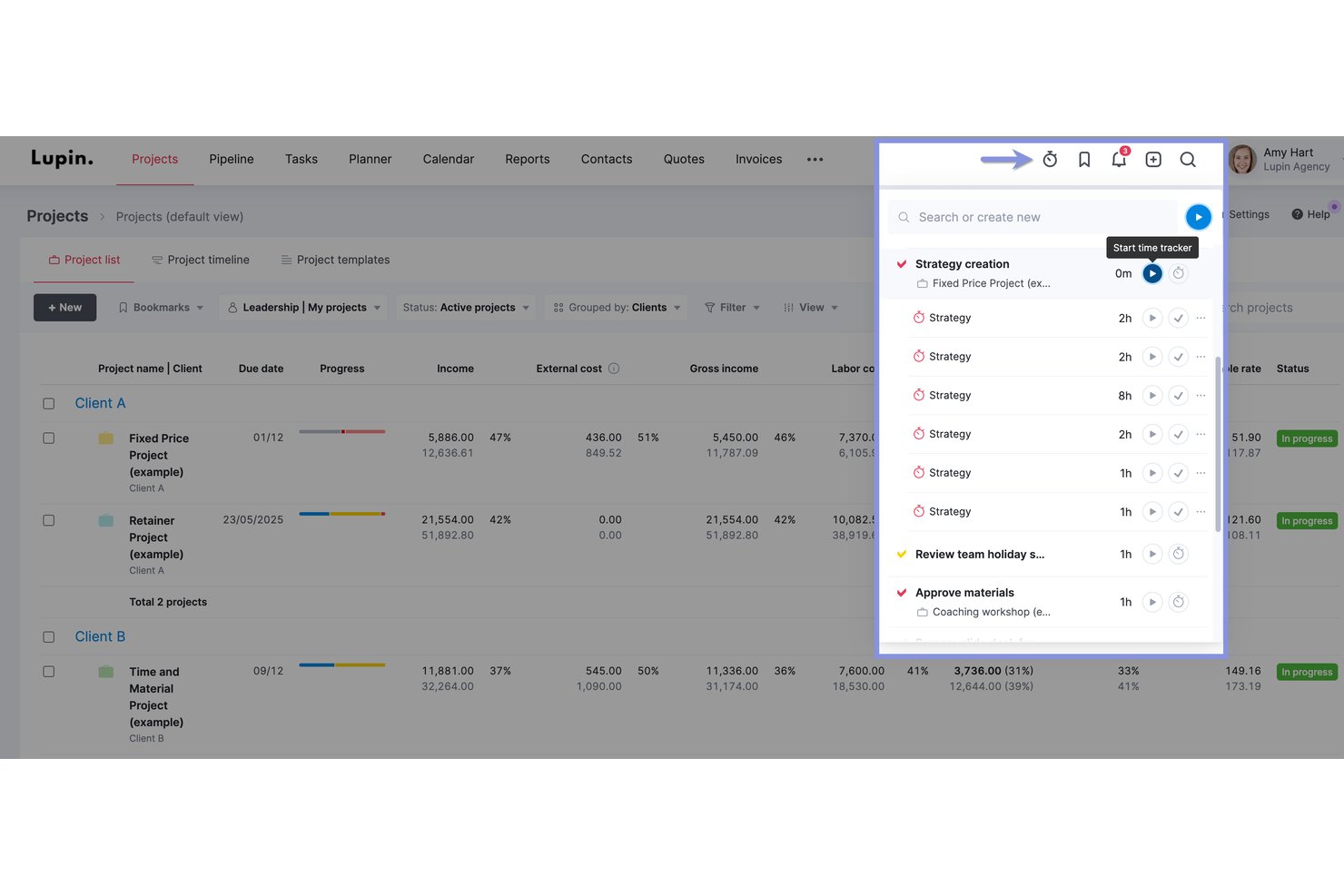
Scoro è una piattaforma di automazione per i servizi professionali che combina il monitoraggio del tempo, la definizione del budget dei progetti, la fatturazione e i report sulla redditività con integrazioni native bidirezionali con QuickBooks, Xero e Sage Intacct.
Per chi è più adatto Scoro?
Scoro è particolarmente adatto alle aziende di contabilità e servizi professionali del mercato intermedio che gestiscono molteplici incarichi per i clienti, entità o valute con un team di almeno cinque persone.
Perché ho scelto Scoro
Ho scelto Scoro come una delle soluzioni migliori perché la sua fatturazione multi-entità e i report sulla redditività in tempo reale sono realmente adatti agli studi contabili che gestiscono servizi di consulenza e incarichi ricorrenti attraverso più sedi o entità giuridiche. Ogni entità può avere la propria valuta e le proprie impostazioni finanziarie, mentre i report WIP e la fatturazione dei compensi ricorrenti vengono eseguiti in parallelo. Mi piace anche il fatto che le previsioni degli utili si aggiornino in tempo reale man mano che viene registrato il tempo, così non devi mai andare a tentativi per capire a che punto si trova un incarico per un cliente in termini di margine.
Funzionalità principali di Scoro
- Flusso di approvazione dei fogli presenze: I responsabili esaminano e approvano i fogli presenze precompilati inviati dai membri del team prima che il tempo venga bloccato e fatturato.
- Promemoria automatici per i fogli presenze: Gli amministratori possono configurare fino a cinque promemoria via e-mail per sollecitare il personale a inviare i fogli presenze non ancora presentati delle ultime otto settimane.
- Supporto multi-valuta: Ogni incarico per un cliente o entità può essere gestito nella propria valuta, con impostazioni finanziarie applicate in modo indipendente.
- Integrazioni contabili native bidirezionali: Scoro sincronizza fatture, pagamenti e contatti in entrambe le direzioni con QuickBooks, Xero, Sage Intacct ed Exact Online.
Integrazioni di Scoro
Scoro offre integrazioni native bidirezionali con QuickBooks, Xero, Sage Intacct ed Exact Online, oltre a integrazioni con Jira, Google Calendar, Microsoft 365, HubSpot, Salesforce, Slack e Avalara. Supporta inoltre integrazioni personalizzate tramite la sua API REST pubblica e Zapier.
Pros and Cons
Pros:
- Previsioni della redditività in tempo reale per gli incarichi dei clienti
- Sincronizzazione bidirezionale nativa con le principali piattaforme contabili
- La fatturazione multi-entità supporta i team contabili internazionali
Cons:
- Il blocco del tempo e le funzionalità WIP sono disponibili solo a determinati livelli
- Non è stato progettato specificamente per i flussi di lavoro contabili
New Product Updates from Scoro

Scoro Adds Time Mobile App and ELI Improvements
Scoro adds the Scoro Time mobile app for iOS/Android to track time anywhere and expands ELI with attachments, smarter filtering, and trigger-based actions. For more information, visit Scoro's official site.

Ideale per tracciare ore fatturabili
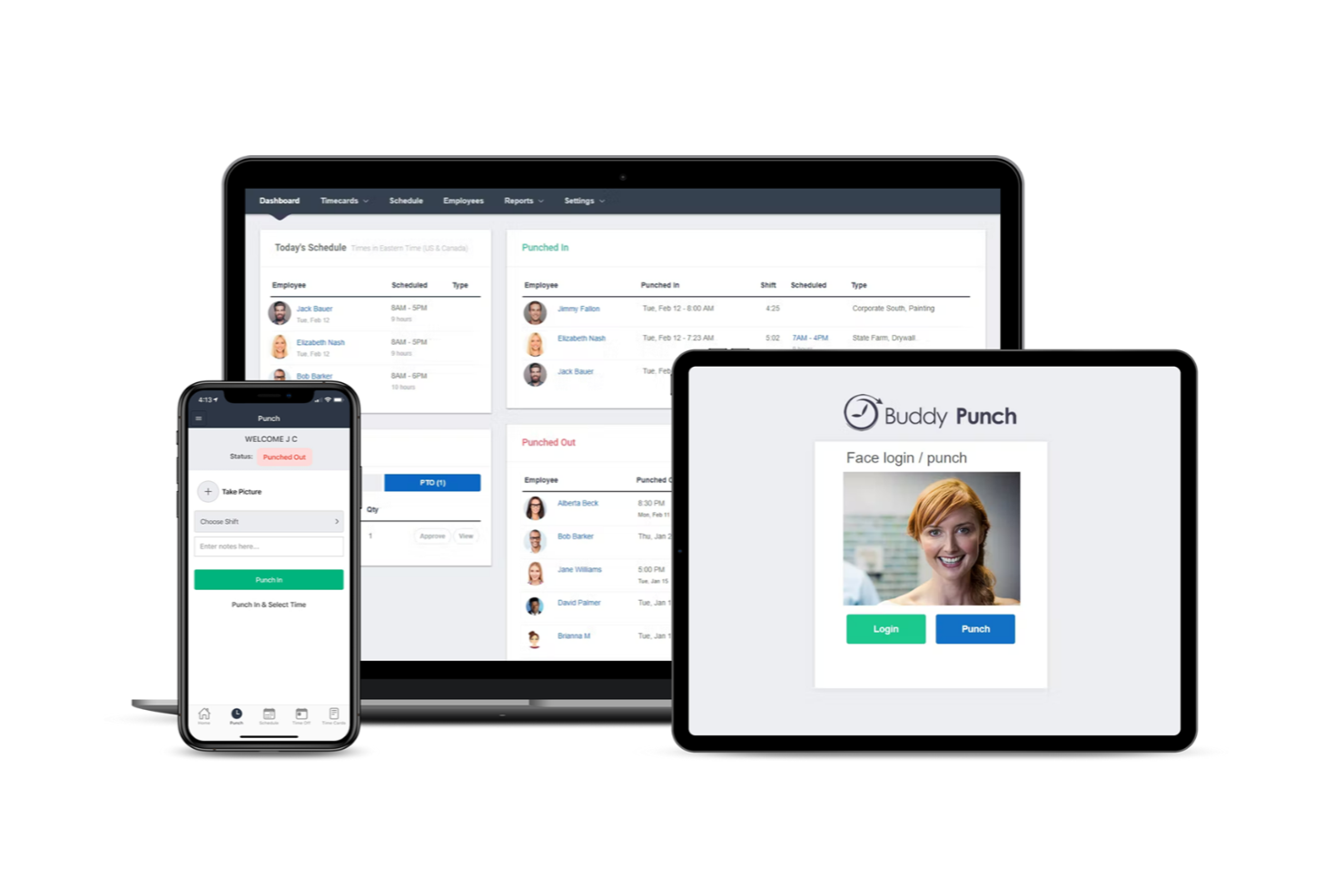
Buddy Punch è un versatile software di rilevazione presenze pensato per semplificare la registrazione delle ore lavorative, la pianificazione dei turni e la gestione delle paghe per le aziende. Offre una varietà di funzionalità che soddisfano le esigenze dei team che desiderano gestire in modo efficiente tempi e presenze.
Perché ho scelto Buddy Punch: Ho scelto Buddy Punch come uno dei migliori strumenti di rilevazione presenze per contabili perché consente il monitoraggio in tempo reale delle ore lavorate e degli straordinari da qualsiasi luogo, aiutandoti a registrare ogni ora fatturabile. Il suo sistema automatizzato di tracciamento di presenze e permessi retribuiti (PTO) semplifica la gestione delle ferie e garantisce la conformità con le policy aziendali. La piattaforma, inoltre, semplifica l'elaborazione delle paghe con fogli presenze automatici e approvazioni rapide, permettendoti di concentrarti su attività di contabilità invece che su lavori amministrativi.
Funzionalità principali e integrazioni
Le funzionalità includono il tracciamento GPS, che monitora la posizione dei dipendenti che lavorano da remoto, assicurando responsabilità e trasparenza. La funzione di geolocalizzazione è un'altra caratteristica di rilievo: ti permette di impostare aree specifiche in cui i dipendenti possono timbrare l'entrata e l'uscita, fornendo un ulteriore livello di sicurezza. Inoltre, i report personalizzabili ti consentono di adattare i resoconti alle esigenze specifiche della tua azienda, offrendoti preziose informazioni sulle performance del team.
Le integrazioni includono QuickBooks, ADP Workforce Now, Gusto, Paychex, Paylocity, Paycor, iSolved, Justworks, SurePayroll, Rippling, Zapier e TriNet Payroll.
Pros and Cons
Pros:
- Report personalizzabili
- Tracciamento GPS
- Monitoraggio in tempo reale
Cons:
- Nessuna modalità offline
- App mobile essenziale

Toggl
Ideale per integrazioni flessibili
Toggl è uno strumento versatile per il monitoraggio del tempo, popolare tra i liberi professionisti e le piccole e medie imprese. Aiuta gli utenti a monitorare il tempo, gestire i progetti e generare report per migliorare la produttività.
Perché ho scelto Toggl: Si distingue per le sue integrazioni flessibili, che consentono di connettersi a oltre 100 strumenti diversi. Questa flessibilità facilita la personalizzazione del flusso di lavoro. Toggl offre inoltre funzionalità come il monitoraggio automatico del tempo e report personalizzabili, in linea con la sua USP. L'interfaccia intuitiva del software lo rende accessibile a team di qualsiasi dimensione.
Funzionalità e integrazioni distintive
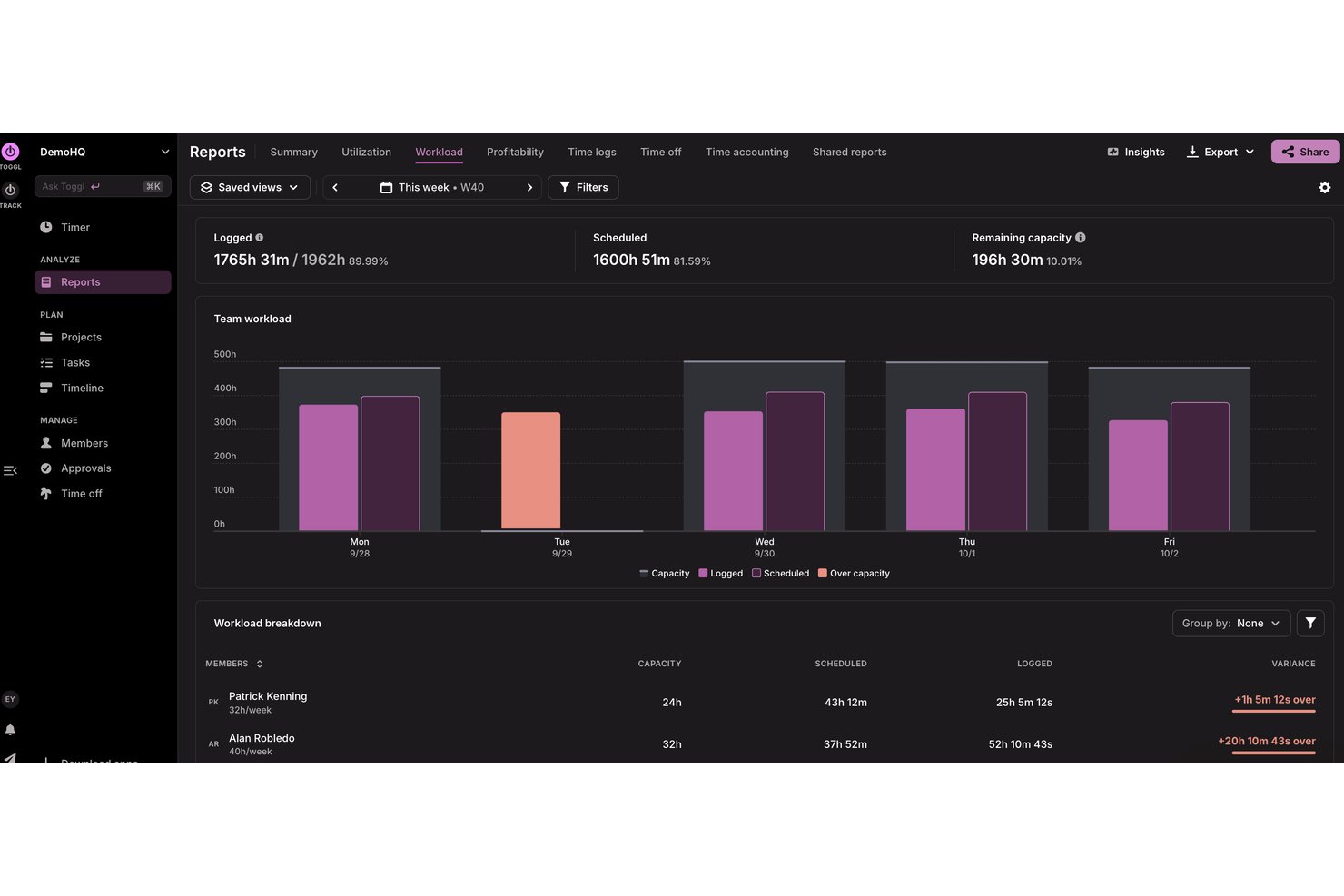
Le funzionalità includono il monitoraggio automatico del tempo, che registra privatamente la tua attività in background, strumenti di reporting personalizzabili per adattarsi alle esigenze della tua azienda, report sul carico di lavoro e sull'utilizzo per una pianificazione accurata della capacità e una vista calendario per una facile integrazione e gestione delle registrazioni del tempo.
Le integrazioni includono Jira, Asana, Slack, Todoist, Google Calendar e Outlook, oltre a un'API per integrazioni personalizzate e MCP per la connessione ad assistenti AI come Claude, Cursor e Codex.
Pros and Cons
Pros:
- Tariffe fatturabili e dei costi per persona e progetto
- Monitoraggio della capacità e dell'utilizzo
- Supporta più valute
Cons:
- Nessuna funzionalità di fatturazione
- Nessun supporto telefonico

actiTIME
Ideale per report dettagliati e analisi dei dati
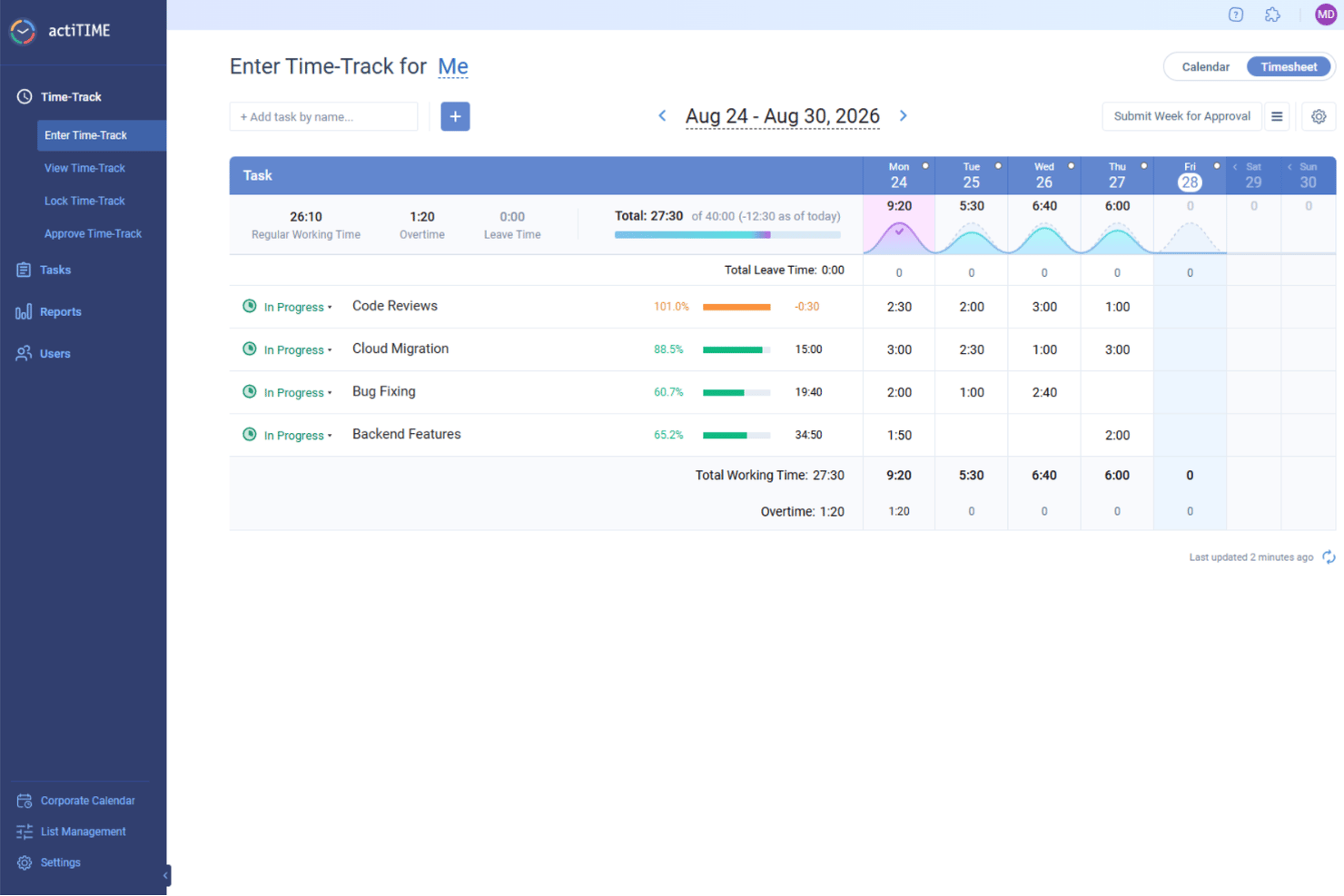
actiTIME è un software versatile per il monitoraggio del tempo, progettato per soddisfare le esigenze di vari settori, tra cui quello contabile. Grazie alla sua attenzione al miglioramento dell'efficienza economica dei progetti, offre una serie di funzionalità pensate appositamente per professionisti come i contabili, che necessitano di una gestione precisa del tempo.
Perché ho scelto actiTIME: Ho scelto actiTIME per i contabili perché offre strumenti completi di gestione dei progetti per monitorare efficacemente i progetti e i budget, garantendo il controllo finanziario e la redditività. Le sue dettagliate funzionalità di reportistica e analisi dei dati forniscono informazioni sulla produttività e sulle prestazioni dei progetti, supportando decisioni consapevoli. Inoltre, l'automazione della fatturazione e della fatturazione ai clienti di actiTIME aiuta a risparmiare tempo e a ridurre gli errori, garantendo una fatturazione accurata ai clienti.
Funzionalità e integrazioni principali
Le funzionalità includono analisi approfondite che offrono una visione chiara della produttività del tuo team e della redditività dei progetti, aiutandoti a prendere decisioni basate sui dati. Il software semplifica inoltre il monitoraggio delle ferie, consentendo di gestire le richieste di assenza e di garantire che il team disponga di personale sufficiente. Inoltre, actiTIME supporta un'analisi efficiente dei costi, permettendoti di monitorare efficacemente le spese e l'allocazione delle risorse.
Le integrazioni includono QuickBooks e Zapier.
Pros and Cons
Pros:
- Tariffe di fatturazione personalizzabili
- Configurazione semplice dei progetti
- Inserimenti manuali semplici del tempo
Cons:
- Interfaccia utente di base
- Funzionalità avanzate limitate
New Product Updates from actiTIME

actiTIME Visual Hour Indicator and Time-Track Report Redesign
actiTIME adds a wave-style hour indicator to the Timesheet and Calendar views and refreshes the Time-Track report for smoother navigation and clearer visuals. For more information, visit actiTIME's official site.

Clockify
Ideale per le funzionalità di reportistica
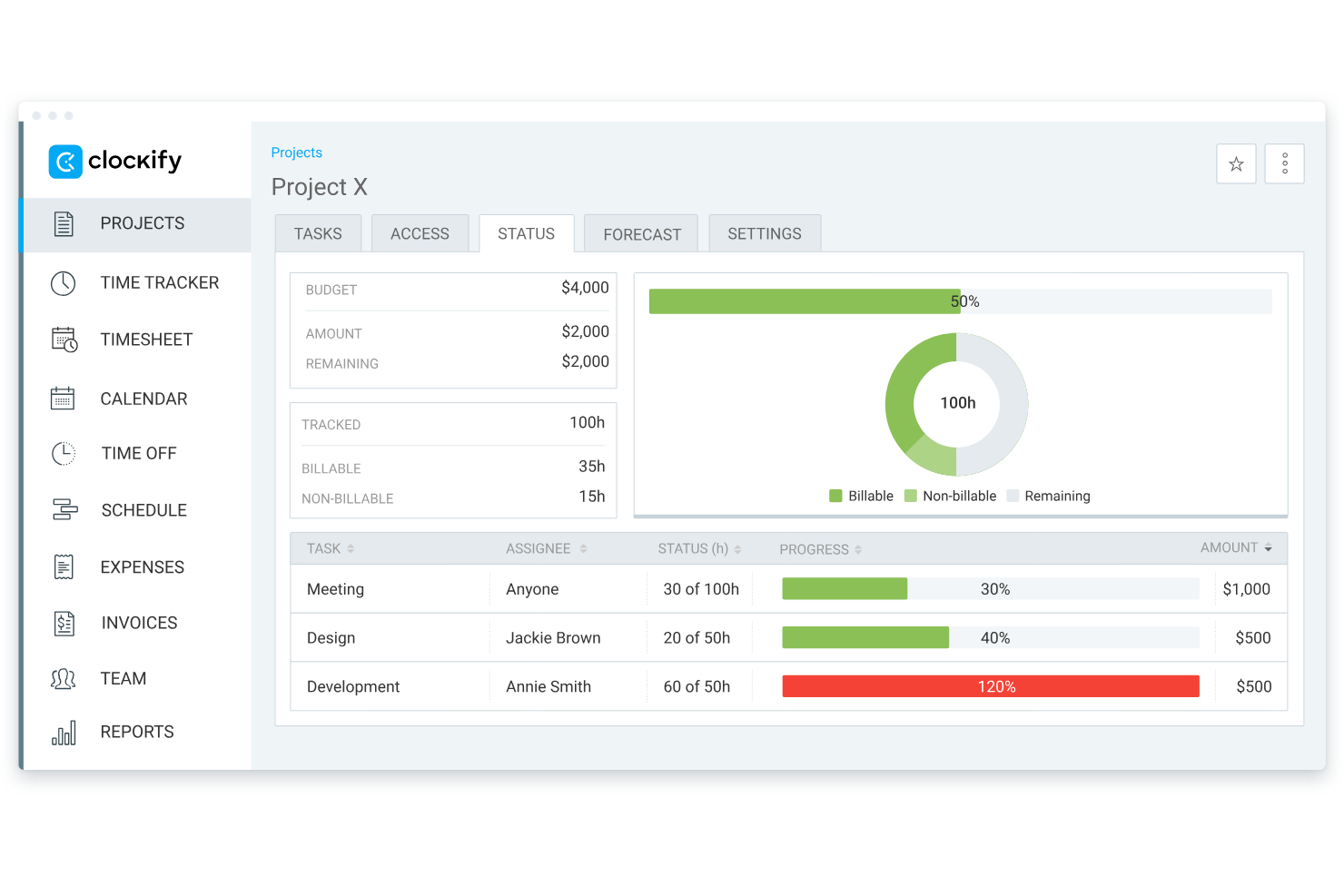
Clockify è uno strumento per il monitoraggio del tempo, ideale per squadre di qualsiasi dimensione, che offre utenti illimitati senza costi aggiuntivi. Consente alle aziende di monitorare le ore lavorate, gestire i progetti e generare report in modo efficiente.
Perché ho scelto Clockify: Ho scelto Clockify perché i suoi strumenti di reportistica dettagliata consentono ai professionisti della contabilità di verificare rapidamente il tempo fatturabile per diversi clienti e progetti. I responsabili degli studi possono generare registrazioni dettagliate del tempo suddivise per attività, cliente o membro della squadra, semplificando la fatturazione mensile e salvaguardando l'accuratezza dei margini. Questo lo rende ideale per i commercialisti che necessitano di funzionalità chiare di monitoraggio del tempo e reportistica per verificare la precisione della fatturazione senza dover gestire manualmente fogli di calcolo.
Funzionalità e integrazioni principali
Le funzionalità includono report dettagliati che aiutano ad analizzare l'utilizzo del tempo, una vista della cronologia per visualizzare la giornata lavorativa della tua squadra e un timer Pomodoro per aumentare la produttività suddividendo il lavoro in intervalli.
Le integrazioni includono Asana, Trello, Jira, Slack, QuickBooks, Google Calendar, Notion, Monday.com, GitHub e Basecamp.
Pros and Cons
Pros:
- Gratuito per un massimo di cinque utenti
- Funzionalità di timer Pomodoro
- Scalabile per squadre in crescita
Cons:
- Funzionalità di base del piano gratuito
- Nessuna funzionalità di fatturazione

Ideale per integrazione con payroll
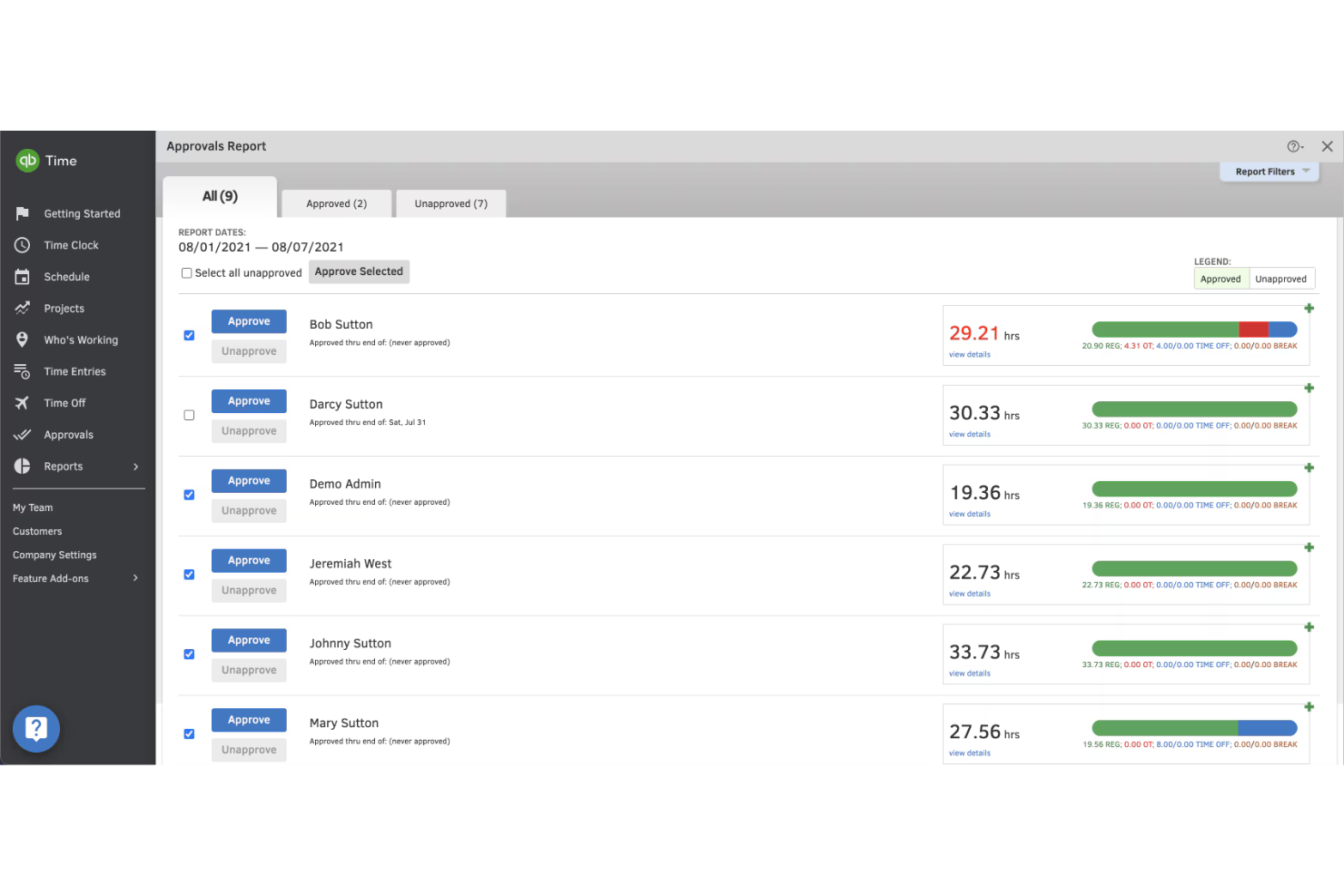
QuickBooks Time è un software di rilevazione delle presenze progettato per aziende di tutte le dimensioni, in particolare per quelle che necessitano dell'integrazione con il sistema di gestione delle paghe. Aiuta gli utenti a tracciare le ore dei dipendenti, gestire i turni ed esportare i dati per l'elaborazione delle buste paga.
Perché ho scelto QuickBooks Time: L'integrazione con il payroll è fondamentale per molte aziende, e QuickBooks Time eccelle proprio in questo. Offre funzionalità come il tracciamento GPS e l'inserimento delle ore tramite dispositivi mobili, rendendo facile al tuo team registrare le presenze ovunque si trovi. Il software consente una sincronizzazione senza interruzioni con QuickBooks per la gestione delle paghe. Questa integrazione garantisce che le buste paga siano precise ed efficienti, facendoti risparmiare tempo e riducendo gli errori.
Funzionalità principali & Integrazioni
Funzionalità includono il tracciamento GPS per monitorare dove sta lavorando il tuo team, l'inserimento delle ore tramite dispositivo mobile per registrare le presenze anche fuori sede e strumenti di pianificazione che aiutano a organizzare i turni e gestire le richieste di ferie.
Integrazioni includono QuickBooks, Xero, Square, Gusto, Expensify, ADP, Deputy, Tsheets, Sage e BambooHR.
Pros and Cons
Pros:
- Solida funzionalità dell'app mobile
- Tracciamento GPS disponibile
- Opzioni dettagliate di pianificazione
Cons:
- Ritardi occasionali nella sincronizzazione
- Curva di apprendimento per i nuovi utenti

Timely
Ideale per il monitoraggio automatico

Timely è un software di monitoraggio del tempo progettato per professionisti e team che desiderano automatizzare la gestione del tempo. Aiuta gli utenti a tenere traccia delle ore di lavoro, gestire i progetti e ottimizzare la produttività senza inserimenti manuali.
Perché ho scelto Timely: Il monitoraggio automatico è il fulcro dell'offerta di Timely, rendendolo una scelta unica per chi vuole ridurre l'inserimento manuale del tempo. Il software registra tutte le attività su diversi dispositivi, offrendo una panoramica completa della giornata lavorativa. Offre inoltre il monitoraggio della memoria, che registra l'utilizzo del tempo senza la necessità di avviare o fermare un timer. Questo aiuta a garantire precisione e risparmiare tempo, rendendolo ideale per i professionisti impegnati.
Funzioni principali & integrazioni
Le funzioni includono il monitoraggio della memoria, che registra la tua attività senza timer, dashboard di progetto che forniscono una panoramica visiva dei compiti e un design orientato alla privacy che assicura che i tuoi dati siano sicuri e privati.
Le integrazioni includono Asana, Trello, Slack, QuickBooks, Google Calendar, Outlook, Xero, GitHub, Monday.com e Zapier.
Pros and Cons
Pros:
- Monitoraggio automatico del tempo
- Design incentrato sulla privacy
- Dashboard di progetto dettagliate
Cons:
- Opzioni di personalizzazione limitate
- Richiede una connessione internet costante

My Hours
Ideale per la gestione dei progetti

My Hours è uno strumento di monitoraggio del tempo e gestione dei progetti progettato per team e liberi professionisti che devono gestire le attività e tracciare le ore fatturabili in modo efficiente. Aiuta gli utenti a organizzare i progetti, allocare le risorse e monitorare il tempo dedicato alle attività.
Perché ho scelto My Hours: Eccelle nella gestione dei progetti, offrendo strumenti che aiutano a organizzare e gestire le attività in modo efficace. Con My Hours è possibile impostare budget di progetto e monitorare il tempo rispetto a tali limiti, assicurandosi di rimanere entro i confini stabiliti. Il software fornisce report dettagliati, fondamentali per valutare le performance dei progetti. Questo lo rende una scelta eccellente per i team che desiderano migliorare le proprie capacità di project management.
Caratteristiche principali & Integrazioni
Le funzionalità includono il monitoraggio delle attività che permette di seguire i progressi in tempo reale, avvisi di budget per notificare quando si stanno avvicinando i limiti di progetto e report dettagliati per analizzare efficacemente i dati su tempo e costi.
Le integrazioni includono QuickBooks, Zapier, Trello, Asana, Slack, Basecamp, Google Calendar, Microsoft Teams, Outlook e Jira.
Pros and Cons
Pros:
- Strumenti efficaci per la gestione dei progetti
- Avvisi di budget per i progetti
- Monitoraggio delle attività in tempo reale
Cons:
- Opzioni di personalizzazione limitate
- Funzionalità limitate sull'app mobile

TimeCamp
Ideale per il monitoraggio delle presenze

TimeCamp è un software di monitoraggio del tempo pensato per le aziende che desiderano approfondimenti dettagliati sulla presenza e la produttività dei dipendenti. Si rivolge a imprese di ogni dimensione, aiutandole a monitorare le ore lavorative, gestire i progetti e aumentare l'efficienza.
Perché ho scelto TimeCamp: Il monitoraggio della presenza è una delle funzionalità più forti, offrendo strumenti per controllare con precisione la presenza dei dipendenti. TimeCamp offre il rilevamento automatico del tempo, registrando le ore lavorate senza necessità di inserimenti manuali. Include anche una funzione per monitorare le ore fatturabili e non fatturabili, facilitando la gestione dei budget di progetto. L'enfasi sul rilevamento presenze garantisce dati precisi per la gestione delle buste paga e la valutazione delle performance.
Funzionalità e integrazioni principali
Funzionalità come i timesheet grafici che offrono una rappresentazione visiva delle ore lavorate, il monitoraggio del tempo inattivo per individuare cali di produttività e le capacità di fatturazione per emettere fatture ai clienti direttamente dall'app.
Integrazioni disponibili con Trello, Asana, Slack, QuickBooks, Xero, Jira, Monday.com, Zapier, Google Calendar e Microsoft Teams.
Pros and Cons
Pros:
- Monitoraggio dettagliato delle presenze
- Monitoraggio automatico del tempo
- Timesheet grafici
Cons:
- Opzioni di personalizzazione limitate
- Nessun supporto telefonico

Karbon
Ideale per studi contabili
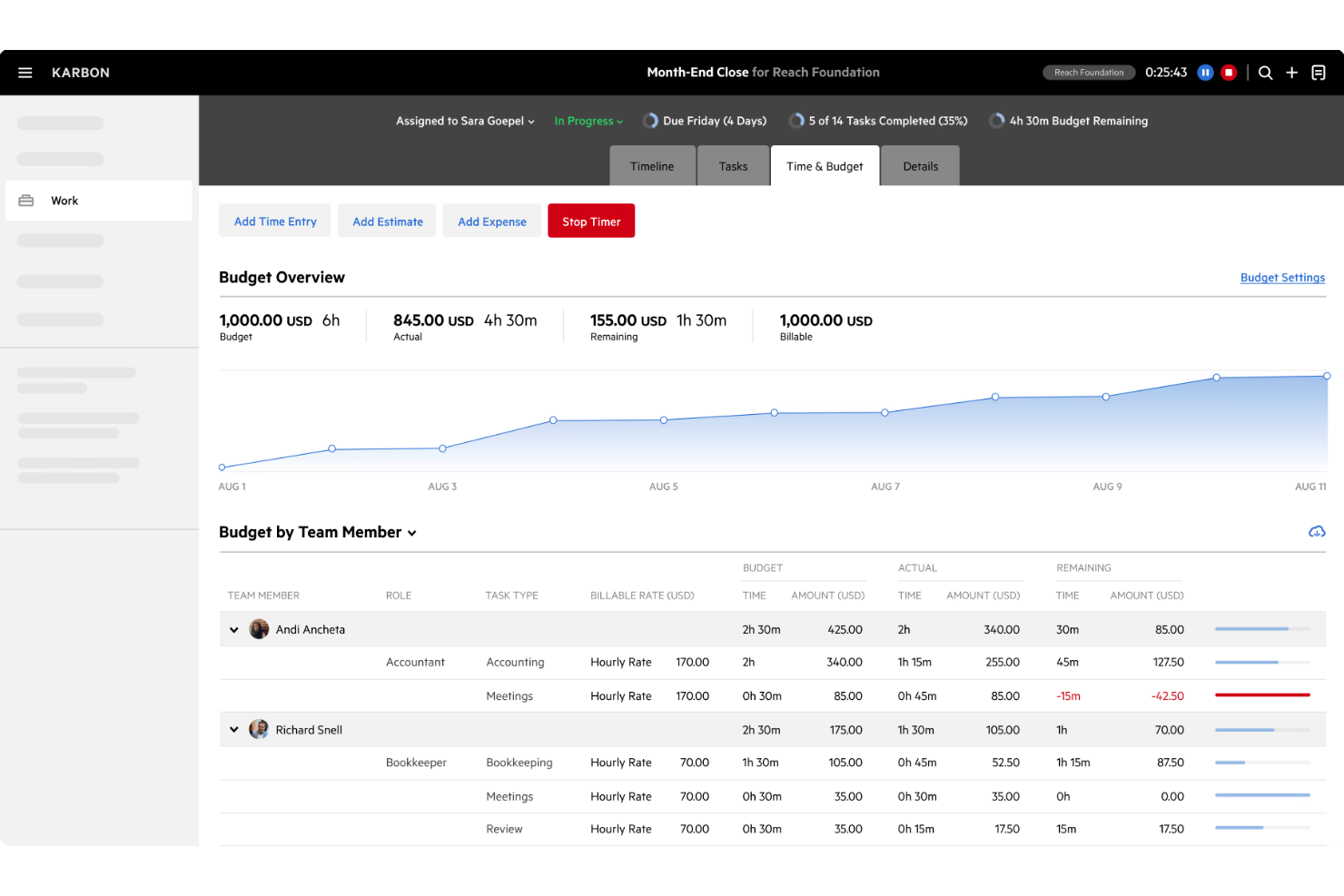
Karbon è un software di gestione dello studio progettato specificamente per gli studi contabili, aiutandoli a gestire i flussi di lavoro, collaborare con i team e comunicare efficacemente con i clienti. Semplifica le operazioni combinando email, attività e dati dei clienti in un'unica piattaforma.
Perché ho scelto Karbon: È pensato per gli studi contabili, offrendo funzionalità che supportano le esigenze uniche di questo settore. Con Karbon puoi gestire le email dei clienti direttamente dalla piattaforma e creare attività dalle email. Offre inoltre l'automazione dei flussi di lavoro, che permette di risparmiare tempo e ridurre il lavoro manuale. Questa attenzione agli studi contabili garantisce di avere a disposizione gli strumenti necessari per gestire lo studio in modo efficiente.
Funzionalità e integrazioni principali
Le funzionalità includono un portale clienti per la comunicazione sicura e la condivisione dei documenti, flussi di lavoro personalizzabili per adattarsi ai processi del tuo studio e una visualizzazione a timeline che fornisce una panoramica completa delle interazioni e delle attività dei clienti.
Le integrazioni includono Xero, QuickBooks Online, Gmail, Outlook, Office 365, Slack, Zapier, GoProposal, Microsoft Teams e Mailchimp.
Pros and Cons
Pros:
- Progettato per studi contabili
- Automazione dei flussi di lavoro disponibile
- Portale clienti sicuro
Cons:
- Prezzo più elevato
- Integrazioni limitate con terze parti
Altri software per il monitoraggio del tempo per commercialisti
Ecco alcune altre opzioni di software per il monitoraggio del tempo per commercialisti che non sono entrate nella mia selezione, ma che vale comunque la pena prendere in considerazione:
- Time Doctor
Ideale per team da remoto
- Deltek Replicon Time
Ideale per la conformità globale
- Harvest
Ideale per il monitoraggio delle spese
- Time Tracker
Ideale per la fatturazione
- Insightful
Ideale per la fatturazione precisa e approfondimenti sulla produttività
- ClickTime
Ideale per una ripartizione intelligente dei costi
- DeskTime
Ideale per il monitoraggio offline
- monday AI Workspace
Ideale per il rilevamento dei rischi di progetto basato sull'IA


Come valuto il software di rilevazione del tempo per commercialisti
Divido la mia valutazione in criteri di base che ogni strumento deve soddisfare—come il monitoraggio delle ore fatturabili e la gestione delle tariffe di fatturazione—e fattori che distinguono le migliori opzioni per gli studi commercialisti.
Funzionalità di base (Requisiti minimi per questa lista)
Quando seleziono gli strumenti da includere nell'elenco, valuto ciascuno su una scala da 0 (non offre la funzionalità) a 5 (eccelle in quest'area) per ogni funzionalità di base elencata di seguito. Poi calcolo il punteggio totale dello strumento in percentuale. Ogni strumento deve raggiungere un punteggio minimo totale del 65% per essere considerato per l'inclusione.
- Rilevazione del tempo fatturabile: Controllo se ogni strumento consente al personale di contrassegnare le voci come fatturabili o non fatturabili a livello di attività, come ad esempio dividere le ore tra una revisione contabile per un cliente e la gestione amministrativa interna.
- Assegnazione clienti e progetti: Ogni strumento dovrebbe supportare gerarchie multilivello, in modo che i commercialisti possano registrare il tempo sotto un cliente, tipo di incarico e consegna specifica.
- Workflow di approvazione delle timesheet: Cerco cicli strutturati di invio e approvazione che riflettano il funzionamento degli studi contabili, dove un senior o un partner approva prima che il tempo venga fatturato.
- Gestione delle tariffe di fatturazione: Gli strumenti devono gestire molteplici strutture tariffarie, poiché spesso gli studi stabiliscono tariffe diverse in base al livello del personale, agli accordi con i clienti o al tipo di servizio.
- Integrazione con fatturazione e contabilità: Valuto come ogni piattaforma si collega a sistemi come QuickBooks, Xero o Sage per trasferire il tempo approvato direttamente nelle fatture o nel libro mastro.
- Report su utilizzo e realizzo: Dashboard che mostrano tassi di realizzo, storni e utilizzo del personale aiutano gli studi a individuare dove si verificano perdite di ricavi durante i periodi di intenso lavoro.
Una volta individuati gli strumenti che soddisfano questi criteri, considero cosa distingue ciascuna piattaforma.
Fattori differenzianti (Cosa distingue i fornitori)
Ecco come confronto e metto a confronto diversi fornitori:
Caratteristiche distintive
La rilevazione automatica del tempo è un elemento realmente distintivo. Gli strumenti che registrano passivamente le ore trascorse in software per la preparazione fiscale o in email evitano ai commercialisti il compito di ricostruire le timesheet a fine settimana. Cerco anche funzionalità di pianificazione della capacità che aiutano gli studi a prevedere il carico di lavoro durante periodi di punta come la chiusura di fine anno. I portali clienti aggiungono ulteriore valore, consentendo ai clienti di visualizzare il tempo registrato e approvare le fatture senza continui scambi di email.
Oltre le funzionalità
L'integrazione profonda è importante. Valuto se uno strumento si integra con piattaforme di gestione dello studio come Karbon o TaxDome, dato che lì si svolgono la maggior parte dei flussi di lavoro contabili. La sicurezza dei dati è un'altra priorità: gli studi gestiscono dati finanziari sensibili dei clienti, quindi verifico la certificazione SOC 2 e controlli di accesso basati sui ruoli. Anche l'adattabilità alla dimensione dello studio influisce sulla mia valutazione. Un professionista singolo ha bisogno di una tariffazione semplice per utente, mentre uno studio con più sedi richiede supporto multi-entità e licenze scalabili che non facciano lievitare i costi con la crescita del team.
Come scegliere il software per il monitoraggio del tempo per commercialisti
È facile perdersi in lunghi elenchi di funzionalità e strutture tariffarie complesse. Per aiutarti a rimanere concentrato mentre affronti il tuo personale processo di selezione del software, ecco una lista di fattori da tenere a mente:
| Fattore | Considerazioni |
|---|---|
| Scalabilità | Considera se il software può crescere insieme al tuo team. Può gestire più utenti o progetti senza problemi? Cerca strumenti che offrano piani tariffari scalabili adatti alle aziende in crescita. |
| Integrazioni | Verifica se lo strumento si collega al software di contabilità esistente e agli altri strumenti che utilizzi quotidianamente. Un'integrazione fluida può far risparmiare tempo e ridurre gli errori. Esamina l'elenco delle integrazioni disponibili e assicurati che siano adatte al tuo attuale insieme di tecnologie. |
| Personalizzazione | Valuta quanto il software sia adattabile al tuo flusso di lavoro. Puoi configurarlo in base ai tuoi processi e alle tue preferenze specifiche? Dashboard e report personalizzabili possono migliorare l'usabilità. |
| Facilità d'uso | Valuta l'interfaccia utente e la navigazione. Sono intuitive per i membri del tuo team? Un'interfaccia complessa può rallentare l'adozione e la produttività, quindi dai priorità a design intuitivi che richiedano una formazione minima. |
| Implementazione e avvio | Considera le risorse fornite per l'avvio. Sono disponibili tutorial, guide e assistenza per aiutare il tuo team a iniziare? Un avvio rapido ed efficiente può creare le condizioni per un'implementazione efficace. |
| Costo | Esamina la struttura dei prezzi e assicurati che sia in linea con il tuo budget. Cerca eventuali costi nascosti o costi aggiuntivi per le funzionalità extra. Confronta il valore offerto a diversi livelli di prezzo per trovare la soluzione più adatta alle tue esigenze. |
| Misure di sicurezza | Assicurati che lo strumento soddisfi i tuoi standard di sicurezza. Offre la crittografia dei dati e un'autenticazione sicura? Proteggere i dati finanziari sensibili è fondamentale, quindi verifica le misure di sicurezza del software prima di sceglierlo. |
| Disponibilità dell'assistenza | Determina il livello di assistenza offerto. È disponibile un supporto 24 ore su 24, 7 giorni su 7? L'accesso a un'assistenza tempestiva ed efficace può essere fondamentale per risolvere rapidamente i problemi e mantenere la produttività. |
Che cos'è il software per il monitoraggio del tempo per commercialisti?
Il software per il monitoraggio del tempo per commercialisti è uno strumento che aiuta a registrare le ore fatturabili, gestire i progetti e generare report. Questi strumenti sono generalmente utilizzati da commercialisti, professionisti della finanza e team che necessitano di un monitoraggio accurato del tempo e delle spese. Funzionalità come la registrazione del tempo, il monitoraggio dei progetti e le capacità di integrazione aiutano a gestire i flussi di lavoro e a garantire una fatturazione accurata. Nel complesso, questi strumenti migliorano la produttività e assicurano una gestione efficiente del tempo dedicato alle attività contabili.
Funzionalità del software per il monitoraggio del tempo per commercialisti
Quando scegli un software per il monitoraggio del tempo per commercialisti, presta attenzione alle seguenti funzionalità chiave:
- Registrazione del tempo: registra con precisione le ore fatturabili e non fatturabili per garantire una fatturazione e una gestione dei progetti accurate.
- Monitoraggio dei progetti: controlla l'avanzamento e i budget di vari progetti, aiutando i team a rispettare le scadenze e i limiti finanziari.
- Capacità di integrazione: si collega al software di contabilità esistente e agli altri strumenti per semplificare il flusso dei dati e ridurre l'inserimento manuale.
- Monitoraggio delle spese: registra e categorizza le spese, offrendo una visione chiara dei costi dei progetti e della gestione finanziaria.
- Report personalizzabili: offre report personalizzati che forniscono informazioni sull'utilizzo del tempo, sulla produttività e sulle prestazioni finanziarie.
- Fatturazione automatizzata: genera fatture direttamente dai dati relativi a tempo e spese, semplificando il processo di fatturazione e garantendo pagamenti puntuali.
- Dashboard in tempo reale: offre una panoramica delle metriche chiave e dello stato dei progetti, consentendo di prendere decisioni informate e allocare le risorse.
- Misure di sicurezza: garantisce la protezione dei dati tramite crittografia e autenticazione sicura, salvaguardando le informazioni finanziarie sensibili.
Vantaggi del software per il monitoraggio del tempo per commercialisti
L'implementazione di un software per il monitoraggio del tempo per commercialisti offre numerosi vantaggi al tuo team e alla tua azienda. Eccone alcuni:
- Maggiore precisione: monitora con precisione le ore fatturabili, riducendo gli errori nella fatturazione e assicurando che ai clienti venga addebitato l'importo corretto.
- Produttività migliorata: monitora l'utilizzo del tempo e identifica le lacune nella produttività, aiutando i team a ottimizzare i flussi di lavoro.
- Maggiore controllo finanziario: offre report dettagliati su tempi e spese, fornendo informazioni sui costi dei progetti e sulla situazione finanziaria.
- Fatturazione semplificata: automatizza la fatturazione utilizzando i dati registrati, velocizzando il processo e garantendo pagamenti puntuali.
- Maggiore trasparenza: offre dashboard e report in tempo reale, consentendo una migliore visibilità sull'avanzamento dei progetti e sull'allocazione delle risorse.
- Gestione sicura dei dati: protegge le informazioni finanziarie sensibili con misure di sicurezza, garantendo la conformità agli standard di protezione dei dati.
Costi e prezzi del software per il monitoraggio del tempo per commercialisti
La scelta di un software per il monitoraggio del tempo per commercialisti richiede la comprensione dei vari modelli e piani tariffari disponibili. I costi variano in base alle funzionalità, alle dimensioni del team, ai componenti aggiuntivi e ad altri fattori. La tabella seguente riassume i piani più comuni, i relativi prezzi medi e le funzionalità tipicamente incluse nelle soluzioni software per il monitoraggio del tempo per commercialisti:
Tabella comparativa dei piani per software di monitoraggio del tempo per commercialisti
| Tipo di piano | Prezzo medio | Funzionalità comuni |
|---|---|---|
| Piano gratuito | $0 | Monitoraggio di base del tempo, progetti limitati e report semplici. |
| Piano personale | $5-$15/user/month | Monitoraggio del tempo, gestione dei progetti, integrazioni e report di base. |
| Piano aziendale | $15-$30/user/month | Report avanzati, fatturazione, più utenti e integrazioni con strumenti di contabilità. |
| Piano per grandi aziende | $30-$50/user/month | Funzionalità personalizzabili, assistenza prioritaria, sicurezza avanzata e analisi complete. |
Domande frequenti sui software di monitoraggio del tempo per commercialisti
Ecco alcune risposte alle domande comuni sui software di monitoraggio del tempo per commercialisti:
In che modo il software di monitoraggio del tempo può migliorare la precisione della fatturazione?
Il software di monitoraggio del tempo garantisce che tutte le ore fatturabili vengano registrate con precisione, riducendo gli errori nella fatturazione ai clienti. Automatizzando il processo di monitoraggio, è possibile evitare gli errori di inserimento manuale e mantenere registri precisi. Questo porta a fatture più accurate e contribuisce a mantenere la fiducia dei clienti.
Quali integrazioni dovrei cercare in un software di monitoraggio del tempo?
Cerca un software che si integri con gli strumenti di contabilità e gestione dei progetti già in uso, come QuickBooks, Xero o Trello. Le integrazioni aiutano a ottimizzare il flusso di lavoro, consentendo ai dati di fluire senza problemi tra i sistemi e riducendo gli inserimenti manuali e i potenziali errori.
In che modo il software di monitoraggio del tempo aiuta a garantire la conformità normativa?
Il software di monitoraggio del tempo può contribuire a garantire la conformità mantenendo registri accurati e dettagliati delle ore lavorate e del tempo fatturabile. Questo è fondamentale per gli audit e la reportistica normativa, poiché fornisce un registro chiaro e organizzato di come viene impiegato il tempo nei diversi progetti e per i vari clienti.
Il software di monitoraggio del tempo supporta i team da remoto?
Sì, molti strumenti di monitoraggio del tempo offrono funzionalità progettate specificamente per i team da remoto, come l'accesso da dispositivi mobili e i dashboard in tempo reale. Queste funzionalità aiutano a monitorare la produttività e a gestire i progetti in modo efficiente, indipendentemente dalla posizione del team.
Quali funzionalità dovrei considerare prioritarie per la gestione dei progetti?
Dai priorità a funzionalità come il monitoraggio dei progetti, la gestione del budget e gli strumenti di collaborazione del team. Queste funzionalità aiutano a gestire le risorse in modo efficace, a mantenere i progetti nei tempi previsti e a garantire che il team lavori in modo efficiente verso gli obiettivi del progetto.
In che modo il software di monitoraggio del tempo migliora la produttività?
Fornendo informazioni su come viene impiegato il tempo, il software di monitoraggio del tempo aiuta a individuare le lacune nella produttività e a ottimizzare i flussi di lavoro. Grazie a dati accurati, è possibile prendere decisioni informate per migliorare l'efficienza e allocare le risorse in modo più efficace.