

I 10 migliori software per la rilevazione delle ore recensiti nel 2026

Elenco dei migliori software per il rilevamento delle presenze


Il miglior software per il rilevamento delle presenze ti aiuta a monitorare le ore lavorate e a gestire il tempo del tuo team in modo più efficace. Senza un modo per tenere traccia del tempo che il tuo team dedica a progetti e attività specifici, non potrai fatturare accuratamente ai clienti il tempo impiegato e la redditività complessiva potrebbe risentirne.
Grazie alla mia esperienza nella gestione di un'agenzia e a oltre 3 anni di test del software, ho esaminato diversi strumenti per il rilevamento delle presenze per offrirti informazioni indipendenti sulle migliori opzioni disponibili. Leggi la mia analisi di ogni strumento e scopri come affronta sfide comuni come la pianificazione e il monitoraggio del lavoro. Che tu stia cercando di tenere sotto controllo i fogli presenze o il coordinamento del team, posso aiutarti a trovare la soluzione più adatta al tuo progetto e alle esigenze del tuo team.
Perché fidarsi dei nostri consigli sui software
Il nostro team testa e recensisce software dal 2012. In quanto project manager noi stessi, sappiamo quanto sia difficile — e importante — scegliere il software giusto.
Per questa guida, abbiamo valutato gli strumenti attraverso test pratici e ricerche indipendenti, assegnando un punteggio agli strumenti in base ai nostri criteri di selezione. Ci basiamo inoltre sulle competenze di leader di pensiero del settore e di professionisti attivi nella gestione dei progetti.
Le nostre recensioni riflettono il nostro giudizio editoriale umano, non un discorso di vendita.
Revisori esperti:
Tabella comparativa dei software per il rilevamento delle presenze
La tabella seguente confronta i dettagli dei prezzi dei migliori software per il rilevamento delle presenze che ho selezionato.
| Tool | Best For | Trial Info | Price | ||
|---|---|---|---|---|---|
| 1 | Beste AI voor bedrijven | Gratis demo beschikbaar | Vanaf $8/gebruiker/maand | Website | |
| 2 | Ideale per team senza postazione fissa | Prova gratuita di 14 giorni + demo gratuita disponibile | Da $29/mese (fatturazione annuale) | Website | |
| 3 | Ideale per la timbratura con riconoscimento facciale | Demo gratuita + prova gratuita di 14 giorni disponibile | Da $4,49/utente/mese | Website | |
| 4 | Ideale per i team di erogazione dei servizi | Prova gratuita + demo gratuita disponibile | Da $19/utente/mese (fatturato annualmente) | Website | |
| 5 | Ideale per il monitoraggio del tempo di lavoro del team | Piano gratuito disponibile | Da $8.50/utente/mese (fatturato annualmente) | Website | |
| 6 | Ideale per la pianificazione dei turni | Prova gratuita disponibile | Da $2,50/utente/mese | Website | |
| 7 | Ideale per il monitoraggio dei progetti | Prova gratuita di 30 giorni + demo gratuita disponibile | Da $9.99/utente/mese (fatturazione annuale) | Website | |
| 8 | Ideale per la programmazione dei turni dei dipendenti | Prova gratuita di 30 giorni | Prezzi su richiesta | Website | |
| 9 | Ideale per il monitoraggio delle ore di progetto | Piano gratuito + prova gratuita di 30 giorni disponibile | Da $9/postazione/mese (fatturato annualmente) | Website | |
| 10 | Ideale per la gestione aziendale | Prova gratuita di 14 giorni + demo gratuita disponibile | Da $19.90/utente/mese (fatturazione annuale) | Website |

Recensioni dei migliori software per il rilevamento delle presenze
Di seguito trovi i miei riepiloghi dettagliati dei migliori software per il rilevamento delle presenze. Per ogni strumento analizzo le funzionalità principali, i pro e i contro, le integrazioni e i casi d’uso ideali, per aiutarti a trovare quello più adatto a te.

Beste AI voor bedrijven
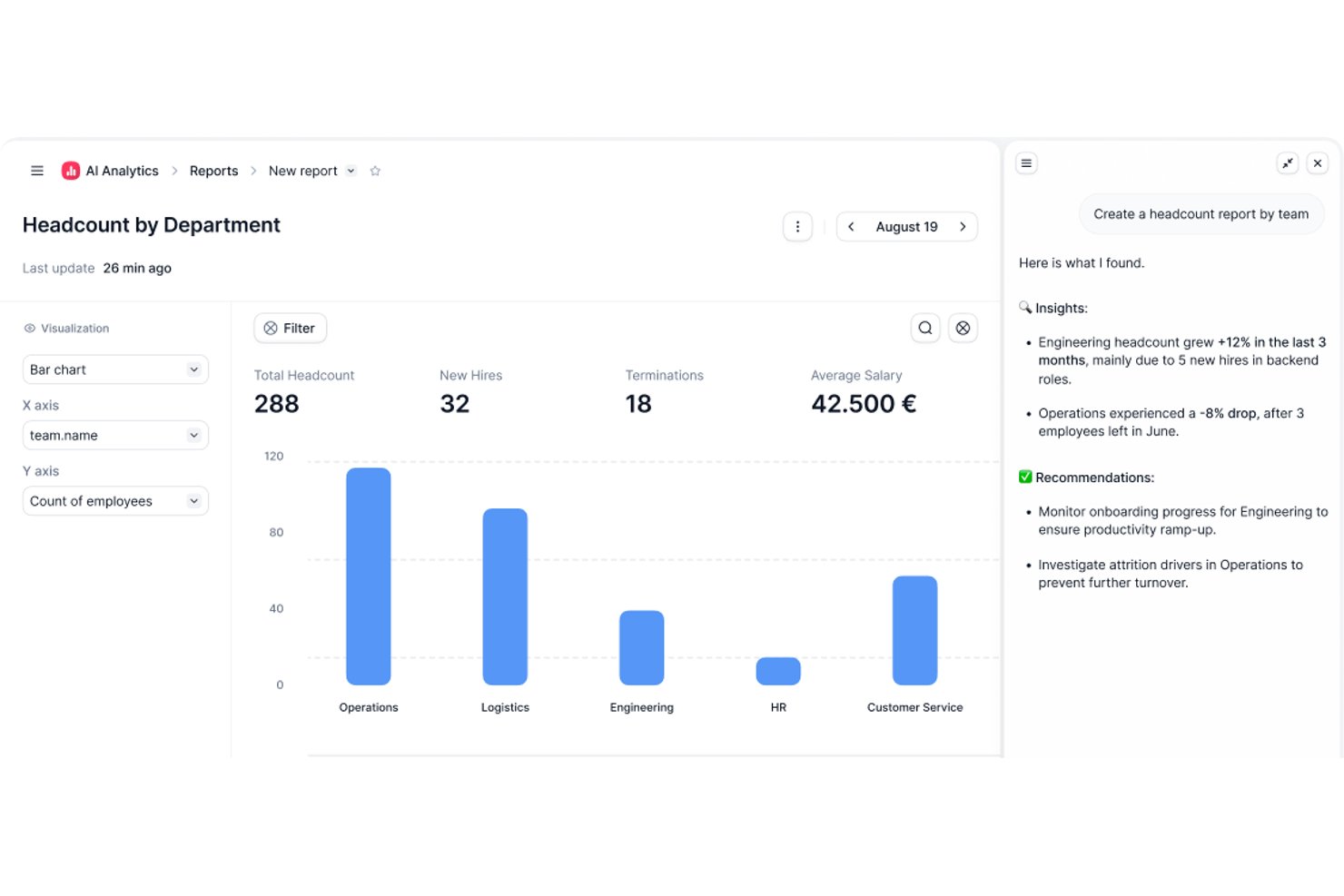
Factorial is een AI-aangedreven HR- en tijdmanagementplatform voor tijdregistratie, ploegplanning, verlofbeheer en aanwezigheidsrapportage via computer, mobiele app, QR-code en geolocatie.
Voor wie is Factorial het meest geschikt?
Factorial is geschikt voor HR- en salarismanagers bij kleine en middelgrote bedrijven die één AI-aangedreven platform willen gebruiken voor tijdregistratie, planning en aanwezigheid naast bredere HR-processen.
Waarom ik voor Factorial heb gekozen
Ik heb Factorial opgenomen in mijn topkeuzes omdat de AI-aangedreven aanpak meer doet dan alleen uren registreren: het platform helpt actief bij planning, rapportage en het beantwoorden van vragen van medewerkers over bedrijfsbeleid. Ik vind het prettig dat de AI de planning afhandelt voor meerdere inklokmethoden (computer, QR-code, geolocatie en mobiele app), zodat verspreid werkende teams niet hoeven te gissen naar hun roosters. De door AI gegenereerde rapportage betekent ook dat managers minder tijd besteden aan het handmatig verzamelen van aanwezigheidsgegevens.
Belangrijkste functies van Factorial
- Ondersteuning voor meerdere inklokmethoden: Medewerkers kunnen inklokken via computer, mobiele app, QR-code, gezichtsherkenning of geolocatie, afhankelijk van de inrichting van je team.
- Goedkeuring en vergrendeling van urenstaten: Managers kunnen urenstaten controleren en goedkeuren, waarna de gegevens worden vergrendeld om te bevestigen dat ze vóór de salarisverwerking zijn gevalideerd.
- Workflow voor verlofaanvragen en goedkeuring: Medewerkers dienen verlofaanvragen rechtstreeks in via het platform, waarna managers deze kunnen goedkeuren of afwijzen en aankomende afwezigheden in een gedeeld overzicht kunnen bekijken.
- Export van salarisgegevens: Goedgekeurde gewerkte uren kunnen worden overgezet naar de Compensation-module van Factorial en worden geëxporteerd in Excel- of CSV-formaat voor de salarisverwerking.
Integraties van Factorial
Factorial biedt integraties via de marktplaats met DATEV LODAS, Sage 200, Google Workspace, Slack, Microsoft Power BI en Okta, plus Zapier. De openbare API ondersteunt OAuth 2.0, webhooks, API-sleutels en SDK's voor aangepaste integraties.
Pros and Cons
Pros:
- Inklokken werkt via mobiel, QR-code en desktop
- Goedgekeurde urenstaten vergrendelen gevalideerde klokregistraties
- Medewerkers en managers hebben gezamenlijk inzicht in verlof
Cons:
- Voor salarisverwerking zijn goedgekeurde urenstaten op uurbasis vereist
- Geolocatie kan geen grenzen voor inklokken afdwingen

Ideale per team senza postazione fissa
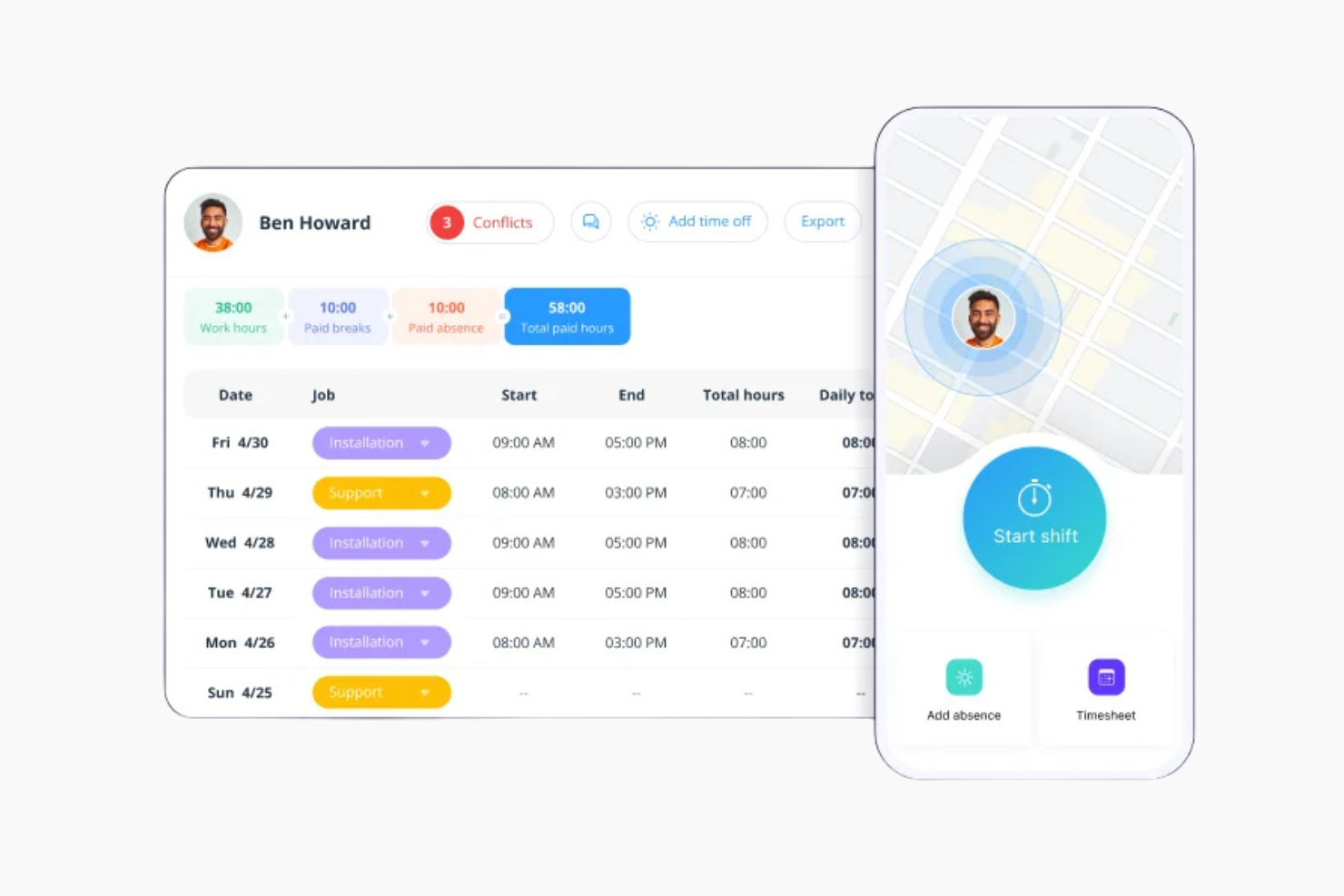
Connecteam è un'app per il rilevamento delle presenze e uno strumento di gestione della forza lavoro per lavoratori senza postazione fissa e team mobili. Viene utilizzato in settori come il retail, l'ospitalità e le costruzioni per gestire comunicazioni, orari e attività.
Perché ho scelto Connecteam: Connecteam permette al tuo team di accedere da remoto a orari, attività e rilevazione delle presenze così da rimanere tutti aggiornati. Puoi chattare, inviare aggiornamenti e gestire i turni da un'unica piattaforma. Permette anche di creare moduli di formazione per favorire un più rapido inserimento dei nuovi dipendenti.
Funzionalità e integrazioni di rilievo:
Funzionalità includono il tracciamento GPS per monitorare la posizione dei dipendenti e flussi di lavoro automatizzati per migliorare l'efficienza. Lo strumento offre anche programmi di riconoscimento dei dipendenti per aumentare la motivazione.
Integrazioni disponibili con QuickBooks, Gusto, Xero e Zapier.
Pros and Cons
Pros:
- Efficace per team mobili
- Pianificazione facile
- Funzionalità di tracciamento GPS
Cons:
- Funzionalità avanzate limitate
- Problemi occasionali di performance dell'app
New Product Updates from Connecteam

Connecteam Expands Break and Timesheet Controls
Connecteam adds flexible break thresholds, personalized policies, auto-end options, a centralized exceptions report, and improved timesheet issue visibility to help teams manage breaks and timesheets more effectively. For more information, visit Connecteam’s official site.
 .
.
Ideale per la timbratura con riconoscimento facciale
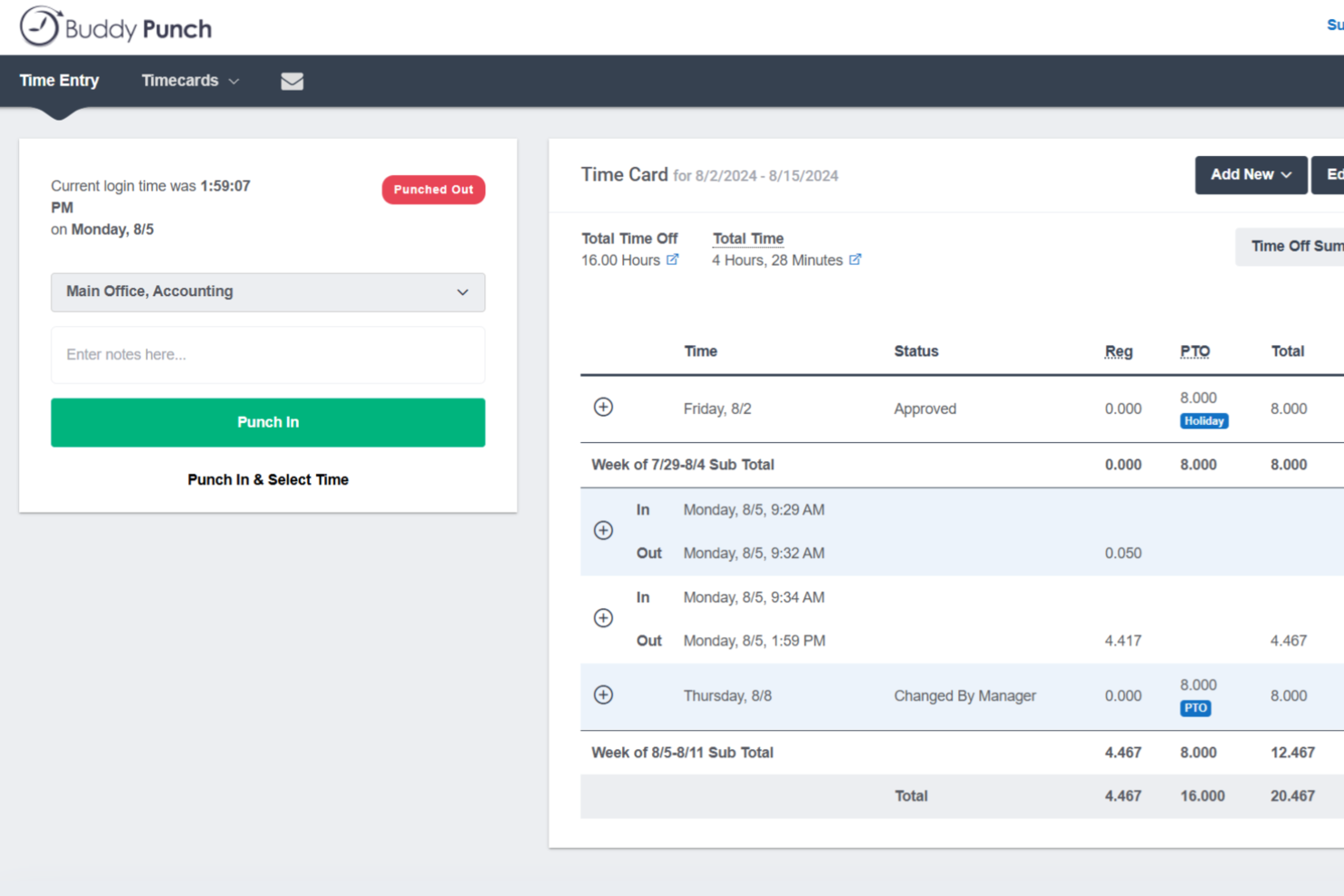
Buddy Punch è una piattaforma di rilevazione delle presenze e gestione dell'orario di lavoro che offre metodi flessibili di timbratura, configurazione delle regole sugli straordinari, pianificazione dei turni, monitoraggio delle ferie retribuite (PTO) e integrazioni dirette con i servizi di payroll.
Per chi è più adatto Buddy Punch?
Buddy Punch è particolarmente indicato per piccole e medie imprese con forza lavoro oraria o operante sul campo, soprattutto in settori come costruzioni, vendita al dettaglio, sanità e ospitalità.
Perché ho scelto Buddy Punch
Ho inserito Buddy Punch tra le mie scelte principali per l’efficacia con cui gestisce la verifica dell’identità al momento della timbratura, in particolare tramite il riconoscimento facciale. Quando un dipendente effettua la timbratura tramite il chiosco Buddy Punch, il sistema cattura e confronta il volto con una foto di riferimento registrata, risolvendo direttamente il problema dei colleghi che timbrano per altri su dispositivi condivisi. Apprezzo anche che il riconoscimento facciale non sia l’unico livello di verifica disponibile: puoi combinarlo con la funzione foto alla timbratura, dove viene scattata automaticamente una foto ad ogni entrata e salvata sul foglio presenze per la revisione amministrativa. Questa combinazione ti offre un registro chiaro e verificabile di chi ha effettivamente timbrato e quando.
Caratteristiche principali di Buddy Punch
- Tracciamento GPS: Registra la posizione di ogni timbratura così puoi sapere esattamente dove i dipendenti hanno iniziato e terminato il turno.
- Blocco tramite indirizzo IP: Limita le timbrature alle reti approvate, impedendo l’accesso da postazioni remote non autorizzate.
- Approvazione dei fogli presenze: Consente ai manager di verificare, modificare e approvare i fogli presenze dei dipendenti prima dell’invio alle paghe.
- Monitoraggio PTO: Gestisce richieste di assenza, saldi maturati e approvazioni direttamente dalla piattaforma.
Integrazioni di Buddy Punch
Buddy Punch offre integrazioni native dedicate ai provider di payroll, tra cui QuickBooks Online, QuickBooks Desktop, ADP Workforce Now, Gusto, Paychex, Paycor, Paylocity, Rippling, Workday e SurePayroll. Si collega anche con Zapier e mette a disposizione un’API per integrazioni personalizzate.
Pros and Cons
Pros:
- Metodi di timbratura multipli inclusi riconoscimento facciale
- Il raggio del geofence è regolabile per ogni sede
- Calcolo automatico delle ore e degli straordinari
Cons:
- Richiede connessione internet per la timbratura
- Le festività nazionali devono essere inserite manualmente

Ideale per i team di erogazione dei servizi

Rocketlane è una piattaforma per la consegna dei progetti che aiuta i team a gestire scadenze, attività e collaborazione nei progetti rivolti ai clienti. È pensato per i team di erogazione dei servizi che necessitano di maggiore visibilità sull'avanzamento dei progetti e sul tempo impiegato.
Perché ho scelto Rocketlane: È ideato per monitorare il tempo insieme alle attività di erogazione del servizio come onboarding, implementazione e supporto. I membri del team possono registrare il tempo per attività o progetto e confrontarlo con le ore pianificate. I timesheet vengono compilati automaticamente in base ai registri di lavoro e puoi anche impostare ore fatturabili e non fatturabili per monitorare i margini.
Funzionalità e integrazioni principali:
Funzionalità includono flussi di lavoro per l'approvazione del tempo che consentono di revisionare le registrazioni prima che siano definitive. C'è anche una dashboard di reportistica per visualizzare il tempo impiegato per clienti, progetti e team.
Integrazioni includono Salesforce, Slack, Google Calendar, HubSpot e Zapier.
Pros and Cons
Pros:
- Monitoraggio dello stato in tempo reale
- Timeline visive dei progetti
- Flussi di lavoro automatizzati
Cons:
- I nuovi utenti potrebbero aver bisogno di formazione
- Configurazione iniziale complessa
New Product Updates from Rocketlane

Rocketlane Introduces Governance and Workforce Agents
Rocketlane introduces Governance Agents and Workforce Agents to automate delivery processes and recurring tasks. These updates help teams enforce rules and streamline project execution. For more information, visit Rocketlane’s official site.
 .
.
Everhour
Ideale per il monitoraggio del tempo di lavoro del team

Everhour è uno strumento di monitoraggio del tempo e gestione progetti che aiuta i team a gestire meglio il proprio tempo. Viene utilizzato da project manager e team leader per tenere sotto controllo il budget e l'avanzamento dei progetti.
Perché ho scelto Everhour: Everhour ti permette di tracciare il tempo e creare report che si aggiornano in tempo reale. Si integra con strumenti come Asana e Trello, così non dovrai cambiare continuamente scheda. Il layout è semplice e aiuta a tenere sotto controllo budget e lavoro di progetto senza distrazioni. Puoi anche utilizzare l'estensione per browser o l'app per iPhone per tracciare il tempo anche quando sei lontano dalla scrivania.
Funzionalità principali & integrazioni:
Funzionalità includono monitoraggio dei progressi, report dettagliati e gestione delle anagrafiche dei dipendenti. Le funzionalità integrate di budgeting e fatturazione ti aiutano a gestire la parte finanziaria nello stesso strumento.
Integrazioni includono Asana, ClickUp, Jira, Trello, Basecamp, GitHub, Slack, QuickBooks, Xero e monday.com.
Pros and Cons
Pros:
- Opzioni di reportistica personalizzabili
- Integrazione facile con strumenti di project management
- Gestione semplice dei fogli ore
Cons:
- Funzionalità offline limitate
- Problemi occasionali di sincronizzazione

Ideale per la pianificazione dei turni

When I Work è uno strumento di gestione dei turni e rilevazione delle presenze che aiuta a organizzare i turni dei dipendenti. È principalmente utilizzato per gestire i calendari, monitorare le ore lavorate e mantenere i contatti con il personale a ore.
Perché ho scelto When I Work: When I Work ti aiuta a gestire i turni consentendo al tuo team di impostare la disponibilità e scambiare facilmente i turni. È semplice da usare e il team può vedere gli aggiornamenti in tempo reale. La messaggistica integrata tiene tutti informati e l'accesso mobile permette al team di controllare i turni ovunque si trovi.
Funzionalità e integrazioni principali:
Funzionalità includono programmazione automatizzata per ridurre l'inserimento manuale e promemoria per la timbratura in ingresso/uscita per mantenere una rilevazione precisa delle ore lavorate. Le funzionalità di gestione delle assenze consentono di monitorare i permessi del personale.
Integrazioni includono ADP, QuickBooks, Square, Gusto e Paychex.
Pros and Cons
Pros:
- Pianificazione dei turni efficace
- Funzionalità di programmazione automatizzata
- Promemoria per timbratura in ingresso/uscita
Cons:
- Funzionalità avanzate limitate
- Opzioni di personalizzazione limitate

Ideale per il monitoraggio dei progetti

Teamwork.com è uno strumento di gestione dei progetti che aiuta i team a monitorare il lavoro e rispettare le scadenze. È pensato per i project manager e i team che desiderano un modo organizzato per collaborare e gestire le attività.
Perché ho scelto Teamwork.com: Teamwork.com ti offre la possibilità di tracciare il tempo dalle attività, dai progetti o dallo strumento timer, così puoi vedere come viene impiegato il tempo mentre il lavoro si svolge. Il tuo team può registrare ore fatturabili e non fatturabili e associarle a clienti o progetti specifici. La piattaforma mostra anche report sul tempo che evidenziano cosa è stato fatto e come si confronta con le stime. Le registrazioni del tempo funzionano insieme agli strumenti di budget e fatturazione per aiutarti a monitorare i costi e i profitti.
Funzionalità principali & Integrazioni:
Funzionalità includono l'inserimento di tempo in blocco, così puoi registrare ore per più attività contemporaneamente. C'è anche un timer integrato che aiuta il tuo team a tracciare le ore in tempo reale.
Integrazioni includono Slack, HubSpot, QuickBooks, Zapier, Microsoft Teams, Dropbox, Google Drive, Xero, Trello e OneDrive.
Pros and Cons
Pros:
- Strumenti completi per il monitoraggio dei progetti
- Flussi di lavoro personalizzabili
- Capacità di reportistica dettagliata
Cons:
- Curva di apprendimento per i nuovi utenti
- Potrebbe richiedere ulteriori personalizzazioni

Ideale per la programmazione dei turni dei dipendenti

Humanity Schedule è uno strumento di gestione della forza lavoro per la programmazione dei turni e il monitoraggio delle presenze dei dipendenti. I manager e i team delle risorse umane possono utilizzarlo per gestire i turni e affrontare le esigenze del personale in modo efficiente.
Perché ho scelto Humanity Schedule: Humanity Schedule ti aiuta a pianificare i turni e offre orari che si aggiornano in tempo reale. Puoi impostare la disponibilità per evitare conflitti e utilizzare l'app mobile per condividere rapidamente le modifiche. Le funzionalità di reportistica ti permettono di vedere i costi del lavoro e quanto bene stai gestendo i turni, così da poter adattare la pianificazione quando necessario.
Funzionalità distintive e integrazioni:
Funzionalità includono lo scambio di turni per offrire flessibilità ai dipendenti e strumenti di previsione per anticipare le esigenze di personale. Humanity Schedule offre anche l'autogestione, così che lo staff possa gestire autonomamente i propri orari.
Integrazioni includono ADP, Oracle, QuickBooks, Workday, BambooHR e Paychex.
Pros and Cons
Pros:
- Pianificazione automatizzata dei turni
- Gestione della disponibilità dei dipendenti
- Capacità di reportistica complete
Cons:
- Opzioni di personalizzazione limitate
- Potrebbe richiedere aggiornamenti frequenti


Harvest è uno strumento per la gestione del tempo e la fatturazione, pensato per team e liberi professionisti che devono monitorare le ore lavorate e gestire la fatturazione. Aiuta i team di piccole e medie dimensioni a tenere sotto controllo tempi e spese.
Perché ho scelto Harvest: Harvest rende semplice per te e il tuo team registrare il tempo grazie a fogli ore intuitivi e strumenti per il budget. Puoi trasformare le ore tracciate in fatture e inviarle direttamente ai clienti. I report aiutano a capire come viene impiegato il tempo del team. Il design essenziale permette di iniziare subito, senza necessità di una formazione approfondita.
Funzionalità principali e integrazioni:
Funzionalità includono promemoria automatici quando i fogli ore non sono stati inviati e monitoraggio delle spese per aiutare a gestire i costi dei progetti. Harvest supporta anche il rilevamento del tempo tramite un'estensione browser, così registrare le ore mentre lavori diventa facile.
Integrazioni includono Asana, Trello, Basecamp, QuickBooks, Xero, Slack, Stripe, PayPal, GitHub e Google Calendar.
Pros and Cons
Pros:
- Fatturazione semplice dalle ore tracciate
- Promemoria automatici per i fogli ore
- Supporta la gestione delle spese
Cons:
- Potrebbe non adattarsi a grandi aziende
- Opzioni di personalizzazione limitate

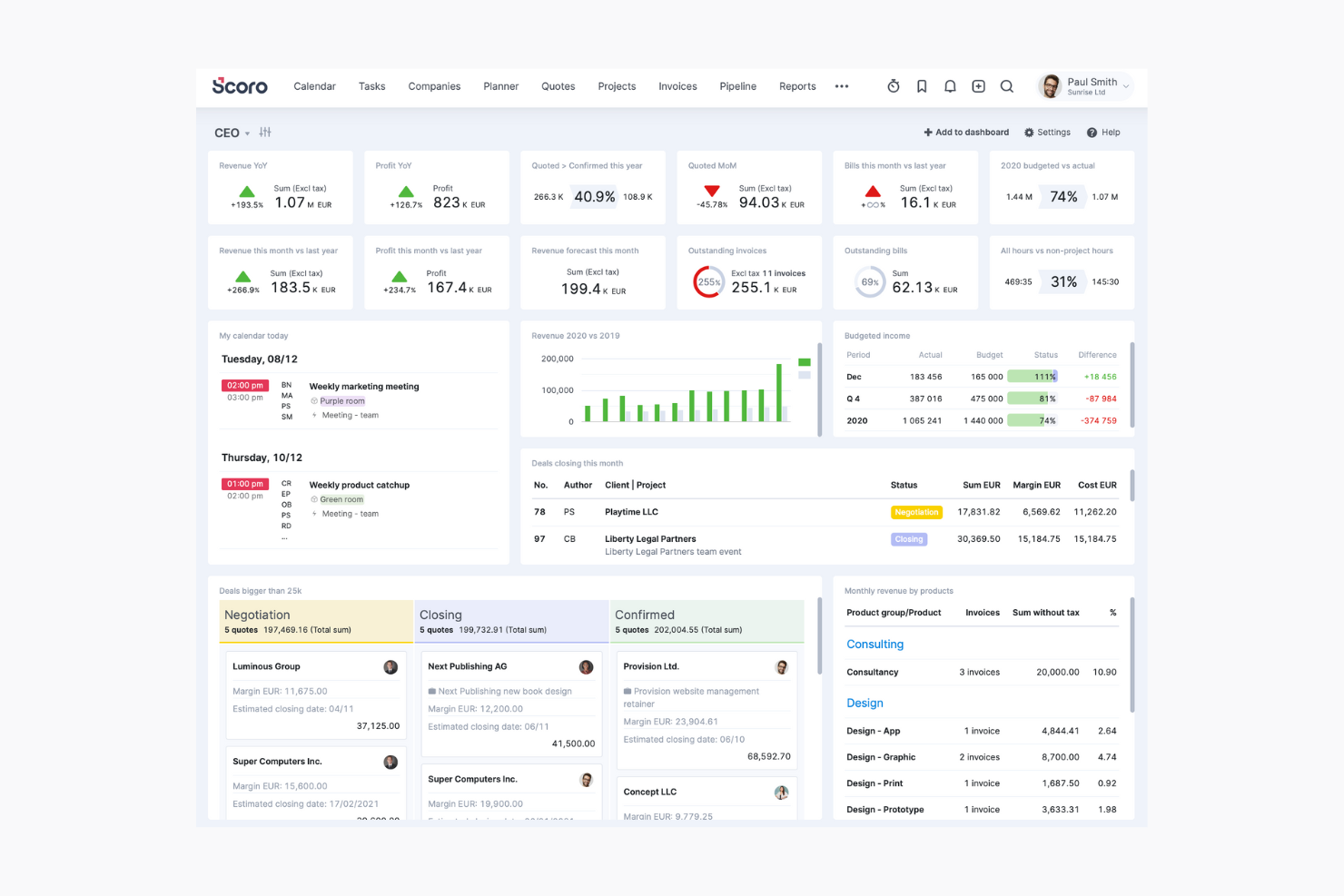
Scoro è una soluzione completa di automazione per i servizi professionali pensata per le piccole e medie imprese che desiderano ottimizzare le proprie operazioni. È utile per manager e team leader che devono supervisionare progetti, finanze e il monitoraggio del tempo.
Perché ho scelto Scoro: Scoro ti consente di gestire progetti e finanze in un unico posto. Puoi monitorare il tempo, inviare fatture e tenere sotto controllo i budget senza cambiare strumento. Il tuo team può utilizzare dashboard per avere sempre sotto controllo i numeri chiave e i report ti aiutano a vedere cosa funziona e cosa va migliorato.
Funzionalità e integrazioni principali:
Funzionalità includono dashboard personalizzabili che ti permettono di monitorare tutto, dalle vendite al tempo, al budget e alle tempistiche dei progetti. Lo strumento offre anche funzioni di fatturazione e gestione delle fatture.
Integrazioni includono Xero, QuickBooks, Zapier, Mailchimp, Dropbox, Google Calendar, Slack, Asana e Stripe.
Pros and Cons
Pros:
- Dashboard personalizzabili
- Strumenti finanziari integrati
- Funzionalità di report dettagliati
Cons:
- Richiede tempo per la configurazione iniziale
- Alto livello di personalizzazione richiesto
Altri software per il rilevamento delle presenze
Ecco altre opzioni di software per il monitoraggio del tempo che non sono entrate nel mio elenco, ma che vale comunque la pena prendere in considerazione se non hai ancora trovato quello che cerchi:
- Beesbusy
Ideale per le piccole imprese
- Monitask
Ideale per la rilevazione automatica del tempo
- Resource Guru
Ideale per la pianificazione delle risorse
- BigTime
Ideale per servizi professionali
- Homebase
Ideale per monitorare le ore dei dipendenti
- GoodDay
Ideale per il tracciamento del tempo integrato nei progetti


Come valuto i software per la rilevazione delle ore
Valuto gli strumenti per la rilevazione delle ore su due livelli: funzionalità fondamentali come la registrazione delle entrate e delle uscite in tempo reale e l'allocazione del tempo ai progetti, quindi gli elementi distintivi che separano gli strumenti validi da quelli eccellenti.
Funzionalità fondamentali (requisiti essenziali per questo elenco)
Quando seleziono gli strumenti per il mio elenco, assegno a ciascuno un punteggio su una scala da 0 (non offre la funzionalità) a 5 (eccelle in quest'area) per ogni funzionalità fondamentale indicata di seguito. Successivamente, converto il punteggio totale dello strumento in una percentuale. Ogni strumento deve raggiungere un punteggio totale minimo del 65% per essere preso in considerazione.
- Registrazione delle entrate e delle uscite in tempo reale: verifico se i membri del team possono registrare l'entrata tramite web, dispositivi mobili e postazioni self-service, soprattutto per i team distribuiti che alternano il lavoro in sede e da remoto.
- Allocazione del tempo a progetti e attività: le ore registrate dovrebbero essere associate a progetti, attività o clienti specifici, così i responsabili di progetto possono vedere dove viene effettivamente impiegato il tempo, invece di visualizzare soltanto il totale delle ore lavorate.
- Gestione e approvazione dei fogli presenze: valuto la completezza del flusso di approvazione, cercando revisioni multilivello, promemoria automatici e il blocco dei fogli presenze, che impedisce modifiche dopo l'approvazione.
- Report e analisi: i report devono andare oltre i semplici totali delle ore. Cerco suddivisioni tra ore fatturabili e non fatturabili, tassi di utilizzo e confronti tra budget e risultati effettivi.
- Integrazioni con paghe e fatturazione: che si tratti di trasferire le ore approvate a QuickBooks, Xero o a un fornitore di servizi paghe, valuto l'ampiezza e la profondità delle integrazioni native disponibili.
- Regole per straordinari e conformità: le regole retributive configurabili sono importanti, soprattutto per i team che gestiscono collaboratori e dipendenti in più regioni con requisiti diversi in materia di straordinari e pause.
Dopo aver creato un elenco di strumenti che soddisfano questi criteri, considero ciò che distingue ciascuna piattaforma.
Fattori distintivi (ciò che differenzia i fornitori)
Ecco come confronto i diversi fornitori:
Funzionalità distintive
Per me, gli avvisi relativi al budget e al consumo del budget sono particolarmente importanti. Quando le ore registrate iniziano ad avvicinarsi alla stima, voglio che il responsabile di progetto riceva una notifica prima che la situazione diventi una sorpresa nella riunione di aggiornamento successiva. Le mappe di calore della capacità e del carico di lavoro offrono ai responsabili delle risorse una panoramica visiva di chi è sovraccarico e chi ha ancora disponibilità, influenzando direttamente la pianificazione degli sprint e le decisioni relative al personale. Cerco anche l'accesso al portale clienti, poiché i team delle agenzie spesso devono condividere con i clienti le ore registrate per garantire trasparenza nella fatturazione, senza concedere l'accesso completo al sistema.
Oltre le funzionalità
È importante considerare il livello di integrazione con il sistema di gestione dei progetti già in uso. Se il team organizza gli sprint in Jira o gestisce i risultati finali in Asana, lo strumento per la rilevazione delle ore deve sincronizzare attività e ore senza richiedere un reinserimento manuale. Valuto attentamente anche i modelli di prezzo: il prezzo per utente può aumentare rapidamente per un ufficio di gestione dei progetti di 50 persone rispetto ai piani a tariffa fissa. Infine, considero le dimensioni del team e l'idoneità al settore, poiché un'agenzia che fattura a ore ha esigenze molto diverse da quelle di un reparto IT aziendale che monitora i costi dei progetti interni.
Come scegliere un software per il rilevamento delle presenze
È facile perdersi in lunghi elenchi di funzionalità e strutture tariffarie complesse. Per aiutarti a rimanere concentrato mentre affronti il tuo processo di selezione del software, ecco un elenco dei fattori da tenere a mente:
| Fattore | Cosa considerare |
|---|---|
| Scalabilità | Il software sarà in grado di crescere insieme al tuo team? Valuta se può gestire più utenti o sedi con l'espansione della tua attività. Evita gli strumenti che potrebbero limitare la tua crescita futura. |
| Integrazioni | Si collega agli strumenti che già utilizzi, come i sistemi paghe o HR? Assicurati che il software possa integrarsi senza problemi con gli strumenti che usi già, per evitare silos di dati. |
| Personalizzazione | Puoi adattarlo ai tuoi flussi di lavoro specifici? Cerca opzioni che ti consentano di personalizzare report e dashboard in base alle esigenze specifiche del tuo team. |
| Semplicità d'uso | È intuitivo per il tuo team? Un'interfaccia facile da usare riduce i tempi di formazione e aiuta il tuo team ad adottare rapidamente il software. |
| Implementazione e avvio | Quanto tempo servirà per iniziare? Valuta le risorse necessarie per la configurazione e verifica se il fornitore offre assistenza o formazione per agevolare la transizione. |
| Costo | Rientra nel tuo budget? Valuta i costi totali, comprese eventuali commissioni nascoste o spese per funzionalità aggiuntive, per assicurarti che siano compatibili con i tuoi vincoli finanziari. |
| Misure di sicurezza | Lo strumento protegge i tuoi dati e la tua privacy? Verifica la presenza di funzionalità come l'autenticazione a due fattori e la crittografia dei dati, per assicurarti che le informazioni del tuo team siano al sicuro. |
Che cos'è un software per la rilevazione delle presenze?
Il software per la rilevazione delle presenze è uno strumento che aiuta a monitorare le ore di lavoro e le presenze dei dipendenti. I responsabili, i team delle risorse umane e i team leader lo utilizzano per assicurarsi che la fatturazione e le buste paga siano accurate e che vengano rispettate le leggi sul lavoro.
Grazie alle funzionalità per il monitoraggio del tempo, il controllo delle presenze e la creazione di report, aiuta a gestire il tempo del team, ridurre gli errori e migliorare l'efficienza.
Funzionalità dei software per la rilevazione delle presenze
Quando selezioni un software per la rilevazione delle presenze, presta attenzione alle seguenti funzionalità chiave:
- Monitoraggio del tempo: registra automaticamente le ore dei dipendenti per mantenere precise le buste paga e ridurre al minimo gli errori manuali.
- Monitoraggio delle presenze: tiene traccia dei modelli di presenza dei dipendenti per aiutare i responsabili ad affrontare i problemi di puntualità e assenteismo.
- Pianificazione dei turni: consente ai responsabili di creare e gestire i turni di lavoro dei dipendenti per mantenere una copertura ottimale.
- Accesso da dispositivi mobili: consente ai dipendenti di registrare l'inizio e la fine del turno dai propri dispositivi mobili, offrendo flessibilità a chi lavora da remoto o sul campo.
- Monitoraggio GPS: verifica la posizione dei dipendenti durante l'orario di lavoro, una funzione utile per le aziende con team mobili o da remoto.
- Funzionalità di reportistica: genera report dettagliati sulle ore lavorate e sulle presenze, aiutando a garantire la conformità e a prendere decisioni.
- Supporto per le integrazioni: si connette ai sistemi esistenti per le buste paga e le risorse umane, riducendo l'inserimento dei dati e mantenendo coerenti le informazioni.
- Avvisi personalizzabili: invia notifiche in caso di timbrature mancanti o straordinari, aiutando i responsabili a rimanere informati e ad agire tempestivamente.
Vantaggi dei software per la rilevazione delle presenze
L'implementazione di un software per la rilevazione delle presenze offre diversi vantaggi al tuo team e alla tua azienda. Ecco alcuni dei benefici che puoi aspettarti:
- Elaborazione accurata delle buste paga: il monitoraggio automatizzato del tempo dei dipendenti riduce gli errori nelle buste paga e fa risparmiare tempo e denaro.
- Maggiore conformità: le funzionalità di monitoraggio e reportistica delle presenze aiutano a rispettare le leggi e i regolamenti sul lavoro.
- Aumento della produttività: la pianificazione dei turni e l'accesso da dispositivi mobili consentono una gestione efficiente della forza lavoro e maggiore flessibilità.
- Migliore capacità decisionale: i report dettagliati forniscono informazioni sui modelli della forza lavoro e aiutano nella pianificazione strategica.
- Risparmio sui costi: riducendo al minimo l'inserimento manuale dei dati e gli errori, puoi diminuire i costi amministrativi.
- Maggiore responsabilizzazione dei dipendenti: il monitoraggio GPS e gli avvisi personalizzabili assicurano che i dipendenti si trovino dove devono essere e promuovono il senso di responsabilità.
Costi e prezzi dei software per la rilevazione delle presenze
I costi dei software per la rilevazione delle presenze variano in base alle funzionalità, alle dimensioni del team, ai componenti aggiuntivi e ad altri fattori. La tabella seguente riassume i piani più comuni, i relativi prezzi medi e le funzionalità tipicamente incluse nelle soluzioni software per la rilevazione delle presenze dei dipendenti:
Tabella di confronto dei piani per i software di rilevazione delle presenze
| Tipo di piano | Prezzo medio | Funzionalità comuni |
|---|---|---|
| Piano gratuito | $0 | Monitoraggio di base del tempo, reportistica limitata e accesso da dispositivi mobili. |
| Piano personale | $5 - $15/utente/mese | Monitoraggio del tempo, controllo delle presenze e reportistica di base. |
| Piano aziendale | $15 - $25/utente/mese | Pianificazione avanzata, monitoraggio GPS, avvisi personalizzabili e supporto per le integrazioni. |
| Piano aziendale avanzato | $25 - $50/utente/mese | Reportistica completa, flussi di lavoro personalizzati, supporto dedicato e ulteriori funzionalità di sicurezza. |
Domande frequenti sul software per la rilevazione delle ore
Ecco alcune risposte alle domande più comuni sul software per la rilevazione delle ore.
In che modo il software per la rilevazione delle ore gestisce la sicurezza dei dati?
Il software per la rilevazione delle ore archivia i dati localmente o nel cloud e in genere utilizza la crittografia per proteggere le informazioni sensibili. Assicurati che lo strumento scelto rispetti le normative sulla protezione dei dati e disponga delle certificazioni necessarie per il tuo settore. Dovrebbe inoltre offrire controlli di accesso sicuri e backup regolari per mantenere i tuoi dati al sicuro.
I dipendenti possono timbrare l'entrata e l'uscita utilizzando dispositivi mobili?
Sì, molti strumenti online per la rilevazione delle ore includono app mobili per iOS e Android. Queste consentono al tuo team di timbrare l’entrata e l’uscita da qualsiasi luogo tramite il proprio dispositivo mobile, una funzione utile se lavora sul campo o presso specifici siti di lavoro. Se devi verificare le posizioni, cerca app che includano il tracciamento GPS.
Quali tipi di report posso generare con il software per la rilevazione delle ore?
Il software per la rilevazione delle ore offre in genere report dettagliati sulle ore lavorate, gli straordinari, le ferie e le tendenze relative alle presenze. Puoi filtrare i report per progetto, dipendente o intervallo di date per monitorare le ore fatturabili, tenere sotto controllo i budget dei progetti e condividere i dati con i clienti o con chi si occupa delle paghe.
Quanto è flessibile il software per la rilevazione delle ore nella gestione degli orari dei dipendenti?
La maggior parte degli strumenti per la rilevazione delle ore consente di aggiornare rapidamente gli orari, gestire le modifiche dell’ultimo minuto e automatizzare gli scambi di turno o le approvazioni. Cerca soluzioni in grado di segnalare i turni sovrapposti o i problemi di conformità. Questo ti aiuterà a mantenere i progetti nei tempi previsti ed evitare una supervisione manuale eccessiva.
È possibile integrare il software per la rilevazione delle ore con i sistemi paghe?
Sì, la maggior parte degli strumenti software per la rilevazione delle ore include integrazioni con i sistemi paghe per automatizzare il calcolo degli stipendi e ridurre gli errori di inserimento manuale. Verifica la disponibilità di integrazioni native o connettori API in grado di sincronizzare lo strumento con i sistemi paghe, le soluzioni per le risorse umane o gli strumenti di contabilità e migliorare il processo del ciclo paghe per il tuo team di progetto.
Quali sono gli errori più comuni da evitare quando si introduce il software per la rilevazione delle ore in un team di progetto?
Tra gli errori più comuni vi sono saltare la formazione dei dipendenti, non personalizzare le impostazioni in base ai propri flussi di lavoro e comunicare in modo insufficiente il “perché” del cambiamento. Evita questi problemi sperimentando prima lo strumento con un piccolo gruppo, raccogliendo i feedback e introducendo le modifiche gradualmente per ottenere il consenso del team.
Come posso assicurarmi che i dipendenti utilizzino effettivamente correttamente il sistema di rilevazione delle ore?
Inizia con un onboarding pratico e affronta eventuali dubbi del team sul monitoraggio. Utilizza promemoria e notifiche mobili per aiutare il team a sviluppare una routine e assicurati che lo strumento scelto disponga di un’interfaccia facile da usare. Definisci politiche chiare, spiega in che modo un monitoraggio accurato porta vantaggi a tutti e controlla a campione i dati per assicurarti che il team segua le tue linee guida.
Il software per la rilevazione delle ore supporta efficacemente i team da remoto e ibridi?
Sì, il software per la rilevazione delle ore supporta i team da remoto e ibridi con funzioni come l’accesso online, le app mobili, gli strumenti GPS e di localizzazione e le integrazioni con le piattaforme di gestione dei progetti da remoto. Scegli una soluzione con monitoraggio e avvisi in tempo reale per assicurarti di poter mantenere la responsabilità in tutti i luoghi di lavoro.