

I 10 migliori software per il monitoraggio automatico del tempo recensiti nel 2026

Elenco dei migliori software per il monitoraggio automatico del tempo


Gestire un team e tenere traccia di ogni attività può essere opprimente. Potresti avere la sensazione di essere sempre alle prese con il tempo, faticando a mantenere produttività e responsabilità. È qui che entra in gioco il software per il monitoraggio automatico del tempo.
Nella mia esperienza, questi strumenti possono aiutare te e il tuo team a concentrarvi su ciò che conta davvero. Registrano automaticamente le ore, forniscono informazioni sulla produttività e ti aiutano a gestire le risorse in modo più efficace.
Ho testato e recensito in modo indipendente diverse soluzioni software e sono qui per condividere le mie migliori scelte. Troverai recensioni imparziali, incentrate sulle funzionalità che possono semplificare le attività di gestione dei progetti. Che tu abbia una piccola impresa o una grande azienda, qui troverai qualcosa di utile. Scopriamo come sfruttare al meglio il tuo tempo.
Perché fidarsi dei nostri consigli sui software
Il nostro team testa e recensisce software dal 2012. In quanto project manager noi stessi, sappiamo quanto sia difficile — e importante — scegliere il software giusto.
Per questa guida, abbiamo valutato gli strumenti attraverso test pratici e ricerche indipendenti, assegnando un punteggio agli strumenti in base ai nostri criteri di selezione. Ci basiamo inoltre sulle competenze di leader di pensiero del settore e di professionisti attivi nella gestione dei progetti.
Le nostre recensioni riflettono il nostro giudizio editoriale umano, non un discorso di vendita.
Revisori esperti:
Tabella comparativa dei software per il monitoraggio automatico del tempo
Questa tabella comparativa riassume i dettagli dei prezzi delle mie migliori selezioni di software per il monitoraggio automatico del tempo:
| Tool | Best For | Trial Info | Price | ||
|---|---|---|---|---|---|
| 1 | Ideale per i portali di self-service dei dipendenti | Prezzo su richiesta | Website | ||
| 2 | Ideale come soluzione di IA per le aziende | Demo gratuita disponibile | A partire da $8/utente/mese | Website | |
| 3 | Ideale per tracciare attività offline | Prova gratuita di 14 giorni + demo gratuita disponibile | Da $6.42/utente/mese (fatturazione annuale) | Website | |
| 4 | Ideale per una reportistica flessibile | Piano gratuito + prova gratuita di 30 giorni + demo gratuita disponibile | A partire da $9/user/month (con fatturazione annuale) | Website | |
| 5 | Ideale per un piano gratuito per piccoli team | Piano gratuito + prova gratuita di 7 giorni disponibile | A partire da $3.99/utente/mese (con fatturazione annuale) | Website | |
| 6 | Ideale per l'integrazione paghe | Prova gratuita + demo gratuita disponibili | Da $20/mese + $8/utente/mese (fatturazione annuale) | Website | |
| 7 | Ideale per la rilevazione automatica del tempo con IA | Prova gratuita di 14 giorni + demo gratuita disponibile | Da $9/utente/mese (fatturato annualmente) | Website | |
| 8 | Ideale per la rilevazione biometrica del tempo | Prova gratuita di 14 giorni + piano gratuito + demo gratuita disponibile | Da $4,49/utente/mese (fatturato annualmente) | Website | |
| 9 | Ideale per la gestione del budget | Prova gratuita di 14 giorni + piano gratuito + demo gratuita disponibile | Da $3.99/utente/mese (fatturato annualmente) | Website | |
| 10 | Ideale per l'analisi della produttività | Prova gratuita di 14 giorni disponibile | Da $7/mese (fatturato annualmente) | Website |

Recensione dei migliori software per il monitoraggio automatico del tempo
Di seguito sono riportati i miei riepiloghi dettagliati dei migliori software per il monitoraggio automatico del tempo inclusi nel mio elenco. Le mie recensioni offrono uno sguardo approfondito alle funzionalità principali, ai pro & contro, alle integrazioni e ai casi d’uso ideali di ogni strumento, per aiutarti a trovare quello più adatto a te.

Paycom
Ideale per i portali di self-service dei dipendenti

Paycom è una piattaforma HR e paghe basata su un unico database, con rilevamento presenze automatizzato integrato, inclusa la generazione automatica delle schede attività, timbratura in entrata e uscita tramite geofencing, biometria o mobile, e decisioni automatizzate sulle richieste di assenza attraverso il suo modulo GONE.
Per chi è più adatto Paycom?
Paycom è particolarmente indicato per organizzazioni di medie e grandi dimensioni che necessitano di rilevamento presenze, paghe e gestione HR in un sistema unificato.
Perché ho scelto Paycom
Ho scelto Paycom tra i miei preferiti perché apprezzo come il portale Employee Self-Service si colleghi direttamente al rilevamento presenze in un unico database. I dipendenti timbrano l'ingresso e l'uscita, richiedono permessi, scambiano o prendono turni e approvano il proprio cedolino prima dell'invio. GONE automatizza istantaneamente le decisioni sulle assenze in base alle regole impostate, eliminando gli scambi con i responsabili. IWant, il motore AI di Paycom, permette ai dipendenti di ottenere il proprio orario e i dati sulle presenze su richiesta senza dover contattare l'HR.
Caratteristiche principali di Paycom
- Timbratura con Geofencing e Microfence: Imposta limiti di posizione ampi o precisi entro cui i dipendenti devono trovarsi per timbrare tramite l'app mobile di Paycom.
- Generazione automatica delle schede attività per i salariati: Paycom genera e approva automaticamente le schede attività per i dipendenti salariati, eliminando totalmente l'inserimento manuale.
- Tracciamento dell'allocazione delle ore lavorate: Assegna le ore dei dipendenti a specifici centri di costo, dipartimenti o posizioni direttamente all'interno di ogni scheda attività.
- App Manager on-the-Go: I responsabili possono visualizzare, modificare e approvare schede attività e pianificazioni da un dispositivo mobile in tempo reale.
Integrazioni di Paycom
Le integrazioni sono fornite principalmente tramite la suite HR e paghe nativa di Paycom, che include strumenti integrati per la gestione dei talenti, il rilevamento delle presenze, l'amministrazione dei benefit e l'autoservizio dei dipendenti all'interno di un unico database.
Pros and Cons
Pros:
- Beti® consente ai dipendenti di verificare i propri cedolini
- Il geofencing garantisce l'accuratezza della posizione di timbratura
- Un unico database elimina l'inserimento dati duplicato
Cons:
- Il generatore di report risulta meno flessibile rispetto ai concorrenti
- Opzioni di integrazione con terze parti molto limitate

Ideale come soluzione di IA per le aziende
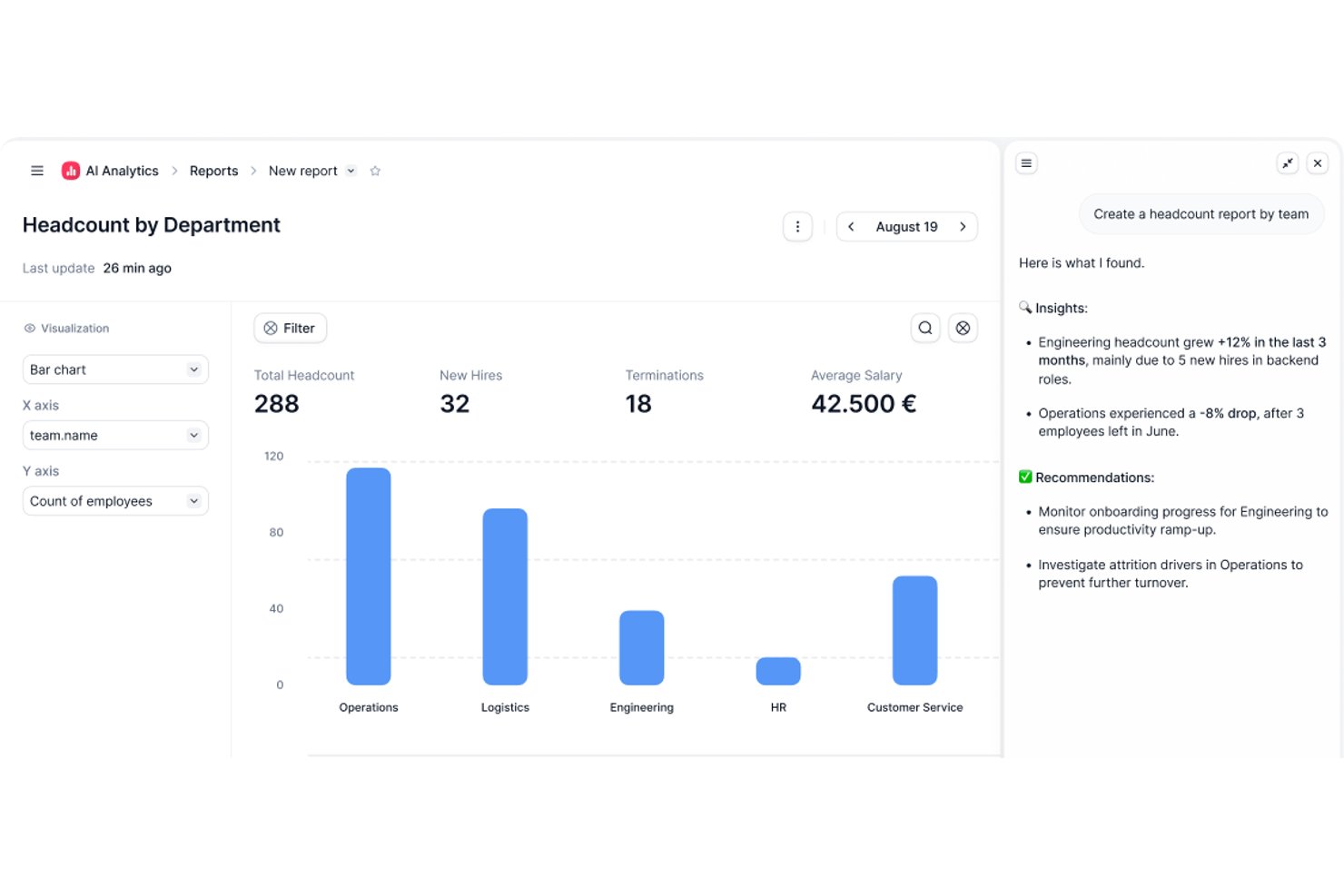
Factorial è una piattaforma HR basata sull'IA che copre il monitoraggio del tempo, la pianificazione dei turni, l'approvazione dei fogli di presenza e la reportistica delle presenze per tutta la squadra.
Per chi è più adatto Factorial?
Factorial è adatto alle squadre HR e operative che desiderano strumenti assistiti dall'IA per la pianificazione, la reportistica e le domande dei dipendenti sulle politiche aziendali, oltre al monitoraggio delle presenze.
Perché ho scelto Factorial
Ho incluso Factorial tra le mie scelte principali perché il suo posizionamento come soluzione di IA per le aziende fa sì che vada oltre il semplice rilevamento delle entrate. L'IA può rispondere alle domande dei dipendenti sulle politiche relative alle ferie e ai permessi, generare automaticamente report sulle presenze e aiutare i responsabili a creare gli orari senza scambi manuali continui. Apprezzo in particolare il fatto che i dipendenti possano registrare l'entrata direttamente sui progetti assegnati dall'app mobile, fornendo alle squadre HR dati più puliti per l'approvazione dei fogli di presenza senza dover rincorrere le persone.
Funzionalità principali di Factorial
- Pianificazione dei turni con trascinamento: I responsabili possono creare e modificare gli orari della squadra utilizzando un'interfaccia con trascinamento, con opzioni per turni a rotazione e modifiche in blocco.
- Registrazione dell'entrata basata sulla geolocalizzazione: I dipendenti registrano l'entrata dai luoghi designati tramite dispositivo mobile, con controlli di recinzione geografica per limitare le registrazioni in base alla posizione geografica.
- Revisione e approvazione dei fogli di presenza: I responsabili possono filtrare i fogli di presenza in base allo stato di attesa, esaminare le ore per giorno, settimana o mese e bloccare i record una volta approvati.
- Monitoraggio del tempo senza connessione con sincronizzazione automatica: I dipendenti possono registrare ore, pause e tempo dedicato ai progetti anche senza connessione, con sincronizzazione automatica dei dati alla riconnessione.
Integrazioni di Factorial
Factorial offre integrazioni dal mercato delle applicazioni con Google Workspace, Slack, Microsoft Azure, Microsoft Power BI, Okta, Sage e DATEV. Offre inoltre un'API pubblica, notifiche tramite webhook, OAuth 2.0 e l'accesso a centinaia di strumenti tramite Zapier.
Pros and Cons
Pros:
- I registri delle presenze offrono ai responsabili una visione chiara delle entrate
- L'invio dei fogli di presenza è rapido per i dipendenti
- La visibilità su turni e permessi aiuta a pianificare la copertura
Cons:
- Le registrazioni manuali dell'entrata sostituiscono il rilevamento passivo del tempo
- Le regole sugli straordinari possono richiedere una convalida manuale

DeskTime
Ideale per tracciare attività offline

DeskTime è uno strumento di monitoraggio automatico del tempo che registra l'utilizzo di app e URL, attività offline e ore di progetto in background—senza richiedere al tuo team di avviare o fermare alcun timer.
Per chi è indicato DeskTime?
DeskTime è adatto a team di piccole e medie dimensioni che necessitano di visibilità su come vengono spese le ore di lavoro sia per attività digitali che non digitali.
Perché ho scelto DeskTime
Ho incluso DeskTime tra le mie scelte principali per la sua efficacia nella gestione delle parti della giornata lavorativa trascorse lontano dal computer. La maggior parte dei tracker automatici smette semplicemente di monitorare quando qualcuno si allontana dalla scrivania, lasciando così dei vuoti nei dati. DeskTime colma questi vuoti con la registrazione del tempo offline: i membri del team possono cliccare su uno slot inattivo nella loro timeline e etichettarlo come riunione, chiamata telefonica o attività in sede. È anche possibile sincronizzare Google Calendar o Outlook per riempire automaticamente gli slot di tempo inattivi. Gli amministratori possono richiedere l'approvazione prima che qualsiasi voce offline venga conteggiata nel totale giornaliero di un membro del team, mantenendo così l'integrità dei dati.
Funzionalità principali di DeskTime
- Monitoraggio automatico di app e URL: DeskTime funziona in background e registra ogni app e sito web aperto da un membro del team, senza alcun input manuale.
- Categorizzazione della produttività: Gli amministratori possono etichettare app e URL come produttivi, improduttivi o neutri, generando così un punteggio di produttività giornaliero per ciascun membro del team.
- Cattura screenshot: DeskTime effettua periodicamente, in modo opzionale, screenshot dello schermo di ciascun utente, con frequenza e impostazioni di privacy regolabili.
- Calendario delle assenze: I team possono registrare e monitorare ferie, giorni di malattia e altri tipi di assenza direttamente all'interno di DeskTime insieme alle ore di lavoro tracciate.
Integrazioni DeskTime
Le integrazioni includono Google Calendar, Outlook Calendar, Trello, Gitlab, Asana, Jira e Zapier.
Pros and Cons
Pros:
- Registra automaticamente titoli di documenti e finestre
- Tracciamento preciso delle app e degli URL visitati
- Funziona silenziosamente in background senza input
Cons:
- Manca il filtraggio predittivo delle categorie web
- Nessun monitoraggio dello schermo in tempo reale

Toggl
Ideale per una reportistica flessibile
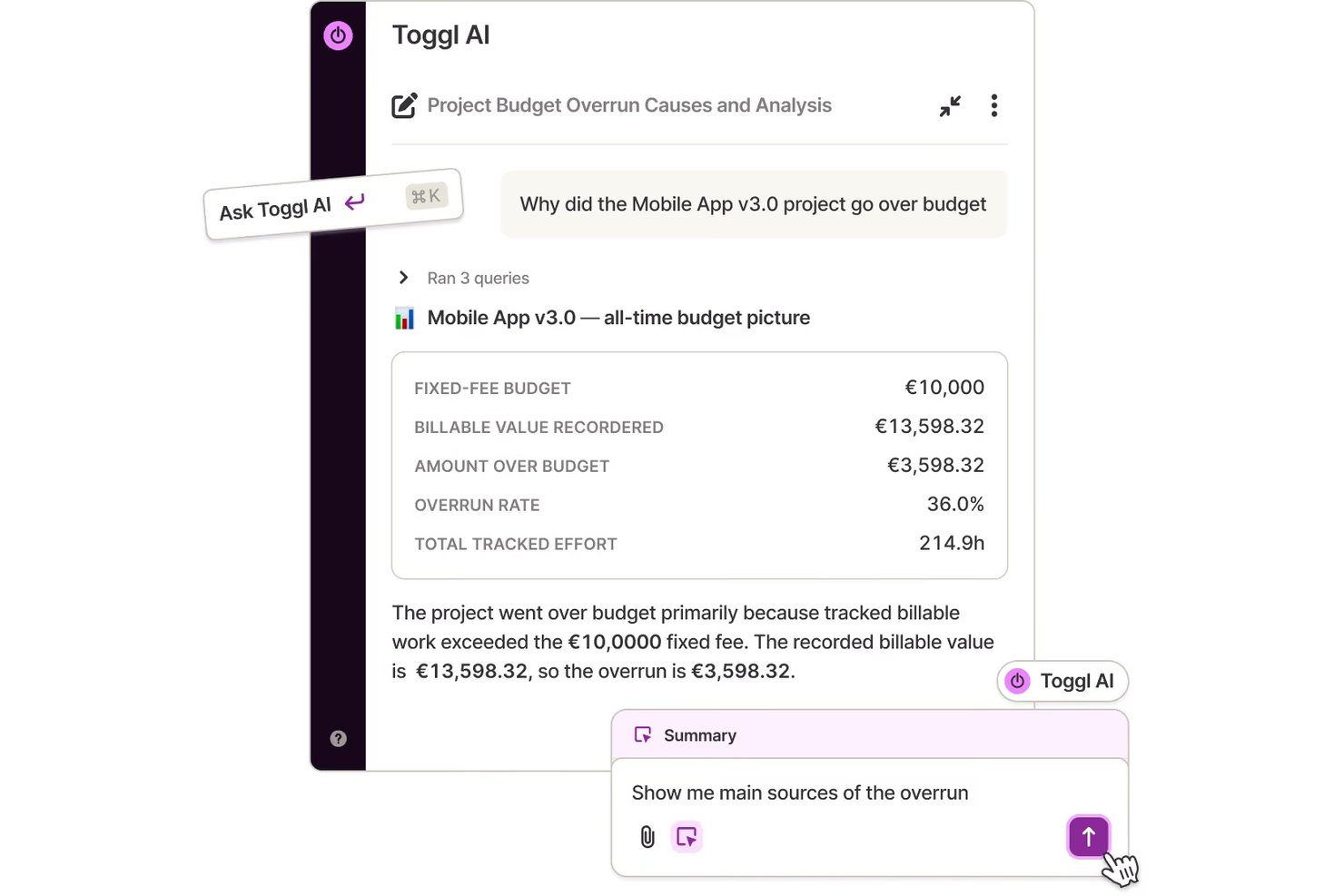
Toggl è una piattaforma di monitoraggio del tempo che combina la registrazione automatica delle attività, timer con un clic, rilevamento dell'inattività, dashboard dei progetti e reportistica flessibile su web, desktop e dispositivi mobili.
A chi è più adatto Toggl?
Toggl è particolarmente adatto a responsabili delle operazioni, freelance e consulenti che hanno bisogno di report dettagliati su come viene impiegato il tempo tra progetti e clienti.
Perché ho scelto Toggl
Ho incluso Toggl tra le mie scelte migliori perché il suo livello di reportistica lo distingue davvero dagli altri strumenti di monitoraggio del tempo. Posso filtrare e raggruppare il tempo per progetto, cliente, membro, tag e intervallo di date, quindi esportare riepiloghi ordinati in formato PDF, CSV o XLSX per la fatturazione ai clienti o le revisioni interne. Ciò che trovo utile anche nella pratica è la sequenza temporale automatica: l'app desktop registra ogni applicazione e sito web in cui sei attivo durante la giornata, mentre il rilevamento dell'inattività segnala le lacune, così le ore registrate rimangono precise senza dover effettuare correzioni manuali.
Funzionalità principali di Toggl
- Sequenza temporale automatica delle attività: L'app desktop registra una sequenza temporale in formato calendario delle tue attività lavorative durante la giornata, così puoi rivedere ciò su cui hai lavorato e copiare le sessioni nelle registrazioni del tempo.
- Timer con un clic: Avvia e interrompi il monitoraggio delle attività con un solo clic nelle app web, desktop e mobili.
- Dashboard del progetto: Visualizza in un unico luogo l'avanzamento dei progetti attivi, il tempo effettivo rispetto alle stime e i dettagli a livello di attività e membro.
- Rilevamento dell'inattività: Toggl segnala i periodi di inattività durante un timer in esecuzione, così puoi decidere se mantenere o scartare quel tempo prima che influisca sulle ore registrate.
Integrazioni di Toggl
Toggl offre integrazioni native con Jira, Asana, Google Calendar, Slack, Outlook Email & Calendar e QuickBooks Online. Fornisce inoltre un'API REST, webhook, un server MCP e un'interfaccia a riga di comando per integrazioni personalizzate.
Pros and Cons
Pros:
- Report dettagliati sul tempo per progetto e cliente
- La sequenza temporale privata delle attività aiuta a ricostruire il lavoro
- I promemoria sull'inattività aiutano a rivedere il tempo inattivo
Cons:
- L'acquisizione desktop richiede una configurazione con attivazione esplicita
- La sincronizzazione mobile può rallentare o non funzionare correttamente

Clockify
Ideale per un piano gratuito per piccoli team
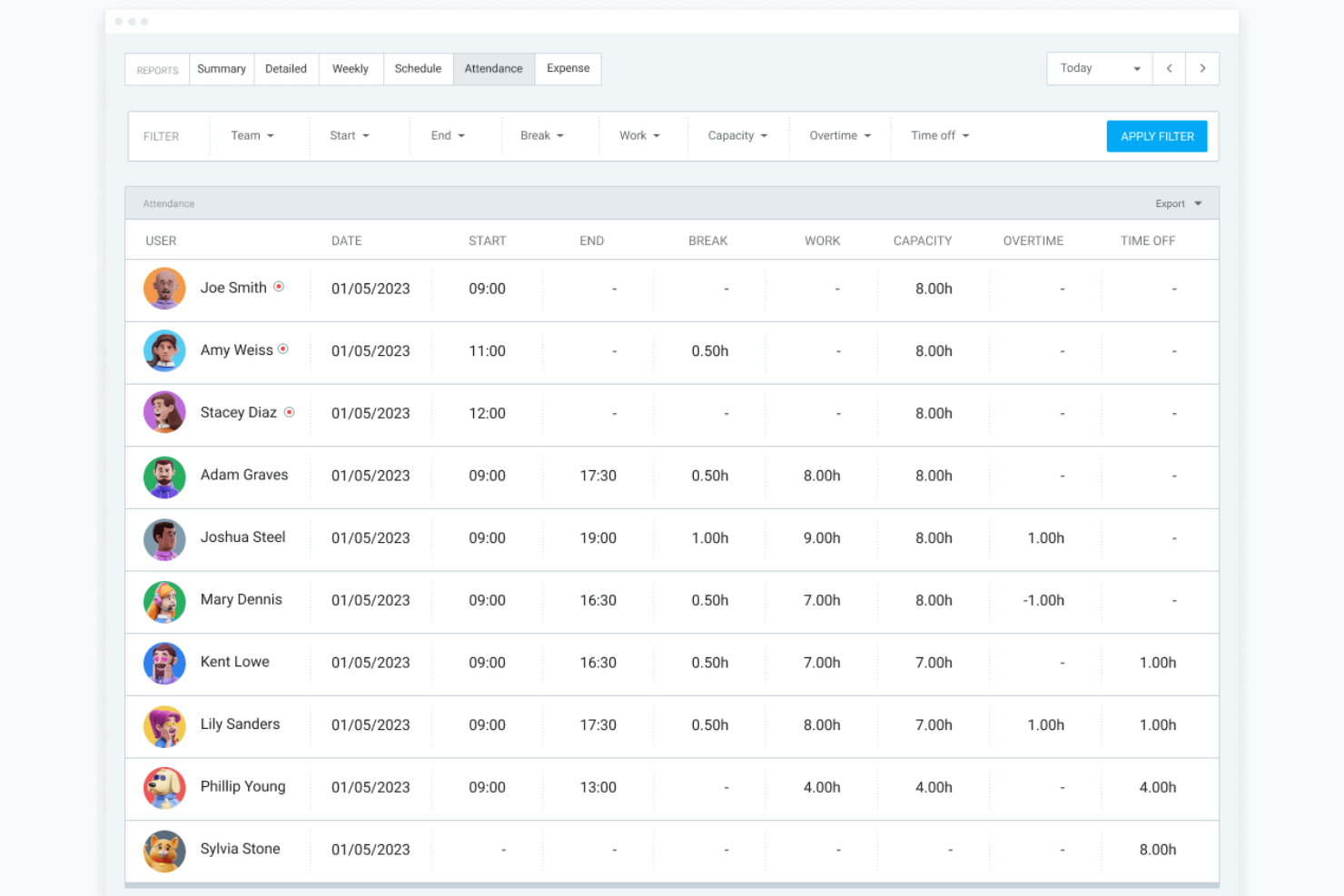
Clockify è un software per il monitoraggio del tempo, ideale per i piccoli team che devono gestire il tempo in modo efficace. Offre accesso gratuito illimitato per un massimo di cinque utenti, rendendolo un'ottima scelta per le piccole imprese.
Perché ho scelto Clockify: consente di avere fino a cinque utenti nei piani gratuiti, una soluzione perfetta per i team in crescita. Lo strumento fornisce un semplice sistema di monitoraggio del tempo che puoi avviare e arrestare con un solo clic. Include anche un sistema di monitoraggio dei progetti che ti aiuta a controllare i progressi e ad allocare le risorse in modo efficiente. Grazie alla sua politica generosa sugli utenti, Clockify è una scelta pratica per i team che hanno bisogno di flessibilità nella gestione degli utenti.
Funzionalità e integrazioni principali:
Le funzionalità includono un sistema visivo di monitoraggio del tempo che consente di registrare il tempo con facilità. La funzione di reportistica genera informazioni dettagliate su come viene impiegato il tempo nei vari progetti. Clockify offre anche un foglio presenze per aiutarti a gestire e approvare in modo efficiente le ore del team.
Le integrazioni includono Asana, Trello, Slack, Jira, QuickBooks, monday.com, GitHub, Google Calendar, Notion e Zapier.
Pros and Cons
Pros:
- Accesso per un massimo di cinque utenti nel piano gratuito
- Registrazione del tempo semplice
- Opzioni di report dettagliate
Cons:
- Interfaccia essenziale
- Molte funzionalità sono disponibili solo nei piani a pagamento

Ideale per l'integrazione paghe
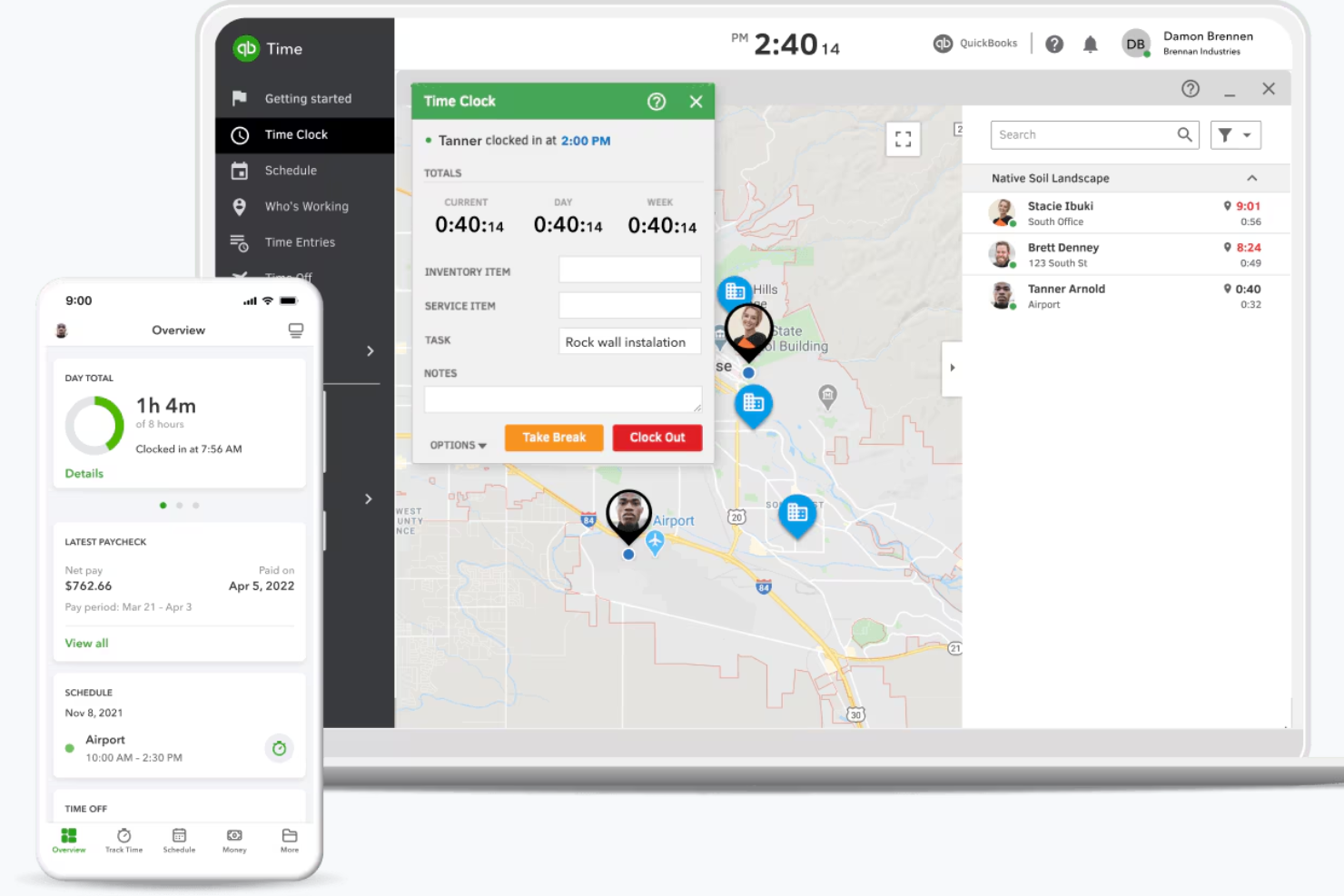
QuickBooks Time è uno strumento di rilevazione delle presenze progettato per le aziende che necessitano di dati orari precisi integrati con la gestione paghe. Semplifica la gestione del tempo e l'elaborazione delle buste paga per aziende di qualsiasi dimensione.
Perché ho scelto QuickBooks Time: L'integrazione con i sistemi paghe di QuickBooks è un vantaggio notevole, garantendo una gestione delle buste paga accurata ed efficiente. Puoi monitorare con precisione le ore lavorate dai dipendenti, riducendo gli errori nell'elaborazione dei salari. QuickBooks Time offre la rilevazione delle presenze anche tramite dispositivi mobili, permettendo al tuo team di timbrare da qualsiasi luogo. Questa semplice integrazione con i sistemi paghe lo rende una scelta pratica per le aziende che desiderano integrare le loro operazioni finanziarie.
Funzionalità e integrazioni di spicco:
Funzionalità includono il tracciamento GPS che ti permette di monitorare dove i dipendenti timbrano entrata e uscita. La funzione di pianificazione aiuta a gestire i turni e assegnare i compiti in modo efficiente. QuickBooks Time offre anche avvisi e notifiche per tenerti aggiornato sugli eventi importanti relativi alla rilevazione delle presenze.
Integrazioni includono QuickBooks, Xero, Gusto, BambooHR, ADP, Paychex, Sage, Expensify e Square.
Pros and Cons
Pros:
- Integrazione con sistemi paghe
- Rilevazione tramite dispositivi mobili
- Localizzazione GPS
Cons:
- La configurazione può essere complessa
- Possono verificarsi occasionali problemi di sincronizzazione

Timely
Ideale per la rilevazione automatica del tempo con IA
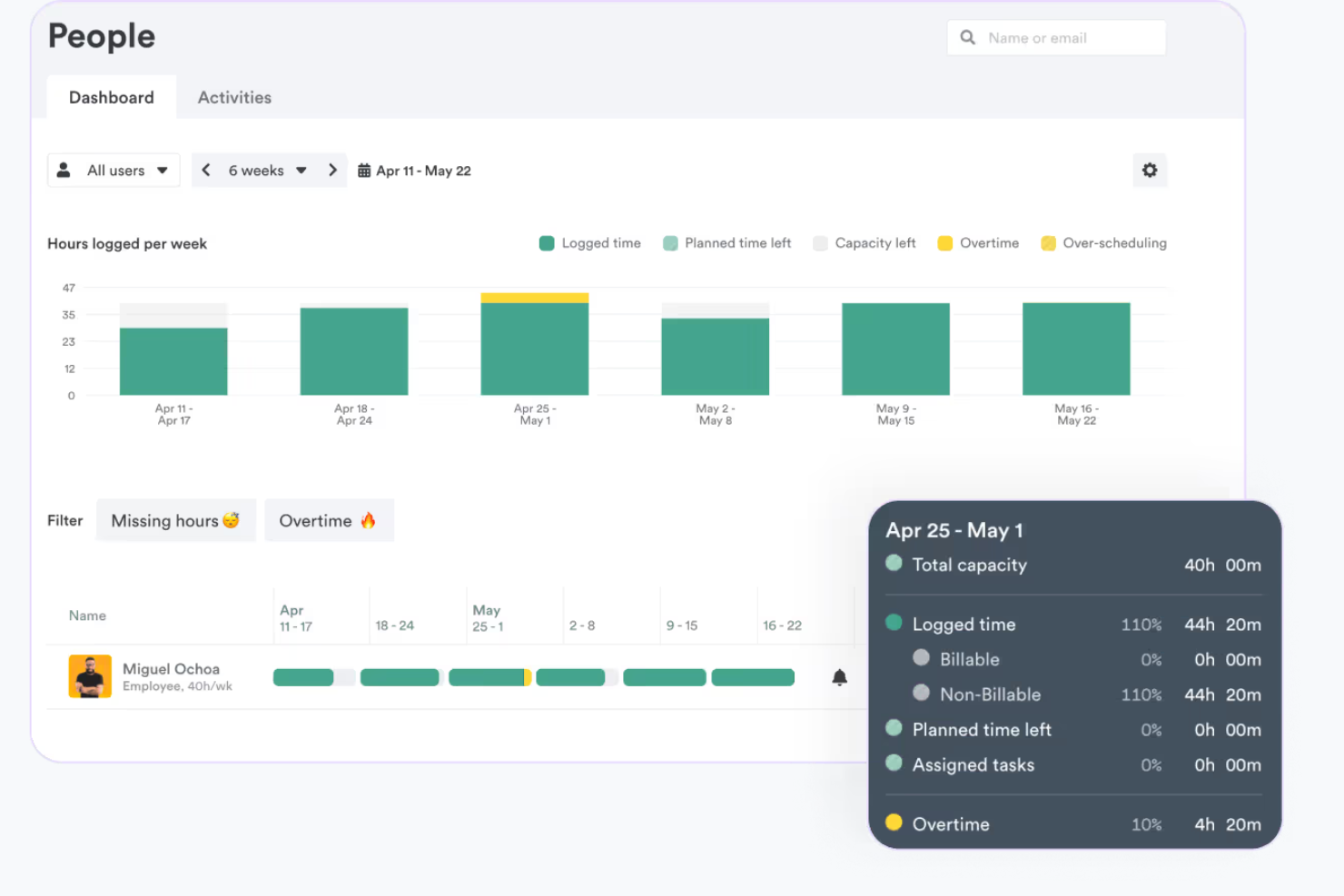
Timely è uno strumento di monitoraggio automatico del tempo progettato per aziende come studi di consulenza, agenzie e società SaaS. Aiuta gli utenti ad automatizzare la registrazione delle ore di lavoro online senza l'inserimento manuale, concentrandosi sull'aumento della produttività e dell'efficienza.
Perché ho scelto Timely: La sua caratteristica distintiva è il monitoraggio automatico del tempo basato sull'intelligenza artificiale, che elimina la necessità di inserimenti manuali. Timely può essere utilizzato per generare fogli presenze accurati, garantendo dati affidabili per la fatturazione e l’analisi. Il tracker della memoria aiuta a ricordare le attività, rendendo il monitoraggio del tempo preciso. Con il suo cruscotto di progetto, puoi facilmente monitorare l’avanzamento dei progetti e l’allocazione delle risorse, in linea con la sua caratteristica unica di monitoraggio automatico del tempo.
Caratteristiche principali & integrazioni:
Caratteristiche includono il monitoraggio automatico del tempo che registra l’attività lavorativa senza inserimenti manuali. I fogli presenze generati dall’IA vengono creati rapidamente in base ai tuoi modelli di lavoro. Il tracker della memoria ricorda le attività per un monitoraggio accurato, assicurando che nessun dettaglio venga perso.
Integrazioni includono Asana, Trello, ClickUp, monday.com, Google Calendar, Office 365 Calendar, QuickBooks e Jira. Per Gmail, Zoom e Microsoft Teams è necessario un software di terze parti.
Pros and Cons
Pros:
- Registrazione automatica del tempo
- Fogli presenze generati con IA
- Funzionalità di monitoraggio della memoria
Cons:
- Funzionalità offline limitate
- Curva di apprendimento per i nuovi utenti

Jibble
Ideale per la rilevazione biometrica del tempo

Jibble è uno strumento di rilevazione delle presenze e gestione dell'orario progettato per le aziende che necessitano di un monitoraggio preciso del tempo. È particolarmente popolare tra le aziende che richiedono dati di presenza affidabili, offrendo il riconoscimento facciale per garantire timbrature accurate.
Perché ho scelto Jibble: Fornisce il riconoscimento facciale, che aggiunge un ulteriore livello di sicurezza e precisione al rilevamento dell'orario. Il tuo team può timbrare l’entrata e l’uscita tramite dispositivi mobili, rendendolo ideale per dipendenti in remoto o in movimento. Jibble offre anche fogli presenze dettagliati che ti aiutano ad analizzare i modelli di lavoro. Questo focus su precisione e sicurezza si allinea alla sua proposta di valore per la rilevazione biometrica del tempo.
Funzionalità e integrazioni di spicco:
Funzionalità includono fogli presenze dettagliati che forniscono informazioni sulle ore lavorate dai dipendenti. L’app mobile consente ai dipendenti di timbrare da qualsiasi luogo. Jibble offre inoltre il tracciamento GPS per monitorare dove avvengono le timbrature, assicurando la conformità alla posizione.
Le integrazioni includono Slack, Microsoft Teams, Zapier, QuickBooks, Trello, Asana, Jira, monday.com, Google Calendar e Xero.
Pros and Cons
Pros:
- Riconoscimento facciale per timbrature
- Accessibilità tramite app mobile
- Tracciamento posizione GPS
Cons:
- La configurazione può essere laboriosa
- Funzionalità offline limitate

TimeCamp
Ideale per la gestione del budget

TimeCamp è uno strumento di monitoraggio del tempo e gestione dei progetti ideale per freelance e team che necessitano di una visione dettagliata dei budget. Offre funzionalità per tracciare il tempo, gestire progetti e analizzare i budget in modo efficace.
Perché ho scelto TimeCamp: È perfetto per le aziende che vogliono concentrarsi sulla gestione del budget. TimeCamp offre un monitoraggio dettagliato del budget, permettendo di tenere sotto controllo i costi di progetto in tempo reale. Lo strumento propone report visivi che aiutano ad analizzare facilmente i dati finanziari. Grazie alle sue capacità di gestione del budget, TimeCamp aiuta a mantenere il controllo degli obiettivi finanziari.
Caratteristiche principali e integrazioni:
Caratteristiche includono il monitoraggio automatico del tempo che registra le attività lavorative senza inserimento manuale. La funzione di fatturazione permette di creare e inviare fatture direttamente dalla piattaforma. TimeCamp offre anche il monitoraggio della produttività per aiutarti a capire come viene impiegato il tempo sulle diverse attività.
Integrazioni includono Trello, Asana, Slack, QuickBooks, Jira, Monday.com, Salesforce, Google Calendar, Zapier e Xero.
Pros and Cons
Pros:
- Controllo dei costi in tempo reale
- Monitoraggio dettagliato del budget
- Report finanziari visivi
Cons:
- Le integrazioni richiedono piani a pagamento
- Alcune funzionalità richiedono personalizzazione

RescueTime
Ideale per l'analisi della produttività
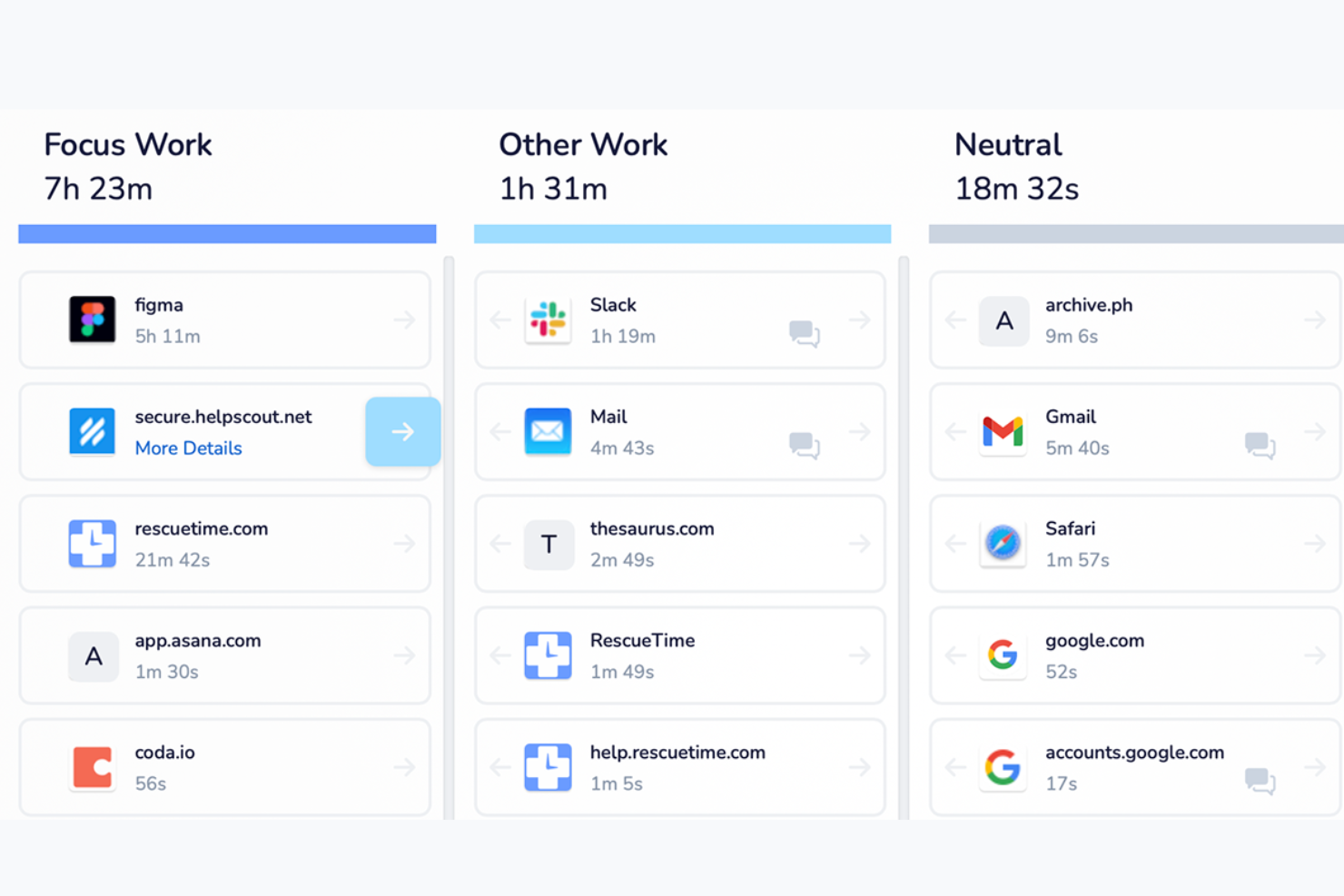
RescueTime è uno strumento di analisi della produttività progettato per persone e team che desiderano comprendere le proprie abitudini lavorative. Tiene traccia del tempo trascorso su applicazioni e siti web, offrendo approfondimenti per aiutare a migliorare concentrazione ed efficienza.
Perché ho scelto RescueTime: Si distingue per la fornitura di report dettagliati sulla produttività, che evidenziano come impieghi il tuo tempo. La funzione di sessione di concentrazione aiuta a bloccare le distrazioni nell'app desktop, aumentando la capacità di concentrazione. Gli avvisi in tempo reale di RescueTime ti notificano quando passi troppo tempo su attività non produttive. L'analisi approfondita si allinea con il suo punto di forza nell'analisi della produttività.
Caratteristiche principali & integrazioni:
Caratteristiche includono report dettagliati sulla produttività che suddividono l'utilizzo del tempo attraverso diverse attività. La funzione di sessione di concentrazione consente di bloccare siti distrattivi per un determinato periodo. Gli avvisi in tempo reale ti tengono informato sui livelli di produttività durante la giornata.
Le integrazioni includono Google Calendar. È necessario software di terze parti per connettersi a Slack, Trello, GitHub, Asana, Todoist, Microsoft Teams, Office 365 e IFTTT/Zapier.
Pros and Cons
Pros:
- Report dettagliati sulla produttività
- Avvisi di produttività in tempo reale
- Funzione di sessione di concentrazione
Cons:
- Potrebbe richiedere aggiustamenti per maggiore accuratezza
- Funzionalità offline limitata
Altri software per il monitoraggio automatico del tempo
Ecco alcune ulteriori opzioni di software per il monitoraggio automatico del tempo che non sono entrate nel mio elenco, ma che vale comunque la pena prendere in considerazione:
- Deltek Replicon Time
Ideale per la scalabilità nelle grandi imprese
- Harvest
Ideale per le funzionalità di fatturazione
- Insightful
Ideale per la mappatura automatica del tempo
- Monitask
Ideale per fogli ore online
- Connecteam
Ideale per team senza postazione fissa
- ClickTime
Ideale per report sui costi del lavoro in tempo reale
- Homebase
Ideale per la gestione di personale orario


Come valuto i software di rilevamento automatico del tempo
Valuto su due livelli: il minimo indispensabile che un tool deve garantire—rilevamento passivo, integrazioni con software di project management, approvazione dei timesheet—e i fattori distintivi che rendono le migliori soluzioni ideali per i team di progetto.
Funzionalità di base (requisiti fondamentali per questa lista)
Quando seleziono gli strumenti per la mia lista, valuto ognuno su una scala da 0 (non offre la funzionalità) a 5 (eccelle in quest'area) per ciascuna funzionalità di base elencata qui sotto. Poi, calcolo il punteggio totale dello strumento in percentuale. Ogni tool deve raggiungere un punteggio minimo totale del 65% per essere considerato.
- Rilevamento automatico del tempo: Verifico se lo strumento traccia passivamente l'attività su app, browser e documenti senza bisogno di avviare manualmente un timer o compilare un modulo.
- Assegnazione di progetto e attività: Il tempo tracciato dovrebbe essere associato a progetti, attività, clienti o azioni specifiche affinché le ore non finiscano tra quelle non assegnate.
- Generazione e approvazione dei timesheet: Cerco timesheet pre-compilati con flussi di lavoro per l'approvazione, dato che rincorrere approvazioni manuali è proprio ciò che questi strumenti dovrebbero evitare.
- Integrazioni con tool di PM: Lo strumento deve offrire connessioni native a piattaforme come Jira, Asana o Monday per sincronizzare direttamente il tempo tracciato con le attività su cui lavora il team.
- Reportistica e analisi del tempo: Valuto la profondità della reportistica disponibile, dal dettaglio dell'utilizzo e dei tassi di consumo budget alle dashboard di redditività a livello di progetto.
- Gestione del tempo fatturabile e delle tariffe: Gli strumenti devono permettere di contrassegnare le ore come fatturabili o non fatturabili e configurare tariffe in base a progetto, cliente o membro del team, per una fatturazione accurata.
Una volta identificati gli strumenti che soddisfano questi criteri, considero ciò che distingue ogni piattaforma.
Fattori distintivi (cosa distingue i fornitori)
Ecco come confronto e metto a confronto i diversi fornitori:
Caratteristiche distintive
La categorizzazione automatica alimentata dall'IA è un fattore importante—cerco strumenti che associano automaticamente le ore tracciate al progetto o all'attività corretta senza bisogno di organizzare manualmente i dati. Anche la sincronizzazione di calendari e riunioni è altrettanto importante, poiché spesso le chiamate coi clienti e le cerimonie sprint non vengono registrate. Valuto inoltre se uno strumento offre pianificazione della capacità delle risorse, che aiuta a individuare membri del team sovraccarichi prima che le scadenze vengano compromesse.
Oltre alle caratteristiche
I controlli sulla privacy sono fondamentali—il tracciamento automatico può risultare invasivo se lo strumento non consente ai membri del team di rivedere, modificare o approvare i propri log prima dell'invio. Valuto anche la profondità dell'integrazione con l'intero stack di project management e finanza, dato che una sincronizzazione bidirezionale con Jira o Asana è molto più utile di una semplice importazione unidirezionale. La struttura dei prezzi è degna di nota, in particolare se i piani si adattano in modo ragionevole con la crescita del team e se le funzionalità principali non sono accessibili solo nei pacchetti enterprise.
Come scegliere un software per il monitoraggio automatico del tempo
È facile perdersi in lunghi elenchi di funzionalità e strutture di prezzo complesse. Per aiutarti a rimanere concentrato mentre affronti il tuo specifico processo di selezione del software, ecco un elenco di fattori da tenere presenti:
| Fattore | Cosa considerare |
|---|---|
| Scalabilità | Lo strumento crescerà insieme alla tua azienda? Cerca soluzioni in grado di supportare un numero maggiore di utenti o progetti senza un aumento significativo dei costi o una riduzione delle prestazioni. |
| Integrazioni | Funziona con gli strumenti che utilizzi già, come i sistemi di gestione dei progetti o delle paghe? Verifica che le integrazioni siano facili da configurare e mantenere. |
| Personalizzazione | Puoi adattare il software ai tuoi flussi di lavoro e alle tue esigenze di reportistica? Evita gli strumenti che limitano la possibilità di modificare le impostazioni o i pannelli di controllo. |
| Facilità d'uso | L'interfaccia è intuitiva e facile da usare? Una curva di apprendimento ripida potrebbe rallentare l'adozione da parte del tuo team. |
| Implementazione e introduzione | Quanto velocemente puoi iniziare? Cerca un supporto dettagliato per la fase iniziale, come tutorial, sessioni di formazione e un servizio clienti reattivo. |
| Costo | Il prezzo è trasparente e rientra nel tuo budget? Considera i costi totali, inclusi eventuali componenti aggiuntivi o costi per funzionalità extra. |
| Misure di sicurezza | Il software soddisfa le tue esigenze di protezione dei dati? Assicurati che sia conforme alle normative e offra funzionalità come la crittografia e i controlli degli accessi. |
| Disponibilità dell'assistenza | Che tipo di assistenza puoi aspettarti? Cerca disponibilità 24 ore su 24, 7 giorni su 7, e diversi metodi di contatto per risolvere rapidamente i problemi. |
Che cos'è un software per il monitoraggio automatico del tempo?
Il software per il monitoraggio automatico del tempo è uno strumento che registra automaticamente il tempo dedicato ad attività e progetti, senza inserimento manuale. Viene comunemente utilizzato da liberi professionisti, responsabili di progetto e team per migliorare la produttività e la precisione della fatturazione. Funzionalità come la registrazione automatica del tempo, la creazione di report e l'integrazione con altri strumenti contribuiscono a una gestione efficiente del tempo e al monitoraggio dei progetti. Nel complesso, questi strumenti fanno risparmiare tempo, migliorano la produttività del team e riducono gli errori nel monitoraggio del tempo e nella gestione dei progetti.
Funzionalità
Quando scegli un software per il monitoraggio automatico del tempo, presta attenzione alle seguenti funzionalità chiave:
- Registrazione automatica del tempo: registra il tempo dedicato alle attività senza inserimento manuale, contribuendo a garantire la precisione e a risparmiare tempo.
- Monitoraggio della posizione GPS: controlla il luogo in cui i dipendenti effettuano l'entrata e l'uscita, garantendo la conformità ai requisiti basati sulla posizione.
- Riconoscimento facciale: aggiunge un livello di sicurezza verificando l'identità dell'utente durante la timbratura, risultando utile per i team distribuiti.
- Integrazione con la fatturazione: genera fatture direttamente dal tempo registrato, semplificando il processo di fatturazione dei progetti.
- Gestione del budget: monitora i costi dei progetti e aiuta a gestire efficacemente i budget, garantendo il raggiungimento degli obiettivi finanziari.
- Report personalizzabili: consente agli utenti di adattare i report a esigenze specifiche, offrendo informazioni sui dati relativi al tempo e ai progetti.
- Accesso da dispositivi mobili: consente agli utenti di monitorare il tempo ovunque si trovino, offrendo flessibilità ai dipendenti che lavorano da remoto o sul campo.
- Approvazione dei fogli presenze: gestisce e approva in modo efficiente le ore del team, garantendo un'elaborazione accurata delle buste paga.
- Monitoraggio delle spese: controlla le spese relative ai progetti, aiutando a gestire i costi e a migliorare il controllo finanziario.
- Funzionalità di integrazione: funziona con strumenti esistenti, come i sistemi di gestione dei progetti e delle buste paga, ottimizzando i flussi di lavoro.
Vantaggi
L'implementazione di un software per il monitoraggio automatico del tempo offre numerosi vantaggi al tuo team e alla tua attività. Eccone alcuni:
- Maggiore precisione: la registrazione automatica del tempo riduce gli errori nel monitoraggio delle ore, garantendo una fatturazione e un'elaborazione delle buste paga precise per i membri del team.
- Maggiore produttività: funzionalità come la creazione di report e l'analisi aiutano a individuare le inefficienze, consentendo ai team di ottimizzare i propri flussi di lavoro.
- Risparmio di tempo: l'automazione del monitoraggio del tempo elimina la necessità di inserimenti manuali, liberando tempo da dedicare ad attività più importanti.
- Migliore gestione del budget: il monitoraggio dei costi e delle spese dei progetti aiuta a rispettare il budget e a prendere decisioni finanziarie consapevoli.
- Maggiore responsabilità: il monitoraggio GPS e il riconoscimento facciale garantiscono che i dipendenti si trovino dove devono essere, promuovendo il senso di responsabilità.
- Fatturazione semplificata: l'integrazione con i sistemi di fatturazione consente di generare facilmente le fatture, accelerando il processo di pagamento.
- Flessibilità per il lavoro da remoto: l'accesso da dispositivi mobili consente di monitorare il tempo da qualsiasi luogo, supportando il monitoraggio del tempo dei dipendenti che lavorano da remoto o sul campo.
Costi e prezzi
La scelta di un software per il monitoraggio automatico del tempo richiede la comprensione dei vari modelli e piani tariffari disponibili. I costi variano in base alle funzionalità, alle dimensioni del team, agli strumenti aggiuntivi e ad altri fattori. La tabella seguente riassume i piani più comuni, i relativi prezzi medi e le funzionalità tipicamente incluse nelle soluzioni software per il monitoraggio automatico del tempo:
Tabella comparativa dei piani per il software di monitoraggio automatico del tempo
| Tipo di piano | Prezzo medio | Funzionalità comuni |
|---|---|---|
| Piano gratuito | $0 | Dati di base sul monitoraggio del tempo, report temporali limitati e accesso da dispositivi mobili. |
| Piano personale | $3-$10/user /month | Monitoraggio del tempo, timer manuali o monitoraggio automatico di base, report di base, monitoraggio di un singolo progetto o cliente, accesso mobile di base. |
| Piano aziendale | $11-$20/user/month | Monitoraggio del tempo, monitoraggio di progetti e attività, report standard, supporto di base per le integrazioni, fogli presenze del team, eventuale fatturazione o registrazione delle spese. |
| Piano aziendale avanzato | $20-$40+/ user/month | Report e analisi avanzati, integrazioni multiple, gestione del tempo e delle presenze del team, monitoraggio delle spese e del budget, esportazione o integrazione con le buste paga, controlli amministrativi e gestione degli accessi, assistenza di livello aziendale. |
Domande frequenti sul software di monitoraggio automatico del tempo
Ecco alcune risposte alle domande comuni sul software di monitoraggio automatico del tempo:
Come funziona il software di monitoraggio automatico del tempo?
Il software di monitoraggio automatico del tempo funziona registrando automaticamente il tempo che dedichi alle attività o ai progetti. Utilizza vari metodi, come il monitoraggio dell’attività del computer e delle app e dei siti web che utilizzi. In questo modo, non devi registrare manualmente le tue ore, risparmiando tempo e riducendo gli errori. Molti strumenti offrono anche app per dispositivi mobili, che ti consentono di monitorare il tempo ovunque ti trovi.
Il software di monitoraggio automatico del tempo può integrarsi con gli strumenti che già utilizzo?
Sì, la maggior parte dei software di rilevamento automatico del tempo può integrarsi con strumenti esistenti, come sistemi di gestione dei progetti, fatturazione e gestione delle paghe. Verifica le integrazioni specifiche offerte da ciascun software per assicurarti che sia compatibile con il tuo flusso di lavoro attuale. L’integrazione può migliorare la produttività semplificando il flusso di dati tra sistemi diversi.
I miei dati sono al sicuro con il software di monitoraggio automatico del tempo?
Sì, i fornitori affidabili di software di monitoraggio automatico del tempo danno priorità alla sicurezza dei dati. Utilizzano la crittografia, server sicuri e aggiornamenti regolari per proteggere i tuoi dati. Esamina sempre le funzionalità di sicurezza del software e la sua conformità alle normative sulla protezione dei dati. È importante scegliere un fornitore che valorizzi la tua privacy e l’integrità dei dati.
Sono necessarie competenze tecniche per utilizzare il software di monitoraggio automatico del tempo?
No, non sono necessarie competenze tecniche avanzate per utilizzare la maggior parte dei software di monitoraggio automatico del tempo. Questi strumenti sono progettati per essere facili da usare, con interfacce intuitive. Molti fornitori offrono tutorial, assistenza clienti e supporto durante la configurazione iniziale per aiutarti a iniziare. Se tu o il tuo team avete dubbi, cerca un software con un’assistenza completa e risorse per la formazione.