

I 10 migliori software di gestione dei progetti integrati con le e-mail 2026

Miglior software di gestione dei progetti con integrazione delle email: selezione


L'email è ancora uno dei modi più comuni con cui i team comunicano, ma se non è collegata al tuo strumento di gestione dei progetti, qualcosa può sfuggire. Perdi tempo a cercare aggiornamenti, sollecitare risposte o copiare informazioni da un sistema all'altro.
Il software di gestione dei progetti con integrazione delle email può risolvere questo problema. Mantiene le conversazioni collegate alle attività e rende più semplice tenere sotto controllo ciò che accade senza passare continuamente da uno strumento all'altro.
In questo articolo ti illustrerò le migliori opzioni che ho testato. Ognuna collega il monitoraggio dei progetti alle email in un modo che aiuta te e il tuo team a rimanere concentrati e sincronizzati.
Perché fidarsi dei nostri consigli sui software
Il nostro team testa e recensisce software dal 2012. In quanto project manager noi stessi, sappiamo quanto sia difficile — e importante — scegliere il software giusto.
Per questa guida, abbiamo valutato gli strumenti attraverso test pratici e ricerche indipendenti, assegnando un punteggio agli strumenti in base ai nostri criteri di selezione. Ci basiamo inoltre sulle competenze di leader di pensiero del settore e di professionisti attivi nella gestione dei progetti.
Le nostre recensioni riflettono il nostro giudizio editoriale umano, non un discorso di vendita.
Revisori esperti:
Tabella comparativa: software di gestione dei progetti con integrazione delle email
Questa tabella comparativa riassume i dettagli dei prezzi delle mie migliori selezioni di software di gestione dei progetti con integrazione delle email.
| Tool | Best For | Trial Info | Price | ||
|---|---|---|---|---|---|
| 1 | Ideale per una supervisione completa dei progetti | Prova gratuita di 14 giorni + demo gratuita disponibile | Da $19,90/utente/mese (fatturazione annuale) | Website | |
| 2 | Ideale per la comunicazione email integrata nella piattaforma | Prova gratuita di 14 giorni + piano gratuito disponibile | Da $10/utente/mese (fatturazione annuale) | Website | |
| 3 | Ideale per la conversione di email in attività | Prova gratuita di 15 giorni + piano gratuito + demo gratuita disponibili | Da $4/utente/mese (fatturato annualmente) | Website | |
| 4 | Ideale per la collaborazione nella casella di posta del team | Prova gratuita di 30 giorni disponibile | Da $14/utente/mese (fatturato annualmente) | Website | |
| 5 | Ideale per revisione e approvazioni | Prova gratuita di 14 giorni + piano gratuito + demo gratuita disponibile | Da $5/utente/mese (fatturato annualmente) | Website | |
| 6 | Ideale per l'unificazione della gestione dei progetti | Piano gratuito disponibile | Da $39/mese (fatturazione annuale) | Website | |
| 7 | Ideale per archiviazione illimitata | Prova gratuita di 14 giorni | Da $1.49/utente/mese (fatturazione annuale) + piano gratuito disponibile | Website | |
| 8 | Ideale per la pianificazione unificata dei progetti | Prova gratuita di 14 giorni + demo gratuita disponibile | A partire da $45/mese (fatturazione annuale) | Website | |
| 9 | Ideale per la gestione del lavoro con i clienti | Prova gratuita di 30 giorni + demo gratuita disponibile | A partire da $9.99/utente/mese (fatturazione annuale) | Website | |
| 10 | Ideale per soluzioni personalizzabili | Prova gratuita di 30 giorni + piano gratuito + demo gratuita disponibile | Da $11,20/utente/mese (fatturato annualmente) | Website |


Recensioni dei migliori software di gestione dei progetti con integrazione delle email
Di seguito trovi i miei riepiloghi dettagliati dei migliori software di gestione dei progetti con integrazione delle email inclusi nella mia selezione. Le mie recensioni offrono un’analisi approfondita delle funzionalità principali, dei pro & contro, delle integrazioni e dei casi d’uso ideali di ogni strumento, per aiutarti a trovare quello più adatto a te.

Scoro
Ideale per una supervisione completa dei progetti

Scoro è un software di gestione aziendale tutto-in-uno progettato per migliorare i processi di lavoro di consulenze, agenzie e società di servizi professionali. Combina gestione dei progetti, gestione delle relazioni con i clienti (CRM), fatturazione e reportistica in un'unica piattaforma.
Perché ho scelto Scoro:
Scoro offre un approccio completo alla gestione dei progetti dall'inizio alla fine. Apprezzo il fatto che disponga di strumenti per preventivazione e budgeting, consentendo di creare proposte dettagliate e monitorare i costi dei progetti. Questo assicura che i progetti rimangano entro il budget e aiuta a mantenere la redditività. Inoltre, le funzionalità di pianificazione delle risorse di Scoro permettono di assegnare i compiti in base alla reale disponibilità del team, evitando sovraccarichi o sotto-utilizzi. La piattaforma fornisce anche calendari condivisi e un timer integrato, rendendo più facile il monitoraggio delle ore fatturabili e non fatturabili.
Funzionalità principali e integrazioni:
Le principali funzionalità di Scoro includono strumenti di gestione dei progetti che offrono una panoramica dettagliata delle attività pianificate e completate, del tempo impiegato e della fatturazione, nonché di entrate e spese. La piattaforma offre anche l'automazione delle attività di routine, come la trasformazione dei preventivi in progetti e compiti assegnati con pochi clic. Inoltre, Scoro fornisce diagrammi di Gantt in tempo reale per visualizzare l'avanzamento dei progetti e gestire attività, dipendenze ed eventi in una visualizzazione sempre aggiornata.
Le integrazioni includono Gmail, Google Calendar, Microsoft Exchange, QuickBooks, Xero, Stripe, PayPal, Jira, Asana, HubSpot, Salesforce, Dropbox e Zapier.
Pros and Cons
Pros:
- Reportistica e analisi avanzate
- Ottima pianificazione e gestione dell'utilizzo delle risorse
- Funzionalità di gestione progetti complete
Cons:
- Alcune funzionalità di monitoraggio del tempo sono disponibili solo nei piani di livello superiore
- L'app mobile potrebbe essere migliorata
New Product Updates from Scoro

Scoro Adds Time Mobile App and ELI Improvements
Scoro adds the Scoro Time mobile app for iOS/Android to track time anywhere and expands ELI with attachments, smarter filtering, and trigger-based actions. For more information, visit Scoro's official site.

Wrike
Ideale per la comunicazione email integrata nella piattaforma
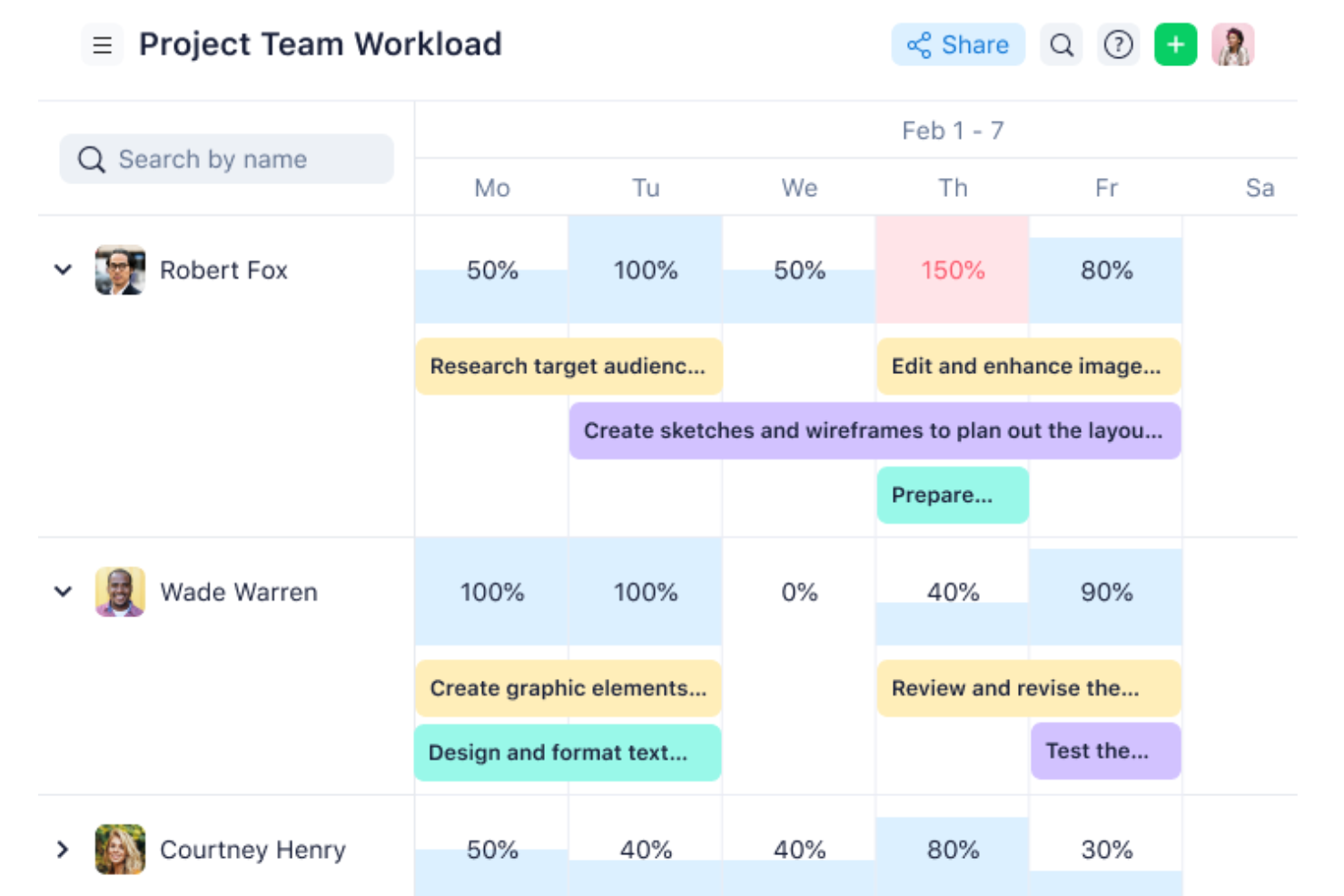
Wrike è una solida opzione per la collaborazione via email integrata nella piattaforma, poiché offre una piattaforma di gestione dei progetti che collega la gestione delle attività con la comunicazione tramite email. Wrike aiuta i team a consolidare lavoro e comunicazioni in un unico luogo, riducendo la dipendenza da catene di email esterne e migliorando la visibilità sui progetti.
Perché ho scelto Wrike: Ho scelto Wrike per questa lista grazie alla sua funzione di comunicazione email integrata, che consente di gestire la corrispondenza esterna senza uscire dallo strumento. Questo rende più semplice organizzare le comunicazioni di progetto e collegarle direttamente alle attività. Apprezzo inoltre gli strumenti di automazione di Wrike, che riducono il lavoro amministrativo ripetitivo, permettendo al team di concentrarsi su compiti di progetto più significativi. Queste funzionalità rendono Wrike una scelta eccellente per i team che desiderano centralizzare lavoro e comunicazione.
Funzionalità e integrazioni principali:
Wrike offre viste di progetto come diagrammi di Gantt e Kanban board, insieme a strumenti di intelligenza artificiale per riassumere aggiornamenti e generare piani di progetto. Le dashboard forniscono visibilità in tempo reale sull'avanzamento dei progetti, mentre l'email integrata consente di gestire le comunicazioni senza cambiare strumento.
Le integrazioni comprendono oltre 400 connessioni native predefinite, tra cui Microsoft, Google, Dropbox, Salesforce e Marketo.
Pros and Cons
Pros:
- Chat integrata per ridurre il costo dei passaggi e favorire la collaborazione
- Singoli e team possono monitorare i carichi di lavoro
- Visualizzazione semplice delle performance dei flussi di lavoro
Cons:
- Non adatto a organizzazioni di piccole dimensioni
- Limitato a 10 flussi di lavoro per spazio
New Product Updates from Wrike

Wrike Adds Quick Search to Table View
Wrike adds Quick Search to Table View with full-table search across titles, descriptions, and fields, plus highlighted matches. This helps users find tasks faster in large tables. For more information, visit Wrike’s official site.

Ideale per la conversione di email in attività

Zoho Projects è pensato per le aziende che desiderano migliorare le proprie capacità di gestione dei progetti con funzioni email integrate. È particolarmente interessante per settori come IT, marketing e costruzioni, dove una comunicazione fluida e la gestione delle attività sono fondamentali. Integrando l’email, Zoho Projects affronta il problema delle comunicazioni disperse, fornendo una piattaforma centralizzata che mantiene il team organizzato e informato. Ciò lo rende una soluzione ideale per i professionisti che necessitano di ottimizzare sia le attività di progetto che la corrispondenza via email.
Perché ho scelto Zoho Projects
Ho scelto Zoho Projects per la sua capacità unica di convertire le email in attività operative e problemi direttamente all’interno della piattaforma. Questa funzione è preziosa per i team che comunicano frequentemente tramite email, poiché assicura che le informazioni importanti non vadano perse nelle caselle di posta. Inoltre, l’integrazione con Zoho Mail consente agli utenti di gestire attività e progetti direttamente dall’interfaccia email, aumentando la produttività. Queste funzionalità specifiche sono ideali per i team che desiderano integrare la gestione dei progetti con gli strumenti di comunicazione quotidiani.
Funzionalità chiave di Zoho Projects
Oltre alla conversione da email a attività, Zoho Projects offre:
- Gestione delle attività: Semplifica l’assegnazione delle attività e monitora l’avanzamento per rispettare le scadenze di progetto.
- Rilevazione del tempo: Registra le ore e monitora il tempo trascorso sulle attività per gestire efficacemente le risorse.
- Diagrammi di Gantt: Visualizza le tempistiche dei progetti e le dipendenze per controllare l’avanzamento e adattare i piani secondo necessità.
- Automazione: Automatizza le attività di routine con un’interfaccia drag-and-drop per risparmiare tempo e ridurre il lavoro manuale.
Integrazioni di Zoho Projects
Le integrazioni includono Zoho CRM, Zoho Desk, Zoho Analytics, Slack, Microsoft Teams, Google Drive, Dropbox, GitHub, Bitbucket e Google Calendar.
Pros and Cons
Pros:
- Facilita la collaborazione grazie a un portale clienti avanzato
- Include ottime funzionalità di rilevazione del tempo e reporting
- Piattaforma centralizzata che migliora la visibilità su tutti i progetti
Cons:
- Rallentamenti nelle prestazioni in caso di progetti grandi o complessi
- Alcune funzionalità utili sono disponibili solo nei piani più costosi
New Product Updates from Zoho Projects
Zoho Projects Adds CodeX Scripts for Custom Modules
Zoho Projects now supports CodeX Scripts for custom modules, enabling conditional logic and rules for creating, updating, and deleting records. For more information, visit Zoho Projects' official site.
 .
.
Missive
Ideale per la collaborazione nella casella di posta del team
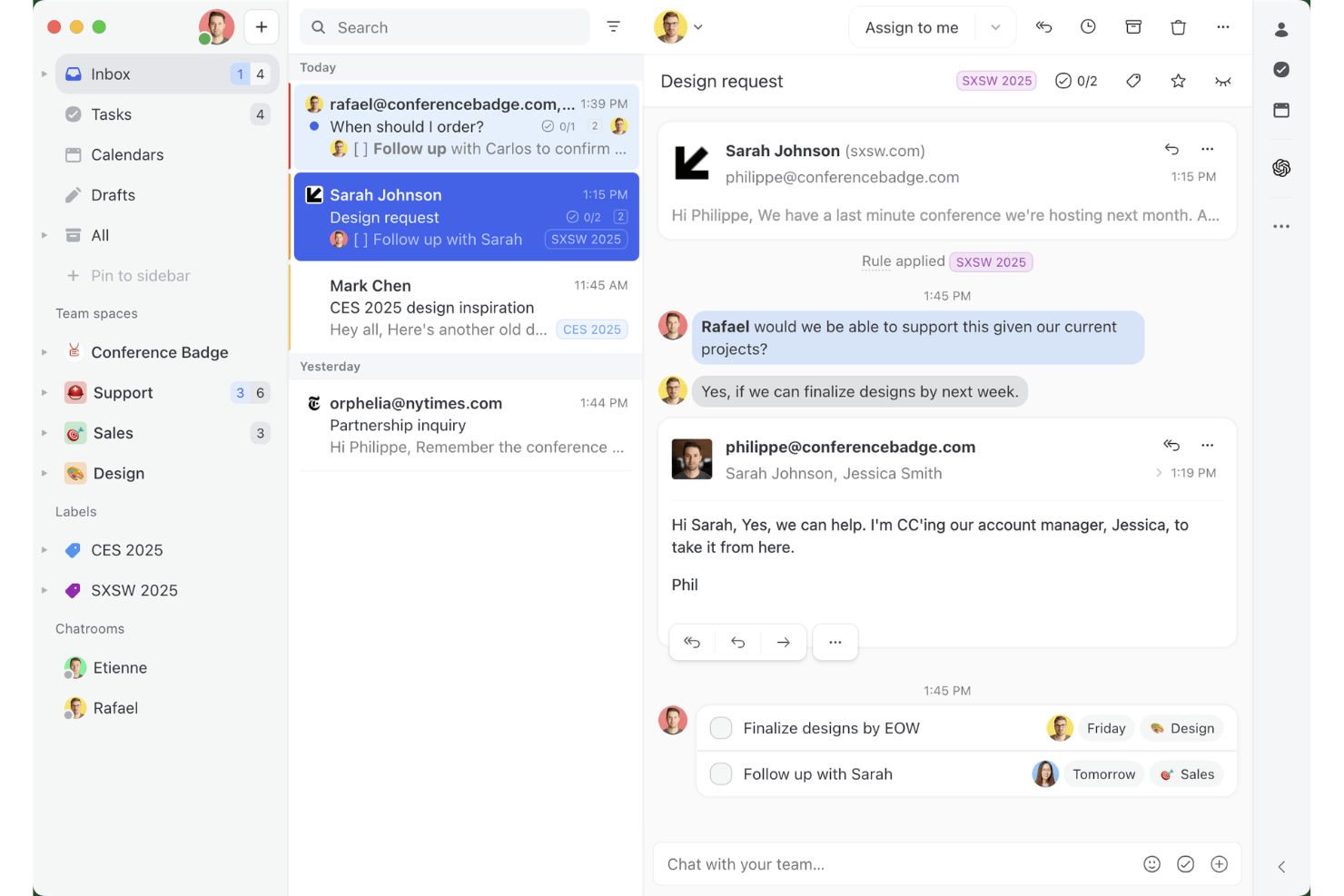
Missive è un client di posta elettronica collaborativo che combina una casella di posta condivisa per il team, la gestione integrata delle attività e la messaggistica multicanale in un'unica interfaccia.
Per chi è più adatto Missive?
Missive è particolarmente adatto ai team che lavorano a contatto con i clienti—agenzie, responsabili degli account e responsabili delle operazioni—che devono gestire code di posta condivise e trasformare le conversazioni in attività senza uscire dalla casella di posta.
Perché ho scelto Missive
Missive si è guadagnato un posto nella mia rosa di strumenti preferiti perché nessun altro strumento gestisce la collaborazione nelle caselle di posta condivise del team come lui. Adoro il modo in cui la scorciatoia 'T' converte qualsiasi e-mail in un'attività che rimane collegata alla conversazione originale, così nulla si perde tra la conversazione e l'elenco delle cose da fare. Le regole AI portano questo approccio ancora più avanti, rilevando le scadenze o l'urgenza nel contenuto dei messaggi e assegnando automaticamente la priorità appropriata. È davvero progettato per i team che gestiscono grandi volumi di e-mail dei clienti, non solo aggiornamenti sui progetti.
Funzionalità principali di Missive
- Casella di posta condivisa del team: Più membri del team possono visualizzare, assegnare e discutere le e-mail in un'unica casella di posta senza inviare risposte duplicate.
- Server MCP di Missive: Collega client AI esterni (come Claude o ChatGPT) tramite mcp.missiveapp.com per cercare conversazioni, consultare le attività di progetto collegate e creare bozze di risposta, mantenendo obbligatoria l'approvazione del team prima dell'invio.
- Regole AI: Automazioni basate sul contenuto che applicano automaticamente etichette, creano bozze di risposta o inoltrano in escalation le e-mail in base al contesto del messaggio.
- Accesso per gli ospiti: Clienti esterni o collaboratori possono essere invitati in conversazioni specifiche per visualizzare la cronologia, gli allegati e pubblicare commenti.
- Casella di posta unificata multicanale: E-mail, SMS, WhatsApp Business, Messenger e chat dal vivo confluiscono tutti in un unico spazio di lavoro collaborativo.
Integrazioni di Missive
Missive offre integrazioni native con Gmail, Google Workspace, Outlook, Microsoft 365, Asana, ClickUp, Trello, Todoist, HubSpot, Salesforce, Pipedrive e Close CRM. Offre inoltre il supporto per Zapier, l'accesso API, i webhook e il nuovo Server MCP (mcp.missiveapp.com) per le integrazioni AI esterne (disponibile nei piani Productive e Business quando abilitato da un amministratore).
Pros and Cons
Pros:
- Casella di posta condivisa del team per la collaborazione
- Le automazioni AI assegnano la priorità e instradano le e-mail
- Le attività sono collegate direttamente alle e-mail
Cons:
- Non si integra all'interno di Gmail o Outlook
- Mancano sequenze temporali dei progetti o viste delle dipendenze
New Product Updates from Missive
Missive Adds Conversation Pins
Missive now lets you pin key links, decisions, and notes inside a conversation, keeping them accessible in a dedicated Pins section in the Details sidebar. For more information, visit Missive's official site.
 .
.
Hive
Ideale per revisione e approvazioni

Hive è una piattaforma di gestione progetti che unisce il monitoraggio delle attività e la collaborazione con l'email integrata, così puoi gestire comunicazione e progetti in un unico luogo. Aiuta i team a coordinare il lavoro, monitorare il tempo e gestire i cicli di feedback senza dover usare più strumenti.
Perché ho scelto Hive:
Ho incluso Hive in questa lista per la sua potente funzione di revisione e approvazioni. Per i team che necessitano di più giri di feedback, Hive centralizza i commenti e le approvazioni dei lavori così da non perdere tempo tra email avanti e indietro. In combinazione con il monitoraggio del tempo e delle risorse integrato, puoi vedere esattamente come viene allocato il tempo del tuo team mentre garantisci che il lavoro sia approvato nei tempi previsti.
Funzionalità e integrazioni distintive:
Le funzionalità distintive di Hive includono la definizione di obiettivi, moduli per la ricezione delle richieste interne e dei clienti e il suo assistente AI (Buzz AI) che automatizza le attività ripetitive. Puoi inoltre creare dashboard per avere una rapida panoramica sull'avanzamento dei progetti e utilizzare modelli per avviare nuovi progetti più velocemente.
Hive si integra con Google Drive, Google Calendar, Dropbox, QuickBooks, Zoom, Microsoft OneDrive, Microsoft Teams, Outlook Calendar, Jira, Slack, GitHub e Box.
Pros and Cons
Pros:
- Revisione e approvazioni centralizzate
- Monitoraggio del tempo integrato
- Automazione delle attività con intelligenza artificiale
Cons:
- App mobile con funzionalità limitate
- Dashboard poco personalizzabili

Nifty
Ideale per l'unificazione della gestione dei progetti

Nifty è ideale per l'unificazione della gestione dei progetti perché offre una suite completa di funzionalità che facilitano la collaborazione e il monitoraggio dei progressi in tutte le fasi di un progetto, tutto su un'unica piattaforma.
Perché ho scelto Nifty:
Ho selezionato Nifty per questa lista perché si distingue come una soluzione olistica per la gestione dei progetti, offrendo uno spazio unificato per tutte le attività correlate ai progetti. La sua capacità di combinare discussioni, roadmap, attività e documentazione in un unico luogo lo differenzia dagli altri software di project management. Ritengo che Nifty sia il migliore per l'unificazione della gestione dei progetti grazie al suo approccio integrato che allinea team e obiettivi, semplificando i processi e riducendo la necessità di più strumenti.
Funzionalità e integrazioni principali:
Le funzionalità chiave di Nifty includono discussioni, roadmap (diagramma di Gantt), obiettivi, attività, moduli, documenti e file, monitoraggio del tempo e reportistica. Queste funzionalità sono progettate per migliorare la collaborazione del team e fornire un alto livello di dettaglio nella gestione del lavoro quotidiano. Nifty si integra nativamente con Google Docs e offre una varietà di visualizzazioni come Kanban, Lista, Timeline, Calendario e Swimlane per soddisfare diversi stili di gestione dei progetti.
Nifty si integra con una gamma di strumenti, tra cui Asana, Basecamp, ClickUp, Jira, Trello e Wrike. Permette inoltre l'importazione di fogli .CSV ed Excel, garantendo la transizione e la sincronizzazione dei dati.
Pros and Cons
Pros:
- Suite completa di funzionalità per la gestione dei progetti
- Visualizzazioni e integrazioni flessibili per vari stili di gestione
- Recensioni positive su design e prestazioni
Cons:
- Prezzo di partenza superiore rispetto ad alcuni concorrenti
- Potrebbe avere una curva di apprendimento per i nuovi utenti a causa delle numerose funzionalità
- Informazioni limitate sul sito riguardo il numero minimo di utenti o le spese di setup

Ideale per archiviazione illimitata

Freedcamp è una piattaforma di gestione progetti che offre spazio di archiviazione illimitato per tutti i suoi piani, consentendo ai team di gestire i propri progetti senza preoccuparsi di esaurire lo spazio disponibile.
Perché ho scelto Freedcamp:
Ho scelto Freedcamp per questa lista perché offre un set robusto di funzionalità che rispondono a diverse esigenze di gestione progetti, fornendo anche spazio di archiviazione illimitato, un notevole vantaggio per i team che necessitano di gestire molti file. Ritengo che Freedcamp sia il migliore per l’archiviazione illimitata perché elimina i vincoli di spazio, permettendo ai team di concentrarsi sul proprio lavoro senza dover gestire limiti di archiviazione.
Funzionalità distintive & integrazioni:
Le funzionalità chiave di Freedcamp includono gestione delle attività, monitoraggio del tempo, traguardi, discussioni e un sistema di segnalazione problemi. Dispone inoltre di un calendario integrato e di un sistema di gestione dei file con archiviazione illimitata, particolarmente utile per i team che gestiscono grandi volumi di documenti e file multimediali.
Freedcamp si integra nativamente con Google Drive, Dropbox, OneDrive, Zapier, Google Calendar, Outlook, Slack, e supporta l’integrazione email, permettendo agli utenti di creare attività e discussioni direttamente tramite email.
Pros and Cons
Pros:
- Archiviazione illimitata su tutti i piani
- Un piano gratuito generoso con funzionalità essenziali
- Ampia gamma di integrazioni
Cons:
- Fatturazione annuale richiesta per ottenere le tariffe migliori
- Alcune integrazioni sono disponibili solo nei piani di fascia superiore

ProofHub
Ideale per la pianificazione unificata dei progetti
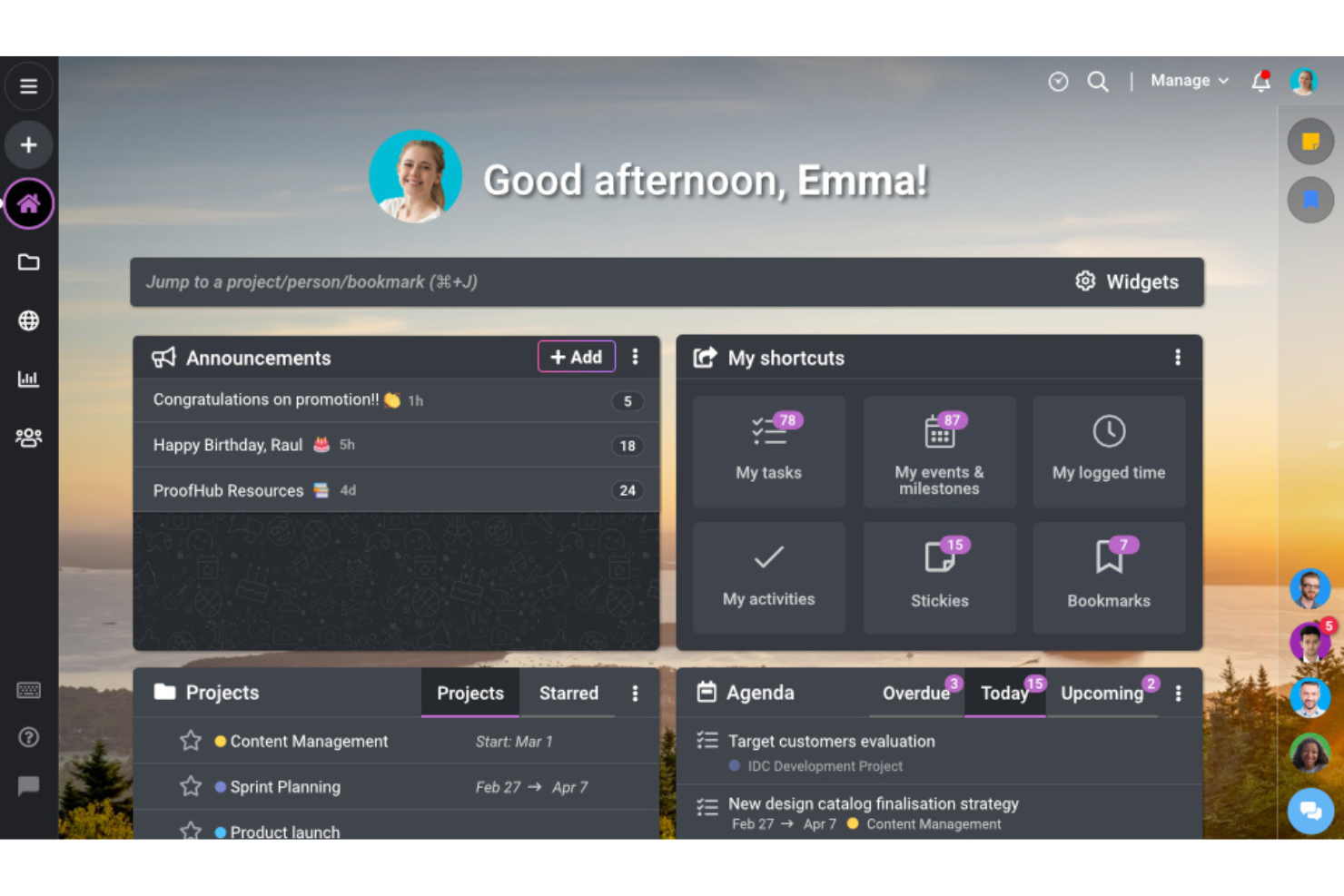
ProofHub si distingue come la migliore soluzione per la pianificazione unificata dei progetti poiché centralizza tutti gli aspetti del progetto, consentendo ai team di pianificare, eseguire, monitorare e gestire i progetti dall'inizio alla fine in un unico luogo.
Perché ho scelto ProofHub:
Ho scelto ProofHub per questa lista grazie al suo robusto set di funzionalità che si adattano a diversi team e flussi di lavoro, rendendolo uno strumento versatile per la gestione dei progetti. La sua capacità di riunire attività, discussioni, diagrammi di Gantt e tracciamento del tempo in un'unica piattaforma lo rende una soluzione unificata per pianificare ed eseguire i progetti. Ritengo che ProofHub sia la scelta migliore per la pianificazione unificata dei progetti perché offre un'unica fonte di verità per tutte le informazioni relative al progetto, elemento cruciale per mantenere coerenza ed assicurare che tutti i membri del team siano allineati.
Funzionalità principali e integrazioni:
Le funzionalità più importanti di ProofHub includono la gestione delle attività con viste a bacheca e tabella, diagrammi di Gantt per impostare dipendenze e monitorare scadenze, e strumenti di collaborazione come discussioni, chat e revisione. Queste caratteristiche sono progettate per semplificare la pianificazione e l'esecuzione dei progetti, migliorare la comunicazione tra i membri del team e aumentare la produttività complessiva.
ProofHub si integra nativamente con diversi strumenti, tra cui Dropbox, Google Drive, Box, OneDrive, e offre anche l'accesso API per integrazioni personalizzate. L'integrazione email del software permette agli utenti di partecipare alle discussioni, aggiungere attività e caricare file senza dover accedere al proprio account ProofHub.
Pros and Cons
Pros:
- Pianificazione ed esecuzione dei progetti unificata
- Prezzo fisso senza costo per utente
- Ampia gamma di integrazioni e strumenti collaborativi
Cons:
- Limitato a 40 progetti nel piano Essential
- Potrebbe non essere adatto a grandi aziende con esigenze oltre il piano Ultimate Control

Ideale per la gestione del lavoro con i clienti

Teamwork è una piattaforma di gestione dei progetti progettata per la gestione del lavoro con i clienti in diversi settori. È riconosciuta per la sua suite completa di funzionalità che semplificano la pianificazione dei progetti, l'allocazione delle risorse e la collaborazione.
Perché ho scelto Teamwork:
Ho scelto Teamwork per il suo robusto set di funzionalità pensate specificamente per le esigenze dei team che lavorano con i clienti. La sua capacità di gestire molteplici aspetti del lavoro, dalla pianificazione del progetto al monitoraggio del tempo, la distingue dagli altri strumenti di project management. Ritengo che Teamwork sia la soluzione ideale per la gestione del lavoro con i clienti perché offre una piattaforma centralizzata dove gestire tutte le attività correlate ai clienti, assicurando che ogni compito, scadenza e minuto fatturabile sia monitorato in modo efficiente.
Funzionalità principali & integrazioni:
Le funzionalità di punta di Teamwork includono monitoraggio del tempo, gestione delle risorse, definizione delle tappe fondamentali e personalizzazione dei compiti, tutti elementi essenziali per la gestione efficace dei progetti dei clienti. Offre inoltre diverse visualizzazioni come elenchi, kanban board, tabelle e diagrammi di Gantt per adattarsi alle preferenze degli utenti.
Teamwork si integra nativamente con Slack, Zapier, MS Teams, Google Drive, QuickBooks, HubSpot e altri strumenti, rendendolo una piattaforma versatile per l'integrazione nei flussi di lavoro esistenti.
Pros and Cons
Pros:
- Funzionalità complete di project management
- Personalizzabile per varie aziende di servizi ai clienti
- Si integra con una vasta gamma di strumenti
Cons:
- Numero minimo di utenti richiesto per i piani a pagamento
- Spazio di archiviazione limitato nel piano gratuito

Podio
Ideale per soluzioni personalizzabili

Podio è un software di gestione progetti versatile che integra flussi di lavoro personalizzabili, comunicazione di squadra e gestione dei dati in un'unica piattaforma facile da usare.
Perché ho scelto Podio:
Ho scelto Podio per questa lista perché eccelle nell'offrire soluzioni personalizzabili che rispondono alle esigenze specifiche di diversi team e progetti. Credo che Podio sia il migliore per soluzioni personalizzabili grazie alla sua capacità di essere ampiamente adattato, offrendo un approccio personalizzato alla gestione dei progetti che può adattarsi a qualsiasi flusso di lavoro.
Funzionalità e integrazioni principali:
Le funzionalità principali di Podio includono la gestione delle attività, i flussi di lavoro automatizzati e la visualizzazione dei dati, tutti altamente personalizzabili.
Podio si integra nativamente con strumenti come Google Drive, Dropbox, Evernote, Zendesk, FreshBooks, Campaign Monitor, GoToMeeting e altri ancora, facilitando un ambiente di lavoro connesso ed efficiente.
Pros and Cons
Pros:
- Flussi di lavoro e app personalizzabili
- Integrazione completa delle email
- Piano gratuito per piccoli team
- Flussi di lavoro e app personalizzabili
- Integrazione completa delle email
- Piano gratuito per piccoli team
Cons:
- Potrebbe richiedere competenze tecniche per personalizzazioni complesse
- La fatturazione annuale potrebbe non essere adatta a tutti i budget
- Potrebbe richiedere competenze tecniche per personalizzazioni complesse
- La fatturazione annuale potrebbe non essere adatta a tutti i budget
Altri software di gestione dei progetti con integrazione delle email
Ecco alcune opzioni aggiuntive di software di gestione dei progetti con integrazione delle email che non sono entrate nella mia selezione, ma che vale comunque la pena prendere in considerazione:
- Jira Service Management
Ideale per il monitoraggio e la pianificazione dei team
- Bitrix24
Ideale per l'integrazione degli strumenti aziendali
- Redmine
Ideale per la flessibilità open-source
- Ravetree
Ideale per la conversione delle email in attività
- Notion
Ideale per note e documentazione
- Kanbanize
Ideale per l'agilità aziendale
- GanttPRO
Ideale per la pianificazione con diagrammi di Gantt
- Workzone
Ideale per la collaborazione tra dipartimenti
- Celoxis
Ideale per l’analisi dei progetti
- ProWorkflow
Ideale per la gestione centralizzata delle attività


Come Valuto il Software di Project Management con Integrazione Email
Divido la mia valutazione in due livelli: il requisito minimo che ogni strumento deve soddisfare—come la conversione da email a attività e la sincronizzazione bidirezionale—e poi i fattori differenzianti che rendono uno strumento più adatto di un altro.
Funzionalità di Base (Requisiti Fondamentali di Questa Lista)
Quando seleziono gli strumenti per la mia lista, li valuto ciascuno su una scala da 0 (funzionalità assente) a 5 (eccellenza in quest'area) per ogni funzionalità di base elencata sotto. Poi calcolo il punteggio totale dello strumento in percentuale. Ogni strumento deve raggiungere un punteggio totale minimo del 65% per essere considerato per l'inclusione.
- Conversione Email-in-Attività: Verifico se inoltrare un'email crea un'attività con oggetto, corpo e allegati intatti—oppure se tutto viene inserito in una nota generica.
- Sincronizzazione Email Bidirezionale: Le risposte degli stakeholder esterni dovrebbero aggiornare automaticamente l'attività collegata. Cerco una gestione delle conversazioni che mantenga entrambi i lati sincronizzati senza duplicazioni.
- Integrazione con Client Email Nativi: Valuto la qualità degli add-in per Gmail e Outlook, concentrandomi sul fatto che sia possibile creare, assegnare e aggiornare attività direttamente dalla casella di posta.
- Core di Gestione Attività & Progetti: I fondamenti del project management sono importanti—assegnazione attività, scadenze, stati e diverse viste come board, elenchi e timeline pesano nella mia valutazione.
- Notifiche & Aggiornamenti Email: Esamino quanto siano dettagliate le impostazioni di notifica, dai controlli per progetto alle opzioni di riepilogo che evitano il sovraffollamento della casella di posta.
- Collegamento Allegati & Conversazioni: Le conversazioni email complete allegate alle attività offrono ai team il contesto necessario. Valuto se la cronologia sia ricercabile e conservata sull'attività stessa.
Una volta che ho una lista di strumenti che soddisfano i criteri, considero ciò che distingue ogni piattaforma.
Fattori Differenzianti (Cosa Distingue i Fornitori)
Ecco come confronto e metto a confronto i diversi fornitori:
Funzionalità Distintive
Una casella di posta condivisa dal team cambia il modo in cui i team di progetto gestiscono le email dei clienti—valuto se più persone possono smistare, assegnare e rispondere da un unico posto invece di inoltrare catene avanti e indietro. Il triage email potenziato dall'AI è fondamentale per i team ad alto volume che hanno bisogno che i messaggi in arrivo vengano automaticamente categorizzati e trasformati in attività suggerite. Per le agenzie che gestiscono più clienti, valuto anche le funzioni del portale clienti che consentono agli stakeholder esterni di inviare email nei progetti con visibilità limitata alle proprie conversazioni.
Oltre le Funzionalità
Analizzo attentamente la struttura dei prezzi—alcuni fornitori riservano l'integrazione email ai livelli più costosi, e i posti per ospiti esterni possono far lievitare i costi rapidamente per i team orientati al cliente. Considero anche quanto bene ogni strumento si integri con le tecnologie già in uso, soprattutto le connessioni native con Google Workspace, Microsoft 365 e CRM da cui spesso originano le email di progetto. Anche la scalabilità è importante; uno strumento che funziona per un team di cinque persone ma va in crisi con grandi volumi di email non sarà valido per un PMO in crescita.
Come scegliere un software di gestione dei progetti con integrazione delle email
È facile perdersi in lunghi elenchi di funzionalità e strutture tariffarie complesse. Per aiutarti a rimanere concentrato mentre affronti il tuo specifico processo di selezione del software, ecco una checklist dei fattori da tenere a mente:
| Fattore | Cosa considerare |
| Scalabilità | Assicurati che il software possa crescere insieme al tuo team. Cerca limiti di utenti flessibili, componenti aggiuntivi e piani tariffari adatti a team piccoli e grandi. |
| Integrazioni | Verifica se il software si integra con le piattaforme email utilizzate dal tuo team, come Gmail o Outlook, oltre che con Slack e il tuo CRM. Integrazioni solide riducono il lavoro manuale e mantengono tutto sincronizzato. |
| Personalizzazione | Scegli uno strumento che ti permetta di modificare flussi di lavoro, tag e regole email-attività in base al modo di lavorare del tuo team. Una soluzione unica raramente è adatta a tutti. |
| Facilità d'uso | Cerca un layout chiaro e funzionalità che non richiedano una curva di apprendimento ripida. Dovresti poter inviare, ricevere e collegare le email alle attività senza passaggi aggiuntivi. |
| Budget | Confronta i piani per verificare se le funzionalità email sono incluse o bloccate nei livelli superiori. Le prove gratuite possono aiutarti a effettuare i test prima di prendere un impegno. |
| Misure di sicurezza | Assicurati che la piattaforma supporti la crittografia, l'accesso basato sui ruoli e standard di conformità come SOC 2 o GDPR, soprattutto se il tuo team gestisce informazioni sensibili. |
| Collegamento delle attività | Cerca strumenti che colleghino automaticamente le conversazioni email a specifiche attività o progetti, così da non perdere il contesto. |
| Accesso da dispositivi mobili | Se il tuo team lavora in mobilità, assicurati che l'integrazione email funzioni senza problemi nelle app mobili e non elimini funzionalità importanti. |
Tendenze nei software di gestione dei progetti con integrazione email
Nel corso della mia ricerca, ho analizzato innumerevoli aggiornamenti di prodotto, comunicati stampa e registri delle versioni di diversi fornitori di software di gestione dei progetti con integrazione email. Ecco alcune delle tendenze emergenti che sto tenendo d'occhio:
- Riepiloghi email basati sull'intelligenza artificiale: Un numero sempre maggiore di strumenti utilizza l'intelligenza artificiale per trasformare lunghe catene di email in riepiloghi brevi e leggibili. Questo aiuta i team a rimanere aggiornati senza dover esaminare intere conversazioni.
- Analisi intelligente delle email per la creazione di attività: I software stanno diventando più efficaci nell'individuare nelle email i dettagli delle attività, come scadenze, priorità e assegnatari, e nel trasformarli automaticamente in attività strutturate con un intervento minimo.
- Conversazioni organizzate all'interno delle attività: Invece di allegare una singola email, le piattaforme incorporano intere conversazioni nelle attività. In questo modo tutti i membri del team hanno il contesto completo senza dover passare da una piattaforma all'altra.
- Controlli email basati sui ruoli: Ora i team possono controllare chi riceve notifiche o può rispondere alle email collegate ai progetti, contribuendo a ridurre il disordine nella posta in arrivo e a evitare scambi di messaggi superflui.
- Minore attenzione alla messaggistica interna: Un numero crescente di prodotti si sta allontanando dalle funzionalità di chat integrate e si concentra sul miglioramento dell'utilizzo delle email nei flussi di lavoro dei progetti, riducendo la sovrapposizione tra strumenti.
Che cos'è un software di gestione dei progetti con integrazione email?
Un software di gestione dei progetti con integrazione email è uno strumento digitale che combina le funzioni tradizionali di gestione dei progetti con funzionalità email dirette. Viene utilizzato dai responsabili di progetto e dai team per semplificare la comunicazione e la gestione delle attività all'interno di un'unica piattaforma. Il software collega i flussi di lavoro dei progetti alla corrispondenza email, consentendo agli utenti di gestire i progetti e comunicare direttamente con i membri del team e le parti interessate attraverso il software.
Tra i componenti di questo software figurano l'assegnazione delle attività tramite email, gli aggiornamenti sui progressi e la possibilità di allegare file e discussioni a specifiche attività del progetto. Nel complesso, questa integrazione mira a centralizzare le informazioni e la corrispondenza relative ai progetti, rendendole accessibili affinché i membri del team possano collaborare efficacemente senza passare da un'applicazione all'altra.
Funzionalità dei software di gestione dei progetti con integrazione email
Quando scegli un software di gestione dei progetti con integrazione email, presta attenzione alle seguenti funzionalità chiave:
- Sincronizzazione bidirezionale delle email: consente di inviare e ricevere email direttamente all'interno della piattaforma di gestione dei progetti utilizzando il proprio indirizzo email esistente.
- Conversione delle email in attività: trasforma automaticamente le email ricevute in attività con membri del team assegnati, scadenze e livelli di priorità.
- Cronologia delle email organizzata in conversazioni: incorpora le conversazioni email complete nelle attività, così i membri del team possono visualizzare tutto il contesto senza cambiare strumento.
- Attivatori email personalizzati: invia email automatiche quando cambiano gli stati delle attività o si avvicinano le scadenze, per mantenere tutti informati.
- Integrazione della casella di posta condivisa: collega una casella di posta del team a un progetto, così tutte le email correlate sono accessibili in un unico posto.
- Acquisizione degli allegati: salva gli allegati delle email direttamente nelle attività pertinenti o nelle cartelle del progetto, per facilitarne l'accesso.
- Etichettatura e filtraggio dei mittenti: aiuta a categorizzare le email ricevute in base al mittente o all'oggetto, per ridurre il disordine e migliorare la concentrazione.
- Opzioni per destinatari interni ed esterni: consente ai team di gestire la comunicazione sia con i colleghi sia con i clienti direttamente dallo strumento di progetto.
- Monitoraggio delle email e conferme di lettura: mostra chi ha aperto o risposto alle email importanti relative al progetto.
- Risposta dalla visualizzazione dell'attività: consente agli utenti di rispondere alle email direttamente nella finestra dell'attività, per mantenere tutto nel contesto.
Vantaggi dei software di gestione dei progetti con integrazione delle email
L'implementazione di un software di gestione dei progetti con integrazione delle email può offrire diversi vantaggi al team e all'azienda. Ecco alcuni dei vantaggi che puoi aspettarti:
- Meno cambi di contesto: il team può gestire attività ed email in un unico posto, invece di passare continuamente da un'app all'altra.
- Meno aggiornamenti persi: la conversione automatica delle email in attività e le notifiche aiutano a garantire che le informazioni importanti non vadano perse.
- Comunicazione più chiara: la cronologia delle email organizzata in conversazioni all'interno delle attività offre a tutti accesso alla conversazione completa.
- Creazione più rapida delle attività: le email ricevute possono diventare immediatamente attività, riducendo il tempo dedicato all'inserimento manuale.
- Migliore visibilità per i clienti: le email esterne collegate ai progetti rendono la comunicazione con i clienti visibile all'intero team.
- File più organizzati: gli allegati inviati tramite email vengono inseriti nelle attività corrette, così non è necessario cercarli nelle caselle di posta.
- Collaborazione del team più semplice: tutti possono visualizzare e rispondere alle email relative al progetto senza dover accedere direttamente al messaggio originale.
Costi e prezzi dei software di gestione dei progetti con integrazione delle email
La scelta di un software di gestione dei progetti con integrazione delle email richiede la comprensione dei diversi modelli di prezzo e dei piani disponibili. I costi variano in base alle funzionalità, alle dimensioni del team, ai componenti aggiuntivi e ad altri fattori. La tabella seguente riassume i piani più comuni, i relativi prezzi medi e le funzionalità generalmente incluse nelle soluzioni software di gestione dei progetti con integrazione delle email:
Tabella comparativa dei piani per i software di gestione dei progetti con integrazione delle email
| Tipo di piano | Prezzo medio | Funzionalità comuni |
| Gratuito | $0 | Utenti illimitati (con alcune limitazioni sul numero di progetti o postazioni), funzionalità di base per la gestione delle attività e dei progetti, conversione delle email in attività, notifiche email |
| Base | $5 - $10/utente/mese | Visualizzazione delle attività su schede Kanban, monitoraggio del tempo (potrebbe richiedere un componente aggiuntivo), un certo livello di integrazione delle email, spazio di archiviazione limitato |
| Standard | $8 - $14/utente/mese | Strumenti avanzati per la collaborazione, funzionalità di integrazione delle email potenziate, più spazio di archiviazione rispetto ai piani Base, accesso a più visualizzazioni dei progetti e strumenti di gestione |
| Professionale | $9.80 - $27/utente/mese | Funzionalità complete per la gestione dei progetti, integrazione completa delle email con conversione in attività e notifiche, gestione del carico di lavoro, report e analisi avanzati |
| Aziendale | $7 - $32/utente/mese | Progettato per le aziende professionali, strumenti avanzati per la gestione delle risorse, flussi di lavoro e integrazioni personalizzabili, funzionalità di sicurezza potenziate |
| Imprese | Prezzo personalizzato | Su misura per le grandi aziende, funzionalità di sicurezza di qualità, API e integrazioni premium, servizi avanzati di assistenza e formazione |
Domande frequenti sul software di gestione dei progetti con integrazione e-mail
Ecco alcune domande frequenti che ho voluto trattare per te.
In che modo l'integrazione e-mail migliora la gestione dei progetti?
L’integrazione e-mail nel software di gestione dei progetti consente la comunicazione diretta all’interno della struttura del progetto, migliorando la collaborazione tra i membri del team. Permette di monitorare le conversazioni relative a specifiche attività o progetti e garantisce che le informazioni importanti non vadano perse in caselle di posta elettronica separate. Ciò può portare a una migliore organizzazione e a un’esecuzione più efficiente dei progetti.
Posso integrare il mio account e-mail esistente con qualsiasi software di gestione dei progetti?
Non tutti i software di gestione dei progetti offrono l’integrazione e-mail e la compatibilità può variare. È importante verificare se il software supporta l’integrazione con il tuo attuale provider di posta elettronica. Molti dei principali strumenti di gestione dei progetti offrono l’integrazione con servizi e-mail popolari come Gmail e Outlook.
L'integrazione e-mail consente di creare attività dalle e-mail?
Sì, molti strumenti di gestione dei progetti con integrazione e-mail offrono la possibilità di creare attività direttamente dalle e-mail. Questa funzionalità può migliorare significativamente il flusso di lavoro, consentendo ai membri del team di convertire rapidamente il contenuto delle e-mail in elementi operativi all’interno del sistema di gestione dei progetti.
È possibile personalizzare le notifiche e-mail dal software di gestione dei progetti?
Sì, la maggior parte dei software di gestione dei progetti con integrazione e-mail consente agli utenti di personalizzare le notifiche e-mail. In genere, gli utenti possono scegliere i tipi di aggiornamenti che desiderano ricevere, la frequenza con cui ricevere le notifiche e quali attività del progetto devono attivare un avviso via e-mail.
Esistono problemi di sicurezza legati all'integrazione della posta elettronica nel software di gestione dei progetti?
L’integrazione della posta elettronica nel software di gestione dei progetti comporta alcune considerazioni relative alla sicurezza. È importante assicurarsi che il software offra solide misure di sicurezza per proteggere le informazioni sensibili. Cerca funzionalità come la crittografia, protocolli di accesso sicuri e la conformità alle certificazioni di sicurezza standard del settore.