

I 10 migliori software per i flussi di lavoro nell’edilizia selezionati per il 2026

10 Elenco dei migliori software per i flussi di lavoro nel settore edile


Scegliere un software per i flussi di lavoro nel settore edile può essere scoraggiante. Desideri semplificare i processi dei progetti, ma selezionare lo strumento giusto può sembrare complicato. Sono qui per rendere più semplice la tua decisione. Attingendo ai miei anni di esperienza come esperto di software nel settore edile, ho selezionato un elenco dei migliori strumenti che fanno davvero la differenza. Ogni strumento offre funzionalità uniche per organizzare, monitorare e gestire efficacemente i progetti edili. Questi strumenti non solo automatizzano i flussi di lavoro complessi, ma riducono anche in modo significativo errori e ritardi, affrontando direttamente problemi comuni come la cattiva comunicazione e il superamento del budget. Ecco le mie scelte per i migliori software per i flussi di lavoro nel settore edile disponibili attualmente.
Perché fidarsi dei nostri consigli sui software
Il nostro team testa e recensisce software dal 2012. In quanto project manager noi stessi, sappiamo quanto sia difficile — e importante — scegliere il software giusto.
Per questa guida, abbiamo valutato gli strumenti attraverso test pratici e ricerche indipendenti, assegnando un punteggio agli strumenti in base ai nostri criteri di selezione. Ci basiamo inoltre sulle competenze di leader di pensiero del settore e di professionisti attivi nella gestione dei progetti.
Le nostre recensioni riflettono il nostro giudizio editoriale umano, non un discorso di vendita.
Revisori esperti:
Tabella comparativa: software per i flussi di lavoro nel settore edile
Questa tabella comparativa riassume i dettagli dei prezzi delle mie migliori selezioni di software per i flussi di lavoro nel settore edile.
| Tool | Best For | Trial Info | Price | ||
|---|---|---|---|---|---|
| 1 | Ideale per la gestione centralizzata dei progetti di costruzione | Prova gratuita di 14 giorni + piano gratuito disponibile | A partire da $10/utente/mese (fatturazione annuale) | Website | |
| 2 | Ideale per la gestione completa di progetti di costruzione su larga scala | Demo gratuita disponibile | Prezzi su richiesta | Website | |
| 3 | Ideale per costruttori di case e ristrutturatori per il monitoraggio dei progetti | Demo gratuita disponibile | Prezzo su richiesta | Website | |
| 4 | Ideale per la gestione in cantiere e la coordinazione in loco | Piano gratuito disponibile | Da $39/utente/mese (fatturazione annuale) | Website | |
| 5 | Ideale per la gestione di progetti di fabbricazione su misura | Demo gratuita disponibile | Da $790/mese | Website | |
| 6 | Ideale per modelli di workflow | Prova gratuita di 7 giorni disponibile | Da $99/mese (utenti illimitati) | Website | |
| 7 | Ideale per le aziende edili che vogliono concentrarsi sul controllo dei costi | Prova gratuita di 14 giorni | A partire da $45/utente/mese (minimo 1 posto, fatturazione annuale). | Website | |
| 8 | Ideale per la collaborazione visiva nei progetti BIM | Not available | Da $50/utente/mese (fatturato annualmente) | Website | |
| 9 | Ideale per utenti non tecnici nell'automazione dei processi | Prova gratuita disponibile | Da $2.347/mese | Website | |
| 10 | Ideale per il project management agile in edilizia | 14 giorni di prova gratuita | Gratis fino a 3 utenti + a partire da $8/mese | Website |

Recensioni dei migliori software per i flussi di lavoro nel settore edile
Esplora le nostre recensioni dettagliate dei migliori software per i flussi di lavoro nel settore edile, in cui analizziamo i vantaggi e gli svantaggi di ogni strumento. Scopri le loro funzionalità e individua il software più adatto alle esigenze specifiche dei progetti edili.

Wrike
Ideale per la gestione centralizzata dei progetti di costruzione
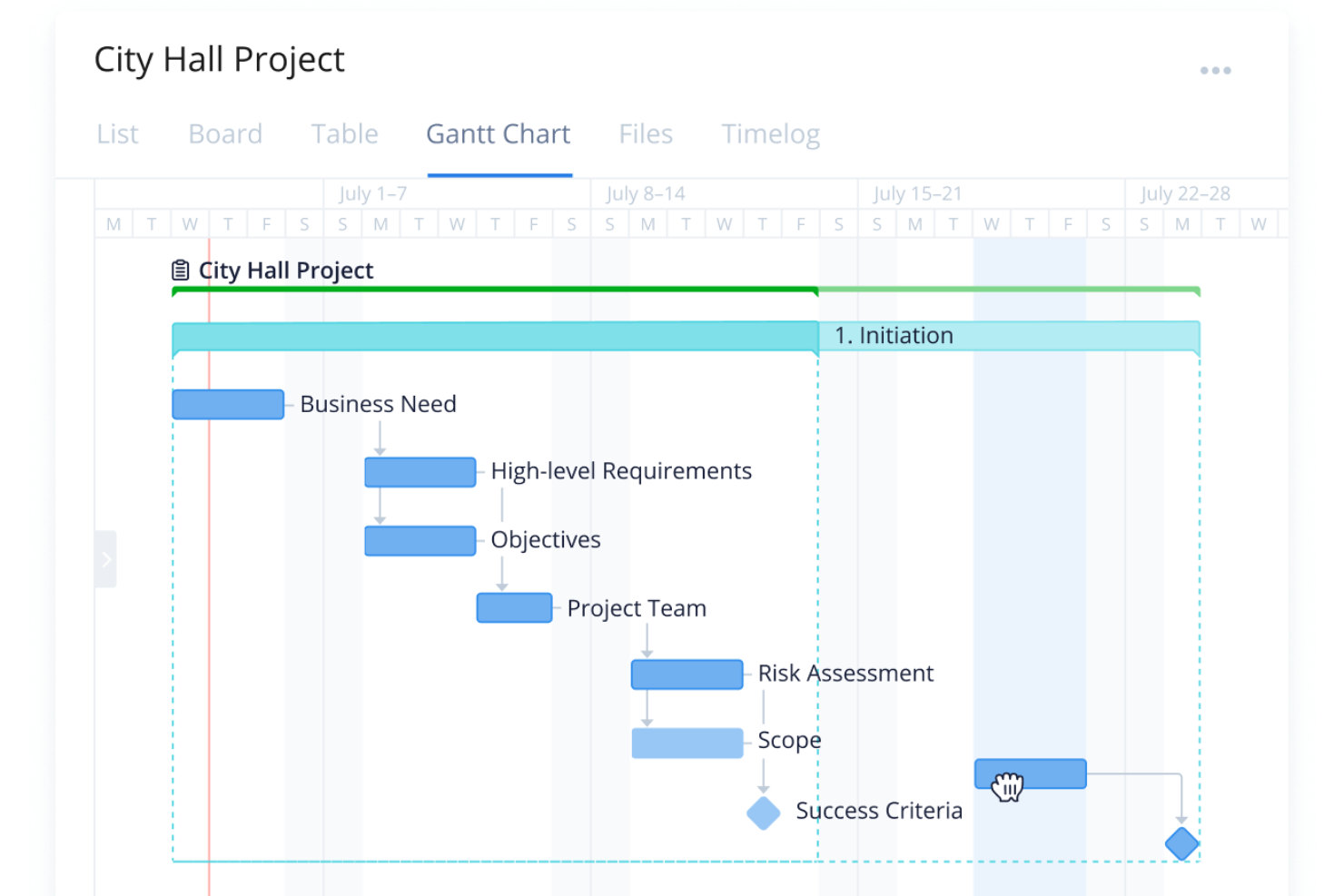
Wrike è uno strumento di gestione dei progetti versatile con soluzioni complete e flessibili, che offre funzionalità come gestione delle attività, monitoraggio del tempo e strumenti di collaborazione. Si distingue per la sua soluzione centralizzata che garantisce una visibilità a 360 gradi su tutti i progetti.
Perché ho scelto Wrike: Una delle caratteristiche più interessanti di Wrike è la capacità di gestire tempistiche e dipendenze di progetti complessi in un unico posto. Lo strumento del diagramma di Gantt della piattaforma consente una pianificazione dettagliata e la visualizzazione delle scadenze nei cantieri, rendendo semplici le modifiche a calendari e risorse man mano che i progetti evolvono. Inoltre, Wrike supporta la creazione di flussi di lavoro personalizzati che rispecchiano la natura a più fasi dei progetti edili, garantendo che ogni fase si inserisca senza intoppi nella successiva, mantenendo sempre sotto controllo attività e scadenze critiche.
Funzionalità e integrazioni principali:
Wrike dispone di strumenti completi di gestione delle risorse, consentendo una distribuzione e un monitoraggio efficienti delle risorse umane e materiali tra i progetti. Offre anche automazione dei flussi di lavoro per consentire ai team di automatizzare attività e notifiche ricorrenti. La piattaforma include anche funzioni di reportistica e analisi dettagliate, che forniscono approfondimenti importanti sulle performance dei progetti, la produttività del team e il monitoraggio del budget.
Wrike si integra con una vasta gamma di strumenti, tra cui OneDrive, Microsoft SharePoint, Adobe Creative Cloud, Microsoft Teams, Slack, Salesforce, Google Drive e Zoom. Dispone anche di un'API e di Wrike Integrate, uno strumento per integrazioni personalizzate.
Pros and Cons
Pros:
- Template di progetto flessibili
- Diagramma di Gantt visuale e interattivo
- Soluzione di project management tutto-in-uno
Cons:
- Mancanza di una chat integrata nella piattaforma
- Potenziale complessità nella configurazione dei flussi di lavoro automatizzati
New Product Updates from Wrike

Wrike Adds Quick Search to Table View
Wrike adds Quick Search to Table View with full-table search across titles, descriptions, and fields, plus highlighted matches. This helps users find tasks faster in large tables. For more information, visit Wrike’s official site.

Procore
Ideale per la gestione completa di progetti di costruzione su larga scala

Procore offre una piattaforma robusta progettata per gestire tutte le fasi dei progetti di costruzione, dalla pianificazione al completamento, su più progetti contemporaneamente. Questo software è particolarmente efficace per le imprese di costruzione di grandi dimensioni che necessitano di un ampio controllo dei progetti e di solide capacità di collaborazione.
Perché ho scelto Procore: Ho selezionato Procore per questa lista per la sua eccezionale capacità di gestire progetti di costruzione complessi e di grande scala, un compito con cui molti altri software hanno difficoltà. Si distingue per il suo set completo di strumenti che coprono ogni aspetto della gestione dei cantieri, rendendolo ideale per le aziende di grandi dimensioni con necessità progettuali estese. È il migliore grazie alla sua scalabilità e alla profondità di integrazione, che supportano grandi team e progetti multifaccettati in modo efficiente.
Funzionalità principali & integrazioni:
Procore eccelle nell’accesso ai dati in tempo reale, garantendo che tutte le parti interessate possano vedere gli aggiornamenti del progetto man mano che avvengono, migliorando il processo decisionale e la risoluzione dei problemi. Le funzionalità di conformità agli standard di qualità e sicurezza aiutano a mantenere uniformità nei vari cantieri, mentre le capacità di gestione finanziaria semplificano il monitoraggio dei budget e il controllo dei costi. Queste funzioni insieme assicurano che i progetti rimangano nei tempi previsti e nel rispetto del budget.
Procore si integra nativamente con numerose altre applicazioni, tra cui Autodesk, Sage, QuickBooks, Oracle, Microsoft Project, Zapier, Slack, Box e DocuSign. Questa ampia gamma di integrazioni ne aumenta la funzionalità, permettendo un flusso dati senza interruzioni tra i diversi sistemi e piattaforme utilizzati nei progetti di costruzione.
Pros and Cons
Pros:
- Ampio controllo dei progetti
- Ampie capacità di integrazione
- Dati e analisi in tempo reale
Cons:
- Costo elevato per le piccole aziende
- Curva di apprendimento ripida
- Principalmente pensato per grandi imprese

Ideale per costruttori di case e ristrutturatori per il monitoraggio dei progetti

Buildertrend offre una soluzione completa per la gestione dei cantieri, pensata per soddisfare le esigenze di costruttori di case e ristrutturatori. Si concentra sul monitoraggio dei progetti, sulla gestione dei clienti e sul controllo finanziario, facilitando flussi di lavoro più fluidi e una migliore comunicazione con i clienti.
Perché ho scelto Buildertrend: Ho scelto Buildertrend per questa lista perché affronta specificamente le sfide che le imprese edili residenziali incontrano nel monitoraggio e nella gestione dei progetti. La sua interfaccia intuitiva e gli strumenti specializzati per costruttori di case e ristrutturatori lo rendono una scelta di spicco. È ideale per questi gruppi perché offre soluzioni su misura che snelliscono le operazioni quotidiane e migliorano la soddisfazione dei clienti.
Funzionalità principali & integrazioni:
Buildertrend offre potenti strumenti di pianificazione dei progetti che mantengono tutti i membri del team aggiornati in tempo reale. Le funzioni di customer relationship management (CRM) del software assicurano una comunicazione efficiente con i clienti, mentre gli strumenti finanziari supportano una gestione accurata di budget e fatturazione. Queste caratteristiche aiutano a mantenere l'allineamento tra gli stakeholder del progetto e a gestire la parte finanziaria con trasparenza.
Buildertrend si integra nativamente con molti strumenti popolari tra cui QuickBooks, Xero, Dropbox, Zapier, Google Calendar, Outlook, PlanSwift e Autodesk. Queste integrazioni facilitano il trasferimento dei dati e la comunicazione tra le varie piattaforme essenziali per la gestione dei cantieri.
Pros and Cons
Pros:
- Pensato per l'edilizia residenziale
- Funzionalità complete per la gestione dei progetti
- Ottimi strumenti per la comunicazione con i clienti
Cons:
- Modello di prezzo premium
- Richiede impegno per una piena integrazione nei flussi di lavoro
- Può risultare complesso per progetti di piccole dimensioni

Ideale per la gestione in cantiere e la coordinazione in loco

Fieldwire si concentra sul miglioramento della gestione in cantiere e sulla coordinazione in loco per i team di costruzione, offrendo strumenti che semplificano la comunicazione e la gestione delle attività. La sua piattaforma è progettata per mettere in collegamento gli operai in cantiere con i project manager, garantendo che tutti siano informati e allineati durante tutto il ciclo di vita del progetto.
Perché ho scelto Fieldwire: Ho scelto Fieldwire per le sue forti capacità nella gestione delle attività in cantiere, un'area fondamentale per il successo dei progetti di costruzione. Eccelle nel fornire comunicazioni chiare e aggiornamenti sulle attività in tempo reale, essenziali per gli ambienti di costruzione dinamici. Questo strumento è ideale per la gestione in cantiere e la coordinazione in loco grazie alla sua enfasi su accessibilità e flusso di informazioni immediato, elementi essenziali per i lavoratori sul campo.
Caratteristiche e integrazioni principali:
Le notifiche push in tempo reale di Fieldwire assicurano che i team in cantiere siano immediatamente a conoscenza di cambiamenti o nuove informazioni, riducendo ritardi e incomprensioni. Il suo potente sistema di gestione delle attività consente un monitoraggio dettagliato degli incarichi e degli aggiornamenti sui progressi. La piattaforma offre anche strumenti completi per la gestione dei progetti, permettendo un accesso facile a planimetrie e aggiornamenti direttamente dal campo.
Fieldwire si integra con numerosi strumenti per la costruzione e il business per ampliare le proprie funzionalità, tra cui PlanGrid, Autodesk, Box, Dropbox, Google Drive e Zapier. Queste integrazioni aiutano a semplificare la gestione dei documenti e la comunicazione tra le varie piattaforme utilizzate nei progetti di costruzione.
Pros and Cons
Pros:
- Forte attenzione alla comunicazione in cantiere
- Gestione efficace di attività e planimetrie
- Aggiornamenti e notifiche immediate
Cons:
- Costo più elevato per i team più piccoli
- Pensato principalmente per l'uso in cantiere, meno per le funzioni d'ufficio
- Richiede un impegno annuale per il miglior prezzo

Archdesk
Ideale per la gestione di progetti di fabbricazione su misura
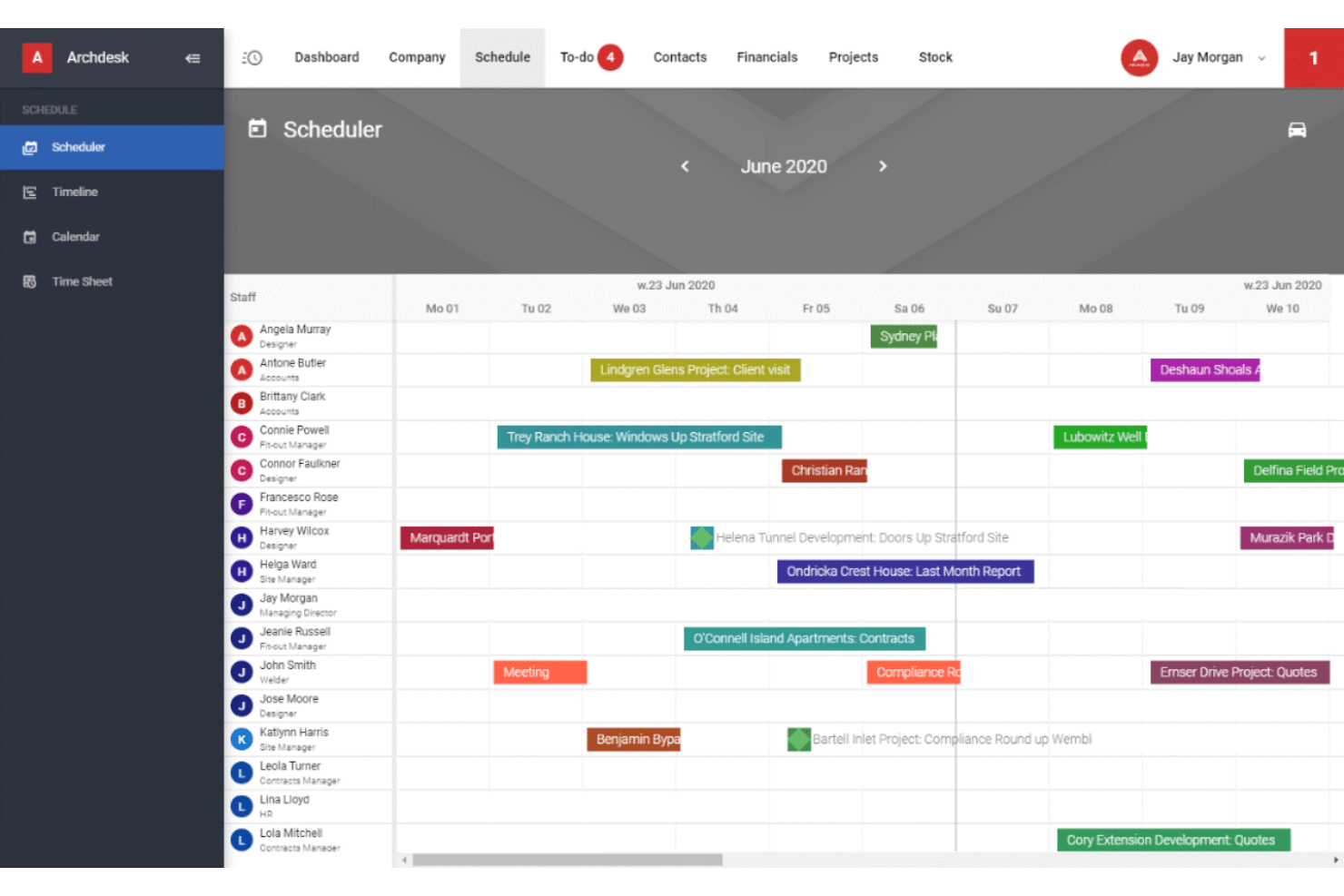
Archdesk è un software versatile di gestione delle costruzioni progettato per progetti complessi di fabbricazione su misura. Integra vari aspetti della gestione del progetto, della gestione finanziaria e della pianificazione delle risorse in un'unica piattaforma, offrendo strumenti specializzati per settori con esigenze particolari.
Perché ho scelto Archdesk: Ho scelto Archdesk per la sua solida capacità di affrontare le sfide uniche dei progetti di fabbricazione su misura. Si distingue da altri software per la sua capacità di adattarsi alle esigenze altamente specifiche dei flussi di lavoro personalizzati. Questo strumento è il migliore per gestire progetti di fabbricazione su misura perché offre la flessibilità e le funzionalità dettagliate necessarie per un'esecuzione precisa e personalizzata del progetto.
Funzionalità principali & integrazioni:
Archdesk eccelle nel monitoraggio dettagliato dei progetti, che consente di seguire in modo meticoloso i processi di fabbricazione personalizzata. Il software include potenti funzionalità ERP che integrano la gestione dei progetti con l'analisi finanziaria, migliorando il controllo del budget e l'analisi dei costi. Inoltre, le sue capacità di pianificazione delle risorse garantiscono un'allocazione ottimale di materiali e manodopera, elementi critici per l'efficienza dei progetti.
Archdesk si integra tipicamente con software di contabilità, sistemi CRM, strumenti ERP, sistemi di gestione documentale e piattaforme di analisi. Queste integrazioni aiutano a semplificare le operazioni tra i vari reparti coinvolti nei progetti di fabbricazione su misura.
Pros and Cons
Pros:
- Progettato per la fabbricazione su misura
- Funzionalità ERP complete
- Strumenti avanzati per la pianificazione delle risorse
Cons:
- Informazioni sui prezzi non trasparenti
- Potrebbe essere complesso per progetti di dimensioni ridotte
- Richiede formazione per ottenere il massimo beneficio

Ideale per modelli di workflow

Pneumatic Workflow è un software di gestione dei flussi di lavoro che aiuta i team a creare, organizzare e gestire processi ripetitivi con facilità.
Perché ho scelto Pneumatic Workflow: Fornisce un approccio strutturato alla gestione di attività e flussi di lavoro ricorrenti. Grazie alla sua funzione di creazione di modelli, puoi standardizzare i processi, rendendo semplice per i membri del team seguire i passaggi prestabiliti senza deviazioni. Ogni fase di un flusso di lavoro viene assegnata a specifici membri del team e il monitoraggio integrato delle attività garantisce che nulla venga trascurato. Le notifiche in tempo reale tengono inoltre tutti aggiornati sullo stato delle attività. Il generatore di moduli di Pneumatic aggiunge versatilità, consentendo di raccogliere e gestire dati all'interno di ciascun flusso di lavoro. Le sue capacità sono particolarmente utili per i team di costruzione che necessitano di un modo adattabile ma controllato per gestire le attività su più progetti.
Funzionalità e integrazioni principali:
Le funzionalità includono analisi dettagliate che forniscono approfondimenti sui colli di bottiglia dei processi e sui tassi di completamento, preziose per i team che necessitano di ottimizzare l'efficienza. Le autorizzazioni basate sui ruoli aumentano ulteriormente la sicurezza, permettendo di controllare l'accesso ai flussi di lavoro secondo necessità. Offre anche un generatore di workflow basato su intelligenza artificiale, logica condizionale nei flussi di lavoro, e la possibilità di etichettare qualsiasi flusso come priorità urgente.
Le integrazioni includono Slack, Google Sheets, Trello, Gmail, HubSpot, Microsoft Outlook, Google Calendar, Asana, Salesforce, Dropbox, Microsoft Teams e Zoom.
Pros and Cons
Pros:
- L'automazione all'interno dello strumento aiuta a semplificare i flussi di lavoro
- Favorisce la collaborazione tra i membri del team
- Modelli di workflow personalizzabili
Cons:
- Le prestazioni possono variare in base alla complessità del workflow
- Potrebbe offrire più integrazioni

Ideale per le aziende edili che vogliono concentrarsi sul controllo dei costi

WorkflowMax offre una soluzione completa per la gestione dei progetti edilizi con una forte enfasi sul monitoraggio finanziario e sui costi di progetto. È progettato per aiutare le aziende di costruzione a gestire in modo più efficace progetti, risorse e costi, fornendo una chiara visibilità su ogni aspetto delle loro operazioni.
Perché ho scelto WorkflowMax: Ho incluso WorkflowMax in questa lista grazie alle sue capacità specializzate nel monitoraggio dei costi e nella gestione finanziaria dei progetti, aspetti fondamentali per mantenere la redditività nel settore delle costruzioni. Si distingue per le sue analisi finanziarie dettagliate e la possibilità di gestire preventivi, fatture e fogli presenza in un'unica piattaforma integrata. È la scelta migliore per le imprese edili che pongono l'accento sul controllo dei costi, poiché offre strumenti per gestire il budget e migliorare i risultati finanziari.
Funzionalità e integrazioni principali:
WorkflowMax offre potenti strumenti per la stima e l'analisi dei costi che consentono alle aziende di monitorare in tempo reale i costi effettivi rispetto a quelli previsti, offrendo una visione chiara della situazione finanziaria. Le sue funzionalità di project management integrano gestione delle attività, monitoraggio delle ore di dipendenti e collaboratori esterni, assicurando una registrazione accurata di tutti i componenti del progetto. Il software comprende anche report personalizzabili che permettono di ottenere approfondimenti dettagliati su ogni aspetto dei progetti.
WorkflowMax si integra con una varietà di altri strumenti per migliorare la sua funzionalità, incluso Xero per la contabilità, Box per la gestione dei documenti e Zapier per l'automazione dei flussi di lavoro. Altre integrazioni comuni includono sistemi CRM, soluzioni per le paghe e vari strumenti di comunicazione per semplificare tutti gli aspetti della gestione dei progetti.
Pros and Cons
Pros:
- Monitoraggio dettagliato dei costi e gestione finanziaria
- L’integrazione con Xero migliora le funzioni contabili
- Report personalizzabili
Cons:
- Curva di apprendimento più ripida a causa delle funzionalità avanzate
- Prezzo elevato per le piccole aziende
- Si concentra principalmente sulla gestione dei costi, meno su altri aspetti della gestione progetti


Revizto è un software per la gestione dei flussi di lavoro in edilizia che si specializza nell'integrazione e collaborazione di Building Information Modeling (BIM). Facilita una comunicazione e coordinazione fluide tra i team visualizzando i dati di progetto in tempo reale, aspetto cruciale per progetti edilizi e architettonici complessi.
Perché ho scelto Revizto: Ho selezionato Revizto per le sue eccellenti capacità nel supportare progetti BIM tramite strumenti di collaborazione visiva avanzata. Si distingue dagli altri software di gestione dei flussi di lavoro in edilizia grazie a un set di funzionalità sviluppato specificamente per la gestione efficace dei dati BIM. È la scelta migliore per la collaborazione visiva nei progetti BIM perché offre una piattaforma intuitiva che consente ai team di interagire con modelli 3D e condividere osservazioni, assicurando che tutti siano allineati e informati durante l'intero ciclo di vita del progetto.
Funzionalità principali & integrazioni:
Gli strumenti di visualizzazione 3D in tempo reale di Revizto permettono alle parti interessate di vedere e interagire con i modelli BIM direttamente da qualsiasi dispositivo, favorendo decisioni migliori e risultati di progetto ottimali. Il software include una funzionalità di tracciamento delle problematiche che si integra direttamente con il modello 3D, rendendo più facile individuare e risolvere rapidamente i problemi. Inoltre, Revizto supporta marcature collaborative, permettendo ai team di annotare direttamente sul modello per comunicare efficacemente modifiche o preoccupazioni.
Integrazioni: Revizto si integra con una serie di strumenti di riferimento del settore come Autodesk Revit, AutoCAD, Navisworks, SketchUp e Trimble, aumentando la sua utilità negli ambienti BIM. Ulteriori integrazioni includono di solito software gestionali comuni, migliorando la sua capacità di integrarsi senza problemi nell'ecosistema tecnologico già esistente di un'azienda.
Pros and Cons
Pros:
- Visualizzazione avanzata di modelli BIM 3D
- Tracciamento efficace delle problematiche integrato nei modelli
- Supporto per numerosi strumenti BIM standard di settore
Cons:
- Costo superiore rispetto ad alcuni strumenti tradizionali di gestione progetti
- Richiede familiarità con i processi BIM
- Particolarmente vantaggioso per progetti che utilizzano il BIM

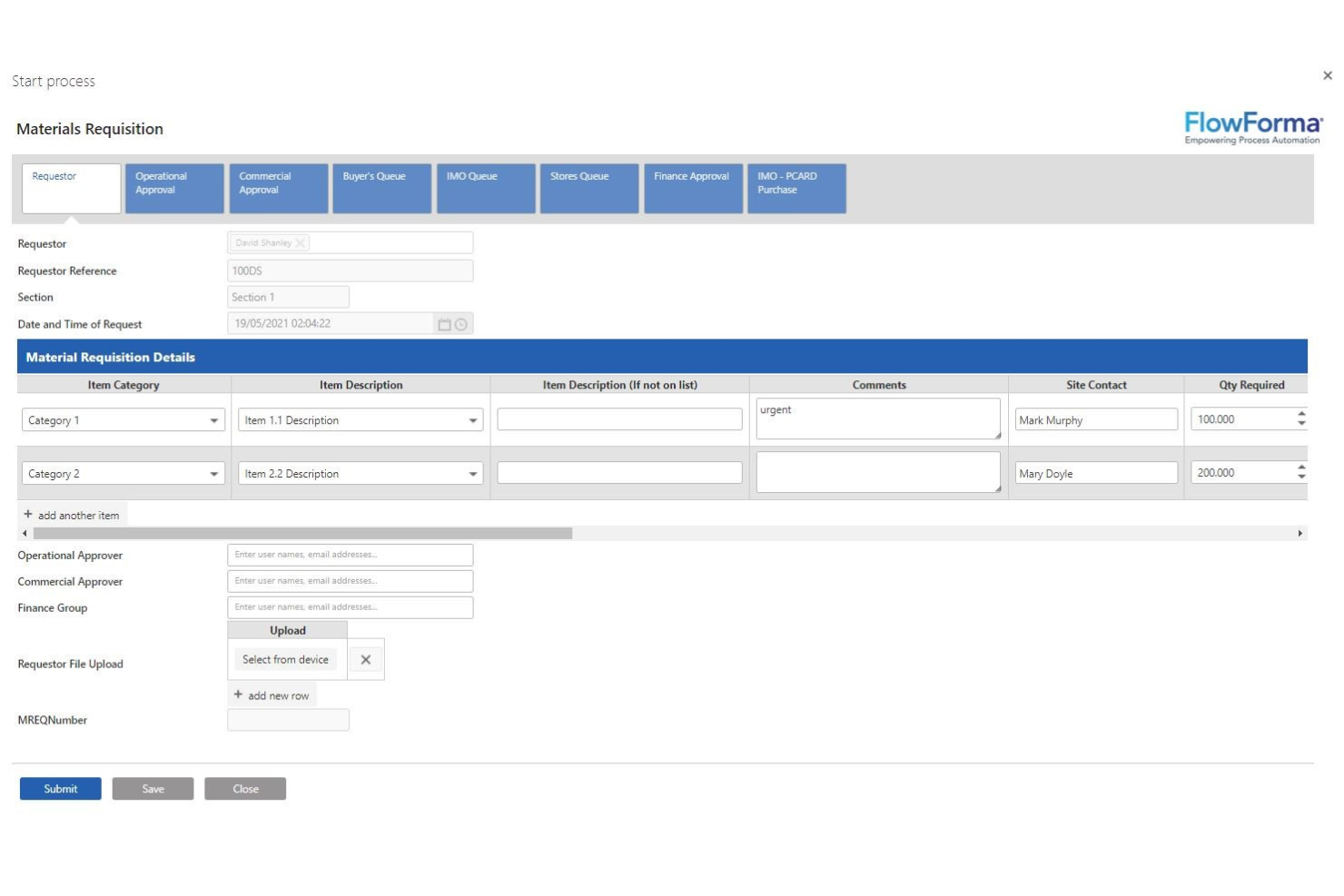
Flowforma è progettato per offrire alle aziende del settore delle costruzioni la possibilità di automatizzare i processi in un ambiente intuitivo, particolarmente adatto a utenti senza competenze tecniche. Facilita una gestione efficiente delle operazioni quotidiane, della conformità e del controllo qualità, utilizzando l'automazione dei processi senza codice per semplificare attività complesse.
Perché ho scelto Flowforma: Ho scelto Flowforma per la sua eccezionale capacità di democratizzare l'automazione dei processi per utenti senza competenze tecniche. Il suo approccio no-code consente a responsabili di cantiere, project manager e altri professionisti del settore costruzioni di automatizzare e ottimizzare facilmente i processi. Si distingue perché rende l'automazione sofisticata accessibile, risultando la scelta migliore per utenti non tecnici nell'automazione dei processi, eliminando le comuni barriere all'adozione tecnologica.
Funzionalità e integrazioni principali:
Flowforma dispone di costruttori di processi drag-and-drop, che rendono semplice la creazione e la modifica dei flussi di lavoro. Lo strumento offre robuste funzionalità logiche basate su regole e decisioni, che guidano gli utenti attraverso ogni fase del processo, garantendo la conformità e riducendo al minimo gli errori. Inoltre, le sue funzioni complete di generazione e gestione dei documenti migliorano l'accuratezza e la disponibilità della documentazione.
Flowforma solitamente si integra con le principali tecnologie Microsoft e altri sistemi aziendali per potenziarne la funzionalità in scenari reali.
Pros and Cons
Pros:
- Automazione dei processi senza codice
- Interfaccia intuitiva
- Gestione efficace della conformità
Cons:
- Informazioni pubbliche limitate sulle integrazioni
- Potrebbe non essere adatto in ambienti IT molto complessi
- L'integrazione focalizzata su Microsoft può limitarne l'utilizzo per alcuni utenti

Orangescrum
Ideale per il project management agile in edilizia

Orangescrum è progettato per adattarsi ai rapidi cambiamenti e al feedback continuo che caratterizzano le metodologie agili, rendendolo ideale per i progetti di costruzione che richiedono adattabilità e aggiornamenti frequenti.
Perché ho scelto Orangescrum: Ho incluso Orangescrum in questa lista per la sua forte aderenza ai principi del project management agile, che vengono sempre più adottati anche nel settore delle costruzioni. Si distingue dagli altri software per la gestione dei flussi di lavoro in edilizia grazie a funzionalità specializzate che supportano lo sviluppo iterativo e la collaborazione tra team. È la soluzione migliore per il project management agile in edilizia perché offre gli strumenti necessari per pianificare, eseguire e monitorare i progetti in modo flessibile e reattivo.
Funzionalità principali & integrazioni:
Gli strumenti di pianificazione di progetto di Orangescrum includono bacheche scrum, backlog e sprint, fondamentali per la gestione dei progetti agili. Il software offre anche funzionalità di monitoraggio del tempo e gestione delle risorse per garantire un'allocazione e un utilizzo ottimali delle stesse. Inoltre, le sue robuste capacità di analisi e reportistica permettono ai team di monitorare l'avanzamento e apportare aggiustamenti basati sui dati.
Orangescrum si integra con vari strumenti per ampliarne le funzionalità, tra cui Google Drive, Dropbox, Slack, GitHub e Bitbucket. Queste integrazioni facilitano una collaborazione e una condivisione dei dati fluide, elementi fondamentali in ambienti agili.
Pros and Cons
Pros:
- Solido supporto alle metodologie agili
- Funzionalità complete per la gestione delle risorse
- Collaborazione efficace e ottime capacità di integrazione
Cons:
- Numero minimo di utenti richiesto potrebbe essere elevato per team piccoli
- Particolarmente utile per team già familiari con l'agile
- Può risultare complesso per chi utilizza metodologie tradizionali di project management
Altri software per i flussi di lavoro nel settore edile da prendere in considerazione
Di seguito è riportato un elenco di altri software per i flussi di lavoro nel settore edile che abbiamo selezionato, ma che non sono entrati nella lista principale. Vale sicuramente la pena dare loro un’occhiata.
- Dashpivot by Sitemate
Ideale per il monitoraggio dell'avanzamento tramite foto e video
- Ontraccr
Ideale per aggiornamenti in tempo reale sullo stato dei progetti
- Jotform Workflows
Ideale per flussi di lavoro di approvazione in edilizia personalizzabili
- Jobber
Ideale per l'efficienza delle piccole imprese nella pianificazione e nella fatturazione
- GoodDay
Ideale per flussi di lavoro edili dinamici
- monday AI Workspace
Ideale per informazioni sui rischi e sui flussi di lavoro basate sull'IA


Come Valuto i Software per il Workflow delle Costruzioni
Valuto ogni strumento su due livelli: le funzionalità di base—gestione RFI, sincronizzazione dal campo, controllo dei documenti—che ne qualificano l’inclusione, e i fattori differenzianti che lo rendono la scelta ideale.
Funzionalità Principali (Requisiti Minimi per Questa Lista)
Quando seleziono gli strumenti per la mia lista, assegno a ciascuno un punteggio da 0 (non offre la funzionalità) a 5 (eccelle in quest’area) per ogni funzionalità principale tra quelle elencate di seguito. Successivamente, calcolo il punteggio totale dello strumento come percentuale. Ogni strumento deve raggiungere un punteggio totale minimo del 65% per essere considerato per l’inclusione.
- Workflow RFI & Presentazioni: Verifico se ogni strumento supporta l’instradamento strutturato di RFI e delle presentazioni con tracciamento dei passaggi, in modo che i team sappiano esattamente chi sta ritardando una risposta.
- Collaborazione Campo-Ufficio: I registri giornalieri mobili, le punch list e i report dal campo devono sincronizzarsi con i registri d’ufficio, anche quando le squadre lavorano offline in cantieri remoti.
- Gestione Disegni & Documenti: Cerco la gestione delle tavole controllata da versione con strumenti di markup, affinché il capocantiere possa essere sicuro di lavorare sull’ultima revisione.
- Approvazione delle Varianti: Ogni strumento dovrebbe offrire catene di approvazione configurabili che colleghino le varianti al budget di progetto, così i PM hanno una visione chiara dell’impatto sui costi prima dell’approvazione.
- Coordinamento di Schedulazione & Attività: Valuto se lo strumento gestisce dipendenze tra attività, milestone e pianificazione a breve termine tra le varie categorie, piuttosto che offrire un semplice elenco di attività.
- Gestione dei Subappaltatori: L’assegnazione delle attività, la condivisione dei documenti e il monitoraggio della documentazione di conformità come certificati assicurativi e rinunce alle garanzie dovrebbero avvenire all’interno della piattaforma.
Una volta ottenuta una lista di strumenti che soddisfano i criteri, considero ciò che distingue ogni piattaforma.
Fattori Differenzianti (Cosa Distingue i Fornitori)
Ecco come confronto e metto a confronto i diversi fornitori:
Funzionalità Distintive
L’integrazione BIM è importante se il tuo team ha bisogno di visualizzare e coordinare modelli 3D insieme a RFI e presentazioni senza dover passare a un’altra piattaforma. Valuto anche la sincronizzazione dei costi in tempo reale—quando viene approvata una variante, il budget del progetto dovrebbe aggiornarsi automaticamente. La reportistica su sicurezza e incidenti è un altro fattore differenziante, soprattutto per le squadre che gestiscono JHA e briefing di sicurezza insieme ai registri giornalieri nello stesso cantiere.
Oltre le Funzionalità
Le integrazioni determinano quanto bene una piattaforma si inserisce nella struttura esistente. Verifico la presenza di connettori nativi con i sistemi contabili per le costruzioni come Sage 300 CRE o Viewpoint Vista, oltre a strumenti di programmazione come Primavera P6. Il supporto all’implementazione conta anche: distribuire workflow standardizzati su più cantieri richiede il supporto operativo di consulenti esperti nel settore delle costruzioni. La trasparenza dei prezzi è importante da valutare, in particolare se i posti per subappaltatori e collaboratori sono inclusi o fatturati separatamente man mano che i team di progetto crescono.
Come scegliere un software per i flussi di lavoro nel settore edile
Nel portare avanti il tuo processo di selezione del software, unico per le tue esigenze, tieni a mente i seguenti punti:
- Capacità di integrazione: i progetti edili coinvolgono diversi sistemi e soggetti interessati. Scegli un software che si integri perfettamente con gli altri strumenti che utilizzi, come i sistemi ERP, i software di contabilità e le piattaforme di gestione dei progetti. Ad esempio, se il tuo reparto contabilità utilizza uno strumento specifico, il software per i flussi di lavoro dovrebbe essere in grado di importare ed esportare i dati senza inserimenti manuali.
- Semplicità d'uso: l'efficienza di un software è spesso limitata dalla sua facilità d'uso. Seleziona uno strumento intuitivo e facile da utilizzare, anche per i membri del team meno esperti di tecnologia. Questo garantisce un'adozione rapida e riduce al minimo i tempi di formazione, affrontando direttamente il problema della resistenza all'inserimento in ambienti di progetto molto impegnativi.
- Accesso da dispositivi mobili: poiché i team sono spesso divisi tra gli uffici e i cantieri attivi, è fondamentale poter accedere al software per i flussi di lavoro da dispositivi mobili. Dovrebbe offrire tutte le funzionalità su smartphone e tablet, così da rispondere alla necessità di aggiornamenti e decisioni in tempo reale anche quando si è in movimento.
- Opzioni di personalizzazione: ogni progetto edile è diverso. Il software dovrebbe offrire opzioni di personalizzazione in linea con le tue specifiche esigenze di flusso di lavoro. Ciò potrebbe significare dashboard regolabili per ruoli diversi o la possibilità di modificare moduli e report in base ai requisiti del progetto.
- Assistenza e formazione: con l'evolversi dei progetti edili, cambiano anche le esigenze relative al software. Scegli un fornitore che offra assistenza continua e formazione di alto livello. Questo è fondamentale per affrontare problemi come le interruzioni del servizio o gli aggiornamenti che potrebbero ostacolare l'avanzamento del progetto, garantendo di ricevere sempre aiuto quando ne hai bisogno.
Tendenze nel software per i flussi di lavoro nell'edilizia
Ecco alcune tendenze che ho notato nella tecnologia dei software per i flussi di lavoro nell'edilizia, oltre a ciò che potrebbero significare per il futuro del settore del marketing. Ho analizzato innumerevoli aggiornamenti dei prodotti, comunicati stampa e registri delle versioni per individuare gli approfondimenti più importanti.
- Integrazione con le tecnologie emergenti: i software per i flussi di lavoro nell'edilizia integrano sempre più tecnologie emergenti come l'intelligenza artificiale, l'IoT e la realtà aumentata/virtuale. Queste integrazioni consentono una gestione più intelligente dei progetti, analisi predittive per le tempistiche dei progetti e l'allocazione delle risorse, nonché tour virtuali dei cantieri più avanzati. Questa tendenza evidenzia la spinta del settore verso la trasformazione digitale, con l'obiettivo di ridurre gli errori e aumentare l'efficienza.
- Ottimizzazione e accesso da dispositivi mobili: l'attenzione alle funzionalità mobili continua a crescere, con software che offrono oggi piattaforme mobili più complete, in grado di rispecchiare le funzionalità delle applicazioni desktop. La possibilità di aggiornare lo stato dei progetti, accedere ai documenti e comunicare con i membri del team in tempo reale, tutto da un dispositivo mobile, risponde alla necessità di gestire i progetti in mobilità, aspetto cruciale nell'ambiente dinamico dei cantieri.
- Collaborazione in tempo reale avanzata: le funzionalità di condivisione dei dati e collaborazione in tempo reale stanno diventando più sofisticate. Le piattaforme si stanno evolvendo per offrire pannelli di controllo più completi e strumenti di comunicazione migliorati, che consentono ai membri del team di visualizzare immediatamente gli aggiornamenti, partecipare alle discussioni e prendere decisioni rapidamente. Questa funzionalità è particolarmente importante poiché i progetti diventano più complessi e i team più distribuiti geograficamente.
- Monitoraggio della sostenibilità: una funzionalità innovativa che sta prendendo piede è la possibilità di monitorare e gestire l'impatto ambientale dei progetti edilizi. Si stanno sviluppando strumenti per calcolare le impronte di carbonio, gestire i rifiuti e garantire un uso sostenibile delle risorse. Questa funzionalità sta diventando sempre più importante poiché il settore è sottoposto a pressioni per rispettare le normative ambientali e costruire in modo sostenibile.
- Declino degli strumenti autonomi: si registra un calo evidente della domanda di strumenti autonomi che gestiscono un solo aspetto della gestione edilizia, come la pianificazione o la fatturazione. Il mercato si sta orientando verso soluzioni complete che offrono funzionalità di gestione end-to-end, riflettendo la necessità di sistemi integrati in grado di gestire efficacemente molteplici aspetti della gestione dei progetti.
Queste tendenze dimostrano l'impegno del settore edilizio nell'utilizzare gli strumenti digitali per risolvere le sfide tradizionali e migliorare i risultati dei progetti. Con la continua evoluzione della tecnologia, queste soluzioni software sono destinate a diventare ancora più essenziali per la gestione dei progetti edilizi, favorendo l'efficienza e l'innovazione nel settore.
Che cos'è il software per i flussi di lavoro nell'edilizia?
Il software per i flussi di lavoro nell'edilizia è una piattaforma digitale progettata per semplificare e gestire i vari processi coinvolti nei progetti edilizi. Questo tipo di software viene utilizzato principalmente da responsabili di progetto, appaltatori e imprese edili che desiderano migliorare l'efficienza dei progetti e la comunicazione. Il suo scopo principale è coordinare le attività, monitorare l'avanzamento dei progetti, gestire i documenti e mantenere la conformità agli standard del settore, garantendo che i progetti edilizi siano completati nei tempi previsti, rispettando il budget e in conformità alle specifiche.
Tra i componenti principali del software per i flussi di lavoro nell'edilizia figurano gli strumenti di pianificazione dei progetti, le funzionalità di allocazione delle risorse, i sistemi di gestione del budget, le funzionalità di comunicazione in tempo reale e i meccanismi di monitoraggio della conformità. Questi strumenti integrati facilitano la collaborazione tra i membri del team e le parti interessate, garantiscono trasparenza nella gestione dei progetti e consentono agli utenti di prendere decisioni informate durante l'intero ciclo di vita di un progetto edilizio.
Funzionalità del software per i flussi di lavoro nell'edilizia
Quando si esplora il software per i flussi di lavoro nell'edilizia, è fondamentale individuare le funzionalità che migliorano direttamente l'efficienza e l'efficacia della gestione dei progetti edilizi. Il giusto insieme di funzionalità può trasformare il modo in cui vengono realizzati i progetti, influendo su tutto, dalla pianificazione alla conformità. Di seguito è riportato un elenco delle funzionalità più importanti da ricercare, che contribuiscono a garantire la corretta esecuzione dei progetti:
- Collaborazione in tempo reale: Facilita la comunicazione istantanea e gli aggiornamenti tra i membri del team. Questa funzionalità è fondamentale per mantenere l'allineamento durante le varie fasi del progetto e tra i diversi stakeholder.
- Monitoraggio e reportistica del progetto: Offre informazioni complete sull'avanzamento e sullo stato del progetto. È essenziale per garantire che i progetti rispettino i tempi e il budget previsti.
- Gestione dei documenti: Centralizza l'archiviazione, l'accesso e la gestione di tutti i documenti del progetto. Riduce gli errori e migliora l'efficienza garantendo che tutti abbiano accesso alle informazioni più recenti.
- Pianificazione delle risorse: Assegna in modo efficiente le risorse, inclusi manodopera, materiali e attrezzature. Previene l'assegnazione eccessiva e garantisce l'utilizzo ottimale delle risorse disponibili.
- Gestione del budget: Tiene traccia di tutti i costi rispetto al budget del progetto. È fondamentale per il controllo finanziario e per prevenire il superamento dei costi.
- Monitoraggio della conformità: Garantisce che tutte le attività del progetto rispettino le normative e gli standard del settore. È fondamentale per evitare problemi legali e sanzioni.
- Automazione delle attività: Semplifica le attività ripetitive per risparmiare tempo e ridurre l'errore umano. Aumenta l'efficienza complessiva del progetto.
- Flussi di lavoro personalizzabili: Consente di modificare i flussi di lavoro del progetto per adattarli a esigenze specifiche. Offre flessibilità e adattabilità alle diverse necessità del progetto.
- Accesso da dispositivi mobili: Permette di gestire e supervisionare i progetti da qualsiasi luogo. È essenziale per i responsabili del cantiere e per i team in movimento.
- Funzionalità di integrazione: Supporta l'integrazione fluida con altri strumenti e software. Migliora le funzionalità e consente un approccio gestionale più unificato.
- Ordini di modifica: Modifiche all'ambito, alle tempistiche o ai costi di un progetto.
- Monitoraggio del cantiere: Luogo fisico in cui vengono eseguiti i lavori di costruzione.
- Coordinamento del team di progetto: Gruppo di persone che lavorano insieme a un progetto.
- Modelli di RFI (richieste di informazioni): Richieste formali di dettagli o chiarimenti sul progetto.
- Processi aziendali personalizzabili: Attività strutturate finalizzate al raggiungimento di specifici obiettivi organizzativi.
- Liste di controllo: Elenchi utilizzati per verificare che le fasi o i requisiti siano stati completati.
- Metriche del lavoro: Misure quantificabili utilizzate per monitorare le prestazioni e i progressi.
- Elenchi delle attività residue: Attività da completare prima della finalizzazione del progetto.
- Software di pianificazione: Strumenti per pianificare e organizzare le tempistiche del progetto.
- Documenti da sottoporre: Documenti o campioni presentati per l'approvazione nel settore delle costruzioni.
Vantaggi del software per i flussi di lavoro nel settore delle costruzioni
Il software per i flussi di lavoro nel settore delle costruzioni è progettato per migliorare l'efficienza operativa e le capacità di gestione dei progetti nel settore edile. Implementando questo tipo di software, utenti e organizzazioni possono aspettarsi miglioramenti significativi in diverse aree chiave delle loro attività. Ecco cinque vantaggi principali offerti dal software per i flussi di lavoro nel settore delle costruzioni:
- Migliore gestione dei progetti: Semplifica la pianificazione e l'esecuzione dei progetti. Questo vantaggio consente a responsabili e team di coordinarsi in modo più efficace, garantendo che i progetti siano completati nei tempi e nel rispetto del budget.
- Comunicazione migliorata: Facilita una comunicazione migliore tra tutti gli stakeholder. L'utilizzo di questo software aiuta a mantenere aggiornati tutti, dai subappaltatori ai clienti, riducendo i malintesi e garantendo la trasparenza.
- Maggiore produttività: Automatizza le attività di routine e semplifica le operazioni complesse. La capacità del software di automatizzare e semplificare i processi riduce il tempo dedicato alle attività manuali, consentendo ai team di concentrarsi sugli aspetti più importanti del progetto.
- Controllo dei costi: Fornisce un monitoraggio dettagliato del budget e un controllo finanziario. Questo vantaggio aiuta le organizzazioni a tenere sotto controllo le spese, riducendo la probabilità di sforamenti finanziari e aumentando la redditività.
- Conformità e garanzia della qualità: Garantisce che i progetti siano conformi agli standard e alle normative del settore. Il software aiuta a mantenere elevati livelli di qualità e il rispetto dei requisiti legali, riducendo al minimo i rischi e le potenziali sanzioni.
Integrando il software per i flussi di lavoro nel settore delle costruzioni nelle proprie attività, le aziende possono raggiungere livelli più elevati di efficienza, efficacia e conformità. Questi strumenti non solo aiutano a gestire la complessità dei progetti di costruzione, ma migliorano anche le prestazioni aziendali complessive, rendendoli un investimento prezioso per qualsiasi impresa legata al settore delle costruzioni.
Costi e prezzi del software per i flussi di lavoro nel settore delle costruzioni
Comprendere i costi e le opzioni di prezzo dei software per i flussi di lavoro nel settore edile è fondamentale per le aziende che desiderano implementare questa tecnologia in modo efficace. Diversi fornitori di software offrono una gamma di piani tariffari adatti a progetti di costruzione di varie dimensioni e tipologie, ciascuno con il proprio insieme di funzionalità e vantaggi. Di seguito ho illustrato le opzioni di piano più comuni che si possono incontrare nella scelta di un software per i flussi di lavoro nel settore edile, che ti aiuteranno a valutare quale possa soddisfare al meglio le esigenze della tua azienda.
| Tipo di piano | Prezzo medio | Funzionalità comuni |
| Gratuito | $0 | Monitoraggio di base dei progetti, utenti limitati, integrazioni essenziali |
| Base | $20 - $50/utente/mese | Strumenti avanzati per la gestione dei progetti, supporto per più utenti, report di base |
| Professionale | $50 - $100/utente/mese | Suite completa per la gestione dei progetti, report avanzati, integrazioni personalizzate, maggiore sicurezza |
| Aziendale | Prezzo personalizzato | Soluzioni su misura, supporto premium, progetti e utenti illimitati, analisi avanzate |
Quando valuti quale piano scegliere, è importante considerare la portata dei tuoi progetti e le esigenze specifiche del tuo team. Un piano gratuito può essere sufficiente per progetti piccoli e semplici, mentre progetti più grandi o complessi potrebbero richiedere un piano professionale o aziendale con funzionalità più solide. Allinea sempre il piano scelto ai requisiti del progetto e ai vincoli di budget, per garantire un utilizzo ottimale del software e un buon ritorno sull'investimento.
Domande frequenti sui software per i flussi di lavoro nel settore edile
In che modo i software per i flussi di lavoro nel settore edile migliorano la gestione dei progetti?
I software per i flussi di lavoro nel settore edile migliorano la gestione dei progetti fornendo strumenti che semplificano la pianificazione, l’allocazione delle risorse e il monitoraggio del budget. Ciò consente ai responsabili di progetto di completare i progetti in modo più efficiente, con un controllo migliore sulle tempistiche e sui costi.
I software per i flussi di lavoro nel settore edile possono contribuire a ridurre i costi dei progetti?
Sì, possono contribuire a ridurre i costi fornendo previsioni accurate del budget, monitoraggio dei costi in tempo reale ed evidenziando le aree in cui è possibile ridurre le spese. Questo aiuta a prevenire gli sforamenti di budget e migliora la gestione finanziaria complessiva dei progetti. Inoltre, se il tuo budget è davvero limitato, il software gratuito per la gestione dei progetti edili di solito include funzionalità per la gestione dei flussi di lavoro.
I software per i flussi di lavoro nel settore edile sono adatti alle piccole imprese edili?
Sì, sono disponibili diverse opzioni software progettate per soddisfare le esigenze delle piccole imprese edili. Spesso offrono soluzioni scalabili, consentendo alle aziende di iniziare con funzionalità di base e aggiungerne altre man mano che crescono.
Quanto sono sicuri i software per i flussi di lavoro nel settore edile?
La maggior parte dei software per i flussi di lavoro nel settore edile offre solide funzionalità di sicurezza, tra cui crittografia dei dati, controlli di accesso sicuri e verifiche periodiche della sicurezza, per garantire che tutti i dati e le comunicazioni dei progetti siano protetti dagli accessi non autorizzati.
I software per i flussi di lavoro nel settore edile si integrano con altri strumenti aziendali?
Molte soluzioni software per i flussi di lavoro nel settore edile offrono funzionalità di integrazione con altri strumenti aziendali, come sistemi ERP, software di contabilità, sistemi HR e piattaforme CRM. Ciò consente un flusso di dati più agevole e una gestione più completa in tutti i reparti.
Che tipo di formazione è necessaria per utilizzare i software per i flussi di lavoro nel settore edile?
La formazione necessaria varia in base al software. La maggior parte dei fornitori offre programmi di formazione completi, tra cui tutorial online, webinar e sessioni di formazione in presenza, per garantire che gli utenti possano utilizzare efficacemente tutte le funzionalità.
Come scelgo il software per i flussi di lavoro nel settore edile più adatto alla mia azienda?
La scelta del software giusto richiede una valutazione delle tue specifiche esigenze di gestione dei progetti, delle dimensioni delle tue attività e del tuo budget. È inoltre importante considerare la scalabilità del software, la facilità d’uso, l’assistenza clienti e le funzionalità di integrazione con gli strumenti che già utilizzi.