

10 migliori generatori di fatture basati sull’IA nel 2026

Elenco dei migliori generatori di fatture con IA


Un generatore di fatture con IA è un software che utilizza l'intelligenza artificiale per automatizzare la creazione, la personalizzazione e la gestione delle fatture per la tua azienda. Se stai cercando il miglior generatore di fatture con IA, probabilmente vuoi velocizzare la fatturazione, ridurre l'inserimento manuale dei dati e diminuire gli errori nella gestione di fatture ricorrenti o complesse. Con così tante opzioni disponibili, trovare quella che si adatta al tuo flusso di lavoro e al tuo budget può sembrare complicato. Questa guida analizza gli strumenti principali, evidenzia ciò che rende unico ciascuno di essi e ti aiuta a individuare la soluzione più adatta alle esigenze e agli obiettivi del tuo team.
Perché fidarsi dei nostri consigli sui software
Il nostro team testa e recensisce software dal 2012. In quanto project manager noi stessi, sappiamo quanto sia difficile — e importante — scegliere il software giusto.
Per questa guida, abbiamo valutato gli strumenti attraverso test pratici e ricerche indipendenti, assegnando un punteggio agli strumenti in base ai nostri criteri di selezione. Ci basiamo inoltre sulle competenze di leader di pensiero del settore e di professionisti attivi nella gestione dei progetti.
Le nostre recensioni riflettono il nostro giudizio editoriale umano, non un discorso di vendita.
Revisori esperti:
Tabella comparativa dei generatori di fatture con IA
Questa tabella comparativa riassume i dettagli sui prezzi delle mie migliori selezioni di generatori di fatture con IA.
| Tool | Best For | Trial Info | Price | ||
|---|---|---|---|---|---|
| 1 | Ideale per integrazione di contratti e pagamenti | Prova gratuita di 7 giorni + demo gratuita disponibile | Da $9/utente/mese (fatturato annualmente) | Website | |
| 2 | Ideale per il controllo dei permessi nei team multiutente | Piano gratuito disponibile | Da $11/mese (fatturazione annuale) | Website | |
| 3 | Ideale per portale clienti e funzionalità di feedback | Prova gratuita di 7 giorni disponibile | A partire da $19/mese | Website | |
| 4 | Ideale per strumenti di fatturazione orientati alle agenzie | Prova gratuita di 14 giorni + demo gratis disponibile | Da $10/mese (fatturato annualmente) | Website | |
| 5 | Ideale per la gestione aziendale end-to-end | Prova gratuita di 14 giorni + demo gratuita disponibile | Da $19,90/utente/mese (fatturazione annuale) | Website | |
| 6 | Ideale per la generazione di fatture multi-valuta | Piano gratuito disponibile | Da $14/mese (fatturazione annuale) | Website | |
| 7 | Ideale per freelance che necessitano di modelli flessibili | Piano gratuito disponibile | A partire da $6/mese (fatturato annualmente) | Website | |
| 8 | Ideale per flussi di lavoro finanziari basati su progetti | Non disponibile | Prezzi su richiesta | Website | |
| 9 | Ideale per l'integrazione del monitoraggio delle spese | Prova gratuita di 30 giorni | Da $23/mese | Website | |
| 10 | Ideale per la personalizzazione open source | Piano gratuito disponibile | A partire da $14/mese | Website |


Recensioni dei migliori generatori di fatture con IA
Di seguito trovi i miei riepiloghi dettagliati dei migliori generatori di fatture con IA inclusi nel mio elenco. Le mie recensioni offrono un’analisi approfondita delle funzionalità, dei casi d’uso migliori e delle integrazioni di ogni strumento, per aiutarti a trovare quello più adatto a te.

Bonsai
Ideale per integrazione di contratti e pagamenti

Bonsai è una piattaforma di gestione clienti per freelance e piccole imprese che offre generazione di fatture con intelligenza artificiale, creazione di contratti, pagamenti, preventivi e automazione dei flussi di lavoro in un unico posto.
Per chi è più indicato Bonsai?
Bonsai è ideale per freelance e titolari di piccole imprese che hanno bisogno di strumenti integrati per la gestione di contratti, fatturazione e pagamenti in un'unica piattaforma.
Perché ho scelto Bonsai
Ho scelto Bonsai tra i migliori perché posso generare fatture tramite intelligenza artificiale direttamente collegate ai contratti, far firmare elettronicamente i documenti ai clienti e poi attivare richieste di pagamento da un'unica area di lavoro. Apprezzo la stretta connessione tra preventivi, contratti e fatturazione.
Caratteristiche principali di Bonsai
- Creazione di fatture con intelligenza artificiale: Genera automaticamente fatture a partire da ore tracciate e attività fatturabili.
- Programmazione di pagamenti ricorrenti: Imposta e gestisci fatture ricorrenti automatizzate per clienti abituali.
- Monitoraggio delle spese: Categorizza e monitora le spese relative ai progetti all'interno della stessa area di lavoro.
- Dashboard dei report fiscali: Accedi a riepiloghi fiscali e report finanziari scaricabili per ogni cliente e progetto.
Integrazioni Bonsai
Bonsai offre integrazioni native con QuickBooks, PayPal, Stripe e Zapier. È disponibile anche una API per integrazioni personalizzate.
Pros and Cons
Pros:
- Genera fatture direttamente dai contratti
- L'IA legge le ore tracciate per la creazione delle fatture
- Contratti, preventivi e fatturazione in un unico sistema
Cons:
- Nessun meccanismo integrato di revisione di file o risorse
- Poche capacità di automazione dei flussi di lavoro

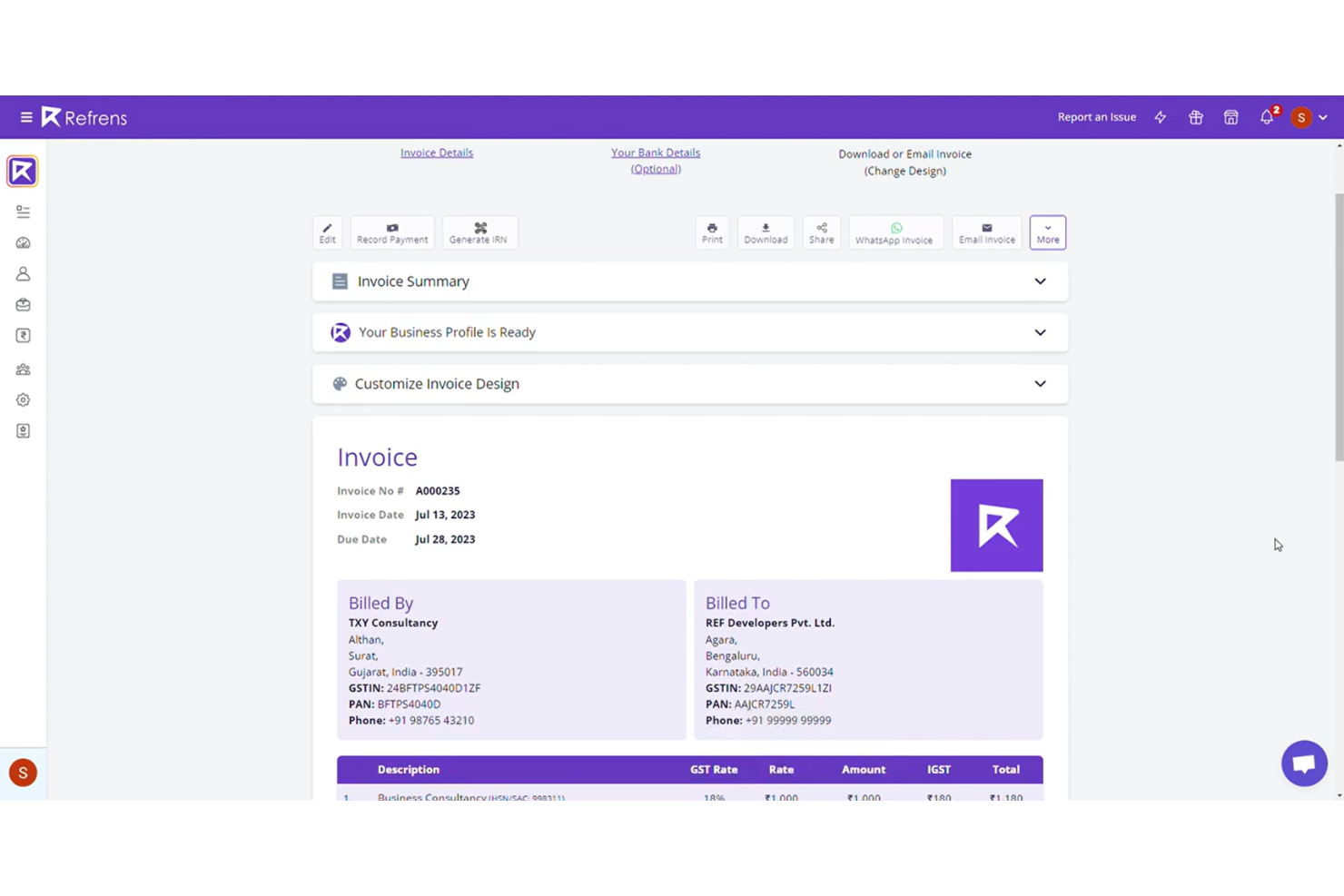
Refrens è una piattaforma di fatturazione online per team che offre gestione delle fatture, preventivi, ordini di acquisto, monitoraggio delle spese e raccolta dei pagamenti in un unico sistema.
Per chi è più indicato Refrens?
Refrens è ideale per piccole e medie imprese che necessitano di fatturazione multiutente, processi di approvazione e gestione delle spese per team distribuiti.
Perché ho scelto Refrens
Ho scelto Refrens perché posso impostare permessi dettagliati per gli utenti nei ruoli di fatturazione, finanza e vendite—controllando chi può creare, approvare o modificare le fatture. Apprezzo la presenza di flussi di approvazione dedicati e i registri di controllo per ogni modifica o azione effettuata sulle fatture.
Funzionalità principali di Refrens
- Generatore di fatture: Crea rapidamente fatture conformi al GST con campi personalizzabili.
- Monitoraggio delle spese: Registra e categorizza le spese direttamente all'interno della piattaforma.
- Strumenti per preventivi e stime: Prepara e invia preventivi o stime di vendita ai clienti.
- Fatturazione ricorrente: Automatizza la generazione delle fatture per clienti abituali o abbonamenti.
Integrazioni di Refrens
Refrens offre integrazioni native con Razorpay, PayPal e Google Sheets. È disponibile un'API per integrazioni personalizzate.
Pros and Cons
Pros:
- Permessi multilivello per team e ruoli
- Flussi di approvazione per modifiche alle fatture
- Portale clienti integrato per la condivisione delle fatture
Cons:
- Connessioni limitate con software di terze parti
- Nessun OCR integrato per la scansione dei documenti


Plutio è una piattaforma di gestione aziendale tutto-in-uno che offre fatturazione, proposte, contratti, monitoraggio del tempo e gestione delle attività per team e liberi professionisti.
Per chi è Plutio?
Liberi professionisti, agenzie e piccoli team creativi che hanno bisogno di un sistema integrato per gestire il lavoro con i clienti, la fatturazione e la comunicazione.
Perché ho scelto Plutio
Ho scelto Plutio perché posso invitare i clienti in un portale sicuro e personalizzato dal mio brand, raccogliere feedback sulle fatture e permettere ai clienti di approvare o rifiutare le singole voci. Mi piace anche poter gestire le conversazioni sui progetti e il tracciamento dei pagamenti tutto in un unico luogo.
Funzionalità principali di Plutio
- Modelli di fattura personalizzati: Crea fatture con branding personalizzato e campi e layout regolabili.
- Supporto multivaluta: Emetti fatture e accetta pagamenti in più valute.
- Promemoria di pagamento automatizzati: Invia solleciti programmati quando le fatture rimangono non pagate.
- Pagamenti parziali: Consenti ai clienti di pagare le fatture in più rate.
Integrazioni di Plutio
Plutio offre integrazioni native con Stripe, PayPal e Zapier. Un'API è disponibile per integrazioni personalizzate.
Pros and Cons
Pros:
- Fatture e stato dei pagamenti visibili nel portale clienti
- Supporta pagamenti parziali e programmazione delle rate
- Commenti e feedback integrati per ogni fattura
Cons:
- Le automazioni per le fatture sono limitate
- I modelli di fattura hanno poche opzioni di personalizzazione

Ideale per strumenti di fatturazione orientati alle agenzie
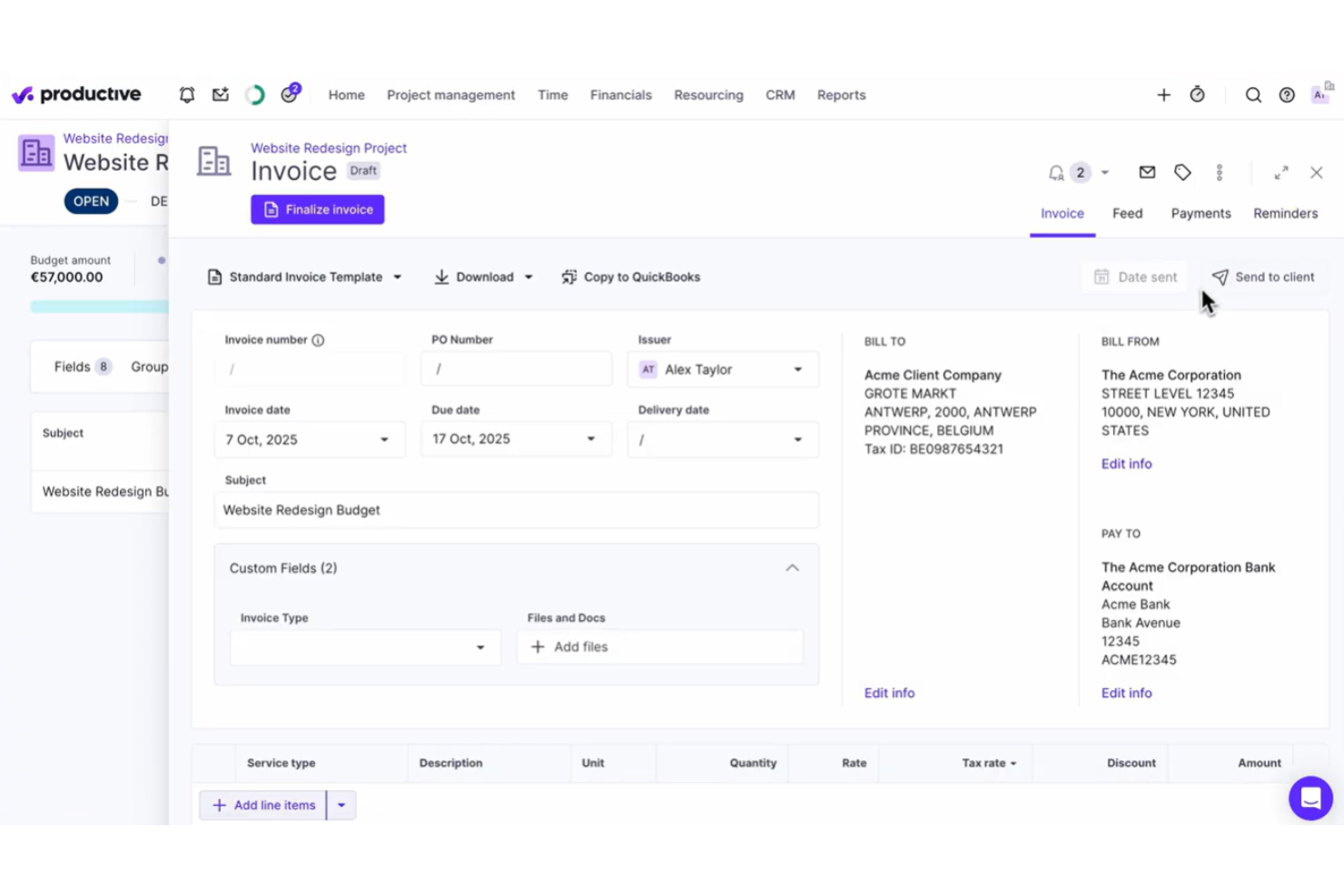
Productive è una piattaforma di gestione del lavoro e fatturazione pensata per le agenzie che necessitano di budget di progetto, monitoraggio del tempo, reportistica in tempo reale e generazione automatica delle fatture in un unico sistema.
A chi è più adatto Productive?
Productive è ideale per agenzie digitali e società di consulenza che necessitano di fatturazione su base progetto, pianificazione delle risorse e monitoraggio integrato del tempo in un'unica piattaforma.
Perché ho scelto Productive
Ho scelto Productive come uno dei migliori perché posso creare fatture direttamente dal tempo tracciato, dai budget o dalle milestone dei progetti, il che è ideale per le agenzie con modelli di fatturazione complessi. Apprezzo anche l'utilizzo di modelli personalizzati per soddisfare le aspettative dei clienti.
Funzionalità principali di Productive
- Notifiche automatiche delle fatture: Invia promemoria e aggiornamenti automatici ai clienti per le fatture in sospeso.
- Supporto multi-valuta: Genera fatture e gestisci pagamenti in più valute per i clienti internazionali.
- Gestione integrata delle spese: Allega le spese fatturabili alle fatture direttamente dai costi dei progetti monitorati.
- Creazione in batch delle fatture: Crea e invia più fatture contemporaneamente per lavori ricorrenti o ripetitivi.
Integrazioni di Productive
Productive offre integrazioni native con Xero, QuickBooks Online, Slack, Google Calendar e Jira, e mette a disposizione un'API per integrazioni personalizzate.
Pros and Cons
Pros:
- Pensato per i flussi di lavoro e i modelli di fatturazione delle agenzie
- Collega automaticamente progetti, budget e fatture
- Supporta fatturazione in multi-valuta e portali clienti
Cons:
- La personalizzazione delle fatture è piuttosto limitata
- Le funzionalità di fatturazione richiedono la configurazione del monitoraggio del tempo
New Product Updates from Productive
Productive Adds Voice Dictation, Slack Connector, Proposals, and Overtime
Productive adds voice dictation, a Slack Connector, proposal controls, and overtime tracking. These updates support faster AI interactions, client proposals, and time management. For more information, visit Productive’s official site.

Scoro
Ideale per la gestione aziendale end-to-end
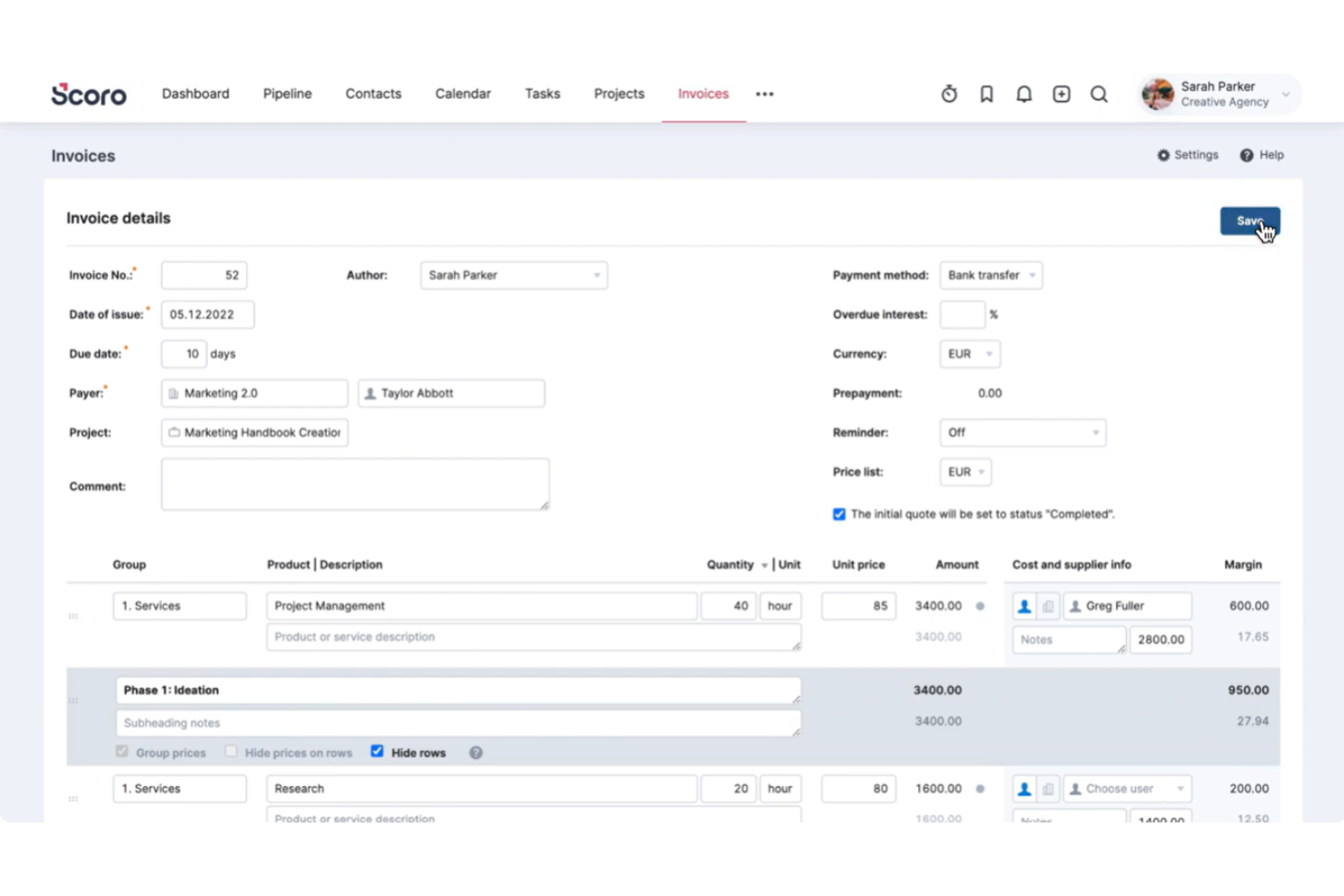
Scoro è una piattaforma unificata di gestione aziendale per fatturazione, preventivi, addebiti e automazione che combina la gestione finanziaria con il monitoraggio dei progetti e strumenti per l'automazione dei flussi di lavoro.
Per chi è più adatto Scoro?
Scoro è ideale per agenzie di medie dimensioni e società di consulenza che necessitano di una piattaforma integrata per fatturazione, gestione progetti e strumenti di workflow.
Perché ho scelto Scoro
Ho scelto Scoro tra i migliori perché posso emettere fatture, gestire pagamenti ricorrenti e monitorare i conti scaduti, collegandoli direttamente a progetti e preventivi. Mi piace poter visualizzare le prestazioni aziendali e i dati di fatturazione da un'unica dashboard.
Funzionalità principali di Scoro
- Modelli di fattura personalizzabili: Crea e salva modelli con marchio e campi preconfigurati.
- Catalogo prodotti e servizi: Aggiungi articoli direttamente alle fatture da un catalogo ricercabile.
- Supporto multivaluta: Genera fatture in più valute per clienti internazionali.
- Calcolo automatico delle imposte: Applica automaticamente le tasse regionali durante la creazione della fattura.
Integrazioni di Scoro
Scoro offre integrazioni native con Xero, QuickBooks, Mailchimp, Google Calendar, Outlook e Dropbox, e fornisce un'API per integrazioni personalizzate.
Pros and Cons
Pros:
- Collega le fatture direttamente ai progetti monitorati
- Gestisce fatturazione ricorrente e abbonamenti
- Offre flussi di approvazione integrati per le fatture
Cons:
- Il monitoraggio del tempo deve essere abilitato per la fatturazione
- I campi delle fatture personalizzate sono solo parzialmente configurabili
New Product Updates from Scoro

Scoro Adds Time Mobile App and ELI Improvements
Scoro adds the Scoro Time mobile app for iOS/Android to track time anywhere and expands ELI with attachments, smarter filtering, and trigger-based actions. For more information, visit Scoro's official site.

Eonebill
Ideale per la generazione di fatture multi-valuta
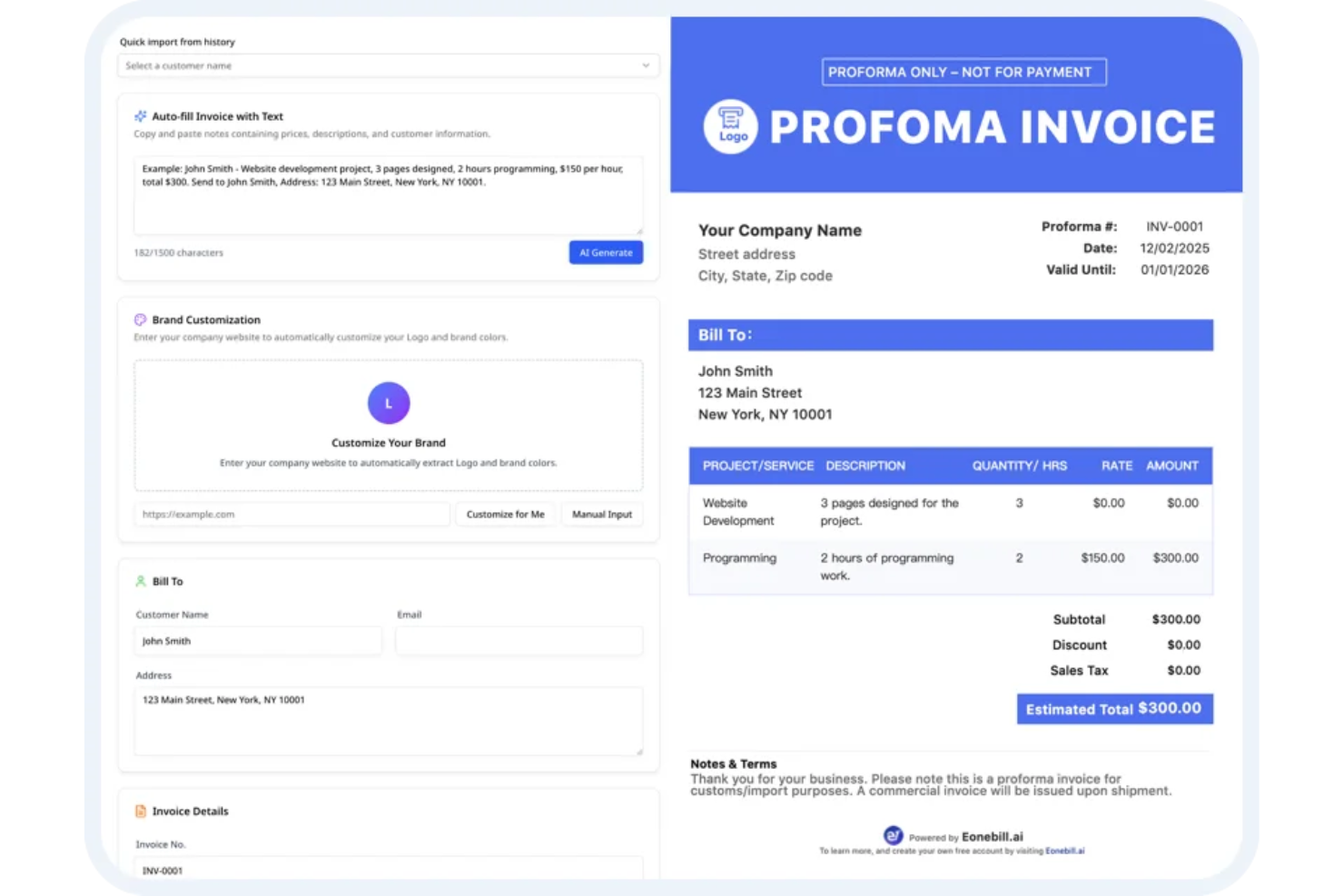
Eonebill è una piattaforma di generazione di fatture con intelligenza artificiale per le aziende che supporta la creazione di fatture, la riscossione automatica dei pagamenti, la conformità a GST e altre tasse, il monitoraggio delle spese e la gestione di clienti globali.
A Chi è Rivolto Eonebill?
Eonebill è ideale per team finanziari o piccole imprese che gestiscono clienti internazionali e necessitano di una funzione di fatturazione multi-valuta integrata.
Perché Ho Scelto Eonebill
Ho scelto Eonebill perché posso creare fatture in più valute con tassi di cambio in tempo reale e conversione automatica dei totali. Mi piace poter inviare fatture generate dall’IA a clienti internazionali e monitorare automaticamente GST, IVA e altre tasse.
Funzionalità Principali di Eonebill
- Promemoria di pagamento automatici: Programma e invia messaggi di sollecito pagamento ai clienti in automatico.
- Monitoraggio delle spese: Registra e categorizza le spese aziendali all’interno della piattaforma per un controllo finanziario.
- Strumenti di conformità GST e fiscale: Genera report di conformità per GST, IVA e altre imposte direttamente dalle fatture.
- Accesso multiutente: Consenti ai membri del team di collaborare e gestire le fatture sotto un unico account.
Integrazioni Eonebill
Offre un’API per integrazioni personalizzate.
Pros and Cons
Pros:
- Generazione di fatture multi-valuta con conversione in tempo reale
- Funzionalità automatiche di conformità GST e IVA
- Creazione di fatture assistita dall’IA a partire dalle ore registrate
Cons:
- Integrazioni native limitate per l’automazione dei flussi di lavoro
- Le opzioni di personalizzazione dei modelli di fattura sono basilari


Taskade Genesis è un generatore di fatture basato sull'IA che offre modelli di fattura personalizzabili, compilazione automatica dei campi e strumenti per la creazione di documenti, progettati per freelance e titolari di piccole imprese.
Per chi è più adatto Taskade Genesis?
Freelance e professionisti indipendenti che devono generare fatture a partire da modelli flessibili basati sull'IA per diversi progetti o tipi di clienti.
Perché ho scelto Taskade Genesis
Ho scelto Taskade Genesis come uno dei migliori strumenti perché posso generare istantaneamente fatture basate sull'IA utilizzando un'ampia gamma di modelli personalizzabili. Mi piace poter modificare i campi per ogni progetto e salvare formati riutilizzabili adattati al mio lavoro da freelance.
Funzionalità principali di Taskade Genesis
- Generazione di contenuti con IA: Compila automaticamente i campi delle fatture in base a istruzioni o dati del progetto.
- Galleria di modelli: Accedi a una libreria di modelli di fattura per diverse esigenze dei freelance.
- Modifica collaborativa: Più utenti possono modificare e aggiornare le fatture in tempo reale.
- Esportazione in più formati: Esporta le fatture completate come file PDF, DOCX o Markdown.
Integrazioni di Taskade Genesis
Le integrazioni includono Slack, Gmail, Stripe, GitHub, Shopify, HubSpot, Salesforce, Pipedrive, Discord e Microsoft Teams.
Pros and Cons
Pros:
- Supporta suggerimenti di testo per le fatture basati sull'IA
- Ampia selezione di modelli di fattura modificabili
- Generazione illimitata di fatture per freelance
Cons:
- Nessuna funzionalità automatizzata di monitoraggio dei pagamenti
- Non consente di programmare fatture ricorrenti

Kantata
Ideale per flussi di lavoro finanziari basati su progetti

Kantata è una piattaforma di gestione finanziaria basata su progetti che riunisce contabilità di progetto, fatturazione, emissione di fatture, rilevamento del tempo, pianificazione delle risorse e analisi, pensata specificamente per i team di servizi.
A chi è più adatto Kantata?
Kantata è una scelta solida per studi di servizi professionali e organizzazioni basate su progetti che necessitano di una gestione avanzata della contabilità di progetto e dei flussi di lavoro finanziari.
Perché ho scelto Kantata
Ho scelto Kantata tra i migliori perché posso gestire i budget dei progetti, automatizzare le approvazioni di fatture complesse e generare report finanziari in tempo reale per ogni progetto. Mi piace poter creare flussi di lavoro di fatturazione in base alle attività fatturabili e al tempo registrato.
Funzionalità principali di Kantata
- Previsione delle risorse: Prevedi le necessità future di risorse in base ai dati attuali dei progetti.
- Schede tariffarie personalizzabili: Imposta tariffe diverse per clienti, ruoli o progetti.
- Fatturazione multivaluta: Invia fatture in diverse valute per progetti a livello globale.
- Portale clienti: Permetti ai clienti l'accesso diretto alle fatture e ai dati finanziari dei progetti.
Integrazioni Kantata
Kantata offre integrazioni native con Salesforce, QuickBooks, Xero, Sage Intacct, NetSuite, HubSpot, Jira, Slack, Microsoft Teams e Google Drive. È disponibile un'API per integrazioni personalizzate.
Pros and Cons
Pros:
- Traccia le ore fatturabili nel contesto del progetto
- Gestisce fatturazione globale e multivaluta
- Supporta flussi di approvazione complessi per le fatture
Cons:
- La modifica massiva delle fatture non è disponibile
- La personalizzazione del branding delle fatture è limitata
New Product Updates from Kantata

Kantata Adds Access Group Change History
Kantata adds Access Groups History, letting account administrators track changes to group details, membership, and permissions in Recent History. The update also makes these events available through the Subscribed Events API for broader monitoring. For more information, visit Kantata’s official site.
 .
.
Ideale per l'integrazione del monitoraggio delle spese


Ideale per la personalizzazione open source
Altri generatori di fatture con IA
Ecco alcune opzioni aggiuntive di generatori di fatture con IA che non sono state incluse nel mio elenco, ma che vale comunque la pena prendere in considerazione:
- Zoho Invoice
Ideale per promemoria di pagamento automatici
- Hiveage
Ideale per le funzionalità di collaborazione in team
- Invoice Quickly
Il migliore con archivio integrato dei servizi di libreria
- Bookipi
Ideale per soluzioni di fatturazione mobile-first


Come valuto i generatori di fatture AI
Ogni strumento in questa lista deve fare molto di più che applicare l'etichetta AI a un semplice modulo di fatturazione — cerco piattaforme che trasformino effettivamente i dati di progetto, i registri orari o i SOW in fatture pronte per essere inviate. Suddivido la mia valutazione in funzionalità di base che ogni strumento deve offrire e fattori differenzianti che separano le soluzioni migliori dal resto.
Funzionalità di base (requisiti fondamentali per questa lista)
Quando seleziono gli strumenti per la mia lista, valuto ciascuno su una scala da 0 (funzionalità assente) a 5 (eccellenza in quest'area) per ognuna delle funzionalità fondamentali elencate di seguito. Successivamente, calcolo il punteggio totale dello strumento in percentuale. Ogni strumento deve raggiungere un punteggio minimo totale del 55% per essere preso in considerazione per l'inclusione.
- Generazione di fatture guidata da AI: Cerco strumenti che elaborino le fatture da input reali — come una descrizione di uno sprint completato o registri orari caricati — invece di limitarsi a riempire automaticamente un modulo vuoto.
- Integrazione dati progetto e tempo: Lo strumento dovrebbe recuperare ore fatturabili, attività o traguardi da strumenti di project management e time tracking, così da far fluire una fase completata di progetto direttamente in una bozza di fattura.
- Estrazione e strutturazione delle voci: Valuto se l’AI è in grado di interpretare un SOW o un contratto caricato suddividendolo in voci strutturate con descrizioni, quantità e tariffe mantenute intatte.
- Gestione clienti e tariffe: Ogni strumento deve archiviare profili clienti con tariffe per progetto, valute e regole fiscali affinché un’agenzia con più clienti non debba reinserire ogni volta i dettagli di fatturazione.
- Modelli di fattura personalizzabili: Verifico se le fatture generate dall’AI vengono inserite in modelli personalizzati, modificabili e in linea con il brand, sia che si tratti di clienti a canone che di incarichi occasionali.
- Invio ed esportazione delle fatture: Gli strumenti devono permettere di inviare, esportare in PDF o sincronizzare le fatture finali con piattaforme contabili come QuickBooks o Xero senza dover lasciare l’interfaccia.
Una volta ottenuto un elenco di strumenti che soddisfano questi criteri, considero cosa distingue ciascuna piattaforma.
Fattori differenzianti (cosa distingue i fornitori)
Ecco come metto a confronto i diversi fornitori:
Caratteristiche distintive
L’estrazione intelligente dei dati è un notevole elemento di distinzione. Cerco AI in grado di ricavare voci da contratti o fogli presenze caricati tramite OCR e NLP, evitando la reinserzione manuale. Anche l’intelligenza sulle fatture ricorrenti conta — strumenti che rilevano pattern di fatturazione e segnalano anomalie come una voce mancante prima dell’invio di una fattura a canone evitano davvero molte seccature. Il sollecito automatico dei pagamenti completa il quadro, con l’AI che personalizza tempistiche e tono dei promemoria in base alla cronologia dei pagamenti di ciascun cliente, riducendo il DSO.
Oltre alle caratteristiche
Valuto l’efficacia per connettersi all’ecosistema contabile e di pagamento che il vostro team già utilizza — sincronizzando le fatture con QuickBooks o Xero e raccogliendo i pagamenti tramite Stripe o PayPal senza dover esportare manualmente. Anche l’esperienza lato cliente è rilevante, soprattutto per le agenzie: portali personalizzati e viste ottimizzate per mobile facilitano ai clienti la revisione e il pagamento. Considero inoltre la rapidità di onboarding. Un project manager dovrebbe poter generare una prima fattura in pochi minuti, non dopo una settimana di configurazione.
Come scegliere un generatore di fatture con IA
È facile perdersi tra lunghi elenchi di funzionalità e strutture tariffarie complesse. Per aiutarti a rimanere concentrato mentre affronti il tuo particolare processo di selezione del software, ecco un elenco dei fattori da tenere presenti:
| Fattore | Cosa considerare |
| Scalabilità | La piattaforma è in grado di gestire la crescita della tua azienda, un maggior numero di utenti e volumi di fatturazione più elevati senza interruzioni o importanti aggiornamenti? |
| Integrazioni | Lo strumento si collega ai tuoi sistemi contabili, CRM o gateway di pagamento? Verifica la disponibilità di connessioni integrate o tramite API. |
| Personalizzazione | Puoi adattare i modelli di fattura, i flussi di lavoro e le regole di automazione alle tue specifiche esigenze di fatturazione e al tuo marchio? |
| Facilità d'uso | Gli utenti dei reparti finanziario, vendite e operativo potranno generare rapidamente fatture e risolvere i problemi con una formazione minima? |
| Implementazione e avviamento | Con quale facilità il tuo team può iniziare, migrare i dati esistenti e accedere a risorse di formazione o supporto durante la transizione? |
| Costo | Esamina il costo totale per l'utilizzo previsto, inclusi gli utenti e gli eventuali addebiti per funzionalità aggiuntive o supporto di livello superiore. |
| Misure di sicurezza | I dati finanziari e dei clienti sensibili sono crittografati quando sono archiviati e durante il trasferimento? Le autorizzazioni degli utenti e i controlli degli accessi sono sufficientemente granulari per le tue esigenze di conformità? |
| Funzionalità internazionali | Il sistema supporta le valute, le regole fiscali, i formati regionali e le lingue richiesti per la fatturazione transfrontaliera? |
Che cos'è un generatore di fatture con IA?
Un generatore di fatture con IA è un tipo specializzato di software di fatturazione che utilizza l'intelligenza artificiale per automatizzare la creazione delle fatture. Estrae i dati di fatturazione, formatta le fatture e spesso gestisce attività come i calcoli, le regole fiscali o il controllo degli errori. Queste piattaforme possono far risparmiare tempo riducendo l'inserimento manuale dei dati, minimizzando gli errori e velocizzando le attività di fatturazione ricorrenti o ad alto volume.
Caratteristiche del generatore di fatture con IA
Quando selezioni un generatore di fatture con IA, presta attenzione alle seguenti caratteristiche principali:
- Creazione automatizzata delle fatture: genera istantaneamente fatture recuperando i dati da preventivi, registri dei progetti o ricevute, senza doverli digitare manualmente.
- Modelli personalizzabili: ti consentono di adattare il formato della fattura, il branding, le voci, la valuta e i campi fiscali in base ai requisiti della tua attività.
- Estrazione dei dati basata sull'IA: legge e converte le informazioni provenienti da documenti o e-mail caricati in campi pronti per la fatturazione, con un input minimo, così puoi usare l'IA per compilare i dettagli.
- Supporto multivaluta: gestisce la fatturazione per clienti di diversi Paesi, con selezione automatica della valuta e gestione dei tassi di cambio.
- Promemoria automatici per i pagamenti: invia ai clienti promemoria programmati tramite e-mail o SMS per i pagamenti in sospeso o scaduti, prima del superamento della data di scadenza.
- Motore di calcolo delle imposte: applica le imposte corrette in base alla posizione geografica, alle norme fiscali o alle categorie degli articoli, senza mappatura manuale.
- Fatturazione ricorrente: programma e invia automaticamente le fatture ai clienti con cicli di fatturazione regolari e ripetuti.
- Pannello di monitoraggio dei pagamenti: monitora lo stato delle fatture, registra i pagamenti ricevuti, come una transazione con carta di credito o un bonifico bancario, e segnala i saldi scaduti in un'unica visualizzazione.
- Accesso degli utenti basato sui ruoli: assegna autorizzazioni specifiche per creare, approvare o modificare le fatture ai diversi membri del team.
- Registrazione della cronologia di controllo: conserva un registro dettagliato di chi ha creato, modificato o approvato ogni fattura, per i controlli interni o per esigenze di conformità.
Vantaggi del generatore di fatture
L'implementazione di un generatore di fatture con IA offre diversi vantaggi al tuo team e alla tua attività. Ecco alcuni dei vantaggi che puoi aspettarti:
- Cicli di fatturazione più rapidi: i flussi di lavoro automatizzati e l'estrazione dei dati basata sull'IA riducono l'inserimento manuale e velocizzano la creazione delle fatture, per una fatturazione più rapida.
- Riduzione degli errori umani: i controlli di convalida integrati e i modelli di fattura gratuiti aiutano a ridurre al minimo gli errori nei calcoli, nelle norme fiscali e nei dati dei clienti.
- Miglioramento della riscossione dei pagamenti: i promemoria automatici e le funzioni di monitoraggio dei pagamenti facilitano i solleciti, riducono le fatture scadute e consentono ai clienti di scaricare immediatamente le fatture.
- Maggiore conformità normativa: le cronologie di controllo, i calcoli delle imposte e la conservazione sicura dei dati semplificano la conformità alle leggi locali e alle politiche interne.
- Collaborazione migliorata: i controlli degli accessi basati sui ruoli consentono ai team di qualsiasi dimensione di delegare le attività, approvare le modifiche e mantenere il controllo senza confusione.
- Scalabilità per la crescita: il supporto per più valute, la fatturazione ricorrente e l'importazione dei dati permettono al sistema di crescere insieme alle esigenze della tua attività.
- Informazioni più utili: i pannelli in tempo reale e il monitoraggio dello stato dei pagamenti offrono una panoramica chiara del flusso di cassa e dei crediti ancora da riscuotere.
Costi e prezzi del generatore di fatture con IA
La scelta di un generatore di fatture con IA richiede la comprensione dei vari modelli di prezzo e dei piani disponibili. I costi variano in base alle funzionalità, alle dimensioni del team, agli strumenti aggiuntivi e ad altri fattori. La tabella seguente riassume i piani più comuni, i relativi prezzi medi e le funzionalità tipicamente incluse nelle soluzioni di generazione di fatture con IA:
Tabella comparativa dei piani per il generatore di fatture con IA
| Tipo di piano | Prezzo medio | Funzionalità comuni |
| Piano gratuito | $0 | Creazione di fatture di base, modelli limitati, reportistica di base e accesso per un singolo utente. |
| Piano personale | $5-$15/utente/mese | Opzioni per modelli personalizzati, automazione di base, integrazioni limitate, supporto multivaluta e assistenza prioritaria via e-mail. |
| Piano aziendale | $20-$40/utente/mese | Automazione avanzata, autorizzazioni del team, promemoria per i pagamenti, analisi avanzate, numerose integrazioni e possibilità di emettere fatture ricorrenti. |
| Piano per grandi aziende | $50-$100/utente/mese | Identità del marchio personalizzata, accesso basato sui ruoli, accesso API, accesso singolo, registri di controllo, sicurezza avanzata e gestione dedicata dell'account. |
Domande frequenti sui generatori di fatture basati sull'IA
Ecco alcune domande frequenti sulla scelta di un generatore di fatture basato sull’IA o di un software di fatturazione:
I generatori di fatture basati sull'IA possono integrarsi con il mio software di contabilità esistente?
Sì, molti generatori di fatture basati sull’IA offrono integrazioni con le piattaforme di contabilità più diffuse. Questo consente di automatizzare il trasferimento dei dati, ridurre i doppioni e mantenere coerenti i registri finanziari tra i vari sistemi. Se attualmente registri le fatture in Excel, spesso puoi esportare direttamente quei dati. Verifica sempre le integrazioni supportate prima di scegliere uno strumento.
Quanto sono sicuri i miei dati finanziari con un generatore di fatture basato sull'IA?
La maggior parte delle soluzioni utilizza la crittografia e i controlli degli accessi per proteggere i tuoi dati. Cerca piattaforme che offrano pratiche di protezione dei dati come la crittografia dei dati archiviati e in transito, ruoli utente basati sulle autorizzazioni e audit o certificazioni di sicurezza periodici. I dati sensibili della tua azienda e le informazioni di contatto dei clienti rimangono protetti da questi livelli di sicurezza.
I generatori di fatture basati sull'IA funzionano per liberi professionisti e grandi team?
Sì, questi strumenti sono progettati sia per i singoli utenti sia per i team in crescita. Molte piattaforme offrono prezzi flessibili che si adattano alle dimensioni della tua azienda, autorizzazioni del team per la collaborazione e funzionalità a livelli per esigenze diverse. Che tu debba inviare una singola fattura per un servizio o gestirne centinaia, il sistema cresce insieme a te.
Quali funzionalità dell'IA sono davvero utili nel processo di fatturazione?
L’IA alimenta funzionalità come l’estrazione automatica dei dati dalle ricevute, i suggerimenti per le voci delle fatture, i calcoli delle imposte e i promemoria intelligenti per i pagamenti. Gli strumenti avanzati di IA possono compilare automaticamente campi ricorrenti come il nome della tua azienda, il numero della fattura e l’indirizzo di fatturazione del cliente. Queste funzionalità possono farti risparmiare tempo, ridurre gli errori e velocizzare i cicli di fatturazione.
Quanto è difficile configurare un generatore di fatture basato sull'IA per il mio team?
La configurazione prevede generalmente l’importazione degli elenchi dei clienti, la selezione dei modelli e il collegamento degli account. Puoi personalizzare il formato della fattura in modo che corrisponda ai colori del tuo marchio e si integri con l’identità della tua azienda. Molti strumenti offrono procedure guidate interattive per iniziare, articoli di assistenza e procedure guidate per la migrazione, così puoi essere operativo in uno o due giorni.
Posso emettere fatture in valute e lingue diverse?
Sì, la maggior parte dei generatori di fatture basati sull’IA supporta la fatturazione in più valute e offre diverse opzioni linguistiche. Il sistema calcola automaticamente il subtotale, l’importo totale e l’importo finale dovuto in base alle leggi fiscali locali. Questo è particolarmente utile per i team con clienti internazionali o esigenze di fatturazione transfrontaliera. Verifica sempre la copertura disponibile prima di scegliere una soluzione.