

Ho testato 10 app di produttività nel 2026: le mie preferite

Migliori app per la produttività


Le app per la produttività sono strumenti che aiutano i project manager a pianificare il lavoro, assegnare attività, monitorare le scadenze, automatizzare gli aggiornamenti e mantenere i team allineati in un unico posto. Le migliori app per la produttività riducono la comunicazione frammentata, i passaggi di consegne mancati e le priorità poco chiare, offrendo una visibilità maggiore su ciò che deve essere fatto, su chi ne è responsabile e su ciò che sta rimanendo indietro.
Le app per la produttività possono aiutarti a organizzare le attività, gestire le scadenze e mantenere il tuo team sulla buona strada. Tuttavia, con così tante opzioni disponibili, è difficile capire quale farà davvero la differenza nel tuo lavoro.
Ho testato e recensito le migliori app per la produttività per project manager, concentrandomi sugli aspetti più importanti: efficienza, collaborazione e facilità d'uso. In questo articolo analizzerò le mie migliori scelte e ciò che le distingue.
Perché fidarsi dei nostri consigli sui software
Il nostro team testa e recensisce software dal 2012. In quanto project manager noi stessi, sappiamo quanto sia difficile — e importante — scegliere il software giusto.
Per questa guida, abbiamo valutato gli strumenti attraverso test pratici e ricerche indipendenti, assegnando un punteggio agli strumenti in base ai nostri criteri di selezione. Ci basiamo inoltre sulle competenze di leader di pensiero del settore e di professionisti attivi nella gestione dei progetti.
Le nostre recensioni riflettono il nostro giudizio editoriale umano, non un discorso di vendita.
Revisori esperti:
Tabella comparativa delle app per la produttività
Questa tabella comparativa riassume i dettagli sui prezzi delle mie migliori selezioni di app per la produttività:
| Tool | Best For | Trial Info | Price | ||
|---|---|---|---|---|---|
| 1 | Ideale per flussi di lavoro e bacheche attività personalizzati | Prova gratuita di 14 giorni | Da $8/utente/mese | Website | |
| 2 | Ideale con il monitoraggio automatico del tempo | Piano gratuito + prova gratuita di 30 giorni + demo gratuita disponibile | A partire da $9/utente/mese (fatturato annualmente) | Website | |
| 3 | La migliore app di produttività per la gestione completa dei progetti | Prova gratuita di 15 giorni + piano gratuito + demo gratuita disponibile | Da $4/utente/mese (fatturazione annuale) | Website | |
| 4 | Ideale per brainstorming, ideazione e gestione delle attività in un'unica soluzione | Prova gratuita + piano gratuito + demo gratuita disponibili | A partire da $13/utente/mese (fatturati annualmente) | Website | |
| 5 | Ideale per strumenti di comunicazione in-app | ClickUp è gratuito con spazio di archiviazione limitato per un numero illimitato di utenti. | Da $7/utente/mese (fatturazione annuale) | Website | |
| 6 | Ideale per creare app di produttività personalizzate | Prova gratuita di 30 giorni | Da $24/utente/mese | Website | |
| 7 | Ideale per elenchi di attività basati su schede e bacheche Kanban | Piano gratuito disponibile | Da $9.99/utente/mese | Website | |
| 8 | Ideale per la collaborazione in tempo reale | Prova gratuita di 14 giorni disponibile | Da $7/utente/mese (fatturati annualmente) | Website | |
| 9 | Miglior strumento per cercare rapidamente risposte in tutte le tue app | Non disponibile | Prezzo su richiesta | Website | |
| 10 | Ideale per la sua interfaccia intuitiva | Piano gratuito disponibile | A partire da $18/utente/mese | Website |


Recensioni delle migliori app per la produttività
Queste sono le mie migliori selezioni di app e software per la produttività. Ho esaminato il caso d’uso migliore di ogni strumento, le funzionalità principali e le integrazioni. Ho incluso anche le informazioni sui prezzi e uno screenshot dell’interfaccia utente di ogni piattaforma.

Ideale per flussi di lavoro e bacheche attività personalizzati
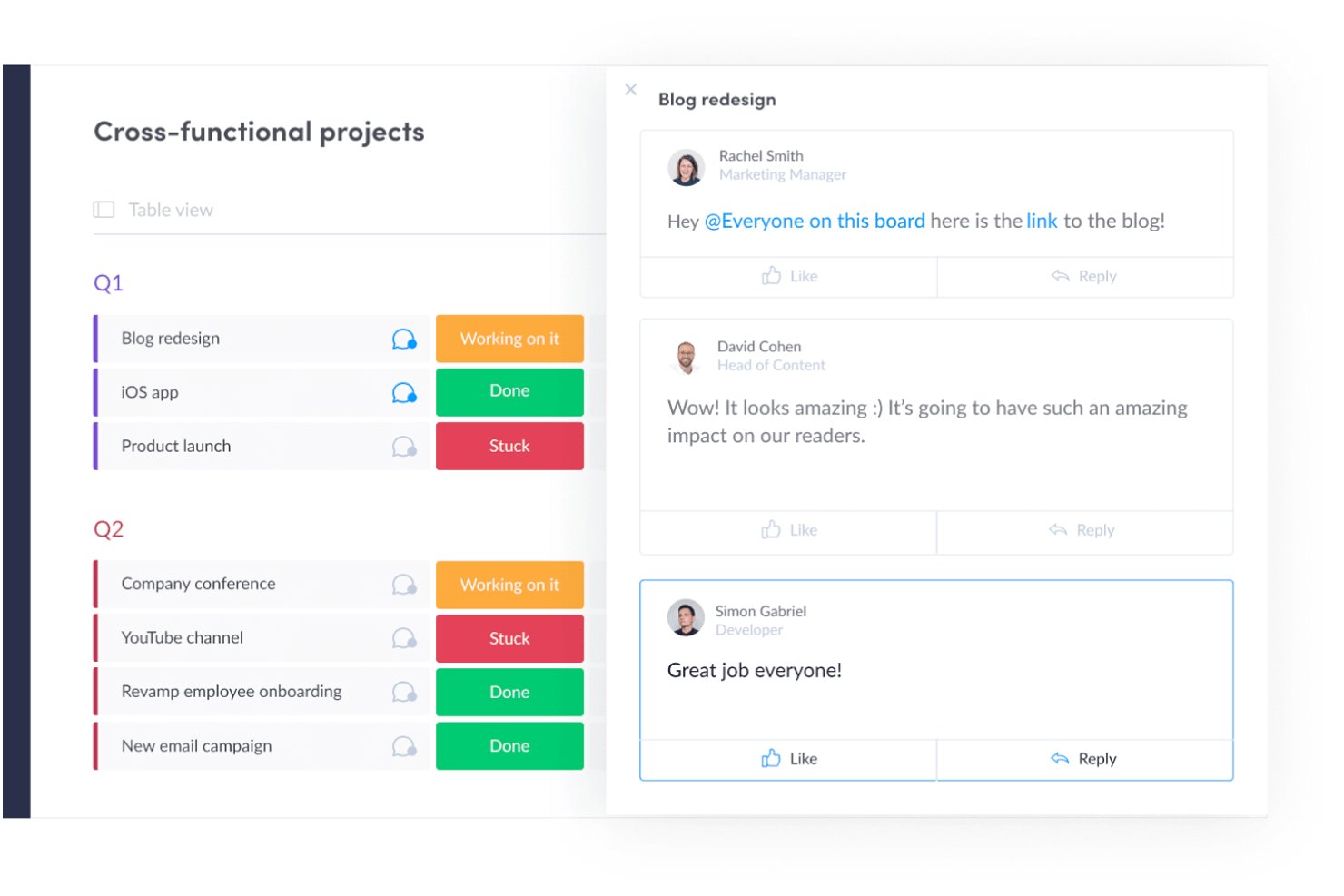
monday AI Workspace è una piattaforma di gestione del lavoro che combina bacheche di attività personalizzabili, pianificazione dei progetti, automazione dei flussi di lavoro e strumenti di esecuzione supportati dall’IA per la gestione di progetti, CRM, sviluppo e operazioni di servizio.
Per chi è più indicato monday AI Workspace?
È una soluzione ideale per team di medie e grandi dimensioni che gestiscono più flussi di lavoro tra prodotto, marketing, operations o ingegneria e che necessitano di uno spazio di lavoro unico e altamente configurabile.
Perché ho scelto monday AI Workspace
Ho inserito monday AI Workspace tra le mie scelte migliori perché nessun altro strumento rende così facile la creazione di flussi di lavoro su misura per come lavora il tuo team. Il sistema a bacheche permette di configurare colonne, stati e automazioni personalizzati in base ai tuoi processi specifici. Apprezzo particolarmente l’AI Workflow Builder, che orchestra automazioni multi-step tra bacheche senza richiedere un programmatore. Il mio team può costruire una bacheca sprint per l’ingegneria e un tracker campagne per il marketing, ognuno con le proprie automazioni.
Funzionalità principali di monday AI Workspace
- AI Meeting Notetaker: Cattura, riassume e distribuisce automaticamente le azioni da intraprendere emerse nelle riunioni di progetto.
- Rilevazione dei tempi di lavoro: Consente ai membri del team di registrare le ore direttamente nelle attività per un reporting di progetto accurato.
- Documenti integrati: Supporta la presa di note collaborativa e documentazione collegata a bacheche o progetti specifici.
- Dashboard personalizzate per reportistica: Permette la creazione di dashboard in tempo reale per visualizzare metriche da più spazi di lavoro.
Integrazioni di monday AI Workspace
monday AI Workspace offre centinaia di integrazioni native attraverso il proprio marketplace integrato, inclusi Slack, Microsoft Teams, Google Workspace, Salesforce, HubSpot, Jira, GitHub, Dropbox, Zoom e Outlook. Supporta anche Zapier e fornisce un’API per integrazioni personalizzate.
Pros and Cons
Pros:
- Bacheche altamente personalizzabili con colonne flessibili
- AI workflow builder gestisce automazioni multi-step
- Visualizzazioni multiple di progetto, inclusi Gantt e carico di lavoro
Cons:
- Le dashboard richiedono configurazione manuale tra diverse bacheche
- Il volume delle notifiche può diventare difficile da gestire
New Product Updates from monday AI Workspace
monday AI Workspace Adds Human Approval Routing
monday AI Workspace adds a human-in-the-loop approval block to AI Workflows, sending approval requests and routing workflow paths based on responses. For more information, visit monday AI Workspace's official site.

Toggl
Ideale con il monitoraggio automatico del tempo
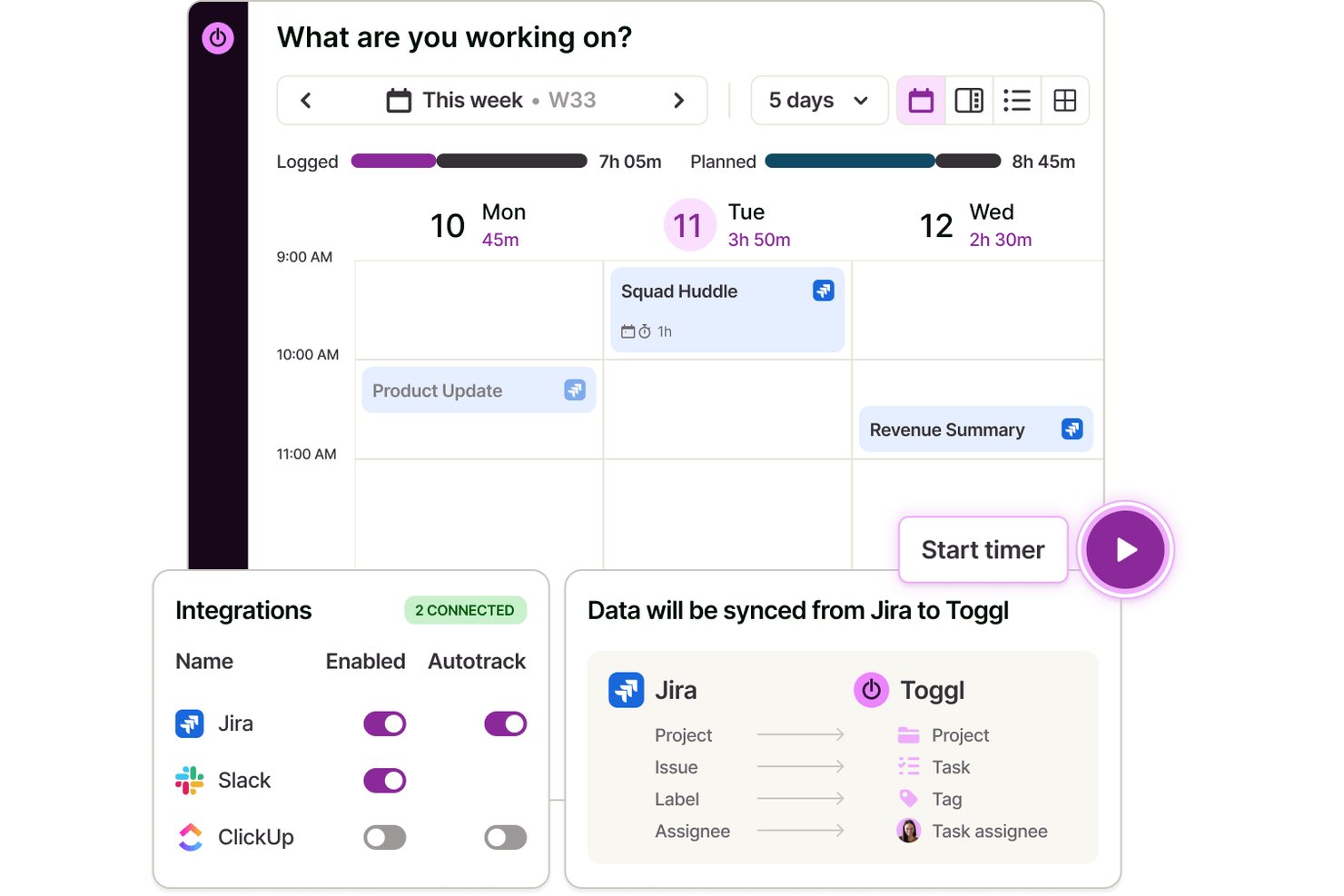
Toggl è un'app per il monitoraggio del tempo che consente a singoli utenti e team di registrare le ore tramite web, desktop e dispositivi mobili, con acquisizione automatica del tempo, integrazioni con il calendario e report dettagliati sulla produttività e sulla redditività.
Per chi è più adatto Toggl?
Toggl è particolarmente adatto a liberi professionisti, consulenti e agenzie che fatturano a ore e necessitano di dati precisi sul tempo senza un monitoraggio invasivo dei dipendenti.
Perché ho scelto Toggl
Ho scelto Toggl come una delle soluzioni migliori perché il suo approccio al monitoraggio automatico è davvero diverso. L'app desktop registra silenziosamente ogni app e sito web che utilizzi per più di 10 secondi, ma questi dati rimangono privati e accessibili solo a te. Sei tu a decidere cosa diventa una voce di tempo ufficiale, il che significa niente screenshot, niente registri dei tasti premuti e nessuna sorveglianza da parte dei responsabili. Inoltre, converte automaticamente gli eventi del calendario in voci di tempo, quindi registrare una chiamata con un cliente non richiede alcuno sforzo aggiuntivo. Toggl dispone anche di un assistente IA che consente di porre domande in linguaggio naturale sul tempo e sui dati dei progetti, facilitando l'estrazione di informazioni utili da ciò che hai monitorato.
Funzionalità principali di Toggl
- Visualizzazione del calendario: Visualizza il tempo monitorato come blocchi su un calendario visivo e collegalo a Google o Outlook.
- Monitoraggio di progetti e clienti: Organizza le voci di tempo in un numero illimitato di progetti e clienti per ottenere report chiari.
- Creazione e gestione delle attività con IA: Crea attività da screenshot, note e idee e gestiscile nella visualizzazione Bacheca, Elenco, Calendario o Sequenza temporale
- Report personalizzabili: Crea grafici a barre, ad anello, pivot e a linee per analizzare le tendenze nelle ore monitorate.
Integrazioni di Toggl
Toggl offre integrazioni native con Asana, Trello, Jira, ClickUp, Salesforce, Google Calendar, Outlook Calendar, QuickBooks Online, Xero e Slack.
Pros and Cons
Pros:
- Gli eventi del calendario diventano automaticamente voci di tempo
- Controlli completi sulla privacy dei dati relativi alle attività
- Passaggio semplice tra progetti e clienti
Cons:
- Mancano funzionalità avanzate per la gestione delle attività
- L'app mobile può non registrare il monitoraggio in secondo piano

La migliore app di produttività per la gestione completa dei progetti

Zoho Projects è un software di project management basato su cloud che permette a individui e team di collaborare, pianificare ed eseguire progetti in modo efficiente. Il software aumenta la produttività offrendo una piattaforma centralizzata per la gestione delle attività, il monitoraggio del tempo, la condivisione dei documenti e la comunicazione del team.
Perché ho scelto Zoho Projects: È una soluzione software versatile che può essere utilizzata da diversi tipi di organizzazioni e team per gestire efficacemente i propri progetti. La sua interfaccia intuitiva facilita la navigazione e l'utilizzo ed è facile da usare, con funzionalità facilmente accessibili e organizzate in modo logico. L'interfaccia utente personalizzabile consente di scegliere il layout e le funzionalità che meglio si adattano alle proprie esigenze.
Con Zoho Projects puoi creare, gestire, assegnare e impostare scadenze delle attività. Puoi anche creare dipendenze tra attività, assicurando che ogni lavoro sia completato nell'ordine corretto. Include una visualizzazione calendario che permette agli utenti di vedere tutte le attività e le scadenze imminenti in un unico luogo.
Gli utenti possono anche monitorare il tempo trascorso su ogni attività, facilitando la gestione del carico di lavoro e l'allocazione efficace delle risorse. La funzionalità di monitoraggio del tempo può generare report, offrendo preziose informazioni sulle prestazioni del team e l’avanzamento del progetto.
Funzionalità e integrazioni di spicco di Zoho Projects
Le funzionalità includono strumenti di collaborazione che facilitano la comunicazione e il lavoro di squadra, una chat che supporta la comunicazione in tempo reale e una sezione commenti dove i membri del team possono discutere attività e progetti specifici. È incluso inoltre un sistema di gestione documentale in cui i membri del team possono condividere e collaborare su documenti, fogli di calcolo e presentazioni.
Le integrazioni sono disponibili con altre app Zoho, le più comuni app di Google (Google Calendar, Drive, Fogli, ecc.), app Microsoft (Calendar, Excel, Office 365, OneDrive, Teams e SharePoint) e altre app di terze parti come Basecamp, Jira, Slack, Zendesk e Zapier.
New Product Updates from Zoho Projects
Zoho Projects Adds CodeX Scripts for Custom Modules
Zoho Projects now supports CodeX Scripts for custom modules, enabling conditional logic and rules for creating, updating, and deleting records. For more information, visit Zoho Projects' official site.
 .
.
Ideale per brainstorming, ideazione e gestione delle attività in un'unica soluzione

MeisterTask è uno strumento versatile per la gestione dei progetti che combina schede Kanban intuitive con potenti funzionalità di collaborazione e personalizzazione, rendendolo ideale per team di tutte le dimensioni. La sua integrazione fluida con MindMeister per il brainstorming e l'ideazione, insieme a robuste automazioni delle attività e capacità di comunicazione in tempo reale, ottimizza i flussi di lavoro e aumenta la produttività su tutti i progetti.
Perché ho scelto MeisterTask: MeisterTask eccelle come app per la produttività offrendo un'interfaccia snella e intuitiva che semplifica la gestione delle attività e dei progetti. Combina efficacemente bacheche Kanban personalizzabili per la gestione visiva dei flussi di lavoro con potenti funzionalità come automazione delle attività, promemoria delle scadenze e monitoraggio del tempo per aumentare l’efficienza.
L’app facilita una collaborazione senza intoppi grazie a condivisione di file semplice, commenti e assegnazione delle attività, mantenendo i team allineati e concentrati. L'integrazione con strumenti come MindMeister per il mind mapping assicura una transizione fluida dal brainstorming all'esecuzione, rendendo più facile per gli utenti trasformare le idee in compiti concreti. L’attenzione di MeisterTask per un design orientato all’utente e la funzionalità pratica lo rendono uno strumento prezioso per individui e team che mirano ad aumentare la produttività e raggiungere i propri obiettivi in modo più efficiente.
Funzionalità principali e integrazioni di MeisterTask
Le funzionalità includono bacheche Kanban, automazione delle attività, integrazione con MindMeister, flussi di lavoro personalizzabili, modelli di progetto, monitoraggio del tempo, allegati di file, promemoria delle scadenze, strumenti di collaborazione, flussi di attività, app mobili, crittografia sicura dei dati, numerose integrazioni con altri strumenti, dashboard personalizzati e viste di progetto flessibili.
Le integrazioni comprendono Slack, Dropbox, Github, Google Drive, Microsoft Teams, Outlook, Trello, Asana, MindMeister e centinaia di altre tramite un piano a pagamento con Zapier.

ClickUp
Ideale per strumenti di comunicazione in-app
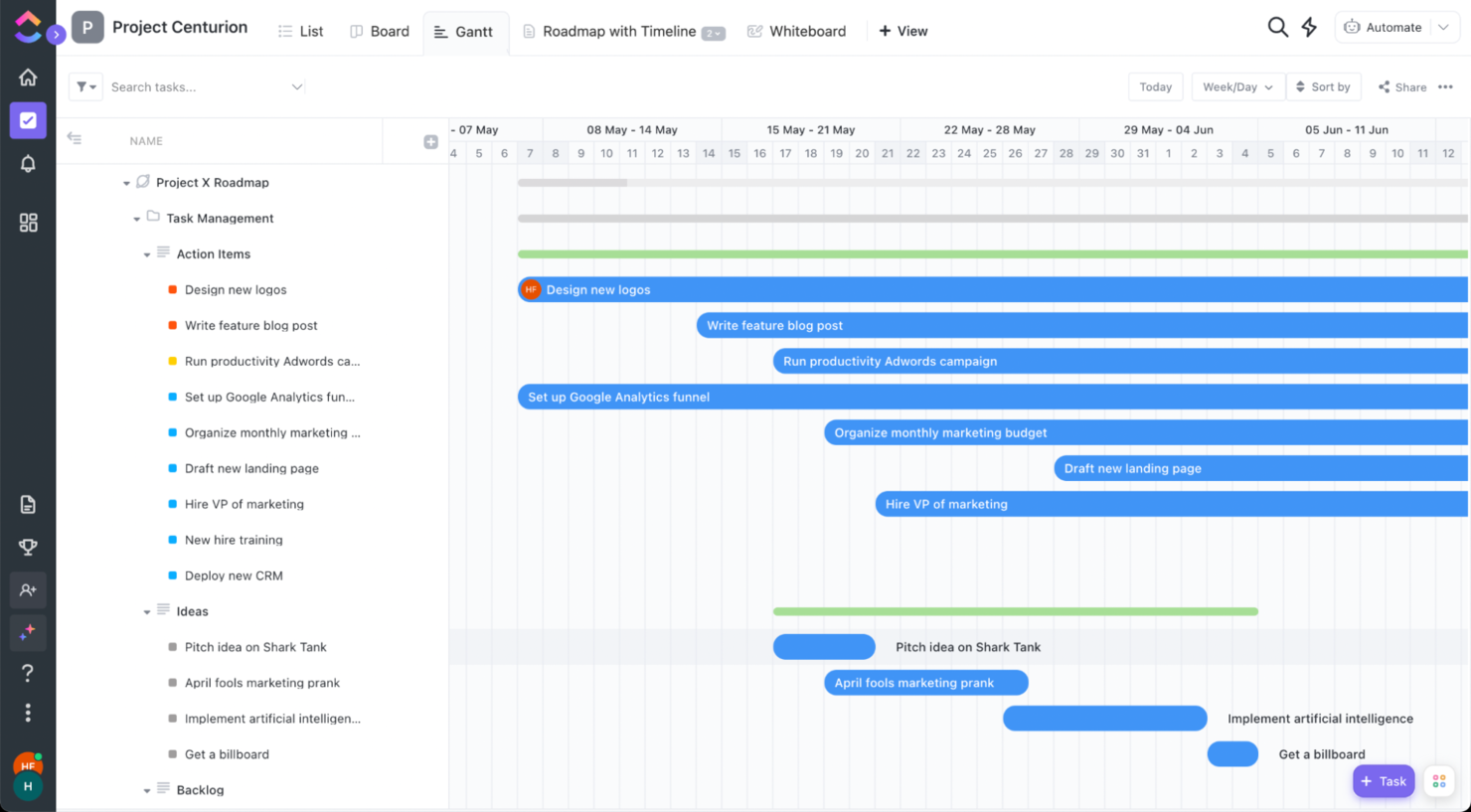
ClickUp è un'app di produttività che aiuta te e il tuo team a rimanere allineati sulle attività quotidiane, i progetti e gli obiettivi aziendali, tra le altre cose. La loro piattaforma riunisce il team in un'unica app per comunicare, collaborare, semplificare il lavoro e ottenere di più.
Perché ho scelto ClickUp: Puoi lavorare in modo più intelligente come team utilizzando la chat in tempo reale. Tagga singoli o gruppi, assegna commenti come compiti da svolgere e collega le attività per assicurarti che nulla venga perso nella routine quotidiana. Rimani sulla buona strada per raggiungere i tuoi obiettivi con target per completamento di attività, numeri e valori monetari.
Funzionalità e integrazioni di spicco di ClickUp
Le funzionalità includono pianificazione/monitoraggio delle attività, gestione dei progetti, gestione delle risorse, budgeting, gestione dei contatti, visualizzazione dei dati, database dei dipendenti, monitoraggio delle spese, condivisione dei file, plugin di terze parti, supporto alla collaborazione, fogli presenze, pianificazione strategica, chat, gestione dei clienti, integrazione email, gestione dei feedback e reportistica dei processi.
Le integrazioni includono integrazioni native con Slack, Google Workspace, Dropbox e molti altri strumenti, oltre a più di 1.000 integrazioni tramite Zapier (potrebbero essere previsti costi aggiuntivi).
New Product Updates from ClickUp
ClickUp Adds Meetings Hub, Super Agent Templates, and ZoomInfo Integration
ClickUp adds a searchable Meetings Hub, new ways to clone and template Super Agents, and a ZoomInfo integration through the App Center. These updates improve meeting retrieval, agent reuse, and access to sales intelligence. For more information, visit ClickUp’s official site.
Kintone
Ideale per creare app di produttività personalizzate
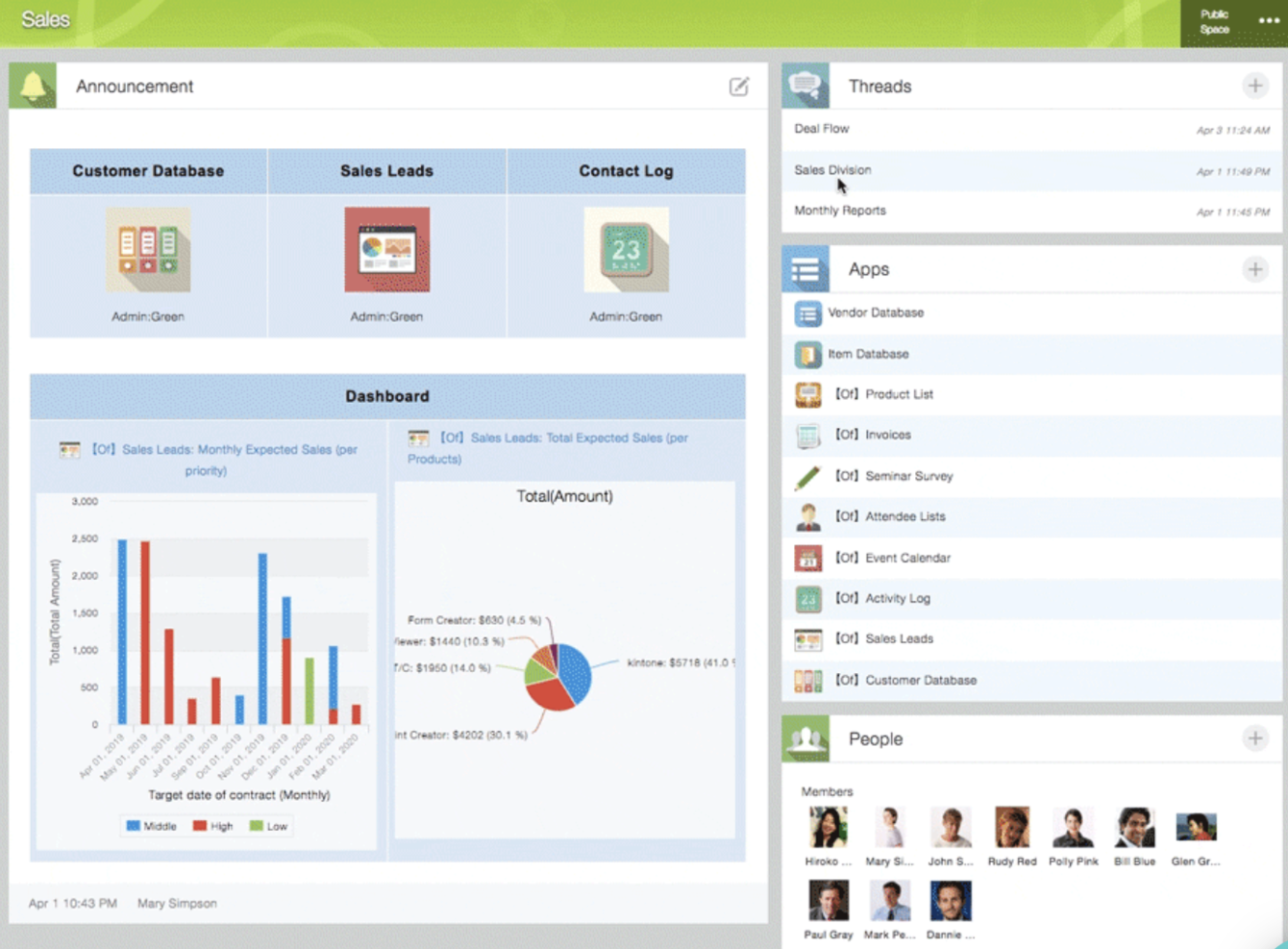
Kintone è una piattaforma di app personalizzabile utilizzata da team di Volvo Trucks North America, Japan Airlines, Shiseido e oltre 23.000 organizzazioni in tutto il mondo. Il loro approccio unico permette di creare un'ampia varietà di 'app' personalizzabili, da zero, utilizzando modelli o partendo dai tuoi fogli di calcolo esistenti, per la gestione dei dati, dei processi aziendali e dei flussi di lavoro. Le app di Kintone possono essere personalizzate per la gestione di progetti, CRM vendite, database clienti, report sulle spese, liste di cose da fare condivise, gestione delle attrezzature, feedback sui prodotti e molto altro ancora.
Perché ho scelto Kintone: Kintone consente di creare app di gestione attività senza codice trascinando e rilasciando gli elementi desiderati sulla pagina: campi di testo ricco, campi data, menu a discesa, campi numerici con calcoli integrati, spazi per allegati, menu di selezione utenti o gruppi, dati correlati da altre app, tabelle e altro ancora.
Una volta creata l'app desiderata, puoi utilizzarla per gestire più facilmente tutti i dati e le attività che tu e il tuo team dovete monitorare. E con notifiche e promemoria personalizzati oltre a impostazioni dettagliate dei permessi, la soluzione di monitoraggio dei progetti può essere modellata e funzionare come desideri.
Ciò che rende Kintone particolarmente adatto al monitoraggio dei progetti sono le funzionalità per filtrare e dare priorità alle attività per campo dati o membro del team, generando report personalizzati o viste dashboard, oltre alla possibilità di automatizzare promemoria e passaggi tra i membri del team per flussi di lavoro articolati in più fasi.
Le funzioni di comunicazione integrate di Kintone permettono inoltre ai team di discutere dei progetti direttamente nell'app e in thread tematici o basati sul progetto. Gli 'spazi' dedicati organizzano tutto ciò di cui il team ha bisogno per il progetto, incluse le app di tracciamento delle attività e le conversazioni ricercabili.
Caratteristiche e integrazioni distintive di Kintone
Le funzionalità comprendono gestione progetti, dashboard, gestione delle risorse, analisi, gestione calendario, monitoraggio delle conversioni, onboarding dei dipendenti, previsione, assegnazione dei lead, fogli presenze, supporto alla collaborazione, report, gestione pipeline, budgeting e modellazione dei processi.
Le integrazioni includono Slack, Gmail, Google Calendar, Outlook, Tableau, Dropbox, Salesforce, HubSpot, Eventbrite, WordPress, QuickBooks, MailChimp e molte altre grazie a un piano a pagamento con Zapier o tramite integrazioni API.

Trello
Ideale per elenchi di attività basati su schede e bacheche Kanban
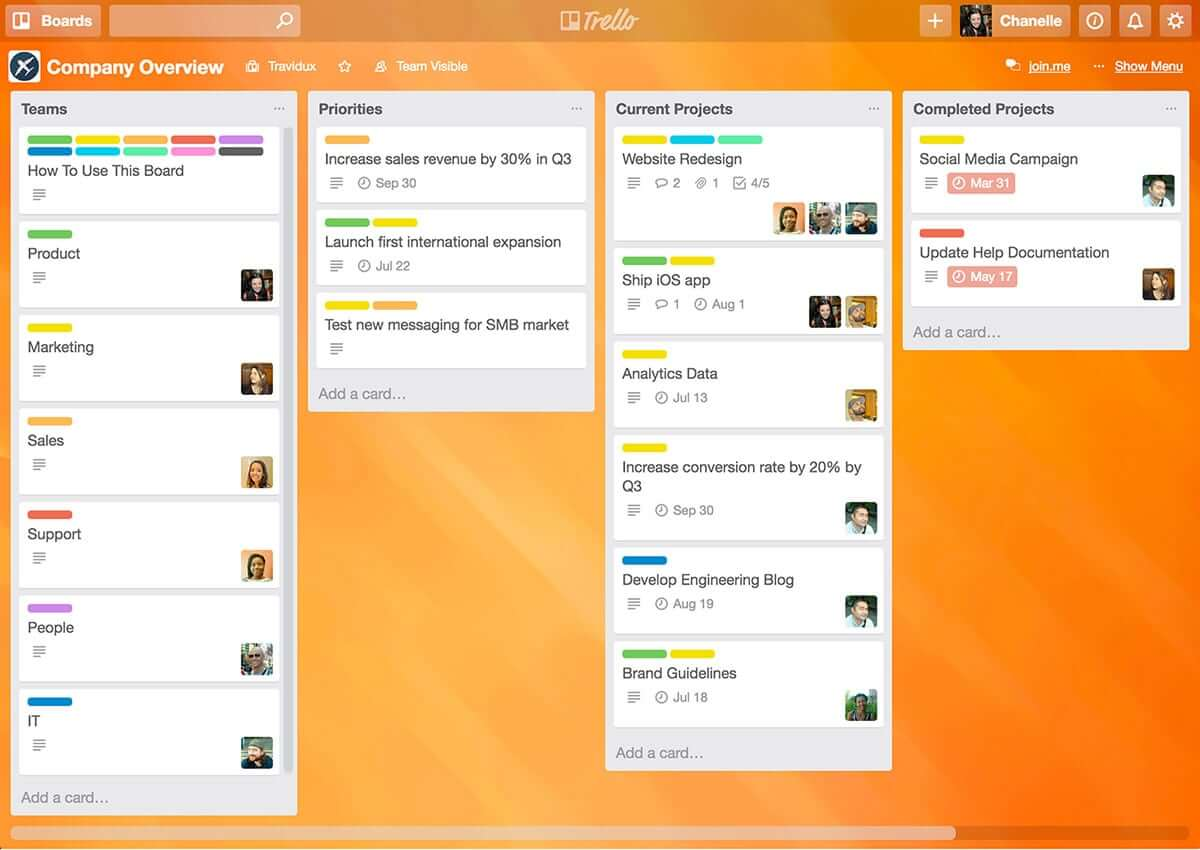
Trello è un'applicazione di tipo Kanban che può essere utilizzata per organizzare visivamente le attività. È facile da usare, con un'interfaccia intuitiva drag-and-drop che la rende semplice da apprendere. Questo strumento popolare può essere utilizzato per aiutarti a visualizzare le tue scadenze, le attività in corso e quelle completate, permettendoti di prendere decisioni informate su cosa affrontare successivamente in base al quadro generale.
Perché ho scelto Trello: Trello è uno strumento di gestione dei progetti molto diffuso che aiuta i team a organizzare le attività e a collaborare ai progetti in modo visivo e intuitivo. Utilizza un sistema di bacheche, elenchi e schede per rappresentare attività e flussi di lavoro, consentendo ai membri del team di vedere facilmente cosa deve essere fatto, chi è responsabile di ogni compito e qual è lo stato di ciascuna attività. Trello può essere personalizzato per adattarsi a una vasta gamma di esigenze nella gestione dei progetti e offre funzionalità come date di scadenza, checklist, allegati e assegnazione dei membri del team. La sua flessibilità e facilità d'uso lo rendono uno strumento ideale per team di tutte le dimensioni e tipologie, dalle startup alle grandi aziende.
Funzionalità e integrazioni principali di Trello
Le funzionalità includono bacheche, liste di cose da fare, gestione delle attività, gestione dei flussi di lavoro, etichette di priorità, date di scadenza, condivisione di file, comunicazione, applicazione mobile e integrazioni/plug-in di terze parti.
Le integrazioni comprendono oltre 200 app e strumenti su cui il tuo team fa affidamento, come Slack, Google Drive, Salesforce, Dropbox direttamente all'interno delle bacheche di Trello. (Nota: alcune connessioni richiedono un costo di abbonamento aggiuntivo.)

Ideale per la collaborazione in tempo reale

Che tu sia a capo di una piccola impresa, gestisca una grande azienda o operi nel settore educativo, Google Workspace offre una suite di strumenti di produttività pensati per soddisfare le tue esigenze diverse. Con app come Gmail, Drive e Meet, puoi gestire senza problemi comunicazioni, archiviazione e riunioni virtuali, migliorando la collaborazione e mantenendo una forte sicurezza. Con Gemini—l’AI premium di Google—integrata in tutti i piani, Workspace ti aiuta a scrivere email più velocemente, riassumere documenti all’istante, generare idee e restare organizzato su più dispositivi. Che tu stia gestendo la comunicazione con i clienti, creando contenuti o coordinando le operazioni quotidiane, Workspace aumenta la produttività e mantiene il tuo team connesso.
Perché ho scelto Google Workspace
Ho scelto Google Workspace per il suo mix unico di collaborazione in tempo reale, accessibilità cloud e assistenza guidata dall’intelligenza artificiale. Strumenti come Google Docs e Sheets permettono al tuo team di lavorare insieme contemporaneamente, eliminando i problemi di controllo delle versioni e riducendo email non necessarie. Google Meet offre videoconferenze comode senza dover usare software esterni, rendendo la comunicazione senza attriti. Gemini è integrato direttamente nelle app come Gmail, Docs, Sheets e Meet, andando oltre la collaborazione per migliorare attivamente il modo in cui lavori. Dalla stesura di contenuti al riassunto di documenti e alla gestione delle attività, avere l’AI incorporata ti aiuta a rimanere efficiente, reattivo e adattabile ai cambiamenti di business o di progetto.
Funzionalità principali di Google Workspace
Oltre alle sue capacità collaborative, Google Workspace offre numerose altre funzionalità per aumentare la produttività:
- Drive: Archiviazione cloud sicura con opzioni di spazio generose, garantendo che i tuoi file siano accessibili ovunque e in qualsiasi momento.
- Calendar: Pianificazione semplificata con calendari condivisi e pagine di prenotazione appuntamenti per mantenere il team organizzato.
- Chat: Piattaforma di messaggistica integrata per comunicazione e collaborazione di squadra in tempo reale.
- NotebookLM: Approfondimenti immediati e panoramiche audio in stile podcast per accelerare l’apprendimento e la comprensione dei contenuti da parte del team.
Integrazioni di Google Workspace
Le integrazioni includono Salesforce, Atlassian, Tableau, SAP, Okta, Microsoft Office 365, Slack, Zoom, Trello e Asana.
Pros and Cons
Pros:
- L'integrazione senza soluzione di continuità con i servizi Google aumenta l’efficienza del flusso di lavoro.
- Gli strumenti di collaborazione in tempo reale migliorano la produttività e la comunicazione del team.
- Le generose opzioni di archiviazione cloud facilitano l’accesso e la condivisione dei file.
Cons:
- Problemi di compatibilità quando si collabora esternamente con team che usano formati di file non Google o flussi di lavoro Microsoft Office.
- Le autorizzazioni dei drive condivisi e le gerarchie di cartelle complesse possono diventare difficili da gestire se non strutturate con attenzione.
Guru
Miglior strumento per cercare rapidamente risposte in tutte le tue app

Guru è una piattaforma avanzata di ricerca e gestione della conoscenza progettata per aiutare gli utenti a trovare rapidamente informazioni rilevanti. La loro funzionalità di ricerca avanzata con intelligenza artificiale è in grado di ricercare risposte in tutte le tue app, documenti e canali slack #, sia direttamente in Slack che tramite un'estensione Chrome, rendendo più facile trovare subito le informazioni necessarie.
Perché ho scelto Guru: Guru utilizza l'intelligenza artificiale per fornire risposte istantanee all'interno del flusso di lavoro dell'utente, adattate al suo ruolo, posizione e attività specifiche. Lo strumento facilita anche il processo di onboarding dei nuovi assunti, semplifica la creazione, la condivisione e l'organizzazione della documentazione aziendale e funge da hub di conoscenza per diffondere contenuti formativi e indicazioni per la risoluzione dei problemi all'interno dell'organizzazione. La piattaforma si integra inoltre con una moltitudine di strumenti e servizi, consentendo agli utenti di trovare risposte e collaborare senza dover abbandonare il loro flusso di lavoro.
In generale, Guru è progettato per abbattere le barriere create dai silos informativi e migliorare la produttività automatizzando il recupero delle informazioni, consentendo così ai dipendenti di concentrarsi sulle attività che richiedono intelligenza umana.
Caratteristiche e integrazioni principali di Guru
Caratteristiche includono ricerca aziendale tramite IA, intranet aziendale, wiki aziendale, suggerimenti e assistenza IA, strumenti di personalizzazione del brand, strumenti di collaborazione e feedback, accessibilità mobile, controlli di accesso e permessi.
Integrazioni includono Trello, Cognito Forms, Jira Software Cloud, Confluence Cloud, HubSpot, Google Chat, Confluence Server e GitHub.
Visor
Ideale per la sua interfaccia intuitiva

Visor è un prodotto SaaS basato su cloud che aiuta privati e aziende a gestire il tempo e le attività in modo più efficiente. È particolarmente indicato per persone singole e team che necessitano di uno strumento di produttività completo e facile da usare, che consenta loro di gestire progetti, attività e tempo tutto in un unico posto.
Perché ho scelto Visor: Ho selezionato Visor tra i migliori software di produttività perché rappresenta una soluzione tutto-in-uno che unisce gestione delle attività, gestione dei progetti, monitoraggio del tempo e funzioni di calendario in un'interfaccia intuitiva. Apprezzo la possibilità di tenere traccia di tutto ciò che devo fare senza dover passare tra diversi strumenti o app.
Un'altra funzionalità interessante sono le sue capacità di collaborazione in tempo reale, che ti permettono di lavorare insieme ai membri del team sui progetti, assegnare compiti e monitorare i progressi. Questa caratteristica semplifica la comunicazione tra i membri del team e consente di restare sempre aggiornati su ciò che accade nei progetti. Dispone inoltre di una funzione intelligente di programmazione che suggerisce le migliori fasce orarie per ciascun compito in base alla disponibilità e al carico di lavoro. Questa funzione è particolarmente utile quando si hanno molte attività da completare e si ha bisogno di dare le giuste priorità al proprio tempo.
Funzionalità principali & integrazioni di Visor
Le funzionalità includono API, dashboard, esportazione/importazione dati, visualizzazione dati, integrazioni esterne, Gantt, gestione progetti, pianificazione/monitoraggio delle attività, gestione risorse e plugin/add-on di terze parti.
Le integrazioni comprendono Jira, HubSpot e Salesforce.
Altri strumenti per la produttività
Non ho ancora avuto modo di esaminare a fondo tutti questi strumenti, ma eccone alcuni altri da considerare se quelli presentati in questa recensione non soddisfano le tue esigenze.
- Pneumatic Workflow
Ideale per la gestione illimitata di flussi di lavoro
- Collabio Spaces
Ideale per iPhone e Mac
- Focus Booster
Ideale per la tecnica di produttività Pomodoro
- SaneBox
Ideale per aumentare la produttività ottimizzando la gestione della casella email
- Slack
Migliore app di messaggistica istantanea per team
- actiTIME
Ideale per il monitoraggio dettagliato del tempo
- Hubstaff
Ideale per gestire team remoti e sul campo
- Hive
Ideale per viste di progetto flessibili in base alle esigenze del team
- Lucidspark
Ideale per l’ideazione e la collaborazione su una tela infinita
- Wrike
La migliore app di produttività per la collaborazione tra team
- GoodDay
Ideale per supporto Agile e Waterfall


Come Valuto le App di Produttività
Che tu stia gestendo il lancio di un prodotto o un backlog di sprint, valuto le app di produttività su due livelli: funzionalità di base che qualificano uno strumento e differenziatori che separano le migliori opzioni.
Funzionalità di Base (Requisiti Minimi per Questa Lista)
Quando seleziono gli strumenti per la mia lista, valuto ciascuno su una scala da 0 (non offre la funzionalità) a 5 (eccelle in quest'area) per ogni funzionalità di base elencata di seguito. Poi calcolo il punteggio totale dello strumento in percentuale. Ogni strumento deve raggiungere un punteggio minimo totale del 75% per essere considerato per l'inclusione.
- Gestione di Attività e Progetti: Cerco strumenti che permettano di creare, assegnare e monitorare attività con scadenze, stati, dipendenze e sotto-attività—abbastanza struttura per gestire il lancio completo di un prodotto o un ciclo di sprint.
- Collaborazione del Team: Ogni app dovrebbe supportare spazi di lavoro condivisi dove i colleghi possano commentare, menzionarsi con @ e co-modificare in tempo reale, simile a come strumenti come Asana e monday.com gestiscono discussioni di progetto con thread.
- Visualizzazioni e Opzioni di Organizzazione: Valuto in quanti modi puoi visualizzare il lavoro—lista, Kanban, calendario, Gantt o timeline—poiché un PM che pianifica roadmap trimestrali ha bisogno di visualizzazioni diverse rispetto a un team lead che gestisce i daily standup.
- Integrazioni e Connettività: Lo strumento dovrebbe collegarsi alle app che il tuo team usa già, come Slack, Google Workspace o GitHub, sia tramite integrazioni native che tramite un'API aperta.
- Notifiche e Promemoria: Verifico se puoi configurare avvisi per canale, attività o livello di priorità affinché i promemoria delle scadenze raggiungano davvero le persone giuste senza inondare la casella di posta di tutti.
- Accesso Multipiattaforma: Un'app di produttività dovrebbe funzionare su web, desktop e mobile con funzionalità reali su ciascuna—non solo un visualizzatore mobile limitato che ti obbliga a tornare al laptop.
Una volta che ho un elenco di strumenti che soddisfano i criteri, considero ciò che distingue ciascuna piattaforma.
Fattori di Differenziazione (Cosa Distingue i Fornitori)
Ecco come confronto e differenzio i diversi fornitori:
Funzionalità Distintive
L'automazione integrata è un importante elemento che distingue—cerco regole no-code che assegnano automaticamente le attività o spostano gli elementi tra le fasi quando cambia lo stato, risparmiando ore su una bacheca sprint intensa. I report e le dashboard sono altrettanto importanti, soprattutto quando serve una visibilità a livello di portfolio su più progetti attivi. Controllo anche se gli strumenti offrono il rilevamento del tempo integrato abbinato a visualizzazioni del carico di lavoro, dato che questa combinazione aiuta i manager a individuare problemi di capacità prima che le scadenze slittino. Anche le funzionalità basate su intelligenza artificiale, come la generazione di attività dalle note delle riunioni, stanno diventando sempre più utili.
Oltre le Funzionalità
Anche la struttura dei prezzi è molto importante—valuto se uno strumento offre un piano gratuito utilizzabile per piccoli team e una tariffazione per utente trasparente che non riserva sorprese con l'aumentare della dimensione del team. Considero anche l'adattabilità rispetto alla dimensione del gruppo, dato che un'app pensata per freelance singoli non gestirà un PMO da 50 persone come farebbe una piattaforma enterprise. La sicurezza è un ulteriore fattore chiave; per i team che trattano dati sensibili dei clienti, verifico la presenza di SSO, controlli di accesso basati sui ruoli e certificazioni come SOC 2.
Come scegliere un'app per la produttività
È facile perdersi in lunghi elenchi di funzionalità e strutture tariffarie complesse. Per aiutarti a rimanere concentrato mentre affronti il tuo esclusivo processo di selezione del software, ecco un elenco dei fattori da tenere a mente:
| Fattore | Cosa considerare |
| Scalabilità | Assicurati che l'app possa crescere insieme alle tue esigenze. È in grado di gestire più utenti, progetti o automazioni all'aumentare del tuo carico di lavoro? Cerca piani tariffari flessibili e funzionalità di livello aziendale se prevedi di espanderti. |
| Integrazioni | L'app si connette agli strumenti che già utilizzi? L'integrazione perfetta con piattaforme come Slack, Google Workspace o Trello aiuta a prevenire interruzioni del flusso di lavoro e riduce il lavoro manuale. |
| Personalizzazione | Cerca funzionalità come campi personalizzati, automazione dei flussi di lavoro e dashboard regolabili per adattare l'app ai flussi di lavoro specifici del tuo team. |
| Facilità d'uso | Un'app complicata rallenterà il tuo team. Dai priorità a interfacce intuitive, funzionalità di trascinamento e un tempo minimo di onboarding per garantire una rapida adozione. |
| Budget | I prezzi variano ampiamente. È importante considerare non solo il costo iniziale, ma anche le commissioni nascoste per componenti aggiuntivi, funzionalità premium o integrazioni necessarie. Scegli un piano che rientri nel tuo budget senza sacrificare le funzionalità fondamentali. |
| Misure di sicurezza | Assicurati che l'app offra la crittografia, l'autenticazione a più fattori e la conformità a standard di sicurezza come il GDPR o SOC 2 per proteggere i tuoi dati. |
| Strumenti di collaborazione | Le app per la produttività dovrebbero rendere il lavoro di squadra fluido. Funzionalità come la modifica in tempo reale, gli elenchi di attività condivisi e la chat integrata possono contribuire ad aumentare l'efficienza. |
| Funzionalità di automazione | Riduci il lavoro ripetitivo con l'automazione delle attività, i promemoria ricorrenti e i suggerimenti basati sull'IA per ottimizzare i tuoi flussi di lavoro. |
Cosa sono le app per la produttività?
Le app per la produttività sono software che aiutano individui e team a migliorare la propria efficienza e produttività in diverse attività. Queste app comprendono un'ampia gamma di funzionalità, come la gestione delle attività, il calendario e la programmazione, la presa di appunti, la modifica e la collaborazione sui documenti, il monitoraggio del tempo e gli strumenti di comunicazione.
L'obiettivo principale delle app per la produttività è semplificare i processi di lavoro, organizzare le attività, gestire meglio il tempo e facilitare una comunicazione e una collaborazione più semplici ed efficaci. Vengono utilizzate sia in contesti personali sia professionali per aiutare gli utenti a rimanere organizzati, concentrati e produttivi.
Funzionalità delle app per la produttività
Quando scegli le app per la produttività, presta attenzione alle seguenti funzionalità principali:
- Ricerca e filtri: ti aiutano a trovare rapidamente attività, documenti o note senza dover scorrere all'infinito.
- Gestione delle attività: ti aiuta a creare, organizzare e monitorare le attività, così nulla viene dimenticato.
- Strumenti di collaborazione: consentono ai team di condividere file, commentare le attività e comunicare senza passare da un'app all'altra.
- Monitoraggio del tempo: registra le ore di lavoro e le attività per aiutare a gestire i carichi di lavoro e migliorare l'efficienza.
- Impostazione delle priorità: ti consente di classificare le attività in base all'urgenza e all'importanza, per concentrarti su ciò che conta di più.
- Accesso offline: ti consente di gestire le attività senza una connessione Internet.
- Archiviazione e condivisione dei file: conserva i documenti in un unico posto e semplifica la condivisione con altri.
- Attività ricorrenti: automatizza le attività ripetitive, così non devi inserirle manualmente ogni volta.
- Integrazione con il calendario: si sincronizza con il tuo calendario per mantenere visibili scadenze e riunioni.
- Monitoraggio dei progressi: mostra aggiornamenti in tempo reale sulle attività e sui progetti per tenere tutti informati.
Vantaggi delle app per la produttività
L'implementazione di app per la produttività può offrire diversi vantaggi al tuo team e alla tua azienda. Ecco alcuni dei benefici che puoi aspettarti:
- Maggiore organizzazione: mantiene attività, scadenze e file in un unico posto, così nulla viene perso o dimenticato.
- Migliore gestione del tempo: ti aiuta a pianificare la giornata, monitorare le ore di lavoro e dare priorità alle attività in modo più efficace.
- Collaborazione più semplice: consente ai membri del team di condividere aggiornamenti, assegnare attività e comunicare senza interminabili scambi di e-mail.
- Meno scadenze non rispettate: invia promemoria e notifiche per mantenere i progetti in linea con i programmi.
- Riduzione del lavoro manuale: automatizza le attività ripetitive, così puoi concentrarti sul lavoro più importante.
- Maggiore visibilità: offre una visione chiara dei carichi di lavoro, dei progressi e dei colli di bottiglia in tempo reale.
- Maggiore responsabilizzazione: monitora i responsabili delle attività e le scadenze, rendendo chiaro chi è responsabile di cosa.
Costi e prezzi delle app per la produttività
La selezione delle app per la produttività richiede la comprensione dei vari modelli di prezzo e dei piani disponibili. Le app gratuite per la produttività possono coprire le esigenze essenziali, mentre i piani a pagamento offrono generalmente funzionalità avanzate. I costi variano in base alle funzionalità, alle dimensioni del team, ai componenti aggiuntivi e ad altro ancora.
La tabella seguente riassume i piani più comuni, i relativi prezzi medi e le funzionalità tipicamente incluse nelle soluzioni per app di produttività:
Tabella comparativa dei piani per le app di produttività
| Tipo di piano | Prezzo medio | Funzionalità comuni |
| Piano gratuito | $0 | Gestione di base delle attività, spazio di archiviazione limitato, accesso per un singolo utente e integrazioni essenziali. |
| Piano personale | $5-$15/utente/mese | Monitoraggio delle attività, integrazione con il calendario, accesso da dispositivi mobili, maggiore spazio di archiviazione e automazione limitata. |
| Piano aziendale | $15-$40/utente/mese | Collaborazione tra team, report avanzati, automazione dei flussi di lavoro, assistenza prioritaria e integrazioni di terze parti. |
| Piano per grandi aziende | $40+/utente/mese | Controlli di sicurezza personalizzati, accesso API, gestione dedicata dell'account, analisi avanzate e automazione a livello organizzativo. |
Domande frequenti sul software per la produttività
Trova le risposte alle domande comuni sulle app di produttività.
Quali app aiutano a migliorare la produttività personale?
Pomodoro Timer, Forest, Todoist, Tiimo, Bear, Notability, Forest e Done.
Questi sono strumenti che ti consigliamo di provare per la produttività personale e che possono essere o meno correlati al tuo lavoro come responsabile di progetto. Soprattutto per chi ha figli e deve essere PM a tempo pieno, gestendo tutte le attività extrascolastiche.
Come posso migliorare la mia produttività quotidiana?
Che tu ci creda o no, molti DPM fanno fatica a essere produttivi. Tutti vogliono essere più produttivi al lavoro e non si tratta solo di avere gli strumenti giusti: è anche una questione di disciplina e di integrare strategie di produttività nella propria routine quotidiana.
Ecco 4 strategie utili per diventare più produttivi:
\u003col\u003e
\u003cli\u003e\u003cstrong\u003eStai lontano dai social network.\u003c/strong\u003e Questo è un aspetto importante. Poiché gestiamo le comunicazioni del team soprattutto online, i nostri telefoni sono diventati dispositivi molto utili per contattare i colleghi. Il problema si presenta quando inizi a passare ad altre app o a occuparti delle notifiche in sospeso ogni volta che guardi lo schermo. Cerca di trovare dei modi per limitare l’accesso a determinate app dalle impostazioni del telefono. Se non puoi farlo, dedica del tempo al telefono usando la strategia successiva.\u003c/li\u003e
\u003cli\u003e\u003cstrong\u003eProva a introdurre un metodo di lavoro, come il Pomodoro.\u003c/strong\u003e Il metodo Pomodoro è una metodologia di lavoro popolare che consiste nel suddividere la giornata in periodi di concentrazione profonda di 25 minuti, seguiti da pause di 5 minuti.\u003c/li\u003e
\u003cli\u003e\u003cstrong\u003eBevi abbastanza acqua.\u003c/strong\u003e La disidratazione influisce sulla concentrazione e per essere produttivi è necessario concentrarsi.\u003c/li\u003e
\u003cli\u003e\u003cstrong\u003eDai priorità al lavoro.\u003c/strong\u003e Non tutte le attività sono uguali, anche se può sembrare così. Usa uno strumento come la matrice di Eisenhower per concentrare i tuoi sforzi sulle cose che contano.\u003c/li\u003e
\u003c/ol\u003e
Che cos'è la paranoia della produttività?
La paranoia della produttività è un fenomeno per cui i datori di lavoro temono che la produttività stia diminuendo perché non riescono a “vedere” cosa stanno facendo i dipendenti. È soprattutto una conseguenza del lavoro da remoto e della mancanza di fiducia nelle metriche.
Di conseguenza, i datori di lavoro potrebbero essere restii a pubblicizzare nuove posizioni come da remoto, ad aumentare le misure di controllo sui dipendenti, come il monitoraggio dettagliato del tempo, o a chiedere ai dipendenti di tornare in ufficio a tempo parziale.
Scopri tutto sulla nostra guida alla paranoia della produttività, in cui analizziamo gli US e gli stati più colpiti da questo fenomeno.