

10 migliori software per procedure operative standard recensiti nel 2026

Elenco dei migliori software per SOP


Gestire i progetti può essere impegnativo: devi monitorare le attività, mantenere il team allineato ed evitare che qualcosa passi inosservato. Il software per SOP può aiutarti organizzando i processi, mantenendo chiare le istruzioni e rendendo più semplice per il team seguirle in modo coerente.
Ho testato e recensito questi strumenti in modo indipendente, concentrandomi su ciò che aiuta davvero te e il tuo team. Nella mia esperienza, utilizzare un software affidabile per SOP fa risparmiare tempo, riduce gli errori e rende più semplice gestire le operazioni quotidiane.
In questo articolo troverai recensioni imparziali e approfondite dei migliori software per SOP. Esaminerò le funzionalità principali, i punti di forza e le debolezze per aiutarti a prendere una decisione informata, adatta al flusso di lavoro del tuo team.
Perché fidarsi dei nostri consigli sui software
Il nostro team testa e recensisce software dal 2012. In quanto project manager noi stessi, sappiamo quanto sia difficile — e importante — scegliere il software giusto.
Per questa guida, abbiamo valutato gli strumenti attraverso test pratici e ricerche indipendenti, assegnando un punteggio agli strumenti in base ai nostri criteri di selezione. Ci basiamo inoltre sulle competenze di leader di pensiero del settore e di professionisti attivi nella gestione dei progetti.
Le nostre recensioni riflettono il nostro giudizio editoriale umano, non un discorso di vendita.
Revisori esperti:
Tabella comparativa dei software per SOP
Questa tabella comparativa riassume i dettagli sui prezzi delle mie migliori selezioni di software per SOP:
| Tool | Best For | Trial Info | Price | ||
|---|---|---|---|---|---|
| 1 | Ideale per la guida di flussi di lavoro su browser | Piano gratuito disponibile | Da $29/mese/utente (fatturazione annuale) | Website | |
| 2 | Ideale per la gestione della conoscenza | Prova gratuita di 14 giorni + demo gratuita disponibile | Prezzi su richiesta | Website | |
| 3 | Ideale per la cattura automatica dei processi | Piano gratuito + demo gratuita disponibile | A partire da $12/postazione/mese (fatturazione annuale) | Website | |
| 4 | Ideale per l'onboarding dei dipendenti | Prova gratuita di 7 giorni | Da $249/mese (fatturato annualmente) | Website | |
| 5 | Ideale per flussi di lavoro centralizzati del team | Prova gratuita di 14 giorni + demo gratuita disponibile | Prezzo su richiesta | Website | |
| 6 | Ideale per l'automazione dei processi | Demo gratuita disponibile | Da $10/mese | Website | |
| 7 | Ideale per le piccole imprese | Demo gratuita + prova gratuita di 14 giorni disponibile | Da $82.50/mese (fatturato annualmente) | Website | |
| 8 | Ideale per la coerenza della formazione | Demo gratuita disponibile | A partire da $99/10 utenti/mese | Website | |
| 9 | Ideale per la creazione visiva di SOP | Piano gratuito disponibile | Da $10/postazione/mese (fatturazione annuale) | Website | |
| 10 | Ideale per il monitoraggio della conformità | Prova gratuita di 14 giorni + demo gratuita disponibile | Da $99/10 utenti/mese | Website |
Recensioni dei migliori software per SOP
Di seguito trovi i miei riepiloghi dettagliati dei migliori software per SOP inclusi nel mio elenco. Le mie recensioni offrono una panoramica dettagliata delle funzionalità principali, dei pro e dei contro, delle integrazioni e dei casi d’uso ideali di ogni strumento, per aiutarti a trovare quello più adatto a te.

Ideale per la guida di flussi di lavoro su browser

Guideless è uno strumento per la creazione di SOP che registra i flussi di lavoro basati su browser tramite un'estensione Chrome e li converte automaticamente in guide video narrate con intelligenza artificiale, passo dopo passo, complete di sottotitoli, zoom intelligenti e annotazioni.
Per chi è ideale Guideless?
Guideless è perfetto per team di piccole e medie dimensioni che devono documentare rapidamente processi basati su browser senza designer didattici o video editor dedicati.
Perché ho scelto Guideless
Guideless è tra le mie scelte preferite perché adoro come cattura i flussi di lavoro sul browser mentre avvengono, trasformando clic e navigazione reali in SOP strutturati senza bisogno di script manuali. Utilizzo l'estensione Chrome per registrare una procedura una sola volta e Guideless genera automaticamente la narrazione, applica zoom intelligenti sulle azioni chiave e aggiunge i sottotitoli. Ciò che trovo particolarmente utile è che quando un flusso di lavoro cambia, posso aggiornare la guida senza doverla registrare nuovamente da zero.
Caratteristiche chiave di Guideless
- Selezione voce AI: Scegli tra oltre 50 voci AI per narrare le tue SOP, così le guide mantengono una coerenza in tutta la tua libreria.
- Condivisione ed esportazione delle guide: Pubblica le guide tramite URL condivisibile, codice embed o MP4 scaricabile per distribuire SOP su qualsiasi canale o piattaforma.
- Personalizzazione branding e annotazioni: Aggiungi il logo, i colori personalizzati e le annotazioni su schermo per mantenere le guide coerenti con lo stile della tua organizzazione.
- Analisi dei visualizzatori: Tieni traccia delle visualizzazioni, dei tassi di completamento e dei punti di abbandono per vedere esattamente dove le persone smettono di seguire un processo.
Integrazioni Guideless
Guideless funziona principalmente tramite un'estensione Chrome che cattura i flussi di lavoro basati su browser e ti consente di condividere o incorporare le guide tramite link o codice embed.
Pros and Cons
Pros:
- Narrazione AI inclusa in ogni guida
- Cattura i flussi di lavoro del browser senza configurazione
- Le guide si aggiornano senza dover registrare tutto di nuovo
Cons:
- Cattura solo i flussi di lavoro su browser
- Il piano gratuito è limitato a tre guide

Ideale per la gestione della conoscenza
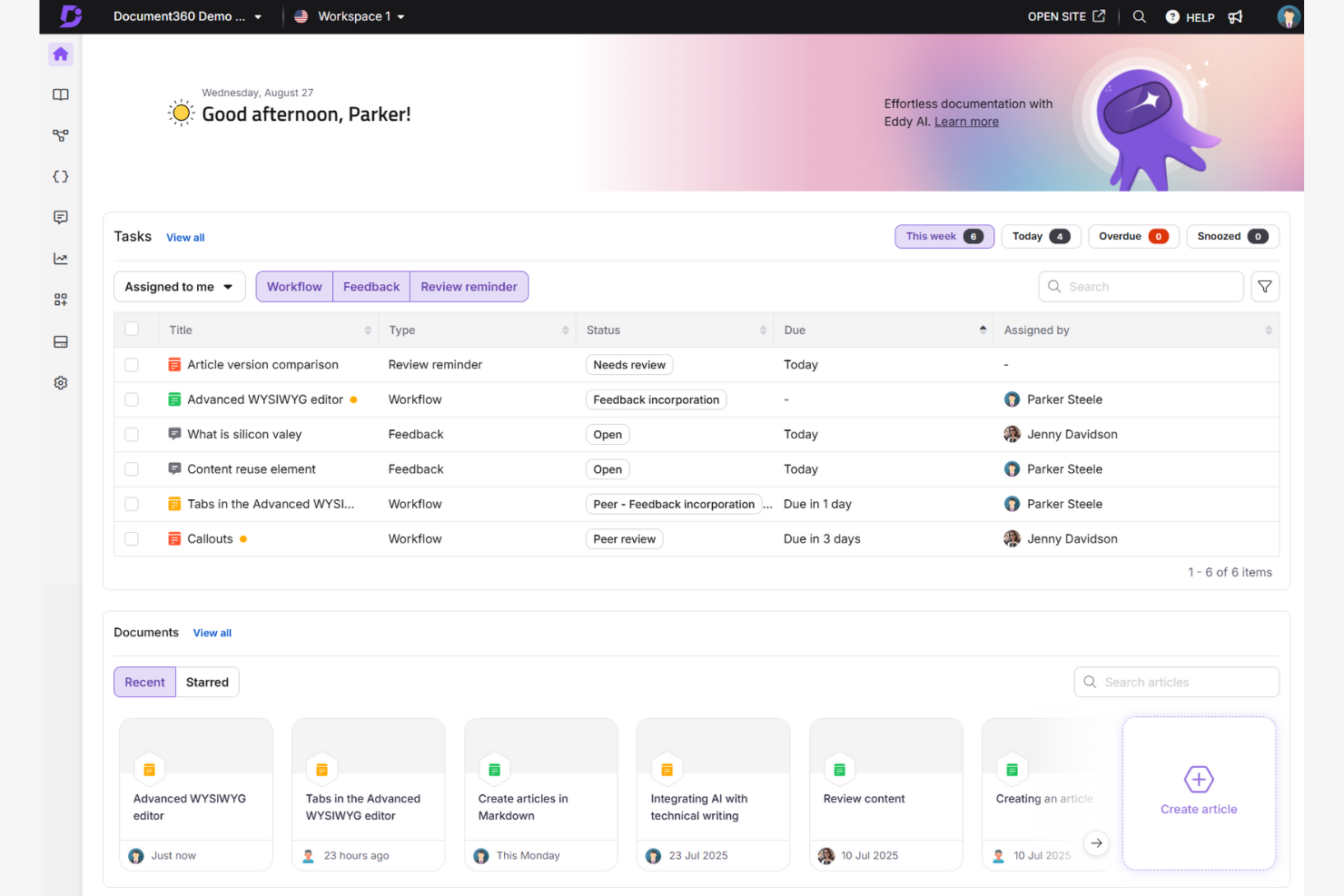
Document360 è un software di gestione della conoscenza progettato per i team che necessitano di una gestione documentale organizzata e accessibile. È molto utilizzato dai reparti di assistenza clienti e IT per la sua capacità di gestire e condividere le conoscenze in modo efficiente.
Perché ho scelto Document360: Offre un modo strutturato per creare e mantenere la documentazione. Puoi utilizzare il suo editor basato su AI per creare SOP e documenti di formazione. La cronologia delle versioni consente di tenere traccia delle modifiche nel tempo, rendendolo ideale per i team che necessitano di un controllo preciso sul sistema di gestione documentale.
Caratteristiche principali e integrazioni:
Funzionalità includono un editor che facilita la creazione, modifica e categorizzazione della documentazione SOP. La funzione di cronologia delle versioni permette di tracciare e ripristinare le modifiche, mantenendo l'accuratezza della documentazione.
Integrazioni includono Microsoft Teams, Slack, Google Analytics e altro ancora.
Pros and Cons
Pros:
- Cronologia delle versioni dettagliata
- Opzioni di branding personalizzabili
- Supporto per più lingue
Cons:
- Richiede aggiornamenti regolari
- Alcune integrazioni possono avere funzionalità limitate
New Product Updates from Document360

Document360 Adds Bulk Mirroring, Eddy AI Citations, and Unified SSO
Document360 adds bulk article mirroring, citations in Eddy AI chatbot responses, and a unified Enterprise SSO setup. These updates improve content reuse, answer verification, and access management. For more information, visit Document360’s official site.
 .
.
Scribe
Ideale per la cattura automatica dei processi
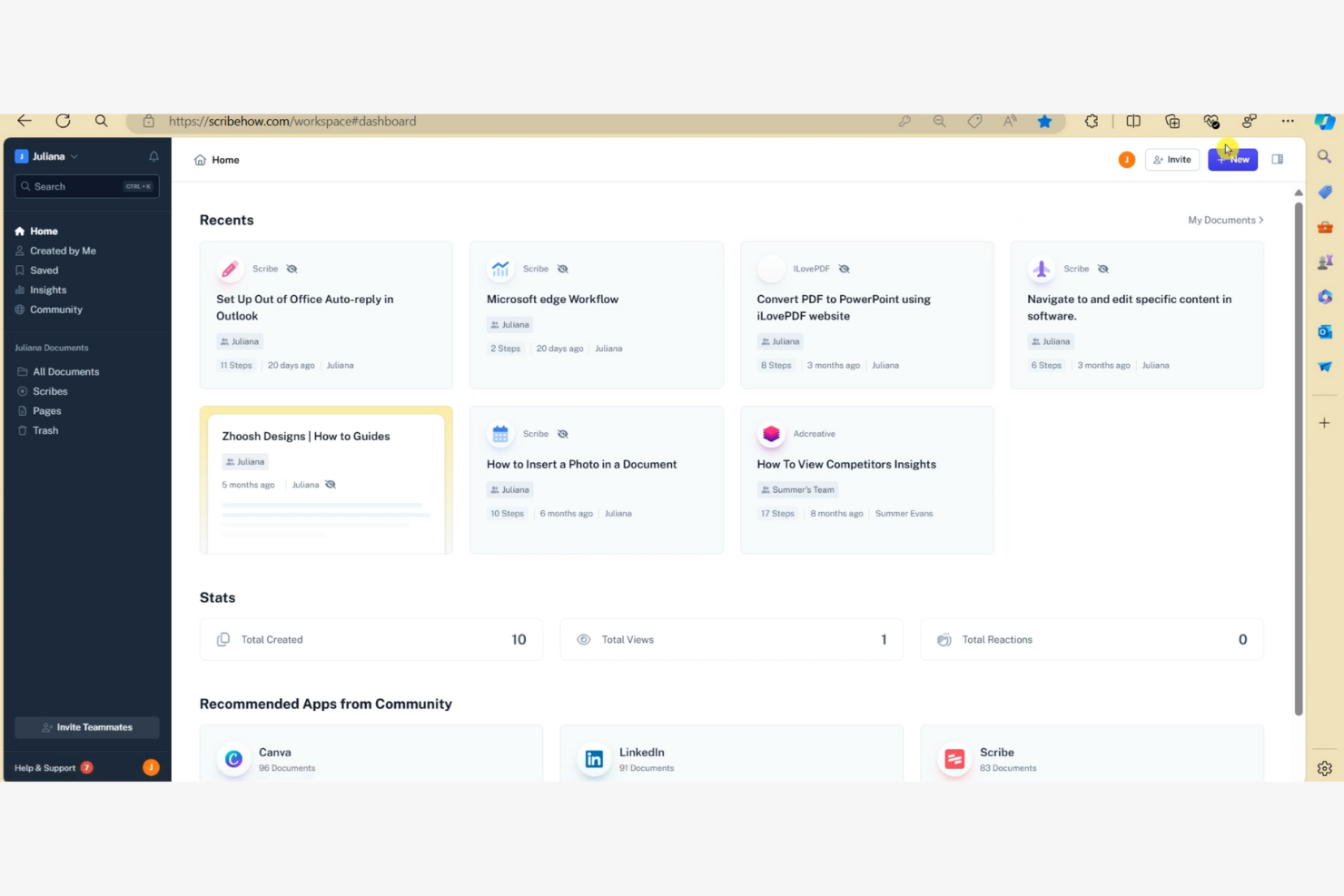
Scribe è uno strumento di documentazione utilizzato dai team per creare rapidamente guide passo passo. È molto usato tra i team di Risorse Umane, IT e assistenza clienti per documentare i processi e creare materiali di formazione per i dipendenti.
Perché ho scelto Scribe: Si distingue per la cattura automatica dei processi, permettendo di generare guide velocemente e documentare flussi di lavoro complessi. È possibile utilizzare il Workflow AI della piattaforma per automatizzare il processo di documentazione. È una soluzione per i team che vogliono migliorare la formazione e l’onboarding dei nuovi dipendenti.
Caratteristiche e integrazioni principali:
Funzionalità che includono una galleria di risorse che offre modelli ed esempi per aiutarti a creare guide. È inoltre possibile personalizzare guide e documenti in base alle proprie esigenze specifiche, rendendoli più pertinenti per il proprio team e gli stakeholder.
Integrazioni che comprendono Slack, Microsoft Teams, Confluence, Salesforce, Zendesk e altri.
Pros and Cons
Pros:
- Cattura automatica dei processi
- Funzionalità Workflow AI
- Adatto a diversi reparti
Cons:
- Non ideale per flussi di lavoro altamente complessi
- Funzionalità di reportistica basilari

Trainual
Ideale per l'onboarding dei dipendenti

Trainual è uno strumento di onboarding e formazione progettato per le piccole e medie imprese. Aiuta a organizzare i processi aziendali e i materiali di formazione per mantenere coerenza e chiarezza per i nuovi assunti.
Perché ho scelto Trainual: Si concentra sull'onboarding dei dipendenti offrendo moduli di formazione strutturati. Puoi creare manuali dettagliati che guidano i nuovi membri del team attraverso le politiche e le procedure aziendali. I modelli rendono semplice configurare percorsi di formazione per diversi ruoli. Questo è l'ideale per le aziende che desiderano semplificare e migliorare il processo di onboarding.
Funzionalità e integrazioni principali:
Funzionalità includono modelli personalizzabili che ti aiutano a creare manuali di formazione specifici per le esigenze della tua azienda. Puoi monitorare i progressi per assicurarti che i membri del team completino la formazione nei tempi previsti. La piattaforma offre anche quiz per verificare la memorizzazione delle conoscenze, il che aiuta a rafforzare l'apprendimento.
Integrazioni includono Slack, Zapier, BambooHR, Gusto, QuickBooks Payroll e altro ancora.
Pros and Cons
Pros:
- Modelli di formazione personalizzabili
- Strumenti di monitoraggio dei progressi
- Include quiz per l'apprendimento
Cons:
- Funzionalità avanzate limitate
- La libreria dei contenuti può diventare caotica

Ideale per flussi di lavoro centralizzati del team

Process Street Docs è una funzione di gestione documentale progettata per i team che desiderano creare, organizzare e mantenere procedure operative standard. È ideale per i team di operations, risorse umane e project management che vogliono centralizzare gli SOP e mantenere la coerenza nei processi.
Perché ho scelto Process Street Docs: Si distingue nella creazione e gestione degli SOP offrendo una piattaforma strutturata per scrivere e aggiornare le procedure. Puoi collegare i Docs ai flussi di lavoro, in modo che i membri del team abbiano accesso alle istruzioni mentre eseguono i compiti. Questo rende semplice per i team mantenere gli SOP aggiornati e allineati con i processi che evolvono.
Funzionalità principali e integrazioni:
Le funzionalità includono un editor di testo avanzato per una documentazione SOP dettagliata, il controllo delle versioni per tracciare nel tempo gli aggiornamenti e la possibilità di organizzare i documenti in categorie e cartelle per un accesso facile. Puoi anche collegare i Docs alle checklist dei flussi di lavoro, così i membri del team fanno riferimento ai SOP giusti durante il completamento delle attività.
Le integrazioni includono Slack, Zapier, Salesforce, Jira, Google Sheets, DocuSign e altri.
Pros and Cons
Pros:
- Supporta la logica condizionale
- API versatile
- Adatto a flussi di lavoro complessi
Cons:
- Richiede tempo per la configurazione iniziale
- Funzionalità limitate nell'app mobile

Tallyfy
Ideale per l'automazione dei processi
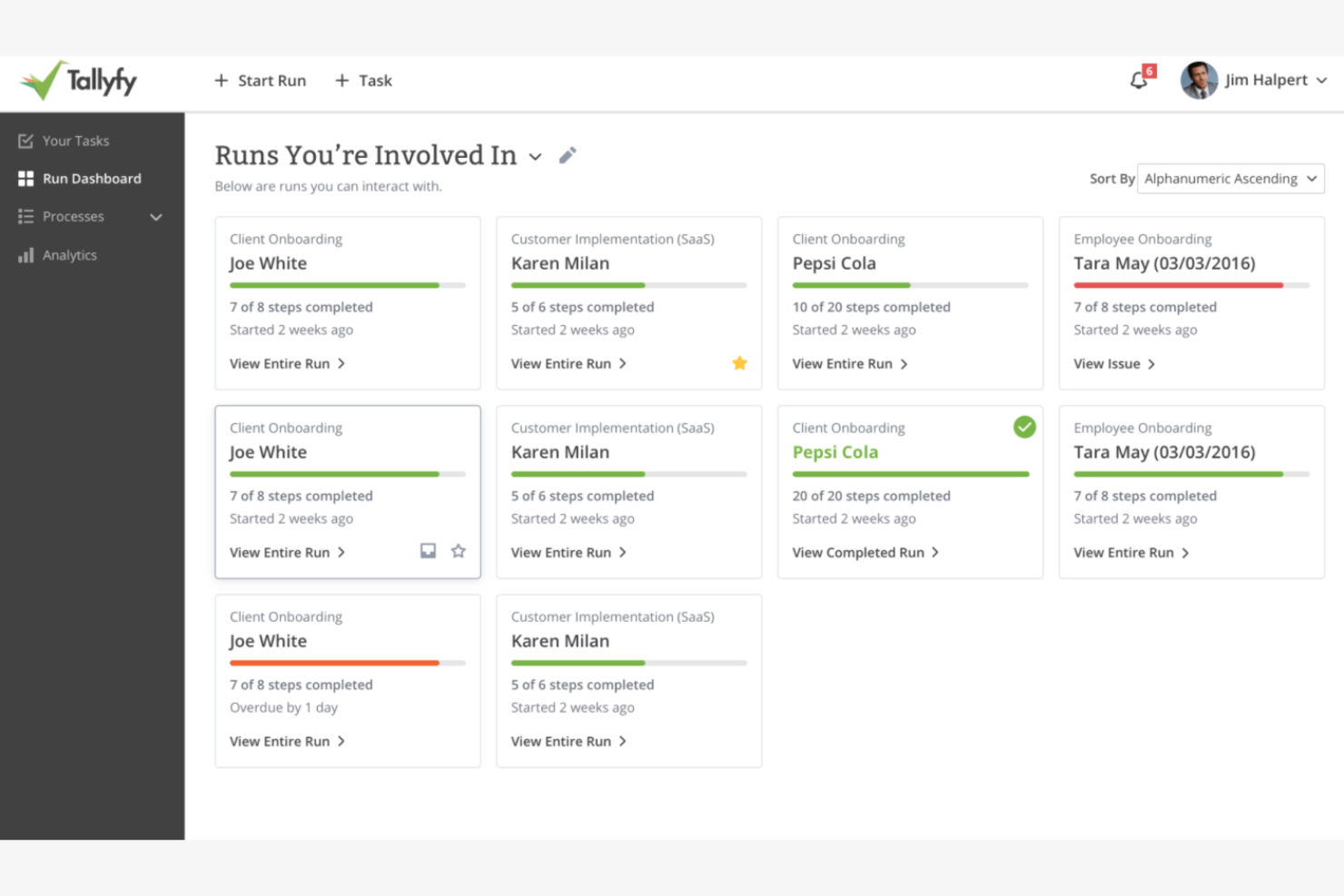
Tallyfy è uno strumento di gestione dei processi progettato per automatizzare e gestire i flussi di lavoro. Viene utilizzato dai team operativi e di project management per assicurare che i processi si svolgano senza intoppi.
Perché ho scelto Tallyfy: Si distingue nell'automazione dei processi, permettendo al tuo team di automatizzare facilmente i flussi di lavoro di routine. Puoi creare mappe di processo dettagliate che visualizzano ogni fase e punto decisionale. Le funzionalità di automazione della piattaforma aiutano a ridurre le attività manuali, facendoti risparmiare tempo ed energie.
Caratteristiche principali e integrazioni:
Caratteristiche includono la possibilità di creare mappe di processo dettagliate che aiutano a visualizzare chiaramente i flussi di lavoro. Puoi utilizzare i trigger di automazione per ridurre l'intervento manuale nelle attività ripetitive. La piattaforma offre anche il monitoraggio in tempo reale, così puoi seguire l'avanzamento dei processi e apportare modifiche quando necessario.
Integrazioni includono Slack e altro.
Pros and Cons
Pros:
- Strumenti per la mappatura dei processi
- Monitoraggio in tempo reale disponibile
- Adatto a flussi di lavoro complessi
Cons:
- Logica condizionale avanzata limitata
- Poche integrazioni

SweetProcess è uno strumento di documentazione dei processi progettato per le piccole imprese, utile a documentare e ottimizzare le proprie procedure. Aiuta i team a creare SOP chiare e assicura che tutti seguano gli stessi passaggi per garantire coerenza.
Perché ho scelto SweetProcess: Si concentra sulle piccole imprese offrendo strumenti semplici per la documentazione dei processi. Puoi creare procedure passo passo che il tuo team può seguire facilmente. SweetProcess ti permette di assegnare compiti e fissare scadenze, aiutando tutti a rimanere in linea con gli obiettivi. Questo lo rende una risorsa preziosa per i piccoli team che desiderano migliorare l'efficienza operativa.
Funzionalità principali e integrazioni:
Funzionalità comprendono un'interfaccia che rende semplice la creazione e la modifica delle procedure per il team. Puoi allegare file e immagini alle SOP per fornire supporti visivi che possono migliorare la comprensione. La gestione dei compiti consente di assegnare responsabilità e monitorare i progressi, mantenendo la responsabilità interna.
Integrazioni includono Zapier, Dropbox, Google Drive, Box, OneDrive, Salesforce, Slack, Microsoft Teams e altri ancora.
Pros and Cons
Pros:
- Strumenti per creare supporti visivi
- Funzionalità di gestione dei compiti
- Adatto a piccoli team
Cons:
- Reportistica e analisi limitate
- Funzionalità di controllo versione di base


Whale è una piattaforma di condivisione della conoscenza e formazione progettata per mantenere la coerenza nella formazione e nella documentazione dei processi. È popolare tra le aziende che hanno bisogno di mantenere l'uniformità nei materiali didattici e nelle procedure operative standard.
Perché ho scelto Whale: si concentra sulla coerenza della formazione, offrendo strumenti per creare e distribuire efficacemente i contenuti formativi. La piattaforma consente di aggiornare i materiali e invia notifiche per ricordare ai membri del team di completare le attività di formazione. Questo software per le procedure operative standard è ideale per le aziende che desiderano migliorare la coerenza della formazione tra i vari reparti.
Caratteristiche principali e integrazioni:
Caratteristiche includono un editor intuitivo che permette di creare e aggiornare i contenuti formativi. Puoi utilizzare il generatore di quiz per testare la comprensione del team e rafforzare l'apprendimento. La funzione di analisi fornisce approfondimenti sull'efficacia della formazione, aiutando a identificare le aree di miglioramento.
Integrazioni includono Slack, Google Drive, YouTube, Microsoft OneDrive e altri.
Pros and Cons
Pros:
- Generatore di quiz
- Strumenti per l'analisi
- Adatto a diversi settori
Cons:
- Opzioni di personalizzazione limitate
- Funzionalità di reportistica di base

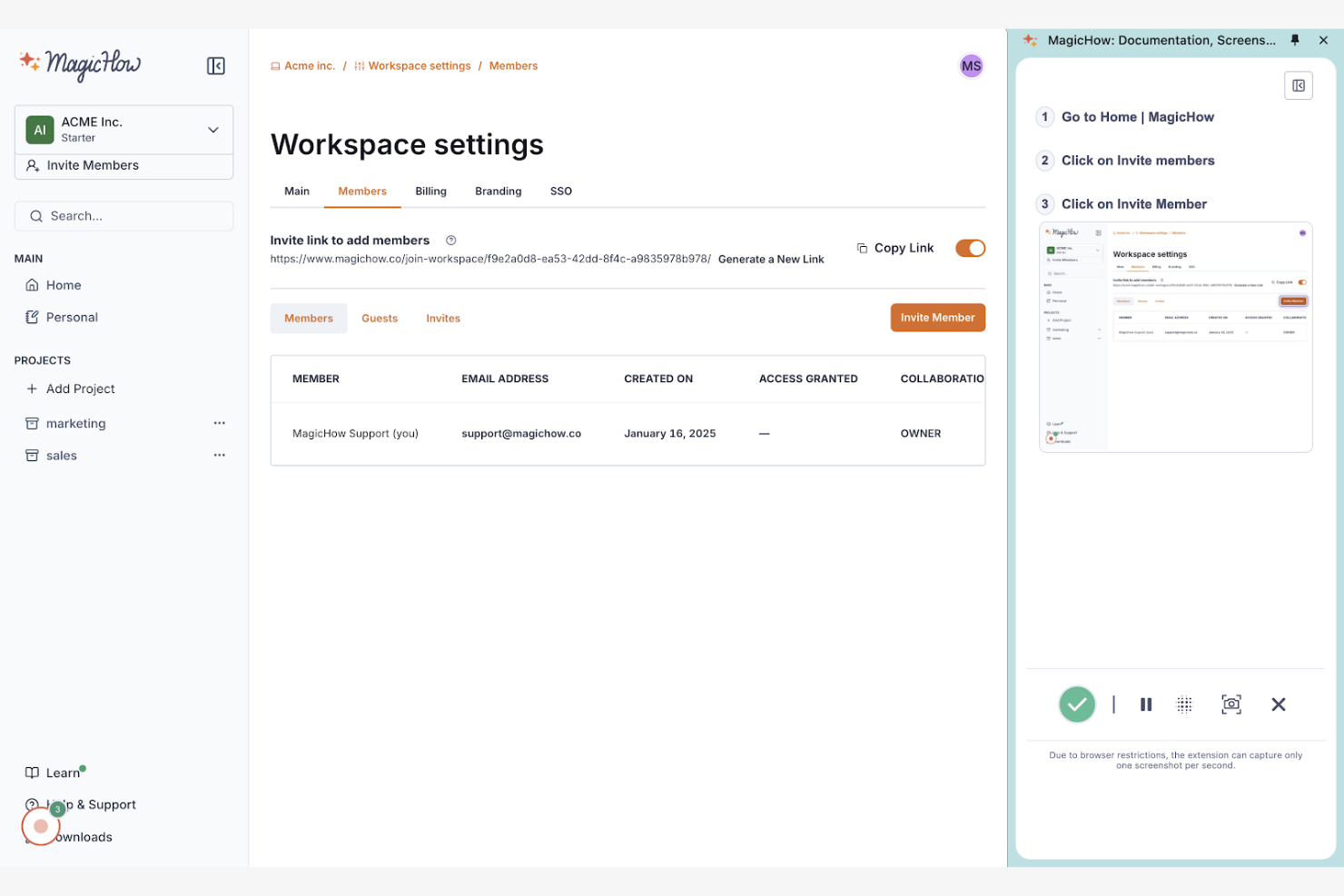
MagicHow è uno strumento progettato per creare guide passo-passo, procedure operative standard (SOP) e manuali di formazione. Viene utilizzato principalmente dai team delle risorse umane, dell'assistenza clienti e delle operazioni.
Perché ho scelto MagicHow: Eccelle nella creazione visiva di SOP, rendendo semplice la documentazione delle procedure. Puoi registrare le azioni, che lo strumento compila in guide modificabili per programmi di formazione. La condivisione delle guide in vari formati, come PDF e HTML, migliora l’accessibilità per il tuo team.
Caratteristiche principali e integrazioni:
Funzionalità includono un processo di registrazione semplice e modelli personalizzabili per diverse esigenze di documentazione. Il tuo team può includere annotazioni, screenshot e grafici sulle slide e integrare i manuali di formazione in altri strumenti per un accesso facilitato.
Le integrazioni includono Google Drive, Slack, Confluence, Notion e molto altro.
Pros and Cons
Pros:
- Configurazione rapida
- Formati di guida flessibili
- Adatto a diversi settori
Cons:
- Funzionalità avanzate limitate
- Personalizzazione di design di base


Way We Do è uno strumento cloud per la gestione delle SOP. La sua principale base di utenti include team che necessitano di un rigoroso rispetto di politiche e procedure per la conformità agli standard di settore.
Perché ho scelto Way We Do: Eccelle nel monitoraggio della conformità, aiutando il tuo team a rispettare gli standard normativi. Lo strumento offre la gestione di politiche e procedure per mantenere tutti aggiornati. È perfetto per le aziende che devono garantire la conformità nelle operazioni quotidiane.
Caratteristiche e integrazioni principali:
Funzionalità includono la possibilità di creare checklist attive che guidano il team passo dopo passo nei processi. Puoi gestire politiche e procedure per comunicare efficacemente gli aggiornamenti. La piattaforma offre anche funzionalità di auditing, che aiutano a monitorare la conformità e individuare aree di miglioramento.
Integrazioni includono Google Drive, Salesforce, Microsoft OneDrive e altri ancora.
Pros and Cons
Pros:
- Checklist interattive
- Strumenti di gestione delle politiche
- Funzionalità di auditing disponibili
Cons:
- Modelli limitati
- Meno adatto ai team piccoli


Come Valuto i Software per le Procedure Operative Standard
Valuto gli strumenti SOP su due livelli: i requisiti di base imprescindibili—come il controllo delle versioni e i workflow di approvazione—e i fattori differenzianti che rivelano quali strumenti si adattano realmente all'ambiente di delivery di un PMO.
Funzionalità di Base (Requisiti Indispensabili per Questa Lista)
Quando seleziono gli strumenti per la mia lista, valuto ciascuno su una scala da 0 (non offre la funzionalità) a 5 (eccelle in quest'area) per ogni funzionalità principale elencata di seguito. Successivamente, calcolo il punteggio totale dello strumento come percentuale. Ogni strumento deve raggiungere un punteggio minimo totale del 65% per essere considerato.
- Redazione SOP & Template: Cerco editor strutturati e librerie di modelli che permettano di costruire SOP specifiche di progetto—come procedure per le retrospettive di sprint o workflow di richiesta cambiamento—senza partire da zero.
- Controllo delle Versioni & Cronologia: Ogni SOP si evolve, quindi verifico se lo strumento traccia le revisioni, supporta il ripristino e mostra chi ha modificato cosa—particolarmente utile durante i periodi di audit.
- Workflow di Approvazione: Valuto come ciascuno gestisce l'instradamento delle revisioni, che si tratti di un'unica approvazione da parte di un responsabile di progetto o di una catena di approvazione a più livelli tramite la leadership del PMO e la compliance.
- Archivio Centralizzato delle SOP: Una libreria ricercabile e organizzata è fondamentale quando il team è distribuito. Cerco sistemi di tagging, strutture a cartelle e filtri per i permessi che aiutano a trovare rapidamente la SOP giusta.
- Assegnazione di Compiti & Processi: I migliori strumenti SOP permettono di trasformare le procedure documentate in checklist o attività assegnabili—ad esempio, legando una SOP di deployment a una milestone di rilascio, così da non saltare nessun passaggio.
- Collaborazione & Controlli di Accesso: Valuto la possibilità di modifica multi-utente, i commenti e i permessi basati sui ruoli per garantire che i team possano co-redigere le SOP mantenendo le procedure sensibili protette per i gruppi appropriati.
Dopo aver selezionato gli strumenti che soddisfano i criteri, considero cosa distingue ciascuna piattaforma.
Fattori di Differenziazione (Cosa Distingue i Fornitori)
Ecco come confronto e metto a confronto i vari fornitori:
Funzionalità Salienti
La generazione di SOP assistita dall'IA è un importante elemento distintivo—cerco strumenti che sappiano redigere procedure partendo da prompt o da documenti esistenti, risparmiando ore nella documentazione di un nuovo framework di delivery. Anche le analisi di processo sono rilevanti. Dashboard che mostrano i tassi di completamento e le tendenze di aderenza danno ai responsabili PMO una reale visibilità su quanto le procedure vengano effettivamente seguite dai team. Controllo anche la presenza di trigger di automazione che avviano le SOP in base alle milestone di progetto, come l'attivazione di una checklist di go-live quando un task di rilascio passa a "pronto."
Oltre le Funzionalità
Le integrazioni con il proprio ecosistema PM sono uno dei primi aspetti che controllo. Uno strumento SOP collegato a Jira, Asana o Monday fa sì che le procedure documentate vivano accanto al lavoro di progetto attivo e non in un silo separato. Le certificazioni di sicurezza e conformità come SOC 2 o ISO 27001 hanno anche un peso importante, in particolare per i team che gestiscono delivery verso clienti dove audit trail e residenza dei dati sono fondamentali. Valuto inoltre i modelli di prezzo per capire se i costi per utente restano sostenibili quando un PMO passa da un team pilota a un dispiegamento su tutto il portafoglio.
Come scegliere il software per SOP
È facile perdersi in lunghi elenchi di funzionalità e strutture tariffarie complesse. Per aiutarti a rimanere concentrato mentre affronti il tuo processo di selezione del software, ecco un elenco dei fattori da tenere a mente:
| Fattore | Cosa considerare |
|---|---|
| Scalabilità | Lo strumento può crescere insieme al tuo team? Considera le esigenze future e valuta se il software è in grado di gestire un aumento degli utenti e dei processi senza richiedere importanti aggiornamenti o costi aggiuntivi. |
| Integrazioni | Funziona con gli strumenti che già utilizzi? Cerca la compatibilità con il tuo strumento CRM, il software di gestione dei progetti e gli altri sistemi importanti su cui fai affidamento. |
| Personalizzazione | Puoi adattarlo ai tuoi flussi di lavoro? Verifica se il software consente di modificare modelli, processi e ruoli degli utenti in base alle tue esigenze specifiche. |
| Semplicità d'uso | È facile da usare? Una curva di apprendimento ripida può ostacolarne l'adozione. Cerca interfacce intuitive e una navigazione semplice, così i membri del team potranno utilizzarlo facilmente. |
| Implementazione e avvio | Quanto rapidamente puoi iniziare? Valuta i tempi di configurazione, le risorse formative disponibili e il supporto durante la fase di avvio per ridurre al minimo le interruzioni. |
| Costo | Rientra nel tuo budget? Confronta i modelli tariffari, considera i costi nascosti e verifica che il prezzo sia in linea con le funzionalità e i vantaggi di cui hai bisogno. |
| Misure di sicurezza | I tuoi dati sono protetti? Assicurati che il software offra crittografia, controlli degli accessi e conformità alle normative sulla protezione dei dati pertinenti al tuo settore. |
| Disponibilità dell'assistenza | Avrai aiuto quando ne avrai bisogno? Cerca opzioni di assistenza 24 ore su 24, 7 giorni su 7, tempi di risposta rapidi e disponibilità di chat dal vivo o assistenza telefonica per risolvere rapidamente i problemi. |
Che cos'è il software SOP?
Il software SOP è uno strumento che aiuta le organizzazioni a creare, gestire e archiviare le procedure operative standard. Professionisti come project manager, team delle risorse umane e responsabili delle operazioni utilizzano questi strumenti per mantenere coerenza e conformità nei propri processi.
Le funzionalità per la creazione dei documenti, la personalizzazione dei modelli e il controllo delle versioni aiutano a organizzare e mantenere efficacemente le procedure. Nel complesso, questi strumenti garantiscono chiarezza ed efficienza nella gestione delle operazioni aziendali.
Funzionalità
Quando selezioni un software SOP, presta attenzione alle seguenti funzionalità chiave:
- Creazione dei documenti: consente di redigere e organizzare facilmente le procedure operative standard per garantire chiarezza e coerenza nelle operazioni.
- Personalizzazione dei modelli: offre opzioni per adattare i modelli alle esigenze specifiche dei processi, mantenendone la pertinenza e l'accuratezza.
- Controllo delle versioni: consente di monitorare le modifiche e ripristinare le versioni precedenti, preservando l'integrità dei documenti.
- Strumenti di collaborazione: facilitano la comunicazione e il lavoro di squadra in tempo reale.
- Funzionalità di integrazione: supportano la connessione con altri strumenti aziendali, come i sistemi CRM e i software di gestione dei progetti, per semplificare i flussi di lavoro.
- Misure di sicurezza: offrono crittografia e controlli degli accessi per proteggere i dati sensibili e rispettare le normative.
- Gestione delle attività: consente di assegnare e monitorare le attività all'interno delle SOP, garantendo responsabilità e completamento tempestivo.
- Aggiornamenti in tempo reale: mantengono aggiornati i documenti, così tutti possono accedere alle informazioni più recenti.
- Analisi e report: forniscono informazioni sull'utilizzo e sull'efficacia delle SOP per aiutare a identificare le aree di miglioramento.
- Accessibilità da dispositivi mobili: consente di accedere alle SOP ovunque ci si trovi, permettendo ai membri del team di seguire le procedure in qualsiasi luogo.
Vantaggi
L'implementazione di un software SOP offre diversi vantaggi al tuo team e alla tua azienda. Ecco alcuni dei benefici che puoi aspettarti:
- Coerenza: garantisce che tutti i membri del team seguano le stesse procedure, riducendo gli errori e migliorando il controllo della qualità.
- Efficienza: semplifica la gestione dei processi con funzionalità come la gestione delle attività e gli aggiornamenti in tempo reale, risparmiando tempo e risorse.
- Collaborazione: incoraggia il lavoro di squadra attraverso strumenti di collaborazione in tempo reale, migliorando la comunicazione e la produttività.
- Conformità: aiuta a mantenere l'aderenza a standard e normative grazie alle misure di sicurezza e al controllo delle versioni.
- Scalabilità: supporta la crescita consentendo l'espansione e l'adattamento dei processi con l'evoluzione dell'azienda.
- Accessibilità: offre l'accesso alle SOP da dispositivi mobili, permettendo ai membri del team di seguire le procedure ovunque si trovino.
- Informazioni utili: offre analisi e report per monitorare l'utilizzo e l'efficacia delle SOP, orientando gli interventi di miglioramento continuo.
Costi e prezzi
La scelta di un software SOP richiede la comprensione dei diversi modelli e piani tariffari disponibili. I costi variano in base alle funzionalità, alle dimensioni del team, ai componenti aggiuntivi e ad altri fattori. La tabella seguente riepiloga i piani comuni, i relativi prezzi medi e le funzionalità generalmente incluse nelle soluzioni software SOP:
Tabella comparativa dei piani per software SOP
| Tipo di piano | Prezzo medio | Funzionalità comuni |
|---|---|---|
| Piano gratuito | $0 | Creazione di documenti di base, spazio di archiviazione limitato e supporto della comunità. |
| Piano personale | $10-$25/utente/mese | Creazione e modifica dei documenti, personalizzazione dei modelli e supporto via e-mail. |
| Piano aziendale | $22-$90/utente/mese | Strumenti di collaborazione avanzati, funzionalità di integrazione e controllo delle versioni. |
| Piano aziendale avanzato | $80-$300+/utente/mese | Misure di sicurezza personalizzabili, gestione dedicata dell'account e funzionalità avanzate di analisi. |
Domande frequenti sul software per SOP
Ecco alcune risposte alle domande comuni sul software per SOP:
Come faccio a sapere se il mio team ha bisogno di un software per SOP?
Se il tuo team ha difficoltà a mantenere la coerenza nei processi o dedica troppo tempo alla gestione manuale della documentazione, un software per SOP può essere utile. Offre una piattaforma centralizzata per creare, gestire e aggiornare le procedure, assicurando che tutti seguano gli stessi passaggi. Valuta le dimensioni del tuo team e la complessità delle operazioni per determinare se è la soluzione adatta.
In che modo il software per SOP migliora l'inserimento dei membri nei team di progetto?
Il software per SOP rende più rapido l’inserimento dei nuovi membri fornendo guide dettagliate, liste di controllo e video in un unico luogo. I nuovi membri del team possono accedere subito a procedure chiare e coerenti, riducendo i tempi di formazione e gli errori. Puoi monitorare i progressi e aggiornare rapidamente le SOP quando i processi cambiano.
Il software per SOP può integrarsi con gli altri strumenti utilizzati dal mio team?
Sì, la maggior parte dei software per SOP offre funzionalità di integrazione con strumenti diffusi come sistemi CRM, software per la gestione dei progetti e piattaforme di comunicazione. Verifica le integrazioni specifiche disponibili per ogni software per confermare la compatibilità con gli strumenti che il tuo team utilizza già. Questo aiuta a mantenere un flusso di lavoro fluido senza dover passare da un sistema all’altro.
Il software per SOP è scalabile con la crescita della mia azienda?
Sì, molte soluzioni software per SOP sono progettate per crescere insieme alla tua azienda. Offrono diversi livelli di prezzo e funzionalità in grado di supportare un numero maggiore di utenti e processi più complessi man mano che il team si espande. Valuta le opzioni di scalabilità di ogni software per verificare che possa sostenere la tua crescita senza interruzioni significative.
Quanto è sicuro il software per SOP per l'archiviazione di informazioni sensibili?
Il software per SOP include in genere misure di sicurezza come la crittografia dei dati, i controlli degli accessi e la conformità agli standard del settore. Esamina sempre le funzionalità di sicurezza del software per verificare che soddisfi i requisiti della tua azienda per la protezione delle informazioni sensibili. Cerca un software che aggiorni regolarmente i propri protocolli di sicurezza per essere sempre al passo con le potenziali minacce.