

10 migliori app per il monitoraggio del tempo del 2026: recensite e confrontate

10 Elenco delle migliori app per il monitoraggio del tempo


Le migliori app per il monitoraggio del tempo ti aiutano a capire esattamente come viene impiegato il tempo tra attività, progetti e membri del team, così da migliorare l'accuratezza della fatturazione, la produttività e la pianificazione del carico di lavoro. Questi strumenti sostituiscono i fogli di calcolo manuali con informazioni in tempo reale e una responsabilità chiara.
Nel corso della mia carriera, ho utilizzato personalmente strumenti per il monitoraggio del tempo in contesti di ingegneria e di agenzia, e ho visto come dati temporali inadeguati possano causare problemi di fatturazione, ampliamento incontrollato dell'ambito dei progetti e burnout.
In questa guida ho esaminato le migliori app per il monitoraggio del tempo sulla base di test effettuati personalmente. Ognuna offre vantaggi diversi per registrare le ore, analizzare i dati temporali e aiutare i team a rimanere concentrati, fatturare con precisione e pianificare in modo più efficace. Pertanto, troverai informazioni su ciò che le distingue, sui loro pro e contro e su altri dettagli utili per prendere una decisione informata sul tuo prossimo strumento.
Perché fidarsi dei nostri consigli sui software
Il nostro team testa e recensisce software dal 2012. In quanto project manager noi stessi, sappiamo quanto sia difficile — e importante — scegliere il software giusto.
Per questa guida, abbiamo valutato gli strumenti attraverso test pratici e ricerche indipendenti, assegnando un punteggio agli strumenti in base ai nostri criteri di selezione. Ci basiamo inoltre sulle competenze di leader di pensiero del settore e di professionisti attivi nella gestione dei progetti.
Le nostre recensioni riflettono il nostro giudizio editoriale umano, non un discorso di vendita.
Revisori esperti:
Tabella comparativa delle app per il monitoraggio del tempo
Questa tabella comparativa riassume i dettagli di base di ciascuna delle mie migliori soluzioni software per il monitoraggio del tempo:
| Tool | Best For | Trial Info | Price | ||
|---|---|---|---|---|---|
| 1 | Ideale come IA per le aziende | Demo gratuita disponibile | A partire da $8/utente/mese | Website | |
| 2 | Ideale per il monitoraggio dei dipendenti da remoto | Demo gratuita + prova gratuita di 14 giorni disponibile | Da $4.49/utente/mese | Website | |
| 3 | Ideale per personalizzabilità e flessibilità | Piano gratuito + prova gratuita di 30 giorni + demo gratuita disponibile | A partire da $6/utente/mese (con fatturazione annuale) | Website | |
| 4 | Ideale per integrazioni intuitive con i calendari | Piano gratuito + prova gratuita di 30 giorni + dimostrazione gratuita disponibile | A partire da $9/user/month (fatturato annualmente) | Website | |
| 5 | Ideale per il monitoraggio dei team sul campo con GPS | Prova gratuita di 14 giorni + demo gratuita disponibile | A partire da $29/mese (fatturazione annuale) | Website | |
| 6 | Ideale per monitorare in tempo reale i costi dei progetti | Prova gratuita di 14 giorni + demo gratuita disponibile | Da $6.42/utente/mese (fatturazione annuale) | Website | |
| 7 | Ideale per agenzie che gestiscono budget e tempi insieme | Prova gratuita di 14 giorni + demo gratuita disponibile | Da $10/mese (fatturato annualmente) | Website | |
| 8 | Ideale per timer manuali e in tempo reale | Piano gratuito disponibile | Da $5/mese | Website | |
| 9 | Ideale per il monitoraggio automatico del tempo | Prova gratuita di 14 giorni disponibile | A partire da $3,99/utente/mese | Website | |
| 10 | Ideale per l'integrazione delle buste paga | Prova gratuita di 21 giorni + demo gratuita disponibile | A partire da $2.93/utente/mese (fatturato annualmente) | Website |


Panoramica delle migliori app per il monitoraggio del tempo
Ecco una breve descrizione di ciascuna app per il monitoraggio del tempo, per illustrare il caso d’uso migliore e le funzionalità più importanti di ogni strumento. Ho incluso anche schermate per offrirti una panoramica della loro interfaccia utente.

Ideale come IA per le aziende
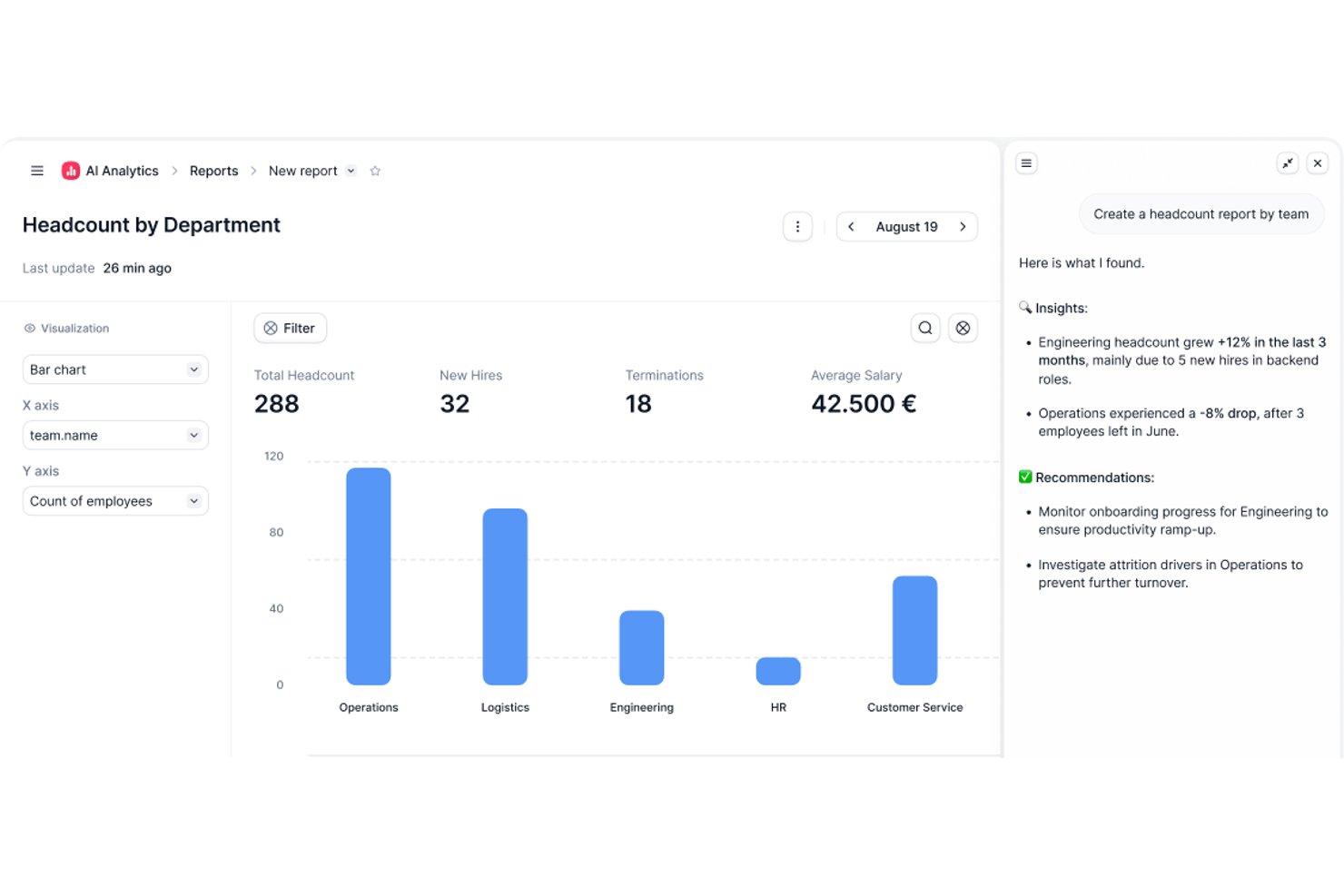
Factorial è una piattaforma basata sull’IA per le risorse umane e le operazioni aziendali, che include il monitoraggio delle ore, la pianificazione dei turni, l’approvazione delle schede delle ore, la registrazione delle ore dei progetti e la reportistica sulla forza lavoro.
Per chi è più adatto Factorial?
Factorial è particolarmente adatto ai team delle risorse umane e delle operazioni che desiderano gestire il monitoraggio delle ore, la pianificazione e la reportistica sulla forza lavoro all’interno di un’unica piattaforma basata sull’IA.
Perché ho scelto Factorial
Ho incluso Factorial tra le mie scelte principali perché il suo approccio all’IA per le aziende va oltre il semplice monitoraggio delle ore: l’agente IA integrato, One, può generare report aggiornati dai dati effettivi della forza lavoro, rispondere alle domande del team sulle politiche relative alle assenze e automatizzare l’elaborazione delle spese senza dover intervenire su un foglio di calcolo. Apprezzo anche il fatto che il monitoraggio delle ore dei progetti sia collegato direttamente alla fatturazione di tempo e materiali, così le ore e le tariffe registrate vengono aggregate in importi fatturabili e visualizzazioni della redditività in tempo reale.
Funzionalità principali di Factorial
- Timbratura tramite codice QR: I dipendenti possono registrare l’entrata e l’uscita scansionando un codice QR, inclusi i codici associati a specifiche sedi di lavoro.
- Riquadro Stato del team: Offre ai manager una panoramica in tempo reale dei dipendenti che hanno registrato l’entrata, l’uscita o che non risultano presenti all’orario di inizio previsto.
- Flusso di lavoro per l’approvazione delle schede delle ore: I manager possono esaminare le schede delle ore per giorno, settimana o mese, filtrare in base allo stato di approvazione e approvare o revocare l’approvazione delle voci.
- Monitoraggio del budget dei progetti: Le fasi del progetto mostrano le ore registrate rispetto a quelle stimate, il budget utilizzato rispetto al limite di budget e i costi sostenuti fino a quel momento rispetto ai costi stimati.
Integrazioni di Factorial
Le integrazioni disponibili nel marketplace includono Microsoft Power BI, Slack, Okta, Sage 200, DATEV LODAS e Zapier. Factorial offre inoltre un’API REST pubblica, webhook e ambienti di prova per le integrazioni personalizzate.
Pros and Cons
Pros:
- Invio rapido delle schede delle ore per i manager
- Le timbrature da mobile sono adatte a team distribuiti e sempre in movimento
- Le presenze sono gestite insieme ad assenze e anagrafiche dei dipendenti
Cons:
- I report personalizzati sulle ore richiedono soluzioni manuali
- I limiti della fatturazione dei progetti possono vincolare la fatturazione ai clienti

Ideale per il monitoraggio dei dipendenti da remoto

Buddy Punch è un software per la rilevazione delle presenze dei dipendenti progettato per aiutarti a gestire la rilevazione delle ore, la pianificazione e le buste paga. Ti permette di monitorare le ore lavorate dai dipendenti e gestire i processi di payroll ovunque tu sia.
Perché ho scelto Buddy Punch
Ho scelto Buddy Punch per le sue solide funzionalità di monitoraggio del tempo e delle presenze, che rendono facile controllare le ore dei dipendenti da remoto, gli straordinari e le assenze per un payroll accurato. Automatizza anche il monitoraggio delle ferie e dei permessi per una gestione più semplice delle assenze. Inoltre, Buddy Punch offre strumenti avanzati come il rilevamento GPS, il geofencing e il riconoscimento facciale per gestire efficacemente i team remoti, garantire la responsabilità e prevenire il 'buddy punching'.
Caratteristiche principali di Buddy Punch
Inoltre, Buddy Punch offre una varietà di altre funzionalità che possono soddisfare le tue esigenze di pianificazione e rilevazione delle ore.
- Pianificazione dei Dipendenti: Puoi creare e gestire i turni utilizzando un'interfaccia intuitiva drag-and-drop, che facilita l'organizzazione dei turni e l'adattamento ai cambiamenti.
- Gestione Buste Paga: Ti permette di integrare i dati di rilevazione delle ore con il processo di payroll per garantire pagamenti accurati e puntuali.
- Report Personalizzabili: Puoi generare report dettagliati su misura per le tue esigenze specifiche e ottenere informazioni su ore lavorate, straordinari e altro ancora.
- Rilevazione dei Costi di Commessa: Ti consente di tracciare il tempo dedicato a specifici progetti o attività per comprendere meglio i costi del lavoro e ottimizzare l'allocazione delle risorse.
Integrazioni di Buddy Punch
Le integrazioni includono QuickBooks, ADP Workforce Now, Gusto, Paychex, Paylocity, Paycor, iSolved, Justworks, SurePayroll, Rippling, Zapier e TriNet Payroll.
Pros and Cons
Pros:
- Monitoraggio in tempo reale
- Rilevamento GPS
- Report personalizzabili
Cons:
- App mobile basilare
- Nessuna modalità offline

actiTIME
Ideale per personalizzabilità e flessibilità
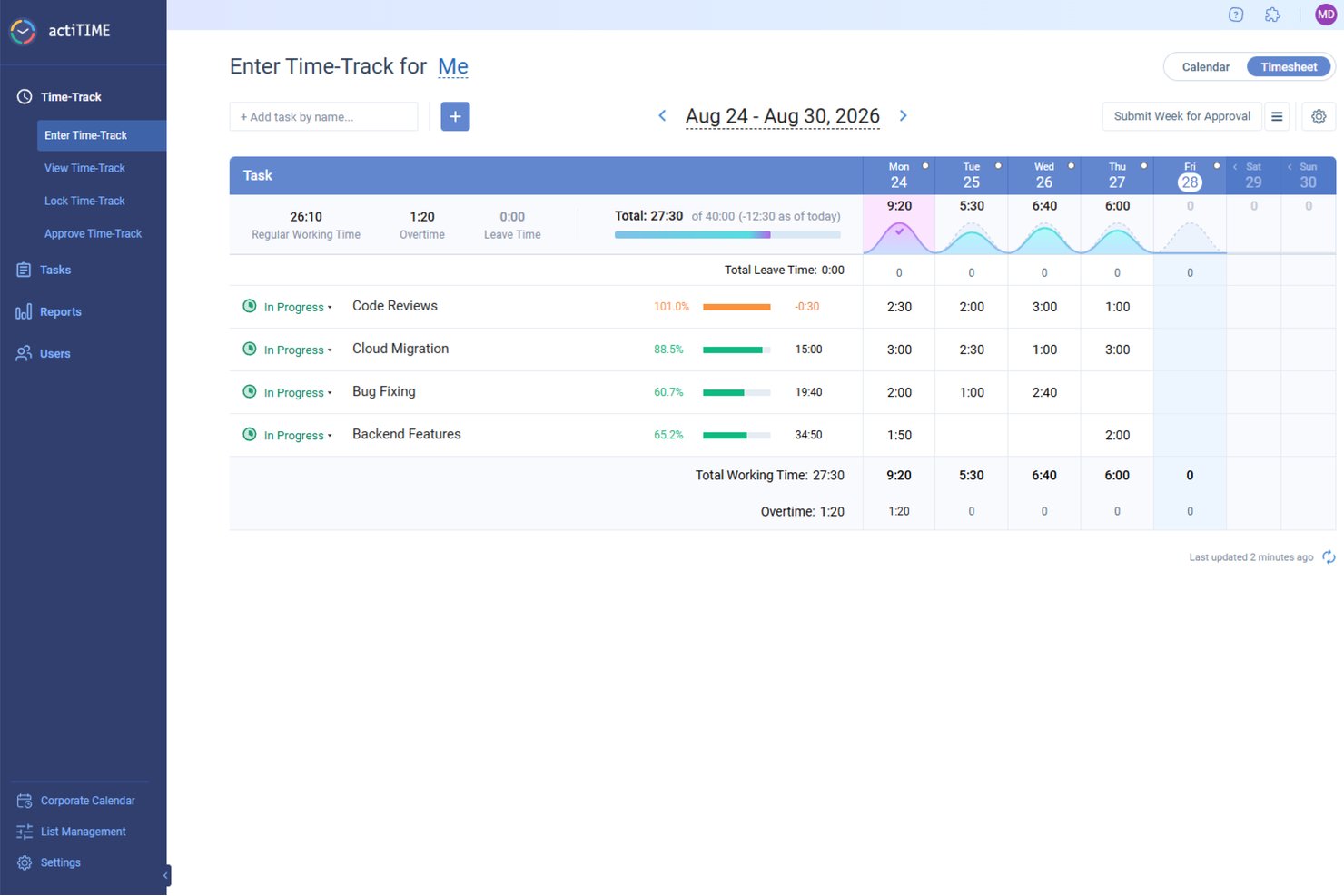
actiTIME è uno strumento digitale di gestione dei progetti che si concentra sul monitoraggio del tempo e sulla gestione del lavoro per aziende di varie dimensioni. La sua interfaccia intuitiva e le complete funzionalità di gestione del tempo lo rendono una delle migliori scelte per una gestione intuitiva del monitoraggio del tempo.
Perché ho scelto actiTIME
actiTIME consente agli utenti di personalizzare il software in base alle proprie esigenze specifiche. Ciò significa che le aziende possono scegliere quali funzionalità utilizzare e disattivare le altre, semplificando l'esperienza utente e garantendo che il software si integri perfettamente con il loro flusso di lavoro e i loro requisiti.
actiTIME offre diverse opzioni di distribuzione, inclusi modelli cloud, on-premise e ibridi. Questa flessibilità garantisce che aziende di ogni tipo e dimensione possano scegliere il metodo di distribuzione più adatto alla propria infrastruttura IT e alle proprie policy di gestione dei dati. Disporre di queste opzioni in un mondo in gran parte 'sempre online' fa distinguere actiTIME per personalizzabilità e flessibilità.
Funzionalità principali di actiTIME
actiTIME offre inoltre un'ampia gamma di altre funzionalità adatte a diverse esigenze aziendali.
- Monitoraggio del tempo: I fogli presenze settimanali, le visualizzazioni del calendario e l'app mobile consentono di monitorare con precisione le ore lavorate e le assenze.
- Gestione delle attività: È possibile utilizzare stime delle attività, scadenze e visualizzazioni Kanban per gestire in modo efficiente il carico di lavoro del team.
- Report e analisi dei dati: Questa funzionalità consente di generare report completi sulle prestazioni e analisi di profitti e perdite per ottenere informazioni sulle operazioni aziendali.
- Gestione del team: È possibile definire i ruoli degli utenti, impostare le autorizzazioni e gestire i programmi di lavoro per mantenere un ambiente di team ben organizzato.
Integrazioni di actiTIME
Le integrazioni includono QuickBooks, Outlook, GitHub, Jira e Trello.
Pros and Cons
Pros:
- Imposta budget orari e monitora i costi per progetto
- Buone opzioni per il blocco e l'approvazione manuale dei fogli presenze
- Monitoraggio del tempo offline con sincronizzazione successiva
Cons:
- Il livello di dettaglio e la personalizzazione dei report sono limitati
- La configurazione e l'impostazione dei flussi di lavoro avanzati possono essere complesse
New Product Updates from actiTIME

actiTIME Visual Hour Indicator and Time-Track Report Redesign
actiTIME adds a wave-style hour indicator to the Timesheet and Calendar views and refreshes the Time-Track report for smoother navigation and clearer visuals. For more information, visit actiTIME's official site.

Toggl
Ideale per integrazioni intuitive con i calendari
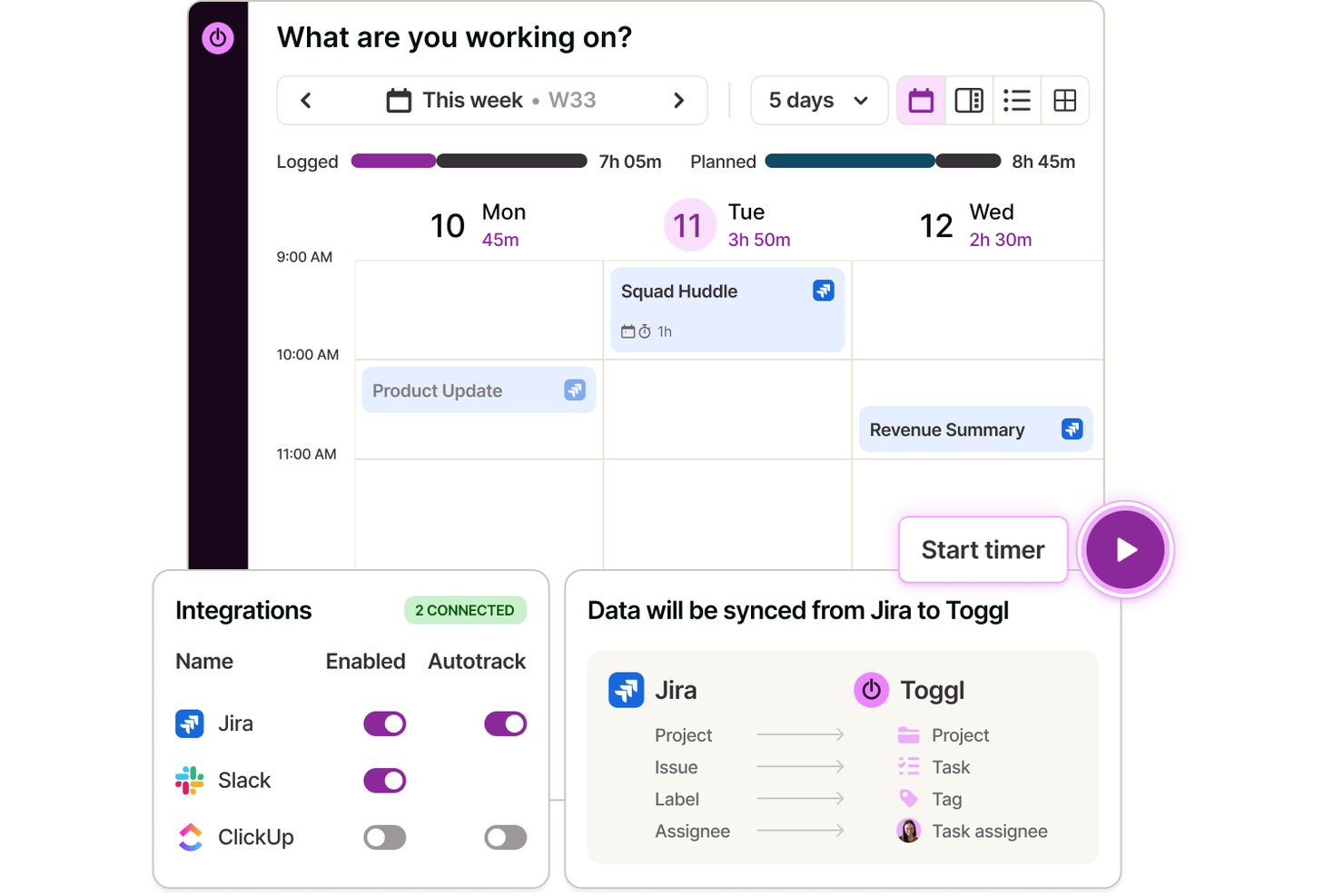
Toggl è un'app per il monitoraggio del tempo che consente di registrare le ore, gestire i progetti, organizzare il lavoro con i clienti e connettersi perfettamente alle più diffuse piattaforme di calendario tramite app web e app per computer e dispositivi mobili.
A chi è più adatto Toggl?
Libero professionisti, agenzie e team di piccole e medie dimensioni alla ricerca di un monitoraggio del tempo semplice e compatibile con i calendari su più dispositivi, della pianificazione della capacità e di rapporti dettagliati.
Perché ho scelto Toggl
Ho scelto Toggl come una delle soluzioni migliori perché posso trascinare gli eventi del calendario direttamente nella mia scheda delle ore, importare istantaneamente i dati delle riunioni di Google o Outlook e visualizzare le attività pianificate insieme alle ore monitorate, tutto senza uscire dalla piattaforma. Toggl AI mi consente inoltre di avviare un cronometro, creare attività e compilare rapporti per i clienti, tutto usando il linguaggio naturale.
Funzionalità principali di Toggl
- Gestione delle attività: pianifica le attività su una bacheca, programmale in base alla capacità effettiva e monitora quanto tempo richiedono con un cronometro.
- Pianificazione della capacità: pianifica in base alla disponibilità della squadra e al carico di lavoro attuale, utilizzando dati temporali accurati.
- Registrazione del tempo su più piattaforme: monitora il tempo sul web, sui computer, sui dispositivi mobili e sulle estensioni del browser, con sincronizzazione su tutti i dispositivi.
- Tariffe fatturabili: assegna tariffe orarie personalizzate a progetti, clienti o membri della squadra per una fatturazione accurata.
Integrazioni di Toggl
Toggl offre integrazioni native con Google Calendar, Outlook Calendar, Asana, Jira, GitHub, Todoist e altri strumenti. Si connette a Zapier, fornisce un'API per integrazioni personalizzate e un MCP per connettersi a Claude, Codex e altri assistenti IA.
Pros and Cons
Pros:
- Supporta l'approvazione delle schede delle ore basata sulle squadre
- Approccio trasparente contro la sorveglianza
- Pannelli di controllo dei rapporti personalizzabili per i progetti
Cons:
- Gli strumenti di modifica in blocco sono limitati
- Nessun monitoraggio della posizione GPS o delle schermate
Ideale per il monitoraggio dei team sul campo con GPS
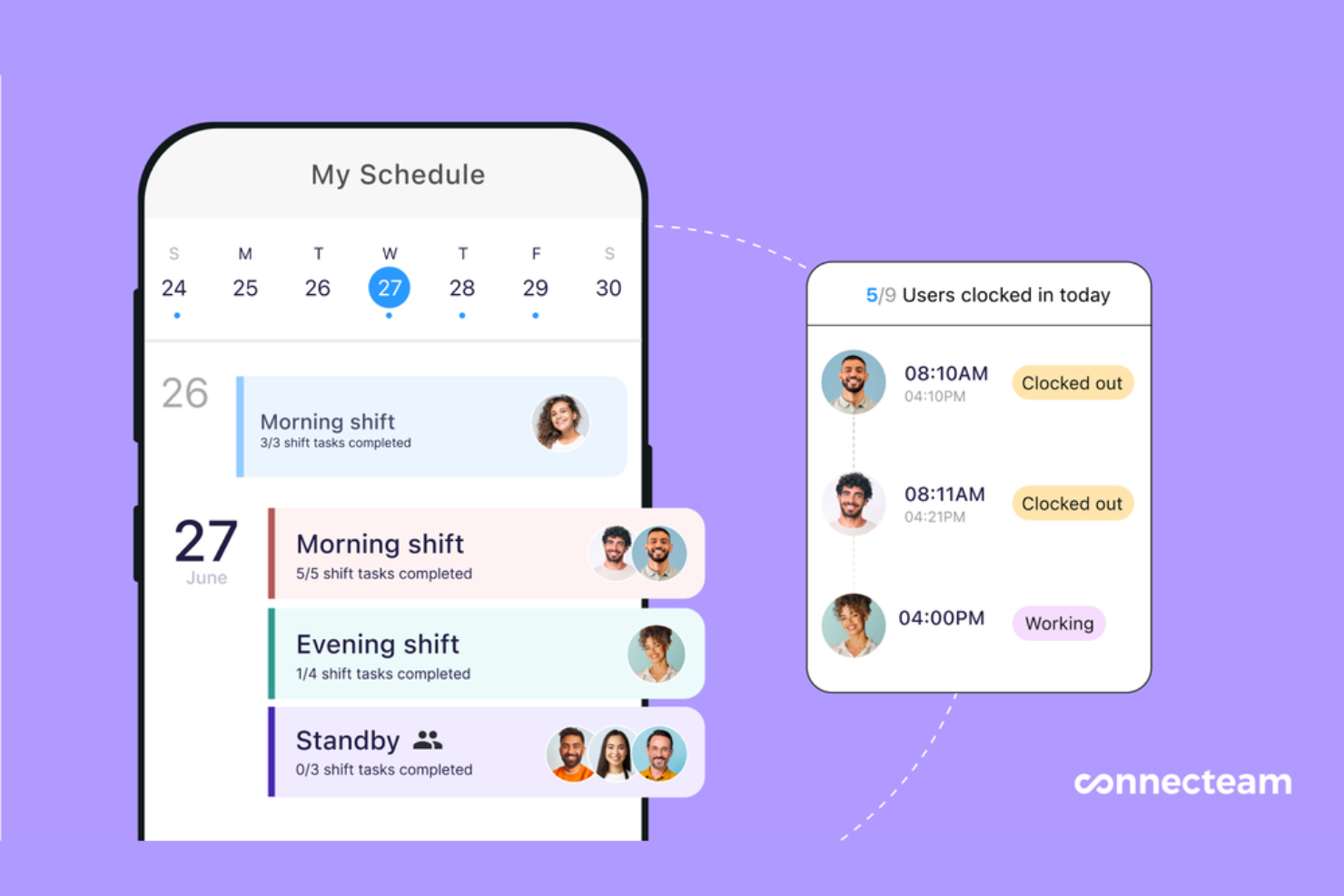
Connecteam è una piattaforma di gestione dei dipendenti progettata per i team senza scrivania e mobili. Combina strumenti per il monitoraggio delle ore, la pianificazione, la gestione delle attività e la comunicazione in un unico posto, rendendo più semplice per le aziende gestire i dipendenti sul campo e rimanere connessi.
Perché ho scelto Connecteam
Ho scelto Connecteam perché offre uno dei sistemi di rilevamento delle presenze tramite GPS più affidabili per i team mobili e sul campo. L'orologio integrato consente ai dipendenti di timbrare in entrata e uscita da qualsiasi luogo, e il tracciamento della posizione aiuta a mantenere registrazioni accurate per il libro paga e la responsabilità. Apprezzo anche i suoi strumenti di pianificazione, che rendono semplice gestire i turni, monitorare la disponibilità e ridurre i conflitti, specialmente per le forze lavoro distribuite o sempre in movimento.
Funzionalità principali di Connecteam
Connecteam offre diverse altre funzionalità che lo rendono una soluzione completa per il monitoraggio delle ore lavorative della tua azienda.
- Registrazione automatica delle ore: Questa funzione consente di registrare automaticamente le ore lavorative dei dipendenti per ridurre gli errori dovuti all'inserimento manuale e mantenere una reportistica accurata.
- Recinzione virtuale (Geofencing): Puoi impostare dei confini virtuali per assicurarti che i dipendenti timbrino in entrata e uscita solo quando si trovano nelle aree di lavoro designate, aggiungendo così un livello di responsabilità.
- Esportazione dei fogli presenze: È possibile esportare facilmente i fogli presenze digitali ai software per le buste paga, semplificando il processo di gestione stipendi e risparmiando tempo sulle attività amministrative.
- Gestione pause e straordinari: L'app monitora in tempo reale le pause e le ore di straordinario per aiutarti a rispettare la conformità e seguire pratiche di lavoro eque.
Integrazioni di Connecteam
Le integrazioni includono Gusto, QuickBooks, Xero, Paychex, Zapier, NetSuite, Salesforce, HubSpot, Slack, Microsoft Teams, Google Calendar e Microsoft Outlook.
Pros and Cons
Pros:
- Controllo accurato delle timbrature tramite geofence
- Visualizza le rotte in tempo reale del personale mobile sulle mappe dei siti di lavoro
- Esportazione dei fogli presenze pronta per la busta paga
Cons:
- I flussi di lavoro complessi richiedono sforzi di configurazione e impostazione
- È necessario disporre di dispositivi mobili per sfruttare tutti i vantaggi
New Product Updates from Connecteam

Connecteam Expands Break and Timesheet Controls
Connecteam adds flexible break thresholds, personalized policies, auto-end options, a centralized exceptions report, and improved timesheet issue visibility to help teams manage breaks and timesheets more effectively. For more information, visit Connecteam’s official site.
 .
.
DeskTime
Ideale per monitorare in tempo reale i costi dei progetti

DeskTime è un'app di monitoraggio automatico del tempo che funziona in background per registrare l'utilizzo di app e URL, tracciare le ore sui progetti, calcolare i punteggi di produttività e gestire gli orari dei dipendenti—tutto all'interno di un'unica piattaforma.
Per chi è ideale DeskTime?
DeskTime è adatto a team di piccole e medie dimensioni che necessitano di un monitoraggio del tempo automatico e sempre attivo, senza doversi affidare agli inserimenti manuali dei dipendenti.
Perché ho scelto DeskTime
Ho incluso DeskTime tra le mie scelte migliori perché il suo tracciamento dei progetti permette di associare tariffe orarie direttamente ai singoli progetti e compiti. Questo significa che, mentre il tuo team registra le ore, DeskTime calcola in tempo reale i costi del lavoro, così non dovrai mai indovinare dove si trova il budget durante il progetto. Mi piace anche che più membri del team possano registrare il tempo sullo stesso progetto contemporaneamente, offrendoti un riepilogo in tempo reale dei costi di tutto il team e non solo dei singoli collaboratori.
Funzionalità principali di DeskTime
- Monitoraggio automatico del tempo: DeskTime funziona in background sul tuo desktop e registra il tempo in modo automatico, senza bisogno di inserimenti manuali per avviare o fermare il timer.
- Categorizzazione di app e URL: Ogni app e sito web visitato dal tuo team viene classificato come produttivo, improduttivo o neutro, offrendoti una panoramica reale su come viene speso il tempo lavorativo.
- Funzione screenshot: DeskTime cattura screenshot opzionali a intervalli prestabiliti, fornendo una conferma visiva di ciò che era sullo schermo durante le ore di lavoro registrate.
- Calendario delle assenze: Traccia vacanze, giorni di malattia e permessi direttamente su DeskTime, insieme agli orari di lavoro regolari.
Integrazioni DeskTime
DeskTime offre un piccolo set di integrazioni native, tra cui Google Calendar, Outlook Calendar, Trello, GitLab, Asana e Jira, e si collega con Zapier. È inoltre disponibile un'API per integrazioni personalizzate.
Pros and Cons
Pros:
- Il monitoraggio automatico elimina la necessità di inserire manualmente i timer
- Classifica le app come produttive o improduttive
- Gestione integrata dei turni e delle assenze
Cons:
- L'app mobile non offre tutte le funzionalità della versione desktop
- Il rilevamento del tempo inattivo può calcolare erroneamente le ore lavorate

Ideale per agenzie che gestiscono budget e tempi insieme
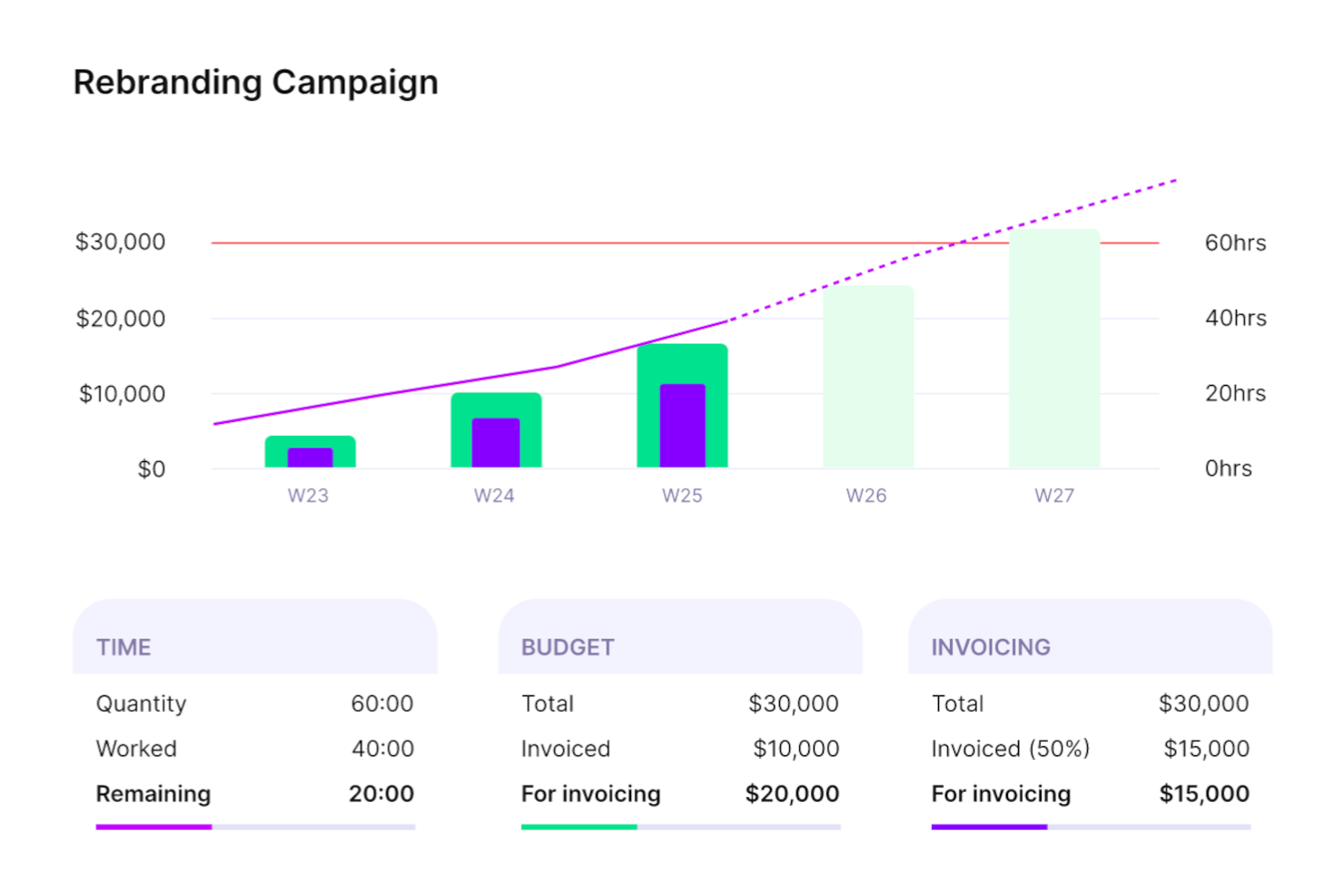
Productive è un sistema completo di gestione del lavoro per agenzie. Riunisce il monitoraggio delle ore dei dipendenti, la gestione dei progetti, l'assegnazione delle risorse e la pianificazione del budget in un'unica piattaforma.
Perché ho scelto Productive
Questo software è una buona scelta per i team che desiderano una soluzione tutto in uno per la gestione del lavoro. Progettato specificamente tenendo conto delle esigenze delle agenzie, i membri del tuo team possono monitorare le ore fatturabili e non fatturabili e puoi sincronizzarle direttamente con la fatturazione e la gestione delle bollette. Puoi anche sfruttare i dati raccolti sul tempo per la pianificazione dei progetti, la pianificazione della capacità e l'allocazione delle risorse.
La piattaforma è relativamente flessibile e personalizzabile. Sono disponibili diverse visualizzazioni per la gestione dei progetti, inclusi diagrammi di Gantt, bacheche, timeline, calendari e altro ancora. Puoi assegnare attività e compiti non solo in base alla capacità dei dipendenti, ma anche alle competenze. Si tratta di uno strumento completo che copre quasi tutti gli aspetti delle operazioni di gestione del lavoro della tua agenzia.
Funzionalità principali di Productive
Productive offre anche diverse altre funzionalità che rispondono alle svariate esigenze della tua agenzia.
- Fatturazione: Questa funzione consente di generare fatture direttamente dal tempo tracciato e dai dati del progetto, per aiutarti a fatturare i clienti in modo accurato.
- Reportistica: Puoi ottenere approfondimenti sulle performance del team, l'avanzamento dei progetti e le metriche finanziarie, tutto su misura per le tue esigenze.
- Programmazione delle risorse: Ti permette di assegnare facilmente i compiti e gestire i carichi di lavoro del tuo team.
- Automazioni: Puoi automatizzare compiti e processi di routine per risparmiare tempo e ridurre gli errori manuali, migliorando così la produttività generale.
Integrazioni di Productive
Le integrazioni includono Dropbox, Exact, Google Calendar, HubSpot, Jira, Harvest Economic, Outlook, Microsoft Calendar, Slack, QuickBooks e Xero.
Pros and Cons
Pros:
- Le registrazioni delle ore sono collegate direttamente a budget e clienti
- La pianificazione delle risorse aiuta a evitare il sovraccarico del team
- Visibilità tra budget preventivi e reali per ogni progetto
Cons:
- Opzioni di personalizzazione limitate per configurazioni complesse
- Richiede disciplina dal team per monitorare accuratamente il tempo
New Product Updates from Productive
Productive Adds Voice Dictation, Slack Connector, Proposals, and Overtime
Productive adds voice dictation, a Slack Connector, proposal controls, and overtime tracking. These updates support faster AI interactions, client proposals, and time management. For more information, visit Productive’s official site.

Ideale per timer manuali e in tempo reale

MinuteShark è progettato specificamente per freelance, professionisti autonomi e consulenti che necessitano di una soluzione di monitoraggio del tempo semplice, senza la complessità dei tradizionali strumenti di gestione dei progetti. Risolve le difficoltà di monitoraggio del tempo, gestione dei progetti e fatturazione con sicurezza, risultando la scelta ideale per chi gestisce più clienti e progetti contemporaneamente. Concentrandosi sulle funzionalità essenziali—including il suo Assistente AI basato su linguaggio naturale—MinuteShark ti aiuta a organizzare il lavoro e a comprendere come viene impiegata la giornata, permettendoti di prendere decisioni di business informate.
Perché ho scelto MinuteShark
Ho scelto MinuteShark perché eccelle nell'offrire un ambiente privo di distrazioni, pensato appositamente per consulenti e freelance. La sua caratteristica di punta è la capacità di tracciare il tempo in modo accurato tramite una dashboard che offre una chiara panoramica visiva dell'avanzamento quotidiano, delle attività e un Assistente AI interattivo che gestisce i comandi tramite testo o voce in linguaggio naturale. Apprezzo anche le funzionalità di gestione progetti fluide, che consentono di suddividere il lavoro in progetti, attività e sottoattività, facilitando la descrizione dettagliata dei compiti e la preparazione di fatture precise. Questa attenzione alla semplicità e funzionalità rende MinuteShark una scelta interessante per chi necessita di una gestione del tempo efficiente.
Caratteristiche principali di MinuteShark
Oltre alle sue funzionalità di base, MinuteShark offre diverse altre caratteristiche che ne aumentano l'utilità come app per il monitoraggio del tempo.
- Centro produttività quotidiano: La dashboard permette di visualizzare l'avanzamento giornaliero e di gestire note personali e liste di cose da fare da un'unica schermata.
- Report potenti: Lo strumento offre report chiari e facili da leggere che aiutano a comprendere come viene impiegato il tempo su progetti e team.
- Sincronizzazione live tra dispositivi: Grazie alla sincronizzazione su cloud, la tua giornata lavorativa ti segue sia su mobile che su desktop, garantendo continuità.
- Sviluppo personalizzato: MinuteShark propone soluzioni su misura per assicurare che la piattaforma soddisfi le esigenze specifiche della tua attività, ideale per necessità particolari.
Integrazioni MinuteShark
MinuteShark attualmente non riporta integrazioni native.
Pros and Cons
Pros:
- Interfaccia pulita e senza distrazioni
- Opzioni di rilevamento orario flessibili
- Report solidi ed esportazioni
Cons:
- Integrazioni native limitate
- Nessuna funzione di fatturazione avanzata

Ideale per il monitoraggio automatico del tempo
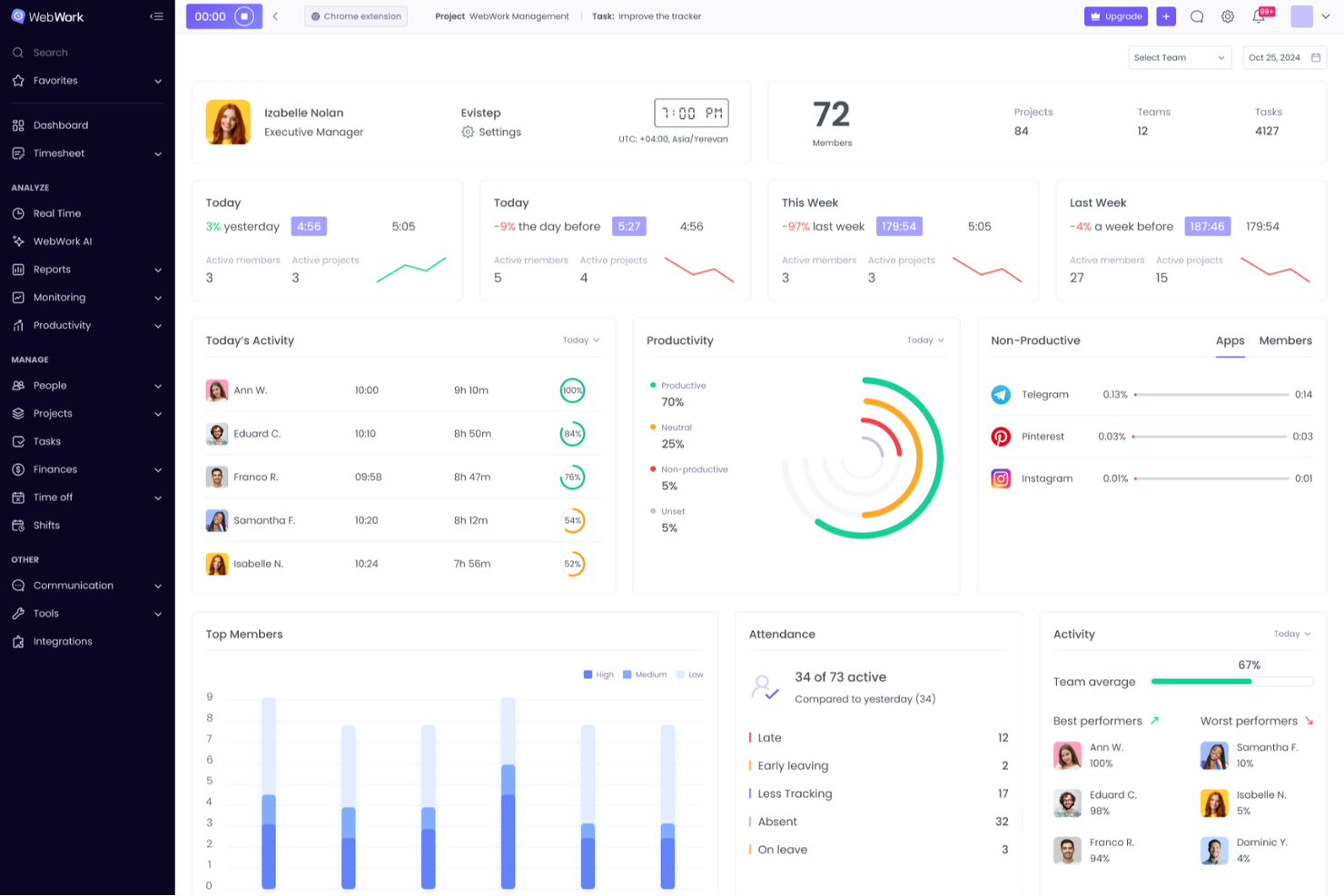
WebWork Time Tracker è uno strumento versatile progettato per aiutare te e il tuo team a monitorare le ore di lavoro e aumentare la produttività. Offre il rilevamento automatico del tempo e un monitoraggio dettagliato delle attività, semplificando la gestione di compiti e progetti.
Perché ho scelto WebWork Time Tracker
Apprezzo il fatto che offra il monitoraggio del tempo con screenshot, che registra automaticamente le ore lavorate dal team e cattura screenshot periodici per verificare l'attività. Questa funzionalità garantisce una visione chiara della produttività del tuo team e aiuta a mantenere la trasparenza. È particolarmente utile nella gestione di team da remoto, in quanto offre un ulteriore livello di responsabilizzazione.
Funzionalità principali di WebWork Time Tracker
WebWork Time Tracker offre anche una serie di altre funzionalità che possono aiutarti a migliorare la produttività e la responsabilità all'interno del tuo team.
- Gestione dei Compiti: Puoi organizzare e assegnare compiti direttamente nell'app, permettendo al tuo team di restare concentrato e allineato con gli obiettivi di progetto.
- Monitoraggio delle Ore Fatturabili: Puoi facilmente distinguere tra ore fatturabili e non fatturabili, aiutando a mantenere una fatturazione e una pianificazione del budget precise per i tuoi progetti.
- Livelli di Attività: Ti consente di monitorare i livelli di attività di tastiera e mouse per ottenere informazioni sul coinvolgimento e la produttività del tuo team durante la giornata.
- Generazione di Fatture: Ti permette di creare e inviare fatture professionali direttamente dall'app, semplificando il processo di fatturazione e migliorando la gestione del flusso di cassa.
Integrazioni di WebWork Time Tracker
Le integrazioni includono Asana, Slack, Deel, GitHub, ClickUp, Trello, Jira, Xero, Bitbucket, Zapier, Todoist e Bitwage.
Pros and Cons
Pros:
- Segmenta il tempo monitorato per progetto e sotto-attività
- Il rilevamento dei tempi di inattività garantisce la precisione delle ore del team
- Le modifiche manuali agli orari consentono di correggere dimenticanze di timbratura
Cons:
- Configurazione iniziale e creazione di flussi di lavoro personalizzati richiedono tempo
- Difficoltà nella detrazione delle ore in eccesso quando il tracker resta attivo

Agendrix
Ideale per l'integrazione delle buste paga

Per i team che cercano un'app affidabile per il monitoraggio delle ore lavorative con integrazione alla gestione delle buste paga, Agendrix offre funzionalità su misura per piccole imprese e squadre che lavorano su turni. I fogli presenze automatizzati e le diverse opzioni di timbratura aiutano a ridurre l'inserimento manuale del tempo e i problemi di pianificazione. Agendrix si collega inoltre con i più diffusi sistemi di gestione paghe, facilitando la preparazione delle buste paga e la gestione accurata delle ore dei dipendenti.
Perché ho scelto Agendrix
Ho scelto Agendrix per la sua integrazione con i sistemi paghe, che rende più semplice trasferire le ore registrate direttamente nei sistemi di gestione delle buste paga. Questo aiuta a ridurre l'inserimento manuale e gli errori nei pagamenti. Include anche fogli presenze automatizzati e diverse opzioni di timbratura, come il rilevamento biometrico e basato sulla posizione, per supportare una registrazione accurata delle ore sia per i team in sede che quelli da remoto.
Funzionalità principali di Agendrix
Oltre alla sua eccezionale integrazione con i sistemi paghe, Agendrix offre:
- Pianificazione dei turni: Crea e condividi facilmente i turni di lavoro con strumenti drag-and-drop.
- Accesso mobile: Gestisci gli orari e monitora le ore anche da dispositivi iOS e Android.
- Strumenti di comunicazione: Interagisci con il tuo team tramite messaggistica professionale e una bacheca delle novità.
- Gestione Risorse Umane: Gestisci assunzioni, archiviazione dei documenti e richieste di ferie direttamente dalla piattaforma.
Integrazioni di Agendrix
Le integrazioni includono Lightspeed, ADP Workforce Now, QuickBooks, Payworks e molte altre per garantire che i processi di rilevazione oraria e gestione delle buste paga siano perfettamente collegati.
Pros and Cons
Pros:
- L'integrazione alle paghe riduce l'immissione manuale di dati ed errori nell'elaborazione delle buste paga
- Gli strumenti di pianificazione dei turni aiutano i manager a organizzare in modo efficiente la disponibilità dello staff
- Le funzionalità di self-service per i dipendenti riducono il carico e le attività amministrative per i responsabili
Cons:
- Gli strumenti di reportistica offrono possibilità di personalizzazione limitate per un'analisi approfondita della forza lavoro
- Alcuni sistemi paghe richiedono regolazioni manuali per la sincronizzazione
Altre opzioni per il monitoraggio del tempo
Ecco alcune altre opzioni che non sono entrate nell’elenco dei migliori software per il monitoraggio del tempo, ma che vale comunque la pena prendere in considerazione:
- Beebole
Ideale per l'addebito delle ore fatturabili
- TimeTrex
Ideale per la rilevazione biometrica delle presenze dei dipendenti
- Clockify
Ideale per il monitoraggio in tempo reale
- Jibble
Ideale per piccoli team
- 7shifts
Ideale per la rilevazione delle presenze nel settore della ristorazione
- Projectworks
Ideale per il monitoraggio in tempo reale delle ore fatturabili
- Timesheets.com
Ideale per la rilevazione delle ore specifiche di progetto
- Deltek Replicon Time
Ideale per il monitoraggio del tempo su dispositivi mobili
- Sage HR
Ideale per le funzionalità di coinvolgimento dei dipendenti
- Deel HR
Ideale per team globali
- Insightful
Ideale per capacità di monitoraggio dei dipendenti
- ClickTime
Ideale per dati strutturati e pronti per la contabilità
- Hubstaff
Ideale per il monitoraggio su più dispositivi
- Homebase
Ideale per la gestione di personale a ore
- Hub Planner by Milient
Ideale per la pianificazione del tempo basata sulla capacità


Come Valuto le App per il Monitoraggio del Tempo
Valuto le app per il monitoraggio del tempo su due livelli: la soglia minima che uno strumento deve raggiungere—come le modalità di registrazione del tempo, l'assegnazione ai progetti e l'approvazione dei timesheet—e i fattori che distinguono i migliori dagli altri.
Funzionalità di Base (Requisiti Minimi per Questa Lista)
Queste capacità fondamentali servono come criteri di accettazione per l'inclusione nella mia lista di app per il monitoraggio del tempo:
- Metodi di Registrazione del Tempo: Verifico se l'app supporta timer in tempo reale, inserimento manuale e registrazione da mobile—strumenti come Toggl Track e Clockify gestiscono questa funzione in modo diverso, e la flessibilità qui conta per l'adozione.
- Assegnazione a Progetto & Attività: Ogni ora registrata deve essere associata a un cliente, un progetto o un'attività, quindi cerco etichettature gerarchiche che rispecchino come agenzie e studi di consulenza organizzano davvero il lavoro.
- Gestione Timesheet: Valuto come ciascuno strumento gestisce la creazione, la modifica e l'approvazione dei timesheet—in particolare le visualizzazioni settimanali con flussi di invio che i manager di team distribuiti utilizzano abitualmente.
- Ore Fatturabili & Tariffe: Distinguere tra tempo fatturabile e non fatturabile è fondamentale, ma cerco anche la possibilità di configurare tariffe per progetto e per utente per supportare strutture di fatturazione multi-cliente.
- Reportistica & Analisi: I buoni report vanno oltre i totali grezzi, quindi cerco viste filtrate per cliente, progetto o membro del team con esportazione in CSV o PDF da integrare in fatturazione o paghe.
- Integrazioni & API: Valuto le connessioni native con gli strumenti che i team già utilizzano—Jira, Asana, QuickBooks, Slack—oltre all'accesso API per flussi di lavoro personalizzati e portabilità dei dati.
Valuto ciascun fornitore su una scala da 0 (non offre la funzionalità) a 5 (eccelle in quest'area) per ogni criterio.
I fornitori devono raggiungere un punteggio medio minimo per essere presi in considerazione per la mia lista. Da lì, considero cosa rende unica ogni piattaforma.
Fattori Differenzianti (Cosa Rende un Fornitore Unico)
Dopo aver selezionato la mia lista, ecco come confronto e metto a paragone i diversi fornitori nel settore delle app di monitoraggio del tempo:
Funzionalità Distintive
Il monitoraggio automatico del tempo spicca per i team che desiderano rilevare il lavoro su app e dispositivi senza intervento manuale—una funzione sempre più presente sulle piattaforme rivolte alle agenzie digitali. Valuto anche come la fatturazione integrata colleghi le ore registrate direttamente alla fatturazione verso i clienti, rendendo più semplice per consulenti e freelance gestire il flusso di cassa. GPS e geofencing sono particolarmente importanti per team sul campo o mobili, offrendo tracciabilità e contesto maggiori ai log registrati fuori dall'ufficio tradizionale.
Oltre le Funzionalità
La struttura dei prezzi è importante—analizzo se una piattaforma addebita per utente o offre piani a tariffa fissa, perché una piccola agenzia da cinque persone e una società da 200 hanno esigenze di budget ben differenti. Considero anche l'adattabilità dello strumento a specifici tipi di team, che si tratti di una consulenza che fattura a ore o di un team di prodotto che traccia la capacità per gli sprint. La velocità di adozione è un altro elemento che peso, inclusa la qualità delle app mobile e desktop, perché un sistema di monitoraggio del tempo funziona solo se viene utilizzato con costanza dalle persone.
Come scegliere un'app per il monitoraggio del tempo
È facile perdersi in lunghi elenchi di funzionalità e strutture tariffarie complesse. Per aiutarti a rimanere concentrato mentre affronti il tuo processo specifico di selezione del software, ecco una lista di fattori da tenere presenti:
| Fattore | Elementi da considerare |
|---|---|
| Scalabilità | Lo strumento è in grado di supportare il tuo team mentre cresce? Esamina i limiti degli utenti, i limiti dei progetti e valuta se i piani tariffari sono adeguati all'aumento delle tue esigenze. Evita gli strumenti che diventano proibitivi o macchinosi con l'aumentare delle dimensioni. |
| Integrazioni | Si integra con i tuoi strumenti di gestione dei progetti, sistemi di fatturazione o software per le buste paga? Assicurati che le integrazioni siano dirette e ben documentate, non soluzioni alternative macchinose. Il supporto per Zapier è utile, ma potrebbe non essere sufficiente. |
| Personalizzazione | Puoi adattare impostazioni come i campi per l'inserimento del tempo, i flussi di approvazione o i tag dei progetti? Considera quanto sono rigidi i tuoi flussi di lavoro e se l'app può adattarsi alle tue esigenze. |
| Facilità d'uso | Il tuo team lo userà davvero? Cerca timer semplici, accesso da dispositivi mobili e una configurazione minima. Se è una seccatura, otterrai dati errati o non ne otterrai affatto. |
| Implementazione e avvio | Quanto tempo richiederà la configurazione e chi dovrà essere coinvolto? Valuta se avrai bisogno dell'aiuto di un amministratore, quanto tempo servirà per importare i progetti e quale tipo di formazione viene offerto. |
| Costo | Puoi giustificare il prezzo per utente al mese? Fai attenzione ai limiti nascosti, ai contratti a lungo termine e ai componenti aggiuntivi obbligatori. Una prova gratuita o un piano freemium contribuiscono a ridurre i rischi. |
| Misure di sicurezza | Il fornitore segue le migliori pratiche, come SOC 2, SSO o 2FA? Se registri le ore dei clienti o i dati delle buste paga, assicurati che siano protetti adeguatamente. |
| Disponibilità dell'assistenza | Quando qualcosa va storto, puoi contattare qualcuno? Verifica se sono inclusi il supporto tramite chat dal vivo, e-mail o telefono, oppure se è limitato all'orario lavorativo o ai piani premium. |
Che cos'è un'app per il monitoraggio del tempo?
Un'app per il monitoraggio del tempo è uno strumento progettato per registrare e analizzare la quantità di tempo dedicata alle attività, aiutando singoli utenti e team a registrare le ore e i responsabili di progetto a tenere sotto controllo la capacità. Viene utilizzata da freelance, agenzie e team che lavorano per progetti per monitorare il tempo fatturabile, misurare la produttività e gestire i carichi di lavoro.
Queste app spesso includono timer, inserimento manuale, report e integrazioni con strumenti di fatturazione o gestione dei progetti.
Funzionalità delle app per il monitoraggio del tempo
Quando scegli un'app per il monitoraggio del tempo, presta attenzione alle seguenti funzionalità chiave:
- Interfaccia intuitiva: L'app dovrebbe essere facile da utilizzare e consentirti di avviare e interrompere rapidamente i timer o registrare le ore. In questo modo puoi concentrarti sul lavoro e non sullo strumento.
- Supporto per più dispositivi: Cerca un'app che funzioni senza problemi su computer, dispositivi mobili e browser web; è utile quando passi da un dispositivo all'altro.
- Organizzazione di progetti e attività: Puoi organizzare le ore per cliente, progetto o attività. Questo ti aiuta a verificare come impieghi il tempo e a fatturare facilmente i clienti.
- Report personalizzabili: Puoi generare report dettagliati basati sul tempo monitorato, individuare tendenze, monitorare la produttività e condividere facilmente le ore con un responsabile o un cliente.
- Inserimento manuale del tempo: Dovresti poter aggiungere o modificare manualmente le ore, così i tuoi registri rimangono accurati anche se dimentichi di avviare il timer.
- Promemoria e notifiche: Questa funzionalità fornisce avvisi, come promemoria per registrare l'entrata o l'uscita, per mantenere ordinati i registri e contribuire a evitare lacune e inserimenti mancanti.
- Integrazione con altri strumenti: Dovresti poter effettuare il collegamento con strumenti di gestione dei progetti o calendari per risparmiare tempo e semplificare i flussi di lavoro.
- Funzionalità offline: Ti consente di monitorare il tempo anche quando non hai accesso alla rete. Le ore di lavoro verranno sincronizzate non appena avrai accesso a Internet, così tutto rimarrà aggiornato.
- Gestione delle tariffe fatturabili: Ti consente di impostare e modificare facilmente le tariffe fatturabili, una funzione utile se fatturi ai clienti a tariffe diverse.
Funzionalità comuni di intelligenza artificiale nelle app per il monitoraggio del tempo
Oltre alle funzionalità standard delle app per il monitoraggio del tempo elencate sopra, molte soluzioni offrono funzionalità di intelligenza artificiale come:
- Acquisizione automatica del tempo: L'intelligenza artificiale può monitorare la tua attività e assegnare automaticamente il tempo ai progetti o alle attività corrette, facendoti risparmiare tempo e prevenendo gli errori manuali.
- Suggerimenti intelligenti: L'intelligenza artificiale può suggerire il cliente o l'attività su cui stai lavorando in base alla tua attività, facilitando l'organizzazione quando cambi attività.
- Analisi predittiva: L'intelligenza artificiale può analizzare i modelli precedenti per prevedere i tempi di completamento dei progetti o aiutarti a pianificare il programma di lavoro in modo più efficiente.
- Rilevamento delle anomalie: L'intelligenza artificiale può segnalare registri del tempo insoliti (ad esempio, ore eccessivamente lunghe o inserimenti mancanti), consentendoti di correggere rapidamente gli errori ed evitare confusione in seguito.
- Analisi della produttività: L'intelligenza artificiale può esaminare le tue abitudini di lavoro, mettere in evidenza le tendenze e offrire suggerimenti pratici, così puoi lavorare in modo più intelligente e non più duramente.
Vantaggi delle app per il monitoraggio del tempo
L'implementazione di app per il monitoraggio del tempo offre diversi vantaggi al tuo team e alla tua azienda. Ecco alcuni dei vantaggi che puoi aspettarti:
- Migliore consapevolezza del tempo: Aiuta i membri del team a capire come impiegano le proprie ore, così possono lavorare in modo più efficiente.
- Fatturazione più semplice: Tiene traccia con precisione delle ore fatturabili, così puoi emettere fatture ai clienti senza dover fare supposizioni.
- Costi dei progetti più chiari: Mostra quanto tempo richiede ogni attività o progetto, aiutandoti a rispettare il budget.
- Maggiore responsabilizzazione: Rende più semplice vedere chi sta lavorando su cosa e quando, soprattutto con i team da remoto.
- Gestione delle paghe semplificata: Registra le ore lavorate, così puoi calcolare le retribuzioni senza dover inseguire i fogli presenze.
- Report più rapidi: Ti offre un accesso immediato ai dati sul tempo senza dover creare fogli di calcolo manualmente.
- Pianificazione delle risorse più fluida: Ti consente di individuare gli squilibri nel carico di lavoro, così puoi distribuire le attività in modo più uniforme.
Costi e prezzi delle app per il monitoraggio del tempo
La scelta delle app per il monitoraggio del tempo richiede la comprensione dei vari modelli di prezzo e dei piani disponibili. I costi variano in base alle funzionalità, alle dimensioni del team, ai componenti aggiuntivi e ad altri fattori. La tabella seguente riassume i piani più comuni, i relativi prezzi medi e le funzionalità tipicamente incluse nelle app per il monitoraggio del tempo:
Tabella comparativa dei piani per le app di monitoraggio del tempo
| Tipo di piano | Prezzo medio | Funzionalità comuni |
|---|---|---|
| Piano gratuito | $0 | Monitoraggio di base del tempo, inserimento manuale, progetti limitati e report di base |
| Piano personale | $5–$10/utente/mese | Monitoraggio del tempo, accesso da dispositivi mobili, report semplici e integrazioni limitate |
| Piano aziendale | $10–$25/utente/mese | Gestione del team, monitoraggio dei progetti, fatturazione, flussi di approvazione e report avanzati |
| Piano per grandi aziende | $25–$50/utente/mese | Ruoli personalizzati, registri di controllo, assistenza dedicata, opzioni SSO e sicurezza avanzata |
Domande frequenti sulle app per il monitoraggio del tempo
Ecco alcune risposte alle domande più comuni che potresti avere sulle app per il monitoraggio del tempo e su come possono aggiungere valore ai tuoi processi:
Perché dovrei monitorare il tempo del mio team?
Monitorare il tempo del tuo team ti permette di capire come vengono impiegate le ore di lavoro e ti aiuta a individuare colli di bottiglia o inefficienze. Questi dati ti consentono di allocare meglio le risorse, gestire i budget e mantenere i progetti in linea con i piani. In qualità di project manager, è particolarmente utile per supportare previsioni più accurate e la rendicontazione ai clienti.
Un monitoraggio accurato del tempo facilita inoltre la fatturazione ai clienti e l’elaborazione delle buste paga senza dover procedere per tentativi. Nel complesso, favorisce la responsabilizzazione e aiuta il tuo team a lavorare in modo più efficiente.
In che modo le app per il monitoraggio del tempo migliorano la produttività?
Le app per il monitoraggio del tempo migliorano la produttività mettendo in evidenza come viene impiegato il tempo ogni giorno. Puoi individuare le distrazioni, gestire i carichi di lavoro e incoraggiare il tuo team a concentrarsi sulle attività più prioritarie. Molte app offrono promemoria e report automatici per aiutare tutti a rispettare le proprie responsabilità e le scadenze.
Numerosi articoli evidenziano la quantità di tempo dedicata ad attività non produttive, e i risultati sono piuttosto preoccupanti. Dal tempo trascorso sui telefoni cellulari alle attività sociali, queste attività possono sottrarre centinaia di ore all’anno.
Implementando il monitoraggio del tempo in tutta la tua organizzazione, i dipendenti diventeranno molto più consapevoli delle ore non produttive accumulate, poiché non avranno modo di registrarle nella loro app di monitoraggio. Diventeranno invece più responsabili e produttivi, riducendo o eliminando le attività che fanno perdere tempo durante l’orario di lavoro.
Esistono app gratuite per il monitoraggio del tempo?
Sì, diverse app per il monitoraggio del tempo offrono piani gratuiti, ideali per i team più piccoli o per provare le funzionalità. Strumenti come Toggl Track, Clockify e Harvest dispongono di versioni gratuite. Tuttavia, i piani freemium sono un’ottima scelta anche per le piccole imprese con esigenze di base per il monitoraggio del tempo. Tieni presente che questi piani non includeranno tutte le funzionalità avanzate disponibili nei piani a pagamento e spesso offrono un’assistenza clienti limitata.
Come posso utilizzare i dati sul monitoraggio del tempo per migliorare le stime dei progetti?
Puoi utilizzare i dati reali dei progetti raccolti dalle app per il monitoraggio del tempo per creare stime più accurate per il lavoro futuro. Analizza quanto tempo hanno richiesto attività simili, dove si sono verificati ritardi e quali risorse erano sovraccariche. Grazie ai dati storici, i nuovi piani e i preventivi dei progetti possono riflettere le prestazioni reali del team, rendendo le tue stime più affidabili.
Come posso gestire l'approvazione e le correzioni delle schede delle ore nelle app per il monitoraggio del tempo?
La maggior parte delle app per il monitoraggio del tempo consente di configurare flussi di approvazione in modo che i responsabili possano esaminare e approvare le schede delle ore inviate prima che vengano finalizzate. In caso di errori o registrazioni mancanti, puoi richiedere le correzioni direttamente tramite l’app. Cerca strumenti che inviino notifiche automatiche ai membri del team e conservino un registro delle modifiche per le tracce di controllo.