

10 strumenti alternativi a Hubstaff per il monitoraggio della forza lavoro nel 2026

Le migliori alternative a Hubstaff: selezione


Se gestisci un team da remoto o ibrido, sai che tenere traccia del tempo e monitorare la produttività può diventare rapidamente complicato, soprattutto quando devi gestire più progetti. Hubstaff è una scelta popolare per le aziende che vogliono semplificare queste attività, ma non è la soluzione adatta a tutti. Fortunatamente, ci sono molte alternative che vale la pena prendere in considerazione.
In questo articolo ho raccolto le migliori alternative a Hubstaff sulla base dei miei test pratici dei software per il monitoraggio del tempo e degli strumenti per la gestione della forza lavoro. Ti illustrerò opzioni che offrono un solido monitoraggio dei dipendenti, un semplice rilevamento del tempo e potenti strumenti di reportistica, aiutandoti a trovare la soluzione più adatta al tuo team.
Che cos'è Hubstaff?
Hubstaff è uno strumento per il monitoraggio del tempo e la gestione della produttività, progettato per aiutare team da remoto, liberi professionisti e agenzie a monitorare le ore di lavoro e la produttività. È pensato per le aziende che desiderano tenere traccia con precisione del tempo dedicato ai progetti, gestire le attività e analizzare le abitudini di lavoro per migliorare l'efficienza. Hubstaff automatizza attività amministrative come l'elaborazione delle buste paga, la fatturazione e la pianificazione, facendo risparmiare tempo e migliorando la gestione dei progetti.
Perché fidarsi dei nostri consigli sui software
Il nostro team testa e recensisce software dal 2012. In quanto project manager noi stessi, sappiamo quanto sia difficile — e importante — scegliere il software giusto.
Per questa guida, abbiamo valutato gli strumenti attraverso test pratici e ricerche indipendenti, assegnando un punteggio agli strumenti in base ai nostri criteri di selezione. Ci basiamo inoltre sulle competenze di leader di pensiero del settore e di professionisti attivi nella gestione dei progetti.
Le nostre recensioni riflettono il nostro giudizio editoriale umano, non un discorso di vendita.
Revisori esperti:
Tabella di confronto dei prezzi
Usa questa tabella di confronto per esaminare fianco a fianco prezzi, prove gratuite e disponibilità di demo.
| Tool | Best For | Trial Info | Price | ||
|---|---|---|---|---|---|
| 1 | Ideale per opzioni di timbratura personalizzabili | Demo gratuita + prova gratuita di 14 giorni disponibile | Da $4,49/utente/mese | Website | |
| 2 | Ideale per la gestione della produttività | Prova gratuita disponibile | A partire da $7/utente/mese | Website | |
| 3 | Ideale per il monitoraggio del tempo incentrato sulla gestione dei progetti senza sorveglianza | Prova gratuita di 30 giorni + piano gratuito disponibile | A partire da $9/utente/mese (con fatturazione annuale) | Website | |
| 4 | Ideale per la fatturazione e la gestione del budget | Prova gratuita di 14 giorni + piano gratuito + demo gratuita disponibile | Da $3.99/utente/mese (fatturato annualmente) | Website | |
| 5 | Ideale per la pianificazione dei turni | Disponibili prova gratuita e demo gratuita | A partire da $5/utente/mese | Website | |
| 6 | Ideale per la gestione delle distrazioni | Prova gratuita di 14 giorni disponibile | A partire da $7/mese (fatturato annualmente) | Website | |
| 7 | Ideale per la pianificazione semplificata dei progetti | Prova gratuita di 14 giorni + demo gratuita disponibile | A partire da $45/mese (fatturato annualmente) | Website | |
| 8 | Ideale per il monitoraggio del tempo visivo | Prova gratuita di 30 giorni | A partire da $7.50/utente/mese (fatturato annualmente) | Website | |
| 9 | Ideale per la gestione integrata dei rischi | Piano gratuito disponibile + prova gratuita di 7 giorni | Da $3/utente/mese (fatturazione annuale) | Website | |
| 10 | Ideale per portfoli online professionali | Prova gratuita di 14 giorni + piano gratuito disponibile | Da $4.99/utente/mese | Website |

Recensioni delle migliori alternative a Hubstaff
Sulla base della mia vasta esperienza, fornirò un’analisi dettagliata e una panoramica di ogni alternativa a Hubstaff. Scoprirai i suoi pro e contro, le funzionalità principali, le integrazioni e i casi d’uso migliori.

Ideale per opzioni di timbratura personalizzabili
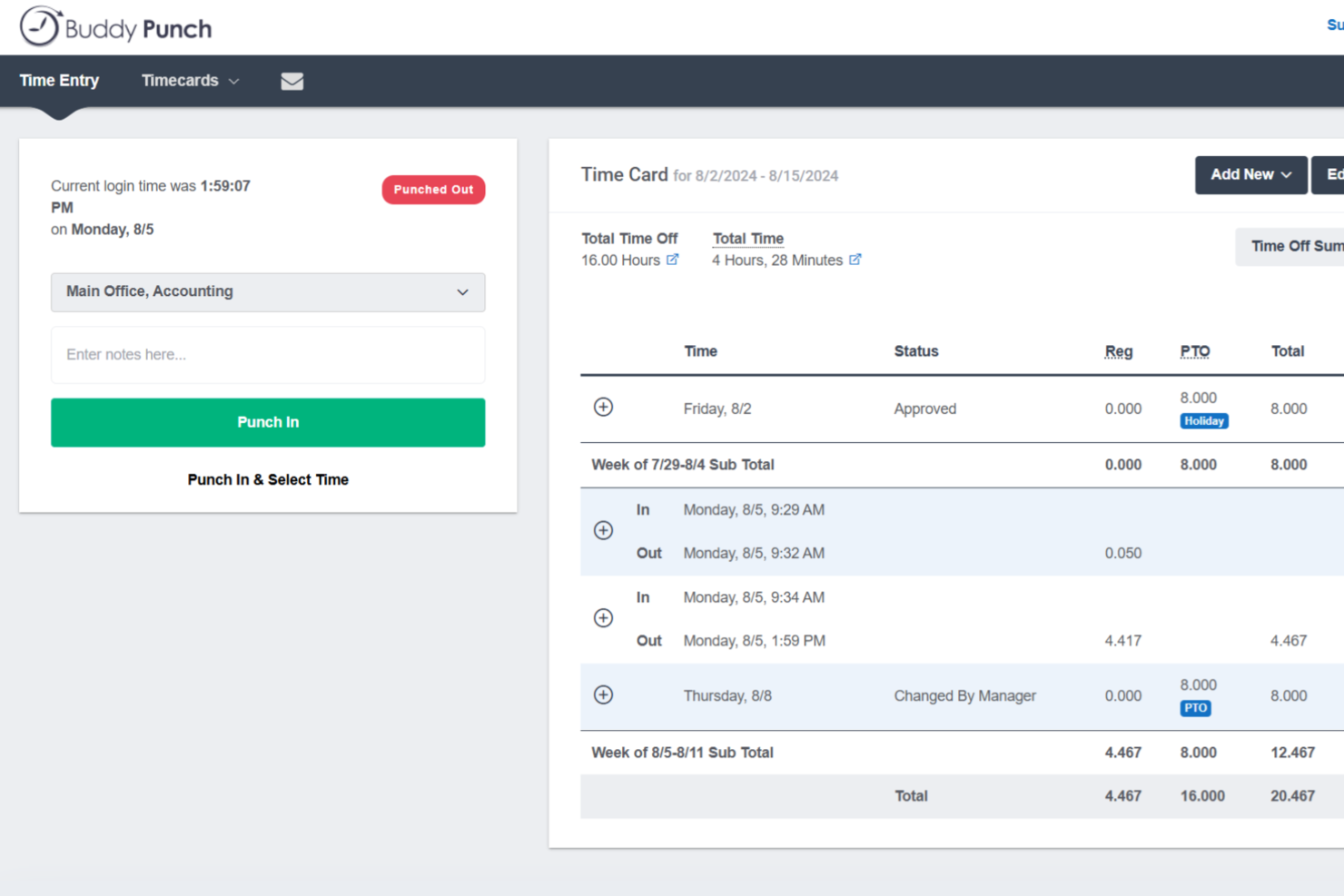
Buddy Punch è uno strumento di gestione del tempo e della forza lavoro che combina la timbratura dei dipendenti, la programmazione, il monitoraggio delle ferie (PTO) e i report per le paghe con tracciamento GPS e opzioni di timbratura flessibili pensate per team distribuiti e lavoratori orari.
Per chi è meglio Buddy Punch?
Buddy Punch è particolarmente adatto per piccole e medie imprese che gestiscono lavoratori orari o sul campo, in settori come l'edilizia, il commercio al dettaglio e la sanità.
Perché ho scelto Buddy Punch
Ho scelto Buddy Punch tra i miei preferiti grazie all'ampia varietà di metodi per la timbratura. Il mio team può timbrare tramite app mobile, scansione del codice QR, PIN su un tablet in comune o persino tramite messaggio di testo per chi lavora sul campo senza accesso a Internet. Apprezzo molto anche la funzione di timbratura di gruppo, che consente a un supervisore di registrare l'ingresso e l'uscita di un intero gruppo contemporaneamente. Questo genere di flessibilità è qualcosa che Hubstaff semplicemente non offre.
Caratteristiche principali di Buddy Punch
- Riconoscimento facciale: Verifica l'identità del dipendente al momento della timbratura tramite foto per prevenire la timbratura fraudolenta.
- Geofencing: Limita le timbrature a un determinato raggio geografico in modo che i dipendenti possano timbrare solo dai siti di lavoro autorizzati.
- Blocco tramite indirizzo IP: Limita l'accesso alla timbratura a indirizzi IP specifici, mantenendo le timbrature da remoto o in ufficio legate alle sedi designate.
- Avvisi di straordinario: Avvisa i responsabili quando i dipendenti si avvicinano alle soglie di straordinario prima che vengano superate le ore.
Integrazioni Buddy Punch
Buddy Punch offre integrazioni native focalizzate sulle paghe, tra cui QuickBooks Online, QuickBooks Desktop, ADP Workforce Now, Gusto, Paychex, Paycor, Paylocity, Rippling, Workday e iSolved. Supporta inoltre il single sign-on tramite Google, Apple, Okta e OneLogin. Buddy Punch si collega con Zapier e offre una API per integrazioni personalizzate.
Pros and Cons
Pros:
- Diversi metodi di timbratura inclusi riconoscimento facciale
- Il geofencing limita le timbrature ai siti approvati
- Regole configurabili di maturazione PTO per ogni dipendente
Cons:
- L'app mobile ha meno funzionalità rispetto al web
- Nessuna modalità offline in caso di scarsa connettività

Apploye
Ideale per la gestione della produttività

Progettato per le aziende che puntano a ottimizzare le prestazioni del personale, Apploye offre funzionalità che rispondono alle esigenze di diversi settori, tra cui agenzie di marketing, team di sviluppo software e società di assistenti virtuali. Affrontando sfide come il monitoraggio della produttività e la gestione ottimizzata dei progetti, Apploye propone un approccio completo per gestire in modo efficace team remoti e ibridi.
Perché ho scelto Apploye
Ho scelto Apploye come alternativa a Hubstaff per la sua attenzione alla gestione della produttività e ai report dettagliati. La funzione di monitoraggio della produttività della piattaforma consente di misurare le prestazioni giornaliere, aiutando a garantire che il team rimanga concentrato sui propri compiti. Inoltre, strumenti di reportistica avanzata forniscono intelligence sulle risorse umane, permettendo alle aziende di prendere decisioni informate basate su dati in tempo reale. Queste caratteristiche rispondono all’esigenza di un monitoraggio e un’analisi dettagliati, rendendolo una scelta interessante per chi cerca alternative.
Caratteristiche principali di Apploye
Oltre alle funzionalità di gestione della produttività, Apploye offre:
- Monitoraggio dei dipendenti: Fornisce il monitoraggio in tempo reale delle attività della forza lavoro, assicurando che il team mantenga la produttività durante l’orario di lavoro.
- Monitoraggio degli screenshot: Cattura l’attività dello schermo a intervalli prestabiliti, offrendo visibilità sul flusso di lavoro del team e aiutando a identificare aree da migliorare.
- Gestione di progetti e compiti: Organizza i progetti in modo efficiente, con strumenti che assistono nell’assegnazione dei compiti, nel monitoraggio dei progressi e nel controllo del budget.
- Paghe e fatturazione: Automatizza l’elaborazione dei pagamenti, semplificando la gestione delle paghe e la fatturazione per le aziende.
Integrazioni di Apploye
Le integrazioni includono ClickUp, Trello, Jira e Asana.
Pros and Cons
Pros:
- Traccia chiaramente le attività del team per il monitoraggio della produttività da remoto
- Monitora efficacemente i dipendenti senza risultare eccessivamente invasivo
- Il rilevamento automatico delle ore di lavoro riduce l’inserimento manuale dei dati
Cons:
- La rilevazione delle pause si attiva erroneamente durante le conversazioni del team
- La rilevazione delle attività a volte rappresenta in modo errato l’effettivo coinvolgimento nel lavoro

Beebole
Ideale per il monitoraggio del tempo incentrato sulla gestione dei progetti senza sorveglianza
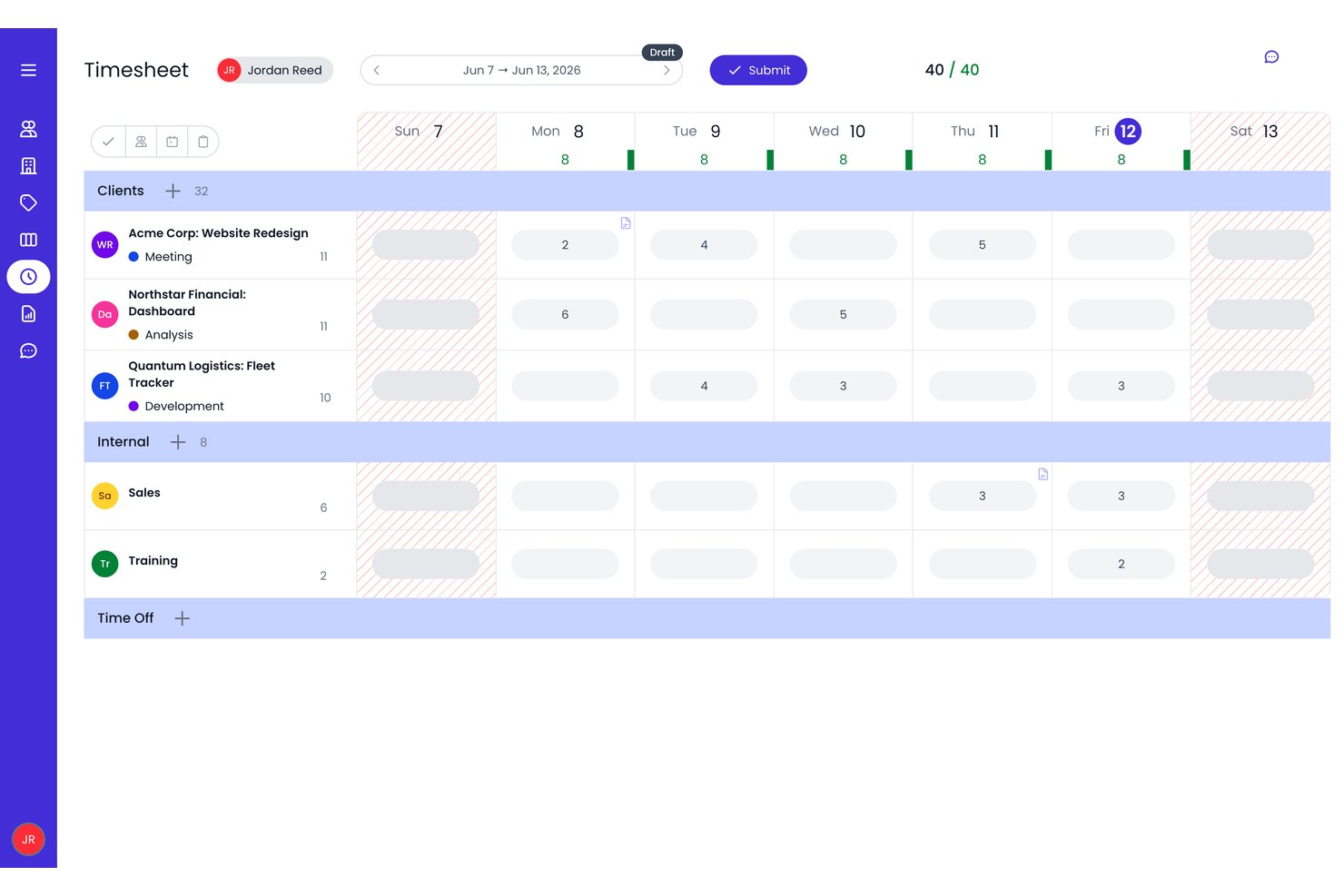
Beebole è una piattaforma per la pianificazione, il monitoraggio del tempo e la reportistica che combina la registrazione del tempo basata sui progetti, la pianificazione con diagrammi di Gantt e Kanban, la gestione delle ore fatturabili e la reportistica personalizzabile, il tutto senza alcuna funzionalità di monitoraggio dei dipendenti.
Per chi è più adatto Beebole?
Beebole è particolarmente adatto ai project manager e ai team operativi delle agenzie che necessitano del monitoraggio delle ore fatturabili e della pianificazione delle risorse senza sorveglianza dei dipendenti.
Perché ho scelto Beebole
Ho incluso Beebole tra le mie scelte principali perché è l'alternativa più semplice che conosca per i team che desiderano il monitoraggio del tempo sui progetti di Hubstaff senza il livello di sorveglianza. Mentre Hubstaff monitora screenshot e utilizzo delle app, Beebole concentra queste funzionalità sui flussi di lavoro di gestione dei progetti: visualizzazioni con diagrammi di Gantt e della pianificazione del personale che compilano automaticamente i fogli presenze del team a partire dalle attività pianificate, oltre al monitoraggio in tempo reale del budget pianificato rispetto a quello effettivo a livello di progetto. Apprezzo anche gli inserimenti di tempo suggeriti dall'AI, che aiutano i dipendenti a registrare accuratamente le ore senza richiedere alcuna supervisione da parte della direzione.
Funzionalità principali di Beebole
- Flussi di approvazione dei fogli presenze multilivello: Invia le richieste di approvazione dei fogli presenze attraverso catene di approvazione configurabili prima della loro finalizzazione.
- Inserimenti di tempo suggeriti dall'AI: Beebole utilizza l'attività sul desktop e i segnali del browser per suggerire direttamente ai dipendenti gli inserimenti nei registri del tempo.
- Strumenti di conformità DCAA e GDPR: I registri di controllo integrati, la portabilità dei dati e il supporto al diritto alla cancellazione soddisfano i requisiti normativi per gli appaltatori governativi e i team internazionali.
- Configurazione delle tariffe fatturabili: Imposta le tariffe di fatturazione a livello di progetto, attività o tag per adattarle al modo in cui il tuo team definisce effettivamente i prezzi del lavoro.
Integrazioni di Beebole
Beebole offre diverse integrazioni native documentate, tra cui Asana, Linear, monday.com, Google Calendar, Outlook Calendar, QuickBooks Online, Xero, BambooHR, Google Sheets ed Excel. Offre inoltre webhook e un'API aperta per le integrazioni personalizzate.
Pros and Cons
Pros:
- Nessuna funzionalità di monitoraggio o sorveglianza dei dipendenti
- Report dettagliati e multidimensionali sui progetti e sulla redditività
- Le ore pianificate nelle visualizzazioni Gantt e Pianificazione del personale precompilano il foglio presenze di ogni persona
Cons:
- Nessuna fatturazione nativa o elaborazione delle paghe
- Nessun monitoraggio GPS, sul campo o della posizione tramite dispositivi mobili

TimeCamp
Ideale per la fatturazione e la gestione del budget

TimeCamp è uno strumento versatile per il monitoraggio del tempo e la gestione dei progetti. È ideale per la fatturazione e la gestione del budget grazie alle sue funzionalità di gestione finanziaria.
Perché è una buona alternativa a Hubstaff:
Ho scelto TimeCamp per le sue funzionalità di fatturazione e gestione del budget, fondamentali per il lavoro su progetti. La sua capacità di monitorare il tempo e le spese lo rende una valida alternativa a Hubstaff, soprattutto per chi necessita di report finanziari dettagliati e capacità di fatturazione.
Caratteristiche e integrazioni principali:
Caratteristiche includono il monitoraggio automatico del tempo, il tracciamento della produttività e report dettagliati.
Integrazioni includono Trello, Asana, Quickbooks, Google Calendar, Slack, Microsoft Teams, Xero, Jira, Salesforce e Todoist.
Pros and Cons
Pros:
- Funzionalità dettagliate di fatturazione e gestione del budget
- Ampia gamma di integrazioni con strumenti popolari
- Disponibile come app desktop e mobile per il monitoraggio
Cons:
- Può avere una curva di apprendimento per i nuovi utenti
- L'interfaccia necessita di alcuni aggiornamenti

Deputy
Ideale per la pianificazione dei turni
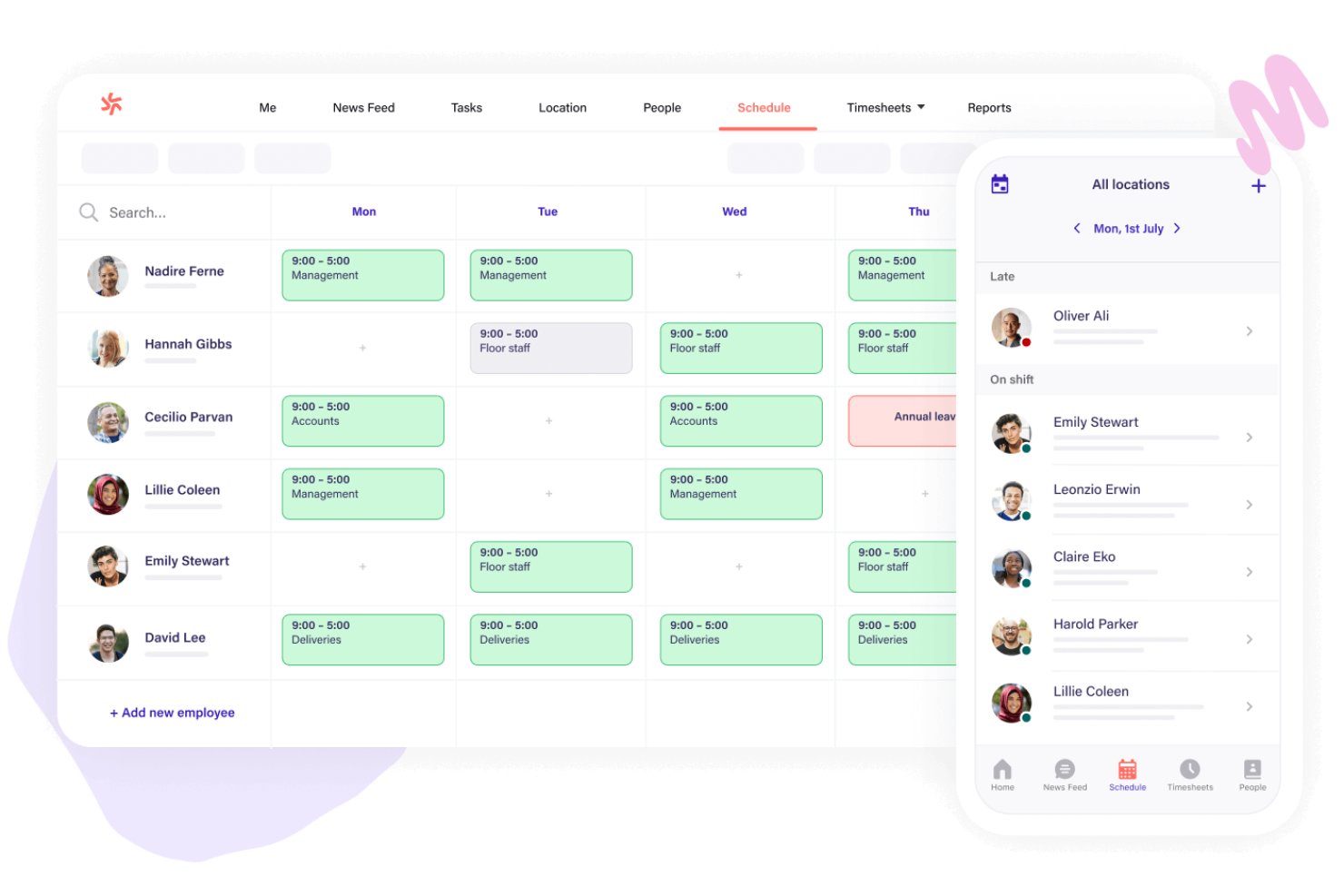
Deputy è uno strumento per la gestione della forza lavoro che semplifica il processo di pianificazione dei turni, monitoraggio delle ore e delle presenze e gestione delle assenze del personale. È rivolto ai settori che richiedono la gestione di una forza lavoro retribuita a ore.
Perché è una valida alternativa a Hubstaff:
Ho scelto Deputy perché offre un insieme di funzionalità specifiche per le aziende che dipendono dal lavoro su turni, in particolare per quelle che gestiscono turni complessi. La sua interfaccia intuitiva e le efficienti funzionalità di pianificazione dei turni lo rendono una valida alternativa a Hubstaff.
Funzionalità e integrazioni principali:
Le funzionalità includono la pianificazione automatica, che aiuta i responsabili a creare rapidamente programmi privi di conflitti, e un'integrazione fluida con i sistemi paghe. Lo strumento offre inoltre un'app mobile per iOS e Android, che consente a responsabili e dipendenti di comunicare e gestire i turni ovunque si trovino.
Le integrazioni includono Gusto, QuickBooks, Xero, BambooHR, ADP, Square, Clover, Vend, Lightspeed e Sage.
Pros and Cons
Pros:
- Interfaccia intuitiva
- Pianificazione dei turni e pianificazione automatica efficienti
- Integrazione fluida con le paghe
Cons:
- Curva di apprendimento moderata per i nuovi utenti
- Opzioni di personalizzazione limitate

Ideale per la gestione delle distrazioni

RescueTime è un software di monitoraggio del tempo completamente automatizzato che traccia il tempo trascorso su app e siti web. Offre strumenti per bloccare le distrazioni e genera report dettagliati per migliorare la concentrazione.
Perché è una buona alternativa a Hubstaff:
Ho scelto RescueTime per il suo approccio alla gestione delle distrazioni. Automatizza il monitoraggio e offre approfondimenti dettagliati su come viene impiegato il tempo. È una buona alternativa a Hubstaff, che si concentra sul monitoraggio manuale e sul controllo dei dipendenti.
Funzionalità e integrazioni principali:
Le funzionalità includono il monitoraggio automatico del tempo senza inserimenti manuali, report dettagliati sul tempo trascorso in varie attività e la possibilità di bloccare siti web e app distraenti. Offre anche il monitoraggio offline per fornire una panoramica completa della giornata.
Le integrazioni comprendono Asana, Slack e app di calendario.
Pros and Cons
Pros:
- Monitoraggio del tempo automatizzato
- Capacità di blocco delle distrazioni
- Report dettagliati sulla produttività
Cons:
- Potrebbe essere meno adatto alle esigenze di tracciamento manuale del tempo
- Alcuni utenti potrebbero trovare difficile adattarsi al monitoraggio automatico

ProofHub
Ideale per la pianificazione semplificata dei progetti

ProofHub è uno strumento di gestione dei progetti che semplifica la pianificazione e la collaborazione per team di tutte le dimensioni. Il suo modello di prezzi a tariffa fissa, che include utenti e funzionalità illimitati senza costi per utente, lo rende ideale per la pianificazione semplificata dei progetti.
Perché è una buona alternativa a Hubstaff:
Ho scelto ProofHub perché offre una struttura di prezzi unica che è conveniente per i team con molti utenti. A differenza di Hubstaff, che applica una tariffa per utente, il prezzo fisso di ProofHub significa che i team più numerosi possono risparmiare denaro. Il suo focus sulla semplificazione della pianificazione dei progetti lo rende un'ottima alternativa per i team che cercano una soluzione tutto-in-uno.
Funzionalità e integrazioni principali:
Le funzionalità includono gestione delle attività con bacheche e vista a tabella, diagrammi di Gantt per la pianificazione visiva dei progetti, monitoraggio del tempo, ruoli personalizzati e strumenti di reportistica.
Le integrazioni includono Slack, Box, Dropbox, Google Calendar, Google Drive, One Drive, Freshbooks e QuickBooks.
Pros and Cons
Pros:
- Prezzi a tariffa fissa senza costi per utente
- Utenti e progetti illimitati nel piano Ultimate Control
- Un set completo di funzionalità per la gestione dei progetti e la collaborazione
Cons:
- Lo spazio di archiviazione è limitato a 15GB per il piano Essential e a 100GB per il piano Ultimate Control
- Nessuna menzione di funzionalità avanzate di analisi o di reportistica oltre ai report di progetto e di risorse di base

Timeular
Ideale per il monitoraggio del tempo visivo

Timeular offre una soluzione di monitoraggio del tempo visiva. Il suo approccio unico consiste nel registrare le ore utilizzando un dispositivo fisico per il tracciamento del tempo e un'interfaccia interattiva.
Perché è una buona alternativa a Hubstaff:
Ho scelto Timeular perché fornisce un modo tangibile per tracciare il tempo, risultando più coinvolgente e meno invasivo rispetto ai metodi tradizionali esclusivamente digitali. I suoi aspetti visivi e fisici lo rendono una valida alternativa alle soluzioni più convenzionali come Hubstaff.
Funzionalità e integrazioni principali:
Le funzionalità includono il monitoraggio automatico del tempo, che rileva l'utilizzo di app, siti web e documenti, oltre a un tracker fisico che rende la gestione del tempo più interattiva. Il software offre anche il monitoraggio delle presenze e delle ore lavorative, la registrazione delle ore fatturabili con calcoli automatici, e approfondimenti personalizzati sulla produttività.
Le integrazioni comprendono Jira, Trello, Slack, ClickUp, Xero, Zendesk, Todoist, Salesforce, GitLab, GitHub e Basecamp.
Pros and Cons
Pros:
- Tracker fisico unico per un'esperienza di monitoraggio tangibile
- Monitoraggio automatico del tempo per app, siti web e documenti
- Si integra con oltre 3.000 app
Cons:
- Il tracker fisico è venduto separatamente, rappresentando un costo aggiuntivo
- La conformità GDPR e le funzionalità anti-sorveglianza potrebbero non essere necessarie per tutti gli utenti
nTask
Ideale per la gestione integrata dei rischi

nTask è una piattaforma di gestione progetti con funzionalità dedicate alla gestione dei rischi.
Perché è una valida alternativa a Hubstaff:
Ho scelto nTask perché si concentra sulla gestione dei rischi all'interno della sua suite di gestione progetti. Questo lo rende una valida alternativa a Hubstaff per i team che danno priorità alla valutazione e mitigazione dei rischi nei loro progetti.
Funzionalità e integrazioni principali:
Le funzionalità includono gestione delle attività, diagrammi di Gantt per la pianificazione, gestione delle riunioni, strumenti di collaborazione di squadra, monitoraggio dei problemi, una Kanban board per la visualizzazione del flusso di lavoro, monitoraggio del tempo e, nello specifico, strumenti di gestione dei rischi.
Le integrazioni includono Slack, Google Drive, Dropbox, Microsoft Teams, Zapier, Trello, GitHub, Jira, Asana e Bitbucket.
Pros and Cons
Pros:
- Prezzi per utente accessibili
- Include un set completo di strumenti di gestione progetti
- Fornisce un'attenzione unica sulla gestione dei rischi integrata
Cons:
- Funzionalità di reportistica limitate
- Non funziona in modalità offline


Workfolio è uno strumento progettato per creare portfoli online professionali. È ideale per privati e aziende che desiderano mostrare il proprio lavoro e migliorare la propria visibilità professionale.
Perché è una buona alternativa a Hubstaff:
Ho scelto Workfolio perché offre funzionalità pensate specificamente per portfoli professionali online, una nicchia non coperta da Hubstaff. La sua attenzione al miglioramento della visibilità professionale lo rende un'opzione eccellente per gli utenti che necessitano di qualcosa in più rispetto al semplice monitoraggio del tempo e della produttività.
Funzionalità distintive & integrazioni:
Le funzionalità includono monitoraggio illimitato, tracciamento dell'attività del computer e regole personalizzate per rilevare dipendenti poco produttivi. Offre inoltre screenshot ogni minuto, video in timelapse dell'avanzamento del lavoro ed esportazione dati nei formati CSV e XLS.
Le integrazioni includono Slack, Trello, Asana, Google Drive, Dropbox, Microsoft Teams, Zoom, Jira, GitHub e Salesforce.
Pros and Cons
Pros:
- Prezzo di partenza conveniente
- Prezzo di partenza conveniente
- Piano gratuito disponibile
Cons:
- Funzionalità di gestione progetti avanzate limitate
- Limitato ai casi d'uso di portfolio professionali
Altre alternative a Hubstaff
Di seguito trovi un elenco di ulteriori alternative a Hubstaff che ho selezionato, ma che non sono rientrate nella lista principale.
- Insightful
Ideale per il monitoraggio dei dipendenti
- Toggl
Ideale per un monitoraggio flessibile del tempo
- Monitask
Ideale per il monitoraggio basato su screenshot
- Connecteam
Ideale per procedure operative
- DeskTime
Ideale per l'analisi dell'efficienza
- Homebase
Ideale per il monitoraggio della disponibilità del team
- GoodDay
Ideale per gli ambienti di lavoro flessibili
- Clockify
Ideale per il monitoraggio del tempo a prezzi convenienti


Recensioni correlate dei software per la gestione dei progetti
Se non hai ancora trovato ciò che cerchi, dai un'occhiata a questi strumenti correlati per la gestione dei progetti che abbiamo testato e recensito.
- Software per la gestione dei progetti
- Software per la gestione delle risorse
- Software per l'automazione dei flussi di lavoro
- Creatore di diagrammi di Gantt
Come valuto le alternative a Hubstaff
Divido la mia valutazione in requisiti di base—come il monitoraggio del tempo, l'attribuzione dei progetti e la fatturazione—e fattori di differenziazione che distinguono la soluzione migliore dalle altre.
Funzionalità di base (requisiti fondamentali per questa lista)
Quando seleziono gli strumenti per la mia lista, valuto ognuno su una scala da 0 (non offre la funzionalità) a 5 (eccelle in quest'area) per ciascuna delle funzionalità base elencate sotto. Poi, converto il punteggio totale dello strumento in una percentuale. Ciascuno deve ottenere un punteggio minimo totale del 65% per essere considerato per l'inclusione.
- Monitoraggio del tempo: Cerco strumenti che vadano oltre il semplice timer—monitoraggio automatico, rilevamento dell'inattività e la possibilità di attribuire le ore a progetti e compiti specifici sono importanti per i team che registrano il tempo su più clienti.
- Gestione di progetti & attività: Ogni strumento dovrebbe permettere di organizzare le consegne in progetti con assegnazione dei compiti, scadenze e viste di avanzamento come board Kanban o diagrammi di Gantt.
- Monitoraggio della produttività: Valuto se uno strumento offre tracciamento a livello di attività, acquisizione di screenshot o registrazione di app/URL—funzionalità di cui i responsabili di team remoti hanno bisogno per avere visibilità sulle giornate di lavoro distribuite.
- Gestione di team & risorse umane: Pianificazione, monitoraggio delle presenze, ruoli utente e viste sul carico di lavoro sono tutti elementi rilevanti, specialmente per le agenzie che gestiscono lavoratori su turni e a progetto nello stesso organico.
- Budget & fatturazione: Gli strumenti che collegano le tariffe fatturabili alle ore tracciate e supportano limiti di budget, generazione di fatture o esportazione delle buste paga ottengono punteggi più alti—soluzioni manuali per la fatturazione vanificano lo scopo.
- Reportistica & integrazioni: Verifico la presenza di report su tempo e progetti personalizzabili insieme a integrazioni native con strumenti come Jira, QuickBooks o Slack che la maggior parte dei team di project management già utilizza.
Una volta che ho una lista di strumenti che rispondono a questi criteri, considero ciò che distingue ogni piattaforma.
Fattori di differenziazione (cosa distingue i fornitori)
Ecco come confronto e metto a confronto i diversi fornitori:
Caratteristiche distintive
I controlli sulla privacy sono un grande fattore di differenziazione—cerco strumenti che consentano di configurare la frequenza degli screenshot, sfocare i contenuti sensibili o permettere ai dipendenti di mettere in pausa il monitoraggio. Per i team di agenzia, dashboard rivolti ai clienti in cui gli stakeholder possono vedere le ore registrate e lo stato dei progetti senza una licenza completa fanno risparmiare molti report manuali. L'elaborazione delle buste paga integrata è un ulteriore elemento distintivo, soprattutto per i team che gestiscono collaboratori in più regioni e vogliono passare dalle ore tracciate al pagamento senza esportare su strumenti di terze parti.
Oltre le caratteristiche
La copertura della piattaforma conta—verifico se uno strumento offre app desktop native per Windows, Mac e Linux, oltre ad app mobili per team sul campo o ibridi che tracciano il tempo in mobilità. La conformità è un altro fattore che considero attentamente, dato che i dati di monitoraggio dei dipendenti sollevano questioni concrete legate a GDPR e privacy. Cerco la conformità SOC 2, accesso basato sui ruoli e politiche chiare sulla conservazione dei dati. Infine, considero quanto sia semplice passare da Hubstaff, incluso se un fornitore supporta la migrazione dei dati, l'onboarding in-app e le risorse di change management per i team che adottano nuovi flussi di lavoro di monitoraggio.
Perché cercare un'alternativa a Hubstaff
Potresti cercare un'alternativa a Hubstaff se riscontri uno dei seguenti problemi.
- Problemi di costo: potresti ritenere che il modello tariffario di Hubstaff sia al di fuori del tuo budget
- Funzionalità: potresti cercare funzionalità aggiuntive o diverse da quelle offerte da Hubstaff
- Esperienza utente: potresti preferire un'interfaccia più intuitiva o facile da usare
- Esigenze di integrazione: potresti aver bisogno di opzioni di integrazione migliori con altri strumenti e servizi.
- Assistenza e risorse: potresti desiderare una maggiore assistenza clienti o più risorse formative
Le alternative a Hubstaff possono offrire funzionalità e vantaggi e soddisfare esigenze specifiche che Hubstaff non soddisfa. Ad esempio, potrebbero adattarsi meglio a determinate aziende in base ai costi, ai requisiti delle funzionalità, all'esperienza utente e all'assistenza.
Funzionalità principali di Hubstaff
Ecco alcune delle funzionalità principali di Hubstaff, per aiutarti a confrontare ciò che offrono le soluzioni alternative:
- Monitoraggio del tempo: monitora con precisione le ore di lavoro grazie alle funzionalità GPS e agli screenshot per verificare il lavoro, integrandoti con i software di gestione delle attività per un monitoraggio fluido dei progetti.
- Approfondimenti sulla produttività: monitora la produttività dei dipendenti con metriche in tempo reale e informazioni sull'utilizzo delle app.
- Paghe e pagamenti: elabora le paghe online, crea fatture personalizzate e monitora gli straordinari per pagamenti accurati.
- Integrazioni: connettiti a oltre 35 strumenti diffusi come Jira, Slack e Google Calendar per migliorare il flusso di lavoro.
- Gestione della forza lavoro: gestisci gli orari dei dipendenti, le presenze e la struttura dei team, integrandoti con gli strumenti di collaborazione per migliorare la comunicazione.
- Gestione dei progetti: gestisci i costi dei progetti, monitora le ore fatturabili e controlla efficacemente i budget dei clienti.
- Monitoraggio dei dipendenti: ottieni informazioni sulla produttività e mantieni i registri delle attività per monitorare meglio le prestazioni.
- Attenzione alla privacy: utilizza opzioni per sfocare i dati sensibili mantenendo il monitoraggio della produttività senza compromettere la privacy.
- Risorse: accedi a un centro assistenza, a un blog e a un hub di risorse per ricevere supporto e indicazioni.
- Prova gratuita: prova il software con una versione gratuita di 14 giorni per esplorarne le funzionalità.