

I 10 migliori strumenti alternativi a Bynder per le risorse digitali nel 2026

Elenco delle migliori alternative a Bynder


Le migliori alternative a Bynder sono più intuitive da utilizzare, si adattano meglio ai flussi di lavoro per la creazione e la distribuzione delle risorse e sono più in linea con il tuo budget, soprattutto se gestisci un'organizzazione di piccole dimensioni. Con la giusta alternativa a Bynder, scoprirai che i tuoi strumenti supportano meglio i flussi di lavoro e rendono più facile trovare e utilizzare le tue risorse di marketing e digitali in modo efficiente ed efficace.
Ho utilizzato la mia esperienza nella gestione di un'agenzia e oltre 3 anni di test di software per esaminare diverse alternative a Bynder e determinare le opzioni migliori per aiutarti a archiviare e proteggere meglio le tue risorse digitali. Nelle mie recensioni qui sotto, evidenzio i punti di forza e le differenze principali, i pro e i contro e i casi d'uso ideali.
Cosa sono le alternative a Bynder?
Le alternative a Bynder sono strumenti di gestione delle risorse digitali che offrono funzionalità paragonabili a Bynder, potenzialmente a un prezzo inferiore o con un'interfaccia più intuitiva. Questi strumenti fungono da archivi centralizzati per tutti i file digitali e facilitano l'accesso, la condivisione e la gestione delle risorse del marchio, come loghi e immagini.
Le alternative a Bynder potrebbero essere più adatte al tuo settore o ambito specifico e consentirti di organizzare i contenuti e mantenere la coerenza tra i vari canali. Rendono più facile per il tuo team collaborare, tenere traccia delle risorse e proteggere l'aspetto e l'identità del tuo marchio.
Tabella di confronto delle alternative a Bynder
Confronta i prezzi e altre informazioni su ciascuna delle mie scelte per le migliori alternative a Bynder qui sotto:
| Tool | Best For | Trial Info | Price | ||
|---|---|---|---|---|---|
| 1 | Ideale per il controllo delle versioni | Prova gratuita di 7 giorni | Da $100/mese/utente | Website | |
| 2 | Ideale per la condivisione di asset digitali | Prova gratuita di 30 giorni | Da $29/utente/mese | Website | |
| 3 | Ideale per la ricerca di contenuti alimentata dall’IA | Piano gratuito disponibile | Da $10/mese (fatturazione annuale) | Website | |
| 4 | Ideale per linee guida del brand | Demo gratuita disponibile | Prezzo su richiesta | Website | |
| 5 | Ideale per team di marketing | Demo gratuita disponibile | Prezzi su richiesta | Website | |
| 6 | Ideale per l'automazione dei flussi di lavoro | Demo gratuita disponibile | Prezzo su richiesta | Website | |
| 7 | Ideale per la personalizzazione | Demo gratuita disponibile | Prezzo su richiesta | Website | |
| 8 | Ideale per l'integrazione con Adobe | Prova gratuita di 14 giorni | Prezzo su richiesta | Website | |
| 9 | Ideale per le funzionalità di intelligenza artificiale | Prova gratuita di 14 giorni + piano gratuito disponibile | A partire da $7/utente/mese (minimo 5 postazioni) | Website | |
| 10 | Ideale per l’ottimizzazione dei media | Piano gratuito disponibile | A partire da $89/mese (fatturato annualmente per 3 utenti) | Website |

Perché fidarsi dei nostri consigli sui software
Il nostro team testa e recensisce software dal 2012. In quanto project manager noi stessi, sappiamo quanto sia difficile — e importante — scegliere il software giusto.
Per questa guida, abbiamo valutato gli strumenti attraverso test pratici e ricerche indipendenti, assegnando un punteggio agli strumenti in base ai nostri criteri di selezione. Ci basiamo inoltre sulle competenze di leader di pensiero del settore e di professionisti attivi nella gestione dei progetti.
Le nostre recensioni riflettono il nostro giudizio editoriale umano, non un discorso di vendita.
Revisori esperti:
Recensioni delle migliori alternative a Bynder
Ecco i miei riepiloghi dettagliati di ciascuna alternativa a Bynder. Analizzo i motivi per cui si distinguono, le funzionalità uniche e le integrazioni per aiutarti a semplificare il processo decisionale.

Pics.io
Ideale per il controllo delle versioni

Pics.io è una piattaforma completa per la gestione delle risorse digitali. È riconosciuta come la migliore per il controllo delle versioni grazie al suo set di funzionalità avanzate, che consente agli utenti di tracciare le modifiche e gestire efficacemente le versioni dei propri asset digitali.
Perché Pics.io è una valida alternativa a Bynder:
Ho scelto Pics.io per questa lista perché offre un sistema di controllo delle versioni convincente che si distingue tra le alternative a Bynder. La capacità di gestire le versioni degli asset assicura che i team possano lavorare in modo collaborativo senza perdere di vista i file più aggiornati, rendendolo un'opzione forte per chi dà priorità alla cronologia e al controllo delle versioni.
Funzionalità principali e integrazioni:
Le funzionalità includono librerie digitali illimitate, link esterni, migrazione dei dati e supporto per modelli 3D. Offre anche strumenti per la condivisione, la pubblicazione e la collaborazione, come la condivisione degli asset, le inbox e un visualizzatore PDF online. Le capacità di ricerca e organizzazione della piattaforma includono raccolte, ricerca per parole chiave, gestione dei metadati e integrazioni con Google Drive e Amazon S3.
Per analisi, personalizzazione e utilizzo, Pics.io offre analytics e reportistica, comparazione dei file, branding e watermarking. Le funzionalità di intelligenza artificiale e automazione includono il riconoscimento facciale e la trascrizione da voce a testo.
Le integrazioni includono Google Drive, Amazon S3, Slack, Zapier, componenti aggiuntivi di Google Workspace, Adobe Creative Cloud (Photoshop, Illustrator, Premiere Pro, After Effects, InDesign), Google Docs, Google Sheets, Google Forms, Google Slides, Zoho CRM, Easy Projects, Shopify, Salesforce, Trello, ClickUp, HubSpot, Figma, YouTube, Wrike e Monday.com.
Pros and Cons
Pros:
- Funzionalità avanzate di controllo delle versioni
- Ampia gamma di integrazioni con strumenti e servizi diffusi
- Capacità di intelligenza artificiale e automazione per la gestione degli asset
Cons:
- La tariffazione è solo annuale, quindi potrebbe non essere flessibile per tutti gli utenti
- La piattaforma può presentare una curva di apprendimento per i nuovi utenti
New Product Updates from Pics.io
Pics.io Adds AVIF File Support
Pics.io now supports AVIF files, expanding the image formats you can upload and manage in the platform. This gives teams more flexibility when working with modern image assets. For more information, visit Pics.io’s official site.
 .
.
Filecamp
Ideale per la condivisione di asset digitali
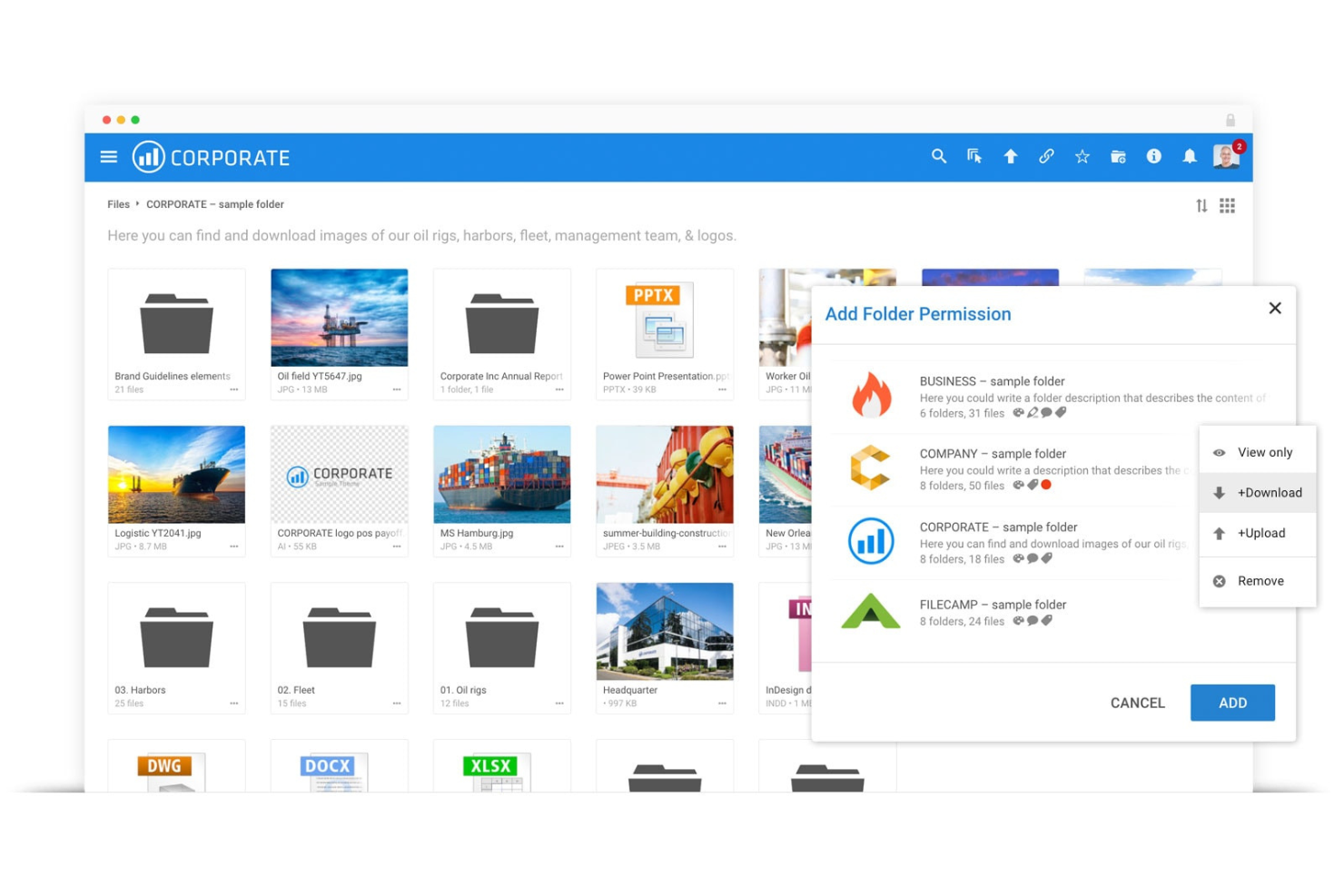
Filecamp è una piattaforma cloud per la gestione delle risorse digitali. È ideale per la condivisione di asset digitali grazie alla sua politica di utenti illimitati, che consente ampie capacità di condivisione senza costi aggiuntivi.
Perché Filecamp è una buona alternativa a Bynder:
Ho scelto Filecamp per questa lista perché offre una proposta unica con la sua politica di utenti illimitati in tutti i piani, rendendola una soluzione conveniente per la condivisione di risorse digitali. Questo la distingue come una valida alternativa a Bynder, soprattutto per le organizzazioni che intendono condividere asset su larga scala senza incorrere in costi extra per utente.
Caratteristiche distintive & integrazioni:
Funzionalità includono opzioni di branding personalizzabili, una libreria multimediale professionale per organizzare e condividere gli asset, oltre a strumenti di revisione online e approvazione. Queste funzionalità sono progettate per semplificare la gestione e la distribuzione delle risorse digitali, rendendo semplice per i team accedere ai file e collaborare su di essi.
Integrazioni comprendono una varietà di strumenti per potenziare le capacità di gestione delle risorse digitali. In particolare, Filecamp offre integrazioni con strumenti come Google Drive, Dropbox, Box, OneDrive, Slack, Zapier, Adobe Creative Cloud, WordPress, Joomla e Drupal.
Pros and Cons
Pros:
- Utenti illimitati in tutti i piani
- Interfaccia facile da usare
- Non è necessaria formazione per i nuovi utenti
Cons:
- Il piano base offre spazio di archiviazione limitato
- Opzioni di personalizzazione limitate
New Product Updates from Filecamp
Filecamp Adds More Flexible Link Files
Filecamp adds editable Link file targets, new opening options, and support for internal Filecamp destinations. These updates make Link files more flexible for navigation and shortcuts. For more information, visit Filecamp’s official site.
 .
.
Air
Ideale per la ricerca di contenuti alimentata dall’IA
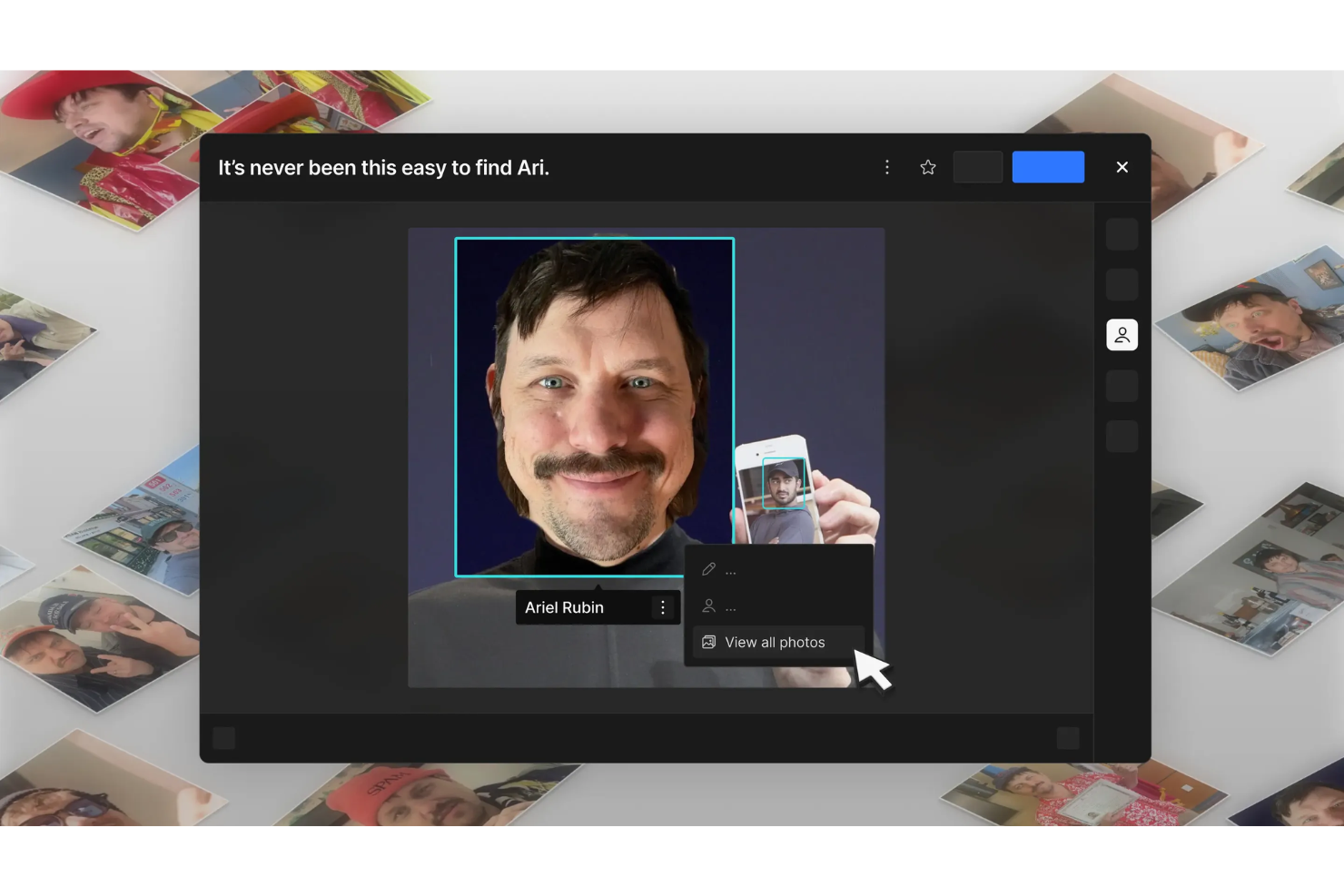
Air è una piattaforma progettata per gestire e scalare le operazioni creative. Offre uno spazio di lavoro visivo che aiuta i team a organizzare i propri processi e flussi di lavoro creativi in modo più dinamico e coinvolgente.
Perché Air è una buona alternativa a Bynder: Ho scelto Air come una valida alternativa a Bynder per le sue robuste capacità di intelligenza artificiale. L’IA di Air comprende il contenuto in modo tale da permetterti di cercare utilizzando colori, oggetti, volti e persino dialoghi, rendendo facilissimo trovare ciò che stai cercando. Questa funzione è particolarmente utile per i team che gestiscono grandi volumi di contenuti creativi. Inoltre, la funzione di version stacking di Air mantiene tutte le iterazioni del tuo lavoro in un unico posto, così non perdi mai traccia delle modifiche. Che tu stia aggiornando un design o revisionando un documento, puoi facilmente caricare nuove versioni senza perdere l’originale, rendendo semplice monitorare i progressi nel tempo
Funzionalità principali & integrazioni:
Le funzionalità includono il riconoscimento facciale, che rileva e tagga automaticamente le persone nelle foto, rendendo semplice cercare e organizzare i contenuti in base a chi vi appare. Un altro punto forte è la sincronizzazione desktop, che ti permette di accedere ai tuoi file all’istante senza bisogno del browser. Infine, la raccolta dei contenuti consente a chiunque di caricare asset direttamente nel tuo spazio di lavoro con un semplice link, semplificando la raccolta e la gestione dei materiali creativi.
Le integrazioni includono Adobe Experience Manager, Plytix, Bynder, MediaValet, Pics.io, Filecamp, 4ALLPORTAL, Cloudinary, Pimcore, Google Calendar, Slack e Airtable.
Pros and Cons
Pros:
- I tag intelligenti dell’IA potenziano la ricercabilità
- Il version stacking migliora il monitoraggio dei progetti
- La sincronizzazione desktop offre accesso immediato
Cons:
- Limite minimo di dieci utenti
- Costo elevato per il livello base
New Product Updates from Air

Air Showcases Introduces Custom Branding, Content Blocks, and Sub-Pages
Air Showcases now support custom branding, content blocks, sub-pages, and saved default layout settings, plus more control over removing items and branding options for Enterprise. For more information, visit Air's official site.

Frontify
Ideale per linee guida del brand

Frontify è una piattaforma completa per la gestione del brand. È ideale per creare e mantenere linee guida del marchio grazie ai suoi strumenti intuitivi e al sistema interconnesso di gestione delle risorse digitali.
Perché Frontify è una valida alternativa a Bynder:
Ho scelto Frontify per questa lista perché offre una piattaforma facile da usare che privilegia la coerenza del brand, pur consentendone la flessibilità e l'evoluzione. Il suo focus sulle linee guida del marchio la rende una delle migliori alternative a Bynder, offrendo ai team gli strumenti necessari per mantenere un'identità di brand coerente.
Caratteristiche e integrazioni principali:
Le funzionalità includono linee guida del marchio, gestione delle risorse digitali e modelli digitali & cartacei. La piattaforma è progettata per favorire la collaborazione e il coinvolgimento, elementi essenziali per mantenere coerenza e qualità nella comunicazione del brand.
Le integrazioni includono Templafy, Storyblok, EyeEm, Intercom, Loom, Google Docs, Google Sheets, Google Slides, Instagram e Vimeo.
Pros and Cons
Pros:
- Offre una prova gratuita per testare la piattaforma
- App mobile per accedere alle risorse ovunque
- Strumenti e funzioni per il brand integrati
Cons:
- La configurazione può risultare complessa e potrebbe richiedere supporto
- La piattaforma può offrire più funzionalità del necessario per organizzazioni di piccole dimensioni
Canto
Ideale per team di marketing

Canto è una piattaforma di gestione delle risorse digitali progettata per semplificare l'organizzazione e la distribuzione delle risorse. È ideale per i team di marketing grazie alle potenti capacità di ricerca, ai portali illimitati e alle guide di stile che garantiscono la coerenza del marchio.
Perché Canto è una valida alternativa a Bynder:
Ho scelto Canto per questa lista perché offre un set completo di funzionalità di gestione delle risorse digitali pensate appositamente per i team marketing. L'attenzione alle potenti funzioni di ricerca, all'integrazione tramite API e ai portali illimitati lo rendono un valido concorrente come alternativa a Bynder.
Funzionalità e integrazioni principali:
Le funzionalità includono una potente funzione di ricerca con tag intelligenti, riconoscimento facciale e riconoscimento del testo, che aiutano a organizzare le risorse digitali attraverso metadati ricercabili. Offre inoltre un'API per l'integrazione con altre piattaforme, portali illimitati per la distribuzione delle risorse e guide di stile per mantenere la coerenza del brand.
Le integrazioni comprendono una varietà di strumenti, tra cui Contentful, Contentstack, commercetools, Commerce Cloud, Sanity, Akeneo, Syndigo, ContentSquare, Conscia, Uniform, AWS e Google Cloud.
Pros and Cons
Pros:
- Potenti capacità di ricerca con tag intelligenti e riconoscimento facciale
- Portali illimitati per una distribuzione personalizzata delle risorse
- Supporto per API e sviluppo per funzionalità estese
Cons:
- Le informazioni sui prezzi non sono facilmente reperibili sul sito web
- Caricare i file può richiedere tempo

Ideale per l'automazione dei flussi di lavoro
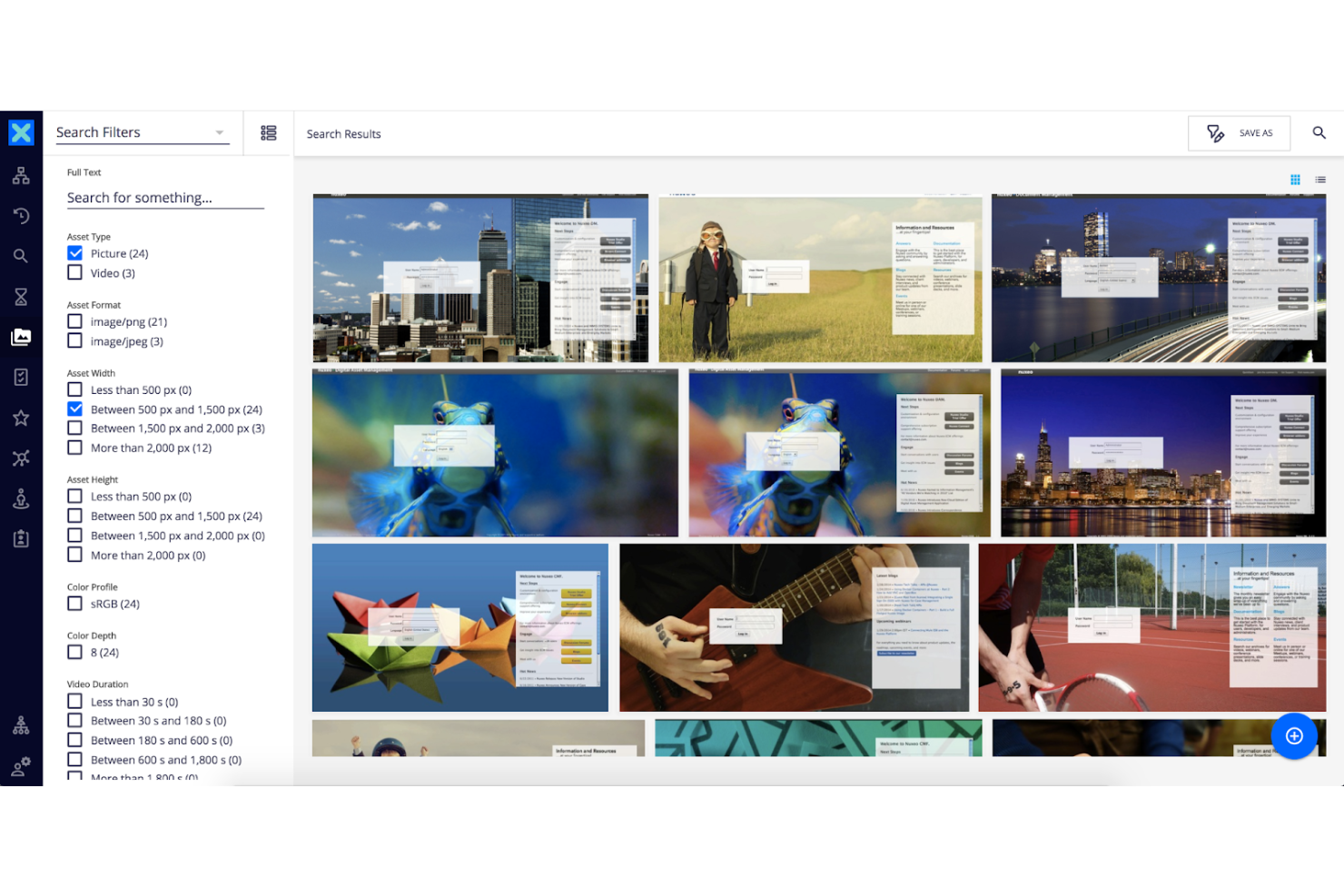
Nuxeo Platform è abile nella gestione di una varietà di contenuti, inclusi asset multimediali avanzati. Si distingue per l'automazione dei flussi di lavoro, sfruttando una piattaforma low-code per migliorare l'efficienza ed estrarre maggiore valore da contenuti e dati.
Perché Nuxeo Platform è una valida alternativa a Bynder:
Ho scelto Nuxeo Platform per le sue solide capacità nell'automazione di workflow complessi e nella gestione di grandi volumi di contenuti. Il suo design cloud-native e la sofisticata gestione dei metadati, potenziati da intelligenza artificiale e machine learning, la rendono una formidabile alternativa a Bynder per organizzazioni con esigenze articolate di gestione di asset digitali.
Funzionalità e integrazioni principali:
Funzionalità comprendono la completa gestione di contenuti aziendali, con particolare attenzione alla gestione avanzata dei metadati e al supporto per AI e machine learning. È progettata per essere scalabile ed efficiente, utilizzando tecnologia cloud e un approccio low-code per lo sviluppo applicativo.
Integrazioni includono Adobe Creative Cloud, M-Files, MongoDB, Box, Dropbox Business, Salesforce Sales Cloud, Google Drive, Elastic Stack, Microsoft Outlook e Microsoft 365.
Pros and Cons
Pros:
- Ampio accesso API e numerose opzioni di integrazione
- Il framework open-source consente un'ampia personalizzazione
- Capace di gestire esigenze prestazionali su larga scala
Cons:
- Configurazione backend complessa richiesta
- Costo proibitivo per alcune aziende

Ideale per la personalizzazione
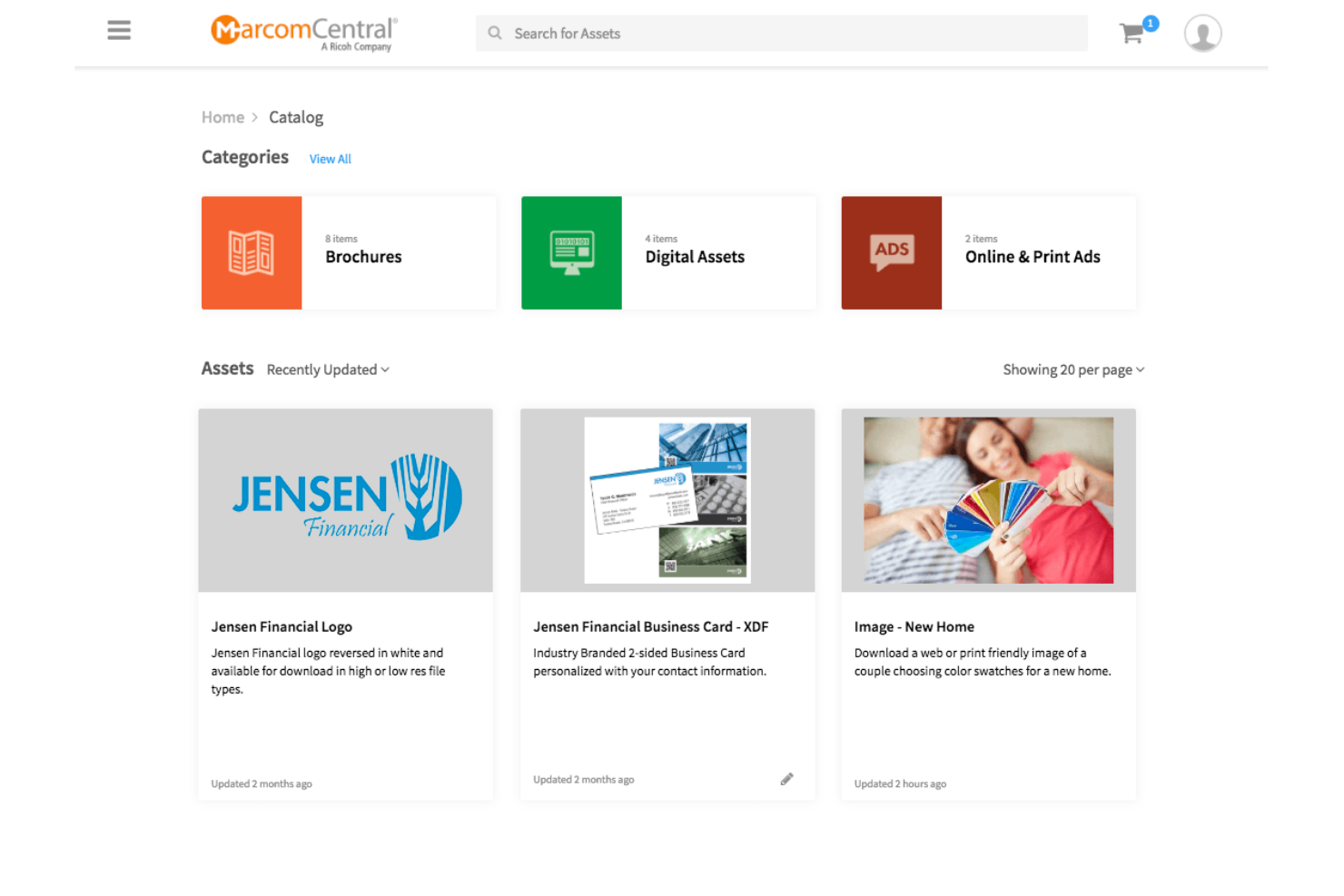
MarcomCentral è una piattaforma di marketing che centralizza le risorse del brand. Si distingue per la personalizzazione, consentendo ai team di creare materiali di marketing su richiesta.
Perché MarcomCentral è una valida alternativa a Bynder:
Ho scelto MarcomCentral per questa lista perché offre solide opzioni di personalizzazione, essenziali per i brand che necessitano di adattare frequentemente i propri materiali di marketing. La sua capacità di fornire materiali promozionali personalizzabili su richiesta lo rende una delle migliori alternative a Bynder.
Funzionalità e integrazioni principali:
Le funzionalità includono una suite di strumenti dedicati alla gestione del brand, gestione delle risorse digitali e automazione dei flussi di lavoro. Supporta la conformità e offre modelli dinamici, analisi di utilizzo e distribuzione dei materiali per garantire che i contenuti di marketing siano efficaci e sempre aggiornati.
Le integrazioni comprendono diversi strumenti per potenziare le sue capacità come piattaforma di gestione delle risorse digitali e automazione del marketing. Tra queste troviamo Salesforce, Adobe Creative Cloud, Microsoft Office, Workfront, Marketo, Eloqua, Google Analytics, Zapier, Shopify e WordPress.
Pros and Cons
Pros:
- Garantisce che tutti i materiali di marketing rispettino le linee guida del brand
- Automatizza le attività di marketing e la distribuzione dei materiali
- Funziona perfettamente con altri strumenti aziendali
Cons:
- Può risultare difficile da apprendere e utilizzare inizialmente
- Potrebbe essere costoso per le organizzazioni di dimensioni ridotte
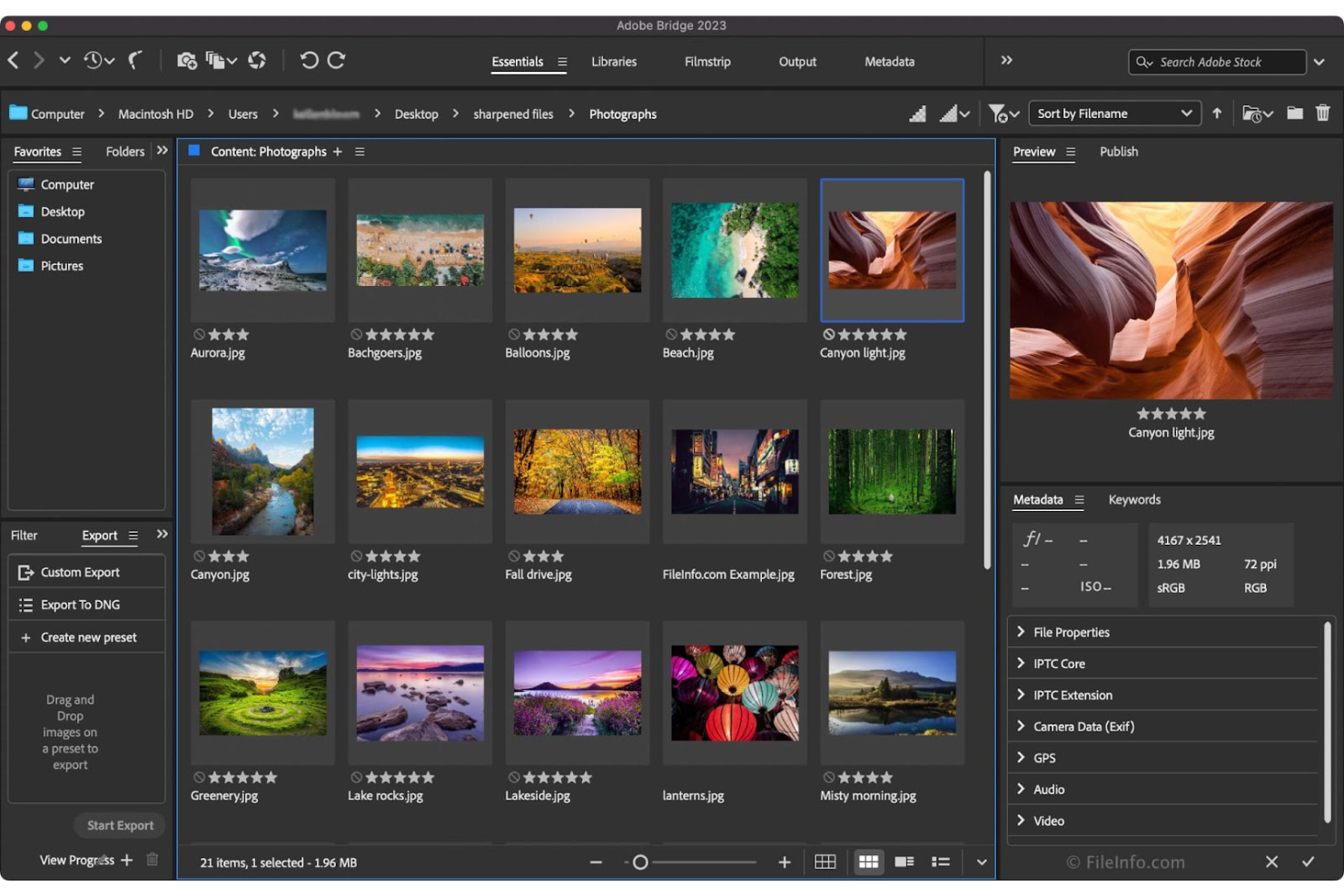
Adobe Bridge è un potente gestore di risorse creative che consente di visualizzare in anteprima, organizzare, modificare e pubblicare rapidamente e facilmente molteplici risorse creative. È la scelta ideale per l'integrazione con Adobe perché centralizza le risorse creative ed è progettato per funzionare perfettamente con altre applicazioni Adobe, migliorando il flusso di lavoro per gli utenti che si affidano all'ecosistema Adobe.
Perché Adobe Bridge è una buona alternativa a Bynder:
Ho scelto Adobe Bridge per questa lista perché offre una soluzione completa per la gestione delle risorse creative all'interno dell'ecosistema Adobe. La sua capacità di integrarsi strettamente con le applicazioni di Adobe Creative Cloud lo rende un'alternativa di spicco a Bynder per chi già utilizza prodotti Adobe per i propri flussi di lavoro creativi.
Funzionalità principali e integrazioni:
Le funzionalità includono una piattaforma centralizzata per la gestione delle risorse creative, tra cui la possibilità di modificare i metadati, aggiungere parole chiave, etichette e valutazioni alle risorse, e organizzare le risorse tramite raccolte. Offre inoltre filtri avanzati e funzioni di ricerca nei metadati, collaborazione con le Creative Cloud Libraries e la possibilità di pubblicare su Adobe Stock direttamente da Bridge.
Le integrazioni comprendono diverse applicazioni Adobe per potenziarne la funzionalità come strumento di gestione delle risorse digitali. Queste integrazioni includono Adobe Photoshop, Adobe Illustrator, Adobe InDesign, Adobe Premiere Pro, Adobe After Effects, Adobe XD, Adobe Lightroom, Adobe Camera Raw, Adobe Stock e Adobe Acrobat.
Pros and Cons
Pros:
- Gestione centralizzata delle risorse creative
- Funzionalità avanzate di modifica e ricerca dei metadati
- Integrazione diretta con Adobe Creative Cloud Libraries e Adobe Stock
Cons:
- Integrazione limitata con software non Adobe
- Possibili costi aggiuntivi per la suite completa di Adobe Creative Cloud


ioMoVo è una piattaforma di gestione delle risorse digitali che semplifica la gestione dei contenuti. Si distingue per le sue capacità di intelligenza artificiale, che offrono un'organizzazione intelligente delle risorse e opzioni di ricerca avanzate.
Perché ioMoVo è una valida alternativa a Bynder:
Ho scelto ioMoVo per questa lista perché offre funzionalità uniche basate sull'IA che migliorano il modo in cui le aziende gestiscono i loro contenuti digitali. Queste caratteristiche lo rendono un concorrente degno di nota rispetto a Bynder, soprattutto per chi cerca strumenti di intelligenza artificiale per migliorare la gestione delle risorse digitali.
Funzionalità e integrazioni principali:
Le funzionalità includono capacità di IA che si estendono alla categorizzazione intelligente dei contenuti e alla ricerca intuitiva, elementi essenziali per una gestione efficiente delle risorse digitali. Offre inoltre strumenti collaborativi per il lavoro in team e supporta una vasta gamma di tipi di media, garantendo versatilità nella gestione delle risorse.
Le integrazioni comprendono Adobe Creative Cloud, Microsoft Office, WordPress, Drupal, Slack, Zapier, Salesforce, Hootsuite, Asana, Trello e Jira.
Pros and Cons
Pros:
- Strumenti avanzati di IA per la categorizzazione e la ricerca dei contenuti
- Funzionalità collaborative per il lavoro in team
- Supporto per una vasta gamma di tipi di media
Cons:
- È richiesto un minimo di cinque postazioni, il che potrebbe non essere adatto alle aziende molto piccole
- La gamma completa di integrazioni potrebbe non coprire tutte le esigenze degli utenti

Cloudinary
Ideale per l’ottimizzazione dei media
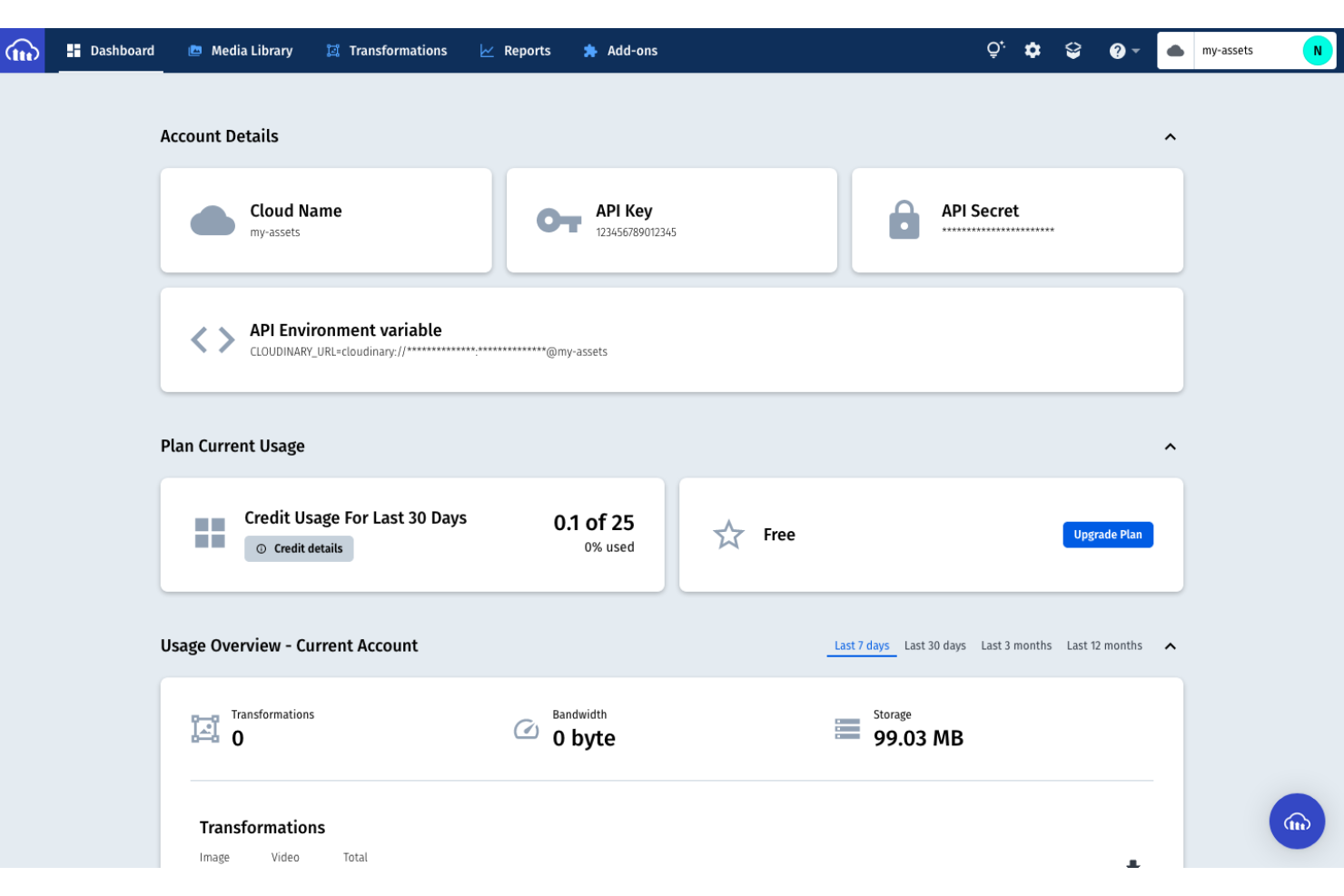
Cloudinary è una soluzione completa per la gestione di immagini e video. È ideale per l’ottimizzazione dei media grazie al suo robusto set di funzionalità per la trasformazione, l’ottimizzazione e la distribuzione efficiente di file multimediali su varie piattaforme.
Perché Cloudinary è una valida alternativa a Bynder:
Ho scelto Cloudinary per questa lista perché offre una potente suite di strumenti per la gestione dei media, essenziali per l’ottimizzazione delle risorse digitali. La sua attenzione all’automazione e alle soluzioni basate su intelligenza artificiale lo rende un’alternativa di spicco a Bynder, in particolare per le aziende che desiderano migliorare i processi di ottimizzazione dei propri media.
Funzionalità e integrazioni distintive:
Le funzionalità includono un ampio ventaglio di opzioni che coprono tutto il ciclo di vita di gestione di immagini e video. Questo comprende una libreria multimediale per organizzare le risorse, auto-tagging tramite intelligenza artificiale con riconoscimento dei contenuti, controllo degli accessi e amministrazione basata sui ruoli. La piattaforma offre inoltre funzionalità di ottimizzazione e distribuzione che garantiscono esperienze reattive e di alta qualità su qualsiasi dimensione di schermo, dispositivo o rete. La modifica e gli effetti visivi sono supportati con oltre 100 tipi di trasformazioni e strumenti di intelligenza artificiale e media intelligence come la ricerca visiva e il ritaglio intelligente aggiungono ulteriore valore.
Le integrazioni comprendono una varietà di strumenti, tra cui Contentful, Contentstack, commercetools, Salesforce Commerce Cloud, Sanity, Akeneo, Syndigo, ContentSquare, Conscia, Uniform, AWS e Google Cloud.
Pros and Cons
Pros:
- Ampia libreria API e SDK completi per l’integrazione
- Funzionalità avanzate di intelligenza artificiale per la gestione di immagini e video
- Distribuzione reattiva e di alta qualità su qualsiasi dispositivo
Cons:
- Prezzi potenzialmente superiori rispetto ad alcune alternative
- La vasta gamma di funzionalità può risultare impegnativa per progetti di piccole dimensioni
New Product Updates from Cloudinary

Cloudinary Integrates with Klaviyo for Personalized Email Visuals
Cloudinary integrates with Klaviyo to generate personalized images and GIFs from customer and event data. This reduces manual design work for email campaigns. For more information, visit Cloudinary’s official site.
 .
.Altre alternative a Bynder da prendere in considerazione
Ecco alcune alternative aggiuntive a Bynder da esaminare se non hai trovato quello che cercavi sopra.
- Acquia DAM (Widen)
Ideale per la scalabilità
- Brandfolder
Ideale per la coerenza del brand
- MediaValet
Ideale per l'accessibilità globale


Recensioni correlate sugli strumenti di gestione dei progetti
Se non hai ancora trovato quello che cerchi qui, dai un'occhiata a queste altre recensioni di strumenti di gestione dei progetti che abbiamo selezionato per te:
- Creatore di diagrammi di Gantt
- Strumenti per la produttività
- Software per il monitoraggio dei progetti
- Software per la pianificazione dei progetti
- Software di gestione dei progetti
- Software per la gestione delle risorse
Hoe ik alternatieven voor Bynder evalueer
Ik evalueer elke optie op twee niveaus: de basis die een tool moet bieden—denk aan DAM, versiebeheer en goedkeuringswerkstromen—en de onderscheidende kenmerken die het belangrijkst zijn voor creatieve operationele en marketingteams.
Kernfunctionaliteit (basisvereisten voor deze lijst)
Bij het selecteren van tools voor mijn lijst beoordeel ik elke tool op een schaal van 0 (biedt de functionaliteit niet) tot 5 (blink uit op dit gebied) voor elke hieronder genoemde kernfunctionaliteit. Vervolgens zet ik de totaalscore van de tool om naar een percentage. Elke tool moet een minimale totaalscore van 65% behalen om in aanmerking te komen voor opname.
- Beheer van digitale middelen: Ik zoek naar een gecentraliseerde bibliotheek waar teams creatieve bestanden kunnen opslaan, taggen en doorzoeken—niet alleen een eenvoudige bestandsopslag, maar gestructureerde metagegevens en filters waarmee een specifiek campagnebestand snel kan worden gevonden.
- Beheer van projectwerkstromen: Elke tool moet taaktoewijzing, tijdlijnen en afhankelijkheden bieden die rechtstreeks aansluiten op creatieve productie, zoals het volgen van een rebrandingproject vanaf het binnenkomen van de briefing tot en met de uiteindelijke overdracht van bestanden.
- Beoordelings- en goedkeuringswerkstromen: Ik evalueer hoe belanghebbenden werk annoteren en goedkeuren—of de tool contextuele aantekeningen op pdf's, afbeeldingen of video ondersteunt en of goedkeuringen volgens een meerfasige routing kunnen verlopen.
- Versiebeheer: Het bijhouden van revisies van middelen is belangrijk wanneer vijf belanghebbenden aan dezelfde bannerset werken. Ik controleer op versiegeschiedenis, vergelijkingsweergaven en de mogelijkheid om terug te keren naar eerdere iteraties.
- Controles voor merkbeheer: Tools moeten rolgebaseerde rechten, centrale punten voor merkrichtlijnen of gebruiksrechten voor middelen bieden, zodat verspreid werkende teams elke keer het juiste, goedgekeurde logo of sjabloon gebruiken.
- Integraties en delen: Creatieve teams werken in Adobe Creative Cloud, Figma en Canva. Ik controleer op native invoegtoepassingen, veilige externe deellinks en open API-toegang die het DAM koppelt aan je bredere marketingtechnologie.
Zodra ik een lijst heb met tools die aan deze criteria voldoen, kijk ik naar wat elk platform onderscheidt.
Onderscheidende factoren (wat aanbieders van elkaar onderscheidt)
Zo vergelijk ik verschillende aanbieders met elkaar:
Opvallende functies
Automatisch taggen op basis van AI is een belangrijke onderscheidende factor—wanneer je team elke week honderden campagnebestanden uploadt, wordt het handmatig invoeren van metagegevens al snel een echte bottleneck. Ik evalueer ook functies voor middelen- en capaciteitsplanning, die leidinggevenden van creatieve operations helpen de werklast van ontwerpers over gelijktijdige projecten te verdelen. Gebruiksanalyses maken het beeld compleet door te laten zien welke middelen worden gedownload, welke ongebruikt blijven en hoe de projectdoorvoer zich in de loop der tijd ontwikkelt.
Meer dan functies alleen
Transparantie over prijzen is hier belangrijk, omdat veel alternatieven voor Bynder uiteenlopen van openbare zelfbedieningsabonnementen tot offertes die alleen voor ondernemingen beschikbaar zijn. Ik controleer of het licentiemodel van een aanbieder meegroeit met de omvang van je team of je opslagbehoeften zonder onverwachte kosten. Ondersteuning bij migratie is een andere factor die ik evalueer—wisselen van DAM-platform betekent dat duizenden bestanden moeten worden verplaatst, en ik zoek naar aanbieders die hulpmiddelen voor bestandsmigratie of speciale hulp bij de ingebruikname bieden. Schaalbaarheid telt ook mee: een tool die werkt voor een creatief team van 10 personen moet nog steeds goed presteren wanneer je bibliotheken met middelen voor meerdere merken in verschillende regio's beheert.
Perché cercare un'alternativa a Bynder
Potresti cercare un'alternativa a Bynder se hai:
- Preoccupazioni relative ai costi: i prezzi di Bynder potrebbero essere oltre il tuo budget.
- Requisiti delle funzionalità: potresti aver bisogno di funzionalità specifiche che Bynder non offre.
- Esigenze relative all'esperienza utente: desideri un'interfaccia utente intuitiva o una migliore esperienza utente.
- Esigenze di integrazione: le funzionalità di integrazione non sono in linea con il tuo stack tecnologico esistente.
- Esigenze di assistenza clienti: ti sei trovato ad aver bisogno di un'assistenza clienti più reattiva o completa.
Caratteristiche principali di Bynder
Ecco alcune delle caratteristiche principali di Bynder, per aiutarti a confrontare ciò che offrono le soluzioni alternative:
- Gestione delle risorse digitali: carica e organizza facilmente i file con la funzionalità di trascinamento e utilizza la ricerca assistita dall'IA per trovare rapidamente ciò che ti serve.
- Flusso di lavoro delle risorse: migliora i tuoi processi creativi dal briefing iniziale all'approvazione finale con strumenti di collaborazione per gli stakeholder interni ed esterni.
- Flusso di lavoro dei contenuti: utilizza strumenti per la creazione di contenuti assistita dall'IA e gestisci il tuo calendario dei contenuti con funzionalità per i flussi di lavoro di collaborazione e approvazione.
- Funzionalità dello studio: progetta e crea modelli per mantenere un branding coerente e adatta i tuoi contenuti a vari formati e dimensioni.
- Modelli del marchio per la stampa: gestisci e modifica facilmente i modelli InDesign ed esporta i tuoi file pronti per la stampa in diversi formati.
- Analisi di Bynder: ottieni informazioni sull'attività degli utenti e dei contenuti per prendere decisioni basate sui dati, con funzionalità di reportistica per una facile distribuzione.
- Accesso e autenticazione: usufruisci di un accesso sicuro con il supporto per Google SSO e la mappatura delle directory di gruppo.