

I 10 migliori strumenti di gestione delle risorse digitali per le piccole imprese

Elenco dei migliori software di gestione delle risorse digitali per piccole imprese


Archiviare e condividere file digitali può diventare complicato, soprattutto quando il tuo team gestisce risorse dei clienti, contenuti creativi e scadenze ravvicinate. Se ti è mai capitato di perdere tempo per trovare la versione corretta di un file, conosci bene la frustrazione.
Il software di gestione delle risorse digitali (DAM) mantiene i file organizzati e facilmente accessibili. È particolarmente utile per le piccole imprese che non hanno tempo da dedicare alla gestione di sistemi disordinati.
In questo articolo ti presenterò i migliori strumenti DAM per i piccoli team, concentrandomi sulle funzionalità che ti aiutano a rimanere organizzato, risparmiare tempo e portare avanti i progetti.
Perché fidarsi dei nostri consigli sui software
Il nostro team testa e recensisce software dal 2012. In quanto project manager noi stessi, sappiamo quanto sia difficile — e importante — scegliere il software giusto.
Per questa guida, abbiamo valutato gli strumenti attraverso test pratici e ricerche indipendenti, assegnando un punteggio agli strumenti in base ai nostri criteri di selezione. Ci basiamo inoltre sulle competenze di leader di pensiero del settore e di professionisti attivi nella gestione dei progetti.
Le nostre recensioni riflettono il nostro giudizio editoriale umano, non un discorso di vendita.
Riepilogo dei migliori software di gestione delle risorse digitali per piccole imprese
Questa tabella comparativa riassume i dettagli dei prezzi delle mie migliori selezioni di software DAM per piccole imprese, per aiutarti a trovare la soluzione più adatta al tuo budget e alle esigenze della tua attività.
| Tool | Best For | Trial Info | Price | ||
|---|---|---|---|---|---|
| 1 | Ideale per la collaborazione sulle risorse | Prova gratuita di 7 giorni | Da $100/mese/utente | Website | |
| 2 | Ideale per portali personalizzabili con il proprio brand | Demo gratuita disponibile | Prezzo su richiesta | Website | |
| 3 | Ideale per la ricerca intelligente delle risorse | Piano gratuito disponibile | Da $10/mese (fatturazione annuale) | Website | |
| 4 | Ideale per i filtri di ricerca dinamici | Piano gratuito disponibile | Da $99/mese (fatturazione annuale) | Website | |
| 5 | Ideale per controllo granulare degli accessi utente | Prova gratuita di 30 giorni disponibile | Da $250/mese (fatturato annualmente) | Website | |
| 6 | Ideale per le funzionalità di branding personalizzato | Prova gratuita di 30 giorni | Da $29/utente/mese | Website | |
| 7 | Ideale per contenuti creativi | Demo gratuita disponibile | Prezzi su richiesta | Website | |
| 8 | Ideale per le operazioni di marketing | Demo gratuita disponibile | Prezzi su richiesta | Website | |
| 9 | Ideale per la distribuzione degli asset | Prova gratuita + demo disponibile | Da $300/utente/mese | Website | |
| 10 | Ideale per la gestione dei dati | Demo gratuita disponibile | Prezzo su richiesta | Website |

Recensioni dei migliori software di gestione delle risorse digitali per piccole imprese
Di seguito trovi le mie sintesi dettagliate dei migliori software DAM per piccole imprese inclusi nel mio elenco. Le mie recensioni offrono un’analisi approfondita delle funzionalità principali, dei pro e & contro, delle integrazioni e dei casi d’uso ideali di ogni strumento, per aiutarti a trovare quello più adatto a te.

Pics.io
Ideale per la collaborazione sulle risorse

Pics.io è una piattaforma di gestione delle risorse digitali per piccole imprese che organizza, archivia e centralizza immagini, video e file creativi nel cloud.
Per chi è consigliato Pics.io?
Pics.io è adatto a piccoli team creativi e di marketing che hanno bisogno di uno spazio condiviso per archiviare, organizzare e gestire insieme le risorse visive.
Perché ho scelto Pics.io
Ho scelto Pics.io come uno dei migliori strumenti grazie all’ottima gestione della collaborazione tra team creativi che lavorano su risorse condivise. Apprezzo in particolare la funzionalità di commento diretto su immagini e video: i commenti sono contrassegnati con l’ora e possono anche essere fissati a specifici timecode di un video, rendendo il ciclo di feedback tra designer, editor e stakeholder molto più snello. Il mio team utilizza anche il controllo delle versioni per approvare o rifiutare direttamente le versioni dei file sulla piattaforma, eliminando la necessità di inseguire i feedback tramite email. Le autorizzazioni basate su ruoli consentono inoltre di controllare esattamente chi può visualizzare, modificare o condividere ogni risorsa, mantenendo contractor esterni e freelance al loro posto senza escluderli del tutto.
Caratteristiche principali di Pics.io
- Campi di metadati personalizzati: Crea campi di metadati personalizzati oltre alle opzioni predefinite, adattandoli ai flussi di lavoro e alla terminologia del tuo team.
- Tagging automatico con IA: Genera automaticamente parole chiave e tag per le risorse caricate, inclusa la rilevazione dei volti nelle librerie di immagini.
- Ricerche salvate: Salva query di ricerca e combinazioni di filtri usati frequentemente per consentire al tuo team di recuperare rapidamente insiemi ricorrenti di risorse.
- Link di condivisione a scadenza: Imposta date di scadenza per i link di condivisione delle risorse per controllare quanto a lungo partner esterni o clienti potranno accedere ai tuoi file.
Integrazioni di Pics.io
Pics.io offre integrazioni native con Google Drive, Amazon S3 e Adobe Creative Cloud. È disponibile un’API per integrazioni personalizzate.
Pros and Cons
Pros:
- Interfaccia intuitiva per una facile navigazione e utilizzo
- Controllo delle versioni completo per la gestione delle risorse
- Ampie opzioni di integrazione con strumenti e servizi popolari
Cons:
- Requisiti minimi per il numero di utenti
- La curva di apprendimento per le funzionalità avanzate può richiedere formazione aggiuntiva
New Product Updates from Pics.io
Pics.io Adds AVIF File Support
Pics.io now supports AVIF files, expanding the image formats you can upload and manage in the platform. This gives teams more flexibility when working with modern image assets. For more information, visit Pics.io’s official site.
 .
.
Ideale per portali personalizzabili con il proprio brand
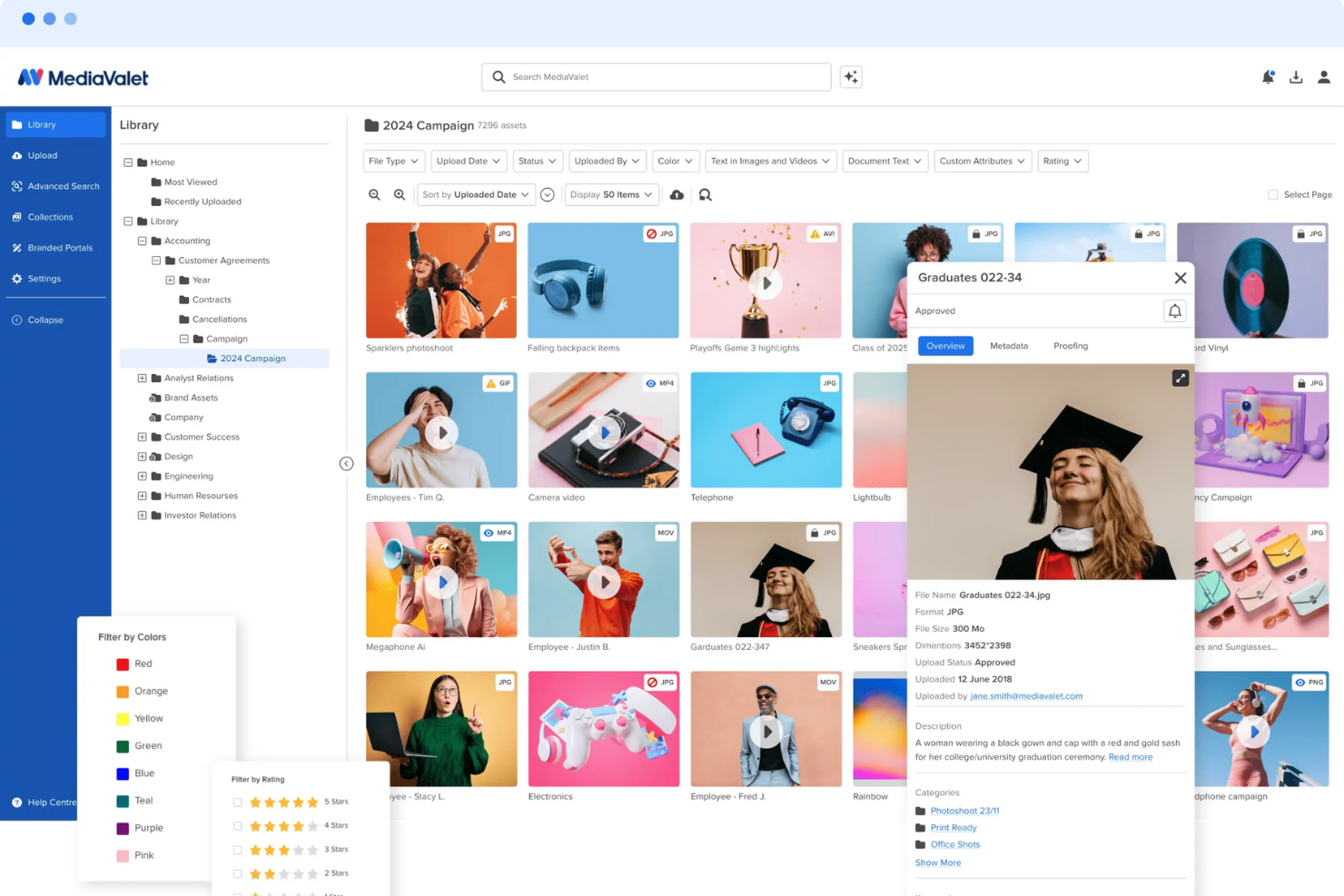
MediaValet è una piattaforma di gestione delle risorse digitali per le piccole imprese che consente di organizzare, archiviare, ricercare e condividere file digitali in una libreria cloud centralizzata.
Per chi è ideale MediaValet?
MediaValet è adatto a team di marketing e creativi di piccole imprese che necessitano di un luogo centralizzato per gestire e distribuire le risorse del marchio.
Perché ho scelto MediaValet
MediaValet si guadagna un posto nella mia lista grazie alla funzione Experience Portals, che permette ai team marketing delle piccole imprese di creare spazi di condivisione delle risorse completamente personalizzati con colori, tipografia e media su misura. Mi piace che questi portali non siano solo pagine statiche, ma utilizzino un CMS flessibile che consente di apportare aggiornamenti in tempo reale ai contenuti del marchio senza dover ricostruire nulla. È anche possibile impostare permessi dettagliati per ogni portale, così i partner esterni accedono solo alle risorse di cui hanno bisogno mentre i file sensibili restano protetti. Il modello di accesso self-service permette al team creativo di dedicare meno tempo alla gestione delle richieste di risorse e più tempo al lavoro vero e proprio.
Funzionalità principali di MediaValet
- Tagging dei metadati potenziato dall'IA: Genera automaticamente tag descrittivi per le risorse usando l'intelligenza artificiale, inclusa la rilevazione di oggetti, il riconoscimento dei colori e il riconoscimento facciale per migliorare la ricerca.
- Ricerca avanzata con attributi personalizzati: Filtra le risorse per tipo di file, stato, testo del documento, valutazione e tag personalizzati, con la possibilità di salvare e condividere le visualizzazioni di ricerca tra il team.
- Revisioni delle risorse: Revisiona e annota le risorse direttamente sulla piattaforma per far avanzare i file in un flusso di approvazione senza cambiare strumenti.
- Templating: Personalizza modelli bloccati e in linea con il brand (grazie a Marq) direttamente dal DAM senza dover coinvolgere il team di design.
Integrazioni di MediaValet
MediaValet offre integrazioni native con Adobe Creative Cloud, Microsoft 365, WordPress, Drupal e Hootsuite. È disponibile un'API per integrazioni personalizzate.
Pros and Cons
Pros:
- Accesso da mobile consente la gestione delle risorse ovunque
- Funzionalità di sicurezza avanzate garantiscono la protezione delle risorse
- Capacità di ricerca avanzate permettono di trovare rapidamente le risorse
Cons:
- Opzioni limitate per la personalizzazione dell'interfaccia utente
- Possibile curva di apprendimento per i nuovi utenti

Air
Ideale per la ricerca intelligente delle risorse

Air è una piattaforma di gestione delle risorse digitali per piccole imprese che offre ricerca potenziata dall'IA, organizzazione visiva, controllo delle versioni e strumenti di collaborazione di squadra per la gestione di file creativi.
Per chi è ideale Air?
Air è adatto a piccoli team creativi—come marketing, design e team di contenuti—che gestiscono ampie librerie di risorse visive e hanno bisogno di un modo più rapido per trovare e condividere file.
Perché ho scelto Air
Ho incluso Air nella mia lista perché la sua ricerca potenziata dall’IA gestisce molto bene grandi librerie di contenuti visivi. Posso cercare per colore, soggetto o anche testo all’interno di un’immagine—senza etichettare manualmente un solo file. L'etichettatura automatica di Air fa tutto il lavoro, così il mio team può trovare una foto prodotto specifica o una risorsa di una campagna in pochi secondi invece che scavare tra le cartelle. Apprezzo anche che i risultati della ricerca siano mostrati in una griglia visiva, rendendo facile scansionare e confermare a colpo d’occhio di aver trovato il file giusto.
Caratteristiche principali di Air
- Revisioni e approvazioni: Lascia commenti, annota e approva le risorse direttamente dentro Air senza dover cambiare strumento.
- Controllo delle versioni: Tieni traccia delle modifiche tra le iterazioni delle risorse così il tuo team saprà sempre qual è il file più aggiornato e approvato.
- Link di condivisione: Condividi collezioni di risorse con stakeholder esterni tramite un solo link, senza bisogno di creare un account per visualizzare.
- Trascrizione video e audio: Trascrivi automaticamente i contenuti parlati nei file video e audio, rendendoli ricercabili per ciò che viene detto.
Integrazioni di Air
Air offre integrazioni native con Slack, Adobe Creative Cloud, Zapier e Canva. È disponibile un'API per integrazioni personalizzate.
Pros and Cons
Pros:
- Facilita la condivisione semplice di risorse visive
- Supporta vari formati di file
- Buono per le funzionalità di approvazione e feedback
Cons:
- Non ideale per risorse digitali non visive
- Manca un'app mobile dedicata
New Product Updates from Air

Air Showcases Introduces Custom Branding, Content Blocks, and Sub-Pages
Air Showcases now support custom branding, content blocks, sub-pages, and saved default layout settings, plus more control over removing items and branding options for Enterprise. For more information, visit Air's official site.

Ideale per i filtri di ricerca dinamici

Stockpress è una piattaforma di gestione delle risorse digitali per piccole imprese che organizza, archivia e condivide file con permessi personalizzabili e funzionalità di ricerca avanzate.
Per Chi è Ideale Stockpress?
Stockpress è adatto a piccoli team creativi e di marketing che hanno bisogno di un modo semplice per archiviare, organizzare e condividere le risorse del brand.
Perché Ho Scelto Stockpress
Stockpress si guadagna il suo posto nella mia shortlist grazie alla grande efficacia dei suoi filtri dinamici per i team che gestiscono ampie librerie di risorse in formati misti. Puoi filtrare i file per orientamento, estensione, proprietario, tag, stato e altro—tutto contemporaneamente—il che significa che trovare un PNG approvato della campagna dello scorso trimestre richiede pochi secondi, senza dover scorrere cartelle infinite. Mi piace anche la funzione Raccolte Intelligenti, che consente di creare collezioni dinamicamente utilizzando termini di ricerca e tag salvati, così i gruppi di risorse più usati restano sempre aggiornati senza manutenzione manuale. Le ricerche fissate ti permettono inoltre di salvare e ripetere combinazioni complesse di filtri.
Caratteristiche Principali di Stockpress
- Tagging AI: Etichetta le immagini caricate con una precisione fino al 90%, riducendo il lavoro manuale sui metadati nelle grandi librerie di risorse.
- Versionamento dei file: Carica nuove versioni dei file direttamente su quelli esistenti, creando uno stack di versioni così il tuo team saprà sempre qual è il file attuale.
- Upload ospiti: Genera pagine pubbliche di caricamento così i collaboratori esterni possono aggiungere file direttamente a raccolte specifiche nel tuo workspace.
- Annotazioni sui file: Aggiungi commenti su aree specifiche di qualsiasi tipo di file, inclusi i video, per fornire feedback precisi durante le revisioni.
Integrazioni Stockpress
Stockpress offre integrazioni native con Adobe Creative Cloud, Google Drive, Dropbox e Slack. È disponibile un'API per integrazioni personalizzate.
Pros and Cons
Pros:
- Gestisce grandi volumi di risorse
- Ottime funzionalità di tagging AI
- Si possono creare raccolte personalizzate di risorse
Cons:
- Potrebbero essere offerte più integrazioni
- Supporto alla migrazione dei file limitato al piano enterprise
Ideale per controllo granulare degli accessi utente

Tagbox.io è una piattaforma di gestione delle risorse digitali progettata per piccoli team che necessitano di un archivio file organizzato, ricerca veloce e controlli di accesso strutturati per la gestione delle risorse di marca.
Per chi è Tagbox.io?
Tagbox.io è ideale per piccoli team di marketing e creativi che hanno bisogno di un hub centralizzato e ricercabile per conservare e condividere risorse visive senza una complessa configurazione enterprise. La maggior parte delle funzionalità AI è disponibile su tutti i piani.
Perché ho scelto Tagbox.io
Ho scelto Tagbox.io perché i suoi controlli di autorizzazione sono flessibili senza essere eccessivamente complicati. Puoi assegnare accessi a livello di raccolta, facilitando l'accesso a membri del team o collaboratori esterni solo a ciò di cui hanno bisogno. Combinato con la ricerca in linguaggio naturale, aiuta i piccoli team a rimanere organizzati senza dover passare ore ad etichettare manualmente i file.
Caratteristiche principali di Tagbox.io
- Ricerca in linguaggio naturale: Combina query per parole chiave con filtri per raccolte, persone e campi di metadati.
- Controlli di accesso per ospiti: Consenti ai collaboratori esterni di visualizzare o scaricare risorse senza accesso completo alla piattaforma.
- Facilità d'uso: Presenta un'interfaccia pulita e intuitiva, rendendo semplice per i piccoli team organizzare, trovare e condividere risorse.
Integrazioni Tagbox.io
Collega Tagbox.io tramite Tagbox Desktop (trascina e rilascia in qualsiasi app), Zapier, Make e una REST API. Sono disponibili flussi di lavoro personalizzati per Enterprise.
Pros and Cons
Pros:
- Controlli di autorizzazione dettagliati a livello di raccolta
- Ricerca potenziata da AI che riduce il lavoro di etichettatura manuale
- Interfaccia semplice adatta a piccoli team
Cons:
- Integrazioni native limitate oltre agli strumenti principali di archiviazione e comunicazione

Filecamp
Ideale per le funzionalità di branding personalizzato

Filecamp è una piattaforma di gestione delle risorse digitali pensata per le piccole imprese che necessitano di un archivio centralizzato dei file, portali clienti personalizzati e permessi utente configurabili.
Per chi è ideale Filecamp?
Filecamp è adatto a piccoli team creativi e di marketing che hanno bisogno di una soluzione semplice per archiviare, organizzare e condividere risorse di brand con clienti o collaboratori.
Perché ho scelto Filecamp
Filecamp si è guadagnato un posto nella mia lista perché è uno dei pochi strumenti DAM che include utenti illimitati in tutti i piani, una caratteristica non indifferente per piccoli team attenti al budget. Mi piace che non ci siano penalizzazioni per la crescita del team o per aggiungere clienti e collaboratori. Le funzioni di branding personalizzato permettono di applicare il proprio logo, colori e un URL personalizzato al portale delle risorse: così i clienti vedono il tuo brand invece di uno strumento di terze parti. Inoltre, il tagging automatico sfrutta l'analisi delle immagini per etichettare le risorse automaticamente, riducendo così il lavoro manuale per organizzare una libreria di file in costante crescita.
Funzionalità chiave di Filecamp
- Collezioni: Raggruppa file provenienti da più cartelle in una singola raccolta per facilitare la condivisione e la collaborazione con partner esterni.
- Revisione e approvazione online: Aggiungi commenti, etichette e stati di approvazione direttamente ai file per gestire i cicli di revisione senza uscire dalla piattaforma.
- Controllo delle versioni: Archivia e accedi alle versioni precedenti di un file così il team può monitorare le modifiche e, se necessario, tornare indietro.
- Richiedi link di caricamento: Genera link di caricamento che permettono a chiunque di inviare file direttamente nel tuo account Filecamp, anche senza login utente.
Integrazioni di Filecamp
Le integrazioni native non sono chiaramente documentate. Filecamp offre una API per integrazioni personalizzate.
Pros and Cons
Pros:
- Prezzo fisso con utenti illimitati
- Opzioni di branding personalizzabile
- Condivisione avanzata dei file e revisione online
Cons:
- Costi extra per spazio di archiviazione aggiuntivo
- Potrebbe avere difficoltà a caricare e recuperare file di grandi dimensioni
New Product Updates from Filecamp
Filecamp Adds More Flexible Link Files
Filecamp adds editable Link file targets, new opening options, and support for internal Filecamp destinations. These updates make Link files more flexible for navigation and shortcuts. For more information, visit Filecamp’s official site.
 .
.
Ideale per contenuti creativi

PhotoShelter è una piattaforma di gestione delle risorse digitali progettata per le piccole imprese che necessitano di organizzare, archiviare e collaborare su file creativi come immagini e video.
Per chi è pensato PhotoShelter?
PhotoShelter è una buona soluzione per piccoli team creativi—come marketing, design o studi fotografici—che hanno bisogno di un luogo centrale per gestire e condividere risorse visive.
Perché ho scelto PhotoShelter
PhotoShelter si guadagna il suo posto tra i migliori nella mia lista per la sua capacità di gestire i contenuti creativi in ogni fase del flusso di lavoro. Apprezzo in particolare il sistema di auto-etichettatura e ricerca visiva basati sull'IA, che permette al mio team di trovare l'immagine o il video giusti in pochi secondi invece di dover cercare manualmente tra le cartelle. La funzione di distribuzione dei contenuti in tempo reale è un altro punto di forza per i team creativi: una volta approvati gli asset, è possibile inviarli direttamente agli stakeholder o ai canali social senza cambiare strumento. Le analisi integrate mostrano quali asset vengono usati e cosa cercano gli stakeholder, così posso prendere decisioni più informate su quali contenuti dare priorità.
Funzionalità chiave di PhotoShelter
- Controllo delle versioni: Tieni traccia delle modifiche agli asset nel tempo e ripristina le versioni precedenti dei file direttamente all'interno della libreria.
- Permessi personalizzati e controlli di accesso: Definisci livelli di accesso dettagliati per singoli utenti o gruppi per controllare chi può visualizzare, scaricare o condividere specifici asset.
- Gestione dei video: Carica, organizza e distribuisci file video insieme alle immagini in un'unica libreria centralizzata.
- Gestione dei contenuti generati dagli utenti (UGC): Raccogli e gestisci foto e video autentici inviati dal tuo pubblico, archiviandoli insieme ai tuoi asset di brand.
Integrazioni PhotoShelter
Le integrazioni includono WordPress, Adobe Creative Cloud, Canva, SketchUp, Drupal, Content Hub e Dropbox.
Pros and Cons
Pros:
- Funzionalità di ricerca avanzata e controllo delle versioni
- Campi metadata personalizzabili
- Interfaccia intuitiva
Cons:
- Opzioni di integrazione limitate
- Problemi di prestazione con librerie di asset di grandi dimensioni e operazioni in blocco

Ideale per le operazioni di marketing

IntelligenceBank è una piattaforma di gestione delle risorse digitali progettata per le piccole imprese che necessitano di uno spazio centralizzato per l’archiviazione delle risorse, gestione del brand e funzionalità di automazione del flusso di lavoro.
Per chi è ideale IntelligenceBank?
IntelligenceBank è adatto per piccoli team marketing che devono gestire asset di brand, approvazioni creative e distribuzione dei contenuti in un unico posto.
Perché ho scelto IntelligenceBank
Ho incluso IntelligenceBank tra le mie scelte principali perché copre l'intero flusso di lavoro delle operazioni di marketing su un’unica piattaforma—dai brief creativi e assegnazione dei compiti fino alle revisioni, approvazioni e distribuzione delle risorse. Quello che apprezzo particolarmente è il modulo di gestione delle attività di marketing, che permette di costruire flussi di approvazione personalizzati e di monitorare ogni fase dal brief all’approvazione finale utilizzando Kanban board e calendari marketing. Trovo veramente utile anche il rilevamento di conformità alimentato dall’IA—che segnala automaticamente rischi per il brand e rischi legali nei contenuti prima che siano pubblicati, eliminando molte interazioni tra i team marketing e legale.
Caratteristiche principali di IntelligenceBank
- Controllo delle versioni: Visualizza, confronta e ripristina versioni precedenti di qualsiasi risorsa direttamente dalla piattaforma.
- Controlli di accesso basati sui ruoli: Imposta i permessi utente per gestire chi può visualizzare, modificare o condividere specifiche risorse e cartelle.
- Tagging dei metadati tramite IA: Genera automaticamente tag di metadati per immagini e video per rendere le risorse ricercabili senza input manuale.
- Report sull’utilizzo delle risorse: Monitora dove e quando le risorse sono state utilizzate tramite dashboard di report configurabili.
Integrazioni di IntelligenceBank
IntelligenceBank offre integrazioni native con Adobe Creative Cloud, Microsoft 365, Google Workspace, Drupal, WordPress e Salesforce. È disponibile un’API per integrazioni personalizzate.
Pros and Cons
Pros:
- Flussi di lavoro personalizzabili specifici per il marketing
- Set completo di strumenti per le operazioni di marketing
- Potenti funzionalità di gestione della conformità e del brand
Cons:
- La fatturazione annuale potrebbe non essere preferita da tutte le aziende
- Numero minimo di utenti richiesto

Ideale per la distribuzione degli asset
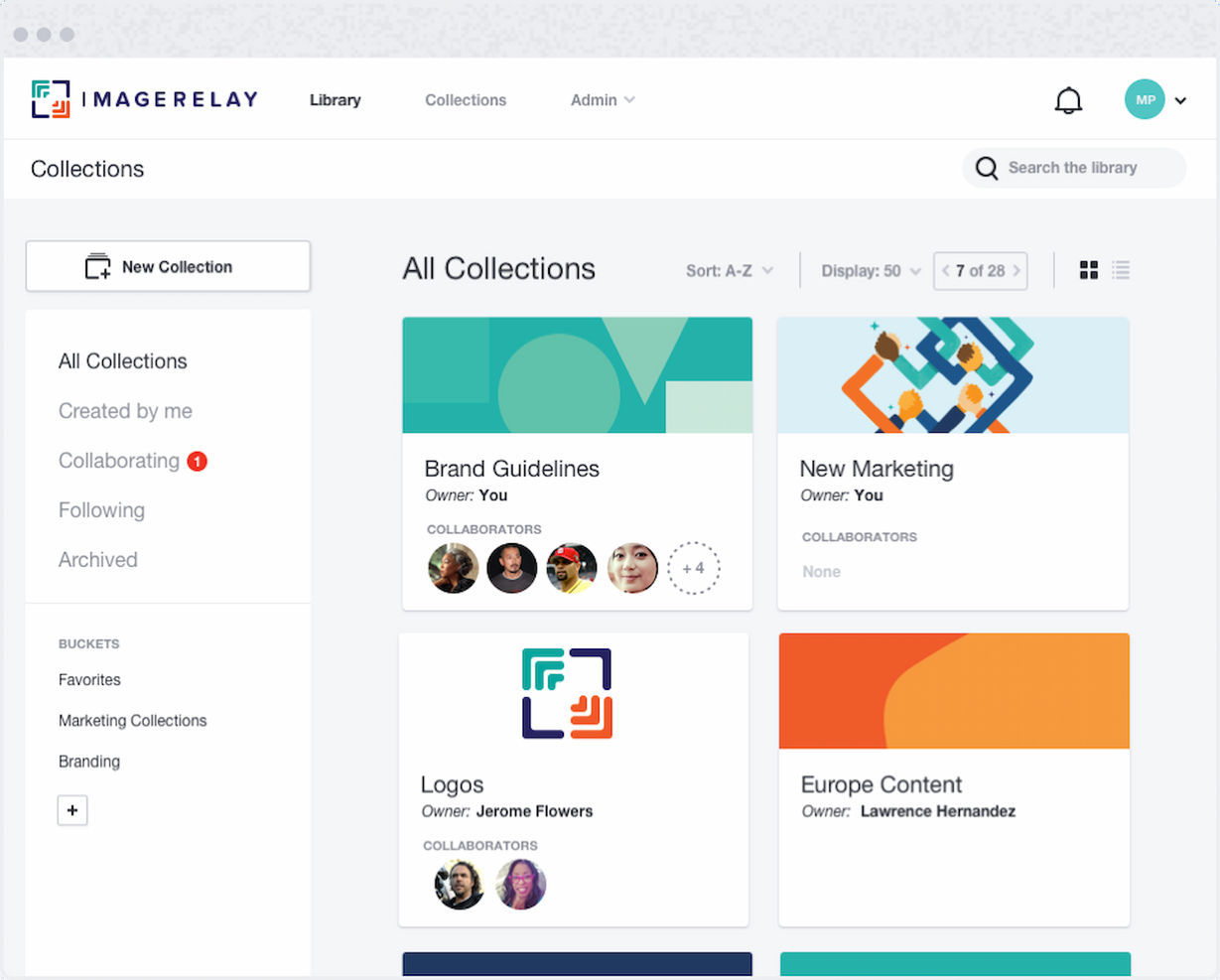
Image Relay è una piattaforma di gestione delle risorse digitali per piccole imprese che centralizza l'archiviazione dei file, organizza i contenuti digitali e supporta la condivisione e la distribuzione di asset a marchio.
Per chi è ideale Image Relay?
Image Relay è adatto a piccoli team marketing e creativi che hanno bisogno di un luogo centrale dove archiviare, organizzare e condividere asset di brand con partner esterni o clienti.
Perché ho scelto Image Relay
Ho scelto Image Relay come uno dei migliori strumenti perché accelera la consegna degli asset alle persone giuste. La funzionalità Marketing Delivery consente al mio team di creare raccolte di file con il marchio, condivisibili, a cui partner esterni, rivenditori o clienti possono accedere senza bisogno di login. Apprezzo anche la funzionalità di portale personalizzato a marchio, che offre a distributori e rivenditori un hub con etichetta bianca fornito degli asset approvati più recenti. Una distribuzione controllata e conforme al brand come questa è difficile da ottenere con uno strumento generico di condivisione file.
Caratteristiche principali di Image Relay
- Ricerca e tagging alimentati da AI: Organizza e contrassegna automaticamente gli asset in modo che il tuo team possa trovare i file senza inserire manualmente i metadati.
- Flusso di lavoro per approvazione: Gli asset passano attraverso un processo centralizzato di revisione e approvazione prima di essere finalizzati o condivisi.
- Portali brandizzabili personalizzabili: Crea hub dedicati e personalizzati dove i team interni e i partner esterni possono accedere agli asset approvati.
- Gestione delle informazioni sui prodotti: Collega i dati sui prodotti—come SKU, specifiche e descrizioni—direttamente alle risorse digitali correlate in un unico luogo.
Integrazioni di Image Relay
Image Relay offre integrazioni native con Adobe Creative Cloud, Microsoft 365, Shopify, WordPress e Drupal. È disponibile un'API per integrazioni personalizzate.
Pros and Cons
Pros:
- Distribuzione efficiente degli asset tramite link di condivisione dinamici e aggiornamenti automatici
- Campi dei metadati personalizzabili per una gestione degli asset su misura
- Interfaccia intuitiva e funzione di ricerca avanzata
Cons:
- Prezzo iniziale più elevato rispetto ad alcune altre soluzioni DAM
- Necessita di esplorazione per sfruttare appieno le potenzialità della piattaforma

Pimcore
Ideale per la gestione dei dati
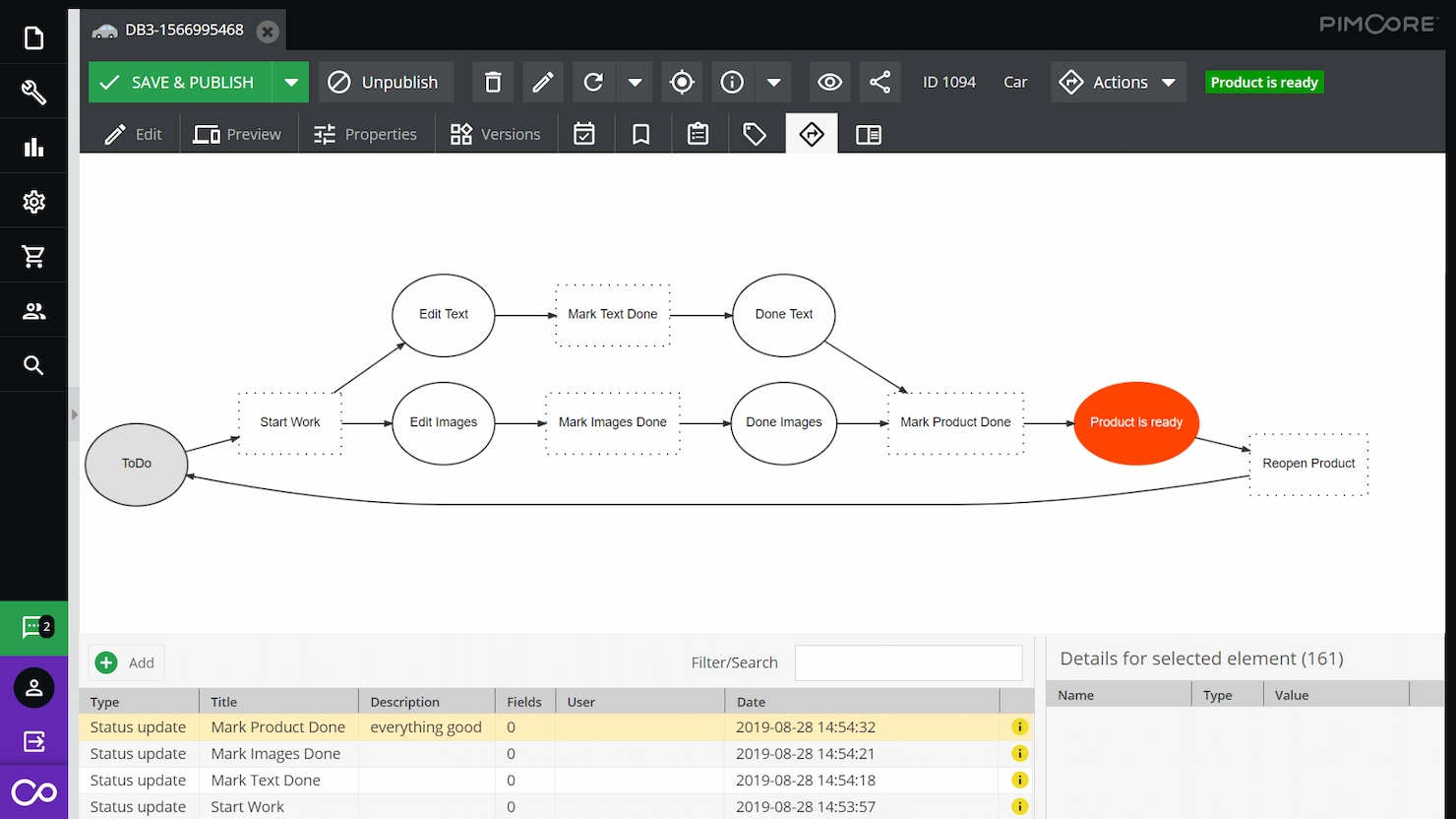
Pimcore è una piattaforma di gestione delle risorse digitali che combina l'organizzazione degli asset, la gestione delle informazioni di prodotto e l'archiviazione centralizzata dei dati per le piccole imprese che necessitano di un controllo unificato sui contenuti digitali.
Per chi è più indicato Pimcore?
Pimcore è adatto alle piccole imprese che gestiscono grandi volumi di contenuti digitali insieme ai dati di prodotto, in particolare nei settori retail, manifatturiero o ecommerce.
Perché ho scelto Pimcore
Ho incluso Pimcore tra le mie scelte principali perché va oltre la maggior parte dei DAM per la gestione dei dati. Mentre un DAM tradizionale si limita ad archiviare e taggare i file, Pimcore consente al mio team di costruire modelli di dati personalizzati utilizzando oltre 45 componenti dati configurabili: così dati strutturati di prodotto, risorse digitali e dati master convivono nello stesso luogo e rimangono collegati. Apprezzo in particolare il livello di Master Data Management, che crea un 'golden record' tra domini come prodotti, fornitori e sedi, mantenendo tutto consistente senza riconciliazione manuale. Gli strumenti di gestione della qualità dei dati—regole di campo obbligatorio, controlli di completezza e dashboard in tempo reale—consentono al mio team di identificare le lacune prima che le risorse o i dati di prodotto arrivino a un canale.
Funzionalità principali di Pimcore
- Conversione degli asset: Codifica degli asset tra formati diversi, applicazione di watermark e upscaling basato su IA direttamente all'interno della piattaforma.
- Controllo versione: Ogni modifica a un asset crea una nuova versione, con cronologia completa e possibilità di rollback su documenti, asset e oggetti.
- Portali di brand: Portali centralizzati e personalizzabili per distribuire asset di brand a team interni e stakeholder esterni, con ricerca e filtri.
- Pubblicazione multicanale: Distribuzione degli asset su digitale, social, mobile, stampa e canali POS da un'unica fonte.
Integrazioni Pimcore
Pimcore offre integrazioni native con Adobe Creative Cloud, SAP, Salesforce, Akeneo e Magento, e fornisce un'API per integrazioni personalizzate.
Pros and Cons
Pros:
- Piattaforma unificata per diverse esigenze di gestione dei dati
- Flessibile e personalizzabile per adattarsi alle esigenze aziendali
- Forti capacità di integrazione con altri sistemi
Cons:
- Può necessitare di competenze tecniche per sfruttare appieno la piattaforma
- Richiede molte risorse, soprattutto su larga scala
Altri software di gestione delle risorse digitali per piccole imprese
Ecco alcune opzioni aggiuntive di software DAM per piccole imprese che non sono entrate nel mio elenco, ma che vale comunque la pena valutare:
- Canto
Ideale per l'organizzazione delle risorse
- Lingo
Ideale per l'organizzazione centralizzata degli asset
- Asset Bank
Ideale per la gestione del brand
- Mailchimp
Migliore gestione delle risorse in una piattaforma di marketing
- Guru
Ideale per asset di brand verificati
- Adobe Experience Manager
Ideale per esperienze personalizzate
- Extensis Portfolio
Ideale per l'utilizzo delle risorse
- Daminion
Ideale per formati multimediali diversificati
- Cloudinary
Ideale per l'ottimizzazione dei media
- Plytix
Ideale per le risorse digitali di prodotto
- Brandfolder
Ideale per l’etichettatura degli asset tramite intelligenza artificiale
- Connecter Suite
Ideale per un setup minimo


Come Valuto il Software di Gestione delle Risorse Digitali per Piccole Imprese
Valuto questi strumenti su due livelli: le funzionalità fondamentali di cui ogni piccolo team ha bisogno per smettere di inviare file tramite email e cercare tra cartelle, e i fattori differenzianti che segnalano una migliore compatibilità a lungo termine.
Funzionalità di Base (Requisiti Fondamentali per Questa Lista)
Quando seleziono strumenti per la mia lista, attribuisco a ciascuno un punteggio da 0 (non offre la funzionalità) a 5 (eccelle in quest'area) per ogni funzionalità di base elencata di seguito. Poi, calcolo il punteggio totale dello strumento convertendolo in percentuale. Ogni strumento deve raggiungere un punteggio totale minimo del 65% per essere preso in considerazione nell'elenco.
- Libreria Centralizzata delle Risorse: Controllo se uno strumento consente ai piccoli team di archiviare, organizzare e visualizzare file come PSD, video e template di brand in un unico luogo ricercabile.
- Metadati & Tagging: Tagging e campi metadati personalizzati sono fondamentali perché determinano la velocità con cui puoi trovare una risorsa specifica tra decine di cartelle di progetto.
- Controllo delle Versioni: Cerco la cronologia automatica delle versioni e la possibilità di annullare le modifiche, così il team può tracciare tutte le revisioni di un deliverable senza dover rinominare i file o perdere il lavoro precedente.
- Permessi & Controllo degli Accessi: I piccoli team coinvolgono spesso freelance o clienti, quindi valuto come ogni strumento gestisce i ruoli utente, i permessi delle cartelle e l'accesso degli ospiti.
- Condivisione & Collaborazione: Considero se è possibile condividere risorse tramite link brandizzati, impostare date di scadenza e raccogliere feedback attraverso commenti o annotazioni nello stesso luogo.
- Integrazioni con Strumenti di Progetto: Una piattaforma DAM che si integra con strumenti come Asana, Trello, Slack o Adobe Creative Cloud si inserisce nel flusso di lavoro esistente invece di creare un nuovo silo.
Una volta in possesso di una lista di strumenti che soddisfano i criteri, analizzo cosa distingue ogni piattaforma dalle altre.
Fattori Differenzianti (Cosa Distingue i Fornitori)
Ecco come confronto e metto in contrasto i diversi fornitori:
Funzionalità Uniche
La ricerca basata sull’IA è fondamentale—cerco strumenti che assegnano tag automaticamente agli upload e permettono di trovare le risorse descrivendo il loro contenuto, non solo tramite il nome del file. I flussi di approvazione creativa guadagnano punti extra quando includono annotazioni, gestione degli stati e notifiche che mantengono il lavoro in movimento senza comunicazioni frammentate. Anche i portali di brand sono importanti, soprattutto per team che condividono asset approvati con clienti o partner tramite un’esperienza curata e personalizzata, invece dei semplici link alle cartelle.
Oltre le Funzionalità
La struttura dei prezzi è molto importante per i piccoli team. Guardo se un fornitore offre piani trasparenti per utente o per spazio di archiviazione senza obbligare a contratti enterprise. Velocità di implementazione è un altro fattore che valuto—le piccole imprese raramente dispongono di un amministratore dedicato, quindi onboarding autogestito, strumenti di migrazione e documentazione esaustiva fanno la differenza. Valuto anche archiviazione e prestazioni, in particolare come una piattaforma gestisce file creativi di grandi dimensioni come immagini RAW o montaggi video senza ritardi o spese impreviste per eccedenze.
Come scegliere un software di gestione delle risorse digitali per piccole imprese
È facile perdersi in lunghi elenchi di funzionalità e strutture di prezzo complesse. Per aiutarti a rimanere concentrato mentre affronti il tuo specifico processo di selezione del software, ecco un elenco di fattori da tenere a mente:
| Fattore | Cosa considerare |
| Scalabilità | Cerca uno strumento che possa crescere insieme alla tua attività, aggiungendo utenti, spazio di archiviazione o funzionalità senza richiedere un aggiornamento importante. |
| Integrazioni | Assicurati che il software si colleghi agli strumenti che il tuo team utilizza già, come applicazioni per la gestione dei progetti, la progettazione o l'archiviazione nel cloud. |
| Personalizzazione | Il software dovrebbe consentirti di modificare le strutture delle cartelle, i campi dei metadati e i ruoli degli utenti in base ai tuoi flussi di lavoro. |
| Facilità d'uso | Scegli uno strumento con un'interfaccia chiara e una navigazione semplice, così il tuo team potrà iniziare a utilizzarlo senza una lunga curva di apprendimento. |
| Budget | Trova un software con prezzi adatti alle dimensioni e alle esigenze del tuo team. Fai attenzione ai costi nascosti, come gli extra per lo spazio di archiviazione o i componenti aggiuntivi. |
| Misure di sicurezza | Assicurati che lo strumento offra autorizzazioni per gli utenti, crittografia e registri di controllo per proteggere le risorse sensibili o destinate ai clienti. |
| Ricerca dei file | Lo strumento dovrebbe offrire filtri di ricerca avanzati, tag e metadati per aiutare il tuo team a trovare rapidamente le risorse. |
| Collaborazione | Verifica la presenza di funzionalità come link condivisi, strumenti di revisione o flussi di approvazione che possano aiutare il tuo team a lavorare insieme sulle risorse. |
Tendenze dei software di gestione delle risorse digitali per le piccole imprese
Durante la mia ricerca, ho raccolto innumerevoli aggiornamenti sui prodotti, comunicati stampa e registri delle versioni di diversi fornitori di software DAM. Ecco alcune delle tendenze emergenti che sto tenendo d'occhio:
- Indicizzazione tramite IA e ricerca visiva: sempre più strumenti utilizzano l'IA per indicizzare automaticamente immagini e video o consentono agli utenti di effettuare ricerche caricando un'immagine di riferimento. Questo aiuta i team, come quelli di fotografi freelance o di marketing, a risparmiare tempo nell'organizzazione e nella ricerca dei contenuti visivi.
- Strumenti per la gestione dei diritti: i DAM per piccole imprese stanno iniziando a includere strumenti per monitorare i termini delle licenze e i diritti di utilizzo. Questo aiuta i team a evitare problemi di copyright quando riutilizzano immagini stock, video o contenuti creativi. È particolarmente utile per le piccole imprese che utilizzano software DAM per l'eCommerce.
- Funzionalità per la raccolta collaborativa di feedback: le piattaforme stanno aggiungendo strumenti integrati per annotazioni, commenti e approvazioni, così i team possono esaminare i file senza utilizzare applicazioni esterne. In questo modo, tutto rimane in un unico posto durante le revisioni creative o le approvazioni dei clienti.
- Strumenti di pubblicazione essenziali: alcuni fornitori stanno aggiungendo semplici strumenti di pubblicazione per inviare direttamente le risorse a siti web, post sui social o campagne email. Questo riduce il numero di passaggi per i team che gestiscono contenuti su più piattaforme.
- Metriche di sostenibilità: alcuni strumenti ora monitorano l'impronta di carbonio digitale o suggeriscono modi per ridurre gli sprechi di spazio di archiviazione. È una funzionalità di nicchia, ma utile per i piccoli team che vogliono allineare la gestione delle risorse agli obiettivi di sostenibilità.
Che cos'è un software di gestione delle risorse digitali per le piccole imprese?
Il software di gestione delle risorse digitali per le piccole imprese è uno strumento che aiuta i team ad archiviare, organizzare, trovare e condividere file digitali da un unico punto centralizzato. Questi strumenti sono spesso utilizzati da esperti di marketing, designer, team di contenuti e titolari di piccole imprese che hanno bisogno di accedere rapidamente a contenuti visivi o con elementi del marchio. Se il tuo team gestisce regolarmente risorse video, valuta la scelta di un software di gestione delle risorse digitali per video che supporti la riproduzione, la modifica e la condivisione dei file.
L'indicizzazione, i controlli delle autorizzazioni e il monitoraggio delle versioni aiutano i team a rimanere organizzati, risparmiare tempo e assicurarsi che tutti utilizzino i file corretti. In generale, questi strumenti aiutano i piccoli team a mantenere sotto controllo i propri contenuti digitali e a renderli facili da utilizzare.
Funzionalità dei software di gestione delle risorse digitali per le piccole imprese
Quando scegli un software di gestione delle risorse digitali per le piccole imprese, presta attenzione alle seguenti funzionalità chiave:
- Accesso al cloud: consente al tuo team di accedere ai file da qualsiasi luogo, aspetto utile se alcuni membri lavorano da remoto.
- Libreria centralizzata dei file: archivia tutte le tue risorse digitali in un unico posto, così il tuo team può trovare e utilizzare facilmente i file.
- Indicizzazione dei metadati: consente di assegnare ai file tag personalizzati, rendendo più semplice cercare e ordinare le risorse.
- Controllo delle versioni: monitora le modifiche e gli aggiornamenti alle risorse, così tutti lavorano con il file più recente.
- Autorizzazioni degli utenti: consente di controllare chi può visualizzare, modificare o condividere le risorse, una funzione particolarmente utile nei piccoli team con ruoli diversi.
- Filtri di ricerca: aiutano a trovare rapidamente file specifici utilizzando filtri come tipo di file, data, tag o autore del caricamento.
- Strumenti di anteprima e riproduzione: consentono agli utenti di visualizzare immagini, video o documenti senza scaricarli.
- Link condivisi e download: facilitano l'invio delle risorse a clienti o collaboratori esterni al tuo team.
- Flussi di lavoro per le approvazioni: favoriscono la collaborazione nelle piccole imprese, consentendo ai membri del team di esaminare e approvare le risorse prima dell'utilizzo.
- Monitoraggio dell'utilizzo dei file: mostra chi utilizza quali risorse e in che modo, aiutandoti a capire quali vengono utilizzate e quali ignorate.
Vantaggi dei software di gestione delle risorse digitali per le piccole imprese
L'implementazione di un software di gestione delle risorse digitali per le piccole imprese può offrire numerosi vantaggi al tuo team e alla tua attività. Eccone alcuni che puoi aspettarti:
- Lavoro da remoto più semplice: l'accesso al cloud consente al tuo team di accedere ai propri file da qualsiasi luogo, a casa o in viaggio.
- Accesso più rapido ai file: tag, filtri e strumenti di ricerca aiutano il tuo team a trovare ciò di cui ha bisogno senza dover cercare tra le cartelle.
- Migliore controllo delle versioni: il monitoraggio delle versioni fa sì che tutti utilizzino il file più recente, evitando confusione o errori.
- Collaborazione del team migliorata: i link condivisi, le autorizzazioni e gli strumenti di approvazione facilitano la collaborazione dei piccoli team.
- Condivisione più sicura: le autorizzazioni degli utenti e le impostazioni di accesso consentono di controllare chi può visualizzare e scaricare ogni file.
- Risparmio di tempo: una libreria centralizzata e una buona organizzazione riducono il tempo dedicato a cercare, ricreare o sostituire i file persi.
- Maggiore chiarezza sull'utilizzo delle risorse: gli strumenti di monitoraggio mostrano come vengono utilizzate le risorse, aiutandoti a decidere cosa conservare o aggiornare.
Leggi anche: stai cercando uno strumento DAM in grado di gestire gli eventi? Dai un'occhiata al nostro elenco dei migliori strumenti di gestione delle risorse digitali per eventi.
Costi e prezzi dei software di gestione delle risorse digitali per le piccole imprese
Per chi non ha mai utilizzato un software DAM, comprendere le varie opzioni di piano e i relativi costi è fondamentale per prendere una decisione informata, in linea sia con le esigenze operative sia con i vincoli di budget. Di seguito è riportata una tabella con i vari piani e prezzi dei software DAM per le piccole imprese.
Tabella comparativa dei piani dei software di gestione delle risorse digitali per le piccole imprese
| Tipo di piano | Prezzo medio | Funzionalità comuni |
| Opzione gratuita | $0 | Gestione di base delle risorse, spazio di archiviazione limitato e assistenza della community |
| Base | $0 - $25/mese | Categorizzazione delle risorse, gestione di base dei file, accesso limitato degli utenti e funzionalità di base per la ricerca e i filtri |
| Intermedio | $25 - $500/mese | Controllo avanzato delle risorse, maggiore capacità di archiviazione, licenze utente aggiuntive e ricerca e filtri avanzati |
| Premium | $500+/mese | Libreria completa delle risorse, gestione avanzata dei metadati, funzionalità di integrazione e analisi complete |
Le piccole imprese dovrebbero valutare attentamente il costo totale di possesso, comprese eventuali commissioni nascoste o costi aggiuntivi per l'assistenza e l'integrazione, per assicurarsi di scegliere una soluzione che offra il miglior valore in base alle proprie esigenze specifiche. Ad esempio, dovresti fare un rapido conteggio dei membri del team per capire quante persone avranno bisogno di accedere al software. Diversi fornitori DAM, come Pics.io, applicano costi per utente, quindi questo ti aiuterà a capire quanto può diventare costoso.
Un'ulteriore opzione consiste nello scegliere un software open source di gestione delle risorse digitali o un software gratuito di gestione delle risorse digitali, poiché può aiutare a organizzare le risorse senza spendere troppo, a testare l'idoneità di uno strumento di questo tipo per la propria strategia e a decidere se investire in uno strumento a pagamento.
Con il software giusto, le piccole imprese possono ottenere significativi ritorni sull'investimento grazie a una migliore organizzazione delle risorse, flussi di lavoro più efficienti e una collaborazione potenziata.
Domande frequenti sul software di gestione delle risorse digitali per piccole imprese
In che modo il software di gestione delle risorse digitali differisce dai servizi di archiviazione cloud?
Sebbene sia il software di gestione delle risorse digitali sia i servizi di archiviazione cloud offrano soluzioni di archiviazione, il software DAM dispone di funzionalità più avanzate pensate per la gestione delle risorse digitali. A differenza dell’archiviazione cloud di base, i sistemi DAM includono strumenti per categorizzare e aggiungere tag alle risorse, cercare contenuti utilizzando i metadati, automatizzare i flussi di lavoro e integrarsi con altri sistemi aziendali. L’archiviazione cloud è spesso soltanto un luogo in cui conservare i file, mentre il DAM è una soluzione completa per gestire il ciclo di vita delle risorse digitali. Molte piattaforme DAM offrono inoltre applicazioni compatibili con Mac dedicate o interfacce basate sul web ottimizzate per macOS, garantendo una gestione fluida delle risorse negli ambienti Apple.
Il software open source di gestione delle risorse digitali è un'opzione valida per le piccole imprese?
Il software open source di gestione delle risorse digitali può essere un’opzione valida per le piccole imprese, soprattutto per quelle con budget limitati o esigenze specifiche di personalizzazione. Le soluzioni DAM open source consentono spesso una maggiore flessibilità e possono essere adattate alle esigenze specifiche dell’azienda. Tuttavia, è importante considerare la possibile necessità di competenze tecniche per gestire e mantenere il software, oltre al livello di supporto della community o commerciale disponibile.
In che modo il software di gestione delle risorse digitali migliora la collaborazione tra i membri del team?
Le piattaforme DAM migliorano la collaborazione fornendo una piattaforma centralizzata in cui i membri del team possono accedere alle risorse digitali e condividerle in tempo reale. Funzionalità come il controllo delle versioni, i commenti e i flussi di lavoro per l’approvazione facilitano la comunicazione e garantiscono che tutti lavorino con i file più aggiornati. Ciò riduce il rischio di errori e di duplicazione del lavoro, rendendo più efficienti i progetti collaborativi.
Qual è il prossimo passo?
Iscriviti alla newsletter di DPM per ricevere aggiornamenti regolari quando pubblichiamo nuove guide pratiche e articoli sugli argomenti relativi alla gestione dei progetti digitali.