

I 10 migliori software per la documentazione dei processi recensiti nel 2026

Elenco dei migliori software per la documentazione dei processi


Gestire i progetti può essere frustrante quando i processi non sono documentati. Comunicazioni inefficaci, ritardi e tempo sprecato possono far sentire il tuo team sopraffatto. È qui che entra in gioco il software per la documentazione dei processi, che ti aiuta a organizzare i flussi di lavoro affinché tutti sappiano esattamente cosa fare e quando.
In base alla mia esperienza, il software giusto può trasformare completamente le operazioni del tuo team. Ho esaminato e testato i principali strumenti per offrirti consigli imparziali, pensati per le tue esigenze reali.
Continua a leggere mentre analizzo le migliori opzioni disponibili e spiego come ciascuna può aiutare il tuo team a rimanere allineato, risparmiare tempo e affrontare le maggiori difficoltà nella gestione dei progetti.
Perché fidarsi dei nostri consigli sui software
Il nostro team testa e recensisce software dal 2012. In quanto project manager noi stessi, sappiamo quanto sia difficile — e importante — scegliere il software giusto.
Per questa guida, abbiamo valutato gli strumenti attraverso test pratici e ricerche indipendenti, assegnando un punteggio agli strumenti in base ai nostri criteri di selezione. Ci basiamo inoltre sulle competenze di leader di pensiero del settore e di professionisti attivi nella gestione dei progetti.
Le nostre recensioni riflettono il nostro giudizio editoriale umano, non un discorso di vendita.
Revisori esperti:
Tabella comparativa dei software per la documentazione dei processi
Questa tabella comparativa riassume i dettagli dei prezzi delle mie migliori selezioni di software per la documentazione dei processi:
| Tool | Best For | Trial Info | Price | ||
|---|---|---|---|---|---|
| 1 | Ideale per trasformare i documenti in task attivi | Prova gratuita di 14 giorni | Da $31/utente/mese (fatturazione annuale) | Website | |
| 2 | Ideale per la scrittura di processi guidata dall’AI | Prova gratuita di 14 giorni + demo gratuita disponibile | Prezzo su richiesta | Website | |
| 3 | Ideale per catturare flussi di lavoro passo-passo | Prova gratuita di 7 giorni | A partire da $49/mese | Website | |
| 4 | Ideale per automatizzare la creazione di documenti | Piano gratuito + demo gratuita disponibile | Da $12/postazione/mese (fatturazione annuale) | Website | |
| 5 | Ideale per l'onboarding degli utenti | Demo gratuita disponibile | Prezzo su richiesta | Website | |
| 6 | Ideale per flussi di lavoro ricorrenti | Prova gratuita di 14 giorni + demo gratuita disponibile | Prezzo su richiesta | Website | |
| 7 | Ideale per la documentazione basata su diagrammi | Piano gratuito disponibile | Da $5/utente/mese (fatturazione annuale) | Website | |
| 8 | Ideale per spazi di lavoro documentali sicuri e basati sui ruoli | Piano gratuito disponibile | Da $14.99/mese (fatturazione annuale) | Website | |
| 9 | Ideale per la condivisione interna della conoscenza | Prova gratuita di 30 giorni disponibile | Da $8/utente/mese (fatturato annualmente) | Website | |
| 10 | Ideale per la collaborazione in team | Prova gratuita di 7 giorni + piano gratuito disponibile | Da $5.42/utente/mese | Website |

Recensioni dei migliori software per la documentazione dei processi
Di seguito trovi i miei riepiloghi dettagliati dei migliori software per la documentazione dei processi inclusi nella mia selezione. Le mie recensioni offrono un’analisi approfondita delle funzionalità principali, dei pro e contro, delle integrazioni e dei casi d’uso ideali di ogni strumento, per aiutarti a trovare quello più adatto a te.

Ideale per trasformare i documenti in task attivi
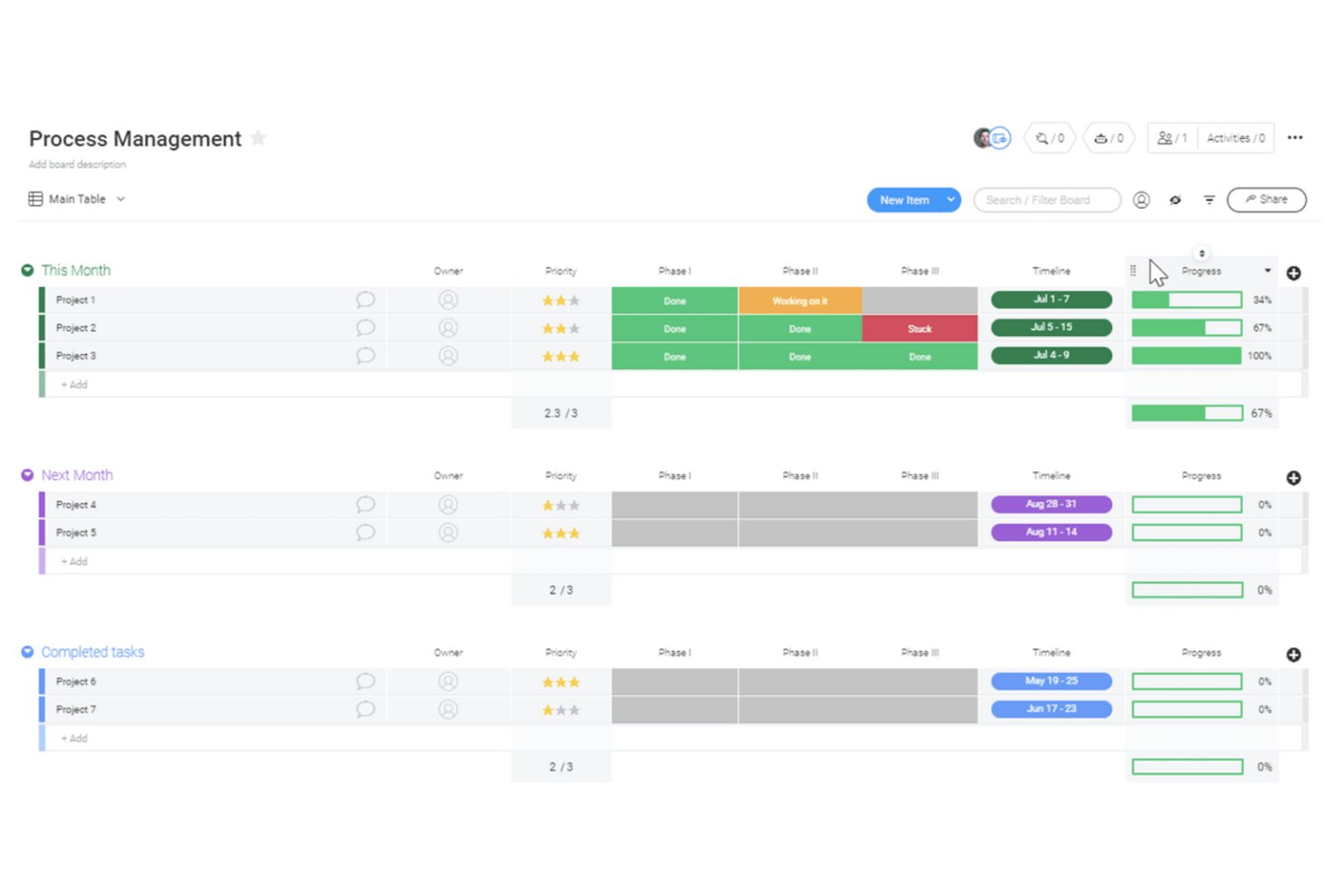
monday AI Workspace è una piattaforma di gestione del lavoro con documenti integrati basati sull'IA che si collegano direttamente a board, attività e flussi di lavoro, permettendo ai team di creare, archiviare ed eseguire la documentazione dei processi senza cambiare strumento.
Per Chi È Ideale monday AI Workspace?
È particolarmente adatto per team operativi di medie dimensioni e PMO che gestiscono più flussi di lavoro e necessitano che la documentazione dei processi sia direttamente collegata all'esecuzione dei progetti.
Perché Ho Scelto monday AI Workspace
monday AI Workspace merita un posto nella mia selezione grazie all'integrazione stretta tra i workdoc e il lavoro di progetto in tempo reale. Posso scrivere una procedura operativa standard (SOP) all'interno di un workdoc e convertire qualsiasi riga di testo in un elemento della board, completo di responsabile assegnato e data di scadenza, con un solo clic. Lo strumento di trascrizione intelligente delle riunioni aggiunge un ulteriore livello, trasformando automaticamente le note delle riunioni in attività operative affinché le decisioni sui processi prese durante le chiamate non restino sepolte in un documento che nessuno rilegge.
Funzionalità Chiave di monday AI Workspace
- Storico delle versioni dei workdoc: Tieni traccia delle modifiche ai documenti nel tempo e ripristina versioni precedenti se necessario.
- Permessi a livello di documento: Imposta permessi di visualizzazione e modifica per individui, team o ospiti all'interno di ogni documento o cartella.
- Co-editing in tempo reale: Più utenti possono collaborare contemporaneamente su un documento con aggiornamenti istantanei e commenti inline.
- Ricerca a testo integrale e tagging: Cerca in tutti i documenti e utilizza tag per organizzare e trovare rapidamente la documentazione dei processi all'interno degli spazi di lavoro.
Integrazioni di monday AI Workspace
monday AI Workspace offre integrazioni native con Slack, Google Drive, Dropbox, Box, OneDrive, GitHub, Gmail, Outlook e Microsoft Excel. Supporta anche Zapier e fornisce un'API per integrazioni personalizzate.
Pros and Cons
Pros:
- Trasforma qualsiasi passaggio di un documento in un'attività operativa
- Collaborazione in tempo reale su documenti multiutente
- Documentazione dei processi direttamente collegata alle board di progetto
Cons:
- Nessuno strumento nativo per diagrammi o flowchart
- Le impostazioni di permesso avanzate richiedono piani di livello superiore
New Product Updates from monday AI Workspace
monday AI Workspace Adds Human Approval Routing
monday AI Workspace adds a human-in-the-loop approval block to AI Workflows, sending approval requests and routing workflow paths based on responses. For more information, visit monday AI Workspace's official site.

Ideale per la scrittura di processi guidata dall’AI

Document360 è una piattaforma basata sul cloud che aiuta i team a creare e gestire documentazione di processo, SOP e guide utente.
Per chi è più adatto Document360?
Document360 è adatto a redattori tecnici, team di prodotto e team di assistenza clienti in aziende SaaS di medie e grandi dimensioni che necessitano di una piattaforma dedicata per la base di conoscenza strutturata e la documentazione dei processi.
Perché ho scelto Document360
Document360 si guadagna un posto nella mia shortlist per l'elevato livello dei suoi strumenti di scrittura AI, che vanno oltre il semplice completamento automatico. Apprezzo particolarmente l'Agente di Scrittura AI, che utilizzo per trasformare walkthrough video, file audio o un semplice prompt in documentazione pienamente strutturata—con formattazione, link interni e metadati SEO. Include anche una funzione di guida stilistica per permettere al mio team di definire tono, regole di formattazione e standard editoriali affinché l'AI generi contenuti coerenti con il nostro stile. Il generatore di SOP è un altro elemento di rilievo per la documentazione dei processi, producendo procedure passo passo con linee guida di conformità integrate.
Caratteristiche chiave di Document360
- Controllo versione: Traccia e gestisci ogni revisione di un documento, con la possibilità di ripristinare versioni precedenti in qualsiasi momento.
- Gestore delle categorie: Organizza la documentazione in una struttura gerarchica fino a sei livelli di categorie nidificate.
- Riutilizzo dei contenuti (snippet): Crea blocchi di contenuto riutilizzabili che possono essere inseriti in più articoli senza dover duplicare le modifiche.
- Dashboard di analisi: Monitora le prestazioni degli articoli, le query di ricerca e il coinvolgimento dei lettori per identificare eventuali lacune nella documentazione.
Integrazioni di Document360
Document360 si integra con strumenti come Slack, Microsoft Teams, Zendesk, Freshdesk, Intercom, Google Analytics, Disqus e Segment. Supporta anche ulteriori integrazioni tramite Zapier e offre un'API per connessioni personalizzate.
Pros and Cons
Pros:
- Ricerca rapida e robusta per il recupero veloce delle SOP
- Supporta sia editor markdown che WYSIWYG per contenuti tecnici
- Permette la creazione di flussi di lavoro personalizzati per soddisfare le esigenze organizzative
Cons:
- Accesso offline limitato
- Occasionali rallentamenti nelle prestazioni durante il caricamento di progetti di grandi dimensioni
New Product Updates from Document360

Document360 Adds Drive and Eddy AI Workflow Updates
Document360 adds Drive file renaming, Eddy AI email ticket notifications, and Drive image support in AI Capture. These updates simplify file management, support escalation, and visual content editing. For more information, visit Document360’s official site.
 .
.

Trails è una piattaforma di documentazione dei processi pensata per catturare, organizzare e condividere flussi di lavoro dettagliati passo-passo usando la registrazione dello schermo, annotazioni e librerie di conoscenza.
Per chi è più indicato Trails?
Trails è ideale per i team operativi e di enablement di aziende SaaS in crescita che devono documentare e condividere processi interni tra team distribuiti.
Perché ho scelto Trails
Trails si guadagna il suo posto nella mia lista ristretta per la gestione efficace della cattura dei flussi di lavoro passo-passo. Registro una prima versione usando l'estensione Chrome di Trails e automaticamente genera una guida strutturata e numerata con screenshot annotati. Ciò che preferisco è che modificando il testo nella guida si aggiorna simultaneamente anche il video, quindi il mio team non deve gestire due risorse separate. L'IA corregge anche gli errori nella registrazione originale, quindi non dobbiamo ri-registrare solo perché qualcuno ha cliccato sulla cosa sbagliata.
Funzionalità principali di Trails
- Esportazione in PDF e formati multipli: Esporta qualsiasi guida come PDF, file HTML o Markdown per condividere la documentazione anche all'esterno di Trails.
- Offuscamento informazioni sensibili: Offusca automaticamente i dati riservati negli screenshot e nelle registrazioni dello schermo prima di condividere le guide.
- Cronologia delle versioni: Ripristina qualsiasi versione precedente di una guida, così il tuo team ha sempre una traccia affidabile delle modifiche.
- Controlli di accesso basati sui ruoli: Imposta permessi per controllare chi può visualizzare, modificare e gestire le guide del team.
Integrazioni di Trails
Le integrazioni native non sono chiaramente documentate. È disponibile una API per integrazioni personalizzate.
Pros and Cons
Pros:
- Estensione Chrome per catturare flussi SaaS basati su browser
- Taglio video direttamente nell'editor senza strumenti esterni
- Supporta la condivisione pubblica e il branding personalizzato delle guide
Cons:
- Mancanza di analitiche sui flussi di lavoro o funzionalità di reportistica sull'uso
- Annotazione automatica degli screenshot limitata alla numerazione dei passaggi

Scribe
Ideale per automatizzare la creazione di documenti
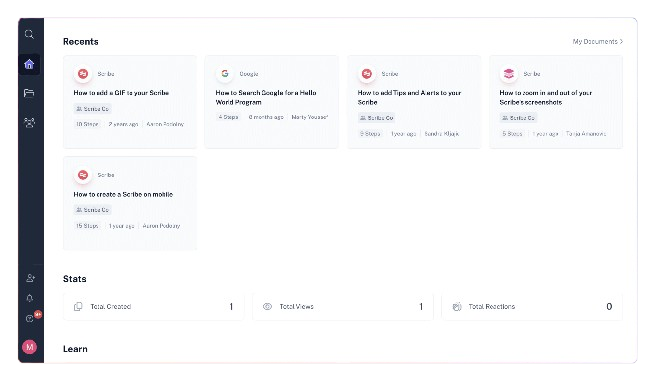
Scribe è una piattaforma di documentazione dei processi che cattura i flussi di lavoro, genera guide passo-passo con schermate e consente ai team di creare e condividere documenti di processo dettagliati.
Per chi è più adatto Scribe?
Scribe è ideale per i team di operations e enablement che devono documentare processi senza dipendere da redattori tecnici.
Perché ho scelto Scribe
Scribe si è guadagnato il suo posto nella mia shortlist per il modo in cui gestisce la creazione dei documenti: basta eseguire una volta un processo e Scribe cattura ogni clic e battuta sulla tastiera per generare una guida formattata e annotata con screenshot. L'ho selezionato in particolare per la sua estensione browser, che funziona in background senza interrompere il tuo flusso di lavoro. Apprezzo anche la funzione di testo generato dall'IA, che redige le descrizioni dei passaggi così il mio team non deve scrivere tutto da zero. Per i team che documentano processi ripetitivi come onboarding o walkthrough software, questa combinazione riduce notevolmente i tempi di documentazione.
Funzionalità principali di Scribe
- Pagine: Unisci più guide Scribe in un unico documento di processo organizzato, aggiungendo testo, video, schermate e link.
- Redazione dati sensibili: Sfoca automaticamente o manualmente le informazioni sensibili nelle schermate catturate prima di condividere le guide.
- Analisi dei lettori: Tieni traccia di chi ha visualizzato o completato una guida e raccogli feedback per segnalare contenuti obsoleti.
- Brand aziendale: Carica il tuo logo, colori del marchio e URL del sito web per applicare uno stile coerente a tutte le guide pubblicate.
Integrazioni Scribe
Scribe funziona principalmente tramite estensione browser che cattura i flussi di lavoro e consente agli utenti di incorporare o condividere guide su diversi strumenti. Permette di incorporare contenuti su piattaforme come Confluence, Notion e Google Docs, ma non offre un set ampio di integrazioni native. Il supporto a Zapier e API non è documentato chiaramente.
Pros and Cons
Pros:
- Creazione documentazione rapida
- Opzioni di personalizzazione semplici
- Oscura le informazioni sensibili
Cons:
- Accesso offline limitato
- Richiede internet per la piena funzionalità

Whatfix
Ideale per l'onboarding degli utenti

Whatfix è una piattaforma di digital adoption per la documentazione dei processi che consente di creare guide interattive, walkthrough in-app e knowledge base per documentare e fornire istruzioni di processo all'interno degli strumenti software utilizzati.
Per chi è più indicato Whatfix?
Whatfix è particolarmente adatto a team di medie e grandi dimensioni che devono documentare e fornire indicazioni di processo direttamente all'interno del software utilizzato quotidianamente da dipendenti o clienti.
Perché ho scelto Whatfix
Ho scelto Whatfix tra i migliori grazie al modo in cui gestisce la documentazione per l'onboarding degli utenti, che si distingue davvero dai wiki statici o dai PDF. Invece di chiedere ai nuovi utenti di leggere un documento di processo e poi capire da soli come usare l'applicazione, Whatfix consente di incorporare direttamente nell'app Flows e Task Lists specifici per il ruolo che stanno imparando. Un nuovo assunto che lavora in un CRM o ERP vede apparire le istruzioni passo-passo nel contesto, proprio quando ne ha bisogno. Apprezzo anche la funzione di sondaggio in-app, che mi permette di raccogliere feedback sull'onboarding senza costringere gli utenti a lasciare il flusso di lavoro per compilare un modulo separato.
Caratteristiche principali di Whatfix
- Editor di contenuti no-code: Crea e aggiorna guide in-app su qualsiasi applicazione senza scrivere codice o dipendere dagli sviluppatori.
- Esportazione di contenuti in diversi formati: Esporta i contenuti di Whatfix come video, PDF, presentazioni o articoli passo-passo da inserire nel tuo LMS o nella knowledge base.
- Widget Self Help: Offri agli utenti un centro assistenza in-app con ricerca conversazionale basata su IA che trae risposte dai tuoi repository di conoscenza esistenti.
- Supporto a flussi di lavoro tra applicazioni: Guida gli utenti attraverso processi che coinvolgono più applicazioni senza interrompere il loro flusso di lavoro.
Integrazioni di Whatfix
Whatfix offre integrazioni native con Salesforce, Oracle CX, SAP S/4HANA, NetSuite e Bullhorn, oltre che con l'ecosistema Microsoft, inclusi Microsoft 365 e Azure. È disponibile un'API per integrazioni personalizzate.
Pros and Cons
Pros:
- Guide in-app efficaci
- Percorsi di apprendimento personalizzabili
- Analytics utente in tempo reale
Cons:
- Processo di configurazione complesso
- Richiede una formazione iniziale

Ideale per flussi di lavoro ricorrenti

Process Street è una piattaforma di documentazione dei processi progettata per i team che desiderano creare, organizzare e gestire flussi di lavoro dettagliati e checklist, con funzionalità di automazione e collaborazione.
Per Chi è Ideale Process Street?
Process Street è adatto a team operativi e focalizzati sui processi all'interno di piccole e medie imprese che hanno bisogno di un modo strutturato per documentare e gestire procedure ricorrenti.
Perché Ho Scelto Process Street
Process Street si è guadagnato un posto nella mia lista per la sua eccellente gestione dei flussi di lavoro ricorrenti grazie a un approccio strutturato e basato su checklist. Apprezzo il fatto che sia possibile creare modelli di workflow una sola volta e poi eseguirli come istanze individuali—così ogni volta che un processo si ripete, ha la propria esecuzione tracciata con assegnatari, date di scadenza e logica condizionale mantenuti. Il mio team usa la funzione di workflow programmato per attivare automaticamente processi ricorrenti a una cadenza impostata, eliminando la necessità di ricordarsi manualmente di iniziare le attività. I passaggi di approvazione integrati in ogni workflow rendono anche facile documentare chi ha approvato cosa, un aspetto importante quando lo stesso processo viene gestito da più membri del team.
Funzionalità Principali di Process Street
- Assegnazione dei ruoli: Assegna compiti specifici all'interno di un workflow ai diversi membri del team in base al loro ruolo.
- Logica condizionale: Imposta regole che mostrano o nascondono attività a seconda di come vengono completati i passaggi precedenti.
- Campi modulo: Inserisci campi di raccolta dati direttamente nelle attività del workflow per raccogliere informazioni strutturate mentre il lavoro procede.
- Audit trail: Monitora una traccia cronologica di ogni azione eseguita durante l'esecuzione di un workflow per garantire responsabilità e revisione.
Integrazioni di Process Street
Process Street si integra con strumenti come Slack, Google Sheets, Salesforce, Jira, DocuSign, Dropbox, Airtable e Trello. Si collega inoltre tramite Zapier per integrazioni aggiuntive e offre un'API per configurazioni personalizzate.
Pros and Cons
Pros:
- Creazione di processi semplice
- Supporta flussi di lavoro complessi
- Offre Process AI
Cons:
- Funzionalità offline limitate
- Può essere complesso da configurare

Creately
Ideale per la documentazione basata su diagrammi
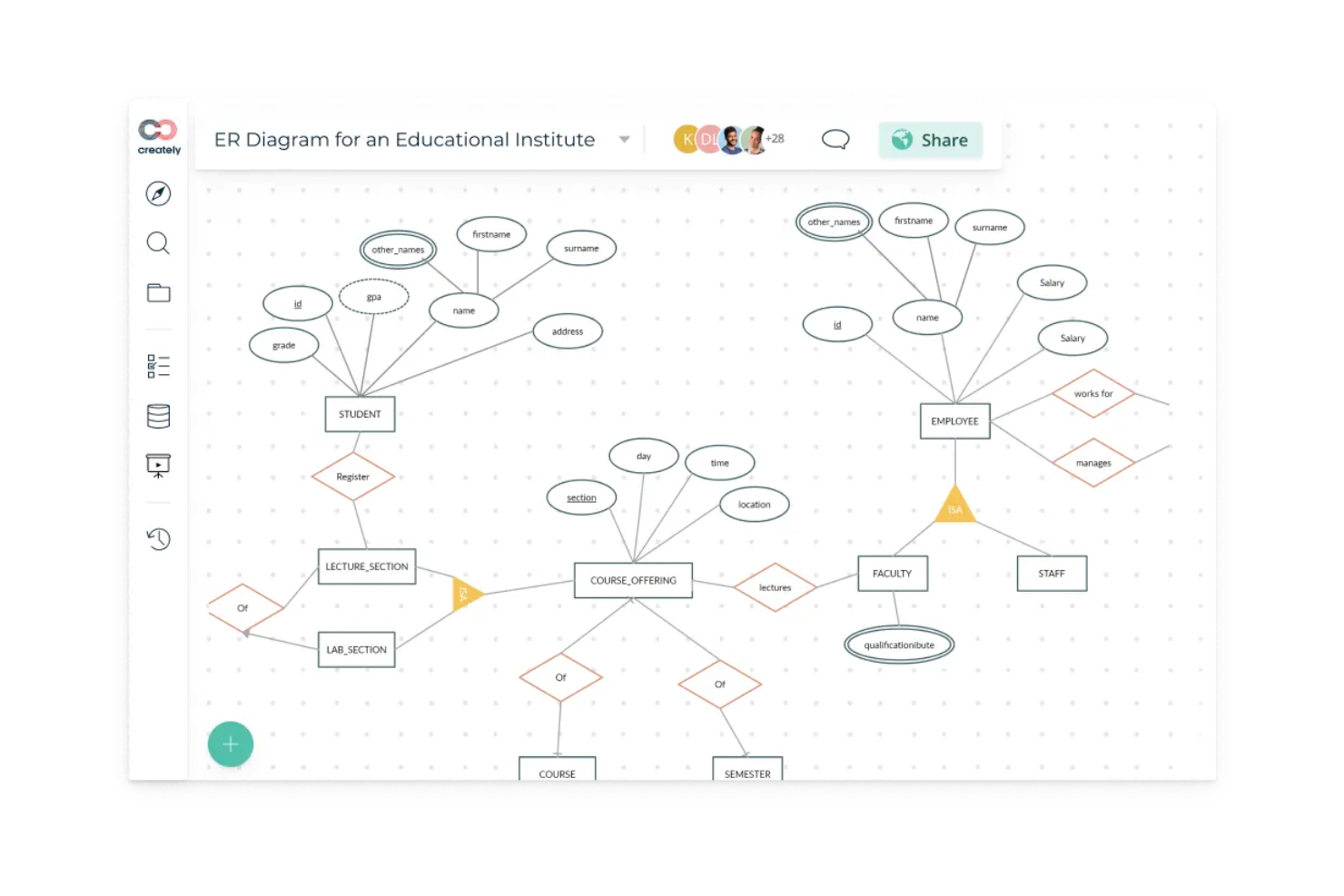
Creately è una piattaforma per la documentazione dei processi che ti permette di creare, organizzare e collaborare su diagrammi, flowchart e mappe di processo visive in uno spazio di lavoro condiviso.
Per chi è più adatto Creately?
Creately è ideale per team trasversali in ambito tecnologico e organizzazioni di prodotto che necessitano di documentare e comunicare i processi in modo visivo.
Perché ho scelto Creately
Creately si guadagna un posto nella mia lista perché va più a fondo della maggior parte degli strumenti di questa categoria sulla documentazione basata su diagrammi. Apprezzo particolarmente il supporto per BPMN—quando il mio team deve documentare un flusso di approvazione multi-step o un processo di passaggio di consegne trasversale, possiamo rappresentarlo con una corretta notazione BPMN con swimlane, gateway decisionali e trigger di eventi, tutto nello stesso canvas. Creately supporta inoltre oltre 70 tipi di diagrammi con più di 1.000 forme progettate appositamente, così non sei costretto a usare un flowchart per uno schema di sequenza UML o un diagramma di flusso dati. La funzione di documentazione per ogni elemento consente di allegare note ricche e contesto direttamente alle singole forme, mantenendo diagramma e documentazione di supporto nello stesso luogo.
Funzionalità principali di Creately
- Modifica in tempo reale: Più membri del team possono lavorare contemporaneamente sulla stessa tela, con tracciamento del cursore in tempo reale per vedere chi sta modificando cosa.
- Oltre 8.000 modelli: Modelli preimpostati che coprono mappe di processo, organigrammi e altro ancora, così non devi partire da zero.
- Modalità presentazione: Presenta i diagrammi direttamente dalla tela selezionando forme e aggiungendole alle slide, con contenuti che si aggiornano automaticamente quando la tela cambia.
- Storico completo delle versioni: Cronologia delle modifiche a livello di elemento e feed dello stato per ogni elemento ti permettono di seguire come si è evoluto un documento di processo nel tempo.
Integrazioni di Creately
Creately offre integrazioni native con Google Drive, Slack, Microsoft Teams, Confluence e Jira, e si collega con Zapier. È disponibile un'API per integrazioni personalizzate.
Pros and Cons
Pros:
- Ampia libreria di modelli
- Supporta documenti multi-pagina
- Funzionalità di collaborazione in tempo reale
Cons:
- Può risultare complesso per i principianti
- Richiede una connessione internet stabile

Ideale per spazi di lavoro documentali sicuri e basati sui ruoli

Adobe Acrobat è una piattaforma di gestione documentale che supporta la creazione, la modifica, l'organizzazione e la protezione della documentazione di processo in formato PDF. Consente ai team di gestire i flussi di lavoro documentali, collaborare sui file e mantenere un accesso controllato ai documenti sensibili.
Per chi è ideale Adobe Acrobat?
Adobe Acrobat è particolarmente indicato per i team che operano in settori regolamentati e per le grandi organizzazioni che richiedono un controllo sicuro dei documenti, il tracciamento degli audit e una collaborazione strutturata sulla documentazione di processo.
Perché ho scelto Adobe Acrobat
Ho scelto Adobe Acrobat perché offre controlli sicuri e basati sui ruoli per la gestione dell'accesso ai documenti di processo sensibili. I team possono assegnare permessi per limitare i diritti di modifica, commento o visualizzazione. Le tracce di audit e il monitoraggio delle attività supportano la responsabilità e la conformità in tutti i flussi di lavoro documentali.
Funzionalità principali di Adobe Acrobat
- Strumenti di modifica PDF: Modifica testo, immagini e formattazione direttamente nei documenti PDF.
- Gestione dei modelli: Crea modelli di documenti riutilizzabili per una documentazione di processo coerente.
- Flussi di lavoro per firme elettroniche: Raccogli firme elettroniche legalmente vincolanti sui documenti di processo.
- Commenti e annotazioni: Aggiungi annotazioni, evidenziazioni e commenti per la revisione collaborativa.
- Tecnologia OCR: Trasforma documenti scansionati in testo ricercabile e modificabile.
Integrazioni di Adobe Acrobat
Adobe Acrobat si integra con Microsoft 365, Google Workspace, Microsoft Teams, SharePoint, Box, Salesforce e Workday. Sono disponibili API per integrazioni personalizzate.
Pros and Cons
Pros:
- Supporta accessi sicuri e basati sui ruoli per i documenti
- Integrazione profonda con Microsoft 365 e Google Workspace
- Strumenti avanzati di modifica e oscuramento PDF
Cons:
- Non è disponibile un piano gratuito per sempre per le aziende
- Le funzionalità di automazione dei flussi di lavoro sono basilari rispetto ai concorrenti

Tettra
Ideale per la condivisione interna della conoscenza
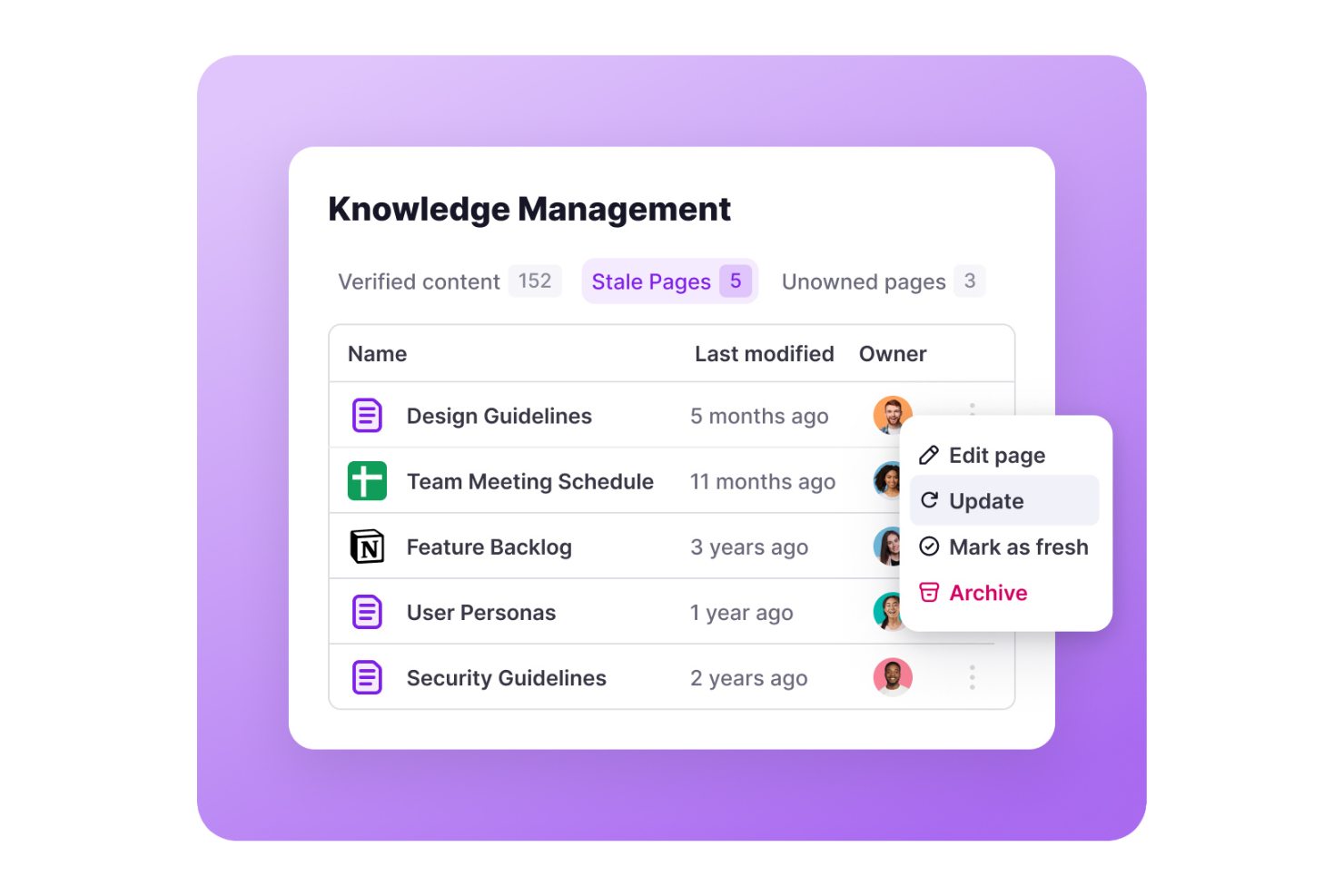
Tettra è una piattaforma di documentazione dei processi progettata per i team che desiderano creare, organizzare e gestire basi di conoscenza interne, wiki strutturati e documentazione collaborativa.
Per chi è consigliato Tettra?
Tettra è ideale per team di piccole e medie dimensioni che hanno bisogno di un luogo centralizzato per documentare i processi, rispondere a domande ricorrenti e mantenere organizzata la conoscenza interna.
Perché ho scelto Tettra
Tettra si guadagna un posto nella mia shortlist per la sua capacità di affrontare efficacemente la sfida di mantenere la conoscenza interna sempre aggiornata e facilmente reperibile. Apprezzo in particolare la funzione di verifica dei contenuti, che consente agli esperti della materia di revisionare le pagine a intervalli programmati—così il mio team non si trova a dipendere accidentalmente da documenti di processo obsoleti. Anche il bot Q&A alimentato dall’IA, Kai, risulta davvero utile: quando un collega fa una domanda in Slack, Kai cerca nella base di conoscenza e fornisce una risposta immediata, e se non ne trova una, indirizza la domanda alla persona giusta. La documentazione strutturata, unita al mantenimento attivo della conoscenza, offre a Tettra un vantaggio rispetto agli strumenti wiki più passivi.
Caratteristiche principali di Tettra
- Modelli di pagina: Usa modelli predefiniti per creare documenti di processo, SOP e wiki di team con una struttura coerente.
- Flussi di richiesta contenuti: I membri del team possono segnalare documentazione mancante, che viene inoltrata alla persona giusta per colmare la lacuna.
- Permessi basati sui ruoli: Controlla chi può visualizzare, modificare o gestire pagine e categorie specifiche all’interno della tua base di conoscenza.
- Integrazione con Slack e Teams: Accedi e condividi contenuti direttamente all’interno di Slack o Microsoft Teams senza cambiare strumento.
Integrazioni di Tettra
Tettra offre integrazioni native con Slack, Microsoft Teams, Google Workspace, GitHub e Zapier. È disponibile un’API per integrazioni personalizzate.
Pros and Cons
Pros:
- Facile categorizzazione dei contenuti
- Editor semplice per aggiornamenti rapidi
- Assegna la proprietà dei contenuti
Cons:
- Funzionalità avanzate limitate
- Potrebbe non essere adatto a team più grandi

Confluence
Ideale per la collaborazione in team
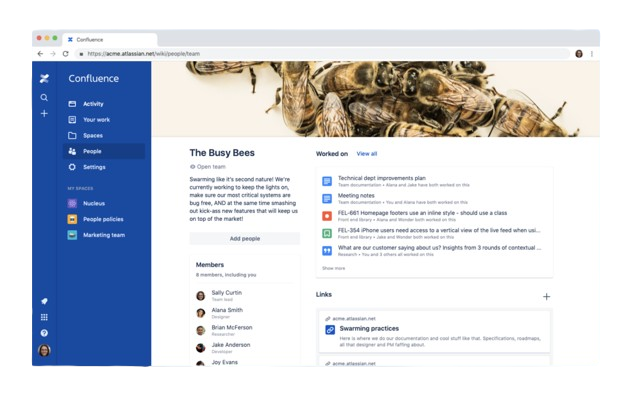
Confluence è una piattaforma di documentazione dei processi di Atlassian che consente di creare, organizzare e gestire documentazione collaborativa, basi di conoscenza e pagine di progetto per i team.
Per chi è ideale Confluence?
Confluence è particolarmente adatto a team tecnologici di medie e grandi dimensioni che necessitano di uno spazio centralizzato per documentare processi, condividere conoscenze e collaborare tra prodotti, ingegneria e design.
Perché ho scelto Confluence
Ho selezionato Confluence per la mia lista perché supporta efficacemente la collaborazione in tempo reale sulla documentazione dei processi. Apprezzo il fatto che più membri del team possano modificare la stessa pagina simultaneamente, lasciare commenti in linea e taggarsi direttamente nel contenuto—così i cicli di feedback avvengono all'interno del documento, e non tramite thread separati. Utilizzo anche la funzione documenti live di Confluence quando il mio team deve co-creare qualcosa sul momento, come una retrospettiva dello sprint o un aggiornamento di processo dopo un incidente. Gli spazi strutturati e la gerarchia dei contenuti facilitano l'organizzazione della documentazione man mano che il team cresce.
Caratteristiche principali di Confluence
- Modelli di pagina: Scegli da una libreria di modelli predefiniti per documenti di processo, runbook, note delle riunioni e altro ancora per standardizzare la documentazione all'interno del tuo team.
- Cronologia delle versioni: Tieni traccia di ogni modifica apportata a una pagina, confronta le versioni precedenti e ripristina i contenuti quando necessario.
- Spazi: Organizza la documentazione in spazi dedicati per team, progetto o dipartimento, così da mantenere i contenuti strutturati e facili da navigare.
- Macro: Incorpora contenuti dinamici come indici, etichette di stato e liste di attività direttamente nelle pagine per aggiungere struttura e interattività.
Integrazioni Confluence
Confluence offre oltre 3.000 integrazioni native tramite Atlassian Marketplace, tra cui Jira, Trello, Loom, Slack, Microsoft 365, Google Drive, Figma, Dropbox, Salesforce e GitHub, e si collega con Zapier. È disponibile un'API per integrazioni personalizzate.
Pros and Cons
Pros:
- Gestione centralizzata dei contenuti
- Funzionalità di collaborazione in tempo reale
- Ampia libreria di modelli
Cons:
- Può essere complesso per i nuovi utenti
- Richiede tempo per la configurazione
Altri software per la documentazione dei processi
Ecco alcune altre opzioni di software per la documentazione dei processi che non sono entrate nella mia selezione, ma che vale comunque la pena valutare:
- Floik
Ideale per la mappatura visiva dei processi
- Tallyfy
Ideale per utenti non tecnici
- SweetProcess
Ideale per processi di piccole imprese
- Heflo
Ideale per la modellazione dei processi
- Miro
Ideale per il lavoro di squadra visivo e creativo
- Tango
Ideale per approfondimenti guidati dall’IA
- Trupeer
Ideale per la generazione di script tramite IA


Come Valuto i Software per la Documentazione dei Processi
Suddivido la mia valutazione in requisiti fondamentali—come la cattura strutturata dei passaggi e il controllo delle versioni—e i fattori differenzianti che separano gli strumenti progettati per i PMO dai semplici wiki glorificati.
Funzionalità di Base (Requisiti Fondamentali per Questa Lista)
Quando seleziono gli strumenti per la mia lista, valuto ciascuno su una scala da 0 (non offre la funzionalità) a 5 (eccelle in quest'area) per ogni funzionalità di base indicata di seguito. Poi, calcolo il punteggio totale in percentuale. Ogni strumento deve raggiungere un punteggio totale minimo del 65% per essere preso in considerazione per l'inclusione.
- Cattura Passo per Passo del Processo: Valuto se lo strumento supporta passaggi strutturati e sequenziali con assegnazione dei responsabili—come la documentazione di una retrospettiva di sprint con titolari chiari delle attività per ogni fase.
- Documentazione Ricca di Media & Visiva: Screenshot, registrazioni schermo e diagrammi incorporati fanno la differenza per l'adozione, quindi verifico la presenza di strumenti nativi per i media oltre i semplici caricamenti di immagini.
- Archivio Centralizzato dei Documenti: Ogni strumento viene valutato in base a come organizza e propone i documenti su larga scala—tag, gerarchie di cartelle e qualità della ricerca su centinaia di procedure operative standard.
- Controllo delle Versioni & Storico delle Revisioni: Cerco cronologie complete delle revisioni con attribuzione degli autori e possibilità di ripristino, soprattutto per i team che aggiornano frequentemente le procedure di gestione dei rilasci o dei cambi di processo.
- Modifica Collaborativa & Revisione: La co-modifica in tempo reale, i commenti in thread e i workflow formali di approvazione sono essenziali—particolarmente per team interfunzionali che devono allinearsi su playbook condivisi di delivery.
- Controlli di Accesso & Permessi di Condivisione: Permessi granulari basati sui ruoli sono fondamentali, quindi controllo se lo strumento consente di separare la visualizzazione e la modifica a livello di documento per stakeholder esterni al team principale.
Una volta che ho una lista di strumenti che soddisfano questi criteri, considero cosa distingue ciascuna piattaforma.
Fattori Differenzianti (Cosa Distingue i Fornitori)
Ecco come confronto e metto a confronto i diversi fornitori:
Caratteristiche Distintive
La cattura automatica dei processi è una delle più importanti—strumenti come Scribe e Tango possono registrare i tuoi click e generare automaticamente guide annotate, risparmiando ore nella documentazione di onboarding o processi di deployment. Cerco anche soluzioni di documentazione assistita dall'AI che creano o affinano SOP da input grezzi. Le analisi e le statistiche di utilizzo aiutano i PMO a individuare playbook obsoleti che nessuno consulta. Infine, l'esecuzione integrata dei processi consente ai team di eseguire i passaggi documentati come checklist interattive, trasformando SOP statiche in attività tracciabili.
Oltre le Caratteristiche
La profondità dell'integrazione è importante—verifico se uno strumento si collega nativamente con Jira, Confluence, Slack o Microsoft Teams, così le documentazioni dei processi restano lì dove avviene il lavoro progettuale. La struttura dei prezzi è un'altra considerazione, in particolare se i posti solo visualizzatori sono gratuiti o scontati, poiché gli stakeholder di progetto che devono solo consultare una SOP non dovrebbero far lievitare i costi di licenza. Valuto anche il time-to-value guardando modelli predefiniti, opzioni di importazione da Google Docs o Word, e risorse di onboarding che aiutano i team a iniziare a documentare in pochi giorni, non settimane.
Come scegliere il software per la documentazione dei processi
È facile perdersi in lunghi elenchi di funzionalità e strutture di prezzo complesse. Per aiutarti a rimanere concentrato mentre affronti il tuo processo unico di selezione del software, ecco una lista di fattori da tenere a mente:
| Fattore | Cosa considerare |
|---|---|
| Scalabilità | Assicurati che il software possa crescere insieme al tuo team. Verifica se è in grado di gestire un numero maggiore di utenti e dati senza compromettere le prestazioni o richiedere aggiornamenti frequenti |
| Integrazioni | Verifica se il software si integra con gli strumenti che il tuo team utilizza già, come Slack, Google Workspace o Trello. Questo garantisce un flusso di lavoro più fluido e la coerenza dei dati |
| Personalizzazione | Cerca opzioni che consentano di adattare il software alle esigenze del tuo team. Modelli e flussi di lavoro personalizzabili possono migliorare l'efficienza e soddisfare requisiti specifici dei progetti |
| Semplicità d'uso | Valuta l'interfaccia utente e la curva di apprendimento. Lo strumento dovrebbe essere intuitivo, consentendo al tuo team di adottarlo rapidamente senza una formazione approfondita |
| Budget | Considera il costo in relazione al tuo budget. Cerca piani tariffari flessibili che offrano un buon rapporto qualità-prezzo e verifica l'eventuale presenza di costi nascosti o contratti a lungo termine |
| Misure di sicurezza | Verifica che il software disponga di solide misure di sicurezza, come la crittografia dei dati e i controlli degli accessi degli utenti, per proteggere le tue informazioni sensibili. |
| Servizi di assistenza | Assicurati che sia disponibile un'assistenza clienti rapida e reattiva. L'accesso alla chat dal vivo, all'assistenza telefonica e a un centro assistenza completo può essere fondamentale durante la configurazione e la risoluzione dei problemi |
| Funzionalità di collaborazione | Cerca funzionalità che facilitino la collaborazione del team, come la modifica in tempo reale, i commenti e il controllo delle versioni, per migliorare il lavoro di squadra e la comunicazione |
Tendenze nel software di documentazione dei processi
Durante la mia ricerca, ho raccolto innumerevoli aggiornamenti di prodotto, comunicati stampa e registri delle versioni di diversi fornitori di software per la documentazione dei processi. Ecco alcune delle tendenze emergenti che sto tenendo d'occhio:
- Analisi basate sull'intelligenza artificiale: I fornitori stanno integrando l'intelligenza artificiale per fornire informazioni sull'efficienza dei flussi di lavoro e sul comportamento degli utenti. Questo aiuta i team a individuare i colli di bottiglia e a ottimizzare i processi. Alcuni strumenti offrono ora analisi predittive per anticipare le future esigenze dei flussi di lavoro.
- Collaborazione in tempo reale: Un numero crescente di strumenti consente la collaborazione in tempo reale, permettendo a più utenti di modificare e commentare simultaneamente i documenti. Questa funzionalità sta diventando fondamentale per i team remoti, che possono così mantenere la produttività e assicurarsi che tutti siano coordinati.
- Guide interattive: Vengono sviluppate guide interattive passo dopo passo per migliorare l'apprendimento e l'inserimento degli utenti. Queste guide aiutano gli utenti a comprendere i processi complessi in modo più intuitivo, riducendo la necessità di sessioni di formazione approfondite.
- Funzionalità di sicurezza avanzate: Poiché la protezione dei dati diventa sempre più importante, i fornitori si stanno concentrando su funzionalità di sicurezza avanzate come la crittografia e i controlli degli accessi basati sui ruoli. Questo garantisce che le informazioni sensibili rimangano protette, un aspetto fondamentale per la conformità normativa in molti settori.
- Flussi di lavoro personalizzabili: È in crescita la domanda di flussi di lavoro personalizzabili, adatti a esigenze aziendali specifiche. I fornitori offrono maggiore flessibilità nel modo in cui i processi vengono strutturati ed eseguiti, consentendo alle aziende di adattare il software ai propri requisiti specifici.
Che cos'è il software di documentazione dei processi?
Il software di documentazione dei processi è uno strumento che aiuta il tuo team a creare, organizzare e gestire il modo in cui viene svolto il lavoro. Viene utilizzato dai responsabili di progetto, dai team operativi e dalle risorse umane per chiarire le attività quotidiane e migliorare il funzionamento delle attività.
Grazie a funzionalità come la collaborazione in tempo reale, le analisi basate sull'intelligenza artificiale e i flussi di lavoro personalizzabili, il tuo team può organizzare le informazioni, collaborare in modo più efficace e individuare opportunità di miglioramento. Questi strumenti offrono un modo chiaro e strutturato per documentare e aggiornare i processi.
Funzionalità del software di documentazione dei processi
Quando scegli un software per la documentazione dei processi, presta attenzione alle seguenti funzionalità principali:
- Collaborazione in tempo reale: consente a più utenti di modificare e commentare simultaneamente i documenti, migliorando il lavoro di squadra e la comunicazione.
- Analisi basate sull'intelligenza artificiale: fornisce analisi sull'efficienza dei flussi di lavoro e sul comportamento degli utenti, aiutando i team a ottimizzare i processi e a individuare i colli di bottiglia.
- Flussi di lavoro personalizzabili: offre flessibilità nella strutturazione dei processi per adattarli a specifiche esigenze aziendali, consentendo soluzioni su misura.
- Guide interattive: consente di creare tutorial dettagliati che semplificano i processi complessi e riducono la necessità di una formazione approfondita.
- Misure di sicurezza: includono funzionalità come la crittografia e i controlli degli accessi basati sui ruoli per proteggere le informazioni sensibili e garantire la conformità.
- Funzionalità di integrazione: si collega agli altri strumenti utilizzati dal team, garantendo un flusso regolare dei dati e migliorando la produttività complessiva.
- Gestione delle attività: aiuta ad assegnare e monitorare le attività per mantenere il team organizzato e rispettare le scadenze.
- Libreria di modelli: fornisce modelli pronti all'uso per una configurazione rapida e una documentazione coerente.
- Controllo delle versioni: tiene traccia delle modifiche e delle revisioni, consentendo ai team di mantenere una cronologia della documentazione accurata e aggiornata.
- Interfaccia con trascinamento: semplifica la creazione e la disposizione degli elementi dei processi, rendendo l'utilizzo intuitivo ed efficiente.
Vantaggi del software per la documentazione dei processi
L'implementazione di un software per la documentazione dei processi offre numerosi vantaggi al team e all'azienda. Ecco alcuni dei risultati che puoi aspettarti:
- Maggiore efficienza: semplifica i flussi di lavoro e riduce le ridondanze, aiutando il team a lavorare in modo più efficiente grazie a funzionalità come la gestione delle attività e i flussi di lavoro personalizzabili.
- Collaborazione migliorata: gli strumenti di collaborazione in tempo reale consentono ai membri del team di lavorare insieme senza difficoltà, migliorando la comunicazione e il lavoro di squadra.
- Maggiore chiarezza dei processi: le guide interattive e i modelli garantiscono che tutti comprendano chiaramente i processi, riducendo gli errori e migliorando la coerenza.
- Sicurezza dei dati: misure di sicurezza avanzate proteggono le informazioni sensibili, offrendo tranquillità riguardo alla conformità e alla sicurezza dei dati.
- Decisioni più consapevoli: le analisi basate sull'intelligenza artificiale forniscono dati preziosi, aiutandoti a prendere decisioni basate sui dati per ottimizzare i processi.
- Risparmio di tempo: l'automazione delle attività ripetitive libera tempo per consentire al team di concentrarsi su attività a maggior valore aggiunto, aumentando la produttività complessiva.
- Scalabilità: la possibilità di adeguare e sviluppare i processi insieme all'azienda garantisce adattabilità e successo a lungo termine.
Costi e prezzi del software per la documentazione dei processi
La scelta di un software per la documentazione dei processi richiede la conoscenza dei diversi modelli e piani tariffari disponibili. I costi variano in base alle funzionalità, alle dimensioni del team, ai componenti aggiuntivi e ad altri fattori. La tabella seguente riassume i piani più comuni, i relativi prezzi medi e le funzionalità tipicamente incluse nelle soluzioni software per la documentazione dei processi:
Tabella comparativa dei piani per il software di documentazione dei processi
| Tipo di piano | Prezzo medio | Funzionalità comuni |
|---|---|---|
| Piano gratuito | $0 | Strumento di documentazione di base, spazio di archiviazione limitato e supporto della comunità |
| Piano personale | $5 - $15/utente/mese | Spazio di archiviazione aggiuntivo, integrazioni di base e alcune opzioni di personalizzazione |
| Piano aziendale | $20 - $50/utente/mese | Integrazioni avanzate, funzionalità di sicurezza avanzate e strumenti di collaborazione |
| Piano aziendale avanzato | $60 - $100/utente/mese | Flussi di lavoro personalizzabili, supporto dedicato, analisi complete e funzionalità di rendicontazione |
Domande frequenti sul software di documentazione dei processi
Ecco alcune risposte alle domande comuni sul software di documentazione dei processi:
Quali domande porre quando si documenta un processo?
Quando si documenta un processo, è importante iniziare verificando quando è stato aggiornato l’ultima volta. Identifica ogni passaggio e il tempo necessario per completarlo. Determina quali passaggi sono problematici o richiedono molto tempo. Considera inoltre quali membri del team sono coinvolti e in che modo incidono sul processo. Queste domande aiutano a garantire che tutti gli aspetti siano presi in considerazione.
Cosa dovrebbe includere la documentazione di un processo?
Una documentazione efficace del processo include un punto di inizio e di fine chiari, i risultati attesi e input dettagliati. Esamina l’intero processo per acquisire con precisione ogni passaggio. Identifica le persone coinvolte e utilizza il sistema di documentazione per organizzare queste informazioni. In questo modo garantisci chiarezza e coerenza per tutti gli utenti.
Qual è lo strumento più utile per la documentazione dei processi?
Tra gli strumenti più diffusi per la documentazione dei processi rientrano i software di mappatura dei processi, come Lucidchart e Microsoft Visio. Questi strumenti aiutano a visualizzare chiaramente i flussi di lavoro. Anche gli strumenti di gestione dei processi aziendali e i sistemi di gestione della conoscenza sono preziosi. Semplificano la documentazione e garantiscono ai membri del team un accesso semplice alle informazioni.
Quali sono i rischi della mancata documentazione dei processi?
Senza un’adeguata documentazione dei processi, si rischiano prestazioni incoerenti e difficoltà nella formazione dei nuovi dipendenti. Possono emergere problemi di conformità e inefficienze, con ripercussioni sulla produttività complessiva. Documentare i processi aiuta a ridurre questi rischi e garantisce operazioni più fluide.
In che modo il software di documentazione dei processi può migliorare l'efficienza?
Il software di documentazione dei processi migliora l’efficienza fornendo una posizione centralizzata per tutti i processi. Consente di aggiornare e condividere facilmente le informazioni tra i membri del team. Funzionalità come la collaborazione in tempo reale e la gestione delle attività semplificano i flussi di lavoro e riducono le attività ridondanti, facendo risparmiare tempo e risorse.
Come scelgo il software di documentazione dei processi più adatto al mio team?
Per scegliere il software più adatto, considera le esigenze specifiche del tuo team e le funzionalità necessarie. Cerca strumenti che offrano scalabilità, integrazione con i sistemi esistenti e interfacce intuitive. Valuta i piani tariffari per assicurarti che rientrino nel tuo budget ed esamina le opzioni di assistenza clienti per ricevere supporto continuo.