

10 meilleures alternatives à Milanote pour la planification visuelle en 2026

Sélection des meilleures alternatives à Milanote


La gestion de projets peut être difficile, car jongler entre les échéances, la coordination de l’équipe et les tâches sans fin peut souvent donner l’impression d’être débordé. Un logiciel de productivité comme Milanote peut être utile, mais il ne répondra peut-être pas à tous vos besoins.
Vous avez peut-être besoin de meilleurs outils de collaboration ou d’une gestion des tâches plus flexible. Quelle qu’en soit la raison, trouver le logiciel adapté peut transformer votre façon de travailler.
J’ai testé et évalué diverses alternatives à Milanote afin de vous aider à faire un choix éclairé. Mon objectif est de fournir des informations impartiales sur des outils susceptibles de mieux répondre aux besoins de votre équipe.
Dans cet article, vous trouverez une liste soigneusement étudiée des meilleures alternatives à Milanote, ainsi que leurs fonctionnalités propres. Découvrons des options qui pourraient bien correspondre à ce que vous recherchez.
Qu’est-ce que Milanote ?
Milanote est un logiciel de productivité conçu pour aider les professionnels de la création à organiser visuellement leurs projets. Il est couramment utilisé par les designers, les rédacteurs et les spécialistes du marketing qui ont besoin d’un outil flexible pour réfléchir et planifier. Les tableaux avec fonction glisser-déposer, les tableaux d’inspiration et les fonctionnalités de prise de notes facilitent l’organisation des projets, le partage d’idées et la collaboration en équipe. Dans l’ensemble, Milanote est un espace de travail visuel utilisé pour garder les projets et les idées organisés.
Tableau comparatif des alternatives à Milanote
Ce tableau comparatif récapitule les tarifs de mes meilleures alternatives à Milanote :
| Tool | Best For | Trial Info | Price | ||
|---|---|---|---|---|---|
| 1 | Idéal pour la collaboration simple en équipe | Forfait gratuit disponible | À partir de $6/utilisateur/mois (facturé annuellement) | Website | |
| 2 | Idéal pour une gestion flexible des tâches | Essai gratuit de 14 jours | À partir de $5/utilisateur/mois (facturé annuellement) | Website | |
| 3 | Idéal pour l'intégration à Microsoft | Démo gratuite + formule gratuite disponible | À partir de $9.99/utilisateur/mois (facturé annuellement) | Website | |
| 4 | Idéal pour la prise de notes avancée | Forfait gratuit disponible | À partir de $8.33/mois (facturé annuellement) | Website | |
| 5 | Idéal pour les outils de productivité intégrés | Forfait gratuit + démonstration gratuite disponible | À partir de $7/utilisateur/mois (facturé annuellement) | Website | |
| 6 | Idéal pour la gestion de projets complexes | Forfait gratuit disponible | À partir de $10.99/utilisateur/mois (facturé annuellement) | Website | |
| 7 | Idéal pour le brainstorming assisté par l’IA | Formule gratuite disponible | À partir de 6,75 $/utilisateur/mois (facturé annuellement) | Website | |
| 8 | Idéal pour la gestion des connaissances | Essai gratuit de 14 jours + forfait gratuit disponible | À partir de $9.99/mois (facturé annuellement) | Website | |
| 9 | Idéal pour créer rapidement des tableaux d’inspiration | Essai gratuit de 7 jours disponible | À partir de $11.99/mois (facturé annuellement) | Website | |
| 10 | Idéal pour les outils de prise de notes visuelle | Formule gratuite + garantie de remboursement de 30 jours disponible | À partir de $99/licence | Website |
Pourquoi faire confiance à nos recommandations de logiciels
Notre équipe teste et évalue des logiciels depuis 2012. En tant que chefs de projet nous-mêmes, nous savons à quel point il est difficile — et important — de choisir le bon logiciel.
Pour ce guide, nous avons évalué les outils grâce à des tests pratiques et une recherche indépendante, en notant les outils selon nos critères de sélection. Nous nous appuyons également sur les enseignements de leaders d’opinion du secteur et de professionnels de la gestion de projet en activité.
Nos avis reflètent notre jugement éditorial humain, et non un argumentaire de vente.
Réviseurs experts:
Avis sur les meilleures alternatives à Milanote
Vous trouverez ci-dessous mes résumés détaillés des meilleures alternatives à Milanote qui figurent dans ma sélection. Mes avis présentent en détail les principales fonctionnalités, les avantages et les inconvénients, les intégrations et les cas d’utilisation idéaux de chaque outil afin de vous aider à trouver celui qui vous convient le mieux.

Nuclino
Idéal pour la collaboration simple en équipe
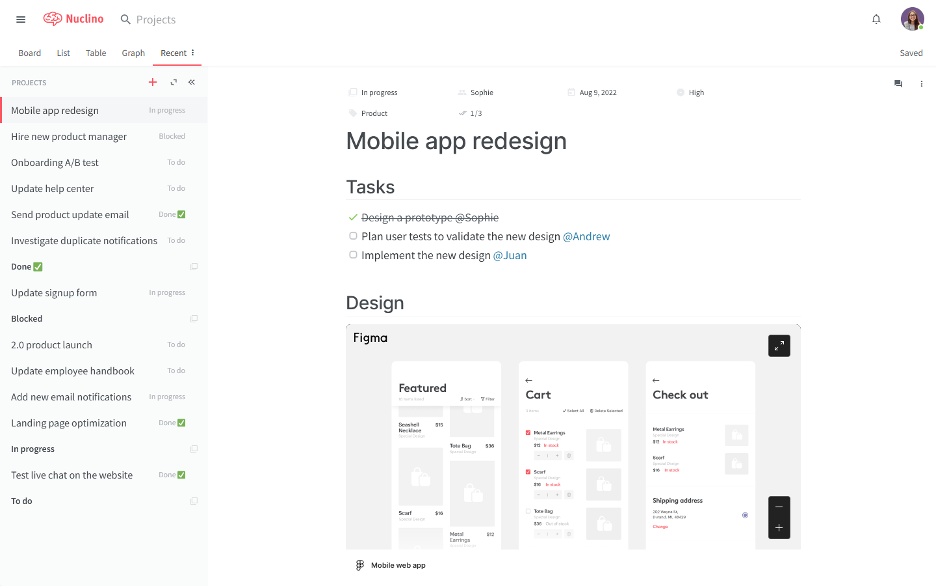
Nuclino est un espace de travail collaboratif conçu pour permettre aux équipes d'organiser leurs connaissances, de gérer leurs projets et de partager leurs idées sur une plateforme unifiée. Il convient aux équipes qui recherchent un moyen simple et rapide de collaborer sur des projets sans encombrement.
Pourquoi c'est une bonne alternative à Milanote : Nuclino offre une interface simple et intuitive qui vise à faciliter la collaboration en équipe. Ses documents collaboratifs en temps réel et ses outils d'organisation conviviaux permettent une configuration rapide et présentent une courbe d'apprentissage minimale. Nuclino fournit un espace unifié pour la collaboration et le partage de connaissances basés sur le texte, et convient aux équipes qui privilégient la simplicité et la rapidité dans leurs flux de travail.
Fonctionnalités remarquables et intégrations :
Les fonctionnalités comprennent des fonctions de communication asynchrone telles que des menus d'activité et de commentaires, ainsi que la possibilité de travailler ensemble sur des documents en temps réel. La plateforme prend en charge les affichages en liste, en tableau Kanban, en tableau et en graphe, offrant une grande flexibilité dans l'organisation des informations. Elle propose également un éditeur sans distraction qui vous permet de rester concentré sur la création de contenu.
Les intégrations comprennent Slack, Google Drive, Dropbox, Microsoft OneDrive, Box, Google Calendar, et bien plus encore.
Pros and Cons
Pros:
- Espace d'écriture épuré
- Faible friction au sein de l'équipe
- Centre de connaissances léger
Cons:
- Liberté de mise en page limitée
- Peu de contrôles d'automatisation

Trello
Idéal pour une gestion flexible des tâches
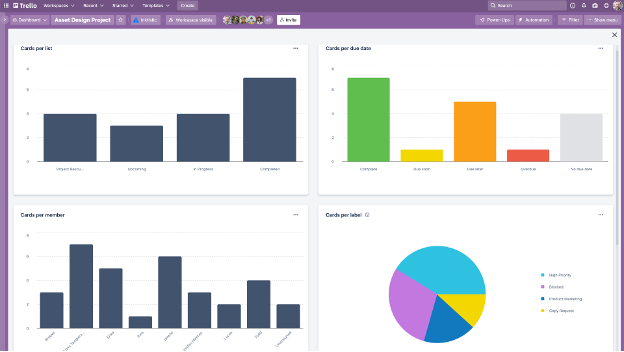
Trello est un outil visuel de gestion de projets qui aide les équipes à organiser les tâches à l'aide de tableaux, de listes et de cartes. Il est conçu pour les équipes qui ont besoin d'une manière flexible et intuitive de gérer leurs projets et de collaborer efficacement.
Pourquoi c'est une bonne alternative à Milanote : Trello propose un système flexible de gestion des tâches conçu pour s'adapter à différents flux de travail. Son système de tableaux et de cartes vous permet de visualiser les tâches et les projets d'une manière facile à comprendre. Il propose également des flux de travail personnalisables et l'automatisation des tâches.
Fonctionnalités remarquables et intégrations :
Les fonctionnalités comprennent des tableaux visuels personnalisables qui permettent à votre équipe d'organiser les tâches de la manière qui correspond à votre flux de travail. Le système de cartes vous permet d'ajouter des détails, des commentaires et des pièces jointes à chaque tâche, afin que tout soit regroupé au même endroit. Trello permet également de créer des règles et des commandes pour automatiser les actions liées aux projets, la messagerie et la gestion des tickets.
Les intégrations comprennent Slack Power-Up, Google Calendar, Jira, Toggl, et bien plus encore.
Pros and Cons
Pros:
- Configuration rapide des tâches
- Suivi visuel de l'avancement des projets
- Capacités d'automatisation flexibles
Cons:
- Aucune logique native de dépendances
- La mise à l'échelle peut entraîner un encombrement

Mural
Idéal pour l'intégration à Microsoft
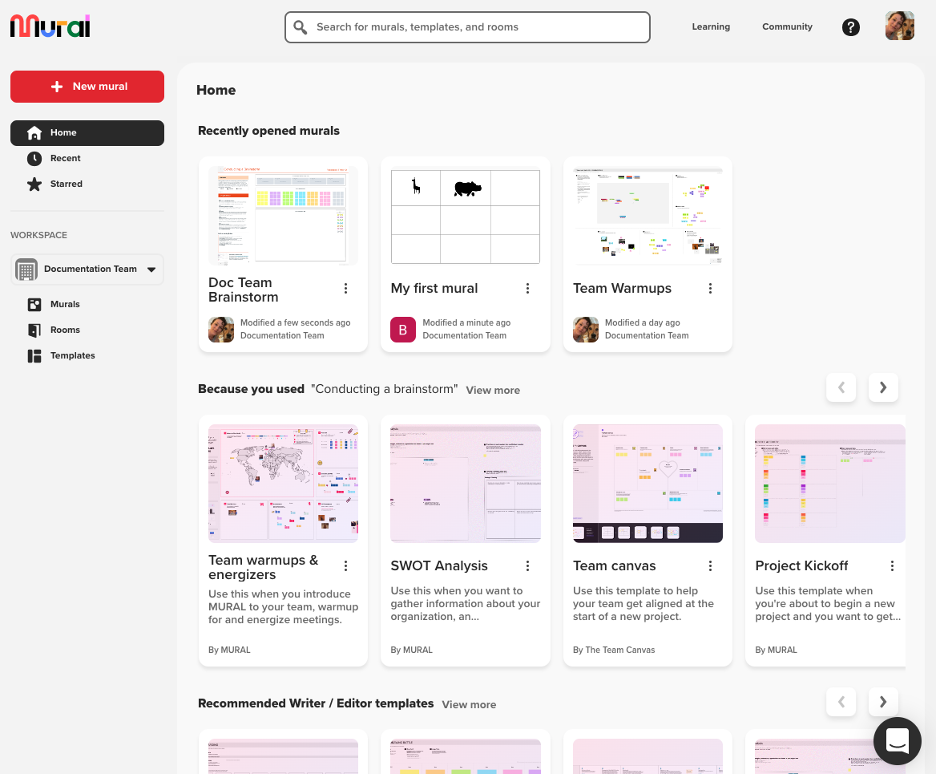
Mural est un espace de travail numérique pour la collaboration visuelle compatible avec Microsoft 365. Il est conçu pour les équipes de conception et d'innovation qui s'appuient sur le brainstorming et la planification interactifs afin de stimuler la créativité et le travail d'équipe.
Pourquoi c'est une bonne alternative à Milanote : Mural propose une plateforme dynamique pour la collaboration visuelle, adaptée aux équipes qui ont besoin de tableaux blancs interactifs et d'outils de brainstorming. Ses notes adhésives, ses outils de dessin et ses modèles peuvent contribuer à améliorer les flux de travail.
Fonctionnalités et intégrations remarquables :
Les fonctionnalités comprennent un canevas infini sur lequel votre équipe peut collaborer en temps réel, ce qui améliore les séances de brainstorming. L'outil offre une intégration étroite avec l'écosystème Microsoft afin que vous puissiez unifier votre flux de travail. Mural propose également des fonctionnalités de vote et de minuteur pour faciliter la prise de décision pendant les réunions.
Les intégrations comprennent Microsoft Teams, Slack, Zoom, Jira, Google Workspace, Dropbox et bien plus encore.
Pros and Cons
Pros:
- Brainstorming de groupe en direct
- Grande capacité des tableaux blancs
- Forte prise en charge de l'écosystème Microsoft
Cons:
- Contrôle des versions limité
- La surcharge visuelle peut rapidement s'accumuler

Evernote
Idéal pour la prise de notes avancée
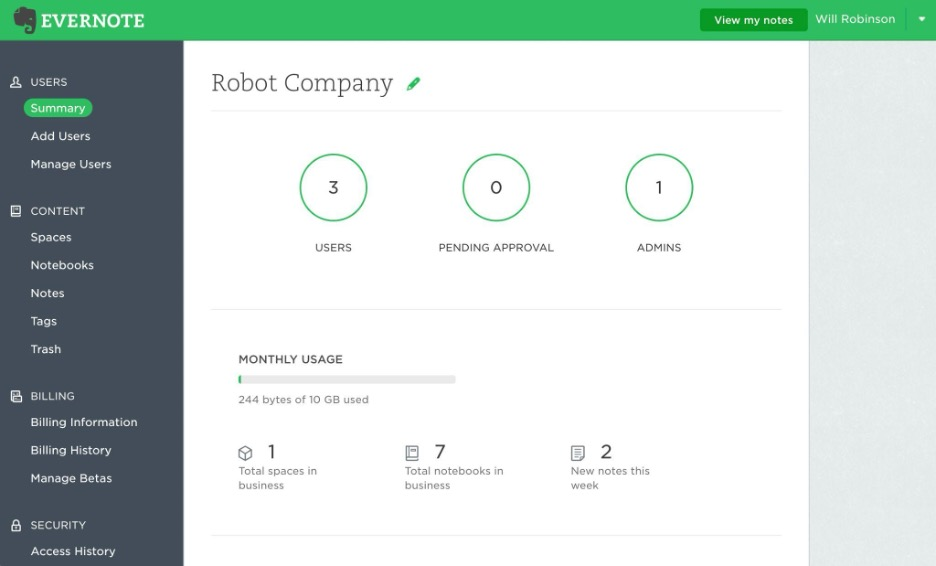
Evernote est une application polyvalente de prise de notes conçue pour les particuliers et les équipes qui ont besoin d'organiser leurs notes, tâches et calendriers au même endroit. C'est un choix populaire pour les professionnels qui apprécient les fonctionnalités de recherche avancée et l'accès facile aux informations.
Pourquoi c'est une bonne alternative à Milanote : Evernote se distingue par ses fonctionnalités avancées de prise de notes, ce qui en fait une solution idéale pour les utilisateurs qui ont besoin de plus qu'une simple cartographie visuelle de projets. Ses modèles de notes prêts à l'emploi, ses listes de tâches et ses fonctionnalités d'IA facilitent la capture et l'organisation d'informations détaillées. Contrairement à Milanote, Evernote se concentre sur les données textuelles et la gestion des tâches.
Fonctionnalités et intégrations remarquables :
Les fonctionnalités incluent l'enregistrement de contenu Web, qui vous permet de sauvegarder directement des articles, des images et des PDF dans vos notes. L'application offre des fonctionnalités de recherche avancée, vous permettant de trouver rapidement des références dans vos notes. De plus, la fonctionnalité de numérisation de documents d'Evernote vous aide à numériser et à gérer vos documents papier.
Les intégrations incluent Google Drive, Slack, Microsoft Teams, Outlook, Google Calendar, et bien plus encore.
Pros and Cons
Pros:
- Grande précision de la recherche
- Capture efficace des documents
- Stockage des notes à long terme
Cons:
- Mise à l'échelle des carnets plus lente
- Limites du contrôle des exportations

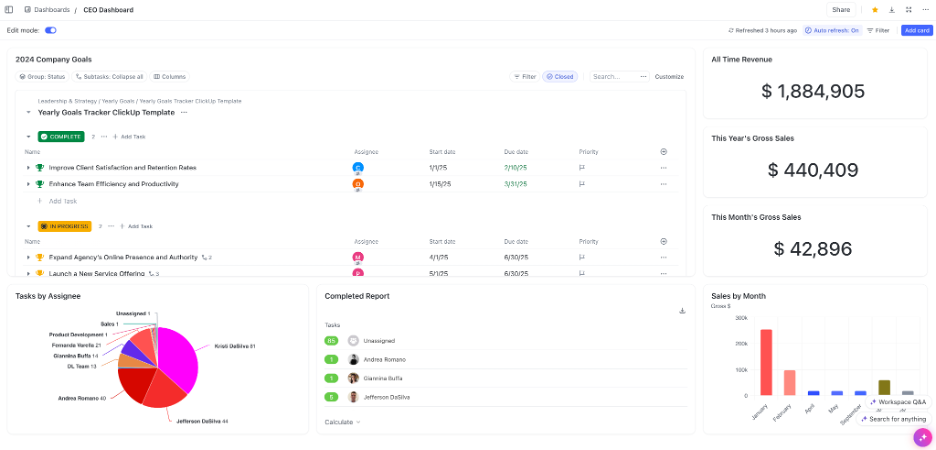
ClickUp est un outil polyvalent de gestion de projets et de productivité utilisé par des équipes dans divers secteurs pour planifier, suivre et gérer des projets en collaboration. Il s'adresse aux entreprises qui ont besoin d'une plateforme centralisée pour intégrer les tâches, les documents, les objectifs et la gestion du temps.
Pourquoi c'est une bonne alternative à Milanote : ClickUp propose une suite tout-en-un d'outils de productivité qui va au-delà de la simple organisation visuelle. Ses fonctionnalités de gestion des tâches, de modification de documents et de suivi du temps sont conçues pour améliorer la productivité des équipes. Il offre un environnement structuré pour gérer plusieurs aspects des projets.
Fonctionnalités et intégrations remarquables :
Les fonctionnalités comprennent l'automatisation des tâches, qui peut faire gagner du temps à votre équipe en automatisant les tâches répétitives. La plateforme fournit des modèles de listes de contrôle et des tableaux de bord personnalisables, ce qui vous permet d'adapter l'interface aux besoins de votre projet. ClickUp propose également le suivi des objectifs pour aider votre équipe à rester concentrée sur les objectifs du projet.
Les intégrations comprennent Slack, Google Drive, Dropbox, Microsoft Teams, Zoom, GitHub et bien d'autres.
Pros and Cons
Pros:
- Large choix d'intégrations
- Moteur d'automatisation performant
- Puissantes fonctionnalités de génération de rapports
Cons:
- Processus de configuration complexe
- Confusion potentielle due à la profusion de fonctionnalités

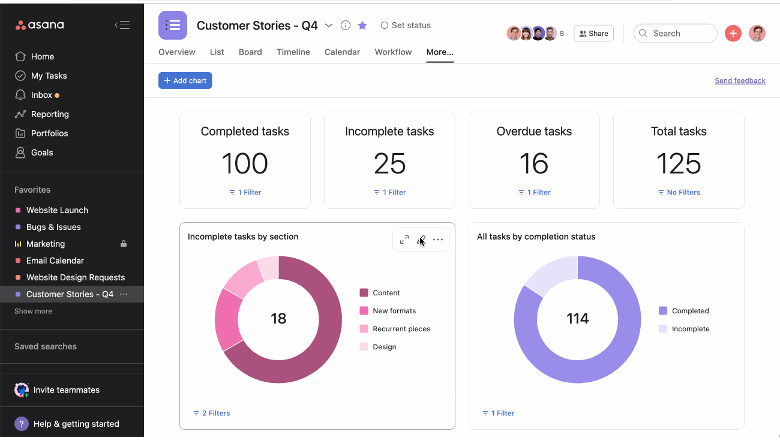
Asana est un outil de gestion de projet conçu pour aider les équipes à organiser, suivre et gérer leur travail. Il est apprécié par les entreprises qui ont besoin de fonctionnalités étendues de planification de projets et de gestion des tâches.
Pourquoi c'est une bonne alternative à Milanote : Asana offre une gamme de fonctionnalités de gestion de projet adaptées aux flux de travail structurés et aux projets complexes. Ses dépendances entre les tâches, ses calendriers et ses fonctionnalités de suivi de projet fournissent une vue détaillée de l'avancement.
Fonctionnalités et intégrations remarquables :
Les fonctionnalités comprennent une vue en temps réel du calendrier, qui vous aide à visualiser les plans et les échéances des projets. Asana propose également des champs personnalisés, vous permettant d'adapter la plateforme aux besoins spécifiques de votre projet.
Les intégrations comprennent Slack, Microsoft Teams, Google Drive, Dropbox, Salesforce, Zoom et bien plus encore.
Pros and Cons
Pros:
- Gestion efficace des dépendances
- Vues claires de la charge de travail
- Structure de flux de travail mature
Cons:
- Limites d'imbrication des tâches pour les grandes organisations
- La tarification et la structure des fonctionnalités peuvent entraîner une charge administrative pour les petites équipes

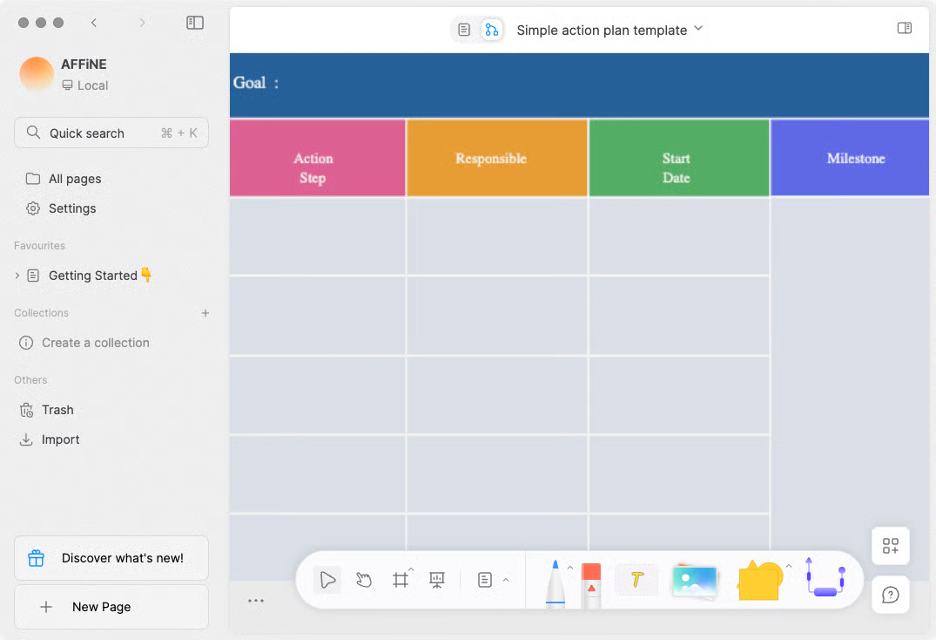
AFFiNE est un espace de travail polyvalent dédié aux connaissances qui combine des documents, des tableaux blancs, des bases de données et un assistant alimenté par l’IA au sein d’une seule application. Il s’adresse aux particuliers ou aux équipes à la recherche d’un espace flexible pour prendre des notes, faire du brainstorming visuel, créer du contenu et planifier des projets.
Pourquoi c’est une bonne alternative à Milanote : AFFiNE propose un espace de travail assisté par l’IA dans lequel vous pouvez écrire, dessiner, planifier ou concevoir. Ses fonctionnalités d’IA vous permettent de générer du contenu, d’affiner le ton et la grammaire, et de transformer rapidement des notes en texte soigné ou en plans structurés. La plateforme associe un tableau blanc en canevas libre à l’édition traditionnelle de documents, vous évitant ainsi de devoir passer d’une application à une autre.
Fonctionnalités et intégrations remarquables :
Les fonctionnalités comprennent un tableau blanc infini (canevas sans bords) pour le brainstorming visuel, la collaboration en temps réel dans des espaces de travail cloud ou locaux, ainsi qu’un assistant IA intégré capable de vous aider à rédiger, résumer et transformer des idées en textes ou en présentations. L’application est également disponible sur mobile pour accéder à vos projets où que vous soyez.
Les intégrations ne sont pas répertoriées publiquement.
Pros and Cons
Pros:
- Écriture sur canevas hybride
- Contrôle local prioritaire
- Rédaction assistée par l’IA
Cons:
- L’interface hybride peut sembler complexe
- Les fonctionnalités sont encore en cours de développement

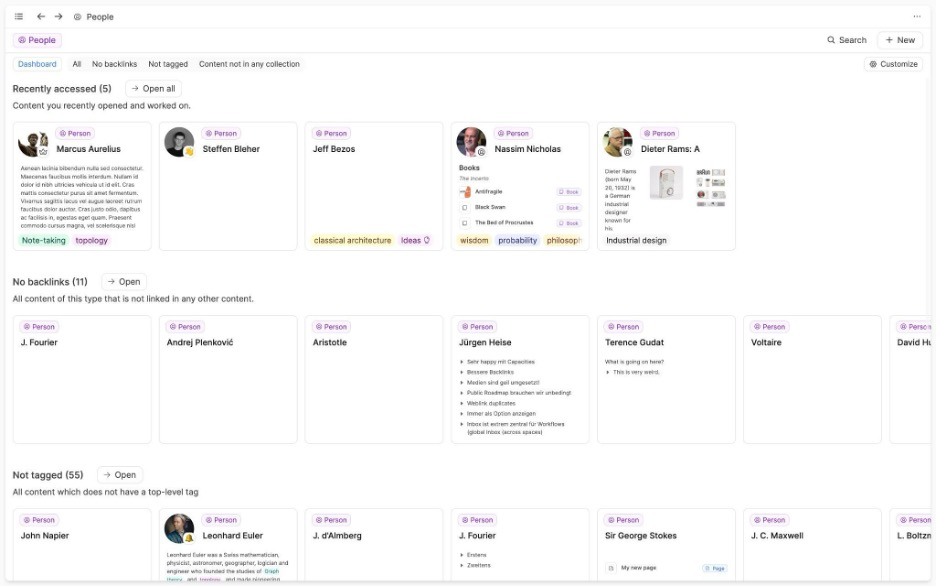
Capacities est un logiciel unique conçu pour stimuler la pensée créative en permettant aux utilisateurs d'interagir avec leurs notes comme avec des objets plutôt qu'avec des fichiers traditionnels. Il est adapté aux écrivains, aux chercheurs et aux développeurs qui recherchent une approche interconnectée de la gestion des connaissances.
Pourquoi c'est une bonne alternative à Milanote : Capacities offre un environnement créatif de cartographie mentale qui vous aide à visualiser et à relier différents éléments, tels que des idées et des livres. Cette approche encourage le développement créatif, vous permettant d'approfondir votre compréhension de vos projets. Elle convient aux utilisateurs qui souhaitent s'affranchir des méthodes conventionnelles de prise de notes et adopter un flux de travail plus intuitif.
Fonctionnalités et intégrations remarquables :
Les fonctionnalités comprennent un espace de travail interactif où vous pouvez relier et organiser visuellement vos réflexions, ainsi qu'une interface intuitive pour créer une archive centrale de vos notes et ressources.
Les intégrations comprennent Google Calendar, Readwise et bien d'autres.
Pros and Cons
Pros:
- Organisation intuitive basée sur les objets
- Interface d'écriture simple
- Fonctionnalités avancées de balisage et de liaison
Cons:
- Conçu pour un usage individuel
- Prise en charge limitée des flux de travail professionnels

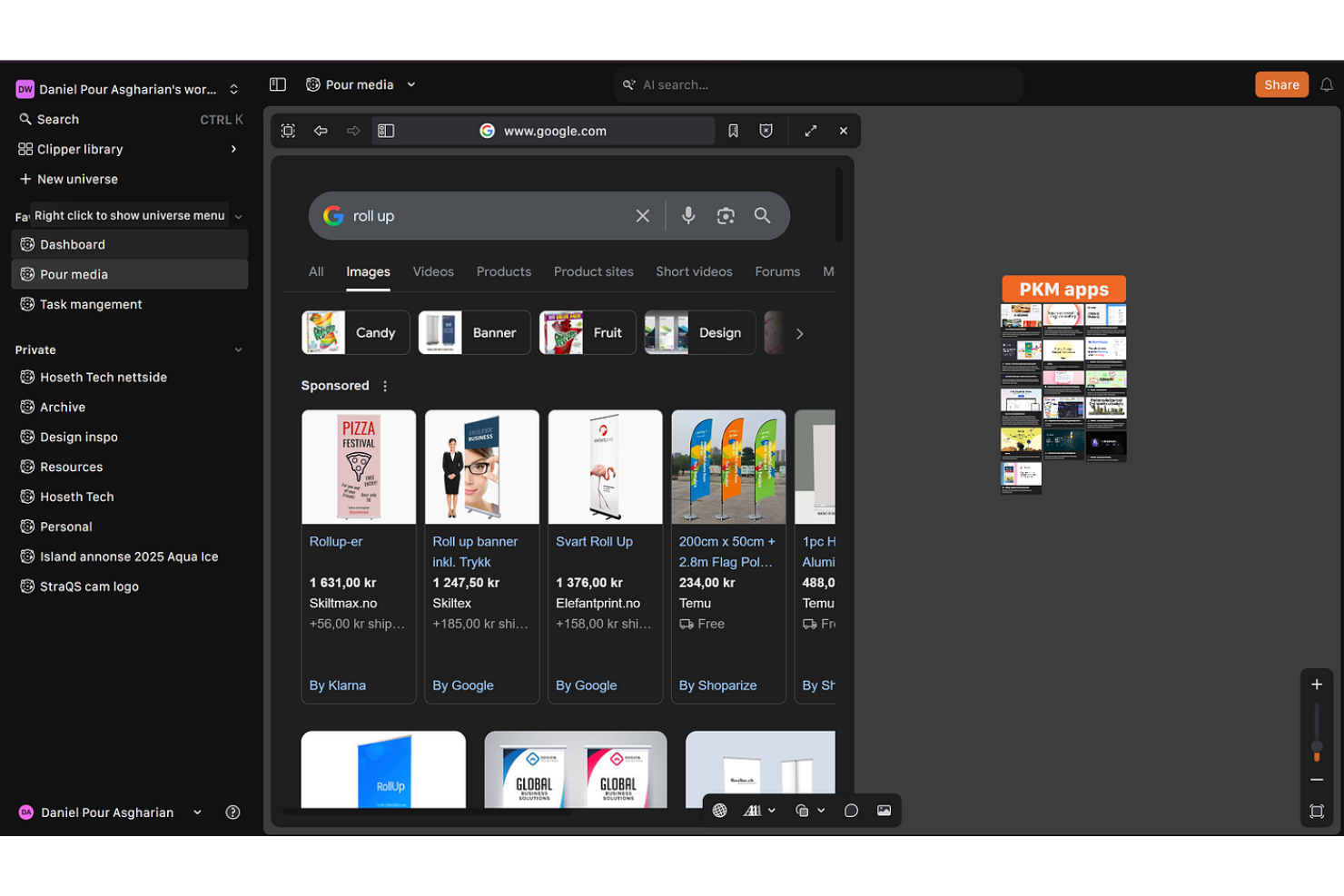
Kosmik est un outil numérique conçu pour aider les professionnels de la création à organiser et à visualiser leurs projets au moyen de tableaux d’inspiration et d’espaces interactifs. Il est principalement utilisé par les designers et les artistes qui ont besoin d’une plateforme flexible pour faire émerger des idées et les développer.
Pourquoi c’est une bonne alternative à Milanote : Kosmik offre une interface intuitive pour créer rapidement des tableaux d’inspiration, ce qui en fait un choix adapté aux créatifs qui ont besoin de visualiser leurs idées à tout moment. Sa fonctionnalité de glisser-déposer vous permet d’assembler et de réorganiser facilement les éléments. Contrairement à Milanote, qui propose des fonctionnalités plus étendues de gestion de projets, Kosmik se concentre sur la création de contenu visuel.
Fonctionnalités et intégrations remarquables :
Les fonctionnalités comprennent un canevas personnalisable qui permet à votre équipe de créer des projets visuels et d’intégrer des vidéos sans contraintes. L’outil prend en charge la collaboration en temps réel, ce qui permet aux membres de l’équipe de travailler ensemble depuis différents endroits. Kosmik propose également une extension de capture de contenu web qui permet de capturer du texte, d’enregistrer des pages dans les favoris et de sauvegarder des images avec leurs informations sources afin de stimuler votre processus créatif.
Les intégrations ne sont pas listées publiquement.
Pros and Cons
Pros:
- Tableaux d’inspiration visuels rapides
- Déplacement fluide par glisser-déposer
- Liberté de mise en page créative
Cons:
- Aucun suivi sérieux des projets
- Prise en charge limitée des flux de travail nécessitant beaucoup de données

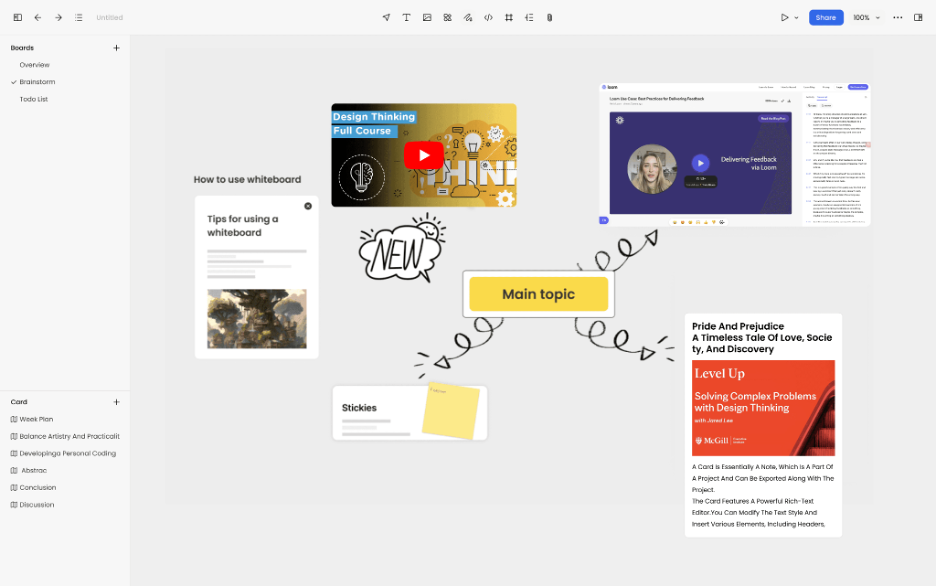
Noteey est une application de prise de notes visuelle conçue pour les utilisateurs qui ont besoin d’organiser leurs idées à l’aide de tableaux blancs, de tableaux d’inspiration et de diagrammes de flux. Elle s’adresse à un public varié, notamment aux étudiants, aux chercheurs et aux professionnels créatifs qui accordent de l’importance à la pensée visuelle.
Pourquoi c’est une bonne alternative à Milanote : Noteey propose une variété d’outils qui améliorent la prise de notes visuelle, ce qui la rend adaptée à ceux qui recherchent davantage d’options créatives. Ses fonctionnalités de tableau blanc et de tableau d’inspiration offrent une toile flexible pour organiser visuellement les idées. Contrairement à Milanote, Noteey intègre la synthèse de contenu basée sur l’IA, ce qui peut vous aider à assimiler rapidement les informations provenant de plateformes telles que YouTube et les PDF.
Fonctionnalités et intégrations remarquables :
Les fonctionnalités comprennent un tableau blanc hors ligne qui vous permet de travailler sans connexion Internet. L’application prend en charge les sauvegardes locales, garantissant que vos données restent en sécurité et soient facilement récupérables. Noteey propose également des outils d’annotation qui vous permettent de surligner des passages et de laisser des commentaires sur les documents.
Les intégrations ne sont pas répertoriées publiquement.
Pros and Cons
Pros:
- Contrôle renforcé des données locales
- Mises en page de tableaux blancs flexibles
- Prise en charge du travail créatif hors ligne
Cons:
- Suivi peu développé de la productivité
- Écosystème limité
Autres alternatives à Milanote
Voici quelques alternatives supplémentaires à Milanote qui ne figurent pas dans ma sélection, mais qui méritent tout de même votre attention :


Comment j’évalue les alternatives à Milanote
Je divise mon évaluation en critères de base — comme la flexibilité d’un canevas libre et la prise en charge de contenus variés — et en facteurs différenciants qui permettent de distinguer les outils que l’on peut recommander de ceux qui font simplement le travail.
Fonctionnalités essentielles (indispensables pour cette liste)
Lorsque je sélectionne les outils pour ma liste, j’évalue chacun d’eux sur une échelle de 0 (ne propose pas la fonctionnalité) à 5 (excelle dans ce domaine) pour chaque fonctionnalité essentielle indiquée ci-dessous. Je convertis ensuite le score total de l’outil en pourcentage. Chaque outil doit obtenir un score total minimum de 65 % pour être pris en compte.
- Espace de travail sur canevas visuel : Je vérifie si les tableaux permettent une disposition spatiale libre — par exemple, faire glisser des images de référence à côté de notes de tâches — avec zoom, regroupement et navigation aisée.
- Blocs de contenu multimédia : Chaque outil doit pouvoir gérer différents types de contenu au sein d’un même tableau, des liens intégrés et des téléversements de fichiers aux listes de tâches et aux clips vidéo.
- Collaboration en temps réel : Je recherche la coédition en direct, les commentaires et les mentions afin que les équipes distribuées puissent réfléchir ensemble sur un tableau d’inspiration partagé sans conflits de versions.
- Outils de structuration des projets : L’organisation de dizaines de tableaux devient rapidement complexe ; j’évalue donc la manière dont chaque outil gère les dossiers, les espaces de travail et les hiérarchies multi-projets.
- Modèles et cadres méthodologiques : Une bibliothèque solide de modèles prêts à l’emploi pour les briefs, les tableaux d’inspiration et les plans de sprint permet de gagner du temps lors de la configuration et aide les nouveaux utilisateurs à démarrer rapidement.
- Options d’exportation et d’intégration : Je vérifie la possibilité d’exporter en PDF et en image, ainsi que les connexions à des outils comme Slack, Asana ou Google Drive, dont les équipes créatives et de gestion de projet dépendent déjà.
Une fois que j’ai dressé une liste d’outils répondant à ces critères, j’examine ce qui distingue chaque plateforme.
Facteurs différenciants (ce qui distingue les fournisseurs)
Voici comment je compare les différents fournisseurs :
Fonctionnalités remarquables
Les vues des tâches et des échéances jouent ici un rôle important. Certains outils permettent de transformer un tableau visuel en vue Kanban ou Gantt, faisant le lien entre la planification créative et le suivi de la réalisation. Le mode présentation est une autre fonctionnalité que je recherche : présenter un tableau d’inspiration à un client sans exporter de diapositives permet de gagner un temps précieux lors des revues. J’évalue également les outils de dessin et d’esquisse, car le fait de créer des schémas filaires à main levée directement sur le canevas permet de poursuivre l’idéation sans changer d’application.
Au-delà des fonctionnalités
Les modèles de collaboration et de partage varient considérablement d’un outil à l’autre. Je vérifie s’il est possible d’inviter des clients externes ou des freelances en tant qu’invités sans utiliser une licence payante — un point important pour les projets d’agence avec des contributeurs qui changent régulièrement. La structure tarifaire constitue un autre facteur clé, notamment la manière dont les coûts évoluent lorsque l’équipe dépasse quelques utilisateurs. J’évalue également les politiques relatives à la propriété des données et à l’exportation, car les équipes créatives qui travaillent avec la propriété intellectuelle de leurs clients ont besoin de garanties claires que leur travail reste portable et protégé.
Pourquoi chercher une alternative à Milanote ?
Bien que Milanote soit un bon choix de logiciel de productivité, plusieurs raisons peuvent pousser certains utilisateurs à rechercher d’autres solutions. Vous cherchez peut-être une alternative à Milanote parce que…
- Vous avez besoin d’une gestion des tâches plus avancée
- Votre équipe a besoin d’un accès hors ligne
- Vous souhaitez disposer de meilleures options d’intégration
- Vos projets nécessitent davantage de personnalisation visuelle
- Vous avez besoin d’une solution adaptée aux équipes plus importantes
- Vous avez besoin de fonctionnalités favorisant la collaboration internationale
Si l’un de ces points vous correspond, vous êtes au bon endroit. Ma liste comprend plusieurs logiciels de productivité mieux adaptés aux équipes confrontées à ces difficultés avec Milanote et à la recherche de solutions alternatives.