

10 meilleures alternatives à Google Workspace pour les équipes en 2026

Sélection des meilleures alternatives à Google Workspace


En tant que chef de projet, votre réussite quotidienne dépend de votre capacité à maintenir l’organisation et la productivité d’équipes complexes. Bien que les outils de productivité basés sur le cloud soient souvent indispensables pour gérer les tâches et la communication entre différentes plateformes, Google Workspace n’est pas toujours la solution idéale. Que vous atteigniez les limites des outils natifs de Google ou que vous ayez besoin d’une intégration plus étroite avec des logiciels spécialisés, trouver la bonne alternative à Google Workspace est essentiel pour faire évoluer les standards de votre entreprise.
Dans ce guide, j’ai évalué de manière indépendante les meilleures solutions logicielles qui comblent les lacunes laissées par Google Workspace. Ma sélection se concentre sur la gestion de projet et la collaboration hautes performances plutôt que sur les CRM traditionnels, même si chaque recommandation propose des intégrations tierces pour maintenir la connexion de vos données clients.
Que vous recherchiez une solution complète de remplacement ou une application web spécialisée pour optimiser votre flux de travail sur des appareils Microsoft ou Apple, ces alternatives à Google Workspace sont conçues pour simplifier votre vie professionnelle et rendre votre équipe plus efficace.
Qu’est-ce que Google Workspace ?
Google Workspace, anciennement connu sous le nom de G Suite, est un outil de productivité basé sur le cloud qui aide les équipes à collaborer et à communiquer efficacement au sein de l’écosystème Google et au-delà. Il est couramment utilisé par des professionnels de divers secteurs, notamment les chefs de projet, les spécialistes du marketing, les petites entreprises et les enseignants, pour sa capacité à améliorer la productivité et la collaboration au sein des équipes.
Des outils tels que Google Docs, Google Sheets et Google Meet prennent en charge la création de documents, la gestion des données et la communication. Ces fonctionnalités vous aident, vous et votre équipe, à rester organisés et connectés. Dans l’ensemble, Google Workspace offre une plateforme polyvalente qui s’adapte aux différents besoins des entreprises, ce qui en fait un atout précieux pour améliorer l’efficacité au travail.
Résumé des meilleures alternatives à Google Workspace
Ce tableau comparatif récapitule les informations tarifaires de ma sélection des meilleures alternatives à Google Workspace afin de vous aider à trouver celle qui correspond le mieux à votre budget et aux besoins de votre entreprise.
| Tool | Best For | Trial Info | Price | ||
|---|---|---|---|---|---|
| 1 | Idéal pour les tableaux de tâches personnalisables | Formule gratuite disponible | À partir de $5/utilisateur/mois | Website | |
| 2 | Idéal pour l’intégration des applications Office | Forfait gratuit disponible | À partir de $21/utilisateur/mois (facturé annuellement) | Website | |
| 3 | Idéal pour la gestion des connaissances | Démo gratuite disponible | Tarifs sur demande | Website | |
| 4 | Idéal pour les fonctionnalités de gestion de projets | Forfait gratuit + démonstration gratuite disponible | À partir de $7/utilisateur/mois (facturé annuellement) | Website | |
| 5 | Idéal pour la gestion des tâches hors ligne | Version gratuite disponible | Utilisation gratuite | Website | |
| 6 | Idéal pour une collaboration sécurisée | Démonstration gratuite disponible | Tarifs sur demande | Website | |
| 7 | Idéal pour l'intégration de la messagerie d'équipe | Formule gratuite + démonstration gratuite disponible | À partir de 7,25 $/utilisateur/mois (facturé annuellement) | Website | |
| 8 | Idéal pour la gestion du travail | Essai gratuit de 30 jours | À partir de $9/utilisateur/mois (facturé annuellement) | Website | |
| 9 | Idéal pour la gestion de projets d’entreprise | Essai gratuit de 14 jours + forfait gratuit disponible | À partir de $10/user/month (facturé annuellement) | Website | |
| 10 | Idéal pour la visioconférence | Formule gratuite disponible | À partir de $14.16/utilisateur/mois (facturé annuellement) | Website |


Pourquoi faire confiance à nos recommandations de logiciels
Notre équipe teste et évalue des logiciels depuis 2012. En tant que chefs de projet nous-mêmes, nous savons à quel point il est difficile — et important — de choisir le bon logiciel.
Pour ce guide, nous avons évalué les outils grâce à des tests pratiques et une recherche indépendante, en notant les outils selon nos critères de sélection. Nous nous appuyons également sur les enseignements de leaders d’opinion du secteur et de professionnels de la gestion de projet en activité.
Nos avis reflètent notre jugement éditorial humain, et non un argumentaire de vente.
Réviseurs experts:
Avis sur les meilleures alternatives à Google Workspace
Vous trouverez ci-dessous mes résumés détaillés des meilleures alternatives à Google Workspace qui ont intégré ma sélection. Mes avis proposent une analyse approfondie des principales fonctionnalités, des avantages et des inconvénients, des intégrations et des cas d’utilisation idéaux de chaque outil afin de vous aider à trouver celui qui vous convient le mieux.
Idéal pour les tableaux de tâches personnalisables
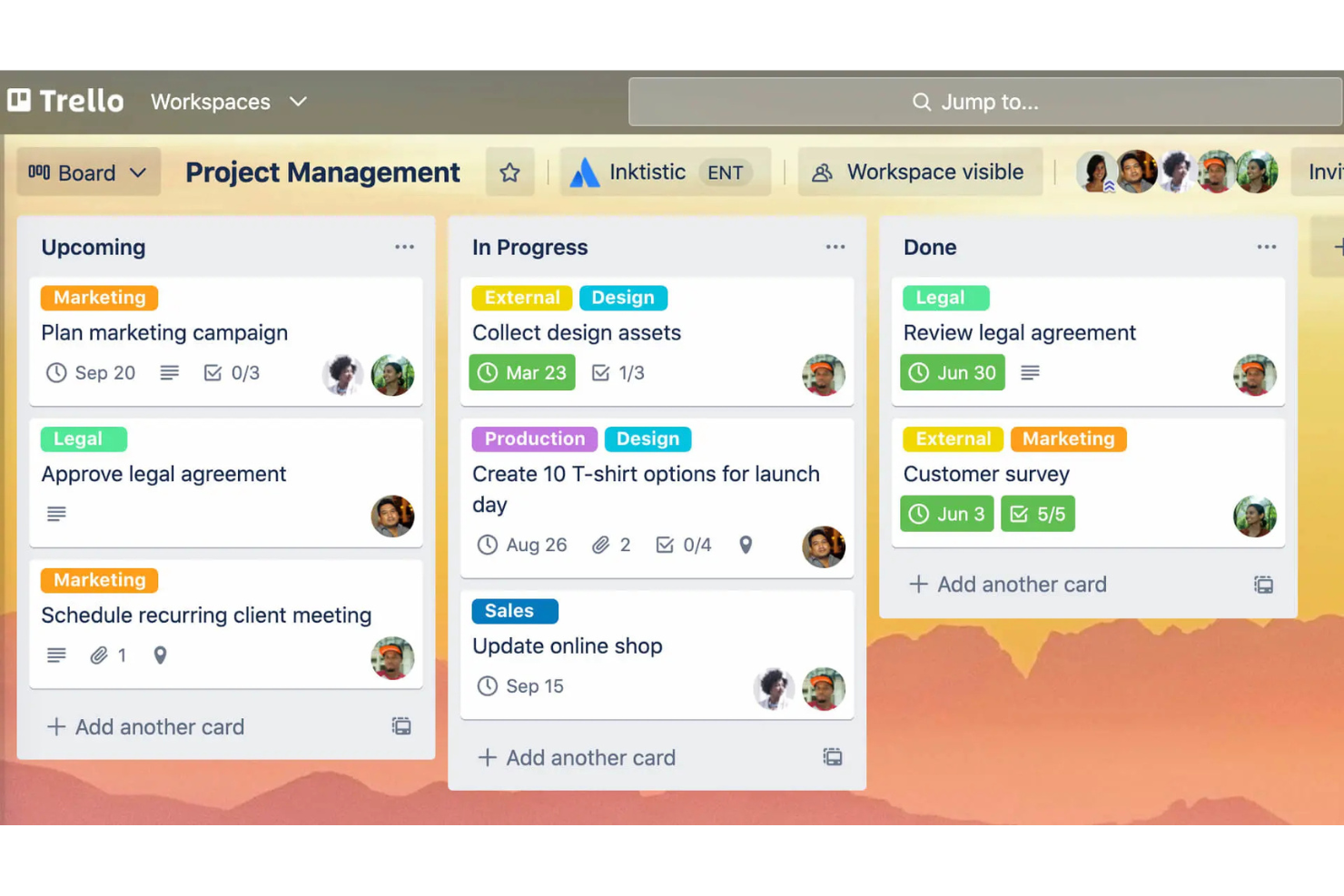
Atlassian Trello est un outil de gestion de projets connu pour son approche visuelle conviviale de l'organisation des tâches à l'aide de tableaux, de listes et de cartes. Il est apprécié par les équipes de toutes tailles qui doivent gérer efficacement des projets et des tâches.
Pourquoi il constitue une bonne alternative à Google Workspace : Atlassian Trello propose des tableaux de tâches personnalisables qui répondent aux besoins spécifiques de votre équipe, contrairement à l'approche plus standardisée de Google Workspace. Vous pouvez créer des tableaux adaptés à différents projets, ce qui offre une grande flexibilité dans la gestion des tâches. La fonctionnalité de glisser-déposer facilite le déplacement des tâches entre les différentes étapes. L'interface visuelle d'Atlassian Trello vous aide, vous et votre équipe, à avoir une vue d'ensemble et à suivre l'avancement en un coup d'œil.
Fonctionnalités et intégrations remarquables :
Les fonctionnalités comprennent la possibilité d'ajouter des dates d'échéance et des listes de contrôle aux tâches, des étiquettes de couleur pour faciliter la catégorisation et la possibilité de joindre directement des fichiers aux cartes. Vous pouvez également utiliser Butler, l'outil d'automatisation intégré d'Atlassian Trello, pour automatiser les tâches répétitives. Les extensions constituent une autre fonctionnalité qui renforce les capacités du tableau grâce à des outils et des intégrations supplémentaires.
Les intégrations comprennent Slack, Google Drive, Dropbox, Microsoft Teams, Evernote, Jira, GitHub, Salesforce, Mailchimp, Zendesk, et bien plus encore.
Pros and Cons
Pros:
- Tableaux de tâches personnalisables
- Suivi visuel des projets
- Déplacement facile des tâches
Cons:
- Absence de suivi natif du temps
- Peu adapté aux projets complexes

Idéal pour l’intégration des applications Office
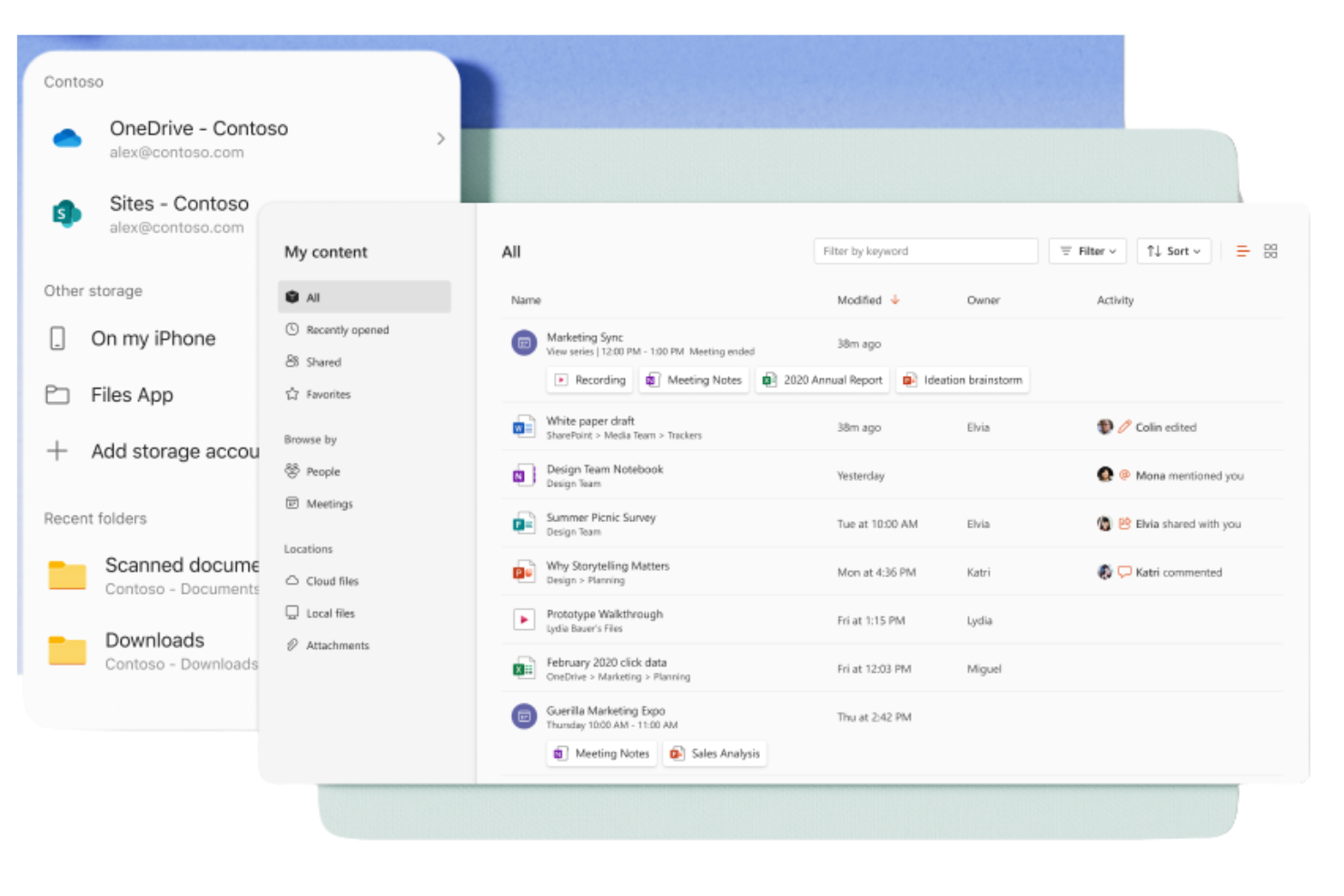
Microsoft 365 Copilot est une suite d’outils de productivité basée sur un abonnement, conçue pour les entreprises et les particuliers afin de les aider à créer, collaborer et communiquer. Elle est largement utilisée par les professionnels qui ont besoin d’accéder aux applications Windows telles que Word, Excel et PowerPoint pour leurs activités professionnelles quotidiennes.
Pourquoi il s’agit d’une bonne alternative à Google Workspace : Microsoft 365 Copilot s’intègre parfaitement aux applications Office, offrant un environnement familier aux utilisateurs qui dépendent fortement de ces outils. Grâce au stockage cloud via OneDrive, vous pouvez accéder facilement aux documents et les partager. La suite inclut également Microsoft Teams pour la communication et la collaboration, ce qui en fait une solution complète pour les besoins professionnels. Ses fonctionnalités de sécurité avancées protègent vos données en permanence.
Fonctionnalités et intégrations remarquables :
Les fonctionnalités comprennent des capacités avancées d’analyse des données avec les feuilles de calcul Excel, qui peuvent aider votre équipe à prendre des décisions éclairées. La suite propose également des modèles personnalisables dans Word et PowerPoint, vous permettant de créer des documents et des présentations professionnels. En outre, Outlook offre une solution intégrée de messagerie électronique et de calendrier pour vous aider à rester organisé.
Les intégrations comprennent Salesforce, Atlassian Trello, Asana, Dropbox, Zoom, Slack, Adobe Acrobat, GitHub, LinkedIn, DocuSign, et bien plus encore.
Pros and Cons
Pros:
- Interface familière pour les utilisateurs de Microsoft Office
- Collaboration documentaire efficace
- Fonctionnalités de sécurité avancées
Cons:
- Qualité des résultats inégale
- Nécessite OneDrive pour Excel

Guru
Idéal pour la gestion des connaissances
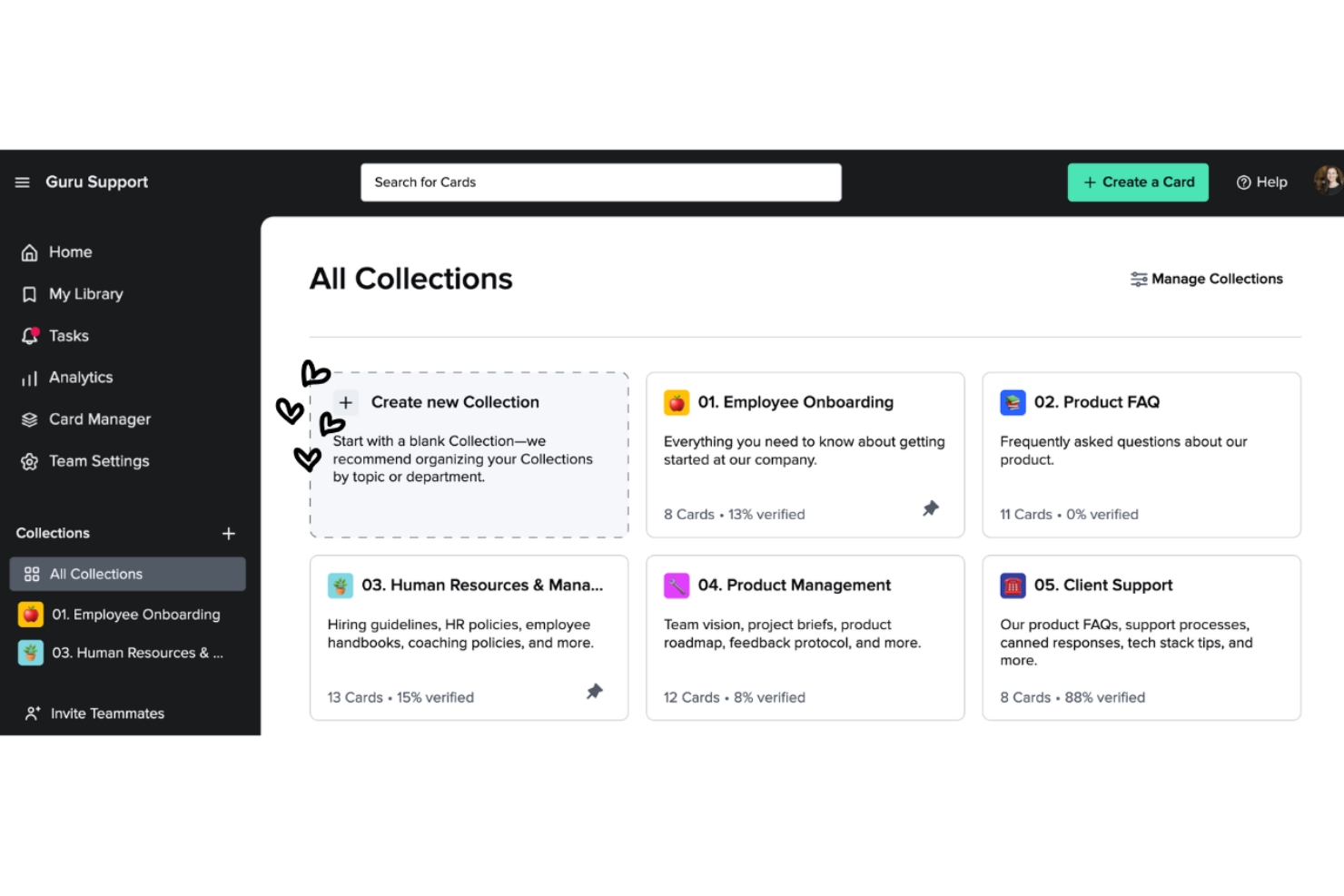
Guru est un outil de gestion des connaissances qui aide les équipes à recueillir, organiser et consulter efficacement les informations. Il est populaire auprès des entreprises qui doivent permettre à leurs équipes d’accéder facilement aux connaissances et aux ressources essentielles.
Pourquoi c’est une bonne alternative à Google Workspace : Guru offre des fonctionnalités de gestion des connaissances qui vont au-delà du stockage de documents de Google Workspace. Son système basé sur des cartes vous permet de créer et de catégoriser des informations afin de les retrouver rapidement. La fonctionnalité de vérification garantit que les connaissances de votre équipe restent à jour et exactes. Les mises à jour et les notifications en temps réel tiennent tout le monde informé des dernières modifications, favorisant ainsi la collaboration.
Fonctionnalités et intégrations remarquables :
Les fonctionnalités comprennent une extension de navigateur qui vous permet d’accéder aux informations et de les recueillir directement depuis votre navigateur web, ce qui facilite la collecte et le stockage des connaissances. La fonctionnalité d’analyse fournit des informations sur la manière dont votre équipe utilise la base de connaissances, ce qui vous aide à repérer les lacunes et les domaines à améliorer. Vous pouvez également profiter de suggestions alimentées par l’IA qui proposent des informations pertinentes lorsque vous en avez besoin.
Les intégrations comprennent Slack, Microsoft Teams, Salesforce, Zendesk, Intercom, Chrome, Outlook, Google Workspace, Zapier et bien plus encore.
Pros and Cons
Pros:
- Organisation efficace des connaissances
- Mises à jour en temps réel
- La vérification garantit l’exactitude
Cons:
- Les options de mise en forme sont limitées
- Nécessite une maintenance constante


ClickUp est un outil de gestion de projets conçu pour les équipes et les entreprises de toutes tailles afin de les aider à organiser les tâches, les projets et les flux de travail. Il offre un éventail de fonctionnalités qui contribuent à optimiser la gestion de projets et à accroître la productivité.
Pourquoi c'est une bonne alternative à Google Workspace : ClickUp fournit des fonctionnalités de gestion de projets étendues qui vont au-delà de ce que propose Google Workspace. La gestion des tâches vous permet d'attribuer et de suivre les tâches facilement, tandis que les tableaux de bord personnalisables vous permettent de visualiser l'avancement des projets de la manière qui vous convient le mieux. La fonctionnalité de définition des objectifs de ClickUp permet à votre équipe de s'aligner sur les objectifs, afin que tout le monde reste sur la même longueur d'onde.
Fonctionnalités et intégrations remarquables :
Les fonctionnalités comprennent le suivi du temps, qui vous aide à surveiller le temps consacré aux tâches. La fonctionnalité de gestion des documents vous permet de créer et de stocker des documents directement au sein de la plateforme. Vous pouvez utiliser les cartes mentales pour organiser visuellement les idées et les plans, ce qui facilite une meilleure planification des projets. Les fonctionnalités du forfait Standard comprennent les tableaux Kanban et une assistance disponible 24 h/24 et 7 j/7.
Les intégrations comprennent Slack, Google Drive, Dropbox, Microsoft Teams, Zoom, GitHub, Atlassian Trello, Salesforce, Zapier, et bien plus encore.
Pros and Cons
Pros:
- Gestion détaillée des tâches
- Fonctionnalités efficaces de définition des objectifs
- Évolutif pour les grandes équipes
Cons:
- Problèmes de performances occasionnels
- Courbe d'apprentissage pour les fonctionnalités avancées

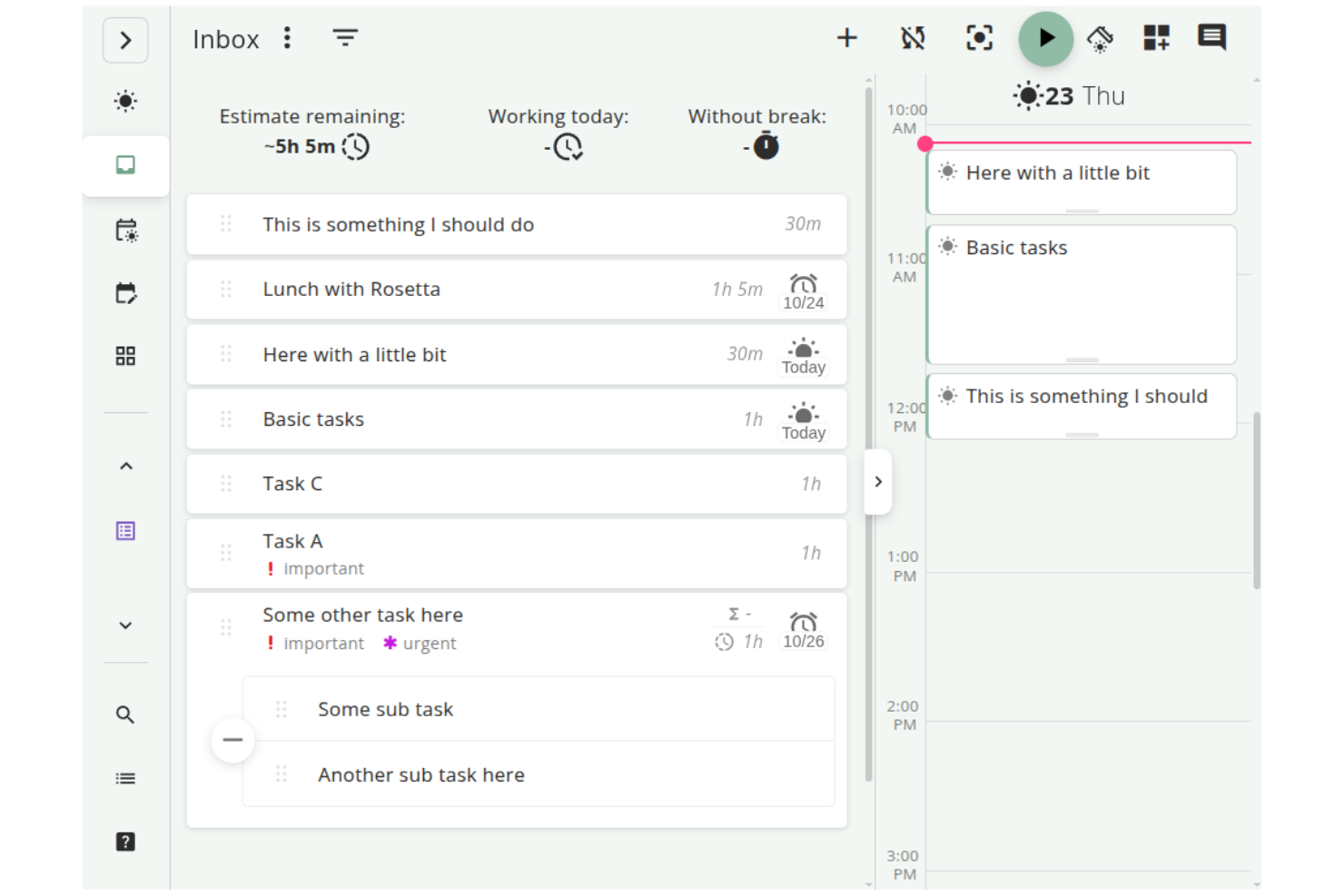
Super Productivity est un gestionnaire de tâches à code source ouvert qui intègre la gestion des tâches, le suivi du temps et la prise de notes, conçu pour les développeurs, les freelances et autres professionnels. Il vise à améliorer la productivité tout en protégeant la vie privée des utilisateurs grâce au stockage des données hors ligne.
Pourquoi c'est une bonne alternative à Google Workspace : Contrairement à Google Workspace, qui dépend fortement des services basés sur le nuage, Super Productivity offre une gestion des tâches hors ligne, protégeant votre vie privée et vous donnant un contrôle total sur vos données. Grâce à des fonctionnalités telles que les tableaux personnalisables, vous pouvez organiser les tâches de la manière qui convient à votre flux de travail. Le mode concentration et le minuteur Pomodoro vous aident à rester concentré pendant vos sessions de travail. De plus, le suivi du temps en un clic et la journalisation détaillée du travail facilitent le suivi de la productivité. Il est également compatible avec Linux.
Fonctionnalités et intégrations remarquables :
Les fonctionnalités comprennent une gestion personnalisable des tâches avec des options pour les sous-tâches et les dates d'échéance, vous permettant d'adapter votre flux de travail. L'intégration du calendrier fournit un aperçu quotidien détaillé pour vous aider à planifier efficacement. Le système de modules d'extension vous permet d'ajouter des fonctionnalités, ce qui le rend adaptable à vos besoins.
Les intégrations comprennent GitHub, GitLab, Jira et bien d'autres.
Pros and Cons
Pros:
- Flux de travail hautement personnalisables
- Protection solide de la vie privée et utilisation hors ligne
- Gestion approfondie des tâches
Cons:
- Collaboration d'équipe limitée
- Pas de synchronisation cloud intégrée

Cisco Webex est une plateforme de visioconférence et de collaboration utilisée par les entreprises et les établissements d’enseignement pour les réunions virtuelles, les webinaires et la collaboration en équipe. Elle fournit des outils de communication à distance, ce qui la rend essentielle pour les équipes qui ont besoin de connexions fiables et sécurisées.
Pourquoi c’est une bonne alternative à Google Workspace : Cisco Webex propose des fonctionnalités de sécurité qui protègent les réunions et préservent leur confidentialité, ce qui la distingue des outils généraux de Google Workspace. Grâce au chiffrement de bout en bout, vos communications restent confidentielles. La plateforme prend en charge la vidéo et l’audio HD, pour des réunions claires et efficaces. De plus, sa capacité à organiser des événements de grande envergure la rend polyvalente pour répondre à divers besoins professionnels.
Fonctionnalités et intégrations remarquables :
Les fonctionnalités comprennent des dispositions de réunion personnalisables, qui vous permettent d’organiser les flux vidéo selon vos préférences. La plateforme propose également une technologie de suppression du bruit, qui contribue à réduire les distractions en arrière-plan pendant les appels. Cisco Webex Assistant fournit une transcription en temps réel, ce qui facilite et optimise la prise de notes.
Les intégrations comprennent Microsoft Teams, Salesforce, Google Workspace, Slack, ServiceNow, Atlassian Trello, Dropbox, Zendesk, Asana, et bien plus encore.
Pros and Cons
Pros:
- Fonctionnalités de sécurité avancées
- Vidéo et audio de haute qualité
- Technologie de suppression du bruit
Cons:
- Nécessite des connaissances techniques pour la configuration
- L’interface peut sembler encombrée

Slack
Idéal pour l'intégration de la messagerie d'équipe
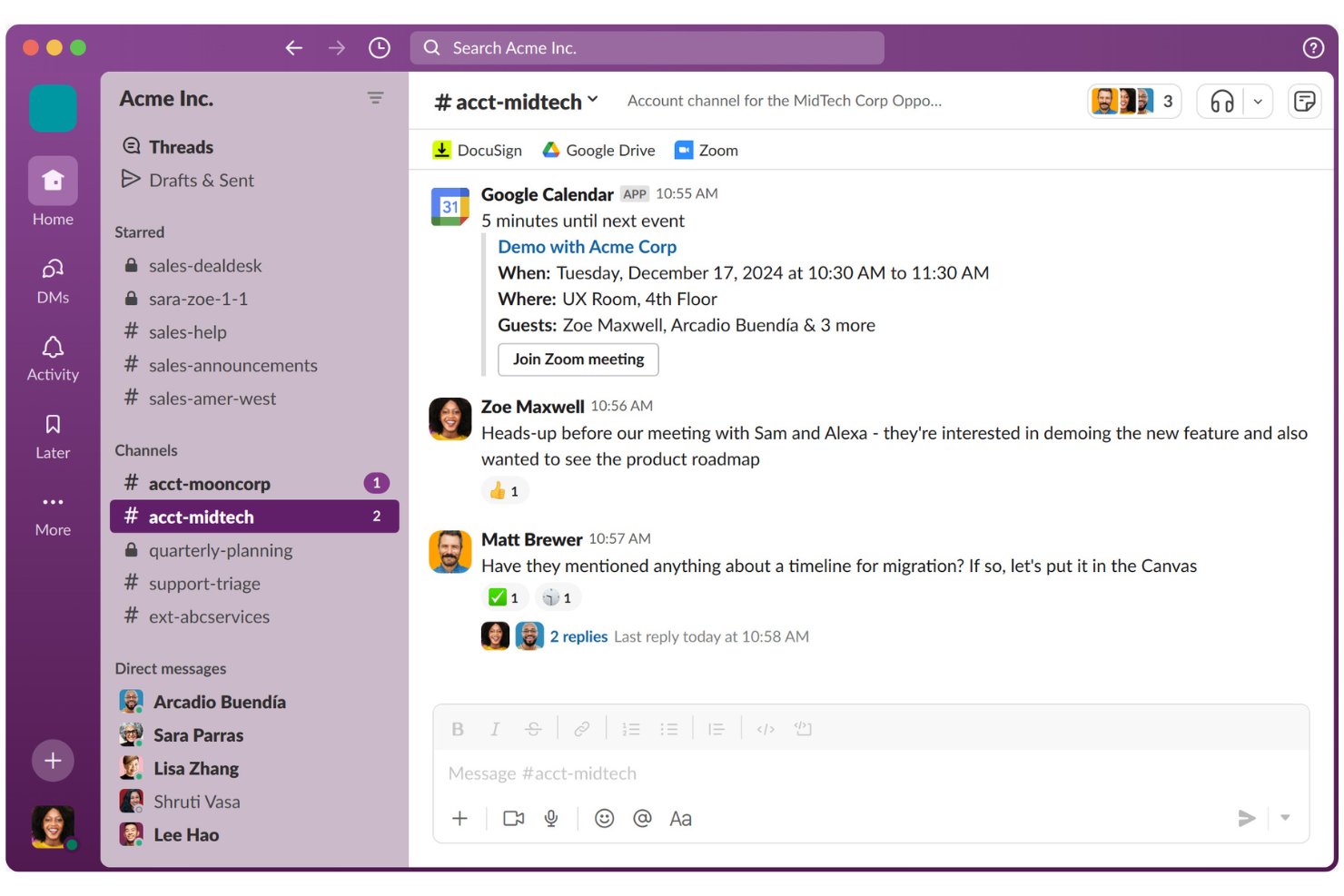
Slack est une plateforme de collaboration conçue pour aider les équipes à communiquer et à collaborer efficacement. Elle est largement utilisée par les entreprises de toutes tailles pour la messagerie, le partage de fichiers et l'organisation des communications d'équipe.
Pourquoi c'est une bonne alternative à Google Workspace : Contrairement à l'approche davantage axée sur les documents de Google Workspace, Slack excelle dans l'intégration de la messagerie d'équipe. Les canaux vous permettent d'organiser les discussions par sujet ou par projet, ce qui rend la communication claire et structurée. Slack Connect vous permet de collaborer avec des partenaires externes et d'élargir votre réseau de communication. Grâce à des fonctionnalités telles que les réunions instantanées pour les appels audio et vidéo rapides, votre équipe peut rester connectée et réactive.
Fonctionnalités et intégrations remarquables :
Les fonctionnalités comprennent la possibilité de créer des flux de travail personnalisés à l'aide du créateur de flux de travail, ce qui contribue à automatiser les tâches courantes. Vous pouvez également utiliser la fonctionnalité Canvas de Slack pour créer et partager des documents. De plus, les outils alimentés par l'IA aident à résumer les conversations et à identifier les principales actions à entreprendre.
Les intégrations comprennent Google Drive, Microsoft 365 Copilot, Dropbox, Salesforce, Zoom, Asana, Atlassian Trello, GitHub, Zendesk, et bien plus encore.
Pros and Cons
Pros:
- Excellentes fonctionnalités de messagerie
- Excellente collaboration externe
- Création de flux de travail personnalisés
Cons:
- La synchronisation mobile peut être instable
- Les notifications peuvent être distrayantes

Idéal pour la gestion du travail

Smartsheet est une plateforme de gestion et d’automatisation du travail utilisée par les équipes et les organisations pour planifier, recueillir, gérer et rendre compte du travail. Il s’agit d’une plateforme de gestion de projets populaire, adaptée aux équipes qui ont besoin d’un outil flexible pour suivre et gérer leurs projets.
Pourquoi il s’agit d’une bonne alternative à Google Workspace : Smartsheet offre des fonctionnalités de gestion du travail qui proposent une approche plus structurée que Google Workspace. Grâce à son interface basée sur une grille, vous pouvez organiser efficacement les tâches et les projets. Les fonctionnalités d’automatisation de la plateforme contribuent à réduire le travail manuel, permettant à votre équipe de se concentrer sur les tâches les plus importantes. Les outils de création de rapports de Smartsheet fournissent des informations sur l’avancement des projets, vous aidant à prendre des décisions fondées sur les données.
Fonctionnalités et intégrations remarquables :
Les fonctionnalités comprennent la possibilité de créer des formulaires personnalisés pour recueillir des données, ce qui simplifie la collecte d’informations auprès de votre équipe. La plateforme propose des vues sous forme de diagramme de Gantt, facilitant la visualisation des échéances et des dépendances des projets. Vous pouvez également utiliser des tableaux de bord pour suivre en temps réel les indicateurs clés et l’état des projets.
Les intégrations comprennent Microsoft Teams, Slack, Google Workspace, Salesforce, Jira, Box, Dropbox, DocuSign, ServiceNow, Tableau et bien plus encore.
Pros and Cons
Pros:
- Outils flexibles de gestion du travail
- Fonctionnalité d’automatisation performante
- Suivi efficace des projets
Cons:
- L’application mobile ne propose pas de vues sous forme de diagramme de Gantt
- Le prix augmente avec les modules complémentaires
New Product Updates from Smartsheet
Smartsheet Adds Column Duplication Without Data
Smartsheet now lets you duplicate columns in table view without copying cell data, while retaining column properties like type, formatting, validation, and dropdown/contact options. For more information, visit Smartsheet's official site.

Wrike
Idéal pour la gestion de projets d’entreprise
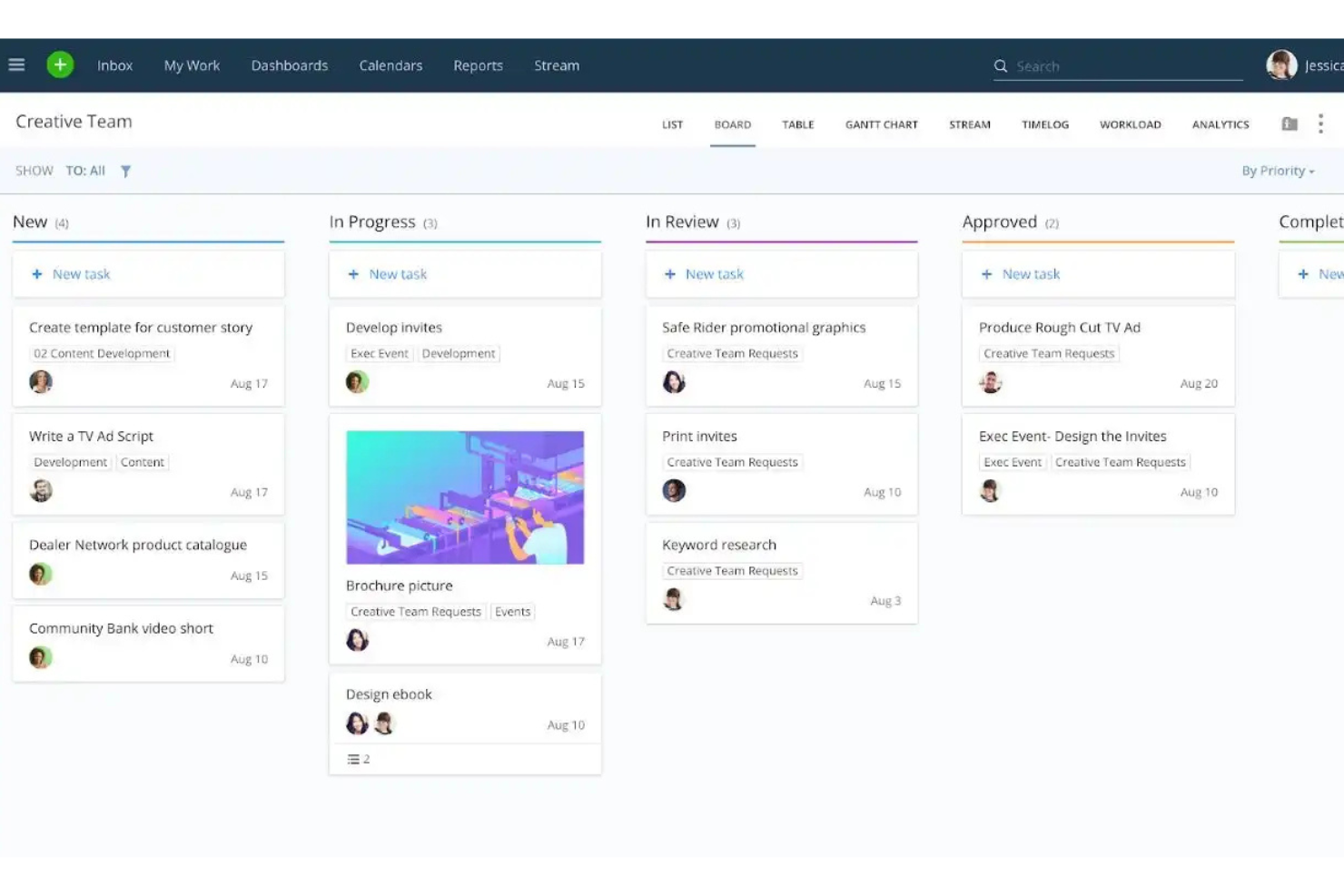
Wrike est une plateforme de gestion de projets et de collaboration conçue pour les équipes et les entreprises qui doivent gérer efficacement les tâches, les projets et les flux de travail. Elle est utilisée par des professionnels qui ont besoin d’un outil centralisé pour planifier, exécuter et suivre l’avancement des projets.
Pourquoi c’est une bonne alternative à Google Workspace : Wrike offre des fonctionnalités de gestion de projets pour les entreprises qui sont plus avancées que les outils de base de Google Workspace. Les diagrammes de Gantt vous aident à visualiser clairement les échéances et les dépendances des projets, tandis que le module de gestion de la charge de travail de la plateforme vous aide à répartir efficacement les ressources au sein de votre équipe. De plus, les rapports en temps réel fournissent des informations sur les performances des projets, ce qui permet de prendre des décisions fondées sur les données. Une version gratuite et des forfaits payants sont disponibles.
Fonctionnalités et intégrations remarquables :
Les fonctionnalités comprennent des formulaires de demande personnalisés qui simplifient le processus de collecte des demandes et aident votre équipe à recueillir toutes les informations nécessaires dès le départ. La fonctionnalité de suivi du temps permet de surveiller la durée des tâches, ce qui facilite l’analyse de la productivité. Vous pouvez également créer des tableaux de bord pour consulter les indicateurs clés et les mises à jour des projets en un coup d’œil.
Les intégrations comprennent Microsoft Teams, Salesforce, Google Drive, Slack, Dropbox, Box, Adobe Creative Cloud, Tableau et bien plus encore.
Pros and Cons
Pros:
- Outils complets de gestion de projets
- Répartition efficace des ressources
- Suivi des projets en temps réel
Cons:
- Certaines fonctionnalités sont masquées dans les menus
- Modifications fréquentes et non annoncées de l’interface utilisateur
New Product Updates from Wrike

Wrike Adds Quick Search to Table View
Wrike adds Quick Search to Table View with full-table search across titles, descriptions, and fields, plus highlighted matches. This helps users find tasks faster in large tables. For more information, visit Wrike’s official site.

Zoom
Idéal pour la visioconférence

Zoom est une plateforme de communication vidéo largement utilisée par les entreprises, les établissements d’enseignement et les particuliers pour les réunions virtuelles et les webinaires. Elle facilite la collaboration et la communication en temps réel grâce à des fonctions vidéo, audio et de discussion.
Pourquoi c’est une bonne alternative à Google Workspace : Zoom propose une plateforme dédiée à la visioconférence, plus spécialisée que les outils de communication généraux de Google Workspace. Grâce à des fonctionnalités telles que la vidéo et l’audio HD, votre équipe peut organiser des réunions claires et efficaces. Les salles de réunion permettent d’organiser des discussions en petits groupes au sein de réunions plus importantes, ce qui améliore la collaboration.
Fonctionnalités et intégrations remarquables :
Les fonctionnalités comprennent des arrière-plans virtuels qui vous permettent de personnaliser votre environnement de réunion et d’y ajouter une touche professionnelle. Les commandes de l’hôte vous permettent de gérer efficacement les participants et d’assurer le bon déroulement des réunions. Zoom propose également des webinaires et des réunions de grande ampleur pouvant accueillir jusqu’à des milliers de participants, ce qui rend la plateforme polyvalente pour répondre à différents besoins.
Les intégrations comprennent Microsoft Teams, Slack, Salesforce, Google Calendar, Outlook, Dropbox, HubSpot, Calendly, Zapier, Asana et bien plus encore.
Pros and Cons
Pros:
- Vidéo et audio de haute qualité
- Options de réunion polyvalentes
- Commandes de l’hôte efficaces
Cons:
- Peut consommer une quantité importante de bande passante
- Préoccupations liées à la sécurité par le passé
Autres alternatives à Google Workspace
Voici quelques alternatives supplémentaires à Google Workspace qui n’ont pas intégré ma sélection, mais qui méritent tout de même votre attention :
- Obsidian
Idéal pour la gestion des connaissances personnelles
- Routine
Idéal pour la gestion intégrée des tâches et du calendrier
- Zoho Workplace
Idéal pour une migration abordable vers une suite tout-en-un


Comment j'évalue les alternatives à Google Workspace
Je divise mon évaluation entre les exigences de base — documents en temps réel, email professionnel, stockage cloud — et les éléments différenciateurs qui rendent une plateforme plus intéressante qu'une autre pour une migration.
Fonctionnalités principales (Critères incontournables pour cette liste)
Lorsque je sélectionne des outils pour ma liste, je note chacun sur une échelle de 0 (fonctionnalité non proposée) à 5 (excellence dans ce domaine) pour chaque fonctionnalité principale détaillée ci-dessous. Ensuite, je calcule le score total de l'outil en pourcentage. Chaque outil doit obtenir un score total minimum de 65 % pour être pris en compte.
- Collaboration sur les documents : Je vérifie si les équipes peuvent co-éditer des documents, feuilles de calcul et présentations en temps réel, avec commentaires, historique des versions et suivi des modifications.
- Stockage cloud et partage de fichiers : L'espace de stockage, la structure des dossiers et les autorisations de partage de chaque plateforme comptent particulièrement lorsque les équipes transmettent des livrables à des parties externes.
- Email professionnel et calendrier : Je recherche la possibilité d'utiliser une adresse mail avec nom de domaine personnalisé et des calendriers partagés avec des outils de planification, indispensables au quotidien pour la plupart des équipes projet.
- Communication d'équipe : La messagerie, les appels vidéo ou les canaux intégrés permettent de conserver les échanges à proximité du travail. Des plateformes comme Zoho Workplace et Microsoft 365 intègrent ces fonctionnalités nativement.
- Suivi des tâches et des projets : J'évalue si la plateforme permet d'attribuer des tâches, de définir des échéances ou d'afficher des vues de projet — des fonctionnalités qui font le lien entre outils de productivité et livraison effective.
- Intégrations tierces : La connexion à des outils comme Jira, Asana ou Slack via des intégrations natives ou une API ouverte est essentielle pour s'intégrer à une pile de gestion de projet existante.
Une fois que j'ai une liste d'outils satisfaisant ces critères, j'examine ce qui distingue chaque plateforme.
Facteurs de différenciation (Ce qui distingue les fournisseurs)
Voici comment je compare et différencie les différents fournisseurs :
Fonctionnalités remarquables
Les assistants dopés à l'IA apportent ici une vraie valeur : je favorise les plateformes où l'IA peut rédiger des documents, résumer des conversations ou générer automatiquement des tâches à partir de notes. Les portails clients et invités sont aussi importants lorsque l’équipe remet des livrables à l’extérieur. Des plateformes comme Notion et Zoho Workplace offrent un accès externe limité sans exiger d’abonnement payant. Les générateurs d’automatisation sans code méritent aussi d’être évalués, car déclencher des validations ou acheminer des tâches entre outils peut remplacer totalement des applications de workflow séparées.
Au-delà des fonctionnalités
La facilité de migration est le premier point que j’évalue : quitter Google Workspace implique de transférer des années de fichiers, emails et structures de dossiers. Des plateformes comme Microsoft 365 ou Zoho Workplace proposent des outils d’import dédiés qui réduisent cette contrainte. Les modèles tarifaires diffèrent aussi beaucoup ; je vérifie si l’accès d’invités ou de collaborateurs externes requiert un abonnement, car les équipes projet travaillent souvent avec des prestataires. Les certifications de sécurité comme SOC 2 et la conformité RGPD comptent également, surtout pour les équipes manipulant des données sensibles dans différents pays.
Pourquoi rechercher une alternative à Google Workspace ?
Bien que Google Workspace soit un bon choix pour un outil de productivité basé sur le cloud, plusieurs raisons peuvent pousser certains utilisateurs à rechercher d’autres solutions. Vous pourriez rechercher une alternative à Google Workspace parce que :
- Vous avez besoin de meilleurs contrôles de confidentialité des données
- Votre équipe a besoin de fonctionnalités plus avancées
- Vous rencontrez des problèmes d’intégration avec d’autres outils
- Vous souhaitez davantage d’options de personnalisation
- Votre entreprise a besoin d’un hébergement local des données
- Vous recherchez une solution plus économique
Si l’une de ces situations vous correspond, vous êtes au bon endroit. Ma liste contient plusieurs options d’outils de productivité basés sur le cloud, mieux adaptées aux équipes confrontées à ces difficultés avec l’écosystème Google et à la recherche de solutions alternatives.
Fonctionnalités
Voici quelques-unes des principales fonctionnalités de Google Workspace pour vous aider à mettre en regard et à comparer les offres des solutions alternatives :
- Messagerie professionnelle : Fournit le service de messagerie Gmail et l’hébergement des e-mails avec des noms de domaine personnalisés et des adresses e-mail professionnelles afin de renforcer la crédibilité de votre marque.
- Gestion des fichiers : Offre des options sécurisées de stockage et de partage de fichiers via Google Drive pour votre équipe.
- Réunions vidéo : Utilise Google Meet pour la collaboration en temps réel et les visioconférences. Si les réunions constituent la partie de Google Workspace que vous souhaitez remplacer, comparez les alternatives à Google Meet.
- Intégration des applications : S’intègre facilement aux applications externes afin d’améliorer vos flux de travail.
- Gestion des administrateurs : Offre un contrôle centralisé des comptes utilisateurs et des paramètres de sécurité via la console d’administration.
- Sécurité des données : Conserve et suit les données professionnelles à des fins de sécurité grâce à Google Vault et prend en charge différents protocoles d’authentification.
- Création de sites web : Permet de créer facilement des sites web avec Google Sites, sans connaissances en programmation.
- Automatisation : Automatise les tâches afin de rendre vos processus métier plus efficaces.
- Compatibilité des appareils : Est optimisé pour une utilisation sur différents navigateurs et systèmes d’exploitation, notamment Android et macOS, en particulier avec Google Chrome.
- Collaboration en temps réel : Permet à plusieurs utilisateurs de modifier simultanément des documents, améliorant ainsi le travail d’équipe.
Et maintenant :
Si vous êtes en train d’étudier des outils de productivité basés sur le cloud, contactez gratuitement un conseiller SoftwareSelect pour obtenir des recommandations.
Vous remplirez un formulaire et aurez un bref échange au cours duquel ils examineront les spécificités de vos besoins. Vous recevrez ensuite une sélection de logiciels à examiner. Ils vous accompagneront même tout au long du processus d’achat, notamment lors des négociations tarifaires.