

Las 10 mejores alternativas a Filecamp para la gestión de activos en 2026

Lista de las mejores alternativas a Filecamp


Gestionar activos digitales puede ser todo un desafío. Si utilizas Filecamp, es posible que te frustren sus limitaciones o que necesites funciones que no ofrece. No eres la única persona que busca alternativas para simplificar la gestión de activos y satisfacer sus necesidades específicas.
Según mi experiencia, encontrar la herramienta adecuada puede ahorrar tiempo a tu equipo y reducir el estrés. He probado y analizado muchas soluciones de gestión de activos digitales, centrándome en la facilidad de uso, las funciones específicas y la relación calidad-precio.
En este artículo, compartiré mis principales alternativas a Filecamp. Conocerás los puntos fuertes de cada herramienta y cómo pueden ayudar a tu equipo a trabajar de forma más eficiente. Descubramos cuál es la opción ideal para tus necesidades de gestión de activos digitales.
¿Qué es Filecamp?
Filecamp es una herramienta de gestión de activos digitales diseñada para ayudar a los equipos a organizar, compartir y colaborar en archivos digitales. La utilizan habitualmente equipos de marketing, profesionales creativos y agencias que necesitan gestionar grandes volúmenes de contenido digital de forma eficiente.
Las herramientas de personalización de marca de Filecamp, el uso compartido sencillo de archivos y los permisos de usuario ayudan a organizar los activos, mantener la coherencia de la marca y garantizar un acceso seguro. En general, Filecamp ofrece una solución práctica para los equipos que necesitan gestionar sus activos digitales.
Resumen de las mejores alternativas a Filecamp
Esta tabla comparativa resume los detalles de precios de mis principales alternativas a Filecamp para ayudarte a encontrar la mejor opción para tu presupuesto y las necesidades de tu empresa.
| Tool | Best For | Trial Info | Price | ||
|---|---|---|---|---|---|
| 1 | La mejor opción para la colaboración en diseño fácil de usar | Plan gratuito disponible | Desde $15/mes (facturado anualmente) | Website | |
| 2 | Ideal para la coherencia de marca y la colaboración | Demostración gratuita disponible | Precios previa solicitud | Website | |
| 3 | Lo mejor para la integración con Microsoft 365 | Plan gratuito disponible | Desde £1.99/usuario/mes | Website | |
| 4 | Ideal para la conversión rápida de contenidos | Demostración gratuita + prueba gratuita de 30 días disponible | Desde $199/usuario/mes | Website | |
| 5 | Ideal para la gestión de activos conforme al RGPD | Demo gratuita + prueba gratuita disponible | Desde $500/mes | Website | |
| 6 | La mejor opción para almacenamiento seguro en la nube con privacidad | Plan gratuito disponible | Desde $4.99/mes (facturado anualmente) | Website | |
| 7 | Ideal para la gestión creativa de vídeos | Plan gratuito + prueba gratuita disponible | Desde $15/usuario/mes (facturado anualmente) | Website | |
| 8 | Ideal para el etiquetado automatizado potenciado por IA | Demostración gratuita disponible | Precios bajo solicitud | Website | |
| 9 | Ideal para la gestión de contenidos en múltiples canales | Demostración gratuita disponible | Precios bajo solicitud | Website | |
| 10 | La mejor opción para la conversión de clientes impulsada por IA | Demostración gratuita disponible | Precios previa solicitud | Website |
Por qué confiar en nuestras recomendaciones de software
Nuestro equipo lleva probando y evaluando software desde 2012. Como gestores de proyectos, sabemos lo difícil —y lo importante— que es elegir el software adecuado.
Para esta guía, evaluamos las herramientas mediante pruebas prácticas e investigación independiente, puntuando las herramientas según nuestros criterios de selección. También nos basamos en la experiencia de líderes de opinión del sector y de profesionales en activo de la gestión de proyectos.
Nuestras reseñas reflejan nuestro criterio editorial humano, no un discurso de ventas.
Revisores expertos:
Análisis de las mejores alternativas a Filecamp
A continuación encontrarás mis resúmenes detallados de las mejores alternativas a Filecamp que se incluyeron en mi lista. Mis análisis ofrecen una visión detallada de las funciones principales, las ventajas y desventajas, las integraciones y los casos de uso ideales de cada herramienta para ayudarte a encontrar la mejor opción para ti.

Canva
La mejor opción para la colaboración en diseño fácil de usar
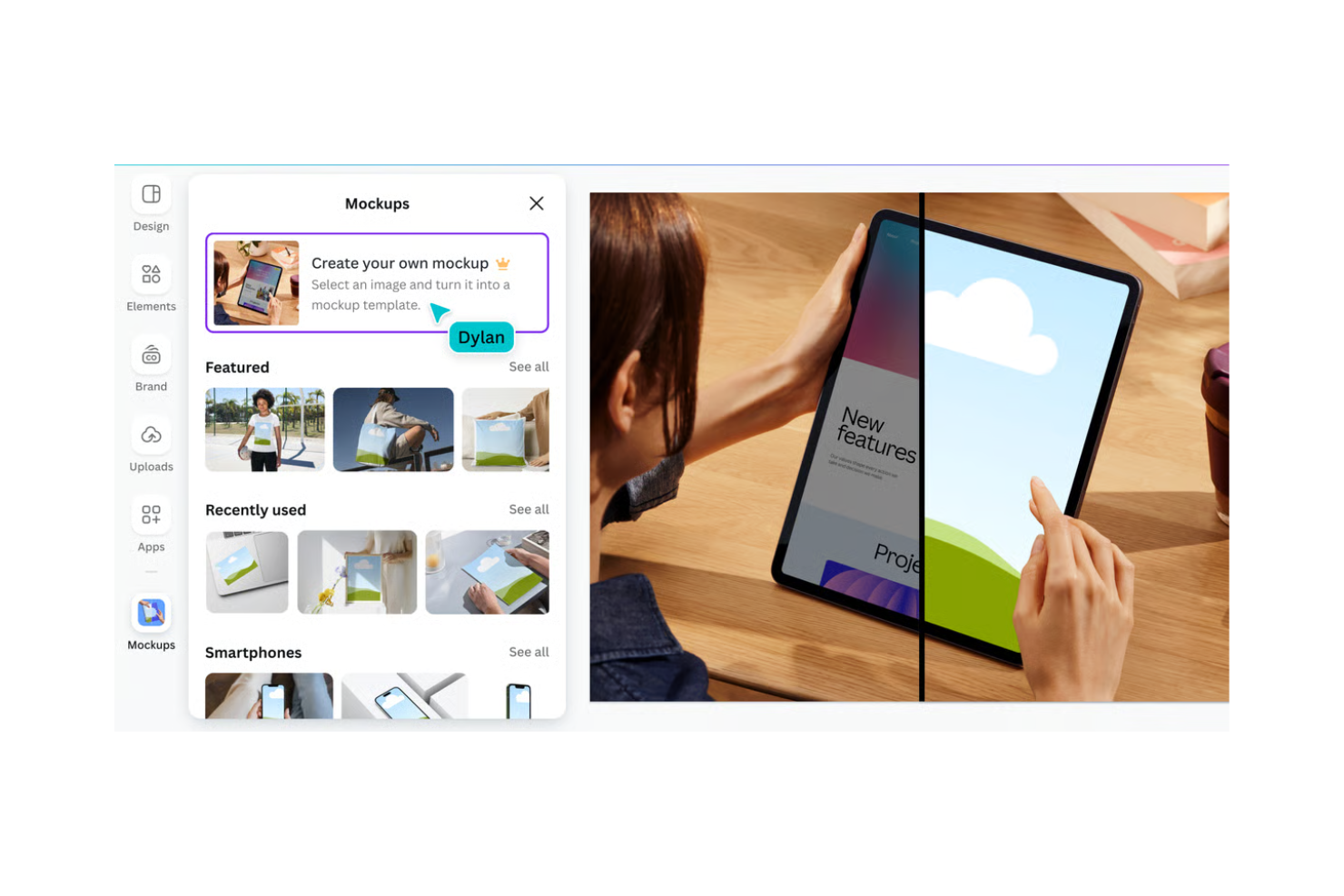
Canva es una plataforma de diseño gráfico para personas y equipos que buscan crear contenido visual. Se utiliza ampliamente entre profesionales del marketing, responsables de redes sociales y propietarios de pequeñas empresas para diseñar desde gráficos para redes sociales hasta presentaciones.
Por qué es una buena alternativa a Filecamp: Canva ofrece una interfaz intuitiva que hace que el diseño sea accesible para todo el mundo. Su funcionalidad de arrastrar y soltar y su extensa biblioteca de plantillas simplifican el proceso de diseño. Canva también permite la colaboración en tiempo real, lo que permite a los miembros del equipo trabajar juntos en proyectos. Estas características lo convierten en una excelente opción para equipos centrados en el diseño y la colaboración.
Características destacadas e integraciones:
Las características incluyen amplias bibliotecas de recursos multimedia de archivo que puedes utilizar para crear diseños profesionales sin empezar desde cero. La función de kit de marca de Canva ayuda a tu equipo a mantener la coherencia de la marca en todos tus diseños. También puedes utilizar sus herramientas de animación para añadir elementos dinámicos a tus recursos visuales.
Las integraciones incluyen Google Drive, Dropbox, HubSpot, Slack, Mailchimp, Pinterest, LinkedIn, YouTube y más.
Pros and Cons
Pros:
- Interfaz fácil de usar
- Amplia biblioteca de plantillas
- Colaboración en tiempo real
Cons:
- Requiere conexión a internet
- Algunas características requieren un plan de pago

Frontify
Ideal para la coherencia de marca y la colaboración

Frontify es una plataforma de gestión de marcas diseñada para profesionales del marketing y responsables de marca que desean mantener la coherencia de la marca en todas las comunicaciones. Ayuda a los equipos a gestionar activos de marca, directrices y proyectos en un solo lugar.
Por qué es una buena alternativa a Filecamp: Las herramientas de Frontify para la coherencia de marca y la colaboración permiten a tu equipo acceder y actualizar fácilmente las directrices de marca. Sus funciones de gestión de activos digitales te permiten organizar y compartir activos de marca. El entorno colaborativo de la plataforma permite recibir comentarios y editar en tiempo real, lo que garantiza que todos estén alineados con los estándares de la marca. Estas funciones convierten a Frontify en una opción sólida para los equipos centrados en mantener una imagen de marca coherente.
Funciones destacadas e integraciones:
Funciones incluyen directrices de marca personalizables que pueden ayudar a tu equipo a cumplir los estándares de la marca. Además, las herramientas de análisis de Frontify te proporcionan métricas de rendimiento que indican cómo se utiliza tu contenido. También puedes utilizar sus flujos de trabajo de comentarios y aprobación para ayudar a acelerar la finalización de proyectos.
Integraciones incluyen Adobe Creative Cloud, Slack, Sketch, Figma, monday.com y más.
Pros and Cons
Pros:
- Favorece la coherencia de marca
- Herramientas de colaboración en tiempo real
- Directrices de marca personalizables
Cons:
- Requiere tiempo de configuración inicial
- No es ideal para proyectos que no sean de marca

OneDrive
Lo mejor para la integración con Microsoft 365

OneDrive es un servicio de almacenamiento en la nube diseñado para particulares y empresas que necesitan almacenar, acceder y compartir archivos de forma segura. Proporciona una manera práctica para que los equipos colaboren y gestionen documentos en línea.
Por qué es una buena alternativa a Filecamp: OneDrive se integra directamente con Microsoft 365, lo que lo convierte en una excelente opción para los equipos que ya utilizan el conjunto de herramientas de Microsoft. Sus funciones de colaboración en tiempo real permiten que varios miembros del equipo editen documentos simultáneamente. El control de versiones de archivos de la plataforma garantiza que puedas acceder a versiones anteriores de los documentos. Estas capacidades hacen de OneDrive una excelente opción para los equipos que buscan una solución de almacenamiento que funcione bien con los productos de Microsoft.
Funciones e integraciones destacadas:
Las funciones incluyen el acceso sin conexión, que te permite trabajar con archivos sin conexión a Internet. La copia de seguridad automática de fotos y vídeos de OneDrive garantiza que tus archivos multimedia estén siempre seguros y accesibles. También puedes utilizar sus opciones para compartir enlaces de forma segura y establecer controles de acceso.
Las integraciones incluyen Microsoft Teams, SharePoint, Outlook, Word, Excel, PowerPoint, OneNote, Yammer, Dynamics 365, Azure y mucho más.
Pros and Cons
Pros:
- Integración nativa con productos de Microsoft
- Colaboración de documentos en tiempo real
- Funciones de acceso sin conexión
Cons:
- No es ideal para usuarios que no utilizan Microsoft
- Requiere conexión a Internet para disfrutar de todas las funciones

Docsie
Ideal para la conversión rápida de contenidos

Docsie es una plataforma de gestión de contenidos diseñada para equipos que necesitan crear, gestionar y publicar documentación digital. La utilizan redactores técnicos y gestores de contenidos para organizar y distribuir documentación en diversas plataformas.
Por qué es una buena alternativa a Filecamp: Docsie ofrece una conversión rápida de contenidos, lo que permite a tu equipo entregar documentos de manera eficiente en diferentes formatos. Sus funciones de edición colaborativa permiten que varios miembros del equipo trabajen en documentos simultáneamente. La plataforma también admite el control de versiones, lo que garantiza que tu equipo siempre tenga acceso a los documentos más recientes. Estas funciones hacen de Docsie una excelente opción para equipos centrados en la gestión y distribución eficientes de documentación.
Funciones destacadas e integraciones:
Las funciones incluyen la posibilidad de crear plantillas de documentos personalizadas que ayudan a mantener la coherencia en todo tu contenido. Las herramientas de análisis de Docsie ofrecen información sobre cómo se utilizan tus documentos, lo que te ayuda a tomar decisiones basadas en datos. También puedes utilizar su función de recopilación de comentarios para obtener opiniones de los usuarios directamente en tus documentos.
Las integraciones incluyen Jira, Confluence, Microsoft 365 y más.
Pros and Cons
Pros:
- Conversión rápida de documentación
- Control de versiones sólido
- Herramientas de análisis integradas
Cons:
- Puede resultar complejo para principiantes
- Algunas funciones requieren conocimientos técnicos

Ideal para la gestión de activos conforme al RGPD
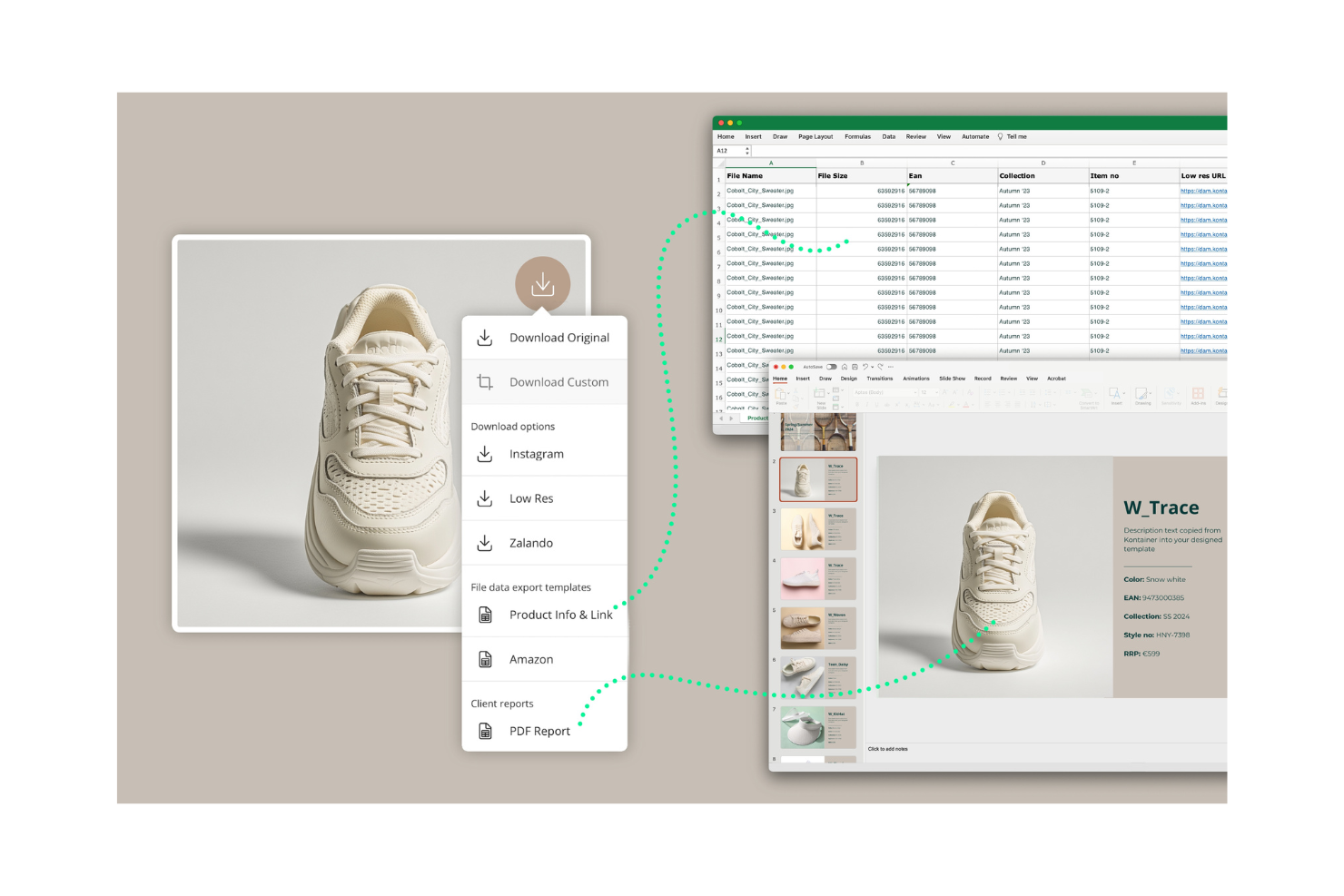
Kontainer es una plataforma de gestión de activos digitales adaptada a empresas que necesitan almacenar y compartir archivos digitales de forma segura. La utilizan equipos de marketing y profesionales creativos para gestionar imágenes, vídeos y documentos.
Por qué es una buena alternativa a Filecamp: Kontainer proporciona una gestión de activos conforme al RGPD, garantizando que se cumplan las necesidades de privacidad y seguridad de los datos de tu equipo. Cuenta con una interfaz fácil de usar que te permite organizar y acceder a los archivos. Los campos de metadatos personalizables de la plataforma te ayudan a categorizar los activos según tus necesidades específicas. Estas características convierten a Kontainer en una excelente opción para equipos que priorizan el cumplimiento normativo y la seguridad de los datos.
Características e integraciones destacadas:
Las características incluyen derechos de acceso personalizables que te permiten controlar quién puede ver y editar tus activos. Las herramientas de informes de Kontainer ofrecen información sobre el uso y la actividad de los activos, lo que te ayuda a hacer un seguimiento del rendimiento. También puedes utilizar sus funciones de colaboración para permitir que los miembros del equipo trabajen juntos en proyectos.
Las integraciones incluyen Adobe, Microsoft Office 365, WordPress y más.
Pros and Cons
Pros:
- Gestión de datos conforme al RGPD
- Campos de metadatos personalizables
- Interfaz fácil de usar
Cons:
- Las características avanzadas y las integraciones requieren un plan superior
- Opciones de personalización limitadas en el plan básico

pCloud
La mejor opción para almacenamiento seguro en la nube con privacidad

pCloud es un servicio de almacenamiento en la nube diseñado para personas y empresas que necesitan un almacenamiento de archivos seguro y privado. Ayuda a los usuarios a almacenar, acceder y compartir archivos de manera eficiente desde cualquier dispositivo.
Por qué es una buena alternativa a Filecamp: el enfoque de pCloud en el almacenamiento seguro en la nube y la privacidad lo hace ideal para equipos que priorizan la seguridad de los datos. Sus funciones de cifrado también garantizan que tus archivos estén protegidos contra accesos no autorizados. La plataforma facilita el uso compartido de archivos, lo que te permite colaborar con miembros del equipo y clientes. Estas capacidades hacen de pCloud una opción adecuada para quienes buscan una solución de almacenamiento confiable y segura.
Características destacadas e integraciones:
Las características incluyen el control de versiones de archivos, que permite recuperar versiones anteriores de varios tipos de archivos con diferentes nombres. La función de copia de seguridad de pCloud realiza copias de seguridad automáticas de los archivos de tu ordenador en la nube. También puedes utilizar su reproductor multimedia para transmitir archivos de audio y vídeo desde la nube.
Las integraciones incluyen Google Drive, Dropbox, Facebook, Instagram y más.
Pros and Cons
Pros:
- Potentes funciones de cifrado
- Uso compartido de archivos sencillo
- Opciones de copia de seguridad automática
Cons:
- Requiere una conexión a Internet
- No es ideal para equipos grandes

Frame.io
Ideal para la gestión creativa de vídeos

Frame.io es una plataforma de colaboración de vídeo diseñada para cineastas, editores de vídeo y equipos creativos. Ayuda a los usuarios a gestionar proyectos de vídeo y revisar contenido.
Por qué es una buena alternativa a Filecamp: Frame.io ofrece herramientas de gestión de flujos de trabajo creativos que permiten a tu equipo revisar y aprobar contenido de vídeo. Sus comentarios y anotaciones con marcas de tiempo permiten proporcionar comentarios precisos, mejorando la comunicación. La plataforma también admite la colaboración en tiempo real, lo que facilita que tu equipo trabaje conjuntamente en proyectos de vídeo. Estas funciones hacen que Frame.io sea ideal para equipos centrados en la producción de vídeo y la colaboración creativa.
Funciones e integraciones destacadas:
Las funciones incluyen herramientas avanzadas de revisión de vídeo que permiten proporcionar comentarios precisos a nivel de fotograma. El sistema de control de versiones de Frame.io garantiza que tu equipo tenga acceso a las ediciones de vídeo más recientes. También puedes utilizar sus opciones seguras para compartir y distribuir contenido de vídeo.
Las integraciones incluyen Adobe Premiere Pro, Final Cut Pro, DaVinci Resolve, Slack, Trello, Asana, YouTube, Google Drive y más.
Pros and Cons
Pros:
- Herramientas precisas para proporcionar comentarios sobre vídeos
- Opciones seguras para compartir vídeos
- Excelente para equipos de producción de vídeo
Cons:
- Requiere conexión a Internet
- No es ideal para proyectos que no sean de vídeo
Canto
Ideal para el etiquetado automatizado potenciado por IA

Canto es una plataforma de gestión de activos digitales diseñada para equipos de marketing y profesionales creativos. Ayuda a las empresas a organizar, compartir y colaborar en contenidos digitales de manera eficiente.
Por qué es una buena alternativa a Filecamp: Canto ofrece capacidades potenciadas por IA que hacen que la gestión de activos sea más inteligente y eficiente. Sus funciones de reconocimiento facial y etiquetado automático ayudan a categorizar y encontrar tus activos. La plataforma también ofrece opciones de personalización de marca, lo que te permite adaptar la interfaz para que se ajuste al estilo de tu marca. Estas funciones hacen de Canto una excelente opción para equipos que necesitan una categorización y gestión avanzadas de activos.
Características e integraciones destacadas:
Características: incluyen portales personalizables que te permiten compartir activos con socios externos. Las herramientas de informes de Canto pueden respaldar tu toma de decisiones al proporcionar información sobre el uso y el rendimiento de los activos. También puedes gestionar las directrices y los activos de tu marca de forma coherente a través de su plataforma centralizada.
Integraciones: incluyen Microsoft Windows, Slack, Hootsuite, WordPress, Shopify, Google Drive, Dropbox, Box, Salesforce y muchas más.
Pros and Cons
Pros:
- Etiquetado y búsqueda potenciados por IA
- Opciones de personalización de marca
- Facilita el intercambio de activos
Cons:
- No es ideal para equipos pequeños
- Puede requerir incorporación y asistencia para la configuración

Ideal para la gestión de contenidos en múltiples canales

Adobe Experience Manager es un sistema de gestión de activos digitales y de gestión de contenidos que presta servicio a empresas que necesitan gestionar y ofrecer experiencias digitales en múltiples canales. Se utiliza principalmente por equipos de marketing y gestores de contenido que buscan optimizar la entrega de contenidos y la gestión de activos.
Por qué es una buena alternativa a Filecamp: las capacidades de gestión de contenidos y de activos digitales de Adobe Experience Manager permiten a tu equipo gestionar eficazmente contenidos web, móviles y de aplicaciones. Sus herramientas de automatización ayudan a obtener y adaptar activos, lo que te permite dedicar menos tiempo a buscar y ajustar contenidos. Estas herramientas lo convierten en una alternativa adecuada para equipos que necesitan una gestión amplia de contenidos en diversas plataformas.
Características destacadas e integraciones:
Las características incluyen herramientas para crear formularios adaptables, inscripción digital y un sistema de gestión del aprendizaje. Puedes gestionar y ampliar la documentación de forma eficaz con su sistema de gestión de contenidos de componentes nativo de la nube. Adobe Experience Manager también ayuda a ofrecer experiencias personalizadas a los clientes mediante sus herramientas integradas.
Las integraciones incluyen Adobe Analytics, Adobe Target, Adobe Creative Cloud, Microsoft Translator, Salesforce y más.
Pros and Cons
Pros:
- Excelente para equipos grandes
- Se integra con Adobe Creative Cloud
- Admite la entrega en múltiples canales
Cons:
- Coste elevado para pequeñas empresas
- Las integraciones están orientadas a productos de Adobe

Acquia
La mejor opción para la conversión de clientes impulsada por IA

Acquia es una plataforma de experiencia digital basada en la nube que sirve principalmente a equipos de marketing y TI que buscan crear y gestionar experiencias digitales personalizadas. Ayuda a las organizaciones a ofrecer contenido a través de múltiples canales y a optimizar la interacción con los clientes.
Por qué es una buena alternativa a Filecamp: Acquia destaca por sus capacidades de gestión de contenidos impulsadas por IA, que permiten automatizar la personalización del contenido y optimizar la conversión de clientes. Sus herramientas de aprendizaje automático pueden analizar los datos de los clientes y predecir comportamientos, ayudando a tu equipo a mejorar la eficacia de sus estrategias de marketing. Además, ofrece alojamiento en la nube y funciones de seguridad que garantizan que tu contenido se entregue de forma fiable y segura. Esto convierte a Acquia en una opción sólida para equipos que necesitan una gestión de contenidos y una personalización avanzadas.
Funciones e integraciones destacadas:
Las funciones incluyen un marco para crear y gestionar sitios web a gran escala. También puedes utilizar sus herramientas para garantizar el cumplimiento de las normas.
Las integraciones incluyen Salesforce, Adobe Marketo, Adobe Experience Manager, Google Analytics, Microsoft Dynamics 365, HubSpot, Shopify, Amazon Web Services, Sitecore y más.
Pros and Cons
Pros:
- Personalización de contenidos impulsada por IA
- Funciones de seguridad sólidas
- Escalable para grandes empresas
Cons:
- Curva de aprendizaje para nuevos usuarios
- Puede requerir formación específica
Otras alternativas a Filecamp
Estas son algunas alternativas adicionales a Filecamp que no se incluyeron en mi lista, pero que merece la pena considerar:
- Aprimo
Ideal para la gestión centralizada de activos
- Google Workspace
Ideal para herramientas de productividad integradas
- Censhare
Ideal para marketing y personalización con IA
- Extensis
La mejor opción para la gestión de fuentes y activos
- Cloudinary
Ideal para la optimización de imágenes y vídeos
- ImageKit
Ideal para transformaciones multimedia en tiempo real


Cómo Evalúo Alternativas a Filecamp
Divido mi evaluación en criterios básicos—como la compartición segura de archivos y portales de clientes con marca propia—y diferenciadores que separan las mejores opciones para agencias y equipos de marca.
Funcionalidad Central (Requisito Básico Para Esta Lista)
Al seleccionar herramientas para mi lista, califico cada una en una escala del 0 (no ofrece la funcionalidad) al 5 (destaca en esta área) para cada funcionalidad central que se enumera a continuación. Después calculo la puntuación total de la herramienta en porcentaje. Cada herramienta debe alcanzar una puntuación mínima total del 65% para ser considerada para su inclusión.
- Compartición y Almacenamiento de Archivos: Verifico si una plataforma puede gestionar archivos creativos grandes—como PSDs con múltiples capas o videos en bruto—con enlaces para compartir y portales de carga para colaboradores externos.
- Organización de Activos Digitales: Etiquetado, metadatos y la búsqueda son clave aquí. Busco herramientas donde tu equipo pueda encontrar una variante de logotipo específica en segundos en lugar de tener que buscar en carpetas anidadas.
- Controles de Acceso y Permisos: Evalúo cuán granulares son los permisos a nivel de rol y carpeta, especialmente para agencias que gestionan varias cuentas de clientes con diferentes necesidades de acceso.
- Portales de Clientes con Marca Propia: La capacidad de entregar activos a través de un portal personalizado y orientado al cliente es un diferenciador clave respecto al almacenamiento genérico en la nube. Herramientas como Brandfolder y Bynder lo gestionan de forma diferente, por lo que comparo el nivel de personalización que ofrece cada una.
- Flujos de Trabajo de Revisión y Aprobación: Los equipos creativos necesitan funciones de anotación y rutas de aprobación para diferentes tipos de archivos. Busco revisión de PDFs, imágenes y video—no solo comentarios básicos en un solo formato.
- Control de Versiones: Valoro si la plataforma realiza un seguimiento de revisiones con un historial claro y posibilidad de volver atrás, para evitar el clásico problema de sobrescribir un activo finalizado con una versión obsoleta.
Una vez tengo una lista de herramientas que cumplen con estos criterios, considero qué distingue a cada plataforma.
Factores Diferenciadores (Qué Distingue a los Proveedores)
Así es como comparo y contrasto diferentes proveedores:
Funciones Destacadas
Las integraciones con herramientas creativas son importantes aquí—busco conexiones nativas con Adobe Creative Cloud o Figma para que los diseñadores puedan utilizar activos sin salir de su flujo de trabajo. El etiquetado potenciado por IA es otro diferenciador, ya que los metadatos generados automáticamente ahorran horas de clasificación manual cuando se incorporan miles de activos. También evalúo funciones de expiración y licenciamiento de activos, que ayudan a los gestores de marca a marcar cuando una licencia de foto de stock está por expirar antes de que termine en una campaña activa.
Más Allá de las Funcionalidades
La estructura de precios es importante—verifico si los asientos de invitados y usuarios externos elevan los costos, ya que las agencias que comparten activos con decenas de clientes pueden ver crecer la factura rápido. La seguridad y el cumplimiento también son relevantes, especialmente para equipos que gestionan la propiedad intelectual de clientes; busco certificación SOC 2, SSO y registros de auditoría. Finalmente, considero cuán bien se integra una plataforma en los flujos de trabajo existentes evaluando integraciones con herramientas como Asana, Monday o ClickUp, más acceso a API o Zapier para automatizaciones personalizadas.
¿Por qué buscar una alternativa a Filecamp?
Aunque Filecamp es una buena opción para la gestión de activos digitales, hay varias razones por las que algunos usuarios buscan soluciones alternativas. Es posible que quieras buscar una alternativa a Filecamp por los siguientes motivos:
- Necesitas opciones de personalización más avanzadas
- Tu equipo necesita mejores capacidades de integración
- Buscas una solución más escalable
- Quieres funciones de seguridad mejoradas
- Tu equipo necesita una atención al cliente más rápida
- Buscas una opción más económica
Si alguna de estas situaciones coincide con lo que estás pensando, has llegado al lugar adecuado. Mi lista incluye varias opciones de gestión de activos digitales más adecuadas para los equipos que se enfrentan a estos desafíos con Filecamp y buscan alternativas.
Funciones
Para ayudarte a contrastar y comparar lo que ofrecen las soluciones alternativas, estas son algunas de las características clave de Filecamp:
- Acceso granular: controla el acceso de tus clientes y socios a los archivos y carpetas.
- Múltiples temas: personaliza la identidad de marca de distintas carpetas para adaptarlas al estilo de tu empresa.
- Palabras clave/etiquetas: utiliza metadatos para organizar y gestionar tus archivos multimedia digitales.
- Páginas personalizadas: crea y gestiona páginas personalizadas mediante un editor WYSIWYG para crear contenido fácilmente.
- Seguridad: proporciona un centro de datos seguro y HTTPS para las transferencias de archivos.
- Enlaces de solicitud de archivos: te permite recibir archivos de cualquier persona y mejorar la colaboración.
- Colecciones: organiza archivos de varias carpetas para colaborar eficazmente con tu equipo.
- Etiquetas automáticas: mejora la capacidad de búsqueda mediante el etiquetado automático de activos digitales.
- Rótulos: utiliza rótulos personalizados para indexar y revisar tus archivos y mantenerlos organizados.
- Marca blanca: toma el control total de la identidad de marca con el plan Professional y haz que la plataforma sea realmente tuya.
Qué viene después:
Si estás investigando software de gestión de activos digitales, contacta gratis con un asesor de SoftwareSelect para recibir recomendaciones.
Rellenas un formulario y mantienes una breve conversación en la que conocerán los detalles específicos de tus necesidades. Después recibirás una lista reducida de programas para revisar. También te ayudarán durante todo el proceso de compra, incluidas las negociaciones de precios.