

10 mejores alternativas a Google Workspace para equipos en 2026

Lista de las mejores alternativas a Google Workspace


Como gestor de proyectos, tu éxito diario depende de mantener organizados y productivos a equipos complejos. Aunque las herramientas de productividad basadas en la nube suelen ser una salvación para gestionar tareas y la comunicación entre plataformas, Google Workspace no siempre es la opción perfecta. Tanto si estás alcanzando los límites de las herramientas nativas de Google como si necesitas una integración más estrecha con software especializado, encontrar la alternativa adecuada a Google Workspace es fundamental para ampliar los estándares de tu empresa.
En esta guía, he analizado de forma independiente las principales soluciones de software que cubren las carencias que deja Google Workspace. Mi lista se centra en la gestión de proyectos y la colaboración de alto rendimiento, en lugar de en los CRM tradicionales, aunque cada recomendación ofrece integraciones de terceros para mantener conectados los datos de tus clientes.
Tanto si buscas un sustituto completo de la suite como una aplicación web especializada para potenciar tu flujo de trabajo en dispositivos Microsoft o Apple, estas alternativas a Google Workspace están diseñadas para facilitar tu vida laboral y hacer que tu equipo sea más eficiente.
¿Qué es Google Workspace?
Google Workspace, conocido anteriormente como G Suite, es una herramienta de productividad basada en la nube que ayuda a los equipos a colaborar y comunicarse eficazmente dentro del ecosistema de Google y más allá. Profesionales de diversos sectores, incluidos gestores de proyectos, especialistas en marketing, pequeñas empresas y educadores, la utilizan habitualmente por su capacidad para aumentar la productividad y la colaboración en equipo.
Herramientas como Google Docs, Google Sheets y Google Meet permiten crear documentos, gestionar datos y comunicarse. Estas funciones os ayudan a ti y a tu equipo a manteneros organizados y conectados. En general, Google Workspace ofrece una plataforma versátil que se adapta a diversas necesidades empresariales, lo que la convierte en un recurso valioso para mejorar la eficiencia en el trabajo.
Resumen de las mejores alternativas a Google Workspace
Esta tabla comparativa resume los detalles de precios de mis principales alternativas seleccionadas a Google Workspace para ayudarte a encontrar la mejor opción para tu presupuesto y las necesidades de tu empresa.
| Tool | Best For | Trial Info | Price | ||
|---|---|---|---|---|---|
| 1 | Ideal para tableros de tareas personalizables | Plan gratuito disponible | Desde $5/usuario/mes | Website | |
| 2 | La mejor opción para la integración con aplicaciones de Office | Plan gratuito disponible | Desde $21/usuario/mes (facturado anualmente) | Website | |
| 3 | Ideal para la gestión del conocimiento | Demostración gratuita disponible | Precios a solicitud | Website | |
| 4 | Ideal para funciones de gestión de proyectos | Plan gratuito + demostración gratuita disponible | Desde $7/usuario/mes (facturado anualmente) | Website | |
| 5 | Ideal para la gestión de tareas sin conexión | Plan gratuito disponible | Uso gratuito | Website | |
| 6 | La mejor opción para la colaboración segura | Demostración gratuita disponible | Precio bajo solicitud | Website | |
| 7 | Ideal para integrar la mensajería del equipo | Plan gratuito + demostración gratuita disponible | Desde $7.25/usuario/mes (facturado anualmente) | Website | |
| 8 | Ideal para la gestión del trabajo | Prueba gratuita de 30 días | Desde $9/usuario/mes (facturado anualmente) | Website | |
| 9 | Ideal para la gestión de proyectos empresariales | Prueba gratuita de 14 días + plan gratuito disponible | Desde $10/usuario/mes (facturado anualmente) | Website | |
| 10 | Ideal para videoconferencias | Plan gratuito disponible | Desde $14.16/usuario/mes (facturado anualmente) | Website |


Por qué confiar en nuestras recomendaciones de software
Nuestro equipo lleva probando y evaluando software desde 2012. Como gestores de proyectos, sabemos lo difícil —y lo importante— que es elegir el software adecuado.
Para esta guía, evaluamos las herramientas mediante pruebas prácticas e investigación independiente, puntuando las herramientas según nuestros criterios de selección. También nos basamos en la experiencia de líderes de opinión del sector y de profesionales en activo de la gestión de proyectos.
Nuestras reseñas reflejan nuestro criterio editorial humano, no un discurso de ventas.
Revisores expertos:
Análisis de las mejores alternativas a Google Workspace
A continuación se muestran mis resúmenes detallados de las mejores alternativas a Google Workspace que han llegado a mi lista de selección. Mis análisis ofrecen una visión detallada de las funciones principales, las ventajas y desventajas, las integraciones y los casos de uso ideales de cada herramienta para ayudarte a encontrar la mejor opción para ti.
Ideal para tableros de tareas personalizables
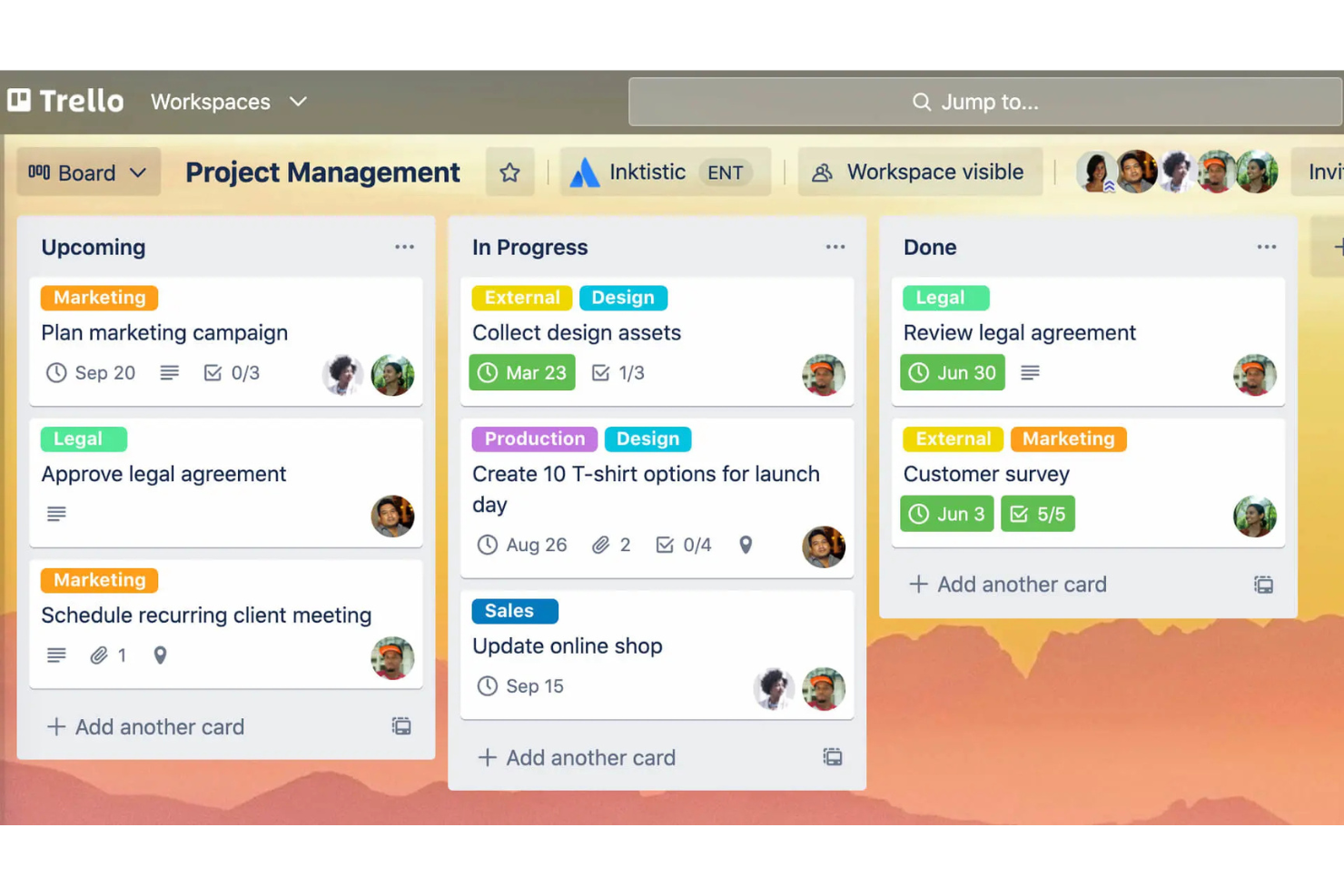
Atlassian Trello es una herramienta de gestión de proyectos conocida por su enfoque visual y fácil de usar para organizar tareas mediante tableros, listas y tarjetas. Es popular entre equipos de todos los tamaños que necesitan gestionar proyectos y tareas de manera eficaz.
Por qué es una buena alternativa a Google Workspace: Atlassian Trello ofrece tableros de tareas personalizables que se adaptan a las necesidades específicas de tu equipo, a diferencia del enfoque más estandarizado de Google Workspace. Puedes crear tableros adaptados a diferentes proyectos, lo que permite flexibilidad en la gestión de las tareas. La función de arrastrar y soltar facilita mover las tareas entre las distintas etapas. La interfaz visual de Atlassian Trello te ayuda a ti y a tu equipo a ver el panorama general y supervisar el progreso de un vistazo.
Características e integraciones destacadas:
Las características incluyen la posibilidad de añadir fechas de vencimiento y listas de comprobación a las tareas, etiquetas codificadas por colores para facilitar la categorización y la opción de adjuntar archivos directamente a las tarjetas. También puedes usar Butler, la herramienta de automatización integrada de Atlassian Trello, para automatizar tareas repetitivas. Otra característica son los potenciadores, que amplían la funcionalidad del tablero con herramientas e integraciones adicionales.
Las integraciones incluyen Slack, Google Drive, Dropbox, Microsoft Teams, Evernote, Jira, GitHub, Salesforce, Mailchimp, Zendesk y más.
Pros and Cons
Pros:
- Tableros de tareas personalizables
- Seguimiento visual de proyectos
- Facilita el movimiento de tareas
Cons:
- Carece de seguimiento de tiempo nativo
- No es adecuado para proyectos complejos

La mejor opción para la integración con aplicaciones de Office
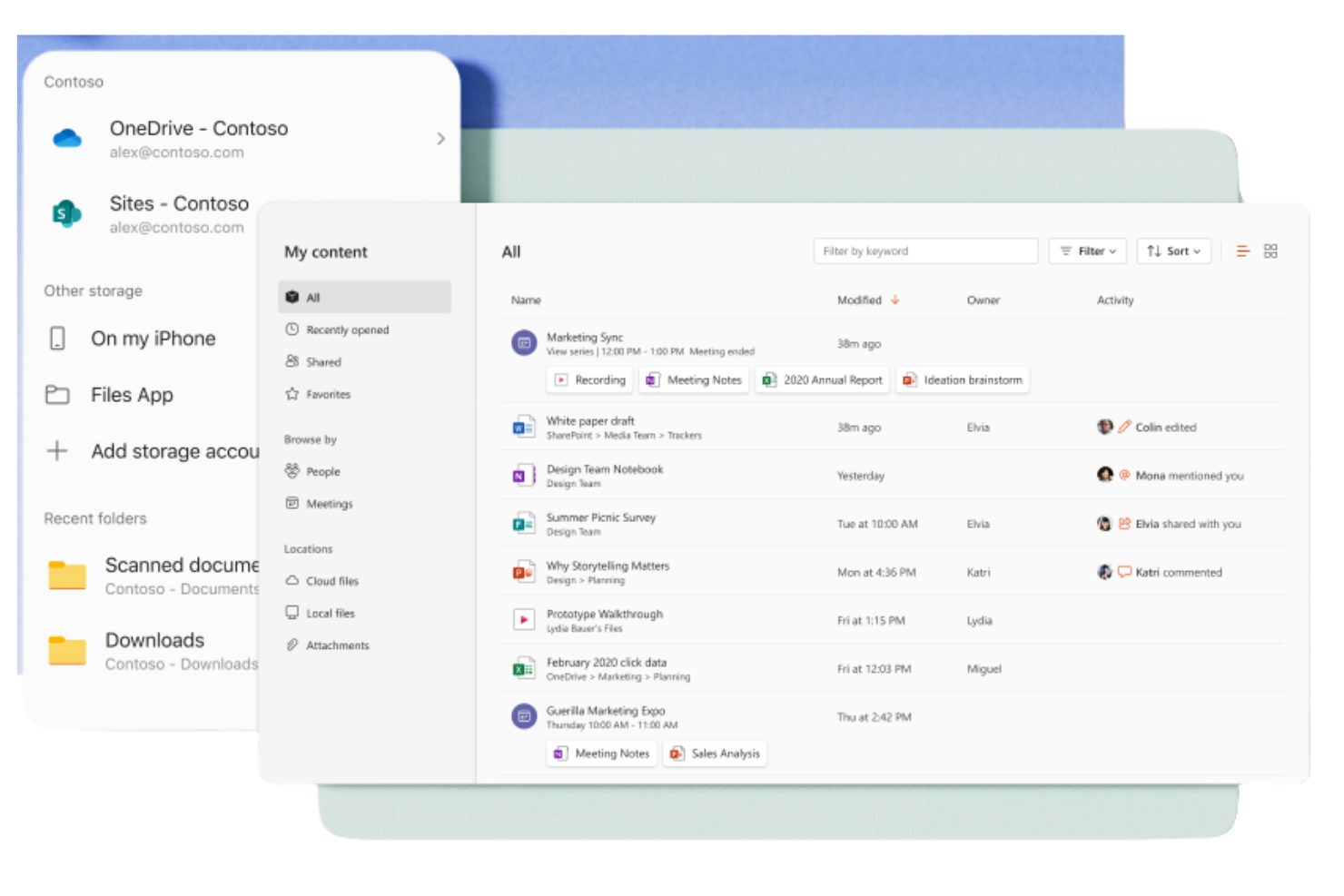
Microsoft 365 Copilot es un conjunto de herramientas de productividad basado en suscripción, diseñado para empresas y particulares, que les ayuda a crear, colaborar y comunicarse. Lo utilizan ampliamente profesionales que necesitan acceso a aplicaciones de Windows como Word, Excel y PowerPoint para las funciones empresariales cotidianas.
Por qué es una buena alternativa a Google Workspace: Microsoft 365 Copilot ofrece una integración fluida con las aplicaciones de Office, proporcionando un entorno familiar para los usuarios que dependen en gran medida de estas herramientas. Con el almacenamiento en la nube a través de OneDrive, puedes acceder a los documentos y compartirlos fácilmente. El conjunto también incluye Microsoft Teams para la comunicación y la colaboración, lo que lo convierte en una solución completa para las necesidades empresariales. Sus sólidas funciones de seguridad mantienen tus datos protegidos en todo momento.
Funciones e integraciones destacadas:
Las funcionalidades incluyen capacidades avanzadas de análisis de datos con hojas de cálculo de Excel, que pueden ayudar a tu equipo a tomar decisiones fundamentadas. El conjunto también ofrece plantillas personalizables en Word y PowerPoint, lo que te permite crear documentos y presentaciones profesionales. Además, Outlook proporciona una solución integrada de correo electrónico y calendario para mantenerte organizado.
Las integraciones incluyen Salesforce, Atlassian Trello, Asana, Dropbox, Zoom, Slack, Adobe Acrobat, GitHub, LinkedIn, DocuSign y más.
Pros and Cons
Pros:
- Interfaz familiar para los usuarios de Microsoft Office
- Colaboración sólida en documentos
- Funciones de seguridad exhaustivas
Cons:
- Calidad de resultados inconsistente
- Requiere OneDrive para Excel

Guru
Ideal para la gestión del conocimiento
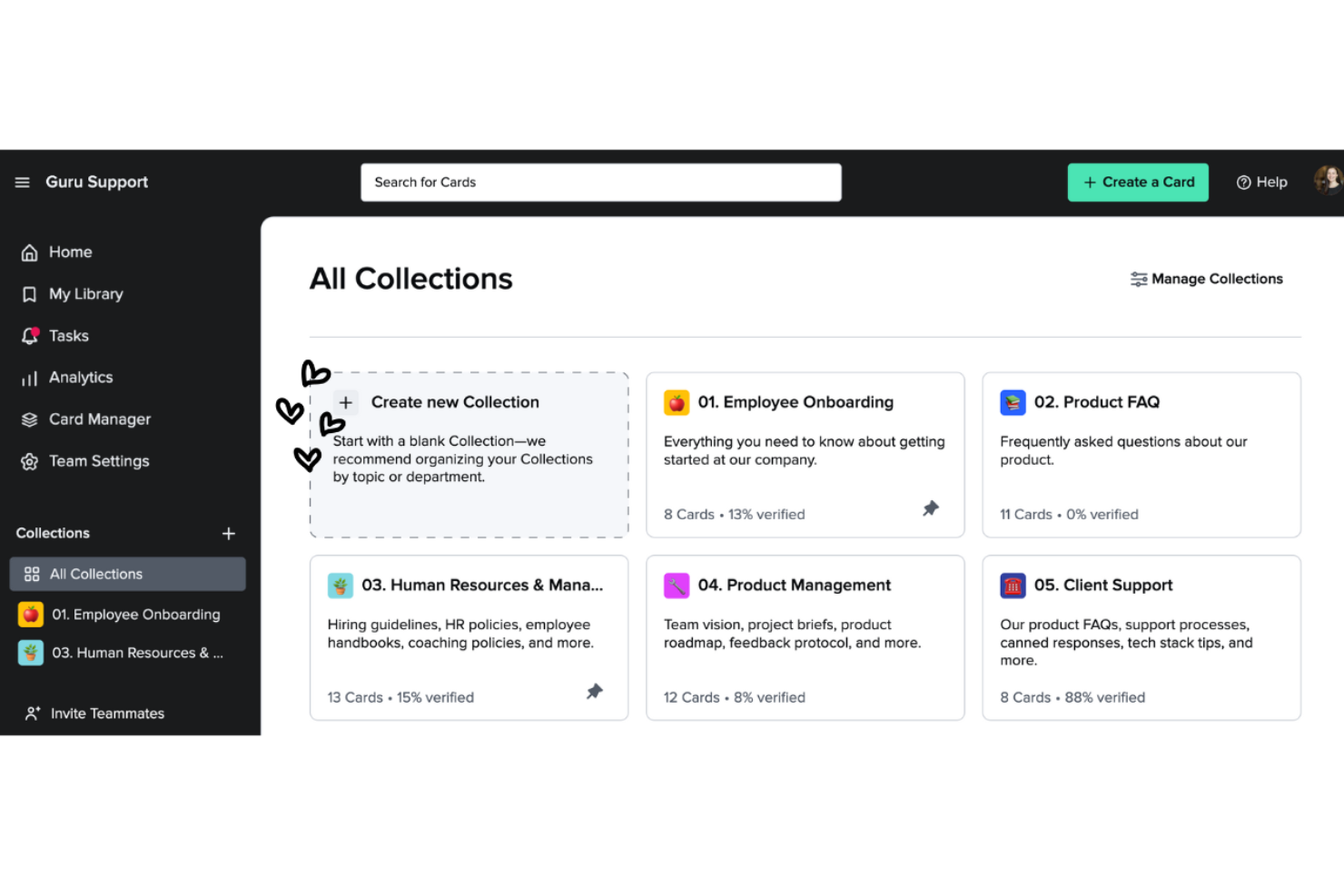
Guru es una herramienta de gestión del conocimiento que ayuda a los equipos a capturar, organizar y acceder a la información de manera eficiente. Es popular entre las empresas que necesitan proporcionar a sus equipos un acceso fácil a conocimientos y recursos críticos.
Por qué es una buena alternativa a Google Workspace: Guru ofrece capacidades de gestión del conocimiento que van más allá del almacenamiento de documentos de Google Workspace. Su sistema basado en tarjetas permite crear y categorizar información para recuperarla rápidamente. La función de verificación mantiene los conocimientos del equipo actualizados y precisos. Las actualizaciones y notificaciones en tiempo real mantienen a todos informados sobre los cambios más recientes, fomentando la colaboración.
Funciones e integraciones destacadas:
Las funciones incluyen una extensión del navegador que permite acceder y capturar información directamente desde el navegador web, lo que facilita recopilar y almacenar conocimientos. La función de análisis ofrece información sobre cómo utiliza tu equipo la base de conocimientos, lo que ayuda a identificar brechas y áreas de mejora. También puedes beneficiarte de las sugerencias basadas en IA, que ofrecen información relevante cuando la necesitas.
Las integraciones incluyen Slack, Microsoft Teams, Salesforce, Zendesk, Intercom, Chrome, Outlook, Google Workspace, Zapier y más.
Pros and Cons
Pros:
- Organización eficaz del conocimiento
- Actualizaciones en tiempo real
- La verificación mantiene la precisión
Cons:
- Las opciones de formato son limitadas
- Requiere mantenimiento constante


ClickUp es una herramienta de gestión de proyectos diseñada para equipos y empresas de todos los tamaños, que ayuda a organizar tareas, proyectos y flujos de trabajo. Ofrece una amplia variedad de funciones que ayudan a optimizar la gestión de proyectos y aumentar la productividad.
Por qué es una buena alternativa a Google Workspace: ClickUp proporciona amplias funciones de gestión de proyectos que van más allá de lo que ofrece Google Workspace. La gestión de tareas permite asignarlas y hacerles seguimiento fácilmente, mientras que los paneles personalizables permiten visualizar el progreso del proyecto de la forma que mejor se adapte a tus necesidades. La función de establecimiento de objetivos de ClickUp permite que tu equipo se alinee en torno a las metas y mantiene a todos informados.
Funciones e integraciones destacadas:
Las funciones incluyen el seguimiento del tiempo, que te ayuda a supervisar cuánto tiempo se dedica a las tareas. La función de gestión de documentos permite crear y almacenar documentos directamente dentro de la plataforma. Puedes utilizar los mapas mentales para organizar visualmente ideas y planes, lo que facilita una mejor planificación de proyectos. Las funciones del plan Estándar incluyen tableros Kanban y asistencia las 24 horas, los 7 días de la semana.
Las integraciones incluyen Slack, Google Drive, Dropbox, Microsoft Teams, Zoom, GitHub, Atlassian Trello, Salesforce, Zapier y más.
Pros and Cons
Pros:
- Gestión detallada de tareas
- Funciones eficaces para establecer objetivos
- Escalable para equipos grandes
Cons:
- Problemas ocasionales de rendimiento
- Curva de aprendizaje para las funciones avanzadas

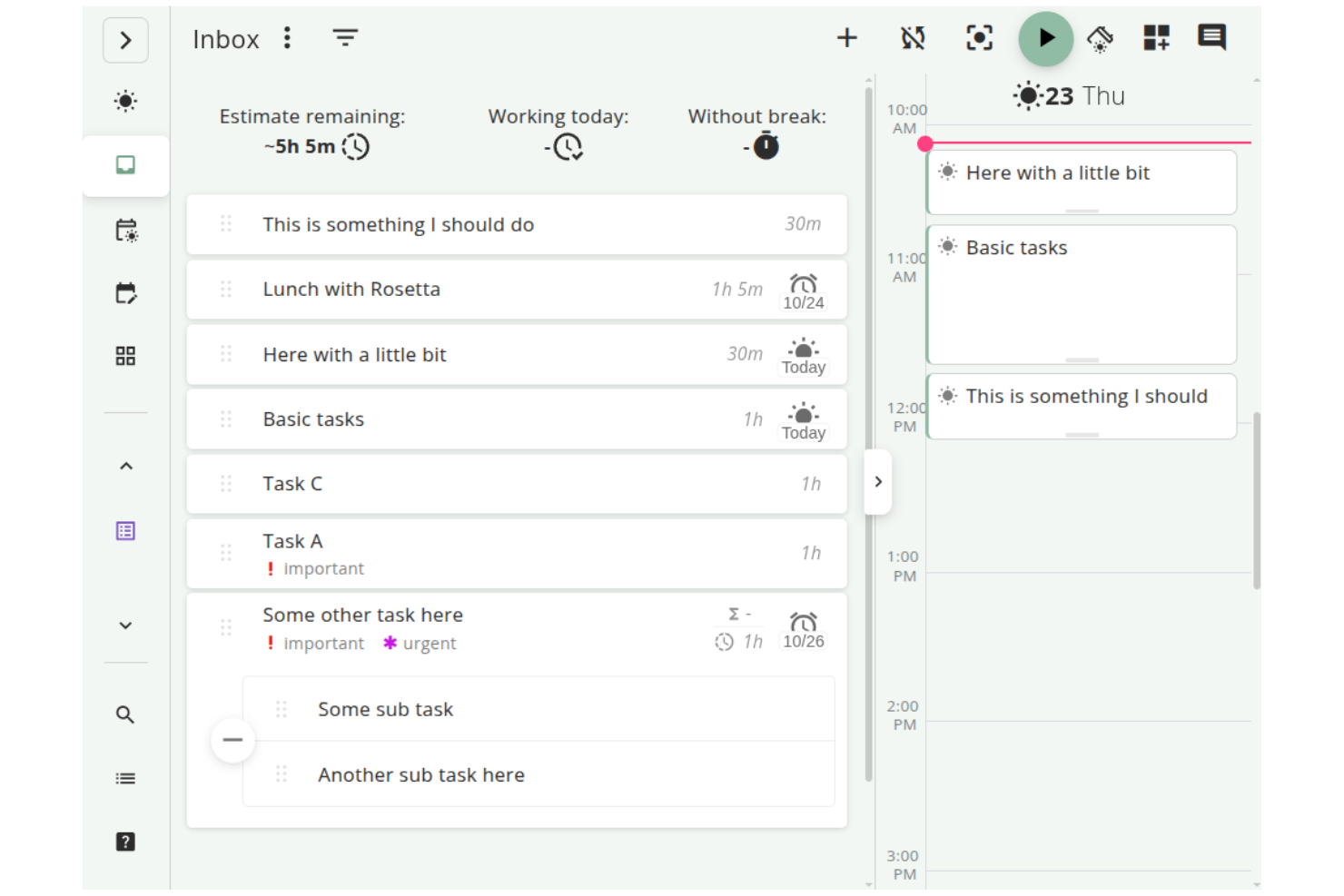
Super Productivity es un gestor de tareas de código abierto que integra la gestión de tareas, el seguimiento del tiempo y la toma de notas, diseñado para desarrolladores, trabajadores independientes y otros profesionales. Se centra en impulsar la productividad mientras protege la privacidad de los usuarios al mantener los datos sin conexión.
Por qué es una buena alternativa a Google Workspace: A diferencia de Google Workspace, que depende en gran medida de servicios basados en la nube, Super Productivity ofrece gestión de tareas sin conexión, protegiendo tu privacidad y dándote control total sobre tus datos. Con funciones como los tableros personalizables, puedes organizar las tareas de la manera que mejor se adapte a tu flujo de trabajo. El modo de concentración y el temporizador Pomodoro te ayudan a mantener la concentración durante las sesiones de trabajo. Además, su seguimiento del tiempo con un solo clic y el registro detallado del trabajo facilitan el control de la productividad. También es compatible con Linux.
Funciones destacadas e integraciones:
Las funciones incluyen una gestión de tareas personalizable con opciones para subtareas y fechas de vencimiento, lo que te permite adaptar tu flujo de trabajo. La integración con el calendario ofrece una vista general diaria detallada para ayudarte a planificar de forma eficaz. El sistema de complementos te permite añadir funcionalidades, haciendo que se adapte a tus necesidades.
Las integraciones incluyen GitHub, GitLab, Jira y más.
Pros and Cons
Pros:
- Flujos de trabajo altamente personalizables
- Gran privacidad y uso sin conexión
- Gestión detallada de tareas
Cons:
- Colaboración en equipo limitada
- No incluye sincronización en la nube
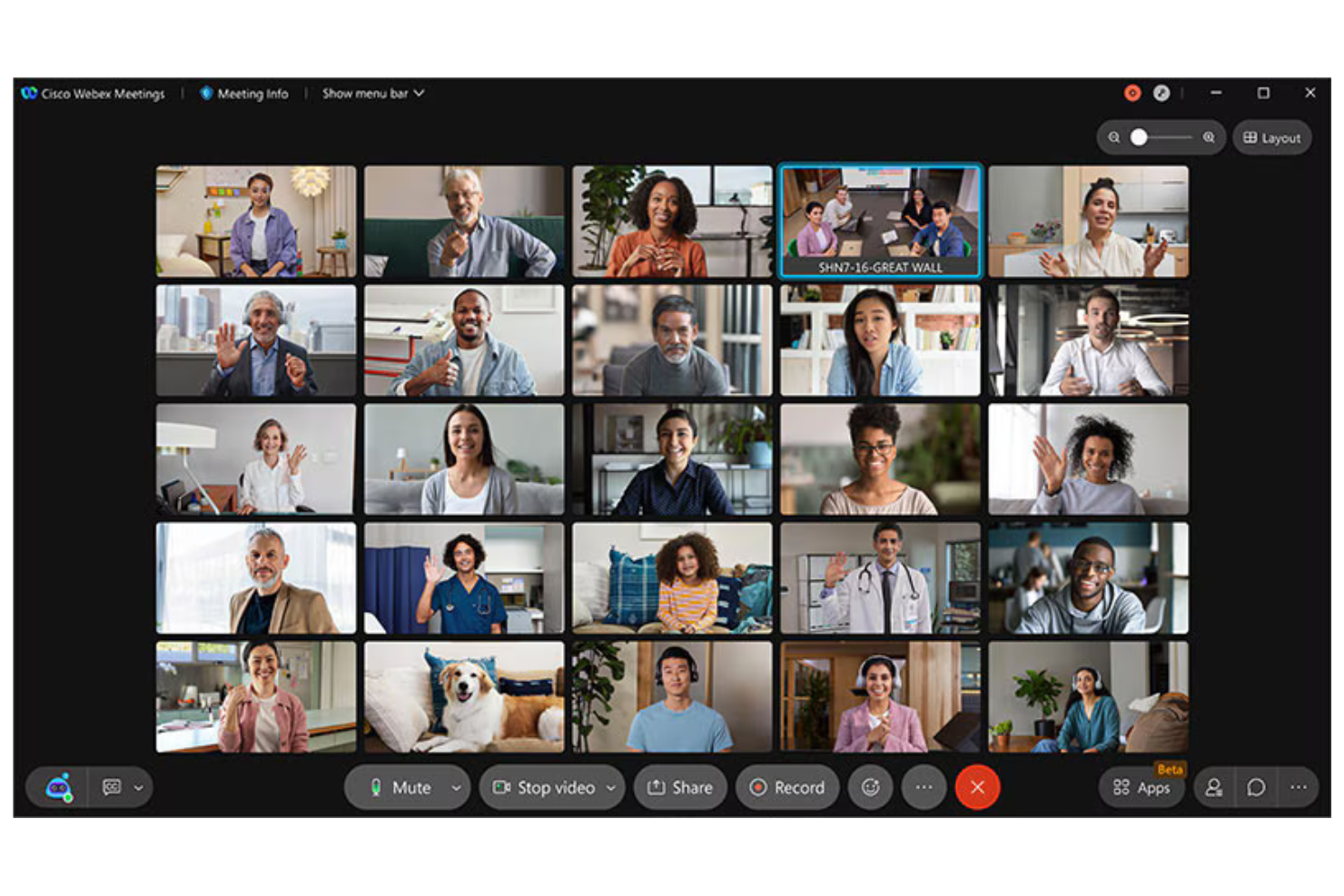
Cisco Webex es una plataforma de videoconferencias y colaboración utilizada por empresas e instituciones educativas para reuniones virtuales, seminarios web y colaboración en equipo. Proporciona herramientas para la comunicación remota, lo que la hace esencial para los equipos que necesitan conexiones fiables y seguras.
Por qué es una buena alternativa a Google Workspace: Cisco Webex ofrece funciones de seguridad que mantienen las reuniones protegidas y privadas, lo que la diferencia de las herramientas generales de Google Workspace. Con el cifrado de extremo a extremo, sus comunicaciones permanecen confidenciales. La plataforma admite vídeo y audio en alta definición, proporcionando reuniones claras y eficaces. Además, su capacidad para organizar eventos a gran escala la hace versátil para diversas necesidades empresariales.
Características e integraciones destacadas:
Características incluyen diseños de reunión personalizables, lo que permite organizar las transmisiones de vídeo según sus preferencias. La plataforma también ofrece tecnología de cancelación de ruido, que ayuda a minimizar las distracciones de fondo durante las llamadas. Cisco Webex Assistant proporciona transcripción en tiempo real, lo que facilita y hace más eficiente la toma de notas.
Integraciones incluyen Microsoft Teams, Salesforce, Google Workspace, Slack, ServiceNow, Atlassian Trello, Dropbox, Zendesk, Asana y más.
Pros and Cons
Pros:
- Funciones de seguridad sólidas
- Vídeo y audio de alta calidad
- Tecnología de cancelación de ruido
Cons:
- Requiere conocimientos técnicos para la configuración
- La interfaz puede parecer desordenada

Slack
Ideal para integrar la mensajería del equipo

Slack es una plataforma de colaboración diseñada para ayudar a los equipos a comunicarse y colaborar de manera eficiente. Es ampliamente utilizada por empresas de todos los tamaños para enviar mensajes, compartir archivos y organizar las comunicaciones del equipo.
Por qué es una buena alternativa a Google Workspace: A diferencia del enfoque más centrado en los documentos de Google Workspace, Slack sobresale en la integración de la mensajería del equipo. Los canales permiten organizar las conversaciones por temas o proyectos, lo que hace que la comunicación sea clara y estructurada. Slack Connect permite colaborar con socios externos, ampliando tu red de comunicación. Con funciones como las reuniones rápidas de audio y vídeo, tu equipo puede mantenerse conectado y responder con rapidez.
Características e integraciones destacadas:
Las características incluyen la posibilidad de crear flujos de trabajo personalizados mediante Workflow Builder, lo que ayuda a automatizar las tareas rutinarias. También puedes utilizar la función Canvas de Slack para crear y compartir documentos. Además, las herramientas impulsadas por IA ayudan a resumir conversaciones e identificar las principales tareas pendientes.
Las integraciones incluyen Google Drive, Microsoft 365 Copilot, Dropbox, Salesforce, Zoom, Asana, Atlassian Trello, GitHub, Zendesk y más.
Pros and Cons
Pros:
- Excelentes funciones de mensajería
- Sólida colaboración externa
- Creación de flujos de trabajo personalizados
Cons:
- La sincronización móvil puede presentar errores
- Las notificaciones pueden distraer

Ideal para la gestión del trabajo
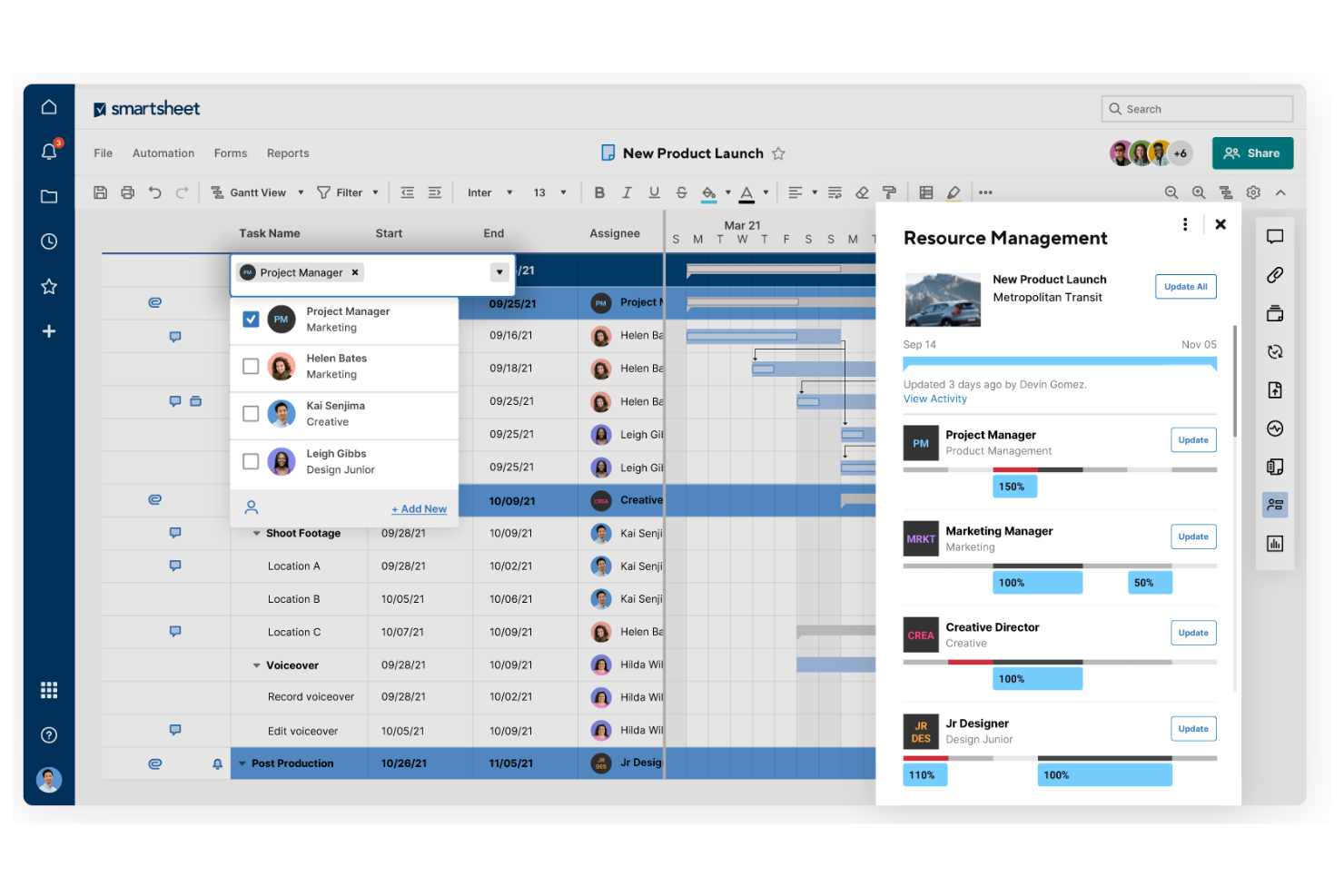
Smartsheet es una plataforma de gestión y automatización del trabajo utilizada por equipos y organizaciones para planificar, recopilar, gestionar e informar sobre el trabajo. Es una plataforma popular de gestión de proyectos y resulta adecuada para equipos que necesitan una herramienta flexible para realizar el seguimiento y gestionar proyectos.
Por qué es una buena alternativa a Google Workspace: Smartsheet ofrece capacidades de gestión del trabajo que proporcionan un enfoque más estructurado que Google Workspace. Con su interfaz basada en cuadrículas, puedes organizar tareas y proyectos de forma eficiente. Las funciones de automatización de la plataforma ayudan a reducir el trabajo manual, lo que permite que tu equipo se concentre en tareas más importantes. Las herramientas de generación de informes de Smartsheet proporcionan información sobre el progreso de los proyectos y te ayudan a tomar decisiones basadas en datos.
Características e integraciones destacadas:
Características incluyen la posibilidad de crear formularios personalizados para recopilar datos, lo que simplifica la recopilación de información de tu equipo. La plataforma ofrece vistas de diagramas de Gantt, lo que facilita la visualización de los plazos y las dependencias de los proyectos. También puedes utilizar paneles para realizar el seguimiento de métricas clave y del estado de los proyectos en tiempo real.
Integraciones incluyen Microsoft Teams, Slack, Google Workspace, Salesforce, Jira, Box, Dropbox, DocuSign, ServiceNow, Tableau y más.
Pros and Cons
Pros:
- Herramientas flexibles de gestión del trabajo
- Potente función de automatización
- Seguimiento eficaz de proyectos
Cons:
- La aplicación móvil no tiene vistas de Gantt
- El precio aumenta con los complementos
New Product Updates from Smartsheet
Smartsheet Adds Column Duplication Without Data
Smartsheet now lets you duplicate columns in table view without copying cell data, while retaining column properties like type, formatting, validation, and dropdown/contact options. For more information, visit Smartsheet's official site.

Wrike
Ideal para la gestión de proyectos empresariales

Wrike es una plataforma de gestión de proyectos y colaboración diseñada para equipos y empresas que necesitan gestionar tareas, proyectos y flujos de trabajo de manera eficiente. La utilizan profesionales que necesitan una herramienta centralizada para planificar, ejecutar y realizar un seguimiento del progreso de los proyectos.
Por qué es una buena alternativa a Google Workspace: Wrike ofrece funciones de gestión de proyectos empresariales que proporcionan mayor profundidad que las herramientas básicas de Google Workspace. Los diagramas de Gantt te ayudan a visualizar claramente los plazos y las dependencias de los proyectos, y el módulo de gestión de cargas de trabajo de la plataforma te ayuda a asignar recursos de manera eficaz en todo tu equipo. Además, los informes en tiempo real proporcionan información sobre el rendimiento de los proyectos, lo que permite tomar decisiones basadas en datos. Hay disponible una versión gratuita y planes de pago.
Funciones e integraciones destacadas:
Las funciones incluyen formularios de solicitud personalizados que simplifican el proceso de recepción, ayudando a tu equipo a recopilar de antemano toda la información necesaria. La función de seguimiento del tiempo ayuda a supervisar cuánto tardan las tareas, lo que facilita el análisis de la productividad. También puedes crear paneles para consultar de un vistazo las métricas clave y las actualizaciones de los proyectos.
Las integraciones incluyen Microsoft Teams, Salesforce, Google Drive, Slack, Dropbox, Box, Adobe Creative Cloud, Tableau y más.
Pros and Cons
Pros:
- Amplias herramientas de gestión de proyectos
- Asignación eficaz de recursos
- Seguimiento de proyectos en tiempo real
Cons:
- Algunas funciones están ocultas en los menús
- Cambios frecuentes y no anunciados en la interfaz de usuario
New Product Updates from Wrike

Wrike Adds Quick Search to Table View
Wrike adds Quick Search to Table View with full-table search across titles, descriptions, and fields, plus highlighted matches. This helps users find tasks faster in large tables. For more information, visit Wrike’s official site.

Zoom
Ideal para videoconferencias

Zoom es una plataforma de comunicación por video ampliamente utilizada por empresas, instituciones educativas y particulares para reuniones virtuales y seminarios web. Facilita la colaboración y la comunicación en tiempo real mediante funciones de video, audio y chat.
Por qué es una buena alternativa a Google Workspace: Zoom ofrece una plataforma dedicada a las videoconferencias, más especializada que las herramientas generales de comunicación de Google Workspace. Con funciones como video y audio en alta definición, tu equipo puede tener reuniones claras y eficaces. Las salas para grupos pequeños permiten debates en grupos reducidos dentro de reuniones más grandes, lo que mejora la colaboración.
Características e integraciones destacadas:
Características como fondos virtuales que te permiten personalizar el entorno de la reunión, aportando un toque profesional. Los controles del anfitrión te permiten gestionar a los participantes eficazmente y mantener las reuniones funcionando sin problemas. Zoom también ofrece seminarios web y reuniones grandes, con capacidad para miles de participantes, lo que lo hace versátil para diferentes necesidades.
Integraciones con Microsoft Teams, Slack, Salesforce, Google Calendar, Outlook, Dropbox, HubSpot, Calendly, Zapier, Asana y más.
Pros and Cons
Pros:
- Video y audio de alta calidad
- Opciones de reunión versátiles
- Controles eficaces del anfitrión
Cons:
- Puede consumir un ancho de banda considerable
- Problemas de seguridad en el pasado
Otras alternativas a Google Workspace
Aquí tienes algunas alternativas adicionales a Google Workspace que no han llegado a mi lista de selección, pero que aun así merece la pena conocer:
- Obsidian
Ideal para la gestión personal del conocimiento
- Routine
Ideal para la gestión integrada de tareas y calendarios
- Zoho Workplace
Ideal para migraciones asequibles de suites todo en uno


Cómo evalúo las alternativas a Google Workspace
Divido mi evaluación en requisitos básicos—documentos en tiempo real, correo empresarial, almacenamiento en la nube—y los diferenciadores que hacen que una plataforma valga la pena para migrar frente a otra.
Funcionalidad principal (Condición indispensable para esta lista)
Cuando selecciono herramientas para mi lista, califico cada una en una escala del 0 (no ofrece la funcionalidad) al 5 (sobresale en esta área) para cada funcionalidad principal mencionada a continuación. Luego, calculo la puntuación total de la herramienta en porcentaje. Cada herramienta debe alcanzar una puntuación mínima total del 65% para ser considerada para su inclusión.
- Colaboración en documentos: Verifico si los equipos pueden coeditar documentos, hojas de cálculo y presentaciones en tiempo real, con comentarios, historial de versiones y seguimiento de cambios.
- Almacenamiento en la nube y compartición de archivos: El almacenamiento, la estructura de carpetas y los permisos de acceso de cada plataforma son relevantes, especialmente para equipos que comparten entregables con partes externas.
- Correo electrónico y calendario empresarial: Busco correo con dominio personalizado y calendarios compartidos con herramientas de programación, ya que la mayoría de los equipos de proyectos dependen de ellos a diario.
- Comunicación en equipo: El chat integrado, videollamadas o canales mantienen las conversaciones cerca del trabajo. Plataformas como Zoho Workplace y Microsoft 365 lo incluyen de forma nativa.
- Gestión de tareas y proyectos: Evalúo si la plataforma ofrece tareas asignables, fechas de vencimiento o vistas de proyectos—características que conectan las herramientas de productividad con la entrega real.
- Integraciones con terceros: Conectar con herramientas como Jira, Asana o Slack mediante integraciones nativas o una API abierta es esencial para adaptarse a un entorno de gestión de proyectos existente.
Una vez tengo una lista de herramientas que cumplen este criterio, considero qué distingue a cada plataforma.
Factores diferenciadores (Qué distingue a los proveedores)
Así es como comparo y contrasto diferentes proveedores:
Funciones destacadas
Los asistentes impulsados por IA aportan un valor real aquí: busco plataformas donde la IA pueda redactar documentos, resumir conversaciones o generar tareas automáticamente a partir de notas. Los portales de clientes e invitados son útiles cuando tu equipo comparte entregables externamente. Plataformas como Notion y Zoho Workplace ofrecen acceso externo limitado sin exigir asientos pagados. Los generadores de automatización sin código también valen la pena evaluarlos, ya que activar aprobaciones o dirigir tareas entre herramientas puede reemplazar completamente aplicaciones de flujo de trabajo independientes.
Más allá de las funciones
La facilidad de migración es lo primero que evalúo—cambiar de Google Workspace implica trasladar años de archivos, correos y estructuras de carpetas. Plataformas como Microsoft 365 y Zoho Workplace ofrecen herramientas de importación dedicadas que reducen esa fricción. Los modelos de precios también varían mucho; verifico si el acceso de invitados o colaboradores externos requiere asientos de pago, ya que los equipos de proyectos suelen involucrar a contratistas. Las certificaciones de seguridad como SOC 2 y el cumplimiento de GDPR también importan, especialmente para equipos que manejan datos sensibles de proyectos en varias regiones.
¿Por qué buscar una alternativa a Google Workspace?
Aunque Google Workspace es una buena opción como herramienta de productividad basada en la nube, hay varios motivos por los que algunos usuarios buscan soluciones alternativas. Es posible que estés buscando una alternativa a Google Workspace porque:
- Necesitas mejores controles de privacidad de datos
- Tu equipo requiere funciones más avanzadas
- Te enfrentas a problemas de integración con otras herramientas
- Quieres más opciones de personalización
- Tu empresa necesita alojar los datos localmente
- Buscas una solución más rentable
Si alguna de estas situaciones te resulta familiar, has llegado al lugar adecuado. Mi lista contiene varias opciones de herramientas de productividad basadas en la nube más adecuadas para equipos que se enfrentan a estos desafíos con el ecosistema de Google y buscan soluciones alternativas.
Características
Estas son algunas de las características principales de Google Workspace que te ayudarán a contrastar y comparar lo que ofrecen las soluciones alternativas:
- Correo electrónico profesional: Proporciona el servicio de correo electrónico de Gmail y alojamiento de correo con nombres de dominio personalizados y correos empresariales para aumentar la credibilidad de tu marca.
- Gestión de archivos: Ofrece opciones seguras de almacenamiento y uso compartido de archivos mediante Google Drive para tu equipo.
- Reuniones por vídeo: Utiliza Google Meet para la colaboración en tiempo real y las videoconferencias. Si las reuniones son la parte de Google Workspace que quieres sustituir, compara las alternativas a Google Meet.
- Integración de aplicaciones: Se integra sin problemas con aplicaciones externas para mejorar tus flujos de trabajo.
- Gestión administrativa: Proporciona un control centralizado de las cuentas de usuario y la configuración de seguridad mediante la consola de administración.
- Seguridad de los datos: Conserva y supervisa los datos empresariales para garantizar la seguridad mediante Google Vault y es compatible con diversos protocolos de autenticación.
- Creación de sitios web: Permite desarrollar sitios web fácilmente con Google Sites sin conocimientos de programación.
- Automatización: Automatiza tareas para hacer más eficientes los procesos de tu empresa.
- Compatibilidad con dispositivos: Está optimizado para su uso en varios navegadores y sistemas operativos, incluidos Android y macOS, especialmente con Google Chrome.
- Colaboración en tiempo real: Permite que varios usuarios editen documentos simultáneamente, mejorando el trabajo en equipo.
Próximos pasos:
Si estás investigando herramientas de productividad basadas en la nube, contacta gratuitamente con un asesor de SoftwareSelect para obtener recomendaciones.
Rellenarás un formulario y tendrás una breve conversación en la que profundizarán en los detalles de tus necesidades. Después recibirás una lista breve de programas que podrás revisar. Incluso te ayudarán durante todo el proceso de compra, incluidas las negociaciones de precios.