

Click Maint CMMS Testbericht: Vorteile, Nachteile, Funktionen und Preisübersicht



When maintenance runs on memory and scattered spreadsheets, the small things slip until a missed request becomes a costly breakdown. Click Maint CMMS sets out to close those gaps, and I dug into whether it actually does.
Click Maint CMMS is a computerized maintenance management system (CMMS) and facilities project management software designed to help you organize, schedule, and track facility maintenance projects with less hassle. If you’re tired of juggling emails, spreadsheets, and disconnected tools, Click Maint gives you a single, user-friendly platform to streamline requests, automate work orders, and monitor asset performance.
In this review, I’ll break down Click Maint’s features, real-world use cases, pricing, and where it shines and falls short. If your team needs something simple yet powerful for managing facility projects, Click Maint is worth a closer look.
Click Maint CMMS Evaluation Summary
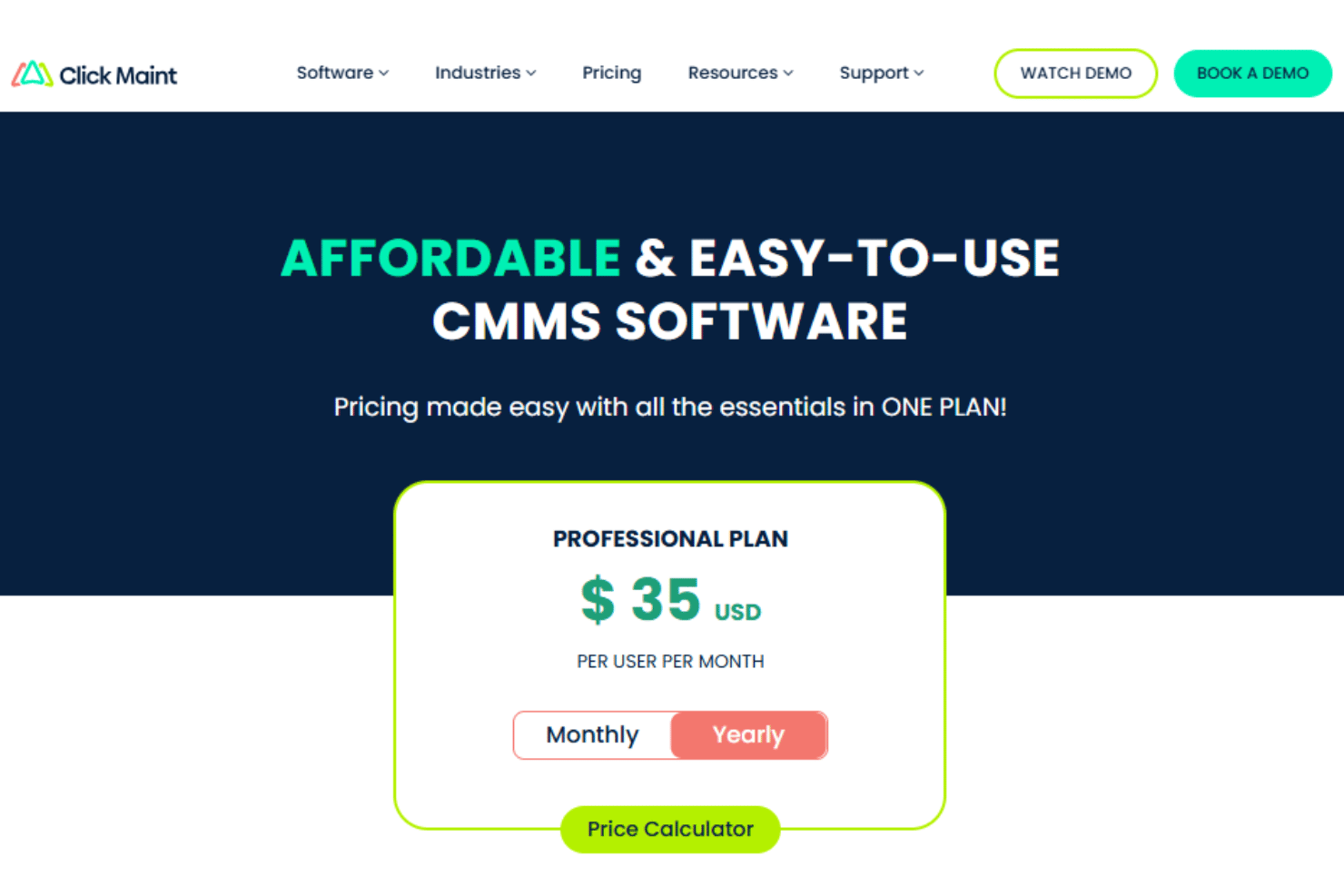
- Single plan at $35 per user/month (billed annually)
- 30-day free trial + free demo available
Warum Sie unseren Software-Empfehlungen vertrauen können
Unser Team testet und bewertet Software seit 2012. Als Projektmanager wissen wir selbst, wie schwierig – und wichtig – es ist, die richtige Software auszuwählen.
Für diesen Leitfaden haben wir Tools mithilfe von praktischen Tests und unabhängiger Recherche bewertet und dabei unsere Bewertungskriterien angewendet. Zudem greifen wir auf Erkenntnisse von Branchenvordenkern und praktizierenden Projektmanagement-Experten zurück.
Unsere Bewertungen spiegeln unser menschliches redaktionelles Urteilsvermögen wider, keine Verkaufsstrategie.
Expertenprüfer:
Click Maint CMMS Overview
When judging Click Maint, I think its clear interface and fast onboarding set it apart, especially for teams with minimal IT resources. Most common actions take three clicks or fewer and the platform balances facilities work with core industrial maintenance like preventive schedules, parts, and downtime tracking. I’d suggest it works best for organizations that value ease of use over hyper-complex workflows; think schools, religious institutions, property management, or light manufacturing looking for rapid improvement.
pros
-
Unlimited requester and view-only users, with requests by portal, email, or QR scan
-
Native iOS and Android apps covering work orders, inspections, time, and photos
-
Multi-level location hierarchies and interactive floor plans across multiple sites
cons
-
Custom fields, workflows, reports, and dashboards are limited for larger enterprises
-
Inventory lacks multiple storerooms and cycle counts
-
Thin fleet capability, with no GPS, fuel, or insurance tracking for large vehicle fleets
Is Click Maint CMMS Right For Your Needs?
Who Would be a Good Fit for Click Maint CMMS?
Click Maint is a strong choice for small and mid-sized organizations that want straightforward facility management software without unnecessary complexity. Industries where fast onboarding, unlimited requester access, and simple work request handling matter, such as K-12 and higher education, senior care, hospitality, religious institutions, and light manufacturing, are likely to get the most value from its streamlined features. Teams with mixed technical skills or part-time facility staff may also appreciate the clean interface and responsive support.
-
K-12 Schools
Staff, teachers, and custodians can submit requests with ease, while facilities managers track and prioritize campus issues quickly.
-
Operations with Multiple Facilities & Locations
Managing distributed residential or commercial properties is easier with asset tracking, visual floor plans, and web-based work order access.
-
Small to Mid-Sized Manufacturing Plants
Plant managers benefit from preventive maintenance tools and clear asset records to reduce downtime and prolong equipment life.
-
Religious Institutions and Nonprofits
Volunteer-driven or small staff teams can use the simple request portal and asset lists to keep buildings running smoothly.
-
Senior Care Facilities
Requests from staff across the building stay in one queue, with preventive schedules and asset history for mechanical, electrical, and plumbing equipment.
-
Hotels and Resorts
Front desk and housekeeping staff can log room and facility issues by QR scan, while managers schedule preventive work across the property.
Who Would be a Bad Fit for Click Maint CMMS?
Click Maint is less suitable for very large organizations or teams that need deep customization, sensor-driven predictive maintenance, or tight integration with SCADA and other plant systems. Heavy inventory operations may also outgrow the platform if they require multiple storerooms, purchase orders, cycle counts, or tool check-in and check-out, as may fleet-focused businesses where most assets are mobile. It is also not designed for room booking, event or space planning, or lease management, since its focus is firmly on facility maintenance.
-
Defence and Military Organizations
Click Maint may not be the best fit for defence or military organizations because its streamlined feature set may not support highly complex operational and security requirements.
-
Pharmaceutical Manufacturing
Pharmaceutical manufacturers may also find the platform too limited for validated production environments with strict compliance and documentation requirements.
-
Sensor-Driven and SCADA-Connected Plants
Predictive maintenance from condition monitoring, sensor feeds, or SCADA integration isn’t part of the platform, so highly automated plants need something else.
-
Large Fleet and Transportation Operators
There is no GPS, fuel, or insurance tracking, so operations whose main maintenance burden is vehicles will find the fleet tooling thin.
-
Construction and Capital Projects
Construction may be a poor fit because its maintenance needs often revolve around mobile equipment fleets rather than fixed facilities.
-
Workplace and Space Management
Teams that need room booking, event planning, space planning, or lease administration alongside maintenance should look at a full IWMS instead.
Unsere Bewertungsmethodik
Wie wir Tools testen & bewerten
Wir haben jahrelang unser System zur Softwareüberprüfung und -bewertung aufgebaut, verfeinert und verbessert. Das Bewertungsschema wurde entwickelt, um die Feinheiten der Softwareauswahl und die Effektivität eines Tools einzufangen, wobei der Fokus auf den entscheidenden Aspekten des Entscheidungsprozesses liegt. Unten sehen Sie genau, wie unser Test- und Bewertungssystem über sieben Kriterien hinweg funktioniert. So können wir eine objektive Einschätzung der Software auf Grundlage von Kernfunktionen, herausragenden Merkmalen, Benutzerfreundlichkeit, Onboarding, Kundenservice, Integrationen, Kundenbewertungen und Preis-Leistungs-Verhältnis bieten.
Kernfunktionalität (25% der Gesamtbewertung)
Ausgangspunkt unserer Bewertung ist immer die Kernfunktionalität des Tools. Hat es die grundlegenden Funktionen, die ein Nutzer erwarten würde? Sind einige dieser Kernfunktionen nur in höherpreisigen Tarifen verfügbar? Wir erwarten, dass ein Tool mindestens den grundlegenden Leistungsumfang seiner Mitbewerber erfüllt.
Herausragende Funktionen (25% der Gesamtbewertung)
Anschließend bewerten wir außergewöhnliche Funktionen, die über die üblichen Kernfunktionen hinausgehen. Eine hohe Bewertung spiegelt spezialisierte oder einzigartige Eigenschaften wider, durch die das Produkt schneller, effizienter oder für den Nutzer besonders wertvoll wird. Wir bewerten auch, wie einfach sich das Tool in andere Tools integrieren lässt, die üblicherweise im Tech-Stack zu finden sind, um die Funktionalität zu erweitern. Lösungen mit vielen nativen Integrationen, Drittanbieter-Anbindungen und API-Zugang zur Erstellung individueller Verknüpfungen schneiden am besten ab.
Benutzerfreundlichkeit (10% der Gesamtbewertung)
Wir berücksichtigen, wie schnell und einfach sich die Aufgaben – basierend auf der Kernfunktionalität – mit dem Tool erledigen lassen. Eine hohe Bewertung erhalten Tools, die durchdacht gestaltet und intuitiv bedienbar sind, mobile Apps und Vorlagen bieten und sogar komplexe Aufgaben einfach erscheinen lassen.
Onboarding (10% der Gesamtbewertung)
Wir wissen, wie wichtig eine schnelle Einführung im Team ist, und bewerten deshalb, wie leicht ein Tool mit minimaler Schulung erlernt und genutzt werden kann. Wir prüfen, wie schnell neue Teammitglieder ohne Vorkenntnisse starten können. Lösungen, die wenig oder gar keine Unterstützung erfordern, erhalten die höchste Bewertung.
Kundenservice (10% der Gesamtbewertung)
Wir überprüfen, wie schnell und unkompliziert Hilfe per Telefon, Live-Chat oder Wissensdatenbank verfügbar ist. Tools und Unternehmen, die Echtzeit-Support bieten, schneiden am besten ab; Chatbots am schlechtesten.
Kundenbewertungen (10% der Gesamtbewertung)
Neben unseren eigenen Tests beziehen wir auch den Net Promoter Score aktueller und ehemaliger Nutzer ein. Wir prüfen die Wahrscheinlichkeit, mit der sie das Tool erneut für die Kernfunktionalitäten wählen würden. Ein hohes Ergebnis spiegelt einen hohen Net Promoter Score bei aktuellen oder früheren Kund:innen wider.
Preis-Leistungs-Verhältnis (10% der Gesamtbewertung)
Abschließend vergleichen wir – unter Berücksichtigung aller anderen Kriterien – den Durchschnittspreis der Einstiegstarife mit den Kernfunktionen und bewerten das Preis-Leistungs-Verhältnis. Software, die mehr Leistung für weniger Geld bietet, bekommt die höchsten Werte.
Core Features
Work Request Portal
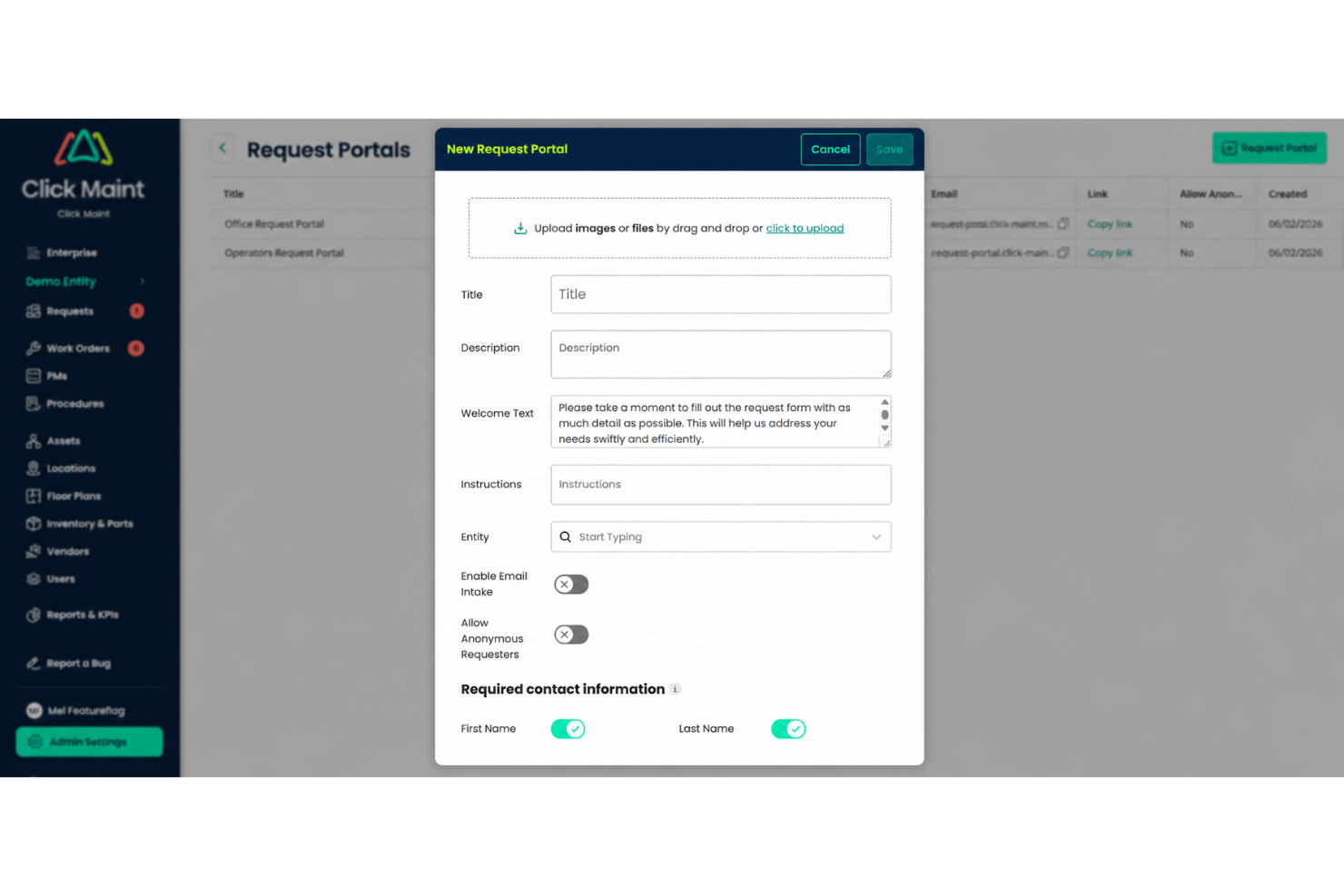
Anyone can submit maintenance requests through a request portal, by scanning a QR code, or through a secure login Requests are instantly routed to the right team and tracked until resolved.
Preventive Maintenance Scheduling
Schedule tasks by location, asset, or time interval with clear calendars, and attach inspections and procedures technicians complete in the field. Automated reminders help teams reduce unplanned downtime.
Asset Management
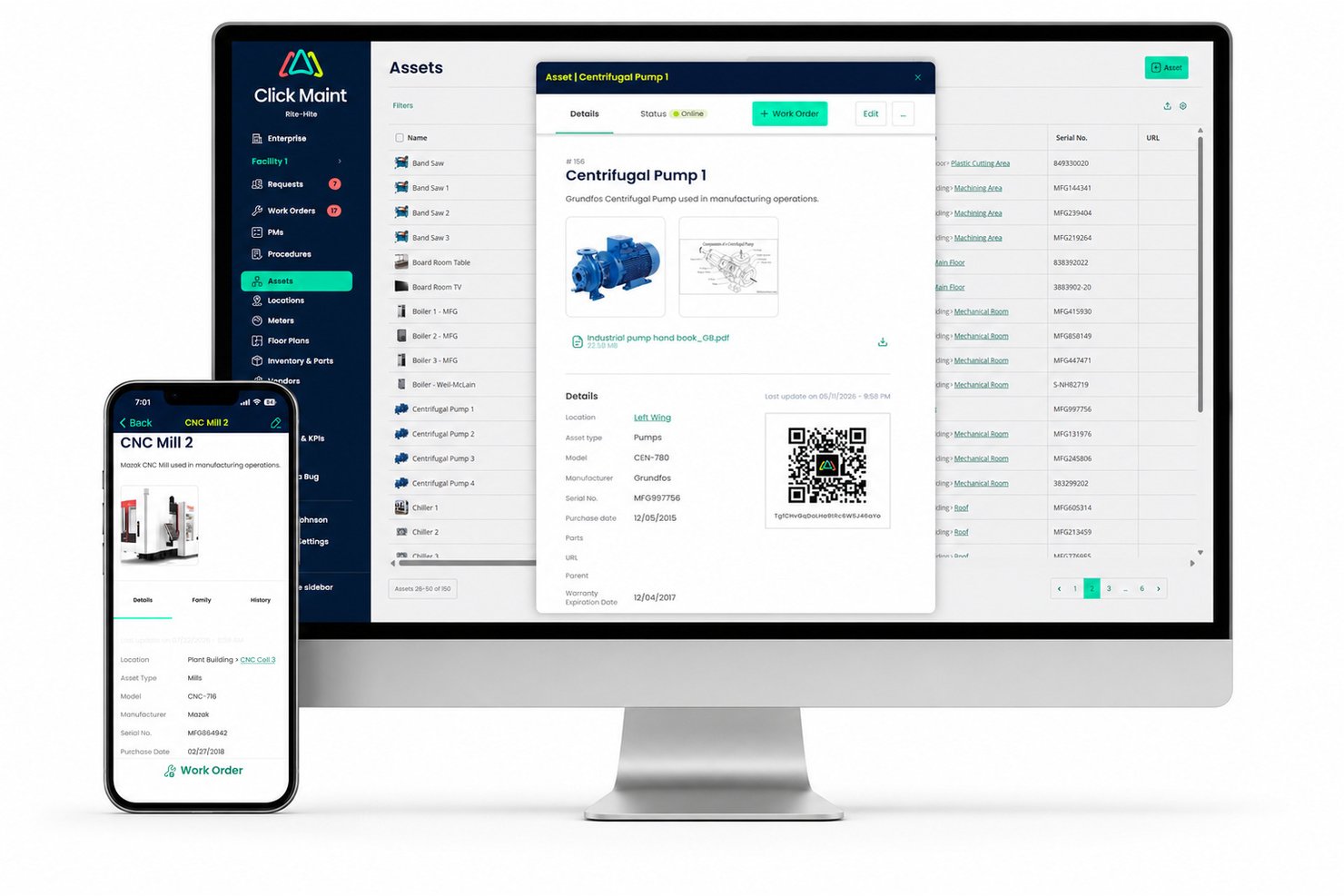
Track equipment details, service history, costs, and documents from one dashboard. Asset records help with audits and identify frequent problem areas.
Work Order Management
Assign, track, and update maintenance work from opening to close-out. Status updates notify teams of progress, approvals, and changes in real time.
Custom Fields and Forms
Create fields tailored for your building, fleet, or specialized assets. This flexibility means you capture every important detail specific to your operation.
Reporting and Analytics
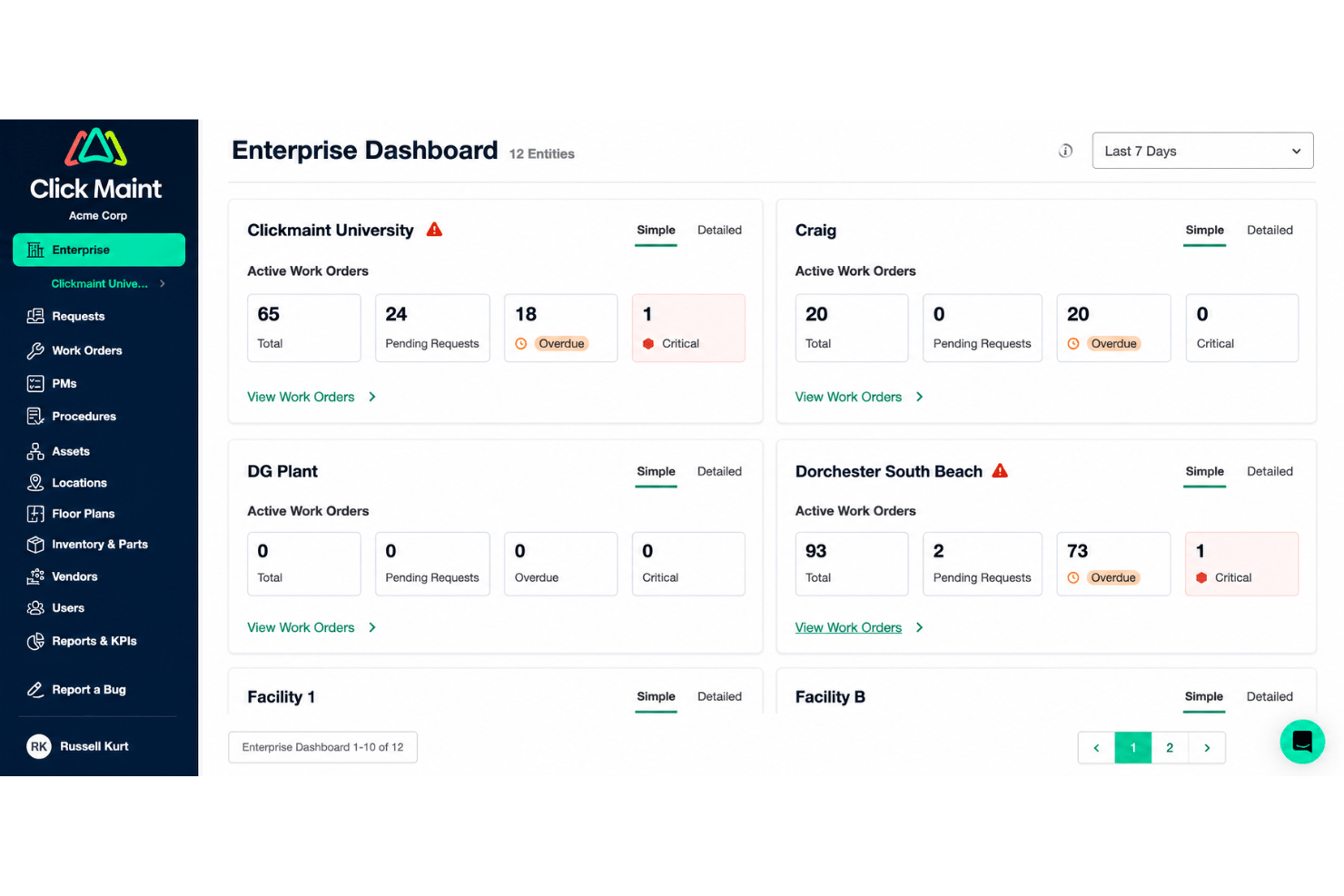
Run reports on work orders, costs, and trends using built-in templates. Make data-driven decisions about maintenance priorities or staffing with clear visualizations.
Standout Features
QR Code Work Order Access
Generate QR codes for assets or locations for instant work order creation. Technicians scan the code onsite and access asset details immediately.
Interactive Floor and Site Plans
View assets and maintenance activity across buildings and campuses. Teams can quickly locate equipment and manage work from a visual map.
Ease of Use
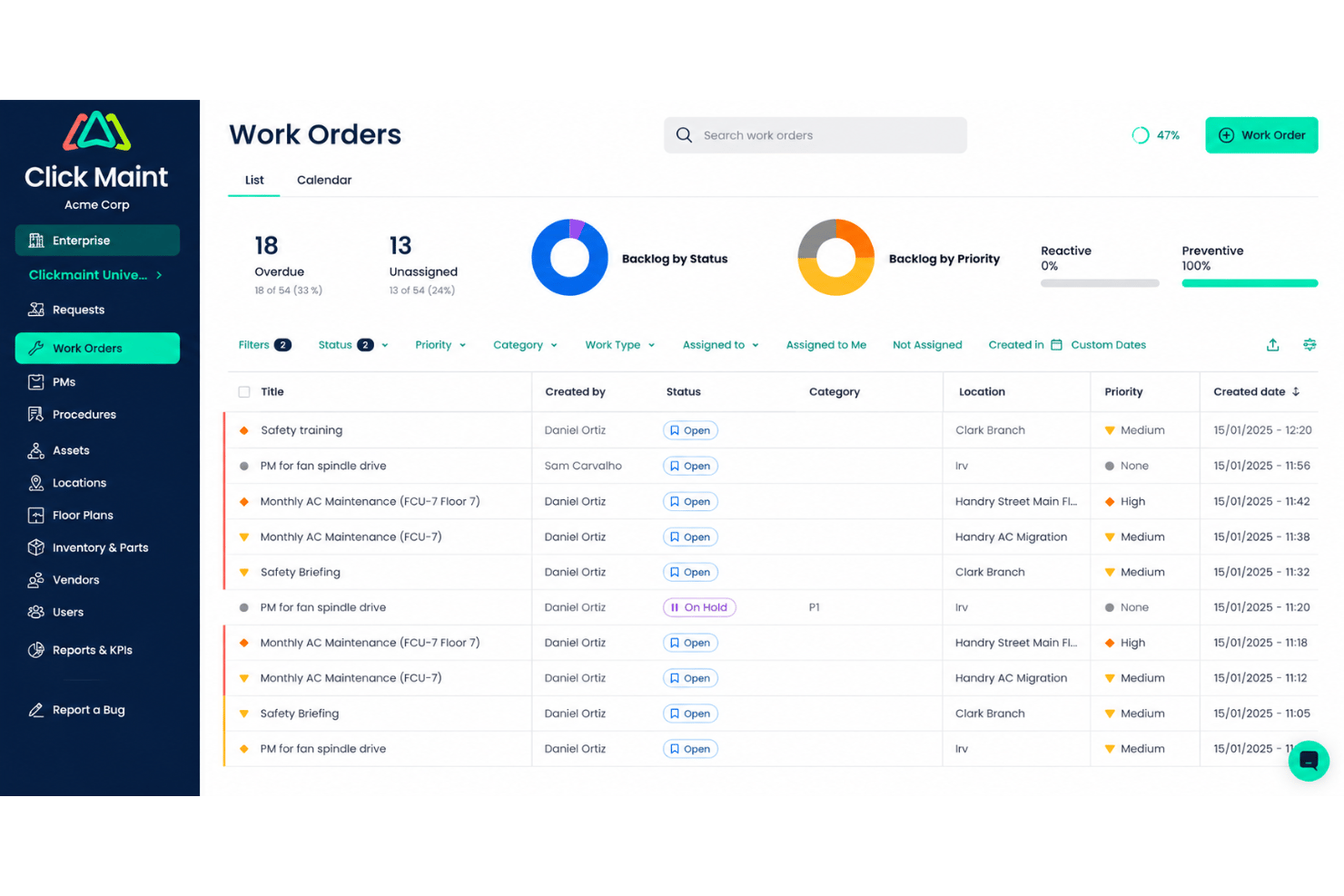
Click Maint stands out for its clean user interface and direct workflows, making it easy for new users and non-technical staff to pick up quickly. The three-click design target, clear request portal, and simple asset search get consistent praise from users looking to avoid cluttered, outdated interfaces. Six role levels (requester, technician, lead technician, limited administrator, administrator, and view-only) let you match access to how people actually work. This ease speeds up onboarding and reduces training stress for most facilities teams.
Onboarding
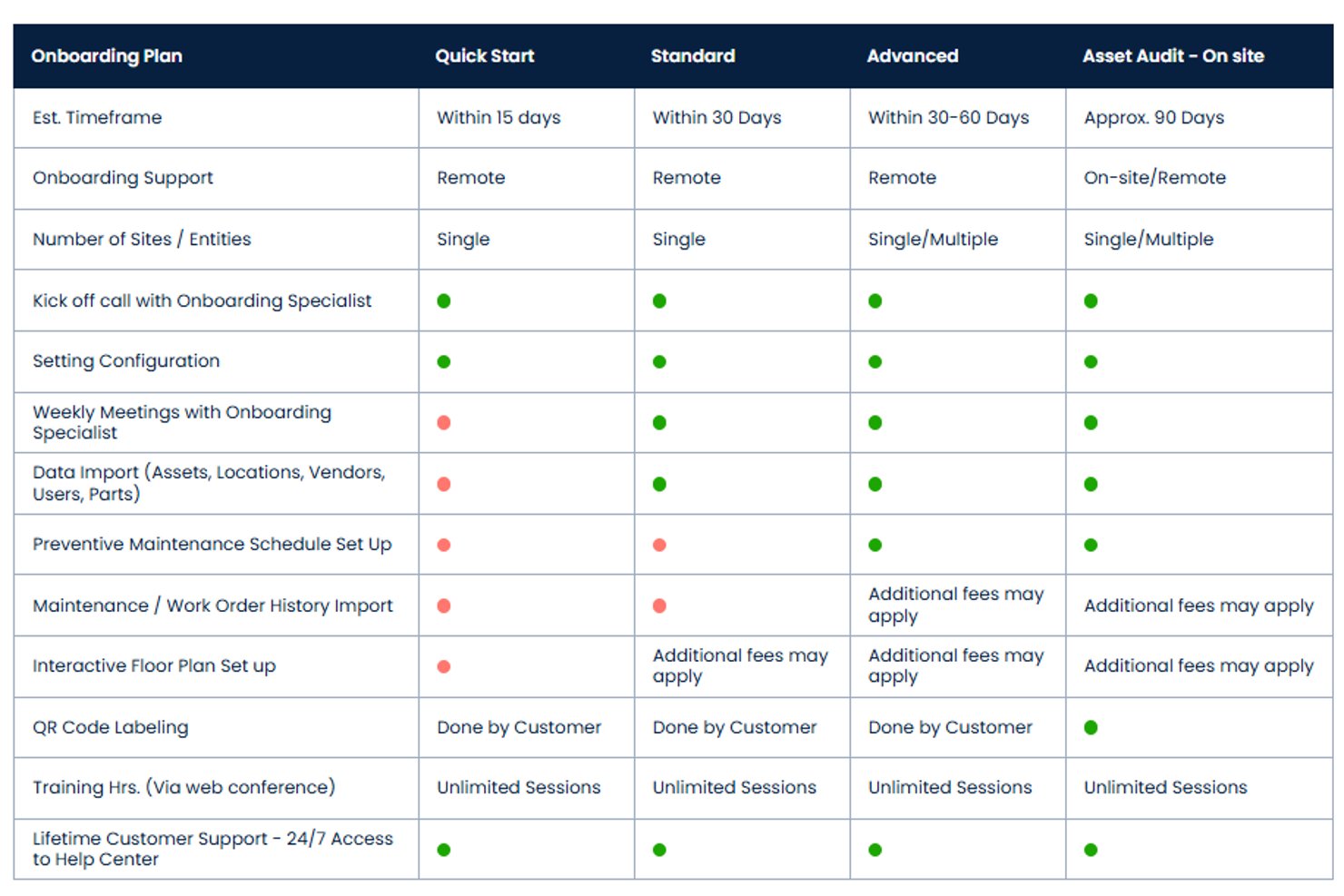
Click Maint CMMS offers four onboarding tracks, and each includes an onboarding specialist, a kickoff call, configuration help, and unlimited web-conference training. Quick Start covers one to five users on a single site within 15 days, Standard Onboarding runs about 30 days with Click Maint performing the data import, and Advanced Onboarding handles multi-site or migrating teams in 30 to 60 days.
Organizations without a reliable asset registry can opt for an onsite audit, where Click Maint inventories and photographs equipment, applies QR labels, and builds the database in roughly 90 days. A customer-facing import wizard covers simpler data loads, and no programming or server setup is required during the entire onboarding process.
Customer Support
Click Maint users consistently report prompt, friendly responses from the support team. The human-first approach, clear troubleshooting steps, and fast follow-up make users feel their problems are genuinely heard and resolved, not just queued. Weekly training sessions are included at no additional cost, so new hires can be brought up to speed without buying another training package, and a help center plus a public status page cover self-service. This level of support stands out for smaller teams or first-time CMMS buyers.
Integrations
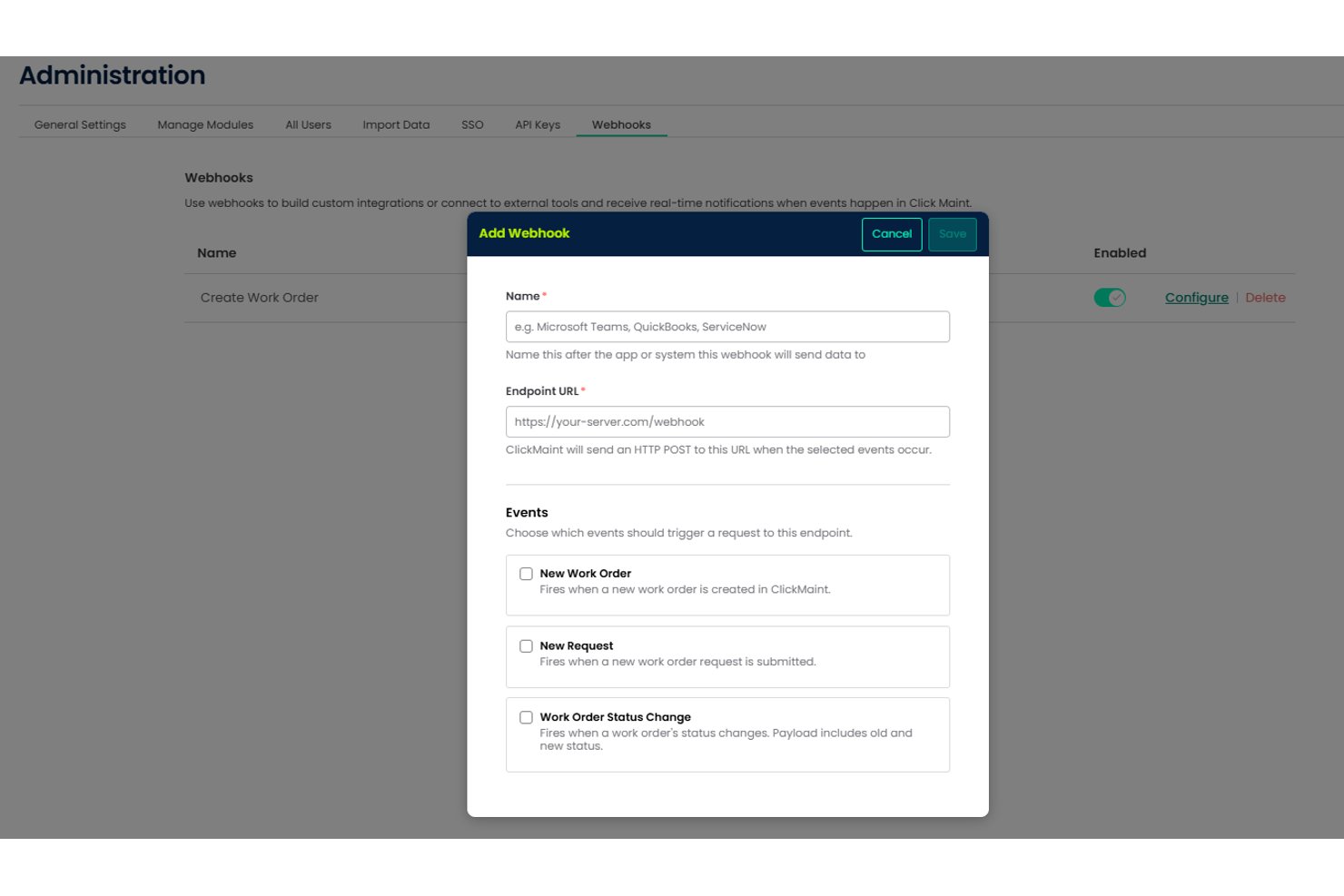
Click Maint does not offer a large marketplace of pre-built, out-of-the-box native third-party app integrations. Instead, it focuses on core CMMS features and provides an open portal and API documentation for custom connections.
Click Maint also offers REST API and Webhooks that can be connected to Zapier so your team can build custom integrations with hundreds of apps. These webhooks will allow notifications for new work orders and requests to be sent via collaboration apps like MS Teams or Slack.
Value for Money
Click Maint offers a single plan priced per user per month, with full feature access and no separate upgrade tiers. This straightforward model provides strong value for smaller facilities teams and makes the tool more affordable as your team and needs grow.
- Professional Plan: Includes work order requests, work orders, preventive maintenance, access to the mobile app, and KPI dashboards, and its API, among other features.
Click Maint CMMS Specs
- API
- Calendar Management
- Customer Management
- Dashboard
- Data Export
- Data Import
- Data Visualization
- External Integrations
- Inventory Tracking
- Multi-User
- Notifications
- Scheduling
- Supplier Management
Click Maint CMMS FAQs
How easy is it to migrate our current facilities data into Click Maint?
Can we customize user access and permissions for different departments?
Does Click Maint have mobile access for field technicians?
How does Click Maint handle recurring preventive maintenance schedules?
What happens if our internet goes down—can we work offline?
How secure is our data on Click Maint, and is it compliant with industry standards?
Are reporting tools and analytics included, or do we need to pay extra?
How long does it take to train a new facilities team on Click Maint?
Click Maint CMMS Company Overview & History
Click Maint CMMS is a cloud-based facilities management platform developed and supported by Click Maint, an independently owned company headquartered in Headingley, Manitoba, Canada. Unlike many CMMS providers that have been absorbed through mergers, acquisitions, or private equity investment, Click Maint remains focused on continuously improving its core product for small and mid-sized organizations. The platform serves industries including manufacturing, education, healthcare, senior care, hospitality, religious institutions, and nonprofits, with data hosting and billing available in both Canada and the United States.
Click Maint Major Milestones
- 2022: Public launch of Click Maint CMMS software
- 2023: Expanded feature set to support asset management and advanced scheduling
- 2024: Added SSO, API access, and enhanced data security controls