

10 beste einfache Zeiterfassungsprogramme im Test 2026

10 Auswahl der besten einfachen Zeiterfassungstools


Ein Projekt zu verwalten, kann sich anfühlen, als müsste man zu viele Aufgaben gleichzeitig jonglieren. Sie möchten, dass Ihr Team produktiv ist, aber die Zeiterfassung kann mühsam und ablenkend sein. Hier kommen einfache Zeiterfassungstools ins Spiel. Sie helfen Ihnen, die Arbeitsstunden im Blick zu behalten, ohne zusätzlichen Aufwand zu verursachen.
Meiner Erfahrung nach kann die Wahl des richtigen Tools einen großen Unterschied machen. Ich habe eine Reihe von Zeiterfassungstools geprüft, um die besten für Sie zu finden. Sie erhalten unvoreingenommene Einblicke in Funktionen, Benutzerfreundlichkeit und Vorteile.
In diesem Listenartikel führe ich Sie durch die besten Optionen. Sie erfahren, wie jedes Tool zu den Anforderungen Ihres Teams passen und Ihr Projektmanagement verbessern kann. Lassen Sie uns eintauchen und die perfekte Lösung für Sie finden.
Warum Sie unseren Software-Empfehlungen vertrauen können
Unser Team testet und bewertet Software seit 2012. Als Projektmanager wissen wir selbst, wie schwierig – und wichtig – es ist, die richtige Software auszuwählen.
Für diesen Leitfaden haben wir Tools mithilfe von praktischen Tests und unabhängiger Recherche bewertet und dabei unsere Bewertungskriterien angewendet. Zudem greifen wir auf Erkenntnisse von Branchenvordenkern und praktizierenden Projektmanagement-Experten zurück.
Unsere Bewertungen spiegeln unser menschliches redaktionelles Urteilsvermögen wider, keine Verkaufsstrategie.
Expertenprüfer:
Vergleichstabelle einfacher Zeiterfassungstools
Die folgende Tabelle vergleicht die Preisinformationen meiner besten Auswahl an einfachen Zeiterfassungstools.
| Tool | Best For | Trial Info | Price | ||
|---|---|---|---|---|---|
| 1 | Am besten für die Unterstützung von Browser-Erweiterungen | Kostenloser Tarif + 7-tägige kostenlose Testversion verfügbar | Ab $3.99/Nutzer/Monat (jährlich abgerechnet) | Website | |
| 2 | Am besten für HR-Funktionen in der Zeiterfassung geeignet | Kostenloser Tarif verfügbar | Ab 5,50 $/Benutzer/Monat | Website |
Test der besten einfachen Zeiterfassungstools
Nachfolgend finden Sie meine ausführlichen Zusammenfassungen der besten einfachen Zeiterfassungstools, die es in meine Auswahl geschafft haben. Meine Bewertungen bieten einen detaillierten Überblick über die wichtigsten Funktionen, Vor- und Nachteile, Integrationen und idealen Anwendungsfälle jedes Tools, damit Sie das beste für sich finden.

Clockify
Am besten für die Unterstützung von Browser-Erweiterungen
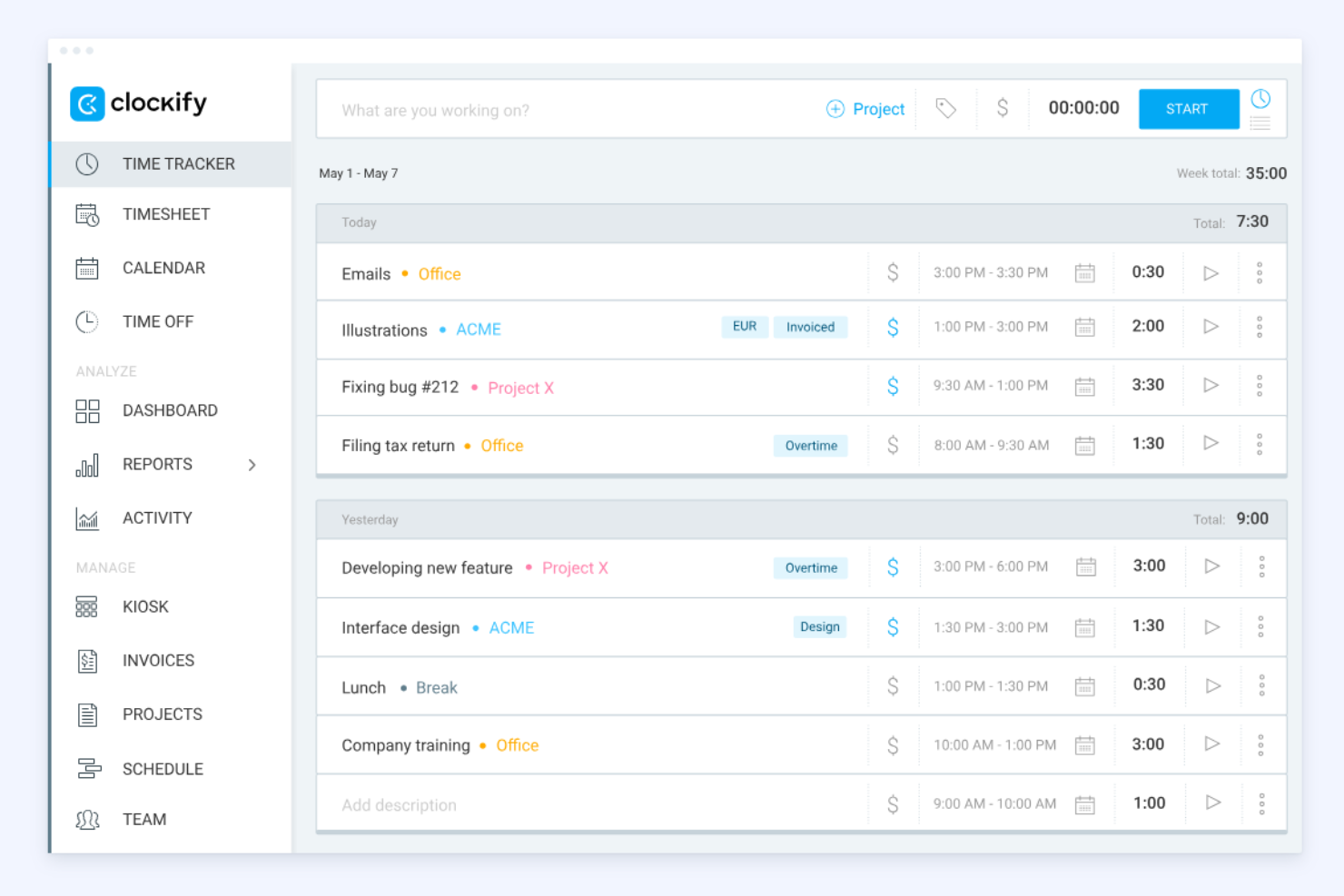
Clockify ist ein Zeiterfassungstool, das von Freelancern und Unternehmen jeder Größe häufig genutzt wird. Es hilft Nutzern, abrechenbare Stunden zu erfassen und Projekte effizient zu verwalten.
Warum ich Clockify ausgewählt habe: Die Unterstützung von Browser-Erweiterungen ist ein herausragendes Merkmal, mit dem Sie die Zeit direkt in Ihrem Browser erfassen können, ohne zwischen Webanwendungen wechseln zu müssen. Das ist ideal für alle, die mit mehreren Webanwendungen arbeiten und schnellen Zugriff benötigen. Clockify bietet detaillierte Berichtstools zur effektiven Analyse der Zeitnutzung. Sie können außerdem Erinnerungen einrichten, damit Ihr Team seine Stunden regelmäßig erfasst.
Herausragende Funktionen und Integrationen:
Zu den Funktionen gehören die einfache Zeiterfassung über Timer und Stundenzettel sowie Projekt- und Abrechnungstools, mit denen Sie Tarife festlegen und Berichte oder Rechnungen erstellen können. Außerdem unterstützt die Anwendung die Teamverwaltung mit Funktionen wie Anwesenheitserfassung, Planung und Genehmigung von Stundenzetteln.
Zu den Integrationen gehören Trello, Asana, Atlassian Jira, Slack und weitere.
Pros and Cons
Pros:
- Starke Unterstützung von Browser-Erweiterungen
- Möglichkeiten zur mobilen Zeiterfassung
- Fünf Nutzer im kostenlosen Tarif
Cons:
- Keine automatische Planung oder Schichttauschfunktion
- Eingeschränkte Projekt- und Aufgabenverwaltung

Am besten für HR-Funktionen in der Zeiterfassung geeignet
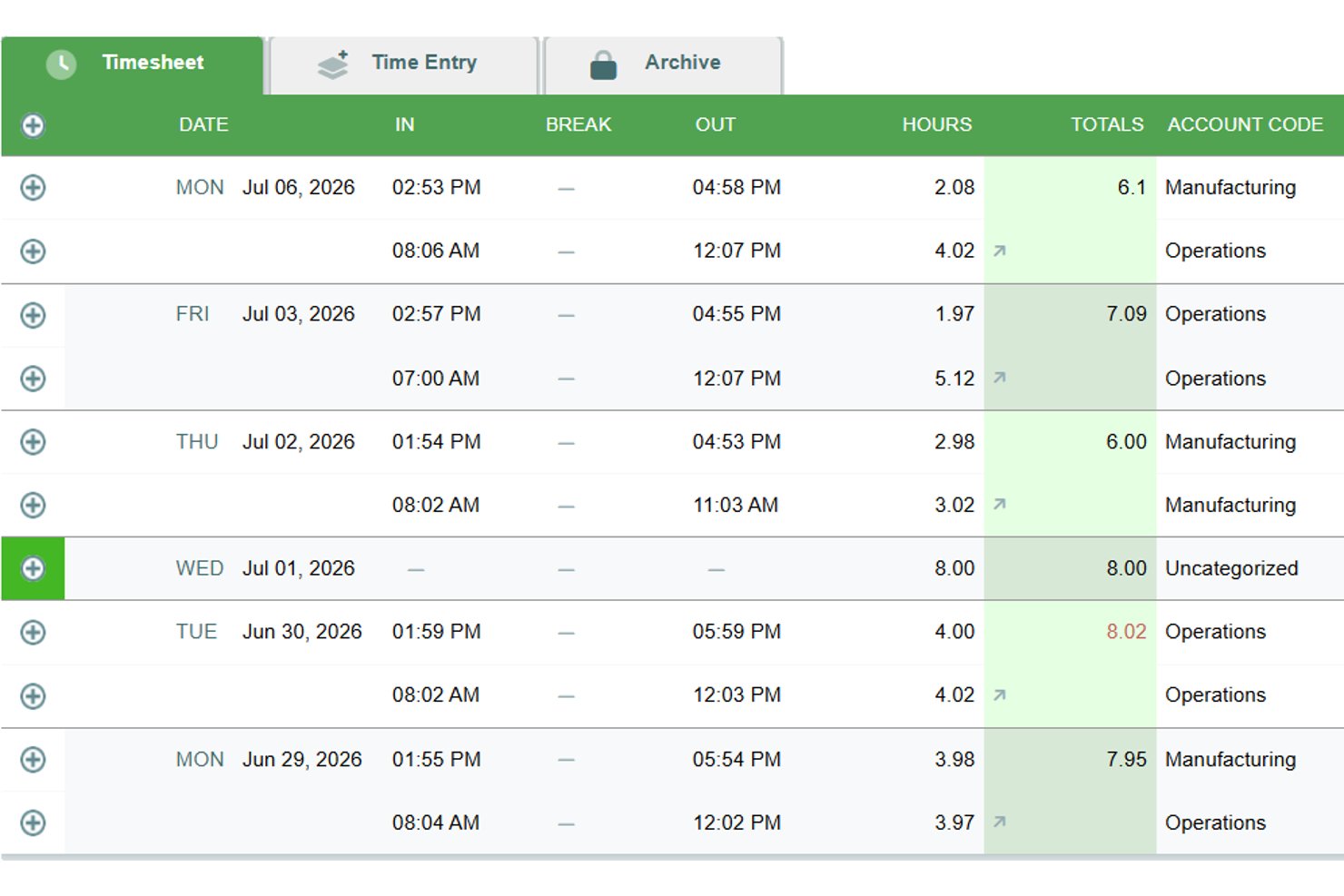

Timesheets.com ist eine browserbasierte Zeiterfassungsplattform, die Lohnabrechnungs-Stundenzettel, die Erfassung abrechenbarer Stunden, projektbezogene Auftragskalkulation, Terminplanung, Ausgabenverwaltung und eine HR-Dokumentensuite in einem Tool kombiniert.
Für wen ist Timesheets.com am besten geeignet?
Timesheets.com eignet sich besonders für kleine Teams, die Zeiterfassung, Terminplanung und die Verwaltung von HR-Dokumenten in einer einzigen Lösung benötigen.
Warum ich Timesheets.com ausgewählt habe
Ich habe Timesheets.com in meine Top-Auswahl aufgenommen, weil der Funktionsumfang im HR-Bereich weit über das hinausgeht, was die meisten einfachen Zeiterfassungstools bieten. Die integrierte HR-Dokumentensuite verwaltet W-4s, I-9s, Leistungsbeurteilungen und Vorlagen für Disziplinarmaßnahmen, die alle direkt mit derselben Plattform verknüpft sind, auf der Mitarbeitende ihre Arbeitszeiten erfassen. Außerdem gefällt mir, dass PTO-Regeln für den Erwerb von Urlaubstagen, einschließlich Obergrenzen, Übertrag und Verfallsregelungen, ohne ein separates HR-Tool konfiguriert werden können.
Wichtige Funktionen von Timesheets.com
- Abrechnungssätze auf mehreren Ebenen: Legen Sie unterschiedliche Abrechnungs- und Kostensätze auf Mitarbeiter-, Projekt- oder Aufgabenebene fest, um eine genaue Kundenabrechnung und Auftragskalkulation zu ermöglichen.
- Gleichzeitige Projekt-Timer: Führen Sie mehrere laufende Timer gleichzeitig aus, sodass Sie problemlos zwischen Aufgaben wechseln können, ohne erfasste Zeit zu verlieren.
- Exporte für Lohnabrechnung und Buchhaltung: Übertragen Sie Stundenzetteldaten über integrierte Exporte direkt an QuickBooks, Gusto, ADP, Paychex und andere Lohnabrechnungssysteme.
- Erfassung von Kilometern und Ausgaben: Erfassen Sie Kilometer mit Tachoaufnahmen und reichen Sie Ausgaben mit Belegfotos direkt neben den Zeiteinträgen ein.
Integrationen von Timesheets.com
Timesheets.com bietet native Integrationen mit QuickBooks Online, QuickBooks Desktop, Gusto, ADP, Paychex, SurePayroll, Sage, Ceridian, Microsoft Dynamics und Heartland. Die API unterstützt benutzerdefinierte Integrationen, allerdings bietet Timesheets.com keine nativen Integrationen mit Projektmanagementtools.
Pros and Cons
Pros:
- HR-Dokumente neben der Zeiterfassung
- Konfigurierbare Regeln für den Erwerb von PTO
- Abrechenbare Sätze auf mehreren Ebenen unterstützen die Auftragskalkulation
Cons:
- Die auf den Browser beschränkte mobile Nutzung wirkt veraltet
- Genehmigungsintensive Änderungen verlangsamen Korrekturen
Wie ich einfache Zeiterfassungstools bewerte
Ich teile meine Bewertung in zwei Ebenen auf: absolute Grundanforderungen (wie ein Ein-Klick-Timer und die Abrechnungsmöglichkeit für Kundenprojekte) sowie die Unterscheidungsmerkmale, die ein Tool zur richtigen Wahl für ein bestimmtes Team machen.
Kernfunktionen (Muss-Kriterien für diese Liste)
Wenn ich Tools für meine Liste auswähle, bewerte ich jedes einzelne auf einer Skala von 0 (bietet diese Funktion nicht) bis 5 (überzeugt in diesem Bereich) für jede unten aufgeführte Kernfunktion. Anschließend berechne ich die Gesamtpunktzahl des Tools als Prozentsatz. Jedes Tool muss mindestens eine Gesamtnote von 65 % erreichen, um für die Aufnahme infrage zu kommen.
- Ein-Klick-Timer: Ich prüfe, ob man sofort aus der Hauptansicht heraus mit dem Tracking beginnen kann – ohne langes Suchen in Menüs oder voreingestellte Felder, bevor die Zeit läuft.
- Manuelle Zeiteingabe: Teams vergessen oft, den Start-Knopf zu drücken. Ich achte auf flexible Nachbuchungsmöglichkeiten, etwa das Eintragen per Dauer oder Start-/Endzeit für beliebige zurückliegende Tage.
- Projekt- & Aufgaben-Zuweisung: Jeder Eintrag sollte einem Kunden, Projekt oder einer Aufgabe zugeordnet werden können, damit die Zeit am Monatsende nicht im Nirgendwo verschwindet.
- Stundenzettel-Ansicht: Ich bewerte, ob die erfasste Zeit klar und übersichtlich in einem Tages- oder Wochenraster darstellbar ist, das sich leicht prüfen, bearbeiten und rechtzeitig vor einer Deadline einreichen lässt.
- Zeitauswertung & Export: Einen CSV-Export der Projektstunden des letzten Monats für die Kundenabrechnung sehe ich als absolute Basiserwartung an jedes Tool auf der Liste.
- Abrechnungspflichtige Zeiterfassung: Das Markieren von Einträgen als abrechnungsfähig mit den zugewiesenen Stundensätzen ist entscheidend – insbesondere für Agenturleiter, die verschiedene Kundenverträge zu unterschiedlichen Preisen verwalten.
Sobald ich eine Liste mit Tools habe, die diese Anforderungen erfüllen, schaue ich, wodurch sich jedes einzelne besonders abhebt.
Unterscheidungsmerkmale (Was Anbieter voneinander abgrenzt)
So vergleiche ich die verschiedenen Anbieter:
Herausragende Funktionen
Ein Riesenvorteil ist die Kalendersynchronisierung – Tools, die Meetings aus Google Calendar oder Outlook ziehen und in Zeiteinträge umwandeln, ersparen Projektmanagern stundenweise Nachpflege. Zudem achte ich auf Leerlauferkennung und intelligente Erinnerungen, die vergessene Timer erfassen, bevor daraus reines Raten wird. Automatische Zeiterfassung geht noch einen Schritt weiter und dokumentiert App- sowie Dateinutzung im Hintergrund – vor allem praktisch für Berater, die häufig zwischen Aufgaben wechseln.
Mehr als nur Funktionen
Eine kostenlose Einstiegsversion, die wirklich nutzbar ist, ist hier wichtig – Freiberufler und kleine Teams müssen ab Tag eins Zeiterfassung betreiben können, ohne ein Budget genehmigen zu lassen. Ebenso bewerte ich, wie schnell man vom Anmelden zum ersten laufenden Timer kommt. Die besten einfachen Tracker bringen nahezu keine Einrichtung mit sich. Integrationen mit Tools wie Jira, Asana und Trello sind ebenfalls ein Pluspunkt, da eine Timer-Funktion in der Projektmanagement-Software selbst weniger Kontextwechsel und präzisere Zeiterfassung für verteilte Teams bedeutet.
So wählen Sie ein einfaches Zeiterfassungstool aus
Es ist leicht, sich in langen Funktionslisten und komplexen Preisstrukturen zu verlieren. Damit Sie sich auf Ihrem Weg durch den individuellen Auswahlprozess für eine Software konzentrieren können, finden Sie hier eine Checkliste mit Faktoren, die Sie berücksichtigen sollten:
| Faktor | Was Sie berücksichtigen sollten |
| Skalierbarkeit | Kann das Tool mit Ihrem Team wachsen? Prüfen Sie, ob es eine steigende Anzahl von Benutzern und Projekten ohne Leistungseinbußen unterstützt. |
| Integrationen | Verbindet es sich mit Ihren vorhandenen Tools? Prüfen Sie die Kompatibilität mit Ihren Plattformen für Projektmanagement, Buchhaltung und Kommunikation, um Arbeitsabläufe zu verbessern. |
| Anpassbarkeit | Können Sie das Tool an Ihre Anforderungen anpassen? Achten Sie auf Optionen zur Anpassung von Dashboards, Berichten und Benutzerberechtigungen an die Prozesse Ihres Teams. |
| Benutzerfreundlichkeit | Ist die Benutzeroberfläche intuitiv? Stellen Sie sicher, dass Teammitglieder mit unterschiedlichen technischen Kenntnissen ohne umfangreiche Schulungen oder Verwirrung damit arbeiten können. |
| Implementierung und Einführung | Wie schnell können Sie loslegen? Bewerten Sie den Einrichtungsprozess, verfügbare Schulungsressourcen und den Support während der ersten Implementierungsphase. |
| Kosten | Passt es in Ihr Budget? Vergleichen Sie die Preispläne und berücksichtigen Sie die Gesamtbetriebskosten einschließlich zusätzlicher Gebühren für Funktionen oder Support. |
| Sicherheitsvorkehrungen | Wie sicher sind Ihre Daten? Achten Sie auf Verschlüsselungsstandards, Verfahren zur Datensicherung und die Einhaltung von Datenschutzbestimmungen wie der DSGVO. |
| Verfügbarkeit des Supports | Können Sie bei Bedarf Hilfe erhalten? Prüfen Sie, ob der Anbieter Support rund um die Uhr, einen Live-Chat oder einen persönlichen Account-Manager für Unterstützung anbietet. |
Was ist eine einfache Zeiterfassung?
Eine einfache Zeiterfassung ist ein Tool, das Benutzern hilft, ihre Arbeitszeiten effizient zu erfassen und zu verwalten. Fachkräfte wie Freiberufler, Projektmanager und Remote-Teams nutzen diese Tools, um die Produktivität zu steigern und abrechenbare Stunden zu erfassen. Funktionen wie Zeiterfassung, Berichterstellung und Projektmanagement unterstützen Benutzer dabei, Aufgaben zu organisieren und ihren Arbeitsablauf zu optimieren. Insgesamt sorgen diese Tools für Klarheit bei der Zeiteinteilung und verbessern das Zeitmanagement.
Funktionen
Achten Sie bei der Auswahl einer einfachen Zeiterfassung auf die folgenden wichtigen Funktionen:
- Zeiterfassung: Arbeitszeiten automatisch oder manuell erfassen, um eine genaue Erfassung der abrechenbaren Zeit sicherzustellen.
- Berichterstellung: Detaillierte Berichte erstellen, um Produktivität und Zeiteinteilung über verschiedene Projekte hinweg zu analysieren.
- Integration in das Projektmanagement: Mit vorhandenen Projektmanagement-Tools synchronisieren, um Arbeitsabläufe und Aufgabenverwaltung zu optimieren.
- Mobiler Zugriff: Arbeitszeit unterwegs mit mobilen Apps erfassen und so Flexibilität für Remote- oder reisende Teammitglieder gewährleisten.
- Abrechnung und Rechnungsstellung: Auf Grundlage der erfassten Zeit Rechnungen erstellen, um den Abrechnungsprozess für Kunden zu vereinfachen.
- Anpassbare Benachrichtigungen: Erinnerungen zur Zeiterfassung einrichten oder Benutzer über bevorstehende Fristen informieren, damit Projekte auf Kurs bleiben.
- GPS-Standortverfolgung: Den Standort mobiler Teams überwachen, um eine genaue Zeiterfassung bei Außeneinsätzen sicherzustellen.
- Visuelle Stundenzettel: Eine klare Übersicht über erfasste Stunden bereitstellen, damit Benutzer ihre Zeitnutzung schnell beurteilen können.
- Automatische Aktivitätserfassung: Die für Aufgaben aufgewendete Zeit ohne manuelle Eingabe erfassen, um Fehler zu minimieren und Zeit zu sparen.
- Sicherheitsvorkehrungen: Benutzerdaten durch Verschlüsselung und die Einhaltung von Datenschutzbestimmungen wie der DSGVO schützen.
Vorteile
Die Einführung einer einfachen Zeiterfassung bietet Ihrem Team und Ihrem Unternehmen mehrere Vorteile. Hier sind einige, auf die Sie sich freuen können:
- Verbesserte Produktivität: Durch die Erfassung von Arbeitszeiten und Aktivitäten können Teams zeitraubende Aufgaben erkennen und sich auf das Wesentliche konzentrieren.
- Genaue Abrechnung: Automatisierte Zeiterfassungs- und Rechnungsstellungsfunktionen tragen dazu bei, dass Kunden die tatsächlich geleisteten Stunden korrekt in Rechnung gestellt bekommen.
- Besseres Projektmanagement: Die Integration in Projektmanagement-Tools ermöglicht eine effiziente Koordination von Aufgaben und Verwaltung von Fristen.
- Mehr Verantwortlichkeit: Zeiterfassung fördert Transparenz und Verantwortungsbewusstsein unter den Teammitgliedern und ermutigt sie, bei ihren Aufgaben zu bleiben.
- Fundierte Entscheidungsfindung: Detaillierte Berichte und Analysen liefern Einblicke in die Zeiteinteilung und helfen Managern, datengestützte Entscheidungen zu treffen.
- Flexible Arbeitsmodelle: Mobiler Zugriff und GPS-Tracking unterstützen Remote-Arbeit und Außendienstteams, da sie ihre Arbeitszeit von jedem Standort aus erfassen können.
- Kosteneinsparungen: Durch die Optimierung des Zeitmanagements können Unternehmen Überstundenkosten reduzieren und ihre Gesamteffizienz verbessern.
Kosten und Preise
Die Auswahl einer einfachen Zeiterfassung erfordert ein Verständnis der verschiedenen verfügbaren Preismodelle und Tarife. Die Kosten variieren je nach Funktionen, Teamgröße, Zusatzoptionen und weiteren Faktoren. Die folgende Tabelle fasst gängige Tarife, ihre Durchschnittspreise und typische enthaltene Funktionen einfacher Zeiterfassungslösungen zusammen:
Vergleichstabelle der Tarife für einfache Zeiterfassungen
| Tarifart | Durchschnittlicher Preis | Übliche Funktionen |
| Kostenloser Tarif | $0 | Grundlegende Zeiterfassung, begrenzte Anzahl an Projekten und grundlegende Berichterstellung. |
| Persönlicher Tarif | $2.99-$12/Monat | Zeiterfassung, Integration in das Projektmanagement, mobiler Zugriff und grundlegende Berichterstellung. |
| Geschäftstarif | $15-$30/Monat | Erweiterte Berichterstellung, Rechnungsstellung, anpassbare Benachrichtigungen und bevorzugter Support. |
| Unternehmenstarif | $30-$50/Monat | Individuelle Integrationen, persönlicher Kundenbetreuer, erweiterte Sicherheitsfunktionen und umfangreiche Analysen. |
Häufig gestellte Fragen zu einfachen Zeiterfassern
Hier finden Sie Antworten auf häufige Fragen zu einfachen Zeiterfassern:
Wie wähle ich den richtigen einfachen Zeiterfasser für mein Team aus?
Beginnen Sie damit, die Anforderungen Ihres Teams zu bewerten, beispielsweise die Integration in das Projektmanagement oder den mobilen Zugriff. Berücksichtigen Sie die Größe Ihres Teams und den Umfang der benötigten Berichte. Testen Sie einige Tools mit kostenlosen Testversionen, um herauszufinden, welche Benutzeroberfläche Ihr Team bevorzugt. Vergessen Sie nicht, die Preispläne anhand Ihres Budgets zu vergleichen.
Können einfache Zeiterfasser in meine aktuelle Software integriert werden?
Ja, viele einfache Zeiterfasser bieten Integrationen mit beliebten Tools wie Projektmanagement- und Buchhaltungssoftware. Auf der Website des Tools finden Sie eine Liste der unterstützten Integrationen. Wenn es sich nicht in Ihre Software integrieren lässt, können Sie ein Tool wie Zapier verwenden, um benutzerdefinierte Verbindungen zu erstellen.
Ist die Datensicherheit bei einfachen Zeiterfassern ein Problem?
Ja, die Datensicherheit sollte Priorität haben. Achten Sie auf Tools, die Verschlüsselung, regelmäßige Datensicherungen und die Einhaltung von Datenschutzbestimmungen wie GDPR bieten. Fragen Sie Anbieter nach ihren Sicherheitsmaßnahmen und lesen Sie Bewertungen, um zu erfahren, wie sie mit dem Datenschutz umgehen.
Funktionieren einfache Zeiterfasser offline?
Einige einfache Zeiterfasser bieten eine Offline-Funktion, mit der Sie Stunden ohne Internetverbindung erfassen können. Sobald Sie wieder verbunden sind, werden die Daten automatisch synchronisiert. Prüfen Sie die Funktionsliste des Tools, um sicherzustellen, dass der Offline-Zugriff verfügbar ist, insbesondere wenn Ihr Team in Gebieten mit eingeschränkter Verbindung arbeitet.
Wie lange dauert die Implementierung eines einfachen Zeiterfassers?
Die Implementierungsdauer hängt vom Tool und der Größe Ihres Teams ab. Einige Tools bieten eine schnelle Einrichtung mit interaktiven Produkttouren und Vorlagen. Die meisten Anbieter stellen Schulungsressourcen bereit, die Ihnen den Einstieg erleichtern. Rechnen Sie mit einigen Tagen bis zu einer Woche für die vollständige Implementierung einschließlich der Schulung Ihres Teams.