

2026’nın En İyi 10 Gayrimenkul Proje Yönetimi Yazılımı

10 En İyi Gayrimenkul Proje Yönetimi Yazılımları Kısa Listesi


Gayrimenkul projelerini yönetmek; bütçeleri, zaman çizelgelerini, onayları ve yüklenicileri takip ederken her ayrıntının sorunsuz ve doğru yönde ilerlemesini sağlamanız gerektiğinden sürekli bir baskı yaratır.
Gayrimenkul proje yönetimi yazılımı bu işi kolaylaştırabilir. Düzenli kalmanıza, gecikmelerden kaçınmanıza, birden fazla mülkü yönetmenize ve ekipler ile zaman çizelgeleri arasında herkesin uyum içinde çalışmasını sağlamanıza yardımcı olur.
Bu listede, mevcut en iyi araçları inceleyeceğim. Her birini, gayrimenkul proje çalışmalarının gerçek gereksinimlerini ne kadar iyi karşıladıklarına odaklanarak test ettim.
Why Trust Our Software Recommendations
Our team has been testing and reviewing software since 2012. As project managers ourselves, we know how difficult—and important—it is to choose the right software.
For this guide, we evaluated tools using hands-on testing and independent research, scoring tools using our selection criteria. We also draw on insights from industry thought leaders and practicing project management experts.
Our reviews reflect our human editorial judgment, not a sales pitch.
Expert reviewers:
Gayrimenkul Proje Yönetimi Yazılımları Karşılaştırma Tablosu
Bu karşılaştırma tablosu, en iyi gayrimenkul proje yönetimi yazılımı seçimlerimin fiyatlandırma ayrıntılarını özetlemektedir.
Score legend (out of 5)
- Excellent 4.5–5
- Good 4–4.4
- Average 3–3.9
- Below average 2–2.9
- Poor 1–1.9
| Tool | Starting Price | Website | |||||||
|---|---|---|---|---|---|---|---|---|---|
| Best for real-time development budget controls | 3.2 out of 5 | 5 | 3 | 3 | 4 | 2 | 2 | $375/project month Free demo available | Website |
| Best for integrated business operations | 3.3 out of 5 | 3 | 4 | 3 | 4 | 2 | 4 | Pricing upon request Free plan + 15-day trial + demo available | Website |
| Best for custom dashboards | 3.3 out of 5 | 3 | 4 | 3 | 4 | 2 | 4 | $10/user/month Free plan + 14-day trial + demo available | Book Demo |
| Best for one-workspace real estate team coordination | 3.0 out of 5 | 2 | 4 | 3 | 3 | 2 | 4 | $12/user/month Free plan + free trial + free demo available | Website |
| Best for coordinating projects with external clients | — | 3 | 4 | 3 | 4 | — | 4 | $9.99/user/month Free plan + 14-day free trial + free demo available | Website |
| Best for comprehensive project visibility | 3.2 out of 5 | 2 | 4 | 3 | 4 | 2 | 4 | $8/user/month 14-day free trial + demo available | Website |
| Best for large-scale contractor coordination | 3.2 out of 5 | 4 | 4 | 2 | 3 | 2 | 4 | Pricing upon request 14-day free trial for Procore Estimating + free demo available | Website |
| Best for construction cost and contractor coordination | 3.3 out of 5 | 4 | 4 | 3 | 3 | 2 | 4 | Pricing upon request Free demo available | Website |
| Best for investment-led development tracking | 3.3 out of 5 | 3 | 4 | 3 | 4 | 3 | 3 | Pricing upon request Free demo available | Website |
| Best for construction draw and lender reporting | 3.0 out of 5 | 4 | 3 | 3 | 4 | 1 | 3 | Pricing upon request Free demo available | Website |
En İyi Gayrimenkul Proje Yönetimi Yazılımları İncelemeleri
Kısa listeme giren en iyi gayrimenkul proje yönetimi yazılımlarına ilişkin ayrıntılı özetlerimi aşağıda bulabilirsiniz. İncelemelerim, size en uygun aracı bulmanıza yardımcı olmak için her aracın temel özelliklerine, artılarına ve eksilerine, entegrasyonlarına ve ideal kullanım alanlarına ayrıntılı bir bakış sunar.

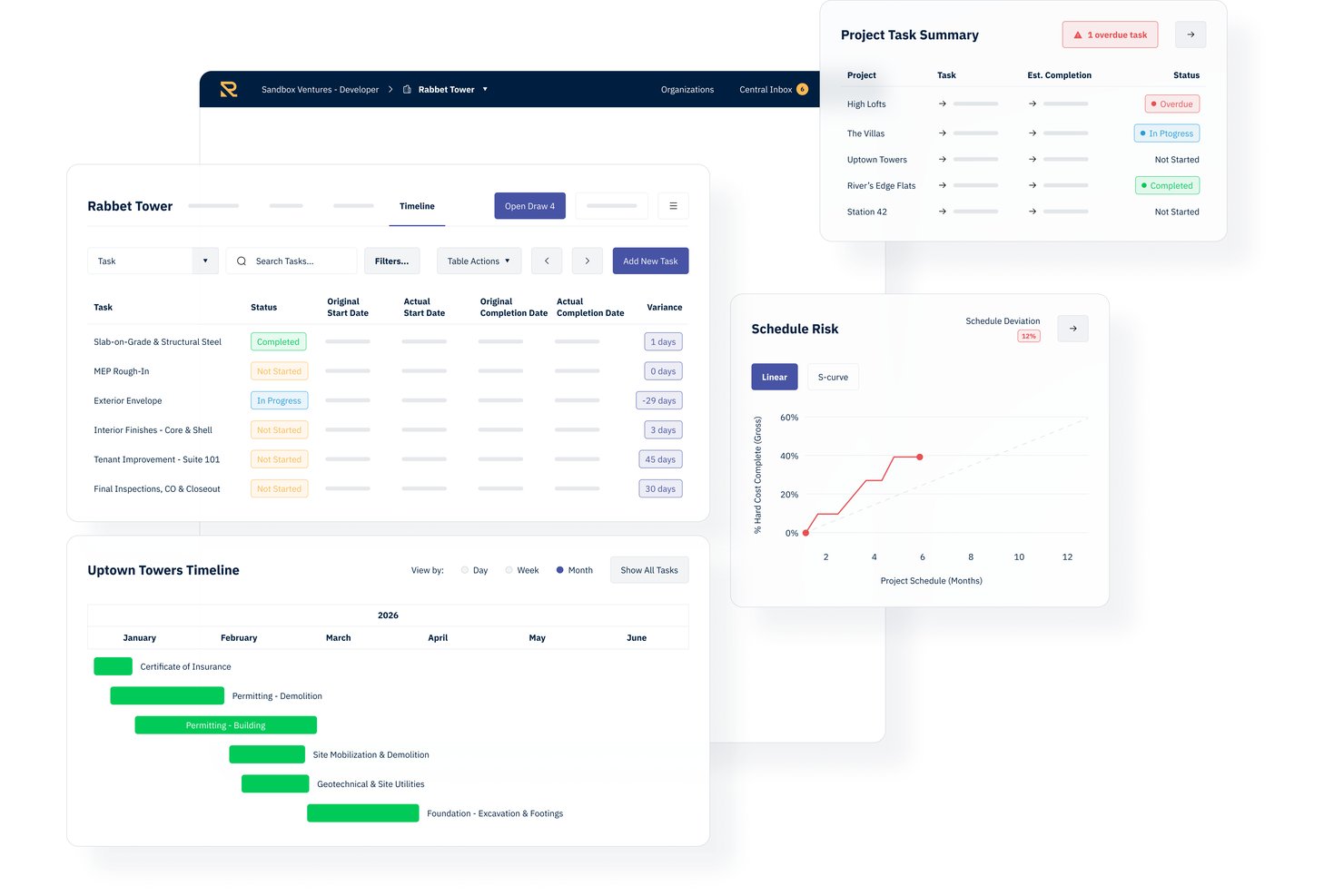
Rabbet is a real estate development management platform that centralizes budgets, contracts, draw packaging, document processing, and portfolio cash flow tracking for development teams.
Who Is Rabbet Best For?
Rabbet is a strong fit for real estate developers and development finance teams managing active construction projects with regular lender draw cycles.
Why I Picked Rabbet
Rabbet earns its spot on my shortlist because of how it handles document processing at the draw stage. I love the AI Document Router, which automatically splits uploaded PDFs by document type and classifies invoices, lien waivers, and pay applications without manual sorting. My team can review and approve rather than chase down paperwork. Missing items get flagged before draw submission, which cuts down on rejected packages coming back from lenders.
Rabbet Key Features
- Live budget tracking: Track anticipated and actual project costs in real time with variance alerts.
- Portfolio dashboard: View funding status, draw timelines, and cash requirements across all projects at once.
- Gantt chart timelines: Organize, visualize, and update project schedules with automated milestone alerts.
- Accounting system integrations: Sync invoice and payment data directly with QuickBooks, Yardi, MRI, Bill.com, and NexusPayables.
Rabbet Integrations
Rabbet offers native integrations with QuickBooks, Yardi Voyager, MRI, Bill.com, NexusPayables, and AvidXChange. An API is available for custom integrations, and single sign-on is supported on higher-tier plans.
Pros and Cons
Pros:
- Portfolio dashboard tracks multiple projects simultaneously
- Draw management workflows reduce manual review steps
- Invoicing automation with advanced AI document parsing
Cons:
- Mobile app functionality is not available
- Advanced reporting options are somewhat limited

Best for integrated business operations

Zoho Projects is a comprehensive project management tool that facilitates project planning and collaboration. It stands out for its ability to integrate deeply with a suite of business applications, enhancing overall operational efficiency.
Why I Picked Zoho Projects: I chose Zoho Projects for its robust integration capabilities that streamline business processes, making it an excellent choice for managing complex projects with various moving parts. Its standout feature is the seamless connection with other Zoho apps and third-party services, which is why it's best for integrated business operations. This tool significantly differs from other real estate project management software by offering an all-in-one solution that can adapt to a wide range of business needs, ensuring that everything from project tracking to resource management works harmoniously together.
Standout features & integrations:
Features included task management, time tracking, and collaboration features, enabling teams to work efficiently and stay aligned on project goals. The tool's ability to integrate with a vast ecosystem of apps, both within the Zoho suite and external platforms, stands out. This connectivity allows for a more cohesive workflow, enhancing productivity and project visibility.
Integrates natively with Zoho CRM, Zoho Books, Zoho Invoice, Zoho Analytics, Zoho Cliq, Zoho Desk, Zoho Mail, Slack, Google Drive, and GitHub, among others.
Pros and Cons
Pros:
- Affordable pricing structure
- Extensive integration capabilities
- Comprehensive project management features
Cons:
- Performance can lag with large projects
- Limited customization options
- Learning curve for new users
New Product Updates from Zoho Projects
Zoho Projects Adds CodeX Scripts for Custom Modules
Zoho Projects now supports CodeX Scripts for custom modules, enabling conditional logic and rules for creating, updating, and deleting records. For more information, visit Zoho Projects' official site.
 .

Wrike
Best for custom dashboards

Wrike is a project management tool that helps teams organize tasks, collaborate on projects, and track progress. It offers various features to manage workflows and improve productivity.
Why I Picked Wrike: Wrike's customizable dashboards let you create views that fit your real estate projects. You can monitor tasks, deadlines, and team workloads in one place, making it easier to keep track of property listings, client communications, and transaction statuses. This helps you stay organized and respond quickly to changes.
Standout features & integrations:
Features include Gantt charts, kanban boards, custom workflows, real-time collaboration, dynamic request forms, project templates, workload management, time tracking, document proofing, mobile app access, reporting and analytics, and calendar integration.
Integrations include Salesforce, Microsoft Teams, Zoom, Adobe Creative Cloud, Google Drive, Microsoft SharePoint, OneDrive, Wrike for Gmail, Google Sheets, Power BI, Miro, and Trello.
Pros and Cons
Pros:
- Various project views
- Good resource management features
- Workflow automation capabilities
Cons:
- Limited storage on lower-tier plans
- Can be complicated to learn the platform
New Product Updates from Wrike

Wrike Redesigns Workspace Search With New Filters
Wrike introduces a redesigned Workspace Search interface with recent search shortcuts, item type and location filters, and parent-task context. These updates help users find relevant work items and navigate search results efficiently. For more information, visit Wrike’s official site.
 .

ClickUp
Best for one-workspace real estate team coordination
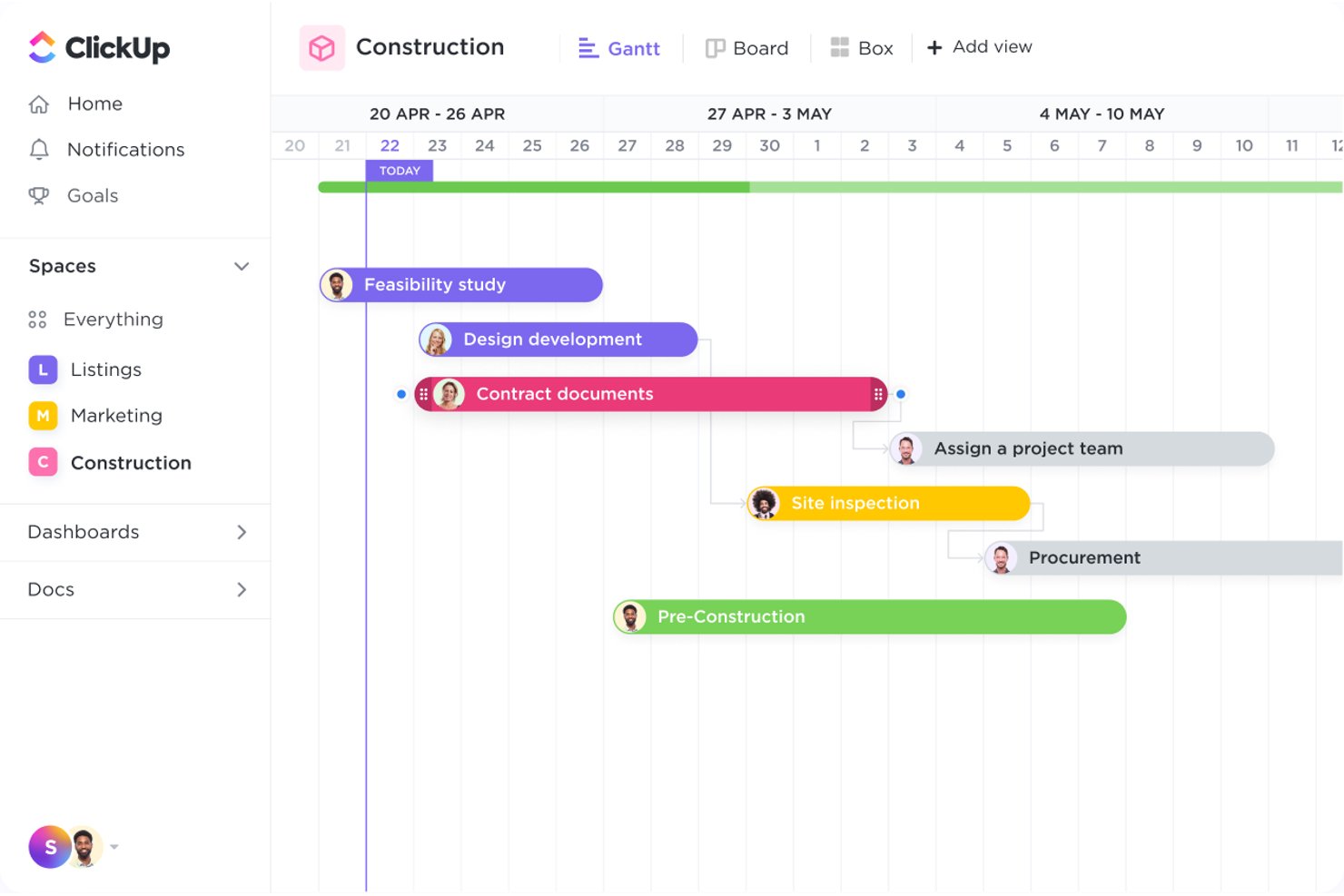
ClickUp is an all-in-one work management platform that combines task tracking, Gantt scheduling, collaborative Docs, dashboards, and built-in chat to coordinate real estate projects across teams.
Who Is ClickUp Best For?
ClickUp works well for real estate teams that want to manage tasks, docs, communication, and reporting in a single workspace instead of juggling multiple tools.
Why I Picked ClickUp
I picked ClickUp as one of the best because it genuinely consolidates every layer of real estate team coordination into a single workspace. I like how Gantt charts with dependency tracking let you map construction phases from site selection through punch lists, automatically rescheduling downstream tasks when timelines shift. Pair that with linked Docs for centralizing blueprints and permits, and Chat channels tied directly to tasks, and your whole team operates from one source of truth instead of scattered tools.
ClickUp Key Features
- Custom Fields: Add Money, Number, Location, and formula field types to tasks to capture property-specific data like pricing, offers, and budget calculations.
- Guest permissions: Invite contractors and vendors as guests with view-only, comment, or edit access scoped only to the items you share with them.
- Dashboards: Build real-time reporting views that combine charts, workload data, and task status across multiple projects and properties.
- Offline Mode: Create tasks and view previously opened work without a connection, with data syncing automatically when you're back online.
ClickUp Integrations
ClickUp offers 50+ native integrations, including QuickBooks Online Sync, Google Drive, Dropbox, Box, HubSpot, and Salesforce. It also provides a public API, webhooks, OAuth, MCP, and Zapier for custom connectivity.
Pros and Cons
Pros:
- Shared tasks coordinate vendors and teams
- Dashboards show status across properties
- Gantt dependencies keep project timelines visible
Cons:
- Large workspaces can load slowly
- No dedicated construction draw management
Best for coordinating projects with external clients
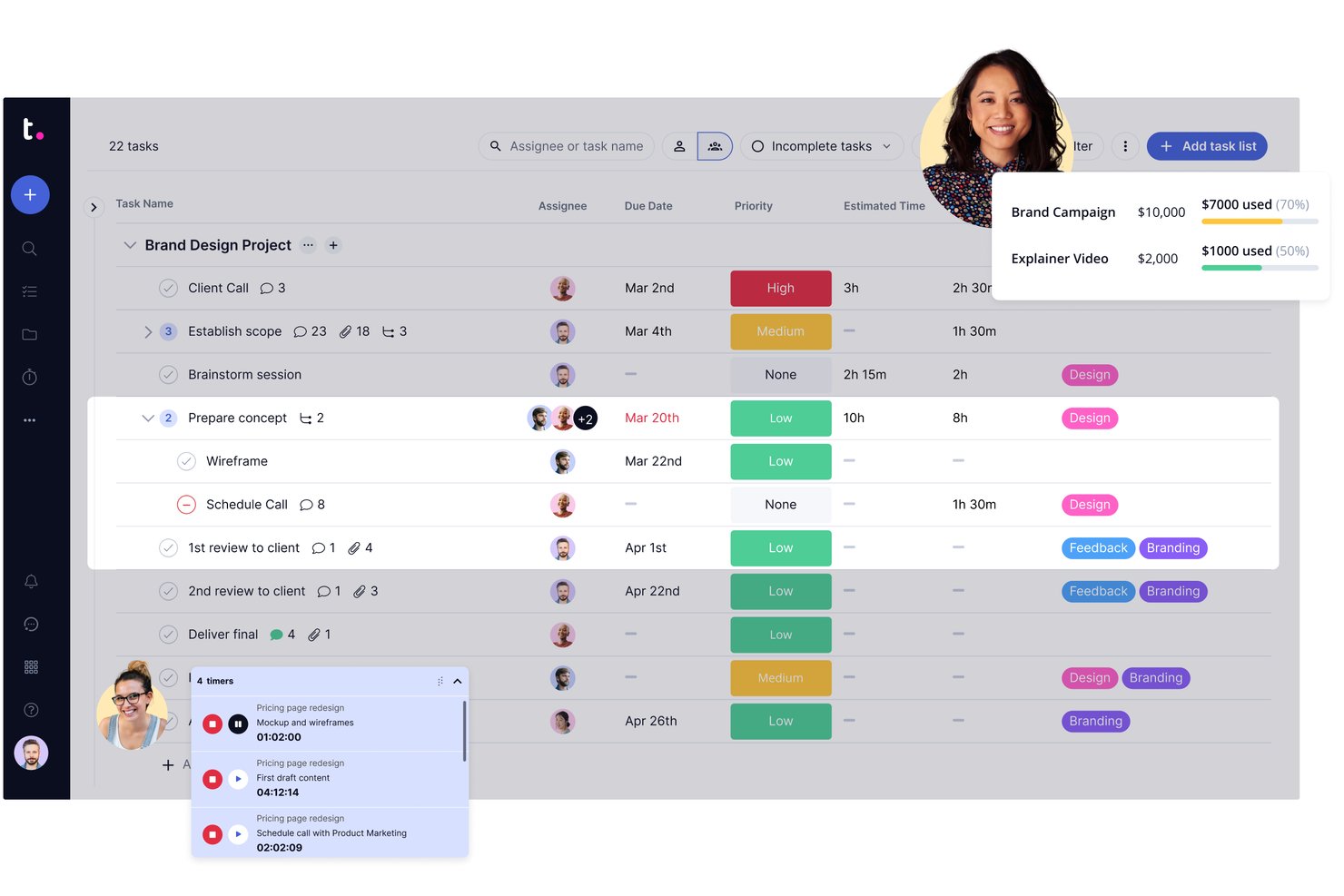
Teamwork.com is a client-work project management platform that combines task tracking, Gantt scheduling, budget management, portfolio views, and external client collaboration tools.
Who Is Teamwork.com Best For?
Teamwork.com suits project-driven teams that need to loop external clients or contractors into active projects without giving them full platform access.
Why I Picked Teamwork.com
I've included Teamwork.com in my top picks because it handles external client collaboration better than most general-purpose tools I've used. When coordinating real estate projects with outside stakeholders, like contractors or property owners, you can invite them directly into active projects, assign tasks, collect file uploads, and run approval workflows through the proofing feature, all without giving them access to your financials or portfolio reporting.
Teamwork.com Key Features
- Gantt chart with task dependencies: Visualize project timelines, assign durations, and link tasks with finish-to-start or finish-to-finish dependencies across multiple projects.
- Portfolio boards: View and filter multiple active projects by status, health, owner, and custom fields from a single dashboard.
- Project budgeting: Set up budgets by hours, fixed fee, or retainer type, with threshold notifications when spending reaches a set percentage.
- File versioning: Upload and manage multiple versions of project files, with privacy controls configurable at the project, company, or team level.
Teamwork.com Integrations
Teamwork.com supports 150+ integrations, including QuickBooks, Xero, Salesforce, NetSuite, HubSpot, Google Drive, SharePoint, Microsoft Teams, and Slack. It also offers API access, webhooks, and Zapier.
Pros and Cons
Pros:
- External clients can review files and approvals
- Budget tracking connects hours, costs, and progress
- Visual Gantt timelines map project dependencies
Cons:
- No permit, RFI, or construction-draw workflows
- No property records link projects to assets

Workzone
Best for comprehensive project visibility
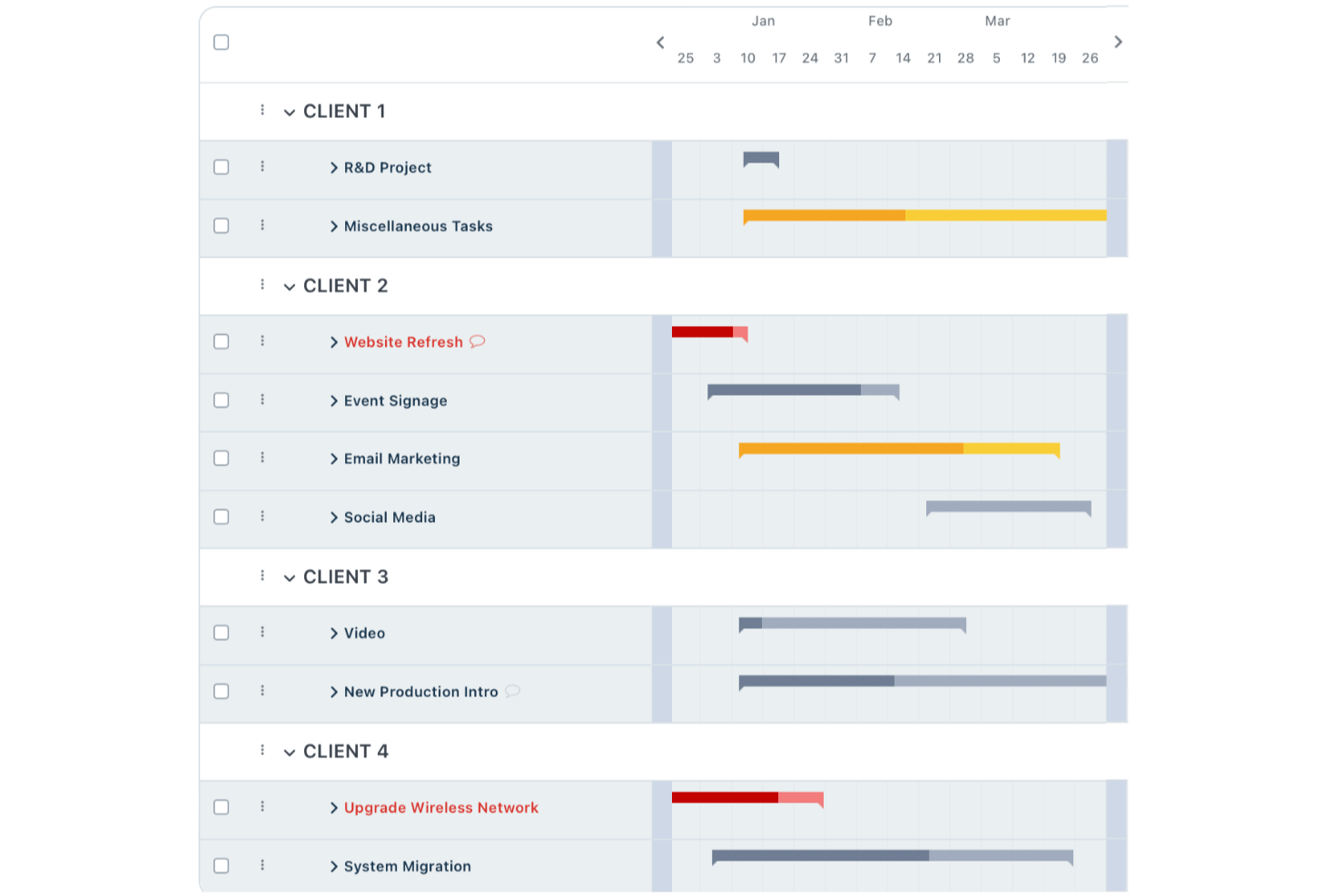
Workzone is a project management platform that covers task tracking, multi-project portfolio visibility, document approvals, and contractor collaboration across real estate teams and portfolios.
Who Is Workzone Best For?
Workzone is a good fit for real estate portfolio teams that need cross-project visibility and structured contractor collaboration without the complexity of construction-specific software.
Why I Picked Workzone
I picked Workzone as one of the best because its Portfolio View gives real estate teams genuine cross-project visibility, showing what's on track, at risk, and needs attention across every property and initiative at once. I love that task dependencies automatically recalculate dates when a predecessor shifts, so a construction delay ripples through the schedule without manual updates. The Reviewer and Partner user types also let me bring contractors and consultants into specific workspaces without exposing the full portfolio.
Workzone Key Features
- Reusable project templates: Build standardized workflows with preset tasks, owners, timelines, and dependencies, then apply them across every new property or build-out.
- Multi-stage document approvals: Route files through configurable approval stages with defined approvers, rules, and deadlines, with progress tracked in the Approval Dashboard.
- Time and expense tracking: Log hours and expenses directly against projects for budget and billing visibility across your portfolio.
- Role-based external user access: Assign contractors and consultants as Partner or Reviewer users, giving them scoped access to specific folders and tasks without exposing the full account.
Workzone Integrations
Workzone has native integrations with Microsoft Teams, Slack, Google Drive, and OneDrive. It also integrates with QuickBooks, FreshBooks, and Harvest, offers a REST API, and supports over 1,000 web app integrations through Zapier.
Pros and Cons
Pros:
- Partner access scopes contractor collaboration
- Dependencies shift downstream task dates automatically
- Portfolio dashboards flag at-risk property projects
Cons:
- No permit tracking or structured property records
- No construction draw management or change orders
New Product Updates from Workzone

Workzone Enterprise Adds Multi-Stage Approval Workflows
Workzone Enterprise now includes Approval Workflows, enabling multi-stage document approvals to standardize complex processes and reduce manual effort. For more information, visit Workzone's official site.
 .

Procore
Best for large-scale contractor coordination
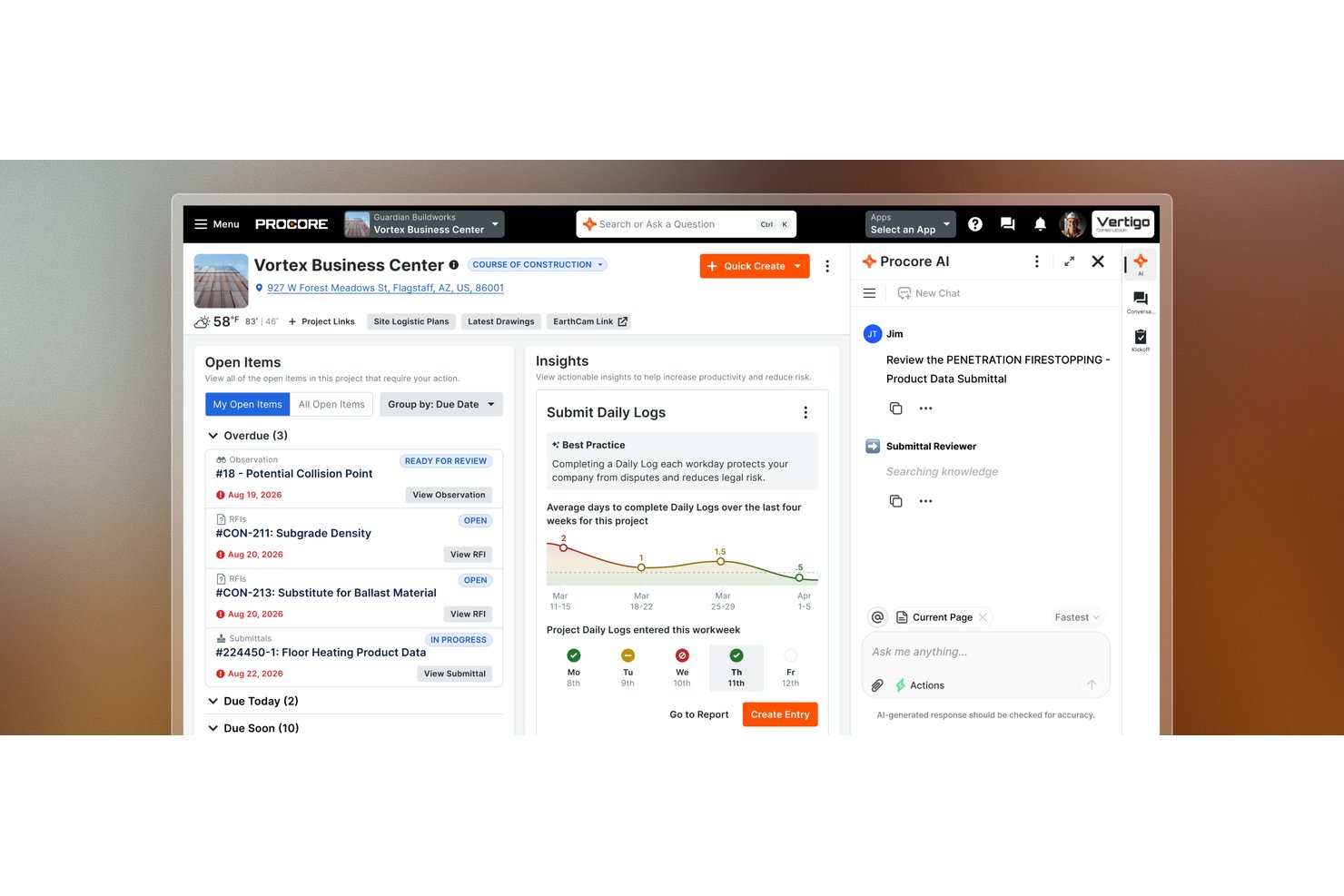
Procore is a construction project management platform that brings together scheduling, bid management, budgeting, RFI workflows, document control, and field-to-office coordination across development projects.
Who Is Procore Best For?
Procore is a strong fit for real estate developers and construction project managers running large, multi-contractor builds where coordinating bids, RFIs, schedules, and budgets across external teams is the core challenge.
Why I Picked Procore
I picked Procore as one of the best because it's built around the realities of large, multi-contractor builds where keeping dozens of external teams aligned is the hardest part of the job. Bid management lets you distribute bid packages, track coverage, and collect responses in one place, while cross-account RFI syncing keeps status updates and attachments flowing between your account and each contractor's without chasing emails. I also like that project budgets connect directly to field data, so change events and subcontractor invoice approvals roll up into owner draw-request PDFs without manual reconciliation.
Procore Key Features
- 360 Reporting: Build company- or project-level reports across datasets including financials, project execution, and portfolio directory.
- Daily log capture: Record site conditions, crew activity, and progress notes from the field for office visibility.
- Punch list management: Create, assign, and track punch-list items through resolution during project closeout.
- Role-based permissions: Assign permission templates and project roles to internal users, subcontractors, and external companies at the project level.
Procore Integrations
Relevant marketplace integrations include Yardi, MRI, Oracle NetSuite, QuickBooks Connector, Sage, Microsoft Project, Oracle Primavera P6, and DocuSign. Procore also offers REST APIs and webhooks for custom integrations.
Pros and Cons
Pros:
- Budget and change-order tracking improve cost visibility
- Centralized drawings and RFIs clarify contractor ownership
- Bid and RFI workflows coordinate external contractors
Cons:
- Portfolio planning trails specialized scheduling tools
- Financial reporting can feel clunky to users

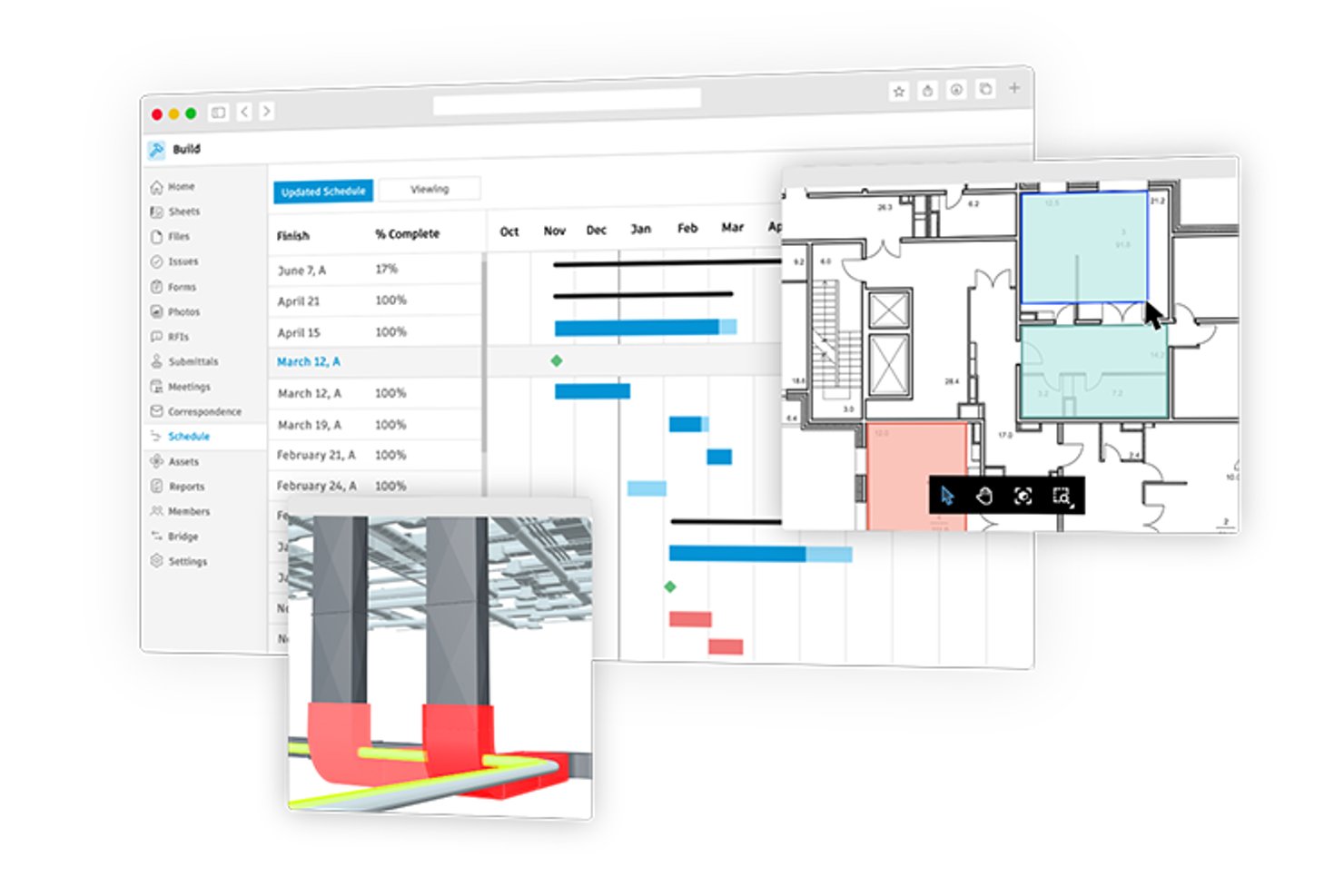
Autodesk Forma Build is construction project management software that covers cost management, contract tracking, RFI and submittal workflows, schedule management, and contractor coordination across office and field teams.
Who Is Autodesk Construction Cloud Best For?
Autodesk Construction Cloud is a strong fit for construction project managers who need to connect cost tracking, contractor workflows, and field teams in one platform.
Why I Picked Autodesk Construction Cloud
I picked Autodesk Construction Cloud (Forma Build) as one of the best because it connects cost tracking and contractor coordination in a way that's hard to replicate on a construction project. I particularly like how change orders link directly to RFIs and budget line items, so when a contractor flags a site condition, the cost impact is traceable from request through approval. The collaborative Potential Change Order workflow also lets external contractors respond to cost items with limited editing access, keeping sensitive financial data protected while still moving approvals forward.
Autodesk Construction Cloud Key Features
- Schedule import and sync: Import and sync project schedules from P6, Microsoft Project, or ASTA, and compare schedule versions over time.
- Weekly work plans: Build three-to-six-week look-ahead plans linked to the master schedule, record trade commitments, and track plan reliability with PPC and variance metrics.
- Construction IQ risk insights: Machine learning analyzes project data to surface high-risk areas across design, quality, safety, and project controls.
- Data Connector: Extract project and hub-level data—including cost, schedule, RFIs, and assets—into CSV files for use with business intelligence tools, with daily, weekly, or monthly scheduled extractions.
Autodesk Construction Cloud Integrations
Autodesk Construction Cloud offers 400+ integrations, including Sage 300, Viewpoint Vista, CMiC, Sage Intacct, Acumatica, and QuickBooks through Agave. Forma APIs and webhooks support custom integrations.
Pros and Cons
Pros:
- Field teams can access project files offline
- Users value budget tracking for construction work
- Reviewers praise centralized drawings and version control
Cons:
- Portfolio milestones rely on extracted data
- No property-level ownership or tenant records

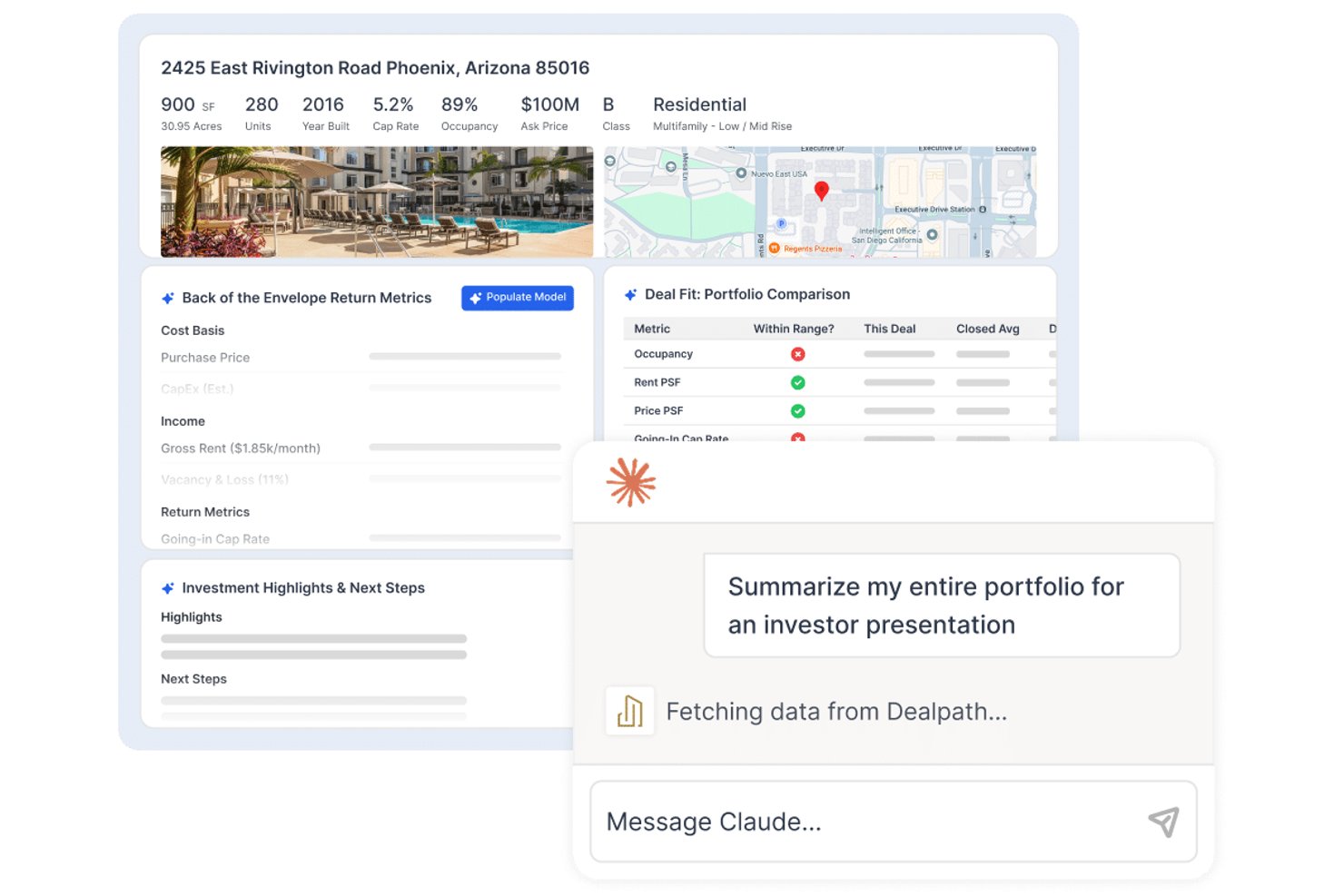
Dealpath is a real estate deal management platform built for investment teams, offering pipeline tracking, development project workflows, AI-powered deal screening, reporting and analytics, and collaboration tools across acquisitions, dispositions, and development.
Who Is Dealpath Best For?
Dealpath is a strong fit for real estate investment teams—developers, lenders, and REITs—that need structured deal tracking across acquisitions, development, and portfolio management.
Why I Picked Dealpath
I picked Dealpath as one of the best because it's purpose-built for investment teams that need to manage development projects as part of a broader deal lifecycle, not just as standalone construction tasks. I love how it tracks projects from site selection through entitlements, construction, and stabilization, with role-based task dependencies that automatically shift projected milestone dates when timelines change. Its development reporting lets my team compare budgets against actuals across multiple projects simultaneously, which is exactly what investment-led development tracking requires.
Dealpath Key Features
- AI deal screening: Processes offering memorandums, rent rolls, and pro formas to generate a tear sheet with deal highlights and preliminary analysis.
- Dealpath Connect listings: Lets teams browse and filter institutional brokerage listings from JLL, CBRE, and Cushman & Wakefield, then move them directly into the pipeline.
- CRM and relationship tracking: Captures broker outreach, calls, meetings, and submissions alongside deal records to manage sourcing relationships.
- Configurable reporting dashboards: Lets teams build custom reports that drill down by project phase, region, or sector across the full development portfolio.
Dealpath Integrations
Dealpath integrations include MRI Software, CompStak, Real Capital Analytics, Esri, Cherre, NavigatorCRE, Box, Dropbox, and Microsoft tools. Its open API supports custom connections, including Yardi and asset-management platforms.
Pros and Cons
Pros:
- Centralized deal records make information easier to find
- Portfolio reports compare deal progress side by side
- Tasks, due dates, and reminders stay visible
Cons:
- No RFI or submittal workflows
- No documented construction-loan draw workflows
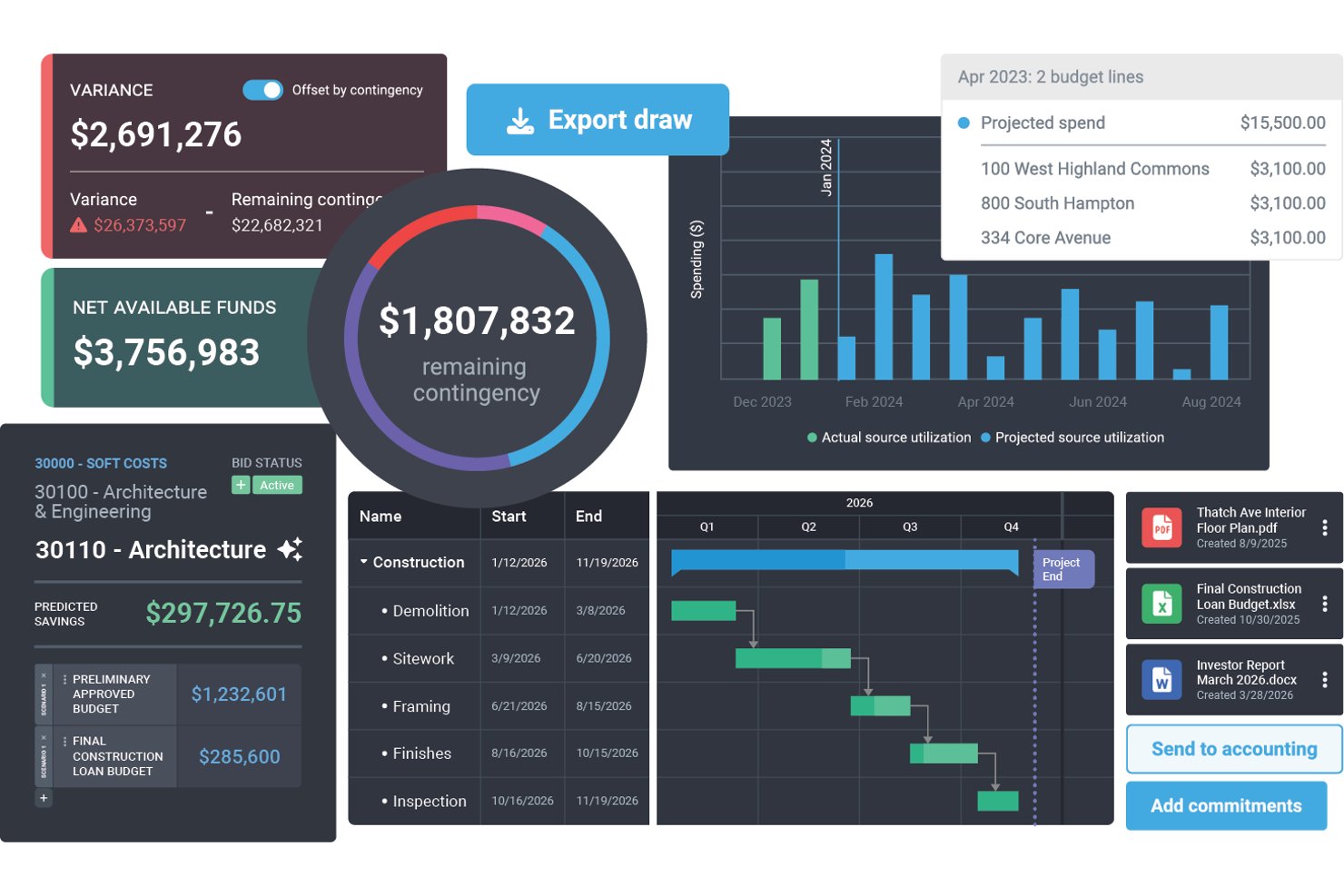
Northspyre is a real estate development project management platform that centralizes budget tracking, draw management, vendor coordination, document control, and portfolio analytics across development projects.
Who Is Northspyre Best For?
Northspyre is built for real estate development teams that manage capital projects and need tight control over budgets, draws, and lender reporting across a portfolio.
Why I Picked Northspyre
I picked Northspyre as one of the best because of how well it handles the draw management and lender reporting side of real estate development. When I'm preparing a draw package, the Lender Compliance Checklist checks readiness across budget lines, documentation, contracts, lien waivers, and insurance before anything goes out. The Funding Portal gives lenders and capital partners 24/7 access to current and historical draw packages, which cuts down the back-and-forth that typically slows funding cycles.
Northspyre Key Features
- Anticipated Cost Report: View and forecast project budgets and costs, including potential costs and worst-case scenarios, to stay ahead of overruns.
- Vendor Marketplace: Find pre-qualified vendors and invite them to bid on specific scopes of work directly within the platform.
- COI Co-Pilot: Set vendor insurance requirements by policy type and receive AI-generated alerts when certificates of insurance are missing or expired.
- Portfolio Manager: View project progress, spending history, and key metrics across all active and historical projects in one dashboard.
Northspyre Integrations
Northspyre offers native integrations with Yardi Voyager, MRI, Sage Intacct, QuickBooks Online, QuickBooks Desktop, AppFolio, Entrata, RealPage, Acumatica, and Oracle JD Edwards EnterpriseOne. Its Open API supports custom connections.
Pros and Cons
Pros:
- Centralized records reduce spreadsheet juggling
- Portfolio-wide budget and cost visibility
- Faster lender-ready draw package preparation
Cons:
- Invoice and lien-waiver workflows frustrate users
- Future-cost forecasting can be difficult
Diğer Gayrimenkul Proje Yönetimi Yazılımları
Kısa listeme giremeyen ancak yine de göz atmaya değer bazı ek gayrimenkul proje yönetimi yazılımı seçeneklerini burada bulabilirsiniz:
- Scoro
For multi-project financial oversight
- Smartsheet
For multi-site portfolio visibility
- Nifty
For visualizing milestones across projects
- Buildertrend
For contractor and subcontractor coordination
- JIRA
For agile construction team workflows
- JobTread
For rehab budgeting and contractor bids
- Kahua
For construction portfolio asset handover


How I Evaluate Real Estate Project Management Software
I split my evaluation into three parts, with the most weight on core functionality: tracking milestones and costs across properties. Next, I look for standout features such as automated loan draws. Finally, I consider real estate-specific onboarding, support, and pricing value.
Core Functionality (Table Stakes For This List)
When I'm selecting tools for my list, I score each one on a scale from 0 (does not offer the functionality) to 5 (excels in this area) for each core functionality listed below. I then convert the total into a percentage to help assess each tool's overall fit, with extra weight on any functionalities I’ve deemed essential.
- Project & Task Tracking (Essential): I look for schedules, milestones, and dependencies that help teams coordinate work from acquisition through construction and close-out.
- Budget & Cost Tracking (Essential): I assess how tools track budgets, actual costs, change orders, and draws across projects, including visibility into variances.
- Documents & Permits: I check whether teams can organize contracts, drawings, permits, and entitlements by project or property, with clear status and version details.
- Portfolio Visibility: I look for dashboards that summarize timelines, progress, and budget status across properties without opening each project separately.
- Contractor Collaboration: I assess how teams share files, assign work, and track updates with contractors, vendors, and consultants.
- Property-Level Data: I check whether project tasks, budgets, and documents connect to property records, helping teams review work by asset.
Once I have a list of tools that meet the criteria, I consider what sets each platform apart.
Differentiating Factors (What Sets Vendors Apart)
Here's how I compare and contrast different vendors:
Standout Features
Draw management automation is a big one. I look for tools that generate draw requests directly from project cost data, so your finance team isn't rebuilding lender packages in spreadsheets every month. RFI and submittal workflows matter just as much—I check whether architects, contractors, and owners can track approvals in a single audit trail instead of scattered email threads. I also evaluate permit and entitlement tracking, since a missed expiration date on a zoning approval can stall an entire development.
Beyond Features
I check whether vendors offer onboarding tailored to real estate workflows—things like AIA contract templates and draw schedule setup—rather than generic project kickoffs. Accounting integrations matter just as much. A tool that syncs budgets and draws with platforms like Sage or Yardi saves your finance team from reconciling data across systems manually. I also evaluate role-based permissions, since projects typically involve investors, lenders, and contractors who each need different levels of access to sensitive documents.
Gayrimenkul Proje Yönetimi Yazılımı Nasıl Seçilir?
Uzun özellik listeleri ve karmaşık fiyatlandırma yapılarına kendinizi kaptırmanız kolaydır. Size özgü yazılım seçim sürecinde ilerlerken odaklanmanızı sağlamak için aklınızda bulundurmanız gereken faktörlerin bir kontrol listesini burada bulabilirsiniz:
| Faktör | Dikkat Edilmesi Gerekenler |
| Ölçeklenebilirlik | Portföyünüz büyüdükçe yazılımın birden fazla mülkü, projeyi ve kullanıcıyı yönetebildiğinden emin olun. |
| Entegrasyonlar | Muhasebe yazılımı, CAD programları veya belge depolama platformları gibi hâlihazırda kullandığınız araçlarla entegrasyonlar arayın. |
| Özelleştirilebilirlik | İş akışlarını, panoları ve raporlama araçlarını ekibinizin süreçlerine uyacak şekilde özelleştirebilmelisiniz. |
| Kullanım Kolaylığı | Platform, özellikle teknoloji konusunda deneyimli olmayabilecek saha ekipleri veya yükleniciler için sezgisel olmalıdır. |
| Bütçe | Fiyatlandırmanın proje boyutunuza uygun olup olmadığını kontrol edin. Bazı araçlar kullanıcı başına, proje başına veya özelliklere göre ücret alır. |
| Güvenlik Önlemleri | Özellikle hassas finansal veya hukuki bilgilerle ilgileniyorsanız izin denetimleri, veri şifreleme ve denetim günlükleri sunan çözümleri arayın. |
| Mobil Erişim | Saha ekiplerinin programlara, planlara ve dosyalara sahada telefon veya tablet kullanarak erişmesi gerekir. |
| Raporlama Araçları | Her proje için maliyetler, zaman çizelgeleri ve kaynak kullanımı hakkında kolay okunabilen raporlar sunan bir yazılım seçin. |
2025'te Gayrimenkul Proje Yönetimi Yazılımlarındaki Trendler
Araştırmamda, farklı gayrimenkul proje yönetimi yazılımı sağlayıcılarından sayısız ürün güncellemesi, basın bülteni ve sürüm günlüğü derledim. İşte yakından takip ettiğim yeni ortaya çıkan trendlerden bazıları:
- Yapay Zekâ Destekli Risk Tespiti: Daha fazla araç, olası gecikmeleri veya bütçe aşımlarını gerçekleşmeden önce işaretlemek için yapay zekâ kullanıyor. Bazı platformlar artık geçmiş verilere veya hava koşullarına dayanarak izinlerin gecikme ihtimali olduğunda da kullanıcıları uyarıyor.
- Dijital İkiz Entegrasyonu: Bazı sağlayıcılar, proje yöneticilerine binalar inşa edilirken gerçek zamanlı dijital görünüm sunmak için dijital ikiz desteği ekliyor. Bu, inşaat sorunlarını daha erken tespit etmeye ve koordinasyonu geliştirmeye yardımcı oluyor.
- Müşteriye Yönelik Portallar: Yazılımlar; gerçek zamanlı güncellemeleri, onayları ve önemli belgeleri gösteren müşteri panolarını bünyelerine katmaya başlıyor. Bu, sürekli e-posta alışverişine gerek kalmadan müşterileri gelişmelerden haberdar etmenin bir yoludur.
- Dahili Maliyet Tahmini: Tahmin araçları artık statik bütçelerin ötesine geçerek öngörüleri iş gücü piyasası trendlerine, malzeme fiyatlarına veya tedarikçi sorunlarına göre güncelliyor. Bazı sağlayıcılar, koşullar değiştikçe tahminleri güncellemek için canlı veri akışlarını da kullanıyor.
- İzin İş Akışı Araçları: Daha fazla araç, izin süreçlerini takip etmek, eksik belgeleri işaretlemek ve yetkililerle yapılan iletişimleri kaydetmek için özellikler geliştiriyor. Bu araçlar ekiplerin mevzuata uygun kalmasına ve gecikmelerden kaçınmasına yardımcı oluyor.
Gayrimenkul Proje Yönetimi Yazılımı Nedir?
Gayrimenkul proje yönetimi yazılımı; geliştiricilere, proje yöneticilerine ve gayrimenkul profesyonellerine, gayrimenkul geliştirme sürecinin başlangıcından tamamlanmasına kadar tüm yönlerini denetleme konusunda yardımcı olmak üzere tasarlanmış özel bir araçtır. Projelerin planlanmasını, yürütülmesini ve izlenmesini kolaylaştırarak projelerin zamanında, bütçe dahilinde ve önceden belirlenmiş özelliklere uygun şekilde teslim edilmesini sağlar.
Gayrimenkul proje yönetimi yazılımının bileşenleri arasında görev planlama, bütçe yönetimi, belge depolama, iletişim araçları ve raporlama özellikleri yer alır. Proje planlaması, kaynak tahsisi, finansal öngörüler ve performans takibi gibi çeşitli işlevleri tek bir platformda bir araya getirir.
Gayrimenkul Proje Yönetimi Yazılımının Özellikleri
Gayrimenkul proje yönetimi yazılımı seçerken aşağıdaki temel özelliklere dikkat edin:
- Portföy raporlaması: Daha iyi stratejik kararlar almanıza yardımcı olmak için birden fazla geliştirme projesindeki performansı gösterir.
- Görev planlama: İnşaat takvimlerini plana uygun şekilde ilerletmek için son teslim tarihleri ve bağımlılıklarla birlikte görevler atamanıza olanak tanır.
- Bütçe takibi: Harcamaları öngörülen maliyetlerle karşılaştırarak izlemenize ve aşımları erken fark etmenize yardımcı olur.
- Belge yönetimi: Projelere, sözleşmelere ve izinlere kolayca erişmek ve bunları paylaşmak için tek bir yerde depolar.
- Kaynak tahsisi: Aynı kaynağın birden fazla projeye atanmasını veya atıl kalmasını önlemek için projeler genelinde iş gücü ve ekipman kullanımını takip eder.
- Gantt şeması görünümleri: Aşamaları, kilometre taşlarını ve darboğazları bir bakışta görebilmeniz için proje zaman çizelgelerini görselleştirir.
- Değişiklik emri takibi: Anlaşmazlıkları azaltmak için proje değişikliklerini ve bunların maliyet ile takvim üzerindeki etkisini kaydeder.
- Paydaş iletişimi: Müşterileri ve iş ortaklarını güncel tutmak için mesajlaşma veya pano özellikleri sunar.
- İzin takibi: Yerel düzenlemelere uygun kalmanıza yardımcı olmak için onay süreçlerini ve son teslim tarihlerini izler.
- Denetim kontrol listeleri: Standartlara ve güvenlik protokollerine uyulduğundan emin olmak için saha denetimlerine yönelik şablonlar sunar.
Gayrimenkul Proje Yönetimi Yazılımının Faydaları
Gayrimenkul proje yönetimi yazılımının uygulanması ekibiniz ve işletmeniz için çeşitli faydalar sağlayabilir. İşte yararlanmayı bekleyebileceğiniz bazı faydalar:
- Daha az gecikme: Görev planlama ve izin takibi gibi araçlar, engelleri erkenden fark etmenize ve işlerin ilerlemesini sürdürmenize yardımcı olur.
- Daha iyi maliyet kontrolü: Bütçe takibi ve maliyet tahmini özellikleri, giderleri kontrol altında tutmanıza ve bütçe aşımlarından kaçınmanıza yardımcı olur.
- Daha az evrak işi: Belge yönetimi araçları; yazdırma, e-posta gönderme ve kayıp dosyalarla ilgili yükü azaltır.
- Daha net iletişim: Paylaşılan panolar ve mesajlaşma araçları, müşterileri ve ekip üyelerini güncel tutmayı kolaylaştırır.
- Daha bilinçli kararlar: Raporlama araçları, proje ilerlemesi, kaynak kullanımı ve harcamalar hakkında içgörü sağlar.
- Daha kolay mevzuat uyumu: İzin takibi ve denetim özellikleri, yerel kurallara ve güvenlik gerekliliklerine uygun kalmanıza yardımcı olur.
- Geliştirilmiş iş yükü planlaması: Kaynak tahsisi araçları, iş gücünü ve ekipmanı projeler genelinde daha verimli şekilde atamanıza olanak tanır.
Gayrimenkul Proje Yönetimi Yazılımının Maliyetleri ve Fiyatlandırması
Gayrimenkul proje yönetimi yazılımı seçmek, mevcut çeşitli fiyatlandırma modellerinin ve planların anlaşılmasını gerektirir. Maliyetler; özelliklere, ekip büyüklüğüne, eklentilere ve daha fazlasına bağlı olarak değişir. Aşağıdaki tablo, gayrimenkul proje yönetimi yazılımı çözümlerinde yaygın olarak sunulan planları, ortalama fiyatlarını ve genellikle dahil edilen özellikleri özetlemektedir:
| Plan Türü | Ortalama Fiyat | Yaygın Özellikler |
| Ücretsiz | $0 | Temel görev yönetimi, sınırlı kullanıcı sayısı, temel entegrasyonlar |
| Temel | $10 - $25/kullanıcı/ay | Görev ve proje yönetimi, bütçe takibi, bazı özel raporlar |
| Profesyonel | $25 - $50/kullanıcı/ay | Tüm Temel özelliklerine ek olarak gelişmiş raporlama, artırılmış entegrasyon seçenekleri ve daha fazla özelleştirilebilirlik |
| Kurumsal | $50+/kullanıcı/ay | Tüm Profesyonel özelliklerine ek olarak tam özelleştirme, özel destek ve gelişmiş güvenlik seçenekleri |
Gayrimenkul Proje Yönetimi Yazılımı Hakkında SSS
Gayrimenkul proje yönetimi yazılımı hakkında sıkça sorulan bazı sorular şunlardır:
Gayrimenkul proje yönetimi yazılımını kimler kullanır?
Bu yazılım genellikle gayrimenkul projelerinin fikir aşamasından tamamlanmasına kadar geliştirilmesini denetlemekten sorumlu gayrimenkul geliştiricileri, proje yöneticileri, müteahhitler ve inşaat yöneticileri tarafından kullanılır.
Gayrimenkul proje yönetimi yazılımının maliyeti ne kadardır?
Maliyetler, sistemin özelliklerine ve ölçeklenebilirliğine bağlı olarak büyük ölçüde değişebilir. Temel planlar kullanıcı başına aylık yaklaşık $25 seviyesinden başlayabilirken, daha gelişmiş seçeneklerin maliyeti kullanıcı başına aylık $50 veya daha yüksek olabilir; kurumsal çözümler ise genellikle özel fiyatlandırma gerektirir.
Gayrimenkul proje yönetimi yazılımı uyumluluk yönetimine yardımcı olabilir mi?
Evet, birçok gayrimenkul proje yönetimi aracı, projelerin ilgili yasa ve yönetmeliklere uygun olmasını sağlamaya yardımcı olan özellikler içerir. Bu özellikler, cezalar ve hukuki sorunlar yaşanma riskini azaltır.
Gayrimenkul proje yönetimi yazılımı küçük projeler için uygun mudur?
Evet, farklı proje büyüklüklerine uygun çeşitli yazılım seçenekleri mevcuttur. Küçük projeler, temel işlevler sunan ve daha uygun maliyetli olabilen daha az karmaşık sistemlerden yararlanabilir.
Gayrimenkul proje yönetimi yazılımı diğer araçlarla nasıl entegre olur?
Çoğu gayrimenkul proje yönetimi sistemi; CRM yazılımı, muhasebe sistemleri, iletişim platformları ve daha fazlası gibi araçlarla entegrasyon özellikleri sunar. Bu özellikler, proje yönetiminin çeşitli yönlerini kolaylaştırır ve bilgileri merkezileştirir.
Gayrimenkul proje yönetimi yazılımı seçerken nelere dikkat etmeliyim?
Dikkate alınması gereken temel özellikler arasında görev ve proje takibi, bütçe yönetimi, belge depolama, gerçek zamanlı iletişim özellikleri, özelleştirme seçenekleri, kullanım kolaylığı ve müşteri desteğinin kalitesi yer alır. Ayrıca işletmenizin ihtiyaçlarına göre ölçeklenebilen bir yazılım seçmek de önemlidir.