

2026’da Profesyonel Hizmetler için En İyi 10 İşletme Yönetimi Yazılımı

Profesyonel Hizmetler için En İyi İşletme Yönetimi Yazılımı Kısa Listesi


Profesyonel hizmetler için işletme yönetimi yazılımı, firmanıza projeleri, müşterileri, finansmanı ve ekipleri yönetebileceğiniz tek bir yer sunar. Son teslim tarihleri, değişen müşteri ihtiyaçları ve birden fazla öncelikle uğraşırken yalnızca başka bir genel platforma değil, düzenli kalmanıza ve tutarlı hizmet sunmanıza yardımcı olacak araçlara ihtiyacınız vardır.
Doğru çözüm, saatler süren manuel çalışmayı azaltabilir, şeffaflığı artırabilir ve yöneticilerin, müşterilerin ve ekiplerin aynı doğrultuda kalmasına yardımcı olabilir. Bu kılavuz, en yüksek puanlı araçları hızlıca karşılaştırmanıza, güçlü yönlerini anlamanıza ve hangilerinin günlük zorluklarınıza uygun olduğunu belirlemenize yardımcı olacaktır.
Why Trust Our Software Recommendations
Our team has been testing and reviewing software since 2012. As project managers ourselves, we know how difficult—and important—it is to choose the right software.
For this guide, we evaluated tools using hands-on testing and independent research, scoring tools using our selection criteria. We also draw on insights from industry thought leaders and practicing project management experts.
Our reviews reflect our human editorial judgment, not a sales pitch.
Expert reviewers:
Profesyonel Hizmetler için İşletme Yönetimi Yazılımı Karşılaştırma Tablosu
Bu karşılaştırma tablosu, profesyonel hizmetler için en iyi işletme yönetimi yazılımı seçimlerimin fiyatlandırma ayrıntılarını özetlemektedir
| Tool | Starting Price | Website | |
|---|---|---|---|
| Best for consulting firm visibility | 4.6 out of 5 | $17/user/month 21-day free trial + free demo available | Website |
| Best for agency profitability analysis | 4.6 out of 5 | $10/user/month 14-day free trial | Book Demo |
| Best for end-to-end business operations | 4.5 out of 5 | $17/user/month 14-day free trial | Book Demo |
| Best for time and billing tracking | 4.5 out of 5 | $20/user/month Free demo available | Website |
| Best for client work automation | 4.4 out of 5 | Pricing upon request Free demo available | Book Demo |
| Best for enterprise workforce planning | 4.3 out of 5 | Pricing upon request Free demo available | Website |
| Best for architecture and engineering sectors | 3.9 out of 5 | Pricing upon request Free demo available | Website |
| Best for Salesforce-native PSA | 4.0 out of 5 | Pricing upon request Free demo available | Website |
| Best for consulting operations | — | $14/user/month 30-day free trial available | Website |
| Best for ERP users | — | Pricing upon request Free demo available | Website |
Profesyonel Hizmetler için En İyi İşletme Yönetimi Yazılımı İncelemeleri
Aşağıda, kısa listeme giren profesyonel hizmetler için en iyi işletme yönetimi yazılımlarının ayrıntılı özetlerini bulabilirsiniz. İncelemelerim, sizin için en uygun seçeneği bulmanıza yardımcı olmak amacıyla her platformun özelliklerine, kullanım alanlarına ve entegrasyonlarına ayrıntılı bir bakış sunmaktadır.

Best for consulting firm visibility
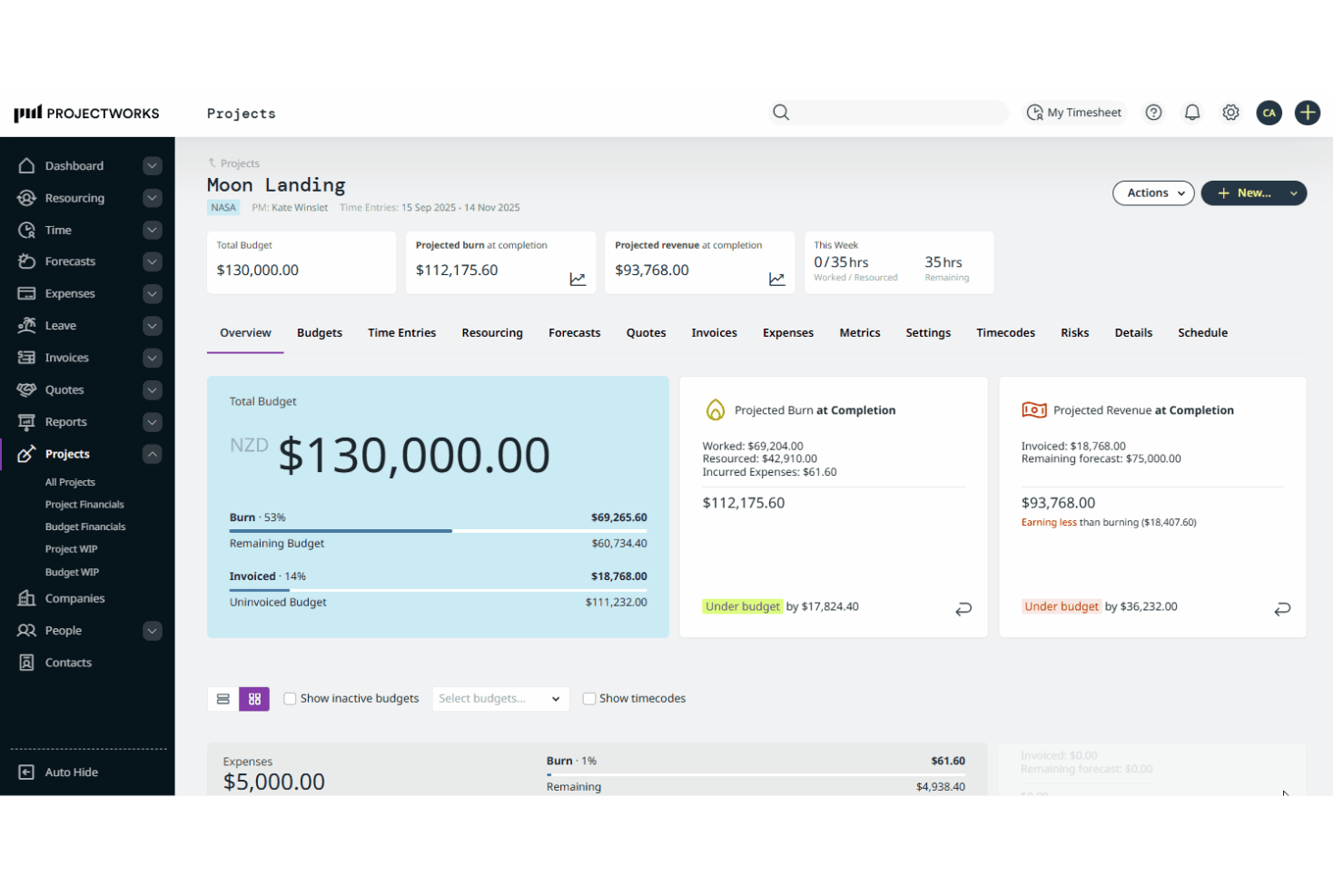
Projectworks is a project intelligence platform for professional services firms that combines time tracking, resource management, invoicing, and project financial reporting in a single system.
Who Is Projectworks Best For?
Projectworks is a strong fit for mid-sized consulting, engineering, and professional services firms that need real-time visibility into project margins and team utilization.
Why I Picked Projectworks
I picked Projectworks as one of the best because it gives me a live view of project margin, WIP, and budget burn across every active engagement. I can see at a glance where a project is trending over or under budget before it becomes a write-off. The utilization heat maps show me exactly who's overbooked and who has capacity, so I can adjust resourcing before timelines slip.
Projectworks Key Features
- AI-powered proposals: Generate new project proposals with an integrated AI teammate trained on your winning bids.
- Multi-currency and multi-entity support: Manage finances and reporting for multiple offices and entities, each with their own currencies and localization.
- Payroll and HRIS integrations: Sync project data with tools like BambooHR, Xero Payroll, and Employment Hero for accurate time and cost tracking.
- Custom reporting and SQL queries: Build unlimited custom reports and connect data directly to BI tools for advanced analytics.
Projectworks Integrations
Projectworks offers native integrations with Xero, QuickBooks, MYOB, HubSpot, Salesforce, Jira, Azure DevOps, Monday.com, BambooHR, Employment Hero, Microsoft Teams, Outlook Calendar, and Google Calendar. An API is available for custom integrations.
Pros and Cons
Pros:
- Scenario modeling for project financials
- Utilization and capacity heat map views
- Real-time project margin and WIP tracking
Cons:
- Lacks advanced Gantt or dependency management
- No native CRM functionality

Best for agency profitability analysis
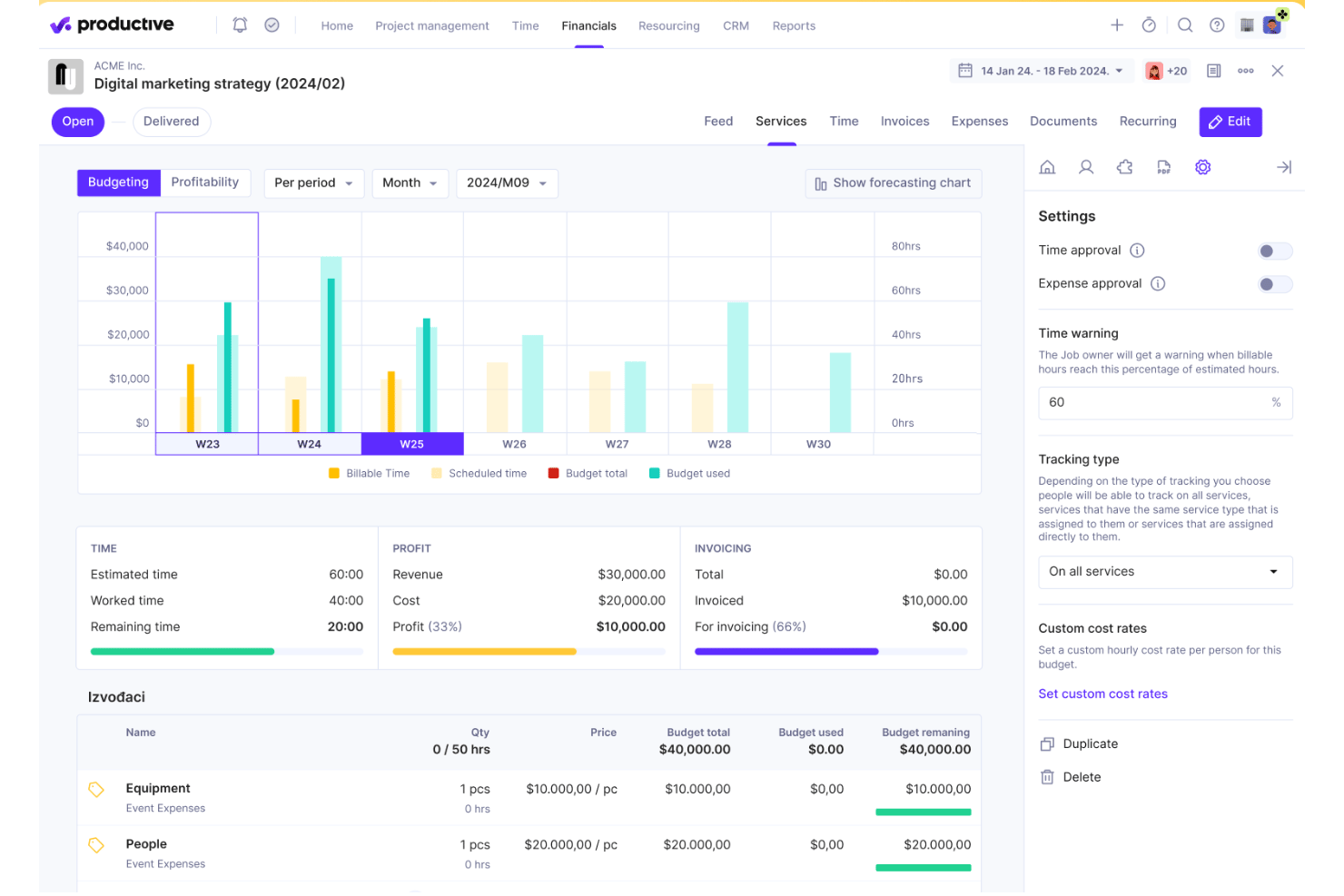
Productive is a professional services automation platform built for agencies and consultancies, combining project management, resource planning, time tracking, budgeting, invoicing, and profitability reporting in one place.
Who Is Productive Best For?
Productive is a strong fit for digital agencies and consultancies with 10 to 200 employees that need real-time visibility into project margins and team utilization.
Why I Picked Productive
Productive earns its spot on my shortlist because of how tightly its time tracking connects to budget and margin data. Every hour logged updates project financials in real time, so I can see exactly where a retainer or fixed-fee engagement stands against its budget without pulling a separate report. The Scenario Builder also lets me model different staffing or rate configurations before committing to a project scope.
Productive Key Features
- Resource planning: Schedule team members across projects and visualize workloads and availability.
- Docs: Create and collaborate on project docs within the platform, keeping all documentation connected to tasks and projects.
- AI assistant: Use built-in AI tools to help draft project specs, summarize discussions, and auto-suggest time entries.
- Custom reporting: Build detailed, customizable reports on everything from utilization rates to invoicing and client performance.
Productive Integrations
Productive offers native integrations with Xero, QuickBooks, Sage, HubSpot, Jira, Google Calendar, Slack, and BambooHR, and connects with Zapier. An API is available for custom integrations.
Pros and Cons
Pros:
- Agency-centric resource management tools
- Scenario builder for project forecasting
- Real-time project margin tracking
Cons:
- No native contract management feature
- CRM functionality feels basic
New Product Updates from Productive
Productive Adds Email and Calendar Integrations for Agents
Productive adds Gmail, Outlook, Google Calendar, and Outlook Calendar connectors for its AI agents. These integrations let agents manage emails and create calendar events directly within Productive. For more information, visit Productive’s official site.
 .

Scoro
Best for end-to-end business operations
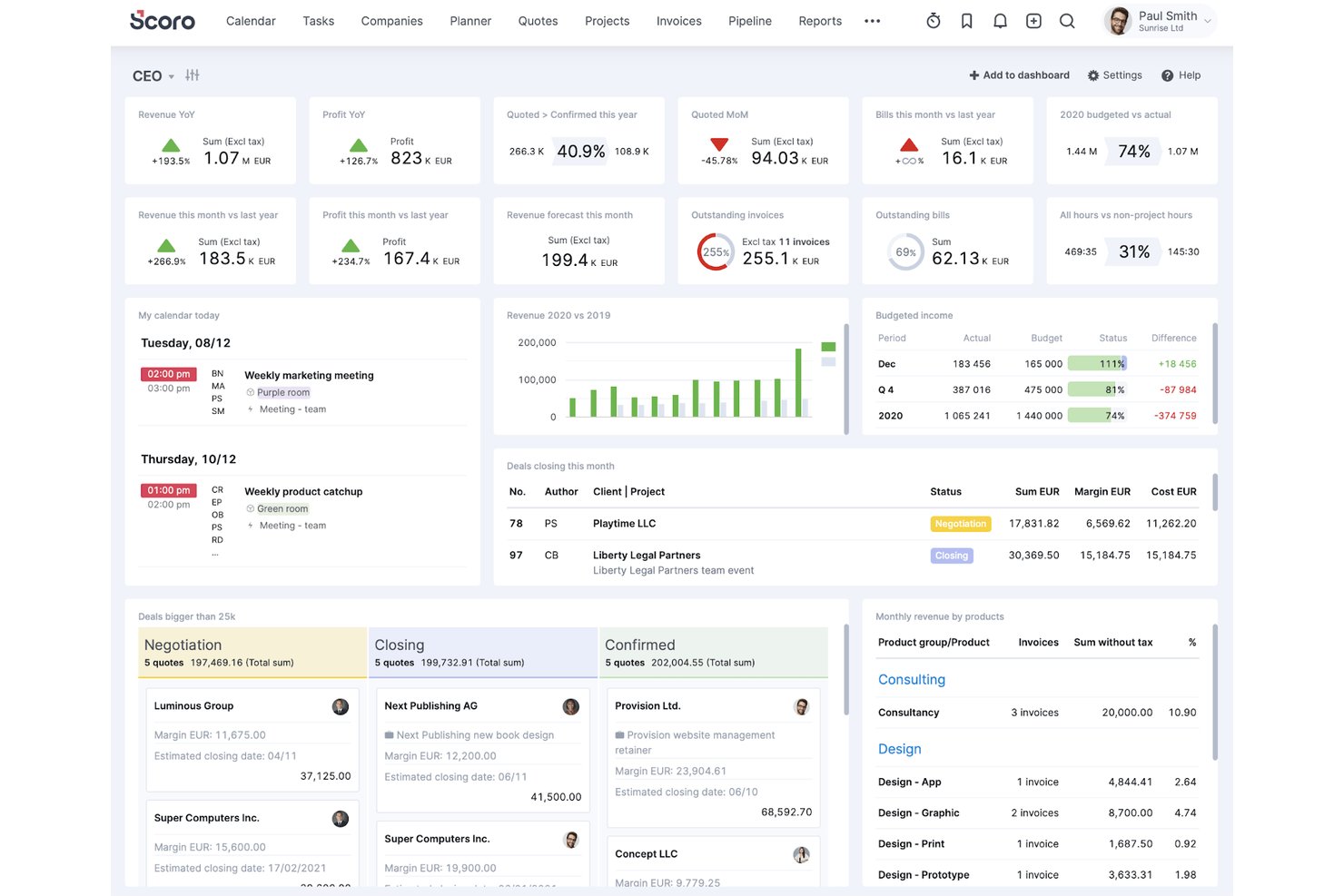
Scoro is an end-to-end professional services automation platform that combines customer relationship management, project management, time tracking, resource planning, invoicing, and financial reporting in a single system.
Who Is Scoro Best For?
Scoro is a strong fit for mid-sized agencies, consultancies, and IT services firms in the 10–100 staff range that need real financial visibility across multiple concurrent client projects.
Why I Picked Scoro
Scoro earns its spot on my shortlist because it's the only platform I've found that connects the quote stage directly to profitability reporting without manual reconciliation. I particularly like the quote estimation matrix, which lets me break a project by role, effort, and cost before a single hour is logged. Combined with real-time budget burn tracking at the role and service level, I can see margin erosion as it happens, not after the invoice goes out.
Scoro Key Features
- Retainers management: Track and manage recurring client agreements, invoice cycles, and retainer utilization within dedicated workflows.
- Integrated CRM and sales pipeline: Manage leads, deals, and accounts with native opportunity tracking linked to project delivery and resource allocation.
- Resource planner: Assign tasks and projects based on staff availability, role, and skills with a visual capacity planning board.
- Automated recurring billing: Generate recurring invoices, set billing schedules, and handle multi-currency transactions without manual setup.
Scoro Integrations
Scoro offers native integrations with Xero, QuickBooks, Sage, Salesforce, HubSpot, Google Workspace, Microsoft 365, Dropbox, BambooHR, Expensify, and Stripe. An API is available for custom integrations.
Pros and Cons
Pros:
- Retainer management for recurring client contracts
- Quote-to-cash workflow built into one tool
- Granular profitability tracking by project and role
Cons:
- Requires five user minimum for all plans
- Mobile app is missing key project features
New Product Updates from Scoro

Scoro Adds Time Mobile App and ELI Improvements
Scoro adds the Scoro Time mobile app for iOS/Android to track time anywhere and expands ELI with attachments, smarter filtering, and trigger-based actions. For more information, visit Scoro's official site.
 .

BigTime
Best for time and billing tracking
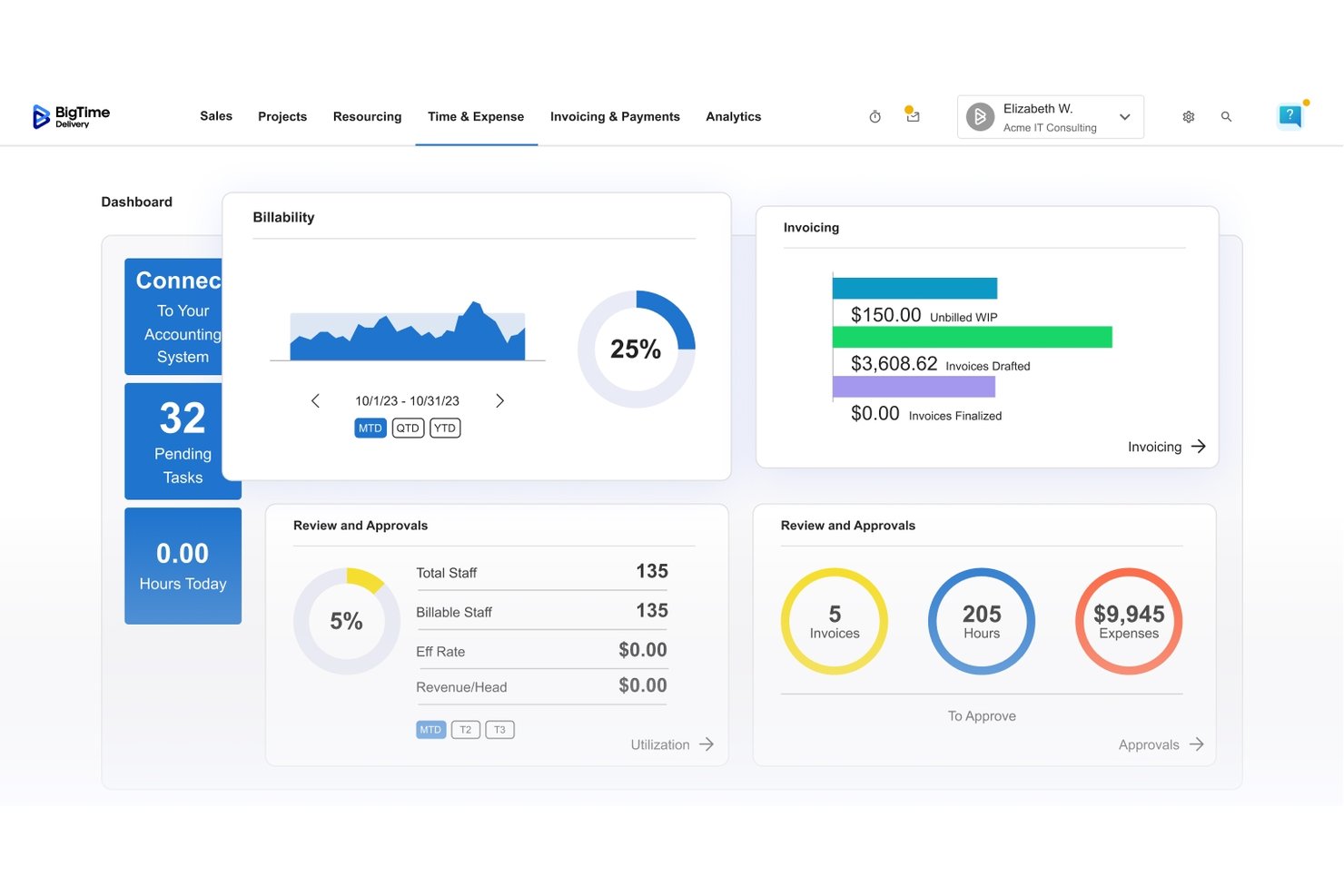
BigTime is a professional services automation platform built around quote-to-cash workflows, combining time tracking, project financials, billing, invoicing, and resource management in one system.
Who Is BigTime Best For?
BigTime is a strong fit for small-to-midsize consulting, IT services, engineering, and accounting firms that bill clients by the hour and need tighter control over project margins.
Why I Picked BigTime
BigTime earns its spot on my shortlist because no other PSA tool I've used matches its depth in billing configuration. I can set custom rate cards per project or client, then run invoices across T&M, fixed-fee, or item-based billing models, all with automatic reconciliation against QuickBooks. The AI-powered Expense Agent is also a genuine time-saver: it handles receipt capture and submission with minimal manual input, which cuts the back-and-forth my team usually deals with at billing close.
BigTime Key Features
- Resource management module: Assign and manage staff by skills, availability, and project demand.
- Project portfolio management: Monitor all active, planned, and historical client projects in a single dashboard.
- Dedicated mobile app: Track time, submit expenses, and review project details from a smartphone.
- Data Hub BI integration: Export unified project and financial data to business intelligence tools like Power BI and Tableau.
BigTime Integrations
BigTime offers native integrations with QuickBooks Online, QuickBooks Desktop, Salesforce, HubSpot, Sage Intacct, Microsoft Dynamics CRM, Xero, BambooHR, Jira, and Google Calendar. An API is available for custom integrations.
Pros and Cons
Pros:
- Project budgeting with margin and WIP analysis
- Time tracking integrates with expense management workflows
- Deep billing configuration for client-specific needs
Cons:
- Kanban boards require third-party integration
- No native CRM for sales pipeline tracking

Accelo
Best for client work automation
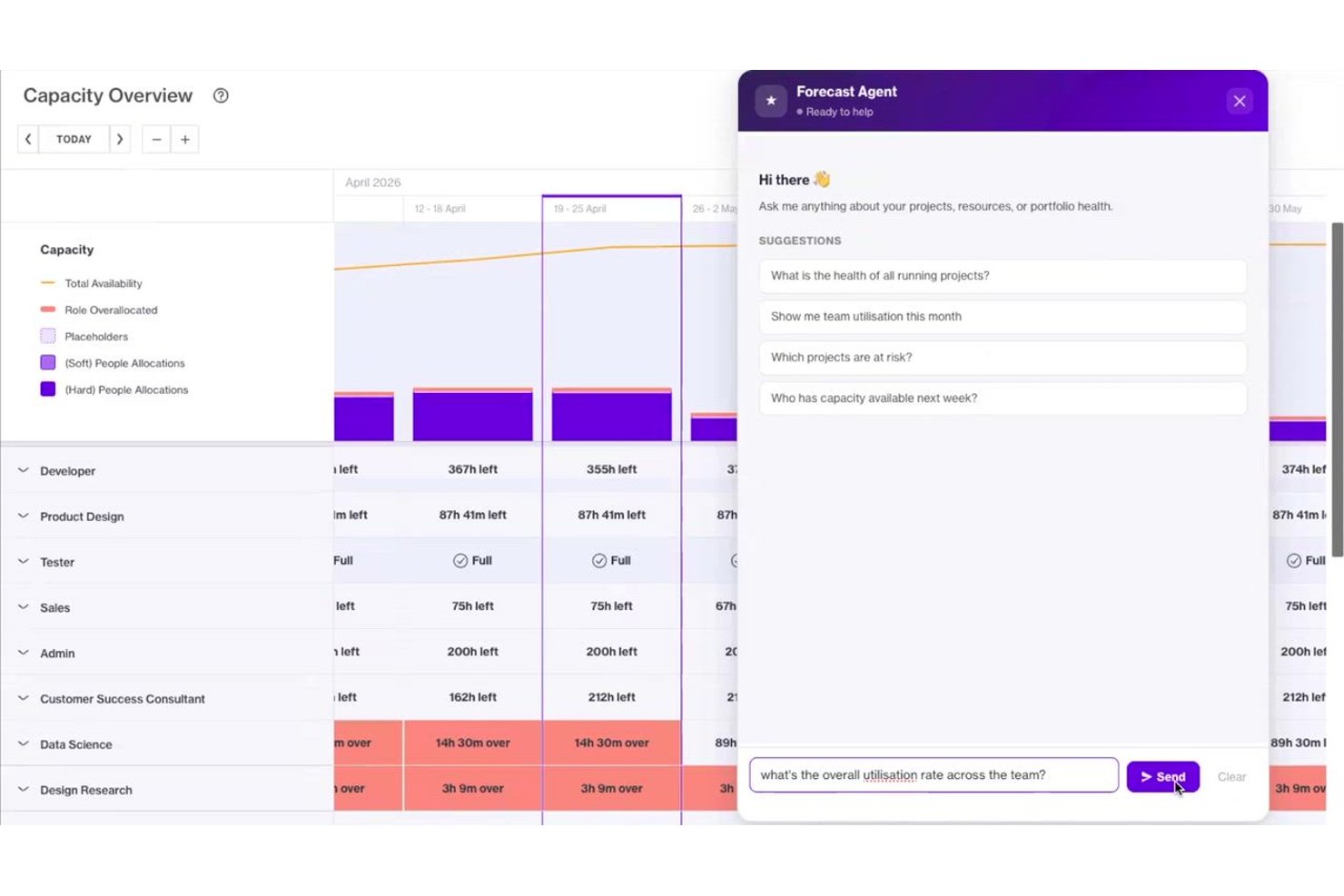
Accelo is a PSA platform that unifies CRM, project management, time tracking, resource planning, and billing into a single system built for professional services teams managing client engagements.
Who Is Accelo Best For?
Accelo is a strong fit for agencies, IT services firms, and consulting companies with 20 to 500+ employees running a mix of project and retainer-based client work.
Why I Picked Accelo
Accelo earns its spot on my shortlist because of how far it takes client work automation beyond basic task assignment. I love that time capture runs automatically as work happens, so billable hours aren't lost to manual logging at the end of the day. The resource matching also goes deeper than most tools: instead of just checking calendar availability, it factors in skills, current workload, and past project performance to recommend who should take on a new engagement.
Accelo Key Features
- AI-powered risk detection: Accelo uses predictive intelligence to surface project, budget, and client relationship risks early.
- Unified CRM and pipeline management: Track, convert, and manage every opportunity through integrated sales and delivery workflows.
- Integrated project financials: Get real-time visibility into project budgets, costs, and margins without leaving the platform.
- Business intelligence dashboards: Access unified, customizable reports for delivery, utilization, and financial health across the business.
Accelo Integrations
Accelo offers native integrations with HubSpot, Salesforce, QuickBooks, Xero, Sage Intacct, Jira, BambooHR, Microsoft 365, Google Workspace, Slack, and Trello. It also connects with Zapier and provides an API for custom integrations.
Pros and Cons
Pros:
- Real-time project margin and utilization reporting
- Unified CRM and project management workflow
- Automated time tracking for billable work
Cons:
- Initial setup can be complex
- Custom report building is limited
New Product Updates from Accelo

Accelo Rebuilds Mobile App for Project and Time Management
Accelo rebuilds its mobile app with task management, new work creation, and mobile timesheets for Forecast customers. This helps teams keep project and time data current while working away from a desktop. For more information, visit Accelo’s official site.
 .

Workday
Best for enterprise workforce planning
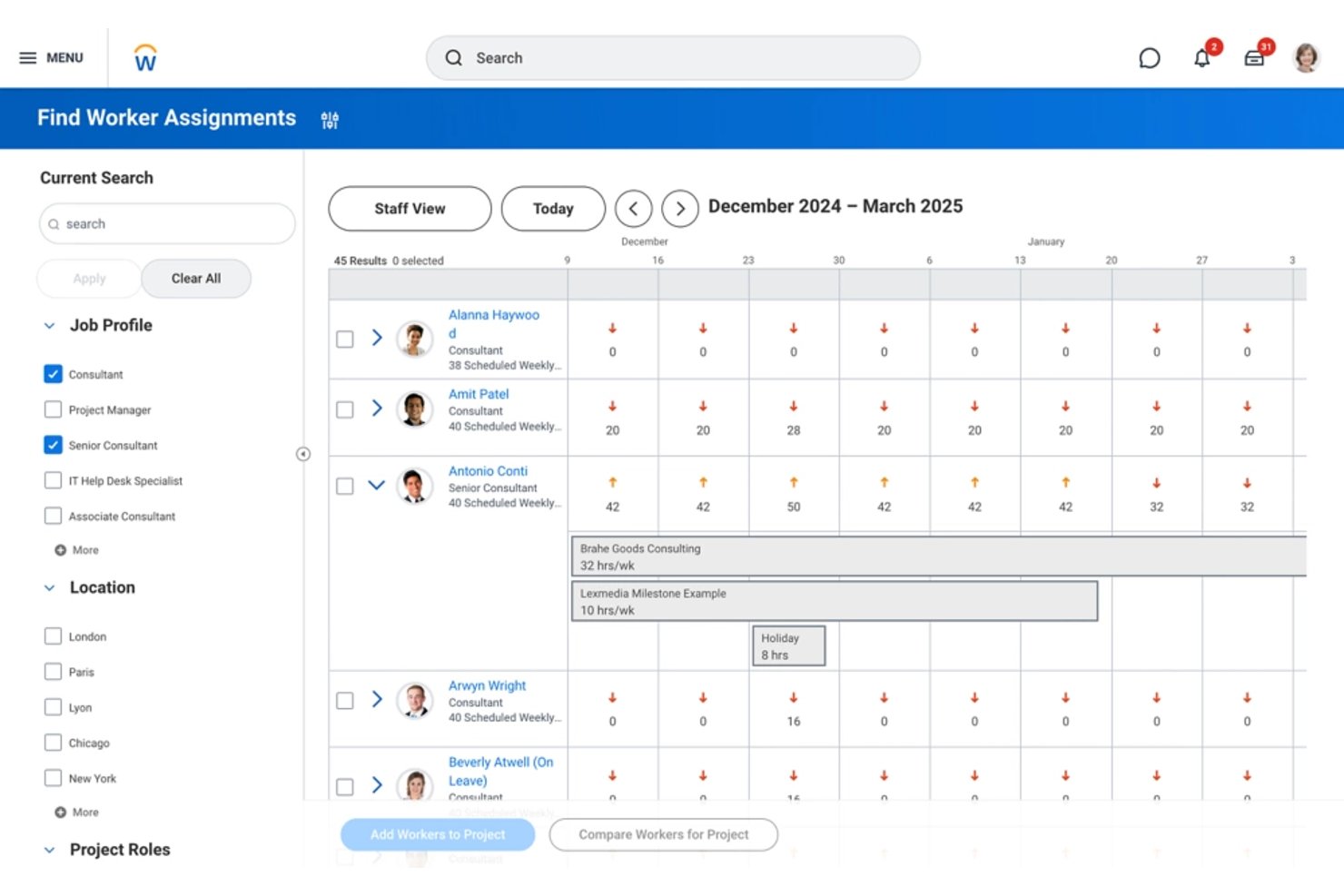
Workday is an enterprise platform that unifies HR, financial management, and professional services automation—covering enterprise resource planning, resource management, project financials, time tracking, billing, and workforce planning in a single system.
Who Is Workday Best For?
Workday is built for large professional services firms—consulting, systems integration, and managed services organizations with complex, multi-entity workforce and financial operations.
Why I Picked Workday
Workday earns its spot on my shortlist because no other platform ties enterprise workforce planning this directly to project financials. I particularly like how Services CPQ connects incoming pipeline opportunities to resource plans before a project even kicks off, collapsing the gap between sales and delivery. When roles shift mid-engagement, rules-based costing updates automatically, keeping margin visibility accurate without manual rework.
Workday Key Features
- Time tracking and approval workflows: Capture billable and non-billable hours with integrated manager approvals.
- Expense management: Enter, categorize, and manage expenses linked directly to projects and clients.
- Skill-based resourcing: Match available talent with the right experience to current and upcoming projects.
- Multidimensional reporting: View project and financial data by client, team, location, or service line for in-depth analysis.
Workday Integrations
Workday offers native integrations with Slack, UKG Pro, Cornerstone LMS, ADP SmartCompliance, Dokmee ECM, LinkedIn Learning, SAP Fieldglass, and UiPath. It also integrates with Salesforce for CRM and provides an API for custom integrations.
Pros and Cons
Pros:
- Real-time project margin and utilization tracking
- Enterprise-scale resource and project forecasting tools
- Consolidates HR, finance, and PSA workflows
Cons:
- Requires significant effort for initial configuration
- Not designed for small or midsize firms

Best for architecture and engineering sectors
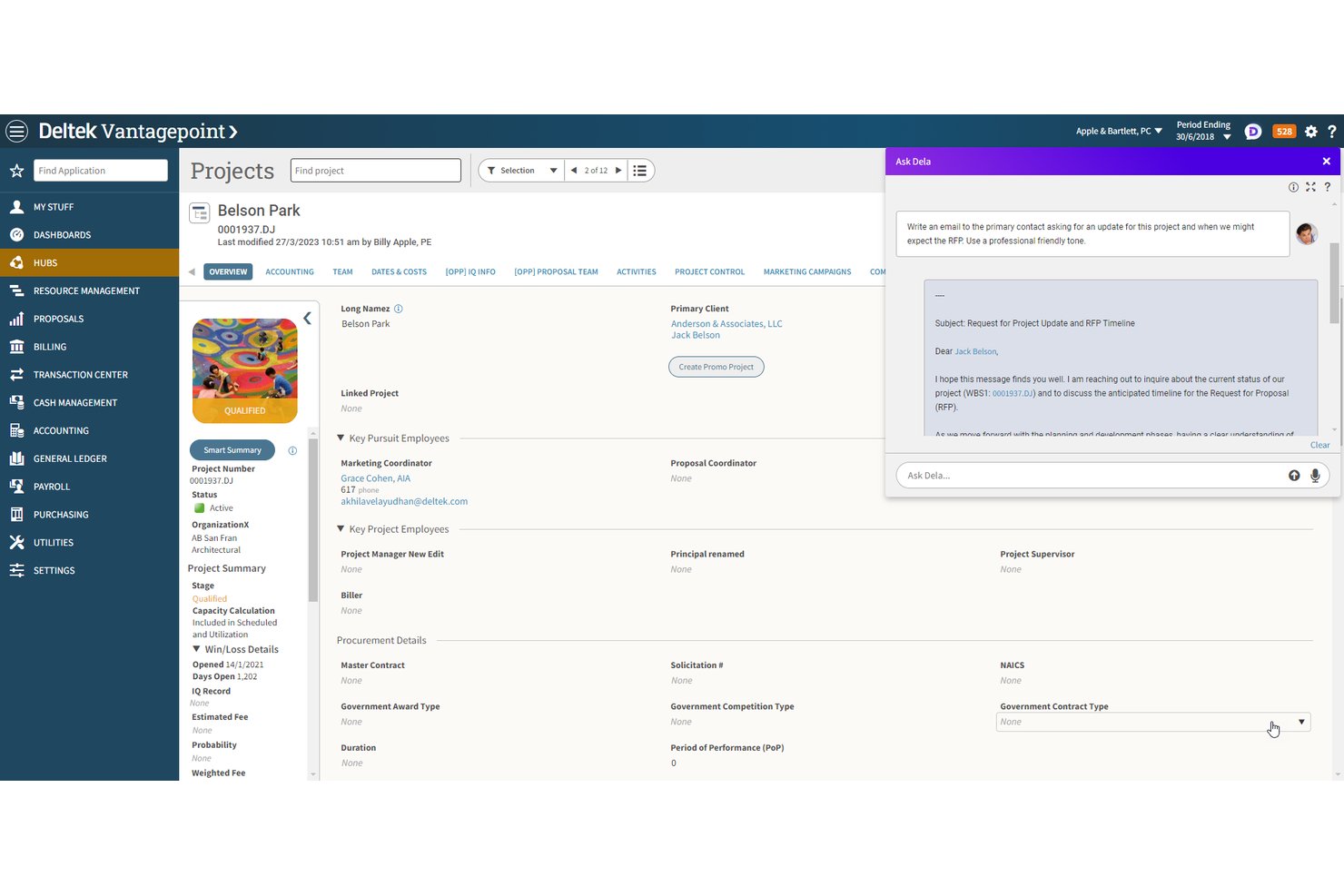
Deltek Vantagepoint is a project-based ERP platform that connects CRM, resource planning, project delivery, and financial management in a single system built for architecture, engineering, and consulting firms.
Who Is Deltek Vantagepoint Best For?
Vantagepoint is a strong fit for mid-to-large architecture, engineering, and consulting firms managing complex, multi-phase client projects with demanding billing and compliance requirements.
Why I Picked Deltek Vantagepoint
Deltek Vantagepoint earns its spot on my shortlist because no other platform matches its depth for architecture and engineering firms. I particularly like how project accounting natively supports A&E billing models, so switching between time-and-materials and milestone billing on the same engagement is straightforward. The embedded Dela AI surfaces client smart summaries and flags project risks in real time, which I haven't seen executed at this level elsewhere.
Deltek Vantagepoint Key Features
- Gantt chart project planning: Build, schedule, and manage tasks, dependencies, and milestones using dynamic Gantt charts.
- Native pipeline management: Track opportunities and forecast project pipeline demand directly within the platform.
- Resource capacity planning: View and allocate staff based on availability, skill set, and current workload across multiple projects.
- In-app approvals and workflows: Set up customized workflows with automated routing for project tasks, timesheets, and expense reviews.
Deltek Vantagepoint Integrations
Deltek Vantagepoint offers native integrations with Microsoft Outlook, QuickBooks Online, Deltek GovWin IQ, Deltek PIM, Deltek Talent Management, Deltek ArchiSnapper, and UKG. An API is available for custom integrations.
Pros and Cons
Pros:
- Pipeline forecasts link directly to resource planning
- Real-time dashboards for project profitability
- Project accounting tailored for A&E requirements
Cons:
- Workflow setup can be time-intensive
- Invoice template editor lacks flexibility

Certinia
Best for Salesforce-native PSA
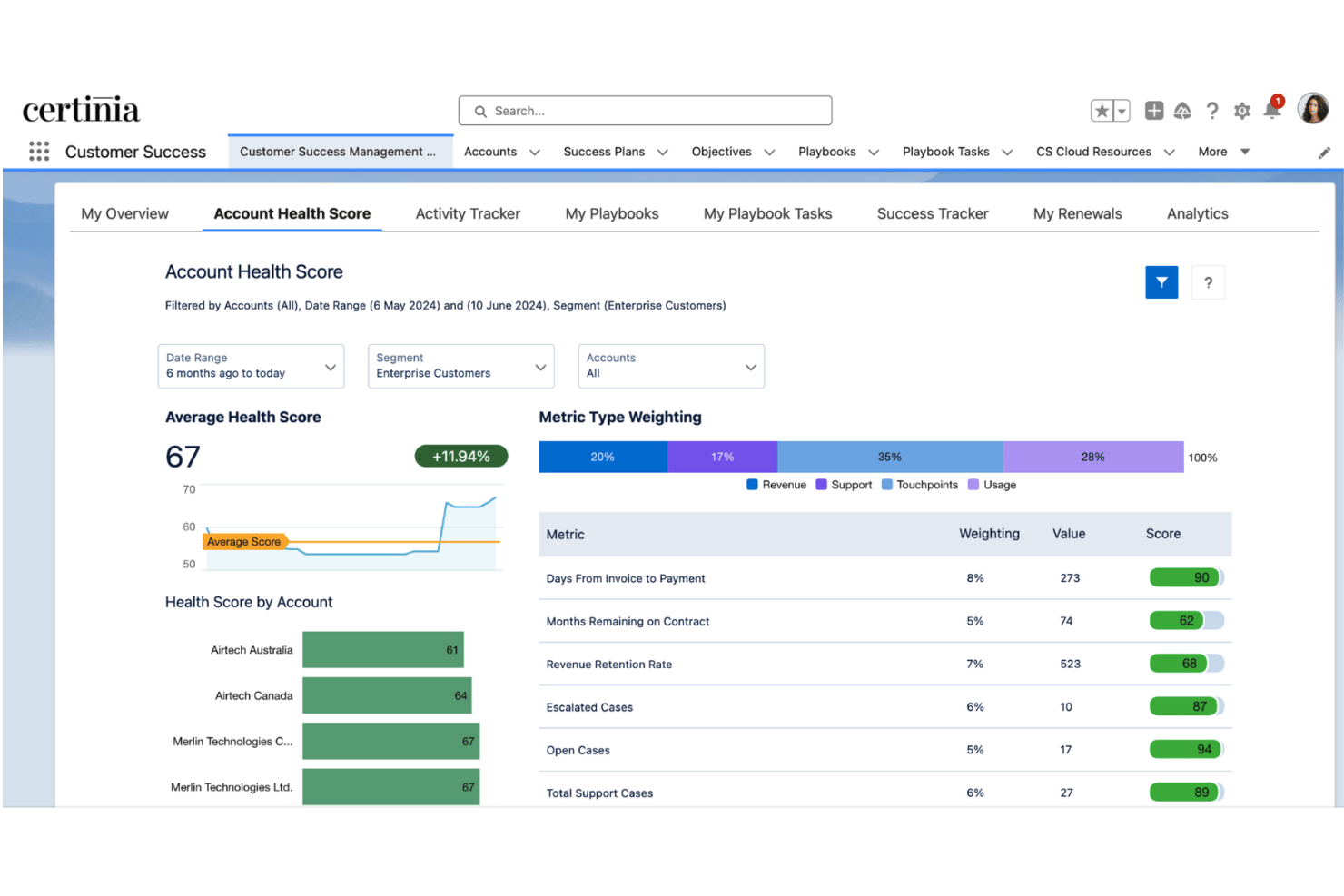
Certinia is a Salesforce-native professional services automation platform that connects project delivery, resource management, client billing, and financial tracking in a single system of record.
Who Is Certinia Best For?
Certinia suits mid-market to enterprise consulting and professional services firms already running on Salesforce that need deep financial controls alongside project delivery.
Why I Picked Certinia
I picked Certinia as one of the best because no other PSA lives natively inside Salesforce the way this one does. When a deal closes in CRM, my team can immediately staff the project using Certinia's Resourcing Agent, which matches open roles to consultant skills and availability without switching platforms. Revenue recognition then pulls directly from live delivery data, so there's no manual reconciliation between what was delivered and what gets billed.
Certinia Key Features
- Project financials dashboard: Tracks budgets, costs, margins, and real-time profitability for every project.
- Automated billing models: Supports fixed-fee, time-and-materials, retainer, and milestone billing with native workflows.
- Time and expense capture: Lets teams log hours and submit expenses at project or task level, including mobile entry.
- Veda AI-powered assistant: Surfaces project risks, creates summaries, and assists with meeting management using AI.
Certinia Integrations
Certinia offers native integrations with MuleSoft, Celigo, SAP Concur, Expensify, DocuSign, Conga, Avalara, Plaid, AvidXchange, and Microsoft Outlook. An API is available for custom integrations.
Pros and Cons
Pros:
- AI-powered project, resource, and margin insights
- Salesforce-native for unified client and delivery data
- Deep financial controls for complex projects
Cons:
- Long, complex implementation cycle
- Typically requires Salesforce admin skills

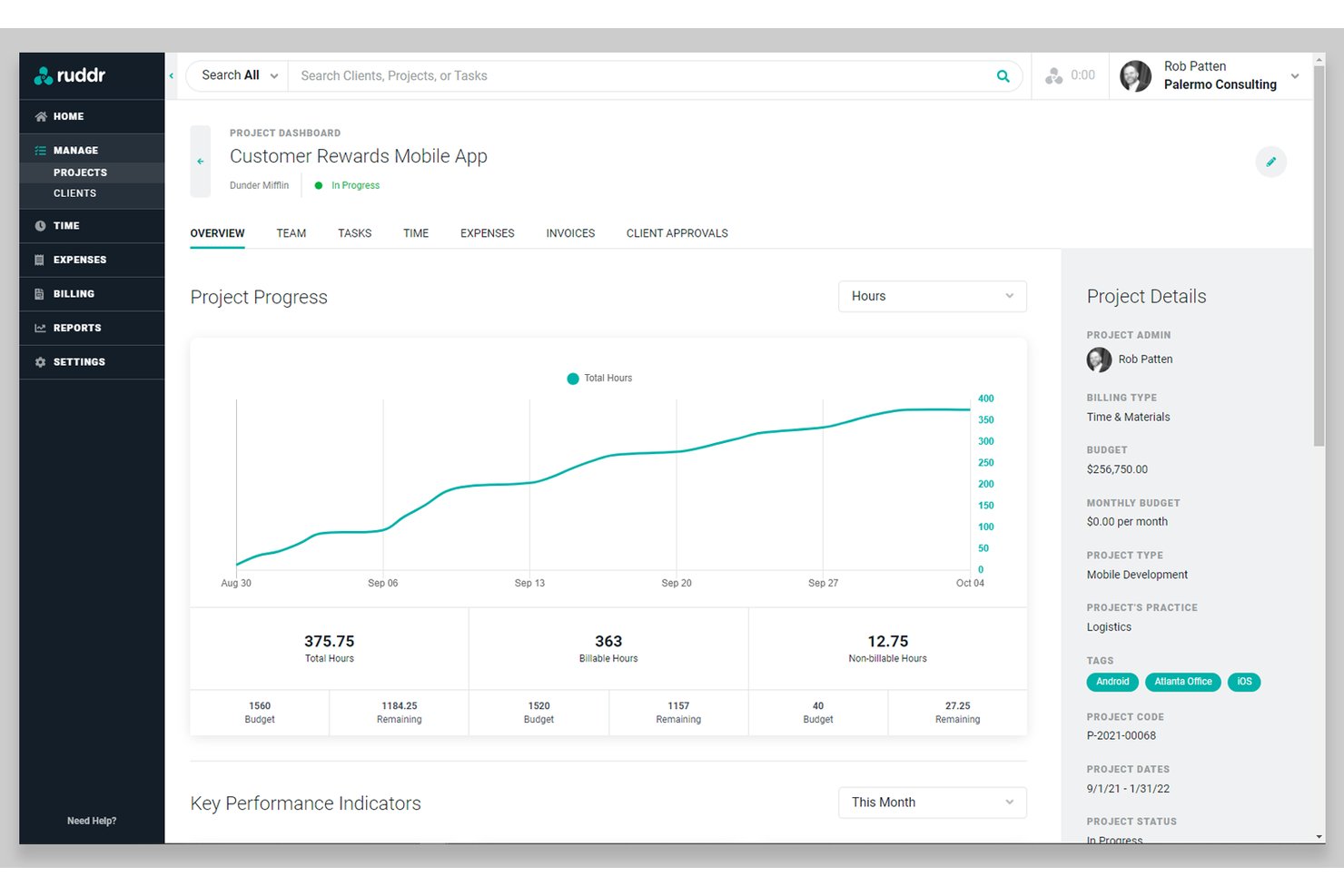
Ruddr is an AI-native PSA platform built for professional services firms, combining project management, time and expense tracking, resource allocation, invoicing, revenue recognition, and pipeline management in one workspace.
Who Is Ruddr Best For?
Ruddr is a strong fit for small to mid-sized management consulting firms that need to manage billable projects, client invoicing, and team utilization without enterprise-level complexity.
Why I Picked Ruddr
I picked Ruddr as one of the best because it's purpose-built around how consulting firms actually operate, with structures like Disciplines and Practices baked directly into the platform. I love that Workspace and Client Rate Cards let me manage different billing rates across engagements without manual workarounds. The automated revenue recognition across multiple methods means I'm not reconciling project financials in a spreadsheet at month-end.
Ruddr Key Features
- Ruddr Intelligence (AI assistant): Use natural language to query operational and financial data across your workspace.
- Project health tracking: Monitor project status using built-in visual indicators and health metrics.
- Sales pipeline management: Track opportunities and link sales forecasts directly to resource capacity and project planning.
- Native multicurrency support: Create invoices, track expenses, and analyze results across 150+ currencies with daily exchange rates.
Ruddr Integrations
Ruddr offers native integrations with QuickBooks Online, QuickBooks Desktop, Xero, Salesforce, HubSpot, BambooHR, Rippling, Expensify, and Slack. An open API is available for custom integrations.
Pros and Cons
Pros:
- Built-in AI assistant for workspace queries
- Robust multicurrency and revenue recognition options
- Disciplines and practices structure for consulting
Cons:
- Resource planning limited to Pro plan
- No native Gantt or timeline views
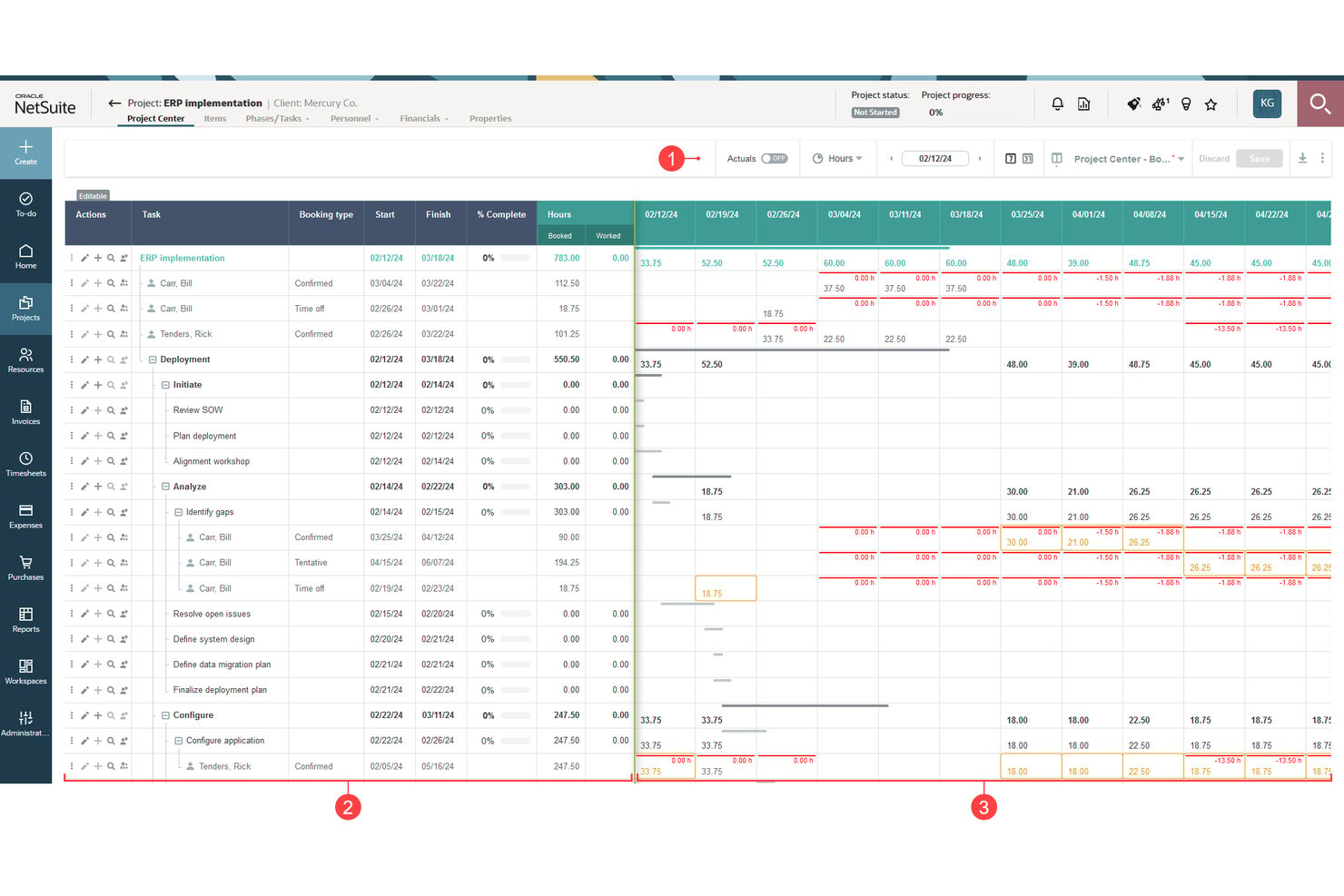
NetSuite SuiteProjects is a PSA platform built on the NetSuite ERP ecosystem that combines project accounting, resource management, time and expense tracking, and client billing in a single cloud-based environment.
Who Is NetSuite SuiteProjects Best For?
It's a strong fit for mid-market and enterprise services firms already running a NetSuite ERP solution that need PSA and financials on a single platform.
Why I Picked NetSuite SuiteProjects
I've included NetSuite SuiteProjects in my top picks because it's the only PSA option that lives natively inside the NetSuite ERP environment. Project accounting connects directly to your general ledger, so revenue recognition fires automatically when project milestones are hit, with no manual exports or reconciliation. I also like how resource allocation feeds directly into project cost tracking, giving finance teams real-time margin visibility at the project level.
NetSuite SuiteProjects Key Features
- Timesheet management: Team members can submit and approve detailed time logs directly within the platform.
- Project budget management: Track project costs and compare actuals versus forecasts in real time.
- Role-based access control: Assign permissions by user role to restrict access to sensitive financial or project data.
- Automated expense management: Capture, submit, and approve expenses with workflow automation linked to project accounting.
NetSuite SuiteProjects Integrations
NetSuite SuiteProjects offers native integrations across the NetSuite ecosystem, including NetSuite ERP and NetSuite CRM, and provides native connectors for tools like BambooHR and Expensify. An API is available for custom integrations.
Pros and Cons
Pros:
- Revenue recognition for multiple billing models
- Powerful resource planning with reporting tools
- Project accounting linked to company financials
Cons:
- Interface complexity frustrates non-ERP users
- Implementation projects require significant time investment
Profesyonel Hizmetler için Diğer İşletme Yönetimi Yazılımları
Kısa listeme giremeyen ancak yine de göz atmaya değer bazı ek profesyonel hizmetler için işletme yönetimi yazılımı seçenekleri şunlardır:
- Kantata
For strategic resource planning
- Planview
For portfolio-driven services
- Avaza
For small service businesses
- Wrike
With customizable workflows
- Polaris PSA By Replicon
For AI-powered resource planning
- Rocketlane
For client onboarding projects
- CMap
For skills-based staffing


How I Evaluate Business Management Software for Professional Services
I split my evaluation into baseline requirements—like native billing models, project reporting, and utilization tracking—and the differentiators that separate a purpose-built PSA from a generic PM tool.
Core Functionality (Table Stakes for This List)
When I'm selecting tools for my list, I rank each one on a scale from 0 (does not offer the functionality) to 5 (excels in this area) for each core functionality listed below. Then, I calculate the tool's total score into a percentage. Each tool needs to achieve a minimum total score of 65% to be considered for inclusion.
- Project Management: I look for task dependencies, milestones, and Gantt or Kanban views that map to client deliverables—not just internal to-do lists.
- Time & Expense Tracking: Splitting billable and non-billable hours at the task level matters, especially for firms running mixed T&M and fixed-fee engagements.
- Resource Management: I evaluate whether the platform shows real-time utilization and lets you allocate staff across concurrent projects based on capacity and skills.
- Billing & Invoicing: Support for multiple billing models is key—retainer clients, milestone-based builds, and T&M contracts all need different invoice logic.
- Project Financials: I check for live budget vs. actuals tracking and margin reporting per project so you can identify budget overruns earlier.
- CRM & Pipeline: The sales-to-delivery handoff breaks down fast without pipeline visibility tied to resourcing, so I look for native or tightly integrated CRM.
Once I have a list of tools that meet the criteria, I consider what sets each platform apart.
Differentiating Factors (What Sets Vendors Apart)
Here's how I compare and contrast different vendors:
Standout Features
Resource forecasting is a big differentiator—I look for tools that model future utilization against pipeline data so you can spot bench time or hiring gaps weeks ahead. Revenue recognition automation also matters, especially for firms juggling fixed-fee and T&M contracts that need to stay compliant with ASC 606 or IFRS 15 without spreadsheet workarounds. Skills and competency tracking rounds things out by letting you staff projects based on tagged certifications and expertise, not just availability.
Beyond Features
I pay close attention to whether a platform is purpose-built for services delivery or adapted from a generic PM or ERP tool—that distinction shows up fast in how billing, utilization, and project accounting work out of the box. Integration ecosystem matters too, especially bi-directional syncs with your CRM and accounting stack so the opportunity-to-invoice pipeline doesn't break. Firm size fit is another factor I evaluate, since a tool built for 500-person consultancies can overwhelm a 20-person agency with unnecessary complexity.
Profesyonel Hizmetler için İşletme Yönetimi Yazılımı Nasıl Seçilir?
Uzun özellik listeleri ve karmaşık fiyatlandırma yapılarına takılıp kalmak kolaydır. Kendinize özgü yazılım seçme sürecinizi yürütürken odaklanmanıza yardımcı olmak için göz önünde bulundurmanız gereken faktörleri içeren bir kontrol listesi hazırladık:
| Faktör | Dikkat Edilmesi Gerekenler |
|---|---|
| Ölçeklenebilirlik | Yazılım, daha sonra geçiş yapmanızı gerektirmeden müşteri sayısı, proje sayısı ve çalışan sayısındaki artışla birlikte firmanızın büyümesini destekleyebilir mi? |
| Entegrasyonlar | CRM, muhasebe veya İK sistemlerinize yerel olarak bağlanabiliyor mu, yoksa verileri senkronize tutmak için manuel dışa aktarma ve içe aktarmaya mı güveneceksiniz? |
| Özelleştirilebilirlik | Yoğun geliştirme çalışmaları veya dış danışmanlar olmadan iş akışlarını, onay zincirlerini ya da fatura şablonlarını firmanızın süreçlerine göre uyarlayabilir misiniz? |
| Kullanım kolaylığı | Yalnızca yöneticiler değil, proje ekipleri de platformu gerçekten kullanmak isteyecek mi, yoksa işe alıştırma sürecini yavaşlatacak dik bir öğrenme eğrisi mi var? |
| Uygulama ve işe alıştırma | Çalışır duruma gelmek ne kadar sürecek? Sağlayıcı, gerçek dünyaya uygun şablonlar, veri taşıma desteği ve personeliniz için eğitim sunuyor mu? |
| Maliyet | Fiyata neler dahil? Kullanıcı katmanlarını, uygulama, sürekli destek, entegrasyon veya yükseltme ücretlerini mutlaka kontrol edin ve tüm yaşam döngüsü maliyetleri için bütçe ayırın. |
| Güvenlik önlemleri | Müşteri verilerini korumak ve sektör gereksinimlerini karşılamak için erişim denetimleri, denetim izleri ve uyumluluk sertifikaları var mı? |
| Dahili kaynak gereksinimleri | Sürekli yönetim için özel bir sistem yöneticisi mi gerekecek, yoksa bir operasyon sorumlusu platformu günlük olarak gerçekçi bir şekilde çalıştırıp sürdürebilir mi? |
Profesyonel Hizmetler için İşletme Yönetimi Yazılımı Nedir?
Profesyonel hizmetler için iş yönetimi yazılımı; müşteri odaklı işler sunan firmalar için proje yönetimi, kaynak planlama, zaman takibi, faturalandırma ve finansal raporlamayı bir araya getiren merkezi bir platformdur. Bu sistemler, hizmet odaklı ekiplerin projeleri yönetmesine, kârlılığı izlemesine, çalışanları tahsis etmesine ve satış hunisi görevlerini benzersiz ihtiyaçlarına göre uyarlanmış tek bir çözüm içinde koordine etmesine yardımcı olur.
Profesyonel Hizmetler için İş Yönetimi Yazılımının Özellikleri
Profesyonel hizmetler için iş yönetimi yazılımı seçerken aşağıdaki temel özelliklere dikkat edin:
- Proje yönetimi: Görünürlüğü ve hesap verebilirliği korumak için kilometre taşlarını, zaman çizelgelerini ve görev atamalarını kullanarak müşteri projelerini başlangıçtan teslimata kadar düzenleyin, izleyin ve yönetin.
- Kaynak planlama: Doğru kişilerin doğru zamanda doğru projelerde çalışmasını sağlamak için çalışanları tahsis edin, iş yüklerini öngörün ve kullanım oranını yönetin.
- Zaman ve gider takibi: Raporlamayı ve müşteri faturalandırmasını kolaylaştırmak için faturalandırılabilir ve faturalandırılamaz saatlerin yanı sıra giderleri de görev ve proje düzeyinde kaydedin.
- Faturalandırma ve fatura kesme: Sabit ücretli, sürekli hizmet sözleşmeli ve zaman-malzeme esaslı işler dahil olmak üzere tüm etkileşim türleri için faturalar oluşturun, gönderin ve takip edin; onayları ve ödeme takibini yönetin.
- Proje finansalları: Gerçek zamanlı kârlılığı takip edebilmek ve olası bütçe aşımlarını erkenden fark edebilmek için bütçeleri, maliyetleri, marjları ve gelir muhasebeleştirmesini izleyin.
- CRM entegrasyonu: Yaklaşan talebe ilişkin tam görünürlük ve sorunsuz devir teslimler sağlamak için satış hunisini ve müşteri yönetimini proje teslimatıyla birbirine bağlayın.
- Raporlama ve analiz: Daha iyi karar verme süreçlerini desteklemek için kullanım oranları, kârlılık, proje durumu ve ekip performansına yönelik özelleştirilebilir panolara ve raporlara erişin.
- Belge yönetimi: Ekiplerin ve müşterilerin en güncel dosyalara ve teslim ürünlerine kolayca erişebilmesi için proje belgelerini güvenli bir şekilde depolayın, paylaşın ve sürümlerini yönetin.
- Müşteri portalı: Müşterilere proje ilerlemesini inceleyebilecekleri, çalışmaları onaylayabilecekleri ve ilgili belgelere ve faturalara erişebilecekleri self servis bir portal sunun.
- Güvenlik ve uyumluluk: Güçlü izinler, denetim izleri ve GDPR ile SOC 2 gibi sektör standartlarına uyumluluk sayesinde müşteri ve proje verilerini koruyun.
Profesyonel Hizmetler için İş Yönetimi Yazılımının Faydaları
Profesyonel hizmetler için iş yönetimi yazılımını uygulamak, ekibiniz ve işletmeniz için çeşitli faydalar sağlar. Yararlanabileceğiniz faydalardan bazıları şunlardır:
- Daha iyi proje görünürlüğü: Birleştirilmiş görev takibi ve panolar sayesinde proje durumu, son tarihler ve teslim ürünleri hakkında gerçek zamanlı içgörüler elde edin.
- Geliştirilmiş kaynak kullanımı: Entegre kaynak planlama araçlarından yararlanarak kapasite ve uzmanlığa göre çalışanları görevlendirin; atıl süreyi ve aşırı görevlendirmeyi azaltın.
- Artan kârlılık kontrolü: Bütçeleri, marjları ve proje maliyetlerini tek bir platformdan takip ederek performansı optimize etmeyi ve bütçe aşımlarını erkenden fark etmeyi kolaylaştırın.
- Daha kısa tekliften tahsilata döngüleri: Faturalandırmayı hızlandırmanıza ve nakit akışını iyileştirmenize yardımcı olmak için zaman takibini, gider kaydını ve fatura kesmeyi otomatikleştirin.
- Daha güçlü müşteri ilişkileri: Belge paylaşımı, onaylar ve ilerleme güncellemeleri için müşterilere markanıza özel bir portal sunarak güven ve şeffaflık oluşturmanıza yardımcı olun.
- Kolaylaştırılmış uyumluluk: Yerleşik güvenlik önlemleri, denetim izleri ve yapılandırılabilir izinlerle sektör ve müşteri veri gereksinimlerini karşılayın.
- Sorunsuz veri akışı: Çift veri girişini azaltmak ve kararları tek bir doğru bilgi kaynağını kullanarak almak için CRM'yi, proje yönetimini ve finansal verileri birbirine bağlayın.
Profesyonel Hizmetler için İş Yönetimi Yazılımının Maliyetleri ve Fiyatlandırması
Profesyonel hizmetler için iş yönetimi yazılımı seçerken mevcut çeşitli fiyatlandırma modellerini ve planları anlamak gerekir. Maliyetler özelliklere, ekip büyüklüğüne, eklentilere ve diğer etkenlere göre değişir. Aşağıdaki tabloda, profesyonel hizmetler için iş yönetimi yazılımı çözümlerinde yaygın olarak sunulan planlar, bunların ortalama fiyatları ve genellikle içerdikleri özellikler özetlenmektedir:
Profesyonel Hizmetler için İş Yönetimi Yazılımı Plan Karşılaştırma Tablosu
| Plan Türü | Ortalama Fiyat | Yaygın Özellikler |
|---|---|---|
| Ücretsiz Plan | $0 | Temel görev yönetimi, sınırlı kullanıcı kontenjanı, minimum depolama alanı ve basit raporlama. |
| Kişisel Plan | $10-$20/kullanıcı/ay | Proje yönetimi, temel zaman takibi, tek kullanıcı veya küçük ekip erişimi ve e-posta desteği. |
| İşletme Planı | $25-$45/kullanıcı/ay | Kaynak planlama, faturalandırma, kullanım takibi, diğer sistemlerle entegrasyonlar ve müşteri portalı erişimi. |
| Kurumsal Plan | $50-$100/kullanıcı/ay | Gelişmiş analizler, çoklu kuruluş desteği, özel güvenlik denetimleri, API erişimi, öncelikli destek ve uyumluluk araçları. |
Profesyonel Hizmetler İçin İşletme Yönetimi Yazılımı Hakkında SSS
Profesyonel hizmetler için işletme yönetimi yazılımı hakkında sık sorulan bazı soruların yanıtlarını burada bulabilirsiniz:
Ne tür şirketler profesyonel hizmetler için işletme yönetimi yazılımı kullanır?
Danışmanlık firmaları, ajanslar, BT hizmet sağlayıcıları, hukuk firmaları ve muhasebe büroları, müşteri projelerini, faturalandırmayı ve ekip kaynaklarını merkezi bir sistem içinde yönetmek için genellikle bu yazılımı kullanır.
İşletme yönetimi yazılımı mevcut CRM ve muhasebe araçlarıyla entegre olabilir mi?
Evet, çoğu seçenek popüler CRM’ler ve muhasebe platformlarıyla entegrasyonlar sunarak daha düzenli operasyonlar için müşteri, proje ve finansal verileri eşitlemenize olanak tanır.
Bir platformun ekibimle birlikte ölçeklenip ölçeklenemeyeceğini nasıl anlarım?
Yazılımın çoklu kuruluş yönetimini, esnek kullanıcı rollerini ve role dayalı izinleri destekleyip desteklemediğini kontrol edin; ayrıca kuruluşunuz büyüdükçe proje veya kullanıcı sınırlarını sorun.
Bu yazılım sektörel uyumluluk veya veri gizliliği konusunda yardımcı olur mu?
Evet, önde gelen platformlar hassas müşteri ve proje verilerinin korunmasına yardımcı olmak için SOC 2, ISO 27001 ve GDPR uyumluluğunun yanı sıra denetim izleri ve özelleştirilebilir izinler sunar.
Uygulama genellikle ne kadar sürer?
Uygulama süreleri değişiklik gösterir; ancak profesyonel hizmetler için çoğu işletme yönetimi çözümü, firma büyüklüğüne, veri taşıma gereksinimlerine ve özelleştirmeye bağlı olarak birkaç hafta ila birkaç ay içinde tamamen kullanıma alınabilir.
Tüm profesyonel hizmet firmaları için müşteri portalı gerekli midir?
Hayır; ancak müşteri portalları iş birliğini geliştirebilir, e-posta üzerinden karşılıklı yazışmaları azaltabilir ve müşterilerin belgeleri incelemesine, teslim edilecek işleri onaylamasına ve ilerlemeyi gerçek zamanlı olarak takip etmesine olanak tanıyarak şeffaflık sağlayabilir.