

2026’da İncelenen En İyi 10 Yapay Zekâ Profesyonel Hizmetler Otomasyonu Yazılımı

10 En İyi Yapay Zekâ PSA Yazılımı Kısa Listesi


Projeleri ve müşteri çalışmalarını yönetmek, özellikle görevleri, zaman çizelgelerini, bütçeleri ve ekip koordinasyonunu aynı anda dengelemeniz gerektiğinde zorlayıcı olabilir. İşlemleri daha karmaşık hâle getirmek yerine kolaylaştıran araçlara ihtiyacınız vardır. İşte AI PSA (Professional Services Automation) yazılımı burada devreye girer; iş akışlarındaki tıkanıklıkları gidermenize, rutin görevleri otomatikleştirmenize ve kaynakları planlama ve tahsis etme şeklinizi geliştirmenize yardımcı olur.
Bu platformları test etme deneyimime göre, doğru yapay zekâ özellikleri öngörüye dayalı içgörüler, daha akıllı zamanlama ve daha doğru tahminler sunarak günlük birçok zorluğu çözebilir. Hangi araçların anlamlı değer sunduğunu anlamanıza yardımcı olmak için en iyi seçenekleri bağımsız olarak inceledim.
Bu makalede en iyi seçimlerimi paylaşacak ve her birini diğerlerinden ayıran özellikleri ve avantajları öne çıkaracağım. Amacım, ekibinizin ihtiyaçlarına uygun yapay zekâ profesyonel hizmetler otomasyonu yazılımını seçmenize yardımcı olmaktır.
Why Trust Our Software Recommendations
Our team has been testing and reviewing software since 2012. As project managers ourselves, we know how difficult—and important—it is to choose the right software.
For this guide, we evaluated tools using hands-on testing and independent research, scoring tools using our selection criteria. We also draw on insights from industry thought leaders and practicing project management experts.
Our reviews reflect our human editorial judgment, not a sales pitch.
Expert reviewers:
Yapay Zekâ PSA Yazılımı Karşılaştırma Tablosu
Bu karşılaştırma tablosu, en iyi yapay zekâ PSA yazılımı seçimlerim için fiyatlandırma ayrıntılarını özetlemektedir.
| Tool | Starting Price | Website | |
|---|---|---|---|
|
Best for business dashboards |
4.5
out of 5
|
$17/user/month 14-day free trial |
Book Demo |
|
Best for service automation |
4.4
out of 5
|
Pricing upon request Free demo available |
Book Demo |
|
Best for real-time resource & financial insights |
4.2
out of 5
|
Pricing upon request Not available |
Website |
|
Best for client onboarding |
4.8
out of 5
|
$49/user/month 14-day free trial |
Website |
|
Best for resource insights |
4.6
out of 5
|
$17/user/month 21-day free trial + free demo available |
Website |
|
Best for IT service teams |
4.0
out of 5
|
Pricing upon request 7-day free trial |
Website |
|
Best for financial operations |
4.0
out of 5
|
Pricing upon request Free demo available |
Website |
|
Best for workflow automation |
—
|
Pricing upon request Free demo available |
Website |
|
Best for project predictability |
—
|
Pricing upon request 14-day free trial |
Website |
|
Best for billing management |
4.5
out of 5
|
$20/user/month Free demo available |
Website |
En İyi Yapay Zekâ PSA Yazılımı İncelemeleri
Aşağıda, kısa listeme giren en iyi yapay zekâ PSA yazılımlarına ilişkin ayrıntılı özetlerimi bulabilirsiniz. İncelemelerim, size en uygun aracı bulmanıza yardımcı olmak için her aracın temel özelliklerine, artılarına ve eksilerine, entegrasyonlarına ve ideal kullanım alanlarına ayrıntılı bir bakış sunar.

Scoro
Best for business dashboards
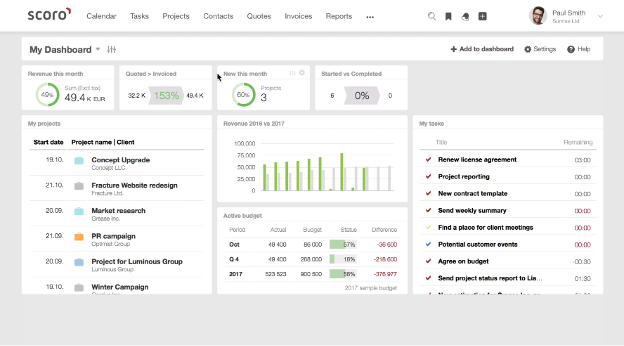
Scoro is a business management software aimed at small to medium-sized businesses, offering solutions for project management, billing, and reporting. Its AI-driven capabilities provide detailed insights and dashboards that help teams make informed decisions and track performance.
Why I picked Scoro: Scoro's AI capabilities offer real-time data visualization, enabling your team to monitor key metrics effortlessly. The software's customizable dashboards allow you to tailor the view to match your specific needs. With its AI-driven analytics, you can gain insights into business performance and identify areas for improvement.
Standout features & integrations:
Features include project and task management, real-time profitability tracking, budgeting tools, automated billing, and AI-powered actions through ELI. The budgeting feature allows you to plan and allocate resources effectively.
Integrations include QuickBooks, Xero, Stripe, Mailchimp, Dropbox, Google Calendar, Slack, Zapier, Microsoft Teams, and Trello.
Pros and Cons
Pros:
- Automated billing and invoicing
- Real-time data visualization
- Customizable business dashboards
Cons:
- Interface can feel cluttered and complex
- Can be too feature-heavy for basic task or project management
New Product Updates from Scoro

Scoro Adds Time Mobile App and ELI Improvements
Scoro adds the Scoro Time mobile app for iOS/Android to track time anywhere and expands ELI with attachments, smarter filtering, and trigger-based actions. For more information, visit Scoro's official site.
 .

Accelo
Best for service automation
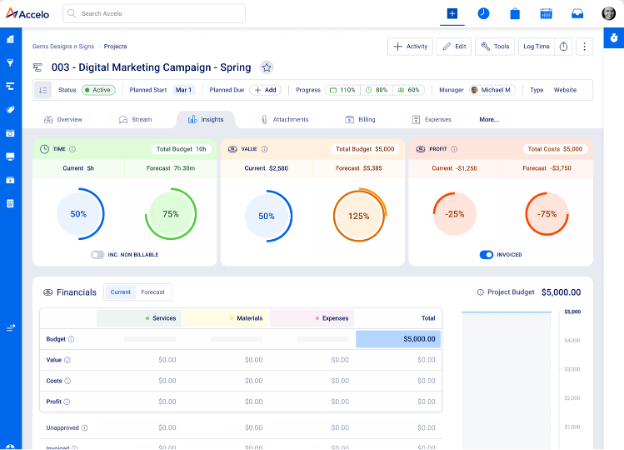
Accelo is a project management tool designed for service businesses, helping teams automate their operations and improve efficiency. It offers AI capabilities that assist in automating tasks and allocating resources, making it invaluable for professionals seeking to optimize their workflows.
Why I picked Accelo: Accelo's AI-driven automation helps you manage client work, from prospect to payment, without manual intervention. Its intelligent scheduling and task prioritization ensure that your team focuses on what matters most. The tool's predictive analytics also aid in making informed business decisions.
Standout features & integrations:
Features include automated task progression, real-time project tracking, revenue forecasting, and AI-supported capacity planning. These features work together to improve productivity and keep your team aligned.
Integrations include Google Workspace, Microsoft 365, Slack, QuickBooks, Xero, Salesforce, HubSpot, Jira, Trello, and Asana.
Pros and Cons
Pros:
- Client portal improves transparency
- Predictive analytics for decision-making
- Automated timesheets save time
Cons:
- Limited customization options
- Initial setup can be complex
New Product Updates from Accelo

Accelo Rebuilds Mobile App for Project and Time Management
Accelo rebuilds its mobile app with task management, new work creation, and mobile timesheets for Forecast customers. This helps teams keep project and time data current while working away from a desktop. For more information, visit Accelo’s official site.
 .

Kantata
Best for real-time resource & financial insights
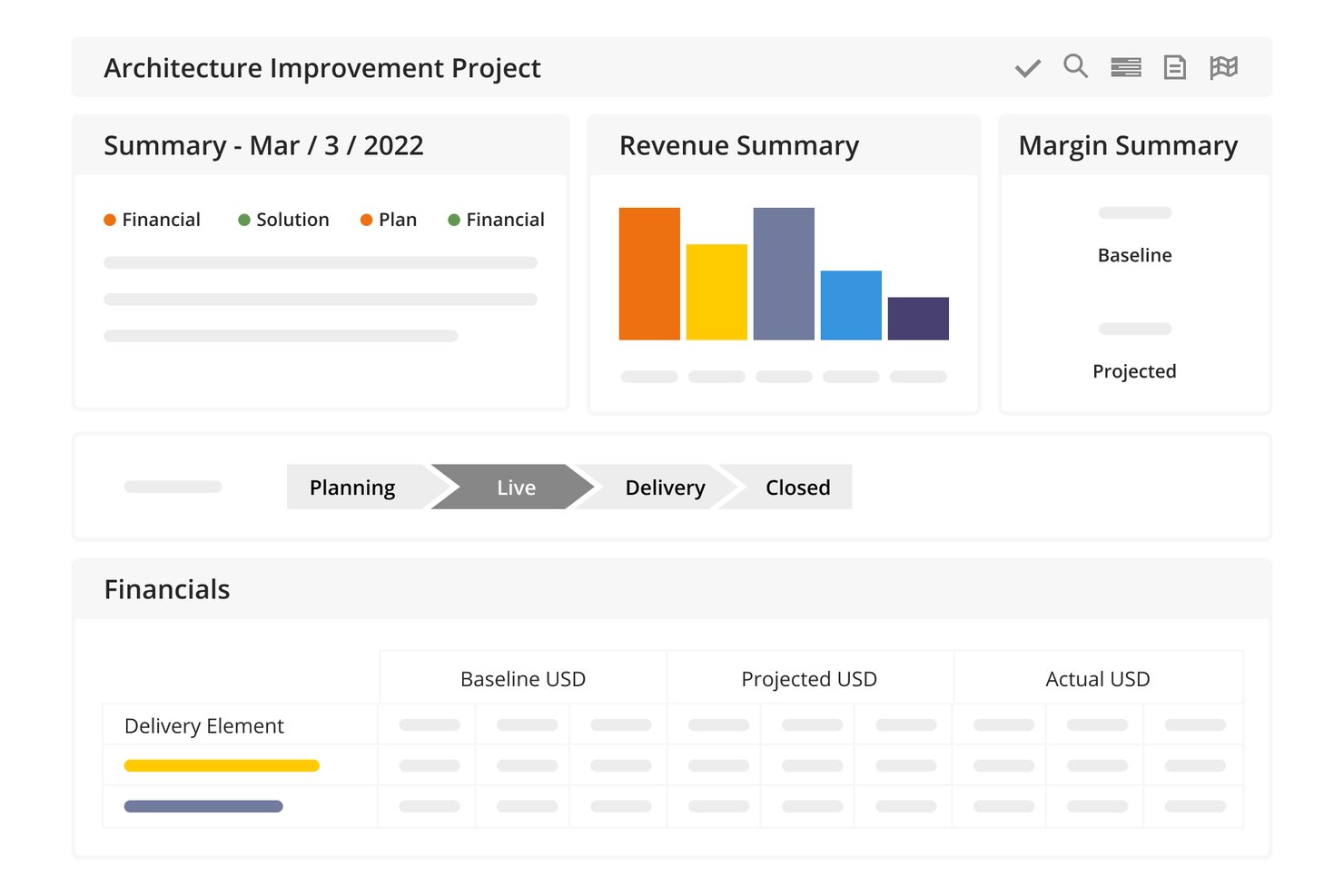
Kantata is a purpose-built AI PSA platform for professional services firms that covers resource management, project delivery, time tracking, billing, and financial analytics across the full engagement lifecycle.
Who Is Kantata Best For?
Kantata is a strong fit for mid-market to enterprise professional services firms—consultancies, agencies, and IT services organizations—that need a dedicated PSA platform at scale.
Why I Picked Kantata
Kantata earns its spot on my shortlist because of how tightly it connects resource visibility to financial outcomes in real time. The Resourcing Agent uses AI to match consultants to projects by skill and availability, surfacing earned value, profit margin, and estimate-at-completion metrics on demand. I also rate Kantata Pulse, which layers team sentiment onto operational data so I can catch margin risk well before a report flags it.
Kantata Key Features
- Skills intelligence graph: AI maintains up-to-date consultant skill profiles to refine project staffing recommendations over time.
- Scenario modeling tools: Simulate what-if changes in resources, pricing, or pipeline to visualize impacts on margins and capacity.
- Generative SOW drafting: Automatically produce statements of work and project plans from opportunity data or simple prompts.
- Pipeline-to-capacity forecasting: Blend CRM pipeline and resource bench data to predict utilization, hiring needs, and future gaps.
Kantata Integrations
Kantata offers native integrations with Salesforce, NetSuite, Sage Intacct, QuickBooks, Xero, Jira, Slack, HubSpot, and Microsoft 365. An API is available for custom integrations.
Pros and Cons
Pros:
- Deep project financial analytics at portfolio level
- AI-driven resource matching by skill and availability
- Real-time margin visibility across active engagements
Cons:
- Reporting customization requires significant admin effort
- Implementation takes months for enterprise deployments
New Product Updates from Kantata

Kantata Adds Access Group Change History
Kantata adds Access Groups History, letting account administrators track changes to group details, membership, and permissions in Recent History. The update also makes these events available through the Subscribed Events API for broader monitoring. For more information, visit Kantata’s official site.
 .

Best for client onboarding
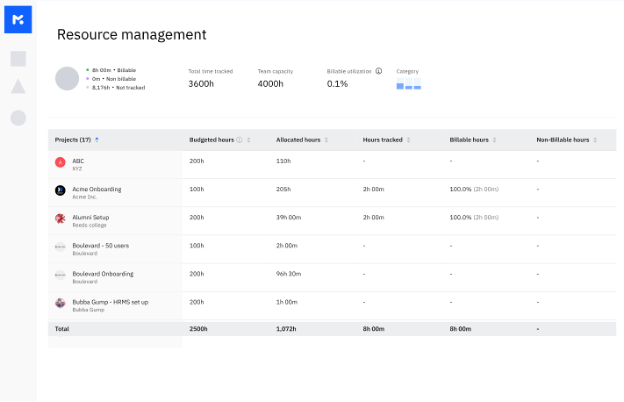
Rocketlane is an all-in-one PSA platform designed for teams that need to manage client projects efficiently and effectively. It offers AI-powered tools that improve onboarding experiences and collaboration between teams and clients.
Why I picked Rocketlane: Rocketlane's AI features include automated task assignments and predictive timelines, ensuring your onboarding processes run smoothly. Its real-time collaboration tools keep everyone aligned, reducing the chances of miscommunication. The software's analytics provide insights into onboarding performance, helping you refine your approach over time.
Standout features & integrations:
Features include AI agents that automate delivery tasks, customizable project templates, shared client portals, and real-time collaboration tools. Task management tools ensure that everyone knows their responsibilities and deadlines.
Integrations include Salesforce, HubSpot, Slack, Microsoft Teams, Google Workspace, Asana, Trello, monday.com, Jira, and Zendesk.
Pros and Cons
Pros:
- Predictive timelines for onboarding
- Real-time collaboration tools
- Automated task assignments
Cons:
- Limited customization in templates
- May require training for new users

Best for resource insights
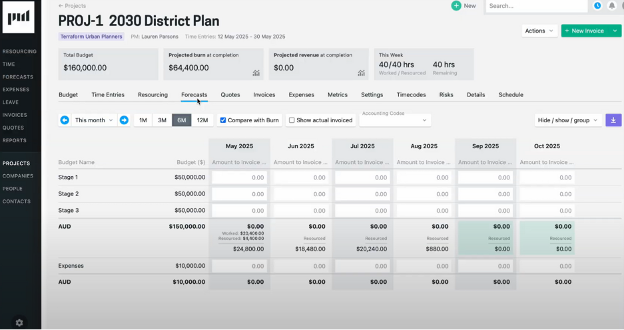
Projectworks is a project management and resource planning software designed for consulting firms, focusing on time tracking, resource management, invoicing, and financial reporting. It provides AI-driven insights into resource utilization, helping firms optimize their operations and improve profitability.
Why I picked Projectworks: Projectworks' AI capabilities analyze resource allocation and provide actionable recommendations for optimal utilization. Its real-time financial reporting offers insights into project profitability, helping you make informed decisions. Additionally, the software's integration of time tracking with invoicing ensures accurate billing and resource management.
Standout features & integrations:
Features include detailed financial reporting that helps your team keep track of project budgets. The time tracking feature integrates directly with invoicing, ensuring accurate billing. Resource management tools provide insights into utilization, helping your team allocate resources effectively.
Integrations include Xero, QuickBooks, Salesforce, HubSpot, MYOB, Stripe, Zapier, Microsoft Excel, Google Workspace, and Slack.
Pros and Cons
Pros:
- AI-driven resource allocation insights
- Accurate time tracking and invoicing
- Real-time financial reporting
Cons:
- Limited customization in reporting
- Can be complex to set up

Best for IT service teams
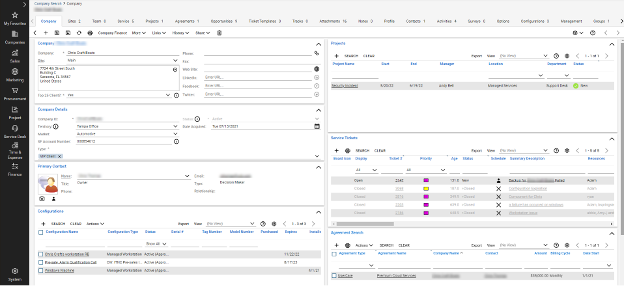
ConnectWise is a professional services automation tool tailored for IT service providers, focusing on project management, service delivery, and customer support. Its AI capabilities improve ticketing and resource management, providing valuable insights to improve IT operations.
Why I picked ConnectWise: ConnectWise's AI-driven ticketing system helps your team manage and resolve issues efficiently. Its automated resource scheduling ensures optimal team deployment, enhancing productivity. Its automated triage through ConnectWise Sidekick and centralized IT service features help teams prioritize issues, deploy resources effectively, and maintain service quality.
Standout features & integrations:
Features include a centralized ticketing system that helps you track and resolve client issues efficiently. Time tracking and billing features simplify your financial management processes. The tool also offers a customizable dashboard that provides a detailed view of your operations.
Integrations include Microsoft 365, QuickBooks, Xero, Salesforce, Slack, Google Workspace, HubSpot, Zoom, FreshBooks, and Stripe.
Pros and Cons
Pros:
- Customizable dashboards for operations overview
- Automated resource scheduling
- Efficient ticketing system for IT support
Cons:
- Support documentation is lacking for complex workflows
- Configuration may be overwhelming and require training

Certinia
Best for financial operations
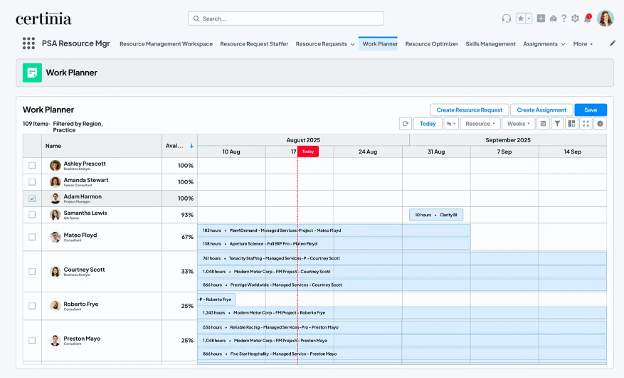
Certinia is a financial management and professional services automation tool designed for businesses looking to simplify their financial operations and project management. It offers AI-driven insights that help teams manage finances, resources, and project timelines effectively.
Why I picked Certinia: Certinia's AI capabilities offer predictive financial analytics, helping your team forecast budgets and manage cash flow. Its automated billing and invoicing ensure accuracy and save time. The software also provides real-time financial dashboards, giving you a clear view of your financial health.
Standout features & integrations:
Features include financial dashboards, automated billing, budgeting tools, expense tracking, and AI-powered financial analytics. Automated expense tracking simplifies your team's expense management processes.
Integrations include Salesforce, QuickBooks, Xero, Microsoft Dynamics 365, SAP, Oracle, NetSuite, Sage, Google Workspace, and Slack.
Pros and Cons
Pros:
- Real-time financial dashboards
- Automated billing and invoicing
- Predictive financial analytics
Cons:
- Requires financial knowledge to maximize features
- May be complex for new users

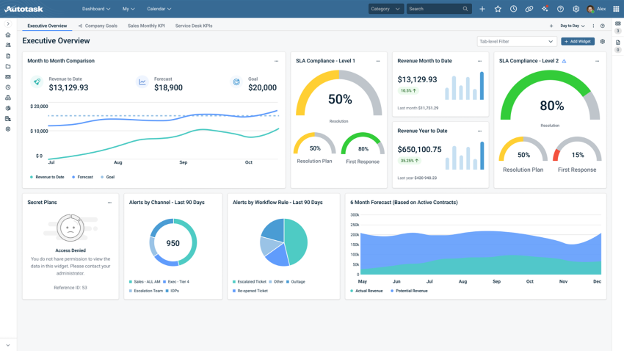
Autotask PSA is a PSA solution designed for IT service providers, offering solutions for project management, billing, and service delivery. Its AI capabilities focus on optimizing workflows and automating routine tasks, helping teams improve productivity and efficiency.
Why I picked Autotask PSA: Autotask PSA’s AI-driven ticketing system simplifies issue resolution and prioritization, ensuring your team focuses on critical tasks. Its automated billing and invoicing reduce manual errors and save time. The tool's analytics provide valuable insights into service performance, enabling you to make informed, data-driven decisions.
Standout features & integrations:
Features include project tracking that keeps your team on schedule and within budget. The customizable reporting feature provides insights into your service delivery and financial performance. Time tracking and billing integration ensure accurate and timely invoicing.
Integrations include QuickBooks, Microsoft 365, Salesforce, Xero, Slack, ConnectWise Manage, Dropbox, Google Workspace, HubSpot, and Zendesk.
Pros and Cons
Pros:
- Customizable reporting features
- Automated billing and invoicing
- AI-driven ticketing system
Cons:
- May require training for effective use
- Can be complex to configure


Forecast App is an AI-powered project management tool designed for industries like software and marketing, focusing on optimizing resource allocation and project execution. It offers AI-driven features that improve planning and ensure projects meet deadlines effectively.
Why I picked Forecast App: Forecast App uses AI for demand forecasting and capacity management, helping your team anticipate future needs. Its real-time dashboards and risk prediction alerts provide actionable insights to keep your projects on track. Moreover, the tool’s automated resource allocation ensures the right team members are assigned to the right tasks, boosting efficiency and preventing burnout.
Standout features & integrations:
Features include real-time workload scheduling that helps your team manage capacity effectively. Automated time tracking reduces the need for time-consuming manual entry. The app also provides real-time visibility into projects through Gantt charts and portfolio reports, giving you a clear view of progress.
Integrations include Jira, Salesforce, HubSpot, Google Calendar, Slack, Sage Intacct, Microsoft Teams, Asana, Trello, and QuickBooks.
Pros and Cons
Pros:
- Automated resource allocation saves time
- Real-time dashboards improve visibility
- AI-driven demand forecasting
Cons:
- Can have a steep learning curve
- Limited customization for reports

BigTime
Best for billing management
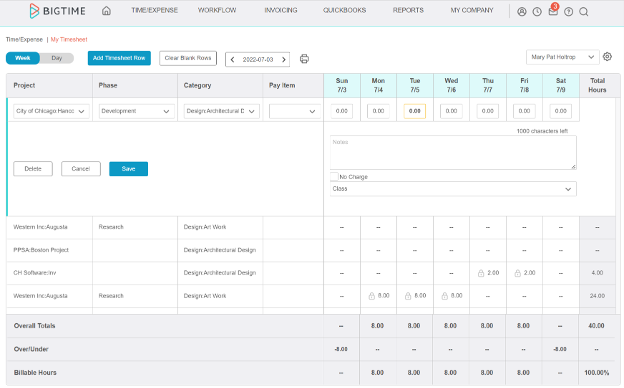
BigTime is a PSA platform designed for firms that need to manage billing, time tracking, and project management. It offers AI-driven insights that help your team simplify billing processes and improve financial accuracy.
Why I picked BigTime: BigTime's AI capabilities automate invoicing and time tracking, reducing manual errors. Its financial analytics provide insights into billing efficiency and profitability, helping your team make informed decisions. The software's customizable billing templates ensure that you can meet specific client needs with ease.
Standout features & integrations:
Features include detailed time tracking, billable hours, expense management, customizable invoicing templates, and AI-assisted billing insights. Customizable invoicing allows you to create invoices that match your branding and client requirements.
Integrations include QuickBooks, Xero, Salesforce, Zapier, Slack, Google Workspace, Microsoft Outlook, HubSpot, Dropbox, and Asana.
Pros and Cons
Pros:
- Detailed time tracking for accuracy
- Customizable billing templates
- Automated invoicing reduces errors
Cons:
- Limited reporting customization
- Can be complex for new users
Diğer Yapay Zekâ PSA Yazılımları
Kısa listeme girmeyen ancak yine de incelemeye değer bazı ek yapay zekâ PSA yazılımı seçenekleri şunlardır:
-
SuperOps
For MSPs
-
Atera
For remote monitoring
-
VOGSY
For Google Workspace users
-
Polaris PSA
For project cost control
-
Octayne PSA
For AI-driven analytics


How I Evaluate AI PSA Software
For a tool to make this list, its AI needs to do more than label existing dashboards—it should actively surface margin risks, recommend staffing moves, or flag delivery issues before they escalate. I split my evaluation into core functionality every PSA must cover and the differentiating factors that separate good options from great ones.
Core Functionality (Table Stakes For This List)
When I'm selecting tools for my list, I rank each one on a scale from 0 (does not offer the functionality) to 5 (excels in this area) for each core functionality listed below. Then, I calculate the tool's total score into a percentage. Each tool needs to achieve a minimum total score of 65% to be considered for inclusion.
- AI-Driven Resource Optimization: I look for platforms that go beyond drag-and-drop scheduling to recommend the best-fit consultant based on skills, availability, and cost.
- Predictive Project Analytics: Each tool should surface margin risks or timeline slippage through AI forecasting, not just display static budget vs. actuals dashboards.
- Integrated Time and Billing: I evaluate how tightly time entries flow into billing rules and invoices, especially across mixed engagement types like T&M and fixed-fee.
- Project Financial Management: Tools earn higher marks when they track cost, revenue, and margin at both the engagement and portfolio level with real-time visibility.
- Quote-to-Cash Workflow: I check whether SOW creation, project delivery, and invoicing connect natively or require manual handoffs between disconnected modules.
- AI Automation and Assistants: The platform should offer AI that handles real work like drafting status reports, generating project plans, or answering questions about project health.
Once I have a list of tools that meet this criteria, I consider what sets each platform apart.
Differentiating Factors (What Sets Vendors Apart)
Here's how I compare and contrast different vendors:
Standout Features
Scenario modeling is a big differentiator—I want to see whether a platform lets services leaders simulate changes to pricing, staffing, or project mix and preview the margin impact before committing. Pipeline-to-capacity forecasting takes this further by blending weighted CRM pipeline data with real-time bench availability to flag hiring needs or utilization gaps months ahead. I also look for a skills intelligence graph that learns from past project outcomes, improving staffing recommendations over time rather than relying on static consultant profiles.
Beyond Features
Ecosystem integrations matter a lot here. A PSA that syncs natively with your CRM, ERP, and HRIS means project data flows from opportunity through invoicing without manual re-entry. I also evaluate AI governance—specifically whether a vendor is transparent about how its models use customer data and offers opt-out controls. Implementation timelines vary widely in this space, so I check whether a platform ships with pre-built role libraries, rate cards, and services templates that shorten deployment from quarters to weeks.
Yapay Zekâ PSA Yazılımı Nasıl Seçilir?
Uzun özellik listeleri ve karmaşık fiyatlandırma yapılarına kendinizi kaptırmanız kolaydır. Kendinize özgü yazılım seçim sürecinizi yürütürken odağınızı korumanıza yardımcı olmak için göz önünde bulundurmanız gereken faktörleri içeren bir kontrol listesi hazırladım:
| Faktör | Dikkat Edilmesi Gerekenler |
| Ölçeklenebilirlik | Yazılım işletmenizle birlikte büyüyecek mi? Kullanıcı sınırlarını, özelliklerin genişletilmesini ve ölçeğinizi büyüttükçe aracın artan veri ve kullanıcı yüklerini kaldırıp kaldıramayacağını göz önünde bulundurun. |
| Entegrasyonlar | İş akışlarınızdaki kesintileri önlemek için yazılımın CRM, muhasebe veya iletişim platformları gibi mevcut araçlarınızla entegre olup olmadığını kontrol edin. |
| Özelleştirilebilirlik | Yazılımı belirli süreçlerinize ve tercihlerinize uyacak şekilde uyarlayabilir misiniz? Gösterge tablolarını, raporları ve kullanıcı izinlerini ayarlama seçeneklerini arayın. |
| Kullanım kolaylığı | Arayüz ekibiniz için sezgisel mi? Öğrenme eğrisini ve teknik bilgisi olmayan kullanıcıların aracı zorlanmadan kullanıp kullanamayacağını göz önünde bulundurun. |
| Uygulama ve işe alıştırma | Ne kadar hızlı çalışmaya başlayabilirsiniz? Kurulum sırasında eğitim için sunulan öğreticiler, kılavuzlar ve müşteri desteği gibi kaynakları değerlendirin. |
| Maliyet | Fiyatlandırma planları bütçeniz dahilinde mi? Maliyetleri sunulan özelliklerle karşılaştırın ve ölçeklendirme veya ek kullanıcılar için uzun vadeli fiyatlandırmayı göz önünde bulundurun. |
| Güvenlik önlemleri | Yazılım yeterli veri koruması sağlıyor mu? Bilgilerinizi korumak için şifreleme, veri düzenlemelerine uyumluluk ve düzenli güvenlik güncellemeleri arayın. |
| Destek erişilebilirliği | İhtiyaç duyduğunuzda müşteri desteğine ulaşabiliyor musunuz? Canlı sohbet, e-posta veya telefon desteğinin kullanılabilirliğini göz önünde bulundurun ve premium destek için ek ücret olup olmadığını kontrol edin. |
AI PSA Yazılımı Nedir?
AI PSA yazılımı, proje yönetimini, kaynak tahsisini ve faturalandırma süreçlerini optimize etmek için yapay zekâyı profesyonel hizmet otomasyonuyla birleştiren bir araçtır. Genellikle karmaşık projeleri verimli bir şekilde yönetmesi gereken BT profesyonelleri, proje yöneticileri ve profesyonel hizmet firmaları tarafından kullanılır. Tahmine dayalı analiz, otomatik görev atamaları ve gerçek zamanlı raporlama gibi özellikler planlama, karar verme ve iş akışı yönetimine yardımcı olur. Genel olarak bu araçlar üretkenliği artırır ve iş süreçlerini iyileştirmek için değerli içgörüler sağlar.
Özellikler
AI PSA yazılımı seçerken aşağıdaki temel özelliklere dikkat edin:
- Tahmine dayalı analiz: Gelecekteki eğilimler ve proje çıktıları hakkında içgörüler sağlayarak bilinçli kararlar almanıza yardımcı olur.
- Otomatik görev atamaları: Becerilere ve uygunluğa göre görevleri verimli bir şekilde dağıtarak zamandan tasarruf sağlar ve manuel hataları azaltır.
- Gerçek zamanlı raporlama: Proje ilerlemesi ve performansı hakkında güncel veriler sunarak hızlı ayarlamalar yapılmasına ve daha iyi yönetime olanak tanır.
- Kaynak tahsisi optimizasyonu: İhtiyaçları öngörerek ve tahsisleri dinamik olarak ayarlayarak kaynakların optimum şekilde kullanılmasını sağlar.
- Yapay zekâ destekli biletleme: Sorunları hızlı bir şekilde önceliklendirip çözmek için bilet yönetimini otomatikleştirerek hizmet sunumunu iyileştirir.
- Özelleştirilebilir gösterge tabloları: Görsel veri ekranlarını belirli iş ihtiyaçlarınıza ve tercihlerinize uyacak şekilde uyarlamanıza olanak tanır.
- Otomatik faturalandırma ve fatura oluşturma: Minimum manuel girişle faturalar oluşturarak ve ödemeleri takip ederek finansal süreçleri basitleştirir.
- Tahmine dayalı bakım: Olası sistem arızalarını önceden tahmin eder ve kesintileri önlemek için önleyici tedbirler önerir.
- Yapay zekâ destekli iş birliği araçları: Akıllı öneriler sunarak ve iş akışlarını kolaylaştırarak iletişimi ve ekip çalışmasını geliştirir.
- Güvenlik önlemleri: Şifreleme ve veri düzenlemelerine uyumluluk sayesinde hassas verileri koruyarak bilgi güvenliğini sağlar.
Faydalar
AI PSA yazılımını uygulamak ekibiniz ve işletmeniz için çeşitli faydalar sağlar. Yararlanabileceğiniz bazı faydalar şunlardır:
- Artan verimlilik: Otomatik görev atamaları ve kaynak optimizasyonu manuel çalışmayı azaltır ve süreçleri hızlandırır.
- Daha iyi karar verme: Tahmine dayalı analiz, gelecekteki eğilimler hakkında içgörüler sunarak bilinçli seçimler yapmanıza yardımcı olur.
- Geliştirilmiş iş birliği: Yapay zekâ destekli iş birliği araçları ekip üyeleri arasındaki iletişimi ve koordinasyonu geliştirir.
- Doğru faturalandırma: Otomatik faturalandırma ve fatura oluşturma, finansal işlemlerin zamanında ve doğru şekilde gerçekleştirilmesini sağlar.
- Proaktif bakım: Tahmine dayalı bakım özellikleri, sorunların operasyonları aksatmasından önce önlenmesine yardımcı olur.
- Artan görünürlük: Gerçek zamanlı raporlama, proje ilerlemesi, kilometre taşları ve performans hakkında net bir görünüm sunarak etkili yönetime yardımcı olur.
- Veri güvenliği: Güvenlik önlemleri hassas bilgileri korur ve veri düzenlemelerine uyumluluğu sağlar.
Maliyetler ve Fiyatlandırma
AI PSA yazılımını seçmek, mevcut çeşitli fiyatlandırma modellerinin ve planların anlaşılmasını gerektirir. Maliyetler özelliklere, ekip büyüklüğüne, eklentilere ve daha fazlasına bağlı olarak değişir. Aşağıdaki tablo, AI PSA yazılımı çözümlerinde yaygın planları, ortalama fiyatlarını ve genellikle sunulan özellikleri özetlemektedir:
AI PSA Yazılımı İçin Plan Karşılaştırma Tablosu
| Plan Türü | Ortalama Fiyat | Yaygın Özellikler |
| Ücretsiz Plan | $0 | Temel proje yönetimi, zaman takibi ve sınırlı kullanıcı desteği. |
| Kişisel Plan | $19-$109/kullanıcı/ay | Gelişmiş proje yönetimi, kaynak tahsisi, raporlama ve e-posta desteği. |
| İşletme Planı | $169-$179/kullanıcı/ay | Tam proje yönetimi paketi, yapay zekâ destekli içgörüler, entegrasyonlar ve sohbet desteği. |
| Kurumsal Plan | $99-$209/kullanıcı/ay | Özelleştirilebilir çözümler, tahmine dayalı analiz, özel destek ve geliştirilmiş güvenlik. |
AI PSA Yazılımı SSS'leri
AI profesyonel hizmetler otomasyonu yazılımı hakkında sık sorulan bazı soruların yanıtları aşağıda yer almaktadır:
AI PSA yazılımı proje doğruluğunu nasıl artırır?
AI PSA yazılımı, proje zaman çizelgelerini ve kaynak ihtiyaçlarını öngörmek için tahmine dayalı analiz kullanarak proje doğruluğunu artırır. Bu, ekibinizin bilinçli kararlar almasına ve planları proaktif biçimde düzenlemesine yardımcı olur. Örneğin yapay zekâ, olası gecikmeleri tahmin etmek, darboğazları önlemek ve düzenlemeler önermek için geçmiş proje verilerini analiz edebilir. Ayrıca mevcut iş yüklerine göre görev atamalarını otomatikleştirerek görevlerin zamanında tamamlanmasını sağlar. Bu düzeydeki hassasiyet, daha iyi proje sonuçlarını ve müşteri memnuniyetini destekler.
AI PSA yazılımı mevcut sistemlerle entegre olabilir mi?
Evet, AI PSA yazılımı CRM, muhasebe ve iletişim araçları gibi mevcut sistemlerle entegre olabilir. Entegrasyon, verilerin sistemler arasında sorunsuz biçimde akmasını sağlayarak manuel veri girişini ve hataları azaltır. Bir araç seçmeden önce, hâlihazırda kullandığınız yazılımlarla entegrasyonu destekleyip desteklemediğini kontrol edin. Örneğin birçok AI PSA aracı Salesforce, QuickBooks ve Slack gibi platformlarla entegre olur. Bu bağlantı, tüm işletme araçlarınızın uyum içinde birlikte çalışmasını sağlayarak verimliliği artırır.
AI PSA yazılımının yatırım getirisini nasıl değerlendirirsiniz?
AI PSA yazılımının yatırım getirisini değerlendirmek için maliyetleri sağladığı faydalarla karşılaştırın. Artan verimlilik, azalan hatalar ve iyileşen proje sonuçları gibi faktörleri göz önünde bulundurun. Otomasyon sayesinde kazanılan zamanı ve bunun maliyet tasarrufuna nasıl dönüştüğünü hesaplayın. Örneğin yazılım faturalandırmayı otomatikleştiriyorsa, bunun finans ekibinize ne kadar zaman kazandırdığını değerlendirin. Ayrıca müşteri memnuniyeti ve müşteri elde tutma oranlarındaki iyileşmeleri de göz önünde bulundurun; bunlar zaman içinde gelirin artmasını sağlayabilir.
AI PSA yazılımını uygularken hangi zorluklarla karşılaşmayı beklemeliyim?
Kullanıcı direnci, veri taşıma sorunları veya süreç değişiklikleri gibi engellerle karşılaşabilirsiniz. Ekiplerin yeni iş akışları konusunda eğitime ihtiyacı olabilir ve eski sistemlerle entegrasyon ek zaman gerektirebilir. Aşamalı kullanıma sunma planları, açık iletişim ve paydaşların desteği geçişin sorunsuz gerçekleşmesine yardımcı olabilir.
AI PSA yazılımı uzaktan veya dağınık ekiplerin yönetilmesine nasıl yardımcı olur?
AI PSA yazılımı, proje ilerlemesini gerçek zamanlı olarak izleyerek, görev atamalarını otomatikleştirerek ve iletişim boşluklarını görünür hâle getirerek uzaktan çalışan ekipleri destekler. Otomatik güncellemeler ve merkezi panolar alırsınız; böylece konumlarından bağımsız olarak herkesin bilgi sahibi olması ve uyum içinde çalışması sağlanır.
AI PSA yazılımı kaynak tahsisini otomatikleştirebilir mi?
Evet, çoğu AI PSA aracı ekip uygunluğunu, proje ihtiyaçlarını ve geçmiş verileri analiz ederek kaynak tahsisini otomatikleştirir. Her görev için en uygun kişiyi önerir veya atar ve proje değişkenleri değiştikçe iş yüklerini düzenleyebilir. Bu, saatlerce süren manuel planlamadan tasarruf etmenizi ve ekibinizin iş yükünü dengelemenizi sağlar.
Ekibimin AI PSA yazılımını kullanmasını nasıl sağlayabilirim?
Faydaları açıkça açıklayarak ve ekibinizi kurulum sürecine dâhil ederek başlayın. Uygulamalı eğitim sunun ve otomasyonun tekrarlayan işlerin azaltılmasına nasıl yardımcı olacağını vurgulayın. Endişeleri açıkça ele alın, geri bildirim toplayın ve erken ivme oluşturmak için hızlı kazanımları kutlayın.