

2026’da İncelenen En İyi 10 Ücretsiz Yapay Zekâ Görev Yönetimi Yazılımı

En İyi Ücretsiz Yapay Zekâ Görev Yönetimi Yazılımları Kısa Listesi


En iyi ücretsiz yapay zekâ görev yönetimi yazılımları, bütçesi kısıtlı kuruluşların öncelikleri belirlemesine, görevleri atamasına ve proje görünürlüğünü korumasına yardımcı olur. Son teslim tarihleri çakıştığında, iletişim e-posta zincirleri arasında kaybolduğunda veya görevlerin sorumlusu olmadığında projeler durur ve önemli işler gözden kaçar. Doğru platform; görev takibini, planlamayı ve durum güncellemelerini merkezileştirerek ekiplerin sırada tam olarak ne olduğunu bilmesini sağlar.
En etkili araçları belirlemek için, 5–20 kişilik ekiplerle projeleri yönetme deneyimimi kullanarak onlarca aracı test ettim. Karmaşıklığı azaltmanıza, sorumluluk bilincini geliştirmenize ve projelerin minimum sürtüşmeyle ilerlemesini sağlamanıza yardımcı olacak doğru aracı bulun.
Why Trust Our Software Recommendations
Our team has been testing and reviewing software since 2012. As project managers ourselves, we know how difficult—and important—it is to choose the right software.
For this guide, we evaluated tools using hands-on testing and independent research, scoring tools using our selection criteria. We also draw on insights from industry thought leaders and practicing project management experts.
Our reviews reflect our human editorial judgment, not a sales pitch.
Expert reviewers:
Ücretsiz Yapay Zekâ Görev Yönetimi Yazılımları Karşılaştırma Tablosu
Bu karşılaştırma tablosu, en iyi ücretsiz yapay zekâ görev yönetimi yazılımı seçimlerimin fiyatlandırma ayrıntılarını özetlemektedir:
| Tool | Starting Price | Website | |
|---|---|---|---|
| Best for tracking time against AI-made tasks | 4.7 out of 5 | $9/user/month Free plan available; 30-day free trial; Free demo available | Book Demo |
| Best with AI-powered risk identification | 4.6 out of 5 | $9/user/month Free plan + 14-day trial available | Book Demo |
| Best for intuitive interface | 4.7 out of 5 | €17.50/user/month Free plan + 14-day free trial available | Website |
| Best for team collaboration | 4.6 out of 5 | $20/month Free plan available | Website |
| Best for simple task lists | 4.5 out of 5 | $5/user/month Free plan + free trial available | Website |
| Best for bug tracking | 4.5 out of 5 | $35/month 30-day free trial and free plan available | Website |
| Best for project milestones | 4.6 out of 5 | $39/month Free-forever plan available | Website |
| Best for project templates | 4.4 out of 5 | $9.99/user/month Free plan + 14-day free trial + free demo available | Website |
| Best for calendar syncing | 4.7 out of 5 | $10/seat/month Free plan available | Website |
| Best for chat integration | — | $0.80/user/month Free plan available | Website |
En İyi Ücretsiz Yapay Zekâ Görev Yönetimi Yazılımları İncelemeleri
En iyi ücretsiz yapay zekâ görev yönetimi yazılımlarının her biriyle ilgili ayrıntılı özetlerimi okuyun. En iyi yapay zekâ görev yöneticilerinin her biri için temel özellikleri, artıları ve eksileri, entegrasyonları ve ücretsiz olarak sunulanları ele alıyorum.

Toggl
Best for tracking time against AI-made tasks
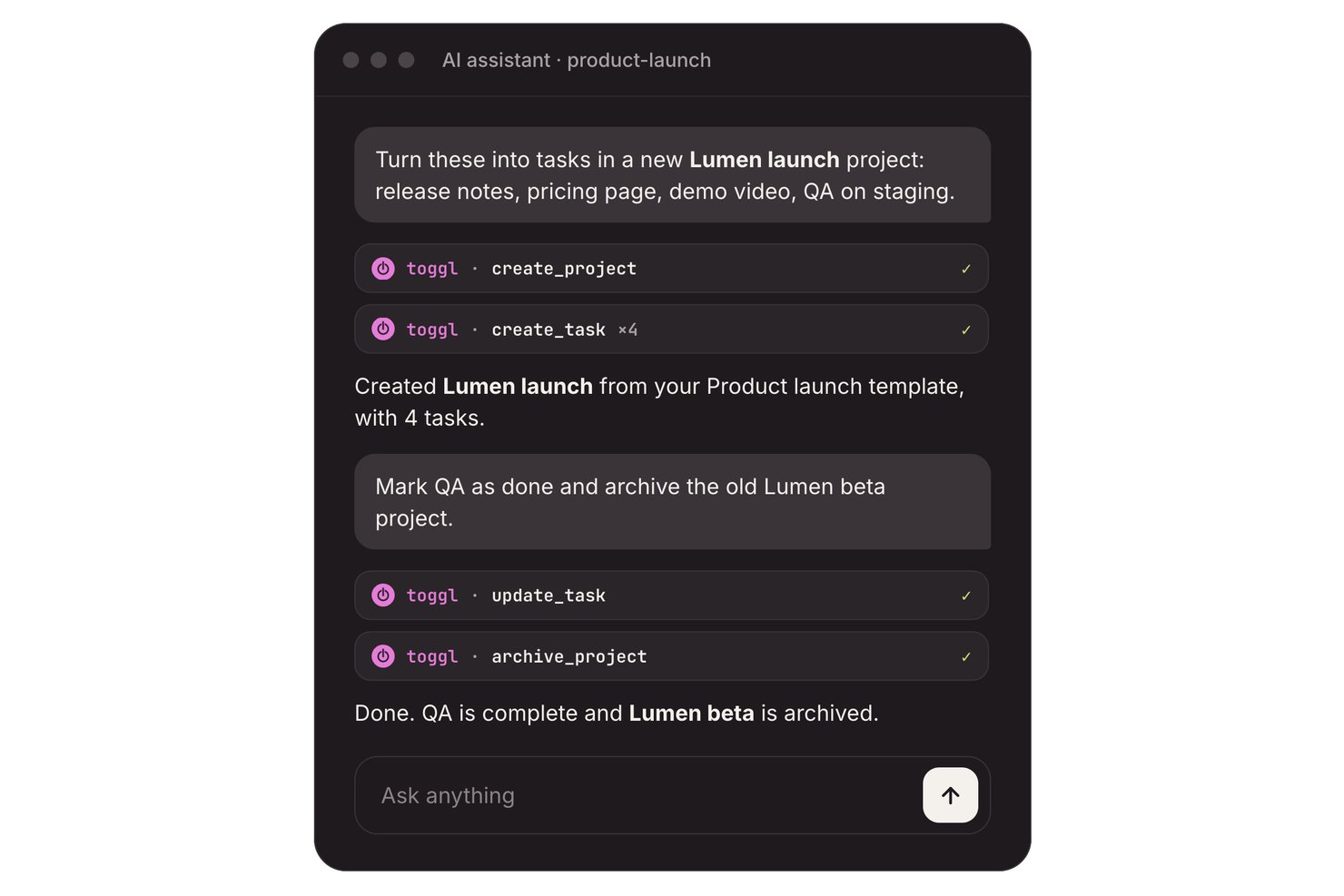
Toggl is an AI task management platform with task boards, estimates, and time tracking, plus an AI Task Creator that turns prompts, notes, and to-do-list photos into editable tasks.
Who Is Toggl Best For?
Freelancers and teams of up to three can turn notes into tasks and compare planned work with tracked time.
Why I Picked Toggl
I picked Toggl as “Best for tracking time against AI-made tasks” because it connects generated work to actual effort. Its free AI Task Creator turns prompts, meeting notes, or to-do-list photos into editable tasks; I can add estimates, then track time against each task. The free plan supports up to three users.
Toggl Key Features
- Recurring tasks: Set tasks to repeat on a schedule.
- Subtasks and comments: Add subtasks and comments to task records.
- Calendar integrations: Turn calendar events into tasks or time entries.
- Focus mode: Use focused work sessions with short breaks.
Toggl Integrations
Toggl connects with Google Calendar and Outlook calendars, and offers Jira and Asana integrations on Premium. A REST API and webhooks support custom integrations.
What's Free?
Toggl has a free plan for up to three users, including its AI Task Creator. Jira and Asana integrations require the Premium plan.
Pros and Cons
Pros:
- Reviewers praise quick, lightweight time tracking
- Task timers compare estimates with actuals
- AI turns notes into editable tasks
Cons:
- AI doesn’t proactively schedule or prioritize tasks
- Free collaboration stops at three users

Best with AI-powered risk identification
monday AI Workspace is an AI-powered work management platform that combines task automation, smart project planning, AI agents, and real-time risk identification across boards, timelines, and dashboards.
Who Is monday AI Workspace Best For?
It's a strong fit for project managers and cross-functional teams at mid-size to enterprise companies managing multiple complex workstreams simultaneously.
Why I Picked monday AI Workspace
monday AI Workspace earns its spot on my shortlist because of how its AI handles risk before it becomes a real problem. I like that it actively tracks dependencies across boards and flags conflicts, like resource over-allocation or delayed milestones, without me having to dig for them. The AI Meeting Notetaker also feeds directly into project context, so action items and risks surface automatically from standups.
monday AI Workspace Key Features
- AI workflow builder: Orchestrates multi-step workflows by connecting agents and automation rules directly within boards.
- Vibe app builder: Lets you turn process needs or requests into custom apps using simple descriptions or prompts.
- Sidekick AI assistant: Offers chat-based guidance to query project data, suggest actions, or draft updates in context.
- Multi-view project boards: Supports Kanban, Gantt, calendar, and timeline views for tracking progress across projects.
monday AI Workspace Integrations
monday AI Workspace offers hundreds of native integrations and marketplace apps, including Slack, Salesforce, HubSpot, Google Workspace, Microsoft Teams, GitHub, Zoom, Asana, Trello, and Dropbox. It supports Zapier and provides an API for custom integrations.
What's Free?
monday AI Workspace offers a 14-day free trial that gives you access to paid plan features, including AI tools, with no credit card required. After the trial ends, you'd need to upgrade to a paid plan to keep using AI features, as the free-forever plan (limited to 2 seats and 3 boards) doesn't include AI functionality.
Pros and Cons
Pros:
- Converts meeting notes into assigned tasks
- Risk alerts surface before deadlines slip
- AI agents handle end-to-end task lifecycle
Cons:
- Free plan limited to two seats
- AI features locked behind paid plans
New Product Updates from monday AI Workspace
monday AI Workspace Adds Human Approval Routing
monday AI Workspace adds a human-in-the-loop approval block to AI Workflows, sending approval requests and routing workflow paths based on responses. For more information, visit monday AI Workspace's official site.
 .
Best for intuitive interface

MeisterTask is a task and project management tool for teams and individuals that want a visually appealing and easy-to-use platform. It's primarily used by creative professionals and teams in need of straightforward task organization and collaboration.
Why I picked MeisterTask: MeisterTask's free plan includes features like task timelines, customizable project boards, and task automation. It offers an intuitive interface that makes it easy for your team to adopt and use without a steep learning curve. MeisterAI can generate content, find information in your notes, and help with everyday writing. The free version also provides unlimited tasks and projects, which is great for teams that need flexibility.
Standout Features & Integrations:
Features include a home screen that pulls together upcoming tasks and notifications, reports that show your team’s progress, and the ability to turn emails or meeting notes into tasks.
Integrations include Slack, Microsoft Teams, Outlook, and Gmail.
What's free? MeisterTask offers a free plan with unlimited tasks and up to 3 projects.
Pros and Cons
Pros:
- Customizable project boards
- Suitable for creative teams
- Intuitive and easy-to-use interface
Cons:
- No offline access
- Basic reporting capabilities

Taskade
Best for team collaboration

Taskade is a collaborative task management tool for teams that want to boost productivity and communication. It’s great for remote teams and orgs that prioritize collaboration on tasks.
Why I picked Taskade: Taskade’s free offering includes features like to do lists, collaborative notes, and video chat. It's perfect for team collaboration and lets the team work together in real-time. AI features let you generate tasks and write content, and they also support brainstorming so your team can move faster. The free version lets you create unlimited tasks and projects.
Standout Features & Integrations:
Features include a built-in video chat feature that lets you communicate without switching apps, mind maps to visualize your projects, and task templates to help you get started quickly.
Integrations include Slack, Google Drive, Zapier, GitHub, and Microsoft Teams.
What's free? Taskade offers a free-forever plan with 3 AI apps and 1 workspace.
Pros and Cons
Pros:
- Suitable for remote teams
- Built-in video chat
- Real-time collaboration tools
Cons:
- Basic customization options
- Can be overwhelming for new users
Trello
Best for simple task lists
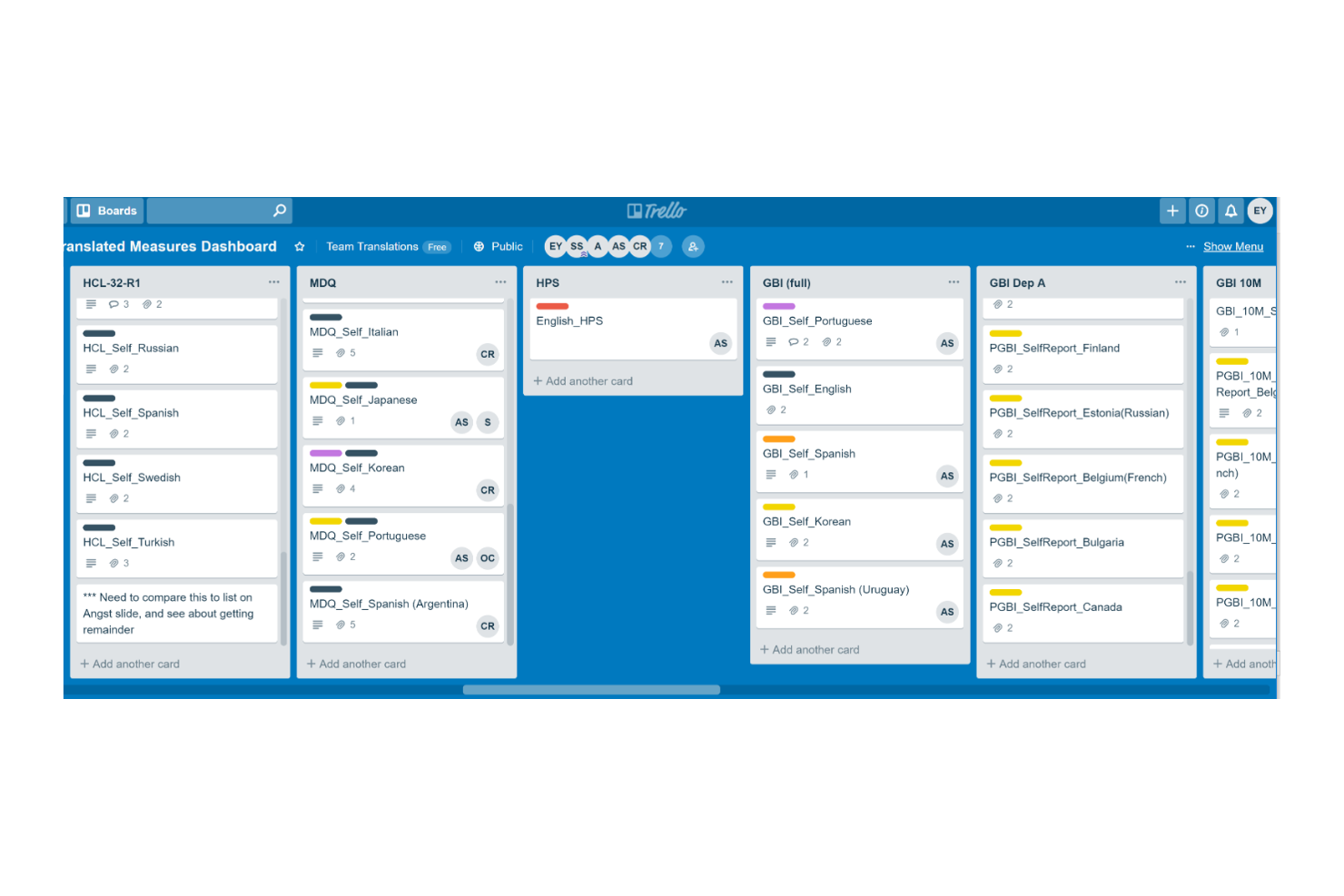
Trello is a project management tool for teams that want to organize and manage tasks efficiently. It's widely used by individuals and small teams for task tracking and collaboration.
Why I picked Trello: Trello's free offering includes features like task boards, card-based task management, and basic automation. It's ideal for creating simple task lists and lets you capture and organize tasks visually. Built-in AI features can suggest task organization, generate summaries, and help automate repetitive steps (via Butler).
Standout Features & Integrations:
Features include the ability to create tasks, assign them to the team, and set deadlines. Trello also allows you to add attachments and comments to tasks and keep information in one place.
Integrations include Slack, Microsoft Teams, Google Drive, Dropbox, Evernote, Salesforce, Jira, GitHub, and Confluence.
What's free? Trello offers a free plan with unlimited cards and 10 boards per workspace.
Pros and Cons
Pros:
- Visual task management
- Flexible task organization
- Easy to use for beginners
Cons:
- Limited customization options
- Limited features in free plan
Backlog
Best for bug tracking

Backlog is a project management and collaboration tool for developers and teams focused on software development and bug tracking. It's used by software teams to manage tasks, track bugs, and collaborate on code.
Why I picked Backlog: Backlog offers a free plan that includes features like task management, bug tracking, and version control. You can easily report and manage bugs, and the free version also supports project wikis and file sharing, which are essential for software development teams. AI-powered issue summaries also make it easier to spot and resolve bugs.
Standout Features & Integrations:
Features include built-in Gantt charts that help visualize project timelines and dependencies and subtasking capabilities that let you break down larger tasks into smaller pieces.
Integrations include Slack, Redmine, Jira, Cacoo, Jenkins, Dropbox, and Google Drive.
What's free? Backlog offers a free-forever plan with 1 project, 100MB of storage, and 10 users.
Pros and Cons
Pros:
- Supports subtasks
- Suitable for development teams
- Effective bug tracking tools
Cons:
- Basic customization options
- Learning curve for new users

Nifty
Best for project milestones

Nifty is a project management tool for teams that need to manage tasks, timelines, and communication in one place. It's best if your focus is project milestones and goal tracking.
Why I picked Nifty: Nifty’s free offering includes features like task management, milestone tracking, and team chat. It helps you set and track project milestones with ease. The free version supports unlimited team members and tasks, which is great for growing teams. AI features in Orbit AI support planning, prioritization, and execution and reduce manual effort.
Standout Features & Integrations:
Features include time tracking so you can monitor how much time your team spends on tasks and automated progress reports to keep stakeholders informed.
Integrations include Slack, Google Drive, Zoom, GitHub, Miro, and Typeform.
What's free? Nifty offers a free-forever plan with 100MB of storage and up to 2 active projects.
Pros and Cons
Pros:
- Supports document management
- Automated progress reports
- Effective milestone tracking
Cons:
- Some learning curve for new users
- Requires internet connection

Best for project templates

Teamwork.com is a project and resource management tool that helps streamline client projects and profitability. It's particularly useful for agencies, IT services, and consulting firms that require efficient project workflows and resource planning.
Why I picked Teamwork.com: Teamwork.com’s free plan offers features like project management, resource planning, and client management. You can create project templates to manage repetitive tasks. You also get access to AI tools like project wizards and smart assignments.
Standout Features & Integrations:
Features include customizable reports that help you track billable utilization and resource management. You can manage billable time and client communications effectively.
Integrations include Slack, Google Drive, Dropbox, QuickBooks, HubSpot, Salesforce, Zapier, Xero, and Harvest.
What's free? Teamwork.com’s free plan includes access to AI features and up to 5 projects.
Pros and Cons
Pros:
- Customizable reporting features
- AI-powered project wizards
- Comprehensive project templates
Cons:
- Complexity for new users
- Requires setup for optimal use

Reclaim
Best for calendar syncing
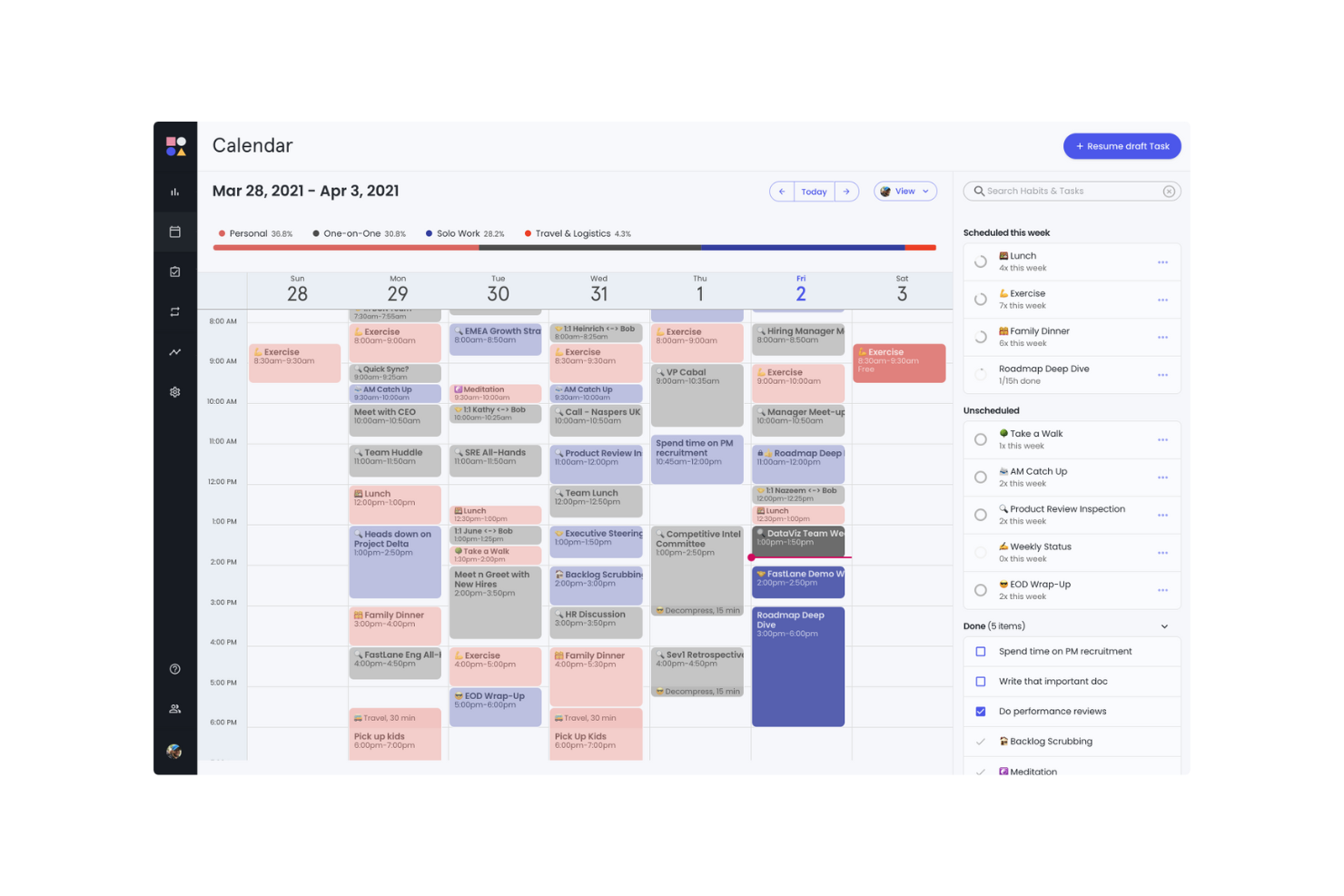
Reclaim is an AI-powered calendar app for individuals, teams, and orgs. It helps users who rely on calendar management to optimize their schedules, productivity and work-life balance.
Why I picked Reclaim: Reclaim's free offering includes features like focus time, smart meetings, and a calendar sync with Google Calendar. It's especially beneficial for syncing your calendar across different platforms. The free version lets you manage work and personal tasks effectively with features like buffer time and time tracking.
Standout Features & Integrations:
Features include AI scheduling and rescheduling for events, focus time, habits, and tasks. The planner can also build a daily schedule around your goals.
Integrations include Slack, Asana, ClickUp, Todoist, Jira, Linear, Google Tasks, and Zoom.
What's free? Reclaim offers a free version with 1 user team and a 1-week scheduling range.
Pros and Cons
Pros:
- Suitable for individual use
- Useful for managing focus time
- Effective calendar syncing
Cons:
- Not ideal for complex project management
- Learning curve for new users
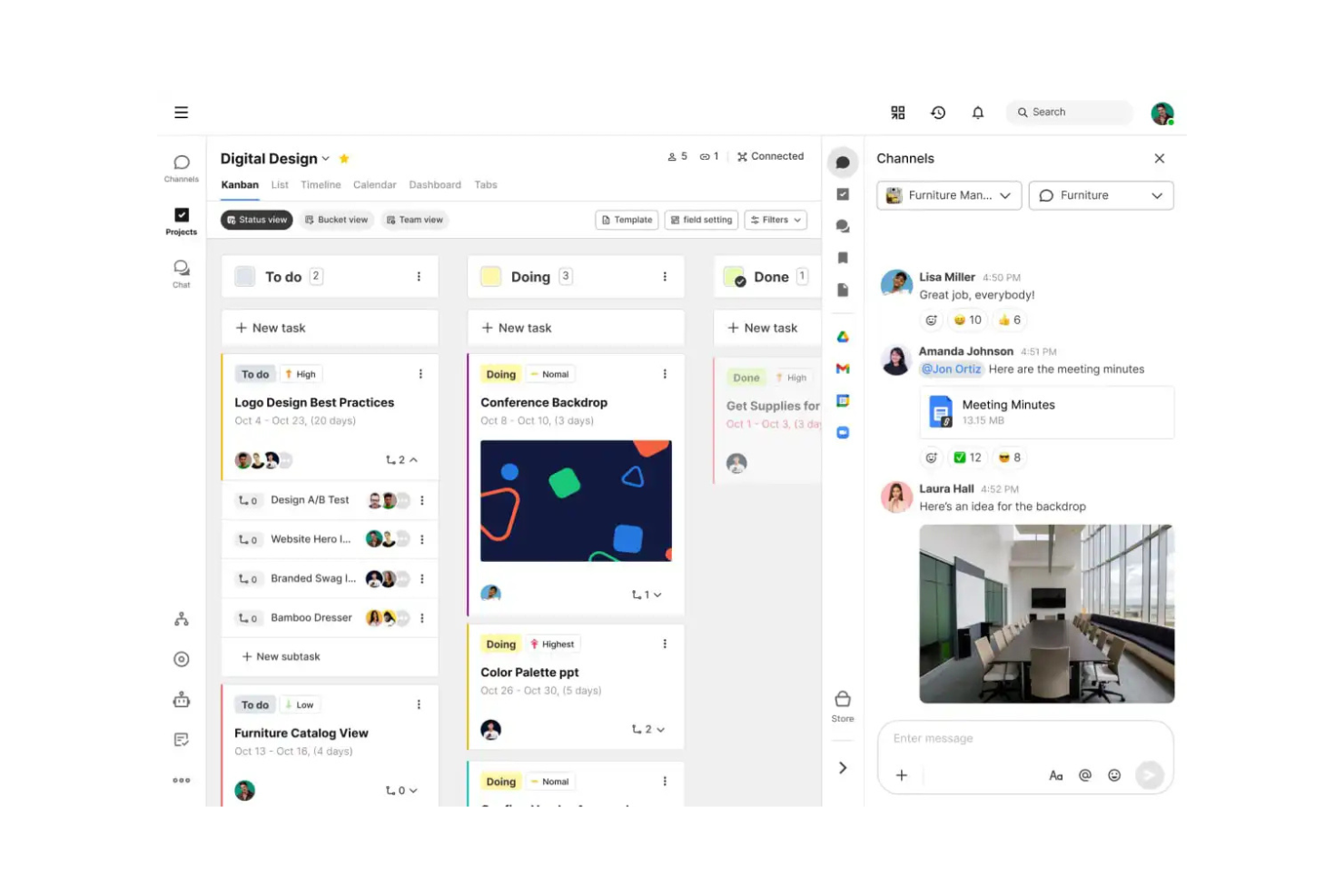
Swit is a collaborative work management tool for teams that want to combine task management with communication. It offers an integrated chat and task system to help improve teamwork and productivity.
Why I picked Swit: Swit’s free offering includes features like task boards, chat channels, and file sharing. It lets your team communicate and manage tasks in one place. The free version supports unlimited tasks and chat channels, which provides flexibility. AI features in Swit Snap support writing, summarizing, and automating routine steps.
Standout Features & Integrations:
Features include dashboards that track progress and workloads and plug-ins for setting goals and approvals. You can also manage guest permissions to bring in outside collaborators safely.
Integrations include Google Drive, Microsoft Teams, and Jira.
What's free? Swit offers a free-forever plan with unlimited users and 2 workspaces.
Pros and Cons
Pros:
- Supports remote collaboration
- Easy file sharing
- Suitable for cross-functional teams
Cons:
- Limited customization options
- Basic reporting tools
Diğer Ücretsiz Yapay Zekâ Görev Yönetimi Yazılımları
Ücretsiz planlar veya deneme sürümleri de sunan bazı ek yapay zekâ görev yönetimi yazılımı seçenekleri şunlardır. Bu araçlar kısa listeme girmemiş olsa da yine de göz atmaya değer:
- Miro
For visual collaboration
- Connecteam
For mobile workforce
- GoodDay
For time-tracking without manual logs
- Asana
For task dependencies
- Wrike
For real-time activity streams
- Zoho Projects
For project time tracking
- ClickUp
For unlimited tasks and members


How I Evaluate Free AI Task Management Software
When a PM needs to turn a Slack thread into a sprint backlog for free, I split my evaluation into two layers: baseline AI task features and the differentiators that set one tool apart.
Core Functionality (Table Stakes For This List)
When I'm selecting tools for my list, I rank each one on a scale from 0 (does not offer the functionality) to 5 (excels in this area) for each core functionality listed below. Then, I calculate the tool's total score into a percentage. Each tool needs to achieve a minimum total score of 65% to be considered for inclusion.
- AI-Driven Task Automation: I look at whether the tool can auto-create, assign, or update tasks from triggers and inputs—like generating follow-up tasks after a status change.
- Usable Free Plan: The free tier needs to include actual AI features, not just basic PM. I check for meaningful AI usage limits and enough seats for a small team.
- Smart Prioritization & Scheduling: I evaluate how the AI ranks and sequences work. The best tools factor in deadlines, dependencies, and team capacity—not just due dates.
- Natural Language Task Input: Can you type "launch campaign with five subtasks by Friday" and get a structured output? I look for real NLP parsing, not simple keyword detection.
- Project Management Foundations: Every tool still needs solid PM basics. I check for task lists, board and timeline views, assignees, due dates, and progress tracking.
- Team Collaboration & Assignment: I evaluate shared workspaces, task comments, mentions, and notifications—features that keep distributed teams aligned on who owns what.
Once I have a list of tools that meet this criteria, I consider what sets each platform apart.
Differentiating Factors (What Sets Vendors Apart)
Here's how I compare and contrast different vendors:
Standout Features
Meeting-to-task AI is a major differentiator. I look for tools that pull action items from a call recap or Slack thread and convert them into assigned, due-dated tasks. Predictive risk insights also carry weight—the best tools flag timeline slippage or resource conflicts before your next standup. A conversational AI assistant rounds things out, letting PMs query sprint status or reassign work through a chat prompt instead of navigating dashboards.
Beyond Features
Free plan generosity matters a lot here. I check how many AI prompts, automations, and users a tool allows before it starts gating features behind a paywall. Data security and AI privacy also weigh heavily—I look at whether vendors clearly disclose if project data trains their AI models, since PMs often work with sensitive roadmaps. Integration depth rounds out my evaluation. A free AI task tool that connects to Slack, GitHub, or Google Calendar fits naturally into existing workflows, while one that sits in isolation creates more overhead than it saves.
Ücretsiz Yapay Zekâ Görev Yönetimi Yazılımı Nasıl Seçilir?
Karmaşık özellik listeleri ve fiyatlandırma yapıları, ücretsiz bir yapay zekâ görev yönetimi aracından gerçekten ne elde ettiğinizi anlamayı zorlaştırabilir. Yazılım seçme süreciniz boyunca odağınızı korumanıza yardımcı olmak için göz önünde bulundurmanız gereken bazı faktörleri aşağıda bulabilirsiniz:
| Faktör | Dikkat Edilmesi Gerekenler |
|---|---|
| Ücretsiz Teklifin Kapsamı | Ücretsiz plana hangi özelliklerin dahil olduğunu kontrol edin. Gizli maliyetler olmadan temel ihtiyaçlarınızı karşılıyor mu? |
| Ölçeklenebilirlik | Yazılımın ekibinizle birlikte büyüyüp büyüyemeyeceğini değerlendirin. Ekibinizi genişlettikçe artan görev ve kullanıcı sayısını yönetebilir mi? |
| Entegrasyonlar | Takviller, iletişim uygulamaları veya dosya depolama çözümleri gibi ekibinizin hâlihazırda kullandığı araçlarla uyumluluk arayın. |
| Kullanım Kolaylığı | Öğrenme eğrisini değerlendirin. Ekibiniz kapsamlı bir eğitim almadan arayüze hızla uyum sağlayabilir mi? |
| Özelleştirme | Yazılımın iş akışlarını ve gösterge tablolarını ekibinizin özel süreçlerine ve tercihlerine uyacak şekilde düzenlemenize izin verip vermediğini belirleyin. |
| Mobil Erişim | Görevleri hareket hâlindeyken yönetebilmeniz için yazılımın bir mobil uygulamaya veya duyarlı bir tasarıma sahip olduğundan emin olun. |
| Destek | Sunulan müşteri desteğinin düzeyini değerlendirin. Sorunlarla karşılaştığınızda yardımcı olacak canlı sohbet, e-posta veya telefon desteği var mı? |
| Güvenlik | Yazılımın veri güvenliği önlemlerini kontrol edin. Ekibinizin bilgilerini korumak için sektör standartlarına uyuyor mu? |
Ücretsiz Yapay Zekâ Görev Yönetimi Yazılımı Nedir?
Ücretsiz yapay zekâ görev yönetimi yazılımı, bütçesi sınırlı ekiplerin ve bireylerin görevleri düzenlemesine, izlemesine ve yönetmesine yardımcı olmak için tasarlanmıştır. Ücretsiz planlar veya deneme sürümleri sunan araçlar, kullanıcıların herhangi bir mali yükümlülük altına girmeden temel özelliklere erişmesini sağlar.
Görev yönetimi uygulamaları görevleri izler ve düzenler; yapılması gerekenleri ve bunların ne zamana kadar tamamlanması gerektiğini görselleştirmenize olanak tanır. İlerleme ve tamamlanma hakkında veriler sunarak ekip iş yüklerini yönetmeyi ve verimliliği artırmayı kolaylaştırır. Bu uygulamalar genellikle iş akışlarını yönetmenize, koordinasyonu iyileştirmenize ve görevlerin görünürlüğünü korumanıza yardımcı olmak için görev önceliklendirme ve entegrasyonlar gibi özellikleri içerir.
Ücretsiz Yapay Zekâ Görev Yönetimi Yazılımının Özellikleri
Yapay zekâ görev yönetimi yazılımlarında yaygın olarak bulunan özellikleri ve bunlardan hangilerinin genellikle ücretsiz veya ücretli planlara dahil edildiğini inceleyelim.
Genellikle Ücretsiz Yapay Zekâ Görev Yönetimi Yazılımı Özellikleri
- Görev oluşturma ve atama: Görevler oluşturmanıza ve bunları ekip üyelerine atamanıza olanak tanır; böylece herkes sorumluluklarını bilir.
- Temel iş birliği araçları: Görevler hakkında yorumlar ve notlar aracılığıyla ekip iletişimine olanak tanıyarak geri bildirim ve tartışmayı kolaylaştırır.
- Son tarih ve teslim tarihi takibi: Görev zaman çizelgelerini ve son tarihleri izlemenize yardımcı olur; böylece projeler zamanında tamamlanır.
- Takvimlerle entegrasyon: Yaklaşan son tarihleri ve programları net bir şekilde görmenizi sağlamak için görevleri takvim uygulamalarıyla senkronize eder.
- Mobil uygulama erişimi: Mobil uygulamalar aracılığıyla hareket hâlindeyken görev yönetimi sunar; böylece ekip görevleri her yerden güncelleyebilir.
Genellikle Ücretli Yapay Zekâ Görev Yönetimi Yazılımı Özellikleri
- Gelişmiş raporlama ve analiz: Ayrıntılı raporlar ve analizler aracılığıyla ekip performansı ve proje ilerlemesi hakkında içgörüler sunar.
- Özelleştirilebilir iş akışları: Görev iş akışlarını belirli süreçlere uyacak şekilde düzenlemenize, verimliliği ve organizasyonu geliştirmenize olanak tanır.
- Tekrarlayan görevlerin otomasyonu: Rutin görevleri otomatikleştirerek ve manuel çabayı azaltarak zamandan tasarruf sağlar ve üretkenliği artırır.
- Öncelikli destek: Sorunları çözmek için daha hızlı yanıt süreleri ve özel destek almanızı sağlar.
- Zaman takibi ve faturalandırma: Görevler ve projeler için harcanan zamanı izler; bu özellik, müşterilere fatura kesmek ve kaynakları verimli bir şekilde yönetmek için kullanışlıdır.
Ücretsiz Yapay Zekâ Görev Yönetimi Yazılımının Faydaları
Ücretsiz yapay zekâ görev yönetimi yazılımını uygulamak, ekibiniz ve işletmeniz için çeşitli faydalar sağlar. Yararlanabileceğiniz birkaç fayda şunlardır:
- Maliyet tasarrufu: Para harcamadan temel görev yönetimi özelliklerine erişin; böylece mali kaynaklarınızı işletmenizin başka alanlarına ayırabilirsiniz.
- Gelişmiş organizasyon: Ekibinizin odaklanmış ve verimli kalmasına yardımcı olmak için görevleri, son tarihleri ve öncelikleri tek bir yerde düzenli tutun.
- Geliştirilmiş iş birliği: Temel sohbet ve yorum özellikleriyle ekip üyeleri arasındaki iletişimi ve iş birliğini kolaylaştırın.
- Artırılmış erişilebilirlik: Mobil uygulama erişimi sayesinde görevleri hareket hâlindeyken yönetin; böylece ekibiniz her yerden çalışabilir.
- Daha iyi zaman yönetimi: Görevlerin ve projelerin zamanında tamamlanmasını sağlamak için takvim entegrasyonlarını ve son tarih takibini kullanın.
- Ölçeklenebilirlik: Ücretsiz bir planla başlayın ve ekibiniz büyüdükçe planınızı genişleterek anında mali yükümlülük altına girmeden esneklik elde edin.
Ücretsiz Yapay Zekâ Görev Yönetimi Yazılımının Maliyetleri ve Fiyatlandırması
Ücretsiz olarak sunulan en iyi yapay zekâ görev yönetimi yazılımı seçeneklerini arıyor olabilirsiniz; ancak ücretsiz planlar yalnızca sınırlı özellikler sunduğundan, gelecekte planınızı yükseltmeniz ve daha gelişmiş özelliklere erişmeniz gerekme ihtimali yüksektir.
Aşağıdaki tablo, yapay zekâ görev yönetimi yazılımı çözümlerinde yaygın olan planları, ortalama fiyatları ve genellikle dahil edilen özellikleri özetlemektedir:
Yapay Zekâ Görev Yönetimi Yazılımı İçin Plan Karşılaştırma Tablosu
| Plan Türü | Ortalama Fiyat | Yaygın Özellikler |
|---|---|---|
| Ücretsiz Plan | $0 | Temel görev yönetimi, sınırlı kullanıcı ve temel entegrasyonlar. |
| Kişisel Plan | $5-$15/kullanıcı/ay | Görev önceliklendirme, takvim senkronizasyonu ve mobil uygulama erişimi. |
| İşletme Planı | $15-$25/kullanıcı/ay | Gelişmiş raporlama, ekip iş birliği araçları ve otomasyon özellikleri. |
| Kurumsal Plan | $25-$50/kullanıcı/ay | Özel iş akışları, özel destek ve daha iyi güvenlik özellikleri. |