

2026’da Bireyler İçin En İyi 10 Görev Yönetimi Yazılımı

Bireyler İçin En İyi Görev Yönetimi Yazılımları Kısa Listesi


Bireyler için görev yönetimi yazılımı, kişisel projelerinizdeki görevleri düzenlemenize, hatırlatıcılar ayarlamanıza ve ilerlemenizi takip etmenize olanak tanır; tüm bunları tek bir yerde yapabilirsiniz. Önceliklerinizi belirlemenize, odağınızı korumanıza ve iş teslim tarihlerinden günlük alışkanlıklara kadar her şeyi yönetmenize yardımcı olacak araçlar arıyorsanız yalnız değilsiniz. Daha fazla üretkenlik ve daha az stres vadeden bu kadar çok seçenek varken gerçekten işe yarayanı bulmak bunaltıcı gelebilir. Bu rehberde, bireyler için en iyi görev yönetimi yazılımlarını inceleyerek özellikleri hızlıca karşılaştırabilmenizi, iş akışınıza uygun olanı bulabilmenizi ve 2026 yılında zamanınız üzerinde daha fazla kontrol sahibi olabilmenizi sağlayacağım.
Why Trust Our Software Recommendations
Our team has been testing and reviewing software since 2012. As project managers ourselves, we know how difficult—and important—it is to choose the right software.
For this guide, we evaluated tools using hands-on testing and independent research, scoring tools using our selection criteria. We also draw on insights from industry thought leaders and practicing project management experts.
Our reviews reflect our human editorial judgment, not a sales pitch.
Expert reviewers:
Karşılaştırma Tablosu: Bireyler İçin Görev Yönetimi Yazılımları Özeti
Bu karşılaştırma tablosu, bireyler için en iyi görev yönetimi yazılımları arasından seçtiklerimin fiyatlandırma ayrıntılarını özetlemektedir:
| Tool | Starting Price | Website | |
|---|---|---|---|
| Best for task inbox for fast universal capture | 4.7 out of 5 | $19/user/month 7-day free trial | Website |
| Best for Kanban boards for solo workflows | 4.5 out of 5 | $5/user/month Free plan + free trial available | Website |
| Best for all-in-one docs and task workspace | 4.6 out of 5 | $10/user/month Free plan + 30-day trial available | Website |
| Best for custom perspectives for workflows | 4.6 out of 5 | $4.99/month 14-day free trial | Website |
| Best for smooth integration with Google Calendar | 4.2 out of 5 | Free to use Free-forever plan available | Website |
| Best for Outlook and Office 365 syncing | 4.7 out of 5 | Free to use Free-forever plan available | Website |
| Best for natural language task entry | 4.6 out of 5 | $5/user/month Free plan available | Website |
| Best for built-in habit tracking integration | 4.6 out of 5 | $49.99/year Free plan available | Website |
| Best for personal cross-device reminders | 4.1 out of 5 | $4.99/user/month Free plan + free demo available | Website |
| Best for macOS native design and performance | — | $9.99 15-day free trial | Website |
Bireyler İçin En İyi Görev Yönetimi Yazılımları İncelemeleri
Aşağıda, kısa listeme giren bireyler için en iyi görev yönetimi yazılımlarına ilişkin ayrıntılı özetlerimi bulabilirsiniz. İncelemelerim, sizin için en uygun seçeneği bulmanıza yardımcı olmak amacıyla her aracın özelliklerini, en uygun kullanım alanlarını ve entegrasyonlarını ayrıntılı şekilde ele almaktadır.

Akiflow
Best for task inbox for fast universal capture
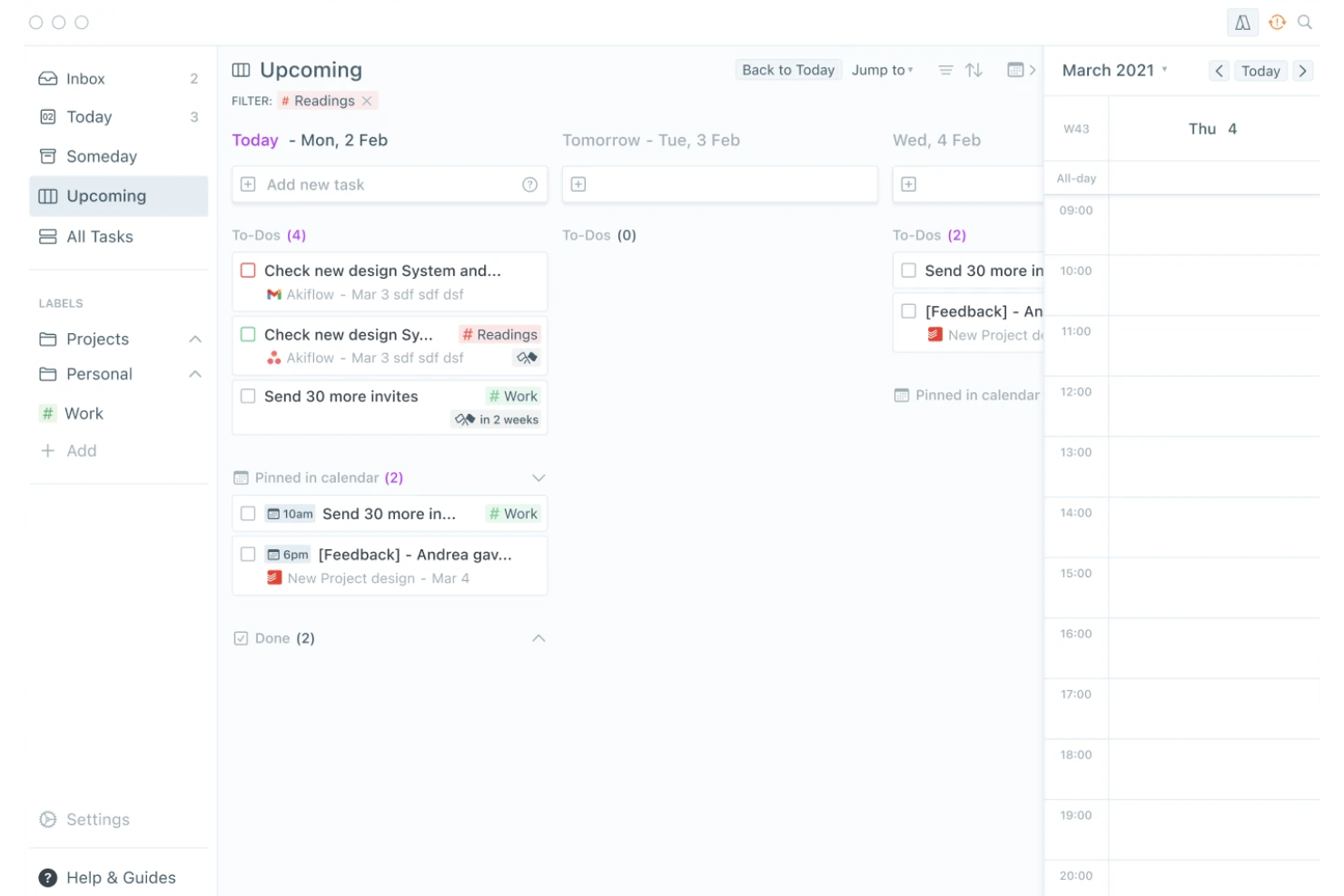
Akiflow is a personal task management app that combines a universal task inbox, time blocking, and calendar integration into a single daily planning interface.
Who Is Akiflow Best For?
Akiflow suits solo consultants and freelance professionals who manage tasks across multiple tools and need a single place to capture and schedule their day.
Why I Picked Akiflow
Akiflow earns its spot on my shortlist because the universal task inbox genuinely solves one of the messiest parts of solo work: tasks scattered across Slack, email, Notion, and five other tools. I love how the Command Bar lets me capture a task using natural language, like "Client call Friday at 2pm for 1 hour," and have it land directly on my calendar. In practice, that means I spend almost no time deciding where a task goes or how to schedule it.
Akiflow Key Features
- Custom recurring tasks: Set up tasks on daily, weekly, monthly, or fully custom repeat schedules.
- Unified calendar integration: Syncs Google and Outlook calendars for one central planning space.
- Focus timer and rituals: Use built-in timers and guided daily shutdowns to structure your workday.
- Cross-platform sync: Access tasks on Mac, Windows, iOS, Android, and web with real-time updates.
Akiflow Integrations
Akiflow offers native integrations with Google Calendar, Outlook, Gmail, Slack, Notion, Todoist, ClickUp, Linear, Microsoft Teams, and Zoom, and it connects with Zapier.
Pros and Cons
Pros:
- Natural language input for rapid task entry
- Smooth calendar integration with time blocking
- Quick universal inbox capture across platforms
Cons:
- Lacks a permanent free plan
- No Kanban or board visualization
Trello
Best for Kanban boards for solo workflows
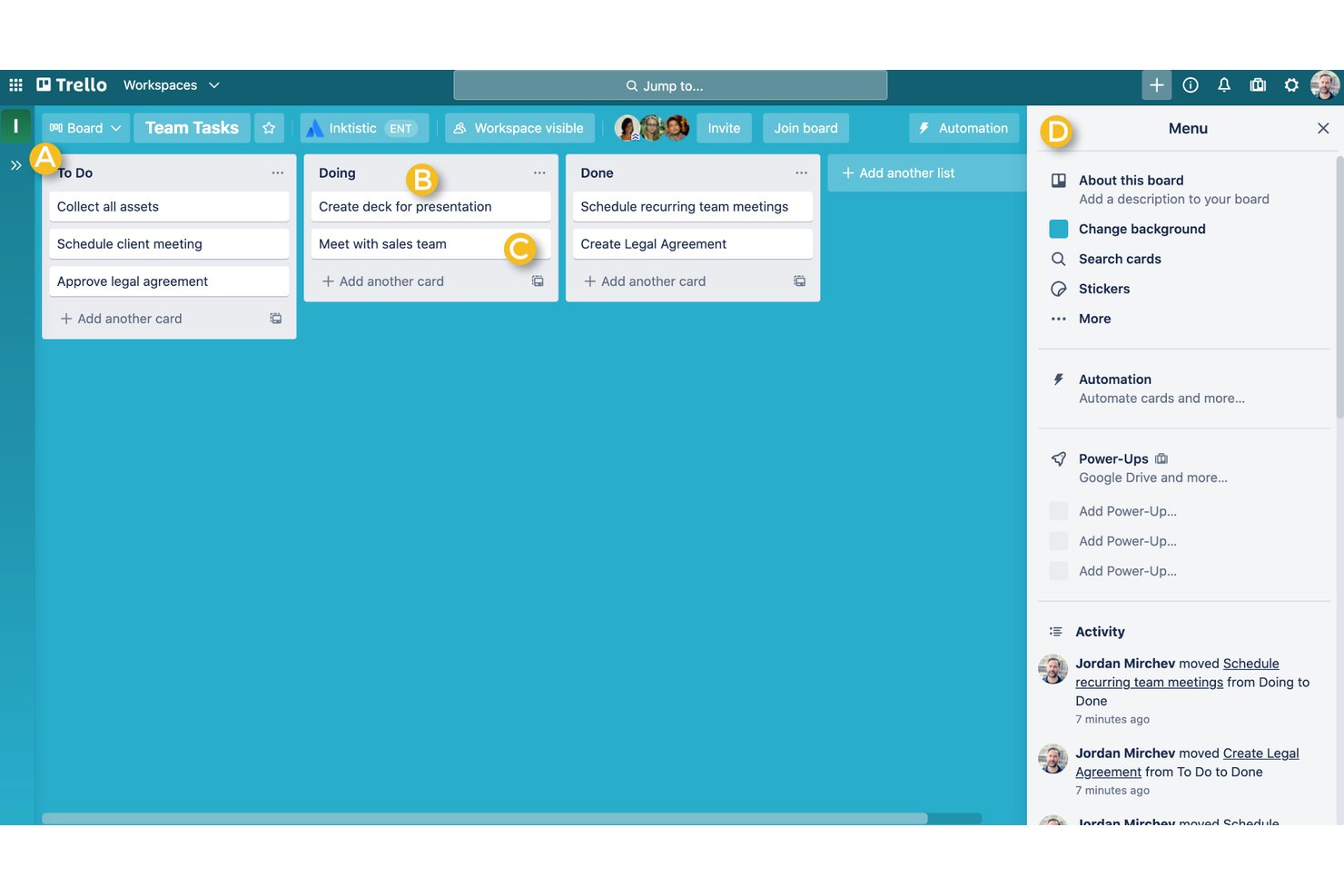
Trello is a visual task management tool built around Kanban boards, cards, and lists, with support for multiple views, built-in automation, and task capture from email and messaging apps.
Who Is Trello Best For?
Trello is a strong fit for freelancers and solo consultants who want a low-overhead, visual way to track tasks across multiple client projects.
Why I Picked Trello
Trello earns its spot on my shortlist because its Kanban board is the cleanest I've used for a solo workflow. I keep one board per client, use color-coded labels to flag priority, and pull tasks straight from email into the Inbox before sorting them into the right list. When my workload gets messy, the built-in Eisenhower Matrix template is something I keep coming back to for a fast reset.
Trello Key Features
- Advanced checklists: Break down tasks into subtasks with individual assignees and due dates.
- Power-Ups gallery: Extend boards with calendar sync, card aging, and 200+ app integrations.
- Butler automation: Create custom rules for recurring tasks, card movement, and notifications.
- AI card tools: Use AI to generate content, edit descriptions, and brainstorm directly within cards.
Trello Integrations
Trello offers native integrations through its Power-Ups gallery, including Slack, Google Drive, Figma, Jira, Google Calendar, and Zapier. An API is available for custom integrations.
Pros and Cons
Pros:
- Quick Capture pulls tasks from email and chat
- Unlimited cards for solo and client boards
- Kanban board is highly visual and flexible
Cons:
- Offline functionality is limited on mobile devices
- Recurring tasks need custom automation setup

Notion
Best for all-in-one docs and task workspace
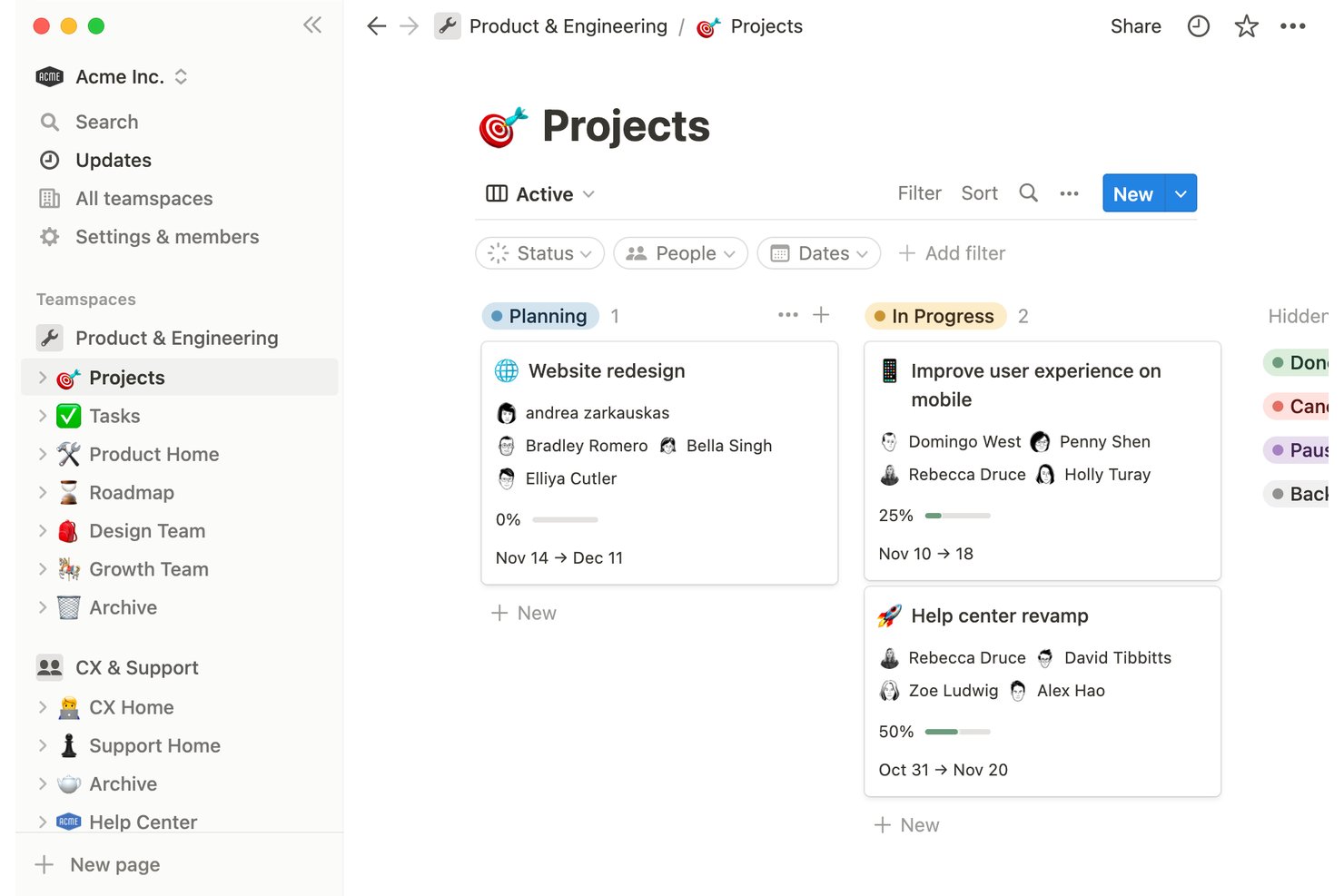
Notion is a block-based personal workspace that combines task management, notes, and databases into a single customizable environment for individuals managing projects, habits, and ideas.
Who Is Notion Best For?
Notion is a strong fit for freelancers and independent professionals who want to manage tasks, notes, and client projects in one place rather than across multiple apps.
Why I Picked Notion
I picked Notion as one of the best because no other tool on this list lets you build a task system from scratch using flexible database blocks. I can set up a board view for active client deliverables, switch to a calendar to track deadlines, and keep project notes on the same page, all without leaving the workspace. Recurring tasks with custom cadences and multi-select priority tags mean I can handle both ongoing client work and one-off to-dos in a single database.
Notion Key Features
- Multiple task views: Switch between list, board, gallery, timeline, and calendar displays for flexible project management.
- Template gallery: Access dozens of free, ready-made personal and project templates to jumpstart organization.
- Custom properties: Add fields for priority, tags, client names, and dates to any task or database.
- Offline access: Mark important pages and databases available for use without an internet connection on mobile or desktop.
Notion Integrations
Notion offers native integrations with Slack, Google Drive, GitHub, Jira, and more. It also connects with Zapier and provides an API for custom integrations.
Pros and Cons
Pros:
- Flexible tagging and prioritization for solo projects
- Allows unlimited custom task views and templates
- Combines notes, tasks, and databases together
Cons:
- Can feel slow with large databases
- Reminders and alerts are limited

Best for custom perspectives for workflows
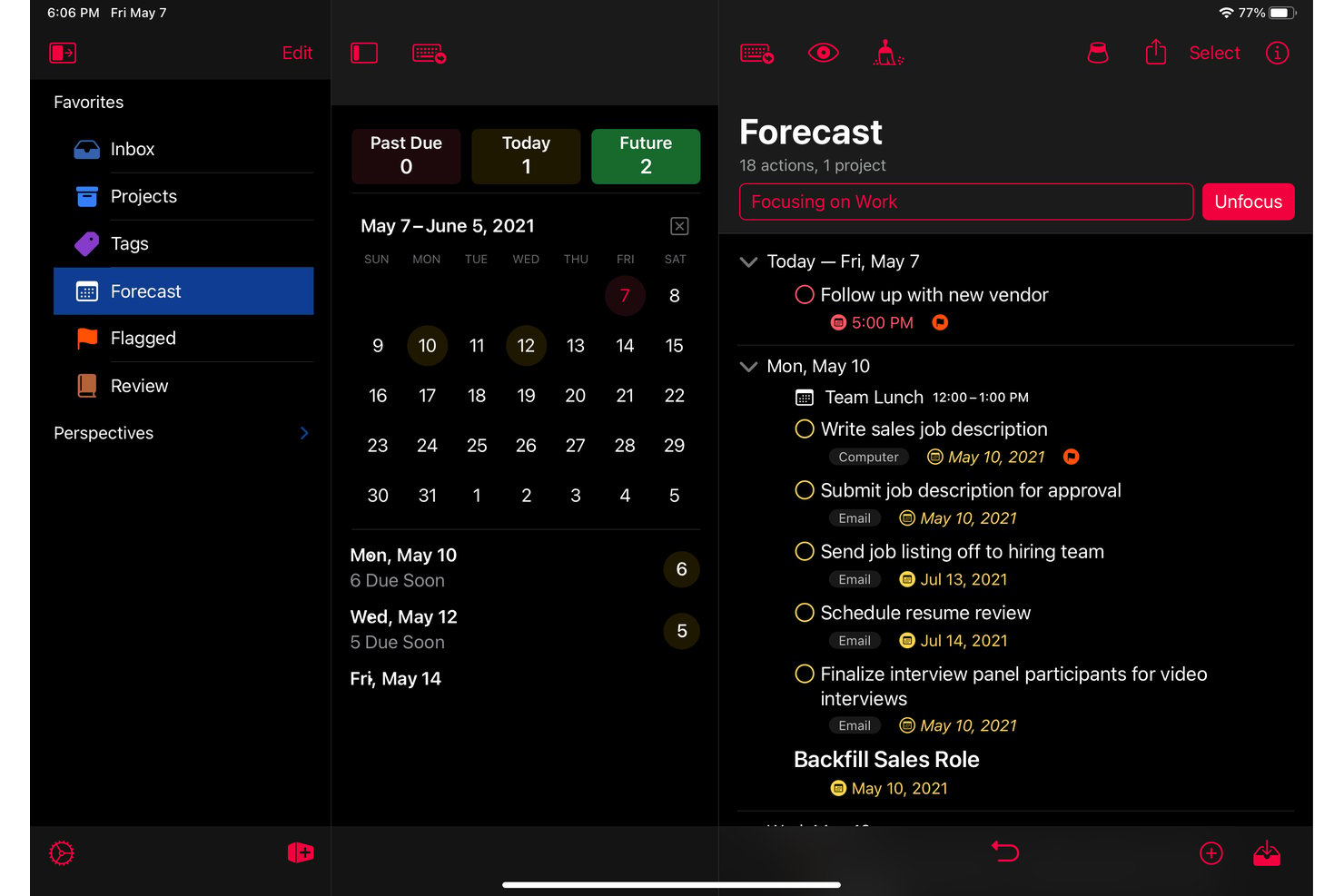
OmniFocus is an Apple-native personal task management app built around GTD methodology, with structured project organization, custom perspectives, tagging, defer and due dates, and a forecast view that combines tasks with calendar events.
Who Is OmniFocus Best For?
OmniFocus is a strong fit for solo professionals on Apple devices who manage complex, multi-project workloads and want a structured, GTD-based system for personal task management.
Why I Picked OmniFocus
OmniFocus earns its spot on my shortlist because the custom perspectives feature lets me build saved views that filter tasks by any combination of tag, project, status, and defer date. I use a "Client Deliverables Due This Week" perspective that pulls flagged tasks across all active projects into one focused list. The Forecast view then layers those tasks directly alongside my calendar, so I can see workload against availability without switching apps.
OmniFocus Key Features
- Forecast view: Combines tasks and calendar events in a single timeline for daily planning.
- End-to-end encrypted sync: Keeps tasks updated and secure across Mac, iPhone, iPad, Apple Watch, and Vision Pro.
- Review mode: Prompts structured reviews of ongoing projects and tasks on a chosen schedule.
- Batch editing: Lets users update, tag, or reschedule multiple tasks at once from any device.
OmniFocus Integrations
OmniFocus offers native integrations with Apple Calendar, Siri, and Apple Shortcuts. The tool syncs across all Apple devices, and an API is available for custom integrations.
Pros and Cons
Pros:
- Review mode for structured project check-ins
- Deep project organization with folders and tags
- Custom perspectives for workflow personalization
Cons:
- Steep initial learning for custom setups
- No native Windows or Android app

Best for smooth integration with Google Calendar
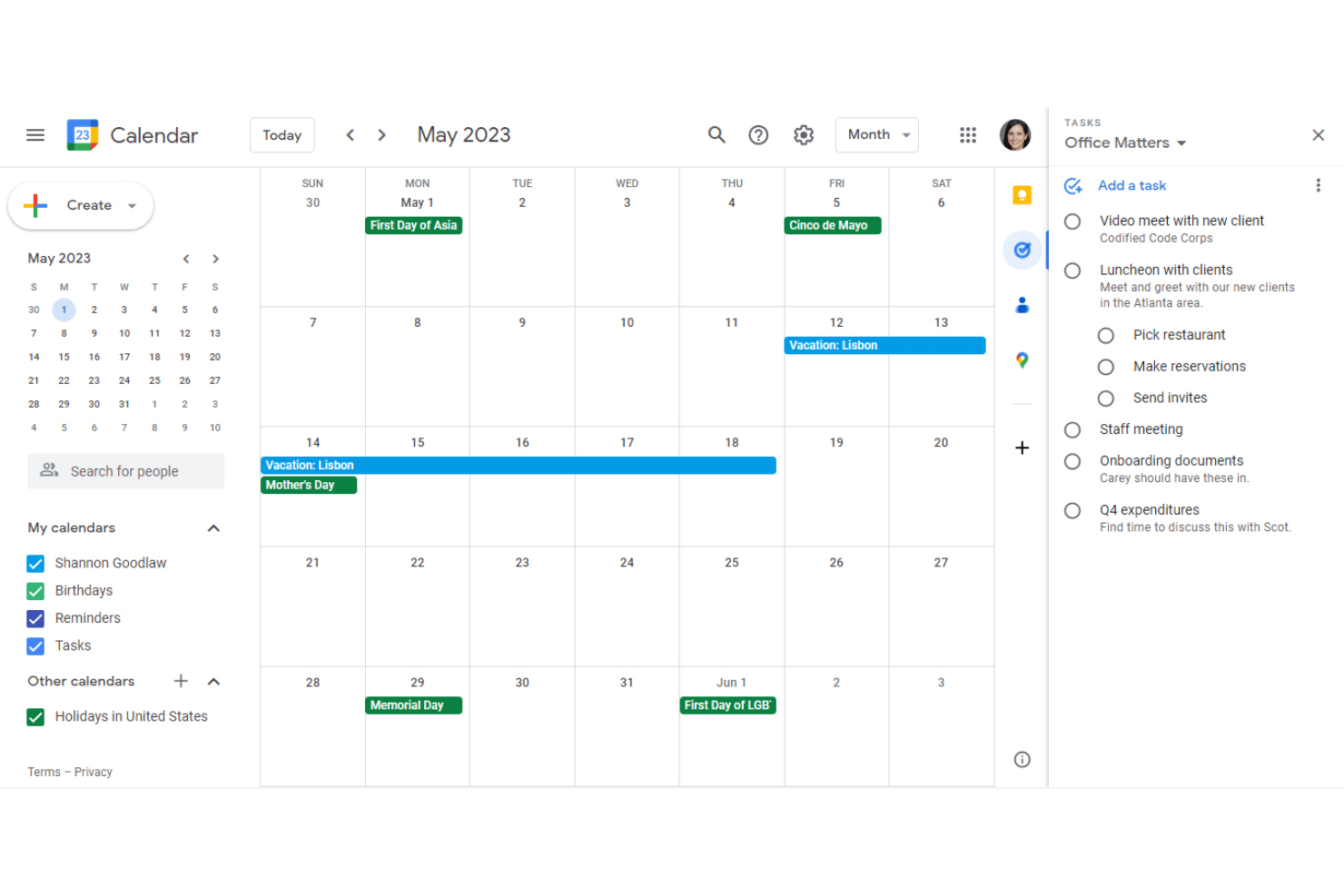
Google Tasks is a free personal task manager that lives natively inside Gmail, Google Calendar, and Google Docs, supporting to-do lists, subtasks, recurring tasks, due dates, and real-time cross-device sync.
Who Is Google Tasks Best For?
Google Tasks is a natural fit for solo professionals who already rely on Google Workspace daily and want task management without switching between apps.
Why I Picked Google Tasks
Google Tasks earns its spot on my shortlist because of how tightly it connects to Google Calendar. When I add a due date and time to a task, it shows up directly on my calendar alongside scheduled events, so nothing gets buried in a separate app. I also use the time-blocking feature to carve out focused work slots for specific tasks, which automatically mutes notifications and can decline conflicting meeting requests during that window.
Google Tasks Key Features
- Subtasks support: Break down larger tasks into manageable steps within any list.
- Multiple lists: Organize tasks by project, client, or context with separate lists for each area of work.
- Email-to-task creation: Turn Gmail messages into actionable tasks directly from your inbox for fast follow-up.
- Cross-device sync: Access and manage your task lists instantly across web and mobile devices.
Google Tasks Integrations
Google Tasks has native integrations across the Google ecosystem, including Gmail, Google Calendar, Google Chat, Google Docs, Google Drive, and the Gemini app. An API is available for custom integrations.
Pros and Cons
Pros:
- Task lists sync instantly across devices
- Quick add from Gmail or Google Chat
- Shows tasks alongside Google Calendar events
Cons:
- Cannot attach files to tasks
- Lacks board and timeline task views

Best for Outlook and Office 365 syncing
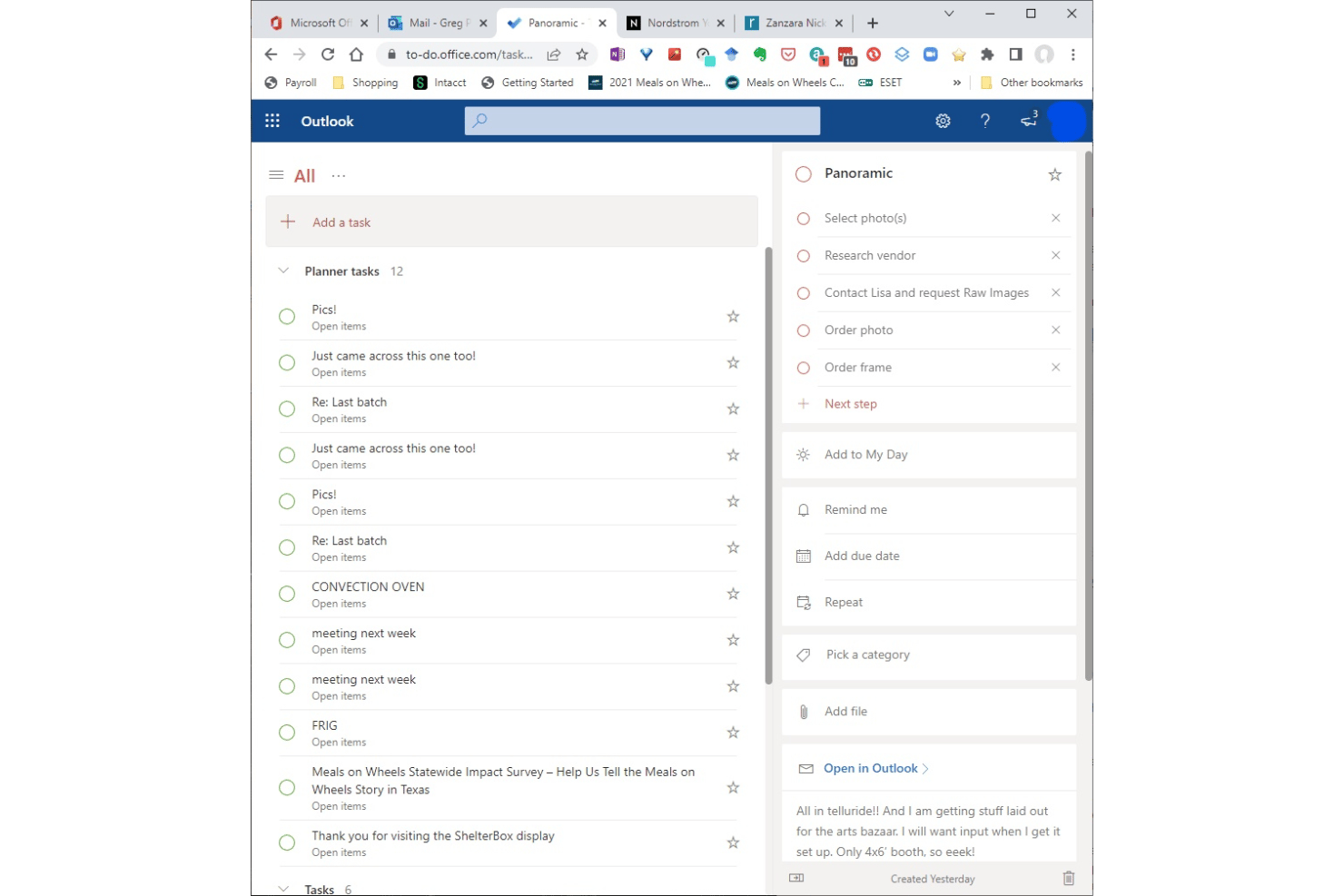
Microsoft To Do is a free personal task management app from Microsoft that lets individuals capture tasks, set due dates and reminders, build recurring to-do lists, and organize daily priorities across desktop and mobile devices.
Who Is Microsoft To Do Best For?
It's a strong fit for solo professionals and freelancers who already work within the Microsoft 365 ecosystem and want a lightweight task tool that connects directly to Outlook.
Why I Picked Microsoft To Do
I picked Microsoft To Do as one of the best because of how tightly it connects with Outlook. Flagged emails in Outlook automatically surface as tasks in To Do, which means my inbox doubles as a task capture tool with zero manual entry. The My Day view then lets me pull from that running queue and build a focused daily list across all my active client work.
Microsoft To Do Key Features
- Recurring tasks: Set custom repeat intervals for tasks to handle routines and ongoing responsibilities.
- Subtask support ("steps"): Break to-dos into smaller action items within each main task for detailed planning.
- Multi-list organization: Create and manage separate lists for each client, project, or context.
- Cross-device sync: Access and manage all tasks from Windows, macOS, iOS, Android, and the web with real-time updates.
Microsoft To Do Integrations
Microsoft To Do has native integrations across the Microsoft ecosystem, including Microsoft 365, Outlook, Teams, and Planner. An API is available for custom integrations.
Pros and Cons
Pros:
- Fast cross-device sync for all platforms
- Built-in daily focus list with My Day
- Excellent Outlook task and email syncing
Cons:
- Limited options for organizing with tags
- No calendar, board, or timeline views
Todoist
Best for natural language task entry
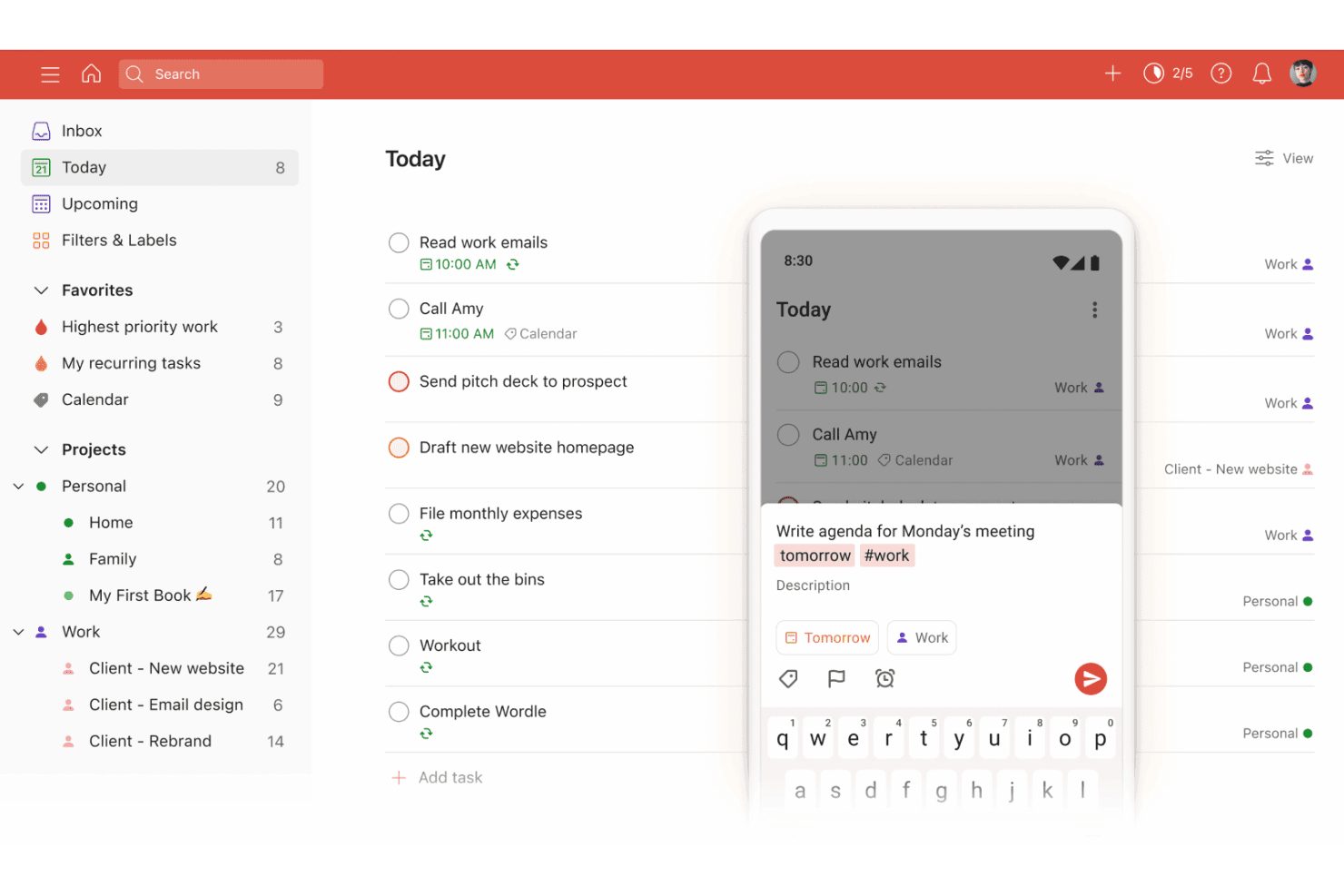
Todoist is a personal task management app that combines natural language task entry, AI-assisted capture, recurring schedules, and cross-platform sync into a single lightweight workspace.
Who Is Todoist Best For?
Todoist is a strong fit for freelancers and solo professionals managing multiple client projects who need a personal task system that works across every device.
Why I Picked Todoist
Todoist earns its spot on my shortlist because the natural language task entry is genuinely the fastest I've used. Typing "submit invoice every first Monday" instantly creates a correctly scheduled recurring task, with no dropdowns or extra clicks required. I also use Ramble, the voice capture feature, to talk through a backlog of ideas and have Todoist parse them directly into organized, actionable tasks.
Todoist Key Features
- Multiple project support: Manage up to 300 personal projects at once with color-coding and custom organization.
- Custom filter views: Create and save up to 150 unique task filters to quickly surface relevant tasks by context or tag.
- Cross-platform sync: Access your task list instantly on web, desktop, mobile apps, and browser extensions, all updated in real time.
- Recurring task rules: Set complex recurring schedules, such as tasks every third Thursday or custom intervals for ongoing routines.
Todoist Integrations
Todoist offers integrations with Google Calendar, Slack, Outlook Calendar, Dropbox, Trello, and Alexa. It also connects with automation platforms like Zapier and provides a REST API, official SDKs, and webhooks for custom integrations
Pros and Cons
Pros:
- Cross-platform sync includes offline access
- Recurring tasks handle complex schedules
- Natural language input speeds up task entry
Cons:
- Project and label limits on free plan
- No timeline or Gantt view option

TickTick
Best for built-in habit tracking integration
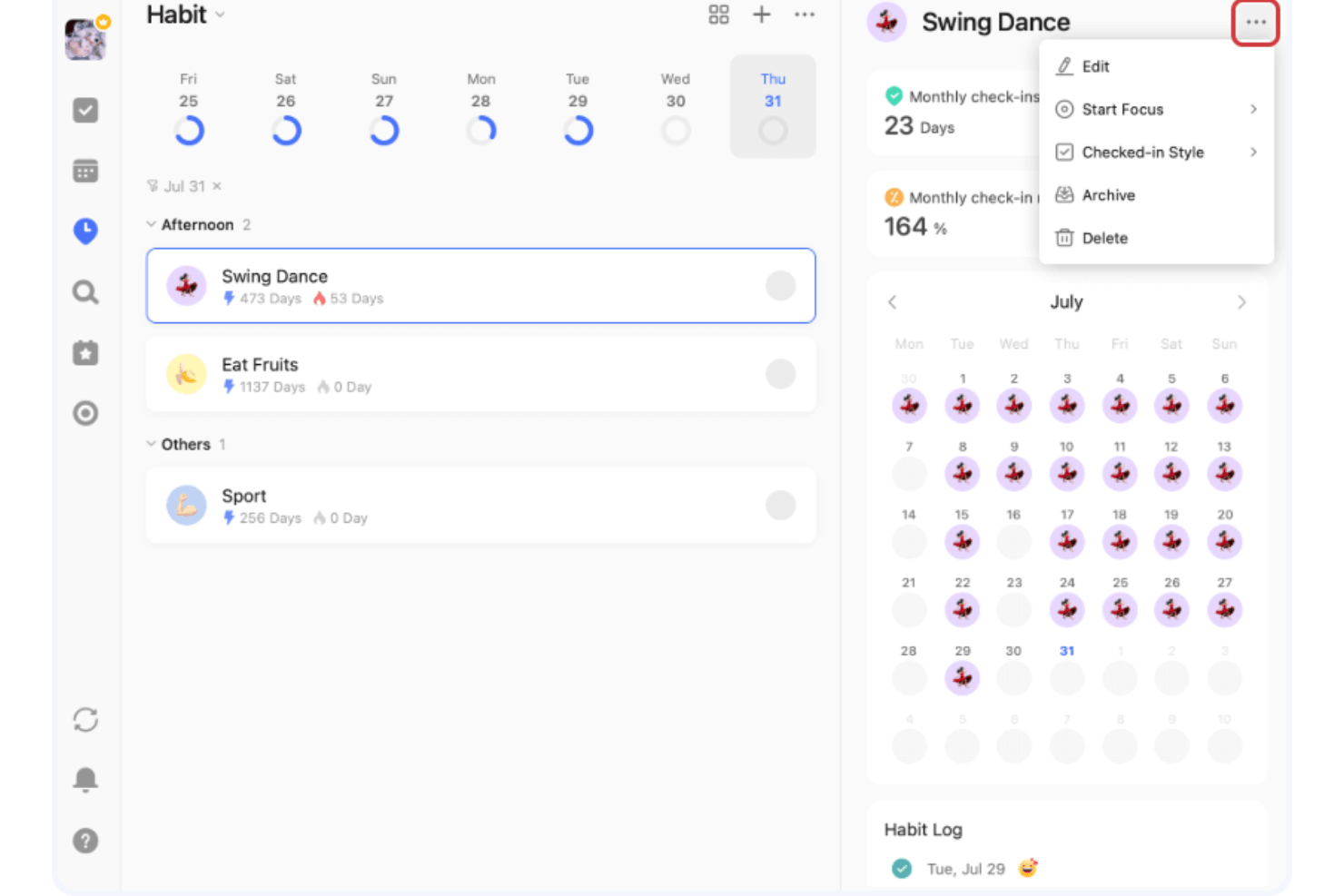
TickTick is a personal task management app that combines to-do lists, habit tracking, a Pomodoro timer, and calendar views in a single cross-platform tool.
Who Is TickTick Best For?
TickTick is a strong fit for freelancers and independent professionals who manage personal productivity alongside client deliverables.
Why I Picked TickTick
TickTick earns its spot as one of the best on my shortlist because no other task management app I've used bundles habit tracking this natively alongside task lists. The Habit Tracker includes a rich habit library, flexible scheduling, and detailed completion statistics, so I can track a daily client check-in routine right next to my project deadlines. I also like the built-in Pomodoro timer with estimated Pomos per task, which lets me attach focused work sessions directly to specific deliverables.
TickTick Key Features
- Multiple task views: Switch between list, Kanban board, timeline, and calendar layouts to organize work visually.
- Natural language processing: Add tasks using everyday speech with autofill dates, times, and reminders.
- Cross-device sync: Access and update tasks seamlessly on web, desktop, mobile, and smartwatches.
- Custom smart lists and filters: Create personalized lists and saved searches using tags, priorities, and other task properties.
TickTick Integrations
TickTick offers native integrations with Google Calendar, Notion, Siri, and Weibo, supports third-party calendar subscriptions, and connects with Zapier.
Pros and Cons
Pros:
- Fast natural language processing for tasks
- Multiple customizable task views available
- Habit tracker built directly into the app
Cons:
- No built-in collaboration or team workflows
- Advanced recurring task rules are limited

Any.do
Best for personal cross-device reminders
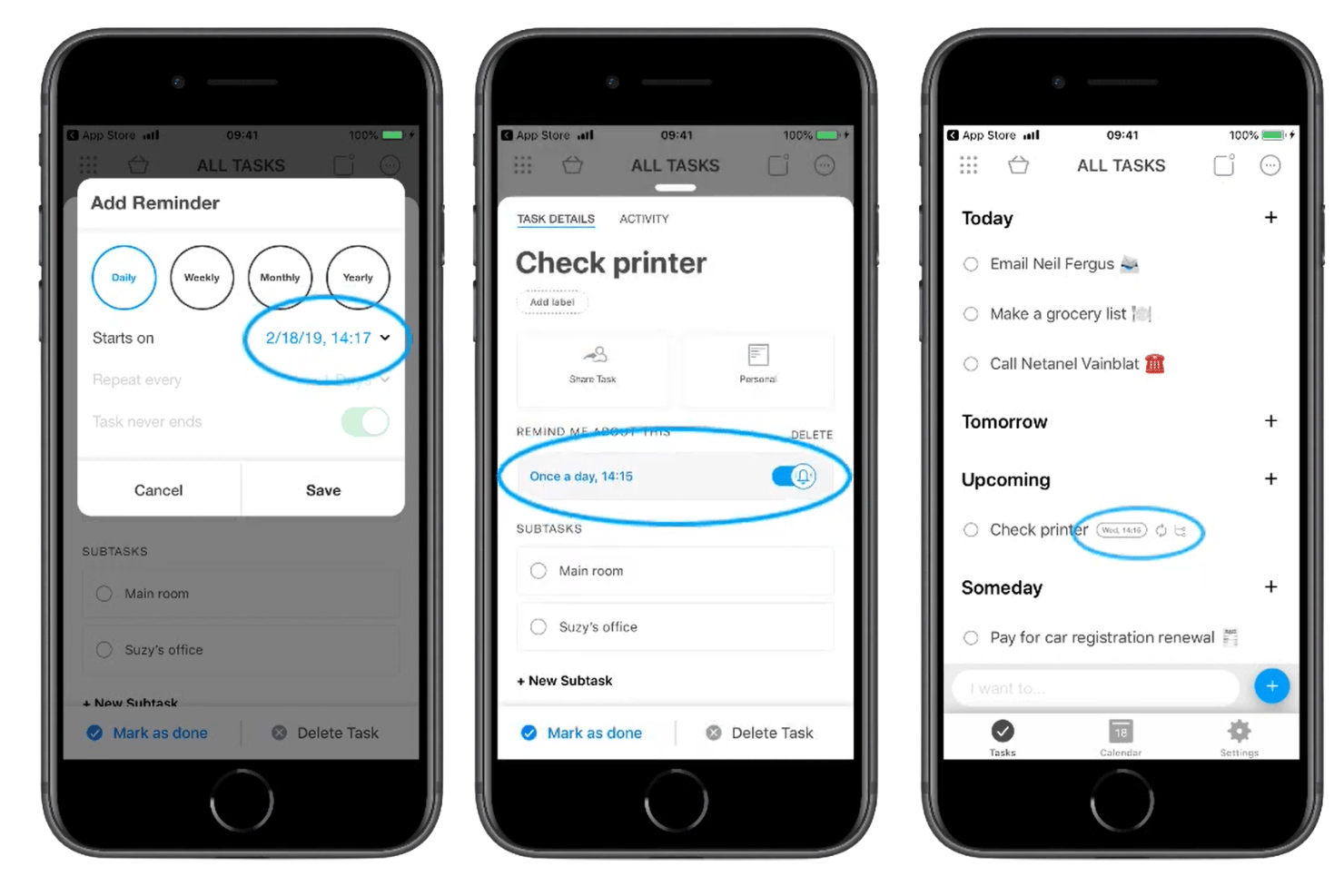
Any.do is a personal task management app that combines to-do lists, a daily planner, location-based reminders, and calendar sync across mobile, desktop, and wearable devices.
Who Is Any.do Best For?
Any.do suits solo professionals and independent contractors who need lightweight task management across personal and client workstreams without collaboration overhead.
Why I Picked Any.do
Any.do earns its spot as one of the best on my shortlist because no other personal task app matches its reminder depth. I love that you can set location-based reminders that fire when you arrive at or leave a specific place, alongside fully customizable recurring reminders. The WhatsApp integration (Premium) is also genuinely unique: you can forward a message directly to Any.do and it becomes a task with a reminder attached.
Any.do Key Features
- Color tags and labels: Organize and sort tasks by project, priority, or context using customizable colors.
- Multi-platform sync: Access and update tasks across web, desktop, mobile, and even wearable devices any time.
- Daily planner (My Day): Start each day by organizing and prioritizing tasks with a dedicated daily planning tool.
- Grocery and shopping lists: Create specialized lists that automatically group items by category and support sharing.
Any.do Integrations
Any.do offers native integrations with Google Calendar, iCloud, Outlook, Gmail, WhatsApp, Alexa, Slack, and more. It also connects with Zapier.
Pros and Cons
Pros:
- Works across mobile, desktop, and wearables
- My Day daily planning view
- Location-based and recurring reminders
Cons:
- Limited reporting or analytics features
- Kanban and calendar views require Premium

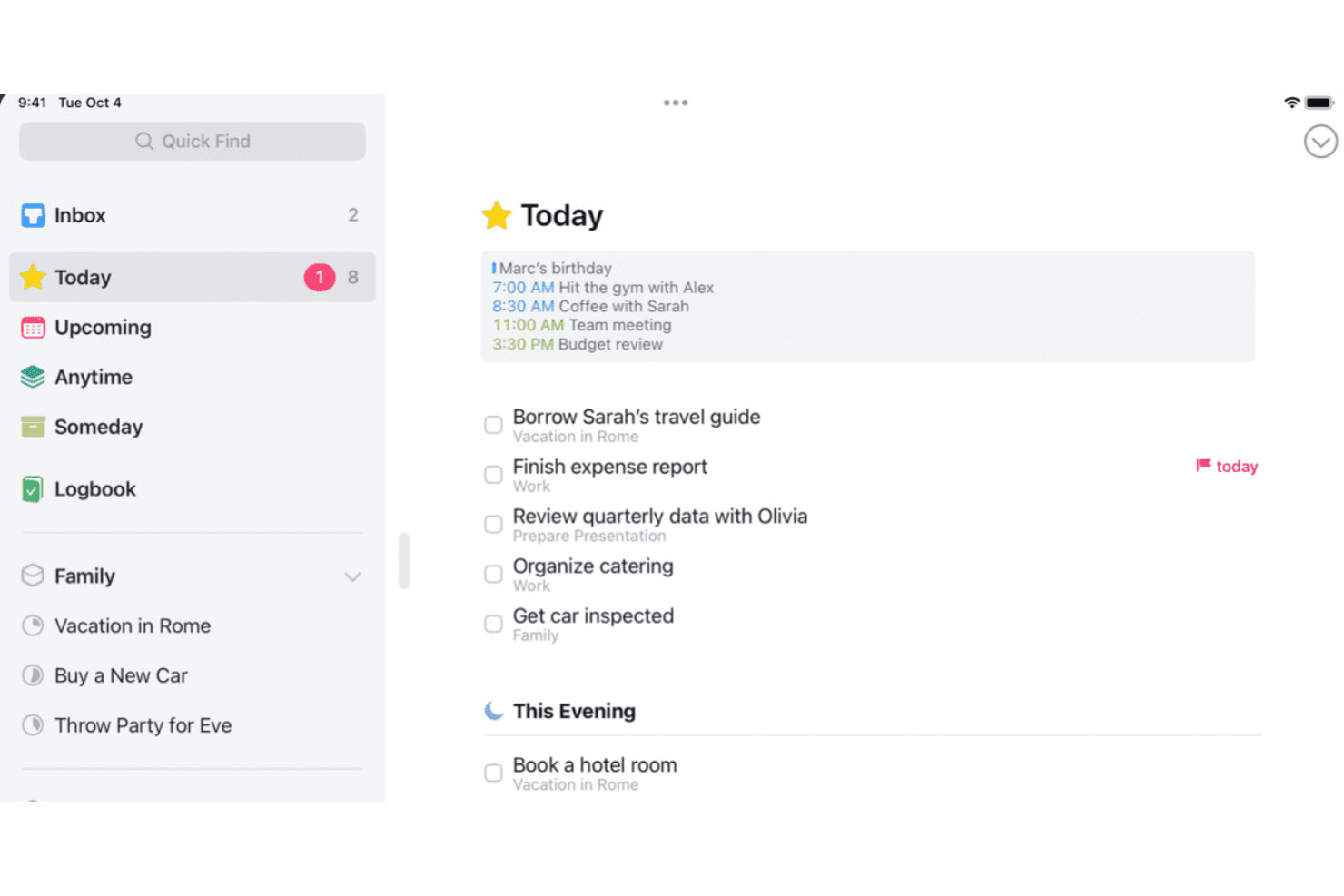
Things is an Apple-native personal task manager that lets you capture to-dos, organize them into projects and areas, set deadlines and reminders, and plan your day across Mac, iPhone, iPad, and Apple Watch.
Who Is Things Best For?
Things is a strong fit for freelancers, solo consultants, and self-employed creatives who work entirely within the Apple ecosystem and want a GTD-friendly system for managing personal workloads.
Why I Picked Things
Things earns its spot as one of the best on my shortlist because it's built exclusively for Apple hardware, and that focus shows in every interaction. I love how the Today list splits morning tasks from This Evening items, reflecting how Apple users naturally structure their day. Jump Start's natural language input lets me type 'Sat' to schedule for Saturday, and Things Cloud's Fastlane sync pushes reminders across Mac, iPhone, and Apple Watch with no lag.
Things Key Features
- Project and area organization: Group tasks within projects and organize multiple projects under larger areas for clean personal work structuring.
- Tag-based filtering: Assign custom tags to tasks and filter lists by tag to quickly drill down to context-specific to-dos.
- Mail to Things integration: Turn emails into action items by forwarding them straight into your task list from any email client.
- Checklists within tasks: Break tasks into smaller steps using checklists embedded directly inside any to-do.
Things Integrations
Things offers native integrations with Apple Calendar, Mail to Things for email capture, and provides a URL scheme and AppleScript support on Mac for advanced automation.
Pros and Cons
Pros:
- Inbox, Today, and Upcoming lists enable clarity
- Magic Plus button allows fast task organization
- Apple-native interface across Mac, iPhone, iPad
Cons:
- Cannot set explicit priority levels
- No Kanban or board view options
Bireyler İçin Diğer Görev Yönetimi Yazılımları
Kısa listeme giremeyen, ancak yine de göz atmaya değer bazı bireysel görev yönetimi yazılımı seçeneklerini aşağıda bulabilirsiniz:
- Amazing Marvin
For customizable productivity frameworks
- Sunsama
For daily planning with calendar integration
- MeisterTask
For vibrant visual boards and timeline views
- ClickUp
For tailored workflows with custom task views
- Motion
For auto-scheduling tasks into your calendar
- GQueues
For Google Workspace integration
- Remember The Milk
For list creation using powerful filters
- Nozbe
For productivity with quick task input
- Habitica
For gamifying tasks and habit achievement
- Apple Reminders
For deep Siri and Apple ecosystem integration


How I Evaluate Task Management Software for Individuals
I split my evaluation into two layers: the core functionality a freelancer juggling multiple clients actually needs, and the differentiators that make one tool the right fit.
Core Functionality (Table Stakes For This List)
When I'm selecting tools for my list, I rank each one on a scale from 0 (does not offer the functionality) to 5 (excels in this area) for each core functionality listed below. Then, I calculate the tool's total score into a percentage. Each tool needs to achieve a minimum total score of 65% to be considered for inclusion.
- Personal Task Capture: I look for how fast you can go from idea to task. Tools like Todoist and TickTick let you type a sentence and auto-parse dates, priorities, and labels.
- Multiple Task Views: A good tool offers lists, boards, and calendars so you can switch views depending on whether you're planning a week or triaging a backlog.
- Reminders & Due Dates: I evaluate whether reminders go beyond basic email pings. Push notifications, snooze options, and location-based alerts matter for staying on track.
- Recurring Tasks: Freelancers juggling monthly invoicing or weekly client check-ins need flexible recurrence rules, not just daily or weekly presets.
- Task Prioritization: I check for tags, labels, priority flags, and smart filters that let you surface urgent work across multiple client projects at a glance.
- Cross-Device Sync: The tool should sync across web, desktop, and mobile apps so you can capture a task on your phone and act on it from your laptop minutes later.
Once I have a list of tools that meet the criteria, I consider what sets each platform apart.
Differentiating Factors (What Sets Vendors Apart)
Here's how I compare and contrast different vendors:
Standout Features
Natural language input saves real time when you're capturing tasks on the fly. Typing "send proposal Friday at 2pm" and having dates auto-populate beats manual entry every time. I also look for focus modes and time-blocking features, like built-in Pomodoro timers or calendar integration that reserves blocks for deep work. Quick capture matters too; global hotkeys, browser extensions, and home-screen widgets let you log a task in seconds without switching apps.
Beyond Features
Pricing matters a lot when you're self-funded. I check whether the free tier is genuinely usable or if task limits and reminder restrictions push you toward a paid plan too quickly. Ecosystem integrations are another big differentiator; syncing with Google Calendar, Outlook, or voice assistants like Siri makes capture and scheduling feel native. I also evaluate methodology flexibility. Tools that support GTD, Kanban, or Eisenhower-style workflows give you room to build a system that matches how you actually think and work.
Bireyler İçin Görev Yönetimi Yazılımı Nasıl Seçilir?
Uzun özellik listeleri ve karmaşık fiyatlandırma yapıları arasında kaybolmak kolaydır. Kendinize özgü yazılım seçimi sürecinde ilerlerken odağınızı korumanıza yardımcı olmak için göz önünde bulundurmanız gereken faktörleri aşağıda bir kontrol listesi halinde derledim:
| Faktör | Göz önünde bulundurulması gerekenler |
|---|---|
| Ölçeklenebilirlik | Müşteri listeniz iki katına çıkarsa veya iş yükünüz artarsa bu araç iş akışınıza hâlâ uyum sağlar mı? Esnek düzenleme seçenekleri sunan ve katı görev sınırları olmayan çözümleri tercih edin. |
| Entegrasyonlar | Araç, hâlihazırda kullandığınız takvim, e-posta, not uygulamaları veya sesli asistanlara bağlanabiliyor mu? Yalnızca geçici çözümleri ya da kullanışsız içe aktarma seçeneklerini değil, yerel eşitleme desteğini de kontrol edin. |
| Özelleştirilebilirlik | Etiketleri, filtreleri ve düzenleri projelerinizi yapılandırma biçiminize uyacak şekilde uyarlayabiliyor musunuz? Bazı araçlar katı yöntemlere uygunken diğerleri farklı sistemleri bir arada kullanmanıza olanak tanır. |
| Kullanım kolaylığı | Menüler arasında arama yapmadan ne kadar hızlı üretken hâle gelebilirsiniz? Arayüzün çalışma ve düşünme tarzınız için sezgisel olup olmadığını değerlendirin. |
| Uygulama ve başlangıç süreci | Uygulamayı bugün kullanmaya başlayabilmeniz için kurulum ve geçiş işlemleri yeterince basit mi? Sizi yavaşlatabilecek gizli adımlara, zorunlu şablonlara veya dik öğrenme eğrilerine dikkat edin. |
| Maliyet | Ücretsiz plan bireysel kullanımınız için yeterli mi, yoksa kısa sürede yükseltme istemleriyle mi karşılaşıyorsunuz? Yalnızca deneme fiyatlarını değil, yenileme dönemlerini de karşılaştırmayı unutmayın. |
| Güvenlik önlemleri | Platform, müşteri verilerinizi ve kişisel notlarınızı nasıl ele alıyor? Hassas bilgiler için uygun, açık politikalara, dışa aktarma seçeneklerine ve gizlilik denetimlerine sahip çözümleri arayın. |
| Destek erişilebilirliği | Yardım belgeleri güncel mi ve bir sorunla karşılaştığınızda insan desteğine ulaşabiliyor musunuz? Hızlı e-posta yanıtları veya iyi forumlar, bireysel kullanıcılar için büyük bir avantaj olabilir. |
Bireyler İçin Görev Yönetimi Yazılımı Nedir?
Bireyler için görev yönetimi yazılımı, tek başına çalışan profesyonellerin kişisel görevlerini ve projelerini düzenlemelerine, önceliklendirmelerine ve takip etmelerine yardımcı olmak üzere tasarlanmış dijital bir araçtır. Bu platformlar; hatırlatıcılar, yinelenen görevler ve birden fazla görüntüleme seçeneği gibi özellikleri destekler. Böylece ekip iş birliğinin getirdiği ek yük olmadan teslim tarihlerini, alışkanlıkları ve hedefleri yönetebilirsiniz.
Bireyler için Görev Yönetimi Yazılımının Özellikleri
Bireyler için görev yönetimi yazılımı seçerken aşağıdaki temel özelliklere dikkat edin:
- Kişisel görev yakalama: Hiçbir şeyin gözden kaçmaması için teslim tarihleri, notlar ve öncelik düzeyleri gibi ayrıntılarla yapılacaklar listenize hızla görev ekleyin ve görevlerinizi düzenleyin.
- Birden çok görev görünümü: Haftanızı planlamak, ilerlemeyi takip etmek veya her şeyi tek bakışta görmek için listeler, panolar ya da takvim düzenleri arasında geçiş yapın.
- Hatırlatıcılar ve bildirimler: Önemli görevler için uyarılar ve son tarihler belirleyerek kritik takip işlerini veya teslimatları asla kaçırmayın.
- Yinelenen görevler: Faturalandırma, raporlama veya düzenli müşteri kontrolleri gibi rutinleri otomatikleştirmenize yardımcı olmak için görevleri özel aralıklarla tekrarlanacak şekilde planlayın.
- Görev önceliklendirme: Bir sonraki adımda çabalarınızı nereye odaklayacağınızı her zaman bilmek için öğeleri aciliyet, proje veya bağlama göre işaretleyin, etiketleyin ya da kategorilere ayırın.
- Cihazlar arası senkronizasyon: Her yerden sorunsuz çalışabilmek için görevlerinizi web, mobil ve masaüstü cihazlarda güncel tutun.
- Hızlı yakalama araçları: Aklınıza bir fikir geldiğinde veya gelen işleri ayıklarken görevleri anında kaydetmek için bileşenleri, klavye kısayollarını veya e-postadan göreve özelliklerini kullanın.
- Özel filtreler ve akıllı listeler: Proje, zaman çizelgesi veya bağlama göre yalnızca odaklanmak istediğiniz görevleri öne çıkaran kişiselleştirilmiş görünümler oluşturun.
- Gizlilik ve veri denetimi: Güçlü gizlilik denetimleri ve anlaşılır dışa aktarma seçenekleriyle kişisel notlarınızın ve müşteri bilgilerinizin korunmasını sağlayın.
- Alışkanlık ve hedef takibi: Hem profesyonel projeleri hem de kişisel gelişimi desteklemek için yinelenen davranışlar veya uzun vadeli hedeflerdeki ilerlemeyi izleyin.
Bireyler için Görev Yönetimi Yazılımının Faydaları
Bireyler için görev yönetimi yazılımını uygulamak, ekibiniz ve işletmeniz için çeşitli faydalar sağlar. Yararlanabileceğiniz birkaç fayda şunlardır:
- Daha fazla odaklanma: Özel hatırlatıcılar ve akıllı önceliklendirme araçları, her gün en önemli konulara odaklanmanıza yardımcı olur.
- Gelişmiş düzen: Esnek görev görünümleri ve filtreleme seçenekleri, işinizi projelerinize ve kişisel tarzınıza uygun şekilde yapılandırmanıza olanak tanır.
- Güvenilir sorumluluk takibi: Otomatik hatırlatıcılar ve son tarih takibi, teslimatları zamanında tamamlamanızı sağlar ve yerine getirilmeyen taahhütleri en aza indirir.
- Daha verimli rutinler: Yinelenen görev ve alışkanlık özellikleri, iş akışlarınızı otomatikleştirerek ve tekrarlanan idari işleri azaltarak zaman kazandırır.
- Her yerde kesintisiz çalışma: Cihazlar arası senkronizasyon, masanızda veya hareket hâlinde olmanız fark etmeksizin yapılacak işlerinizin her zaman erişilebilir olmasını sağlar.
- Artan netlik: Hızlı yakalama ve zengin görev ayrıntıları, fikirleri aklınızdan çıkmadan eyleme dönüştürmenize yardımcı olur.
- Korunan veriler: Güçlü gizlilik denetimleri ve dışa aktarma seçenekleri, hassas müşteri ve kişisel bilgileri güvenle yönetmenizi sağlar.
Bireyler için Görev Yönetimi Yazılımının Maliyetleri ve Fiyatlandırması
Bireyler için görev yönetimi yazılımı seçmek, mevcut çeşitli fiyatlandırma modellerini ve planları anlamayı gerektirir. Maliyetler özelliklere, ekip büyüklüğüne, eklentilere ve daha fazlasına göre değişir. Aşağıdaki tabloda, bireyler için görev yönetimi yazılımı çözümlerinde yaygın planlar, ortalama fiyatları ve genellikle bulunan özellikler özetlenmektedir:
Bireyler için Görev Yönetimi Yazılımı Plan Karşılaştırma Tablosu
| Plan Türü | Ortalama Fiyat | Yaygın Özellikler |
|---|---|---|
| Ücretsiz Plan | $0 | Temel görev yakalama, listeler veya panolar, sınırlı hatırlatıcılar, cihazlar arası senkronizasyon ve başlangıç düzeyinde destek. |
| Kişisel Plan | $5–$10/kullanıcı/ay | Sınırsız görev, gelişmiş hatırlatıcılar, özel görünümler, yinelenen görevler, entegrasyonlar ve basit dosya ekleri. |
| İşletme Planı | $10–$25/kullanıcı/ay | Ekip iş birliği, paylaşılan projeler, raporlama araçları, öncelikli destek ve ek entegrasyonlar. |
| Kurumsal Plan | $25+/kullanıcı/ay | Gelişmiş güvenlik, yönetici denetimleri, veri dışa aktarma seçenekleri, uyumluluk özellikleri, kişiselleştirilmiş başlangıç süreci ve SLA'lar. |
Bireyler İçin Görev Yönetimi Yazılımı SSS
Bireyler için görev yönetimi yazılımı hakkında sık sorulan soruların bazı yanıtlarını burada bulabilirsiniz:
Görev yönetimi yazılımını hem iş hem de kişisel projeler için kullanabilir miyim?
Evet. Çoğu proje yönetimi aracı, iş teslim tarihlerini, kişisel işleri ve uzun vadeli hedefleri tek bir yerde yönetebilmeniz için ayrı çalışma alanları veya listeler oluşturmanıza olanak tanır. Birçoğu ayrıca görevleri kendinize veya başkalarına atamanıza ve farklı projelerde tamamlanan görevleri izlemenize izin verir.
Bu platformlardaki verilerim ne kadar güvende?
Çoğu sağlayıcı şifreleme kullanır ve gizlilik denetimleri sunar, ancak özellikle hassas müşteri veya finansal bilgileri takip ediyorsanız her aracın güvenlik belgelerini ve koşullarını kontrol etmeniz önemlidir. Bir ekiple çalışıyorsanız ekip üyelerinin paylaşılan verilere nasıl eriştiğini ve güvenlik sorunları için hangi müşteri desteğinin sunulduğunu inceleyin.
Temel özellikler için ödeme yapmam gerekir mi?
Hayır. Birçok üretkenlik uygulaması; görevleri kaydetme, hatırlatıcılar ve cihazlar arası senkronizasyon gibi temel özellikleri içeren kapsamlı ücretsiz planlar sunar. Yapay zekâ destekli otomasyonlar, Gantt çizelgeleri, özel alanlar ve iş akışı bağımlılıkları gibi gelişmiş özellikler genellikle ücretli bir plan gerektirir.
Görev yönetimi araçları arasında geçiş yapmak ne kadar zordur?
Çoğu platform CSV veya JSON dışa aktarma seçenekleri sunar; bu nedenle verilerinizi genellikle taşıyabilirsiniz. Yeni sisteme aktardıktan sonra etiketleri, yinelenen görevleri veya özel alanları yine de düzenlemeniz gerekebilir.
Genellikle hangi entegrasyonlar sunulur?
Yaygın entegrasyonlar arasında Google Takvim, Outlook, not alma uygulamaları ve sesli asistanlar bulunur. Bu entegrasyonlar, görevleri senkronize etmeyi ve mevcut iş akışınızdaki yapılacak işleri kaydetmeyi kolaylaştırır. Birçok araç ayrıca Çevik geliştirme platformlarına bağlanır ve bilgileri özelleştirilebilir panolar aracılığıyla görüntüler.