

2026 İçin En İyi 7 Sermaye Projesi Yönetimi Yazılımı Seçimi

7 En İyi Sermaye Projesi Yönetimi Yazılımları Kısa Listesi


Sermaye projesi yönetimi yazılımı, büyük, karmaşık ve yönetilmesi zor sermaye ve inşaat projelerini yönetmenin en iyi ve en kolay yoludur. Kullanılabilecek birçok farklı seçenek vardır ve süreçleriniz ile projeleriniz için doğru olanı bulmak zor olabilir.
Proje yönetimi süreçlerinizi, verimliliğinizi ve ekip üyeleri arasındaki iş birliğini geliştirmenize yardımcı olacak en iyi sermaye projesi yönetimi yazılımları için seçimlerim burada. Farklı platformlarla yüzlerce büyük ve karmaşık projeyi yönetme deneyimime dayanarak bunların her birini test ettim ve değerlendirdim.
Why Trust Our Software Recommendations
Our team has been testing and reviewing software since 2012. As project managers ourselves, we know how difficult—and important—it is to choose the right software.
For this guide, we evaluated tools using hands-on testing and independent research, scoring tools using our selection criteria. We also draw on insights from industry thought leaders and practicing project management experts.
Our reviews reflect our human editorial judgment, not a sales pitch.
Expert reviewers:
Sermaye Projesi Yönetimi Yazılımları Karşılaştırma Tablosu
En iyi sermaye projesi yönetimi yazılımı araçlarımın fiyatlarını ve temel özelliklerini aşağıdaki tabloda karşılaştırın.
| Tool | Starting Price | Website | |
|---|---|---|---|
| Best for connecting cost, scope, and schedule data | 4.4 out of 5 | $37/user/month Free demo available | Website |
| Best for field collaboration | 4.5 out of 5 | Pricing upon request 14-day free trial for Procore Estimating + free demo available | Website |
| Best for collaboration with on-site construction crews | 4.5 out of 5 | $39/user/month Free plan available | Website |
| Best for real-time capital project tracking and insights | 4.2 out of 5 | $15/user/month 30-day free trial + demo available | Website |
| Best for integrated design & construction workflows | — | Pricing upon request 30-day free trial | Website |
| Best for advanced project analytics | — | Pricing upon request Free demo available | Website |
| Best for design-build projects | — | Pricing upon request Free demo available | Website |
En İyi Sermaye Projesi Yönetimi Yazılımları İncelemeleri
Her bir sermaye projesi yönetimi yazılımının en uygun kullanım alanını, dikkat çeken özelliklerini ve bazı artılarını ve eksilerini kısaca açıklayacağım. Ayrıca kullanıcı arayüzünü önceden görebilmeniz için ekran görüntülerine de yer verdim.

InEight
Best for connecting cost, scope, and schedule data

InEight is a capital project management platform that integrates estimating, scheduling, cost controls, contract management, and document management across the full construction project lifecycle.
Who Is InEight Best For?
InEight is a strong fit for large contractors and owner organizations managing complex, multi-phase capital construction programs in infrastructure, energy, or industrial sectors.
Why I Picked InEight
InEight earns its spot as one of the best on my shortlist because of how tightly it connects estimating, cost controls, and schedule performance in one system. I particularly like the way its Project Controls module links time-phased budgets directly to field progress data, so cost forecasts update as work is actually completed. The built-in earned value management means I can see budget variance and schedule variance side by side, without pulling data into a separate spreadsheet.
InEight Key Features
- Capital planning scenarios: Model and compare multiple funding and phasing options before committing to a final capital plan.
- Bid and procurement management: Manage solicitations, vendor prequalification, bid leveling, and owner-side award workflows in one system.
- Mobile field capture: Enable site teams to record daily reports, attach photos, and manage punch lists from the field via mobile devices.
- Role-based document controls: Set granular permissions, approval matrices, and version tracking for all project documents and submittals.
InEight Integrations
InEight offers native integrations with SAP, Oracle Primavera P6, QuickBooks Desktop, Sage 300, Viewpoint Vista, Autodesk Civil 3D, AdobeSign, Bluebeam Revu, Microsoft Dynamics 365, and Ping Identity. An API is available for custom integrations.
Pros and Cons
Pros:
- Supports custom approval workflows and audits
- Enables detailed capital scenario planning
- Provides robust earned value management tools
Cons:
- Initial configuration requires significant onboarding support
- Reporting can lag with very large datasets

Procore
Best for field collaboration

Procore is a cloud-based construction project management software that provides tools for project management, financials, quality and safety, and field productivity. Its mobile app and web-based platform make it easy for contractors, architects, and owners to manage their projects from anywhere.
Why I picked ProCore: I picked ProCore because it’s probably the most well-known turnkey software platform in industry for capital project management. What sets Procore apart is its seamless integration of innovative tools. It combines and features that enhance project communication, collaboration, and documentation. With cloud-based accessibility, it also has user-friendly mobile apps and real-time data capabilities.
Procore is great for the consultant-contractor relationship at all phases of a project, and particularly during construction. With the volume of documentation and information that needs coordinating and expediting, this is an excellent tool. I love the user interface especially and the excellent dashboarding functions also help the owner keep on top of everything. Whether in the office or the field, ProCore has a great suite of mobile and desktop apps to keep everyone singing from the same song sheet.
Ideal User Groups: Owners, architects, engineers, and contractors.
Ideal Project Type: Large, complex projects.
ProCore Standout Features and Integrations
Features include streamlined communication and document management, automated workflows and field productivity, project financials and cost control, quality and safety management, BIM modeling and coordination, and mobile app for on-the-go access.
Integrations include accounting tools like QuickBooks, Sage 300 Construction and Real Estate, Viewpoint, Office tools like Microsoft Office, Google Suite, Dropbox, and collaboration tools like Microsoft Teams and Slack.
Pros and Cons
Pros:
- Customizable dashboards and reports.
- Integration with accounting software.
- Excellent customer support.
- Robust set of features.
- User-friendly interface.
Cons:
- Some features require additional add-ons.
- Limited customization options.
- Steep learning curve.

Best for collaboration with on-site construction crews

Fieldwire is a construction project management platform that offers a really user-friendly interface and some powerful features for project collaboration.
Why I picked Fieldwire: I wanted to highlight Fieldwire because it really stands out for streamlining complex workflows among project stakeholders, especially on the contractor side and at the construction phase of a project. Like many of the other platforms I’ve reviewed here, Fieldwire makes document sharing and real-time progress tracking easy. Communication is key (in any setting) and especially so with capital projects. The clear and transparent communication channels Fieldwire enables make all the difference.
Fieldwire works well for the construction phase of projects, though it can be utilized throughout the entire project lifecycle. It is especially well-suited for field workers and construction professionals who value efficient task management. The real-time collaboration and document control features, combined with a great user interface, mobile app support, and integrations with Building Information Modelling (BIM) software and office tools, come in really handy for productivity when on the job.
Ideal User Groups: Large construction firms
Ideal Project Type: Projects with complex specifications and requirements.
Fieldwire Standout Features and Integrations
Features include document management and control, project collaboration tools, workflow management, real-time reporting and analytics, and integration with Building Information Modelling (BIM) tools.
Integrations include SAP, Oracle, Sage, Microsoft Office, Google Suite, and Dropbox.
Pros and Cons
Pros:
- Integration with accounting software
- Customizable dashboard and reports
- Excellent document control
- User-friendly interface
Cons:
- Steep learning curve for new users
- Expensive pricing
- Limited customisation options

Best for real-time capital project tracking and insights

ProjectManager is an advanced project management software designed to support a wide range of industries, including those managing large-scale capital projects. It offers an extensive suite of tools for planning, scheduling, and tracking projects in real time, making it an ideal choice for capital project managers who need to ensure their projects are delivered on time and within budget.
Why I picked ProjectManager: I selected ProjectManager for its exceptional real-time project tracking and insightful analytics. Capital projects often involve substantial investments, complex logistics, and extended timelines, making it crucial to monitor project health closely. ProjectManager’s real-time dashboards provide immediate visibility into key project metrics such as progress, budget status, and resource utilization.
Additionally, ProjectManager excels in its ability to manage large-scale capital projects by offering comprehensive planning and scheduling capabilities. The software's Gantt charts are particularly valuable for capital projects, allowing managers to create detailed project plans, set dependencies, and adjust schedules dynamically. The ability to track the critical path and monitor project baselines ensures that all aspects of the project are aligned with the overall timeline and objectives.
Ideal User Groups: Engineers, construction managers, manufacturing companies, and infrastructure firms
Ideal Project Type: Large-scale infrastructure, manufacturing, and construction projects
ProjectManager Standout Features and Integrations
Features include workflow automation, secure collaboration, mobile app access, customizable reporting, resource management, time tracking, and portfolio management.
Integrations include Google Drive, Microsoft Teams, Microsoft Office, Salesforce, Slack, Jira, Trello, Power BI, Hubspot, Acumatica, OneDrive, Dropbox, Desk.com, QuickBooks, and Xero.
Pros and Cons
Pros:
- Real time reporting and tracking
- Comprehensive planning tools
- Intuitive and easy-to-use interface, even when managing larger projects
Cons:
- Could offer more integrations
- Automation feature can take time to learn

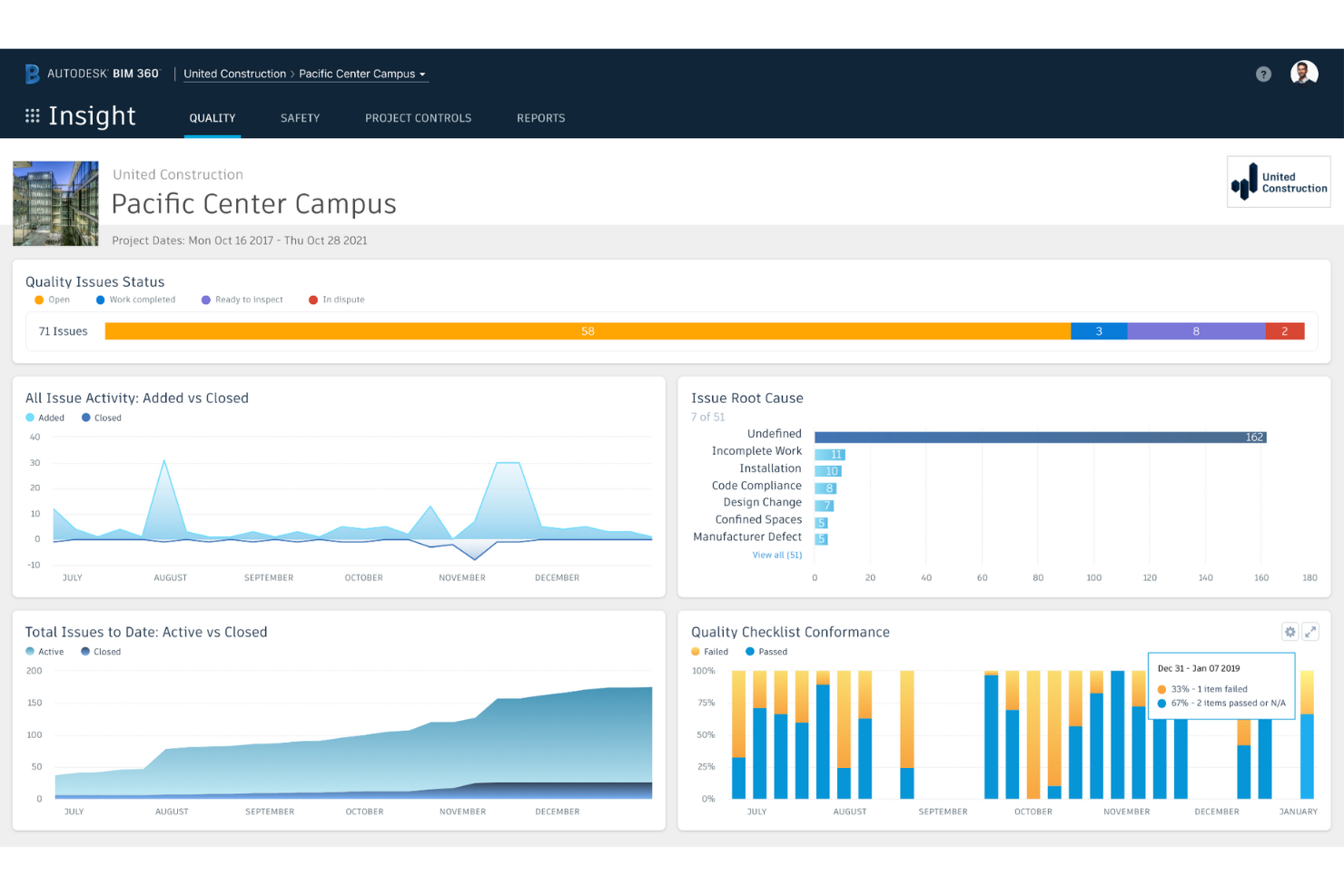
Now a part of the Autodesk Construction Cloud, BIM 360 is a construction management software that helps you predict safety hazards, proactively manage quality, automate tasks, and reduce rework so that you can control costs and stay on schedule.
Why I picked Autodesk BIM 360: I needed to highlight this tool because of its advanced Building Information Modelling (BIM) capabilities (which makes sense, as it’s in the name!). Again, it’s great for cross-team collaboration due to the real time access to 3D models, designs and documentation. It has cloud-based and mobile platform support, which really aids efficiency throughout the project lifecycle.
BIM 360 is best for architects, engineers and contractors (rather than owners). It’s exceptionally useful for complex design coordination and teams involved in clash detection. For me, the standout features are it’s ability to facilitate real time collaboration and track project and design changes. Obviously, the clash detection features are excellent, and it does a great job of managing data-rich 3D models.
Ideal User Groups: Large construction firms.
Ideal Project Type: Simple to medium-sized projects.
Autodesk BIM 360 Standout Features and Integrations
Features include BIM collaboration and coordination, document management and control, issue tracking and resolution, mobile access for on-the-go productivity, real-time updates and collaboration, and safety and quality management.
Integrations include QuickBooks, Sage 300 Construction and Real Estate, Viewpoint, Microsoft Office, Google Suite, Dropbox, Microsoft Teams, and Slack.
Pros and Cons
Pros:
- Integration with accounting software.
- Customizable dashboards and reports.
- Robust set of features.
- Excellent BIM coordination and collaboration.
Cons:
- Expensive pricing.
- Limited customization options.
- Steep learning curve.


Oracle Primavera is a construction platform that helps you invest in the right projects to ensure maximum return on investment and shareholder value.
Why I picked Oracle Primavera: Primavera is an especially great package if you care about project performance data. I like how it’s particularly suited to capital-intensive industries, such as oil and gas, construction, and utilities, where measuring and monitoring the value of an investment, and the returns on that investment, matter.
Its main use case is capital project portfolio management (PPM) for organizations handling complex projects. These organizations often have significant resources, multiple stakeholders, and intricate scheduling requirements. Primavera works exceptionally well in this context. It allows users to efficiently manage progress, risks, timelines and resources on multiple projects. With its advanced capabilities, Primavera enables organizations to make informed decisions based on real-time data. Standout features include its ability to handle large-scale projects with intricate dependencies, perform critical path analysis, and integrate with other enterprise systems for seamless data exchange. Its scalability and flexibility make it suitable for organizations of various sizes, from small teams to enterprise-level operations.
Ideal User Groups: Large construction firms.
Ideal Project Type: Large and complex projects.
Oracle Primavera Standout Features and Integrations
Features include Portfolio management, resource management, schedule management, risk management, cost management, and BIM integration.
Integrations include QuickBooks, SAP, Microsoft Dynamics, Sage, Microsoft Office, Google Suite, Dropbox, Microsoft Teams, and Slack.
Pros and Cons
Pros:
- Integration with accounting software.
- Excellent customer support.
- Advanced scheduling and resource management.
- Robust set of features.
Cons:
- Limited customization options.
- Expensive pricing.
- Steep learning curve.


Aconex is a construction project management platform from Oracle that helps you capture a complete project record and minimize disputes through an unalterable audit trail.
Why I picked Aconex: A notable aspect of Aconex is its strength in managing complex construction project documentation and workflows. I really like how it offers a centralized platform that allows stakeholders to collaborate. You can share and track documents and information in real-time: great for communication and streamlining processes. Its ability to handle large volumes of project documentation (like drawings, contracts, and RFIs) while ensuring version control and audit trails, certainly sets Aconex apart.
Aconex is primarily designed for large scale construction projects. It’s standout features include its ability to handle vast volumes of project documents, and very importantly, provide comprehensive audit trails. It also excels in bringing together multiple parties, such as contractors, architects, and project owners.
Ideal User Groups: Large construction firms.
Ideal Project Type: Large and complex projects.
Aconex Standout Features and Integrations
Features include document management and control, project collaboration, workflow management, real-time reporting and analytics, and BIM integration.
Integrations include SAP, Oracle, Sage, Microsoft Office, Google Suite, Dropbox, Microsoft Teams, and Slack.
Pros and Cons
Pros:
- Integration with accounting software.
- Customizable dashboards and reports.
- Excellent document control.
- User-friendly interface.
Cons:
- Steep learning curve.
- Expensive pricing.
- Limited customization options.
Get the PM Software Buyer's Guide
Diğer Seçenekler
Kısa listeye giremeyen ancak yine de değerlendirmenize değer birkaç seçenek burada.
- Bluebeam Revu
For document collaboration
- CMiC
For a integrated solution with advanced cost control
- GoodDay
For custom workload views
- Kahua
For its flexibility to align with your business model
- Archibus by Eptura
For its onboarding services
- NextProcess
For ERP integrations


İlgili İncelemeler
Aradığınızı hâlâ burada bulamadıysanız, test edip değerlendirdiğimiz ve proje yönetimi yazılımıyla yakından ilişkili şu araçlara göz atın:
- Proje Yönetimi Yazılımı
- Kaynak Yönetimi Yazılımı
- İş Akışı Yönetimi Yazılımı
- Zaman Takibi Yazılımı
- Görev Yönetimi Yazılımı
- İş Birliği Araçları
- Verimlilik Araçları
- Ücretsiz İnşaat Projesi Yönetimi Yazılımı
- Çevrim İçi İnşaat Projesi Yönetimi Yazılımı
- En İyi İnşaat Kaynak Yönetimi Yazılımı
How I Evaluate Capital Project Management Software
I split my evaluation into baseline criteria—owner-side budget controls, contract management, lifecycle workflows—and differentiating factors that set purpose-built capital tools apart.
Core Functionality (Table Stakes For This List)
When I'm selecting tools for my list, I rank each one on a scale from 0 (does not offer the functionality) to 5 (excels in this area) for each core functionality listed below. Then, I calculate the tool's total score into a percentage. Each tool needs to achieve a minimum total score of 65% to be considered for inclusion.
- Capital Budget Management: I check whether a tool tracks budgets, commitments, forecasts, and contingencies across multi-year programs—not just simple budget-vs.-actuals snapshots.
- Portfolio & Program Oversight: Rolling up cost and schedule data across dozens of concurrent projects matters, so I evaluate dashboard hierarchy and KPI aggregation at the program level.
- Project Lifecycle Workflows: I look for configurable phase-gate workflows that mirror how capital projects actually move from planning through design, procurement, construction, and closeout.
- Cost & Contract Controls: Owner-side controls like change order routing, pay application workflows, and commitment tracking are what I evaluate—not just basic PO logging.
- Document & Approval Management: I consider how the platform handles RFIs, submittals, and approval chains, especially versioning and audit trails across external stakeholders.
- Capital Reporting & Analytics: Budget variance, cash flow projections, and schedule performance reports aimed at executive audiences are what I look for in a tool's reporting suite.
Once I have a list of tools that meet this criteria, I consider what sets each platform apart.
Differentiating Factors (What Sets Vendors Apart)
Here's how I compare and contrast different vendors:
Standout Features
Cash flow forecasting is a big differentiator—I look for tools that project monthly outflows across a portfolio so finance teams can align draws with actual construction progress. Capital planning scenarios also matter. Being able to model different phasing or prioritization options before locking in a budget saves real headaches down the line. I also evaluate mobile capture capabilities, since punch lists and daily reports collected on-site and tied directly to the project record cut out a lot of manual re-entry.
Beyond Features
ERP integration is one of the first things I evaluate. Capital project data needs to flow into systems like SAP or Oracle for GL and AP reconciliation, and tools that lack bi-directional sync create manual work that compounds across a large portfolio. Stakeholder collaboration also weighs heavily—I check whether external architects, GCs, and consultants can access the platform without inflating per-seat costs. Implementation support matters too, especially vendors that offer preconfigured templates for phase gates and cost breakdown structures tailored to capital programs.
Sermaye Projesi Yönetimi Yazılımı Nasıl Seçilir?
Uzun özellik listeleri ve karmaşık fiyatlandırma yapıları içinde kaybolmak kolaydır. Benzersiz inşaat projesi yönetimi yazılımı seçim sürecinizde ilerlerken odaklanmanıza yardımcı olmak için aklınızda bulundurmanız gereken faktörlerin bir kontrol listesi aşağıdadır:
| Etken | Dikkate Alınması Gerekenler |
|---|---|
| Ölçeklenebilirlik | Yazılımın artan proje karmaşıklıklarını, daha büyük ekipleri ve büyüyen bütçeleri yönetebildiğinden emin olun. Esnek kullanıcı limitlerine ve veri depolamaya sahip bulut tabanlı seçenekleri tercih edin. |
| Entegrasyonlar | Ekipleriniz muhtemelen muhasebe yazılımı, BIM platformları veya ERP sistemleri gibi araçlara güveniyor. Veri silolarını ve gereksiz çalışmaları önlemek için sorunsuz şekilde entegre olan bir yazılım seçin. |
| Özelleştirilebilirlik | Her sermaye projesi benzersizdir. İş akışlarını, gösterge panellerini ve raporları projenizin özel ihtiyaçlarına uyacak şekilde uyarlamanıza olanak tanıyan bir yazılıma ihtiyacınız vardır. |
| Kullanım Kolaylığı | Karmaşık arayüzler benimsenme sürecini yavaşlatır. Ekibinizin her konumdan verimli şekilde çalışabilmesi için sezgisel gezinme, anlaşılır raporlama araçları ve mobil erişim sunan çözümleri tercih edin. |
| Bütçe | Lisanslama, uygulama ve eğitim dahil olmak üzere toplam maliyeti değerlendirin. Gizli ücretlere karşı dikkatli olun ve ihtiyaçlarınız arttıkça fiyatlandırmanın adil şekilde ölçeklendiğinden emin olun. |
| Güvenlik Önlemleri | Hassas proje verileri korunmalıdır. Şifreleme standartlarını, role dayalı izinleri ve SOC 2 veya ISO 27001 gibi sektör düzenlemelerine uyumluluğu doğrulayın. |
| İş Birliği Araçları | Sermaye projeleri birden fazla paydaş içerir. Herkesin aynı doğrultuda ilerlemesini sağlamak için gerçek zamanlı iletişim, belge paylaşımı ve görev takibi özelliklerini arayın. |
| Raporlama & Analiz | Ekibinizin bilinçli kararlar alabilmesi için doğru verilere ihtiyacı vardır. Güçlü raporlama özelliklerine, gösterge panellerine ve öngörücü analizlere sahip yazılımlara öncelik verin. |
Sermaye projesi yönetimi yazılımı nedir?
Sermaye projesi yönetimi yazılımı, önemli finansal yatırımlar içeren büyük ölçekli sermaye projelerinin planlanmasını, yürütülmesini ve kontrolünü kolaylaştıran özel bir araçtır. Özellikleri arasında proje planlaması, bütçeleme, kaynak tahsisi, risk yönetimi, belge yönetimi ve iş birliği araçları bulunur. Bu özellikler ilerlemeyi izlemenize, bütçeleri yönetmenize, kaynak kullanımını takip etmenize ve projelerinizle ilişkili riskleri azaltmanıza olanak tanır.
Sermaye projesi yönetimi yazılımı; proje yöneticileri, inşaat yöneticileri, bina işletmecileri, program yöneticileri ve altyapı projelerinde yer alan herkes tarafından kullanılan kritik bir araçtır. Büyük ölçekli projelerin karmaşıklıklarının yönetilmesine, başarılı sonuçların elde edilmesine ve yatırım getirisinin en üst düzeye çıkarılmasına yardımcı olur.
Sermaye Projesi Yönetimi Yazılımının Özellikleri
Sermaye projesi yönetimi yazılımı seçerken aşağıdaki temel özelliklere dikkat edin:
- Bütçe takibi ve tahminleme: Proje maliyetlerini izlemenize, bütçe aşımlarını öngörmenize ve uzun vadeli sermaye planlarıyla finansal uyumu korumanıza yardımcı olur.
- Belge yönetimi: Proje belgelerini, kolay erişim ve düzenleyici gerekliliklere uyumluluk için sürüm kontrolüyle merkezi bir yerde toplar.
- İş birliği araçları: Paydaşlar arasındaki iletişime ve dosya paylaşımına olanak tanır; ekiplerin aynı doğrultuda ilerlemesini ve bilgilendirilmesini sağlar.
- Risk yönetimi: Olası riskleri belirler, azaltma stratejileri sunar ve proje kesintilerini en aza indirmek için sorunları takip eder.
- Kaynak tahsisi: Verimliliği artırmak ve israfı azaltmak için iş gücü, malzeme ve ekipman planlamasını en iyi duruma getirmenize yardımcı olur.
- Uyumluluk takibi: Düzenleyici raporlamayı otomatikleştirir ve sektör standartlarına ve yerel düzenlemelere uymanıza yardımcı olur.
- İş akışı otomasyonu: Verimliliği artırmak ve manuel çalışmayı azaltmak için onayları, görev atamalarını ve bildirimleri kolaylaştırır.
- Özel raporlama ve gösterge panelleri: Veriye dayalı karar almayı desteklemek için gerçek zamanlı analizler ve görsel içgörüler sunar.
- Mobil erişilebilirlik: Ekiplerin proje ayrıntılarını güncellemesine, belgelere erişmesine ve her konumdan iletişim kurmasına olanak tanır.
- Üçüncü taraf entegrasyonları: Veri akışını iyileştirmek ve siloları azaltmak için ERP, muhasebe ve diğer iş sistemlerine bağlanır.
Sermaye Projesi Yönetim Yazılımı Hakkında Sıkça Sorulan Sorular
Bu konu hakkında diğer kişilerin sorduğu yaygın soruların yanıtlarını bulun.
Proje yönetimi yazılımı ile sermaye projesi yönetim yazılımı arasındaki fark nedir?
Sermaye projelerini yönetmek, diğer proje türlerini yönetmeye benzemez ve sermaye projesi yönetim yazılımı benzersiz özellikler ve yeteneklerle tasarlanmıştır. Sermaye projesi yönetim yazılımı ile proje yönetimi yazılımı arasındaki beş temel fark şunlardır:
\u003cul\u003e
\u003cli\u003e\u003cstrong\u003eMaliyet yönetimi\u003c/strong\u003e: Sermaye projesi yönetim yazılımı, karmaşık finansal yönetimi ele almak için bütçe takibi, maliyet tahmini ve kaynak tahsisi gibi gelişmiş araçlar sunar. Genel proje yönetimi yazılımı yalnızca temel bütçe takibi özellikleri sağlayabilir ve bunlar sermaye projeleri için yetersiz kalabilir.\u003c/li\u003e
\u003cli\u003e\u003cstrong\u003eProgram yönetimi\u003c/strong\u003e: Sermaye projelerine ilişkin inşaat programları genellikle karmaşıktır ve kritik yol analizi, kaynak planlaması ve sermaye projesi yönetim yazılımının kolaylıkla ele alabileceği diğer gelişmiş özellikleri gerektirir. Genel proje yönetimi yazılımı, inşaat programlarını etkili bir şekilde yönetmek için gerekli özelliklere sahip olmayabilir.\u003c/li\u003e
\u003cli\u003e\u003cstrong\u003eRisk yönetimi\u003c/strong\u003e: İnşaat projelerine yönelik yazılımlar, proje risklerini belirlemek, değerlendirmek ve yönetmek için araçlar içerir. Bunlara risk analizi, risk azaltma planlaması ve risk takibi yetenekleri dahildir. Genel proje yönetimi yazılımı temel risk yönetimi özellikleri sunabilir, ancak genellikle sermaye projeleri için gereken özgüllük ve derinlikten yoksundur.\u003c/li\u003e
\u003cli\u003e\u003cstrong\u003eBelge yönetimi\u003c/strong\u003e: Sermaye projesi yönetim yazılımı; çizimler, teknik özellikler ve sözleşmeler de dahil olmak üzere büyük miktarda proje belgesini işleyebilir. Bu araçlar, genel proje yönetimi yazılımında genellikle bulunmayan gelişmiş belge yönetimi özellikleri sunar.\u003c/li\u003e
\u003cli\u003e\u003cstrong\u003eMevzuata uygunluk\u003c/strong\u003e: Özel proje yönetimi yazılımı, bu tür projelerle ilişkili karmaşık ve kapsamlı mevzuata uygunluk gerekliliklerini karşılamak için çevre düzenlemeleri, güvenlik standartları ve yapı yönetmeliklerine yönelik özellikler içerir. Sermaye projelerinin mevzuat standartlarına uygun olması önemlidir ve yazılım bu görevleri verimli bir şekilde yerine getirmek için idealdir. Genel proje yönetimi yazılımı, mevzuata uygunluğu etkili bir şekilde yönetmek için gerekli özelliklere sahip olmayabilir.\u003c/li\u003e
\u003c/ul\u003e
Sermaye projeleri nedir?
Sermaye projeleri, maliyetleri aktifleştirilen (maddi varlıklara dönüştürülen) projelerdir. Örneğin bir bina tasarlamak ve inşa etmek veya \u003ca href=\u0022https://thedigitalprojectmanager.com/tools/best-real-estate-project-management-software/\u0022\u003egayrimenkul geliştirmek\u003c/a\u003e ya da sondaj platformları, rafineriler veya boru hatları gibi petrol ve gaz çıkarma altyapıları \u003ca href=\u0022https://thedigitalprojectmanager.com/tools/best-oil-and-gas-project-management-software/\u0022\u003egeliştirmek\u003c/a\u003e.
Sermaye projesi örnekleri nelerdir?
Sermaye projelerine örnekler şunlardır:
\u003cul\u003e
\u003cli\u003eKamuya açık oyun alanlarında veya parklarda iyileştirmeler yapmak\u003c/li\u003e
\u003cli\u003eCaddeleri ve kaldırımları onarmak\u003c/li\u003e
\u003cli\u003eKamuya ait alanlara erişilebilirlik rampaları kurmak\u003c/li\u003e
\u003cli\u003eKamu binalarını yenilemek\u003c/li\u003e
\u003cli\u003eBanklar veya sokak lambaları kurmak\u003c/li\u003e
\u003cli\u003eBir topluluk bahçesi oluşturmak\u003c/li\u003e
\u003cli\u003eBir basketbol sahasının yüzeyini yenilemek\u003c/li\u003e
\u003c/ul\u003e