

Os 10 melhores softwares de gestão de projetos para a mineração em 2026

Melhor software de gestão de projetos para mineração — seleção


O melhor software de gestão de projetos para mineração ajuda a coordenar operações, controlar custos, manter os padrões de segurança e conformidade e cumprir prazos. Os atrasos nos projetos de mineração resultam de uma má alocação de recursos, falhas de comunicação e falta de visibilidade sobre o progresso. Sem a ferramenta certa, corre o risco de exceder o orçamento, sofrer períodos de inatividade do equipamento e enfrentar violações de segurança.
A plataforma certa permite acompanhar o progresso, alocar mão de obra e equipamentos e centralizar atualizações para manter a sua equipa alinhada. Testei e comparei soluções para identificar o melhor software de gestão de projetos para mineração. Encontre abaixo a ferramenta certa para manter as suas operações eficientes e em conformidade.
Why Trust Our Software Recommendations
Our team has been testing and reviewing software since 2012. As project managers ourselves, we know how difficult—and important—it is to choose the right software.
For this guide, we evaluated tools using hands-on testing and independent research, scoring tools using our selection criteria. We also draw on insights from industry thought leaders and practicing project management experts.
Our reviews reflect our human editorial judgment, not a sales pitch.
Expert reviewers:
Tabela comparativa de software de gestão de projetos para mineração
Compare abaixo os detalhes de preços das minhas principais escolhas de software de gestão de projetos para mineração na tabela abaixo.
| Tool | Best For | Trial Info | Price | ||
|---|---|---|---|---|---|
| 1 | Best for advanced resource allocation in mining | 14-day free trial | From $10/user/month (billed annually) | Website | |
| 2 | Best for integrated ERP and asset project control | Free demo available | Pricing upon request | Website | |
| 3 | Best for construction document control in mining | Free demo available | From $995/user/year (billed annually) | Website | |
| 4 | Best for integrated cost and schedule control | Free demo available | Pricing upon request | Website | |
| 5 | Best for capital-heavy mining project controls | Free demo available | Pricing upon request | Website | |
| 6 | Best for Microsoft 365-native project scheduling | Not available | From £679.99 one-time purchase | Website | |
| 7 | Best for office-to-field construction project execution | Free demo available | Pricing upon request | Website | |
| 8 | Best for large-scale critical path scheduling | Free demo available | From $125/user/month | Website | |
| 9 | Best for mining asset lifecycle cost control | Not available | Pricing upon request | Website | |
| 10 | Best for spreadsheet-style Gantt scheduling | 30-day free trial + demo available | From $9/user/month (billed annually) | Website |

Avaliações do melhor software de gestão de projetos para mineração
Leia abaixo o meu resumo de cada uma das minhas escolhas para o melhor software de gestão de projetos para mineração. Abordo as principais funcionalidades, vantagens & desvantagens, integrações e casos de utilização para que possa encontrar a solução mais adequada.

Celoxis
Best for advanced resource allocation in mining
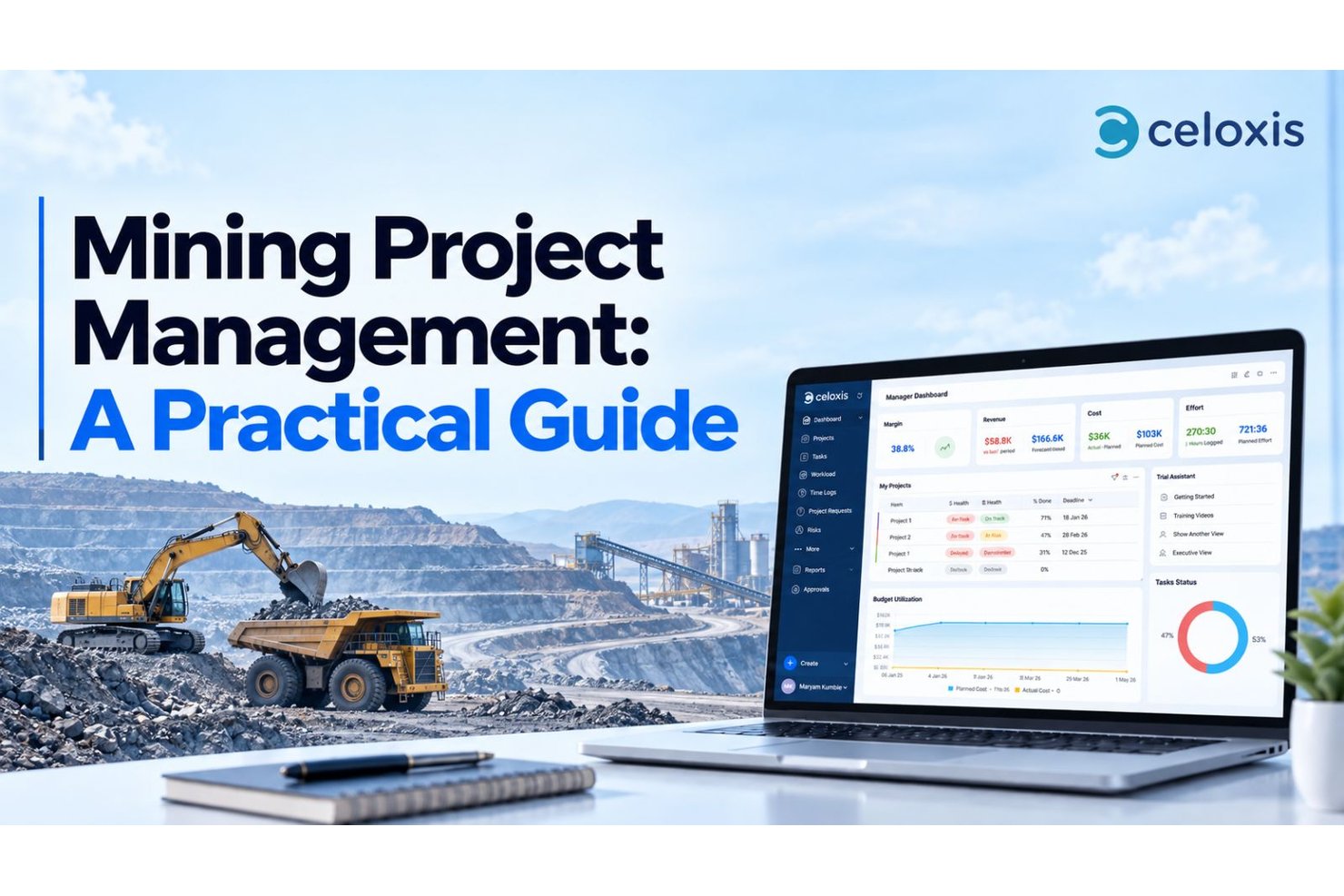
Celoxis is a project and portfolio management platform that covers Gantt scheduling, resource capacity planning, budget and cost tracking, risk and issue workflows, and portfolio dashboards across multi-site project environments.
Who Is Celoxis Best For?
Celoxis suits project and portfolio managers overseeing multi-phase mining programs who need strong scheduling, resource capacity planning, and cross-site budget visibility in one platform.
Why I Picked Celoxis
I picked Celoxis as one of the best because its capacity planning engine handles exactly the kind of resource complexity mining programs create. When you're running concurrent site projects with shared drilling crews and engineering staff across multiple locations and shifts, Celoxis surfaces overloads before they become schedule problems. I also like how its cross-project dependencies and critical-path analysis keep multi-phase schedules honest, automatically recalculating task dates when a predecessor slips.
Celoxis Key Features
- Portfolio dashboard: View schedule health, budget variance, and open risks across all active projects in a single configurable dashboard.
- Configurable risk and issue workflows: Build custom workflow apps with defined fields, states, routing rules, and approval chains for risks, issues, and change requests.
- Baseline and earned value tracking: Set project baselines and compare planned versus actual performance using earned value measures like CPI and SPI.
- Client portal: Give external stakeholders—such as contractors or clients—access to permitted project data without requiring a paid standard-user license.
Celoxis Integrations
Celoxis offers 21 native integrations configured inside the platform, including Microsoft Project, Microsoft Excel, Google Sheets, Jira, Azure DevOps, QuickBooks Online, Google Drive, and Slack. It also supports 400+ connected apps, Zapier, and a REST API for custom integrations.
Pros and Cons
Pros:
- Reviewers value project cost visibility
- Capacity views help balance site teams
- Reviewers value schedule dependency visibility
Cons:
- Mobile access has no documented offline sync
- No equipment allocation or fleet dispatch
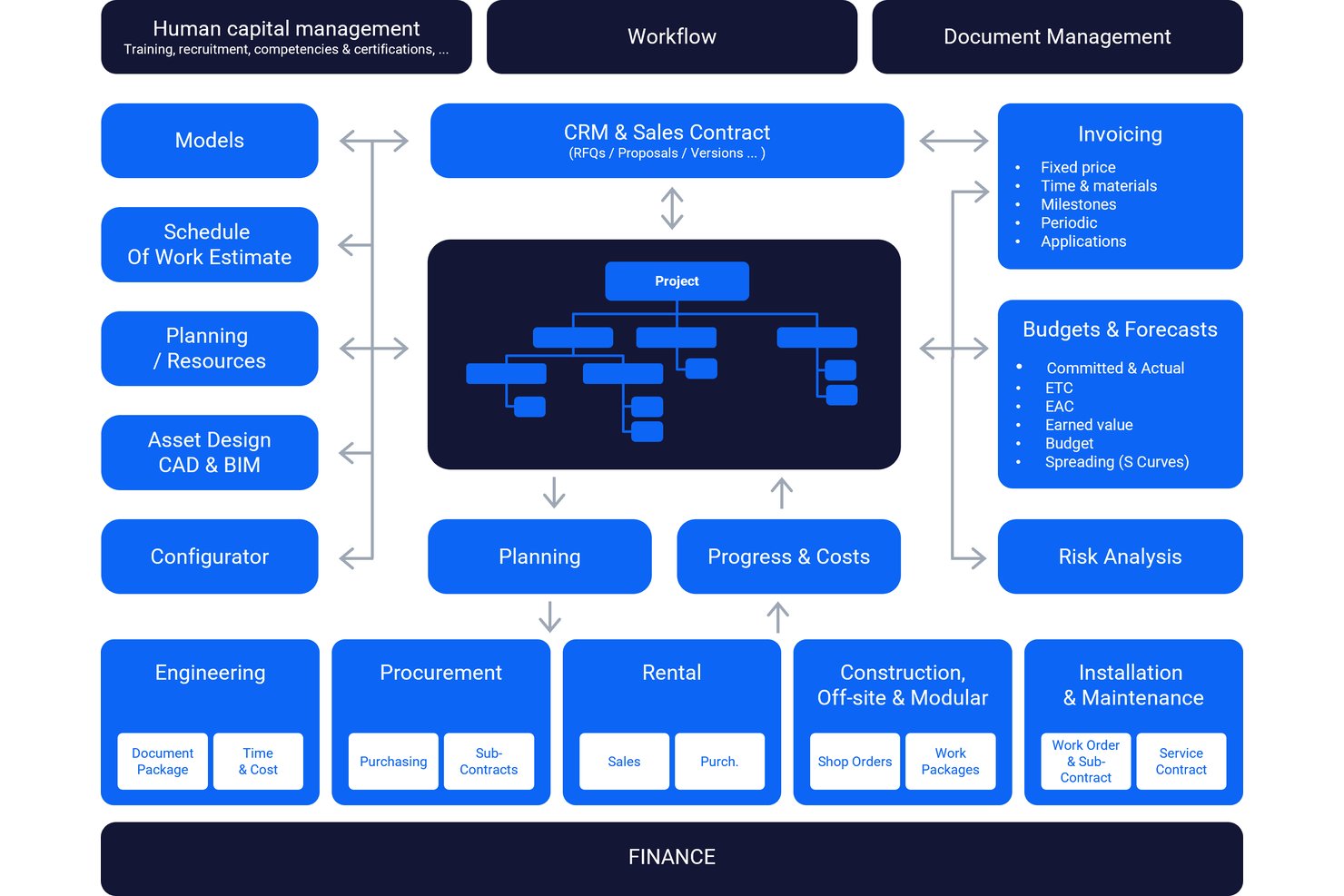
IFS Cloud is an enterprise ERP and asset management platform that spans project management, financial control, resource allocation, risk management, and supply chain management for complex industrial operations, including mills and mining.
Who Is IFS Cloud Best For?
IFS Cloud suits large industrial enterprises that need ERP, asset management, and project financials in a single platform across complex, multi-site operations.
Why I Picked IFS Cloud
IFS Cloud earns its spot on my shortlist because it's one of the few platforms that genuinely connects project financials, asset management, and ERP in a single system. For mining operations running multi-phase projects, I particularly like how it handles project budgeting with multiple forecast versions, variance analysis, and Estimate at Completion values alongside scheduling that tracks activity dependencies, float, and critical paths simultaneously. The built-in risk management module lets teams document threats, score probability and impact, and assign response actions with deadlines, all within the same platform managing the project budget.
IFS Cloud Key Features
- Multi-currency budgeting: Manage project budgets and forecasts in different currencies across global operations, with Work Breakdown Structure-level cost control.
- Earned value tracking: Report earned value, hours, cost, and revenue at the activity level, with progress calculated from multiple input methods.
- Role-based permissions and audit trail: Configure access controls, segregation-of-duties rules, and approval workflows, with automatic logging of all user actions and transactions.
- Microsoft Project integration: Import and export project schedules between IFS Cloud and Microsoft Project to support cross-team planning workflows.
IFS Cloud Integrations
IFS Cloud offers a documented integration with Microsoft Project for project schedule imports and exports. It also provides REST APIs for custom integrations, but native connections to Deswik, Maptek, Micromine, or mining fleet systems aren’t clearly documented.
Pros and Cons
Pros:
- Dependencies and float clarify schedule risk
- Reviewers value project data visibility
- Unified project, asset, and financial controls
Cons:
- No mining-specific GIS or fleet workflows
- Reviewers report limited document archiving

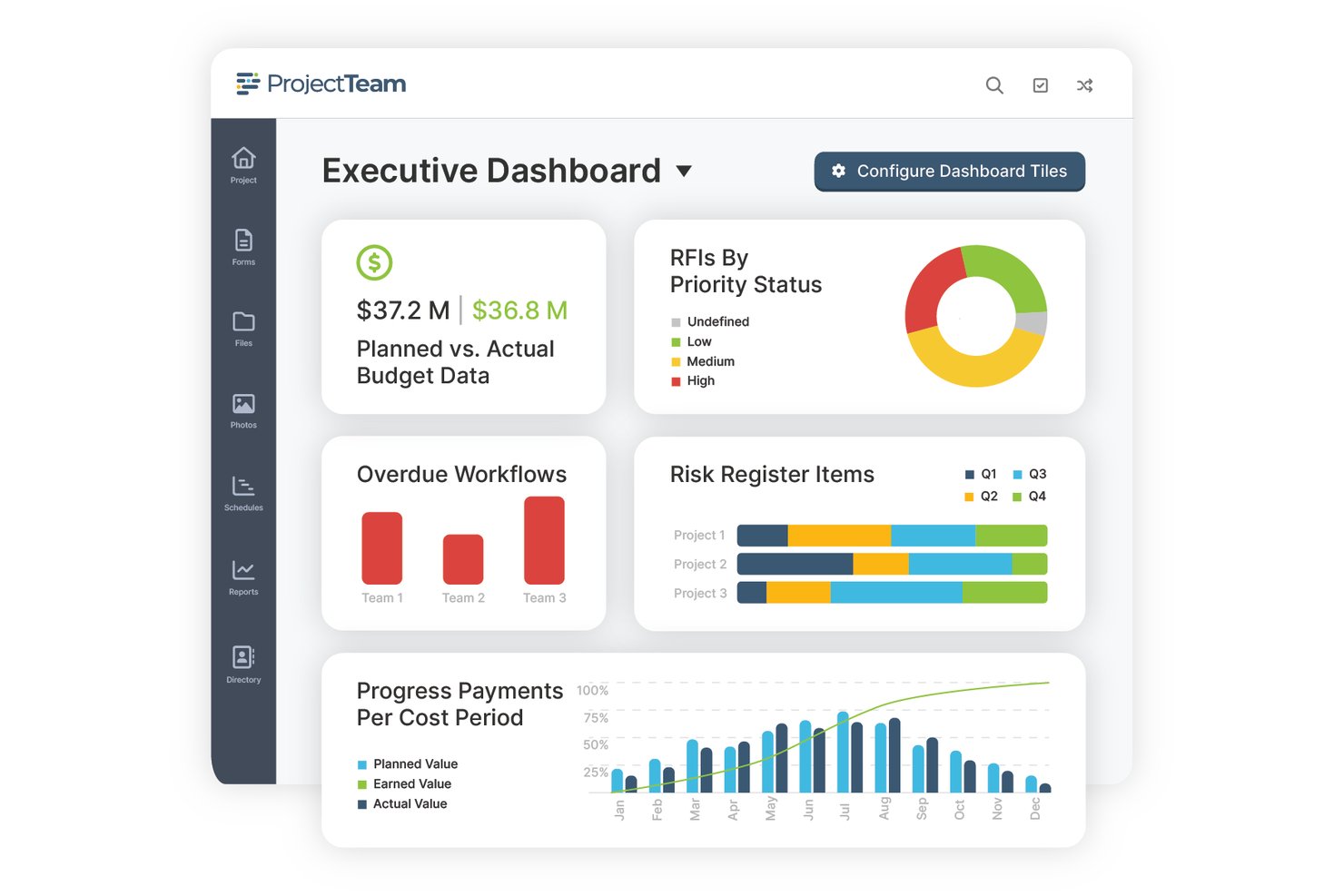
ProjectTeam.com is a cloud-based construction management platform that centralizes document control, project scheduling, budget tracking, and stakeholder collaboration across complex, multi-phase projects in the mining sector.
Who Is ProjectTeam.com Best For?
ProjectTeam.com suits mining and construction organizations that need tight document control across multi-phase projects with multiple stakeholders and external contributors.
Why I Picked ProjectTeam.com
I've included ProjectTeam.com in my top picks because its document control capabilities are genuinely strong for mining projects, where drawing revisions, permits, and submittals need to stay organized across long project timelines. Every form and document carries a timestamped activity history, prior versions stay accessible, and role-based permissions keep sensitive records visible only to the right people. I also like that teams can configure custom forms and approval workflows without writing a single line of code, which matters when your reclamation closeout process looks nothing like a standard submittal workflow.
ProjectTeam.com Key Features
- Gantt scheduling with critical-path analysis: Teams can build unlimited Gantt schedules separated by phase or timeline, with dependency links, milestone tracking, and critical-path display.
- Planned-versus-actual cost reporting: Users can run cost-variance reports and budget forecasts alongside change order and commitment tracking with a full audit trail.
- No-code custom forms and workflows: Administrators can create custom forms, add fields, and configure approval workflows without writing code or paying extra.
- Sage accounting integration: ProjectTeam.com connects to Sage Intacct, Sage 100 Contractor, and Sage 300 to sync project budgets, contracts, and payment applications.
ProjectTeam.com Integrations
ProjectTeam.com offers integrations with Sage Intacct, Sage 100 Contractor, and Sage 300 Construction and Real Estate. Its event-driven REST API supports custom integrations, including scheduled or real-time data flows.
Pros and Cons
Pros:
- Cloud sharing connects remote project stakeholders
- Custom reports support project progress reviews
- Centralizes drawings, RFIs, and submittals
Cons:
- No documented mining risk register or offline access
- Reviewers report difficulty finding older revisions

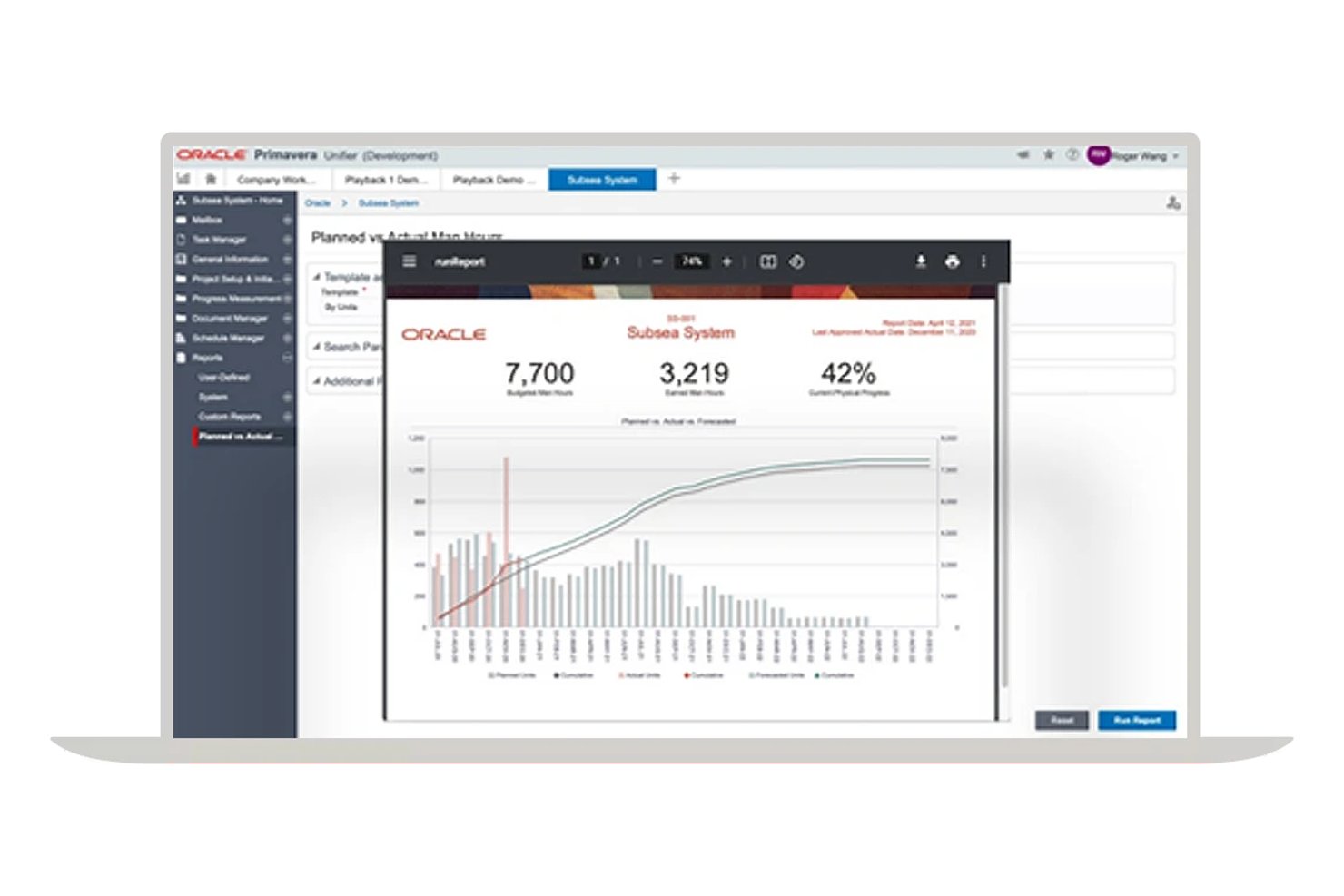
Oracle Primavera Unifier is an enterprise project and asset lifecycle management platform built for capital-intensive industries, combining cost management, scheduling, document control, contract management, and workflow automation in a single configurable system.
Who Is Oracle Primavera Unifier Best For?
Primavera Unifier fits large capital project teams in construction and EPC who need tight cost, schedule, and contract control across complex, multi-phase programs.
Why I Picked Oracle Primavera Unifier
I picked Oracle Primavera Unifier as one of the best because its cost and schedule integration is genuinely tight in a way most tools don't match. On large capital projects, I can tie cash flow forecasts directly to schedule baselines, so a slipped activity immediately surfaces as a cost variance, not a surprise at month-end. The earned value management module connects planned value, actuals, and schedule progress in one view, which is exactly what you need when tracking multi-phase mine infrastructure against committed budgets.
Oracle Primavera Unifier Key Features
- Risk register: Tracks risks from identification through resolution, with pre- and post-response scoring, risk ownership, and links to related schedule activities or milestones.
- Workflow automation via uDesigner: A no-code tool that lets you build or modify business processes, forms, and approval workflows without custom development.
- Document Manager: Maintains version-controlled project documents with separate revision tracking, check-out locking, and co-authoring support for connected teams.
- Oracle Fusion Cloud ERP integration: Syncs project and financial data—including budgets, commitments, and payment applications—bidirectionally with your ERP system.
Oracle Primavera Unifier Integrations
Oracle Primavera Unifier has native integrations with Oracle Fusion Cloud ERP, Primavera P6, Oracle Primavera Cloud, and Oracle Primavera Cloud Portfolio and Capital Planning. It also supports RESTful APIs and third-party middleware for custom integrations.
Pros and Cons
Pros:
- Keeps project documents and revisions traceable
- Reviewers value budget and purchase-order tracking
- Connects schedule progress with cost forecasts
Cons:
- No native mining GIS or tailings tracking
- Personnel tracking omits heavy-equipment allocation

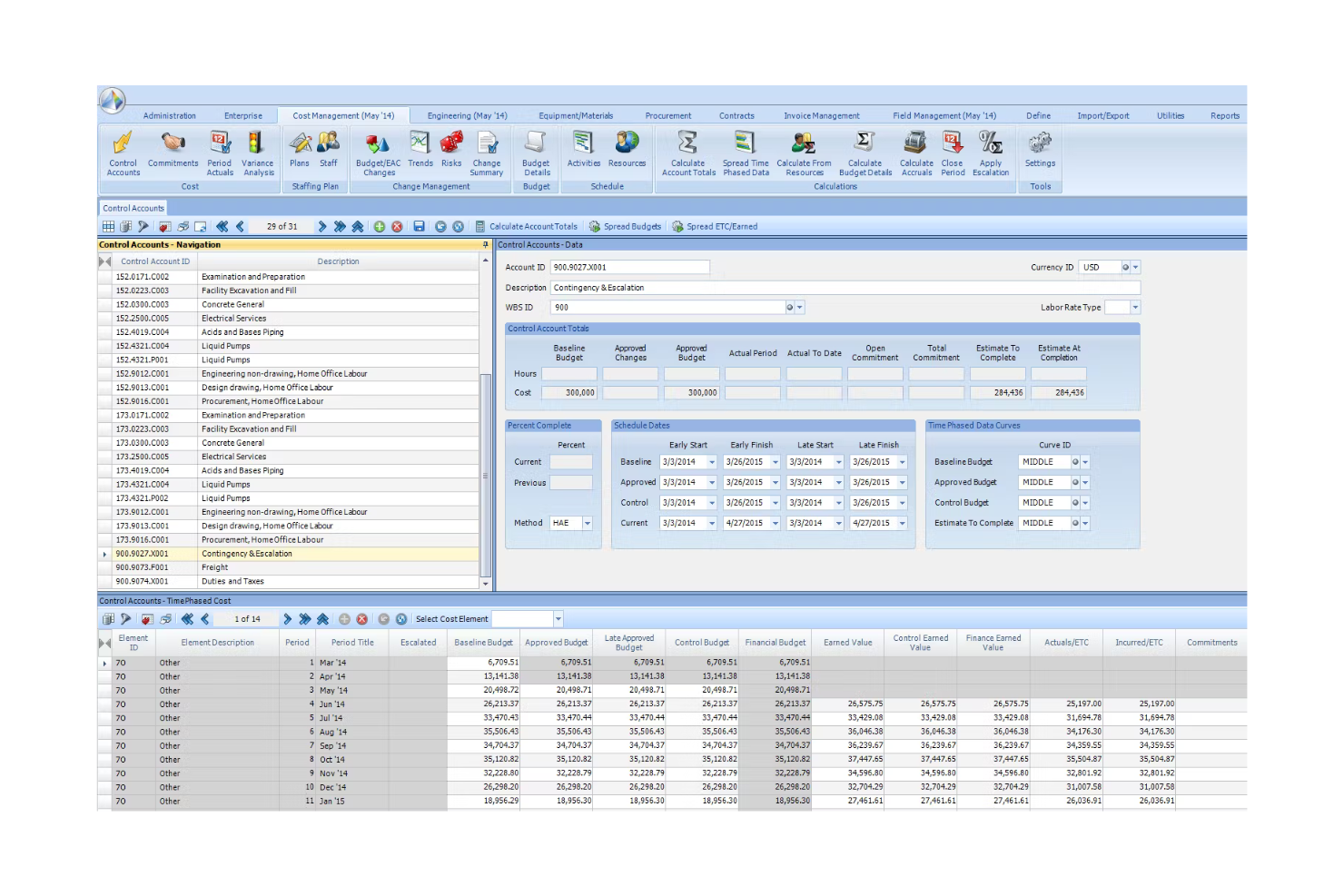
Contruent Enterprise is a capital project controls and lifecycle cost management platform that integrates scheduling, cost tracking, earned value management, change management, and portfolio reporting for large-scale mining projects.
Who Is Contruent Best For?
Contruent Enterprise is a strong fit for project controls teams managing large, capital-intensive mining programs where integrated cost, schedule, and earned value management are non-negotiable.
Why I Picked Contruent
I've included Contruent in my top picks because it's one of the few platforms built specifically around the project-controls demands of capital-heavy mining programs, with 25+ years of mining experience and clients like Rio Tinto, BHP, and Anglo American backing that up. I particularly like how its earned value management ties directly into cost and schedule data, so when a mining project drifts off baseline, you can see the variance, its cost impact, and the forecast adjustment in one place. Its change management module links every change order back to scope, cost, and schedule, which matters when you're managing multi-phase capital projects where a single unapproved change can cascade across budgets.
Contruent Key Features
- Contractor portal: Gives contractors gated access to view progress data, upload and download templates, and collaborate directly within the platform.
- ANSI EIA-748-compliant earned value management: Tracks CPI, SPI, cost and schedule variances, and estimate at completion across the full project lifecycle.
- 200+ pre-built reports: Covers EAC, physical progress, period actuals, productivity, change, commitments, histograms, and S-curves out of the box.
- Bid and RFP management: Collects and analyzes bids, supports configurable bid analysis, and administers RFPs within the contract management workflow.
Contruent Integrations
Contruent has certified adapters for SAP, Oracle, and IBM, plus integrations with Primavera P6 and Microsoft Project and connections to SharePoint. The vendor doesn’t publish a total integration count or API availability.
Pros and Cons
Pros:
- Contractor portals support distributed project teams
- Portfolio rollups connect project-level controls
- Cost and schedule data support forecasting
Cons:
- No documented fleet or offline field workflows
- Report customization can take extra effort
Best for Microsoft 365-native project scheduling
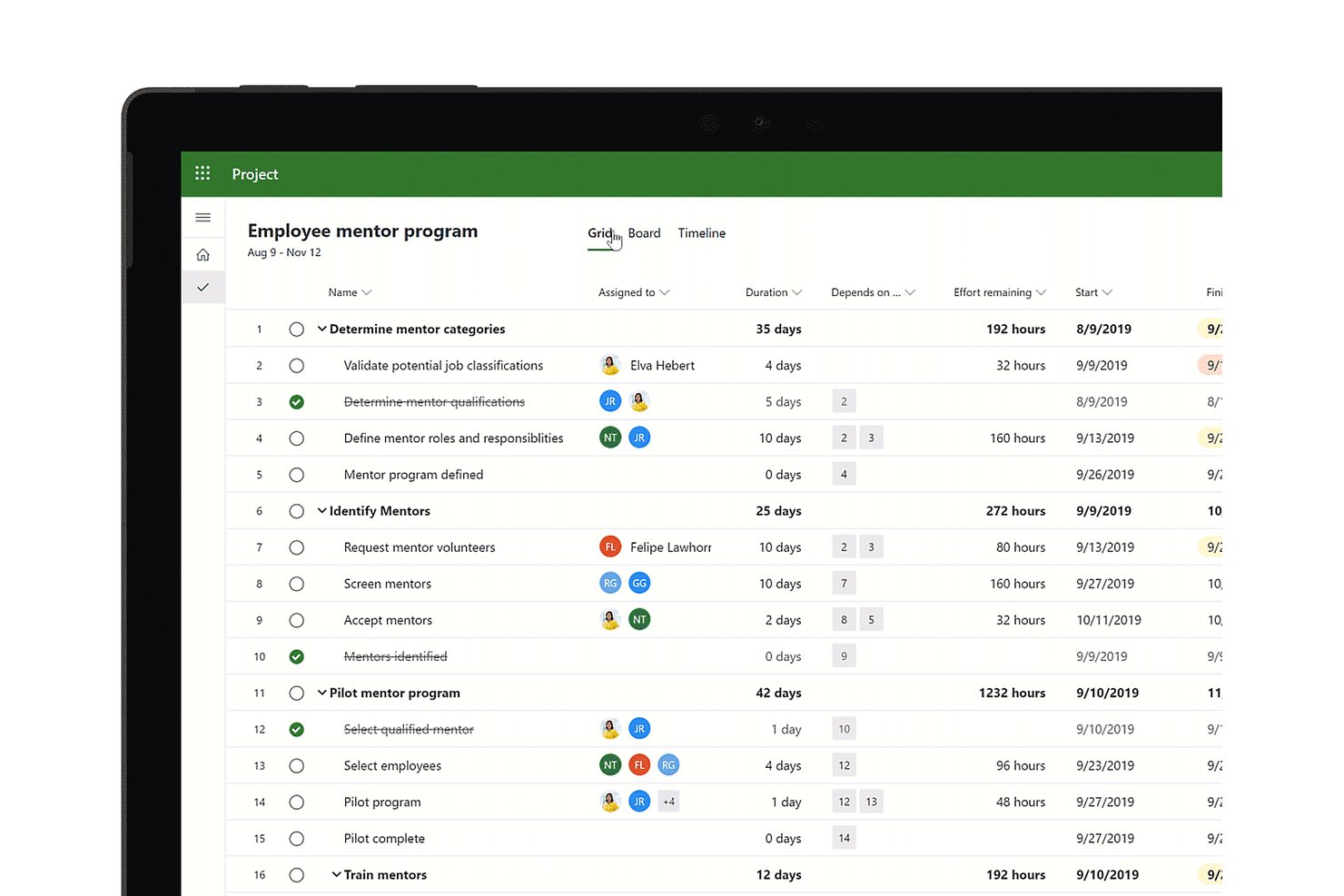
Microsoft Project is a project management and portfolio planning tool from Microsoft that covers scheduling, resource management, cost tracking, and reporting across complex, multi-phase projects.
Who Is Microsoft Project Best For?
Microsoft Project suits enterprises already running Microsoft 365 that need a proven scheduling engine for large, multi-phase projects with complex dependencies.
Why I Picked Microsoft Project
I've included Microsoft Project in my top picks because it's the most mature scheduling engine available for teams already running Microsoft 365, and that ecosystem fit matters more than people expect on complex, multi-phase projects. Its critical path analysis, cross-project dependencies, and Gantt baselines let you model a full mine development schedule and immediately see how a delayed shaft-sinking phase cascades into downstream milestones. I also like that master projects let you consolidate several sub-projects into a single view, which is practical when you're coordinating separate contracts across a site.
Microsoft Project Key Features
- Enterprise resource pool: Centralizes all work, generic, and material resources so you can view availability and allocate capacity across multiple concurrent projects.
- Master projects: Consolidates multiple sub-projects into a single schedule, letting you manage cross-project dependencies and critical paths in one view.
- Baseline tracking: Captures a snapshot of your original schedule and budget so you can compare planned versus actual progress throughout the project lifecycle.
- Portfolio dashboards: Provides built-in reporting views for issues, risks, and project status across your full project portfolio.
Microsoft Project Integrations
Microsoft Project offers native integrations across the Microsoft ecosystem, including Microsoft 365, Microsoft Planner, Microsoft Power BI, Microsoft SharePoint, and Microsoft Teams. It also supports Office JavaScript add-ins, a REST-backed API, and Power Automate.
Pros and Cons
Pros:
- Baselines link physical progress with budget tracking
- Resource assignments reveal capacity constraints across projects
- Cross-project critical paths map EPC dependencies
Cons:
- Project Online retirement disrupts cloud-based deployments
- No native mining safety or GIS workflows

Procore
Best for office-to-field construction project execution
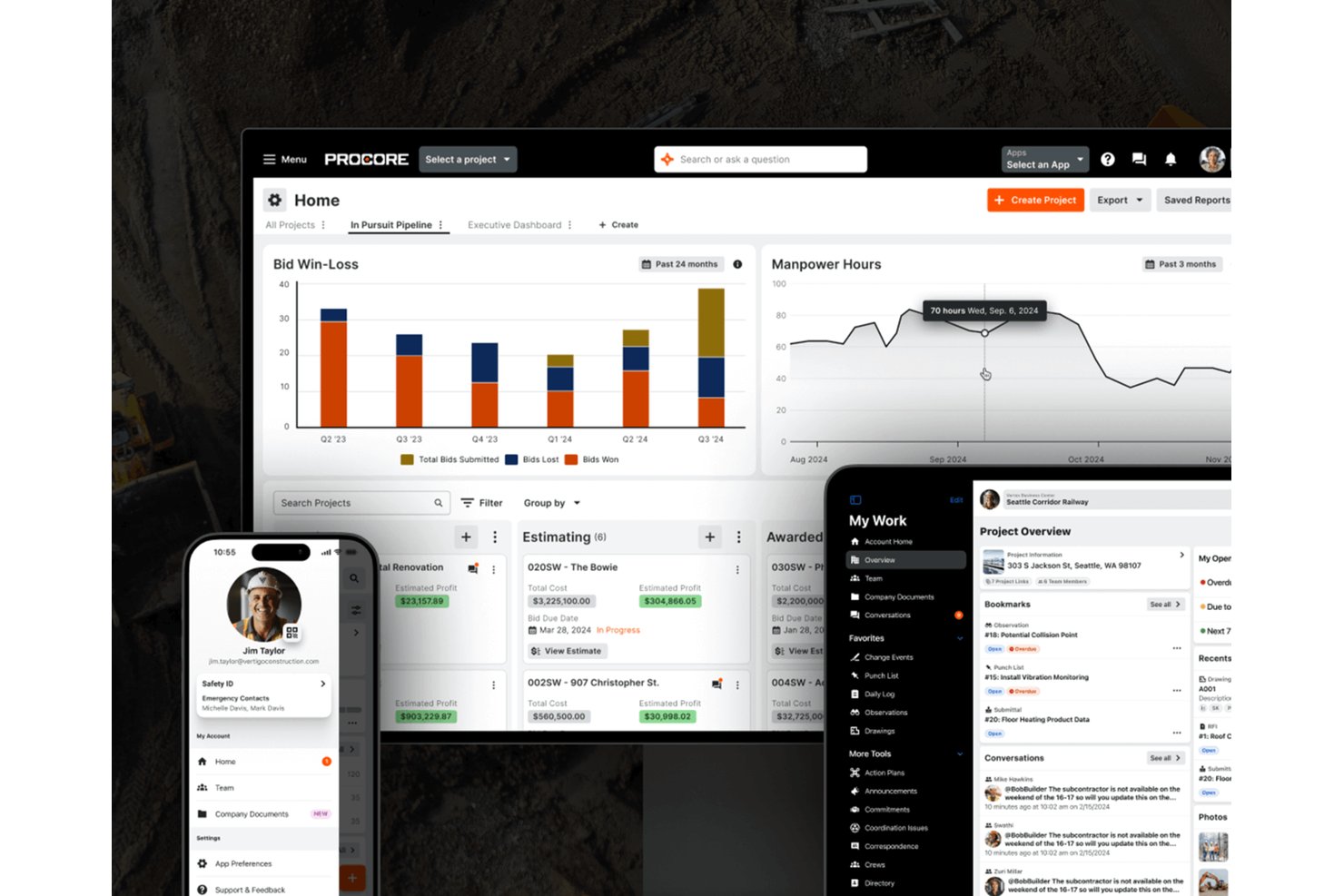
Procore is a construction project management platform that connects office and field teams through scheduling, document control, budget tracking, quality and safety management, and equipment coordination.
Who Is Procore Best For?
Procore fits construction and EPC project teams that need to keep office and field operations tightly connected across multiple active sites.
Why I Picked Procore
I picked Procore as one of the best because it genuinely closes the gap between office planning and field execution, which matters enormously on mining-adjacent construction and EPC projects. I love how its Gantt-based scheduling ties directly to daily field logs, so when a crew marks work complete on-site, that progress flows straight into cost and schedule forecasts. Its Quality and Safety module lets you run equipment inspections, log incidents with hazard details, and assign corrective actions from the field, all in one place.
Procore Key Features
- Bid management: Create, track, and compare bids side by side, then convert a selected bid directly into a subcontract or purchase order.
- BIM model viewer: View and collaborate on BIM models from a mobile device, with the ability to create and manage coordination issues in the field.
- Action plans: Build sequential work checklists with verification checkpoints using customizable templates to track project-specific requirements.
- Analytics and reporting: Access over 100 pre-built reports and combine Procore data with ERP information to generate job-cost forecasts across your portfolio.
Procore Integrations
Procore offers 400+ out-of-the-box Marketplace integrations, including Oracle Primavera P6, Microsoft Project, Sage, Bluebeam, and DocuSign. It also provides a REST API for custom integrations.
Pros and Cons
Pros:
- Daily progress informs cost forecasts
- Equipment records track cross-project assignments
- Shared drawings keep field-office teams aligned
Cons:
- Reviewers report scheduling can feel difficult
- No mining-specific engineering or production workflows

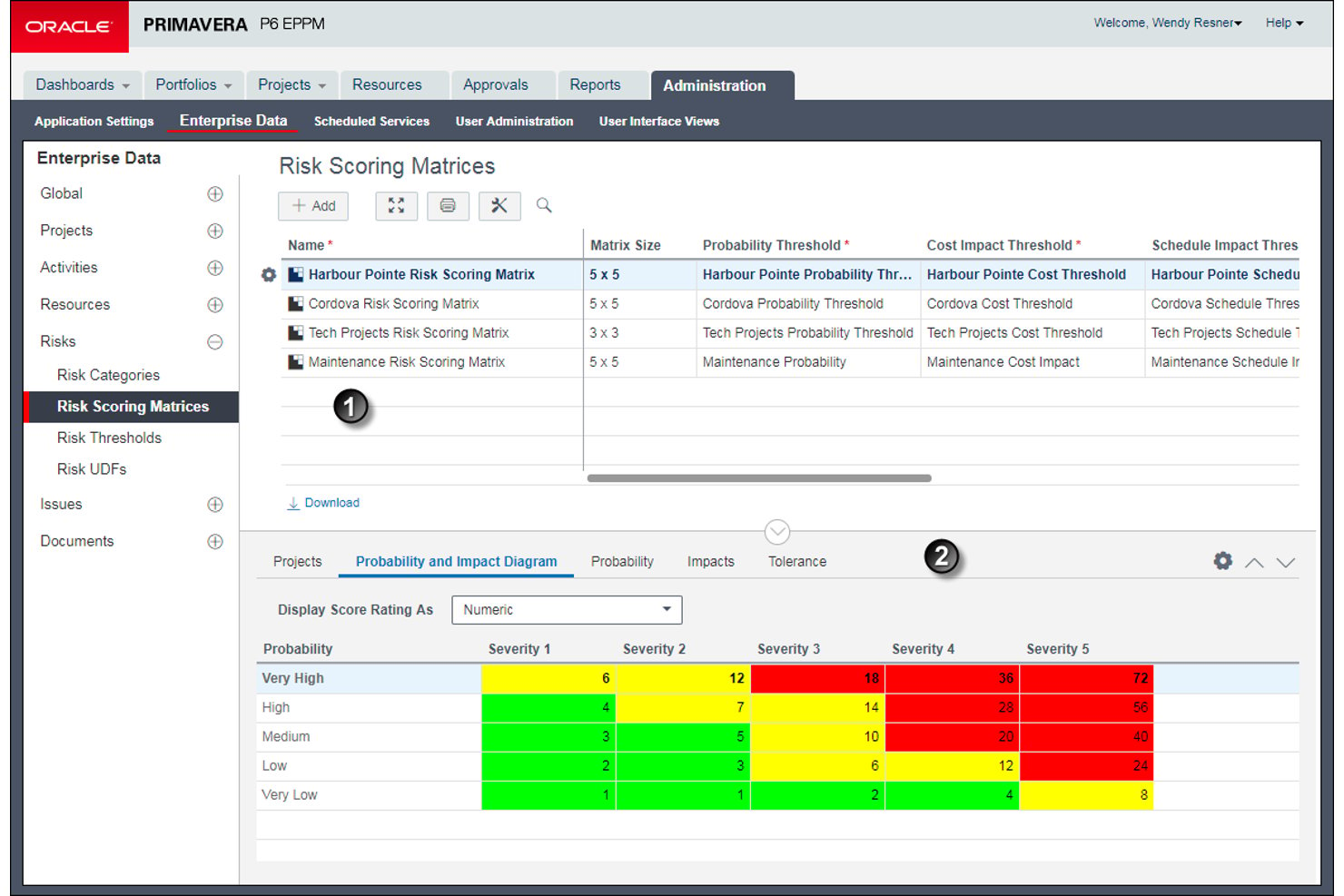
Oracle Primavera P6 is an enterprise project portfolio management tool built for planning, scheduling, and controlling large-scale programs across construction, engineering, and capital project environments, with multiuser scheduling, resource management, cost tracking, and risk analysis.
Who Is Oracle Primavera P6 Best For?
Oracle Primavera P6 is a strong fit for construction and engineering project controls teams managing large, multi-phase programs where critical path scheduling is the top priority.
Why I Picked Oracle Primavera P6
Oracle Primavera P6 earns its spot on my list because its critical path scheduling engine is genuinely unmatched for large, multi-phase programs. I've worked with schedules containing tens of thousands of activities, and P6's Trace Logic is what makes that manageable: it shows exactly which predecessor and successor relationships are driving an activity's timing, so you can pinpoint delays without guessing. I also rely on its multiple critical float path calculations, where you can define criticality by longest path or maximum total float, to keep subcritical paths visible before they become real problems.
Oracle Primavera P6 Key Features
- Baseline comparison: Store multiple static project snapshots and compare them against current progress using variance fields to surface schedule and cost deviations.
- Resource histogram: View time-based allocation histograms by resource, role, or resource team, with a limit line drawn from calendars and maximum units per time period.
- Earned value tracking: Calculate at-completion costs using actual costs plus estimate-to-complete, with the EV technique configured at the WBS level for each activity.
- Document review workflows: Set up structured review cycles with approval types, reviewer sequences, and due dates to manage project document approvals across teams.
Oracle Primavera P6 Integrations
Oracle Primavera P6 integrates with Oracle E-Business Suite and SAP ERP, with Primavera Gateway and Primavera Web Services supporting connections to business systems. Its Integration Applications Programming Interface (API) supports custom integrations.
Pros and Cons
Pros:
- Maps equipment demand across project schedules
- Tracks production quantities, manpower, and hours
- Traces dependencies across large mine schedules
Cons:
- Reports can require extra Excel preparation
- Mining compliance workflows need external configuration
Best for mining asset lifecycle cost control
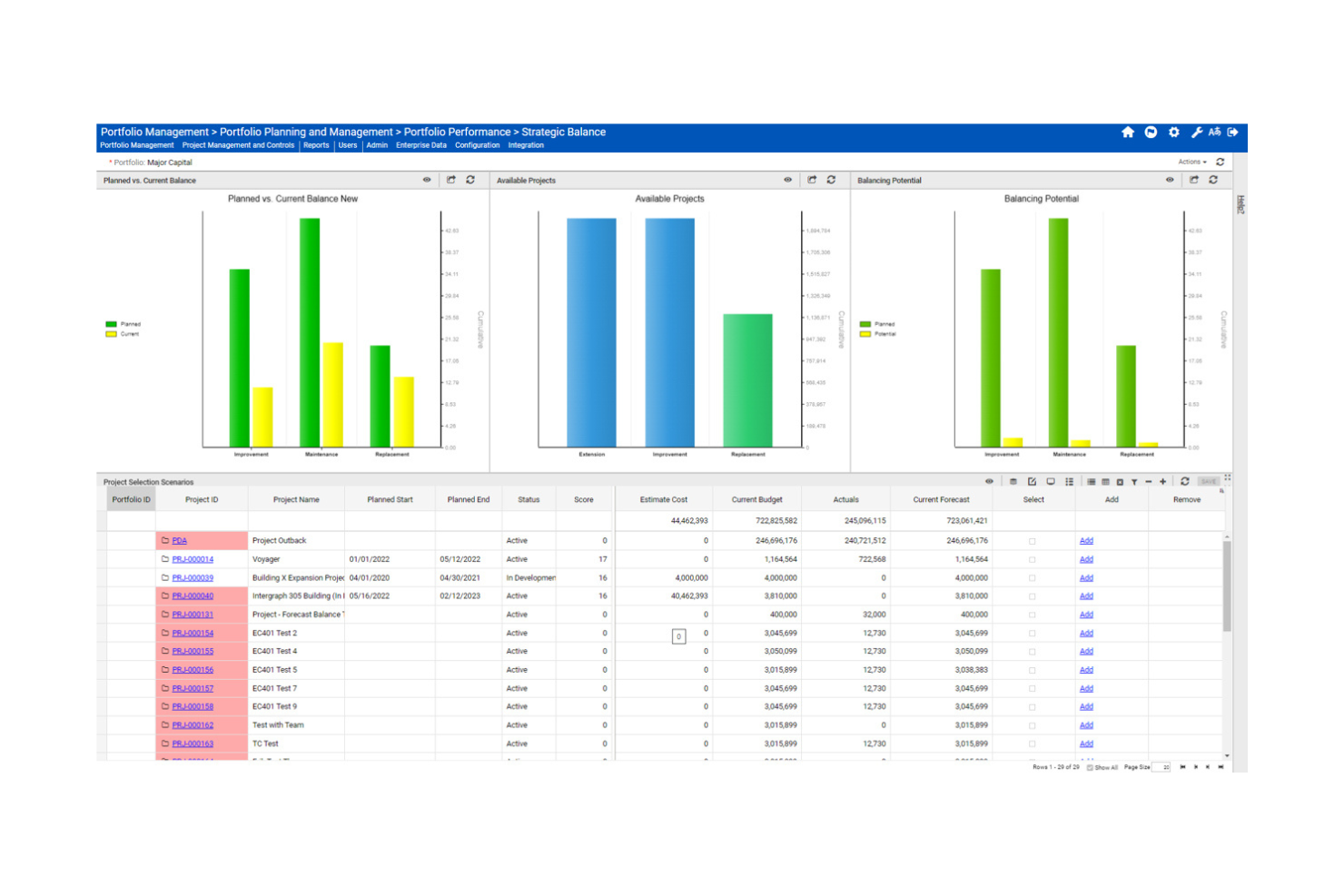
Octave Sequence Enterprise (formerly EcoSys) is an enterprise project and portfolio management platform that combines capital budgeting, cost tracking, resource forecasting, earned value management, and multi-region project controls.
Who Is Octave Sequence Enterprise Best For?
Octave Sequence Enterprise is a strong fit for enterprise capital project teams managing complex, multi-phase asset portfolios where long-term cost control and cross-regional financial visibility are the top priorities.
Why I Picked Octave Sequence Enterprise
I've included Octave Sequence Enterprise in my top picks because it's one of the few platforms built to manage the full financial complexity of a mining asset portfolio, from early-stage capital planning through reclamation and closure. I particularly like how it connects rolling cost forecasts, funding baselines, and what-if scenario modeling in a single view, so cost variance doesn't catch you off guard mid-project. Its multi-currency, multi-region execution support means distributed mine sites aren't operating in financial silos.
Octave Sequence Enterprise Key Features
- Earned value management: Tracks actual project progress against plan using standard EVM metrics including CPI, SPI, BCWP, and BCWS.
- Multi-vendor contract management: Manages contract terms, deliverables, obligations, and change orders with direct links to cost and schedule impacts.
- Role-based dashboards: Lets each user build custom dashboards surfacing the performance data most relevant to their role.
- Offline mobile field access: Allows field teams to log progress and updates without connectivity, then syncs data automatically when reconnected.
Octave Sequence Enterprise Integrations
Documented integrations include SAP, Oracle E-Business Suite, PeopleSoft, JD Edwards, Viewpoint, Oracle Primavera P6, and Microsoft Project. Octave Sequence Enterprise also supports web-service APIs, pre-built and real-time connectors, plus Excel, text, and XML imports.
Pros and Cons
Pros:
- Offline field reporting supports remote sites
- Portfolio visibility reduces spreadsheet consolidation
- Budget and forecast data stay connected
Cons:
- Heavy reports can slow large datasets
- Project-file handling drew reviewer criticism
Smartsheet
Best for spreadsheet-style Gantt scheduling
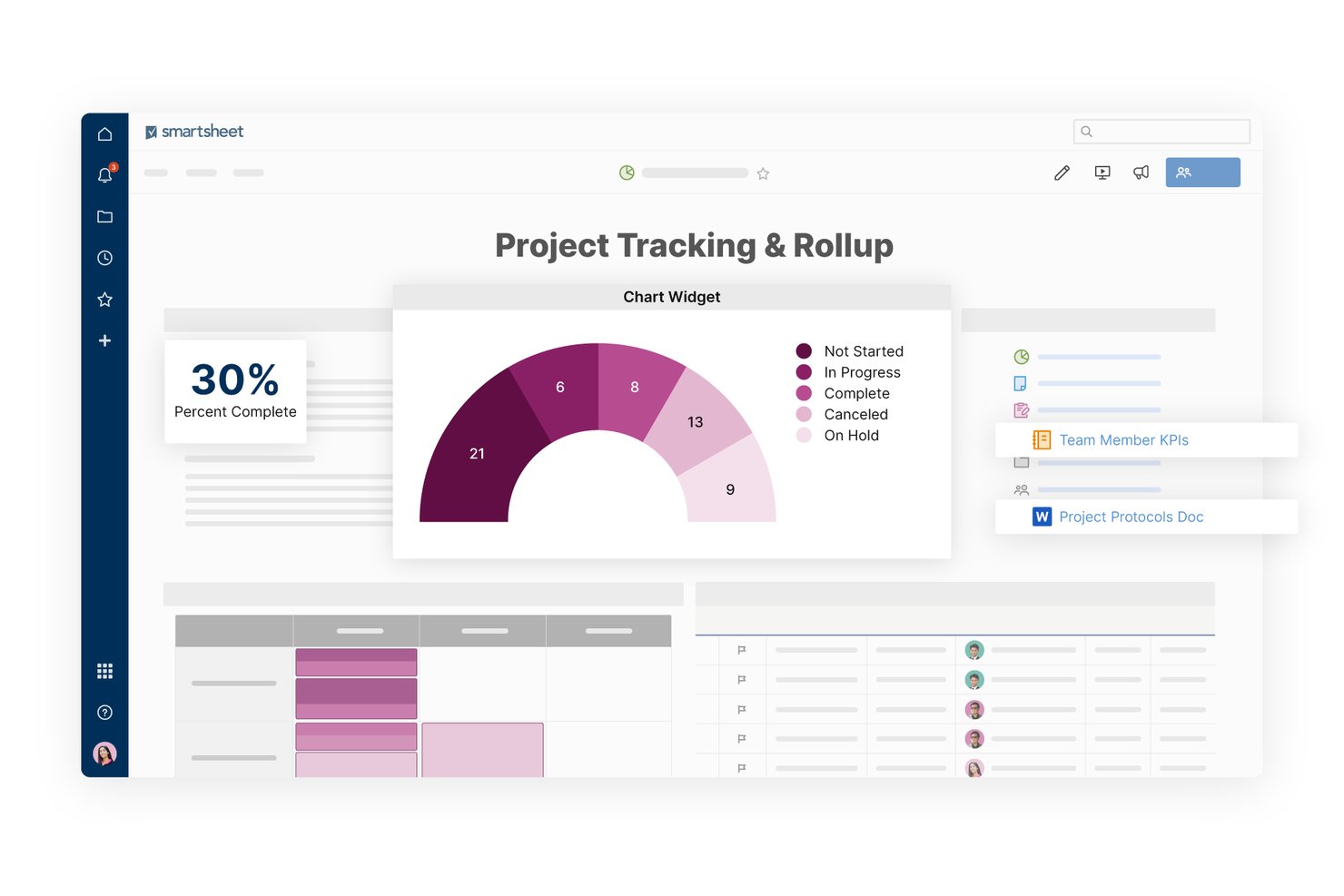
Smartsheet is a spreadsheet-style work management platform that combines Gantt scheduling, resource tracking, dashboards, automated workflows, and multi-project portfolio visibility for managing complex, multi-phase projects.
Who Is Smartsheet Best For?
Smartsheet suits project managers at mining companies who already work in spreadsheet-style tools and need structured Gantt scheduling and multi-site dashboard visibility without switching to a specialized platform.
Why I Picked Smartsheet
I've included Smartsheet in my top picks because its spreadsheet-style Gantt scheduling makes it easy for mining project managers to map out complex, multi-phase schedules without abandoning the familiar grid format they already work in. I particularly like how Gantt baselines let you compare your original plan against actual progress, so schedule slippage across long extraction or development phases is immediately visible. Scenario Planning also lets you model timeline changes without touching the live plan.
Smartsheet Key Features
- RAID log tracking: Log risks, actions, issues, and decisions with assigned owners, priority levels, status, due dates, and mitigation steps in a structured sheet.
- Automated workflow builder: Create no-code workflows that trigger notifications, approvals, and reminders based on conditions or schedules.
- Portfolio dashboards: Consolidate project health, status, and performance data across multiple projects into a single shareable dashboard view.
- Resource Management capacity view: Monitor team availability and utilization by role or discipline, filtered by project, and updated in real time as assignments change.
Smartsheet Integrations
Smartsheet offers over 175 integrations, including SAP ERP, SAP BusinessObjects, Power BI, Jira, ServiceNow, Tableau, Microsoft Teams, and Slack. It supports custom integrations through its REST API on Business plans and higher, plus Zapier.
Pros and Cons
Pros:
- RAID logs assign owners to project risks
- Shared dashboards improve cross-site visibility
- Gantt baselines expose schedule slippage
Cons:
- Offline access stops beyond forms
- No equipment-fleet or materials allocation
New Product Updates from Smartsheet

Smartsheet Adds Non-Plan User Management in Admin Center
Smartsheet adds a Non plan users tab to the Seat types and true-up page in Admin Center. This lets system admins review non-plan users and add them to the plan or remove them from the organization in one place. For more information, visit Smartsheet’s official site.
Outro software de gestão de projetos para mineração
Eis algumas opções adicionais de software de gestão de projetos para mineração que não foram incluídas na minha seleção, mas que ainda vale a pena conhecer:
- Wrike
For task management flexibility
- InEight
For capital project cost and schedule control
- GoodDay
For multi-view task and timeline tracking
- Autodesk Construction Cloud
For schedule-linked cash flow forecasting
- Planisware
For PPM across multi-region project portfolios
- Mastt
For capital project cost controls
- Spider Project
For resource-constrained schedule risk analysis
- MineOne
For mine operation scheduling


How I Evaluate Project Management Software for Mining
I split my evaluation into three parts, with the most weight on core functionality: schedule phased work with dependencies and allocate crews and equipment across sites. Then I look for differentiators such as mine-scheduling templates or offline field access. Finally, I consider mining-specific support, onboarding, and pricing for changing contractor headcounts.
Core Functionality (Table Stakes For This List)
When I'm selecting tools for my list, I score each one on a scale from 0 (does not offer the functionality) to 5 (excels in this area) for each core functionality listed below. I then convert the total into a percentage to help assess each tool's overall fit, with extra weight on any functionalities I’ve deemed essential.
- Scheduling & Gantt (Essential): I look for dependency-based timelines, baseline comparisons, and path analysis that can track phased work such as engineering, construction, and commissioning.
- Resource & Equipment (Essential): I assess whether teams can allocate and track labor, equipment, and materials across sites, including availability during overlapping work.
- Budget & Cost Tracking: I check for planned-versus-actual cost reporting and forecasts tied to milestones, so teams can spot variances before project phases close.
- Multi-Site Collaboration: I look for shared project views and timely updates across remote sites, including practical access for teams coordinating work in the field.
- Documents & Compliance: I evaluate version control, permissions, and organized records for drawings, permits, inspections, and safety documentation.
- Risk & Issue Tracking: I check whether teams can log, assign, score, and track risks or issues through mitigation and resolution.
Once I have a list of tools that meet the criteria, I consider what sets each platform apart.
Differentiating Factors (What Sets Vendors Apart)
Here's how I compare and contrast different vendors:
Standout Features
I look for remote/offline field access because mine sites regularly lose connectivity, and a tool that can't sync data after a shift underground creates dangerous blind spots. GIS and geology visualization is another separator—I check whether a platform can overlay tasks onto pit designs or ore body maps so teams tie schedules to real site geography. I also evaluate fleet and shift optimization, since coordinating haul trucks and crew rotations across multiple pits directly affects whether phases stay on schedule.
Beyond Features
I check whether a vendor's licensing model can flex with contractor headcounts that spike during construction and drop during steady-state operations. I also evaluate integration depth with mine planning tools like Deswik or Maptek, because a schedule that can't pull updated pit designs becomes stale fast. Deployment options matter too—remote sites need offline-first mobile apps or on-premise hosting that won't collapse when satellite links go down.
Como escolher software de gestão de projetos para mineração
É fácil perder-se em listas extensas de funcionalidades e estruturas de preços complexas. Para o ajudar a manter o foco enquanto analisa o seu processo específico de seleção de software, apresentamos uma lista de verificação dos fatores a ter em conta:
| Fator | O que considerar |
|---|---|
| Escalabilidade | O software pode acompanhar o crescimento das suas operações? Considere a expansão futura e se a ferramenta consegue gerir um volume maior de dados e utilizadores. |
| Integrações | É compatível com os seus sistemas atuais? Procure compatibilidade com ferramentas como GIS, ERP e software financeiro. |
| Personalização | Pode adaptá-lo para se adequar ao seu fluxo de trabalho? Verifique se o software permite personalizar painéis, relatórios e processos. |
| Facilidade de utilização | É fácil de utilizar pela sua equipa? Teste a interface para garantir que é intuitiva e requer formação mínima. |
| Implementação e integração inicial | Quanto tempo demorará a configuração? Avalie o suporte disponibilizado durante a integração inicial e se existem materiais de formação. |
| Custo | Enquadra-se no seu orçamento? Compare os planos de preços e verifique se existem custos ocultos ou requisitos de contratos de longa duração. |
| Medidas de segurança | Existem medidas de proteção de dados? Procure encriptação, autenticação de utilizadores e conformidade com as normas do setor. |
| Disponibilidade do suporte | É fácil obter ajuda? Considere a disponibilidade do apoio ao cliente e os canais oferecidos, como chat ou telefone. |
O que é software de gestão de projetos para mineração?
O software de gestão de projetos para a mineração foi concebido para ajudar a gerir e otimizar projetos de mineração, desde o planeamento até à execução. Estas ferramentas são utilizadas por gestores de projetos, engenheiros e pessoal operacional para aumentar a eficiência e manter os projetos no caminho certo.
As funcionalidades de agendamento, gestão de recursos e acompanhamento da conformidade ajudam a organizar tarefas, gerir recursos e cumprir os regulamentos. Estas ferramentas apoiam a obtenção de resultados de projeto bem-sucedidos na indústria mineira.
Funcionalidades do software de gestão de projetos para a mineração
Ao selecionar software de gestão de projetos para a mineração, procure as seguintes funcionalidades essenciais:
- Agendamento e acompanhamento: Gira os calendários dos projetos e monitorize o progresso para garantir que as tarefas são concluídas dentro do prazo.
- Gestão de recursos: Afete e otimize os recursos de forma eficaz para evitar estrangulamentos e maximizar a produtividade.
- Acompanhamento do orçamento: Acompanhe as despesas dos projetos e as previsões financeiras para se manter dentro do orçamento.
- Acompanhamento da conformidade: Mantenha o cumprimento dos regulamentos da indústria e das normas de segurança para reduzir os riscos.
- Visualização de dados: Disponibilize informações claras e acessíveis através de gráficos e diagramas para apoiar a tomada de decisões.
- Avaliação de riscos: Identifique e avalie potenciais riscos para mitigar problemas antes de estes afetarem o projeto.
- Capacidades de integração: Ligue-se aos sistemas de software existentes para manter um fluxo de dados contínuo e melhorar a eficiência.
- Painéis personalizáveis: Adapte a interface às necessidades e preferências específicas do projeto para melhorar a experiência do utilizador.
- Gestão de incidentes: Acompanhe e gira incidentes de segurança para manter um ambiente de trabalho seguro.
- Acesso móvel: Permita que os membros da equipa acedam aos dados e às ferramentas do projeto no terreno para melhorar a flexibilidade e a capacidade de resposta.
Vantagens do software de gestão de projetos para a mineração
Eis algumas das principais vantagens da implementação de software de gestão de projetos para a mineração:
- Maior eficiência: Automatize tarefas como o agendamento e a afetação de recursos para poupar tempo e aumentar a produtividade.
- Melhor conformidade: Acompanhe e gira o cumprimento dos regulamentos da indústria e das normas de segurança, além de reduzir os riscos legais.
- Tomada de decisões mais eficaz: Utilize ferramentas de visualização de dados para obter informações e tomar rapidamente decisões fundamentadas.
- Controlo de custos: Monitorize de perto os orçamentos e as despesas para evitar gastos excessivos e melhorar os resultados financeiros.
- Mitigação de riscos: Identifique potenciais riscos numa fase inicial com funcionalidades de avaliação de riscos que ajudam a evitar atrasos e problemas no projeto.
- Maior colaboração: Permita que os membros da equipa acedam às informações do projeto a partir de qualquer lugar para promover uma melhor comunicação e trabalho em equipa.
- Fluxos de trabalho personalizáveis: Adapte o software às necessidades específicas do seu projeto, melhorando a satisfação dos utilizadores e os resultados do projeto.
Custos e preços do software de gestão de projetos para a mineração
Os custos do software de gestão de projetos para a mineração variam consoante as funcionalidades, a dimensão da equipa, os complementos, entre outros fatores. A tabela abaixo resume os planos comuns, os respetivos preços médios e as funcionalidades normalmente incluídas na maioria das soluções:
Tabela de comparação de planos de software de gestão de projetos para a mineração
| Tipo de plano | Preço médio | Funcionalidades comuns |
|---|---|---|
| Plano gratuito | $0 | Agendamento básico, número limitado de utilizadores e relatórios essenciais |
| Plano pessoal | $5-$25/user/month | Agendamento, gestão de recursos e análises básicas. |
| Plano empresarial | $30-$75/user/month | Relatórios avançados, integrações e acompanhamento da conformidade. |
| Plano empresarial de grande dimensão | $100-$200/user/month | Fluxos de trabalho personalizados, maior segurança e suporte dedicado. |
Software de Gestão de Projetos para a Indústria Mineira – Perguntas Frequentes
Eis algumas respostas a perguntas comuns sobre software de gestão de projetos para a indústria mineira:
Como é que o software de gestão de projetos ajuda as operações mineiras?
O software de gestão de projetos ajuda as operações mineiras com ferramentas para o planeamento, a gestão de recursos e o acompanhamento do orçamento. Permite à sua equipa planear de forma eficiente, atribuir recursos e acompanhar o progresso face aos prazos. Isto ajuda a manter os projetos dentro do prazo e do orçamento.
O software de gestão de projetos pode integrar-se com os sistemas existentes?
Sim, muitas soluções de software de gestão de projetos oferecem capacidades de integração com sistemas existentes, como software de SIG, ERP e financeiro. Antes de escolher uma ferramenta, verifique a sua compatibilidade com os sistemas atuais para manter um fluxo de dados contínuo e a eficiência entre plataformas.
Quais são os principais desafios da implementação de software de gestão de projetos na indústria mineira?
A implementação de software de gestão de projetos na indústria mineira pode ser um desafio devido à complexidade dos projetos e à necessidade de personalização. Poderá deparar-se com obstáculos ao alinhar o software com os seus fluxos de trabalho existentes e ao formar a sua equipa para utilizar eficazmente novas ferramentas.
Como pode o software de gestão de projetos melhorar a conformidade em matéria de segurança?
O software de gestão de projetos pode melhorar a conformidade em matéria de segurança através de funcionalidades como o acompanhamento de incidentes, a monitorização da conformidade e a elaboração automatizada de relatórios. Estas ferramentas ajudam a sua equipa a cumprir as normas e os regulamentos de segurança e a reduzir o risco de acidentes e problemas legais.
O acesso móvel é importante para o software de gestão de projetos na indústria mineira?
Sim, o acesso móvel permite à sua equipa aceder aos dados e às ferramentas dos projetos no terreno. Esta flexibilidade melhora a comunicação e a capacidade de resposta e permite aos membros da equipa atualizar informações e tomar decisões em tempo real, o que é essencial em ambientes mineiros dinâmicos.