

10 melhores softwares gratuitos de integração de clientes em 2026

Lista de seleção de software gratuito para integração de clientes


O software gratuito de integração de clientes fornece à sua equipa ferramentas para dar as boas-vindas, organizar e gerir novos clientes sem custos iniciais — através de um plano gratuito ou de um período de avaliação gratuito. Se procura formas de automatizar a integração, manter todos alinhados e proporcionar uma experiência tranquila aos clientes sem ultrapassar o orçamento, está no sítio certo. Este guia apresenta as principais opções gratuitas, para que possa comparar funcionalidades, perceber qual se adapta ao seu fluxo de trabalho e fazer uma escolha confiante para a sua empresa em 2026.
Why Trust Our Software Recommendations
Our team has been testing and reviewing software since 2012. As project managers ourselves, we know how difficult—and important—it is to choose the right software.
For this guide, we evaluated tools using hands-on testing and independent research, scoring tools using our selection criteria. We also draw on insights from industry thought leaders and practicing project management experts.
Our reviews reflect our human editorial judgment, not a sales pitch.
Expert reviewers:
Tabela comparativa de software gratuito para integração de clientes
Esta tabela comparativa resume os detalhes de preços das minhas principais escolhas de software gratuito para integração de clientes.
| Tool | Best For | Trial Info | Price | ||
|---|---|---|---|---|---|
| 1 | Best for secure client portals with workflow automation | Free trial available | From $5,000/year (billed annually) | Website | |
| 2 | Best for a flexible workspace for building onboarding checklists and guides | Free plan + free trial + free demo available | From $10/user/month | Website | |
| 3 | Best for no-code client portals for onboarding and resource sharing | Free plan + free demo available | From $19/month (billed annually) | Website | |
| 4 | Best for a spreadsheet-database hybrid for tracking onboarding progress | Free plan + free trial + free demo available | From $20/user/month (billed annually) | Website | |
| 5 | Best for client onboarding workspaces with templates and automation | Free plan + free demo available | From $350/month | Website | |
| 6 | Best for SOP templates for structured client onboarding | Free plan available | From $7/user/month (billed annually) | Website | |
| 7 | Best for onboarding and client portals for small teams | 7-day free trial + free plan available | From $20/month | Website | |
| 8 | Best for CRM with built-in onboarding pipeline tools | 28-day free trial + free plan available | From $20/seat/month | Website | |
| 9 | Best for interactive forms for client intake and onboarding surveys | Free plan available | From $28/month (billed annually) | Website | |
| 10 | Best for client portals with task management and file sharing | Free trial + free plan available | From $6.50/month (billed annually) | Website |

Avaliações de software gratuito para integração de clientes
Abaixo encontrará os meus resumos detalhados do melhor software gratuito para integração de clientes que entrou na minha lista de seleção. As minhas avaliações apresentam uma análise detalhada das funcionalidades, dos melhores casos de utilização e dos preços de cada plataforma, para o ajudar a encontrar a melhor opção para si.

Moxo
Best for secure client portals with workflow automation
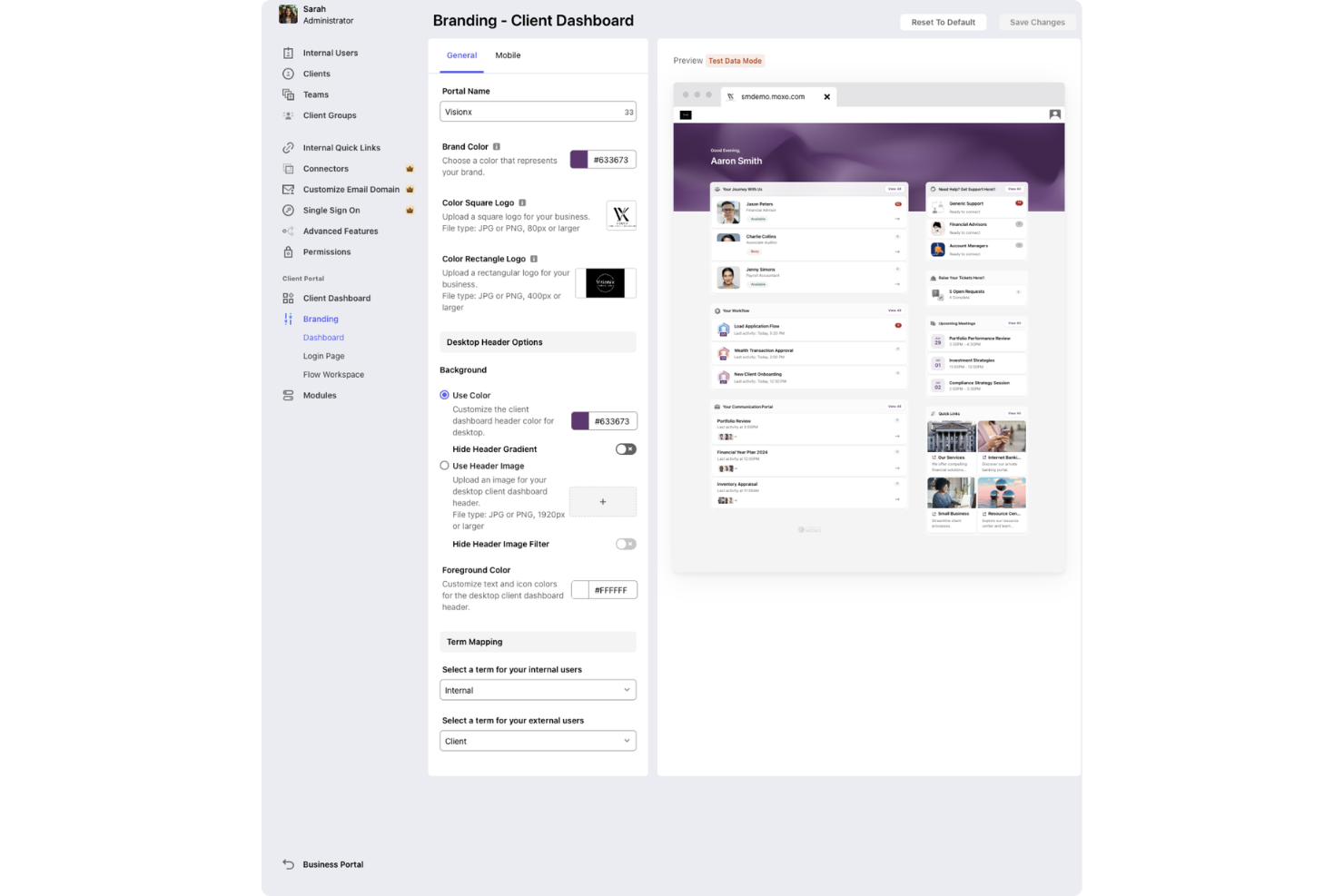
Moxo is a client onboarding and workflow management platform that provides secure client portals, digital forms, e-signatures, and real-time collaboration tools for managing onboarding processes.
Who Is Moxo Best For?
Moxo suits client-facing teams at financial services firms, consultancies, and professional services companies that need secure, branded onboarding portals.
Why I Picked Moxo
I picked Moxo as one of the best because I can set up secure, branded onboarding portals for clients and manage all onboarding steps in one place. I like that Moxo supports digital forms and e-signatures, which lets my team collect documents and approvals without switching tools. The free trial lets me test these features with real clients before committing.
Moxo Key Features
- In-app chat: Communicate with clients directly within the onboarding portal.
- Task tracking: Assign and monitor onboarding tasks for each client.
- Document sharing: Upload and organize files for client access and review.
- Audit trails: Track all client interactions and activity for compliance.
Moxo Integrations
Moxo offers native integrations with DocuSign, Salesforce, HubSpot, Outlook, and Google for meeting scheduling and data sync. An API is available for custom integrations.
What's Free?
Moxo offers a free plan with limited “flows” and AI credits. The plan provides access to core onboarding features, and users can perform up to two flows and have access to 500 AI credits per month.
Pros and Cons
Pros:
- Branded experience with customizable client workspaces
- Automated task assignment and progress tracking
- Real-time chat and messaging with clients
Cons:
- Mobile app notifications can be inconsistent
- No free plan, only a free trial
Notion
Best for a flexible workspace for building onboarding checklists and guides
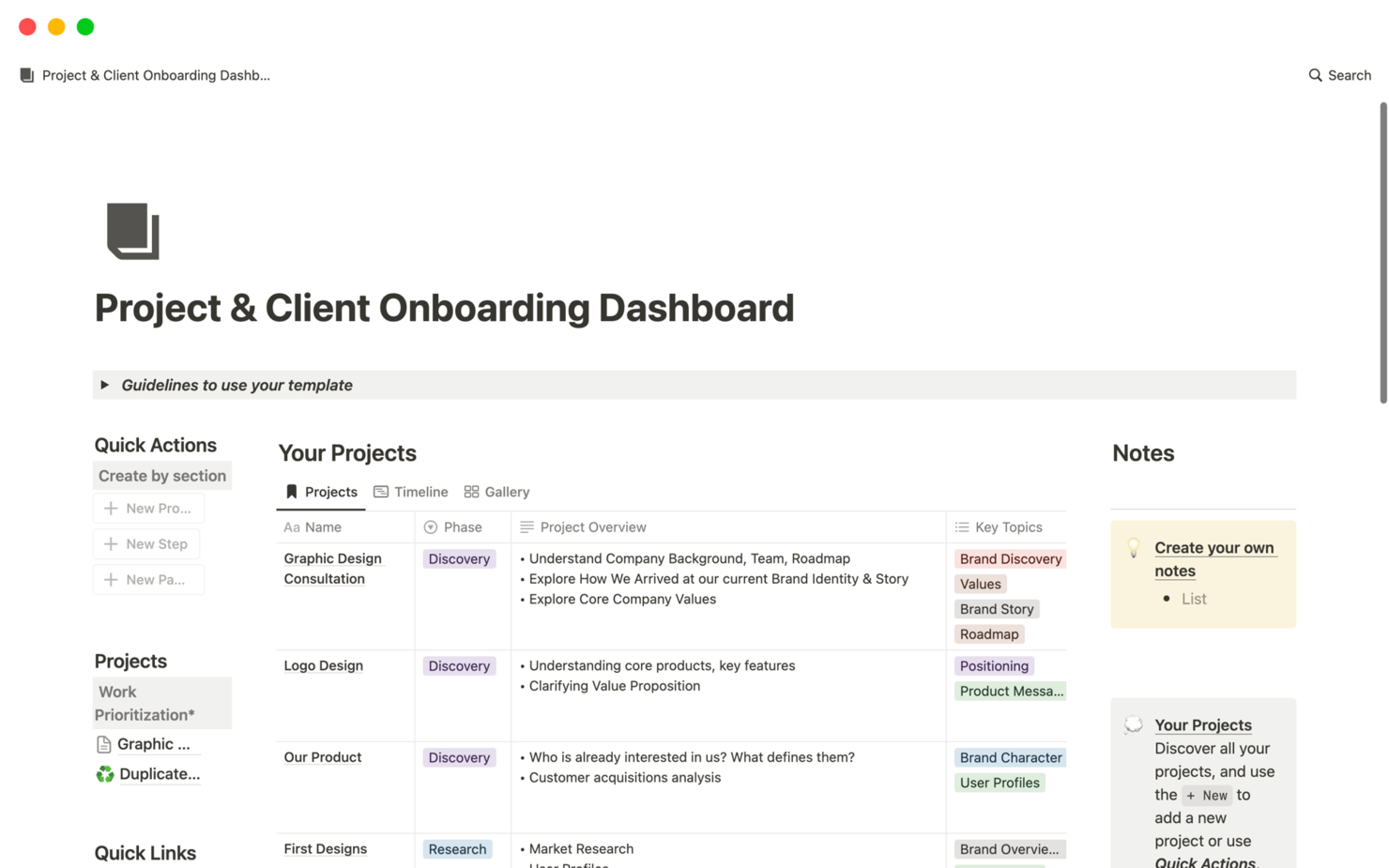
Notion is a collaborative workspace platform that combines document creation, wikis, databases, and project management tools for organizing and managing client onboarding workflows.
Who Is Notion Best For?
Notion suits small to midsize teams who want a flexible, all-in-one workspace for managing client onboarding and internal documentation.
Why I Picked Notion
I picked Notion as one of the best because I can combine docs, wikis, and project management in a single workspace—my team builds onboarding templates, tracks client progress in databases, and centralizes all onboarding resources in one place. I like that we can link onboarding checklists directly to client records and update everything in real time. The flexibility to create custom onboarding dashboards and knowledge bases makes it easy to adapt our process as client needs change.
Notion Key Features
- Guest access: Invite clients to view or edit specific onboarding pages.
- Task assignment: Assign onboarding tasks to team members or clients.
- Commenting and mentions: Collaborate on onboarding steps with in-line comments and @mentions.
- Version history: Track changes to onboarding documents and restore previous versions.
Notion Integrations
Notion offers native integrations with Slack, GitHub, GitLab, Jira, Asana, Google Drive, Figma, Zoom, and Typeform. It connects with Zapier and provides an API for custom integrations.
What's Free?
Notion offers a free-forever plan for individuals and small teams with unlimited pages and blocks. The free plan limits file uploads to 5MB per file and restricts some advanced permissions and admin controls.
Pros and Cons
Pros:
- Real-time collaboration with comments and mentions
- Custom templates support tailored onboarding workflows
- Flexible workspace combines documentation and task tracking
Cons:
- No dedicated client portal functionality
- Limited native automation for onboarding processes

Softr
Best for no-code client portals for onboarding and resource sharing

Softr is a no-code client portal builder that lets you create secure onboarding portals using data from Airtable or Google Sheets, with features for user authentication, permissions, and customizable layouts.
Who Is Softr Best For?
Softr is a good fit for small businesses and consultancies that want to build secure, no-code client onboarding portals using Airtable or Google Sheets.
Why I Picked Softr
I picked Softr as one of the best because I can build secure client portals directly from Airtable or Google Sheets without writing code. My team is able to set up granular user permissions and authentication for each client. I like that we can customize layouts and add document upload blocks to match our onboarding process.
Softr Key Features
- Drag-and-drop page builder: Arrange onboarding pages and sections visually with no coding required.
- Pre-built onboarding templates: Start quickly with templates designed for client portals and onboarding flows.
- Custom domain support: Use your own branded domain for client-facing portals.
- Email notifications: Automatically send onboarding updates and alerts to clients and team members.
Softr Integrations
Softr offers native integrations with Airtable, Google Sheets, Stripe, HubSpot, Mailchimp, Google Analytics, Intercom, Hotjar, and Google Tag Manager. It connects with Zapier and provides an API for custom integrations.
What's Free?
Softr offers a free-forever plan that includes unlimited applications and up to 5 internal users. The free plan displays Softr branding and has limited integration and customization options.
Pros and Cons
Pros:
- User authentication controls support secure access
- Pre-built templates accelerate setup time
- No-code builder simplifies creation of client onboarding portals
Cons:
- Reporting features are relatively basic
- Limited workflow automation capabilities

Airtable
Best for a spreadsheet-database hybrid for tracking onboarding progress
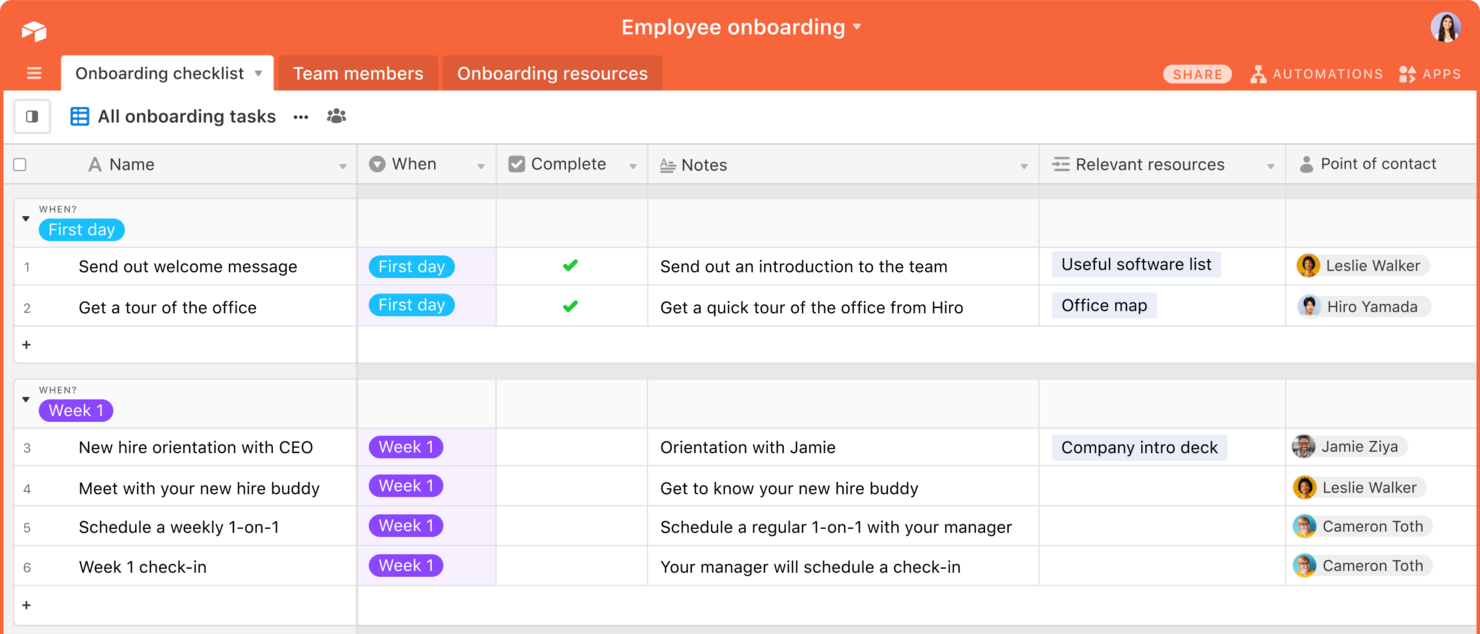
Airtable is a flexible database and workflow platform that lets you build custom client onboarding pipelines, automate processes, and organize client data using spreadsheets, forms, and visual dashboards.
Who Is Airtable Best For?
Airtable is a good fit for teams that need to design custom onboarding workflows and manage client data in a highly visual, flexible environment.
Why I Picked Airtable
I picked Airtable as one of the best because I can build custom onboarding pipelines using its visual database and automation tools. My team uses the free plan to create onboarding forms, track client progress, and collaborate in real time. I like that I can design unique onboarding templates and dashboards without code, which fits a range of client needs.
Airtable Key Features
- Views gallery: Choose from grid, calendar, kanban, and gallery views for onboarding data.
- Role-based permissions: Set granular access levels for collaborators and clients.
- Automations library: Trigger actions like notifications or record updates based on onboarding milestones.
- Attachment fields: Upload and organize client documents directly within onboarding records.
Airtable Integrations
Airtable offers native integrations with Google Drive, Slack, Jira, Salesforce, Box, and Dropbox, and connects with Zapier. An API is available for custom integrations.
What's Free?
Airtable offers a free-forever plan with unlimited bases, up to five creators or editors per workspace, and limited automation and integration options. Storage and record limits apply on the free plan.
Pros and Cons
Pros:
- Custom forms support structured client data collection
- Multiple views improve visibility into onboarding progress
- Flexible database structure adapts to custom onboarding workflows
Cons:
- Lacks built-in client communication tools
- Advanced automation features restricted on free plan

Dock
Best for client onboarding workspaces with templates and automation
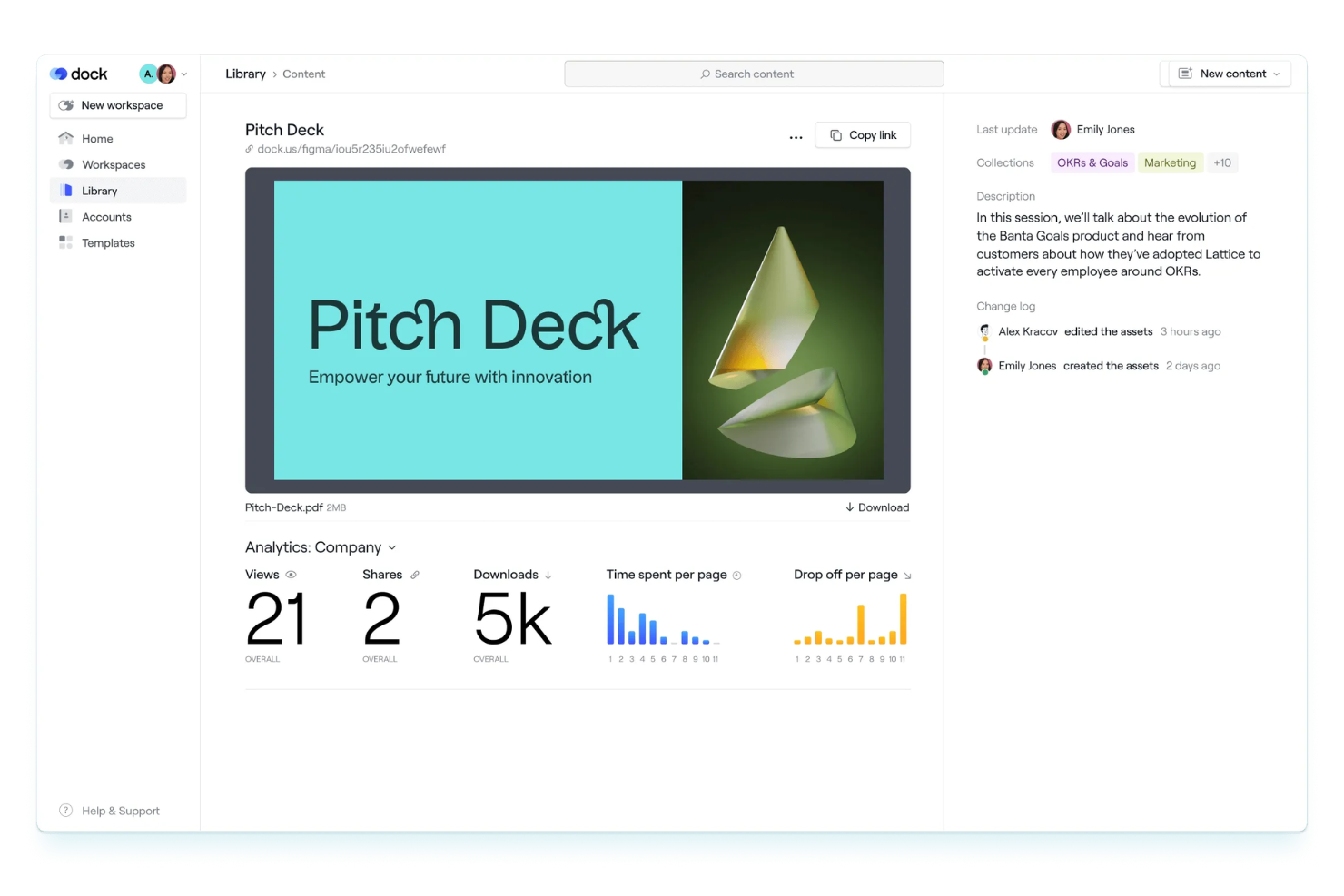
Dock is a client onboarding workspace platform that lets teams create interactive onboarding portals, automate onboarding tasks, and use customizable templates to manage client journeys.
Who Is Dock Best For?
Dock is a good fit for customer success and onboarding teams at B2B SaaS companies managing multiple client projects.
Why I Picked Dock
I picked Dock as one of the best because its onboarding workspaces let my team build repeatable client journeys with templates and automation. I like that I can assign tasks, share documents, and track progress in a single portal. The workspace templates make it easy to standardize onboarding across different client types.
Dock Key Features
- Client portal customization: Personalize each client’s onboarding portal with branding and tailored content.
- Embedded video walkthroughs: Add video guides directly into onboarding workspaces for step-by-step instructions.
- File request and upload: Request and collect documents securely from clients within the portal.
- Approval workflows: Set up approval steps for client deliverables and onboarding milestones.
Dock Integrations
Integrations include Slack, Salesforce, Gong, Zoom, Microsoft Teams, Zoom, Avoma, and Loom.
What's Free?
Dock offers a free-forever plan with limited features. The free plan restricts you to one active client workspace and does not include advanced automation or integrations.
Pros and Cons
Pros:
- Embedded video walkthroughs enhance onboarding guidance
- Customizable client portals with tailored content and branding
- Workspace templates standardize repeatable onboarding processes
Cons:
- Mobile experience less optimized than desktop
- Limited analytics for tracking onboarding performance

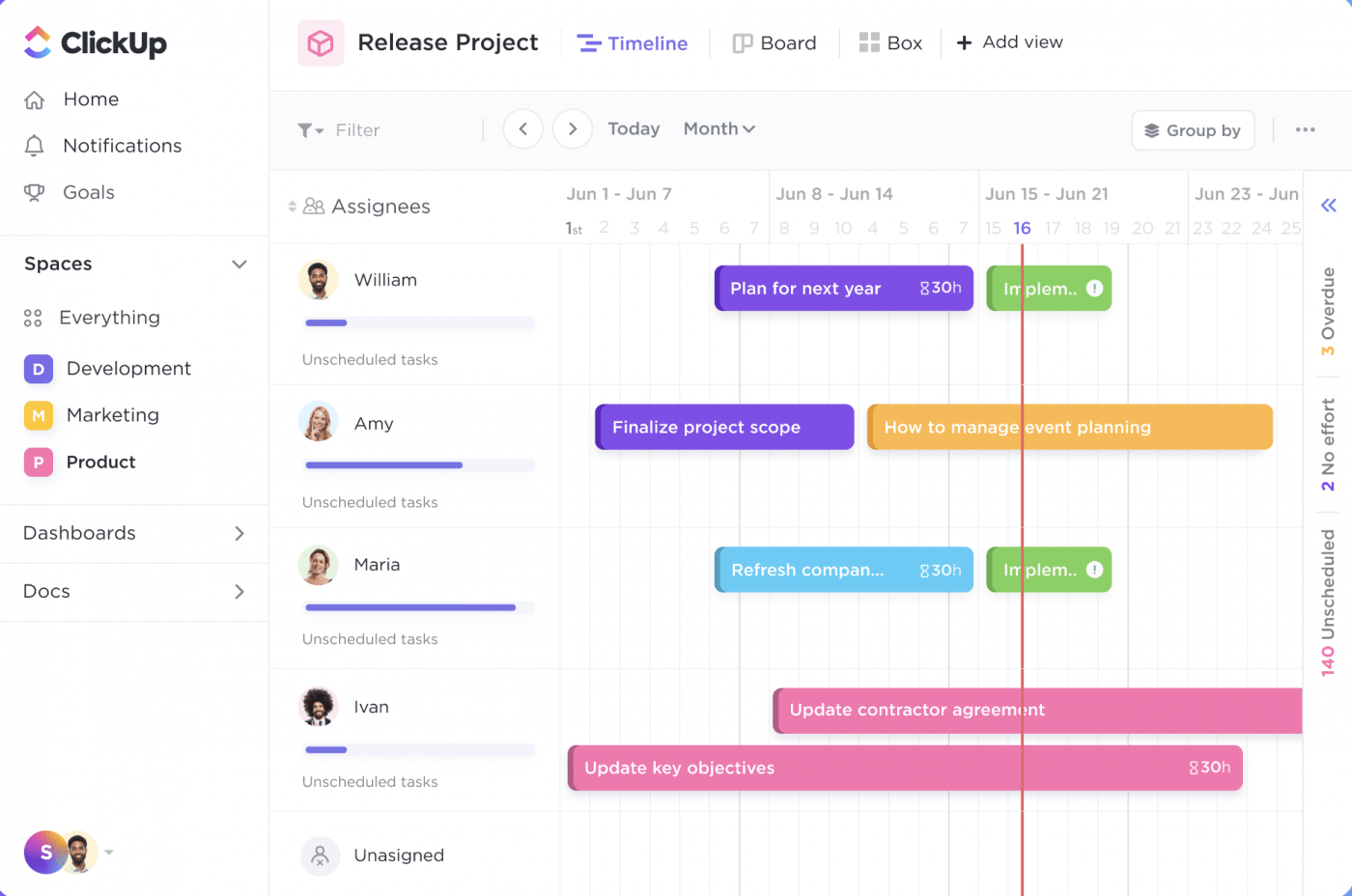
ClickUp is a work management platform that lets teams organize client onboarding with customizable SOP templates, task lists, document sharing, and workflow automation.
Who Is ClickUp Best For?
ClickUp is a good fit for small to midsize teams in digital agencies or consulting firms that need customizable onboarding workflows.
Why I Picked ClickUp
I picked ClickUp as one of the best because I can grab ready-made SOP templates for client onboarding and customize them for my workflow. I like that I can assign onboarding tasks, set dependencies, and track progress in real time. My team uses ClickUp’s document sharing to keep all onboarding materials in one place.
ClickUp Key Features
- Form view: Collect onboarding information from clients using customizable forms.
- Automations: Set up triggers and actions to automate repetitive onboarding steps.
- Custom fields: Track client-specific onboarding data with tailored field types.
- Time tracking: Monitor time spent on each onboarding task directly within the platform.
ClickUp Integrations
ClickUp offers native integrations with Google Drive, Slack, GitHub, Zoom, Microsoft Teams, Dropbox, OneDrive, Outlook, and Calendly. It also connects with Zapier and provides an API for custom integrations.
What's Free?
ClickUp offers a free-forever plan with unlimited users and tasks. The free plan limits automations, advanced reporting, and some integrations, and restricts guest access and storage.
Pros and Cons
Pros:
- Real-time collaboration improves team coordination
- Custom fields allow detailed client data tracking
- Pre-built SOP templates support structured onboarding processes
Cons:
- Mobile performance can lag on complex projects
- Automation capabilities limited on free plan

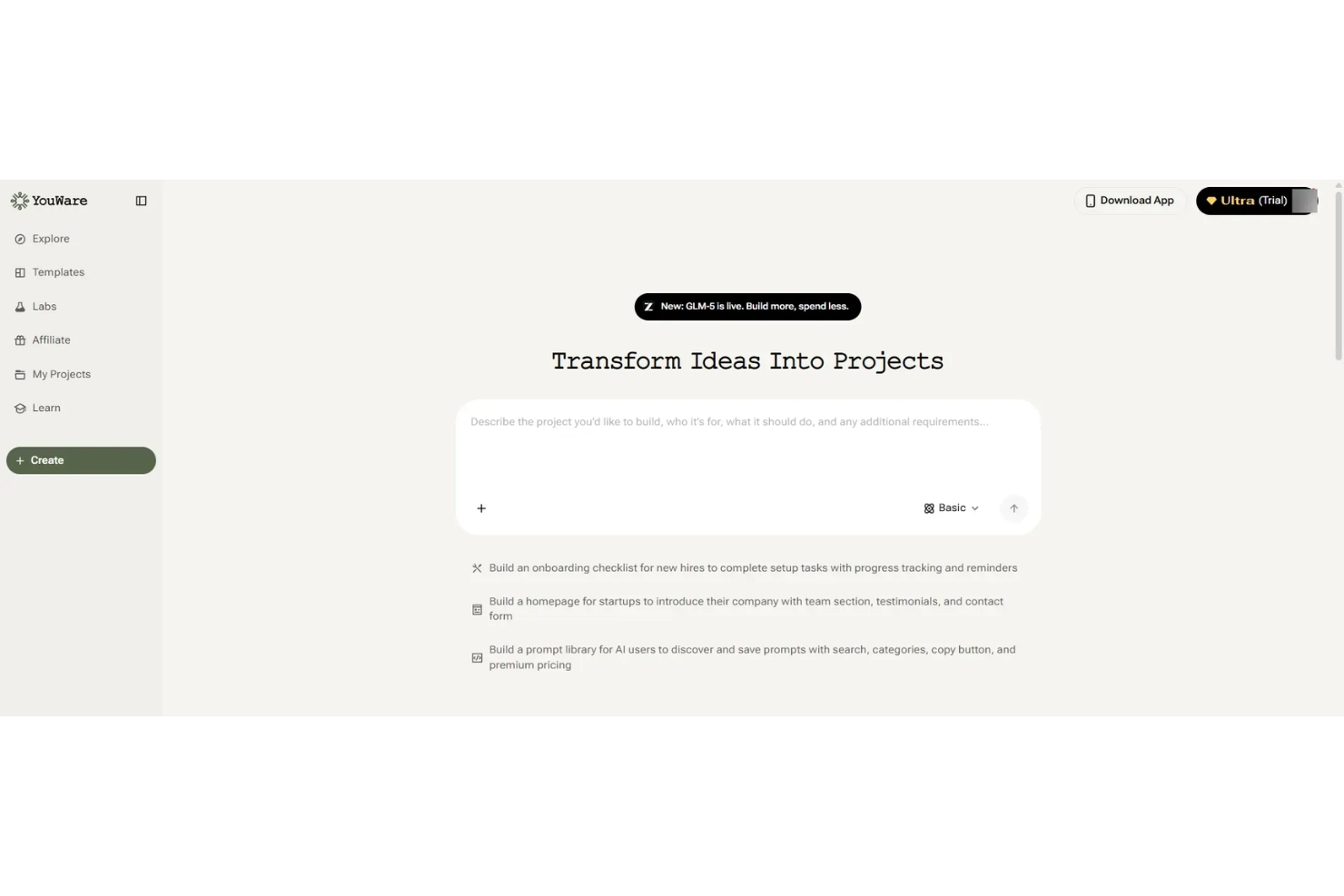
Youware is a client onboarding and portal platform designed for small teams, offering tools for client intake, document sharing, task assignment, and progress tracking.
Who Is Youware Best For?
Youware is a good fit for small teams or solo professionals who need a simple client onboarding and portal solution.
Why I Picked Youware
I picked Youware as one of the best because its free onboarding and client portal features are purpose-built for small teams. I like that I can set up client intake forms, assign onboarding tasks, and share documents in a single workspace. My team is able to track client progress and manage communication without needing to upgrade or add extra tools.
Youware Key Features
- Client portal customization: Personalize the look and feel of each client’s portal.
- Automated reminders: Send scheduled notifications to clients for outstanding tasks.
- Role-based access control: Set permissions for team members and clients.
- Activity timeline: View a chronological log of all client interactions and updates.
Youware Integrations
Integrations include Azure, Stripe, Google Cloud, Cloudflare, Supabase, Figma, AWS, Anthropic, OpenAI, and more.
What's Free?
Youware offers a free-forever plan for small teams. The free plan includes unlimited clients and core onboarding features, but advanced integrations and some customization options may be limited.
Pros and Cons
Pros:
- Built-in task tracking and automated reminders improve follow-ups
- Simple interface suited for small teams and solo users
- Free plan supports unlimited client onboarding projects
Cons:
- Basic role-based permissions lack depth
- Limited workflow automation compared to advanced tools

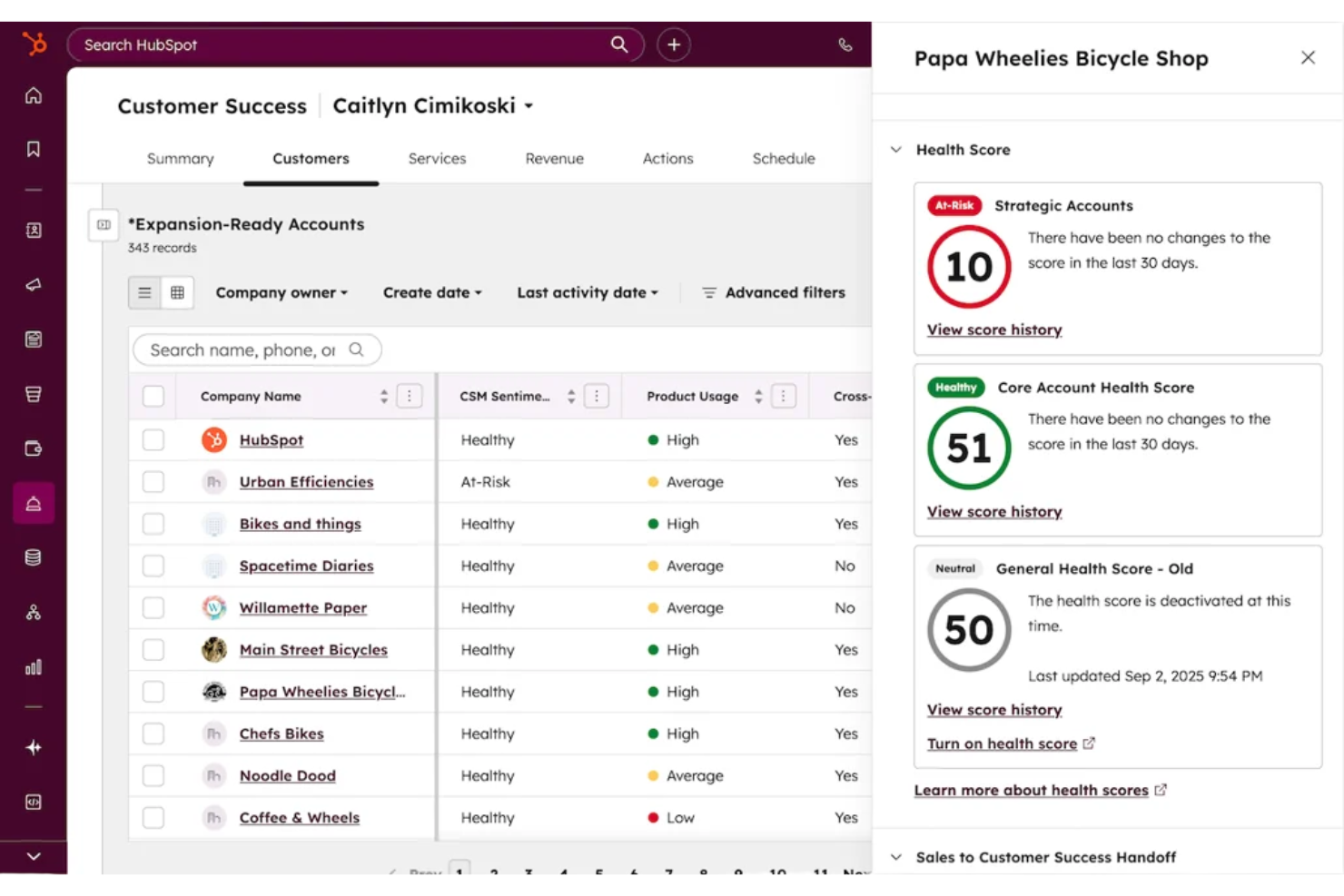
HubSpot CRM is a client onboarding and relationship management platform that combines contact management, pipeline tracking, email integration, and workflow automation for teams handling new client onboarding.
Who Is HubSpot CRM Best For?
Small to midsize businesses that need a unified platform for managing client onboarding and ongoing customer relationships.
Why I Picked HubSpot CRM
I picked HubSpot CRM as one of the best because it gives my team unlimited users and contacts on the free plan, which is rare for onboarding tools. I use its customizable pipelines to track every stage of client onboarding, and the built-in email tracking helps us keep communication organized. The contact timeline lets me see all client interactions in one place, so nothing falls through the cracks.
HubSpot CRM Key Features
- Meeting scheduling links: Let clients book onboarding calls directly from your calendar.
- Document management: Store and share onboarding documents within each client record.
- Task automation: Automatically assign onboarding tasks to team members based on triggers.
- Live chat widget: Add real-time chat to your website for instant client support during onboarding.
HubSpot CRM Integrations
HubSpot CRM offers native integrations with Gmail, Outlook, Google Calendar, Slack, Zoom, Mailchimp, Shopify, Stripe, Facebook Ads, and LinkedIn Ads. An API is available for custom integrations.
What's Free?
HubSpot CRM offers a free-forever plan with unlimited users and contacts. Some advanced features, automation, and reporting tools are restricted to paid plans.
Pros and Cons
Pros:
- Customizable pipelines for onboarding workflows
- Email tracking and logging for client communication
- Built-in meeting scheduler for onboarding calls
Cons:
- No built-in e-signature for onboarding documents
- Workflow automation is limited on free plan


Typeform is an online form builder that lets you create interactive forms, surveys, and quizzes with conversational logic for collecting client information and onboarding details.
Who Is Typeform Best For?
Typeform suits marketing teams and small businesses that want to create engaging, interactive onboarding forms for clients.
Why I Picked Typeform
I picked Typeform as one of the best because its conversational forms make client onboarding feel personal and interactive. I like that I can use conditional logic to tailor questions based on client responses. My team is able to embed forms directly on our website and collect onboarding details in a way that feels more like a conversation than a survey.
Typeform Key Features
- File upload field: Clients can securely upload documents or images during onboarding.
- Custom branding: Add your logo, colors, and fonts to match your brand identity.
- Response notifications: Get instant email alerts when a client submits a form.
- Integration with CRM tools: Connect responses directly to platforms like HubSpot or Salesforce.
Typeform Integrations
Typeform offers native integrations with HubSpot, Slack, Google Sheets, Salesforce, Mailchimp, Airtable, Trello, Asana, Microsoft Teams, and Zapier. An API is available for custom integrations.
What's Free?
Typeform offers a free-forever plan that allows one user to create unlimited forms with up to 10 questions per form and 10 responses per month. Some integrations and advanced features are only available on paid plans.
Pros and Cons
Pros:
- Custom branding enhances client-facing forms
- Conditional logic personalizes onboarding experiences
- Interactive forms improve client engagement during intake
Cons:
- Not suited for full end-to-end onboarding workflows
- Response limits restrict scalability on free plan

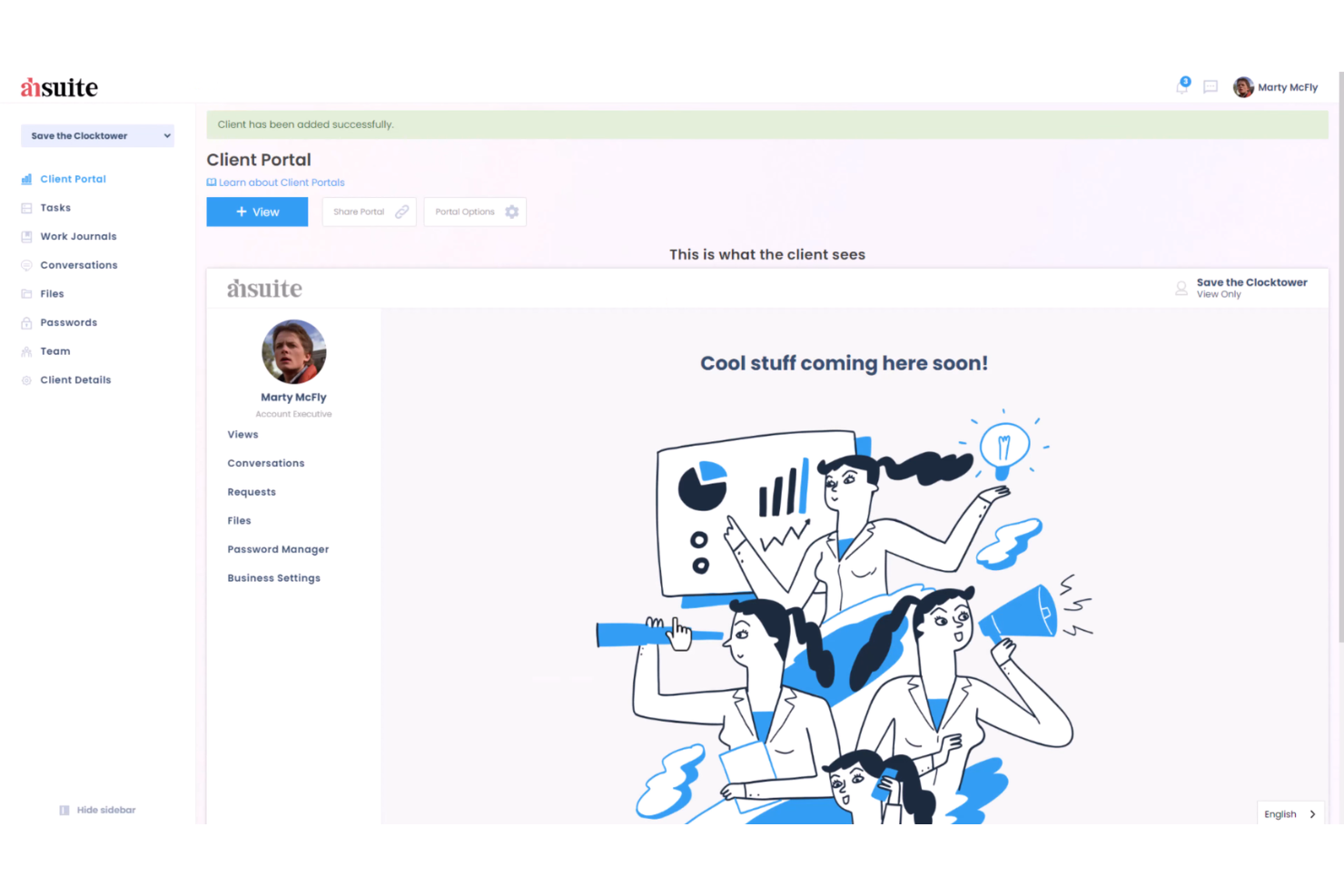
Ahsuite is a client portal platform for onboarding that lets you organize client dashboards, share files, manage tasks, and embed custom tools in a secure, branded environment.
Who Is Ahsuite Best For?
Ahsuite is a good fit for small agencies and consultants who need to onboard and manage multiple clients in one place.
Why I Picked Ahsuite
I picked Ahsuite as one of the best because it lets me onboard unlimited clients for free and organize each client’s dashboard with custom tabs, file sharing, and embedded tools. I like that I can create secure, branded portals for every client without worrying about user limits. My team is able to manage client communications, tasks, and shared resources all in one place, which is rare for a free plan.
Ahsuite Key Features
- White label customization: Add your own branding, logo, and colors to each client portal.
- Password manager: Store and share passwords securely with clients and team members.
- Client messaging: Send and receive direct messages within the portal.
- Task management: Assign, track, and organize tasks for each client workspace.
Ahsuite Integrations
Native integrations are not clearly documented
What's Free?
Ahsuite offers a free-forever plan with unlimited client portals and users. The free plan includes core features but displays Ahsuite branding and does not support white-label customization or advanced automation.
Pros and Cons
Pros:
- Custom dashboard tabs support flexible onboarding layouts
- Built-in messaging centralizes client communication
- Unlimited client portals available on free plan
Cons:
- No dedicated mobile application
- Limited automation for onboarding workflows
Outro software gratuito para integração de clientes
Eis algumas opções adicionais de software gratuito para integração de clientes que não entraram na minha lista de seleção, mas que ainda vale a pena conhecer:
- Zoho CRM
For CRM with onboarding workflow automation
- Trupeer
For AI-driven onboarding automation
- Rocketlane
For purpose-built onboarding platform with project templates
- Clustdoc
For client portal for document collection and onboarding workflows
- Appcues
For no-code onboarding flows and in-app guidance


How I Evaluate Free Client Onboarding Software
First, I define what counts as free. For client onboarding software, where you're repeating intake forms, kickoff checklists, and client portals for every engagement, a free-forever plan is required. From there, I evaluate on two layers: the core functionality a tool must have to make the list, and the differentiators that set vendors apart.
Core Functionality (Table Stakes For This List)
In addition to my free offer requirements, I also use a scoring system to select tools for my list. Here's how it works:
I rank each one on a scale from 0 (does not offer the functionality) to 5 (excels in this area) for each core functionality listed below. Then, I calculate the tool's total score into a percentage. Each tool needs to achieve a minimum total score of 65% to be considered for inclusion.
- Client Intake Forms: I check whether the free plan includes customizable forms for collecting project briefs, brand assets, login credentials, or scoping details from new clients.
- Onboarding Workflow Automation: Repeatable onboarding matters here. I look for templates or task sequences that can be cloned each time a new client signs on, rather than rebuilding from scratch.
- Client Portal or Shared Workspace: I evaluate whether clients get a dedicated space to view progress, access shared files, and interact with your team without needing a paid seat.
- Task & Milestone Tracking: Each tool should let you assign onboarding tasks, set due dates, and track milestones so nothing falls through the cracks during a client's first few weeks.
- Document Sharing & E-Signatures: I look at how the free plan handles contracts, SOWs, and onboarding packets—specifically whether clients can review, approve, or sign documents in the platform.
- Communication & Notifications: I evaluate whether the tool keeps clients and internal team members aligned through comments, @mentions, or automated email alerts tied to onboarding steps.
Once I have a list of tools that meet the criteria, I consider what sets each platform apart.
Differentiating Factors (What Sets Vendors Apart)
Here's how I compare and contrast different vendors:
Standout Features
Reusable onboarding templates save real time when you're bringing on multiple clients with similar service packages. I look for tools that let you clone a full onboarding sequence—tasks, forms, documents—and deploy it in a few clicks. A built-in contract or proposal builder also adds value by keeping the entire handoff in one place instead of bouncing between separate signing tools. I also consider whether clients can complete intake steps from their phone, since delays often happen when someone needs a desktop to respond.
Beyond Features
Free plan limits matter a lot here. I check how many active clients, team seats, and storage a tool allows before you hit a paywall—because onboarding even five clients a month can push you past tight caps. Integration support is another big factor. If the tool connects natively to your project management stack (Asana, Trello, ClickUp) or offers Zapier access on its free tier, you can hand off onboarded clients into active projects without manual re-entry. I also evaluate data security, since you're handling contracts, credentials, and sensitive client information from day one.
Como escolher software gratuito para integração de clientes
É fácil perder-se em listas extensas de funcionalidades e estruturas de preços complexas. Para o ajudar a manter o foco enquanto analisa o seu processo específico de seleção de software, apresentamos uma lista de verificação com os fatores a ter em conta:
| Fator | O que considerar |
|---|---|
| Escalabilidade | O software conseguirá gerir mais clientes ou utilizadores à medida que a sua empresa cresce, ou irá rapidamente ultrapassar os limites do plano gratuito? |
| Integrações | Estabelece ligação nativa às ferramentas que já utiliza (como CRM, correio eletrónico ou armazenamento de ficheiros), ou será necessário recorrer a soluções alternativas? |
| Personalização | Pode adaptar fluxos de trabalho, campos e modelos ao seu processo de integração, ou fica limitado às predefinições? |
| Facilidade de utilização | A sua equipa e os seus clientes conseguirão navegar no sistema sem formação ou apoio extensivos? |
| Implementação e integração | Quanto tempo demorará a começar a utilizar o sistema e que recursos ou apoio estão disponíveis para o ajudar na migração? |
| Custo | Existem custos ocultos, condições que desencadeiem uma atualização ou limites de utilização que possam obrigá-lo a pagar mais cedo do que esperava? |
| Medidas de segurança | A plataforma oferece encriptação, controlos de acesso e conformidade com as normas relevantes de privacidade de dados? |
| Disponibilidade do apoio | Que canais de apoio estão disponíveis no plano gratuito e os tempos de resposta são aceitáveis para as suas necessidades? |
O que é software gratuito para integração de clientes?
O software gratuito para integração de clientes é uma solução de integração que ajuda as empresas a gerir o processo de integração de clientes, desde o início até à conclusão, sem custos iniciais. Estas ferramentas ajudam as equipas a organizar as partes interessadas, reduzir tarefas repetitivas e melhorar o tempo até ao valor através de fluxos de trabalho estruturados, recursos de autoatendimento e interfaces fáceis de utilizar. São frequentemente utilizadas para otimizar a retenção e reduzir a desistência durante a integração dos utilizadores, criando uma experiência de integração consistente e orientada.
Funcionalidades do software gratuito para integração de clientes
Vamos analisar as funcionalidades habitualmente encontradas no software de integração de clientes e quais são geralmente incluídas nos planos gratuitos e pagos.
Funcionalidades normalmente gratuitas do software de integração de clientes
- Gestão de tarefas: Atribua, acompanhe e organize tarefas de integração para membros da equipa e clientes, garantindo que nada fica esquecido.
- Modelos de listas de verificação: Utilize ou personalize listas de verificação de integração pré-criadas para uniformizar o seu processo e poupar tempo na configuração.
- Partilha de documentos: Carregue e partilhe ficheiros ou formulários com os clientes diretamente na plataforma, para facilitar o acesso e a colaboração.
- Automatização básica: Configure acionadores simples, como a atribuição automática de tarefas ou o envio de lembretes, para reduzir o trabalho manual.
- Comentários e menções: Comunique com membros da equipa ou clientes através de comentários na aplicação e menções com @, para manter as discussões organizadas.
- Acompanhamento do progresso: Monitorize o estado das etapas de integração e visualize as taxas de conclusão para acompanhar de perto o percurso dos clientes.
- Gestão de utilizadores: Adicione vários utilizadores ou membros da equipa para colaborarem em projetos de integração no mesmo espaço de trabalho.
- Integração com o calendário: Sincronize as tarefas e os prazos de integração com o seu calendário para manter os horários alinhados.
- Registos de atividade: Consulte um histórico das ações realizadas nos projetos de integração, promovendo a responsabilização e a transparência.
Funcionalidades normalmente pagas do software de integração de clientes
- Automatização avançada: Crie fluxos de trabalho com várias etapas que automatizam sequências complexas de integração, aprovações ou notificações entre equipas.
- Personalização da marca: Adicione o logótipo, as cores e o domínio da sua empresa para criar uma experiência de integração com a sua marca para os clientes.
- Recolha de assinaturas eletrónicas: Recolha assinaturas eletrónicas juridicamente vinculativas em contratos ou formulários diretamente na plataforma.
- Portais de clientes: Disponibilize aos clientes painéis seguros e personalizados para acompanharem o progresso da integração e acederem a recursos.
- Relatórios e análises: Gere relatórios detalhados sobre o desempenho da integração, os estrangulamentos e as métricas de satisfação dos clientes.
- Permissões baseadas em funções: Controle o acesso a informações sensíveis atribuindo permissões granulares a utilizadores e clientes.
- Integração com ferramentas premium: Ligue-se a sistemas avançados de CRM, contabilidade ou gestão de projetos que não estão disponíveis nos planos gratuitos.
- Suporte prioritário: Tenha acesso a tempos de resposta mais rápidos e a canais de suporte dedicados para resolução de problemas e assistência na integração.
- Armazenamento ilimitado: Remova os limites de carregamento e armazenamento de ficheiros para acomodar grandes volumes de documentos e conteúdos multimédia de integração.
- Acesso à API: Utilize a API da plataforma para criar integrações personalizadas ou automatizar fluxos de dados com outros sistemas empresariais.
Benefícios do software gratuito de integração de clientes
A implementação de software gratuito de integração de clientes proporciona vários benefícios à sua equipa e à sua empresa. Eis alguns dos que pode esperar:
- Processos uniformizados: Utilize modelos e listas de verificação para garantir que todos os clientes têm uma experiência de integração consistente.
- Colaboração melhorada: Atribua tarefas, partilhe documentos e comunique num só local para manter a sua equipa e os seus clientes alinhados.
- Poupança de custos: Tenha acesso a funcionalidades essenciais de integração sem pagar uma subscrição, facilitando a gestão dos orçamentos.
- Integração mais rápida: Automatize etapas repetitivas e acompanhe o progresso para fazer avançar os clientes mais rapidamente ao longo da integração.
- Maior visibilidade: Monitorize o estado e os prazos da integração para que nada seja esquecido e todos se mantenham responsáveis.
- Escalabilidade fácil: Adicione mais utilizadores ou clientes à medida que a sua empresa cresce, sem se preocupar com custos imediatos de atualização.
- Documentação centralizada: Armazene todos os materiais de integração e ficheiros dos clientes num único local acessível à sua equipa.
Custos e preços do software de integração de clientes
Compreendo que chegou a este artigo à procura das melhores opções de software de integração de clientes disponíveis gratuitamente. No entanto, uma vez que os planos gratuitos oferecem apenas funcionalidades limitadas, é bastante provável que precise de atualizar o seu plano no futuro.
A tabela abaixo resume os planos mais comuns, os seus preços médios e as funcionalidades normalmente incluídas no software de integração de clientes:
Tabela de comparação de planos para software de integração de clientes
| Tipo de plano | Preço médio | Funcionalidades comuns |
|---|---|---|
| Plano gratuito | $0 | Gestão básica de tarefas, modelos de listas de verificação, partilha limitada de documentos, automatização básica e suporte padrão. |
| Plano pessoal | $5–$15/utilizador/mês | Tarefas ilimitadas, mais espaço de armazenamento, sincronização com o calendário, integrações simples e relatórios limitados. |
| Plano empresarial | $15–$30/utilizador/mês | Automatização avançada, personalização da marca, portais de clientes, recolha de assinaturas eletrónicas e análise melhorada. |
| Plano empresarial avançado | $30–$60/utilizador/mês | Permissões baseadas em funções, acesso à API, armazenamento ilimitado, integrações avançadas e suporte prioritário. |
Perguntas frequentes sobre software gratuito de integração de clientes
Eis algumas respostas a perguntas comuns sobre software gratuito de integração de clientes:
Quais são as principais limitações do software gratuito de integração de clientes?
O software gratuito de integração de clientes limita normalmente o número de utilizadores, o espaço de armazenamento, as regras de automatização e as integrações. Também poderá encontrar restrições em funcionalidades avançadas, como relatórios, personalização da marca e portais de clientes.
Posso migrar os meus dados se passar de um plano gratuito para um plano pago?
Sim, a maioria das plataformas permite migrar os seus dados sem problemas quando faz uma atualização. As suas tarefas, documentos e registos de clientes permanecem normalmente intactos, mas é aconselhável confirmar os detalhes da migração com o fornecedor antes de fazer a mudança.
O software gratuito de integração de clientes é suficientemente seguro para dados confidenciais de clientes?
Sim, a maioria dos softwares gratuitos de integração de clientes de fornecedores reputados utiliza encriptação e controlos de acesso. No entanto, os planos gratuitos podem não incluir funcionalidades de segurança avançadas ou certificações de conformidade, por isso consulte a documentação de segurança do fornecedor se lidar com informações confidenciais.
Posso utilizar software gratuito de integração de clientes para vários projetos ou clientes em simultâneo?
Sim, a maioria dos planos gratuitos permite gerir vários projetos ou clientes, mas poderá atingir limites quanto ao número de projetos ativos, utilizadores ou espaço de armazenamento. Consulte as restrições do plano para garantir que este se adequa ao seu fluxo de trabalho.
O que acontece se ultrapassar os limites do plano gratuito?
Se ultrapassar os limites do plano gratuito, terá de passar para um plano pago para aceder a mais utilizadores, espaço de armazenamento ou funcionalidades avançadas. A maioria dos fornecedores facilita a atualização sem perder os dados ou fluxos de trabalho existentes. À medida que as suas necessidades de integração se tornam mais complexas, poderá também querer explorar software de integração de clientes com IA para obter automatização e suporte adicionais.