

10 melhores softwares gratuitos de gestão de tarefas com IA analisados em 2026

Melhor seleção de software gratuito de gestão de tarefas com IA


O melhor software gratuito de gestão de tarefas com IA ajuda as organizações com um orçamento limitado a definir prioridades, atribuir tarefas e manter a visibilidade dos projetos. Quando os prazos se sobrepõem, a comunicação se perde em cadeias de e-mails ou as tarefas não têm responsáveis definidos, os projetos ficam parados e trabalhos importantes são esquecidos. A plataforma certa centraliza o acompanhamento de tarefas, o agendamento e as atualizações de estado, para que as equipas saibam exatamente o que vem a seguir.
Testei dezenas de ferramentas com base na minha experiência de gestão de projetos com equipas de 5–20 pessoas, para identificar as mais eficazes. Encontre a ferramenta certa para ajudar a reduzir a complexidade, melhorar a responsabilização e manter os projetos em andamento com o mínimo de obstáculos.
Why Trust Our Software Recommendations
Our team has been testing and reviewing software since 2012. As project managers ourselves, we know how difficult—and important—it is to choose the right software.
For this guide, we evaluated tools using hands-on testing and independent research, scoring tools using our selection criteria. We also draw on insights from industry thought leaders and practicing project management experts.
Our reviews reflect our human editorial judgment, not a sales pitch.
Expert reviewers:
Tabela comparativa de software gratuito de gestão de tarefas com IA
Esta tabela comparativa resume os detalhes de preços das minhas principais escolhas de software gratuito de gestão de tarefas com IA:
| Tool | Best For | Trial Info | Price | ||
|---|---|---|---|---|---|
| 1 | Best for tracking time against AI-made tasks | Free plan available; 30-day free trial; Free demo available | From $9/user/month | Website | |
| 2 | Best with AI-powered risk identification | Free plan + 14-day free trial + free demo available | From $9/user/month (billed annually) | Website | |
| 3 | Best for intuitive interface | Free plan + 14-day free trial available | From €17.50/user/month | Website | |
| 4 | Best for team collaboration | Free plan available | From $20/month | Website | |
| 5 | Best for simple task lists | Free plan + free trial available | From $5/user/month (billed annually) | Website | |
| 6 | Best for bug tracking | 30-day free trial and free plan available | From $35/month | Website | |
| 7 | Best for project milestones | Free-forever plan available | From $39/month (billed annually) | Website | |
| 8 | Best for project templates | Free plan + 14-day free trial + free demo available | From $9.99/user/month (billed annually) | Website | |
| 9 | Best for calendar syncing | Free plan available | From $10/seat/month | Website | |
| 10 | Best for chat integration | Free plan available | From $0.80/user/month (billed annually) | Website |


Avaliações do melhor software gratuito de gestão de tarefas com IA
Leia os meus resumos detalhados de cada uma das melhores opções de software gratuito de gestão de tarefas com IA. Analiso as principais funcionalidades, vantagens e desvantagens, integrações e o que é gratuito em cada uma das melhores ferramentas de gestão de tarefas com IA.
Toggl
Best for tracking time against AI-made tasks
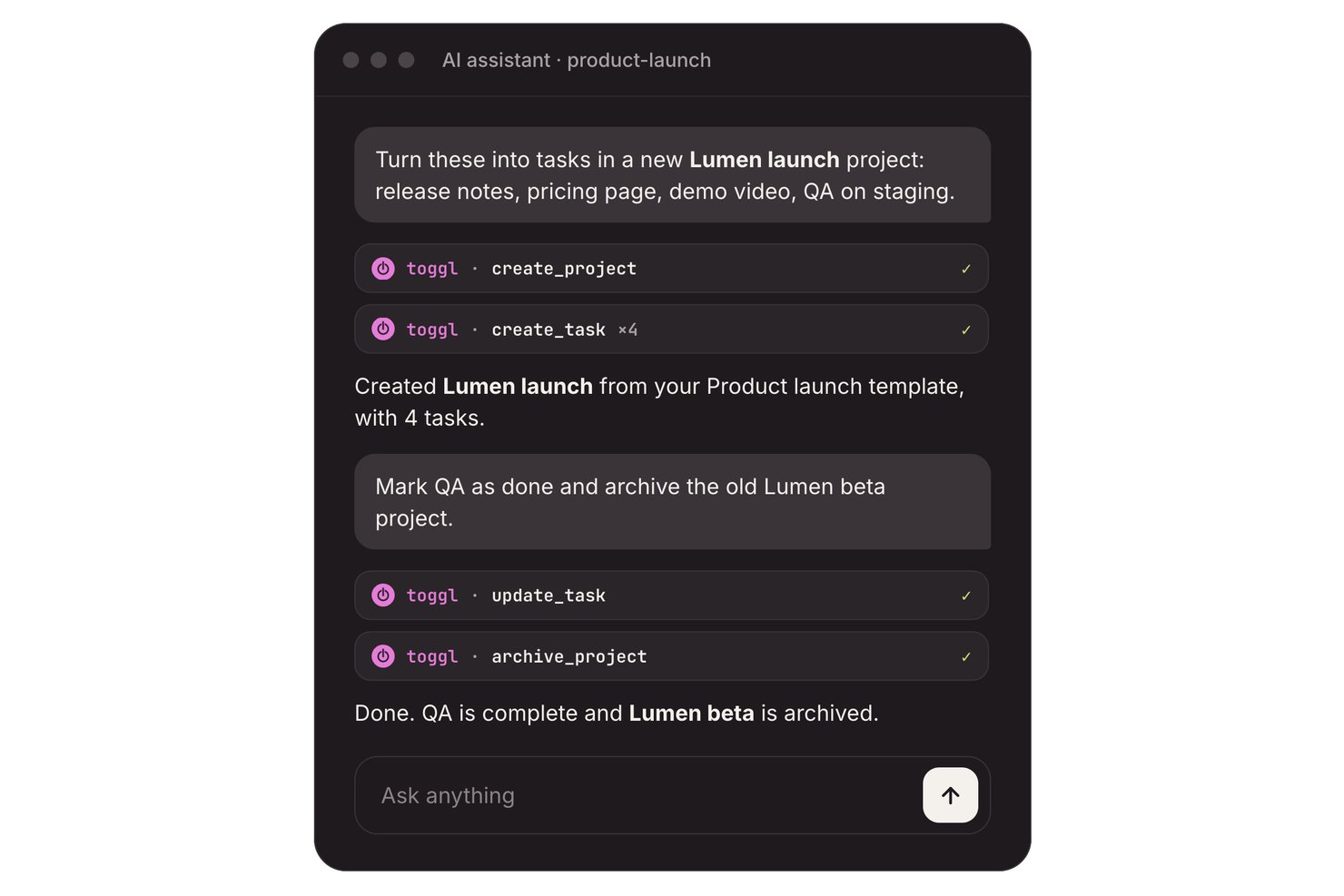
Toggl is an AI task management platform with task boards, estimates, and time tracking, plus an AI Task Creator that turns prompts, notes, and to-do-list photos into editable tasks.
Who Is Toggl Best For?
Freelancers and teams of up to three can turn notes into tasks and compare planned work with tracked time.
Why I Picked Toggl
I picked Toggl as “Best for tracking time against AI-made tasks” because it connects generated work to actual effort. Its free AI Task Creator turns prompts, meeting notes, or to-do-list photos into editable tasks; I can add estimates, then track time against each task. The free plan supports up to three users.
Toggl Key Features
- Recurring tasks: Set tasks to repeat on a schedule.
- Subtasks and comments: Add subtasks and comments to task records.
- Calendar integrations: Turn calendar events into tasks or time entries.
- Focus mode: Use focused work sessions with short breaks.
Toggl Integrations
Toggl connects with Google Calendar and Outlook calendars, and offers Jira and Asana integrations on Premium. A REST API and webhooks support custom integrations.
What's Free?
Toggl has a free plan for up to three users, including its AI Task Creator. Jira and Asana integrations require the Premium plan.
Pros and Cons
Pros:
- Reviewers praise quick, lightweight time tracking
- Task timers compare estimates with actuals
- AI turns notes into editable tasks
Cons:
- AI doesn’t proactively schedule or prioritize tasks
- Free collaboration stops at three users

Best with AI-powered risk identification
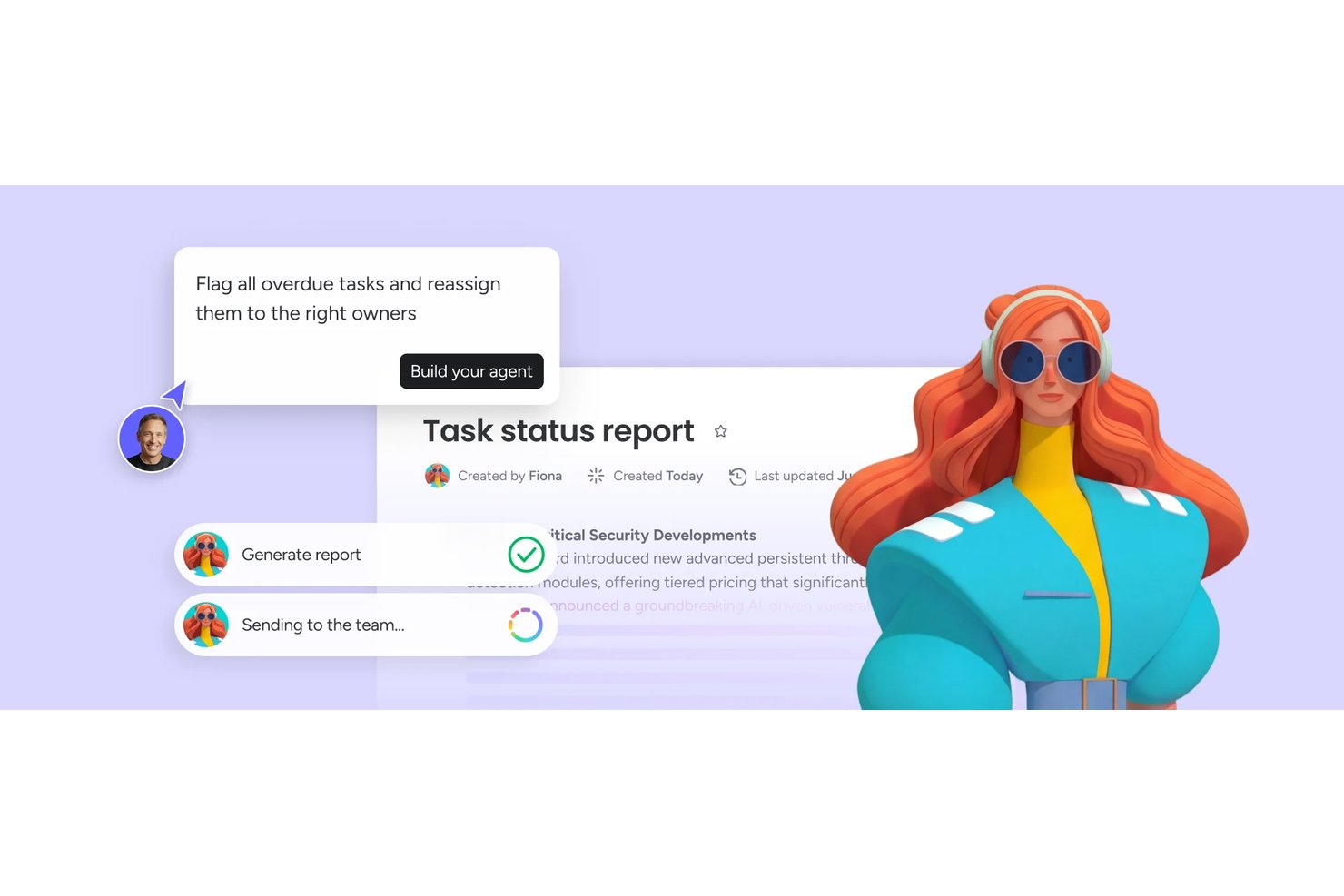
monday AI Workspace is an AI-powered work management platform that combines task automation, smart project planning, AI agents, and real-time risk identification across boards, timelines, and dashboards.
Who Is monday AI Workspace Best For?
It's a strong fit for project managers and cross-functional teams at mid-size to enterprise companies managing multiple complex workstreams simultaneously.
Why I Picked monday AI Workspace
monday AI Workspace earns its spot on my shortlist because of how its AI handles risk before it becomes a real problem. I like that it actively tracks dependencies across boards and flags conflicts, like resource over-allocation or delayed milestones, without me having to dig for them. The AI Meeting Notetaker also feeds directly into project context, so action items and risks surface automatically from standups.
monday AI Workspace Key Features
- AI workflow builder: Orchestrates multi-step workflows by connecting agents and automation rules directly within boards.
- Vibe app builder: Lets you turn process needs or requests into custom apps using simple descriptions or prompts.
- Sidekick AI assistant: Offers chat-based guidance to query project data, suggest actions, or draft updates in context.
- Multi-view project boards: Supports Kanban, Gantt, calendar, and timeline views for tracking progress across projects.
monday AI Workspace Integrations
monday AI Workspace offers hundreds of native integrations and marketplace apps, including Slack, Salesforce, HubSpot, Google Workspace, Microsoft Teams, GitHub, Zoom, Asana, Trello, and Dropbox. It supports Zapier and provides an API for custom integrations.
What's Free?
monday AI Workspace offers a 14-day free trial that gives you access to paid plan features, including AI tools, with no credit card required. After the trial ends, you'd need to upgrade to a paid plan to keep using AI features, as the free-forever plan (limited to 2 seats and 3 boards) doesn't include AI functionality.
Pros and Cons
Pros:
- Converts meeting notes into assigned tasks
- Risk alerts surface before deadlines slip
- AI agents handle end-to-end task lifecycle
Cons:
- Free plan limited to two seats
- AI features locked behind paid plans
New Product Updates from monday AI Workspace
monday AI Workspace Adds Human Approval Routing
monday AI Workspace adds a human-in-the-loop approval block to AI Workflows, sending approval requests and routing workflow paths based on responses. For more information, visit monday AI Workspace's official site.
Best for intuitive interface

MeisterTask is a task and project management tool for teams and individuals that want a visually appealing and easy-to-use platform. It's primarily used by creative professionals and teams in need of straightforward task organization and collaboration.
Why I picked MeisterTask: MeisterTask's free plan includes features like task timelines, customizable project boards, and task automation. It offers an intuitive interface that makes it easy for your team to adopt and use without a steep learning curve. MeisterAI can generate content, find information in your notes, and help with everyday writing. The free version also provides unlimited tasks and projects, which is great for teams that need flexibility.
Standout Features & Integrations:
Features include a home screen that pulls together upcoming tasks and notifications, reports that show your team’s progress, and the ability to turn emails or meeting notes into tasks.
Integrations include Slack, Microsoft Teams, Outlook, and Gmail.
What's free? MeisterTask offers a free plan with unlimited tasks and up to 3 projects.
Pros and Cons
Pros:
- Customizable project boards
- Suitable for creative teams
- Intuitive and easy-to-use interface
Cons:
- No offline access
- Basic reporting capabilities

Taskade
Best for team collaboration

Taskade is a collaborative task management tool for teams that want to boost productivity and communication. It’s great for remote teams and orgs that prioritize collaboration on tasks.
Why I picked Taskade: Taskade’s free offering includes features like to do lists, collaborative notes, and video chat. It's perfect for team collaboration and lets the team work together in real-time. AI features let you generate tasks and write content, and they also support brainstorming so your team can move faster. The free version lets you create unlimited tasks and projects.
Standout Features & Integrations:
Features include a built-in video chat feature that lets you communicate without switching apps, mind maps to visualize your projects, and task templates to help you get started quickly.
Integrations include Slack, Google Drive, Zapier, GitHub, and Microsoft Teams.
What's free? Taskade offers a free-forever plan with 3 AI apps and 1 workspace.
Pros and Cons
Pros:
- Suitable for remote teams
- Built-in video chat
- Real-time collaboration tools
Cons:
- Basic customization options
- Can be overwhelming for new users
Trello
Best for simple task lists
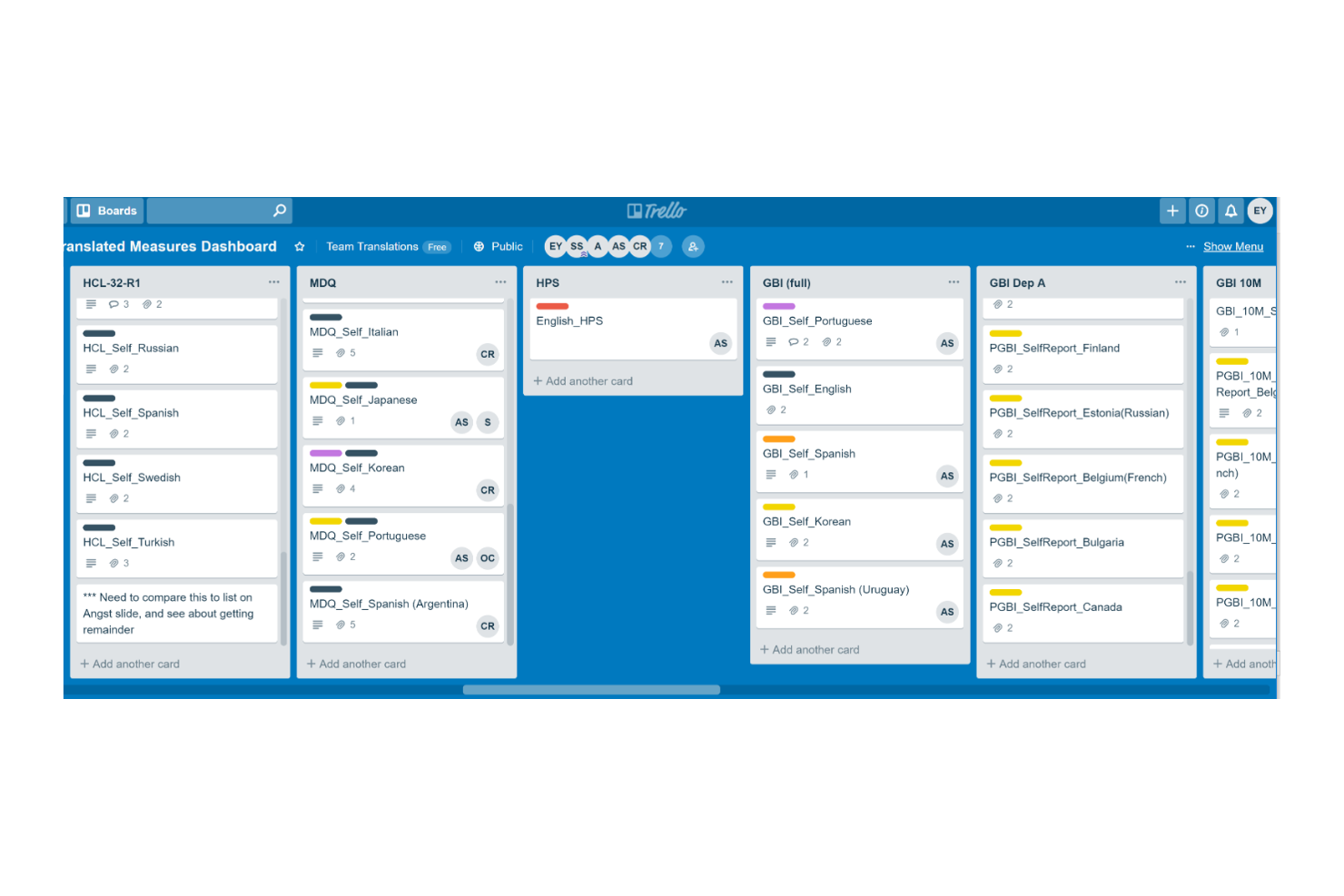
Trello is a project management tool for teams that want to organize and manage tasks efficiently. It's widely used by individuals and small teams for task tracking and collaboration.
Why I picked Trello: Trello's free offering includes features like task boards, card-based task management, and basic automation. It's ideal for creating simple task lists and lets you capture and organize tasks visually. Built-in AI features can suggest task organization, generate summaries, and help automate repetitive steps (via Butler).
Standout Features & Integrations:
Features include the ability to create tasks, assign them to the team, and set deadlines. Trello also allows you to add attachments and comments to tasks and keep information in one place.
Integrations include Slack, Microsoft Teams, Google Drive, Dropbox, Evernote, Salesforce, Jira, GitHub, and Confluence.
What's free? Trello offers a free plan with unlimited cards and 10 boards per workspace.
Pros and Cons
Pros:
- Visual task management
- Flexible task organization
- Easy to use for beginners
Cons:
- Limited customization options
- Limited features in free plan
Backlog
Best for bug tracking

Backlog is a project management and collaboration tool for developers and teams focused on software development and bug tracking. It's used by software teams to manage tasks, track bugs, and collaborate on code.
Why I picked Backlog: Backlog offers a free plan that includes features like task management, bug tracking, and version control. You can easily report and manage bugs, and the free version also supports project wikis and file sharing, which are essential for software development teams. AI-powered issue summaries also make it easier to spot and resolve bugs.
Standout Features & Integrations:
Features include built-in Gantt charts that help visualize project timelines and dependencies and subtasking capabilities that let you break down larger tasks into smaller pieces.
Integrations include Slack, Redmine, Jira, Cacoo, Jenkins, Dropbox, and Google Drive.
What's free? Backlog offers a free-forever plan with 1 project, 100MB of storage, and 10 users.
Pros and Cons
Pros:
- Supports subtasks
- Suitable for development teams
- Effective bug tracking tools
Cons:
- Basic customization options
- Learning curve for new users

Nifty
Best for project milestones

Nifty is a project management tool for teams that need to manage tasks, timelines, and communication in one place. It's best if your focus is project milestones and goal tracking.
Why I picked Nifty: Nifty’s free offering includes features like task management, milestone tracking, and team chat. It helps you set and track project milestones with ease. The free version supports unlimited team members and tasks, which is great for growing teams. AI features in Orbit AI support planning, prioritization, and execution and reduce manual effort.
Standout Features & Integrations:
Features include time tracking so you can monitor how much time your team spends on tasks and automated progress reports to keep stakeholders informed.
Integrations include Slack, Google Drive, Zoom, GitHub, Miro, and Typeform.
What's free? Nifty offers a free-forever plan with 100MB of storage and up to 2 active projects.
Pros and Cons
Pros:
- Supports document management
- Automated progress reports
- Effective milestone tracking
Cons:
- Some learning curve for new users
- Requires internet connection

Best for project templates

Teamwork.com is a project and resource management tool that helps streamline client projects and profitability. It's particularly useful for agencies, IT services, and consulting firms that require efficient project workflows and resource planning.
Why I picked Teamwork.com: Teamwork.com’s free plan offers features like project management, resource planning, and client management. You can create project templates to manage repetitive tasks. You also get access to AI tools like project wizards and smart assignments.
Standout Features & Integrations:
Features include customizable reports that help you track billable utilization and resource management. You can manage billable time and client communications effectively.
Integrations include Slack, Google Drive, Dropbox, QuickBooks, HubSpot, Salesforce, Zapier, Xero, and Harvest.
What's free? Teamwork.com’s free plan includes access to AI features and up to 5 projects.
Pros and Cons
Pros:
- Customizable reporting features
- AI-powered project wizards
- Comprehensive project templates
Cons:
- Complexity for new users
- Requires setup for optimal use

Reclaim
Best for calendar syncing
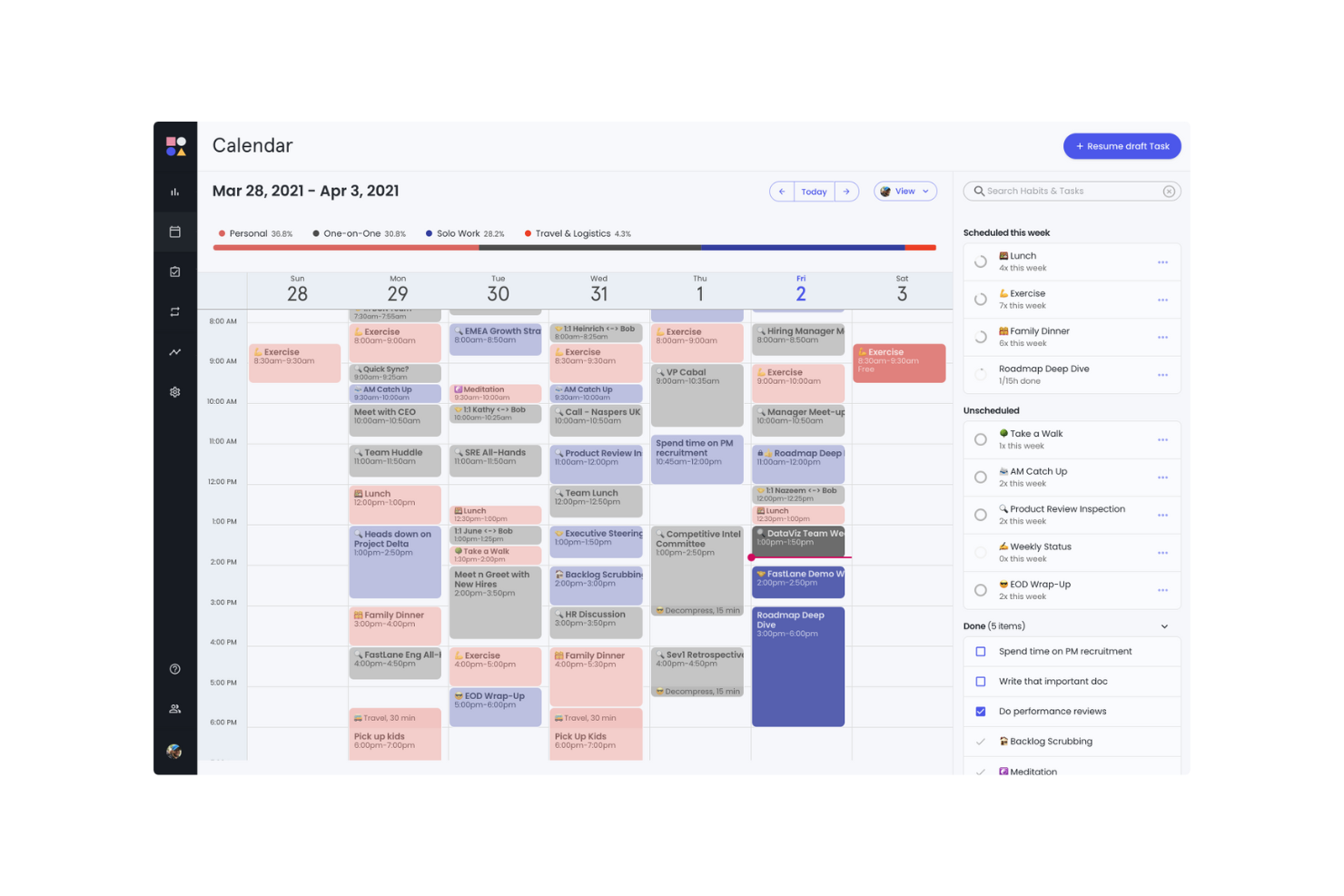
Reclaim is an AI-powered calendar app for individuals, teams, and orgs. It helps users who rely on calendar management to optimize their schedules, productivity and work-life balance.
Why I picked Reclaim: Reclaim's free offering includes features like focus time, smart meetings, and a calendar sync with Google Calendar. It's especially beneficial for syncing your calendar across different platforms. The free version lets you manage work and personal tasks effectively with features like buffer time and time tracking.
Standout Features & Integrations:
Features include AI scheduling and rescheduling for events, focus time, habits, and tasks. The planner can also build a daily schedule around your goals.
Integrations include Slack, Asana, ClickUp, Todoist, Jira, Linear, Google Tasks, and Zoom.
What's free? Reclaim offers a free version with 1 user team and a 1-week scheduling range.
Pros and Cons
Pros:
- Suitable for individual use
- Useful for managing focus time
- Effective calendar syncing
Cons:
- Not ideal for complex project management
- Learning curve for new users
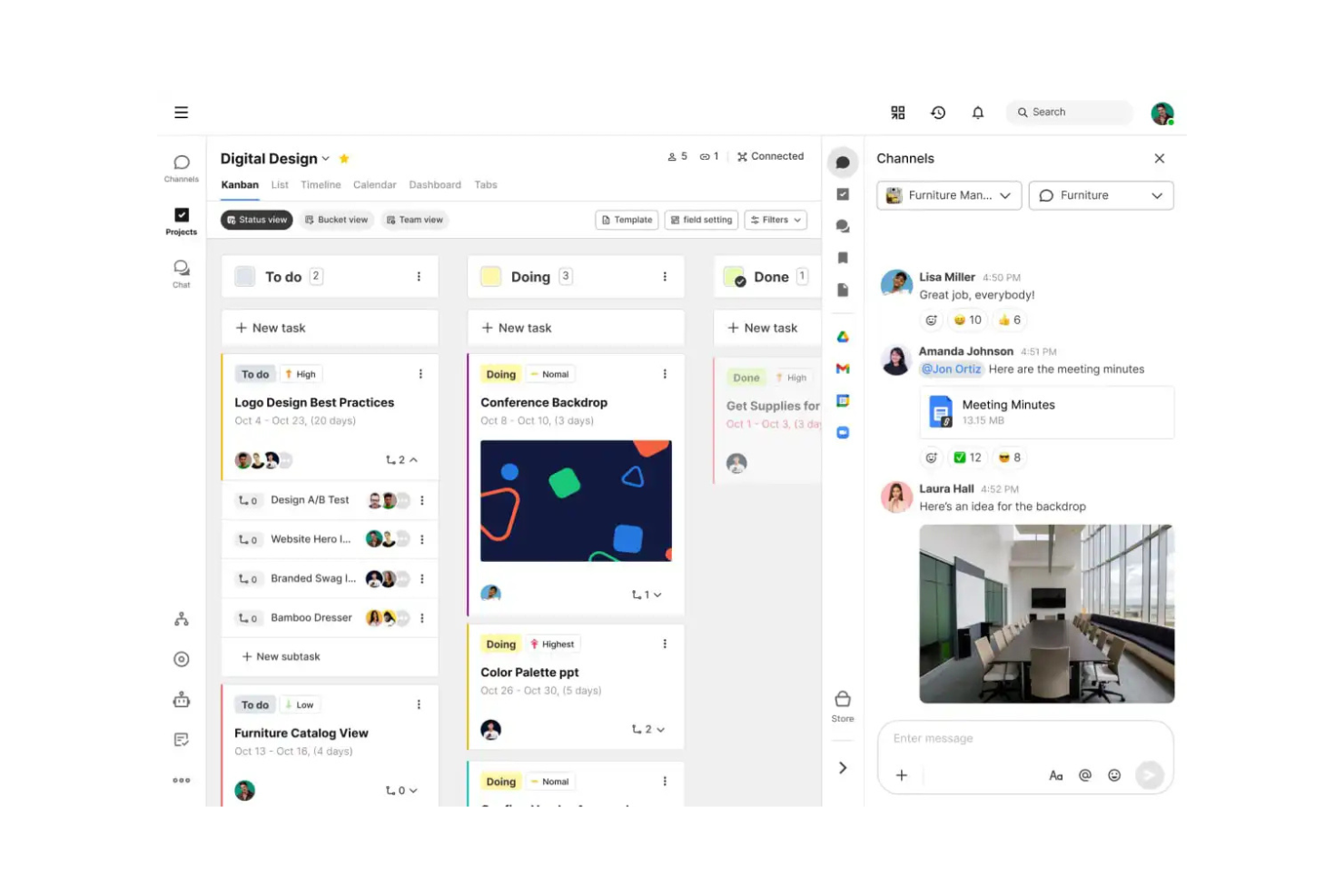
Swit is a collaborative work management tool for teams that want to combine task management with communication. It offers an integrated chat and task system to help improve teamwork and productivity.
Why I picked Swit: Swit’s free offering includes features like task boards, chat channels, and file sharing. It lets your team communicate and manage tasks in one place. The free version supports unlimited tasks and chat channels, which provides flexibility. AI features in Swit Snap support writing, summarizing, and automating routine steps.
Standout Features & Integrations:
Features include dashboards that track progress and workloads and plug-ins for setting goals and approvals. You can also manage guest permissions to bring in outside collaborators safely.
Integrations include Google Drive, Microsoft Teams, and Jira.
What's free? Swit offers a free-forever plan with unlimited users and 2 workspaces.
Pros and Cons
Pros:
- Supports remote collaboration
- Easy file sharing
- Suitable for cross-functional teams
Cons:
- Limited customization options
- Basic reporting tools
Outro software gratuito de gestão de tarefas com IA
Eis algumas opções adicionais de software de gestão de tarefas com IA que também disponibilizam planos ou períodos de teste gratuitos. Embora estas ferramentas não tenham sido incluídas na minha seleção, vale a pena conhecê-las:
- Miro
For visual collaboration
- Connecteam
For mobile workforce
- GoodDay
For time-tracking without manual logs
- Asana
For task dependencies
- Wrike
For real-time activity streams
- Zoho Projects
For project time tracking
- ClickUp
For unlimited tasks and members


How I Evaluate Free AI Task Management Software
When a PM needs to turn a Slack thread into a sprint backlog for free, I split my evaluation into two layers: baseline AI task features and the differentiators that set one tool apart.
Core Functionality (Table Stakes For This List)
When I'm selecting tools for my list, I rank each one on a scale from 0 (does not offer the functionality) to 5 (excels in this area) for each core functionality listed below. Then, I calculate the tool's total score into a percentage. Each tool needs to achieve a minimum total score of 65% to be considered for inclusion.
- AI-Driven Task Automation: I look at whether the tool can auto-create, assign, or update tasks from triggers and inputs—like generating follow-up tasks after a status change.
- Usable Free Plan: The free tier needs to include actual AI features, not just basic PM. I check for meaningful AI usage limits and enough seats for a small team.
- Smart Prioritization & Scheduling: I evaluate how the AI ranks and sequences work. The best tools factor in deadlines, dependencies, and team capacity—not just due dates.
- Natural Language Task Input: Can you type "launch campaign with five subtasks by Friday" and get a structured output? I look for real NLP parsing, not simple keyword detection.
- Project Management Foundations: Every tool still needs solid PM basics. I check for task lists, board and timeline views, assignees, due dates, and progress tracking.
- Team Collaboration & Assignment: I evaluate shared workspaces, task comments, mentions, and notifications—features that keep distributed teams aligned on who owns what.
Once I have a list of tools that meet this criteria, I consider what sets each platform apart.
Differentiating Factors (What Sets Vendors Apart)
Here's how I compare and contrast different vendors:
Standout Features
Meeting-to-task AI is a major differentiator. I look for tools that pull action items from a call recap or Slack thread and convert them into assigned, due-dated tasks. Predictive risk insights also carry weight—the best tools flag timeline slippage or resource conflicts before your next standup. A conversational AI assistant rounds things out, letting PMs query sprint status or reassign work through a chat prompt instead of navigating dashboards.
Beyond Features
Free plan generosity matters a lot here. I check how many AI prompts, automations, and users a tool allows before it starts gating features behind a paywall. Data security and AI privacy also weigh heavily—I look at whether vendors clearly disclose if project data trains their AI models, since PMs often work with sensitive roadmaps. Integration depth rounds out my evaluation. A free AI task tool that connects to Slack, GitHub, or Google Calendar fits naturally into existing workflows, while one that sits in isolation creates more overhead than it saves.
Como escolher software gratuito de gestão de tarefas com IA
Listas complexas de funcionalidades e estruturas de preços podem dificultar a compreensão do que está realmente incluído numa ferramenta gratuita de gestão de tarefas com IA. Para ajudar a manter o foco enquanto avalia as opções de software, eis alguns fatores a ter em conta:
| Fator | O que considerar |
|---|---|
| Âmbito da oferta gratuita | Verifique quais as funcionalidades incluídas no plano gratuito. Satisfaz as suas necessidades básicas sem custos ocultos? |
| Escalabilidade | Considere se o software pode acompanhar o crescimento da sua equipa. Consegue gerir um número crescente de tarefas e utilizadores à medida que a sua organização se expande? |
| Integrações | Procure compatibilidade com as ferramentas que a sua equipa já utiliza, como calendários, aplicações de comunicação ou soluções de armazenamento de ficheiros. |
| Facilidade de utilização | Avalie a curva de aprendizagem. A sua equipa consegue adaptar-se rapidamente à interface sem formação extensiva? |
| Personalização | Determine se o software permite adaptar os fluxos de trabalho e os painéis de controlo aos processos e preferências específicos da sua equipa. |
| Acesso móvel | Certifique-se de que o software tem uma aplicação móvel ou um design responsivo, para poder gerir tarefas em qualquer lugar. |
| Suporte | Considere o nível de suporte ao cliente disponível. Existe apoio por chat em direto, e-mail ou telefone para ajudar quando surgem problemas? |
| Segurança | Verifique as medidas de segurança de dados do software. Cumpre as normas do setor para proteger as informações da sua equipa? |
O que é um software gratuito de gestão de tarefas com IA?
O software gratuito de gestão de tarefas com IA foi concebido para ajudar equipas e indivíduos com um orçamento limitado a organizar, acompanhar e gerir tarefas. As ferramentas que oferecem planos gratuitos ou períodos de teste permitem aos utilizadores aceder a funcionalidades básicas sem qualquer compromisso financeiro.
As aplicações de gestão de tarefas acompanham e organizam tarefas, permitindo-lhe visualizar o que precisa de ser feito e até quando. Fornecem dados sobre o progresso e a conclusão, facilitando a gestão das cargas de trabalho das equipas e a melhoria da eficiência. Estas aplicações incluem frequentemente funcionalidades como a definição de prioridades das tarefas e integrações para ajudar a gerir fluxos de trabalho, melhorar a coordenação e manter a visibilidade das tarefas.
Funcionalidades do software gratuito de gestão de tarefas com IA
Vamos analisar as funcionalidades normalmente encontradas no software de gestão de tarefas com IA e quais são geralmente incluídas nos planos gratuitos e nos planos pagos.
Funcionalidades normalmente gratuitas do software de gestão de tarefas com IA
- Criação e atribuição de tarefas: Permite criar tarefas e atribuí-las aos membros da equipa, para que todos saibam quais são as suas responsabilidades.
- Ferramentas básicas de colaboração: Permitem a comunicação da equipa através de comentários e notas nas tarefas, facilitando o feedback e a discussão.
- Acompanhamento de datas de vencimento e prazos: Ajuda a acompanhar os calendários e os prazos das tarefas, para que os projetos sejam concluídos atempadamente.
- Integração com calendários: Sincroniza as tarefas com aplicações de calendário para proporcionar uma visão clara dos próximos prazos e horários.
- Acesso através de aplicação móvel: Disponibiliza a gestão de tarefas em qualquer lugar através de aplicações móveis, para que a equipa possa atualizar as tarefas a partir de qualquer local.
Funcionalidades normalmente pagas do software de gestão de tarefas com IA
- Relatórios e análises avançados: Oferecem informações sobre o desempenho da equipa e o progresso dos projetos através de relatórios e análises detalhados.
- Fluxos de trabalho personalizáveis: Permitem adaptar os fluxos de trabalho das tarefas a processos específicos e melhorar a eficiência e a organização.
- Automatização de tarefas repetitivas: Poupa tempo ao automatizar tarefas rotineiras e reduzir o esforço manual, aumentando a produtividade.
- Suporte prioritário: Permite obter tempos de resposta mais rápidos e suporte dedicado para resolver problemas.
- Acompanhamento do tempo e faturação: Acompanha o tempo despendido em tarefas e projetos, sendo útil para faturar aos clientes e gerir recursos de forma eficiente.
Benefícios do software gratuito de gestão de tarefas com IA
A implementação de software gratuito de gestão de tarefas com IA proporciona vários benefícios para a sua equipa e para a sua empresa. Eis alguns dos benefícios que pode esperar:
- Poupança de custos: Permite aceder a funcionalidades essenciais de gestão de tarefas sem gastar dinheiro, para que possa alocar recursos financeiros a outras áreas da sua empresa.
- Organização melhorada: Mantém as tarefas, os prazos e as prioridades organizados num só lugar, ajudando a equipa a manter-se concentrada e eficiente.
- Colaboração melhorada: Facilita a comunicação e a colaboração entre os membros da equipa através de funcionalidades básicas de conversação e comentários.
- Maior acessibilidade: Permite gerir tarefas em qualquer lugar através do acesso a aplicações móveis, para que a equipa possa trabalhar a partir de qualquer local.
- Melhor gestão do tempo: Utilize integrações com calendários e o acompanhamento de prazos para garantir a conclusão atempada das tarefas e dos projetos.
- Escalabilidade: Comece com um plano gratuito e faça uma atualização à medida que a equipa cresce, obtendo flexibilidade sem um compromisso financeiro imediato.
Custos e preços do software gratuito de gestão de tarefas com IA
Poderá estar à procura das melhores opções de software de gestão de tarefas com IA disponíveis gratuitamente, mas, uma vez que os planos gratuitos oferecem apenas funcionalidades limitadas, é bastante provável que precise de fazer uma atualização ao seu plano no futuro para obter funcionalidades mais avançadas.
A tabela abaixo resume os planos comuns, os preços médios e as funcionalidades normalmente incluídas nas soluções de software de gestão de tarefas com IA:
Tabela de comparação de planos para software de gestão de tarefas com IA
| Tipo de plano | Preço médio | Funcionalidades comuns |
|---|---|---|
| Plano gratuito | $0 | Gestão básica de tarefas, número limitado de utilizadores e integrações básicas. |
| Plano pessoal | $5-$15/utilizador/mês | Priorização de tarefas, sincronização do calendário e acesso à aplicação móvel. |
| Plano empresarial | $15-$25/utilizador/mês | Relatórios avançados, ferramentas de colaboração em equipa e funcionalidades de automatização. |
| Plano empresarial de grande dimensão | $25-$50/utilizador/mês | Fluxos de trabalho personalizados, suporte dedicado e funcionalidades de segurança melhoradas. |
Perguntas frequentes sobre software gratuito de gestão de tarefas com IA
Eis algumas respostas a perguntas comuns sobre software gratuito de gestão de tarefas com IA:
O software de gestão de tarefas com IA pode substituir o meu calendário ou agenda?
As ferramentas de gestão de tarefas com IA podem sugerir onde e quando agendar tarefas com base nos prazos e na disponibilidade, mas normalmente não substituem um calendário para reuniões, viagens ou compromissos pessoais. Continuará a precisar de uma ferramenta de calendário específica, mas as ferramentas de IA podem ajudá-lo a encaixar o trabalho na sua agenda atual.
Qual é o desempenho das ferramentas de IA gratuitas na colaboração em equipa?
Muitas ferramentas gratuitas de tarefas com IA permitem uma colaboração básica (tarefas partilhadas, comentários e listas), mas as funcionalidades avançadas de coordenação — como o acompanhamento de dependências, as permissões, o equilíbrio da carga de trabalho ou os conhecimentos de IA entre projetos — estão frequentemente limitadas aos planos pagos. Consulte as especificações das ferramentas específicas que lhe interessam para saber o que é disponibilizado.
Posso passar do plano gratuito para um plano pago sem perder os meus dados ou a minha configuração?
Sim, a maioria dos fornecedores ajuda a garantir que as suas tarefas, definições e históricos são transferidos; apenas passa a ter acesso a mais funcionalidades e capacidade. Faça sempre uma cópia de segurança dos seus dados antes de fazer a atualização, por precaução.
O software gratuito de gestão de tarefas com IA pode integrar-se com outras ferramentas?
Sim, muitas ferramentas gratuitas de gestão de tarefas com IA oferecem integrações com aplicações populares como o Slack, o Google Calendar e o Dropbox. Isto permite sincronizar tarefas e colaborar com as ferramentas que já utiliza, melhorando a produtividade da sua equipa sem custos adicionais.