

10 melhores ferramentas alternativas ao MindMeister para geração de ideias em 2026

Melhores alternativas ao MindMeister


O MindMeister é uma ferramenta de criação de mapas mentais que ajuda os utilizadores a organizar, visualizar e partilhar as suas ideias de forma eficaz. A ferramenta também estimula a criatividade e a colaboração, permitindo aos utilizadores criar mapas mentais interativos e visualmente apelativos.
Apesar das suas vantagens, poderá procurar alternativas ao MindMeister para explorar funcionalidades diferentes, encontrar opções mais económicas ou utilizar uma plataforma que se adeque melhor às necessidades específicas do seu fluxo de trabalho. Se for esse o caso, estou aqui para ajudar a explorar a vasta gama de opções disponíveis e selecionar a mais adequada para si.
O que é o MindMeister?
O MindMeister é uma ferramenta de criação de mapas mentais baseada na Web, concebida para facilitar o planeamento e a geração colaborativa de ideias. Funciona como uma plataforma onde os utilizadores podem criar mapas mentais que representam conceitos e estratégias, permitindo às equipas desenvolver e aprofundar ideias num ambiente partilhado e interativo. É normalmente utilizada por vários tipos de utilizadores, incluindo professores, estudantes e profissionais de negócios, para organizar e partilhar ideias visualmente. O MindMeister pode ser particularmente útil para quem precisa de registar e estruturar os seus pensamentos, planear projetos ou colaborar em processos criativos.
Porquê utilizar uma alternativa ao MindMeister
Poderá estar à procura de uma alternativa ao MindMeister se:
- A estrutura de preços do MindMeister não se adequa ao seu orçamento.
- Precisa de funcionalidades mais avançadas que não estão disponíveis no MindMeister.
- Precisa de melhores capacidades de integração com outras ferramentas e plataformas.
- A interface não é intuitiva ou fácil de utilizar para a sua equipa.
- Procura funcionalidades de colaboração mais abrangentes para equipas maiores.
As alternativas ao MindMeister oferecem frequentemente funcionalidades e modelos de preços diferentes que podem adequar-se melhor às necessidades específicas de gestão dos seus projetos. Podem também disponibilizar funcionalidades avançadas, capacidades de integração ou melhorias na experiência do utilizador que correspondam às razões pelas quais procura um substituto para o MindMeister.
Tabela de comparação das alternativas ao MindMeister
| Tool | Best For | Trial Info | Price | ||
|---|---|---|---|---|---|
| 1 | Best for visual project planning | Free plan + 14-day trial + demo available | From $10/user/month (billed annually) | Website | |
| 2 | Best for comprehensive mind mapping | Free plan available | From $8.50/month | Website | |
| 3 | Best for graphic documents and diagrams | Free plan available | Pricing upon request | Website | |
| 4 | Best for classic mind mapping | Free plan available | Pricing upon request | Website | |
| 5 | Best for free-form thought structuring | 30-day free trial | From $20.99/month | Website | |
| 6 | Best for collaborative mind maps | Free plan + 1-month free trial available | From $5/month | Website | |
| 7 | Best for AI-powered mind mapping | Free plan + 7-day free trial available | From $4.92/user/month (billed annually) | Website | |
| 8 | Best for visual brainstorming | Free plan available | From $2.99/month | Website | |
| 9 | Best for a simple and intuitive interface | 30-day free trial | From $4.91/month (billed annually) | Website | |
| 10 | Best for online collaboration | Free plan available | From $6/month (billed annually) | Website |

Why Trust Our Software Recommendations
Our team has been testing and reviewing software since 2012. As project managers ourselves, we know how difficult—and important—it is to choose the right software.
For this guide, we evaluated tools using hands-on testing and independent research, scoring tools using our selection criteria. We also draw on insights from industry thought leaders and practicing project management experts.
Our reviews reflect our human editorial judgment, not a sales pitch.
Expert reviewers:
Avaliações das melhores alternativas ao MindMeister
Aqui, vou orientá-lo através de uma análise detalhada e de uma visão geral de cada concorrente do MindMeister, incluindo as vantagens e desvantagens de cada ferramenta, as suas funcionalidades e os casos de utilização ideais.

Wrike
Best for visual project planning
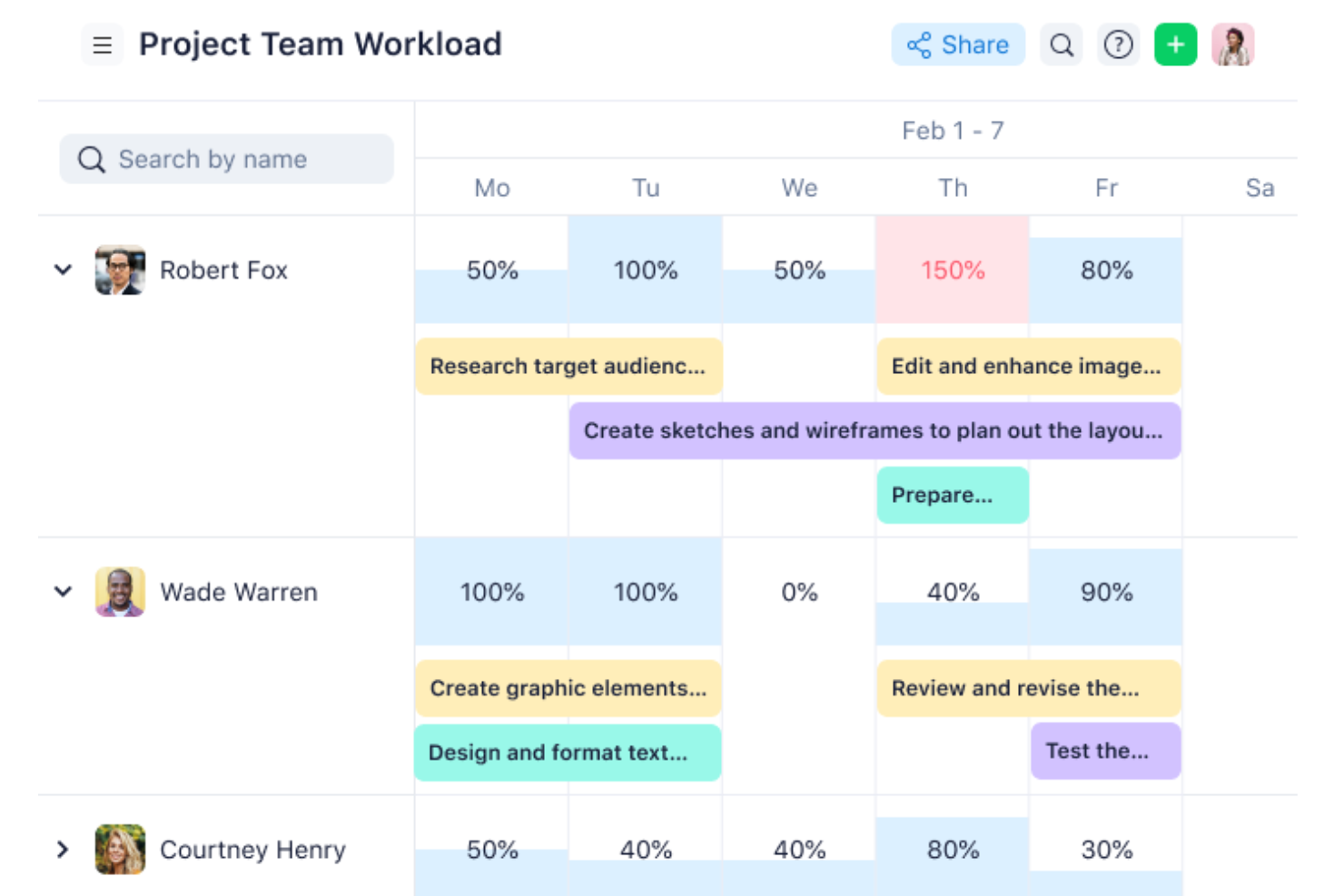
Wrike gives product, engineering, and design teams a shared workspace to organize project ideas, assign work, and track changing priorities beyond a standalone mind map.
Who Is Wrike Best For?
Wrike is a good fit for project managers coordinating cross-functional initiatives who need visual plans to track dependencies, timelines, and shifting priorities.
Why I Picked Wrike
I picked Wrike because “Best for visual project planning” fits how I turn mind maps into coordinated project work. I use Gantt charts to map dependencies and timelines, then track shifting priorities and assigned tasks in a shared workspace.
Wrike Key Features
- Wrike Whiteboard: Brainstorm and diagram on a visual canvas; it’s a paid add-on on Business and Pinnacle, and included with Apex.
- Request forms: Capture project ideas with forms that create work items.
- Automations: Set rules to trigger actions when work changes.
- Integrations: Connect tools through 400+ pre-built native integrations, an open REST API, and Wrike Integrate.
Wrike Integrations
Wrike offers 400+ pre-built native integrations, including Slack, Google Drive, Adobe Creative Cloud, Salesforce, HubSpot, and Zoom, and connects with Zapier. It also provides an open REST API and Wrike Integrate for custom connections and workflows.
Pros and Cons
Pros:
- Dashboards track cross-team priorities and progress
- Gantt dependencies connect brainstorms to delivery
- Whiteboard ideas convert directly into Wrike tasks
Cons:
- Whiteboard access requires a qualifying plan
- Setup and navigation can overwhelm new users
New Product Updates from Wrike
Wrike Expands Gantt Planning, Approvals, and AI Work Intake
Wrike adds cross-project Gantt dependencies, flexible approval routing, and AI work intake through Wrike MCP. These updates give teams more control over planning, decision-making, and incoming work. For more information, visit Wrike’s official site.
Mindomo
Best for comprehensive mind mapping
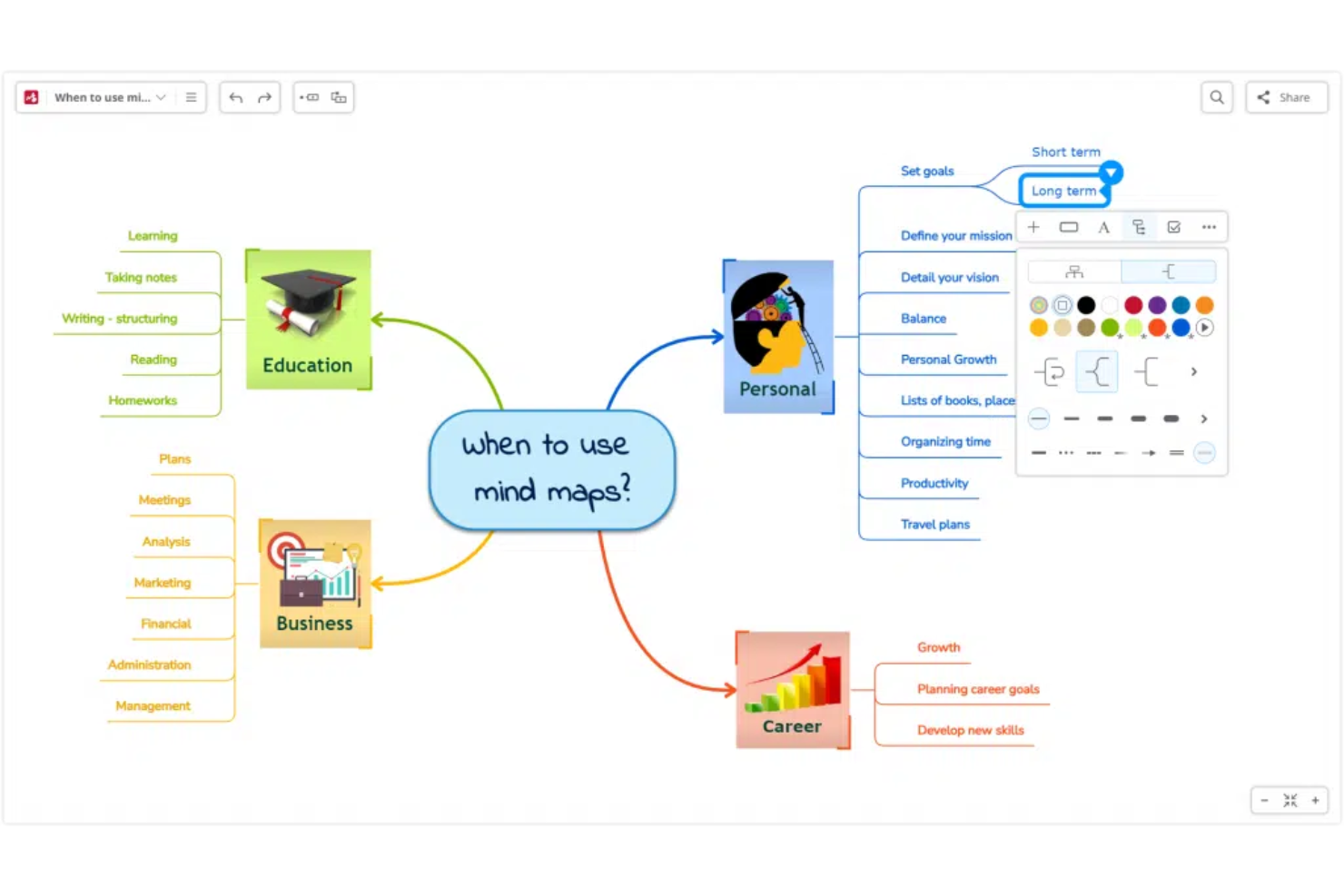
Mindomo is a visual planning tool for project and product teams that connects brainstorming with outlines and task-oriented maps, helping turn scattered ideas into clearer plans without losing the relationships between them.
Who Is Mindomo Best For?
Product managers and project leads can use Mindomo to structure discovery workshops, compare options, and align stakeholders around a shared direction.
Why I Picked Mindomo
I picked Mindomo as a MindMeister alternative because it’s best for comprehensive mind mapping. I like that you can switch a map to an outline, then turn branches into tasks with assignees, deadlines, and progress tracking. That helps me carry workshop decisions into a delivery plan without rebuilding the structure.
Mindomo Key Features
- Real-time collaboration: Edit shared maps together and see who’s viewing or editing.
- Presenter mode: Turn a map into a slide-by-slide presentation.
- Map attachments: Add notes, links, files, videos, images, and audio recordings to topics.
- Offline editing: Work on maps offline and sync changes when you reconnect.
Mindomo Integrations
Mindomo documents integrations with Google Drive, Dropbox, OneDrive, Microsoft Teams, and Office 365. It also offers an API for custom integrations.
Pros and Cons
Pros:
- Topics hold notes, media, and multiple links
- Offline editing syncs after reconnecting
- Maps convert into assignable, trackable tasks
Cons:
- Advanced controls take time to learn
- Large maps can become visually crowded
Best for graphic documents and diagrams
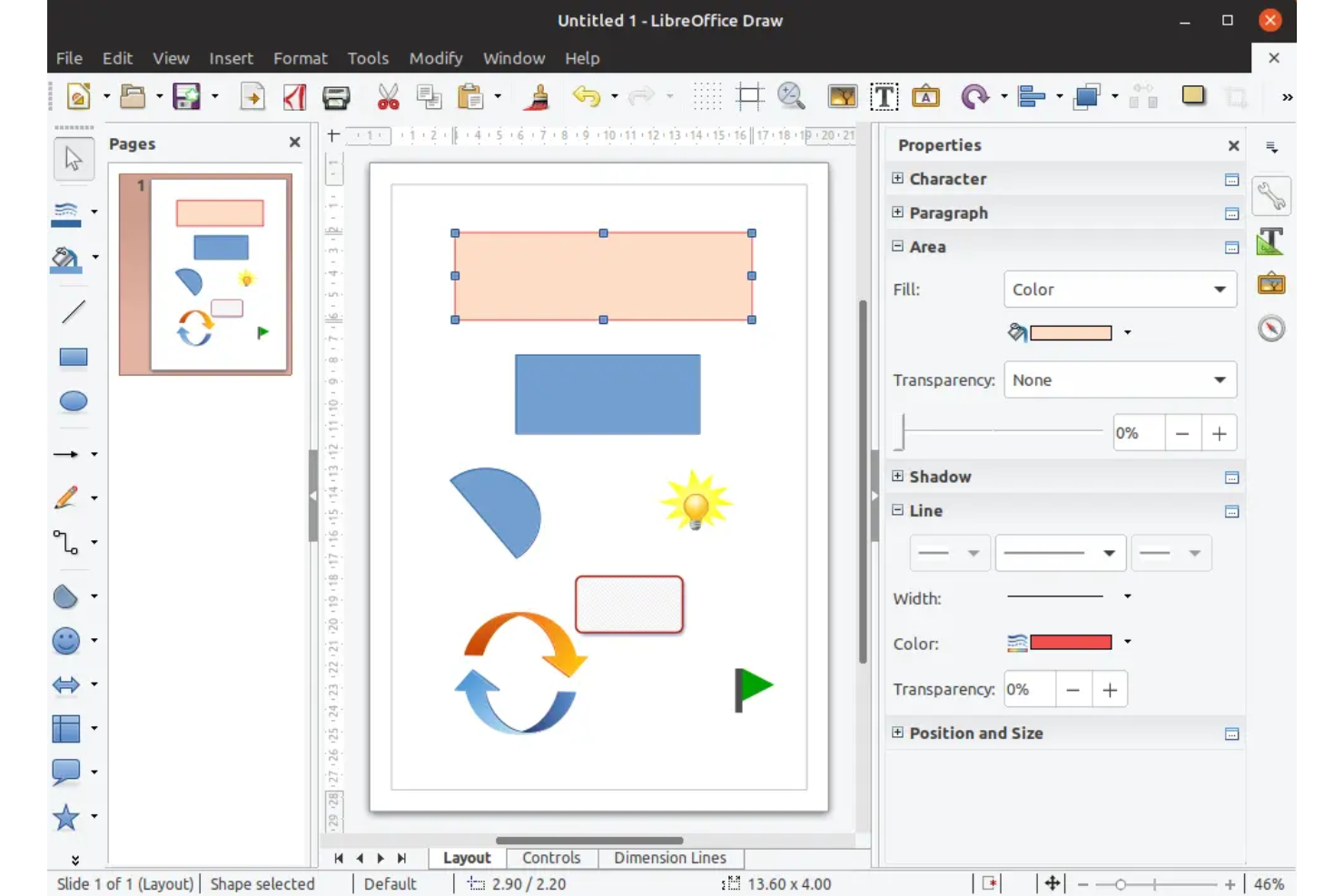
For teams seeking a MindMeister alternative within a familiar office suite, LibreOffice offers drawing tools to map ideas, workflows, and project plans alongside everyday document work.
Who Is LibreOffice Best For?
LibreOffice suits project managers and operations teams who create process diagrams and visual project documents in a desktop office suite.
Why I Picked LibreOffice
I picked LibreOffice because Draw gives me a canvas for graphic documents and diagrams that can grow beyond a simple mind map. I use shapes, connector lines, and labels to map project workflows or dependencies, then add the diagram to a project document for review.
LibreOffice Key Features
- PDF export: Save documents and presentations as PDF files.
- Microsoft Office formats: Open and save files in formats such as DOCX, XLSX, and PPTX.
- Offline desktop apps: Work in Writer, Calc, and Impress without an internet connection.
- Extensions: Add functions through downloadable extensions.
LibreOffice Integrations
LibreOffice’s built-in remote-file service supports Google Drive, WebDAV, Windows shares, SSH, and CMIS servers. Its UNO API and SDK support custom extensions and integrations with external programs.
Pros and Cons
Pros:
- Export diagrams as PDFs or SVGs
- Layers and alignment help organize complex visuals
- Smart connectors support clear workflow diagrams
Cons:
- No real-time collaboration for team mapping
- Few built-in mind map shapes

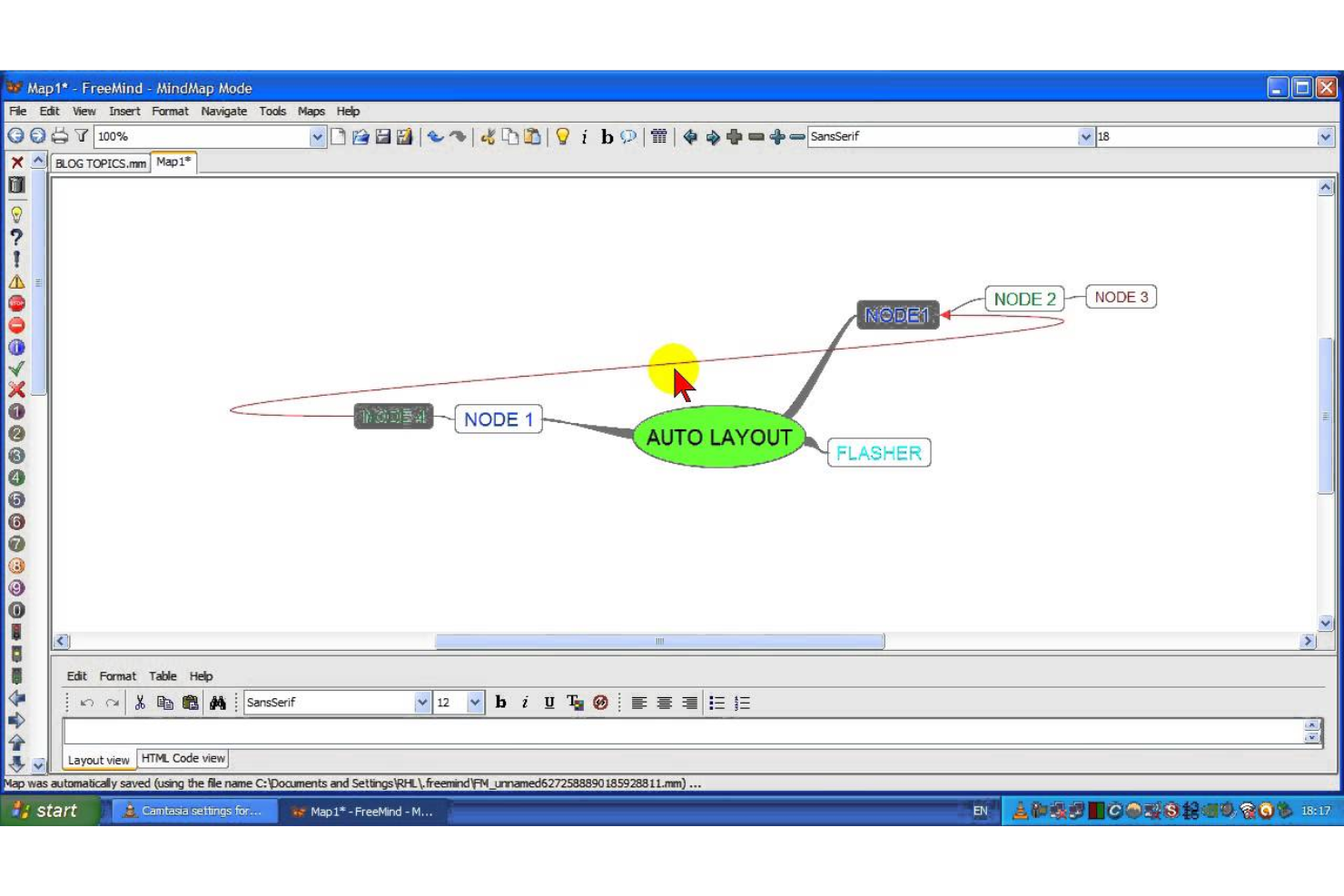
FreeMind is an open-source desktop mind mapping tool for project managers who want to organize ideas, plans, and dependencies in visual maps without relying on a browser-based collaboration suite.
Who Is FreeMind Best For?
FreeMind suits project managers who prefer a desktop tool for mapping project structures, brainstorming, and breaking complex ideas into branches.
Why I Picked FreeMind
I picked FreeMind as a MindMeister alternative because “Best for classic mind mapping” fits its desktop tree maps. I fold branches to focus on active project work, then link nodes to local files or websites and use icons and colors to mark priorities.
FreeMind Key Features
- Map encryption: Password-protect a mind map.
- Export formats: Export maps as HTML, PDF, PNG, or other formats.
- Undo and redo: Reverse or restore recent map edits.
- Keyboard shortcuts: Use key commands to edit and navigate maps.
FreeMind Integrations
FreeMind doesn’t have any documented native integrations.
Pros and Cons
Pros:
- Maps export to HTML, PDF, and images
- Nodes link directly to local source files
- One-click branch folding keeps large maps manageable
Cons:
- Dated menus make editing feel cumbersome
- Live collaboration remains limited and primarily single-user

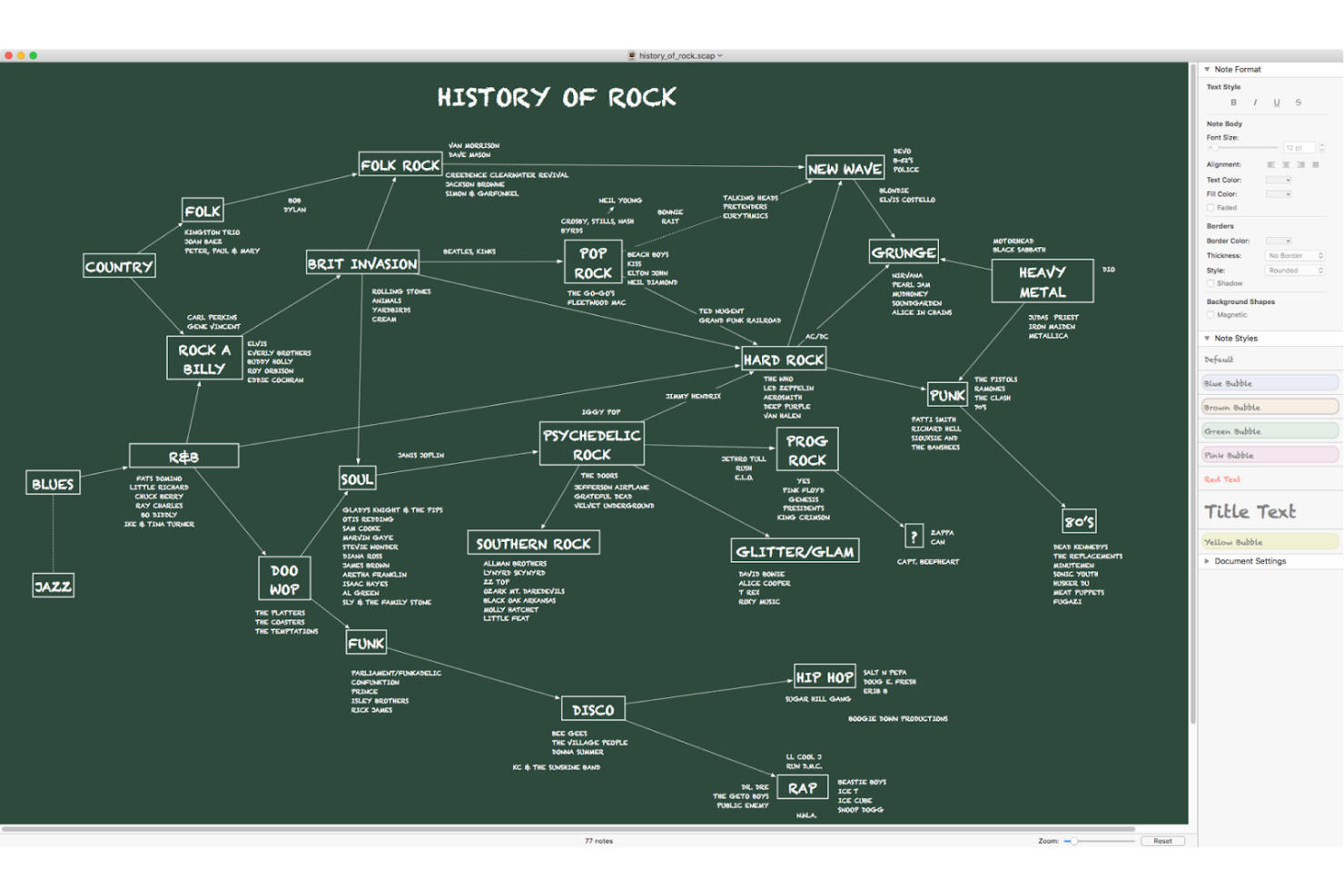
Scapple gives product and project teams a flexible digital canvas for capturing and connecting early ideas, helping them explore requirements, risks, and dependencies without a rigid map structure.
Who Is Scapple Best For?
Scapple suits project managers and product teams who need a flexible space to brainstorm requirements, risks, and dependencies before creating structured plans.
Why I Picked Scapple
I picked Scapple as a MindMeister alternative because it’s best for free-form thought structuring. I can place notes anywhere on a blank canvas, connect related ideas with lines, and rearrange them as project requirements, risks, and dependencies emerge. That helps me explore a project’s shape before turning ideas into a formal plan.
Scapple Key Features
- Note columns: Stack related notes in columns on the canvas.
- Background shapes: Draw shapes behind notes to group them.
- Note styling: Customize the appearance of individual notes.
- Export and print: Export or print your ideas from Scapple.
Scapple Integrations
Scapple supports a direct drag-and-drop workflow with Scrivener, letting you move notes between the two apps. Other native integrations aren’t clearly documented.
Pros and Cons
Pros:
- Capture detailed, text-heavy ideas as notes
- Connect related notes in any direction
- Place ideas freely without forced hierarchy
Cons:
- Straight connectors can clutter complex maps
- No real-time team co-editing

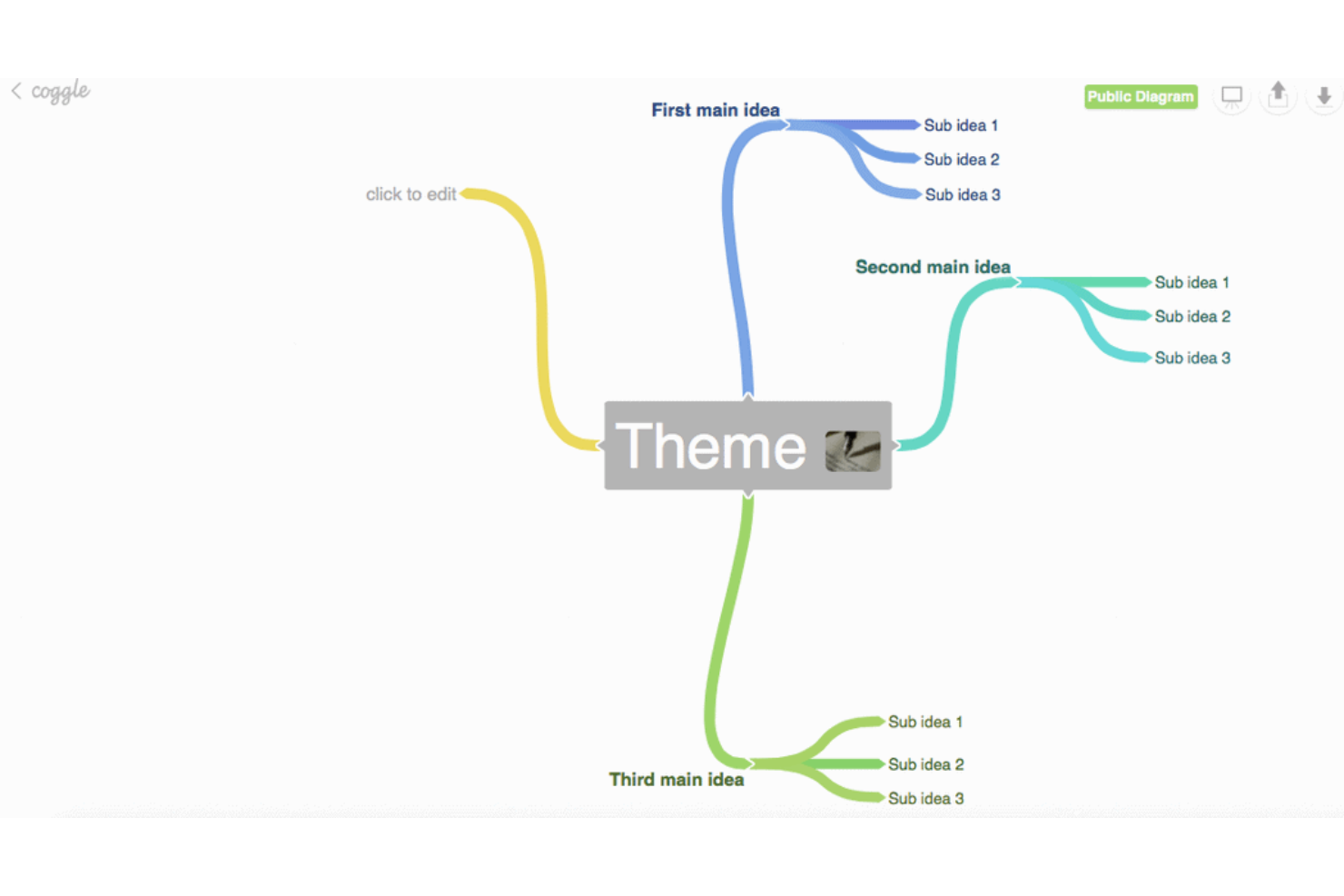
Coggle is a browser-based mind mapping tool that helps product and project teams organize ideas, clarify dependencies, and align around shared visual plans (Best for collaborative mind maps).
Who Is Coggle Best For?
Coggle suits product and project leads who want teams to structure early-stage planning in a shared visual workspace.
Why I Picked Coggle
I picked Coggle as a MindMeister alternative because it fits “Best for collaborative mind maps”: teammates can edit the same diagram in real time, and the full change history helps us trace how a product plan shifted as priorities changed.
Coggle Key Features
- Flowchart shapes: Choose from shapes for process maps and other diagrams.
- Image uploads: Add unlimited images to your diagrams by dragging them from your desktop.
- Floating annotations: Place text labels and images outside the diagram tree.
- Multiple starting points: Add several central items to map related topics in one diagram.
Coggle Integrations
Coggle offers a native Google Drive integration for organizing diagrams and sharing them with Google contacts. Its public API supports custom integrations, including creating, updating, and exporting diagram data.
Pros and Cons
Pros:
- Loops and joined branches map dependencies
- Full diagram history supports safe revisions
- Real-time edits keep distributed planning aligned
Cons:
- Layout and branch placement controls feel limited
- Large maps can become slow

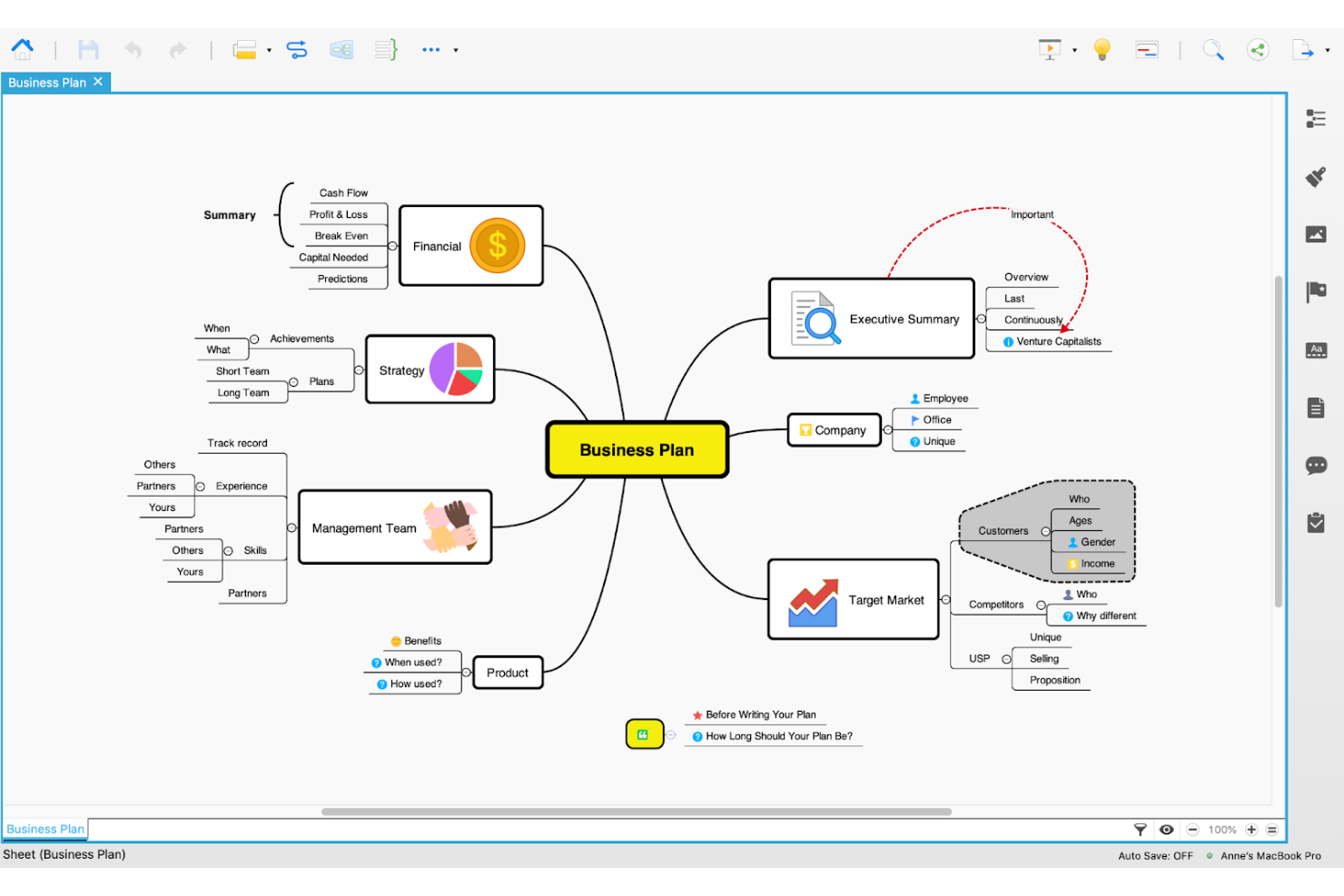
Xmind is a mind mapping and diagramming tool for project and product teams that need to organize brainstorms, clarify complex ideas, and turn scattered input into visual plans.
Who Is Xmind Best For?
Product managers and digital teams that need AI-assisted mind maps to explore ideas and align on early project direction.
Why I Picked Xmind
I picked Xmind as a MindMeister alternative because it’s best for AI-powered mind mapping. I like that its AI can turn a prompt into a mind map and help expand branches, so I can map product ideas or project risks before a planning session.
Xmind Key Features
- Multiple structures: Create mind maps, timelines, matrices, and other visual layouts.
- Gantt charts: View project schedules with tasks, dates, and dependencies.
- Real-time collaboration: Edit maps with teammates in shared team spaces.
- File export: Export maps to formats including PDF, PNG, Excel, and PowerPoint.
Xmind Integrations
Xmind supports connections with Slack, Dropbox, Google Drive, and OneDrive, and lets teams embed shared maps in Notion. Xmind Agent can also create maps from Notion pages and turn maps into Notion pages.
Pros and Cons
Pros:
- Offline apps work across major platforms
- Switch map structures without rebuilding
- AI drafts maps from prompts and files
Cons:
- Team collaboration trails dedicated collaboration tools
- Large maps can lag or stutter

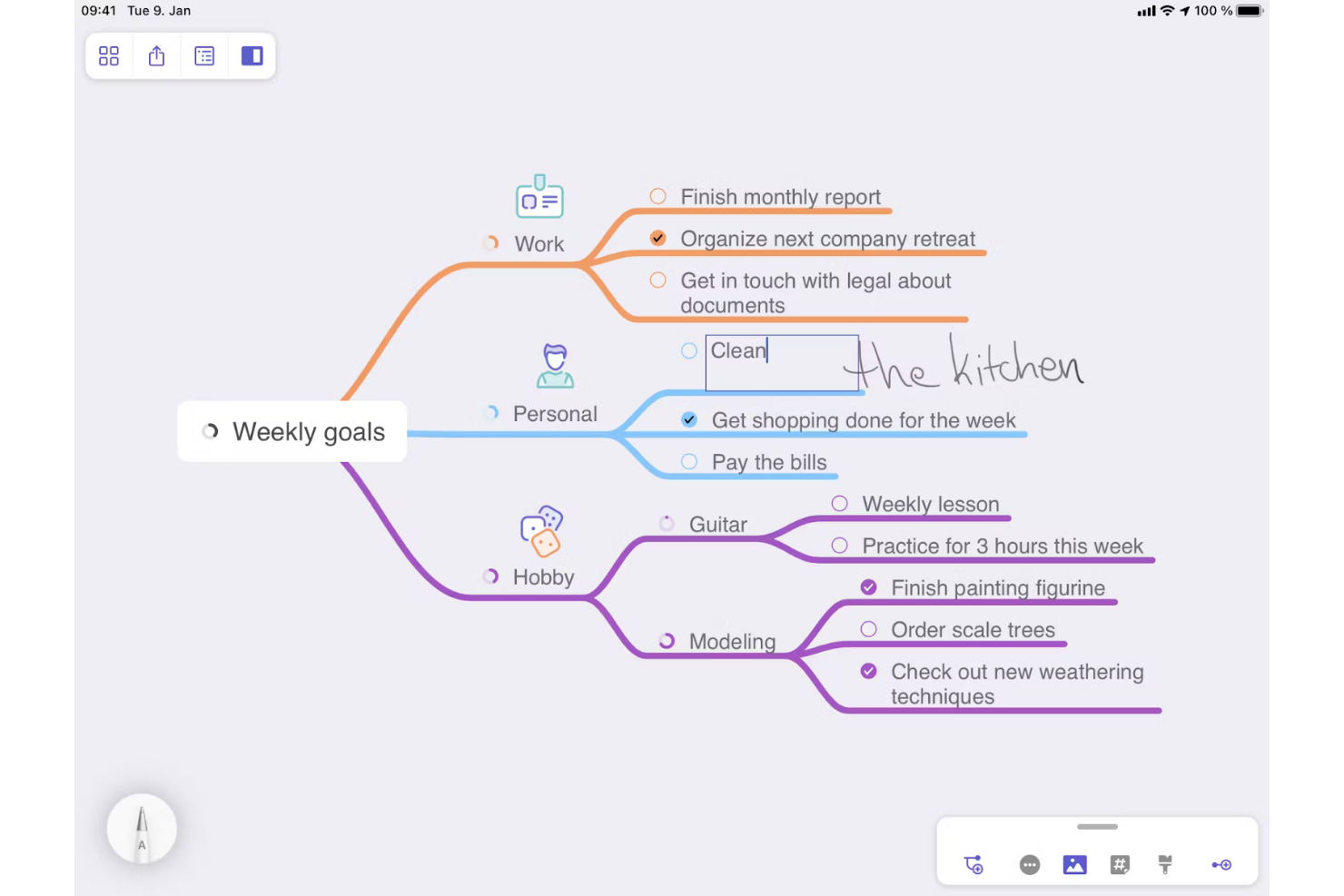
MindNode is mind mapping software for product and project teams who need to organize scattered ideas, clarify requirements, and shape planning discussions into connected maps and outlines.
Who Is MindNode Best For?
MindNode suits product managers and design teams who need to map early-stage concepts, explore connections, and give brainstorms a clear structure.
Why I Picked MindNode
I picked MindNode as a MindMeister alternative for its “Best for visual brainstorming” focus. I like using visual tags to group ideas and connections to show how product requirements relate across branches. Its synchronized map and outline views help me turn a brainstorm into a structured planning outline without losing those relationships.
MindNode Key Features
- Focus mode: Isolate one branch while dimming the rest of the map.
- Foldable branches: Collapse or expand branches to manage map detail.
- Node notes: Add supporting details to individual nodes.
- Themes: Change a map’s colors and visual style.
MindNode Integrations
MindNode syncs tasks with Apple Reminders and supports one-way task exports to Things and OmniFocus. It also supports Apple Shortcuts and offers an MCP integration for AI assistants.
Pros and Cons
Pros:
- Focus mode reduces branch clutter
- Visual tags and connections clarify relationships
- Synced map and outline keep ideas structured
Cons:
- Real-time team collaboration trails MindMeister
- No browser-based editing for mixed-device teams

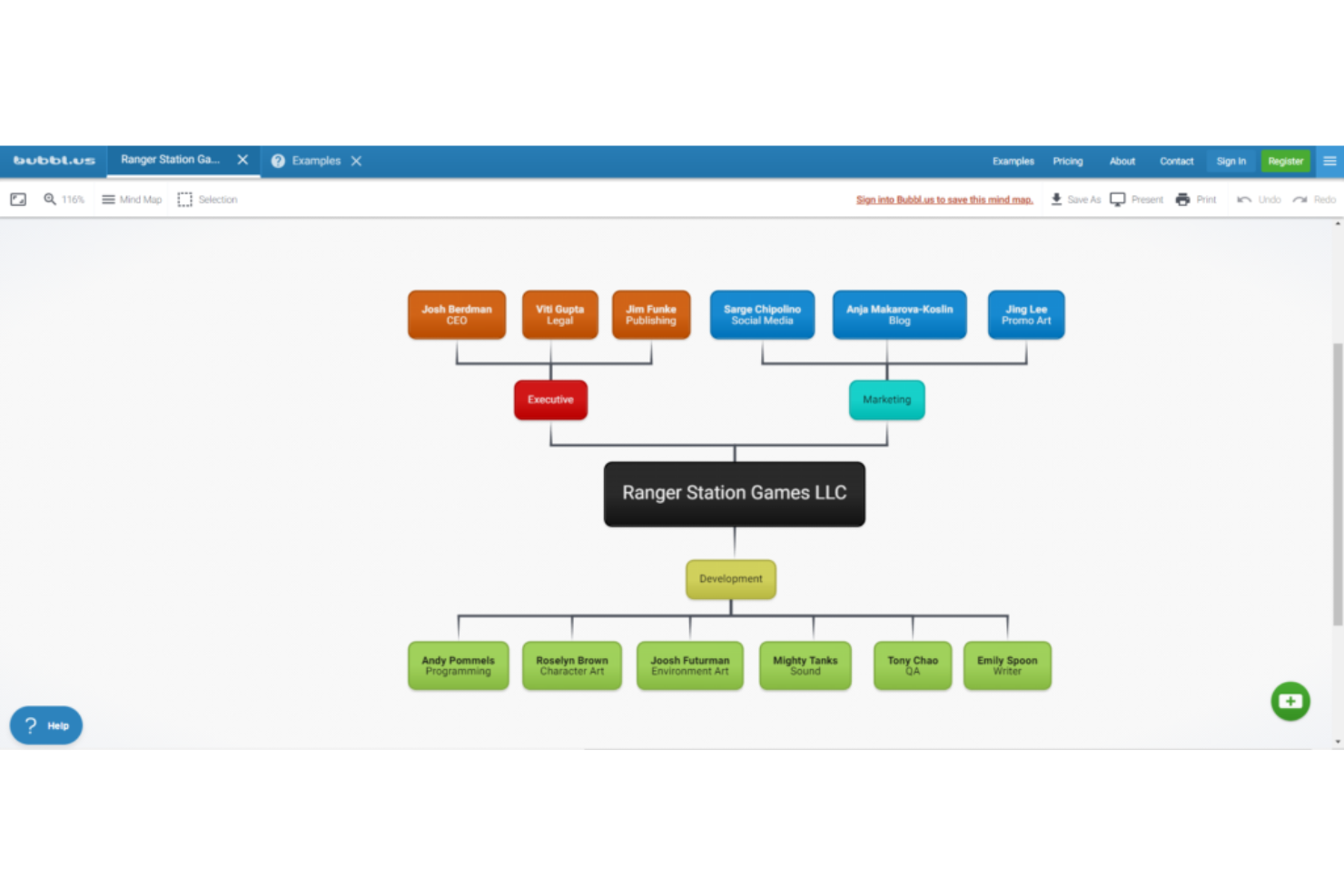
Bubbl.us is an online mind mapping tool that helps project managers and cross-functional teams organize ideas, explore relationships, and turn early brainstorming into clearer project plans.
Who Is Bubbl.us Best For?
Bubbl.us suits solo project managers and small teams who want a straightforward way to map ideas and clarify project thinking.
Why I Picked Bubbl.us
I picked Bubbl.us as a MindMeister alternative because bubble-based maps make project discovery easy to scan. I use layouts and color themes to separate workstreams, then add notes inside bubbles to capture decisions beside each idea. It’s my choice for “Best for a simple and intuitive interface” when mapping an early project brainstorm.
Bubbl.us Key Features
- Mind map templates: Start with project roadmaps, work breakdown structures, RACI charts, or other ready-made templates.
- Real-time collaboration: Edit a mind map with teammates and see changes as they happen.
- Presentation mode: Present a mind map directly from the editor.
- Export options: Save maps as JPG, PNG, PDF, HTML outlines, or plain text.
Bubbl.us Integrations
Bubbl.us doesn't have any native integrations.
Pros and Cons
Pros:
- Share maps with collaborators without accounts
- One-click layouts quickly reorganize bubble maps
- Start maps instantly without an account
Cons:
- No offline app or vector export
- Crowded maps make bubbles harder to move

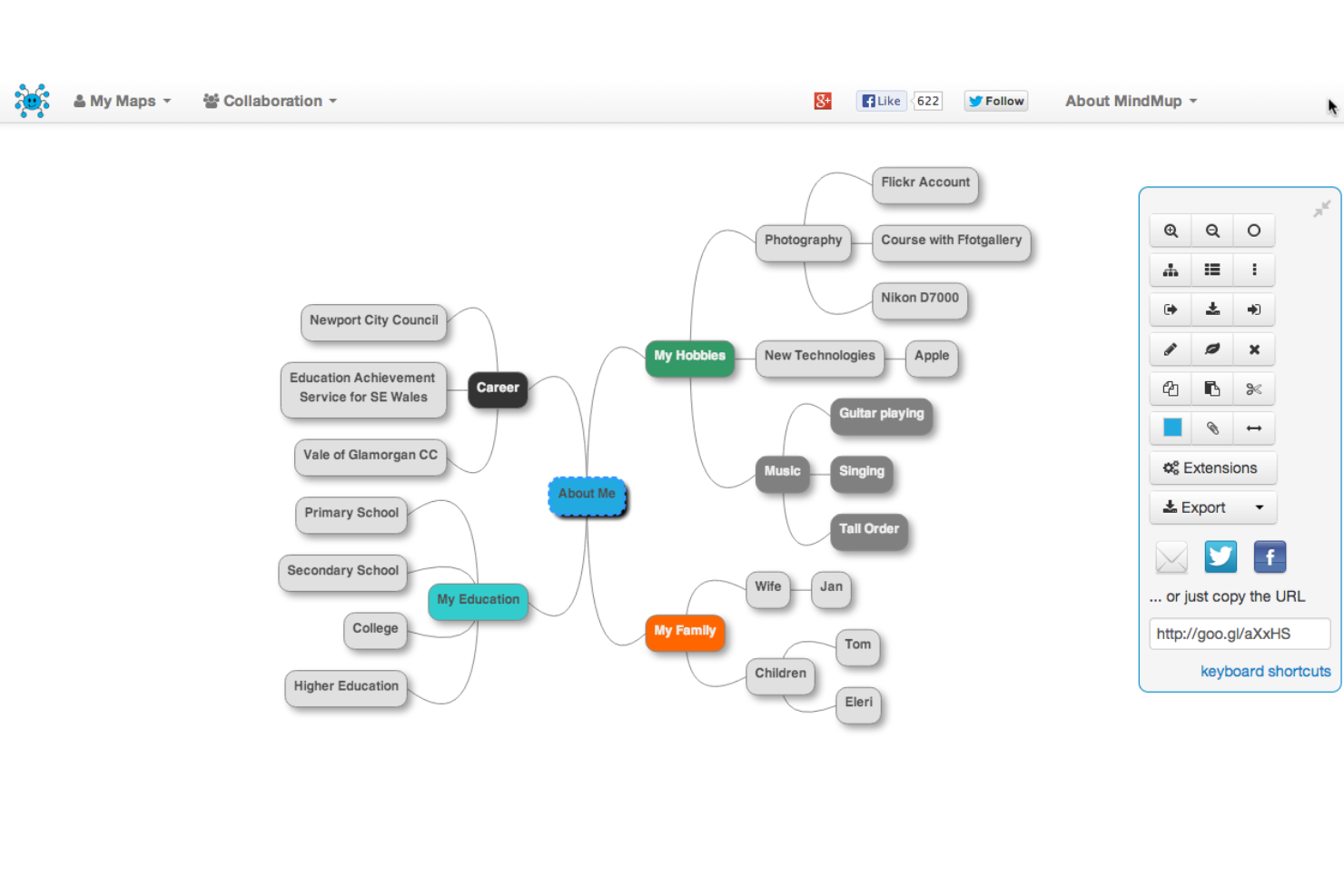
MindMup is a browser-based mind mapping tool for project and product teams that want to turn workshop ideas, requirements, and early plans into visual maps they can share and develop without adding a full project-planning suite.
Who Is MindMup Best For?
MindMup is a good fit for distributed product and project teams that need to build and discuss shared mind maps in a browser.
Why I Picked MindMup
I picked MindMup as a MindMeister alternative because it’s built for online collaboration. I like that teammates can edit the same map with changes synced in real time, then follow a facilitator’s view during a requirements workshop. That keeps discussion and the evolving map aligned in one browser session.
MindMup Key Features
- Map presets: Create standard mind maps, org charts, and argument maps.
- Map styling: Customize layouts, colors, shapes, and text across maps and nodes.
- Node notes: Attach rich-text notes to map nodes.
- Export formats: Save maps as PDFs, images, Mindmup files, or structured outlines.
MindMup Integrations
MindMup’s documented native integration is Google Drive, where you can create, store, and manage maps. Real-time collaboration requires MindMup storage rather than Google Drive.
Pros and Cons
Pros:
- Keyboard shortcuts and auto-layout speed map creation
- Org charts and argument maps expand use cases
- Real-time co-editing keeps workshop maps aligned
Cons:
- Recent redesign drew usability complaints
- Large maps can lag during editing
Outras alternativas ao MindMeister
Segue-se uma lista de alternativas adicionais ao MindMeister que não chegaram à lista das dez melhores, mas que vale certamente a pena conhecer.
- SimpleMind
For cross-platform mind mapping
- WiseMapping
For open-source enthusiasts
- iMindQ
For advanced project planning features
- GoodDay
For agile project management
- Lucidchart
For complex diagramming needs
- Canva
For creative mind map designs
- Miro
For interactive whiteboarding sessions
- Microsoft OneNote
For note-taking integration with Office
- Zoho Notebook
For multimedia note organization
- ClickUp
For task management versatility
- FigJam
For design-focused brainstorming
- Ayoa
For combining mind mapping with task management


Software de gestão de projetos relacionado
Se ainda não encontrou o que procura aqui, consulte estas outras ferramentas relacionadas que testámos e avaliámos:
- Software de gestão de projetos
- Software de gestão de recursos
- Software de gestão de tarefas
- Ferramentas de colaboração
- Criador de gráficos de Gantt
- Ferramentas de produtividade
How I Evaluate MindMeister Alternatives
I split my evaluation into two layers: baseline table stakes—like a functional mind map canvas and live collaboration—and the differentiators that reveal which tool actually fits how your team works.
Core Functionality (Table Stakes For This List)
When I'm selecting tools for my list, I rank each one on a scale from 0 (does not offer the functionality) to 5 (excels in this area) for each core functionality listed below. Then, I calculate the tool's total score into a percentage. Each tool needs to achieve a minimum total score of 65% to be considered for inclusion.
- Mind Mapping Canvas: I look for a true branching canvas where you can build hierarchical node structures, not just a generic diagramming tool with a mind map template buried in the sidebar.
- Real-Time Collaboration: Teams running remote sprint planning or brainstorming sessions need live co-editing, so I check for shared cursors, comments, and presence indicators.
- Task & Project Conversion: The bridge from ideation to execution matters—I evaluate whether map nodes can become assignable tasks with due dates and status tracking.
- Multiple View Modes: A good alternative lets you flip a mind map into an outline, Kanban board, or timeline, similar to how tools like Miro and Ayoa handle view switching.
- Templates & Frameworks: I look for PM-relevant templates like retrospectives, SWOT analyses, and project kickoff maps that save setup time for recurring planning sessions.
- Integrations & Export: Connecting to tools your team already uses is key, so I check for native links to platforms like Jira, Slack, and Asana, plus export to standard formats.
Once I have a list of tools that meet this criteria, I consider what sets each platform apart.
Differentiating Factors (What Sets Vendors Apart)
Here's how I compare and contrast different vendors:
Standout Features
AI-assisted ideation is a major differentiator—I look for tools that generate branches from a prompt, which speeds up early-stage project scoping sessions. Presentation mode matters when you need to walk stakeholders through a planning map without jumping to a separate slide deck. I also evaluate whether a tool blends mind mapping with freeform whiteboarding, since retros and workshops often need sticky notes, shapes, and drawings alongside a branching structure.
Beyond Features
Pricing structure plays a big role here—I check whether a tool charges per user or offers flat team pricing, since a 15-person project team can blow past budget fast on per-seat plans. Integration depth with your existing PM stack also matters; a two-way sync with Jira or Asana is far more useful than a basic one-directional export. I also evaluate onboarding support, especially whether a vendor offers migration tools for importing existing MindMeister maps.
Principais características do MindMeister
Eis algumas das principais características do MindMeister que o seu software alternativo deverá conseguir replicar ou melhorar, para ser uma boa opção:
- Estilos personalizados: Esta funcionalidade permite aos utilizadores personalizar mapas mentais com temas, estilos e imagens.
- Modo de concentração: Esta funcionalidade ajuda a minimizar as distrações para uma sessão de criação de mapas mais focada.
- Esquemas de mapas mistos: Esta funcionalidade disponibiliza vários esquemas de visualização numa única tela.
- Modo de estrutura: Esta funcionalidade permite aos utilizadores alternar entre um mapa visual e uma lista linear.
- Comentários & notificações: Esta funcionalidade ajuda a facilitar a colaboração através de comentários e alertas.
- Conteúdos multimédia incorporados: Esta funcionalidade permite aos utilizadores anexar vídeos, imagens e ligações aos mapas mentais.
- Colaboração em tempo real: Esta funcionalidade permite que vários utilizadores editem um mapa mental em simultâneo.
- Aplicações móveis: Esta funcionalidade permite aos utilizadores aceder e editar mapas mentais no iOS, incluindo iPhones e iPads, e em dispositivos Android.
- Opções de exportação e partilha: Esta funcionalidade pode ajudar os utilizadores a exportar mapas para diferentes formatos e a partilhá-los através de ligações.
- Integração com outras ferramentas: A sua alternativa deverá estabelecer ligação com outras ferramentas úteis, como o MeisterTask, o Google Workspace e o Microsoft Teams.