

10 melhores aplicações de tomada de notas com IA analisadas em 2026

10 Seleção das melhores aplicações de tomada de notas com IA


Gerir projetos pode rapidamente tornar-se confuso quando acompanha tarefas, reuniões e ideias em simultâneo. É aí que entram as aplicações de tomada de notas com IA; tratam do trabalho entediante, como transcrever chamadas, organizar informações e destacar o que é mais importante, para que não tenha de o fazer.
Dediquei algum tempo a testar pessoalmente estas ferramentas e algumas tornam realmente o trabalho mais simples. Abaixo, encontrará as minhas principais escolhas com base numa utilização real, incluindo as que se destacam pelas funcionalidades inteligentes e pelos fluxos de trabalho adequados a equipas
Why Trust Our Software Recommendations
Our team has been testing and reviewing software since 2012. As project managers ourselves, we know how difficult—and important—it is to choose the right software.
For this guide, we evaluated tools using hands-on testing and independent research, scoring tools using our selection criteria. We also draw on insights from industry thought leaders and practicing project management experts.
Our reviews reflect our human editorial judgment, not a sales pitch.
Expert reviewers:
Tabela de comparação de aplicações de tomada de notas com IA
Esta tabela de comparação resume os detalhes de preços das minhas principais escolhas de aplicações de tomada de notas com IA.
| Tool | Best For | Trial Info | Price | ||
|---|---|---|---|---|---|
| 1 | Best for admin-controlled meeting capture | Free plan + 14-day free trial + free demo available | From $9/user/month (billed annually) | Website | |
| 2 | Best for turning meeting notes into tasks | Free plan + demo available | From $7/user/month (billed annually) | Website | |
| 3 | Best for AI-assisted organization | Free plan + free trial + free demo available | From $10/user/month | Website | |
| 4 | Best for collaboration with AI | Free plan available | Pricing upon request | Website | |
| 5 | Best for eco-friendly AI note-taking | Free plan available | From $14/user/month | Website | |
| 6 | Best for linking notes with AI | Free plan available | From $4/user/month (billed annually) | Website | |
| 7 | Best for AI-powered voice analysis | Free plan + free demo available | From $10/user/month (billed annually) | Website | |
| 8 | Best for transcribing meetings | Free plan available | From $8.33/user/month (billed annually) | Website | |
| 9 | Best for AI-driven memory recall | Free plan available | From $12/user/month | Website | |
| 10 | Best for automating meeting notes | Free plan + free demo available | From €39/user/month (billed annually) | Website |


Análises das melhores aplicações de tomada de notas com IA
Abaixo encontram-se os meus resumos detalhados das melhores aplicações de tomada de notas com IA que entraram na minha seleção. As minhas análises apresentam uma visão detalhada das principais funcionalidades, vantagens e desvantagens, integrações e casos de utilização ideais de cada ferramenta, para o ajudar a encontrar a melhor opção para si.

Best for admin-controlled meeting capture
monday AI Notetaker is an AI note-taking tool built into the monday.com platform that records, transcribes, and summarizes meetings, then connects action items directly to monday.com boards and workflows.
Who Is monday AI Workspace Best For?
monday AI Notetaker is a strong fit for project managers and team leads who already run their work inside monday.com and want meeting outcomes to feed directly into their boards and workflows.
Why I Picked monday AI Workspace
I've included monday AI Workspace in my top picks because the admin-controlled governance layer is something I rarely see done this well in a note-taking tool. Admins can set account-wide Notetaker attendance defaults, lock settings so members can't override them, and control which meeting types get recorded, which matters when sensitive client calls are in the mix. Action items pulled from transcripts link directly to monday.com boards as subitems, so meeting outcomes don't sit in a silo.
monday AI Workspace Key Features
- Real-time speaker identification: The Notetaker transcribes meetings as they happen and labels each speaker in the transcript view using participant icons.
- Searchable recording archive: Recorded meetings are searchable by keyword, letting you jump directly to the relevant moment in any recording.
- Custom summary instructions: You can write your own summary instructions, save them for reuse, or set them as the default so every meeting follows the same format.
- Workflow-based recap delivery: Meeting outcomes can be routed to Slack or Gmail automatically using the workflow builder, available on Pro and Enterprise plans.
monday AI Workspace Integrations
monday AI Workspace has native integrations with Zoom, Microsoft Teams, Google Meet, Google Calendar, and Outlook calendar. Its workflow builder connects with Slack, Gmail, and Outlook, while the Platform MCP/API supports custom retrieval of meeting data.
Pros and Cons
Pros:
- Private-by-default recordings reassure client-facing teams
- Timestamped summaries make decisions easier to revisit
- Admins can lock meeting attendance settings
Cons:
- Host approval can prevent scheduled capture
- Meeting search lacks AI tagging and clustering
New Product Updates from monday AI Workspace
monday AI Workspace Adds Human Approval Routing
monday AI Workspace adds a human-in-the-loop approval block to AI Workflows, sending approval requests and routing workflow paths based on responses. For more information, visit monday AI Workspace's official site.
ClickUp
Best for turning meeting notes into tasks
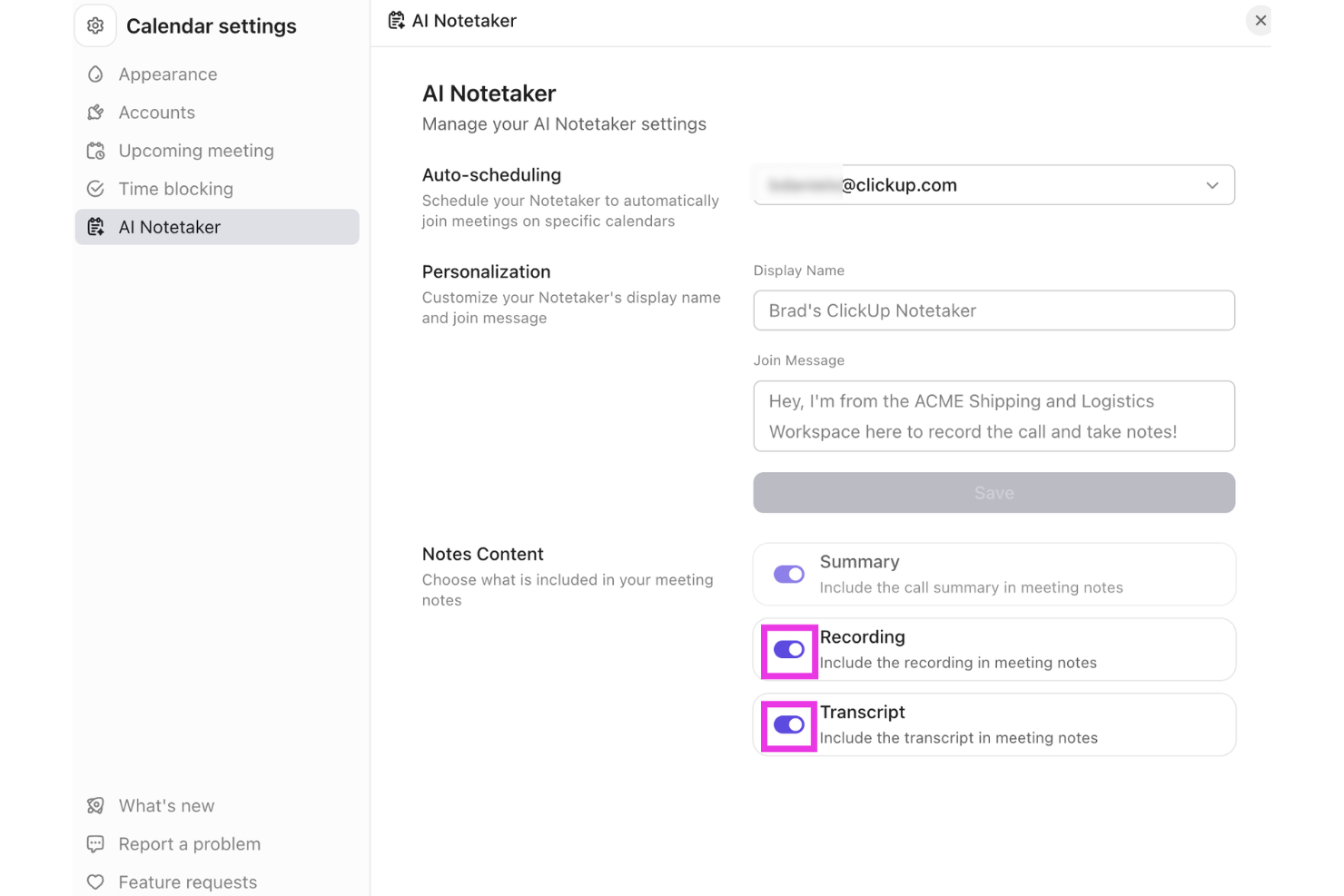
ClickUp offers a versatile platform that integrates AI capabilities to support note-taking and team collaboration. Professionals across project management, software development, and vendor management can use its tools to organize information and manage workflows in one place. With the AI Meeting Notetaker and support for turning meeting notes into tasks, ClickUp helps teams capture discussions and connect them directly to actionable work.
Why I Picked ClickUp
I picked ClickUp for turning meeting notes into tasks, using its AI Meeting Notetaker to capture conversations and organize key points from discussions. The tool records meetings, generates summaries, and converts action items into tasks that can be tracked within ClickUp. It also connects notes with projects, documents, and workflows, helping teams manage follow-ups without switching between multiple tools.
ClickUp Key Features
In addition to turning meeting notes into tasks, ClickUp offers:
- Project Tracking: Offers real-time visibility into project status, helping teams stay on top of their tasks and deadlines.
- Document Creation: Enables seamless document drafting and editing within the platform, ensuring all your notes are easily accessible.
- Time Management: Provides tools to track time spent on tasks, aiding in better resource allocation and productivity analysis.
- Integration Support: Connects with over 50 applications, allowing you to manage projects across different platforms without switching tools.
ClickUp Integrations
Integrations include Slack, Google Drive, Dropbox, Microsoft Teams, Zoom, GitHub, Jira, Salesforce, and other third-party tools.
Pros and Cons
Pros:
- All-in-one platform combining tasks, docs, goals, and collaboration tools
- Flexible customization for workflows, dashboards, and task organization
- Centralized workspace organizing tasks, projects, and clients in one platform
Cons:
- Interface complexity can overwhelm non-technical users or first-time users
- Mobile app and form features reported as limited by some users
New Product Updates from ClickUp
ClickUp Adds Meetings Hub, Super Agent Templates, and ZoomInfo Integration
ClickUp adds a searchable Meetings Hub, new ways to clone and template Super Agents, and a ZoomInfo integration through the App Center. These updates improve meeting retrieval, agent reuse, and access to sales intelligence. For more information, visit ClickUp’s official site.
Notion
Best for AI-assisted organization

Notion is a workspace that combines note-taking, task management, and collaboration, catering to both individuals and teams. It offers AI-driven features that help users organize information and streamline workflows efficiently.
Why I picked Notion: Notion's AI capabilities assist in organizing information through smart suggestions and automated content categorization. Its flexibility allows you to create custom databases and templates tailored to your needs. The tool's ability to integrate tasks, notes, and projects in one place can increase productivity.
Standout Features & Integrations:
Features include the ability to create custom templates for different project types, which is designed to limit repetitive tasks. You can embed various types of media, from videos to code snippets, enriching your workspace. Notion's drag-and-drop interface makes it easy to rearrange content and adapt to changing project needs.
Integrations include Slack, Google Drive, Trello, Asana, Figma, GitHub, Typeform, Zapier, Jira, and Microsoft Teams.
Pros and Cons
Pros:
- Supports embedding various media types
- Drag-and-drop interface simplifies organization
- Customizable templates for diverse projects
Cons:
- Limited offline capabilities
- Free plan does not offer full scope of the tool
Best for collaboration with AI

Microsoft OneNote is a digital note-taking app that caters to individuals and teams looking for a collaborative workspace. With AI-enhanced features, it helps users organize notes, share ideas, and collaborate efficiently across projects.
Why I picked Microsoft OneNote: The tool's AI capabilities make it ideal for collaboration by enabling real-time sharing and editing of notes. It integrates with other Microsoft products, which increases productivity for teams using the Microsoft ecosystem. AI-driven features like handwriting recognition and search make it easy to find and organize information.
Standout Features & Integrations:
Features include the ability to clip web content directly into your notes, making research more efficient. You can organize your notes with sections and pages, providing a structured approach to note-taking. Additionally, the drawing tools allow you to sketch ideas or annotate documents directly within OneNote.
Integrations include Microsoft Word, Microsoft Excel, Microsoft Outlook, Microsoft Teams, OneDrive, SharePoint, PowerPoint, Skype, Yammer, and Planner.
Pros and Cons
Pros:
- Integrates with Microsoft products
- Handwriting recognition for easy note search
- Real-time collaboration with team members
Cons:
- Requires a Microsoft account for full features
- Mobile versions offer fewer features than desktop versions

Granola
Best for eco-friendly AI note-taking

Granola is an AI-powered notepad aimed at professionals who frequently attend meetings and need efficient note-taking solutions. It focuses on transcribing audio directly from your device, eliminating the need for additional meeting bots and enhancing the note-taking experience with AI-driven features.
Why I picked Granola: Granola's eco-friendly approach is reflected in its ability to transcribe audio directly from your computer, reducing the reliance on external servers. Its AI capabilities assist in creating detailed meeting notes quickly, which is ideal for back-to-back meetings. Users can customize templates to fit various meeting types, ensuring that the tool adapts to specific needs.
Standout Features & Integrations:
Features include customizable templates that let you tailor notes to different meeting formats. The AI support for post-meeting tasks helps you manage follow-ups. Additionally, Granola enables easy sharing of notes across platforms, making collaboration straightforward.
Integrations include Zoom, Slack, Microsoft Teams, Google Meet, Skype, Webex, Asana, Trello, Notion, and Evernote.
Pros and Cons
Pros:
- AI support for managing post-meeting tasks
- Customizable templates for different meetings
- Direct transcription from your device
Cons:
- No audio or video playback available
- Limited to Mac and iPhone users

Obsidian
Best for linking notes with AI

Obsidian is a note-taking app designed for users who need to organize complex information and connections between notes. It caters mainly to individuals and teams looking for a way to visualize their thoughts and ideas through interconnected notes and AI-assisted linking.
Why I picked Obsidian: The app's standout feature is its ability to link notes using AI, making it easier for you to create a web of related ideas. Obsidian uses AI to suggest connections between your notes, which can increase your ability to discover relationships. Its AI capabilities also help in categorizing and organizing your notes automatically.
Standout Features & Integrations:
Features include a graph view that visually represents the links between your notes, aiding in better comprehension. You can also customize your workspace with plugins to suit your needs. Additionally, Obsidian offers markdown support, which allows you to format notes with ease.
Integrations include Markdown, Git, Dropbox, Google Drive, Evernote, OneDrive, Todoist, Trello, and Notion.
Pros and Cons
Pros:
- Supports markdown for easy formatting
- Customizable with community plugins
- Visual graph view for note connections
Cons:
- Requires manual setup for full functionality
- Mobile app interface is less feature-rich than desktop version

Best for AI-powered voice analysis

Fireflies is an AI-driven meeting assistant that transcribes and analyzes conversations for teams and professionals. It helps capture meeting notes and insights, leveraging AI to improve understanding and collaboration.
Why I picked Fireflies: Fireflies provides AI-powered voice analysis by transcribing meetings in real-time and highlighting key topics. Its AI capabilities allow you to search and review past conversations quickly, ensuring no detail is missed. The tool's ability to analyze sentiment and track speaker participation adds depth to its transcription functionality.
Standout Features & Integrations:
Features include the ability to create action items directly from meeting notes, which helps with follow-up tasks. You can also set up reminders for important deadlines based on meeting discussions. Fireflies offers a searchable archive of all your meetings, making it easy to revisit past conversations.
Integrations include Slack, Google Meet, Zoom, Microsoft Teams, Salesforce, Asana, Trello, Dropbox, Evernote, and Zapier.
Pros and Cons
Pros:
- Searchable archive of past meetings
- Sentiment analysis for conversation insights
- Real-time transcription of meetings
Cons:
- Action items can feel overly literal
- Some users need repeated “training” for voice accuracy


Otter is a transcription service tailored for professionals who need to capture meetings and conversations accurately. It offers AI-driven transcription capabilities, making it a popular choice among teams and individuals who rely on detailed meeting notes.
Why I picked Otter: Otter excels in transcribing meetings by using advanced AI algorithms to convert speech into text in real time. It can distinguish between different speakers and provides time-stamped notes, ensuring you capture every detail. Its voice recognition technology is considered quite accurate, which minimizes the need for manual edits.
Standout Features & Integrations:
Features include live transcription during meetings, which allows you to follow along in real time. You can also highlight important parts of the conversation for easy reference later. Additionally, Otter offers keyword searching to quickly locate specific information within your transcripts.
Integrations include Zoom, Microsoft Teams, Google Meet, Dropbox, Google Calendar, Microsoft Outlook, Google Drive, Slack, and Evernote.
Pros and Cons
Pros:
- Easy keyword searching in transcripts
- Real-time transcription capabilities
- Accurate speaker identification
Cons:
- Limited functionality in noisy environments
- Transcript can include errors, garbled output, and missed wording


Mem is an AI-powered note-taking application tailored for professionals and teams who need efficient information retrieval and organization. It uses AI to enhance memory recall, allowing users to access and manage their notes.
Why I picked Mem: Mem's AI-driven features focus on knowledge management and memory recall, helping you find notes quickly with contextual search capabilities. The tool learns from your usage patterns to suggest relevant content and connections. Its AI organizes notes automatically, reducing manual effort. This makes it ideal for those who need to recall information quickly and accurately without sorting through a pile of documents.
Standout Features & Integrations:
Features include a timeline view that organizes notes chronologically for easy access. You can also create tasks and reminders, ensuring you never miss important deadlines. Mem's tagging system helps categorize and retrieve notes efficiently, intuitively create a collection of notes through hashtags, or pull in links to previous mems by hitting “@” and searching for relevant notes. Instead of a hierarchical folder system, mem enables you to create a fluid map of relevant documentation, easily retrievable without leaving the note you are currently working on.
Integrations include Slack, Google Calendar, Notion, Zapier, Trello, Asana, Microsoft Teams, Google Drive, Dropbox, and Evernote.
Pros and Cons
Pros:
- Automatic note organization
- AI suggests relevant content and connections
- Contextual search for quick information retrieval
Cons:
- Note structure and features take some time to fully understand
- Free plan limits usage per month


Jamie is an AI note-taking tool designed for meeting productivity by automatically generating detailed notes, transcripts, and action items. It caters to professionals and teams who need to focus on discussions without the distraction of manual note-taking.
Why I picked Jamie: Jamie excels in automating meeting notes, allowing your team to capture essential details without interruption. Its AI capabilities include speaker recognition and support for several languages, ensuring accurate transcription. The tool's focus on privacy and security, with GDPR compliance and data encryption, adds value for enterprise users.
Standout Features & Integrations:
Features include speaker recognition, which helps distinguish between different participants for clarity. Jamie supports over 99 languages, making it accessible for diverse teams. It also offers admin controls and single sign-on options for enterprise use.
Integrations include Notion, Google Docs, Microsoft Teams, Slack, Zoom, Google Meet, Salesforce, Asana, Trello, and monday.com.
Pros and Cons
Pros:
- Automates action items from meetings
- Integrated AI assistant for follow-ups
- Works online and in-person meetings
Cons:
- No live transcription during meetings
- Desktop-only app, no full mobile support
Outras aplicações de tomada de notas com IA
Eis algumas aplicações adicionais de tomada de notas com IA que não entraram na minha seleção, mas que ainda vale a pena conhecer:
- Supernormal
For generating meeting summaries
- Wave.co
For AI-enhanced audio notes
- Fellow
For team feedback and notes
- Avoma
For collaborative meeting insights
- Krisp
For noise cancellation in calls
- Equal Time
For meeting time management


How I Evaluate AI Note Taking Apps
Any tool on this list needs to do more than just record and transcribe—it has to use AI to turn messy project conversations into usable outputs like action items, owner assignments, and decision logs that actually flow into your PM workflow. I split my evaluation into two layers: the core functionality a tool must have to qualify, and the differentiating factors that separate a good option from the right one for your team.
Core Functionality (Table Stakes For This List)
When I'm selecting tools for my list, I rank each one on a scale from 0 (does not offer the functionality) to 5 (excels in this area) for each core functionality listed below. Then, I calculate the tool's total score into a percentage. Each tool needs to achieve a minimum total score of 65% to be considered for inclusion.
- AI-Powered Transcription: I evaluate how well each tool converts spoken dialogue into accurate, speaker-labeled text—especially during fast-paced standups or multi-speaker sprint reviews.
- AI Meeting Summarization: Each tool needs to generate structured recaps that capture key points, not just condense text. I look for summaries I could share directly with stakeholders.
- Action Item Extraction: I check whether the AI reliably pulls tasks, owners, and deadlines from conversations—like catching "Sarah will update the risk register by Friday."
- Meeting Platform Integration: The tool should connect natively with Zoom, Microsoft Teams, and Google Meet so it joins calls automatically without manual recording or uploads.
- Project Tool Integrations: I look at how well notes and tasks flow into tools like Jira, Asana, ClickUp, or Monday so extracted action items don't sit in a silo.
- AI Search & Query: Teams build up months of meeting history. I evaluate whether the AI lets you ask questions across past transcripts to find a specific decision or commitment.
Once I have a list of tools that meet this criteria, I consider what sets each platform apart.
Differentiating Factors (What Sets Vendors Apart)
Here's how I compare and contrast different vendors:
Standout Features
Multi-meeting intelligence is a big differentiator—I look for tools that can connect themes, blockers, and decisions across an entire sprint cycle rather than treating each call in isolation. Custom AI prompts also matter because PMs can build reusable templates that pull out risks or dependencies every time. I check whether a tool can auto-generate status reports from recent meetings, saving you from manually compiling weekly updates for leadership.
Beyond Features
Security and compliance weigh heavily in my evaluation because these tools record sensitive stakeholder and client conversations. I check for SOC 2 Type II certification, GDPR readiness, and clear data retention policies. Pricing structure also matters—I look at whether per-seat costs and recording minute caps scale reasonably for PMs who run five or more meetings a day. For distributed teams, transcription accuracy on technical PM vocabulary and multi-language support can make or break adoption across regions.
Como escolher uma aplicação de tomada de notas com IA
É fácil perder-se em listas longas de funcionalidades e estruturas de preços complexas. Para o ajudar a manter-se concentrado enquanto avalia o seu processo específico de seleção de software, eis uma lista de verificação dos fatores a ter em conta:
| Fator | O que considerar |
| Escalabilidade | Até que ponto a aplicação consegue crescer com a sua equipa? Considere se permite adicionar utilizadores ou expandir funcionalidades sem aumentos significativos de custos. |
| Integrações | A aplicação liga-se às suas ferramentas atuais? Verifique a compatibilidade com plataformas como o Slack, o Google Workspace ou o Microsoft Office. |
| Personalização | Pode adaptar a aplicação ao seu fluxo de trabalho? Procure opções para ajustar modelos, painéis ou a organização das notas de acordo com as suas necessidades. |
| Facilidade de utilização | A aplicação é intuitiva para todos os membros da sua equipa? Avalie a curva de aprendizagem e verifique se os membros da equipa sem conhecimentos técnicos conseguem utilizá-la sem dificuldades. |
| Implementação e integração inicial | Com que rapidez pode começar a utilizar a aplicação? Avalie a disponibilidade de guias de configuração, recursos de formação e apoio durante a fase de integração inicial. |
| Custo | A aplicação enquadra-se no seu orçamento? Compare os planos de preços e verifique se existem taxas ocultas ou se é necessário efetuar compras adicionais para aceder a todas as funcionalidades. |
| Medidas de segurança | As suas notas estão seguras? Certifique-se de que a aplicação disponibiliza encriptação, atualizações regulares e conformidade com normas de proteção de dados como o RGPD. |
O que são as aplicações de tomada de notas com IA?
As aplicações de tomada de notas com IA são ferramentas digitais que utilizam inteligência artificial para melhorar a recolha e a organização de notas. Estas ferramentas são geralmente utilizadas por profissionais como gestores de projetos, estudantes e executivos empresariais que necessitam de uma documentação eficiente e rigorosa.
Funcionalidades como a transcrição em tempo real, a organização automática e a pesquisa baseada no contexto ajudam a melhorar a produtividade e a reduzir o esforço manual. De um modo geral, estas ferramentas permitem poupar tempo e melhoram a precisão e a acessibilidade das informações.
Funcionalidades
Ao selecionar aplicações de tomada de notas com IA, esteja atento às seguintes funcionalidades principais:
- Transcrição em tempo real: Converte instantaneamente as palavras faladas em reuniões, chamadas telefónicas ou ficheiros de áudio em texto, permitindo-lhe manter o foco nas conversas em vez de escrever.
- Organização automática: A IA categoriza e ordena as notas de forma inteligente, poupando-lhe tempo na gestão de registos de reuniões ou sessões de brainstorming.
- Pesquisa baseada no contexto: Permite-lhe utilizar a IA para encontrar notas por tópico, palavra-chave ou contexto. Ideal para rever rapidamente detalhes de reuniões anteriores.
- Reconhecimento de oradores: Identifica e separa claramente os oradores, melhorando a precisão das transcrições durante discussões de grupo e chamadas com clientes.
- Resumos de reuniões: Cria resumos com IA de cada sessão, para que possa rever os pontos principais e as tarefas a realizar sem reproduzir o áudio completo.
- Etiquetagem por palavras-chave: Realça automaticamente os termos e as decisões essenciais, ajudando-o a analisar e organizar o conteúdo mais rapidamente.
- Suporte de integração: Liga-se a plataformas populares como o Slack, o Google Workspace e o Microsoft Office, permitindo a colaboração tanto na versão gratuita como nos planos pagos.
- Análise de sentimentos: Utiliza a IA para detetar o tom e os sentimentos presentes nas discussões, ajudando-o a avaliar o envolvimento e o alinhamento durante as reuniões.
- Modelos personalizáveis: Disponibiliza modelos prontos a utilizar para diferentes tipos de reuniões, quer se trate de uma verificação rápida, quer de uma revisão detalhada de um projeto.
- Conversão de voz em texto: Converte notas de voz ou gravações de áudio em texto escrito preciso. Perfeito para aplicações completas de tomada de notas de reuniões em vários dispositivos.
Benefícios
A implementação de aplicações de tomada de notas com IA proporciona vários benefícios à sua equipa e à sua empresa. Eis alguns dos benefícios que pode esperar:
- Poupança de tempo: A transcrição em tempo real e a organização automática reduzem o tempo despendido na tomada e ordenação manual de notas.
- Maior precisão: Funcionalidades baseadas em IA, como o reconhecimento de oradores e a pesquisa baseada no contexto, melhoram a precisão das suas notas e facilitam a sua recuperação.
- Colaboração melhorada: O suporte de integração permite partilhar e colaborar facilmente com membros da equipa em diferentes plataformas.
- Informações mais aprofundadas: A análise de sentimentos e os resumos de reuniões fornecem informações valiosas sobre as conversas, ajudando-o a tomar decisões fundamentadas.
- Maior acessibilidade: A conversão de voz em texto e a etiquetagem por palavras-chave tornam as suas notas facilmente acessíveis e fáceis de consultar em qualquer dispositivo.
- Opções de personalização: Os modelos personalizáveis permitem-lhe adaptar a experiência de tomada de notas a vários tipos de reuniões e fluxos de trabalho.
- Melhor organização: As funcionalidades de IA categorizam e etiquetam automaticamente as notas, mantendo as suas informações bem organizadas e fáceis de encontrar.
Custos e preços
A seleção de aplicações de tomada de notas com IA exige uma compreensão dos vários modelos de preços e planos disponíveis. Os custos variam consoante as funcionalidades, o tamanho da equipa, os complementos e outros fatores. A tabela abaixo resume os planos comuns, os seus preços médios e as funcionalidades normalmente incluídas nas soluções de aplicações de tomada de notas com IA:
Tabela de comparação de planos para aplicações de tomada de notas com IA
| Tipo de plano | Preço médio | Funcionalidades comuns |
| Plano gratuito | $0 | Tomada de notas básica, armazenamento limitado e funcionalidade de pesquisa básica. |
| Plano pessoal | $5-$15/utilizador/mês | Pesquisa avançada, modelos personalizáveis e integrações com aplicações populares. |
| Plano empresarial | $20-$35/utilizador/mês | Ferramentas de colaboração em equipa, transcrição em tempo real e funcionalidades de segurança reforçadas. |
| Plano empresarial de grande escala | $50-$75/utilizador/mês | Integrações personalizadas, suporte dedicado e análise e elaboração de relatórios. |
Perguntas frequentes sobre aplicações de tomada de notas com IA
Eis algumas respostas a perguntas comuns sobre aplicações de tomada de notas com IA:
As aplicações de tomada de notas com IA podem integrar-se com as minhas ferramentas existentes?
A maioria das aplicações de tomada de notas com IA funciona sem problemas com ferramentas como o Google Workspace, o Slack e o Microsoft Office. Muitas também se ligam a aplicações populares de videoconferência e produtividade, permitindo-lhe partilhar notas de reuniões ou notas de voz geradas por IA sem passos adicionais. Se não estiver disponível uma ligação direta, plataformas como o Zapier podem ajudar a ligar as suas ferramentas favoritas ou a automatizar tarefas entre elas. Antes de escolher uma aplicação, verifique quais as integrações que são compatíveis com o seu fluxo de trabalho específico.
As aplicações de tomada de notas com IA são seguras para informações sensíveis?
A segurança é uma prioridade para a maioria dos assistentes de reuniões com IA e das aplicações de produtividade. Normalmente, utilizam encriptação, autenticação de dois fatores e conformidade com o GDPR para proteger os seus dados. Se tratar transcrições confidenciais de reuniões ou gravações de áudio, procure ferramentas que ofereçam controlos de acesso e atualizações de segurança regulares. Rever a política de privacidade de uma aplicação antes de armazenar informações sensíveis é sempre uma boa ideia.
Como podem as aplicações de tomada de notas com IA melhorar a colaboração entre equipas?
As aplicações de tomada de notas com IA ajudam as equipas a manter-se alinhadas, gerando automaticamente resumos de reuniões, transcrições e tarefas a realizar. Quer utilize funcionalidades baseadas no ChatGPT, o Fireflies.ai ou o Otter.ai, estas ferramentas facilitam a revisão das discussões e dos próximos passos por todos. Algumas também permitem conversas com IA para sessões rápidas de brainstorming ou acompanhamentos após as reuniões. Escolha uma solução que se adapte aos canais de comunicação e ao fluxo de trabalho preferidos da sua equipa para manter a colaboração produtiva e clara.