

10 melhores alternativas ao Kissflow para gestão de fluxos de trabalho em 2026

Melhores alternativas ao Kissflow — seleção


O Kissflow é uma plataforma de trabalho digital que utilizo para gerir fluxos de trabalho e automatizar processos empresariais. No entanto, por vezes procuro soluções semelhantes para responder a necessidades específicas de determinados projetos ou para explorar diferentes interfaces de utilizador e funcionalidades que possam estar mais alinhadas com as preferências da minha equipa. Estas são as minhas escolhas das melhores alternativas ao Kissflow.
O que é o Kissflow?
O Kissflow é uma ferramenta de automatização baseada na nuvem, concebida para gerir vários processos empresariais e fluxos de trabalho. Destina-se a organizações de todas as dimensões e de vários setores, com o objetivo de automatizar e simplificar a gestão dos seus processos. O software é utilizado para criar, conceber e acompanhar processos com um mínimo de programação, o que é essencial para melhorar a eficiência e manter o controlo sobre as operações empresariais.
O Kissflow disponibiliza ferramentas para a gestão de fluxos de trabalho, gestão de projetos, gestão de casos e colaboração, permitindo aos utilizadores gerir aplicações empresariais e trabalhar de forma eficaz.
Why Trust Our Software Recommendations
Our team has been testing and reviewing software since 2012. As project managers ourselves, we know how difficult—and important—it is to choose the right software.
For this guide, we evaluated tools using hands-on testing and independent research, scoring tools using our selection criteria. We also draw on insights from industry thought leaders and practicing project management experts.
Our reviews reflect our human editorial judgment, not a sales pitch.
Expert reviewers:
Tabela comparativa das alternativas ao Kissflow
Esta tabela comparativa resume os detalhes dos preços das minhas principais alternativas ao Kissflow:
| Tool | Best For | Trial Info | Price | ||
|---|---|---|---|---|---|
| 1 | Best for all-in-one workspace | Free plan + free trial + free demo available | From $10/user/month | Website | |
| 2 | Best for centralized project tracking | 14-day free trial | From $45/month (billed annually) | Website | |
| 3 | Best for client work management | Free plan + 14-day free trial + free demo available | From $9.99/user/month (billed annually) | Website | |
| 4 | Best for integrated team collaboration | Free plan + 1-month free trial available | From $4/user/month (billed annually) | Website | |
| 5 | Best for customizable workspaces | Free plan + 30-day free trial + free demo available | From $14/user/month | Website | |
| 6 | Best for agile software development | Free plan + 14-day trial available | From $21.50/user/month | Website | |
| 7 | Best for visual project planning | Free plan + Free trial available | From $5/user/month (billed annually) | Website | |
| 8 | Best for custom automated workflows | Free plan + 14-day trial + demo available | From $10/user/month (billed annually) | Website | |
| 9 | Best for comprehensive project management | Free plan + 15-day trial + demo available | From $4/user/month (billed annually) | Website | |
| 10 | Best for professional services automation | Not available | Pricing upon request | Website |

Análise das melhores alternativas ao Kissflow
Segue-se uma análise e uma visão geral detalhadas de cada alternativa ao Kissflow. Em seguida, encontrará as vantagens e desvantagens, as funcionalidades e os cenários ideais para utilizar cada plataforma de automatização.
Notion
Best for all-in-one workspace
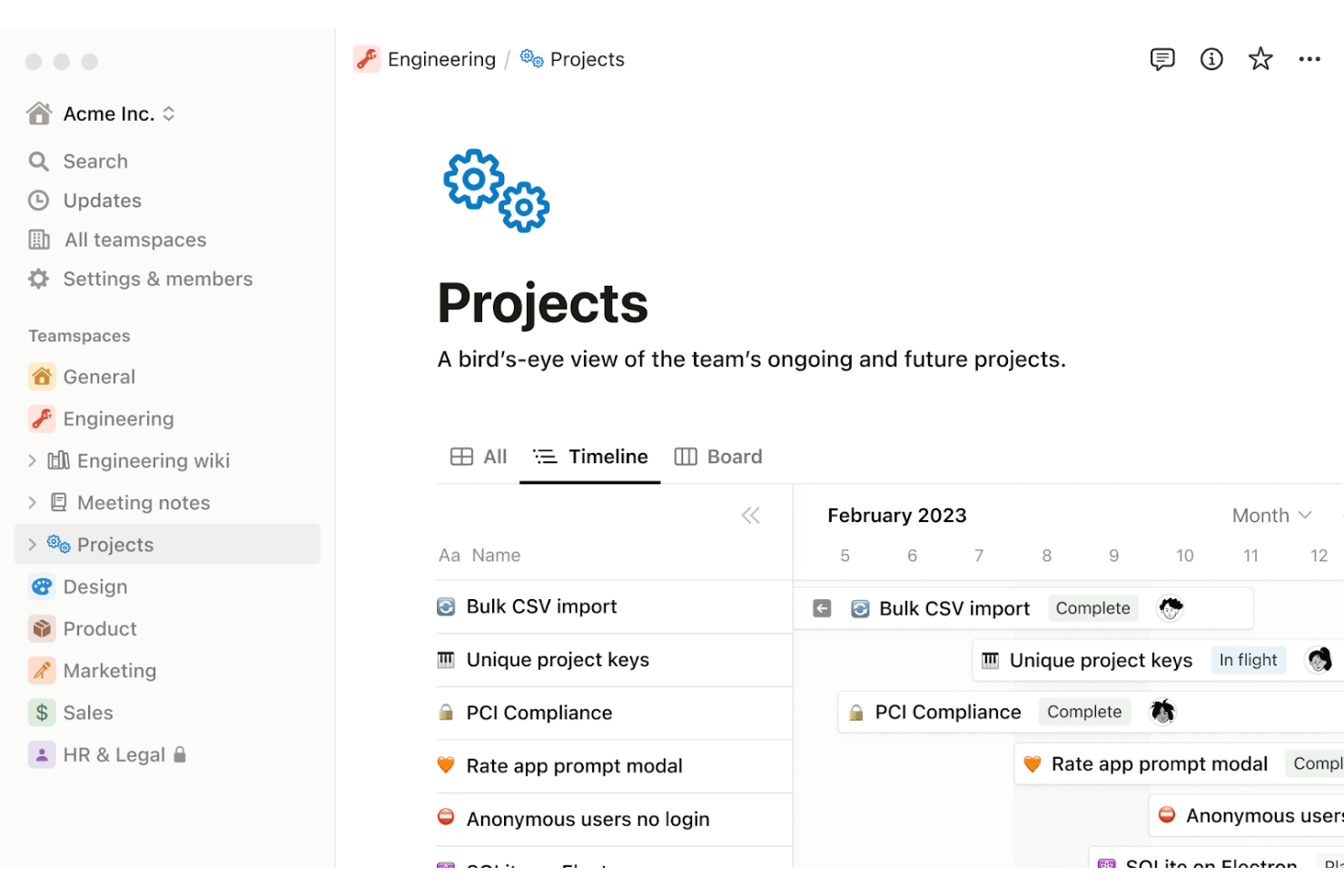
Notion is a connected workspace platform that combines docs, wikis, databases, project tracking, and AI-powered automation in one place.
Who Is Notion Best For?
Notion works well for teams that want docs, wikis, project tracking, and light automation in a single workspace rather than switching between multiple tools.
Why I Picked Notion
I've included Notion in my top picks because it genuinely replaces a tangle of separate tools by combining docs, wikis, databases, and project tracking in one workspace. I especially like how database automations let you trigger Slack notifications, property updates, or webhook calls the moment a form is submitted or a status changes, keeping lightweight workflows moving without extra software. Paired with customizable project views like timelines and boards, it gives teams real visibility across active work.
Notion Key Features
- Database automations: Set triggers based on property changes, page additions, or recurring schedules to automatically update records, send Slack notifications, or fire webhook calls to external tools.
- Forms connected to databases: Build forms that map directly to database properties, collect responses, and automatically trigger downstream automations on submission.
- Granular database permissions: Assign page-level access rules based on assignee or ownership properties, with permission levels ranging from view-only to full access.
- Charts and dashboards: Build visual dashboards from multiple databases using bar, line, donut, and number chart types, with global filters to focus data across widgets.
Notion Integrations
Notion has marketplace integrations with Slack, Jira, GitHub, Salesforce, Asana, Google Drive, and Microsoft Teams. Its Public API and webhooks support custom integrations and workflow connections.
Pros and Cons
Pros:
- Automations handle routine database status changes
- Custom databases adapt to changing project workflows
- Combines project documentation and task tracking
Cons:
- No multi-step approval routing or bottleneck analytics
- No visual canvas for designing workflows

ProofHub
Best for centralized project tracking
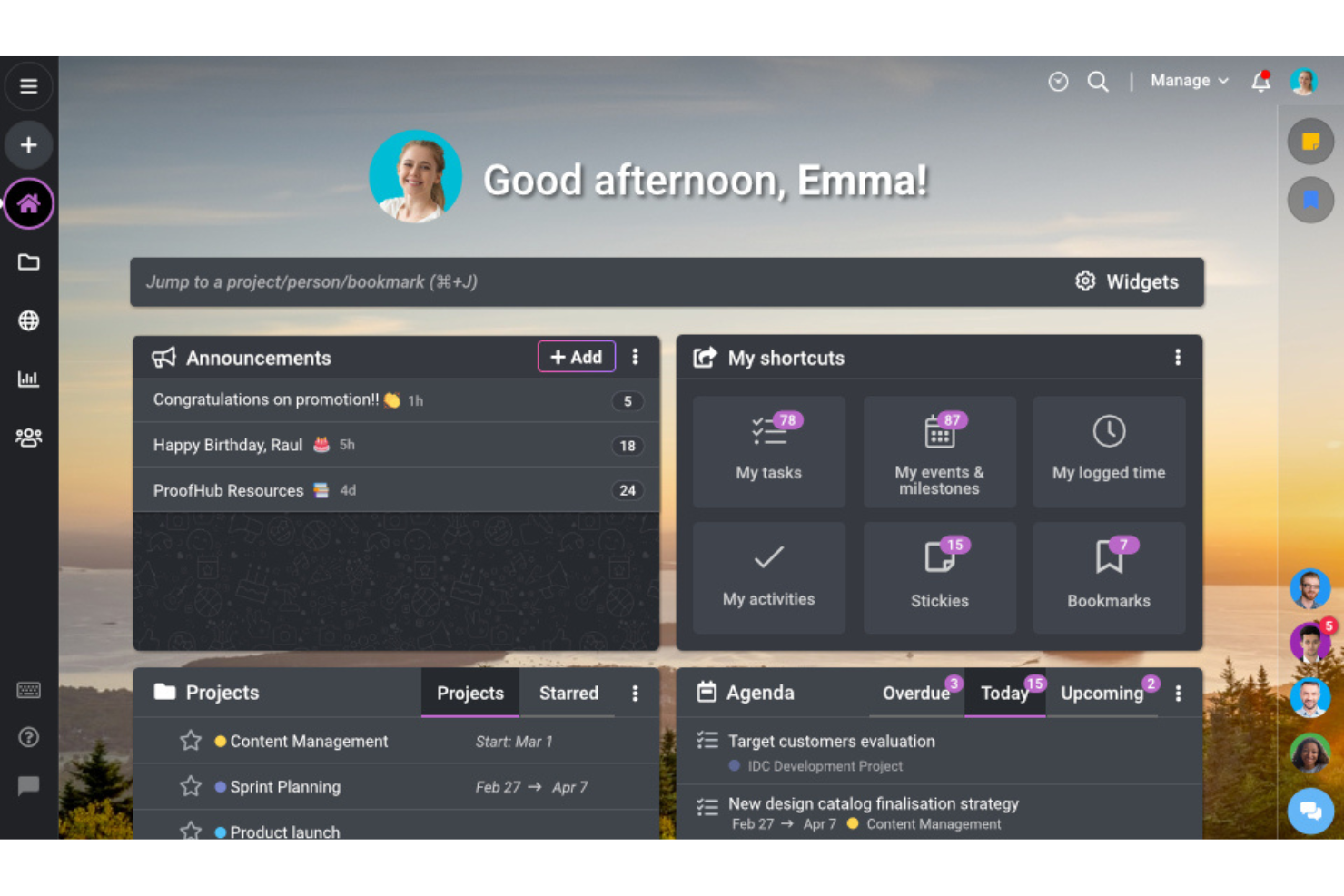
ProofHub is a project management and team collaboration platform that brings together task tracking, Gantt views, boards, file proofing, and reporting in one centralized workspace.
Who Is ProofHub Best For?
ProofHub suits small to mid-sized teams that need a single workspace to manage projects, tasks, and file reviews without juggling multiple tools.
Why I Picked ProofHub
I picked ProofHub as one of the best because it pulls tasks, Gantt timelines, boards, and file proofing into a single workspace, which makes centralized project tracking genuinely practical. If your team is moving away from Kissflow's process-heavy setup and just needs to track who owns what and where things stand, ProofHub's All Projects report gives you status, assignees, and task-completion percentages across every project in one view. I also like that the proofing tool lets reviewers annotate and approve files directly, without routing feedback through a separate app.
ProofHub Key Features
- Task dependencies: Link tasks so team members can see which items must be completed before others can begin.
- Time tracking: Log time manually or with a timer, add timesheets, and generate time reports across projects.
- Custom roles and permissions: Create roles with specific access levels across projects, tasks, reports, files, and integrations.
- In-app chat: Message teammates one-on-one or in groups, with file attachments and emoji support built in.
ProofHub Integrations
ProofHub offers integrations with Slack, Dropbox, Box, OneDrive, Google Calendar, iCal, FreshBooks, FreshBooks Classic, and QuickBooks. Its Ultimate Control plan includes API access for custom integrations.
Pros and Cons
Pros:
- File proofing supports direct reviewer approvals
- Reviewers value centralized project collaboration
- Cross-project task and status visibility
Cons:
- No conditional or multilevel approval chains
- No visual BPM workflow builder

Best for client work management
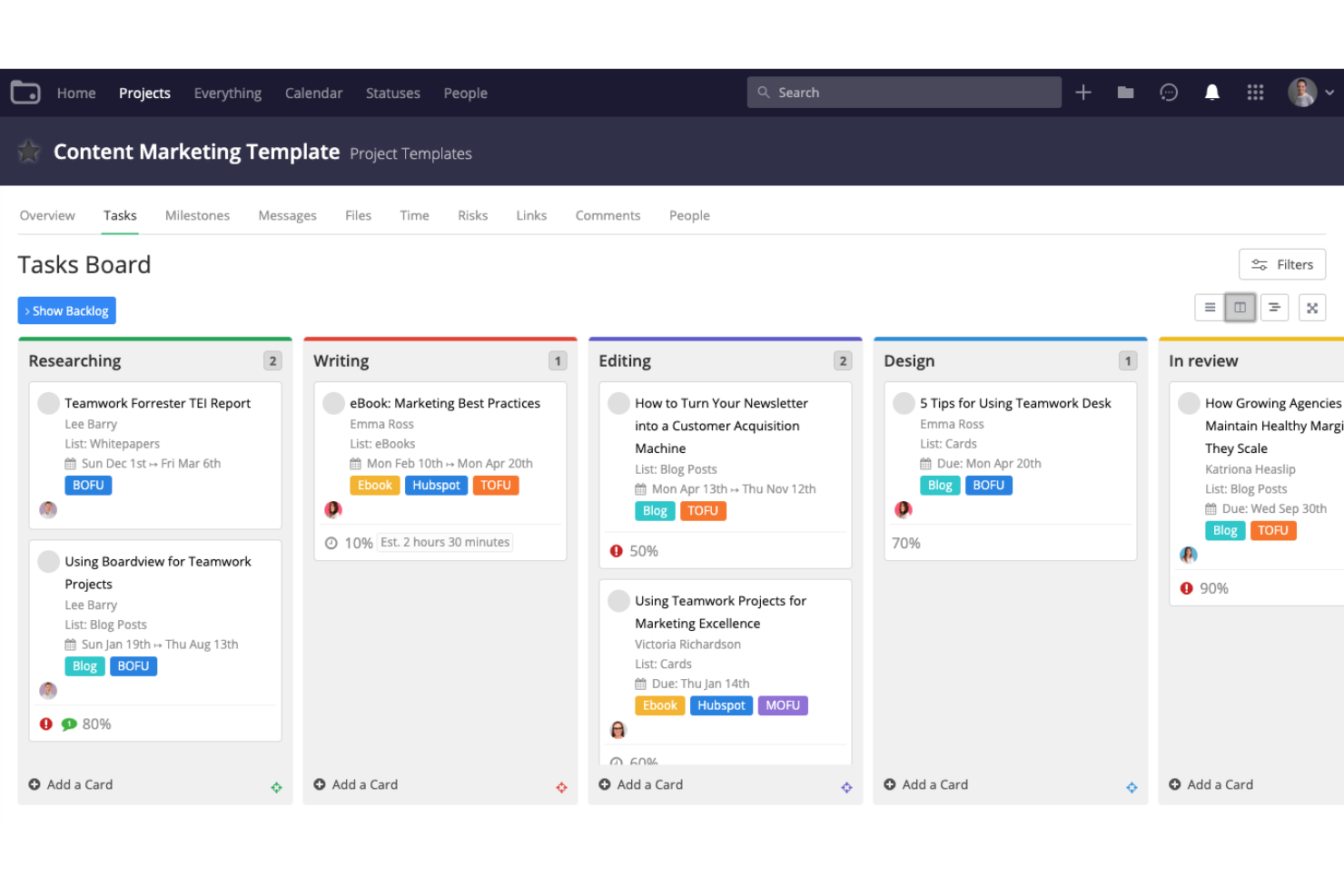
Teamwork.com is a project and resource management platform built for client work, combining task planning, time tracking, client intake forms, automations, and proofing tools in one place.
Who Is Teamwork.com Best For?
Teamwork.com suits agencies and client-facing teams that need to manage projects, track billable time, and coordinate client reviews in one place.
Why I Picked Teamwork.com
I picked Teamwork.com as one of the best for client work management because it keeps the full delivery cycle—from client intake to final sign-off—in one place. I especially like the intake forms that convert client requests directly into tasks, and the proofing tool, which lets clients review and approve deliverables without needing a paid account. The unanimous approver sign-off model means nothing slips through without explicit client confirmation.
Teamwork.com Key Features
- Task automations: Build trigger-condition-action rules to automatically move tasks between workflow columns, send notifications, or create follow-up tasks.
- Time tracking and invoicing: Log billable and non-billable time with timers and timesheets, then generate client invoices directly from tracked hours.
- Resource and workload management: View team capacity, identify resourcing gaps, and reassign work to balance workloads across active projects.
- Project health reporting: Monitor project status across your portfolio using color-coded health indicators that surface on dashboards and Portfolio board cards.
Teamwork.com Integrations
Teamwork.com lists 150+ integrations, including native Slack, Harvest, Xero File, and Microsoft Office Add-in, plus marketplace integrations such as BugHerd and Screenful. It also offers API access and webhooks for custom connections.
Pros and Cons
Pros:
- Project reports clarify workload and progress
- Task automations simplify deadline updates
- Client proofing supports external approvers
Cons:
- Forms lack conditional fields and validation rules
- No visual branching process designer

Best for integrated team collaboration
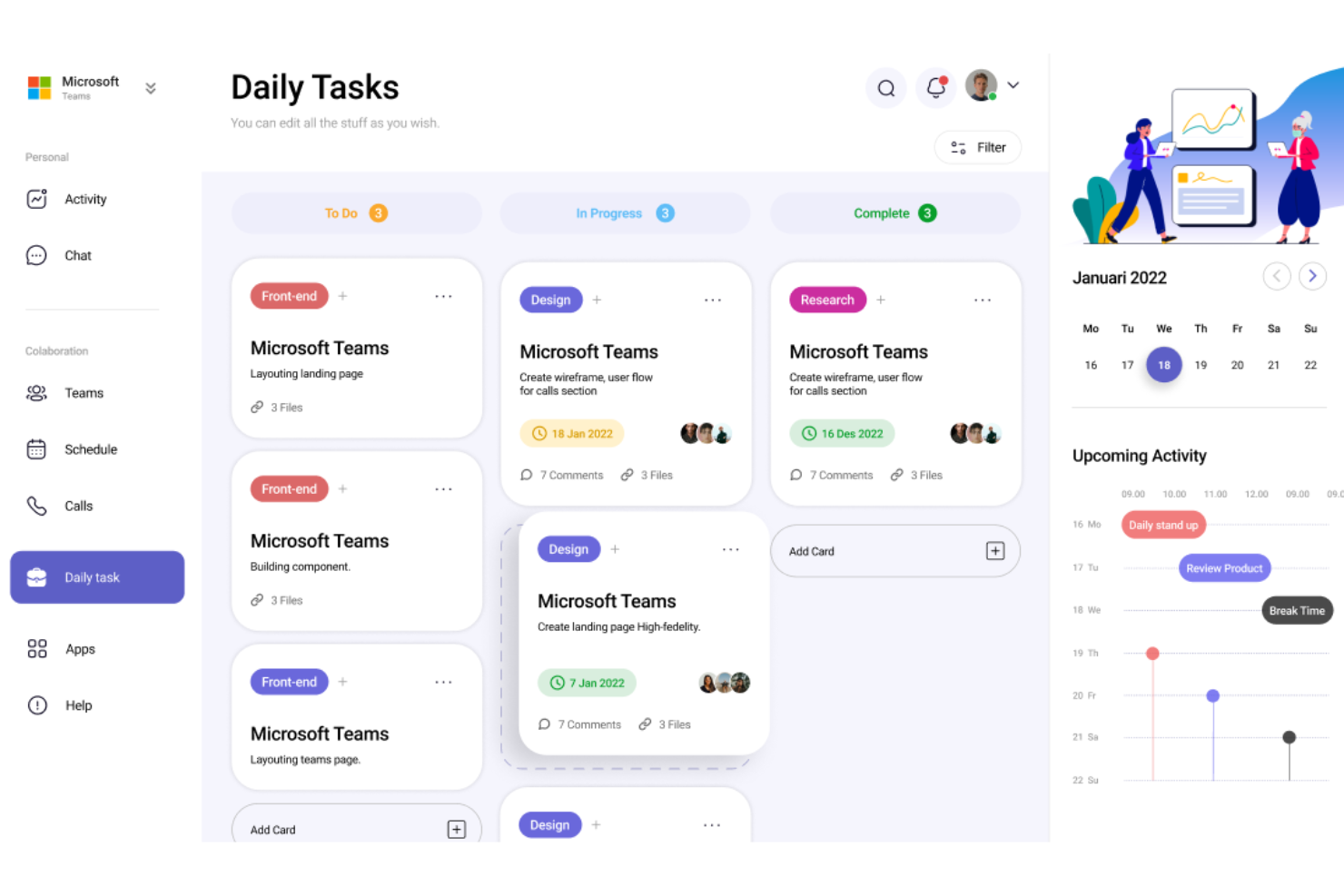
Microsoft Teams is a communication and collaboration platform that brings together chat, meetings, calling, file sharing, and workflow automation tools—including an Approvals app and AI-assisted flow builder—into a single workspace.
Who Is Microsoft Teams Best For?
Microsoft Teams fits organizations already running Microsoft 365 that want to handle approvals and lightweight workflow automation without leaving their existing collaboration environment.
Why I Picked Microsoft Teams
I've included Microsoft Teams in my top picks because it's the strongest option for teams that live inside Microsoft 365 and want approval workflows without adopting a separate tool. The Approvals app lets you build org- or team-scoped templates using Microsoft Forms, route requests to specific responders, and track activity logs across the full approval lifecycle. The Workflows agent adds AI-generated flow creation, letting you describe a process in plain language and review it in a visual designer before it goes live.
Microsoft Teams Key Features
- Approvals activity log: Tracks every approval action—create, approve, reject, cancel, reassign—across org- and team-scoped templates in one audit trail.
- Shifts scheduling app: Lets managers build staff schedules, assign shifts, and track time directly within the Teams workspace.
- Teams connector triggers: Fires automated actions based on channel messages, mentions, reactions, membership changes, and meeting recordings.
- Microsoft Graph API: Lets developers programmatically create and manage teams, channels, conversations, and installed apps across the organization.
Microsoft Teams Integrations
Microsoft Teams offers native integrations across the Microsoft 365 ecosystem and marketplace integrations including Calendly, Snowflake Cortex Agents, Read AI, and Cursor. Microsoft Graph APIs and SDKs support custom integrations with teams, channels, chats, apps, meetings, and calls.
Pros and Cons
Pros:
- Approval logs record request decisions
- AI-generated flows can be visually reviewed
- Project channels organize cross-functional discussions
Cons:
- Deleting linked forms can break templates
- No process dashboards or bottleneck analytics

Podio
Best for customizable workspaces
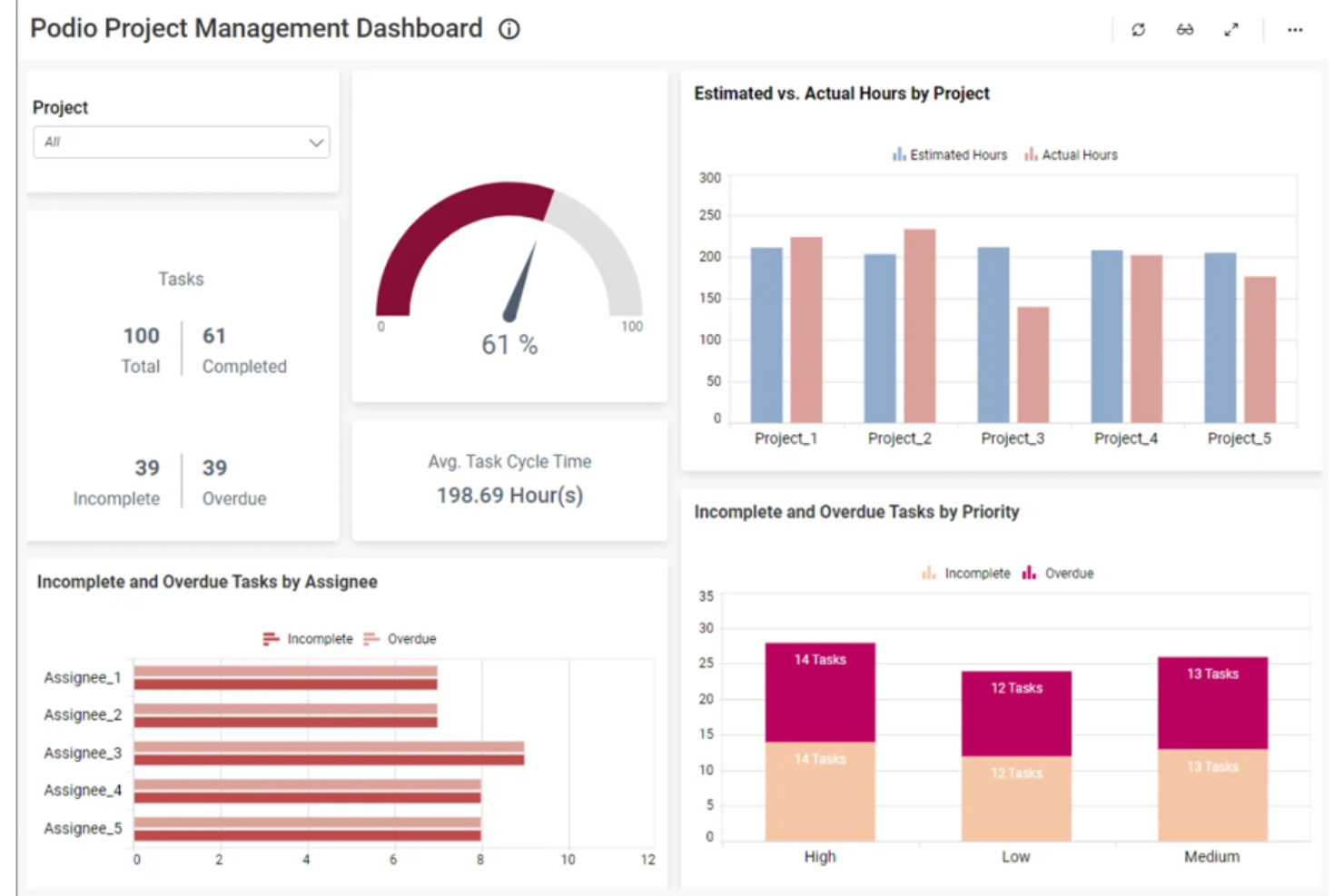
Podio is a no-code work platform from Progress Software that lets teams build custom apps, automate workflows, and organize work across shared workspaces—without writing code.
Who Is Podio Best For?
Podio suits small to mid-sized teams and citizen developers who want to build custom apps and automate workflows around their own processes without relying on a developer.
Why I Picked Podio
I've included Podio in my top picks because its drag-and-drop app builder lets you shape workspaces entirely around how your team actually works, rather than adapting your process to a fixed structure. I particularly like that you can link apps together through relationship fields, so a workspace for, say, client onboarding can connect intake forms directly to task apps and status workflows.
Podio Key Features
- No-code app builder: Build custom apps using a drag-and-drop interface—no coding required—and modify them as your team's processes evolve.
- Webforms with relationship linking: Capture data through webforms that submit directly into apps, with relationship fields that connect submissions to existing linked records.
- When/then workflow automation: Configure automated workflows using trigger-based rules that create or update items, assign tasks, and send notifications across apps.
- App Market templates: Access hundreds of pre-made apps from Podio's App Market, free to add and customizable as starting points for common team processes.
Podio Integrations
Podio offers native integrations with ShareFile, Dropbox, GoToMeeting, Excel, Google Drive, and Gmail. Its open API, OAuth 2, and webhooks support custom integrations.
Pros and Cons
Pros:
- Templates provide practical process starting points
- Linked apps fit changing team processes
- Custom workflows reduce repetitive manual work
Cons:
- Reporting offers limited cross-process visibility
- No documented multi-step approval routing
Best for agile software development
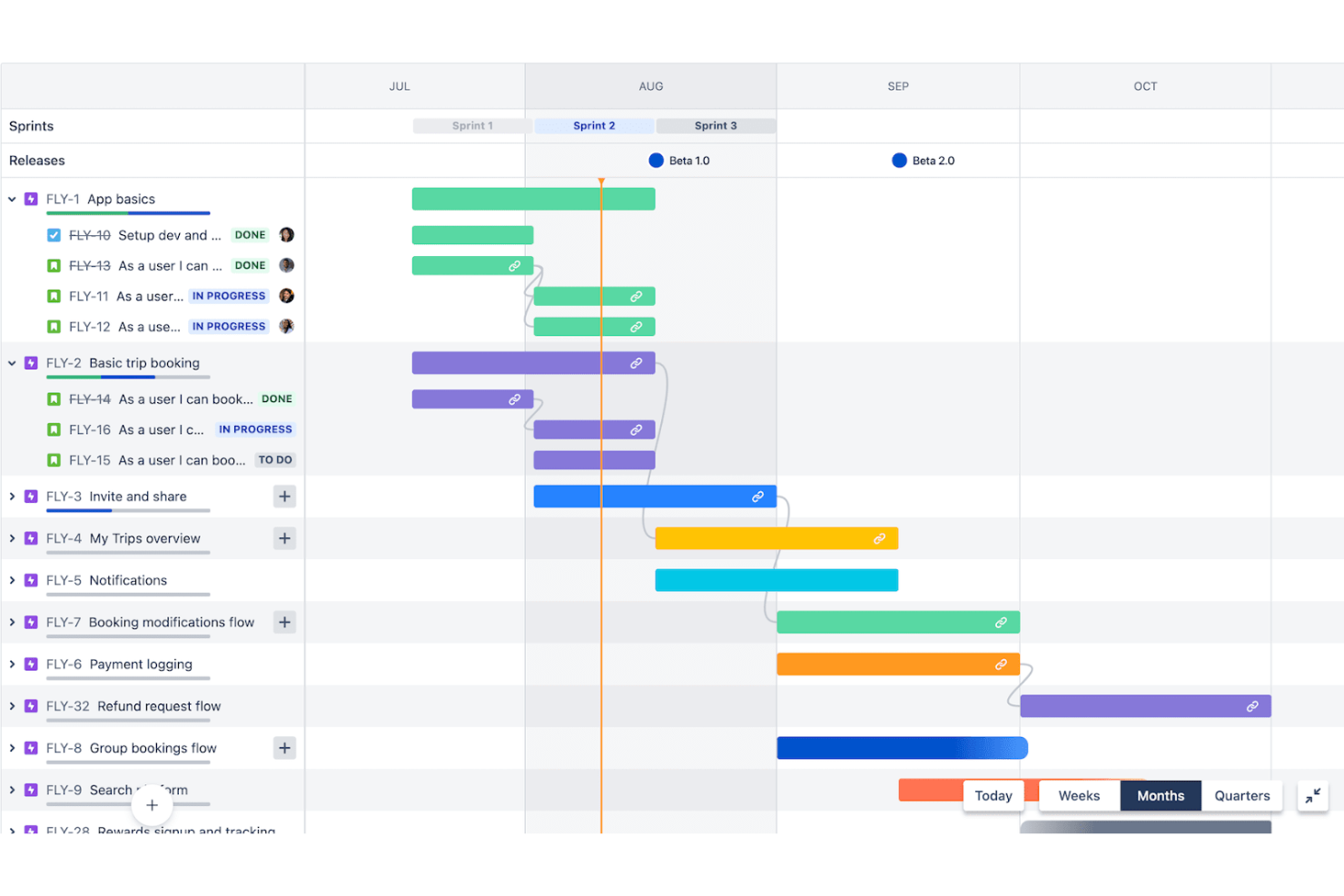
Jira Service Management is Atlassian's ITSM platform that combines service request management, incident and change management, customizable workflows, and AI-assisted automation across IT, HR, legal, and finance teams.
Who Is Jira Service Management Best For?
IT teams that already work within the Atlassian ecosystem and need a structured way to manage service requests, incidents, and changes alongside their development workflows.
Why I Picked Jira Service Management
I've included Jira Service Management in my top picks because it's one of the few tools that genuinely bridges agile development and IT service delivery in a single platform. I love how its drag-and-drop workflow editor connects directly to development pipelines, so change approvals and deployment gating aren't siloed from the engineering work they govern. Rovo's AI triage routes incoming requests and resolves qualifying ones autonomously, which cuts the repetitive queue management that slows most service teams down.
Jira Service Management Key Features
- Multi-channel request intake: Employees and customers can submit requests through a portal, email, Microsoft Teams, Slack, or an embedded widget.
- Customizable queues: Teams can configure queues to organize and prioritize incoming requests based on their own triage logic.
- Pre-built service templates: Ready-made templates for IT, HR, legal, finance, and facilities include preconfigured request types and workflows for common service spaces.
- Approval email and chat actions: Approvers can approve or decline requests directly from email notifications or messages in Slack and Microsoft Teams.
Jira Service Management Integrations
Jira Service Management supports native request intake through Microsoft Teams and Slack, plus 1,000+ Marketplace integrations and a REST API for custom connections.
Pros and Cons
Pros:
- Automates request triage with Rovo
- Tracks approvals and ownership in one queue
- Keeps service requests tied to development work
Cons:
- Approval routing lacks proven multilevel chains
- Workflow setup can demand programming skills
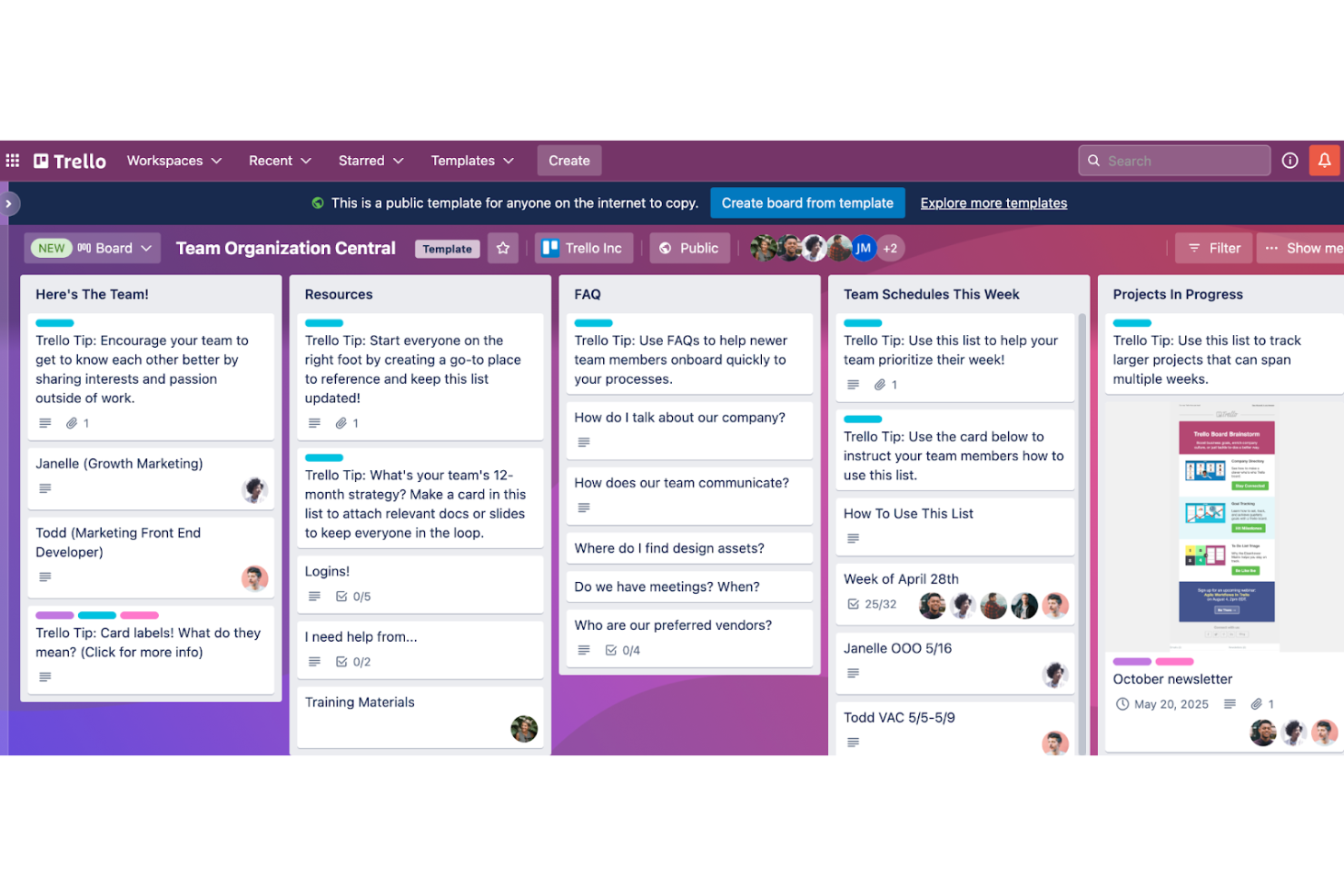
Trello is a visual project management tool built by Atlassian that organizes work through boards, lists, and cards, with built-in no-code automation, 236+ app integrations, and multiple project views including timeline, calendar, and dashboard.
Who Is Trello Best For?
Trello works well for small to mid-sized teams that need a lightweight, visual way to track tasks and projects without a steep learning curve.
Why I Picked Trello
Trello earns its spot on my shortlist because its board-based layout makes it one of the clearest visual alternatives to Kissflow's process-heavy interface. I particularly like how Butler automation lets you move cards between lists, assign members, and trigger due-date updates without writing a single line of code. Pair that with Timeline and Dashboard views on Premium, and you can track where work stands across a project at a glance.
Trello Key Features
- Custom Fields: Add structured data to cards using checkbox, date, dropdown, number, and text field types to standardize information across a workflow.
- Power-Ups: Connect third-party apps and services directly to Trello boards through a library of 236+ integrations, including Slack, Jira, and Microsoft Teams.
- Card mirroring: Keep a single card synced across multiple boards so updates in one place are reflected everywhere the card appears.
- Workspace Table view: View, sort, and filter cards across multiple boards in a spreadsheet-style layout for cross-project visibility.
Trello Integrations
Trello offers 236 marketplace integrations, including Slack, Jira Cloud, Microsoft Teams, Gmail, and Miro. Its REST API, Power-Ups framework, and webhooks support custom connections across business apps.
Pros and Cons
Pros:
- Fast board setup suits lightweight repeatable workflows
- Butler automates owner, due-date, and stage updates
- Board stages make project status immediately visible
Cons:
- Cross-board reporting stays shallow as portfolios grow
- No native intake forms or routed approvals

Wrike
Best for custom automated workflows
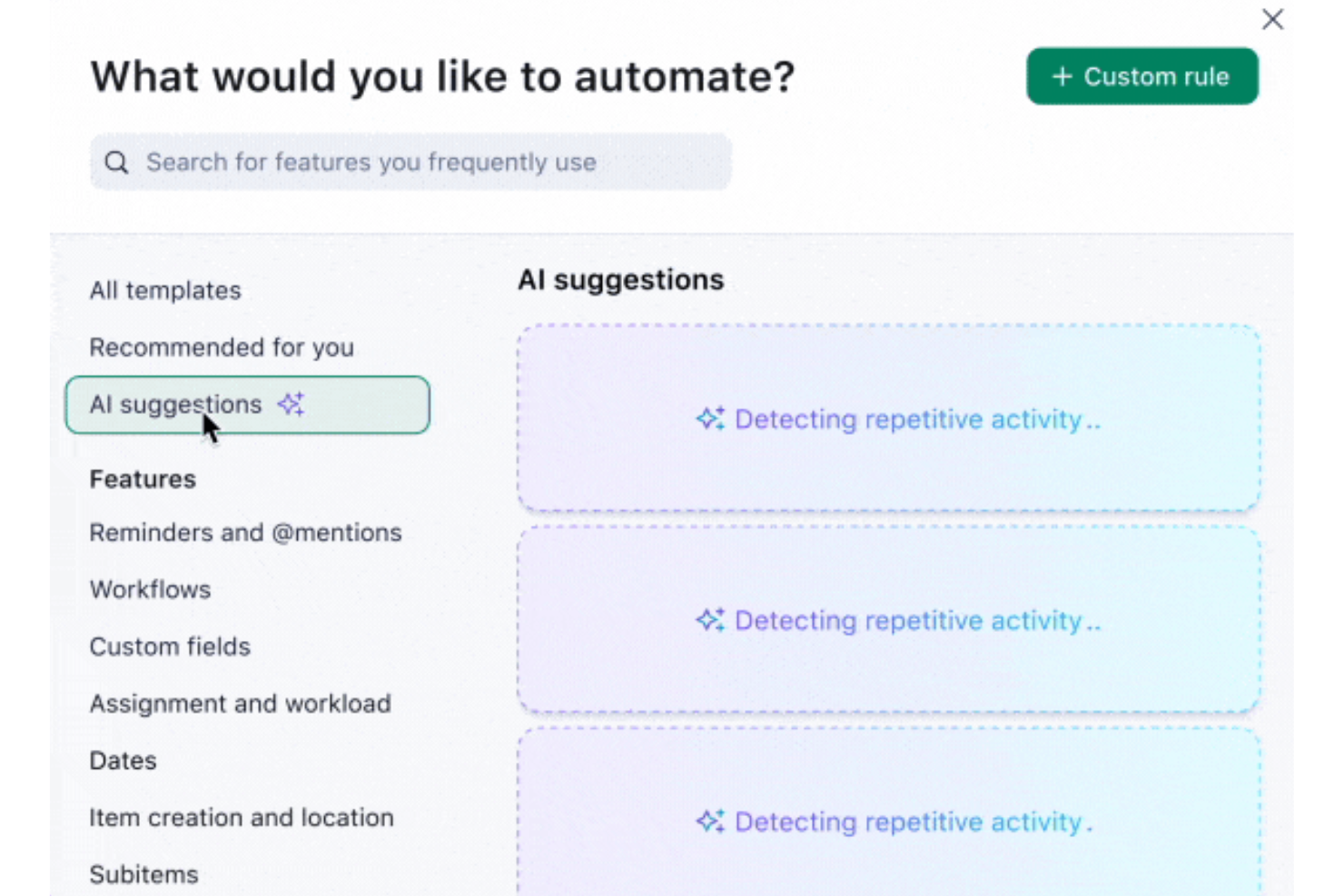
Wrike is a work management platform that combines custom workflow configuration, no-code automation, request forms with conditional logic, multi-step approvals, and cross-departmental reporting across Kanban, Gantt, and dashboard views.
Who Is Wrike Best For?
Wrike is a strong fit for operations managers and cross-functional project teams at mid-to-large organizations that need to build and automate structured workflows across departments.
Why I Picked Wrike
Wrike earns its spot on my shortlist because its no-code WHEN–IF–THEN automation rules let you build genuinely structured workflows without writing a line of code. I particularly like how custom workflows trigger multi-step approval chains automatically when a status changes, so work moves through review stages without anyone chasing it manually. Pair that with conditional request forms that branch based on responses, and you get a full intake-to-approval system that rivals what Kissflow offers natively.
Wrike Key Features
- Role-based access controls: Full, Editor, Limited, and Read Only access roles apply to shared folders, projects, and spaces, with tasks inheriting permissions from parent items.
- Real-time dashboards: Customizable dashboards pull data from multiple folders, projects, and spaces into a single view with widgets, charts, and approval reporting.
- 400+ pre-built native integrations: Wrike connects to tools like Salesforce, Slack, HubSpot, and Zoom, with an open REST API and Wrike Integrate for custom connections.
- Time tracking: Teams can log hours worked by employees, contractors, and freelancers, with time data available to inform external finance and billing systems.
Wrike Integrations
Wrike offers 400+ pre-built native integrations, including Salesforce, HubSpot, Slack, Zoom, and Bynder. It also provides an open REST API, webhooks, OAuth 2.0, and Wrike Integrate for custom integrations and data synchronization.
Pros and Cons
Pros:
- Dashboards reduce cross-team status chasing
- Conditional forms capture intake details upfront
- Automates approval routing through configurable workflows
Cons:
- Request forms trail dedicated form builders
- Workflow setup demands governance and training
New Product Updates from Wrike
Wrike Expands Gantt Planning, Approvals, and AI Work Intake
Wrike adds cross-project Gantt dependencies, flexible approval routing, and AI work intake through Wrike MCP. These updates give teams more control over planning, decision-making, and incoming work. For more information, visit Wrike’s official site.

Best for comprehensive project management
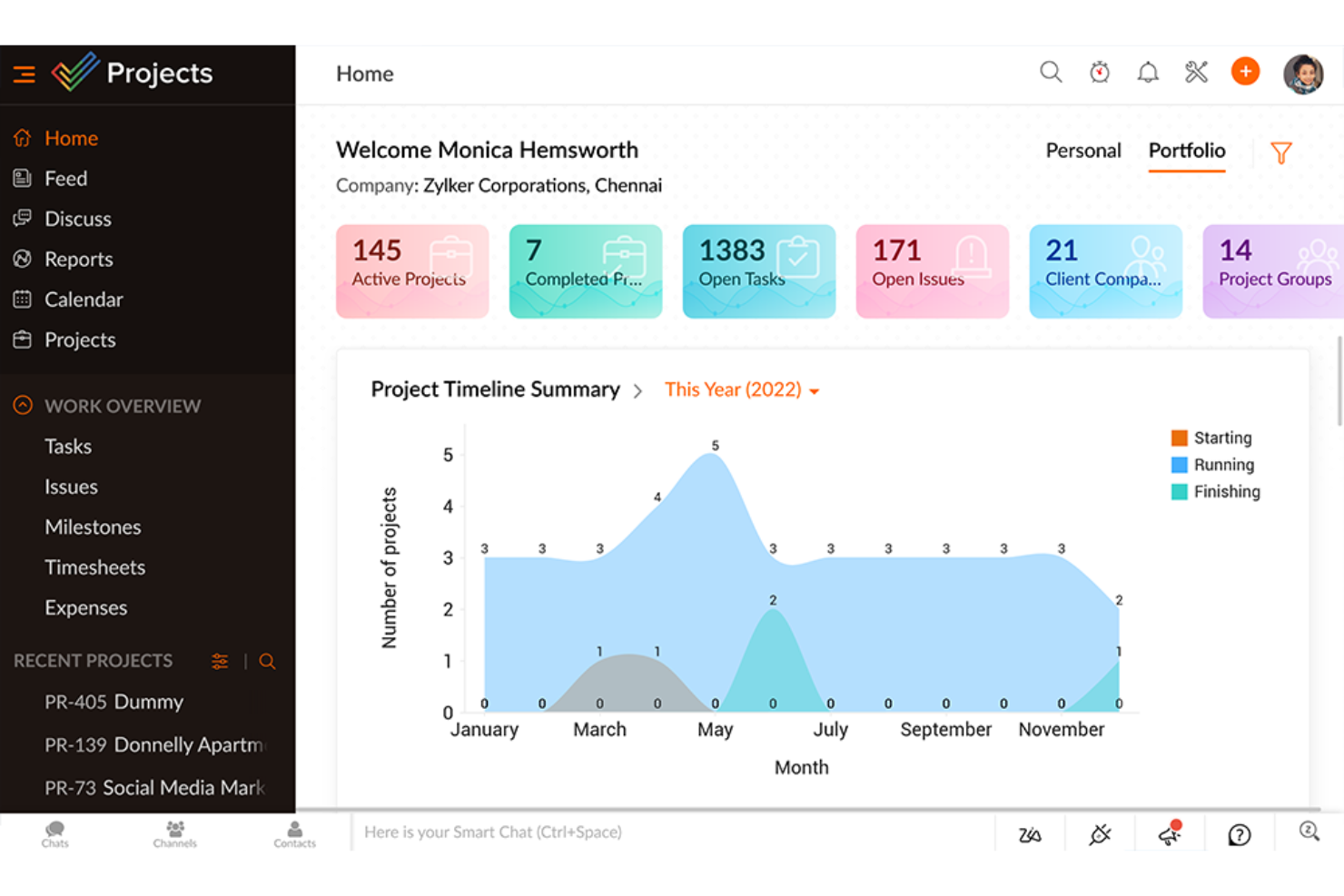
Zoho Projects is a project management platform that combines task planning, workflow automation via Blueprints, Gantt charts, time tracking, and integrations with Zoho apps and third-party tools.
Who Is Zoho Projects Best For?
Zoho Projects is a strong fit for teams already using other Zoho apps who want project management, task automation, and reporting in one connected workspace.
Why I Picked Zoho Projects
I picked Zoho Projects as one of the best because it packs genuinely deep project management into a connected workspace that goes well beyond basic task tracking. Its Blueprint tool lets me design task workflows visually, mapping out exactly which statuses a task moves through, who can trigger each transition, and what actions fire automatically when a status changes. Paired with a portfolio dashboard that rolls up project health, ownership, and budget status across the entire portal, it gives my team real visibility into work at scale.
Zoho Projects Key Features
- Task Blueprint: A drag-and-drop workflow editor that maps task statuses, transition rules, permitted users, and automated follow-up actions in a visual graph.
- Custom task layouts: A form design interface that lets you add sections, custom field types, and conditional visibility rules to capture project-specific data.
- Portal-level custom reports: A reporting builder that lets you filter, group, and chart data across projects, tasks, issues, time logs, and phases in one view.
- Zoho Flow integration: A connector that links Projects tasks, phases, and time logs to third-party apps through automated, credit-based workflows.
Zoho Projects Integrations
Zoho Projects offers 50+ marketplace integrations, plus native connections with Zoho CRM, Zoho Forms, Zoho Flow, Zoho Analytics, Microsoft Teams, Slack, GitHub, and Zendesk. It also provides a REST API and Zapier.
Pros and Cons
Pros:
- Portfolio dashboards surface project and budget health
- Gantt dependencies clarify delivery bottlenecks
- Visual task Blueprints enforce status transitions
Cons:
- Enterprise-gated rules cap at twenty per layout
- Forms remain tied to project tasks
New Product Updates from Zoho Projects
Zoho Projects Adds CodeX Scripts for Custom Modules
Zoho Projects now supports CodeX Scripts for custom modules, enabling conditional logic and rules for creating, updating, and deleting records. For more information, visit Zoho Projects' official site.
 .

Kantata
Best for professional services automation
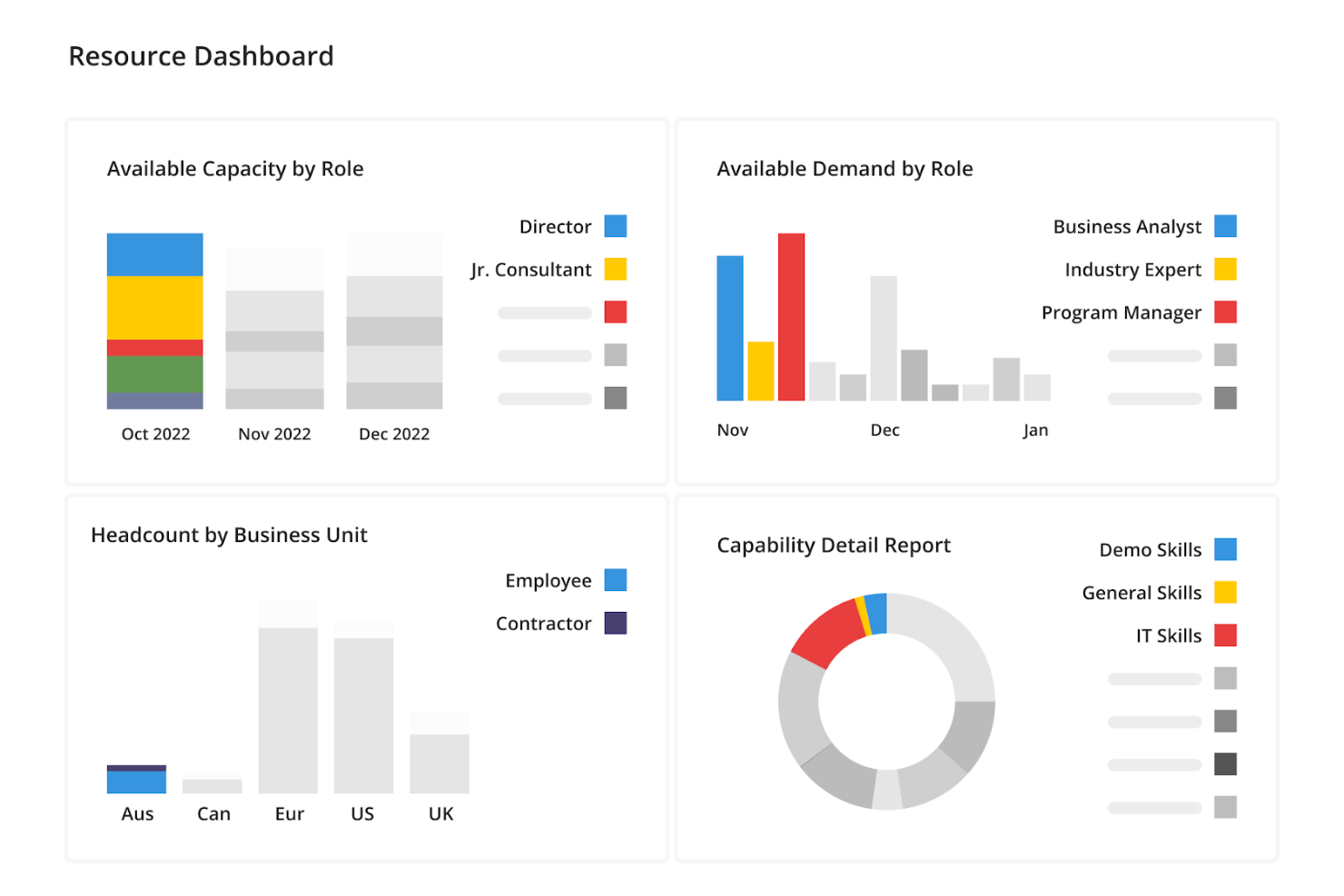
Kantata is a professional services automation platform that combines resource management, project delivery, financial tracking, time and expense management, and business intelligence reporting.
Who Is Kantata Best For?
Kantata suits professional services organizations—consulting firms, agencies, and managed services teams—that need to connect resource planning, project delivery, and financial tracking in one place.
Why I Picked Kantata
I picked Kantata as one of the best because it's purpose-built for professional services teams that need resource planning, project delivery, and financial visibility in one place. I especially like how its AI-powered resource intelligence matches people to projects based on skills, capacity, and predicted success—not just availability. Its Agentic Business Intelligence also surfaces margin trends and burn-rate forecasts without needing a separate analyst or BI tool.
Kantata Key Features
- Project financial tracking: Monitor project costs, margins, burn rates, and invoicing from a single dashboard across all active engagements.
- Time and expense logging: Log billable hours and expenses with receipt attachments, category flags, and timesheet submission for approval.
- Gantt and board project views: Plan and adjust project schedules using Gantt charts or board views, with baseline comparisons over time.
- Client sentiment collection: Gather client and employee feedback alongside project metrics to track satisfaction and spot delivery issues early.
Kantata Integrations
Kantata offers over 1,200 prebuilt integrations, including Salesforce, HubSpot, SAP, QuickBooks, NetSuite, Sage Intacct, BambooHR, MuleSoft, and Workato. Its OAuth 2.0 API supports custom integrations.
Pros and Cons
Pros:
- Client feedback pairs with project health metrics
- Project margins and burn rates stay visible
- Resource planning links skills with project capacity
Cons:
- Approvals focus on timesheets, not cross-team chains
- No visual workflow designer for general processes
New Product Updates from Kantata

Kantata Adds Access Group Change History
Kantata adds Access Groups History, letting account administrators track changes to group details, membership, and permissions in Recent History. The update also makes these events available through the Subscribed Events API for broader monitoring. For more information, visit Kantata’s official site.
 .
Outras alternativas ao Kissflow a considerar
Eis uma lista de alternativas adicionais ao Kissflow que foram pré-selecionadas, mas que continuam a oferecer um grande valor:
- Smartsheet
For spreadsheet-like project management
- Basecamp
For team communication
- Freedcamp
For freelancers and SMBs
- Adobe Workfront
For enterprise-level solutions
- Freshservice
For IT service management
- monday AI Workspace
For workflow customization
- Taskworld
For visual task boards
- Airtable
For database-driven projects
- Nifty
For milestone-driven planning
- HoneyBook
For client-focused businesses


How I Evaluate Kissflow Alternatives
I look at these tools in two layers—core capabilities like workflow automation and low-code app building that every contender must have, plus differentiators that set the best options apart.
Core Functionality (Table Stakes For This List)
When I'm selecting tools for my list, I rank each one on a scale from 0 (does not offer the functionality) to 5 (excels in this area) for each core functionality listed below. Then, I calculate the tool's total score into a percentage. Each tool needs to achieve a minimum total score of 75% to be considered for inclusion.
- Workflow Automation: I evaluate whether a tool supports multi-step, conditional workflows—things like purchase order approvals that route based on dollar thresholds or team.
- Low-Code/No-Code App Building: Each platform should let non-developers build custom apps and forms, like an employee onboarding tracker, using drag-and-drop tools.
- Project & Task Management: I look for task assignment, dependencies, and progress views (Kanban, Gantt, timeline) that keep cross-functional delivery on track.
- Process Modeling & BPM: Visual process designers matter here—I check whether you can map a structured process like change requests with branching logic and role assignments.
- Collaboration & Communication: Teams need in-context collaboration tied to workflows and tasks, such as threaded comments, mentions, and shared workspaces.
- Integrations & API Access: I check for prebuilt connectors to tools like Jira, Slack, and Salesforce, plus open API and webhook support for custom connections.
Once I have a list of tools that meet this criteria, I consider what sets each platform apart.
Differentiating Factors (What Sets Vendors Apart)
Here's how I compare and contrast different vendors:
Standout Features
Process analytics dashboards are a major differentiator—I look for tools that surface cycle times, SLA compliance, and bottleneck data so PMO leads can continuously refine how work moves. External user portals also matter when your workflows involve vendors or clients submitting requests without needing full platform licenses. For teams managing compliance-sensitive processes like change approvals, version control and audit trails provide a clear record of every modification and the ability to roll back when needed.
Beyond Features
Pricing structure is something I always evaluate closely—some platforms charge per user while others price by workflow volume, which changes the math entirely for teams scaling from a handful of processes to hundreds. I also check for compliance certifications like SOC 2, ISO 27001, and HIPAA readiness, especially when teams handle sensitive data in regulated industries. Implementation support matters too. A platform with strong documentation, active community forums, and professional services tends to deliver faster time-to-value for operations teams rolling out their first automated workflows.
Porque procurar uma alternativa ao Kissflow?
Poderá estar à procura de uma alternativa ao Kissflow se:
- Precisar de uma funcionalidade específica que não esteja disponível no Kissflow.
- Procurar opções de personalização mais avançadas para adaptar o software às necessidades empresariais específicas.
- Preferir uma interface de utilizador diferente, que possa ser mais intuitiva ou fácil de utilizar pela equipa.
- Tiver restrições orçamentais que tornem o modelo de preços do Kissflow menos atrativo em comparação com outras soluções.
- Desejar um melhor apoio ao cliente ou recursos de formação mais aprofundados.
- Precisar de capacidades de integração mais abrangentes com as ferramentas e os sistemas existentes já utilizados na organização.
- Procurar uma escala de implementação diferente, quer para equipas mais pequenas, quer para soluções de nível empresarial que o Kissflow possa não conseguir suportar eficazmente.
Funcionalidades que uma alternativa ao Kissflow deve ter
Ao selecionar uma alternativa ao Kissflow, é essencial considerar funcionalidades que respondam às necessidades específicas das empresas que procuram gerir os seus fluxos de trabalho e processos de forma eficiente. Isto inclui:
- Criação de fluxos de trabalho personalizados: As alternativas ao Kissflow devem permitir aos utilizadores criar fluxos de trabalho personalizados, adaptados aos processos únicos da sua empresa.
- Interface de utilizador intuitiva: É essencial ter uma interface de utilizador intuitiva e fácil de navegar. Esta deve incluir representações visuais claras dos fluxos de trabalho, funcionalidade de arrastar e largar para criar e modificar processos, e um painel de controlo simples que forneça uma visão geral rápida das tarefas e dos estados.
- Relatórios e análises avançados: São necessários relatórios e análises detalhados para que as empresas monitorizem o desempenho e tomem decisões baseadas em dados. Isto implica ter a capacidade de gerar relatórios personalizados, aceder a dados em tempo real e visualizar métricas através de gráficos e diagramas.
- Controlo de acesso baseado em funções: O sistema deve permitir configurar facilmente funções e permissões, adaptando-se à hierarquia organizacional e às responsabilidades individuais.
- Capacidades de integração: É indispensável dispor de um conjunto robusto de capacidades de integração com outras ferramentas empresariais. Isto inclui integrações padrão com software popular, como CRM, ERP e plataformas de comunicação, bem como acesso a API para integrações personalizadas.
- Compatibilidade com dispositivos móveis: Com a crescente necessidade de acesso em mobilidade, a conectividade através de aplicações móveis é indispensável. Os utilizadores devem poder aceder a todas as funcionalidades a partir dos seus dispositivos móveis, permitindo-lhes gerir tarefas, aprovar pedidos e monitorizar fluxos de trabalho a partir de qualquer lugar.
- Escalabilidade: À medida que as empresas crescem, a sua solução de gestão de fluxos de trabalho deve ser capaz de acompanhar esse crescimento. Isto significa conseguir gerir um número crescente de processos, utilizadores e dados sem uma diminuição do desempenho.
- Suporte ao utilizador e recursos de formação: O suporte ao utilizador e os recursos de formação são essenciais para integrar novos utilizadores e prestar assistência contínua. Isto inclui uma base de conhecimentos, fóruns de utilizadores, orientação na aplicação e opções de suporte em direto.
- Baixo código: Permite o desenvolvimento rápido de aplicações com um mínimo de programação manual, possibilitando uma entrega e iteração mais rápidas.
- Automatização de processos: Automatiza tarefas repetitivas nos processos empresariais para aumentar a eficiência e reduzir os erros humanos.
- Transformação digital: Integra a tecnologia digital em todas as áreas de uma empresa, alterando fundamentalmente a forma como esta opera e proporciona valor aos clientes.
- Aprovações: Uma funcionalidade que facilita o processo de análise e autorização em aplicações de software.
- Desenvolvimento de aplicações: O processo de criação de um programa informático ou de um conjunto de programas para executar as diferentes tarefas de que uma empresa necessita.
- Desenvolvimento de código: O ato de escrever código para criar, expandir ou manter aplicações ou sistemas de software.
- Plataforma de baixo código: Um ambiente de desenvolvimento que utiliza uma abordagem visual com um mínimo de programação, permitindo que utilizadores sem conhecimentos técnicos criem aplicações.
- Aquisição: Funcionalidades de software que simplificam o processo de aquisição de bens e serviços, garantindo eficiência de custos e conformidade com as políticas.
Estas funcionalidades são essenciais para as empresas que necessitam de uma solução robusta e flexível de gestão de fluxos de trabalho. Uma alternativa ao Kissflow com estas capacidades estará bem equipada para responder às necessidades dinâmicas das organizações modernas.
Existem alternativas gratuitas ao Kissflow?
Ao procurar alternativas gratuitas ao Kissflow, estavam disponíveis várias opções gratuitas, incluindo:
- Clappia: Uma plataforma de desenvolvimento de aplicações sem código que permite aos utilizadores criar aplicações móveis e Web com conhecimentos básicos de Excel. É adequada para criar ERPs de nível empresarial e ferramentas básicas de recolha de dados.
- NocoDB: Uma plataforma de código aberto #Sem código que transforma qualquer base de dados numa folha de cálculo inteligente, semelhante ao Airtable.
- ClickUp: Uma plataforma completa de gestão de projetos que procura eliminar a necessidade de utilizar várias ferramentas para o fluxo de trabalho organizacional.
- Zenkit: Um espaço de trabalho flexível que permite aos utilizadores acompanhar os seus dados durante todo o seu ciclo de vida.
- Basecamp: Uma ferramenta de colaboração baseada na Web que ajuda grupos de pessoas a partilhar ficheiros, cumprir prazos, atribuir tarefas e centralizar comentários.
- JIRA: Uma ferramenta amplamente utilizada para o acompanhamento de erros, o acompanhamento de problemas e a gestão de projetos, que combina a gestão ágil de projetos com fluxos de trabalho personalizáveis.
- Bitrix24: Uma plataforma de colaboração com um conjunto de ferramentas de gestão, colaboração, comunicação e vendas, que oferece uma plataforma unificada para ficheiros, projetos, mensagens, tarefas e contactos.
Estas ferramentas oferecem uma variedade de funcionalidades que podem servir como alternativas ao Kissflow para quem procura opções gratuitas. Cada ferramenta possui o seu próprio conjunto de funcionalidades, direcionadas para diferentes aspetos da gestão de projetos e da colaboração em equipa, e podem ser exploradas mais detalhadamente através dos respetivos sites oficiais.