

De 10 beste verktøyene for orkestrering av arbeidsflyt vurdert i 2026

Kortliste over de beste verktøyene for arbeidsflytorkestrering


Når du har mange bevegelige deler – jobber, tjenester og datapipelines – er det ikke nok å bare automatisere oppgaver. Du trenger en måte å koordinere dem på. Det er dette verktøy for arbeidsflytorkestrering er best på.
De hjelper deg med å administrere avhengigheter, planlegge prosesser og sørge for at alt kjører problemfritt på tvers av systemer. Enten du distribuerer til Kubernetes, bygger ETL-datapipelines eller utløser handlinger basert på sanntidshendelser, sørger disse verktøyene for at alt skjer i riktig rekkefølge – og med oversikt.
I denne artikkelen har jeg vurdert de beste verktøyene for arbeidsflytorkestrering for tekniske team. Hvert av dem er utviklet for å håndtere komplekse arbeidsflyter på en pålitelig og skalerbar måte, og jeg har tatt med fordeler, ulemper og viktige funksjoner for å hjelpe deg med å finne det som passer best.
Hvorfor du kan stole på våre programvareanbefalinger
Teamet vårt har testet og anmeldt programvare siden 2012. Vi er selv prosjektledere, så vi vet hvor vanskelig og hvor viktig det er å velge riktig programvare.
I denne guiden har vi vurdert verktøyene gjennom praktisk testing og uavhengig research og gitt dem poeng ut fra våre utvelgelseskriterier. Vi bygger også på innsikt fra ledende eksperter i bransjen og erfarne prosjektledere.
Anmeldelsene våre bygger på vår egen redaksjonelle vurdering. De er ikke et salgsargument.
Ekspertanmeldere:
Sammenligningstabell: Verktøy for arbeidsflytorkestrering
Denne sammenligningstabellen oppsummerer prisdetaljene for mine utvalgte toppverktøy for arbeidsflytorkestrering.
| Tool | Best For | Trial Info | Price | ||
|---|---|---|---|---|---|
| 1 | Best for secure client collaboration workflows | Free trial available | From $5,000/year (billed annually) | Website | |
| 2 | Best for SAP system integration | Free demo available | Pricing upon request | Website | |
| 3 | Best for centralized automation management | Free trial available | From $10,000 (one-time license) | Website | |
| 4 | Best for creative project routing | Free demo available | Pricing upon request | Website | |
| 5 | Best for no-code workflow automation | Free plan + 14-day free trial + free demo available | From $10/user/month (billed annually) | Website | |
| 6 | Best for IT ops workflow orchestration | Free demo available | Pricing upon request | Website | |
| 7 | Best for prebuilt connectors library | 30-day free trial available | Pricing upon request | Website | |
| 8 | Best for open-source automation | Free trial available | From €20/month (billed annually) | Website | |
| 9 | Best for complex task dependencies | Free plan available | Pricing upon request | Website | |
| 10 | Best for Kubernetes integration | Not available | Free to use | Website |


Anmeldelser av de beste verktøyene for arbeidsflytorkestrering
Nedenfor finner du mine detaljerte sammendrag av de beste verktøyene for arbeidsflytorkestrering som kom med på kortlisten. Anmeldelsene mine gir en detaljert gjennomgang av de viktigste funksjonene, fordelene og ulempene, integrasjonene og ideelle bruksområdene for hvert verktøy, slik at du kan finne det beste alternativet for deg.

Moxo
Best for secure client collaboration workflows

Moxo is an AI-powered workflow orchestration platform that coordinates humans, AI agents, and external systems across multi-step business processes—with conditional routing, parallel execution, SLA tracking, and a complete audit trail.
Who Is Moxo Best For?
Moxo is a strong fit for professional services teams—such as those in financial services, legal, or consulting—that manage recurring, client-facing workflows.
Why I Picked Moxo
I've included Moxo in my top picks because it handles client-facing workflow orchestration with a level of security that most tools in this space simply don't match. SOC 2 Type II certification, GDPR compliance, end-to-end encryption, and a 7+ year audit trail mean every document exchange, approval, and client action is fully logged and protected. I also like the granular role-based access controls, which let you lock down exactly who sees what at each step of a workflow, whether that's a KYC verification or a contract review.
Moxo Key Features
- Conditional workflow routing: Build multi-step workflows with branching logic that routes tasks based on form inputs, decisions, or client actions.
- SLA timers and escalation triggers: Set deadlines on individual workflow steps and automatically escalate overdue tasks to the right team member.
- AI agent coordination: Assign AI agents to handle data validation, document preparation, or follow-up actions within a running workflow.
- Parallel path execution: Run concurrent workflow branches simultaneously so multiple stakeholders can act without waiting on each other.
Moxo Integrations
Moxo offers data sync connectors with Salesforce, HubSpot, Microsoft Dynamics, Zoho, Wealthbox, Redtail, Filevine, Global Relay, Smarsh, Xero, and Follow Up Boss. It also supports native calendar integrations with Google Calendar and Outlook. Integration actions like DocuSign and Jumio can be embedded directly as workflow steps. Moxo connects with Zapier and provides a REST API with webhooks for custom integrations.
Pros and Cons
Pros:
- AI agents handle document review automatically
- SOC 2 Type II and GDPR compliant
- Embeds eSignatures and forms inside workflow steps
Cons:
- Rigid structure restricts creative workflows
- Steep learning curve and setup effort

Best for SAP system integration

In the world of workflow orchestration, RunMyJobs by Redwood stands out as a versatile tool designed to cater to enterprises seeking to automate and streamline their critical business processes. If your organization is looking to enhance efficiency and integrate seamlessly with both SAP and non-SAP systems, RunMyJobs offers a comprehensive solution. By automating tasks such as job scheduling and finance operations, it addresses the need for improved productivity and operational excellence in today's fast-paced business environment.
Why I Picked RunMyJobs by Redwood
I chose RunMyJobs by Redwood for its ability to automate complex business processes with precision, particularly its integration with SAP systems. The tool's drag-and-drop workflow designer makes it accessible for non-IT users, allowing your team to engage in automation without needing extensive technical expertise. Additionally, its advanced scheduling feature ensures that your tasks are executed at optimal times, reducing manual intervention and errors. These functionalities make it an invaluable asset for organizations aiming to enhance their workflow orchestration capabilities.
RunMyJobs by Redwood Key Features
In addition to its standout capabilities, there's also several other features that enhance its value:
- Job Scheduling: Automate the execution of tasks with precise timing to optimize business operations.
- File Transfer Capabilities: Securely transfer data across your systems, ensuring consistent and reliable information flow.
- Finance Automation: Automate up to 90% of financial tasks, streamlining operations and reducing manual workloads.
- Built-in Observability: Gain insights into your processes with real-time monitoring and alerts, enhancing decision-making and operational efficiency.
RunMyJobs by Redwood Integrations
Integrations include SAP, Oracle, Microsoft Dynamics, Salesforce, ServiceNow, Workday, Amazon Web Services (AWS), Google Cloud Platform, Microsoft Azure, and IBM Cloud.
Pros and Cons
Pros:
- Strong monitoring and security controls
- Low-code workflow orchestration design
- Deep SAP and enterprise integrations
Cons:
- Pricing less accessible for SMBs
- Steep learning curve initially

Best for centralized automation management

For organizations seeking to enhance operational efficiency, ActiveBatch offers a versatile solution designed to meet the demands of various industries. Whether you're in IT, finance, or healthcare, ActiveBatch's workflow orchestration capabilities can address challenges such as complex task automation and resource optimization. Simplifying the orchestration of intricate workflows helps teams focus on strategic initiatives rather than manual processes.
Why I Picked ActiveBatch
I picked ActiveBatch for its unique ability to centralize automation processes, which is crucial for any workflow orchestration tool. With its low-code/no-code interface, ActiveBatch allows your team to create and manage workflows without extensive programming knowledge. The platform also supports event-driven scheduling, enabling you to trigger workflows based on specific conditions or events, making it highly adaptable to dynamic business environments. Additionally, its integration capabilities with platforms like Microsoft and AWS ensure seamless connectivity across your tech stack.
ActiveBatch Key Features
In addition to centralized automation management, ActiveBatch offers:
- Job Step Library: Provides pre-built templates to streamline the creation of automation workflows.
- Customizable Reporting: Offers tools to generate insights and analytics tailored to your specific needs.
- SLA Management: Monitors and manages service level agreements to ensure compliance and performance.
- High Availability Architecture: Ensures workflows remain operational during system outages or failures.
ActiveBatch Integrations
Integrations include Microsoft, Oracle, Informatica, ServiceNow, AWS, SAP, VMware, Google Cloud, IBM, and Salesforce.
Pros and Cons
Pros:
- High availability with scalable architecture
- Optimizes cloud infrastructure resources
- Supports multi-platform scheduling and central monitoring
Cons:
- Occasional trigger failures reported by users
- Difficulty in modifying workflows as per user needs

Best for creative project routing

Screendragon is a no-code workflow orchestration platform built for marketing and creative operations, combining visual workflow design, automated routing, digital approvals, and compliance tracking in a single system.
Who Is Screendragon Best For?
Screendragon is a strong fit for enterprise marketing and creative teams that manage high volumes of projects with complex approval chains and strict compliance requirements.
Why I Picked Screendragon
I picked Screendragon as one of the best because of how it handles creative project routing with genuine precision. Its no-code workflow builder lets you set up conditional routing logic, so a video asset automatically follows a different approval path than a print ad. I also like that task assignment can be automated based on role or availability, which means the right creative lead gets pulled in at the right stage without manual intervention.
Screendragon Key Features
- Custom form builder: Create dynamic intake forms that trigger the correct workflow automatically based on the data submitted.
- Digital proofing and markup: Review and annotate creative assets directly in-platform, with version tracking across each review cycle.
- Workflow analytics dashboard: Monitor workflow performance in real time with visual reports on cycle times, bottlenecks, and task completion rates.
- AI-powered briefing: Use built-in AI agents to generate, review, and validate creative briefs before a project enters the workflow.
Screendragon Integrations
Screendragon offers pre-built integrations with tools like Aprimo, HubSpot, Microsoft Power BI, Amazon S3, Sitecore, Ziflow, Brandfolder, Smartsheet, and Workato, along with connectors for Jira, Google Drive, Salesforce, SAP, Adobe, Box, OneDrive, and Microsoft 365. It's available on Zapier and provides an API for custom integrations.
Pros and Cons
Pros:
- Budget tracking visible at the project level
- No-code admin tool for workflow customization
- Dynamic forms consolidate multiple inputs into one
Cons:
- Reporting lacks deeper analytical drill-downs
- Occasional freezing and page loading delays
New Product Updates from Screendragon
Screendragon Unveils New AI Hub
Screendragon introduced AI Hub, a new capability that lets teams build and manage AI agents directly within workflows. The update helps marketing teams automate tasks, maintain governance controls, and scale AI-driven operations more efficiently. For more information, visit Screendragon's official site.

Wrike
Best for no-code workflow automation
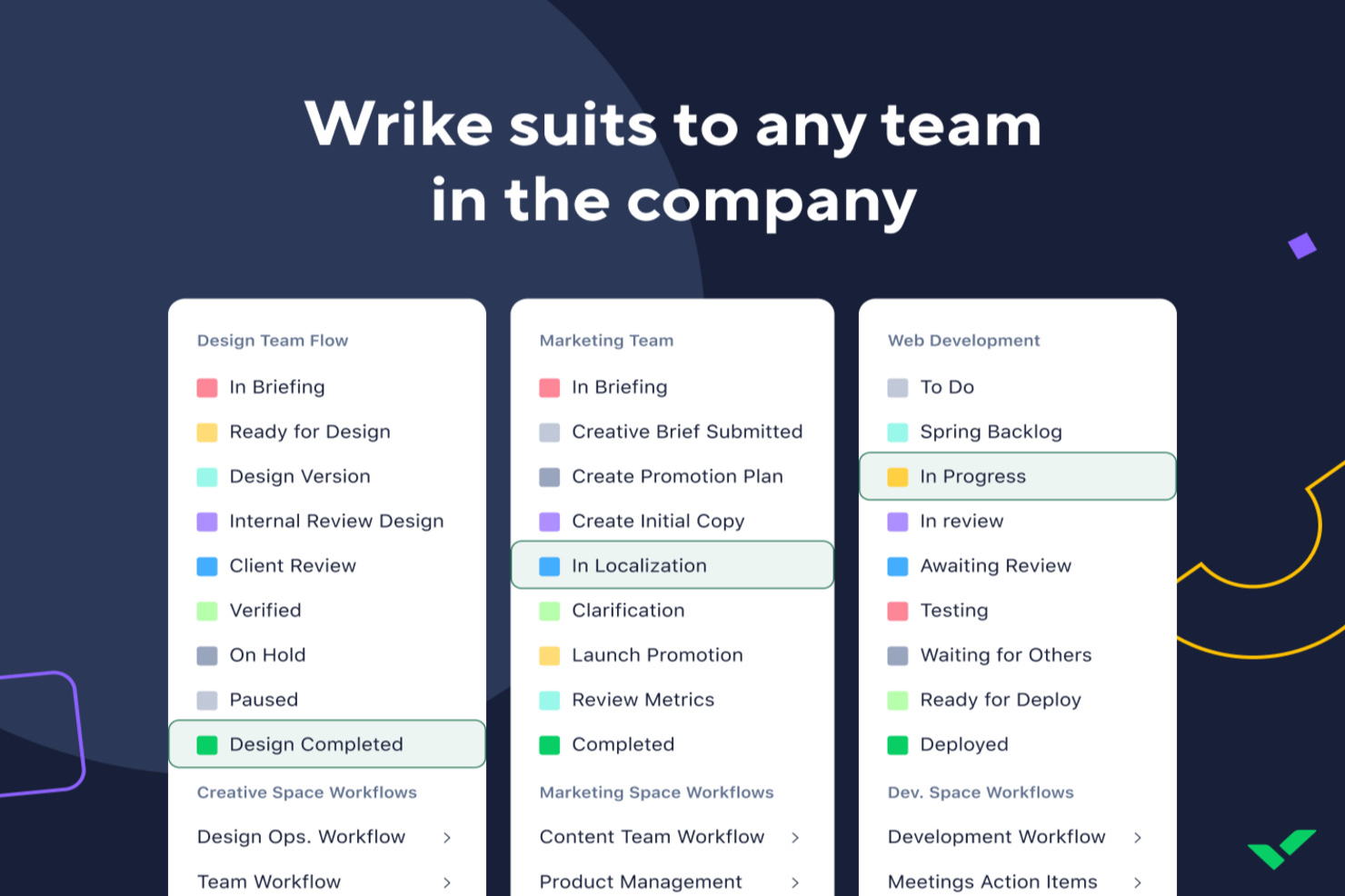
Wrike is designed for teams seeking to streamline their project management with workflow orchestration tools, offering a no-code platform that automates repetitive tasks. This makes it appealing to businesses across various industries, from tech startups to large enterprises, aiming to enhance collaboration and reduce administrative overhead. By integrating visualization options and AI capabilities, Wrike addresses the challenge of managing complex projects and helps teams focus on strategic tasks rather than mundane operations.
Why I Picked Wrike
I picked Wrike for its unique ability to automate workflows without requiring coding skills, which is crucial for teams looking to enhance efficiency. The platform's AI capabilities, such as automated project planning and task summarization, enable teams to stay ahead of deadlines and minimize errors. Additionally, Wrike's visual collaboration tools, like Gantt charts and Kanban boards, provide clarity and transparency, helping your team track progress and adjust priorities dynamically.
Wrike Key Features
In addition to its automation and AI capabilities, here are other key features that enhance workflow orchestration:
- Custom Request Forms: Wrike lets you create tailored request forms to streamline the intake process and ensure the right information is collected upfront.
- Real-Time Dashboards: Your team can access up-to-date project metrics and analytics, helping you make informed decisions quickly.
- Mobile Access: Wrike's mobile apps allow you to manage tasks and projects on the go, ensuring your team stays connected and productive from anywhere.
- Enterprise-Grade Security: With robust security measures, Wrike protects your data, giving you peace of mind while collaborating across teams.
Wrike Integrations
Integrations include Microsoft Teams, Google Sheets, Salesforce, QuickBooks, Microsoft SharePoint, Power BI, Tableau, Klaxoon, Miro, and Wrike Integrate for automation.
Pros and Cons
Pros:
- Extensive integrations support various business tools
- Approval functionality aids in efficient task management
- Mobile app allows task management and approvals on the go
Cons:
- Search functionality could be enhancement for better retrieval
- Integration with some software, like Salesforce, is limited
New Product Updates from Wrike

Wrike Redesigns AI Agent Builder
Wrike redesigns its AI Agent Builder with a side-by-side setup, Scopes, sentence-style triggers and actions, and clearer filters. These changes make it easier to configure, test, and manage agent behavior. For more information, visit Wrike’s official site.

Resolve
Best for IT ops workflow orchestration
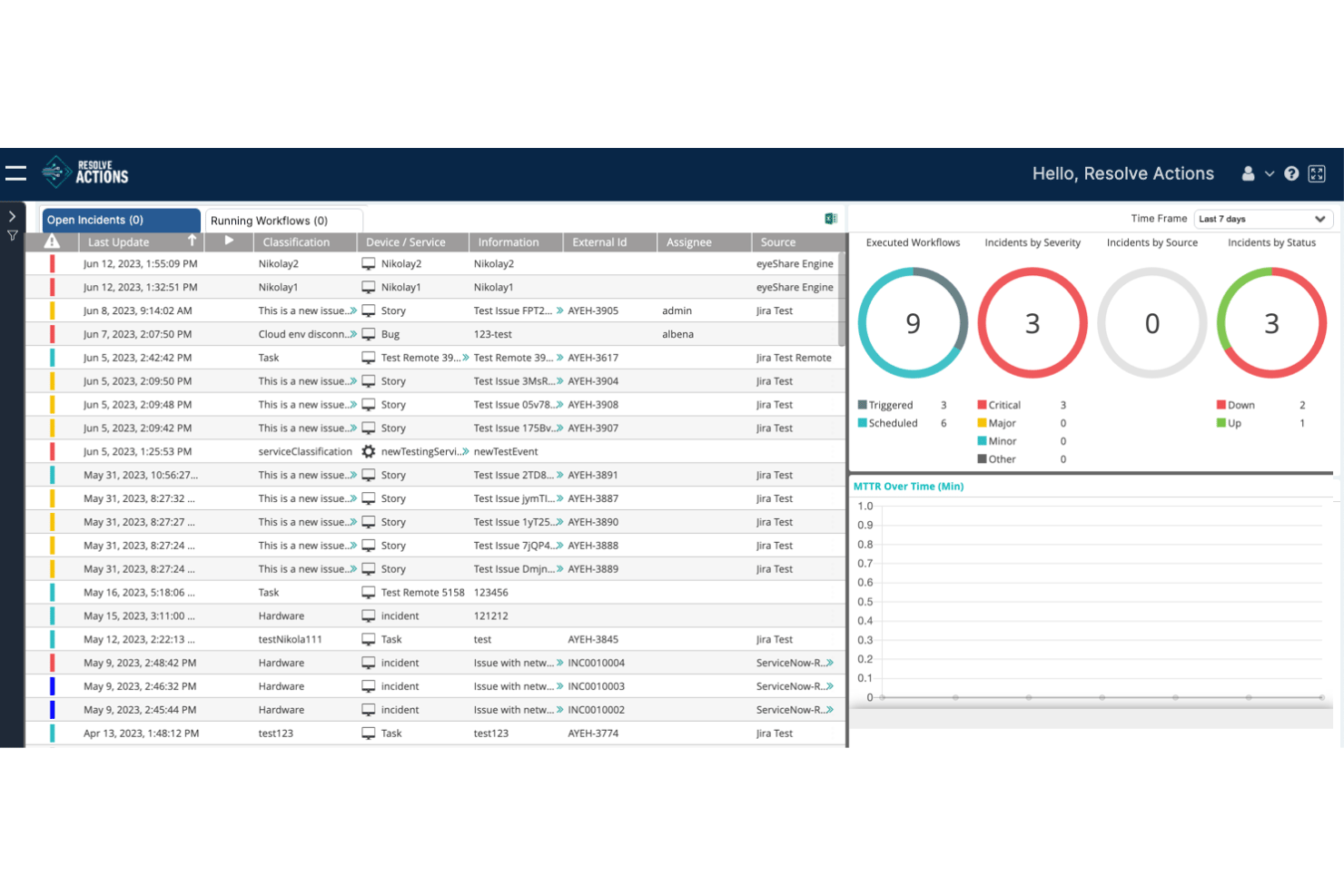
Resolve is an IT operations workflow orchestration platform that automates cross-system processes across ITSM, cloud, network, and security environments using a combination of AI-driven reasoning and no-code workflow building.
Who Is Resolve Best For?
Resolve is a strong fit for IT operations teams in large enterprises that need to automate complex, cross-system workflows across ITSM, cloud, network, and security environments.
Why I Picked Resolve
I picked Resolve as one of the best because no other tool on this list is as purpose-built for IT ops workflow orchestration specifically. Its Agentic Resolution Fabric combines AI reasoning with deterministic automation, so workflows don't just execute—they validate, remediate, and verify outcomes in a closed loop. I'm particularly impressed by Jarvis, which generates production-ready workflows from plain-language descriptions, and RITA, which autonomously resolves service desk requests like password resets and VPN issues before a ticket is ever created.
Resolve Key Features
- AgentLab: A workbench for building and publishing custom AI agents using plain-language role and guardrail definitions.
- Automation Exchange library: A catalog of 5,000+ prebuilt automations and integrations spanning ITSM, cloud, identity, security, and network systems.
- Closed-loop resolution engine: Automatically validates, diagnoses, remediates, and verifies outcomes within a single workflow execution.
- Event-driven workflow triggers: Workflows launch automatically from alerts, tickets, schedules, emails, or chat inputs across connected monitoring and ITSM tools.
Resolve Integrations
Resolve offers 5,000+ prebuilt automations and integrations, including ServiceNow, Jira, AWS, Microsoft Azure, Google Cloud, Datadog, Splunk, Okta, Microsoft Teams, and Slack.
Pros and Cons
Pros:
- No-code builder with AI-generated workflows
- Closed-loop resolution engine reduces manual work
- Automates complex IT operations workflows at scale
Cons:
- Requires third-party ITSM and monitoring tools
- No project management or portfolio features


Celigo is a workflow orchestration platform that lets you automate, integrate, and manage business processes across cloud applications using a visual builder, prebuilt connectors, and advanced integration tools.
Who Is Celigo Best For?
Celigo is a good fit for IT teams and operations leaders at mid-sized to large enterprises who need to automate and connect multiple business systems.
Why I Picked Celigo
I’ve included Celigo in my top picks because its prebuilt connectors library covers a huge range of SaaS apps and business systems. My team is able to launch integrations for platforms like NetSuite, Salesforce, and Shopify without custom development. I like that we can deploy these connectors instantly and customize them to fit our workflows. In practice, that means we can automate complex multi-app processes without needing deep technical expertise.
Celigo Key Features
- Visual flow builder: Design and manage workflows using a drag-and-drop interface.
- Role-based access controls: Set permissions and manage user roles for workflow management.
- Workflow monitoring dashboard: Track process status, errors, and performance metrics in real time.
- API management tools: Manage, monitor, and secure APIs used in your workflows.
Celigo Integrations
Celigo offers 1,000+ native prebuilt connectors, including NetSuite, Salesforce, Shopify, Microsoft Dynamics 365, SAP, QuickBooks, Snowflake, Jira, Slack, and Google Sheets. An API is available for custom integrations.
Pros and Cons
Pros:
- Highly reliable data syncing
- Real-time monitoring and automated error handling
- AI-powered assistant for integration setup guidance
Cons:
- Custom scripting requires JavaScript knowledge
- Occasional delays in connector updates
New Product Updates from Celigo
Celigo Adds Shopify–Microsoft Business Central Integration Template
Celigo adds a pre-built Shopify–Microsoft Business Central integration template for D2C and B2B commerce. This helps merchants launch connected commerce workflows faster. For more information, visit Celigo’s official site.
 .

n8n
Best for open-source automation

n8n is an open-source workflow automation tool designed for developers and tech-savvy users. It allows you to automate tasks, connect different systems, and manage data flows efficiently, providing a flexible solution for various automation needs.
Why I picked n8n: It's open-source, which means you have the freedom to customize it to fit your specific needs. You can self-host it, giving you control over your data and infrastructure. The tool's visual workflow editor makes it easy to design and manage complex automations. Its extensive node library allows you to connect a wide range of services and applications effortlessly.
Standout features & integrations:
Features include a visual workflow editor that simplifies the process of designing and managing automations. The tool's extensive node library lets you connect a wide range of services and applications. You can also self-host n8n, giving you full control over your data and infrastructure.
Integrations include Slack, Google Sheets, Discord, Airtable, Trello, GitHub, Dropbox, Webhooks, HTTP Request, and MySQL.
Pros and Cons
Pros:
- Active community support
- Visual workflow editor
- Extensive node library
Cons:
- Documentation can be sparse
- Initial setup complexity


Apache Airflow is an open-source workflow orchestration tool used primarily by data engineers and developers. It helps automate and manage complex workflows, making it ideal for handling intricate task dependencies in data processing pipelines.
Why I picked Apache Airflow: It's built to handle complex task dependencies with ease. With features like dynamic pipeline generation using Python, you can create workflows that adapt to your needs. The modular architecture supports scalability, so it grows with your projects. The user-friendly web interface simplifies managing and monitoring workflows, which makes it accessible for teams familiar with Python.
Standout features & integrations:
Features include a scalable architecture that adapts to your workflow needs, dynamic pipeline creation with Python for flexible workflows, and a user-friendly interface for easy management. It also offers extensibility, letting you create custom operators tailored to your processes.
Integrations include Google Cloud, AWS, Azure, Apache Hadoop, Apache Spark, Kubernetes, Docker, Slack, Microsoft SQL Server, and PostgreSQL.
Pros and Cons
Pros:
- Community-driven improvements
- Extensible with custom operators
- Wide range of integrations
Cons:
- Can be resource-intensive
- No official enterprise support


Argo Workflows is an open-source container-native workflow engine for orchestrating parallel jobs on Kubernetes. It's designed for DevOps teams and developers who need an efficient Kubernetes integration to manage complex workflows.
Why I picked Argo Workflows: It's tailored for Kubernetes, making it a perfect fit for teams already using this platform. With features like container-native execution, you can run each step in its own Kubernetes pod. The support for parallel execution allows you to handle large-scale workflows efficiently. YAML-based configuration provides a flexible way to define workflows that integrate seamlessly into your existing Kubernetes infrastructure.
Standout features & integrations:
Features include container-native execution, which ensures each step runs in its own Kubernetes pod. The parallel execution feature allows you to handle large-scale workflows efficiently. YAML-based configuration offers a flexible way to define workflows that integrate seamlessly into your existing Kubernetes infrastructure.
Integrations include Kubernetes, Prometheus, Grafana, MinIO, Google Cloud Storage, S3, Vault, MySQL, PostgreSQL, and Redis.
Pros and Cons
Pros:
- Open-source community support
- Flexible YAML configuration
- Scalable for large jobs
- Supports complex workflows
- Native Kubernetes support
Cons:
- No official enterprise support
- Complex setup process
- Limited non-Kubernetes support
- Steep learning curve
- Requires Kubernetes knowledge
Andre verktøy for arbeidsflytorkestrering
Her er noen flere verktøy for arbeidsflytorkestrering som ikke kom med på kortlisten min, men som likevel er verdt å se nærmere på:
- Camunda
For BPMN 2.0 support
- Prefect
For dataflow automation
- Nextflow
For bioinformatics workflows
- StackStorm
For event-driven automation
- Stonebranch
For hybrid IT environments
- Bonitasoft
For low-code development
- Flowable
For microservices architecture
- jBPM
For business process integration
- Acliviti
For Java developers
- Appian
For low-code process automation
- Red Hat Ansible Automation Platform
For IT infrastructure automation
- SAP Process Automation
For SAP environments
- Azure Logic
For cloud-based integrations
- Control-M
For batch job management
- Tidal
For enterprise workload automation
- IBM Workload Automation
For hybrid cloud environments


How I Evaluate Workflow Orchestration Tools
I split my evaluation into two layers: the baseline capabilities a tool must have—like cross-system dependency handling and event-driven triggers—and the differentiators that set platforms apart.
Core Functionality (Table Stakes For This List)
When I'm selecting tools for my list, I rank each one on a scale from 0 (does not offer the functionality) to 5 (excels in this area) for each core functionality listed below. Then, I calculate the tool's total score into a percentage. Each tool needs to achieve a minimum total score of 75% to be considered for inclusion.
- Workflow Automation Engine: I evaluate whether a tool supports multi-step, event-driven automation with conditional branching—like auto-routing a design review to the right approver based on project type.
- Visual Workflow Builder: The builder should let you map and modify workflow steps on a visual canvas, so teams can design sequences like sprint intake or change request flows without writing code.
- Task & Dependency Management: I check how well each tool handles task sequencing, parallel execution, and cross-team dependencies—especially for coordinated launches that span engineering, QA, and release.
- Third-Party Integrations: A tool's connector library matters. I look at native integrations with platforms like Jira, Slack, GitHub, and Salesforce, plus API and webhook support for custom connections.
- Monitoring & Observability: Real-time dashboards, run-status tracking, and alerting are what I evaluate here—can you spot a stalled approval step or a missed SLA before it cascades downstream?
- Error Handling & Retry Logic: I look for configurable retry policies, failure notifications, and fallback paths so a broken webhook or timed-out API call doesn't silently derail an entire release workflow.
Once I have a list of tools that meet the criteria, I consider what sets each platform apart.
Differentiating Factors (What Sets Vendors Apart)
Here's how I compare and contrast different vendors:
Standout Features
AI-powered automation is a major differentiator—I look for tools that suggest workflow optimizations or auto-route tasks based on historical patterns, not just execute static rules. Reusable workflow templates also matter. A solid template library for common scenarios like project intake or vendor onboarding saves hours of setup time. For teams in regulated environments, approval and governance controls with role-based permissions and version-tracked change logs make a real difference in audit readiness.
Beyond Features
Security and compliance posture is one of the first things I check—especially whether a vendor holds SOC 2 and ISO 27001 certifications and supports SSO with SCIM provisioning. Implementation timelines vary widely, too. Some platforms require weeks of solutions engineering, while others let you launch your first production workflow in days. I also evaluate pricing transparency, particularly how costs scale as workflow volume and user count grow across a portfolio.
Slik velger du et verktøy for arbeidsflytorkestrering
Det er lett å gå seg vill i lange funksjonslister og komplekse prismodeller. For å hjelpe deg med å holde fokus mens du arbeider deg gjennom din unike prosess for valg av programvare, har jeg laget en sjekkliste over faktorer du bør ha i bakhodet:
- Skalerbarhet: Sørg for at verktøyet kan vokse med virksomheten din. Se etter løsninger som håndterer økt arbeidsmengde uten ytelsesproblemer, spesielt hvis du planlegger å ekspandere.
- Integrasjoner: Kontroller om verktøyet kan integreres med de eksisterende systemene dine. Kompatibilitet med plattformer som AWS, Google Cloud eller Salesforce kan effektivisere arbeidsflytene dine.
- Tilpasningsmuligheter: Se etter verktøy som lar deg tilpasse prosessene etter teamets behov. Dette omfatter justerbare arbeidsflyter og fleksible brukergrensesnitt.
- Brukervennlighet: Verktøyet bør være intuitivt for teamet ditt å bruke. Se etter et brukervennlig grensesnitt og minimale opplæringskrav, slik at dere raskt kan komme i gang.
- Budsjett: Sammenlign prisplaner og sørg for at de passer inn i budsjettet ditt. Ta hensyn til de totale eierkostnadene, inkludert eventuelle skjulte gebyrer for ekstra funksjoner eller kundestøtte.
- Sikkerhetstiltak: Sørg for at verktøyet tilbyr robuste sikkerhetsfunksjoner. Se etter datakryptering, tilgangskontroller for brukere og samsvar med bransjestandarder som GDPR.
- Kundestøtte: Vurder nivået på kundestøtten som er tilgjengelig. Se etter alternativer med kundestøtte døgnet rundt, dedikerte kundeansvarlige og en omfattende kunnskapsbase.
- Ytelse: Vurder hvor godt verktøyet presterer under belastning. Ta hensyn til hastighet, pålitelighet og hvordan det håndterer samtidige prosesser, for å sikre effektivitet.
Trender innen verktøy for arbeidsflytorkestrering
I arbeidet med undersøkelsen innhentet jeg utallige produktoppdateringer, pressemeldinger og utgivelseslogger fra ulike leverandører av verktøy for arbeidsflytorkestrering. Her er noen av trendene som er i ferd med å vokse frem, og som jeg følger med på:
- KI-drevet optimalisering: Leverandører integrerer KI for å forbedre beslutningstakingen i arbeidsflyter. Denne trenden muliggjør prediktiv analyse, slik at team kan forutse problemer før de oppstår. Noen verktøy bruker for eksempel KI til å optimalisere ressursfordelingen og sikre effektiv gjennomføring av prosesser.
- Grensesnitt uten kode: Flere verktøy tilbyr grensesnitt uten kode eller med lite kode, ofte med dra-og-slipp-verktøy som gjør det enklere for ikke-tekniske brukere å utforme og administrere arbeidsflyter. Dette demokratiserer tilgangen og gjør det mulig for flere teammedlemmer å bidra til prosessautomatisering uten programmeringskunnskaper.
- Samarbeid i sanntid: Arbeidsflytverktøy støtter i økende grad funksjoner for samarbeid i sanntid. Det betyr at team kan arbeide samtidig med de samme prosessene, noe som forbedrer koordineringen og reduserer forsinkelser. Noen leverandører har lagt til funksjoner som delte dashbord og direkte redigering.
- Forbedrede sikkerhetsfunksjoner: Ettersom datainnbrudd blir stadig vanligere, får sikkerhet i arbeidsflytverktøy økt oppmerksomhet. Leverandører legger til funksjoner som avansert kryptering, flerfaktorautentisering og samsvar med internasjonale standarder for å beskytte brukerdata.
- Integrasjon med databehandling i ytterkanten: Noen verktøy støtter nå databehandling i ytterkanten, slik at prosesser kan håndteres nærmere stedet der dataene genereres. Dette reduserer forsinkelsen og øker hastigheten, noe som er avgjørende for bransjer som krever databehandling i sanntid, for eksempel tingenes internett og produksjon.
- Integrasjon med datapipelines: Etter hvert som arbeidsflyter blir mer datadrevne, utvikles orkestreringsverktøyene for å gi bedre støtte til komplekse dataoperasjoner. Mange plattformer tilbyr nå innebygde integrasjoner med et bredt spekter av datakilder – både strukturerte og ustrukturerte – slik at team kan hente inn data fra API-er, databaser eller datasjøer. Disse verktøyene støtter også innebygde funksjoner for datatransformasjon, slik at team kan rense, omforme og videresende data mellom systemer uten å være avhengige av separate ETL-prosesser. Muligheten til å administrere komplette datasett i én enkelt orkestrert arbeidsflyt blir stadig viktigere som et konkurransefortrinn.
Hva er verktøy for arbeidsflytorkestrering?
Verktøy for arbeidsflytorkestrering er programvareløsninger som automatiserer, administrerer og optimaliserer forretningsprosesser. De brukes vanligvis av IT-fagfolk, prosjektledere og dataanalytikere for å forbedre effektiviteten og koordineringen i team. Funksjoner for automatisering, sanntidsovervåking og oppgaveplanlegging bidrar til å administrere komplekse arbeidsflyter og sikre at oppgaver fullføres i tide. Alt i alt sparer disse verktøyene tid og reduserer feil ved å automatisere repetitive oppgaver og legge til rette for bedre prosessadministrasjon.
Funksjoner i verktøy for arbeidsflytorkestrering
Når du velger verktøy for arbeidsflytorkestrering, bør du se etter følgende viktige funksjoner:
- Automatisering: Automatiserer repetitive oppgaver for å spare tid og redusere menneskelige feil.
- Overvåking i sanntid: Gir oppdateringer i sanntid om prosessstatus, slik at teamene kan holde seg informert og reagere raskt.
- Planlegging av oppgaver: Gjør det mulig for brukere å angi bestemte tidspunkter eller utløsere for oppgaver, slik at de utføres til riktig tid.
- KI-drevet optimalisering: Bruker KI til å forbedre beslutningstakingen og effektiviteten i arbeidsflyten.
- Grensesnitt uten kode: Gjør det mulig for ikke-tekniske brukere å utforme arbeidsflyter uten programmeringskunnskaper.
- Sikkerhetstiltak: Tilbyr avanserte sikkerhetsfunksjoner som kryptering og flerfaktorautentisering for å beskytte data.
- Integrasjon med kantdatabehandling: Støtter behandling av data nærmere kilden, noe som reduserer forsinkelsen for sanntidsapplikasjoner.
- Tilpasningsmuligheter: Lar brukere tilpasse arbeidsflyter og grensesnitt slik at de dekker deres spesifikke behov.
- Skalerbarhet: Sørger for at verktøyet kan håndtere økt arbeidsmengde etter hvert som virksomheten vokser.
- Samarbeidsverktøy: Tilrettelegger for teamsamarbeid i sanntid med funksjoner som delte kontrollpaneler og direkte redigering.
Fordeler med verktøy for arbeidsflytorkestrering
Implementering av verktøy for arbeidsflytorkestrering gir flere fordeler for teamet og virksomheten din. Her er noen av fordelene du kan se frem til:
- Økt effektivitet: Funksjoner for automatisering og planlegging av oppgaver bidrar til å redusere manuelt arbeid, spare tid og minimere feil.
- Bedre samarbeid: Overvåking i sanntid og samarbeidsverktøy sørger for at alle har samme oversikt, noe som styrker teamsamarbeid og koordinering.
- Bedre beslutningstaking: KI-drevet optimalisering gir innsikt og anbefalinger som hjelper teamene med å ta informerte beslutninger raskere.
- Skalerbarhet: Muligheten til å håndtere økende arbeidsmengder sørger for at arbeidsflytene kan utvides etter hvert som virksomheten vokser.
- Større fleksibilitet: Tilpasningsmulighetene gjør det mulig å tilpasse arbeidsflyter til spesifikke behov, slik at det blir enklere å håndtere endringer eller nye krav.
- Datasikkerhet: Avanserte sikkerhetstiltak beskytter sensitiv informasjon og sørger for samsvar med bransjestandarder.
- Raskere responstider: Oppdateringer i sanntid og integrasjon med kantdatabehandling hjelper teamene med å reagere raskt på endringer og utfordringer.
Kostnader og priser for verktøy for arbeidsflytorkestrering
Ved valg av verktøy for arbeidsflytorkestrering er det nødvendig å forstå de ulike prismodellene og abonnementene som er tilgjengelige. Kostnadene varierer basert på funksjoner, teamstørrelse, tillegg og mer. Tabellen nedenfor oppsummerer vanlige abonnementer, gjennomsnittsprisene deres og typiske funksjoner som er inkludert i løsninger for verktøy for arbeidsflytorkestrering:
Sammenligningstabell for abonnementer for verktøy for arbeidsflytorkestrering
| Abonnementstype | Gjennomsnittspris | Vanlige funksjoner |
|---|---|---|
| Gratisabonnement | $0 | Grunnleggende automatisering, begrensede integrasjoner og brukerstøtte fra fellesskapet. |
| Personlig abonnement | $5-$25/bruker/måned | Forbedret automatisering, tilpassede arbeidsflyter og grunnleggende analyse. |
| Bedriftsabonnement | $30-$75/bruker/måned | Avansert analyse, prioritert brukerstøtte og flere integrasjoner. |
| Virksomhetsabonnement | $100-$200/bruker/måned | Tilpassbare løsninger, dedikert brukerstøtte og sikkerhet på virksomhetsnivå. |
Vanlige spørsmål om verktøy for arbeidsflytorkestrering
Her er noen svar på vanlige spørsmål om verktøy for arbeidsflytorkestrering:
Hva er hovedformålet med arbeidsflytorkestrering?
Plattformer for arbeidsflytorkestrering forbedrer driftseffektiviteten ved å automatisere og koordinere oppgaver. De hjelper organisasjoner med å tilpasse seg raskt til endringer og ta informerte beslutninger. Ved å redusere manuelt arbeid gjør disse verktøyene det mulig for team å fokusere på mer strategiske aktiviteter.
Hva er forskjellen mellom arbeidsflytautomatisering og arbeidsflytorkestrering?
Arbeidsflytautomatisering fokuserer på å automatisere individuelle oppgaver, mens orkestrering håndterer rekkefølgen og samspillet mellom disse oppgavene. Orkestrering skaper en helhetlig prosess ved å sørge for at oppgavene utføres i riktig rekkefølge, noe som fører til effektiv fullføring av prosessen.
Hva er forskjellen mellom arbeidsflytorkestrering og RPA?
Arbeidsflytorkestrering koordinerer og håndterer flere oppgaver, mens Robotic Process Automation (RPA) automatiserer individuelle oppgaver. Orkestrering gir et bredere perspektiv på komplekse prosesser og sørger for at alle automatiserte oppgaver fungerer effektivt sammen, mens RPA håndterer utførelsen av bestemte oppgaver.
Hvordan forbedrer verktøy for arbeidsflytorkestrering samarbeidet i team?
Disse verktøyene forbedrer samarbeidet ved å tilby sanntidsoppdateringer, dataintegrasjon og delte dashbord. Datavitenskapsteam, IT-avdelinger og utviklere kan arbeide samtidig med prosesser, noe som reduserer forsinkelser og flaskehalser og forbedrer koordineringen. Funksjoner som direkte redigering og kommunikasjonsverktøy sørger for at alle holder seg informert og samkjørt.
Kan verktøy for arbeidsflytorkestrering håndtere komplekse arbeidsflyter?
Ja, de er utviklet for å håndtere komplekse arbeidsflyter ved å automatisere oppgavesekvenser og håndtere avhengigheter. Med funksjoner som AI-drevet optimalisering, maskinlæring og sanntidsovervåking og observerbarhet sørger disse verktøyene for at selv de mest kompliserte prosessene kjører problemfritt og effektivt. I tillegg støtter mange av disse verktøyene programtillegg for å håndtere tilpassede arbeidsflyter ytterligere.
Hvordan beskytter sikkerhetsfunksjoner i verktøy for arbeidsflytorkestrering data?
Sikkerhetsfunksjoner som kryptering, flerfaktorautentisering og samsvar med standarder sørger for databeskyttelse. Disse sikkerhetstiltakene forhindrer uautorisert tilgang og hjelper virksomheter med å oppfylle regulatoriske krav, slik at sensitiv informasjon holdes sikker gjennom hele prosessen.