

De 10 beste programvarene for prosjektstyring av fasiliteter i 2026

Kortliste over den beste programvaren for prosjektstyring av fasilitetsforvaltning


Den beste programvaren for prosjektstyring av fasilitetsforvaltning hjelper deg med å følge opp vedlikeholdsforespørsler, administrere eiendeler og koordinere team på ett sted, slik at ingenting går mellom sprekkene.
Uten slik programvare går forespørsler tapt i e-poster, teknikere kaster bort tid på å vente på oppdrag, og ledere mangler oversikt over kostnader eller tidsplaner. En sentralisert plattform hjelper deg med å forbedre oppgavehåndteringen, planlegge forebyggende vedlikehold og få rapporter som støtter beslutningstaking.
Etter å ha testet og vurdert flere verktøy med min ekspertise som prosjektleder har jeg identifisert de mest pålitelige alternativene. Her er mine anbefalinger av løsninger som hjelper deg med å redusere nedetid, begrense misforståelser og forenkle driften av fasiliteter, slik at du kan finne det som passer best for dine behov.
Hvorfor du kan stole på våre programvareanbefalinger
Teamet vårt har testet og anmeldt programvare siden 2012. Vi er selv prosjektledere, så vi vet hvor vanskelig og hvor viktig det er å velge riktig programvare.
I denne guiden har vi vurdert verktøyene gjennom praktisk testing og uavhengig research og gitt dem poeng ut fra våre utvelgelseskriterier. Vi bygger også på innsikt fra ledende eksperter i bransjen og erfarne prosjektledere.
Anmeldelsene våre bygger på vår egen redaksjonelle vurdering. De er ikke et salgsargument.
Ekspertanmeldere:
Sammenligningstabell for programvare for prosjektstyring av fasilitetsforvaltning
Sammenlign spesifikasjoner og priser for mine utvalgte programmer for prosjektstyring av fasilitetsforvaltning nedenfor.
Score legend (out of 5)
- Excellent 4.5–5
- Good 4–4.4
- Average 3–3.9
- Below average 2–2.9
- Poor 1–1.9
| Tool | Starting Price | Website | |||||||
|---|---|---|---|---|---|---|---|---|---|
| Best for QR-code-driven PM scheduling | 3.0 out of 5 | 3 | 2 | 4 | 4 | 3 | 2 | $35 per user/month 30-day free trial + free demo available | Book Demo |
| Best for maintenance-based facility setup | 3.5 out of 5 | 4 | 3 | 4 | 4 | 3 | 3 | Pricing upon request Free demo available | Website |
| Best for maintenance-driven work order tracking | 3.5 out of 5 | 4 | 2 | 4 | 4 | 4 | 3 | $24/user/month 7-day free trial + free demo available | Website |
| Best for multi-site maintenance project oversight | 3.8 out of 5 | 4 | 2 | 5 | 5 | 4 | 3 | Pricing upon request Free demo available | Website |
| Best for field-to-office job cost tracking | 3.5 out of 5 | 3 | 4 | 4 | 3 | 3 | 4 | Pricing upon request Free demo available | Website |
| Best for multi-year capital cost forecasting | 3.7 out of 5 | 4 | 4 | 4 | 4 | 2 | 4 | Pricing upon request Free demo available | Website |
| Best for multi-site facilities asset oversight | 3.7 out of 5 | 4 | 3 | 4 | 4 | 4 | 3 | Pricing upon request Free demo available | Website |
| Best for multi-site maintenance operations | 3.5 out of 5 | 4 | 2 | 5 | 4 | 4 | 2 | Pricing upon request Free demo available | Website |
| Best for government and multi-site asset upkeep | 3.7 out of 5 | 4 | 4 | 4 | 4 | 3 | 3 | Pricing upon request Free demo available | Website |
| Best for multi-site vendor coordination | 3.5 out of 5 | 3 | 3 | 4 | 4 | 4 | 3 | Pricing upon request Free plan available; Free demo available | Website |
Anmeldelser av den beste programvaren for prosjektstyring av fasilitetsforvaltning
Les mitt detaljerte sammendrag av hver av de beste programmene for prosjektstyring av fasilitetsforvaltning på listen min. Jeg dekker viktige funksjoner, fordeler & ulemper, integrasjoner og bruksområder, slik at du kan finne det som passer best.
Best for QR-code-driven PM scheduling
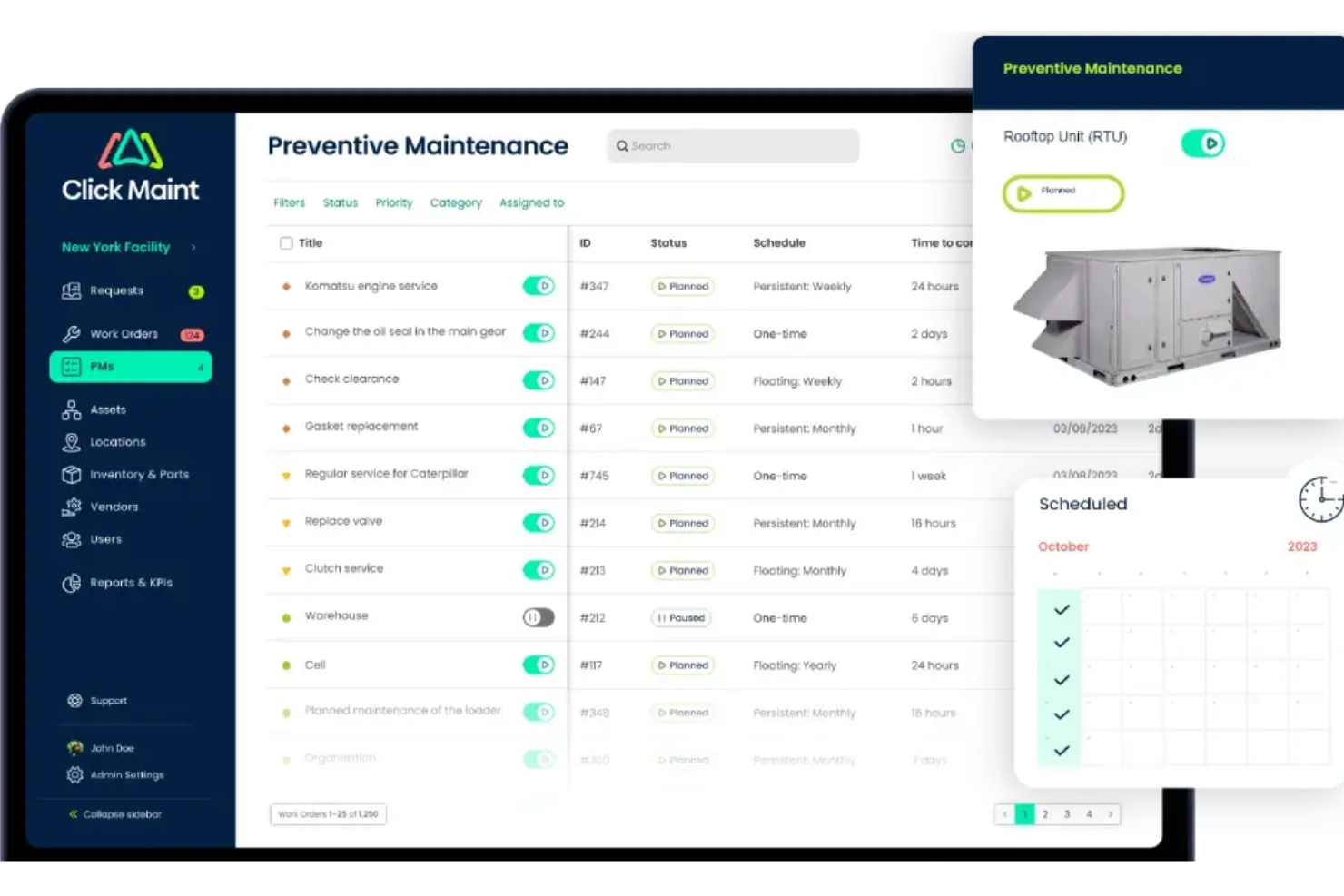
Click Maint CMMS is a maintenance management platform for facilities teams that covers work order tracking, preventive maintenance scheduling, asset management, inventory, and multi-site oversight.
Who Is Click Maint Best For?
Click Maint is a strong fit for facility maintenance teams managing work orders and preventive maintenance schedules across multiple locations without needing full project management depth.
Why I Picked Click Maint
I've included Click Maint in my top picks because its QR-code-driven preventive maintenance scheduling is genuinely practical for facility teams managing equipment across multiple buildings. Technicians scan a QR code on any asset to instantly pull up its maintenance history, trigger a work order, or log a PM task from their phone. The PM progression view then shows every scheduled task about to trigger, so nothing slips through the gaps across locations.
Click Maint Key Features
- Enterprise dashboard: View active, overdue, and critical work orders alongside pending requests across all your sites from a single dashboard.
- Floor plan module: Pin assets, work orders, and requests to interactive floor maps with color-coded status indicators for at-a-glance oversight.
- Work order cost tracking: Log labor time, parts, vendor charges, and invoice uploads directly against individual work orders.
- Multi-tier request portal: Let unlimited requesters submit maintenance requests through configurable portals, with approval workflows before conversion to work orders.
Click Maint Integrations
Click Maint enables custom software development and direct data synchronization with external platforms through its Rest API, as well as single sign-on through enterprise identity providers.
Pros and Cons
Pros:
- Mobile work orders support field updates and photos
- PM progression view flags upcoming maintenance across sites
- QR scans connect technicians directly with asset histories
Cons:
- Costs stop at work orders, not project budgets
- No project dependencies, milestones, or cross-project timelines

Limble
Best for maintenance-based facility setup
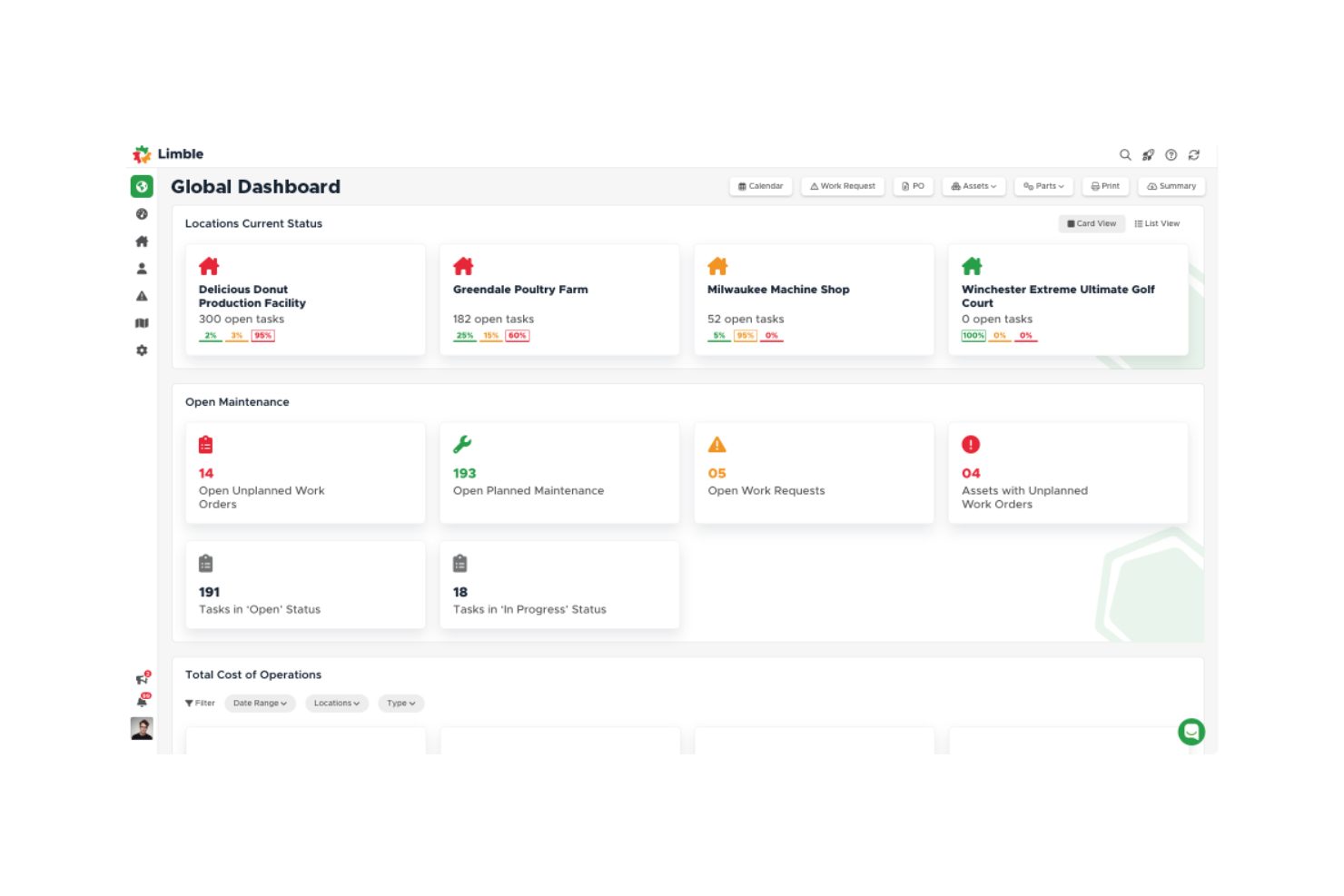
Limble is a CMMS platform that centralizes work order management, preventive maintenance scheduling, asset tracking, parts inventory, and multi-site reporting for facility and maintenance teams.
Who Is Limble Best For?
Limble fits maintenance and facilities teams managing asset-heavy environments across multiple sites who need work order control and preventive maintenance scheduling in one place.
Why I Picked Limble
I picked Limble as one of the best because it's built from the ground up around maintenance operations, which makes it a natural fit when your facility work is primarily driven by asset health and work order volume. I love how the AI-powered PM Builder scans asset manuals and generates preventive maintenance tasks automatically, and the Resource Planning calendar lets me drag and drop technician assignments across days while tracking capacity in real time. For multi-site teams, the location-based access controls and cross-site reporting keep each property's data clean without losing portfolio-level visibility.
Limble Key Features
- Work request portal: Lets anyone submit maintenance or service requests via a link or QR code, without needing a Limble account.
- Parts inventory tracking: Monitors stock levels, triggers low-quantity alerts, and links parts directly to assets, work orders, and vendors.
- Maintenance KPI dashboards: Displays real-time metrics like MTTR and MTBF, with custom dashboards that report time, parts, and costs by asset.
- Vendor task sharing: Shares work orders with external contractors via an emailed link so they can complete instructions, comment, and submit invoices.
Limble Integrations
Limble offers native integrations with ArcGIS Online, Augury, AssetWatch, Monnit, SAP S/4HANA, Google Calendar, Slack, Okta, and Azure Active Directory. It also provides REST API and MCP access for custom connectivity; the total integration count isn’t stated.
Pros and Cons
Pros:
- Asset histories and parts stay organized
- Mobile crews capture photos onsite
- External requesters submit without accounts
Cons:
- Project budget-versus-actual reporting is absent
- No dependencies or critical-path timelines

UpKeep
Best for maintenance-driven work order tracking
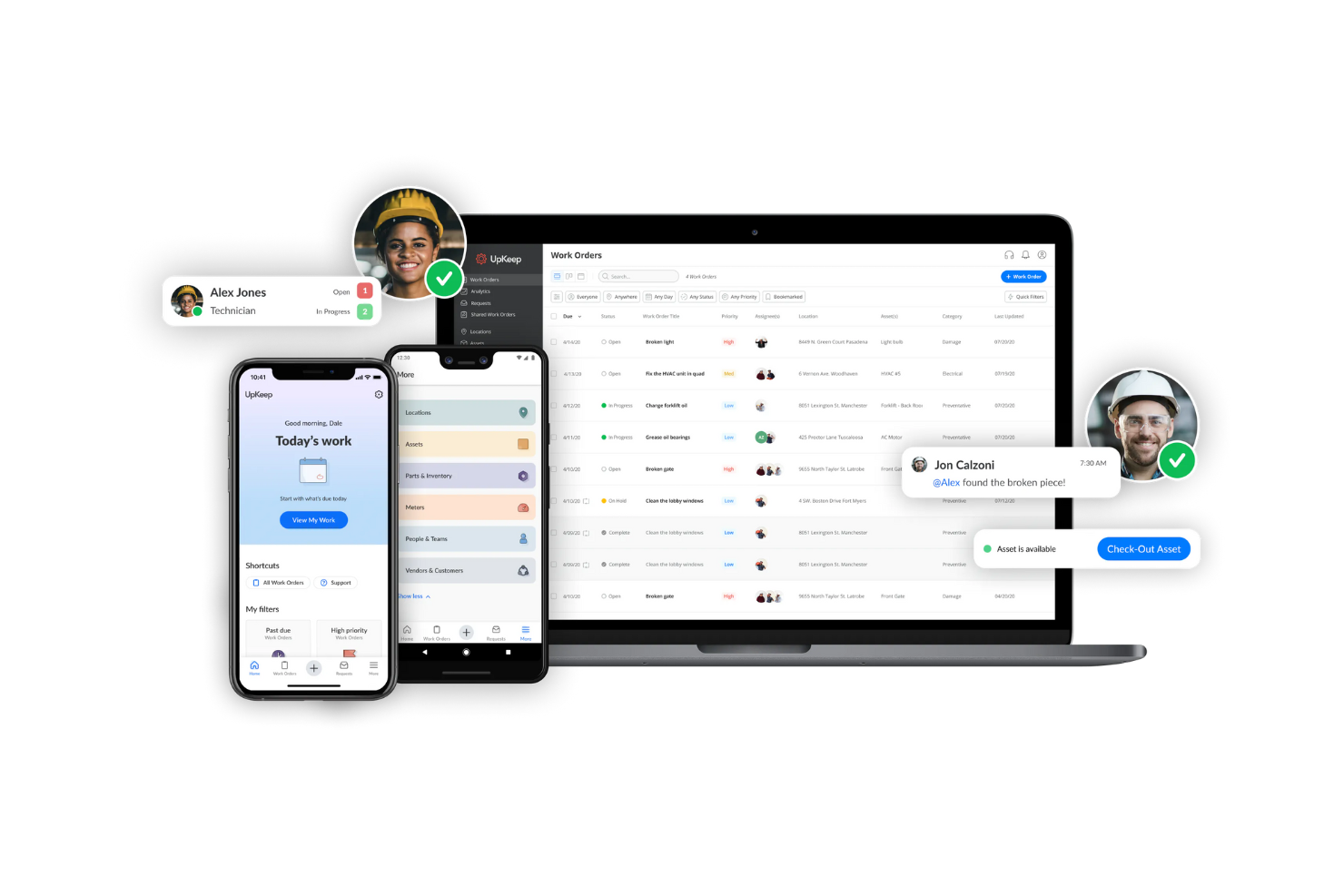
UpKeep is a mobile-first CMMS that covers work order management, preventive maintenance scheduling, asset tracking, parts inventory, and contractor coordination across facilities.
Who Is UpKeep Best For?
UpKeep is a strong fit for maintenance managers and their technician teams who need a mobile-first system to handle work orders, asset records, and preventive maintenance across one or more facilities.
Why I Picked UpKeep
I picked UpKeep as one of the best because it handles the full work order lifecycle better than almost any other tool in this category. I love how technicians can receive a request, get assigned based on skill and location, complete a checklist on mobile, and close the job with parts usage and labor time all logged in one record. The vendor portal also stands out: contractors can update status, upload files, and communicate directly through a shared work order link without needing a full account.
UpKeep Key Features
- Preventive maintenance scheduling: Set recurring work orders by calendar interval or meter-based triggers like runtime hours, miles, or cycles.
- Asset registry with QR lookup: Store searchable asset records with full history, then scan a QR code in the field to pull up the record instantly.
- Multi-storeroom inventory tracking: Manage parts quantities, stock thresholds, and reorder points across multiple storerooms, warehouses, or service vehicles.
- Cross-site maintenance analytics: Track KPIs like MTTR, MTBF, and PM compliance with dashboards that benchmark performance across facilities.
UpKeep Integrations
UpKeep connects with 1,000+ systems through native integrations, Zapier, and its public REST API, including SAP, Oracle, NetSuite, and Microsoft Dynamics. The API supports custom integrations for work orders, assets, parts, locations, and users.
Pros and Cons
Pros:
- Contractors can update shared work orders
- Asset histories support recurring maintenance decisions
- Mobile updates keep technicians current onsite
Cons:
- No project-level budget-versus-actual tracking
- Scheduler lacks dependencies and milestone tracking
eMaint
Best for multi-site maintenance project oversight
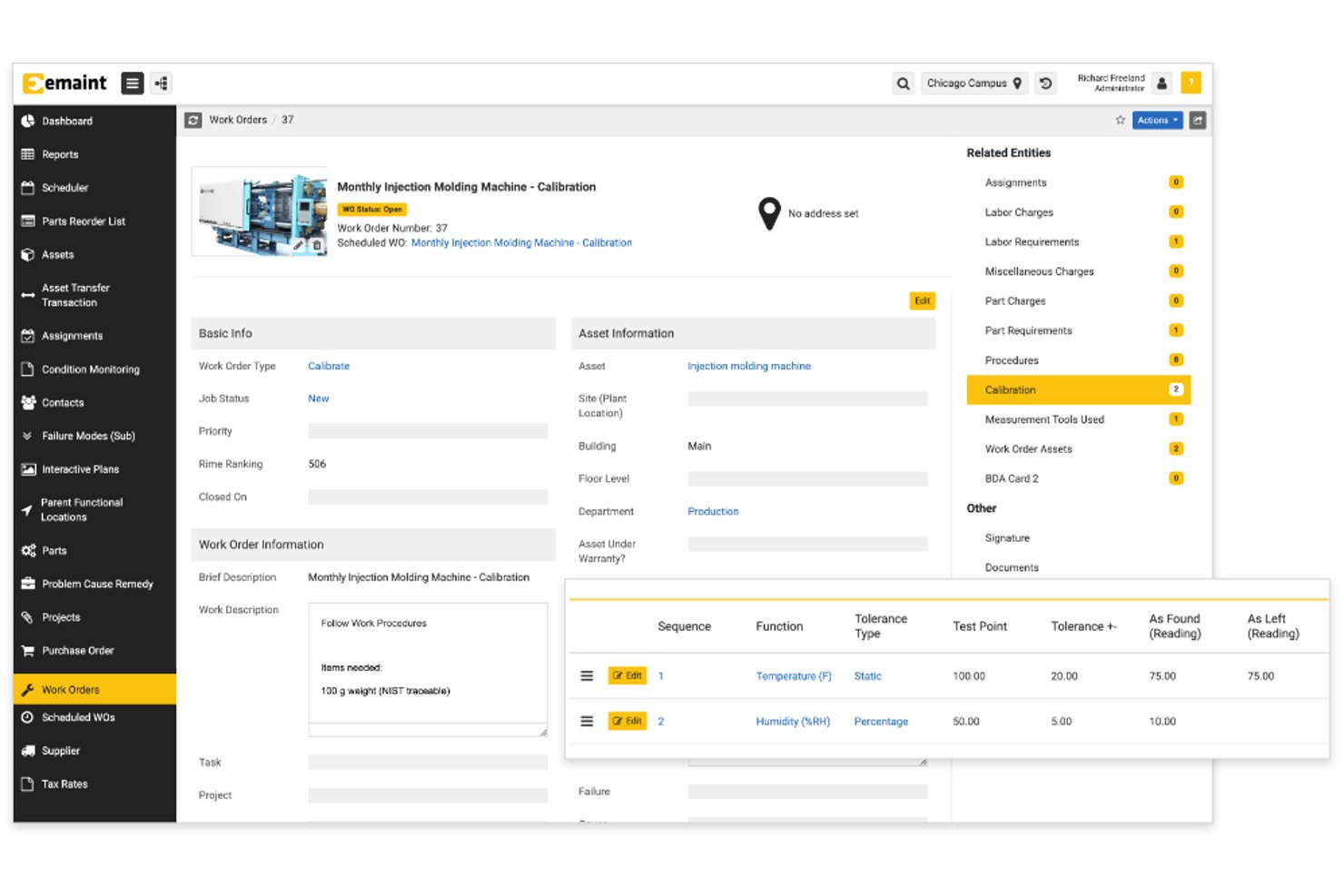
eMaint is a CMMS platform built by Fluke that covers work order management, preventive maintenance scheduling, asset tracking, multi-site oversight, and vendor coordination for facilities and maintenance teams.
Who Is eMaint Best For?
eMaint is a strong fit for maintenance and facilities teams managing assets and work orders across multiple sites or locations.
Why I Picked eMaint
I picked eMaint as one of the best because it handles multi-site maintenance oversight in a way most CMMS platforms don't: Enterprise-tier Consolidation Accounts give you a single view of performance metrics across every location, while Master Accounts let you create and edit global work orders, assets, and tasks from one place. I also like the interactive floor plans, which let my team assign and track work directly from a site map rather than hunting through menus.
eMaint Key Features
- Work order routing: Automatically assigns work orders based on priority, skill set, location, or technician workload.
- Vendor portal: Gives external contractors a dedicated access point to receive work notifications, log labor and charges, and submit completed work for supervisor review.
- Condition-based maintenance triggers: Connects to Fluke sensors, BMS, SCADA, and PLC systems to automatically generate work orders when readings exceed set thresholds.
- Asset lifecycle tracking: Records total cost of ownership, depreciation, remaining useful life, and replacement priorities for each asset in your inventory.
eMaint Integrations
eMaint supports 200+ pre-built integrations, including SAP, Oracle, Salesforce, Power BI, Tableau, SCADA, PLC systems, and BMS. Enterprise REST API access and low-code integrations connect eMaint with 1,000+ apps.
Pros and Cons
Pros:
- Drag-and-drop scheduling adjusts daily work
- Asset histories help identify recurring failures
- Shared reports support multi-site oversight
Cons:
- Project timelines lack documented task dependencies
- Calendar rules complicate future work scheduling

Simpro
Best for field-to-office job cost tracking

Simpro is a field service management platform that connects office and field teams across work order management, project scheduling, job costing, asset maintenance, and contractor coordination.
Who Is Simpro Best For?
Simpro fits trades and field service businesses that need to track job costs from the field back to the office across multiple sites and contractors.
Why I Picked Simpro
I picked Simpro as one of the best because it closes the gap between what's happening on-site and what the office sees in real time. When a technician completes work, job costs update against the budget immediately, so you're comparing estimated versus actual spend per cost centre without waiting for end-of-week reconciliation. I also like that Gantt-chart views with task dependencies let you track every phase of a facilities project from scheduling through completion, and contractor work orders include a "Send Status" column so you always know whether a contractor has accepted the job.
Simpro Key Features
- Recurring maintenance scheduling: Set up repeating maintenance jobs for customer sites and assets so planned work is automatically queued without manual re-entry each cycle.
- Contractor portal: Give contractors a dedicated login to view their issued work orders and invoices without accessing the broader job management system.
- Digital Forms add-on: Build mobile-friendly forms with conditional logic to capture safety data, compliance checks, and job information directly from the field.
- Progress billing: Generate deposit, progress claim, final claim, and retention invoices tied to specific project milestones as work advances.
Simpro Integrations
Marketplace integrations include QuickBooks, Xero, SafetyCulture, Raken, PropertyMe, and Inspect Point. Simpro also offers a RESTful API with OAuth2 authentication for custom integrations.
Pros and Cons
Pros:
- Asset histories support recurring maintenance
- Gantt views show task dependencies
- Budget-versus-actual costs by project phase
Cons:
- Contractors cannot edit issued work orders
- Mobile notes can fail to sync
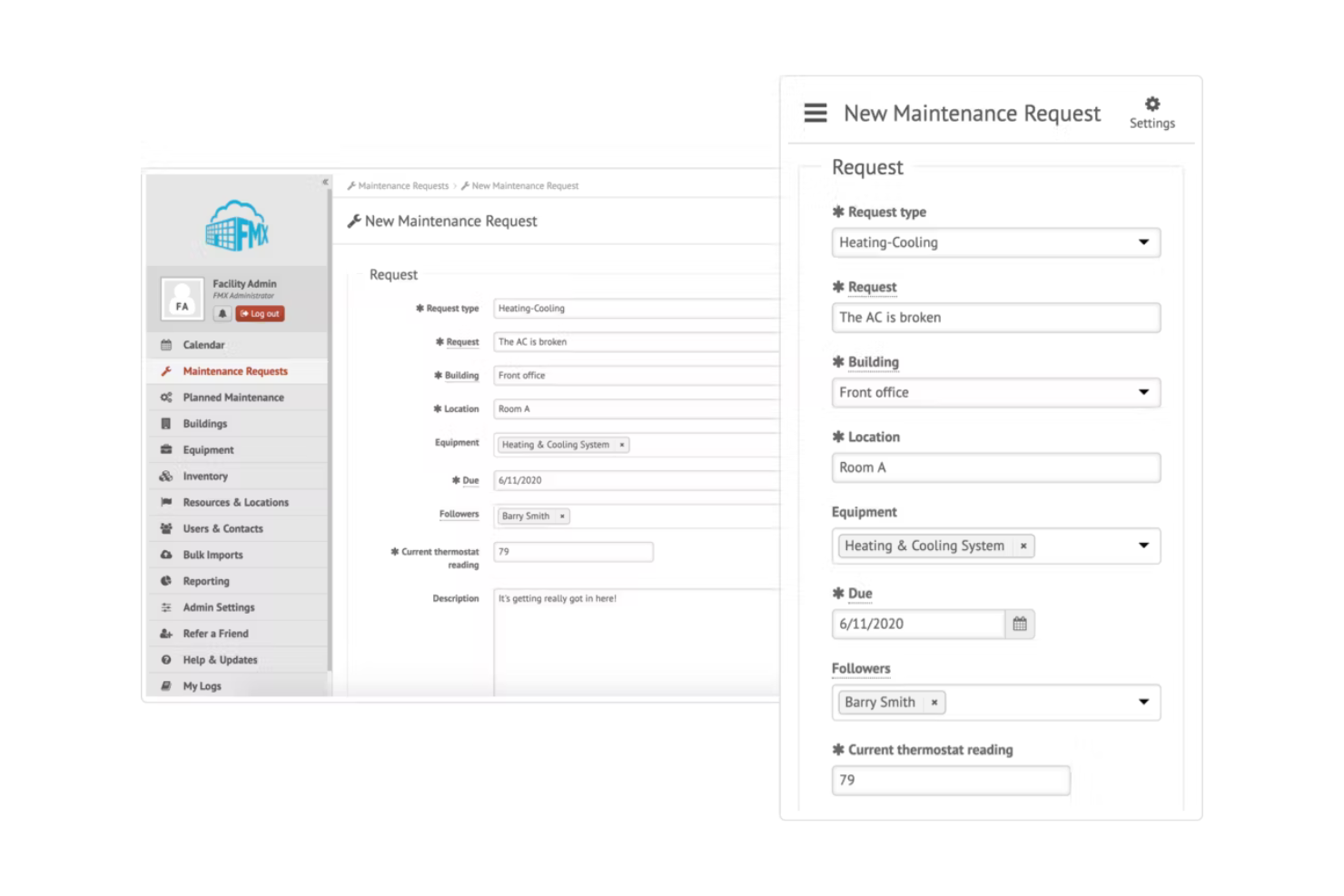
FMX is a facilities management platform that combines work order management, asset tracking, preventive maintenance scheduling, and multi-year capital planning into a single system.
Who Is FMX Best For?
FMX is a strong fit for facilities managers and operations directors who need to plan and defend capital spending across multiple buildings or campuses.
Why I Picked FMX
FMX earns its spot on my shortlist because of how well its Capital Planner handles multi-year cost forecasting across a portfolio of buildings. I like that it tracks asset condition, replacement value, and useful life to project capital costs by fiscal year and building, then surfaces funding gaps where planned spending exceeds available allocations. The scenario planning feature lets you model alternative timelines before committing, which is exactly what I'd want when preparing a capital budget presentation for leadership.
FMX Key Features
- Automatic work order routing: Assigns incoming work to technicians based on skill set, location, and current workload.
- Preventive maintenance scheduling: Schedules recurring service tasks triggered by time intervals, usage, or inspection results.
- Multi-site filtering: Filters work orders, reports, and assets by building, campus, or region from a single view.
- Interactive mapping: Places assets, equipment, and open work orders on image or geographic maps across your facilities.
FMX Integrations
FMX lists native integrations with ArcGIS Online, EventSync: BAS, iMonnit, SensorHubb, Okta Provisioning, Slack, and Twilio. Its REST API supports custom connections to buildings, equipment, purchase orders, users, work requests, and work tasks.
Pros and Cons
Pros:
- Reviewers praise responsive support during setup
- Project dependencies connect timelines and cost rollups
- Asset condition informs multi-year capital forecasts
Cons:
- Reviewers report effort entering data during rollout
- Contractors lack logins and email notifications

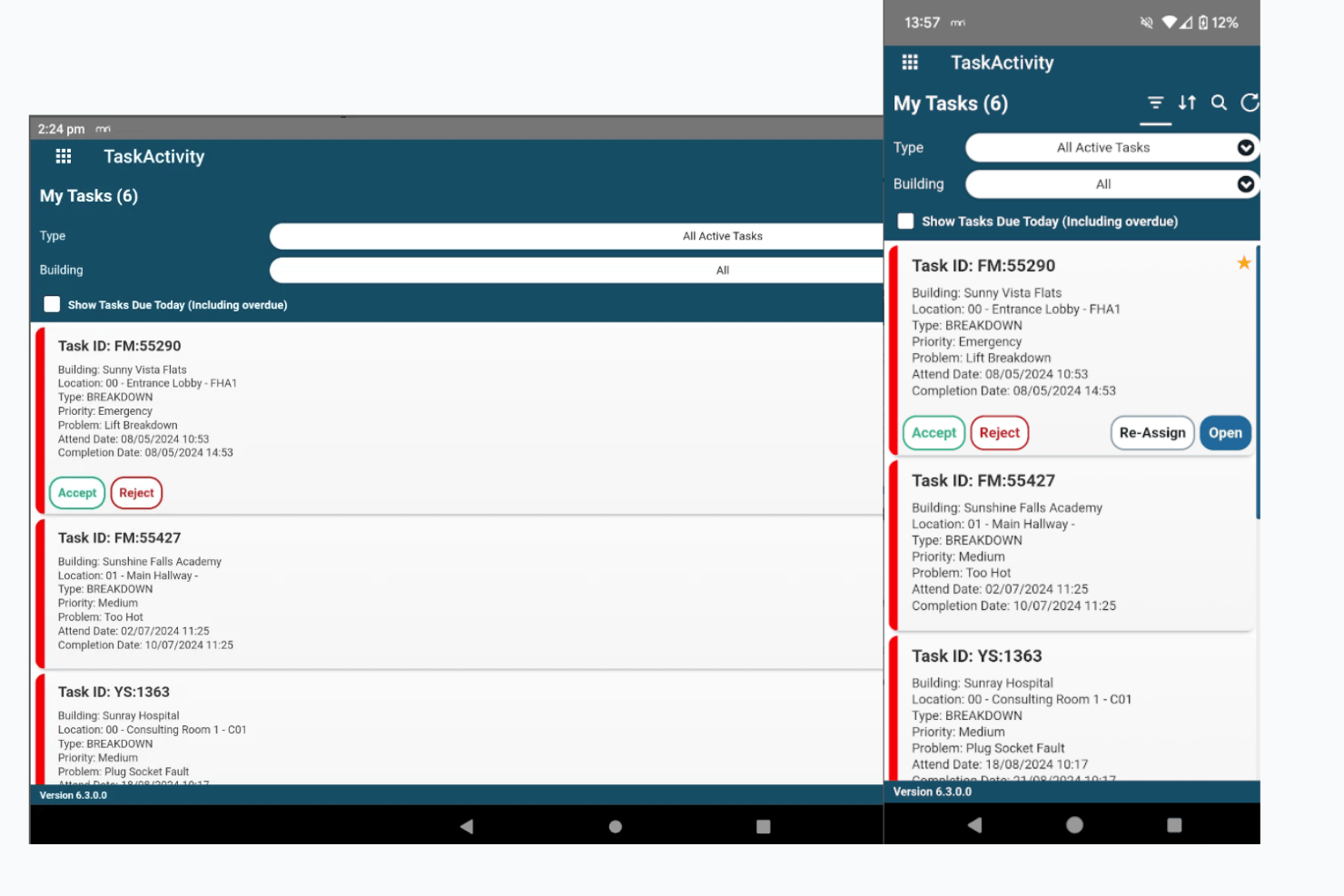
MRI Evolution is a module by MRI Software, built specifically as a facilities management platform that combines work order tracking, asset lifecycle management, planned and reactive maintenance scheduling, compliance monitoring, and multi-site portfolio oversight.
Who Is MRI Evolution Best For?
MRI Evolution fits organizations managing large, multi-site property portfolios where facilities operations, asset tracking, and compliance need to stay connected across many locations.
Why I Picked MRI Evolution
I picked MRI Evolution as one of the best because its facilities hierarchy genuinely handles multi-site complexity, letting you organize assets, maintenance, and compliance across regions, countries, and sites in a single unified database. I love that each site or team can have segmented data access, so a contractor in one region only sees what's relevant to them. It is available for mobile app whether through the Google Play Store - MRI Evolution Go or the Apple App Store - MRI Evo GO. The BIM viewer, which accepts IFC files, lets you navigate a 3D building model to locate asset groups and trace connections, which is something I rarely see this well executed in a facilities platform.
MRI Evolution Key Features
- Planned preventive maintenance scheduling: Automate PPM schedules against industry-standard or custom compliance schedules to keep recurring maintenance on track.
- Evolution GO mobile apps: Field workers can accept, reject, or reassign tasks, record hazards, upload attachments, and work offline with automatic sync.
- Vendor and resource register: Store contractor coverage, trades, skills, and availability through calendars, shifts, and rota patterns for accurate assignment.
- Compliance certificate tracking: Tasks requiring certificates stay open until the required documentation is confirmed and on file.
MRI Evolution Integrations
MRI Evolution has a documented integration with MRI PMX, sending purchase order values for financial reporting. MRI Information eXchange provides custom and partner-built APIs for connecting third-party or in-house applications.
Pros and Cons
Pros:
- IFC models help locate assets and connections
- Work orders connect assets, labor, and costs
- Reviewers value estate-wide maintenance visibility
Cons:
- Report generation can be difficult to navigate
- Mobile job updates can arrive late

Facilio
Best for multi-site maintenance operations
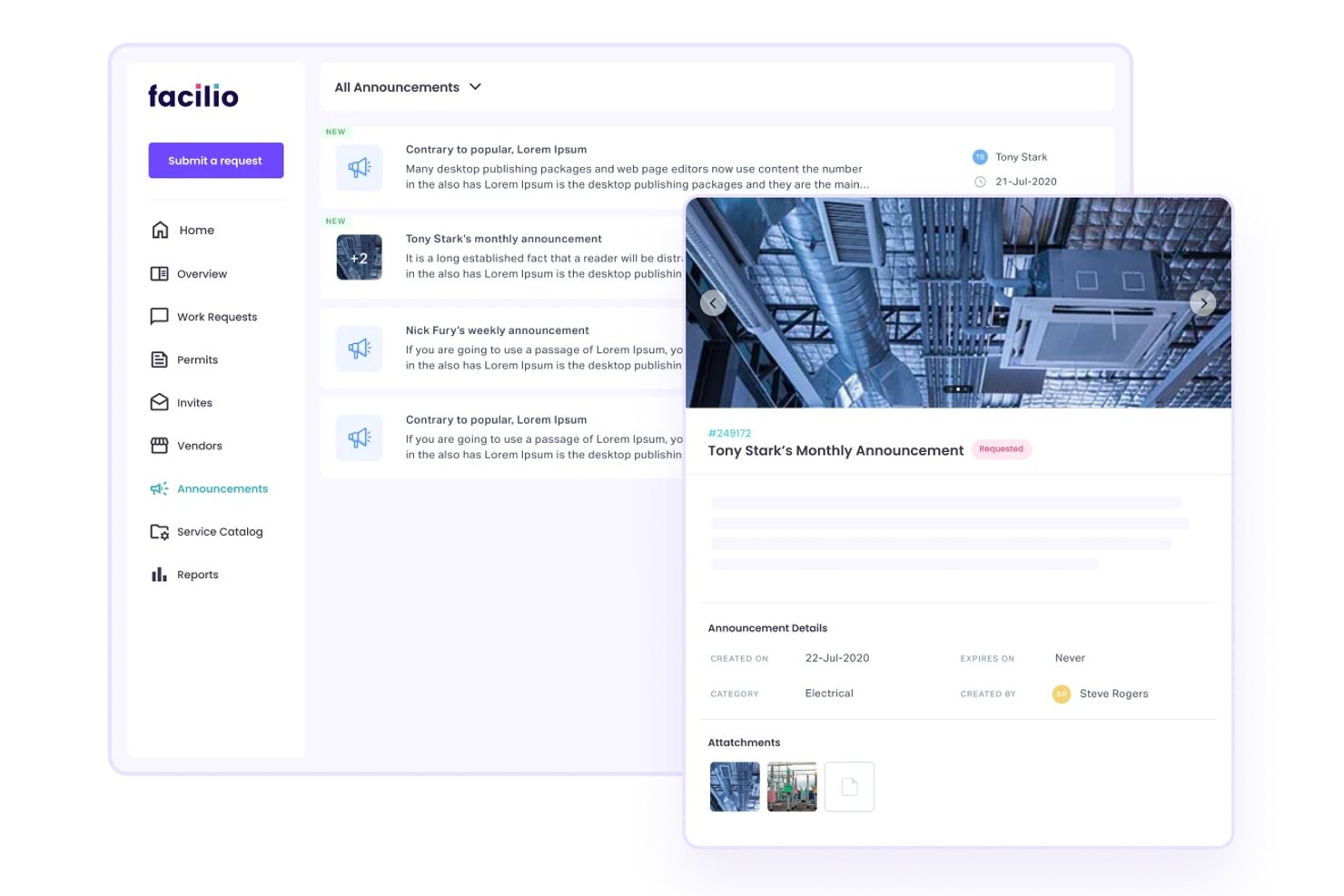
Facilio is a connected CMMS platform built for enterprise facilities management, combining work order lifecycle tracking, preventive maintenance scheduling, asset management, vendor coordination, and multi-site operational reporting.
Who Is Facilio Best For?
Facilio suits enterprise facilities and maintenance managers overseeing large, multi-site property portfolios who need centralized work order control and vendor coordination.
Why I Picked Facilio
I picked Facilio as one of the best because it handles multi-site maintenance operations better than most CMMS tools I've reviewed. The portfolio-wide dashboards let you drill into work-order status, SLA deadlines, and technician assignments across every site from one view. I also like that you can roll out preventive maintenance changes across your entire asset portfolio in bulk, which saves hours when you're managing dozens of locations.
Facilio Key Features
- Vendor credential tracking: Monitors contractor certifications and compliance documents, and blocks vendors with expired credentials from being assigned to jobs.
- Rules-based work-order assignment: Automatically routes work orders to the right technician or vendor based on configurable scheduling, notification, and escalation logic.
- IoT and BMS integration: Connects to building automation systems via BACnet/IP, Modbus, OPC UA, and Niagara to trigger maintenance workflows from live equipment data.
- Role-specific mobile apps: Provides separate mobile app experiences for technicians, vendors, tenants, and requestors, with offline work sync and GPS-based location validation.
Facilio Integrations
Facilio offers integrations with ServiceNow, Yardi, QuickBooks, Oracle ERP, SAP, Power BI, Autodesk, Invicara, Honeywell, and Siemens. It also provides REST APIs, SDKs, Connected Apps, scripting, and FOQL for custom connectivity.
Pros and Cons
Pros:
- Work orders cover maintenance through compliance
- Responsive implementation support across time zones
- Portfolio dashboards consolidate building data
Cons:
- Reviewers report mobile app crashes
- Project dependencies and milestones aren’t documented


Brightly's Asset Essentials is a cloud-based CMMS that centralizes work order management, preventive maintenance scheduling, asset tracking, and multi-site coordination across government and institutional facilities portfolios.
Who Is Brightly Best For?
Brightly's Asset Essentials is a strong fit for government agencies, school districts, and public institutions managing maintenance and assets across large, multi-site portfolios.
Why I Picked Brightly
I picked Brightly's Asset Essentials as one of the best because it's built specifically for the scale and complexity of government and institutional portfolios. I love how its hierarchical Regions, Sites, and Locations structure lets you scope work orders and project routing to individual buildings or entire regions, which I've found invaluable when coordinating across dozens of facilities. Its Capital Forecast integration also lets teams submit capital needs directly as work requests with mapped asset and cost data already attached.
Brightly Key Features
- AI-driven work order management: Asset Essentials uses AI to prioritize maintenance requests, flag duplicate submissions, and auto-trigger work orders based on asset conditions.
- Technician Copilot: A chat-based AI assistant surfaces task-specific instructions, parts lists, and safety information for field technicians in real time.
- Data Share analytics: Connects asset, work order, and inventory datasets to BI tools like Power BI and Tableau, with refresh intervals down to near-real time.
- IoT-triggered work orders: Smart Assets integration translates IoT sensor alerts into Asset Essentials work orders automatically, based on validated asset mappings.
Brightly Integrations
Brightly documents integrations with ESRI, ArcGIS Online, Power BI, Tableau, Excel, Snowflake, MS SQL Server, Oracle, Salesforce, and SharePoint. Asset Essentials also offers developer APIs for custom integrations.
Pros and Cons
Pros:
- Mobile requests include useful issue photos
- Project budgets capture labor and parts
- Tracks work orders across many buildings
Cons:
- Initial asset and location setup can drag
- Urgent mobile assignment alerts can arrive late

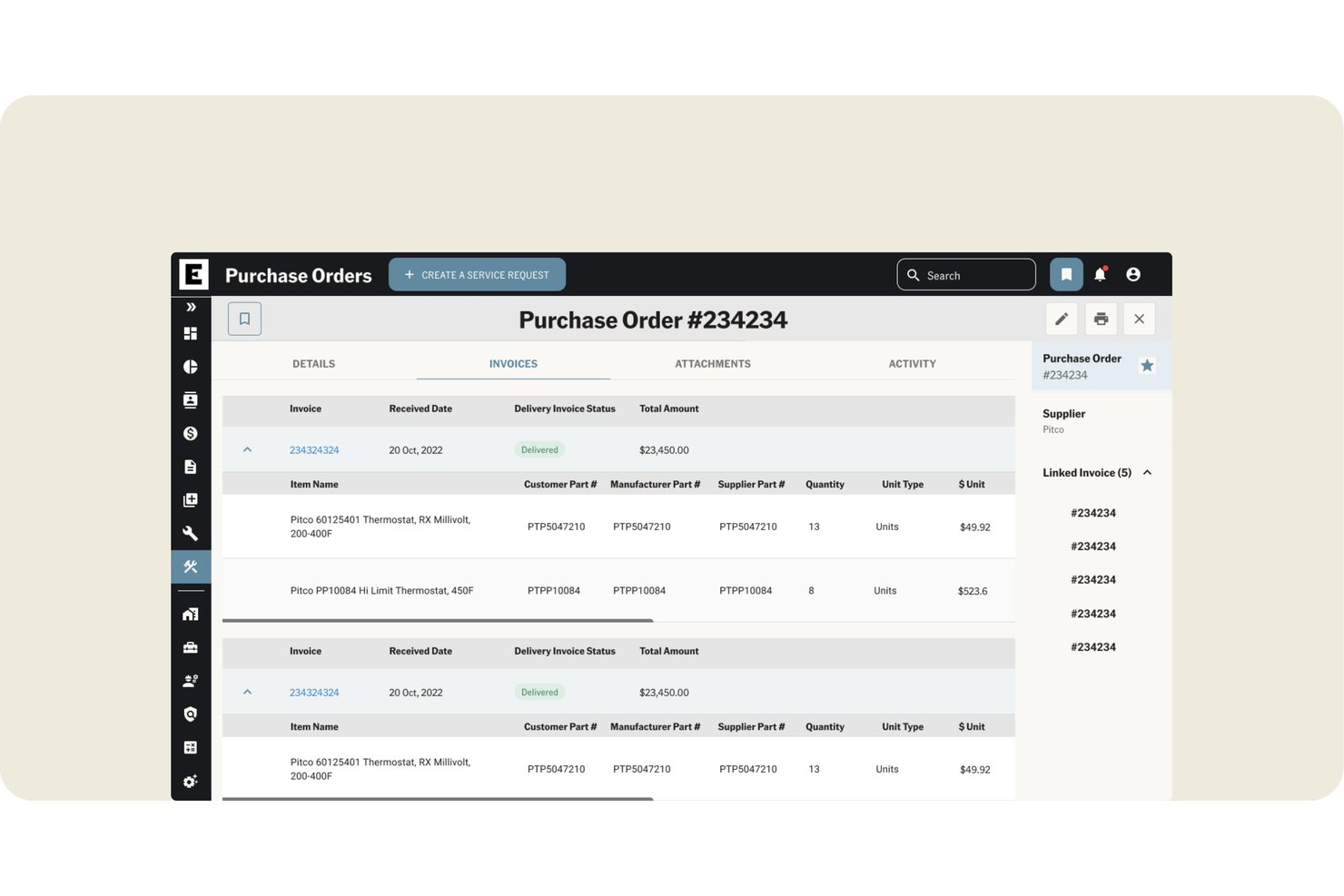
Ecotrak is a facilities management platform that combines work order tracking, asset lifecycle management, preventive maintenance scheduling, vendor coordination, and project planning across single and multi-site operations.
Who Is Ecotrak Best For?
Ecotrak suits operations teams managing facilities work across restaurant chains, retail networks, or any multi-site portfolio where vendor coordination is the daily bottleneck.
Why I Picked Ecotrak
I picked Ecotrak as one of the best because it handles multi-site vendor coordination better than most tools I've seen in this category. When you're running remodels or rollouts across dozens of locations, you can assign tasks directly to vendors, who then update progress and submit invoices and photos into the same system. The 15,000-plus vendor network with AI-powered provider recommendations, ranked by repair history and proximity, makes finding the right contractor for a specific site genuinely fast.
Ecotrak Key Features
- Preventive maintenance scheduling: Schedule recurring maintenance tasks to keep assets running and reduce unplanned downtime across your locations.
- Budget vs. actual spend tracking: Monitor real-time project spend against an allocated budget, including vendor invoices, labor costs, and other expenditures.
- Technician time tracking: Technicians can clock in, log drive time, and clock out against a specific work order, with manager visibility into timesheets.
- AI-powered work order summaries: Generate plain-language summaries of work order details to support reviews, approvals, dispatches, and follow-ups.
Ecotrak Integrations
Ecotrak offers native integrations with Claude Connector and ChatGPT. It also provides an external API using OAuth 2.0 client-credentials authentication for custom integrations.
Pros and Cons
Pros:
- Cross-site progress flags expose delayed work
- Project tasks capture vendor updates and documentation
- Work-order tracking through invoice approval praised
Cons:
- Some smaller vendors report system-use friction
- No project task dependencies or critical path
Annen programvare for prosjektstyring av fasilitetsforvaltning
Her er noen flere alternativer for programvare for prosjektstyring av fasilitetsforvaltning som ikke kom med på kortlisten min, men som likevel er verdt å se nærmere på:
- ServiceChannel
For multi-site contractor and budget oversight
- Corrigo
For large-portfolio asset oversight
- Fiix
For AI-driven maintenance insights
- eWorkOrders
For multi-site maintenance reporting
- Coast
For maintenance-first facilities teams
- Yardi Facility Manager
For property management integration
- FM:Systems
For multi-site facility portfolio projects
- MaintenanceCare
For multi-site maintenance asset planning
- IBM Maximo Application Suite
For managing large facility portfolios
- Planon
For real estate portfolio project budgeting


How I Evaluate Facilities Project Management Software
I split my evaluation into three parts, giving the most weight to core functionality: assign and track work orders, then schedule projects across sites. Next, I look for differentiators such as mobile field updates or capital planning forecasts. Finally, I consider beyond-feature factors, including onboarding, support, and pricing value.
Core Functionality (Table Stakes For This List)
When I'm selecting tools for my list, I score each one on a scale from 0 (does not offer the functionality) to 5 (excels in this area) for each core functionality listed below. I then convert the total into a percentage to help assess each tool's overall fit, with extra weight on any functionalities I’ve deemed essential.
- Work Orders & Tasks (Essential): I look for assignment, prioritization, status tracking, and closeout, including recurring maintenance requests and approval steps.
- Scheduling & Timelines (Essential): I evaluate task sequencing, dependencies, milestones, and progress views for projects such as equipment upgrades across a building.
- Multi-Site Management: I check whether teams can organize work by location and compare project status across buildings or a wider portfolio.
- Asset & Space Tracking: I look for structured links between work and specific equipment or spaces, plus asset history that informs maintenance planning.
- Vendor Coordination: I assess how teams assign work to contractors, exchange updates, and track vendor progress through project completion.
- Budget & Cost Tracking: I check whether teams can compare project budgets with actual costs and review spend by task, vendor, or facility.
Once I have a list of tools that meet the criteria, I consider what sets each platform apart.
Differentiating Factors (What Sets Vendors Apart)
Here's how I compare and contrast different vendors:
Standout Features
I look for a mobile field app that lets technicians update work orders, log time, and attach site photos without returning to an office. Capital planning forecasting is another separator—I evaluate whether a tool can model multi-year improvement plans and reserve fund projections across a portfolio. Floor plan or BIM visualization matters too, especially when teams need to pin active work orders or asset data onto a spatial view of a building.
Beyond Features
I evaluate how each tool handles implementation and change management, since facility teams mix office staff, field crews, and contractors with different comfort levels around software. Vendor-provided onboarding, asset data migration, and training resources directly affect how fast your team gets value. I also check the integration ecosystem—pre-built connections to ERP, accounting, and CMMS platforms like Yardi or IBM Maximo cut down on duplicate data entry across systems of record. Finally, I consider total cost of ownership, because per-user, per-site, and per-asset pricing models scale very differently depending on your portfolio size.
Slik velger du programvare for prosjektstyring av fasilitetsforvaltning
Det er lett å gå seg vill i lange funksjonslister og komplekse prismodeller. For å hjelpe deg med å holde fokus under utvelgelsesprosessen får du her en sjekkliste over faktorer du bør ha i tankene:
| Faktor | Hva du bør vurdere |
|---|---|
| Skalerbarhet | Kan programvaren vokse med virksomheten din? Ta hensyn til fremtidig ekspansjon og om verktøyet kan håndtere flere brukere og større datamengder uten problemer. |
| Integrasjoner | Kan den kobles til de eksisterende verktøyene dine? Sørg for at den integreres med de nåværende systemene dine, for eksempel ERP eller CRM, for å unngå datasiloer. |
| Tilpasningsmuligheter | Kan du tilpasse programvaren til arbeidsflytene dine? Se etter fleksible innstillinger som lar deg tilpasse verktøyet til de spesifikke prosessene og behovene dine. |
| Brukervennlighet | Er grensesnittet intuitivt for teamet ditt? Brukerne bør kunne navigere enkelt uten omfattende opplæring, slik at tiden som brukes på å lære verktøyet, reduseres. |
| Implementering og innføring | Hvor smidig er oppsettprosessen? Vurder hvilke ressurser som kreves, og om leverandøren tilbyr støtte som opplæringsøkter eller hjelp med oppsettet, slik at du raskt kommer i gang. |
| Kostnad | Hva er den totale eierkostnaden? Ta ikke bare hensyn til abonnementsprisen, men også tilleggsgebyrer for kundestøtte, opplæring eller oppgraderinger som kan påvirke budsjettet ditt. |
| Sikkerhetstiltak | Hvordan beskytter programvaren dataene dine? Se etter funksjoner som kryptering, tilgangskontroller for brukere og overholdelse av personvernregler for å opprettholde sikkerheten. |
| Tilgjengelig kundestøtte | Er hjelp lett tilgjengelig? Sjekk om leverandøren tilbyr kundestøtte døgnet rundt, flere kontaktmetoder og en omfattende kunnskapsbase som kan hjelpe når problemer oppstår. |
Hva er programvare for prosjektstyring av anlegg?
Programvare for prosjektstyring av anlegg er et verktøy som hjelper deg med å administrere vedlikehold og drift av anlegg. Anleggsforvaltere, vedlikeholdsteam og driftspersonell bruker vanligvis disse verktøyene til å organisere oppgaver og optimalisere ressursbruken.
Funksjoner for håndtering av arbeidsordrer, sporing av aktiva og planlegging av vedlikehold bidrar til å organisere den daglige driften, forbedre anleggets ytelse, øke effektiviteten og redusere driftskostnadene.
Funksjoner i programvare for prosjektstyring av anlegg
Når du velger programvare for prosjektstyring av anlegg, bør du se etter følgende viktige funksjoner:
- Håndtering av arbeidsordrer: Organiserer og sporer vedlikeholdsoppgaver, slik at ingenting blir glemt.
- Sporing av aktiva: Overvåker tilstanden og plasseringen til aktiva for å bidra til å forlenge levetiden deres.
- Planlegging av vedlikehold: Planlegger regelmessige vedlikeholdsaktiviteter for å forhindre uventede driftsstans.
- Lagerstyring: Holder oversikt over deler og forsyninger for å redusere risikoen for utsolgte varer.
- Leverandørstyring: Lar deg administrere relasjoner og kontrakter med tjenesteleverandører for effektivt samarbeid.
- Mobil tilgang: Lar team administrere oppgaver mens de er på farten, noe som øker fleksibiliteten og produktiviteten.
- Tilpassbare instrumentbord: Gir visuell og handlingsrettet innsikt i viktige ytelsesindikatorer, slik at du kan ta informerte beslutninger.
- Sikkerhetstiltak: Beskytter sensitive data med funksjoner som kryptering og tilgangskontroller for brukere.
Fordeler med programvare for prosjektstyring av anlegg
Implementering av programvare for prosjektstyring av anlegg gir flere fordeler for anleggsteamet og virksomheten din. Her er noen av fordelene du kan se frem til:
- Økt effektivitet: Automatiserer og organiserer oppgaver som arbeidsordrer for å redusere tiden som brukes på manuelle prosesser.
- Kostnadsbesparelser: Planlegging av forebyggende vedlikehold minimerer uventede reparasjoner, forlenger levetiden til aktiva og sparer penger.
- Bedre ressursstyring: Sporer lagerbeholdning og aktiva for å hjelpe deg med å bruke ressursene mer effektivt.
- Bedre beslutningstaking: Tilpassbare instrumentbord og rapporter gir innsikt i driften og bidrar til strategisk planlegging.
- Bedre samarbeid: Verktøy for leverandørstyring legger til rette for smidigere samhandling med tjenesteleverandører.
- Økt fleksibilitet: Mobil tilgang lar teamet ditt administrere oppgaver hvor som helst, noe som gir større fleksibilitet.
- Økt datasikkerhet: Beskytter sensitiv informasjon med sikkerhetstiltak som kryptering og tilgangskontroller.
Kostnader og priser for programvare for prosjektstyring av anlegg
Kostnadene for programvare for prosjektstyring av anlegg varierer basert på funksjoner, teamstørrelse, tillegg og mer. Tabellen nedenfor oppsummerer vanlige abonnementer, gjennomsnittsprisene deres og typiske funksjoner som er inkludert i programvareløsninger for prosjektstyring av anlegg:
Sammenligningstabell for abonnementer for programvare for prosjektstyring av anlegg
| Plantype | Gjennomsnittspris | Vanlige funksjoner |
|---|---|---|
| Gratisplan | $0 | Grunnleggende arbeidsordrebehandling, begrenset sporing av eiendeler og grunnleggende rapportering |
| Personlig plan | $5 - $25 per bruker per måned | Arbeidsordrebehandling, sporing av eiendeler, vedlikeholdsplanlegging og mobiltilgang. |
| Bedriftsplan | $30 - $60 per bruker per måned | Avansert rapportering, leverandørstyring, lagerstyring og tilpassbare oversikter. |
| Storbedriftsplan | $70 - $100 per bruker per måned | Omfattende sikkerhetsfunksjoner, integrasjonsmuligheter, prediktivt vedlikehold og full tilgang til kundestøtte. |
Vanlige spørsmål om programvare for prosjektstyring av fasiliteter
Her er noen svar på vanlige spørsmål om programvare for prosjektstyring av fasiliteter:
Hvor lang tid tar det å implementere programvare for prosjektstyring av fasiliteter?
Implementeringstiden kan variere avhengig av hvor komplekse de nåværende systemene dine er, og hvilken programvare du velger. Vanligvis tar det fra noen uker til flere måneder. Planlegg datamigrering og opplæring for å sikre en smidig overgang for teamet ditt.
Kan programvare for prosjektstyring av fasiliteter integreres med eksisterende systemer?
Det meste av programvaren for prosjektstyring av fasiliteter kan integreres med andre systemer, for eksempel ERP-, CRM- eller regnskapsprogramvare. Undersøk om verktøyet tilbyr API-er eller ferdigbygde integrasjoner som kobles til den eksisterende teknologiplattformen din.
Passer programvare for prosjektstyring av fasiliteter for små bedrifter?
Ja, mange verktøy for prosjektstyring av fasiliteter er skalerbare og tilbyr abonnementer som er tilpasset små bedrifter. De har viktige funksjoner som arbeidsordrebehandling og sporing av eiendeler, slik at små team kan administrere fasiliteter effektivt uten behov for komplekse løsninger.
Hvordan fungerer skybasert programvare for prosjektstyring av fasiliteter?
Skybaserte løsninger lagrer dataene dine på eksterne servere og gir tilgang fra hvor som helst med internettilkobling. Dette gir fleksibilitet, slik at teamet ditt kan administrere oppgaver underveis, samtidig som datasikkerheten ivaretas gjennom regelmessige oppdateringer og sikkerhetskopier.
Hvilke sikkerhetstiltak bør jeg se etter i programvare for prosjektstyring av fasiliteter?
Se etter funksjoner som datakryptering, tilgangskontroller for brukere og samsvar med regelverk for databeskyttelse. Disse tiltakene bidrar til å beskytte sensitiv informasjon, slik at bare autoriserte brukere får tilgang til kritiske data.