

De 10 beste programmene for kundeoppstart vurdert i 2026

Beste programvare for kundeonboarding


Den beste programvaren for kundeonboarding lar deg automatisere onboardingoppgaver, følge opp tidsfrister og sørge for at hver kunde får en god start. Uten riktig verktøy vil du slite med å holde orden, håndtere onboarding effektivt og holde kundene fornøyde. Dette gjør det vanskeligere å bygge et godt arbeidsforhold med kundene dine og innfri forventningene deres gjennom hele samarbeidet.
Jeg har brukt erfaringen min fra å drive et byrå og over 3 års testing av programvare til å vurdere dusinvis av verktøy og sette sammen listen min over den beste programvaren for kundeonboarding. Hver av anbefalingene mine nedenfor vil redusere mengden onboardingoppgaver du må håndtere, slik at du kan konsentrere deg om viktig arbeid for kundene. Jeg går gjennom de viktigste funksjonene i hvert verktøy og hvordan de hjelper, i tillegg til fordeler og ulemper samt typiske bruksområder.
Hvorfor du kan stole på våre programvareanbefalinger
Teamet vårt har testet og anmeldt programvare siden 2012. Vi er selv prosjektledere, så vi vet hvor vanskelig og hvor viktig det er å velge riktig programvare.
I denne guiden har vi vurdert verktøyene gjennom praktisk testing og uavhengig research og gitt dem poeng ut fra våre utvelgelseskriterier. Vi bygger også på innsikt fra ledende eksperter i bransjen og erfarne prosjektledere.
Anmeldelsene våre bygger på vår egen redaksjonelle vurdering. De er ikke et salgsargument.
Ekspertanmeldere:
Sammenligningstabell for programvare for kundeonboarding
Tabellen nedenfor sammenligner prisdetaljer for mine beste utvalgte programmer for kundeonboarding.
| Tool | Best For | Trial Info | Price | ||
|---|---|---|---|---|---|
| 1 | Best for CRM-triggered onboarding automation | 14-day free trial | From €59/user/month | Website | |
| 2 | Best for interactive training and automation | 14-day free trial | Pricing upon request | Website | |
| 3 | Best for client communication management | Free demo available | From $5,000/year (billed annually) | Website | |
| 4 | Best for mobile-friendly client training | Free demo + 30-day free trial available | From $3.97/user/month (billed annually) | Website | |
| 5 | Best with 1,000+ prebuilt app connectors | 30-day free trial | Pricing upon request | Website | |
| 6 | Best for agentic AI capabilities | 14-day free trial + free demo available | From $19/user/month (billed annually) | Website | |
| 7 | Best for custom onboarding portals | Free plan + free demo available | From $350/month (billed annually) | Website | |
| 8 | Best for managing onboarding projects | Free plan available | From $7/user/month (billed annually) | Website | |
| 9 | Best for customer retention | Free demo available | Pricing upon request | Website | |
| 10 | Best for custom in-app experiences | 14-day free trial | From $299/month | Website |


Vurdering av den beste programvaren for kundeonboarding
Nedenfor finner du mine detaljerte sammendrag av den beste programvaren for kundeonboarding som kom med på kortlisten min. I vurderingene mine får du en grundig gjennomgang av de viktigste funksjonene, fordeler & ulemper, integrasjoner og ideelle bruksområder for hvert verktøy, slik at du kan finne det som passer best for deg.

Best for CRM-triggered onboarding automation
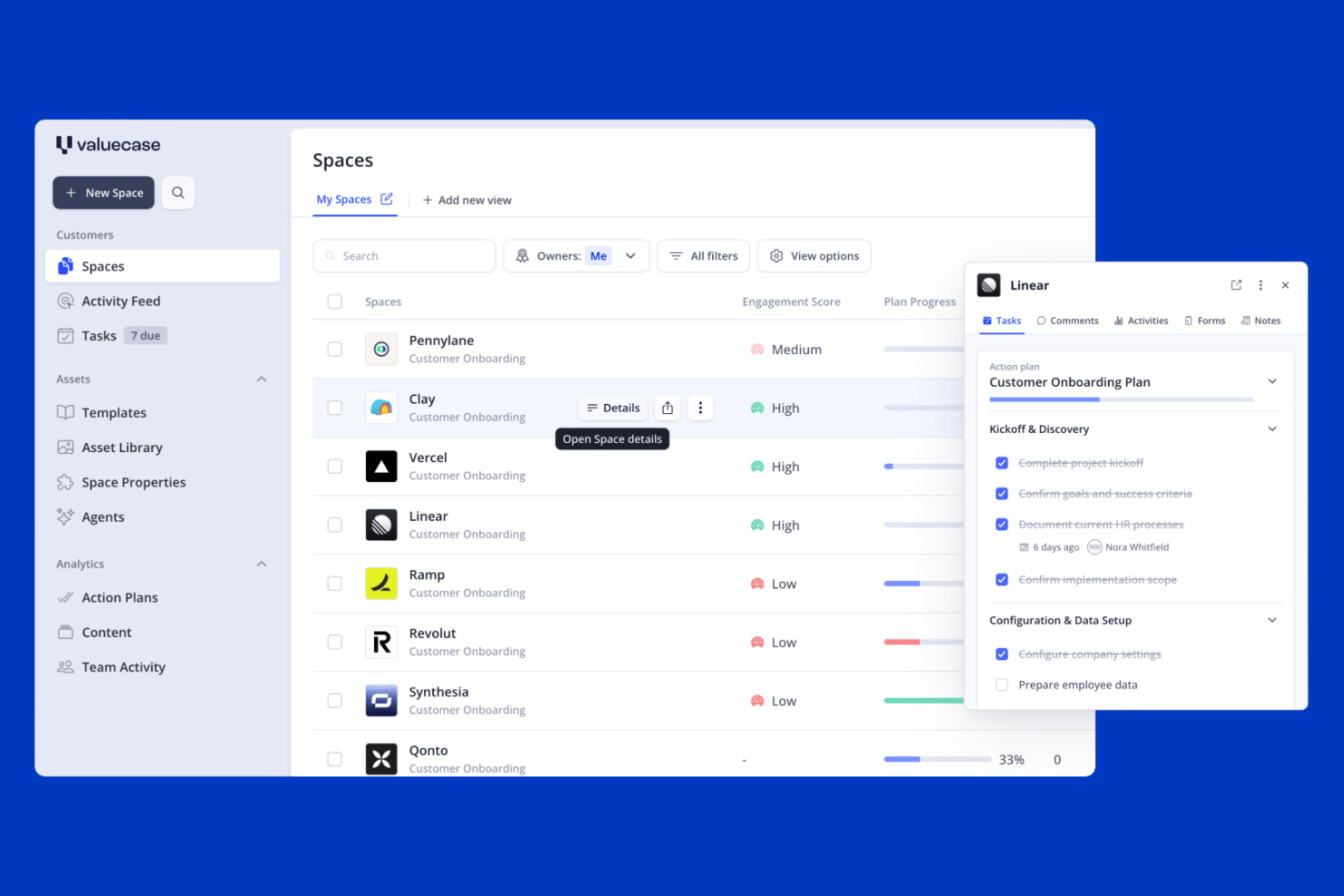
Valuecase is a client onboarding platform that combines branded client Spaces, CRM-triggered workflow automation, intake forms, and built-in live chat into a single workspace.
Who Is Valuecase Best For?
Valuecase is a strong fit for B2B SaaS teams that want to automate the handoff from sales to onboarding using CRM data from HubSpot or Salesforce.
Why I Picked Valuecase
Valuecase earns its spot on my shortlist because of how well it handles the sales-to-onboarding handoff using live CRM data. When a deal closes in HubSpot or Salesforce, Valuecase can automatically spin up a personalized client Space, pre-populated with the right tasks, forms, and milestones, without anyone touching it manually. I also like the built-in live chat inside each Space, which keeps client questions tied to the onboarding record instead of scattered across inboxes.
Valuecase Key Features
- No-login client access: Clients open their onboarding Space via a shared link without creating an account, with optional password protection available.
- Multilingual support: Spaces automatically detect and display content in the client's language across 7+ supported languages using AI-powered translation.
- Reusable Space templates: Build and save unlimited onboarding templates with tasks, milestones, forms, and embedded content to deploy across new accounts instantly.
- Engagement analytics: Track client activity, content usage, and time-to-completion across all active Spaces from a central dashboard to spot at-risk accounts early.
Valuecase Integrations
Valuecase offers native integrations with HubSpot, Salesforce, and Calendly, plus connections to Google Drive, Google Docs, Google Slides, Slack, and Microsoft Teams. It also supports Make, Albato, Zapier, and a REST API for custom integrations.
Pros and Cons
Pros:
- Built-in multilingual and AI-powered features
- CRM-triggered onboarding automates sales handoff
- Branded client portals with no-login access
Cons:
- E-signature features lack compliance depth
- No native project management tool integration
SkyPrep
Best for interactive training and automation
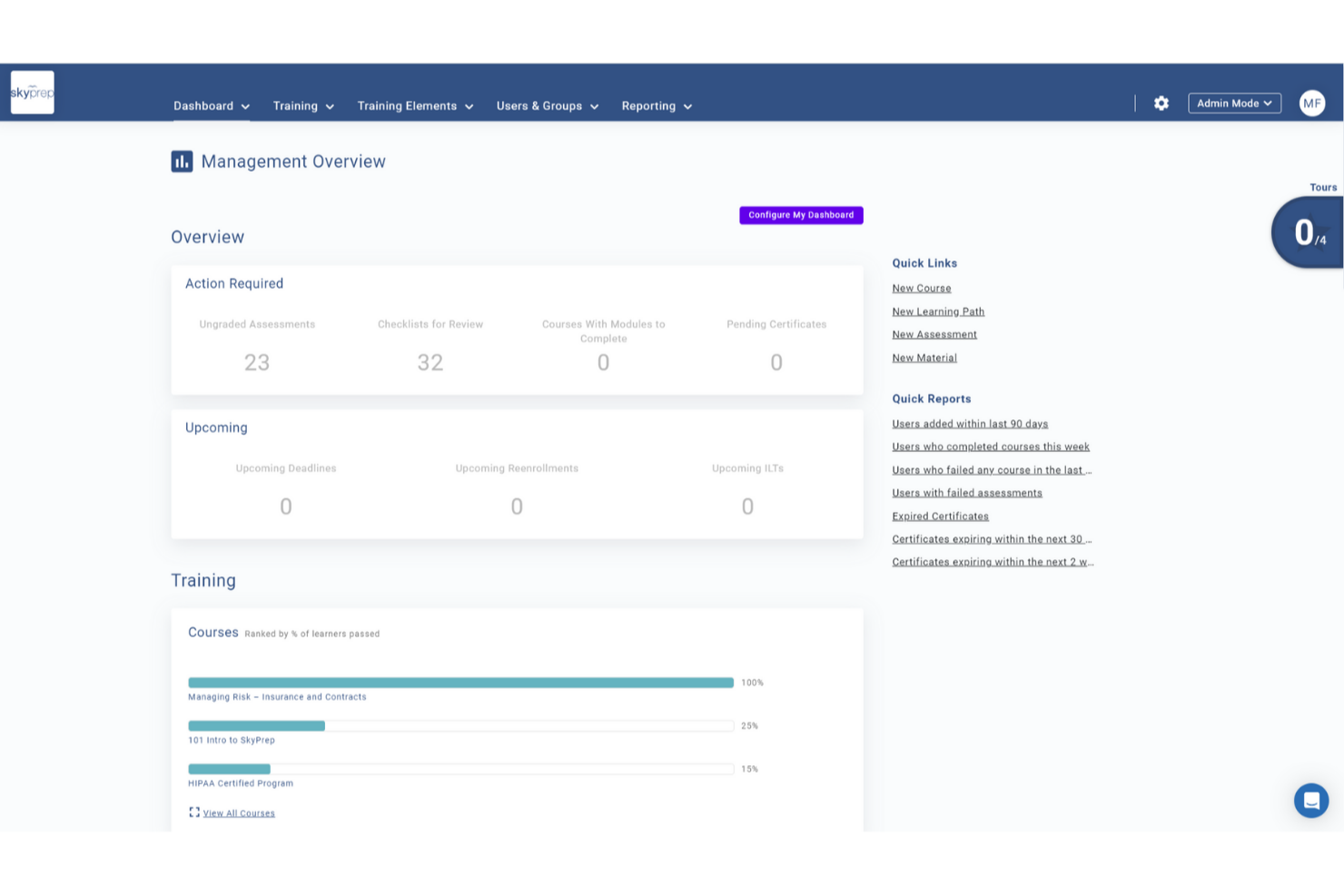
For teams looking to support client onboarding through structured training, SkyPrep offers a flexible learning platform used across industries such as corporate training, compliance, and customer education. Your team can leverage its dynamic course creation and user management capabilities to address the common challenge of engaging new clients effectively. By focusing on improving the onboarding experience, SkyPrep empowers businesses to foster stronger relationships with clients from the start.
Why I Picked SkyPrep
I picked SkyPrep for its exceptional ability to simplify client onboarding through its interactive training and automated notifications. The platform's interactive training allows you to customize and gamify content, keeping your clients engaged and motivated throughout the onboarding process. Additionally, automated notifications ensure clients receive timely reminders about their training requirements, helping them stay on track and reducing the manual effort on your team.
SkyPrep Key Features
In addition to its interactive training and automated notifications, SkyPrep offers:
- Course Auto-Enrollment: Automatically assigns new users to relevant training based on their profiles, ensuring they receive appropriate onboarding without manual intervention.
- Learning Paths: Organizes courses into structured sequences, allowing learners to progress through prerequisite training systematically.
- Resource Center: Centralizes training materials like videos and PDFs, providing easy access for new clients to support their learning.
- White Labeling: Customizes the LMS with branding options, enhancing the onboarding experience and fostering engagement.
SkyPrep Integrations
Integrations include PayPal, Stripe, Cisco Webex Meetings, ClickMeeting, GoToMeeting, Microsoft Teams, Zoom, Active Directory Connector, ADP, and BambooHR.
Pros and Cons
Pros:
- Offers robust data protection for secure client information handling
- Automated notifications keep clients informed about training progress
- Interactive training customizes content for engaging client onboarding
Cons:
- Some users find the reporting features lacking depth
- Users report occasional glitches with video uploads

Moxo
Best for client communication management

Moxo is a client collaboration and workflow automation platform aimed at businesses looking to enhance client communication and streamline processes. It serves industries like real estate and banking, focusing on client onboarding, document management, and task coordination.
Why I Picked Moxo
Moxo helps you manage client communication through role-based portals, so everyone knows where to go and what to do. Its AI handles the repetitive stuff, so your team can focus on real decisions. It also connects with your systems to keep everything running smoothly and organized.
Moxo Key Features
In addition to communication management, Moxo offers several other features for client onboarding.
- Workflow Automation: You can automate complex processes and eliminate manual tasks by creating customizable workflows that integrate forms, approvals, and e-signatures.
- Document Management: This includes document uploads, e-signature capabilities, version control, audit trails, and compliance tracking to help you manage documents efficiently and securely.
- Analytics and Reporting: You can track key metrics to identify bottlenecks and improve processes. This feature helps you optimize the onboarding workflow and improve overall efficiency.
- Zero-Login Access: This provide clients with easy access to portals and lets them engage without creating accounts, which increases completion rates.
Moxo Integrations
Integrations include Salesforce, Slack, Gmail, Box, Stripe, HubSpot, Jira, QuickBooks, Jotform, and Docusign.
Pros and Cons
Pros:
- Supports multiple industries
- Integrates AI effectively
- Boosts client communication
Cons:
- Requires technical setup
- Integration challenges

Best for mobile-friendly client training

iSpring LMS is a cloud-based learning management system (LMS) designed to make client onboarding efficient and engaging. It provides businesses with tools to deliver personalized learning paths, track progress, and keep clients engaged through interactive content.
Why I Picked iSpring LMS
I picked iSpring LMS for its strong mobile and offline learning capabilities, which make it easy for clients to complete training anytime, anywhere. It also supports development plans and compliance training, which can help businesses tailor onboarding experiences to different client needs. Additionally, iSpring LMS stands out for its robust reporting features that give you insights into client progress and training effectiveness.
iSpring LMS Key Features
In addition to being mobile-friendly, iSpring LMS offers a range of other features that can help with client onboarding.
- Launch and Engage: You can create and assign digital onboarding programs with interactive training paths that keep clients engaged from the start.
- Automation: This lets you automatically enroll clients, assign relevant training, and send notifications to reduce manual workload and ensure timely progress.
- Tracking: You can monitor client progress in real-time and adjust the training approach to better meet their needs.
- Newsfeed: This lets you keep clients informed and connected throughout their onboarding journey by sharing updates and important information.
iSpring LMS Integrations
Integrations include BambooHR, Tilda, Shopify, Zoom, Microsoft Teams, Google Meet, and Salesforce.
Pros and Cons
Pros:
- Robust reporting and analytics
- Strong mobile and offline learning support
- AI-assisted course creation tools
Cons:
- Fewer gamification features compared to competitors
- Limited customization for course layouts
New Product Updates from iSpring LMS

iSpring LMS Adds Multiple Observations to OJT Sessions
iSpring LMS now lets managers log multiple observations within one OJT session, grouping visits and auto-generating summary stats like averages, criterion results, and comparisons. For more information, visit iSpring LMS's official site.

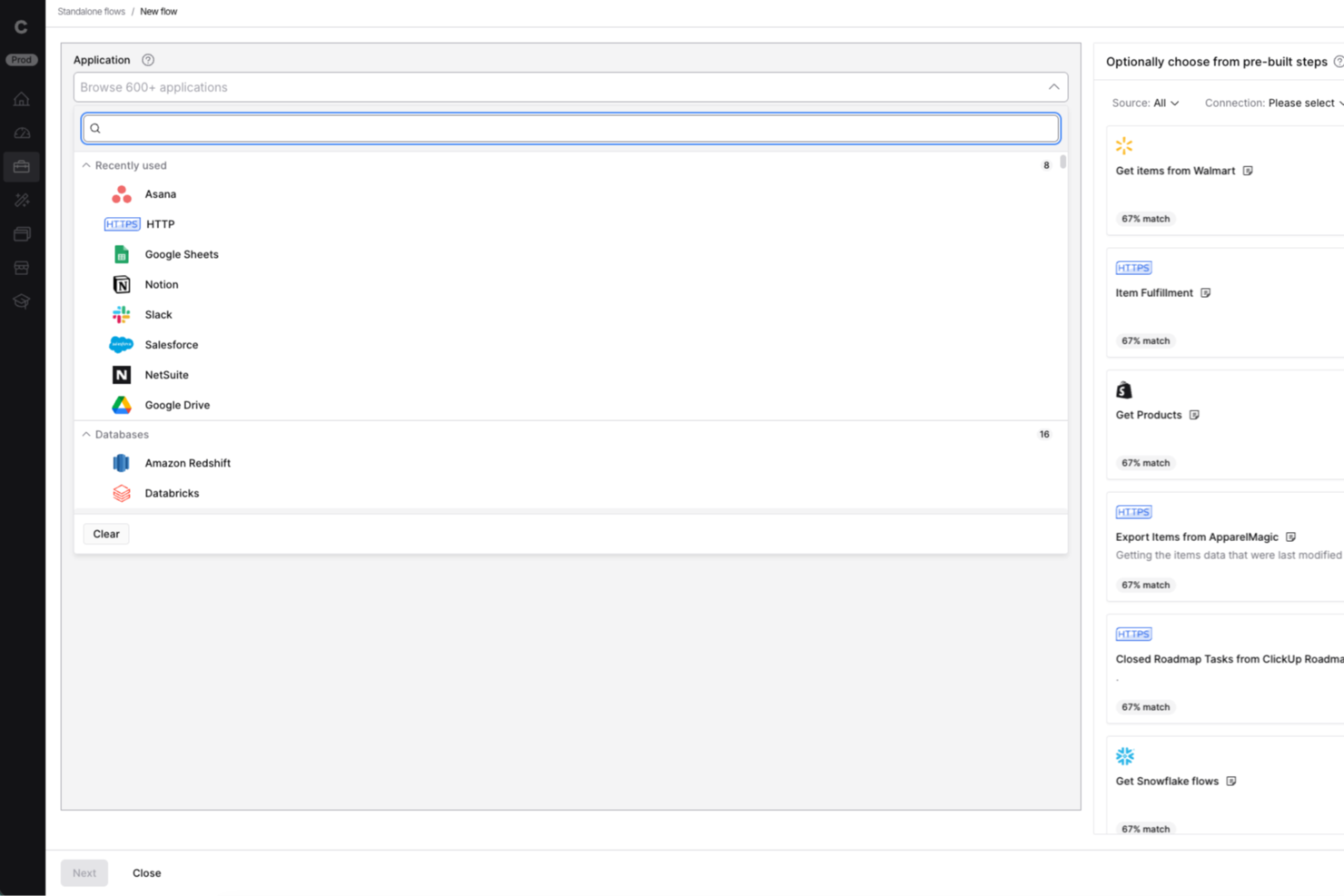
Celigo is an integration and automation platform for businesses that need to connect multiple apps and automate onboarding workflows, helping teams in IT, operations, and client services eliminate manual data entry and streamline client onboarding across systems.
Who Is Celigo Best For?
Celigo suits IT and operations teams at mid-sized to large businesses that need to automate onboarding across multiple apps and platforms.
Why I Picked Celigo
I picked Celigo as one of the best because I can connect over 1,000 apps right out of the box, which is a huge advantage when onboarding clients who use a mix of systems. My team uses the prebuilt connectors to automate data flows between CRMs, billing, and support tools without custom development. In practice, that means we can quickly set up onboarding workflows that sync client data across platforms like Salesforce, NetSuite, and Zendesk.
Celigo Key Features
- Visual flow builder: Design onboarding workflows using a drag-and-drop interface.
- Error management dashboard: Monitor and resolve integration errors from a single dashboard.
- Role-based access controls: Set permissions for team members managing onboarding processes.
- API management tools: Configure and manage custom API integrations for unique onboarding needs.
Celigo Integrations
Integrations include Salesforce, Microsoft Dynamics 365 Business Central, Oracle NetSuite, Walmart, SAP, Snowflake, Acumatica, Adobe, ADP, and 3PL Central.
Pros and Cons
Pros:
- Enables granular field-level data mapping
- Provides real-time error monitoring and alerts
- Offers protocol compatibility for legacy systems
Cons:
- Limited onboarding templates for niche industries
- Requires technical setup for advanced workflows
New Product Updates from Celigo
Celigo Adds SuiteTax and Variant Publishing for Shopify–NetSuite
Celigo adds NetSuite SuiteTax support and variant-level sales channel publishing to its Shopify–NetSuite integration. These updates improve tax handling and give merchants more control over how product variants are published. For more information, visit Celigo’s official site.
 .
.
Best for agentic AI capabilities

Rocketlane is a professional services automation (PSA) and customer onboarding tool built for project managers and service delivery teams. It combines project management, financial tracking, and resource planning to enhance team collaboration and drive better service delivery.
Adam Bushell, owner and director of AB Electrical and Communications, found the shared dashboards especially impactful: “Clients could log in at any point to see exactly where their project stood. That transparency reduced misunderstandings, minimized disputes, and made handovers seamless.”
Why I Picked Rocketlane
Rocketlane lets you and your team collaborate closely with clients using shared workspaces. You can use project templates and automations to stay efficient and on schedule. Its agentic AI updates help you keep clients in the loop without extra effort. It's built to make remote work and communication easier.
Rocketlane Key Features
In addition to remote collaboration, Rocketlane offers several other features that cater to effective client onboarding.
- SmartFill: This simplifies the process of filling out project information and creating updates and minimizes manual data entry.
- Customer Portals: This helps facilitate communication and accountability through shared portals and automated reminders for a seamless client experience.
- Unified Project Management: This combines various project management tasks into one platform, reduces the need for multiple tools, and increases efficiency.
- Performance Insights: This provides analytics on project performance, team utilization, and customer satisfaction to help you make informed decisions.
Rocketlane Integrations
Integrations include Salesforce, HubSpot, Slack, Google Calendar, Zapier, and Jira.
Pros and Cons
Pros:
- Automated task management
- Real-time client interaction
- AI-driven updates
Cons:
- Initial setup complexity
- Limited offline access
New Product Updates from Rocketlane

Rocketlane Introduces Governance and Workforce Agents
Rocketlane introduces Governance Agents and Workforce Agents to automate delivery processes and recurring tasks. These updates help teams enforce rules and streamline project execution. For more information, visit Rocketlane’s official site.
 .
.
Dock
Best for custom onboarding portals

Dock is a client onboarding and collaboration platform designed for businesses that need personalized client interactions. It serves teams in sales, customer success, and project management, helping them create custom onboarding portals and manage client communication.
Why I Picked Dock
It allows you to create custom onboarding portals tailored to your clients' needs. These portals can include personalized content, making client interactions more meaningful. The platform supports document sharing and tracking, ensuring your clients have everything they need in one place. Its focus on customization makes it ideal for businesses that value personalized client experiences.
Dock Key Features
Dock also offers several other features that make it a compelling choice for client onboarding software.
- Templated Workspaces: This lets you quickly set up onboarding workspaces, which saves time and helps maintain consistency across different clients.
- Survey Forms: You can create and distribute survey forms to collect valuable client feedback during the onboarding process, which helps with continuous improvement and client satisfaction.
- File Upload Buttons: This lets clients easily upload necessary documents without needing to navigate away from the onboarding portal, which streamlines the data collection process.
- Analytics and Reporting: You can track customer engagement and onboarding progress and get insights that can help refine and improve the onboarding experience.
Dock Integrations
Integrations include Salesforce, HubSpot, Slack, Google Drive, Microsoft Teams, Asana, Jira, ClickUp, and Zoom.
Pros and Cons
Pros:
- Tracks document engagement
- Supports collaborative editing
- Customizable client portals
Cons:
- Limited offline functionality
- Learning curve for new users

ClickUp
Best for managing onboarding projects

ClickUp is a productivity platform that brings together various tools for client management, project management, communication, and collaboration. By consolidating tasks, calendars, and other essential functions under one roof, ClickUp can help and your team onboard clients and manage and execute projects.
Why I Picked ClickUp
I picked ClickUp because of its ability to automate task assignments, which helps your team focus on more important aspects of client management without getting bogged down by manual processes. ClickUp lets you monitor onboarding progress and collect feedback and provides valuable insights into how to optimize the experience for new clients.
ClickUp's project tracking tools are another reason it stands out as a client onboarding software. These tools help you keep tabs on multiple aspects of your onboarding projects, so nothing falls through the cracks. The platform also provides features for collecting employee feedback and analyzing training performance, so you can keep improving your onboarding procedures.
ClickUp Key Features
ClickUp also offers several other features tailored for client onboarding.
- AI-Powered Assistance: This helps you generate checklists and summaries and makes it easier to organize and track client onboarding tasks.
- Centralized Documentation: ClickUp provides a single location to store client-related documents and make sure your team always has easy access to necessary information.
- Collaborative Spaces: This lets your team and clients communicate openly and share feedback, which fosters a more interactive onboarding process.
- Automated Follow-Ups: You can maintain client engagement by scheduling and sending follow-up messages automatically.
ClickUp Integrations
Integrations include Microsoft OneDrive, Outlook, Google Calendar, Slack, Trello, Asana, Jira, GitHub, Zoom, Twilio, Zendesk, and Salesforce.
Pros and Cons
Pros:
- Highly customizable interface
- Comprehensive task management features
- Effective for managing multiple projects and deadlines
Cons:
- Limited offline functionality
- Setup time may be excessive for short-term projects
New Product Updates from ClickUp
ClickUp Adds Meetings Hub, Super Agent Templates, and ZoomInfo Integration
ClickUp adds a searchable Meetings Hub, new ways to clone and template Super Agents, and a ZoomInfo integration through the App Center. These updates improve meeting retrieval, agent reuse, and access to sales intelligence. For more information, visit ClickUp’s official site.

Best for customer retention
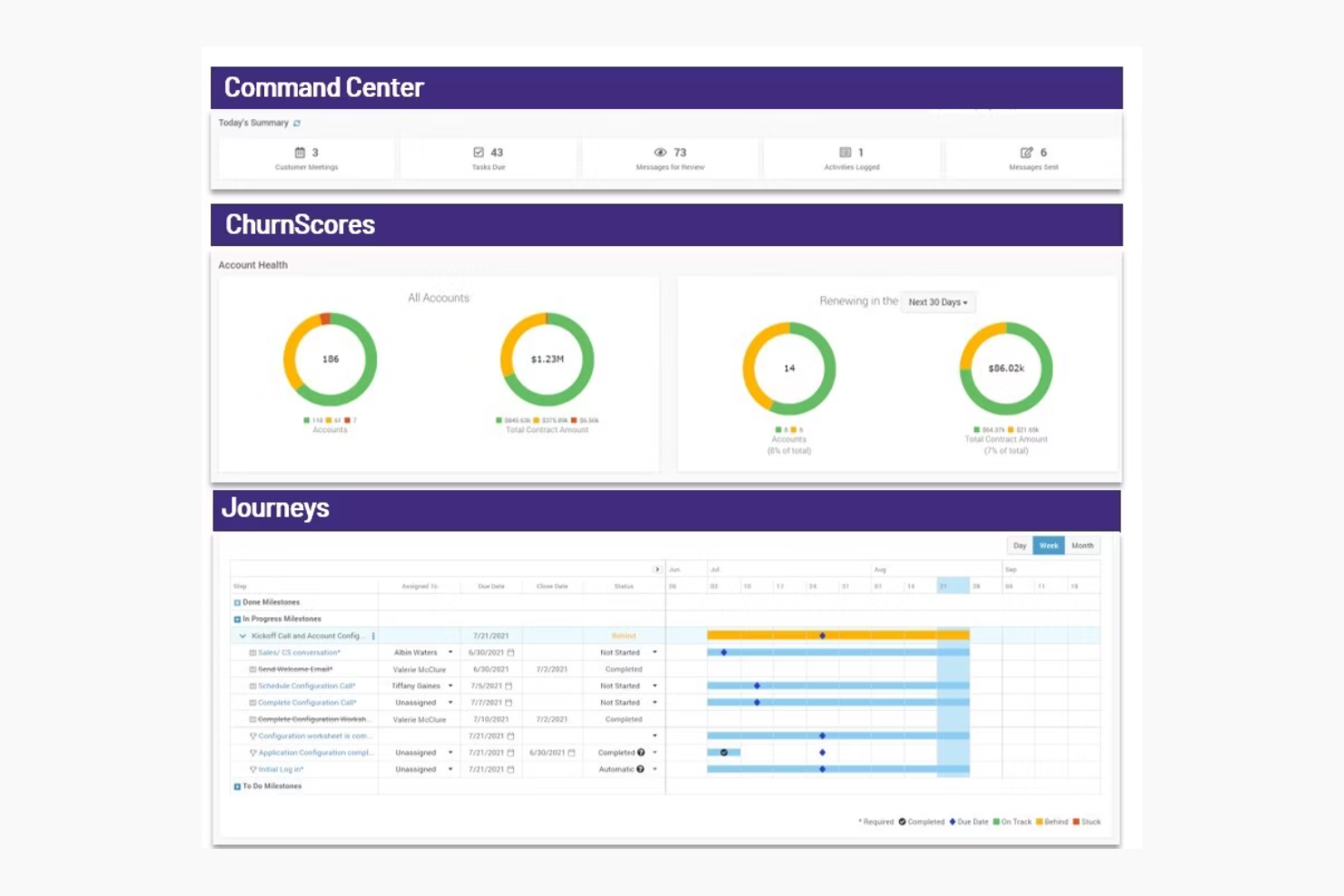
ChurnZero is a customer success platform designed for SaaS companies and customer success teams. It focuses on improving customer retention and engagement by providing insights, analytics, and communication tools.
Why I Picked ChurnZero
ChurnZero helps you keep customers by showing real-time health scores, so your team can spot at-risk accounts early. You can use automated playbooks to reach out before issues grow. Its in-app messaging lets you talk to users right where they are. It's built for SaaS teams focused on retention.
ChurnZero Key Features
ChurnZero also offers a variety of other features that can help you with client onboarding.
- Comprehensive Customer View: You get real-time insights into customer health and sentiment by integrating data from product usage, CRM, and support systems.
- AI-Powered Tools: You can automate administrative tasks to free up your team for more strategic customer interactions.
- Collaboration and Automation: This lets you use chatbots, customer playbooks, and real-time alerts to boost team efficiency.
- Advanced Analytics: You can monitor customer relationships and predict churn risk with tools like health scores and detailed reporting.
ChurnZero Integrations
Integrations include Salesforce, HubSpot, Zendesk, Slack, Intercom, Mailchimp, Microsoft Dynamics, and Pipedrive.
Pros and Cons
Pros:
- Ideal for SaaS companies
- Customizable success dashboards
- Automated engagement playbooks
Cons:
- Costly for smaller teams
- Complex setup process

Userpilot
Best for custom in-app experiences

Userpilot is a product growth platform that can improve client onboarding. It offers tailored in-app experiences that guide new users and make sure they're getting the most out of your product or services.
Why I Picked Userpilot
One of the reasons I picked Userpilot is its ability to create customized in-app experiences without the need for coding. This lets you guide users through your product in a way that feels natural and intuitive to them. Another feature is its in-app feedback collection, which lets you gather user insights directly from within the app so you can understand user needs and improve your product accordingly.
Userpilot also offers session replay capabilities, which lets you visualize user journeys and identify areas for improvement. This feature is invaluable for refining your onboarding process and making sure users can navigate your product with ease. Additionally, Userpilot provides mobile support so you can create mobile-first onboarding experiences that cater to users on the go.
Userpilot Key Features
Userpilot also offers a wealth of other features that can help you improve client onboarding and user engagement.
- Onboarding Checklists: This helps users learn about the product and reduce time-to-value. You can create them with a no-code builder that triggers specific actions and tracks progress through analytics.
- Resource Centers: This provides self-service support and lets users find answers without leaving the product. It's also built with a no-code editor for targeted modules.
- User Segmentation: You can set up personalized onboarding by segmenting users based on demographics and product usage, which allows for targeted flows and detailed analytics.
- NPS Surveys: You can create and analyze net promoter score surveys using a no-code builder, with options for audience targeting and AI-powered localization for translations.
Userpilot Integrations
Integrations include HubSpot, Salesforce, Segment, Google Tag Manager, Zendesk, Google Analytics, Intercom, Amplitude, Mixpanel, and Heap.
Pros and Cons
Pros:
- Track product growth goals and analyze feedback
- Fast implementation and deployment of features
- Offers customizable options
Cons:
- Integrations with other tools can be difficult
- Content creation plugin can be cumbersome to use
Annen programvare for kundeonboarding
Her er noen flere alternativer for programvare for kundeonboarding som ikke kom med på kortlisten min, men som likevel er verdt å se nærmere på:
- Whatfix
For in-app guidance
- Appcues
For user onboarding flows
- GUIDEcx
For project transparency
- Process Street
For centralized policy management
- Intercom
For in-app messaging
- Userlane
For custom onboarding content
- Clustdoc
For document collection
- ShareFile
For secure file sharing
- Content Snare
For automated client reminders
- Fenergo
For regulatory compliance
- Leadsie
For managing multi-platform access
- Motion.io
For task automation
- Chameleon
For product tours
- Trupeer
For personalized video creation
- Travitor
For blended learning programs


How I Evaluate Client Onboarding Software
I evaluate every tool in two layers: the baseline capabilities—intake forms, client portals, workflow automation—and the differentiators that separate strong options for agencies and PMOs.
Core Functionality (Table Stakes For This List)
When I'm selecting tools for my list, I rank each one on a scale from 0 (does not offer the functionality) to 5 (excels in this area) for each core functionality listed below. Then, I calculate the tool's total score into a percentage. Each tool needs to achieve a minimum total score of 65% to be considered for inclusion.
- Client Intake Forms: I check whether a tool lets you build branded questionnaires with conditional logic—like surfacing different fields for a retainer client vs. a one-off project.
- Document & File Collection: The ability to send structured file requests, track what's missing, and nudge clients with reminders matters more than a simple upload button.
- Onboarding Workflow Automation: I look for trigger-based task sequences that move a client through stages automatically, such as assigning a PM after intake is submitted.
- Client-Facing Portal: I evaluate whether clients get a branded space to view their progress, complete tasks, and communicate—without needing a product login or seat.
- E-Signature & Approvals: Tools like HoneyBook and Dubsado handle signatures natively, while others rely on DocuSign or PandaDoc integrations—I check for both paths.
- Project Management Integration: I look at how onboarding data flows into your PM stack, whether that's syncing tasks to Asana, creating projects in ClickUp, or mapping fields into Monday.
Once I have a list of tools that meet the criteria, I consider what sets each platform apart.
Differentiating Factors (What Sets Vendors Apart)
Here's how I compare and contrast different vendors:
Standout Features
Onboarding analytics give you visibility into where clients stall—whether it's a delayed file upload or an unsigned SOW sitting in someone's inbox for days. I look for dashboards that track time-to-onboard and completion rates across accounts. Reusable playbook templates also matter. Being able to clone a proven onboarding sequence for a specific service line saves PMs from rebuilding workflows for every new engagement. I also check whether a tool handles payments within the onboarding flow, letting you collect deposits or retainers before kickoff.
Beyond Features
Integration ecosystem matters here. If your onboarding data doesn't flow into your CRM or PM tool—say, from HubSpot into Asana—you're stuck re-entering client details manually. I also evaluate pricing structures, especially how vendors handle client-facing seats. Some tools charge per external collaborator, which gets expensive fast when you're onboarding dozens of clients per quarter. Time-to-value is another factor I check—whether a platform ships with pre-built templates so your team isn't building everything from scratch during setup.
Slik velger du programvare for kundeonboarding
Det er lett å gå seg vill i lange funksjonslister og komplekse prismodeller. For å hjelpe deg med å holde fokus mens du går gjennom den unike prosessen din for valg av programvare, er her en sjekkliste over faktorer du bør ha i bakhodet:
| Faktor | Hva du bør vurdere |
|---|---|
| Skalerbarhet | Kan programvaren vokse sammen med virksomheten din? Vurder om den kan støtte en voksende kundebase eller et team i vekst. Se etter fleksible abonnementer eller funksjoner som dekker fremtidige behov. |
| Integrasjoner | Fungerer den med verktøyene du allerede bruker? Sørg for at den kobles til CRM-systemet, e-post og andre viktige plattformer. Sjekk om den har innebygde integrasjoner eller API-støtte for å unngå ekstra kostnader og kompleksitet. |
| Tilpasningsmuligheter | Kan du tilpasse programvaren til arbeidsprosessene dine? Se etter alternativer for å endre arbeidsflyter, profilering og brukerroller. Unngå verktøy som låser deg til rigide maler og ikke passer behovene dine. |
| Brukervennlighet | Er den enkel å bruke? Vurder grensesnittet og navigasjonen. Programvaren bør være intuitiv for alle teammedlemmer for å redusere opplæringstiden og antall feil. |
| Implementering og oppstart | Hvor raskt kan du begynne å bruke den? Vurder hvor mye tid og hvilke ressurser som kreves for oppsettet. Se etter verktøy med veiledet oppstart, opplæringsmateriell og støtte for å gjøre overgangen enklere. |
| Kostnad | Hva blir de totale utgiftene? Se ikke bare på abonnementsavgiften, men også på eventuelle skjulte kostnader som tillegg eller integrasjonsgebyrer. Sammenlign prisnivåene for å finne den beste verdien innenfor budsjettet ditt. |
| Sikkerhetstiltak | Hvordan beskytter den dataene dine? Vurder krypteringsmetoder, tilgangskontroller og samsvar med standarder for databeskyttelse. Sørg for at den er i tråd med sikkerhetspolicyene til organisasjonen din. |
| Tilgjengelig brukerstøtte | Hvilke støttealternativer er tilgjengelige? Sjekk om de tilbyr brukerstøtte døgnet rundt, direktechat eller dedikerte kundeansvarlige. Pålitelig støtte kan være avgjørende i kritiske situasjoner eller ved tekniske problemer. |
Hva er programvare for kundeoppstart?
Programvare for kundeoppstart er et verktøy som lar deg organisere og automatisere alt du trenger for å ta imot en ny kunde, inkludert skjemaer, oppgaver, meldinger og deling av dokumenter.
Den brukes av byråer, konsulenter og tjenesteteam som betjener kunder i en rekke bransjer (f.eks. markedsføring, økonomi og drift) for å redusere tiden det tar å ta imot nye kunder, opprettholde enhetlighet og skape en strukturert opplevelse, slik at du kan bygge tillit og en god relasjon til kundene. Disse verktøyene hjelper deg med å unngå rotete overleveringer, slik at kundene føler seg trygge på å samarbeide med deg.
Funksjoner i programvare for kundeoppstart
Når du velger programvare for kundeoppstart, bør du se etter følgende viktige funksjoner:
- Tilpassbare arbeidsflyter: Du kan bygge oppstartstrinn som samsvarer med den unike prosessen din, slik at du kan tilpasse deg ulike kundebehov og bransjekrav.
- Automatisert oppgavehåndtering: Dette lar deg automatisk tildele, spore og minne brukere på alle oppgaver, noe som forhindrer oversittede frister og hindrer at arbeid faller mellom stolene.
- Integrasjon for elektroniske signaturer: Du kan samle inn digitale signaturer på en sikker måte direkte i plattformen, slik at papirarbeid, kontrakter og avtaler ikke blir flaskehalser.
- Kundeportaler: Dette lar deg gi kundene et personlig dashbord der de kan laste opp dokumenter, følge fremdriften og kommunisere, slik at alle holder seg oppdatert med færre e-poster frem og tilbake.
- Dokumenthåndtering: Du kan organisere og lagre viktige filer på en sikker måte og enkelt finne det du trenger uten endeløs leting.
- Overvåking av samsvar: Dette hjelper deg med å holde oversikt over regulatoriske krav ved å automatisere datainnsamling, godkjenninger og dokumentasjon.
- Automatiserte kommunikasjonsverktøy: Du kan konfigurere velkomstmeldinger, påminnelser eller oppfølgingsmeldinger som sendes automatisk.
- Rapportering og analyse: Dette lar deg følge fremdriften, identifisere flaskehalser, få innsikt i prosessen din og gjøre forbedringer som har betydning.
AI-funksjoner du bør se etter i programvare for kundeoppstart
Team som bruker AI-drevet programvare for kundeoppstart kan ta effektivitet og personalisering til neste nivå med funksjoner som:
- AI-drevet dokumentbehandling: AI kan automatisk hente ut, validere og organisere informasjon fra opplastede dokumenter for å redusere manuell dataregistrering og feil.
- Smart automatisering av oppgaver: Du kan la AI tildele oppgaver og frister basert på prosjektets kompleksitet og kundeprofiler, noe som opprettholder en smidig onboardingopplevelse.
- Prediktiv analyse: AI kan forutsi potensielle forsinkelser, identifisere kunder som kan være utsatt, og foreslå proaktive tiltak for å holde onboardingen på rett spor.
- Chatboter og virtuelle assistenter: Du kan sette opp AI-chatboter som tilbyr umiddelbar støtte til kunder, svarer på vanlige spørsmål, veileder brukere gjennom skjemaer og eskalerer problemer ved behov.
- Personlige onboardingforløp: AI kan analysere kundedata og anbefale tilpassede onboardingtrinn, ressurser og kommunikasjon, noe som får hver kunde til å føle seg verdsatt og forstått.
- Behandling av naturlig språk (NLP): AI kan automatisk analysere kundekommunikasjon for å oppdage følelser, hast eller samsvarsproblemer, noe som hjelper teamet ditt med å svare mer effektivt.
Fordeler med programvare for kundeonboarding
Implementering av programvare for kundeonboarding gir flere fordeler for teamet og virksomheten din. Her er noen av fordelene du kan se frem til:
- Bedre organisering: Oppbevarer all kundeinformasjon og alle dokumenter på ett sted, slik at teamet ditt enkelt kan få tilgang til og administrere dem.
- Forbedret kundekommunikasjon: Tilbyr verktøy som meldinger i appen og kundeportaler for å opprettholde tydelig og effektiv kommunikasjon med kundene.
- Tidsbesparelser: Automatiserer repetitive oppgaver og arbeidsflyter, slik at teamet ditt kan konsentrere seg om viktigere aktiviteter.
- Økt kundetilfredshet: Gir kundene en smidig onboardingopplevelse gjennom interaktive produktvisninger og personlige portaler.
- Datasikkerhet: Lagrer kundedata sikkert og beskytter sensitiv informasjon mot uautorisert tilgang.
- Bedre beslutningstaking: Leverer analyse- og rapporteringsfunksjoner som gir innsikt i onboardingprosessen og kundeengasjementet.
- Konsekvent merkevareprofil: Gjør det mulig å tilpasse merkevareprofilen og opprettholder virksomhetens identitet gjennom hele kundereisen.
Kostnader og priser for programvare for kundeonboarding
Valg av programvare for kundeonboarding krever en forståelse av de ulike prismodellene og tilgjengelige abonnementene. Kostnadene varierer basert på funksjoner, teamstørrelse, tillegg og mer. Tabellen nedenfor oppsummerer vanlige abonnementer, gjennomsnittspriser og typiske funksjoner som er inkludert i programvareløsninger for kundeonboarding:
Sammenligningstabell for abonnementer for programvare for kundeonboarding
| Abonnementstype | Gjennomsnittspris | Vanlige funksjoner |
|---|---|---|
| Gratisabonnement | $0 | Grunnleggende dokumenthåndtering, begrenset brukertilgang og grunnleggende støtte |
| Personlig abonnement | $5 - $25 /bruker/måned | Dokumenthåndtering, automatisering av oppgaver, grunnleggende analyse og e-poststøtte |
| Forretningsabonnement | $30 - $60 /bruker/måned | Avansert dokumenthåndtering, tilpassbare arbeidsflyter, meldinger i appen, kundeportaler og prioritert støtte |
| Virksomhetsabonnement | $70 - $100 /bruker/måned | Omfattende analyse, fullstendige tilpasningsmuligheter, en dedikert kundeansvarlig, avanserte sikkerhetsfunksjoner og førsteklasses kundestøtte døgnet rundt |
Vanlige spørsmål om programvare for onboarding av kunder
Her er noen svar på vanlige spørsmål om programvare for onboarding av kunder:
Hvordan kan programvare for onboarding av kunder forbedre kommunikasjonen?
Programvare for onboarding av kunder effektiviserer kommunikasjonen ved å samle all kundeinformasjon, alle oppgaver og oppdateringer på én plattform. Som prosjektleder kan du angi automatiske påminnelser, følge med på meldinger og gi kundene ett enkelt kontaktpunkt. Dette reduserer mengden frem og tilbake i e-post og hjelper alle med å holde seg oppdatert under onboardingprosessen.
Hvordan forbedrer programvare for onboarding av kunder kundetilfredsheten?
Riktig onboardingprogramvare gir kundene innsyn i fremdrift, tidsplaner og hva som skjer videre. Når du bruker programvare til å holde kundene informert og styre forventningene, reduserer du forvirring og forsinkelser. I tillegg gjør automatiserte sjekklister og rettidige oppdateringer at kundene føler seg ivaretatt gjennom hele onboardingprosessen.
Funksjoner som automatisert oppgavetildeling, personlige kundeportaler og interaktive produktomvisninger hjelper kundene med å føle seg ivaretatt og informert.
Hvordan automatiserer prosjektledere oppgaver for onboarding av kunder med programvare?
Du kan automatisere gjentakende onboardingtrinn ved å konfigurere maler, utløsere og arbeidsflyter i onboardingprogramvaren. Du kan for eksempel automatisk sende velkomstmeldinger, tildele oppstartsoppgaver og planlegge oppfølging så snart en ny kunde registrerer seg.
Disse automatiseringene reduserer manuelt arbeid og sørger for at alle kunder får en konsekvent onboardingopplevelse. Programvare for onboarding av kunder er et verktøy som lar deg organisere og automatisere alt du trenger når du tar imot en ny kunde, inkludert skjemaer, oppgaver, meldinger og deling av dokumenter.
Hvordan måler jeg hvor vellykket onboardingprosessen er ved hjelp av oversikter eller rapporter i programvaren?
Bruk de innebygde oversiktene og rapportene på onboardingplattformen til å følge med på viktige måltall som fullføringsgrad for oppgaver, tilbakemeldinger fra kunder og tiden onboardingprosessen tar.
- Fullføringsgrad for oppgaver viser hvor mange onboardingtrinn kundene dine fullfører i tide. Hvis du ser en høy fullføringsgrad, vet du at prosessen er tydelig og overkommelig. En lav grad betyr at kundene kan ha kjørt seg fast eller blitt forvirret.
- Innhenting av tilbakemeldinger fra kunder, for eksempel gjennom spørreundersøkelser eller vurderinger, hjelper deg med å forstå kundenes opplevelse under onboardingprosessen. Positive tilbakemeldinger forteller deg at onboardingprosessen fungerer godt, mens negative tilbakemeldinger avdekker områder som kan forbedres.
- Ved å følge med på tiden onboardingprosessen tar, altså hvor lang tid det tar for en ny kunde å fullføre prosessen, kan du oppdage flaskehalser. Kortere onboardingtid betyr ofte at prosessen er effektiv, mens lange forsinkelser kan tyde på unødvendige trinn.