

De 10 beste klientdatabaseprogrammene for små bedrifter i 2026

10 Kortliste over den beste klientdatabaseprogramvaren for små bedrifter


Den beste klientdatabaseprogramvaren for små bedrifter gjør det enkelt å organisere kundedata, følge opp hver interaksjon og effektivisere klienthåndteringen, slik at du kan fokusere på å utvikle virksomheten og relasjonene dine i stedet for å kjempe med regneark og kaos i e-postene. Uten det riktige verktøyet vil du få problemer med å beholde klienter, skalere småbedriften din og opprettholde et godt omdømme blant kunder og klienter.
Med utgangspunkt i over 10 års erfaring med drift i små bedrifter og oppstartsbedrifter har jeg selv testet de ledende alternativene. Nedenfor går jeg gjennom viktige funksjoner, fordeler og ulemper, slik at du raskt kan finne det som passer best for virksomheten din, spare tid og redusere stress, og opprettholde sterke relasjoner til klientene dine.
Why Trust Our Software Recommendations
Our team has been testing and reviewing software since 2012. As project managers ourselves, we know how difficult—and important—it is to choose the right software.
For this guide, we evaluated tools using hands-on testing and independent research, scoring tools using our selection criteria. We also draw on insights from industry thought leaders and practicing project management experts.
Our reviews reflect our human editorial judgment, not a sales pitch.
Expert reviewers:
Sammenligningstabell for klientdatabaseprogramvare for små bedrifter
Denne sammenligningstabellen oppsummerer prisdetaljene for utvalget mitt av den beste klientdatabaseprogramvaren for små bedrifter:
| Tool | Best For | Trial Info | Price | ||
|---|---|---|---|---|---|
| 1 | Best for simple CRM needs | 14-day free trial | From $18/user/month (billed annually) | Website | |
| 2 | Best for task management features | Free plan available | From $12/user/month | Website | |
| 3 | Best for sales-focused teams | 14-day free trial | From $19/user/month (billed annually) | Website | |
| 4 | Best for social media integration | 14-day free trial | From $24.90/user/month (billed annually) | Website | |
| 5 | Best for Google Workspace users | 14-day free trial | From $12/user/month | Website | |
| 6 | Best for small business marketing | 14-day free trial | From $83/month (billed annually) | Website | |
| 7 | Best for enterprise scalability | 30-day free trial | From $70/user/month | Website | |
| 8 | Best for marketing automation | Free plan available | From $8.99/user/month | Website | |
| 9 | Best for project management integration | 14-day free trial | From $29/user/month (billed annually) | Website | |
| 10 | Best for ease of use | 14-day free trial | From $13/user/month (billed annually) | Website |
Anmeldelser av den beste klientdatabaseprogramvaren for små bedrifter
Nedenfor finner du mine detaljerte sammendrag av den beste klientdatabaseprogramvaren for små bedrifter som kom med på kortlisten min. Anmeldelsene mine gir en detaljert gjennomgang av de viktigste funksjonene, fordelene og ulempene, integrasjonene og de ideelle bruksområdene for hvert verktøy, slik at du kan finne det beste alternativet for deg.

Best for simple CRM needs
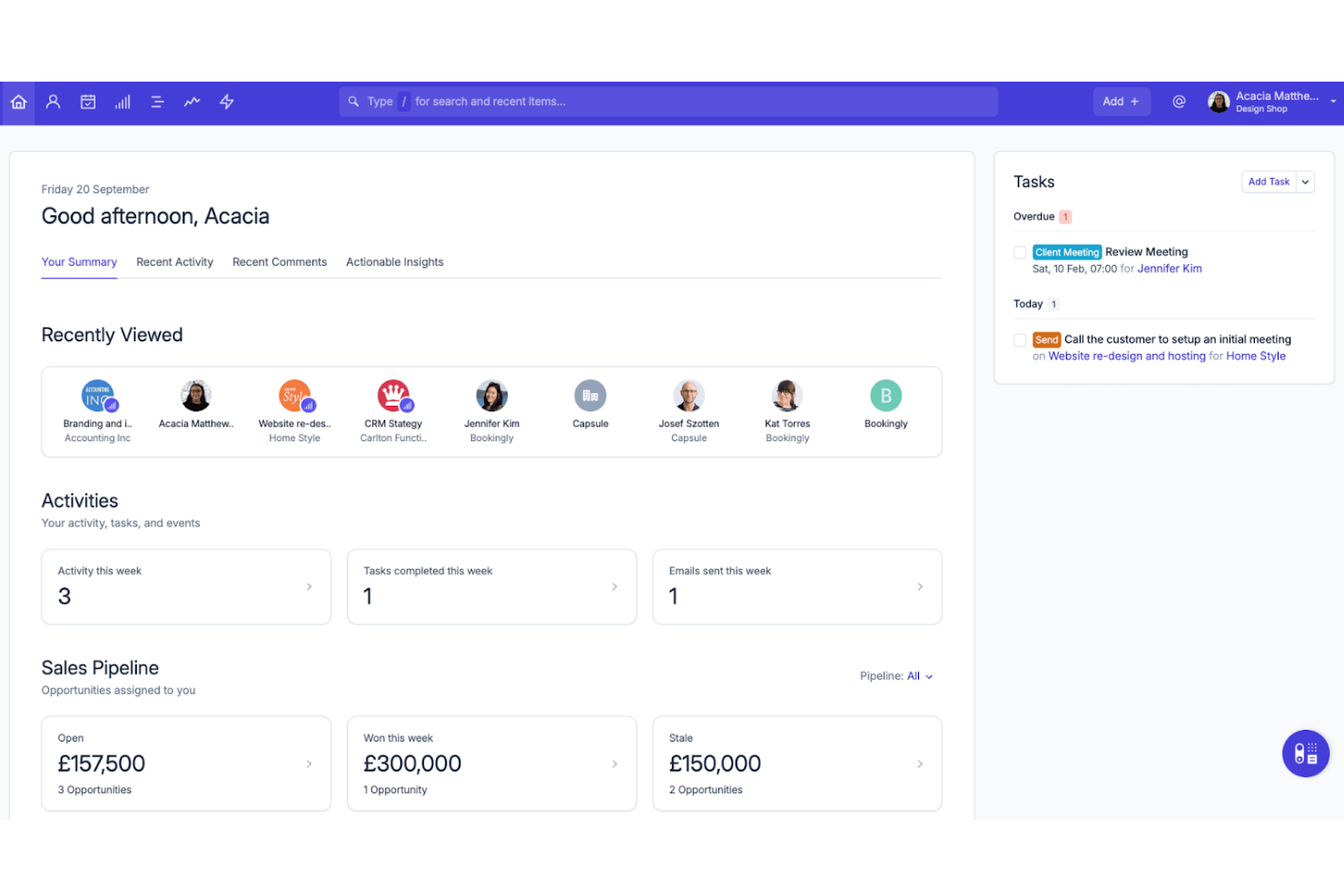
Capsule CRM lands on my shortlist because it does the fundamentals of client tracking exceptionally well without complexity getting in the way.
What stands out is how the contact management is structured for quick lookup, history, and relationship-view—when small businesses need to focus on straightforward sales follow-up, this works. I appreciate how the sales pipeline view and custom fields support simple, tailored workflows without extra noise.
Capsule CRM’s Best For
- Small businesses needing simple client tracking and sales pipelines
- Teams that want basic relationship and activity history
Capsule CRM’s Not Great For
- Organizations with advanced reporting or automation needs
- Businesses managing complex sales processes or large datasets
What sets Capsule CRM apart
Capsule CRM sticks to simple, straightforward sales and client tracking, similar to the way Trello keeps task management focused and minimal. You work with contacts, deals, and activity timelines instead of getting lost in a maze of extras. This feels different from larger platforms like Salesforce, which I find expect you to customize and configure as you go.
Tradeoffs with Capsule CRM
By keeping the CRM simple, Capsule gives up advanced automation and reporting, so teams needing deep analytics or complex workflow rules usually hit a ceiling.
Pros and Cons
Pros:
- Helps organize contacts with tags and filters
- Clean and intuitive interface for small teams
- Easy to set up and start using
Cons:
- Storage limits on lower-tier plans
- No built-in email marketing functionality

ClickUp
Best for task management features

ClickUp lands on my list because its task management features are some of the most robust and flexible I've used for client tracking. When small businesses need a database that goes beyond simple contact storage, ClickUp gives you custom fields, detailed task assignment, and relationship linking to create a tailored client workspace without heavy setup.
What stands out for me is how easily you can connect client records directly to tasks, notes, and conversations in one place. For teams juggling follow-ups, project updates, and client histories, this interconnected setup means you rarely have to dig through different apps to stay on top of client needs.
ClickUp’s Best For
- Small businesses building a custom client tracking tool
- Teams needing client records tied to tasks and docs
ClickUp’s Not Great For
- Companies needing advanced sales pipelines or CRM automation
- Businesses wanting out-of-the-box industry-specific client management
What sets ClickUp apart
ClickUp approaches client management with the mindset of extreme customization. Instead of limiting you to a fixed CRM style, it lets you piece together fields, relationships, and workflows for exactly how your business manages client work. Unlike HubSpot or Salesforce, this means you shape the workspace to fit your process, not the other way around.
I often see this work best when teams want task management and client data tied together, without strict CRM templates.
Tradeoffs with ClickUp
ClickUp optimizes for flexibility, but you sacrifice ready-made CRM reports and advanced deal pipeline tools, so out-of-the-box sales analytics are limited.
Pros and Cons
Pros:
- Includes built-in time tracking features
- Offers multiple task views for flexibility
- Highly customizable to fit your workflow
Cons:
- Advanced features may require higher-tier plans
- Can be overwhelming with numerous features

Best for sales-focused teams

I picked Zendesk Sell for sales-focused teams that need to manage client relationships and track deals without getting bogged down by clunky admin work. When small businesses want a client database that syncs pipeline activity, contacts, and communications in one place, it handles that better than most CRMs I’ve tested. I especially like the built-in activity tracking, which makes follow-ups and sales forecasting less work for everyone.
Teams should choose Zendesk Sell when staying close to changing client needs and sales cycles drives success.
Zendesk Sell’s Best For
- Sales-driven teams that need a focused client database
- Small businesses that manage outbound sales pipelines
Zendesk Sell’s Not Great For
- Teams needing advanced marketing automation
- Businesses wanting industry-specific CRM customization
What Sets Zendesk Sell Apart
Zendesk Sell structures every workflow around the sales pipeline, which simplifies how small businesses track leads and stay organized. Unlike HubSpot, which mixes sales and marketing, Zendesk Sell expects you to focus on sales activity first and everything else second. In practice, this works best when keeping tabs on sales tasks and communications is what actually drives your day-to-day priorities.
Tradeoffs with Zendesk Sell
Zendesk Sell optimizes for sales pipeline tracking, but you lose out on advanced marketing features and broader client engagement tools, so you may need a separate solution for campaigns or relationship marketing.
Pros and Cons
Pros:
- Customizable sales pipelines
- Intuitive interface with easy navigation
- Efficient sales tracking and organization
Cons:
- Customer support lacks phone assistance
- Limited advanced customization options

Nimble
Best for social media integration
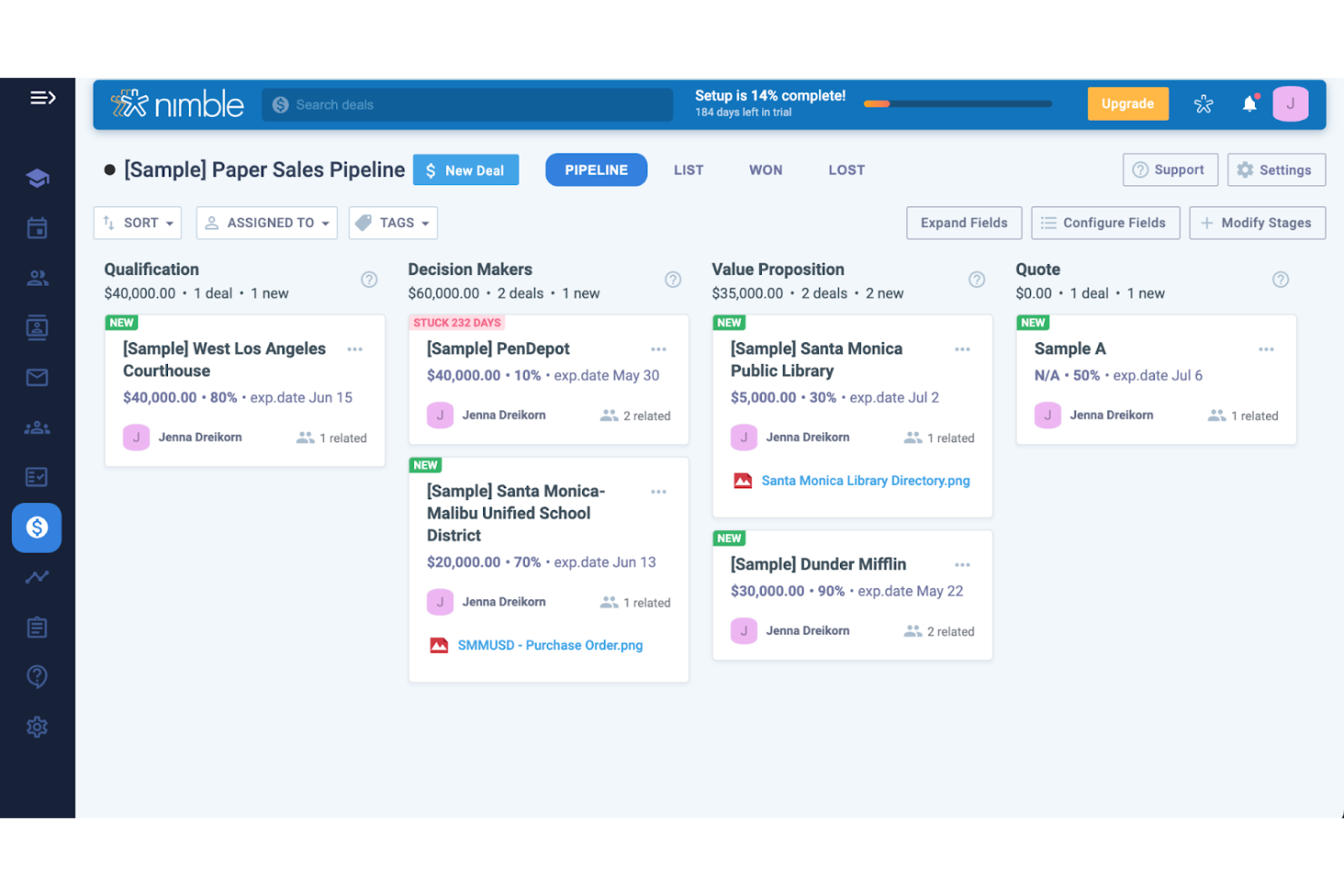
Nimble is on my list because it connects contact database management directly with social media channels, something most client database software overlooks. I’ve used Nimble in teams that lean heavily on LinkedIn, Twitter, and Facebook to build customer relationships, and it automatically pulls and updates contact data from those networks.
What I appreciate most is how Nimble lets you see a client’s full social profile right next to their record, which means you can reference past interactions and get context without switching tools. For anyone whose client base is active on social, this setup is refreshingly direct and keeps outreach personal.
Nimble’s Best For
- Small businesses using social media to build client relationships
- Teams needing unified social and contact insights in one place
Nimble’s Not Great For
- Companies managing high-volume or complex, hierarchical client data
- Teams without a strong social selling component
What sets Nimble apart
Nimble stands out by making social data central to client management, not just an add-on. The platform expects you to interact and engage with contacts through their public social presence alongside traditional CRM activities.
Unlike tools like HubSpot, which separate databases and social feeds, Nimble fuses them so you work from a single profile when researching, updating, or reaching out. This works best when you rely on up-to-date social streams for building and maintaining client relationships.
Tradeoffs with Nimble
Nimble optimizes for integrated social context, but this means its database tools are less suited to advanced segmentation or custom fields. If you need complex structures or reporting, you may hit limits.
Pros and Cons
Pros:
- Lightweight tool that doesn’t overwhelm users
- Combines communication channels in one place
- Easy to set up for small teams
Cons:
- No built-in phone support for customers
- Can’t handle complex workflows effectively

Best for Google Workspace users
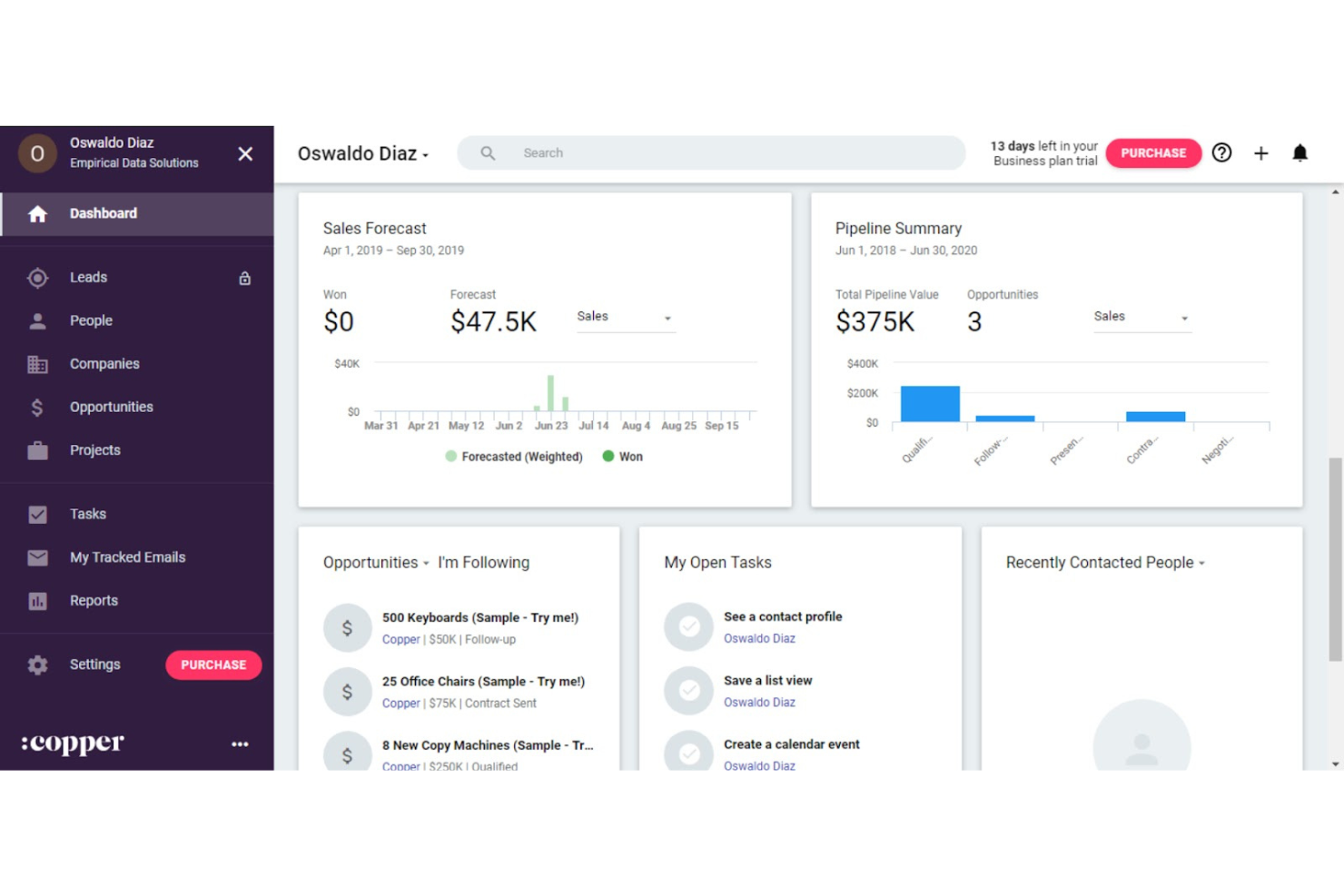
Copper CRM lands on this list because it’s so deeply built for teams working in Google Workspace. If your business lives in Gmail, Sheets, and Drive, Copper feels more like an extension than a separate tool. I appreciate how it lets you auto-capture contacts, track deal activity, and update opportunities straight from your inbox.
What’s unique is how smoothly it links with Google Calendar and automates relationship tracking, keeping your client database up to date without duplicate work.
Copper CRM’s Best For
- Small businesses using Google Workspace as their main platform
- Teams that want automatic contact and opportunity updates in Gmail
Copper CRM’s Not Great For
- Businesses needing advanced custom reporting or analytics
- Companies not committed to Google Workspace tools
What sets Copper CRM apart
Copper stands out by embedding itself right inside Google Workspace, so client tracking happens where you already do your daily work. Unlike Salesforce, which requires you to switch platforms and adapt to a new environment, Copper keeps your sales process visible inside Gmail and Google Calendar. This works well if your workflows are already built around those tools and you want less context-switching.
Tradeoffs with Copper CRM
Copper optimizes for natural fit in Google Workspace, but you lose out on highly advanced reporting or customizable dashboards. If you outgrow basic workflow needs, you might feel boxed in by its limits.
Pros and Cons
Pros:
- Simplifies sales tracking with visual pipelines
- Automates data entry from emails
- Integrates naturally with existing Google tools
Cons:
- Advanced features require higher-tier subscriptions
- Limited custom reports for detailed analysis

Best for small business marketing

Ontraport lands on this list because it brings small business marketing and client database management under one roof, without the typical complexity. I see small teams get the most value when they need reliable contact management, automated follow-ups, and campaign tracking in a single platform.
What I appreciated most during testing is how funnel automation, CRM records, and segmentation all tie together, making life easier, especially, I imagine, for small businesses who want nimble marketing and database workflows.
Ontraport's Best For
- Small businesses that need integrated CRM and marketing automation
- Teams focused on automating client follow-ups and segmentation
Ontraport's Not Great For
- Businesses with complex, multi-department sales structures
- Teams needing deep customization for industry-specific workflows
What sets Ontraport apart
Ontraport is designed for small businesses that want marketing automation and client management tightly woven together. Unlike dedicated CRMs like HubSpot or generalist tools like Airtable, it expects you to build marketing automations and manage your contacts from one place. This works best when you want marketing, email follow-up, and contact data to live inside a single workflow, without bouncing between systems.
Tradeoffs with Ontraport
Ontraport optimizes for easy all-in-one automation, but you lose the depth and complexity you get in tools that handle intricate sales processes or support multi-division needs. If your workflows require granular pipeline controls or tailored, industry-specific workflows, you’ll hit limits fast.
Pros and Cons
Pros:
- Scalable features that grow with your business
- Customizable dashboards to fit your needs
- Flexible automation for various business processes
Cons:
- Complex setup may require time and training
- Steep learning curve for new users


Microsoft Dynamics CRM makes my shortlist because it’s one of the few client database platforms that adapts fast when your business outgrows entry-level tools. I find it’s the best fit when small businesses need something scalable for future growth, with built-in automation and tailored dashboards for sales and customer data. I especially like its custom entity model, so you can shape data structures as client relationships get more complex.
Microsoft Dynamics CRM’s Best For
- Small businesses planning for rapid, long-term growth
- Sales teams handling complex, multi-stage client data
Microsoft Dynamics CRM’s Not Great For
- Solo operators or businesses with simple databases
- Teams looking for a lightweight, low-maintenance tool
What sets Microsoft Dynamics CRM apart
Microsoft Dynamics CRM is shaped for businesses that want their client database to evolve with them. Unlike tools like HubSpot, which favor simple pipelines and lighter sales processes, Dynamics builds on the assumption that teams will want to customize objects, automate complex relationships, and integrate with a wider suite of Microsoft tools. In practice, this feels like working within a framework that expects your needs and data structures to keep scaling as you grow.
Tradeoffs with Microsoft Dynamics CRM
Dynamics optimizes for long-term flexibility and custom setup, but the setup process takes longer and usually requires more admin than with a turnkey CRM.
Pros and Cons
Pros:
- Strong security features for data protection
- Supports complex sales processes effectively
- Offers advanced data analytics tools
Cons:
- Occasional performance issues with large data sets
- Requires significant time to implement fully


Agile CRM earns its spot because of how well it connects client records with its built-in marketing automation. When I tested workflows, I found the drag-and-drop campaign builder practical for targeting contact segments and tracking outcomes. Teams usually reach for Agile CRM once basic spreadsheets stop scaling and timely follow-ups start slipping.
What I appreciate most is its ability to centralize client history while automating emails, web engagement, and follow-up tasks; you can actually see personal touchpoints drive engagement without losing track of conversation context.
Agile CRM’s Best For
- Small businesses needing marketing automation with contact management
- Teams that want to automate personalized follow-ups and campaigns
Agile CRM’s Not Great For
- Businesses needing detailed reporting across multiple business units
- Companies with complex sales workflows or high-volume support queues
What sets Agile CRM apart
Agile CRM takes a marketing-first approach to client management. Instead of focusing just on organizing contacts like HubSpot or Pipedrive, it expects you to blend contact data with targeted campaigns from day one. In practice, this works well if you want relationship tracking tied directly to nurture actions, not managed separately. The automation is woven into daily client interactions, so you see how engagement efforts connect to outcomes.
Tradeoffs with Agile CRM
Agile CRM optimizes for blending contacts and marketing, but that focus means you give up granular sales or operations features. As a result, teams with complex pipelines or heavy service needs hit limits and may need to supplement with other tools.
Pros and Cons
Pros:
- Features web engagement tools for lead capture
- Offers built-in capabilities for direct calls
- Includes lead scoring even on the free plan
Cons:
- Limited customization for advanced workflows
- There can be a steep learning curve for beginners


Insightly makes the cut for me because it links CRM and project management in a way that helps small businesses keep client relationships and project delivery in sync. I see teams using it to move quickly from a sales opportunity to managing related project work in context, with all client details carried over.
What I like most is how the contact database connects directly to project milestones, pipelines, and task assignments. This works best when you want to keep teams on the same page about both project progress and client communication.
Insightly’s Best For
- Small businesses needing unified CRM and project workflow tracking
- Teams managing the full client lifecycle from lead to project
Insightly’s Not Great For
- Companies needing advanced marketing automation features
- Businesses that manage projects outside of a CRM context
What sets Insightly apart
Insightly takes a unique approach by blending contact management and project delivery in one system. It’s built for small businesses that want every client detail linked directly to the tasks and projects serving those clients. Unlike Salesforce, which can feel heavy and siloed, Insightly expects you to manage both sales and delivery in a single workflow.
This works best when you want your pipeline and projects tightly connected so nothing falls through.
Tradeoffs with Insightly
Insightly optimizes for uniting CRM and project work, but you lose depth in marketing automation and customization compared to tools designed purely for those needs. That tradeoff can matter if you expect heavy workflow tailoring or advanced marketing features.
Pros and Cons
Pros:
- Drag-and-drop pipeline management
- Workflow automation reduces manual tasks
- Email tracking for engagement insights
Cons:
- Customer support may require extra fees
- Additional costs for advanced features


Nutshell CRM does an excellent job organizing and searching client data, which I find essential when teams outgrow spreadsheets. You get helpful reporting tools that show client activity and sales trends, and the single-list client view makes it easy to keep everything together as your business scales.
What stands out for me is how quickly you can filter and act on client records without fuss.
Nutshell CRM’s Best For
- Small businesses tracking sales, contacts, and interactions in one place
- Teams needing quick access and action on client records
Nutshell CRM’s Not Great For
- Large companies with advanced customization or automation needs
- Organizations needing deep vertical-specific CRM features
What sets Nutshell CRM apart
Nutshell CRM is designed for small businesses that need a straightforward way to handle client relationships. It leans into making contact management and sales tracking feel intuitive, which is why I suggest it for teams new to CRM software. Unlike Salesforce, which expects you to spend time customizing everything, Nutshell’s approach is to keep things as out-of-the-box as possible so you can focus on the work itself.
Tradeoffs with Nutshell CRM
By optimizing for simplicity and quick setup, you lose out on specialized automation or industry-specific workflows. Teams needing detailed customization won’t find enough control here.
Pros and Cons
Pros:
- Visual sales pipeline aids in tracking
- Effective email automation for campaigns
- Quick setup without extensive customization
Cons:
- No built-in phone dialer functionality
- Advanced reporting options are restricted
Annen klientdatabaseprogramvare for små bedrifter
Her er noen flere alternativer innen klientdatabaseprogramvare for små bedrifter som ikke kom med på kortlisten min, men som likevel er verdt å undersøke:
- Bitrix24
For team collaboration
- Salesflare
For automated data entry
- GoodDay
For customizable workspaces
- Less Annoying CRM
For simple CRM needs
- Salesforce CRM
For enterprise customization
- Creatio CRM
For low-code development
- Bigin by Zoho CRM
For micro-businesses
- Zoho CRM
For small business budgets
- Kintone
For custom app creation
- Freshsales
For AI-driven insights
- Pipedrive
For visual sales pipelines
- monday.com
For team project tracking
- Close
For remote sales teams
- GoHighLevel
For agency solutions


How I Evaluate Client Database Software for Small Business
When an agency PM jumps on a client call and needs instant context—past projects, notes, contacts—I evaluate two layers: baseline must-haves and the differentiators that set tools apart.
Core Functionality (Table Stakes For This List)
When I'm selecting tools for my list, I rank each one on a scale from 0 (does not offer the functionality) to 5 (excels in this area) for each core functionality listed below. Then, I calculate the tool's total score into a percentage. Each tool needs to achieve a minimum total score of 65% to be considered for inclusion.
- Centralized Client Records: I look for profiles that store contacts, custom fields, and project history so your team pulls up a full client snapshot in one view.
- Interaction & Communication Tracking: Each tool should log emails, calls, and meeting notes on the client timeline—not buried in a separate inbox or external app.
- Project-Client Linking: I evaluate how directly you can tie a client record to active projects and deliverables—like pulling up all open work for a retainer client.
- Document & File Management: Contracts, SOWs, and briefs should attach to client records with version tracking, so you're never searching shared drives mid-meeting.
- Client Segmentation & Filtering: I check for tags, custom fields, and saved filters that let you sort clients by project status, account type, or engagement tier.
- Small Business Accessibility: Pricing tiers, onboarding effort, and feature availability should suit teams of one to twenty without requiring enterprise-level budgets or setup.
Once I have a list of tools that meet this criteria, I consider what sets each platform apart.
Differentiating Factors (What Sets Vendors Apart)
Here's how I compare and contrast different vendors:
Standout Features
Automated workflow triggers make a real difference—when a project stage changes, the tool should fire off follow-up tasks or client notifications without manual effort. I also look for client portal access, which lets clients check project status and approve deliverables on their own instead of emailing you for updates. Reporting and client insights round things out. Dashboards that surface project profitability and engagement frequency per account help small teams prioritize where to focus.
Beyond Features
Integration support matters a lot here. I check whether a tool connects natively with project management platforms like Asana or Monday and syncs with Gmail or Outlook, since small teams can't afford to manually copy data between systems. Time-to-value is another factor I weigh—tools with CSV import, guided setup, and ready-made templates let a three-person agency get running in a day instead of a week. Pricing transparency also shapes my evaluation, especially whether core features stay accessible on entry-level plans as your team grows.
Slik velger du klientdatabaseprogramvare for små bedrifter
Det er lett å gå seg vill i lange funksjonslister og komplekse prismodeller. For å hjelpe deg med å holde fokus mens du går gjennom den unike prosessen din for valg av programvare, får du her en sjekkliste over faktorer du bør ha i bakhodet:
| Faktor | Hva du bør vurdere |
| Skalerbarhet | Forsikre deg om at programvaren vokser sammen med virksomheten din. Se etter alternativer som støtter flere brukere og større datasett uten at du trenger en fullstendig omlegging. |
| Integrasjoner | Kontroller om den kan kobles til verktøy teamet ditt allerede bruker, for eksempel e-postplattformer eller regnskapsprogramvare, slik at arbeidsflyten forblir smidig. |
| Tilpasningsmuligheter | Finn ut om du kan tilpasse den til de spesifikke forretningsprosessene dine, fra egendefinerte felt til personlige dashbord. |
| Brukervennlighet | Teamet ditt bør bruke tiden på å bruke programvaren, ikke på å lære seg den. Velg grensesnitt som er intuitive og krever minimalt med opplæring. |
| Budsjett | Vei funksjonene opp mot hva du har råd til. Ta hensyn til både startkostnader og langsiktige utgifter, inkludert oppgraderinger og brukerstøtte. |
| Sikkerhetstiltak | Beskytt kundedataene dine med sterk kryptering og overholdelse av regelverk som GDPR. Kontroller programvarens sikkerhetssertifiseringer. |
Trender innen klientdatabaseprogramvare for små bedrifter
I undersøkelsene mine har jeg samlet utallige produktoppdateringer, pressemeldinger og utgivelseslogger fra ulike leverandører av klientdatabaseprogramvare for små bedrifter. Her er noen av de fremvoksende trendene jeg følger med på:
- AI-drevet personalisering: Leverandører legger til AI-funksjoner for å tilby personlige forslag til kundeinteraksjoner. Verktøy som Salesforce bruker AI til å analysere kundedata og anbefale neste steg. Dette hjelper bedrifter med å tilpasse strategiene sine for å imøtekomme individuelle kundebehov på en effektiv måte.
- Integrasjon av stemmegjenkjenning: Talekommandoer blir stadig vanligere, slik at brukere kan legge inn data eller søke i systemet uten å bruke hendene. Leverandører som Zoho CRM utforsker denne funksjonen for å forbedre brukerinteraksjon og datainntasting, slik at det blir raskere og mer praktisk.
- Prediktiv analyse: Flere leverandører bruker prediktiv analyse for å hjelpe bedrifter med å forutsi salgstrender og kundeatferd. Denne trenden er nyttig for planlegging og strategi, ettersom den gjør det mulig for bedrifter å forutse kundenes behov og tilpasse tilnærmingen deretter.
- Forbedringer av personvern: Med stadig strengere personvernregler fokuserer leverandører på å forbedre sikkerhetsfunksjonene. Verktøy som HubSpot CRM prioriterer sikker håndtering av data og overholdelse av standarder som GDPR, slik at bedrifter effektivt kan beskytte kundeinformasjon.
- Kommunikasjon på tvers av kanaler: Leverandører integrerer flere kommunikasjonskanaler i plattformene sine, slik at bedrifter kan kommunisere med kunder via e-post, chat, sosiale medier og mer. Denne trenden bidrar til å opprettholde en konsekvent kommunikasjon og møte kundene der de befinner seg, noe som forbedrer engasjement og tilfredshet.
Hva er kundedatabaseprogramvare for små bedrifter?
Kundedatabaseprogramvare for små bedrifter er et verktøy som hjelper deg med å organisere kundeopplysninger, håndtere interaksjoner og følge opp salg på ett sted. Selgere, markedsførere og kundeservicemedarbeidere i små bedrifter bruker det til å holde kundeinformasjonen ryddig, følge opp potensielle kunder og se en fullstendig historikk over hvert kundeforhold.
Det fjerner kaoset fra håndteringen av kundelister og hjelper deg med å svare raskere, huske viktig informasjon og holde alle på teamet oppdatert. Dette er spesielt nyttig for små bedrifter med begrenset tid og ressurser, der teammedlemmene utfører mange ulike arbeidsoppgaver, og klienthåndtering bare er én av dem.
Funksjoner i kundedatabaseprogramvare for små bedrifter
Her er noen av de viktigste funksjonene du bør se etter i kundedatabaseprogramvare for små bedrifter.
- Kontaktadministrasjon: Organiserer kundeinformasjon, kjøpshistorikk og preferanser på ett sentralisert sted, slik at det er enkelt å få tilgang til og oppdatere dem.
- Salgssporing: Overvåker salgsaktiviteter, innsats for å generere potensielle kunder og fremdrift i salgstrakten for å hjelpe teamene med å fokusere på å avslutte avtaler effektivt.
- E-postintegrasjon: Kobler seg til e-postplattformen din for å spore kommunikasjon og håndtere interaksjoner direkte fra CRM-systemet, noe som gir en mer konsekvent kommunikasjon.
- Automatiseringsfunksjoner: Automatiserer repetitive oppgaver som oppfølginger, påminnelser og varsler, slik at du får mer tid til strategisk arbeid.
- Rapportering og analyse: Gir innsikt i salgsresultater, kundeatferd og markedsføringskampanjer, og bidrar til datadrevne beslutninger.
- Mobil tilgang: Lar brukerne administrere kundedata, teamoppgaver og tillatelser mens de er på farten, slik at produktiviteten opprettholdes uansett hvor de befinner seg.
- Sikkerhetsfunksjoner: Sørger for at kundedata er beskyttet og overholder personvernregler som GDPR, slik at sensitiv informasjon ivaretas.
- Prediktiv analyse: Forutsier salgstrender og kundebehov for å bidra til planlegging og strategi, slik at bedrifter holder seg i forkant av endringer i markedet.
- Kommunikasjon på tvers av kanaler: Integrerer flere kommunikasjonskanaler, inkludert e-handelsplattformer og telefonnumre, slik at du kan kommunisere konsekvent med kunder på tvers av plattformer.
- Kanban-visninger: Tilbyr en visuell tilnærming til håndtering av arbeidsflyter, slik at det er enkelt å følge med på oppgaver, salgstrakter og teamets prioriteringer med et raskt overblikk.
- Funksjonalitet for elektroniske signaturer: Lar team sende, motta og lagre signerte dokumenter direkte i CRM-systemet, noe som effektiviserer kontraktsprosessen og bidrar til at avtaler blir inngått raskere.
Fordeler med kundedatabaseprogramvare for små bedrifter
Implementering av programvare for administrasjon av kundedata kan gi flere fordeler for teamet ditt og den lille bedriften din. Her er noen av fordelene du kan se frem til:
- Bedre organisering og datahåndtering: Sentraliserer kundeinformasjon, slik at teamet ditt enklere får tilgang til og håndterer data effektivt.
- Økt salgsproduktivitet: Sporer salgsaktiviteter og automatiserer oppfølginger, slik at teamet ditt kan fokusere på å avslutte avtaler.
- Bedre beslutningstaking: Tilbyr rapportering og analyse for å gi innsikt som veileder strategiske forretningsbeslutninger.
- Økt mobilitet: Gir mobil tilgang til kundedata, slik at teamet ditt kan være produktivt også når de er på farten.
- Sterkere kunderelasjoner: Integrerer kommunikasjonskanaler og automatiserer interaksjoner for å opprettholde jevn og personlig kontakt med kundene.
- Datasikkerhet: Sikrer at kundedata er beskyttet og i tråd med personvernregler, slik at du kan bygge tillit hos kundene dine.
- Prediktiv planlegging: Bruker prediktiv analyse til å forutse kundebehov og salgstrender, noe som bidrar til proaktiv beslutningstaking.
Kostnader og priser for kundedatabaseprogramvare for små bedrifter
Valg av kundedatabaseprogramvare for en liten bedrift krever en forståelse av de ulike prismodellene og abonnementene som er tilgjengelige. Kostnadene varierer fra gratis programvare for kundeoppfølging til bedriftsabonnementer som kan koste $100s+ per måned, avhengig av funksjoner, teamstørrelse, tillegg og mer. Tabellen nedenfor oppsummerer vanlige abonnementer, gjennomsnittsprisene deres og typiske funksjoner som er inkludert i kundedatabaseprogramvare for små bedrifter:
Sammenligningstabell for abonnementer for kundedatabaseprogramvare for små bedrifter
| Abonnementstype | Gjennomsnittspris | Vanlige funksjoner |
| Gratisabonnement | $0 | Grunnleggende kontaktadministrasjon, begrenset lagringsplass og e-poststøtte. |
| Personlig abonnement | $5-$25 per bruker per måned | Kontaktadministrasjon, e-postintegrasjon, oppgavehåndtering og mobiltilgang. |
| Bedriftsabonnement | $25-$50 per bruker per måned | Avansert rapportering, automatiseringsfunksjoner, salgssporing og integrasjoner. |
| Foretaksabonnement | $50-$100 per bruker per måned | Tilpassbare dashbord, dedikert kundestøtte, API-tilgang og forbedret sikkerhet. |
Vanlige spørsmål om kundedatabaseprogramvare for små bedrifter
Her er noen svar på vanlige spørsmål om kundedatabaseprogramvare for små bedrifter:
Kan kundedatabaseprogramvare integreres med andre verktøy jeg bruker?
Ja, mange alternativer for kundedatabaseprogramvare kan fungere sammen med andre verktøy du bruker. De kobles ofte til e-posttjenester, kalendere og regnskapsprogramvare. Før du velger, bør du sjekke om programvaren kan kobles til verktøyene du allerede bruker, slik at arbeidet blir enklere.
Er kundeinformasjonen min trygg med kundedatabaseprogramvare?
Det er viktig å holde kundeinformasjonen din trygg. God kundedatabaseprogramvare bruker sterke sikkerhetstiltak for å beskytte dataene dine. Se etter programvare som tilbyr datakryptering, regelmessige sikkerhetskopier og følger personvernlovgivningen. Det er også lurt å bruke sterke passord og begrense hvem som har tilgang til informasjonen.
Hvor mye koster kundedatabaseprogramvare for små bedrifter?
Kostnadene for kundedatabaseprogramvare varierer. Noen tilbyr gratisversjoner med grunnleggende funksjoner, mens andre har månedlige avgifter som avhenger av funksjonene du trenger og hvor mange brukere som skal bruke programvaren. Det er best å sammenligne ulike alternativer for å finne en løsning som passer budsjettet ditt og dekker bedriftens behov.
Hvor vanskelig er det å bytte til ny kundedatabaseprogramvare?
Det kan ta litt tid å bytte til ny programvare, men mange leverandører tilbyr hjelp for å gjøre prosessen enklere. De kan ha veiledninger, kundestøtte eller tjenester for å flytte dataene dine. Før du bytter, bør du planlegge prosessen for å unngå problemer og sørge for at bedriften fortsetter å fungere som normalt.
Kan kundedatabaseprogramvare bidra til å forbedre kunderelasjonene mine?
Ja, kundedatabaseprogramvare kan hjelpe deg med å bygge bedre relasjoner med kundene dine. Den samler all kundeinformasjon på ett sted, noe som gjør det enkelt å følge opp interaksjoner og ta kontakt igjen. Dette hjelper deg med å forstå kundenes behov og yte bedre service, noe som kan føre til mer salg og mer fornøyde kunder.