

8 beste verktøy for AI-prognoser – anmeldt i 2026

Kortliste over de beste AI-prognoseringsverktøyene


Det kan føles overveldende å håndtere prosjekter, særlig når du må holde styr på tidslinjer, ressurser og forventninger. Du kan oppleve at du drukner i data og har problemer med å ta informerte beslutninger raskt. Det er her AI-prognoseringsverktøy kommer inn. De hjelper deg med å forutsi resultater, fordele ressurser effektivt og holde prosjektene på rett spor.
Jeg har brukt tid på å teste og vurdere disse verktøyene, og jeg vil dele funnene mine med deg. I denne artikkelen guider jeg deg gjennom de beste tilgjengelige AI-prognoseringsverktøyene. Du vil oppdage hvilke som passer behovene dine, enten du håndterer et lite team eller en stor virksomhet.
Why Trust Our Software Recommendations
Our team has been testing and reviewing software since 2012. As project managers ourselves, we know how difficult—and important—it is to choose the right software.
For this guide, we evaluated tools using hands-on testing and independent research, scoring tools using our selection criteria. We also draw on insights from industry thought leaders and practicing project management experts.
Our reviews reflect our human editorial judgment, not a sales pitch.
Expert reviewers:
Sammenligningstabell for AI-prognoseringsverktøy
Denne sammenligningstabellen oppsummerer prisopplysningene for utvalget mitt av de beste AI-prognoseringsverktøyene:
| Tool | Best For | Trial Info | Price | ||
|---|---|---|---|---|---|
| 1 | Best for AI multi-project resource allocation | 30-day free trial + free demo available | From €22.5/month (billed annually) | Website | |
| 2 | Best for scenario planning | Free demo available | Pricing upon request | Website | |
| 3 | Best for financial planning | Free demo available | Pricing upon request | Website | |
| 4 | Best for integration capabilities | 30-day free trial | Pricing upon request | Website | |
| 5 | Best for budgeting | Free demo available | Pricing upon request | Website | |
| 6 | Best for team collaboration | 14-day free trial | Pricing upon request | Website | |
| 7 | Best for data analytics | Free plan and 30-day free trial available | From $10/user/month | Website | |
| 8 | Best for project tracking | 14-day free trial | Pricing upon request | Website |

Anmeldelser av de beste AI-prognoseringsverktøyene
Nedenfor finner du mine detaljerte oppsummeringer av de beste AI-prognoseringsverktøyene som kom med på kortlisten. Anmeldelsene mine gir en detaljert oversikt over de viktigste funksjonene, fordeler & ulemper, integrasjoner og ideelle bruksområder for hvert verktøy, slik at du kan finne det beste alternativet for deg.

Epicflow
Best for AI multi-project resource allocation
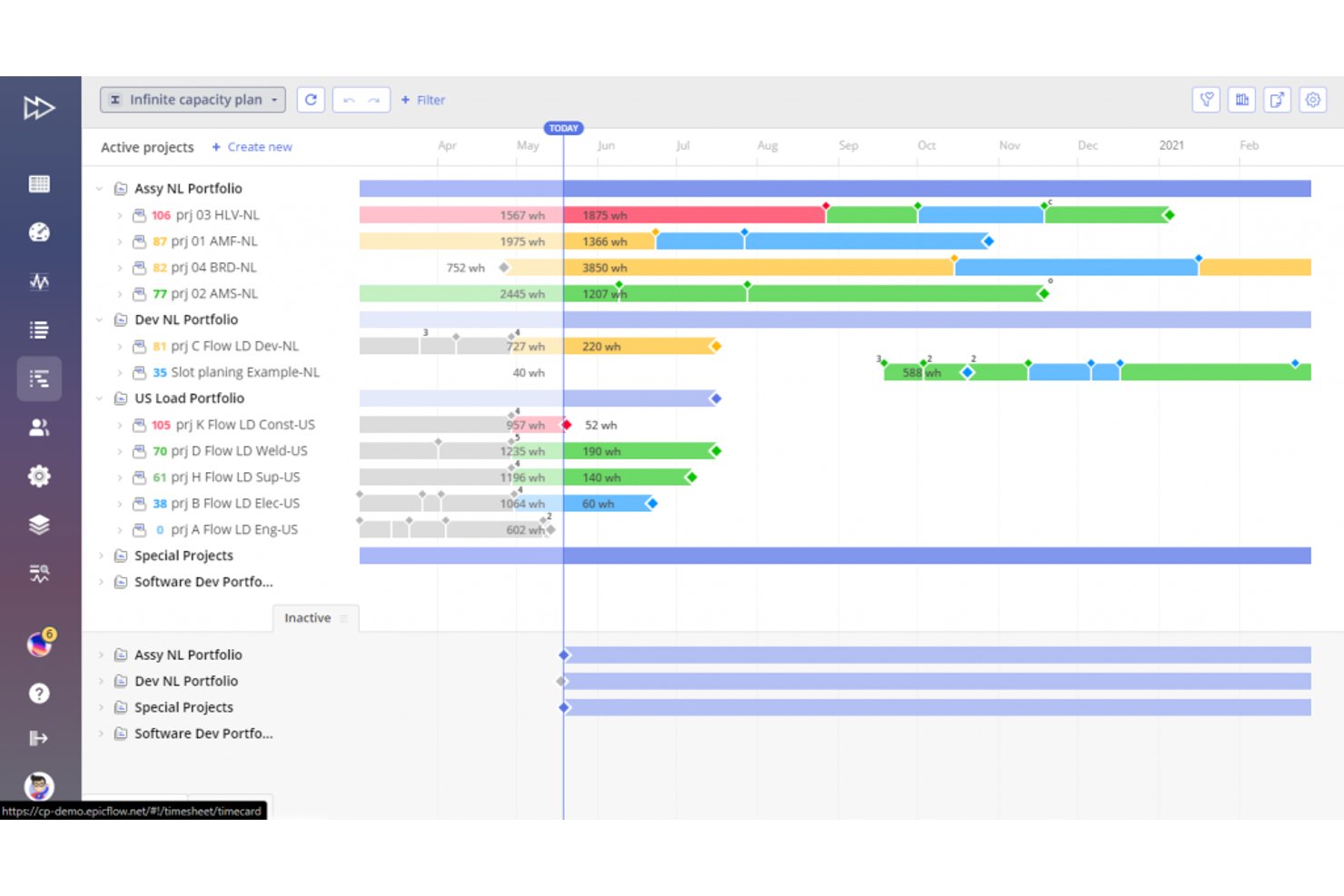
Epicflow is an AI-driven resource management and portfolio forecasting platform that combines predictive capacity planning, multi-project scheduling, bottleneck detection, and what-if scenario simulation.
Who Is Epicflow Best For?
Epicflow fits mid-to-large organizations in engineering, IT, and product development where multiple projects compete for the same pool of specialized resources.
Why I Picked Epicflow
Epicflow earns its spot as one of the best on my shortlist because it tackles the forecasting problem most PM tools ignore: schedule impact when the same engineers are shared across eight projects. The Future Load Graph predicts resource demand across every active project simultaneously, and Due Date Prediction recalculates delivery timelines in real time as constraints shift. Epica, the AI advisor, then models what happens if I pull a resource from one project to rescue another, with downstream impacts surfaced immediately.
Epicflow Key Features
- Historical load graph: Visualizes actual resource output and bottlenecks from completed projects for trend analysis.
- Epica AI report generator: Produces executive reports and status summaries from natural language queries about project health.
- Competence and attribute management: Matches resource profiles with project tasks based on skill and attribute criteria.
- Bubble/fever chart visualization: Displays progress, budget consumption, and remaining buffer using Theory of Constraints logic.
Epicflow Integrations
Epicflow offers native integrations with Jira, Microsoft Project, Oracle Primavera, SAP, Workfront, and Trimergo. An API is available for custom integrations.
Pros and Cons
Pros:
- What-if scenario modeling with immediate downstream impact
- Real-time due date recalculation across the portfolio
- AI-driven cross-project resource demand prediction
Cons:
- Reporting customization is relatively restricted
- Limited cost and budget forecasting depth

Anaplan
Best for scenario planning

Anaplan makes the cut for teams that need to compare and stress-test multiple business scenarios in a single workspace. I see teams rely on Anaplan when their forecasting needs go way beyond linear models or static spreadsheets.
What I like most is that you can build complex, custom what-if models and pivot between them to see immediate downstream impact. When scenario planning is a central part of forecasting, Anaplan makes it practical to run those simulations fast—even when plans and variables change throughout the cycle.
Anaplan’s Best For
- Finance or operations teams modeling complex what-if scenarios
- Large organizations needing dynamic, customizable forecasting models
Anaplan’s Not Great For
- Small teams with basic, single-outcome forecasting needs
- Anyone wanting turnkey, one-click AI forecasting
What sets Anaplan apart
Anaplan is built for organizations that want to model complex scenarios without being boxed in by the limits of traditional spreadsheets. Instead of managing static inputs and forecasts one at a time, as you might in Excel, you’re working in a dynamic modeling environment that lets you stress-test different business plans all in one place. I find this approach makes sense for finance or operations groups who need to adjust live, see impact, and handle multiple layers of what-if analysis as plans shift.
Tradeoffs with Anaplan
Anaplan optimizes for flexibility and modeling complexity, but setup and ongoing changes take more time and skill than tools that focus on packaged forecasts, so quick turnarounds or casual users often stumble.
Pros and Cons
Pros:
- Interconnected intelligence enables holistic planning
- CoPlanner feature lets you ask conversationally for insights
- Role-based AI agents & predictive guidance
Cons:
- High cost for small businesses
- Requires technical expertise
- Steep learning curve

Cube
Best for financial planning

Cube earns its spot on my AI forecasting tools list because it’s built for finance teams who need true planning agility, not just dashboards. When I’ve tested Cube’s scenario modeling, I can update projections on the fly and drill down into details fast.
What I appreciate most is how smoothly you can adjust assumptions and see instant impacts in real financial statements. I recommend Cube if you want visibility and flexibility from your forecasting, especially when aligning planning cycles across business units.
Cube’s Best For
- Finance teams managing companywide forecasting and planning cycles
- Organizations needing real-time scenario modeling and reporting
Cube’s Not Great For
- Small businesses with basic planning needs
- Teams wanting dashboard-only, hands-off forecasting
What sets Cube apart
Cube is built for finance teams who need to rapidly shift between planning cycles and forecast models, not just monitor high-level metrics. Unlike spreadsheet-driven approaches, Cube expects you to work with structured, multi-dimensional models that stay synced as business assumptions keep changing.
In practice, this works best when you want to update projections and see how changes affect your core financials without chasing down disconnected data.
Tradeoffs with Cube
Cube optimizes for structured planning and flexible scenario analysis, but you give up some of the freeform reporting and custom data manipulation you’d get in traditional spreadsheets. This means very custom, ad-hoc reporting can feel more constrained.
Pros and Cons
Pros:
- Agentic AI for FP&A support / decision support
- AI Smart Forecasting (bootstrapping / benchmarking forecasts)
- Scenario modeling flexibility
Cons:
- Complex initial setup
- Limited customization options
- Steep learning curve


IBM Planning Analytics is my pick when you need advanced AI forecasting, especially with complicated data environments that demand heavy integration. You can connect it directly to sources like ERP, CRM, and external data warehouses, making it a fit when you’re consolidating inputs from everywhere.
What I like is how quickly scenario modeling and predictive analytics sync across business units, even with diverse data. This works best if you’re handling complex or layered forecasts and require quick integration with existing systems.
IBM Planning Analytics’ Best For
- Enterprises needing to unify forecasting from multiple systems
- Finance teams managing complex, multi-source data inputs
IBM Planning Analytics’ Not Great For
- Small organizations with limited data integration needs
- Teams seeking simple or low-maintenance forecasting tools
What sets IBM Planning Analytics apart
IBM Planning Analytics tends to prioritize connected forecasting in organizations that have data streaming in from many sources. Unlike simpler solutions, it expects you to integrate real-time data from systems across finance, sales, and operations. In practice, this works best when you want to build forecasts that can reflect changes in underlying data as they happen.
Tradeoffs with IBM Planning Analytics
IBM Planning Analytics optimizes for deep data integration, but this adds complexity and setup time for anyone looking for quick forecasting or less technical maintenance.
Pros and Cons
Pros:
- Embeds predictive insights across planning workflows
- Flexible modeling options
- Multivariate AI forecasting & trend modeling
Cons:
- Limited customization flexibility
- Requires technical expertise
- Complex setup process


Jedox stands out to me whenever budgeting, forecasting, and planning need to happen in one unified space. I see finance teams getting real value from features like integrated financial modeling, driver-based forecasting, and structured workflows for approvals.
What makes Jedox unique is how it handles budget iterations and scenario planning, especially for organizations juggling multiple branches or product lines. I like how you can build and adjust detailed models without needing to jump between tools.
Jedox’s Best For
- Finance teams handling complex budgeting and forecasting
- Enterprises needing integrated scenario and driver-based planning
Jedox’s Not Great For
- Teams seeking automated, AI-driven forecasts without manual modeling
- Small organizations wanting lightweight budgeting tools
What sets Jedox apart
Jedox is built around enterprise budgeting and planning, so it pushes you to bring forecasting, planning, and analytics into a shared model that fits into finance and ops workflows. Unlike other tools, which leave workflow up to the user, Jedox expects you to define how budgets, forecasts, and approvals should run. In practice, this works well if you want structured, traceable, and repeatable planning processes across teams.
Tradeoffs with Jedox
Jedox optimizes for structure and process control, but you lose out on fast, automated AI forecasting and the flexibility of lightweight tools. That can slow you down if you need ad hoc or experimental forecasting approaches.
Pros and Cons
Pros:
- Privacy-sensitive architecture & secure AI integration
- Support for natural language querying
- Multidimensional planning capabilities
Cons:
- Not suitable for small teams
- High learning curve
- Complex initial setup


Forecast App lands on this list because it’s rare to find AI forecasting built with team collaboration as the core feature. I see teams getting the most mileage here when project managers, finance, and operations all need to chime in on resource allocation and scenario modeling at the same time.
The real benefit for collaboration is how Forecast lets multiple people build, adjust, and comment on forecasts together in real time. I appreciate how easy it is to visualize capacity and see shifts across schedules and budgets, right inside the scenario planning dashboards.
Forecast App’s Best For
- Teams who need collaborative forecasting across roles
- Project-based organizations managing resources and capacity
Forecast App’s Not Great For
- Solo users needing personal forecasting tools
- Highly specialized financial modeling or deep statistical analysis
What sets Forecast App apart
Forecast App is designed for cross-functional teams who need to build, review, and refine forecasts together in the same workspace. Unlike other tools, which treat forecasting as a solitary or siloed task, Forecast App expects multiple people to have input and share responsibility for scenario planning. In practice, this works best when you want everyone—from project managers to finance—to understand and adjust upcoming workloads without passing spreadsheets back and forth.
Tradeoffs with Forecast App
Forecast App optimizes for shared planning and visibility, but that means you lose out on advanced statistical options and custom scripting you’d find in tools built for specialist forecasting or analytics work.
Pros and Cons
Pros:
- Task-level suggestions & resource optimization
- Nova Insights for performance tracking and decision support
- Tailored predictive project metrics (end dates, budgets, risk alerts)
Cons:
- High cost for small teams
- Steep learning curve for beginners
- Limited customization options


Dart earns a spot on my list for its real-time data analytics and predictive modeling designed for quantitative forecasting. When I compare tools for deep data work, I notice Dart’s advanced algorithms and flexible data handling set it apart, especially when working with larger datasets and complex time series.
I like how it surfaces meaningful insights quickly, which is critical when you need to adapt forecasts as trends shift.
Dart’s Best For
- Quantitative analysts building data-driven forecasting models
- Teams needing real-time analytics on large datasets
Dart’s Not Great For
- Non-technical users needing guided forecasting workflows
- Small teams with basic reporting or prediction needs
What Sets Dart Apart
Dart is built for analysts who want to work directly with raw data and run hands-on forecasting experiments. Unlike other tools, Dart expects you to know your dataset and modeling approach. Instead of guiding you through pre-built workflows, it gives you control over configuration and data exploration. This works well if you want to experiment and refine forecasts in detail.
Tradeoffs with Dart
Dart optimizes for custom modeling, so guidance and templates are minimal, and non-technical users can hit a steep learning curve.
Pros and Cons
Pros:
- Advanced calendar features
- Intuitive interface design
- Automates routine admin & subtask generation
Cons:
- Users report occasional system lags
- May have a learning curve
- Requires constant internet access

Wrike
Best for project tracking

Wrike earns its spot for project tracking because it’s built to handle complex work where forecasting and visibility are non-negotiable. When I work with teams juggling multiple deadlines and shifting priorities, Wrike's interactive dashboards and workload charts give a real-time read on project health.
I like that forecasting and resource allocation are front and center, so you can spot risks before they become blockers.
Wrike’s Best For
- Teams managing multiple projects with resource constraints
- Organizations needing forecasting and workload visibility
Wrike’s Not Great For
- Small groups with simple, static project plans
- Teams who avoid detailed configuration and reporting
What sets Wrike apart
Wrike feels designed for project teams that manage several moving pieces across workstreams. Unlike other tools, which build around flexible task types, Wrike anchors work in formal project timelines and workload allocation. In practice, this approach gives you a practical way to handle dependencies and assignments, especially for resource planning and forecasting across overlapping initiatives.
Tradeoffs with Wrike
Wrike optimizes for detailed project modeling, so casual teams or projects with fluid, shifting goals might find the setup process too rigid for their needs.
Pros and Cons
Pros:
- Task automation and intelligent suggestions
- Automated summarization & content assistance
- AI features in all plans
Cons:
- 2FA in enterprise plan only
- Integrations cost extra
- Can become expensive quickly
New Product Updates from Wrike
Wrike Adds Klaxoon MCP Integration
Wrike’s Klaxoon MCP integration is now generally available, enabling AI agents to navigate between Wrike tasks and attached whiteboards, read task context, and manage whiteboard attachments via API. For more information, visit Wrike's official site.
Andre AI-prognoseringsverktøy
Her er noen flere alternativer for AI-prognoseringsverktøy som ikke kom med på kortlisten min, men som likevel er verdt å se nærmere på:
- Zoho Analytics
For data visualization
- Asana
For team communication
- monday.com
For visual task management
- ClickUp
For customizable workflows


How I Evaluate AI Project Forecasting Tools
I look for tools where AI actually shifts how teams predict timelines, costs, and risks—not just dashboards with an "AI" label slapped on. My evaluation splits into two layers: the core functionality a tool needs to make the list, and the differentiating factors that separate a good fit from a great one.
Core Functionality (Table Stakes For This List)
When I'm selecting tools for my list, I rank each one on a scale from 0 (does not offer the functionality) to 5 (excels in this area) for each core functionality listed below. Then, I calculate the tool's total score into a percentage. Each tool needs to achieve a minimum total score of 65% to be considered for inclusion.
- Predictive Schedule Forecasting: I evaluate whether the tool uses ML models to predict completion dates and milestone slippage, not just display a static Gantt chart with manual date math.
- AI-Driven Risk Detection: The tool should surface at-risk projects and flag delay patterns automatically, going beyond basic rule-based alerts that someone had to configure by hand.
- Cost & Budget Prediction: I look for AI-modeled EAC and overrun forecasts grounded in actual spend data, not simple burn-rate projections that assume a perfectly linear trajectory.
- Resource Demand Forecasting: Tools should predict upcoming capacity gaps and workload imbalances across projects, helping portfolio managers reassign talent before bottlenecks hit.
- Scenario Simulation & What-If Analysis: I check whether teams can model trade-offs like adjusting scope or shifting timelines and get AI-informed projections on how each change ripples through the plan.
- Project Data Integration: The tool needs to pull live data from the PM and financial systems teams already use, whether that's Jira, MS Project, Primavera P6, or an ERP platform.
Once I have a list of tools that meet this criteria, I consider what sets each platform apart.
Differentiating Factors (What Sets Vendors Apart)
Here's how I compare and contrast different vendors:
Standout Features
Explainable AI outputs matter a lot—when a tool flags a project as at risk, I want to see which variables drove that call so I can defend it to leadership. Portfolio-level aggregation is a big differentiator for program managers overseeing dozens of projects who need a rolled-up view of delivery health and risk concentration. I also check for natural language querying, where users can ask things like "Which Q3 projects are trending over budget?" instead of building custom reports from scratch.
Beyond Features
Data readiness is one of the first things I evaluate—some tools need months of historical project data before their forecasts become useful, while others ship with pre-built industry benchmarks to close that gap. Implementation and time-to-value go hand in hand here, since a tool that takes six months to onboard can stall adoption. I also look at AI governance policies, especially how vendors handle customer data in model training and whether they offer transparency into bias mitigation practices.
Slik velger du AI-prognoseringsverktøy
Det er lett å gå seg vill i lange funksjonslister og komplekse prismodeller. For å hjelpe deg med å holde fokus mens du arbeider deg gjennom den unike prosessen med å velge programvare, får du her en sjekkliste over faktorer du bør ha i tankene:
| Faktor | Hva bør du vurdere? |
|---|---|
| Skalerbarhet | Vil verktøyet vokse med virksomheten din? Tenk på fremtidig utvidelse og om verktøyet kan håndtere økt datamengde og flere brukere uten problemer. |
| Integrasjoner | Kan det kobles til de eksisterende systemene dine? Kontroller om det kan integreres med CRM-systemet, ERP-systemet og annen viktig programvare for å unngå datasiloer. |
| Tilpasningsmuligheter | Kan du tilpasse det etter behovene dine? Se etter alternativer for å justere dashbord og rapporter slik at de passer arbeidsflytene og preferansene til teamet ditt. |
| Brukervennlighet | Er grensesnittet intuitivt? Sørg for at teammedlemmene kan navigere i det uten omfattende opplæring, slik at læringskurven blir kortere og effektiviteten forbedres. |
| Implementering og innføring | Hvor lang tid tar det å komme i gang? Vurder tiden og ressursene som kreves for oppsett og innføring, samt om det finnes støtte i denne fasen. |
| Kostnad | Passer det inn i budsjettet ditt? Sammenlign abonnementsmodeller og skjulte gebyrer. Se etter hvilken verdi du får i form av funksjoner som tilbys på hvert prisnivå. |
| Sikkerhetstiltak | Hvordan beskytter det dataene dine? Gå gjennom krypteringsstandarder, overholdelse av regelverk som GDPR og tilgangskontroller for å holde sensitive data sikre. |
| Tilgjengelig kundestøtte | Når kan du få hjelp? Kontroller om støtte er tilgjengelig døgnet rundt, hvilke kanaler som tilbys (chat, e-post, telefon) og kvaliteten på ressurser som vanlige spørsmål og brukerfora. |
Hva er AI-prognoseringsverktøy?
AI-prognoseringsverktøy er programvareløsninger som bruker kunstig intelligens til å forutsi fremtidige trender og resultater basert på historiske data. Analytikere, prosjektledere og økonomimedarbeidere bruker vanligvis disse verktøyene til å forbedre beslutningstaking og strategisk planlegging.
Funksjoner for dataanalyse, prediktiv modellering og rapportering bidrar til å ta informerte beslutninger, optimalisere ressurser og forutse markedsendringer. Alt i alt gir disse verktøyene verdifull innsikt som fører til bedre forretningsresultater.
Funksjoner i AI-prognoseverktøy
Når du velger AI-prognoseverktøy, bør du se etter følgende nøkkelfunksjoner:
- Prediktiv modellering: Bruker historiske data til å forutsi fremtidige trender, noe som bidrar til strategisk planlegging.
- Datavisualisering: Presenterer data i lettforståelige diagrammer og grafer, noe som gir bedre innsikt.
- Scenarioplanlegging: Lar brukere simulere ulike forretningsscenarier for å forberede seg på forskjellige utfall.
- Dataanalyse i sanntid: Gir oppdatert innsikt og muliggjør raske beslutninger.
- Tilpassbare dashbord: Lar brukere tilpasse grensesnittet etter spesifikke behov og arbeidsflyter.
- Integrasjonsmuligheter: Kobler seg til eksisterende systemer for å sikre datakonsistens og tilgjengelighet.
- Automatisert rapportering: Genererer rapporter automatisk, noe som sparer tid og reduserer manuelt arbeid.
- Maskinlæring: Forbedrer prognosenes nøyaktighet kontinuerlig ved å lære av nye datainndata.
- Databehandling i minnet: Fremskynder dataanalysen og gir rask innsikt.
- Sikkerhetstiltak: Beskytter sensitiv informasjon med kryptering og tiltak for etterlevelse.
Fordeler med AI-prognoseverktøy
Implementering av AI-prognoseverktøy gir flere fordeler for teamet og virksomheten din. Her er noen av fordelene du kan se frem til:
- Bedre beslutningstaking: Prediktiv modellering og sanntidsanalyse hjelper teamet ditt med å ta informerte beslutninger raskt.
- Optimalisering av ressurser: Scenarioplanlegging lar deg fordele ressurser effektivt ved å forutse fremtidige behov.
- Økt effektivitet: Automatisert rapportering og datavisualisering sparer tid og reduserer manuelt arbeid, slik at teamet ditt kan fokusere på kjerneoppgaver.
- Forbedret nøyaktighet: Maskinlæring forbedrer prognosene kontinuerlig, noe som gir mer pålitelige forutsigelser over tid.
- Bedre samarbeid: Tilpassbare dashbord og integrasjonsmuligheter sikrer at alle har tilgang til den samme oppdaterte informasjonen.
- Risikostyring: Databehandling i minnet og sikkerhetstiltak hjelper deg med å identifisere og redusere potensielle risikoer gjennom rask og sikker datahåndtering.
Kostnader og priser for AI-prognoseverktøy
Valg av AI-prognoseverktøy krever en forståelse av de ulike prismodellene og abonnementene som er tilgjengelige. Kostnadene varierer basert på funksjoner, teamstørrelse, tillegg og mer. Tabellen nedenfor oppsummerer vanlige abonnementer, gjennomsnittsprisene deres og typiske funksjoner som er inkludert i løsninger for AI-prognoseverktøy:
Sammenligningstabell for abonnementer for AI-prognoseverktøy
| Abonnementstype | Gjennomsnittspris | Vanlige funksjoner |
|---|---|---|
| Gratisabonnement | $0 | Grunnleggende datavisualisering, begrensede rapporteringsmuligheter og tilgang til brukerstøtte fra fellesskapet. |
| Personlig abonnement | $5-$25/bruker/måned | Forbedret datavisualisering, grunnleggende prediktiv modellering og tilpassbare dashbord. |
| Bedriftsabonnement | $30-$75/bruker/måned | Avansert prediktiv modellering, dataanalyse i sanntid og integrasjon med tredjepartssystemer. |
| Virksomhetsabonnement | $100+/bruker/måned | Komplett funksjonalitet, inkludert scenarioplanlegging, maskinlæringsfunksjoner og prioritert brukerstøtte. |
Vanlige spørsmål om verktøy for AI-prognoser
Her er noen svar på vanlige spørsmål om verktøy for AI-prognoser:
Hvordan kan AI brukes til prognoser?
AI-prognoser gjør det mulig å forutsi salg eller markedsføringsavkastning for de kommende månedene basert på tidligere resultater. Det gir mulighet for hva-hvis-analyser gjennom en årsak-og-virkning-modell, slik at du enkelt kan simulere variabler. Dette gir mer presis planlegging og bedre strategiske beslutninger.
Er AI-prognoser nøyaktige?
AI-drevne prognoser forbedrer nøyaktigheten ved å analysere store mengder både historiske data og sanntidsdata, inkludert markedstrender og værmønstre. De oppdager komplekse mønstre som mennesker eller tradisjonelle metoder ofte overser. Dette fører til mer presise etterspørselsprognoser og bedre driftsresultater.
Hva er de 7 trinnene i prognosearbeid?
De syv trinnene i prognosearbeid omfatter å definere formålet, samle inn tidligere regnskaper og historiske data, velge en tidsramme, velge en prognosemetode, dokumentere og overvåke resultatene, analysere økonomiske data og gjenta prosessen basert på den definerte tidsrammen. Disse trinnene bidrar til å lage pålitelige prognoser.
Hvordan fungerer AI-basert etterspørselsprognostisering?
AI forbedrer etterspørselsprognostiseringen ved å analysere store mengder data, inkludert eksterne faktorer, for å identifisere komplekse mønstre. Dette gir mer nøyaktige og omfattende prognoser, effektiviserer lagerstyringen og reduserer svinn. Det hjelper virksomheter med å reagere proaktivt på endringer i markedet.
Hvilke bransjer har størst nytte av AI-prognoser?
Bransjer som detaljhandel, finans, produksjon og forsyningskjedestyring har stor nytte av AI-prognoser. Disse sektorene er avhengige av nøyaktige forutsigelser for å optimalisere lagerbeholdningen, styre ressursene og øke kundetilfredsheten. AI-prognoser hjelper dem med å forutse markedets etterspørsel og tilpasse strategiene deretter.
Kan verktøy for AI-prognoser integreres med eksisterende systemer?
Ja, de fleste verktøy for AI-prognoser kan integreres med eksisterende systemer som CRM, ERP og andre plattformer for databehandling. Dette sikrer datakonsistens og tilgjengelighet i hele organisasjonen, og legger til rette for en mer enhetlig og effektiv prognoseprosess.