

27 beste KI-møteassistenter i 2026

Kortliste over AI-møteassistenter


En AI-møteassistent er programvare som bruker kunstig intelligens til å ta opp, transkribere og oppsummere møtene dine, slik at du aldri går glipp av detaljer eller oppfølgingspunkter. Hvis du ser etter smartere måter å holde teamet organisert og fokusert på – uten å drukne i manuell notatskriving – kan AI-møteassistenter utgjøre en stor forskjell.
Denne listen hjelper deg med å skille ut det viktigste og sammenligne de beste alternativene, slik at du kan velge verktøyet som passer best til arbeidsflyten, samarbeidsstilen og produktivitetsmålene dine.
Hvorfor du kan stole på våre programvareanbefalinger
Teamet vårt har testet og anmeldt programvare siden 2012. Vi er selv prosjektledere, så vi vet hvor vanskelig og hvor viktig det er å velge riktig programvare.
I denne guiden har vi vurdert verktøyene gjennom praktisk testing og uavhengig research og gitt dem poeng ut fra våre utvelgelseskriterier. Vi bygger også på innsikt fra ledende eksperter i bransjen og erfarne prosjektledere.
Anmeldelsene våre bygger på vår egen redaksjonelle vurdering. De er ikke et salgsargument.
Ekspertanmeldere:
Sammenligningstabell for AI-møteassistenter
Denne sammenligningstabellen oppsummerer prisdetaljene for mine beste utvalgte AI-møteassistenter.
| Tool | Best For | Trial Info | Price | ||
|---|---|---|---|---|---|
| 1 | Best for collaborative meeting workflows | Free plan available | From $7/user/month (billed annually) | Website | |
| 2 | Best for AI call summaries with CRM sync | Free plan + free demo available | From $16/user/month (billed annually) | Website | |
| 3 | Best for meeting insights and coaching | 14-day free trial + free demo available | From $19/user/month (billed annually) | Website | |
| 4 | Best for concise meeting summaries | Free plan available | From $14/user/month | Website | |
| 5 | Best for real-time transcription and notes | Free plan available | From $16.99/user/month | Website | |
| 6 | Best for automatic meeting transcription | Free plan + free demo available | From $10/user/month (billed annually) | Website | |
| 7 | Best for real-time meeting summaries | Free plan available | From $8/user/month (billed annually) | Website | |
| 8 | Best for multi-language transcription | Free plan available | From $8.17/month (billed annually) | Website | |
| 9 | Best for meeting analytics and insights | Free plan available | From $15/month (billed annually) | Website | |
| 10 | Best for multilingual meeting capture | Free plan + free demo available | From €39/user/month (billed annually) | Website |
Anmeldelser av AI-møteassistenter
Nedenfor finner du mine detaljerte oppsummeringer av AI-møteassistentene som kom med på kortlisten min. Anmeldelsene mine gir et detaljert innblikk i funksjonene, mulighetene og integrasjonene til hvert verktøy, slik at du kan finne det beste alternativet for deg.

Fellow
Best for collaborative meeting workflows
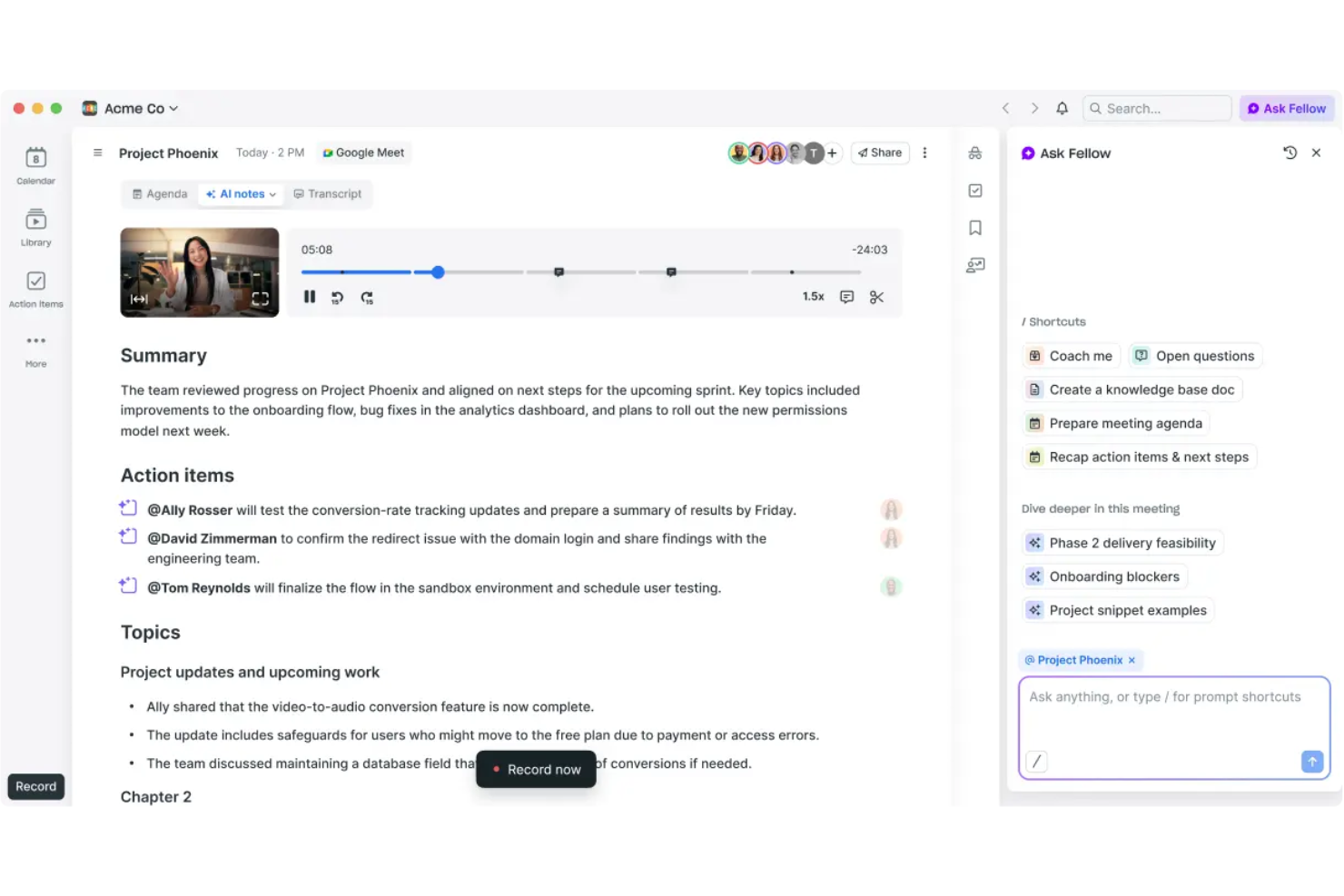
Fellow is an AI meeting assistant platform for creating collaborative agendas, capturing shared meeting notes, and facilitating structured team feedback and action items.
Who Is Fellow Best For?
Fellow fits managers and team leads at small to mid-sized tech companies who want organized, collaborative meeting workflows.
Why I Picked Fellow
I picked Fellow as one of the best because my team actually uses its collaborative agendas to keep meetings focused and accountable. I love how we can capture notes side-by-side in real time, and assign action items during the call. It’s especially useful for building and sharing meeting feedback directly in the workspace.
Fellow Key Features
- AI meeting transcription: Automatically generates transcripts for recorded meetings.
- Template library: Offers pre-built templates for different meeting types and structures.
- Meeting analytics dashboard: Tracks meeting frequency, engagement, and attendee data.
- Shared streams: Lets users organize meetings and notes by project, team, or topic.
Fellow Integrations
Fellow offers native integrations with Google Calendar, Outlook, Slack, Microsoft Teams, Zoom, Asana, Jira, Salesforce, HubSpot, and Linear. An API is available for custom integrations.
Pros and Cons
Pros:
- Dedicated agenda templates for different meeting types
- Built-in AI meeting summaries and transcripts
- Structured feedback and action item management
Cons:
- Occasional sync issues with some calendar platforms
- Fewer workflow automations
Fathom
Best for AI call summaries with CRM sync
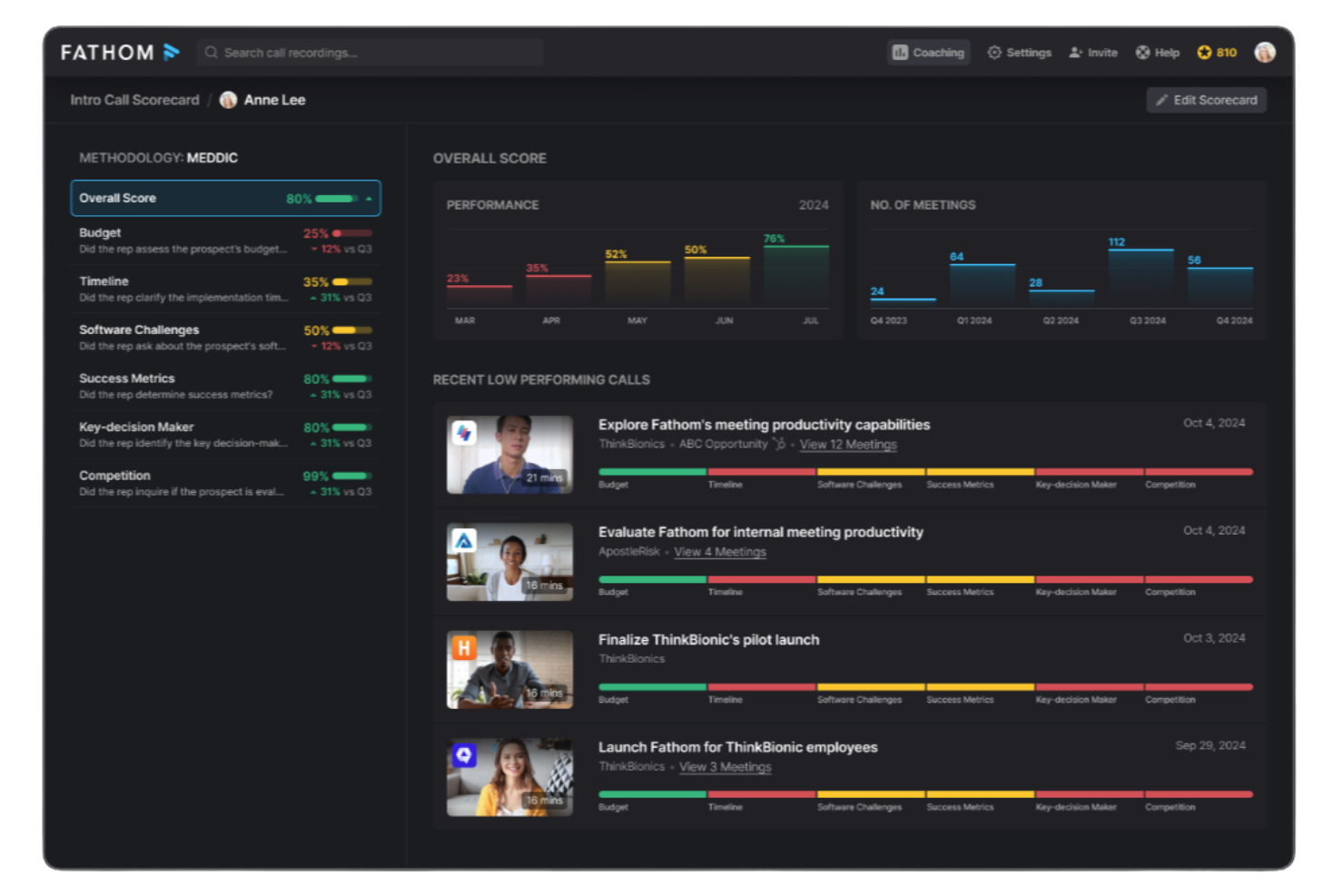
Fathom is an AI meeting assistant platform for recording, transcribing, highlighting, and summarizing video calls, offering instant access to meeting insights and action items.
Who Is Fathom Best For?
Fathom suits distributed sales, customer success, and research teams recording and analyzing virtual meetings across Zoom, Google Meet, and Microsoft Teams.
Why I Picked Fathom
I picked Fathom as one of the best because my team gets truly unlimited meeting recordings and transcriptions without hidden limits or upcharges, staying completely free for individual users. I like using Fathom to automatically generate sharable meeting summaries, highlight key points during calls, and sync action items to our connected apps.
Fathom Key Features
- Real-time transcription: Captures spoken words live on Zoom, Google Meet, and Microsoft Teams.
- Multi-language support: Transcribes meetings in multiple languages without manual switching.
- Speaker identification: Clearly marks which participant is speaking throughout the transcript.
- Automated call tagging: Tags important topics and segments for quick reference after meetings.
Fathom Integrations
Fathom offers native integrations with Salesforce, HubSpot, Slack, Notion, Google Docs, and supports exporting meeting content to Google Drive. An API is available for custom integrations.
Pros and Cons
Pros:
- Highlights and tags key moments during calls
- Real-time transcription in multiple languages
- Unlimited meeting recordings for individuals
Cons:
- Speaker labeling can be inconsistent on large calls
- No offline recording or mobile meeting capture

Avoma
Best for meeting insights and coaching
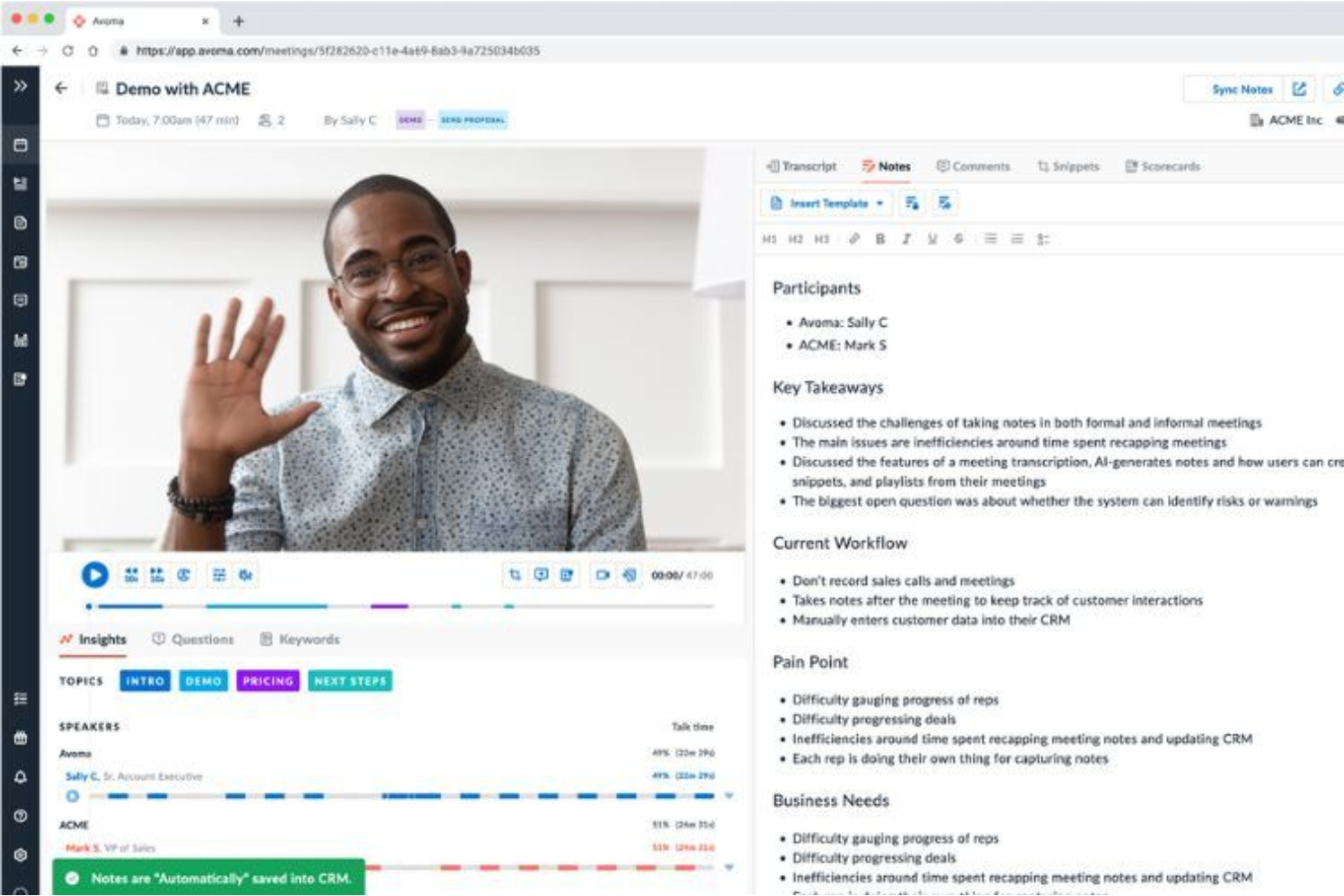
Avoma is an AI meeting assistant platform that records, transcribes, and analyzes conversations while supporting collaboration and coaching features for team meetings.
Who Is Avoma Best For?
Avoma fits revenue and customer-facing teams who need AI-powered meeting recording, insights, and coaching across recurring conversations.
Why I Picked Avoma
I picked Avoma because it goes beyond basic AI notes to deliver in-depth meeting transcriptions, collaborative real-time note-taking, and post-call coaching insights. My team uses Avoma to annotate decisions together during calls and organize conversation highlights for quick reference. The built-in coaching tools let managers review calls and share feedback tied directly to specific conversations.
Avoma Key Features
- Automated agenda templates: Lets you create and reuse structured agendas for recurring meetings.
- Searchable meeting transcript repository: Stores and indexes transcripts for keyword and topic search across all conversations.
- CRM integration: Syncs meeting insights and notes directly with Salesforce, HubSpot, and other CRMs.
- Speaker identification: Distinguishes individual speakers to attribute statements and action items accurately.
Avoma Integrations
Avoma offers native integrations with Zoom, Microsoft Teams, Google Meet, Salesforce, HubSpot, Slack, Google Calendar, and Outlook Calendar. An API is available for custom integrations.
Pros and Cons
Pros:
- Conversation intelligence provides coaching and analytics
- Automated agenda templates for recurring meetings
- Collaborative notes editing during and after meetings
Cons:
- No mobile app for recording meetings on the go
- Occasional transcription errors with strong accents

Granola
Best for concise meeting summaries
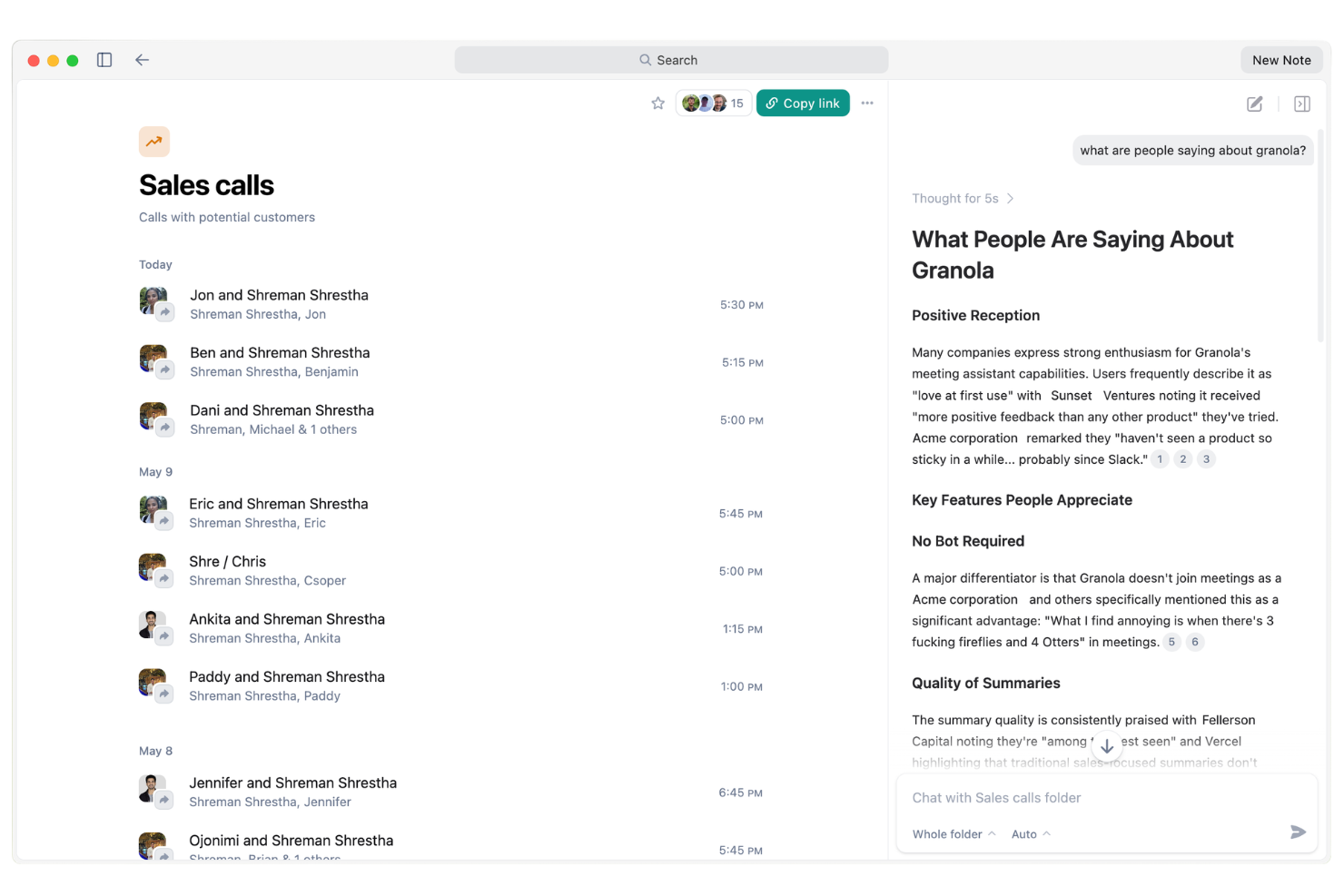
Granola is an AI meeting assistant platform that records meetings, generates transcripts, tracks action items, and triggers automated follow-ups and reminders for your team.
Who Is Granola Best For?
Granola suits busy sales and client-facing teams who need automated follow-ups and reliable action tracking from every meeting.
Why I Picked Granola
I've included Granola in my shortlist because I value how its AI agent automatically handles meeting follow-ups, reminders, and key action items with no manual effort from my side. I like how it actively tracks commitments and nudges participants after meetings so nothing slips. In practice, that means my team is able to focus on discussions while Granola ensures tasks and follow-ups are always managed.
Granola Key Features
- Live meeting transcription: Granola captures and transcribes meeting audio in real time.
- Speaker detection: Identifies and labels different speakers during meeting recordings.
- Searchable meeting archive: Lets users search and retrieve past meeting notes or transcripts easily.
- AI-powered meeting summaries: Generates concise written summaries of each meeting automatically.
Granola Integrations
Granola offers native integrations with Google Calendar, Zoom, Google Meet, Slack, Notion, and Salesforce. An API is available for custom integrations.
Pros and Cons
Pros:
- Summarizes meetings with AI-generated notes
- Tracks and reminds participants on follow-ups
- Automated action items assigned after each meeting
Cons:
- No mobile app for on-the-go use
- Lower plans restrict monthly transcription minutes

Otter.ai
Best for real-time transcription and notes
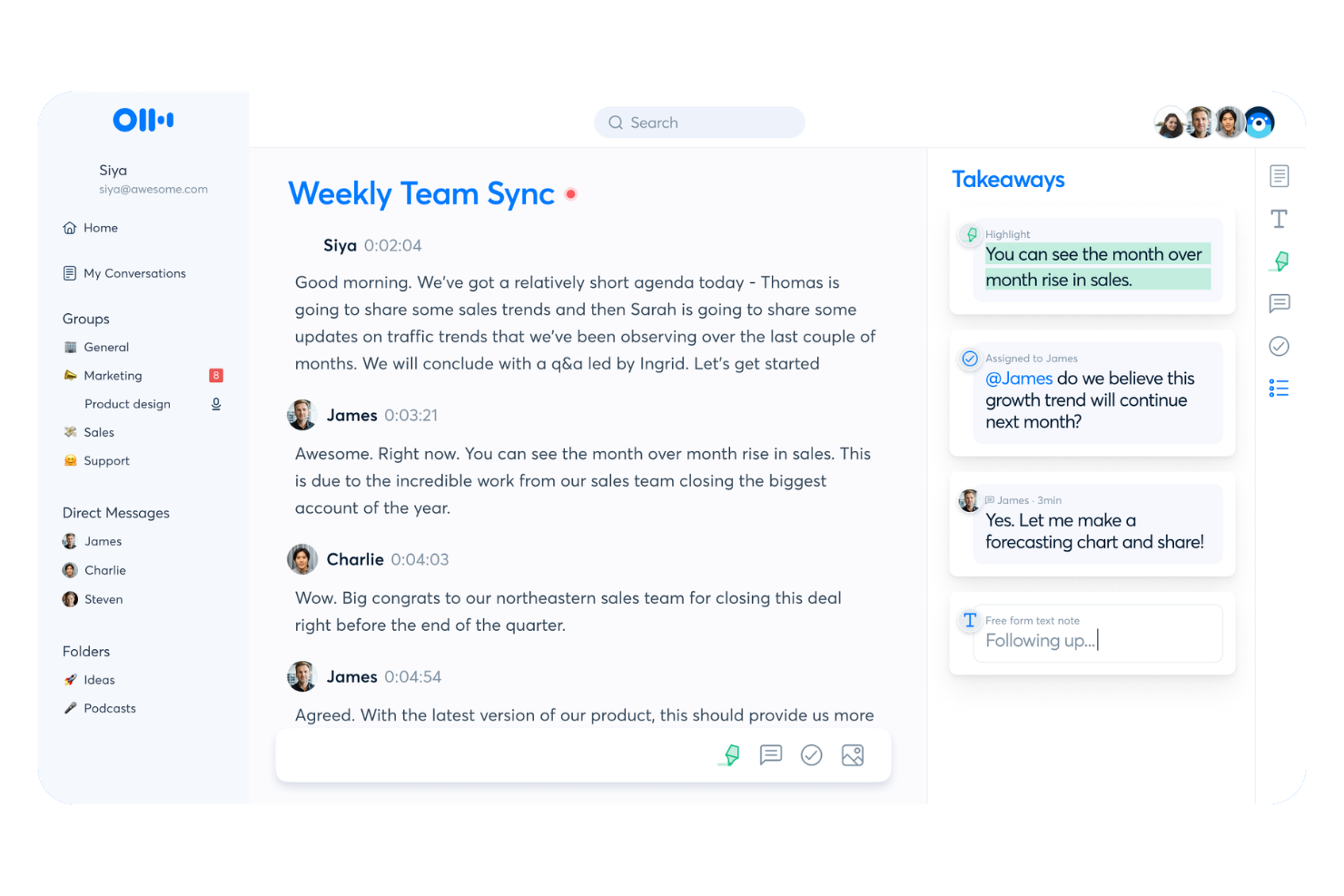
Otter.ai is an AI meeting assistant platform for live voice meeting notes, automated transcription, real-time collaboration, and turning conversations into searchable records for teams and organizations.
Who Is Otter.ai Best For?
Remote and hybrid teams that need live, collaborative voice transcripts and meeting documentation across distributed meetings.
Why I Picked Otter.ai
I picked Otter.ai as one of the best because I rely on its live voice meeting notes and instant transcript sharing during cross-team meetings. I like collaborating on shared notes in real time, with teammates adding comments or edits mid-conversation. My team uses interactive live summary cards to capture decisions and assigned action items as they happen.
Otter.ai Key Features
- Automated speaker identification: Distinguishes and labels speakers in meeting transcripts.
- Syncs with video conferencing platforms: Connects directly to Zoom, Google Meet, and Microsoft Teams.
- Audio import for transcription: Lets you upload audio files to generate searchable transcripts.
- Custom vocabulary: Allows you to add industry terms or names for more accurate transcription.
Otter.ai Integrations
Otter.ai offers native integrations with Zoom, Google Meet, Microsoft Teams, Dropbox, Google Drive, and more. An API is available for custom integrations.
Pros and Cons
Pros:
- Live note collaboration during conversations
- Automated speaker identification is accurate
- Real-time transcription in meetings and calls
Cons:
- Edit options for summaries are limited
- Meeting bot can disrupt privacy-conscious guests

Best for automatic meeting transcription
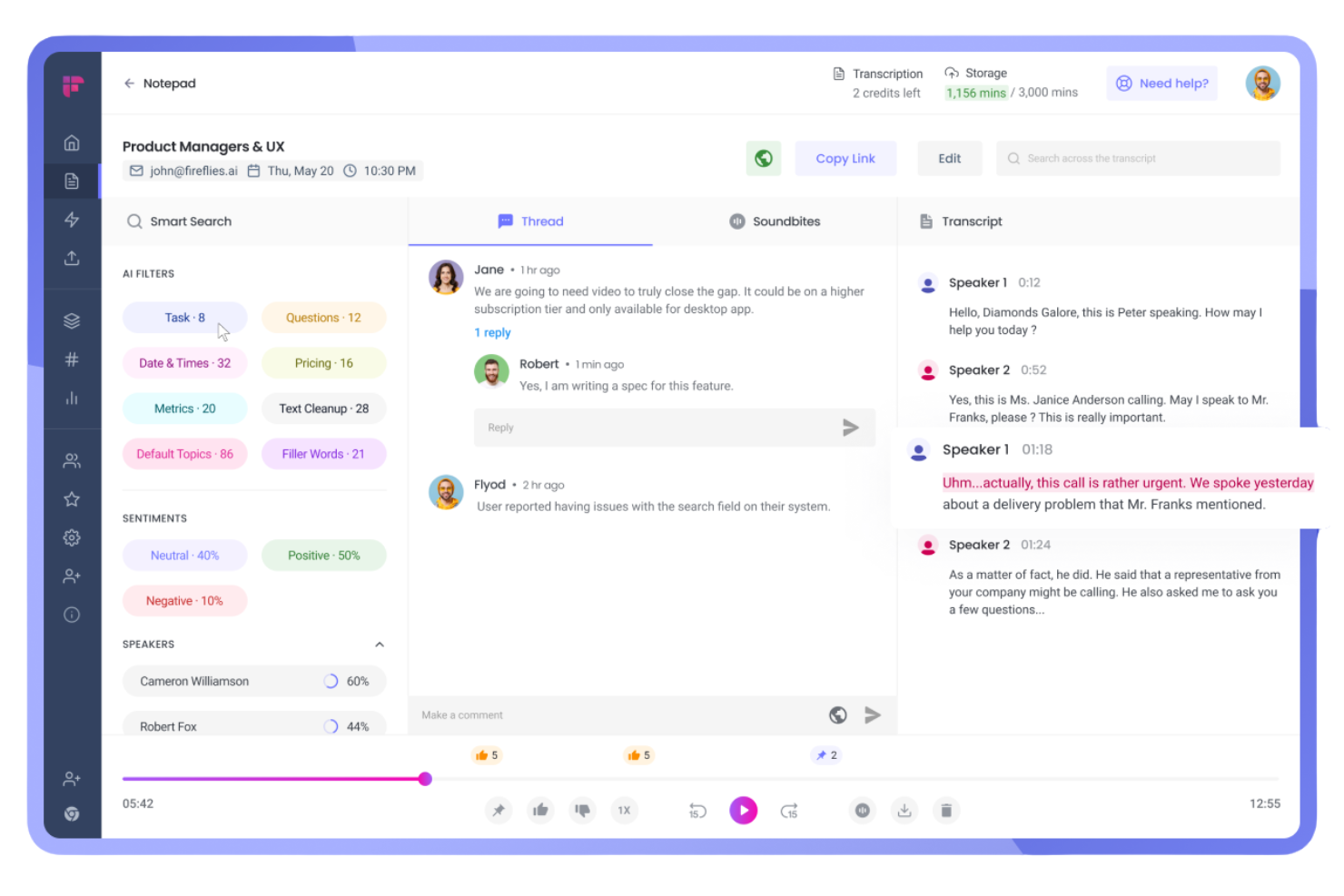
Fireflies.ai is an AI meeting assistant platform that records calls, generates searchable transcripts, auto-summarizes conversations, and integrates with a wide range of video conferencing and collaboration tools.
Who Is Fireflies.ai Best For?
Sales teams and project managers who need automated call transcription and documentation across distributed meetings.
Why I Picked Fireflies.ai
I picked Fireflies.ai as one of the best because it transcribes and summarizes meetings across platforms automatically, taking care of multi-platform recordings in real time. I use its AI-generated summaries to share tailored recaps with different stakeholders, and rely on its keyword search to track key action items from hours of calls without manual effort.
Fireflies.ai Key Features
- Smart search: Search transcripts by keyword, speaker, or topic across all your meetings.
- Speaker identification: Detects and labels different speakers automatically during recordings.
- Collaboration tools: Highlight, comment, and assign tasks directly within transcribed meeting notes.
- CRM integration: Sync meeting data and notes with popular CRM platforms like Salesforce and HubSpot.
Fireflies.ai Integrations
Fireflies.ai offers native integrations with Google Meet, Zoom, Microsoft Teams, Slack, Salesforce, HubSpot, Asana, ClickUp, Monday.com, and more. It connects with Zapier and provides an API for custom integrations.
Pros and Cons
Pros:
- Searchable archive of all recorded meetings
- Real-time AI summaries delivered after calls
- Accurate multi-speaker transcription on meetings
Cons:
- Occasional transcription errors with heavy accents
- No live video recording, audio only

Tactiq
Best for real-time meeting summaries
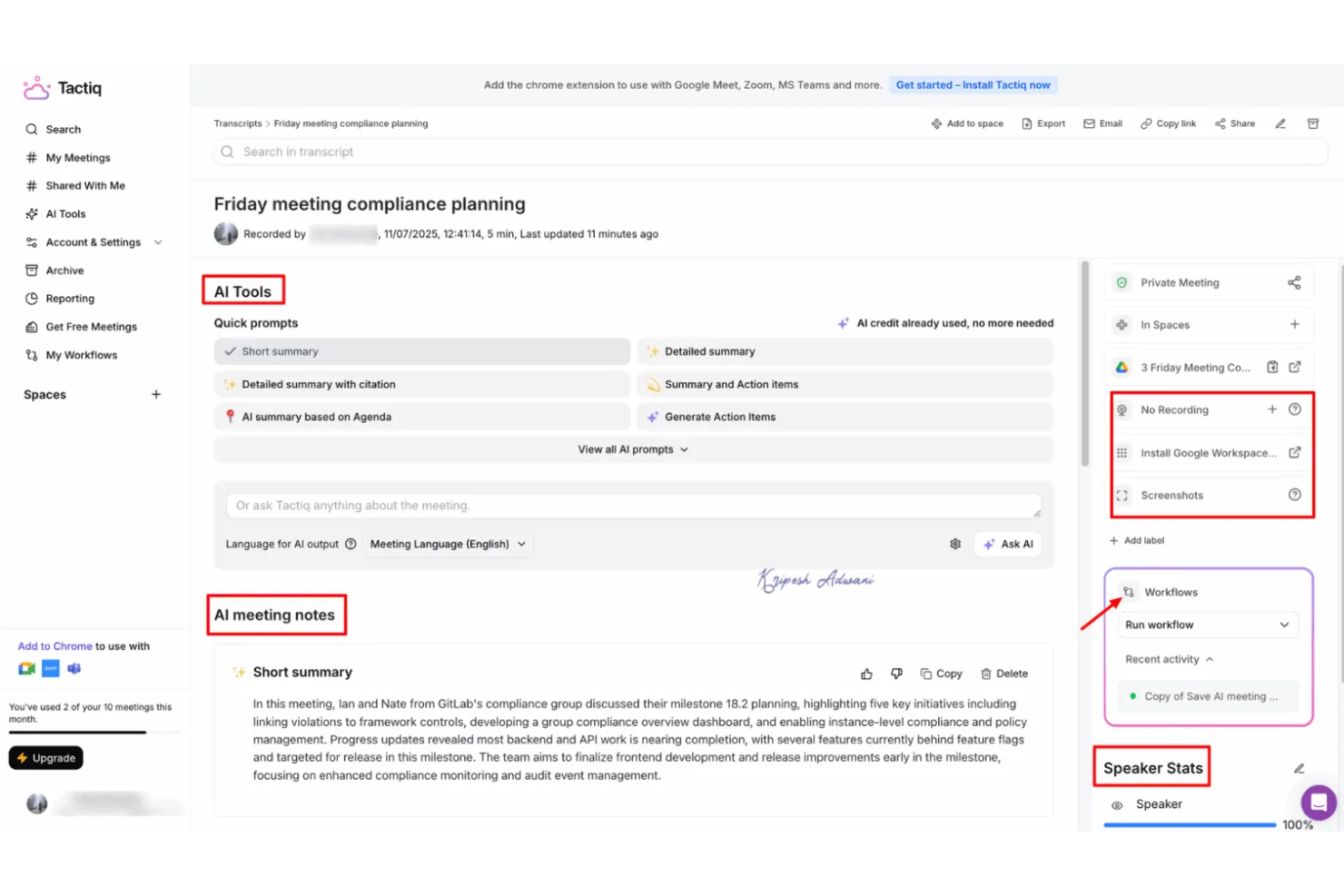
Tactiq is an AI-driven meeting assistant platform that captures live transcripts, generates summaries and action items, and integrates directly with platforms like Google Meet, Zoom, and Microsoft Teams.
Who Is Tactiq Best For?
Tactiq suits cross-functional teams in hybrid or remote workplaces that need instant, AI-powered transcripts and meeting documentation on major video platforms.
Why I Picked Tactiq
I picked Tactiq as one of the best because it grabs transcripts, summaries, and action items live as my team uses Google Meet, Zoom, and Microsoft Teams. I like being able to highlight key moments during a meeting, tag teammates for follow-up, and instantly reference specific details in the transcript. I’ve used it to streamline note-taking by exporting meeting records to tools like Google Docs and Notion.
Tactiq Key Features
- AI topic detection: Identifies and organizes topics discussed in meetings automatically.
- Speaker labeling: Differentiates speakers throughout the transcript for reference.
- Custom vocabulary: Lets you add keywords for better recognition and accuracy.
- Export in multiple formats: Allows exports to PDF, Word, and subtitle files for sharing or archiving.
Tactiq Integrations
Tactiq offers native integrations with Google Meet, Zoom, and Microsoft Teams, and provides export options to Google Docs, Notion, and Slack. An API is available for custom integrations.
Pros and Cons
Pros:
- AI summarizes meetings with key action items
- Detects and labels different speakers
- Captures transcripts in multiple languages
Cons:
- Speakers sometimes mislabeled in fast exchanges
- Few project management or CRM integrations

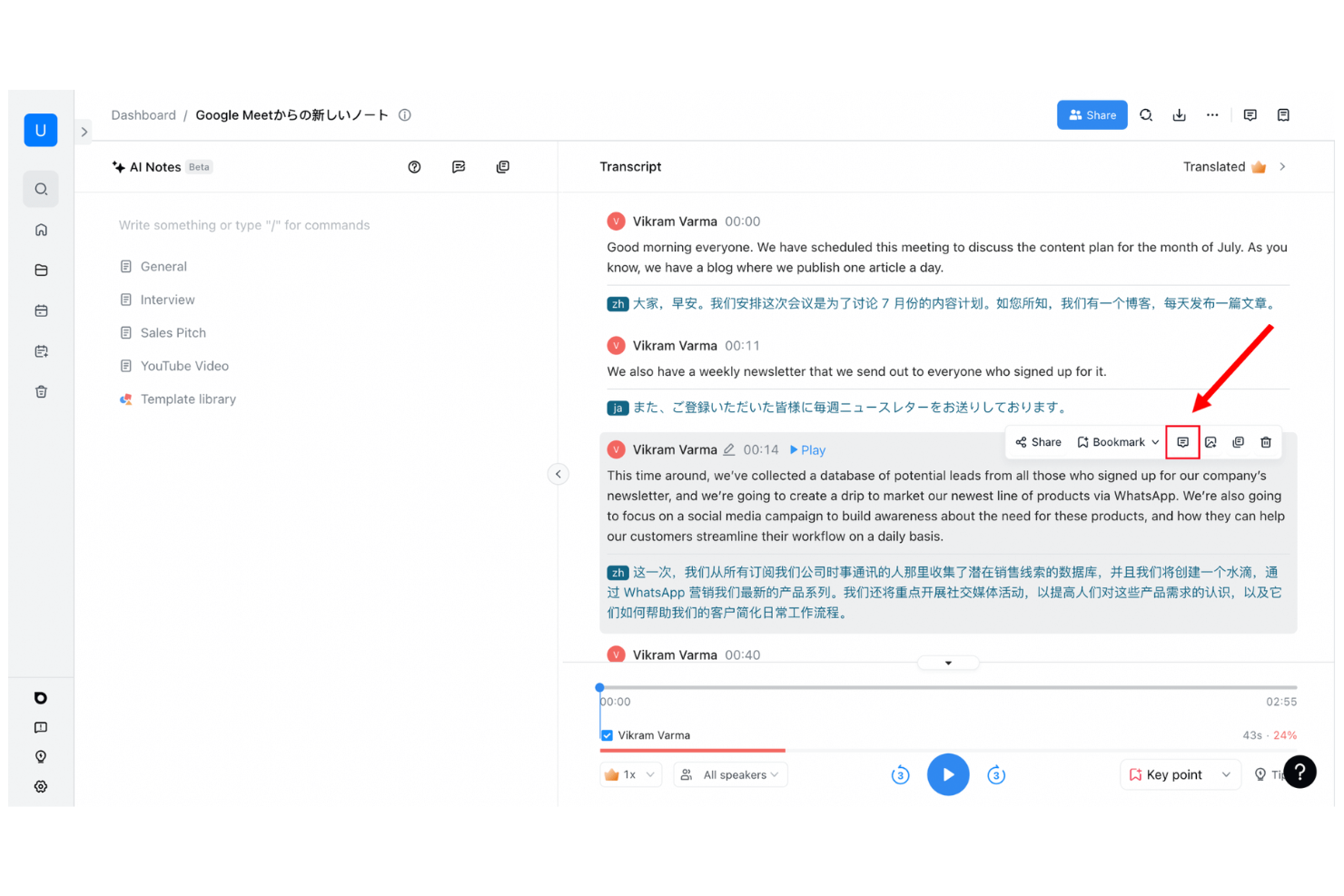
Notta is an AI-powered meeting assistant platform for recording, transcribing, and organizing conversations from online meetings, phone calls, and uploaded audio or video files.
Who Is Notta Best For?
Notta suits remote professionals and global businesses that need fast, accurate transcription for meetings, webinars, calls, and live events across multiple languages.
Why I Picked Notta
I picked Notta as one of the best AI meeting assistants because it instantly transcribes conversations in real time—whether I’m in a video call, attending a live event, or uploading an audio file. I like being able to record and capture every word as it happens, then search, edit, and organize transcripts from any device. I also appreciate that Notta supports multiple languages and recognizes different speakers automatically.
Notta Key Features
- Meeting summary generator: Automatically creates concise AI-powered summaries after each meeting.
- Export options: Lets you export transcripts to PDF, Word, TXT, or subtitle formats.
- Calendar integration: Syncs with Google and Outlook calendars to auto-record meetings.
- Team workspace: Allows teams to organize and share recorded meetings and transcriptions in one place.
Notta Integrations
Notta offers native integrations with Google Meet, Zoom, Microsoft Teams, Google Calendar, and Outlook Calendar, and provides an API for custom integrations.
Pros and Cons
Pros:
- Action items are pulled out from conversation
- Can auto-join and record scheduled meetings
- Distinguishes speakers in transcripts
Cons:
- Free tier limits monthly transcription duration
- Transcription struggles with background noise
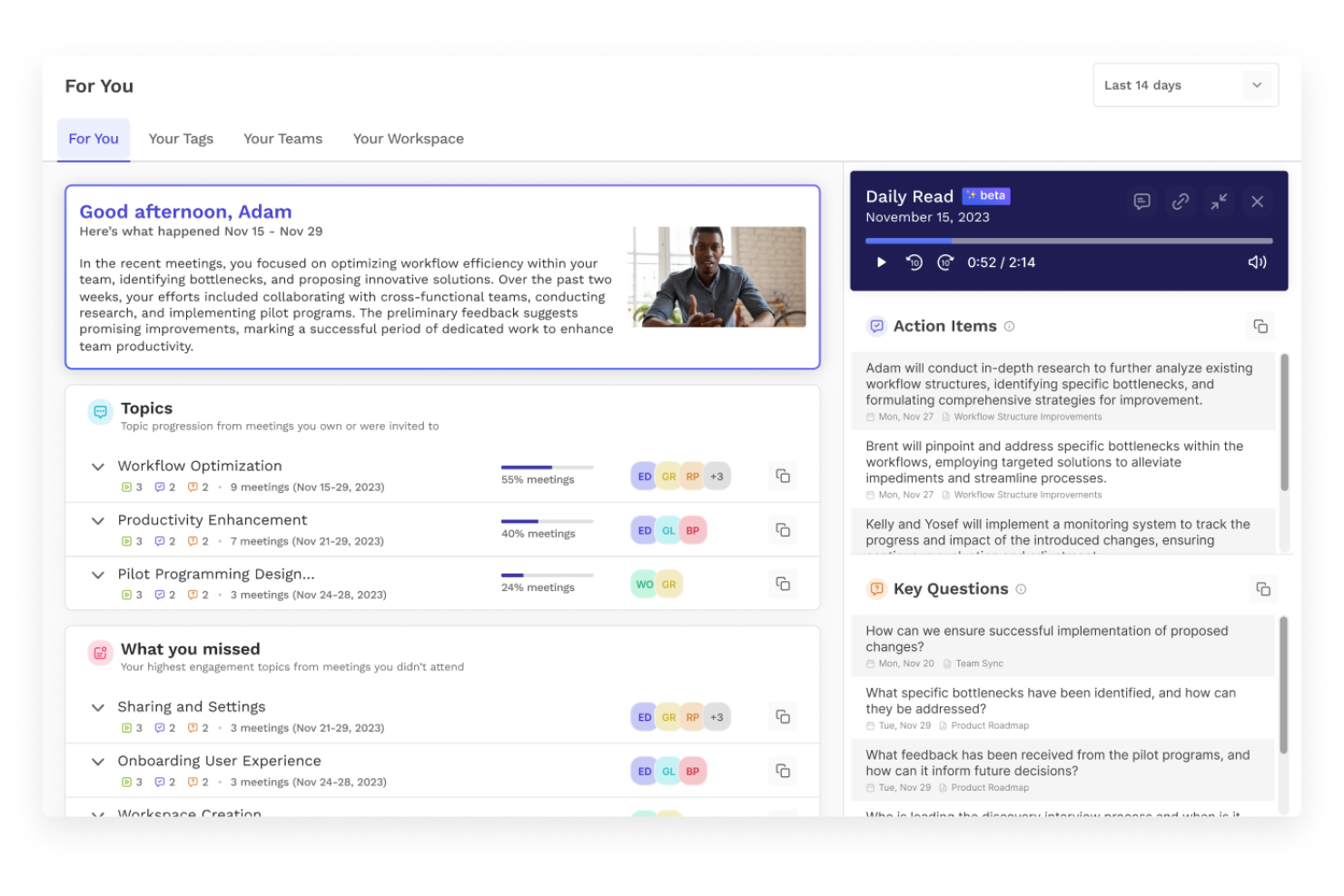
Read AI is an AI meeting assistant platform that automates meeting notes, generates summaries, and tracks action items, while supporting integrations for collaboration across popular video conferencing tools.
Who Is Read AI Best For?
Read AI suits remote and hybrid teams who need automated meeting summaries, tracking, and action items across multiple video conferencing platforms.
Why I Picked Read AI
I picked Read AI because it automates not just meeting notes, but summaries and action items as well, using its AI host feature. I’ve used it to get instant, structured recaps after calls, and I like that it reliably captures every decision point on the fly. My team often references Read AI’s real-time action item tracking to stay on top of follow-ups across multiple meetings.
Read AI Key Features
- Automatic meeting attendance reports: Generates participant lists and attendance summaries after each meeting.
- Live engagement analytics: Measures attentiveness and engagement scores in real time during meetings.
- Custom vocabulary support: Lets you add specific terms and jargon for accurate transcription.
- Calendar integration: Syncs with your calendars to schedule, join, and track meetings automatically.
Read AI Integrations
Read AI offers native integrations with Zoom, Microsoft Teams, Google Meet, Slack, andmore. An API is available for custom integrations.
Pros and Cons
Pros:
- Exports meeting notes to Notion and Drive
- Unlimited meeting recordings for individuals
- Highlights and tags important meeting moments
Cons:
- No offline or mobile meeting capture support
- Speaker labeling inconsistent on large calls

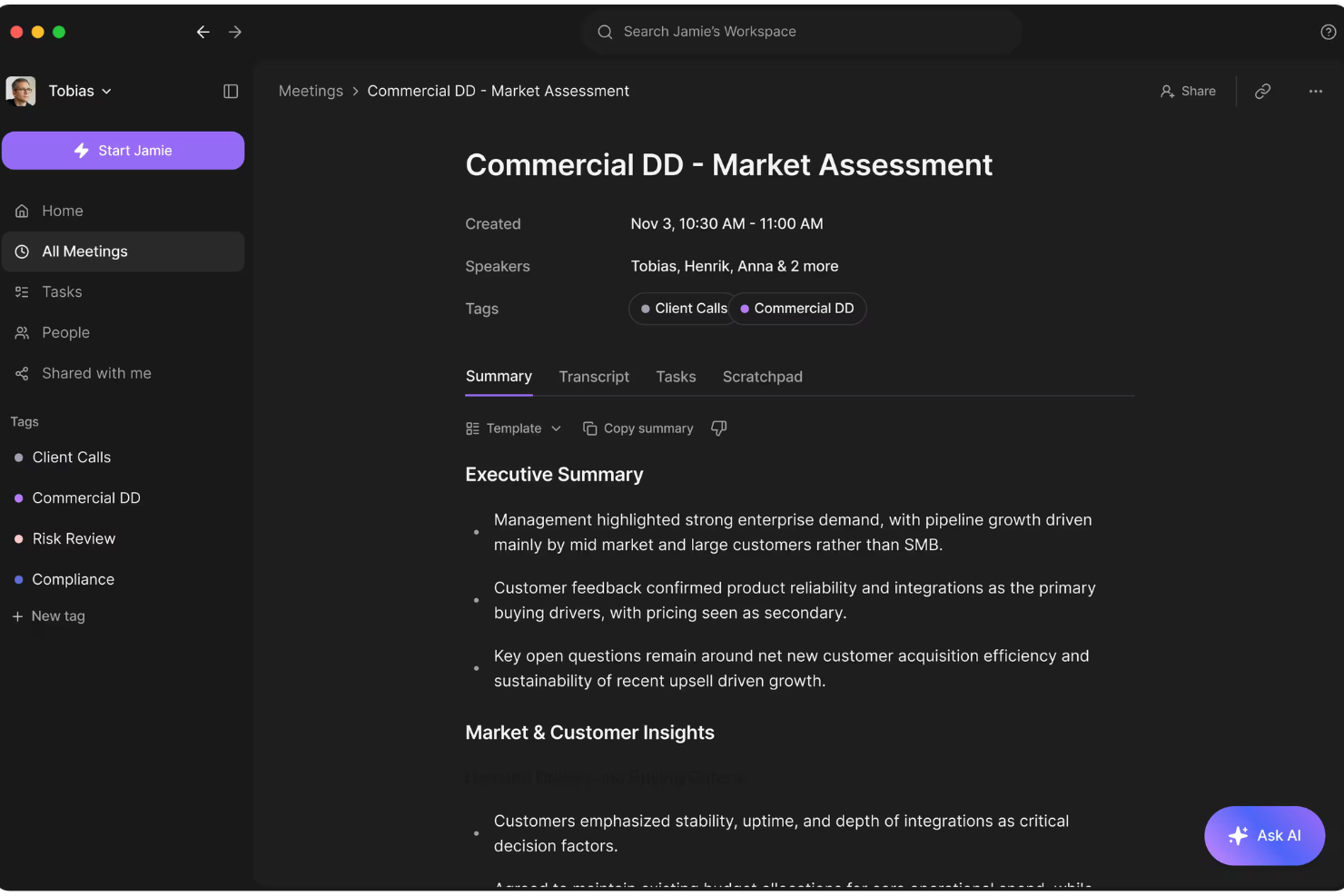
Jamie is an AI meeting assistant that automatically records virtual meetings across platforms, transcribes discussions, and delivers detailed, multilingual summaries for every conversation.
Who Is Jamie Best For?
Jamie fits distributed teams and consultants working internationally who need AI-powered meeting transcription and summaries in multiple languages.
Why I Picked Jamie
I picked Jamie as one of my best AI meeting assistants because I love that it runs on any meeting platform, not just the big names. I’m able to get clear, structured summaries in my choice of language right after every meeting. I also like how Jamie joins automatically and captures everything without my needing to start a recording or manage permissions.
Jamie Key Features
- Automated meeting recordings: Jamie automatically records audio from all scheduled meetings.
- Speaker diarization: The tool distinguishes and labels individual speakers during meetings.
- Action item extraction: Jamie identifies and displays action items discussed in the meeting.
- Edit and export summaries: You can edit generated meeting summaries and export them as text or PDF files.
Jamie Integrations
Jamie offers native integrations with Google Calendar, Microsoft Outlook Calendar, and native video conferencing platforms including Zoom, Google Meet, and Microsoft Teams. An API is available for custom integrations.
Pros and Cons
Pros:
- Action items are automatically detected and listed
- Can join meetings automatically as an attendee
- Transcripts include speaker identification
Cons:
- Summaries occasionally misattribute speakers
- Transcription quality drops with poor audio
Andre AI-møteassistenter
Her er noen flere alternativer for AI-møteassistenter som ikke kom med på kortlisten min, men som likevel er verdt å sjekke ut:
- tl;dv
For meeting highlights and timestamps
- MeetGeek
For automated meeting summaries
- Gong
For revenue-focused conversation insights
- Grain
For video meeting highlights
- Sybill
For conversational meeting insights
- Reclaim
For smart meeting scheduling
- Microsoft CoPilot
For AI within Microsoft 365
- Google Gemini
For AI in Google Workspace
- Cirrus Insight
For Salesforce meeting automation
- Chorus
For sales conversation analytics
- Clari Copilot
For revenue conversation insights
- Supernormal
For instant meeting notes
- Zoom AI Companion
For AI in Zoom meetings
- Hedy AI
For multilingual meeting assistance
- Sembly AI
For meeting transcription and analysis
- Colibri.ai
For real-time meeting transcription
- AudioCodes Meeting Insights
For voice analytics and summaries


How I Evaluate AI Meeting Assistants
To make this list, a tool's AI has to deliver real time savings after standups, sprint reviews, and stakeholder check-ins—not just hand you a transcript. I split my evaluation into core functionality every tool must meet to qualify and differentiating factors that separate one pick from another.
Core Functionality (Table Stakes For This List)
When I'm selecting tools for my list, I rank each one on a scale from 0 (does not offer the functionality) to 5 (excels in this area) for each core functionality listed below. Then, I calculate the tool's total score into a percentage. Each tool needs to achieve a minimum total score of 65% to be considered for inclusion.
- Automated Meeting Transcription: I check whether the tool auto-joins and transcribes calls across Zoom, Google Meet, Microsoft Teams, and Webex without manual setup.
- AI-Generated Meeting Summaries: A good summary should break a 45-minute sprint review into topics, decisions, and outcomes I can share with stakeholders right away.
- Action Item Extraction: I look for AI that pulls out tasks, assigns owners, and flags due dates from natural conversation rather than requiring manual tagging.
- Project Tool Integrations: Tools like Otter.ai, Fireflies.ai, and Fellow differ in how deeply they connect with Jira, Asana, or Monday—I evaluate native sync depth.
- Searchable Meeting Repository: I evaluate whether I can search across months of transcripts by keyword, speaker, or topic to find a past decision quickly.
- Speaker Identification: Accurate speaker labels matter, especially when attributing action items across a cross-functional team of engineers, designers, and product managers.
Once I have a list of tools that meet the criteria, I consider what sets each platform apart.
Differentiating Factors (What Sets Vendors Apart)
Here's how I compare and contrast different vendors:
Standout Features
Custom AI summary templates are a big deal for PMs who run different meeting types daily—I want sprint retro outputs structured differently than a stakeholder update. I also look for conversational AI chat that lets me ask questions like "What risks came up in last month's planning sessions?" across stored transcripts. Multi-meeting project intelligence takes this further by surfacing recurring blockers and decision patterns over time, which helps me spot trends before they become problems.
Beyond Features
Security matters because meeting transcripts often contain sensitive project details, client names, and internal decisions. I check for SOC 2 Type II compliance and configurable data retention policies. Pricing structure is another factor I weigh—some tools cap monthly meeting minutes or lock PM integrations behind higher tiers, which changes the real cost for active teams. I also evaluate transcription accuracy with technical jargon, since a tool that mishandles acronyms like "CI/CD" or "OKR" creates more cleanup work than it saves.
Slik velger du en AI-møteassistent
Det er lett å gå seg vill i lange funksjonslister og kompliserte prismodeller. For å hjelpe deg med å holde fokus mens du jobber deg gjennom den unike prosessen med å velge programvare, er dette en sjekkliste over faktorer du bør ha i tankene:
| Faktor | Hva du bør vurdere |
|---|---|
| Skalerbarhet | Vil løsningen håndtere teamets møtevolum etter hvert som dere vokser? Se etter begrensninger på brukere, plasser eller møter. |
| Integrasjoner | Kan assistenten koble seg direkte til kalenderen, videoplattformen og samarbeidsverktøyene dine? |
| Tilpasningsmuligheter | Kan du justere maler og eksportformater eller utløse bestemte arbeidsflyter slik at de passer med teamets prosess? |
| Brukervennlighet | Er viktige handlinger som planlegging, deltakelse og deling av resultater tydelige for alle brukere, inkludert ansatte uten teknisk bakgrunn? |
| Implementering og opplæring | Hvor raskt kan teamet ditt komme i gang? Finnes det veiledninger, opplæringsressurser og støtte for migrering? |
| Kostnad | Passer funksjonene og bruksbegrensningene med budsjettet ditt? Vær oppmerksom på skjulte kostnader for avanserte funksjoner, bruksgrenser eller brukerstøtte. |
| Sikkerhetstiltak | Oppfyller plattformen behovene dine for personvern og relevante standarder? Se etter kryptering og datakontroller. |
| Tilgjengelig brukerstøtte | Er direkte brukerstøtte tilgjengelig når du trenger hjelp? Ta hensyn til tidssonen din, åpningstidene og hvor raskt brukerstøtten må håndtere henvendelser. |
Hva er en AI-møteassistent?
En AI-møteassistent er et digitalt verktøy som bruker kunstig intelligens til å ta opp, transkribere og analysere møter i sanntid. Disse AI-verktøyene automatiserer notatskriving ved å generere møtenotater, oppsummeringer og handlingspunkter under virtuelle møter eller møter ansikt til ansikt.
Mange plattformer har også funksjoner som AI-chat, automatiske oppfølgings-e-poster og søkbare oppsummeringer som kan lagres i en delt kunnskapsbase. Dette hjelper teammedlemmer med å forbedre teamsamarbeidet, øke teamets produktivitet og få tilgang til innsiktsfulle møteoppsummeringer uten manuelt arbeid.
Team bruker i økende grad KI-møteassistenter for å forenkle arbeidsflyter etter møter, redusere repetitive oppgaver og gjøre det enklere å dele og følge opp resultatene fra møter.
Funksjoner
Når du velger en KI-møteassistent, bør du se etter følgende viktige funksjoner:
- Transkripsjon i sanntid: Fanger opp det som blir sagt, som tekst under møtene, noe som gjør det enklere å følge samtaler, gå gjennom detaljer og dele møtereferater rett etter samtalene.
- Identifisering av talere: Skiller mellom og merker stemmen til hver deltaker, slik at du alltid vet hvem som sa hva, selv i gruppediskusjoner eller paneler.
- Automatiske sammendrag: Bruker KI til å lage kortfattede oppsummeringer som fremhever hovedtemaer, oppgaver og beslutninger, og gir deg umiddelbare møtenotater som du kan bruke eller sende til kolleger.
- Uthenting av oppgaver: Identifiserer, lister opp og følger automatisk opp oppgaver eller ansvarsområder som oppstår under samtalen, slik at teamet lettere kan holde oversikt over ansvar.
- Søkbar møtehistorikk: Lar deg søke i tidligere møter etter nøkkelord, tema eller deltaker, slik at det blir enkelt å finne informasjon eller gå tilbake til samtaler.
- Integrasjoner med videokonferanser: Kobler seg direkte til plattformer som Zoom, Google Meet eller Microsoft Teams, slik at du kan bruke assistenten under møter uten å bytte mellom faner eller verktøy.
- Alternativer for eksport og deling: Gjør det mulig å eksportere transkripsjoner og sammendrag til vanlige formater eller arbeidsplassapper, slik at notatene er tilgjengelige der teamet arbeider.
- Støtte for flere språk: Håndterer transkripsjon og sammendrag på flere språk enn engelsk, noe som er nyttig for multinasjonale team eller internasjonale partnere.
- Sikkerhets- og personvernkontroller: Tilbyr kryptering, tilgangstillatelser og samsvarsalternativer, slik at konfidensielle møtedata beskyttes og oppfyller organisasjonens standarder.
Fordeler
Implementering av en KI-møteassistent gir flere fordeler for teamet og virksomheten din. Her er noen av fordelene du kan se frem til:
- Nøyaktige møtereferater: Automatisk transkripsjon og identifisering av talere sørger for at du får med deg alle detaljer og vet nøyaktig hvem som sa hva.
- Mindre manuell notatskriving: KI-sammendrag i sanntid og uthenting av oppgaver gjør at deltakerne kan fokusere på samtalene i stedet for å skrive notater.
- Raskere oppfølging: Oppgaver og eksportfunksjoner hjelper teamet med raskt å tildele oppgaver eller dele møteresultater uten forsinkelser.
- Bedre ansvarlighet: Søkbare transkripsjoner og tilgjengelige referater gjør det enkelt å finne frem til forpliktelser og beslutninger fra tidligere møter.
- Bedre tilgjengelighet: Støtte for flere språk og integrasjoner med videoplattformer gjør det enklere for eksterne eller globale team å delta i og gå gjennom møter.
- Bedre datasikkerhet: Personvernkontroller og krypteringsfunksjoner beskytter sensitiv møteinformasjon mot uautorisert tilgang.
- Økt produktivitet: Automatiserte prosesser gjør det raskere å avslutte møter og frigjør tid til arbeid med høyere verdi.
Kostnader og priser
Valg av KI-møteassistent krever en forståelse av de ulike prismodellene og abonnementene som er tilgjengelige. Kostnadene varierer basert på funksjoner, teamstørrelse, tillegg og mer. Tabellen nedenfor oppsummerer vanlige abonnementer, gjennomsnittsprisene deres og typiske funksjoner som er inkludert i KI-møteassistentløsninger:
Sammenligningstabell for abonnementer for KI-møteassistent
| Abonnementstype | Gjennomsnittspris | Vanlige funksjoner |
|---|---|---|
| Gratisabonnement | $0 | Inkluderer grunnleggende møtetranskripsjon, et begrenset antall minutter per måned, én bruker, kjerneintegrasjoner og grunnleggende sammendrag. |
| Personlig abonnement | $5-$15/bruker/måned | Tilbyr ubegrenset eller utvidet transkripsjon, individuell identifisering av talere, eksportalternativer, prioritert brukerstøtte og registrering av oppgaver. |
| Bedriftsabonnement | $15-$40/bruker/måned | Støtter teamkontoer, avanserte integrasjoner, delt møtehistorikk, forbedrede sammendrag, analyser og administratorkontroller. |
| Virksomhetsabonnement | $40-$80/bruker/måned | Tilbyr tilpassede integrasjoner, dedikert kontoadministrasjon, SSO, samsvarsfunksjoner, massevis av oppsett og avanserte sikkerhetsalternativer. |
Vanlige spørsmål om AI-møteassistenter
Her er noen svar på vanlige spørsmål om AI-møteassistenter:
Kan AI-møteassistenter integreres med den eksisterende kalenderen og videokonferanseverktøyene mine?
Ja, de fleste AI-møteassistenter kan integreres med de største kalenderappene og videokonferanseplattformene. Dette gjør det enkelt å bli med i og ta opp møter automatisk, synkronisere tidsplaner og sørge for at notatene og transkripsjonene dine er knyttet til riktig hendelse.
Hvor nøyaktig er transkripsjonen fra AI-møteassistenter?
Transkripsjonsnøyaktigheten er generelt høy, spesielt i rolige omgivelser med tydelig lyd. Du kan oppleve feil når personer snakker i munnen på hverandre, snakker raskt eller når det er mye bakgrunnsstøy. Det er lurt å gå gjennom og redigere transkripsjoner for svært viktige møter.
Er møtedataene mine sikre når jeg bruker en AI-møteassistent?
Ja, de fleste anerkjente plattformer for AI-møteassistenter bruker kryptering og tilbyr personvernkontroller for å beskytte dataene dine. Sjekk alltid sikkerhetsinnstillingene og personvernerklæringene til hver leverandør, spesielt hvis du jobber i en regulert bransje eller håndterer sensitiv informasjon.
Kan AI-møteassistenter håndtere flere språk?
Ja, mange AI-møteassistenter tilbyr støtte for flere språk, både i transkripsjoner og møtesammendrag. Dette er spesielt nyttig for internasjonale team eller møter som veksler mellom ulike språk.
Hva skjer hvis en deltaker blir med sent – blir innspillene deres fanget opp?
Ja, de fleste verktøy fanger opp alt som blir sagt så snart deltakeren blir med. Alt som ble diskutert før møteassistenten ble aktivert eller brukeren ble med, vises imidlertid ikke i transkripsjonen. Hvis du starter assistenten i tide, sikrer du full dekning.
Hvordan deler jeg møtenotater med teamet mitt etter en samtale?
De fleste AI-møteassistenter lar deg eksportere notater og transkripsjoner til skylagringstjenester, samarbeidsverktøy eller som delte lenker. Noen verktøy automatiserer til og med deling av notater til Slack eller oppdaterer prosjektstyringsverktøy med oppgaver som ble identifisert under et møte.