

10 raske alternativer til QuickBooks Time for stemplingsur i 2026

Beste alternativer til QuickBooks Time – kortliste


Et godt alternativ til QuickBooks Time gir deg pålitelig tidsregistrering, brukervennlige funksjoner og integrasjoner med verktøyene teamet ditt allerede er avhengig av. Hvis du ser etter alternativer til QuickBooks Time, opplever du sannsynligvis utfordringer med å registrere arbeidstimer på tvers av team, administrere fremmøteregistrering eller behov for mer fleksible funksjoner i arbeidsflyten din. Denne listen begrenser utvalget til de beste alternativene, slik at du raskt kan sammenligne de beste verktøyene og appene for tidsregistrering og finne en løsning som hjelper deg med å forbedre tidsstyringen. Du kan forvente korte sammendrag og praktisk veiledning som hjelper deg med å optimalisere prosessene dine og ta en trygg beslutning.
Hva er QuickBooks Time?
QuickBooks Time er en programvareløsning for tidsregistrering utviklet for bedriftseiere, små bedrifter og team som trenger å registrere ansattes arbeidstimer, administrere arbeidsplaner og forenkle lønnskjøringen. Den fungerer som en tidsregistreringstjeneste og lar teamet ditt stemple inn og ut fra hvor som helst, opprette nøyaktige tidsregistreringer og administrere timelister i sanntid. QuickBooks Time støtter også registrering av fravær (inkludert PTO), fremmøteregistrering og detaljert tidsrapportering.
Sammenligningstabell for alternativer til QuickBooks Time
Denne sammenligningstabellen oppsummerer prisdetaljene for mine beste utvalgte alternativer til QuickBooks Time:
| Tool | Best For | Trial Info | Price | ||
|---|---|---|---|---|---|
| 1 | Best for customizable approval workflows | 14-day free trial + free demo available | From $4.99/user/month + $19/month base fee (billed annually) | Website | |
| 2 | Best for AI-assisted workforce time and budget tracking | 14-day free trial + free demo available | From $3.99/user/month (billed annually) | Website | |
| 3 | Best for department-level time tracking | 30-day free trial | From $50/month (billed annually) | Website | |
| 4 | Best for affordable project tracking | Free plan + 7-day free trial available | From $4.99/user/month | Website | |
| 5 | Best for automatic time tracking with AI | Free 14-day trial + free demo available | From $9/user/month (billed annually) | Website | |
| 6 | Best for verified attendance tracking | Free plan + free demo available | Pricing upon request | Website | |
| 7 | Best for automatic time tracking by tasks | 14-day free trial + free plan + free demo available | From $3.99/user/month (billed annually) | Website | |
| 8 | Best for tracking team productivity | 14-day free trial | Pricing upon request | Website | |
| 9 | Best with invoicing and expense tracking | Free trial + free plan available | From $9/user/month (billed annually) | Website | |
| 10 | Best for tracking field teams | 14-day free trial | From $4/user/month | Website |

Why Trust Our Software Recommendations
Our team has been testing and reviewing software since 2012. As project managers ourselves, we know how difficult—and important—it is to choose the right software.
For this guide, we evaluated tools using hands-on testing and independent research, scoring tools using our selection criteria. We also draw on insights from industry thought leaders and practicing project management experts.
Our reviews reflect our human editorial judgment, not a sales pitch.
Expert reviewers:
Anmeldelser av de beste alternativene til QuickBooks Time
Nedenfor finner du mine detaljerte sammendrag av alternativene til QuickBooks Time som kom med på kortlisten. Anmeldelsene mine gir en detaljert gjennomgang av funksjonene, de beste bruksområdene og integrasjonene for hver programvare for tidsregistrering, slik at du kan finne det beste alternativet for deg.

Best for customizable approval workflows
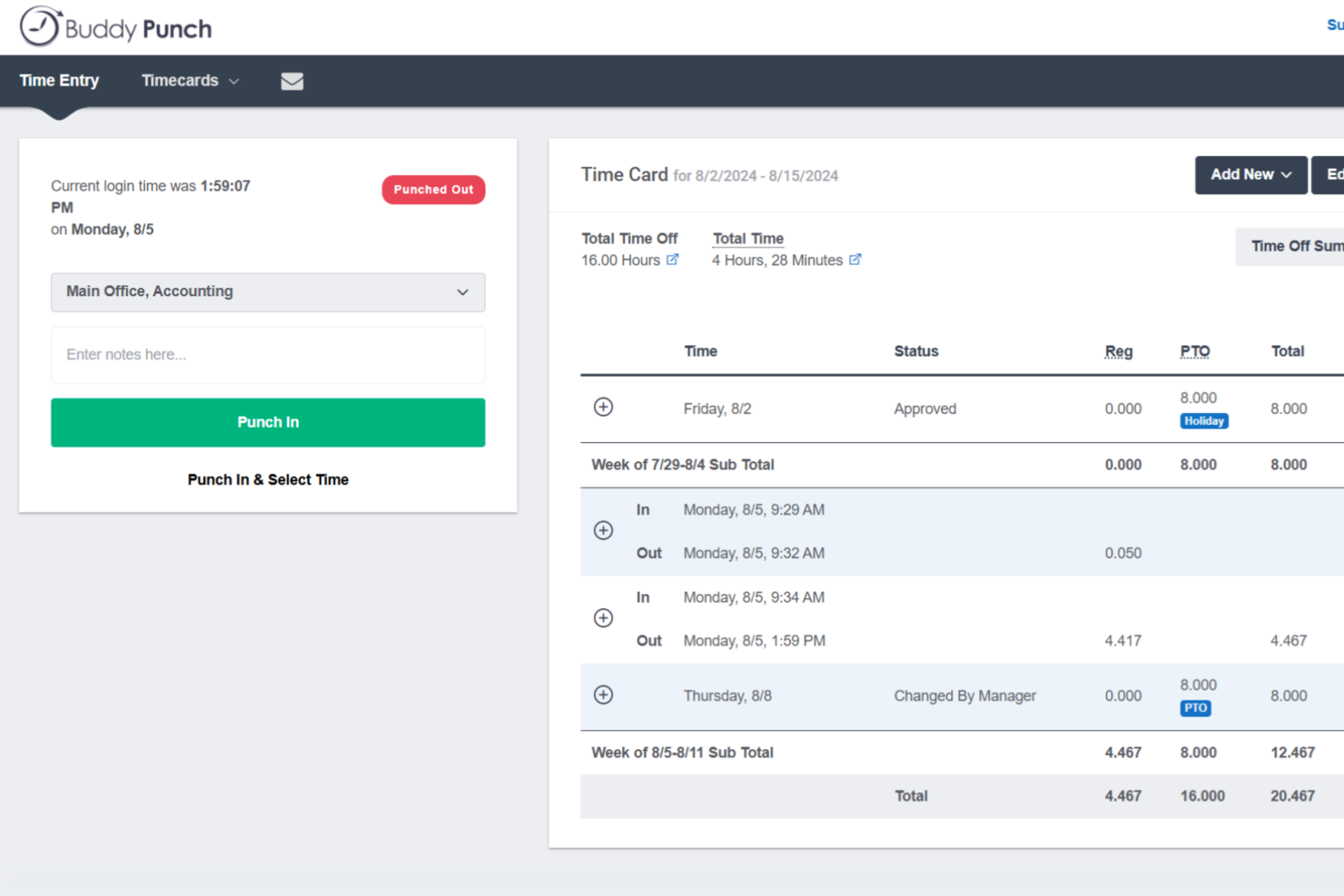
Buddy Punch gives teams a flexible way to track hours, manage attendance, and handle scheduling all in one platform. It’s a good fit for businesses looking for an easy-to-use QuickBooks Time alternative with strong customization options and reliable payroll integrations.
Who Is Buddy Punch Best For?
HR managers and operations leads in small and midsize businesses who need granular control over time-off and attendance approvals.
Why Buddy Punch Is a Good QuickBooks Time Alternative
I picked Buddy Punch specifically for its approval workflow flexibility—you can set up multi-step approval chains, assign specific managers as approvers, and configure different rules for different departments or locations. In practice, that means my team can handle time-off requests and timesheet approvals without routing everything through a single bottleneck. I also appreciate that Buddy Punch lets you build notification rules into the workflow, so approvers get alerted automatically when action is needed. For businesses managing multiple teams with different approval requirements, that level of control is hard to find in most QuickBooks Time alternatives.
Buddy Punch Key Features
- GPS tracking: Log employee locations at the time of each punch-in or punch-out.
- Facial recognition: Verify employee identity at clock-in to prevent buddy punching.
- Job codes: Assign time entries to specific projects, clients, or cost centers.
- Overtime alerts: Automatically flag employees who are approaching overtime thresholds.
Buddy Punch Integrations
Buddy Punch offers native integrations with QuickBooks, ADP, Gusto, Paychex, Zapier, and Workday. An API is available for custom integrations.
Pros and Cons
Pros:
- Built-in scheduling and shift swapping tools
- Flexible punch-in methods for diverse teams
- Highly customizable approval workflows for time off
Cons:
- Limited advanced payroll reporting options
- Mobile app features can be inconsistent

Best for AI-assisted workforce time and budget tracking
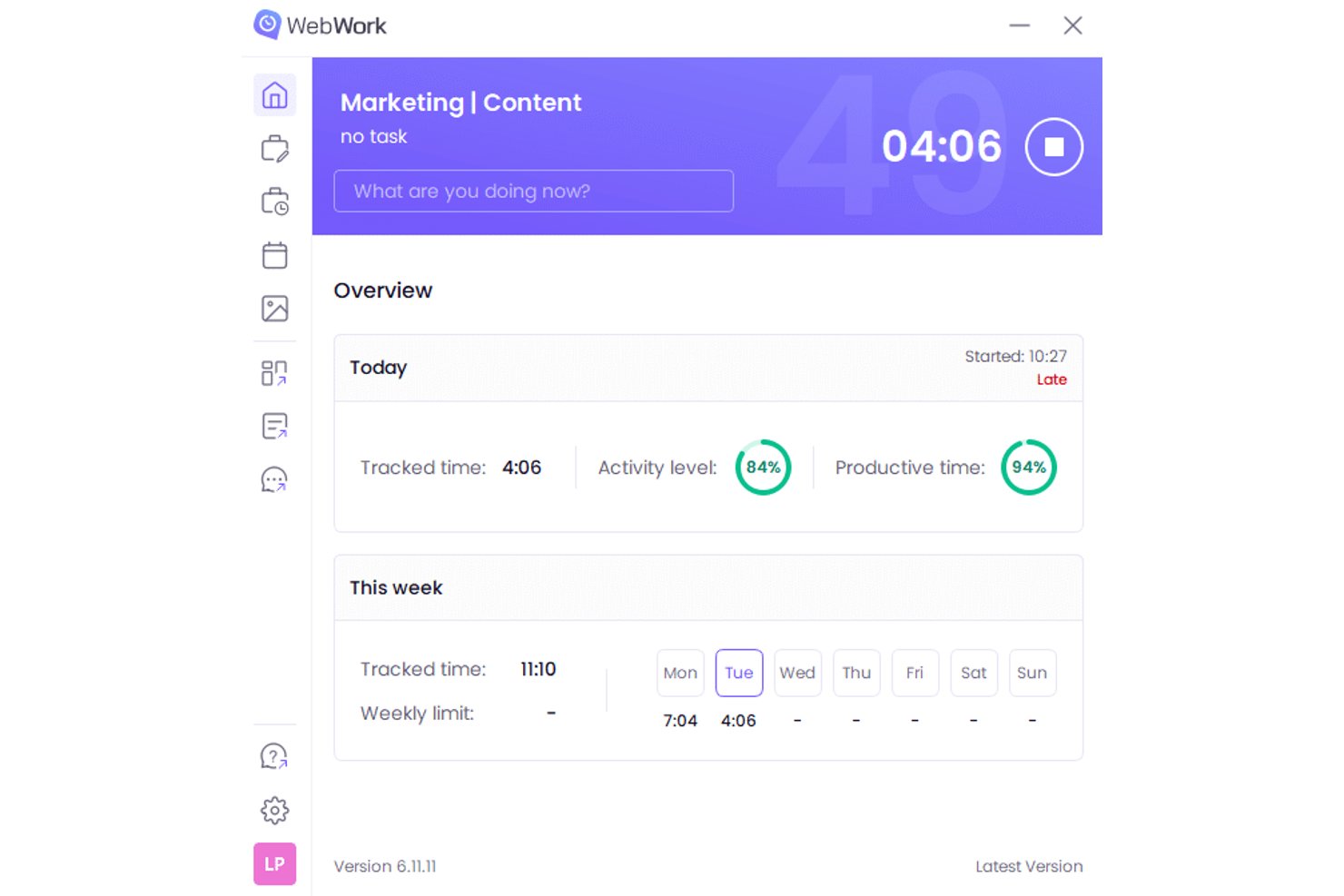
WebWork Time Tracker is a time tracking platform for tech teams, agencies, and businesses that need to monitor work hours, productivity, project progress, and budgets in one place.
Who Is WebWork Time Tracker Best For?
WebWork Time Tracker suits tech teams and agencies that need AI-assisted visibility into staff hours, project budgets, and workforce productivity.
Why I Picked WebWork Time Tracker
I picked WebWork Time Tracker because its AI-assisted workforce time and budget tracking helps my team connect logged hours with project costs. I use productivity reports, activity monitoring, and budget alerts to spot overruns while work is still in progress. This gives me clearer evidence for adjusting scope, staffing, or delivery forecasts.
WebWork Time Tracker Key Features
- Screenshots: Captures periodic screenshots during tracked work sessions.
- Timesheets: Lets users review, edit, and export recorded time entries.
- Attendance tracking: Records clock-ins, breaks, absences, and working schedules.
- Task management: Assigns tasks, sets deadlines, and tracks completion status.
WebWork Time Tracker Integrations
WebWork Time Tracker offers native integrations with Google Workspace, Slack, Jira, ClickUp, Asana, QuickBooks, Xero, Gusto, and Microsoft Teams, plus Zapier. A public API and webhooks are available for custom integrations, with API access limited to Premium users.
Pros and Cons
Pros:
- Screenshot frequency can be controlled
- Detailed reports connect hours with tasks
- Budget alerts flag project overruns early
Cons:
- Screenshot monitoring can feel intrusive
- Mobile app omits desktop monitoring features

TimeTrex
Best for department-level time tracking

TimeTrex gives growing businesses a way to manage time tracking, scheduling, and payroll on a single platform. If you’re looking for more control and advanced options than QuickBooks Time, this tool helps you cover compliance and complex workforce needs in one place.
Who Is TimeTrex Best For?
TimeTrex is ideal for businesses managing hourly employees across several locations or branches.
Why TimeTrex Is a Good QuickBooks Time Alternative
I picked TimeTrex specifically because of how well it handles teams spread across multiple sites. Each location can have its own time and attendance rules, and managers at each site only see what's relevant to them through role-based access controls. I also appreciate the geofencing feature, which lets you define specific zones so employees can only clock in from approved locations. For businesses running retail outlets, warehouses, or service branches, that kind of location-level structure is hard to find in a tool like QuickBooks Time.
TimeTrex Key Features
- Job costing: Assign labor and expenses to specific projects or tasks and track real-time profitability across jobs.
- Employee self-service portal: Employees can submit time-off requests, access pay stubs, and update their own information without involving HR.
- Multi-state and multi-country payroll: Automatically applies the correct tax rules and labor regulations for employees working across different states or countries.
- AI assistant: Answers employee and manager queries in real time and helps automate routine workforce management tasks.
TimeTrex Integrations
TimeTrex offers native integrations with ADP, QuickBooks, Sage, Paychex, Surepay, Ceridian, Meditech, and more. It also provides an API for custom integrations.
Pros and Cons
Pros:
- Includes built-in payroll and scheduling tools
- Supports biometric and mobile time clock options
- Tracks attendance across multiple locations easily
Cons:
- Setup process can be time-consuming
- Mobile app interface feels dated
New Product Updates from TimeTrex
TimeTrex Adds Quick Punch App With Offline and QR Support
TimeTrex adds a new Quick Punch app, offline punching, QR code scanning, punch images, configurable messages, and punch warnings or lockouts to improve employee clock-ins across browsers and local computers. For more information, visit TimeTrex’s official site.
 .
.
Clockify
Best for affordable project tracking
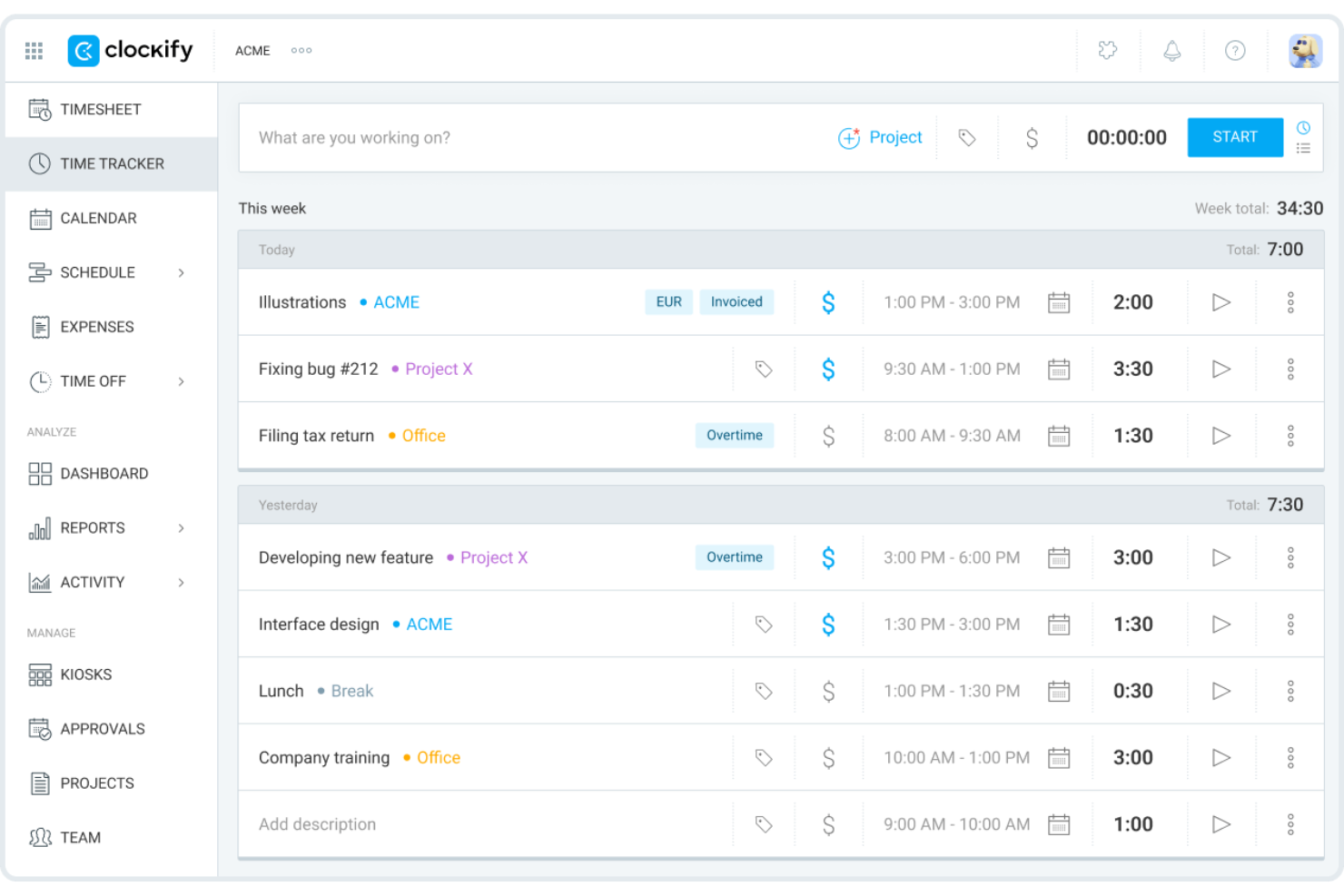
Clockify helps digital teams, consultancies, and agencies track hours across unlimited projects without limits on complexity or client count. If you need clear visibility into billable time, project progress, and accountability for a diverse portfolio of work, Clockify covers all the essentials.
Who Is Clockify Best For?
Clockify suits freelancers, startups, and agencies that manage a high volume of clients and need simple project tracking or billable time tracking without worrying about hitting a project cap.
Why Clockify Is a Good QuickBooks Time Alternative
I picked Clockify largely because it's a budget-friendly time-tracking tool. That matters when you're managing a growing agency where adding new client work in QuickBooks Time or Harvest would quickly force you into a higher-paid tier. I also appreciate that Clockify lets you set hourly rates per project, so your profitability reports and billable time stay accurate without manual adjustments. The project budget tracking feature gives my team a live view of hours burned against the total estimate, which is genuinely useful for staying on scope and managing resource utilization.
Clockify Key Features
- Time tracker: Start and stop a timer from any device, or log time manually using the timesheet view.
- Attendance tracking: Monitor clock-in and clock-out times to track team availability and breaks across locations.
- Kiosk mode: Let field or shared-device teams clock in from a fixed terminal using a PIN.
- Reporting dashboard: Generate detailed time reports filtered by project, client, team member, or date range.
Clockify Integrations
Integrations include Jira, Asana, Trello, Monday, QuickBooks, Google Calendar, Outlook, Airtable, Notion, and Salesforce.
Pros and Cons
Pros:
- 24/7 live customer support
- Able to create shared project schedules
- Up to five free users
Cons:
- Limited offline time tracking options
- No built-in payroll processing

Timely
Best for automatic time tracking with AI
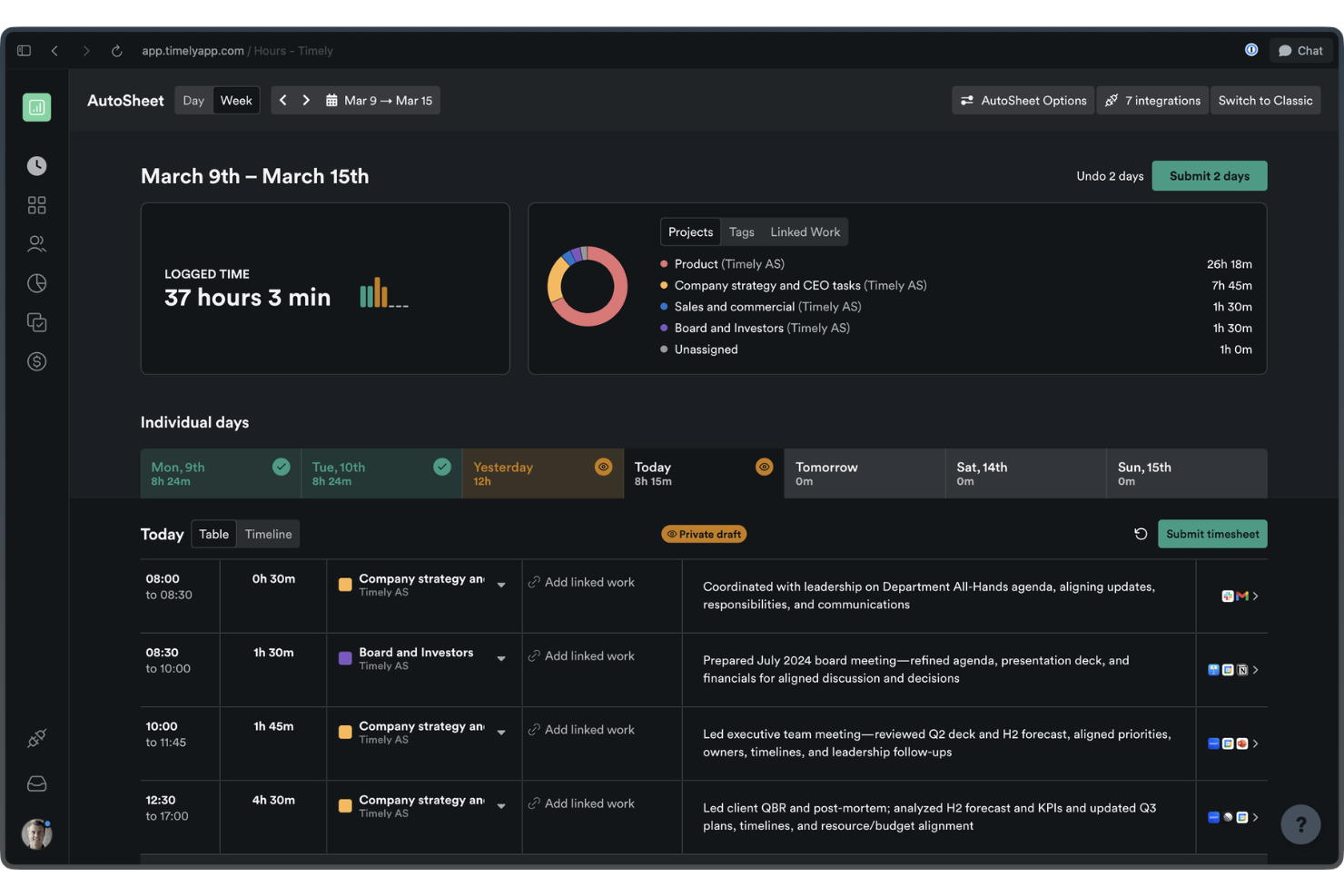
Timely is a time tracking software designed for teams and professionals who want accurate, real-time records without manual input. It’s especially well-suited for digital agencies and knowledge workers aiming to automate time tracking and gain reliable project insights.
Who Is Timely Best For?
Timely is a smart fit for digital teams and consultancies that want fully automated, AI-powered time tracking for client projects and internal work.
Why Timely Is a Good QuickBooks Time Alternative
I picked Timely because it eliminates the need for manual time entries. Its Memory Tracker runs in the background and automatically logs everything team members work on across apps, meetings, and documents. I can then review those logs and approve AI-drafted timesheets in bulk, rather than chasing people for entries at the end of the week. For client-facing teams where accurate time reporting directly affects billing, that automatic capture is a real advantage over time tracking tools that rely solely on manual timers.
Timely Key Features
- Project dashboard: View all active projects in one place, including budgets, billable rates, and cost rates.
- Locked time: Lock submitted time entries to prevent edits and keep approved timesheets accurate.
- Overtime and undertime tracking: Monitor when team members exceed or fall short of their expected hours.
- Report exports: Export live or snapshot reports to share project and team time data externally.
Timely Integrations
Integrations include Asana, Trello, Jira, Slack, Zoom, HubSpot, Salesforce, QuickBooks, GitHub, and WordPress.
Pros and Cons
Pros:
- Calendar integration for meeting and event tracking
- Logs activity across apps and meetings
- Automatic AI-generated timesheets
Cons:
- Manual approval needed for AI timesheets
- No free plan available

Jibble
Best for verified attendance tracking
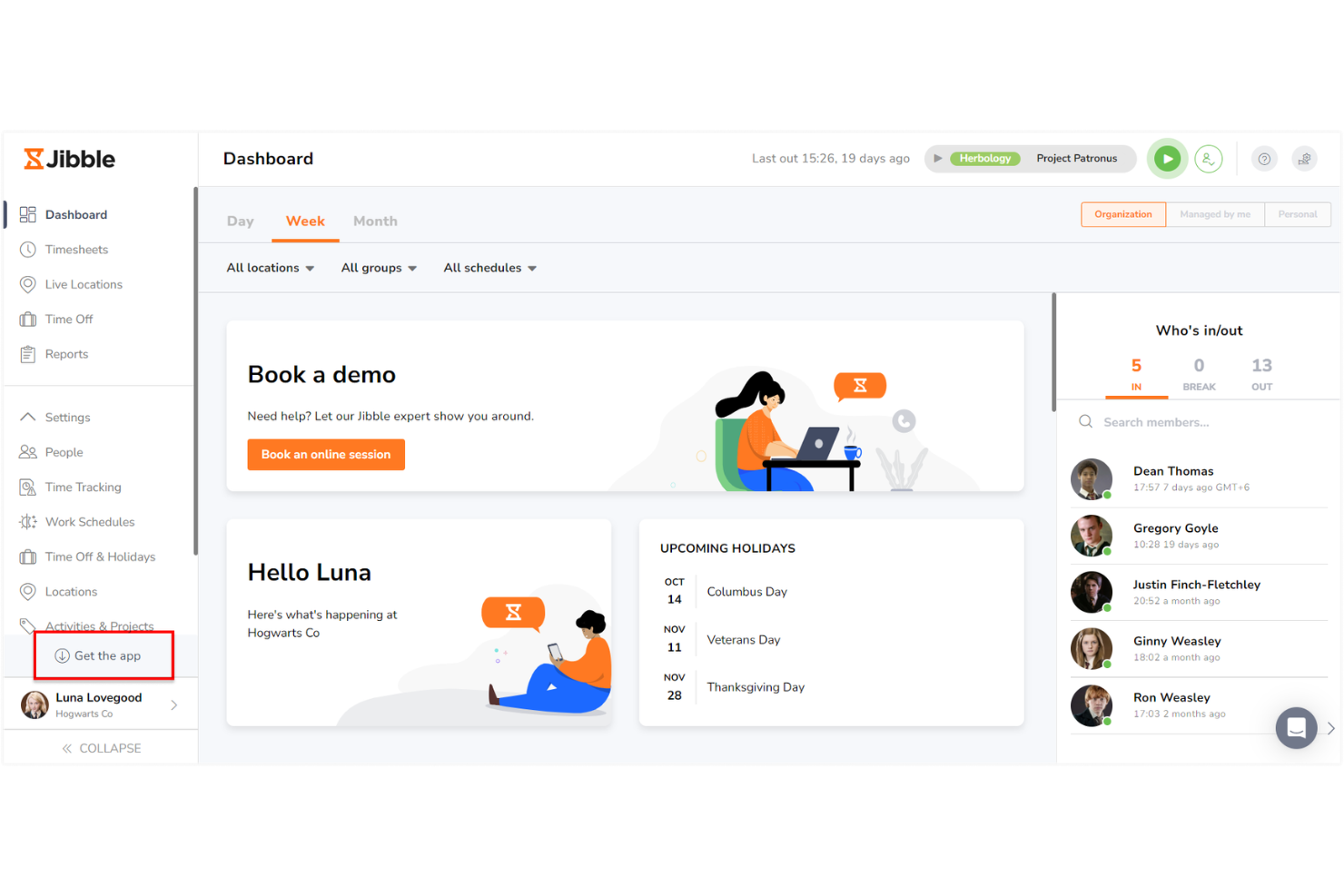
Jibble is a cloud-based time and attendance platform built for businesses that need reliable, automated timesheet management. I think you’ll like it if your team juggles varied locations, complex shift patterns, or the need for strict compliance in workforce tracking.
Who Is Jibble Best For?
Jibble is a strong choice for mid-sized companies needing verified, location-based attendance tracking for deskless or mobile workforces.
Why Jibble Is a Good QuickBooks Time Alternative
I picked Jibble specifically for teams where attendance verification is non-negotiable. Its facial recognition clock-in feature confirms each employee's identity, so "buddy punching" isn't something business owners have to worry about. I also rely on the kiosk options for locations where phones aren't practical. For managers running shift-heavy teams, those verification layers ensure real-time integrity in a way most time tracking tools simply don't. Plus, with a solid free plan available, it's easy to test the ease of use before committing.
Jibble Key Features
- Invoicing: Convert tracked billable hours directly into client invoices without leaving the platform.
- Work schedules: Set and publish employee work schedules to keep shift expectations clearly defined.
- Time off management: Configure leave policies, track accruals, and process team time-off requests.
- Activity tracking: See who's currently clocked in and what activity or project they're working on in real time.
Jibble Integrations
Jibble offers native integrations with QuickBooks, Xero, Deel, Slack, Microsoft Teams, Google Workspace, and Zapier. An API is available for custom integrations.
Pros and Cons
Pros:
- Provides audit logs for timesheet compliance
- Supports shift scheduling and job costing
- Tracks attendance with facial recognition
Cons:
- Limited integration options for project billing
- Limited automation for overtime calculations

TimeCamp
Best for automatic time tracking by tasks
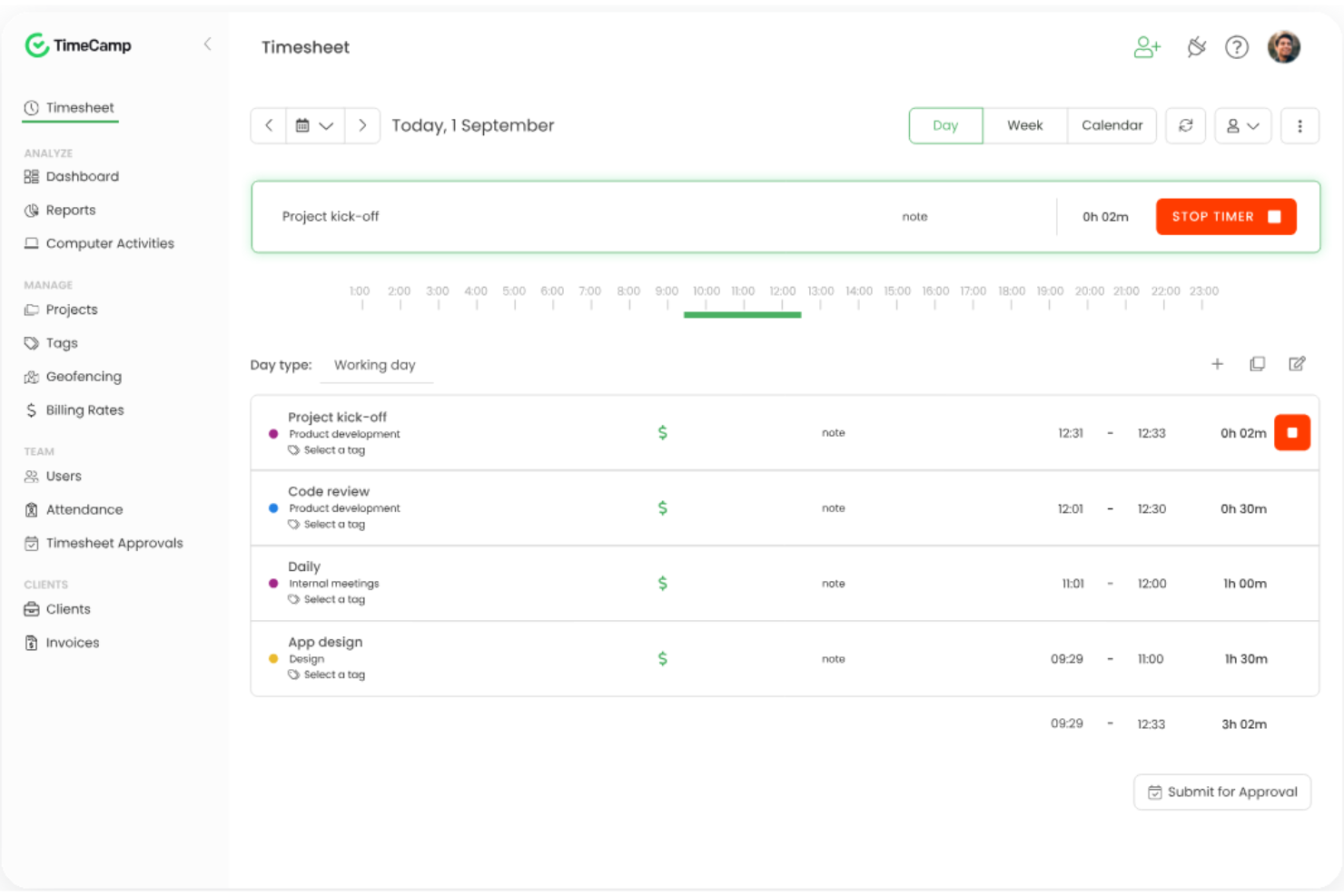
TimeCamp is a cloud-based time tracking solution for teams needing precise task-level time reporting and effective oversight of billable hours. I think it’s well-suited to digital agencies, consultancies, and small businesses looking to tie time entries to real client work or internal projects.
Who Is TimeCamp Best For?
TimeCamp suits remote teams, consultancies, or professional services firms that need detailed, task-based time data for projects and clients.
Why TimeCamp Is a Good QuickBooks Time Alternative
I picked TimeCamp because its automatic time tracking captures work hours in the background, without requiring anyone to manually start and stop timers. It tracks activity across websites, apps, and documents, then maps those activities to specific tasks and projects automatically. That means I can get accurate, task-level time data without relying on my team to remember to log hours. For client billing or project cost reporting, that level of accuracy makes a real difference.
TimeCamp Key Features
- Timesheet approvals: Submit timesheets for manager review and flag entries that need corrections before approval.
- Billable time and billing rates: Set hourly billing rates per project or user and track billable hours separately from non-billable time.
- Budget and estimates: Compare tracked hours against project estimates and get alerts when budgets are running close to the limit.
- Expense tracking: Log project-related costs alongside time entries to keep a full picture of project spending in one place.
TimeCamp Integrations
Integrations include Asana, Jira, Trello, Slack, monday.com, Zendesk, Salesforce, QuickBooks Online, Google Calendar, and GitLab.
Pros and Cons
Pros:
- One-click timesheet approvals for managers
- Links time directly to billing rates
- Automatic time tracking in the background
Cons:
- No GPS location tracking on mobile apps
- Does not support bulk edits on timesheets

Best for tracking team productivity

Time Doctor gives managers and distributed teams a detailed look at work hours, activity levels, and app or website usage. It's a practical choice if you're looking to monitor productivity, manage remote staff, or track billable hours in one system.
Who Is Time Doctor Best For?
Time Doctor is a fit for remote-first tech companies and service firms that track billable work and employee productivity across multiple locations.
Why Time Doctor Is a Good QuickBooks Time Alternative
I picked Time Doctor because it goes beyond logging hours—it captures a real picture of how work is actually getting done. The activity tracking feature records app and website usage throughout the day, so I can see whether the time logged against a project reflects focused work or distraction. I also find the screenshot capture feature useful for client accountability, where periodic screenshots give me verifiable evidence of work completed during billable hours. For distributed teams where output visibility is a constant challenge, that level of detailed functionality is hard to find elsewhere.
Time Doctor Key Features
- Payroll management: Generate payroll reports based on tracked hours and pay rates directly within the platform.
- Project and task time tracking: Assign tracked time to specific projects or tasks for accurate job costing.
- Work schedules and shift management: Set working hours and schedules to flag time tracked outside expected windows.
- Productivity reports: View team-level and individual breakdowns of time spent across projects over any date range.
Time Doctor Integrations
Integrations include Asana, Trello, monday.com, Jira, Salesforce, HubSpot, Zendesk, Freshdesk, PayPal Payouts, and ADP.
Pros and Cons
Pros:
- Offers customizable productivity metrics
- Identifies low-productivity website usage
- Integrates with project management tools
Cons:
- Limited reporting customization
- No mobile-only app for tracking

Harvest
Best with invoicing and expense tracking

Harvest is a web-based time tracking tool built for agencies, consultancies, and service businesses that need clear insights into billable hours and project budgets. I think it's a great fit for teams who want to simplify tracking time on client work, handling multiple projects, and managing productivity.
Who Is Harvest Best For?
Harvest is ideal for consultancies and digital agencies that need unified timesheets, invoicing, and expense tracking in client-facing projects.
Why Harvest Is a Good QuickBooks Time Alternative
I picked Harvest because it combines time tracking features with built-in invoicing and expense tracking, which removes the need to jump between multiple tools. When my team finishes a project phase, I can turn billable hours directly into a client invoice without any manual data entry. Harvest also lets me attach expenses to specific projects, so client billing always reflects the full cost of the work. That tight connection between time tracking, expenses, and invoices is what makes it genuinely useful for small businesses and client-facing teams.
Harvest Key Features
- Timesheet approvals: Review and approve your team's submitted timesheets before using them for invoicing or reporting.
- Capacity reporting: See team workload at a glance to identify who is over- or under-utilized across projects.
- Automated reminders: Schedule time tracking reminders to prompt team members to log hours consistently.
- Budget tracking: Monitor project budgets in real time as hours are logged against set cost thresholds.
Harvest Integrations
Integrations include Asana, Slack, QuickBooks Online, GitHub, Trello, Jira, Zendesk, monday.com, Notion, and Stripe.
Pros and Cons
Pros:
- Project budget alerts with real-time updates
- Built-in expense tracking for client projects
- Automatic invoice creation from tracked hours
Cons:
- Lacks automatic activity capture
- Requires integrations to manage scheduling

Timeero
Best for tracking field teams
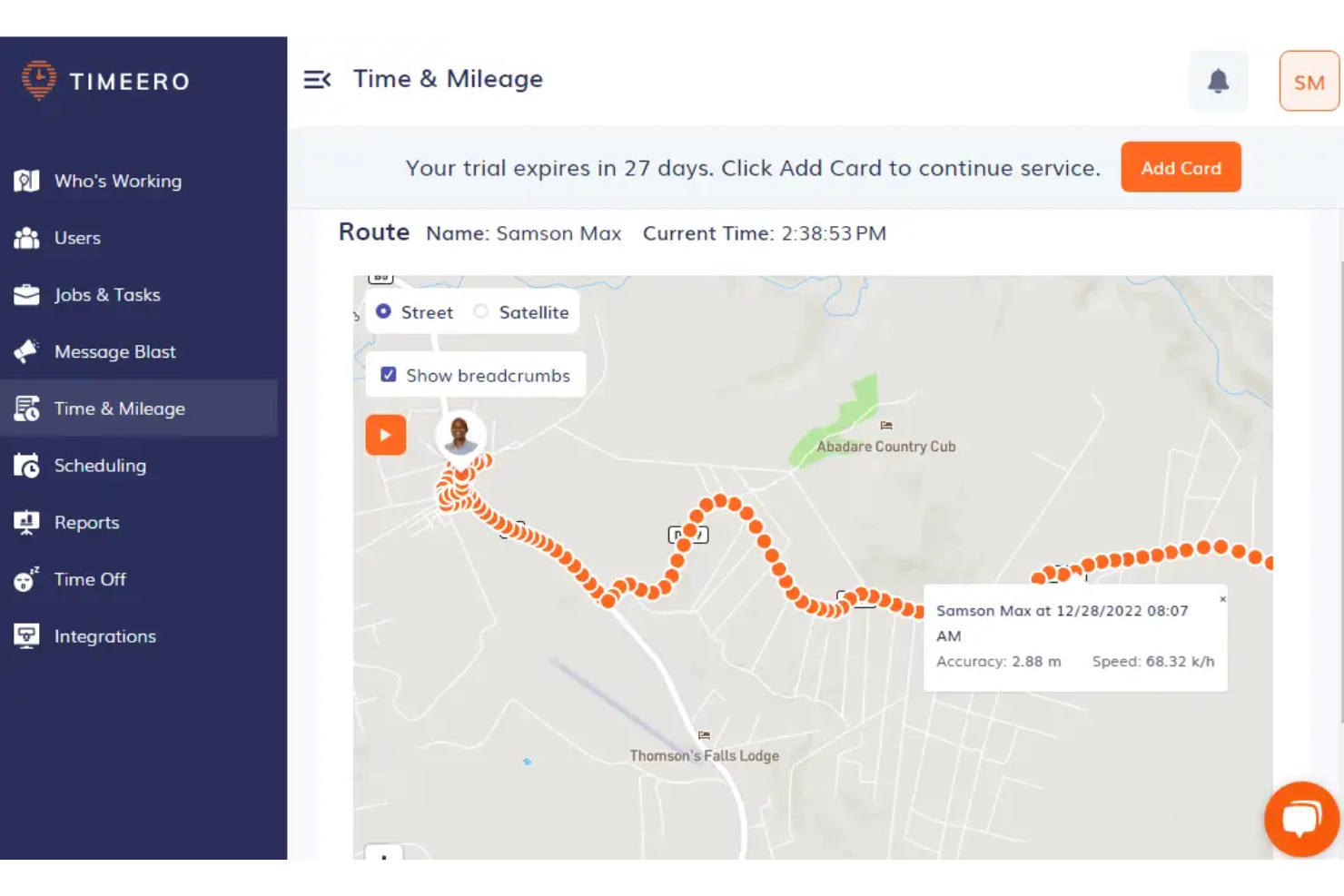
Timeero is a mobile and web-based time tracking tool designed for businesses with workers on the move. I think teams in construction, home services, or any field-based organization will like how it takes the guesswork out of tracking hours, routes, and attendance.
Who Is Timeero Best For?
Timeero is a great fit for field service teams and businesses that need to track employee location, routes, and mileage across multiple job sites using a user-friendly mobile app.
Why Timeero Is a Good QuickBooks Time Alternative
I picked Timeero because it handles the GPS tracking and mileage side of field operations better than most providers in this space. The GPS breadcrumb trail feature records the exact path each employee takes throughout their shift, so I can verify routes without relying on manual time reporting. I also find the mileage feature useful for making reimbursement calculations straightforward. For teams managing technicians or drivers, it covers field accountability gaps effectively.
Timeero Key Features
- Geofencing: Set location boundaries that trigger automatic clock-in/out reminders or restrict punching outside a designated job site.
- Segmented tracking: Automatically differentiates drive time from on-site time throughout a shift without requiring manual clock-outs between jobs.
- Shift scheduling: Build and assign employee schedules that team members can accept or decline directly from the mobile app.
- Face recognition: Verify employee identity at clock-in to prevent buddy punching across your field workforce.
Timeero Integrations
Integrations include QuickBooks, Gusto, ADP, Paycor, Paychex, Paylocity, Xero, Rippling, Sage Intacct, and PIMSY.
Pros and Cons
Pros:
- Shows live map views
- Prevents early clock-ins at jobsites
- Tracks exact path of vehicles in real time
Cons:
- Basic scheduling features
- Limits geofencing to higher tiers
Andre alternativer til QuickBooks Time
Her er noen flere alternativer til QuickBooks Time som ikke kom med på kortlisten min, men som likevel er verdt å undersøke:
- Replicon
For compliance and payroll support
- Toggl
For simple tracking with reports
- Hubstaff
For built-in GPS tracking
- Paymo
For tracking work and billing in one place
- Wrike
For customizable workflows
- Kantata
For resource forecasting
- monday AI Workspace
For projects with built-in time tracking
- ClickTime
For tracking billable hours by client
- Homebase
For team scheduling
- Insightful
With automated productivity reports


How I Evaluate QuickBooks Time Alternatives
I split my evaluation into two layers: baseline criteria a tool must clear—project time tracking, approval workflows, payroll sync—and differentiators like GPS or budget alerting.
Core Functionality (Table Stakes For This List)
When I'm selecting tools for my list, I rank each one on a scale from 0 (does not offer the functionality) to 5 (excels in this area) for each core functionality listed below. Then, I calculate the tool's total score into a percentage. Each tool needs to achieve a minimum total score of 65% to be considered for inclusion.
- Time Tracking: I check whether a tool supports both timers and manual entry tied to specific projects or clients—like logging hours against a retainer versus an ad hoc task.
- Timesheet Management: Approval workflows matter here, so I look for configurable submission cycles, manager review steps, and edit history to keep records clean.
- Project & Task Allocation: Each tool should let you map hours to projects, tasks, and billable codes—say, splitting a developer's day across three client engagements with different rates.
- Scheduling & Shift Management: I evaluate how well the platform handles shift creation, team availability, and conflict detection for teams juggling overlapping project timelines.
- Reporting & Analytics: Reports should cover utilization, labor costs, and project profitability with filters and exports—not just raw hour totals dumped into a spreadsheet.
- Payroll & Accounting Integrations: I look for native connections to platforms like QuickBooks, Xero, ADP, or Gusto so approved hours flow into payroll or invoicing without manual re-entry.
Once I have a list of tools that meet this criteria, I consider what sets each platform apart.
Differentiating Factors (What Sets Vendors Apart)
Here's how I compare and contrast different vendors:
Standout Features
Real-time budget alerts are a big differentiator—I want to know if a tool warns you when logged hours creep past a project's budget before it's too late. GPS and geofencing also get my attention, especially for teams managing field crews across multiple job sites where manual clock-ins are unreliable. Resource capacity planning rounds things out. I look for tools that visualize workloads so you can spot overallocation and redistribute hours before a sprint falls behind.
Beyond Features
Pricing model matters when you're scaling—I evaluate whether a vendor charges per user or offers flat-rate plans, since a 40-person agency has very different cost math than a five-person consultancy. Integration depth is equally important. A tool that syncs approved timesheets into your existing PM stack and accounting platform saves hours of manual reconciliation each pay cycle. I also consider how well a vendor supports migration from QuickBooks Time, including data import options and onboarding resources that reduce the transition learning curve.
Hvorfor se etter et alternativ til QuickBooks Time?
Selv om QuickBooks Time er et godt valg av programvare for tidsregistrering, finnes det flere grunner til at enkelte bedriftseiere og små bedrifter ser etter alternative løsninger. Det kan hende du ser etter et alternativ til QuickBooks Time fordi …
- Behov for avansert automatisk tidsregistrering
- Ønske om mer fleksible verktøy for prosjektbudsjettering
- Behov for dypere integrasjon med produkter som ikke kommer fra Intuit
- Frustrasjon over mobilappens ytelse eller pålitelighet
- Ønske om enklere innføring og administrasjon av teamet
- Begrensninger knyttet til internasjonal samsvar eller lokalisering
Hvis noe av dette høres kjent ut, har du kommet til rett sted. Listen min inneholder flere alternativer for tidsregistrering med ulik funksjonalitet og ulike prisnivåer som passer bedre for team som møter disse utfordringene med QuickBooks Time og ser etter alternative løsninger.
Viktige funksjoner i QuickBooks Time
Her er noen av de viktigste funksjonene i QuickBooks Time, slik at du kan sammenligne hva de alternative løsningene tilbyr:
- Stemplingsklokke: Teammedlemmer og frilansere stempler inn og ut ved hjelp av et nettbasert kontrollpanel, en skrivebordsapp eller en mobilapp, noe som gir nøyaktig tidsregistrering enten de er på kontoret, hjemme eller på farten.
- Geogjerder: Sett opp geografiske grenser som sender varsler for å minne ansatte på å bruke tidsregistreringen når de kommer til eller forlater bestemte arbeidssteder, slik at man unngår manglende stemplinger for feltteam.
- Planlegging: Lag og del ukentlige skiftplaner, tildel arbeid til enkeltpersoner eller grupper, og varsle ansatte om endringer i sanntid.
- Mobilapper: Tilby funksjonsrike Android- og iOS-apper som lar ansatte registrere arbeidstimer, se arbeidsplaner og be om fri fra hvor som helst.
- Integrasjon med lønnssystemer: Automatiser arbeidsflyten ved å synkronisere godkjente timelister direkte med QuickBooks Online, QuickBooks Desktop eller kompatible lønnsleverandører.
- GPS-sporing: Overvåk hvor arbeidstakere befinner seg når de er stemplet inn, for å bekrefte tiden de tilbringer på bestemte arbeidssteder og bidra til administrasjon av feltarbeidsstyrken.
- Rapportering i sanntid: Få tilgang til oppdaterte data om arbeidede timer, overtid, pauser og lønnsomhet ved hjelp av tilpassbare kontrollpaneler og eksporterbar tidsrapportering.
- Jobb- eller oppgavekoder: Tildel arbeid til bestemte jobber, kunder eller aktiviteter i programvaren for tidsregistrering, slik at det blir enklere å følge prosjektkostnader, fakturerbare timer og ressursallokering.
- Overtidsvarsler: Konfigurer automatiske varsler når ansatte nærmer seg eller overskrider overtidsgrensene, noe som bidrar til å overholde arbeidsbestemmelser og gir bedre tidsstyring.
- Administrasjon av fravær: Be om, godkjenn og følg opp betalt fri, sykefravær og annet fravær, slik at all fraværsregistrering samles i ett system.