

10 Box-alternativer for fildeling for bedrifter i 2026

Kortliste over Box-alternativer


Et godt Box-alternativ gir teamet ditt sikker fildeling, fleksibelt teamsamarbeid og pålitelig innholdsbehandling – uten å binde deg til Box-økosystemet. Hvis du ikke lenger ønsker å bruke Box, vurderer du sannsynligvis datasikkerhet, integrasjoner og arbeidsflyt opp mot kostnader, brukervennlighet eller krav til samsvar.
Den riktige løsningen bør passe organisasjonens struktur, støtte verktøyene du foretrekker og tilpasse seg etter hvert som behovene dine endrer seg. På denne listen, som bygger på de beste brukeranmeldelsene på Capterra, finner du en rekke Box-alternativer for 2026, hver med særpregede funksjoner som hjelper deg med å administrere dokumenter, kontrollere tilgang og holde prosjektene i gang.
Hva er Box?
Box er en skybasert plattform for innholdsbehandling og en løsning for administrasjon av digitale ressurser som lar team lagre, dele og samarbeide sikkert om filer fra hvor som helst. Den tilbyr sentralisert dokumentbehandling, detaljerte tilgangskontroller og integrasjon med populære produktivitetsverktøy.
Organisasjoner bruker Box til å administrere arbeidsflyter, opprettholde samsvar og støtte distribuerte team. Funksjonene er utviklet for store virksomheter og bedrifter som trenger sikker fillagring, versjonskontroll og samarbeid på tvers av avdelinger eller med eksterne partnere.
Sammendrag av de beste Box-alternativene
Denne sammenligningstabellen oppsummerer prisdetaljene for mine beste utvalgte Box-alternativer:
| Tool | Best For | Trial Info | Price | ||
|---|---|---|---|---|---|
|
1
|
Best for real-time document collaboration |
Free plan + 14-day free trial available |
From CAD $9.20/user/month (billed annually) | Website | |
|
2
|
Best for automated workflow management |
Free demo available |
From $73/user/month (billed annually) | Website | |
|
3
|
Best for simple file sharing workflows |
Free trial + free plan available |
From $9.99/user/month (billed annually) | Website | |
|
4
|
Best for open-source customization options |
1-hour free trial |
From 71.29€/user/year (billed annually) | Website | |
|
5
|
Best for self-hosted deployment flexibility |
Free demo + 14-day free trial available |
From $14/user/month (billed annually) | Website | |
|
6
|
Best for enterprise intranet solutions |
Free trial available |
From $7/user/month (billed annually) | Website | |
|
7
|
Best for small business team organization |
Free demo + 15-day free trial available |
From CAD $3/user/month (billed annually) | Website | |
|
8
|
Best for granular data governance controls |
Free demo + 15-day free trial available |
From $22/user/month (billed annually) | Website | |
|
9
|
Best for document-centric process automation |
Free demo available |
Pricing upon request | Website | |
|
10
|
Best with Microsoft 365 integration |
Free plan available |
From $1.99/month | Website |
Why Trust Our Software Recommendations
Our team has been testing and reviewing software since 2012. As project managers ourselves, we know how difficult—and important—it is to choose the right software.
For this guide, we evaluated tools using hands-on testing and independent research, scoring tools using our selection criteria. We also draw on insights from industry thought leaders and practicing project management experts.
Our reviews reflect our human editorial judgment, not a sales pitch.
Expert reviewers:
Anmeldelser av Box-alternativer
Nedenfor finner du mine detaljerte sammendrag av Box-alternativene som kom med på kortlisten. Anmeldelsene mine gir et detaljert innblikk i funksjonene, de beste bruksområdene og integrasjonene til hver plattform, slik at du kan finne den som passer best for deg.

Best for real-time document collaboration
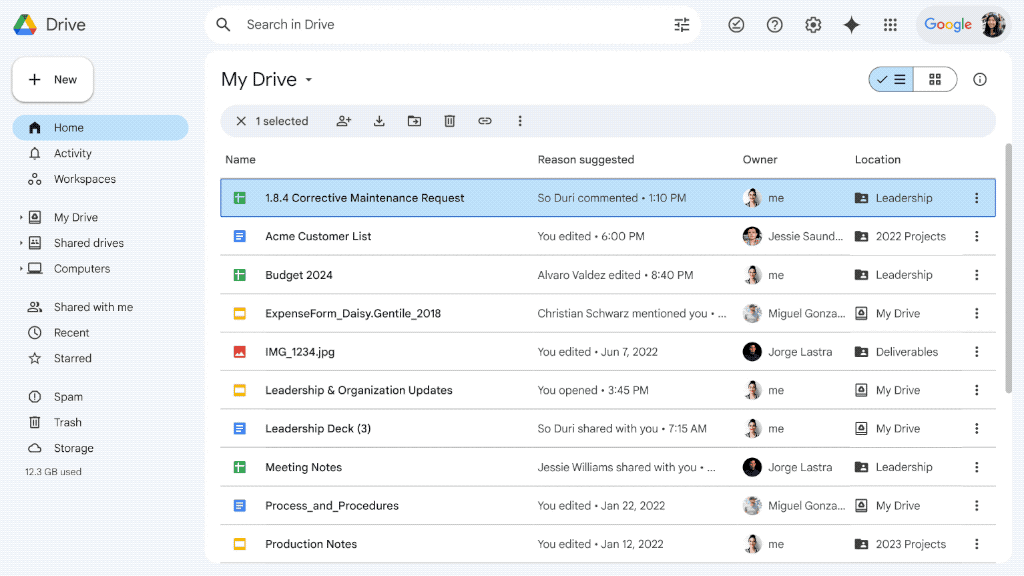
Google Drive is worth considering if your team relies on real-time collaboration and close integration with Google Workspace. The platform appeals to organizations that prioritize live document editing and easy sharing across distributed teams. Its connection with Docs, Sheets, and Slides sets it apart from Box, making it a strong choice for teams that need fast, interactive content management.
Why It’s a Good Box Alternative
Google Drive stands out for teams that need real-time document collaboration as a core part of their workflow. I picked it because its live editing in Docs, Sheets, and Slides lets multiple users work together on the same file without version conflicts.
The platform’s commenting and suggestion tools make feedback and approvals fast and transparent. For organizations that value instant updates and collaborative editing, Google Drive offers a clear advantage over Box.
Google Drive Key Features
Some other features make Google Drive a flexible option for content management beyond real-time collaboration:
- Shared Drives: Create team-based folders with customizable permissions for organizing and managing group files.
- Advanced Search: Use keyword, file type, and owner filters to quickly locate documents across your organization’s storage.
- File Version History: Access and restore previous versions of files to track changes and recover older content when needed.
- Offline Access: Work on files without an internet connection, with changes syncing automatically once you’re back online.
Google Drive Integrations
Integrations include Gmail, Google Meet, Google Chat, Google Calendar, Google Docs, Google Sheets, Google Slides, Salesforce, Slack, and Zoom.
Pros and Cons
Pros:
- Very intuitive interface
- Incredible search functions
- Deep Google Workspace sync
Cons:
- No robust workflow automation
- Sharing links can get messy

Best for automated workflow management
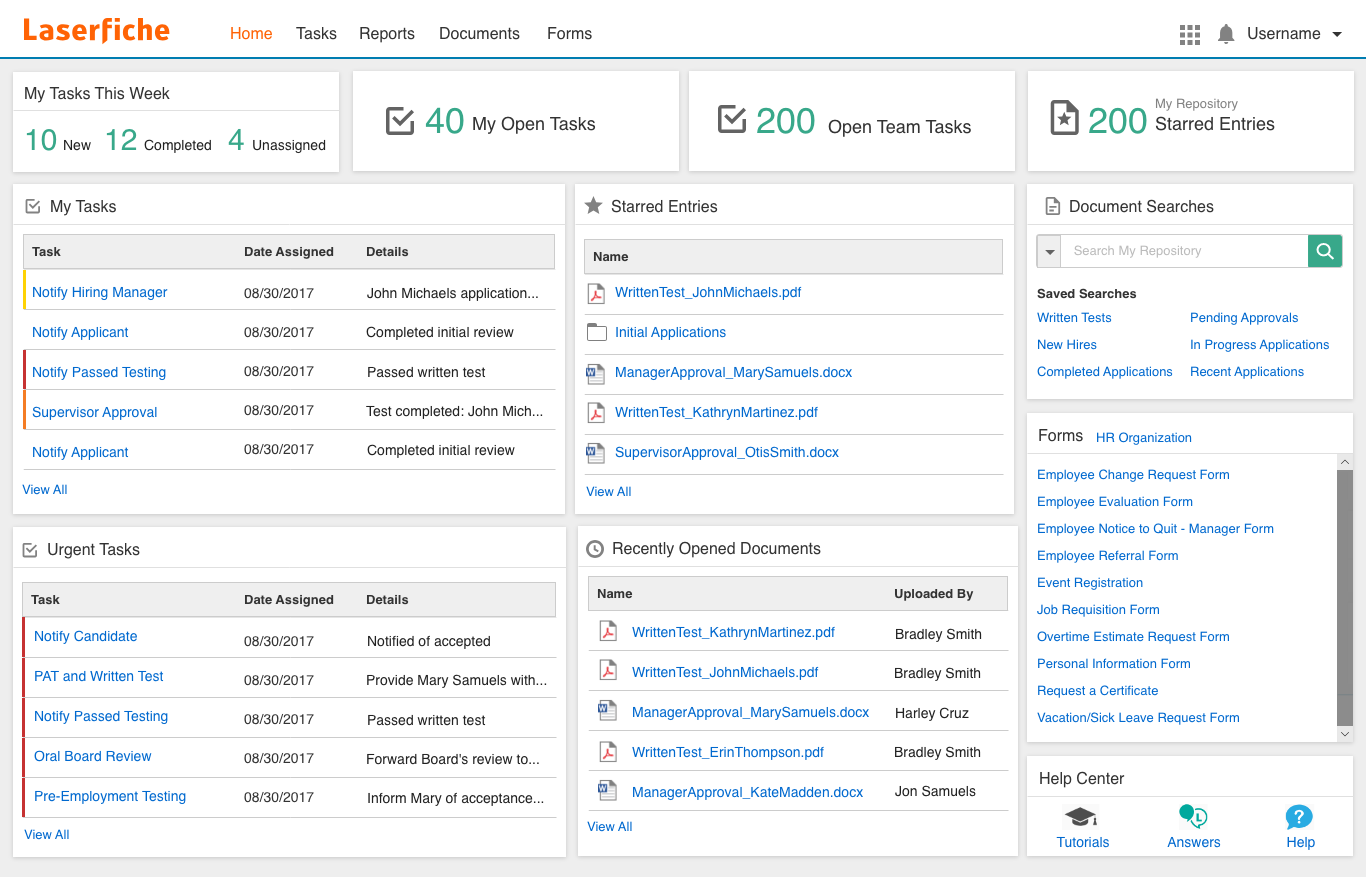
Laserfiche is often considered by teams looking to automate complex document workflows through its process automation capabilities. The platform is a strong fit for organizations that need to digitize forms, route approvals, and orchestrate multi-step processes across departments. Unlike Box, Laserfiche offers built-in workflow design tools and advanced automation features that help reduce manual intervention in content management.
Why It’s a Good Box Alternative
For teams that need to automate document-driven processes, Laserfiche offers workflow management tools that go beyond what Box provides. I picked Laserfiche because it lets you design custom workflows using a visual drag-and-drop builder, making it easier to automate approvals, notifications, and document routing.
The platform also supports electronic forms and process mapping, so you can digitize and streamline multi-step tasks across your organization. If your priority is reducing manual work in content management, Laserfiche’s automation features are a strong fit.
Laserfiche Key Features
Some other features that stood out to me include:
- Granular Permission Controls: Set detailed access rights for users and groups at the folder or document level.
- Version Control: Track changes and maintain a full history of document edits and updates.
- Optical Character Recognition (OCR): Convert scanned documents and images into searchable, editable files.
- Records Management: Apply retention schedules and automate compliance with regulatory requirements.
Laserfiche Integrations
Integrations include Microsoft 365, Salesforce, SAP, DocuSign, Adobe Sign, OneSpan, Workday, Oracle Cloud ERP, Esri ArcGIS, and Ellucian.
Pros and Cons
Pros:
- Highly customizable metadata
- Deep regulatory compliance
- Powerful electronic forms
Cons:
- Overkill for basic file sync
- UI feels a bit old-fashioned

Dropbox
Best for simple file sharing workflows
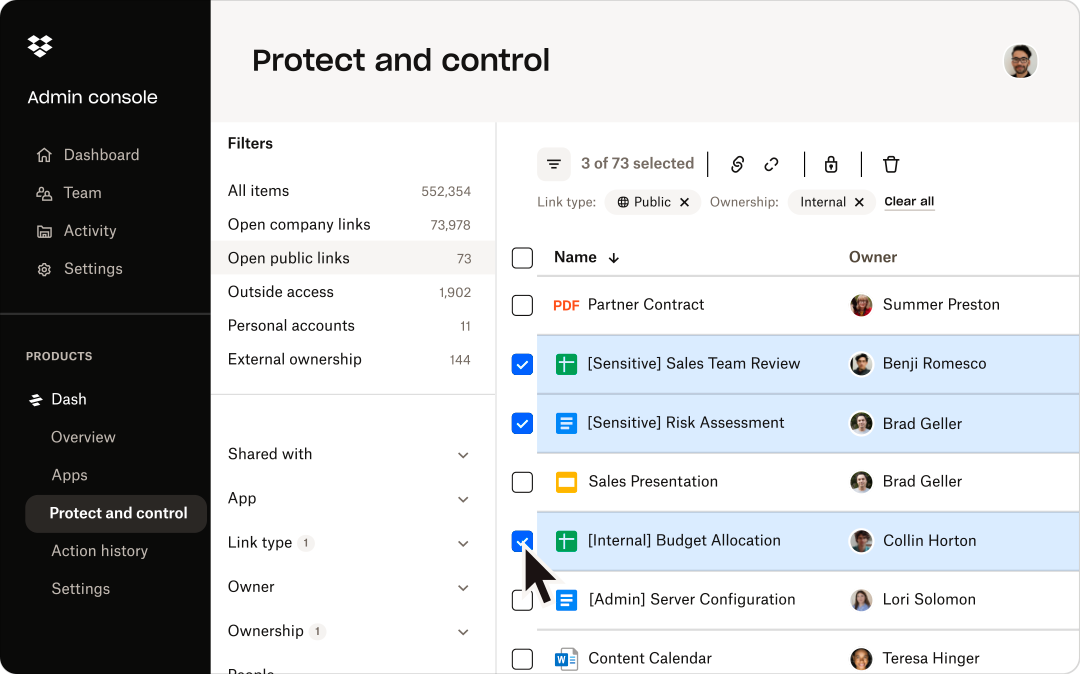
Dropbox is a strong fit for teams that need a straightforward way to share and organize files without extra complexity. It appeals to businesses and creative professionals who want fast, reliable file syncing and sharing across devices. Unlike Box, Dropbox keeps its workflows simple, making it easy to manage content without navigating advanced configuration or layered permissions.
Why It’s a Good Box Alternative
For teams that want to avoid complicated content management setups, Dropbox offers a streamlined approach to file sharing. I picked Dropbox because its core features focus on fast file uploads, simple folder organization, and reliable syncing across devices.
The file request tool lets you collect documents from anyone, even if they don’t have a Dropbox account. If your priority is straightforward file sharing without advanced workflow layers, Dropbox is a practical alternative to Box.
Dropbox Key Features
Some other features make Dropbox a versatile option for content management:
- Dropbox Paper: Create, edit, and collaborate on documents directly within Dropbox.
- File Recovery and Version History: Restore deleted files and access previous versions for up to 180 days.
- Smart Sync: Access all files from your desktop without taking up local storage space.
- Team Folder Management: Organize and control access to shared folders for different groups or projects.
Dropbox Integrations
Integrations include Google Workspace, Microsoft, Adobe, HubSpot, Autodesk, Canva, AWS, Slack, Zoom, and Trello.
Pros and Cons
Pros:
- Familiar UI for most users
- Great external file requests
- Massive third-party app list
Cons:
- Tiny free storage allocation
- Bloated desktop application

Best for open-source customization options
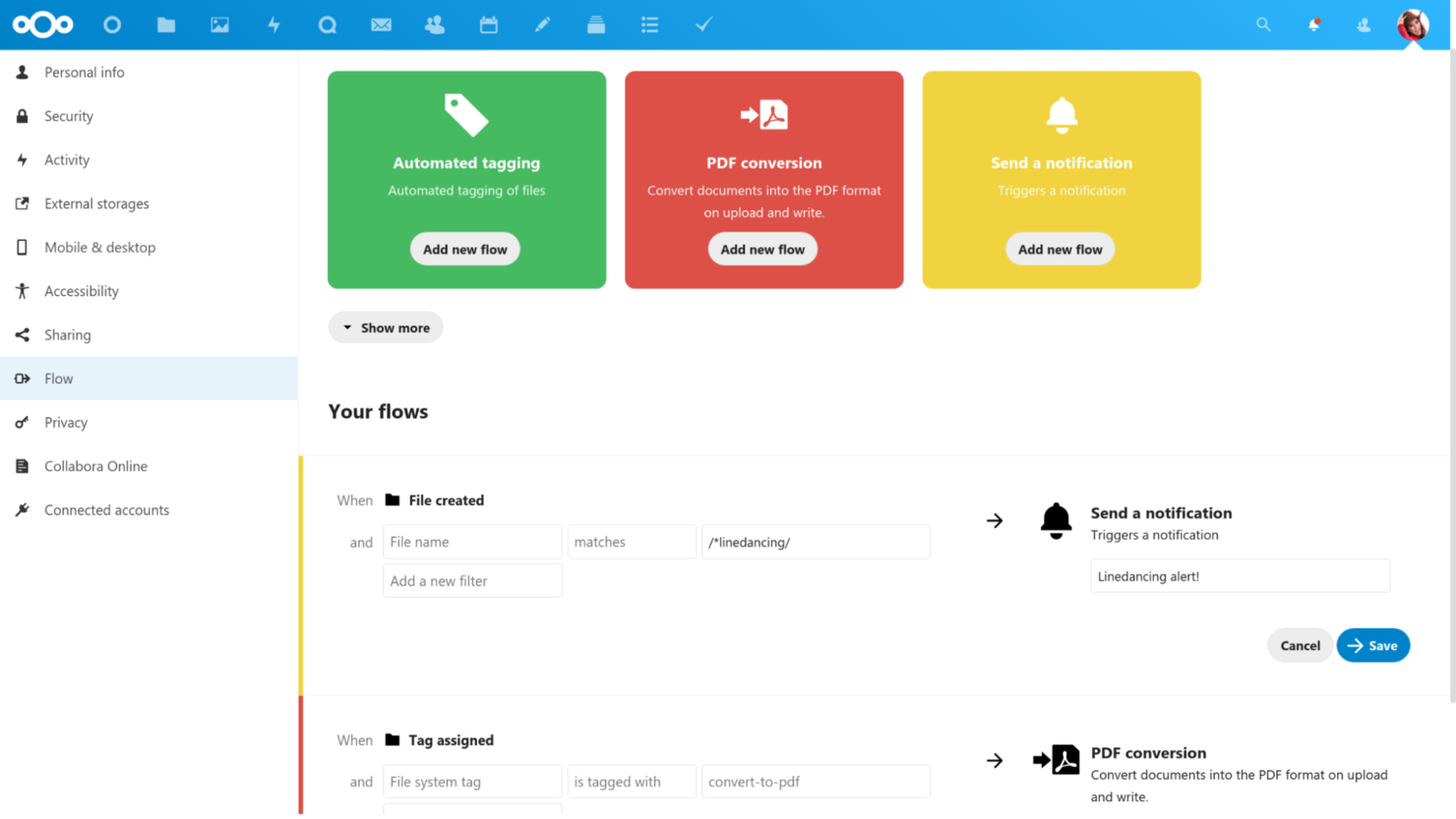
Nextcloud is worth a close look if you need a content management platform that you can fully control and customize. This open-source solution is ideal for IT teams, privacy-focused organizations, and groups with unique compliance or integration needs. Unlike Box, Nextcloud lets you self-host, modify, and extend every aspect of your file management environment.
Why It’s a Good Box Alternative
For teams that want full control over their content management platform, Nextcloud stands out with its open-source customization options. I appreciate that you can self-host Nextcloud on your own infrastructure, giving you direct control over data privacy and compliance.
The platform also supports a wide range of community-built apps, so you can tailor workflows, security, and collaboration features to your exact needs. If you’re looking for a solution that adapts to your organization’s unique requirements, Nextcloud offers flexibility that Box can’t match.
Nextcloud Key Features
Some other features make Nextcloud a flexible choice for content management:
- End-to-End Encryption: Protect files with client-side encryption for sensitive data.
- Integrated Video and Audio Calls: Host meetings and calls directly within the platform.
- Granular File Access Controls: Set detailed permissions for users and groups on folders and files.
- Collaboration Tools: Use built-in chat, comments, and collaborative document editing.
Nextcloud Integrations
Integrations include Collabora, OnlyOffice, Moodle, Zimbra, BigBlueButton, and Microsoft Outlook.
Pros and Cons
Pros:
- Great European data compliance
- Massive community plugin hub
- No monthly storage limits
Cons:
- Not an out-of-the-box setup
- Sync clients can be buggy

Best for self-hosted deployment flexibility
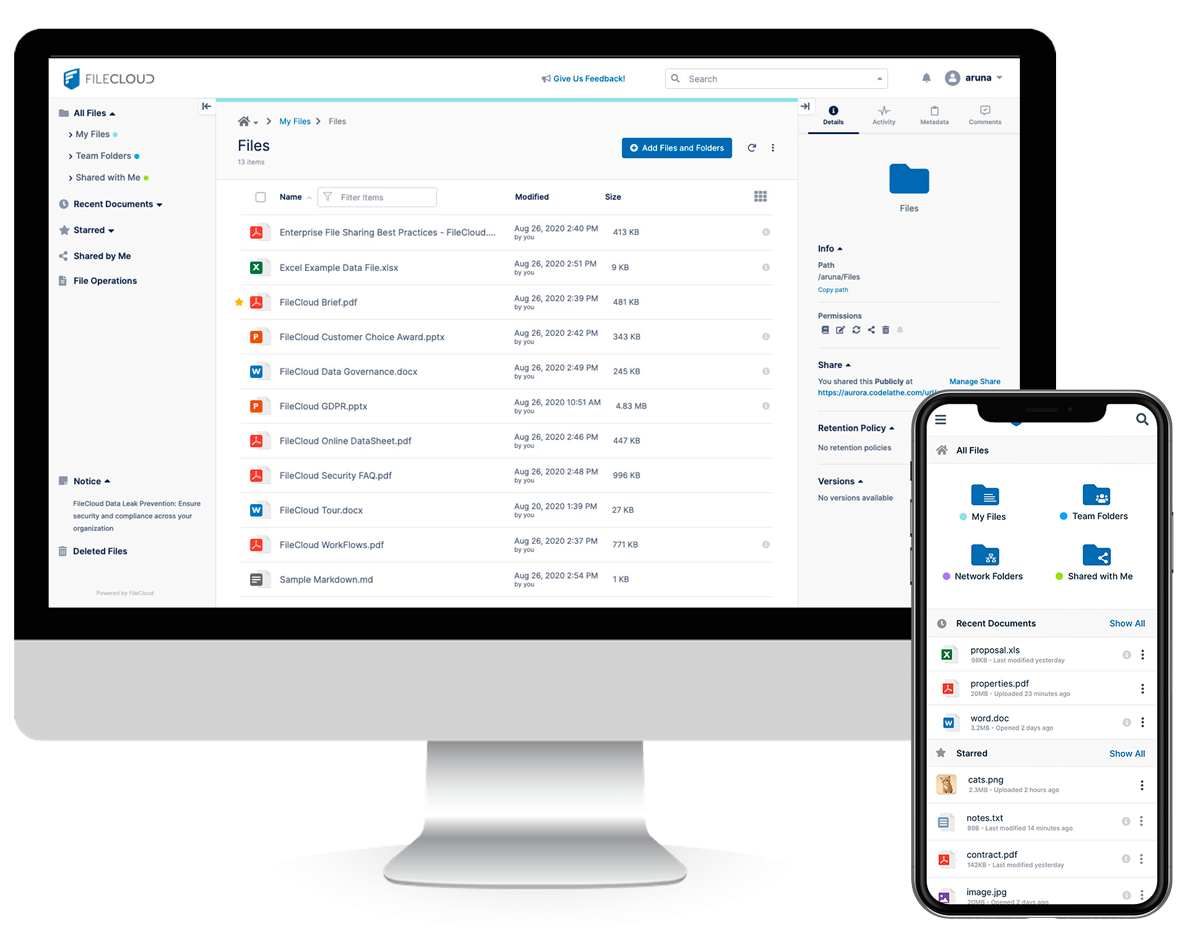
FileCloud is a strong fit for organizations that want full control over their data and infrastructure. It’s especially appealing to IT teams and regulated industries that need to deploy content management on their own servers or private cloud. With flexible self-hosting options and granular admin controls, FileCloud addresses security, compliance, and customization needs that Box and most cloud-only platforms can’t match.
Why It’s a Good Box Alternative
Unlike most cloud-first platforms, FileCloud gives you the option to fully self-host your content management environment. I picked FileCloud because it lets you deploy on-premises, in a private cloud, or in a hybrid setup, which is ideal for organizations with strict data residency or compliance requirements.
Its admin console offers granular control over user access, storage locations, and encryption settings. If your team needs deployment flexibility that Box doesn’t offer, FileCloud is built for that level of control.
FileCloud Key Features
Some other features make FileCloud appealing for content management teams:
- Custom Branding: Apply your organization’s logo, colors, and domain to the user interface.
- Integrated Workflow Automation: Build and manage document approval and review workflows directly in the platform.
- Advanced DLP (Data Loss Prevention): Set rules to detect and prevent unauthorized sharing or downloads of sensitive files.
- Comprehensive Audit Logs: Track all user activity and file access for compliance and security monitoring.
FileCloud Integrations
Integrations include Microsoft 365, Microsoft Teams, Outlook, OnlyOffice, Google Workspace, Okta, Active Directory, ClamAV, ICAP, and reCaptcha.
Pros and Cons
Pros:
- Excellent custom branding
- Deep endpoint backup options
- High compliance for healthcare
Cons:
- UI lacks modern polish
- Complex initial configuration

Best for enterprise intranet solutions
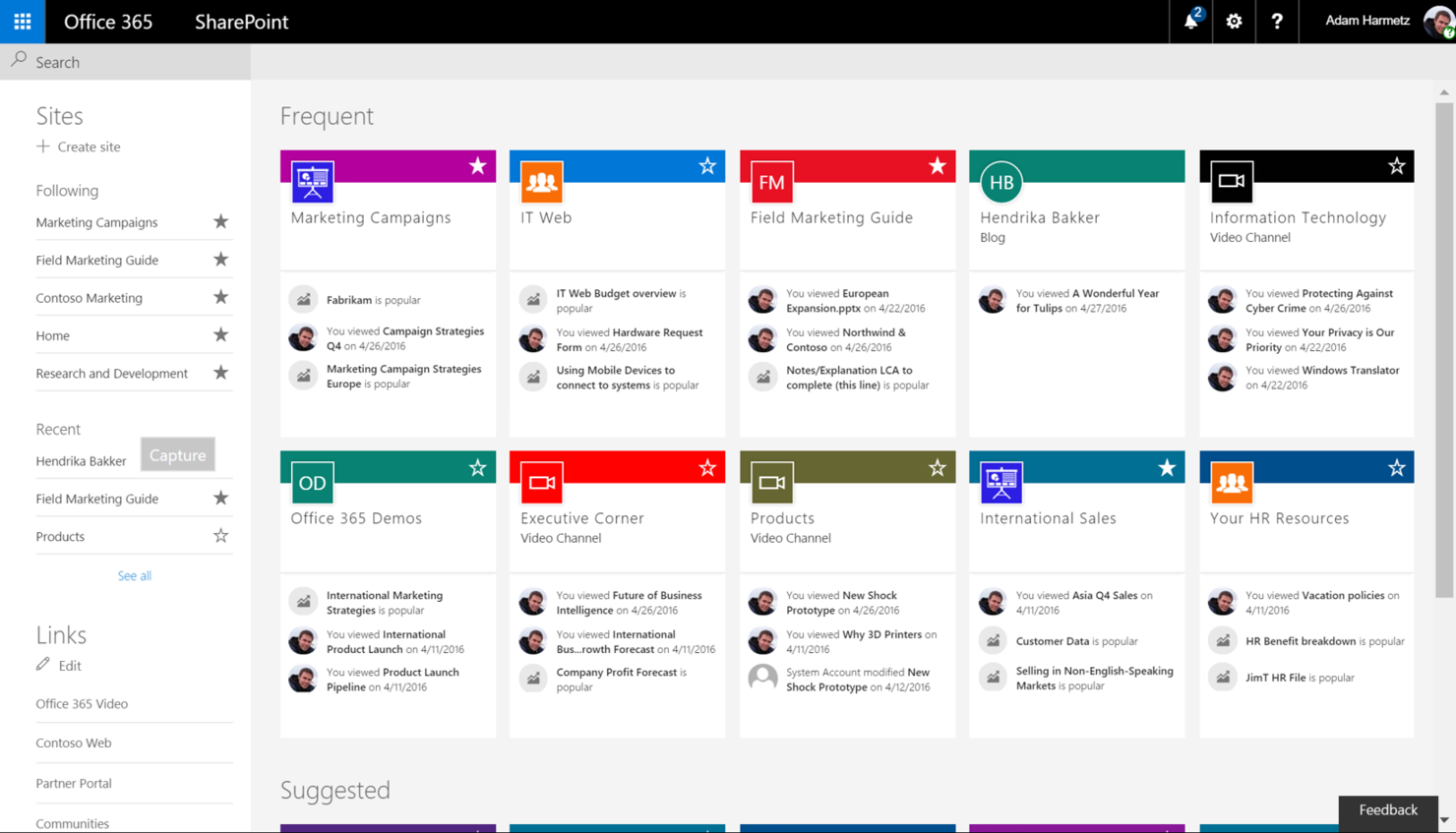
Microsoft SharePoint is built for organizations that need a content management platform that also functions as a secure, customizable intranet. Enterprise IT teams and large companies often choose SharePoint for its integration with Microsoft 365, advanced permission controls, and scalable site management. Unlike Box, SharePoint lets you create internal portals, automate workflows, and manage documents within a single environment.
Why It’s a Good Box Alternative
When you need a content management platform that can also serve as a full-featured enterprise intranet, SharePoint is a strong choice. I picked SharePoint because it lets you build custom internal sites, manage document libraries, and set granular access controls for different teams or departments.
Its workflow automation tools help streamline business processes directly within your intranet environment. For organizations that want more than just file storage, SharePoint offers a unified space for collaboration, communication, and knowledge sharing.
Microsoft SharePoint Key Features
Some other features make SharePoint a versatile platform for enterprise content management:
- Version History: Track and restore previous versions of documents within libraries.
- Metadata Tagging: Organize and search files using custom metadata fields.
- Co-Authoring: Edit documents simultaneously with colleagues in real time.
- Mobile Access: Use dedicated mobile apps to access sites and files on the go.
Microsoft SharePoint Integrations
Integrations include Microsoft Teams, Microsoft OneDrive, Microsoft Outlook, Microsoft Word, Microsoft Excel, Microsoft Forms, and Microsoft Viva.
Pros and Cons
Pros:
- Strong access control lists
- Massive enterprise scalability
- Highly custom document flows
Cons:
- High training barrier for staff
- Sync issues with large folders

Best for small business team organization
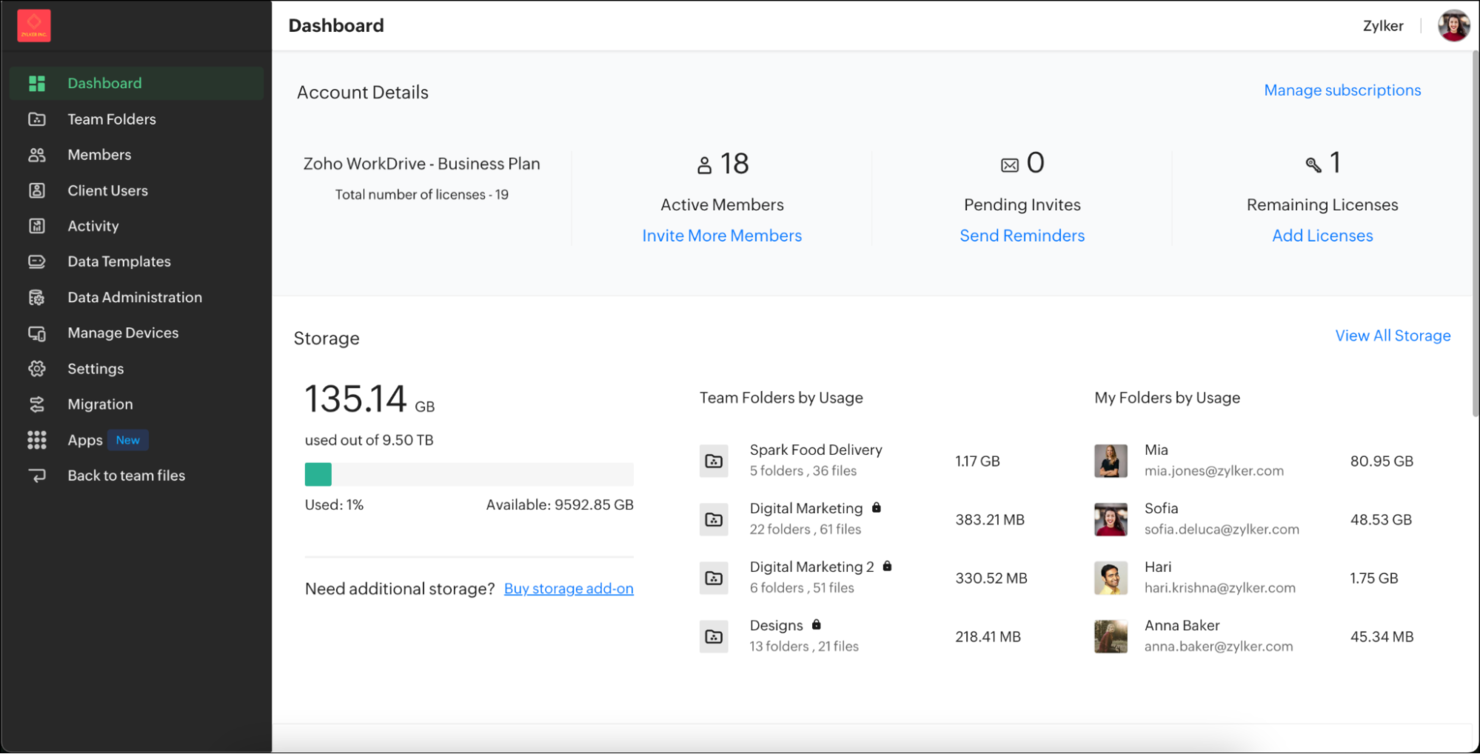
Zoho WorkDrive is appealing for small businesses looking for a content management platform that’s easy to organize and manage. The platform is designed for teams that need shared workspaces, granular folder permissions, and simple onboarding without heavy IT involvement. Unlike Box, Zoho WorkDrive emphasizes team-based file structures and built-in collaboration tools tailored for growing organizations.
Why It’s a Good Box Alternative
For small businesses that want to keep teams organized without extra complexity, Zoho WorkDrive offers a team-focused approach that stands out from Box. I like that you can create Team Folders with role-based access, so everyone knows exactly where to find and store files.
The built-in activity timeline lets you track document changes and team contributions at a glance. If your business needs a content management platform that’s structured for collaboration and clarity, Zoho WorkDrive is built for that.
Zoho WorkDrive Key Features
Some other features make Zoho WorkDrive a strong option for content management:
- Document Versioning: Access and restore previous versions of files directly from the platform.
- Built-in File Preview: View documents, images, and videos without downloading them.
- Granular Admin Controls: Set storage limits, manage user roles, and monitor activity from a central dashboard.
- Zoho Office Suite Integration: Edit documents, spreadsheets, and presentations within the same workspace.
Zoho WorkDrive Integrations
Integrations include Zoho CRM, Zoho Projects, Zoho Cliq, Zoho Mail, Microsoft Office, Microsoft Outlook, Gmail, Bigin, WorkDrive Genie, and Zoho Sheet.
Pros and Cons
Pros:
- Clean and simple dashboard
- Good team folder structure
- Built-in office suite apps
Cons:
- Smaller enterprise footprint
- Mobile app can be clunky

Egnyte
Best for granular data governance controls
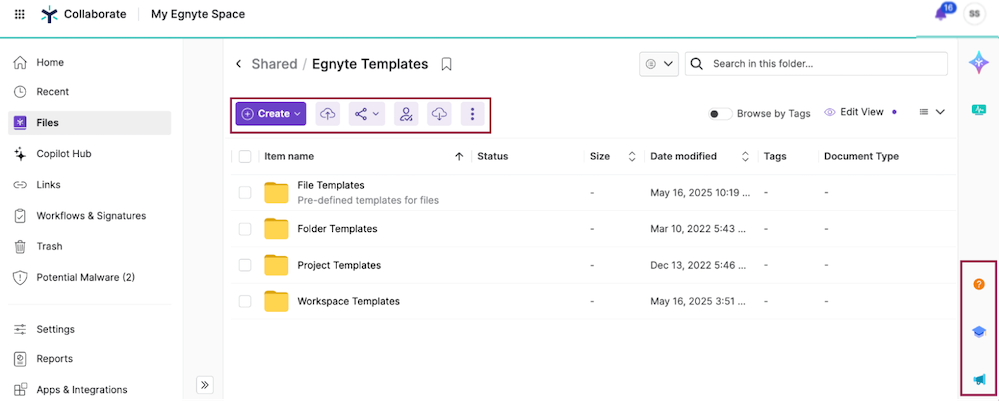
Egnyte stands out for organizations that need advanced control over sensitive files and regulatory compliance. It’s especially useful for IT leaders and security-focused teams in industries like healthcare, finance, and architecture. With its granular data governance features, Egnyte helps you manage permissions, monitor file activity, and enforce policies that go beyond what Box and many other platforms provide.
Why It’s a Good Box Alternative
When you need more than basic file sharing, Egnyte delivers advanced data governance controls that set it apart from Box. I picked Egnyte because it lets you set highly specific permissions at the folder, subfolder, and even file level, which is essential for regulated industries.
Its built-in content classification and real-time threat detection help you identify sensitive data and respond to risks quickly. If your team needs to enforce strict compliance and security policies, Egnyte offers the granular oversight that Box often lacks.
Egnyte Key Features
Some other features make Egnyte a strong choice for content management:
- Hybrid Cloud Storage: Store and access files both on-premises and in the cloud for flexible deployment.
- Document Collaboration Tools: Edit and comment on documents directly within the platform.
- Mobile Access App: Manage and share files securely from iOS and Android devices.
- Automated File Lifecycle Management: Set retention, archival, and deletion policies for files based on your organization’s needs.
Egnyte Integrations
Integrations include Google Workspace, Microsoft 365, Salesforce, Google Cloud, Microsoft Azure, AWS, and Adobe.
Pros and Cons
Pros:
- Deep data governance controls
- Handles large CAD files well
- Built-in ransomware detection
Cons:
- Setup requires IT expertise
- Heavy desktop sync client

Best for document-centric process automation
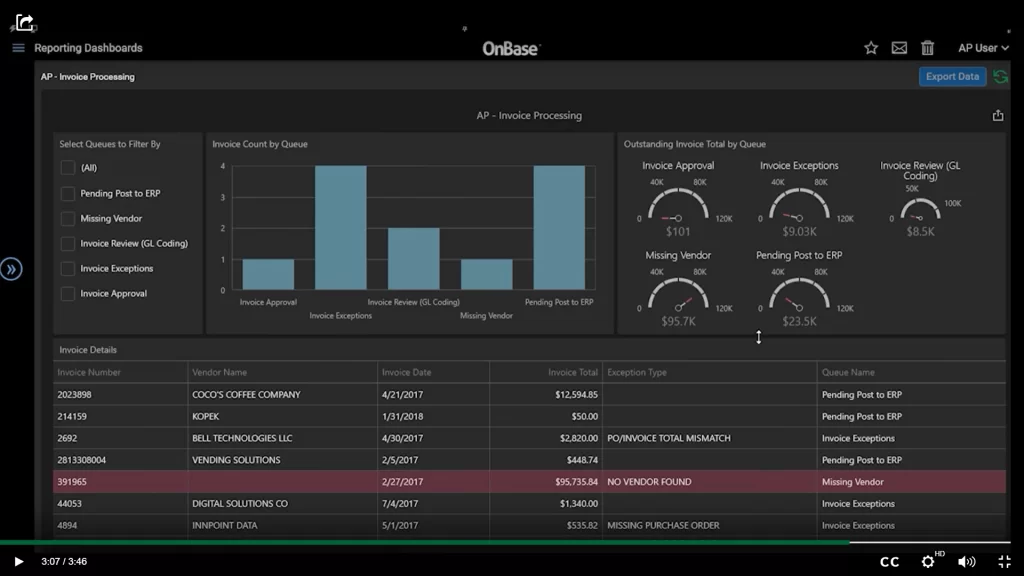
Hyland OnBase is often used by organizations that need to automate document-heavy processes through a process-centric approach. The platform is well suited for industries like healthcare, government, and finance that require secure document management and workflow automation aligned with compliance needs. Unlike Box, OnBase offers deep integration with line-of-business systems and advanced automation for document-centric workflows.
Why It’s a Good Box Alternative
When document-centric process automation is a top priority, Hyland OnBase brings capabilities that Box doesn’t match. I picked OnBase because it lets you automate complex workflows around document capture, routing, and approvals, all within a single platform.
The system also supports advanced document imaging and indexing, which helps teams manage high volumes of content tied to business processes. If your organization needs to tightly link documents to automated workflows, OnBase is a strong alternative to Box.
Hyland OnBase Key Features
Some other features that caught my attention include:
- Case Management Tools: Manage documents, tasks, and communications related to specific cases or projects in a unified workspace.
- Electronic Signature Integration: Collect legally binding signatures directly within the platform.
- Automated Retention Scheduling: Apply and enforce document retention policies based on compliance requirements.
- Full-Text Search: Locate documents quickly using keyword and metadata search across all stored content.
Hyland OnBase Integrations
Integrations include Peoplesoft, Accela, Google Docs, Tempest Prospero, Adobe Sign, MuleSoft, NextGen, Microsoft Outlook, Cerner, and Cognizant.
Pros and Cons
Pros:
- Connects disjointed IT stacks
- Exceptional audit trail history
- Strong healthcare compliance
Cons:
- Only for massive enterprises
- Very rigid deployment rules

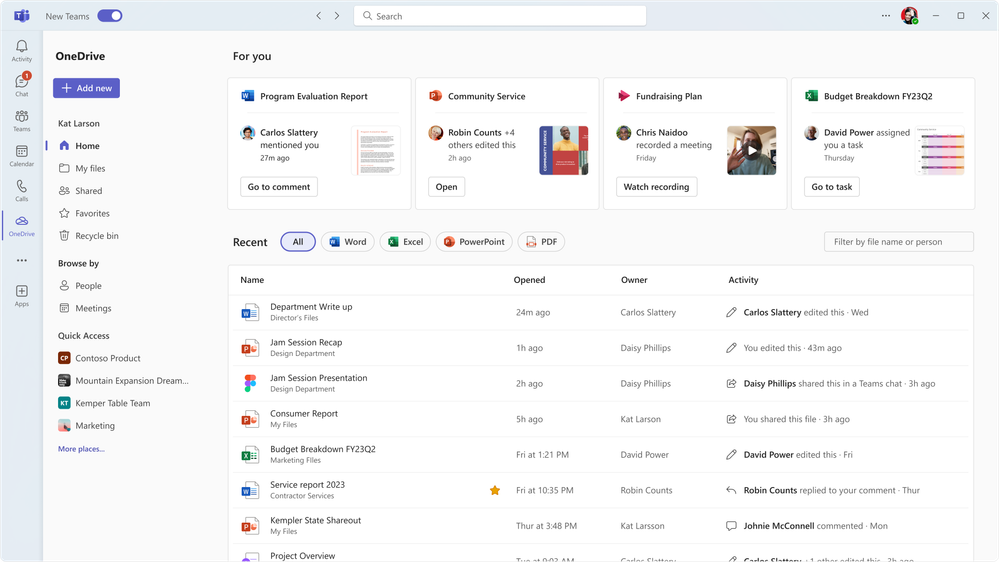
Microsoft OneDrive offers a tightly integrated content management experience for organizations already invested in Microsoft 365. It’s especially useful for teams that rely on Word, Excel, and Teams for daily collaboration and document sharing. Unlike Box, OneDrive’s direct connection to Microsoft’s productivity suite makes it a natural fit for organizations looking to centralize files and manage workflows within the Microsoft ecosystem.
Why It’s a Good Box Alternative
If your team already uses Microsoft 365, OneDrive offers a level of integration that Box can’t match. I picked it because files stored in OneDrive are accessible directly from Word, Excel, PowerPoint, and Teams, making document management and collaboration feel seamless within the Microsoft environment.
OneDrive also supports real-time co-authoring and automatic file syncing across devices, which helps teams stay aligned on shared projects. For businesses that want to keep everything within the Microsoft ecosystem, OneDrive is a practical alternative to Box.
Microsoft OneDrive Key Features
Some other features make OneDrive a strong choice for content management beyond its Microsoft 365 integration:
- Personal Vault: Store sensitive files in a protected area with identity verification for extra security.
- File Request: Collect files from anyone by sending a secure upload link, even if they don’t have a Microsoft account.
- Automatic Photo and Video Backup: Sync photos and videos from mobile devices directly to OneDrive for easy access and organization.
- Granular Sharing Controls: Set permissions for viewing, editing, or downloading files and folders at a detailed level.
Microsoft OneDrive Integrations
Integrations include Microsoft Teams, Outlook, SharePoint, Word, Excel, PowerPoint, Power BI, Dynamics 365, Windows, and Samsung.
Pros and Cons
Pros:
- Strong offline file access
- Excellent Windows integration
- Personal Vault for security
Cons:
- Slower upload speeds at times
- Lacks granular Box governance
Andre Box-alternativer
Her er noen flere Box-alternativer som ikke kom med på kortlisten min, men som likevel er verdt å ta en titt på:
-
OpenText Content Cloud
For regulated industry compliance
-
Progress ShareFile
For secure client file exchange
-
monday AI Workspace
For AI-powered project file organization
-
Tresorit
For zero-knowledge security
-
Clinked
For client portal collaboration
-
IDrive
For multi-device file backup
-
Proton Drive
For end-to-end encrypted storage
-
Oodrive
For European data residency needs


How I Evaluate Box Alternatives
I split my evaluation into two layers: the baseline every tool must meet—versioning, permissions, and real-time collaboration—and the differentiators like e-signatures and compliance certifications.
Core Functionality (Table Stakes For This List)
When I'm selecting tools for my list, I rank each one on a scale from 0 (does not offer the functionality) to 5 (excels in this area) for each core functionality listed below. Then, I calculate the tool's total score into a percentage. Each tool needs to achieve a minimum total score of 65% to be considered for inclusion.
- Cloud File Storage: I look at storage tiers, sync reliability, and file size limits—especially how well each tool handles large deliverables like video assets or design files across devices.
- Granular Access Controls: Each tool gets evaluated on folder-level permissions, link expiration, and password protection for sharing sensitive SOWs or client contracts.
- Real-Time Collaboration: I check whether teams can co-edit, comment, and annotate within documents without leaving the platform, since toggling between apps slows reviews down.
- Version Control & Audit Logs: Tracking who changed what and when matters for project accountability, so I evaluate revision history depth and admin-level activity reporting.
- External Sharing & Client Portals: Projects rarely stay internal, so I look at how each tool handles guest users, branded portals, and secure file request workflows with outside stakeholders.
- PM Tool Integrations: I evaluate native connectors to platforms like Jira, Asana, and Monday, plus Microsoft 365 and Google Workspace support for co-authoring within familiar environments.
Once I have a list of tools that meet this criteria, I consider what sets each platform apart.
Differentiating Factors (What Sets Vendors Apart)
Here's how I compare and contrast different vendors:
Standout Features
AI-powered search and auto-tagging make a real difference when your team is digging through hundreds of project folders for a single deliverable. I also look at native e-signature support, which saves a step when you need sign-off on SOWs or change orders without jumping to a separate tool. For AEC and creative teams, built-in previews for CAD, PSD, and video files let reviewers give feedback without downloading anything.
Beyond Features
Compliance certifications matter when your projects involve regulated data—I check for SOC 2 Type II, HIPAA, and GDPR coverage, plus data residency options for distributed teams. Migration tooling is another big one, since moving terabytes of project files off Box without losing folder structures or permissions can derail a rollout. I also evaluate pricing transparency, paying close attention to how storage caps and per-user costs scale as project teams grow beyond the initial pilot group.
Hvorfor se etter et Box-alternativ?
Selv om Box er et godt valg som plattform for innholdsbehandling, finnes det flere grunner til at enkelte brukere ser etter alternative løsninger. Det kan hende du ser etter et Box-alternativ fordi …
- Du trenger mer avanserte funksjoner for kundeportaler
- Bransjen din krever strengere samsvarskontroller
- Du ønsker ende-til-ende-kryptering for alle filer
- Du trenger bedre integrasjon med bransjespesifikke verktøy
- Teamet ditt synes tillatelsesinnstillingene i Box er for kompliserte
- Du trenger at dataene lagres i et bestemt land
Hvis noe av dette høres kjent ut, har du kommet til rett sted. Listen min inneholder flere plattformalternativer for innholdsbehandling som passer bedre for team som står overfor disse utfordringene med Box og ser etter alternative løsninger.
Viktige funksjoner i Box
Her er noen av de viktigste funksjonene i Box, slik at du kan sammenligne hva alternative løsninger tilbyr:
- Detaljerte tillatelseskontroller for brukere og grupper
- Samarbeid om dokumenter i sanntid med Box Notes
- Automatisert oppretting av arbeidsflyter med Box Relay
- Innebygde funksjoner for elektronisk signering med Box Sign, tilgjengelig som et tillegg
- Integrasjon med Microsoft 365 og Google Workspace
- Detaljert historikk over filversjoner og aktivitetssporing
- Avansert innholdssikkerhet, passordbeskyttelse og verktøy for vannmerking
- Sentralisert administrasjonskonsoll for brukeradministrasjon
- Mobilapper for iOS og Android
- Omfattende API for tilpassede integrasjoner