

10 beste prosjektstyringsprogrammer på egne servere for 2026

10 Kortliste over den beste lokalt installerte prosjektstyringsprogramvaren


Du vet at du trenger et prosjektstyringsverktøy, men strenge krav til personvern og samsvar i virksomheten eller bransjen din kan begrense valgmulighetene dine.
Her er mine anbefalinger av den beste lokalt installerte prosjektstyringsprogramvaren som hjelper deg med å oppfylle kravene og gir deg prosjektstyringsfunksjonene du trenger for å tildele oppgaver, administrere ressurser og følge fremdriften. Jeg har brukt min personlige erfaring med å implementere lokalt installerte løsninger for å hjelpe deg med å finne det riktige alternativet for organisasjonen din.
Hvorfor du kan stole på våre programvareanbefalinger
Teamet vårt har testet og anmeldt programvare siden 2012. Vi er selv prosjektledere, så vi vet hvor vanskelig og hvor viktig det er å velge riktig programvare.
I denne guiden har vi vurdert verktøyene gjennom praktisk testing og uavhengig research og gitt dem poeng ut fra våre utvelgelseskriterier. Vi bygger også på innsikt fra ledende eksperter i bransjen og erfarne prosjektledere.
Anmeldelsene våre bygger på vår egen redaksjonelle vurdering. De er ikke et salgsargument.
Ekspertanmeldere:
Sammenligningstabell for lokalt installert prosjektstyringsprogramvare
Sammenlign spesifikasjonene for hvert prosjektstyringsverktøy som er lokalt installert, i kortlisten min her:
| Tool | Best For | Trial Info | Price | ||
|---|---|---|---|---|---|
| 1 | Best for self-hosted PPM with BI-grade reporting | 14-day free trial | From $10/user/month (billed annually) | Website | |
| 2 | Best for teams that work within the Microsoft ecosystem | Not available | Pricing upon request | Website | |
| 3 | Best cloud-based option for its enterprise-grade security | Free plan + 14-day trial available | From $2.49/user/month | Website | |
| 4 | Best on-premise open source software | Free plan available; 14-day free trial available for Enterprise Cloud and on-premises | From €5.95/user/month (billed annually) | Website | |
| 5 | Best for portfolio-based work with personalized hosting | 30-day free trial; free demo available | Pricing upon request | Website | |
| 6 | Best for teams that need to track time and invoice clients | 14-day free trial | From $15/month | Website | |
| 7 | Best free on-premise open source tool for agile teams | 30 day free trial | From $7/user/month (billed annually) | Website | |
| 8 | Best for teams looking for a tool that follows PMBOK guidelines | Free plan available | From $4/user/month | Website | |
| 9 | Best for its extended on-premise tool trial | 14-day free trial + free demo available | From $29/month (billed annually) | Website | |
| 10 | Best on-premise software for its free, unlimited extra plugins | Free version and demo available | From $299 for 5 users | Website |
Anmeldelser av den beste lokalt installerte prosjektstyringsprogramvaren
Her er en kort beskrivelse av hvert verktøy, med informasjon om det beste bruksområdet, fremtredende funksjoner og integrasjoner

Celoxis
Best for self-hosted PPM with BI-grade reporting
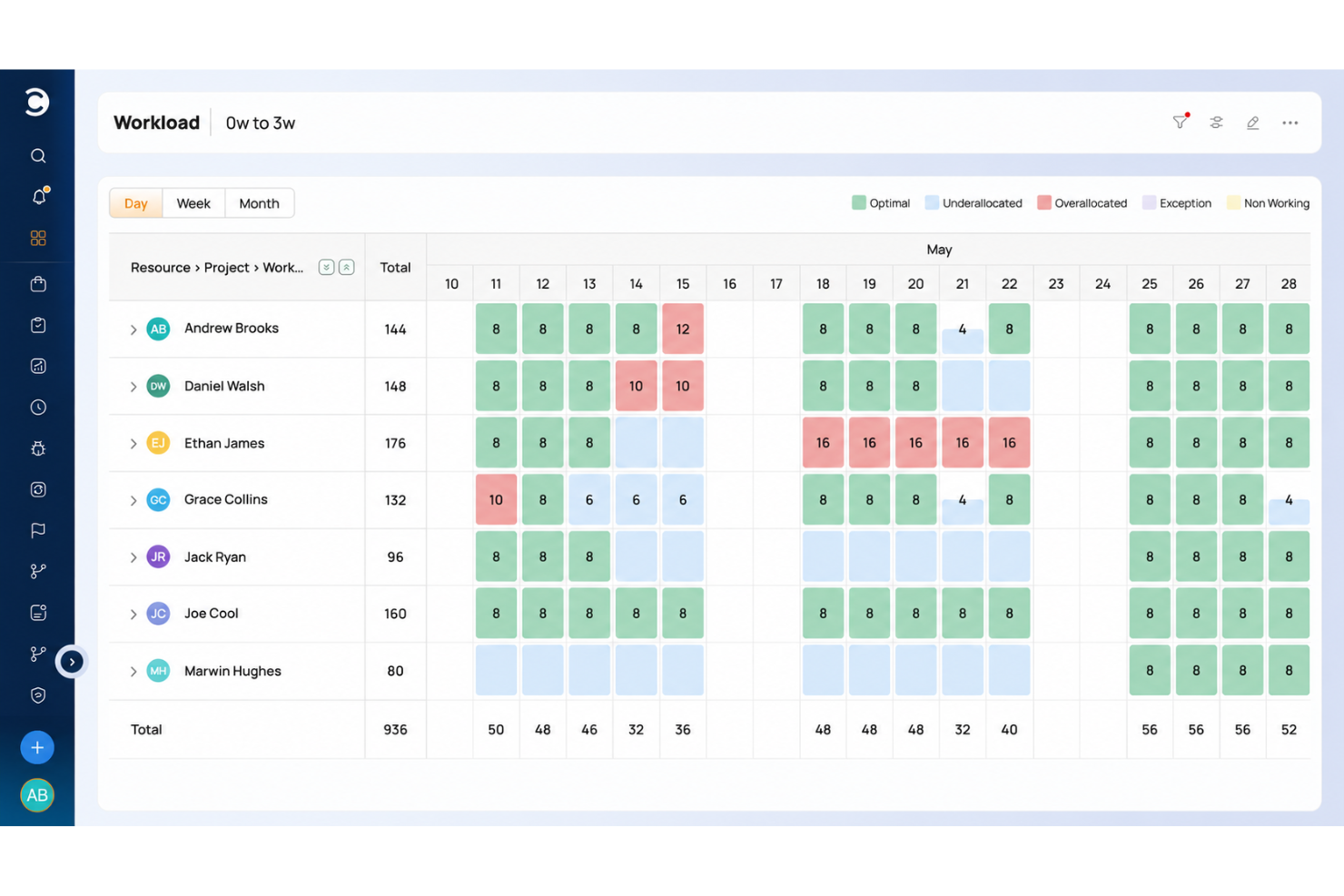
Celoxis is an enterprise project and portfolio management platform with self-hosted deployment options, offering Gantt scheduling, resource capacity planning, financial tracking, and built-in BI-grade reporting across portfolios.
Who Is Celoxis Best For?
Celoxis is a strong fit for enterprise PMO teams and IT directors who need self-hosted project and portfolio management with built-in BI-grade reporting across portfolios.
Why I Picked Celoxis
Celoxis earns its spot on my shortlist because of how well it handles self-hosted PPM with built-in BI-grade reporting across portfolios. I particularly like that its reporting isn't bolted on as an afterthought: custom dashboards, drill-down charts, and scheduled report delivery all run natively on your own infrastructure. Pair that with Gantt scheduling, critical-path analysis, and resource capacity planning, and you get a full portfolio view without routing sensitive project data through a vendor's cloud.
Celoxis Key Features
- Perpetual on-premises license: Celoxis's EULA grants a one-time fee, perpetual license to run the software on your own servers indefinitely.
- Multi-database support: The on-premises installation supports SQL Server, Oracle, and PostgreSQL, giving your IT team flexibility over the database environment.
- Project intake and scoring: Teams can collect project requests, score them against business KPIs, and run what-if scenario analysis to prioritize the portfolio.
- SAML 2.0 single sign-on: Celoxis supports SAML 2.0 federated authentication, with named integrations for Okta, Microsoft Active Directory, Google, and OneLogin.
Celoxis Integrations
Celoxis has 21 native integrations, including Jira, Microsoft Project, Microsoft Excel, Azure DevOps, GitHub, Salesforce, Google Drive, Okta, and QuickBooks Online. Its REST API supports custom connections, with 400+ connected apps through the API and Zapier.
Pros and Cons
Pros:
- Custom BI dashboards support portfolio reporting
- Capacity planning flags resource overloads
- Portfolio Gantt tracks dependencies across projects
Cons:
- On-premise updates trail cloud releases
- Customer-managed backups add operational work
Best for teams that work within the Microsoft ecosystem
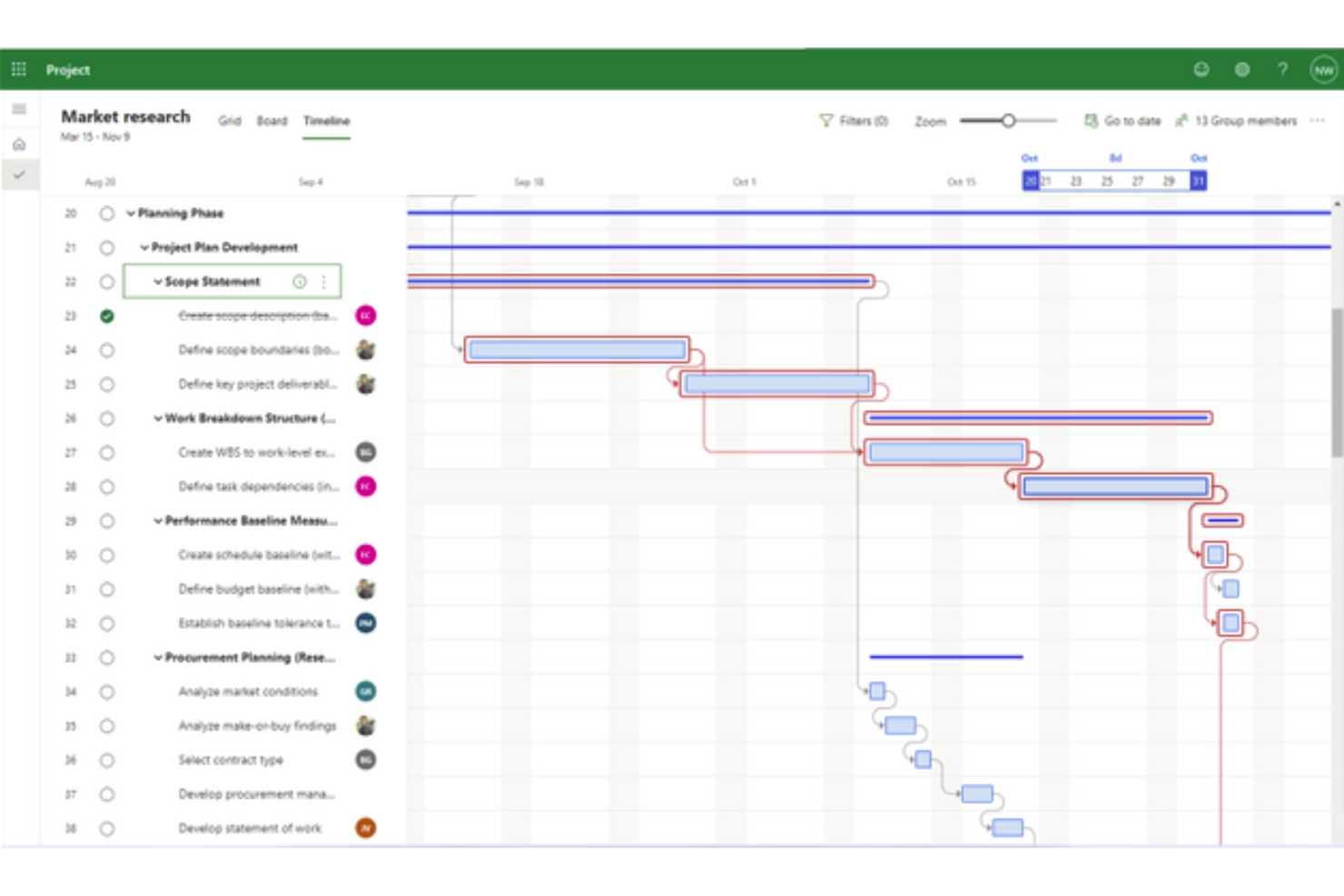
Microsoft Project is a project management software that has been around for over 30 years, and is popularly known for having an on-premise version.
Why I picked Microsoft Project: This tool used to be either license-based or on-premise until fairly recently. Now, Microsoft has an online version of the software, but has kept its self-hosted options.
Microsoft Project Standout Features & Integrations
Features include portfolio management, an up-to-date desktop app, task management, reporting, business intelligence, resource management, and timesheet submissions.
Integrations include all the tools within the MS ecosystem, like Word, PowerPoint, Excel, and Teams.

Best cloud-based option for its enterprise-grade security

Freedcamp is a web-based project management software with an enterprise option that offers advanced analytics and enterprise-grade support.
Why I picked Freedcamp: Although it is a cloud-based software, you can pay an extra fee every year and choose where your information is hosted. Therefore, you can research their locations and select the one where you believe your information will be less vulnerable to, lets say, earthquakes.
The enterprise version of this software offers security features that will make you feel like you are hosting it yourself. For example, you can have access to daily snapshots of all your data and control access through 2FA.
Freedcamp Standout Features & Integrations
Features include a white label product, custom fields for projects, personalized dashboards, data encryption in transit, secure password sharing, flexible permissions, and streamlines file editing.
Integrations include a public API that you can use to build custom integrations and access to thousands of apps through Zapier.

Best on-premise open source software
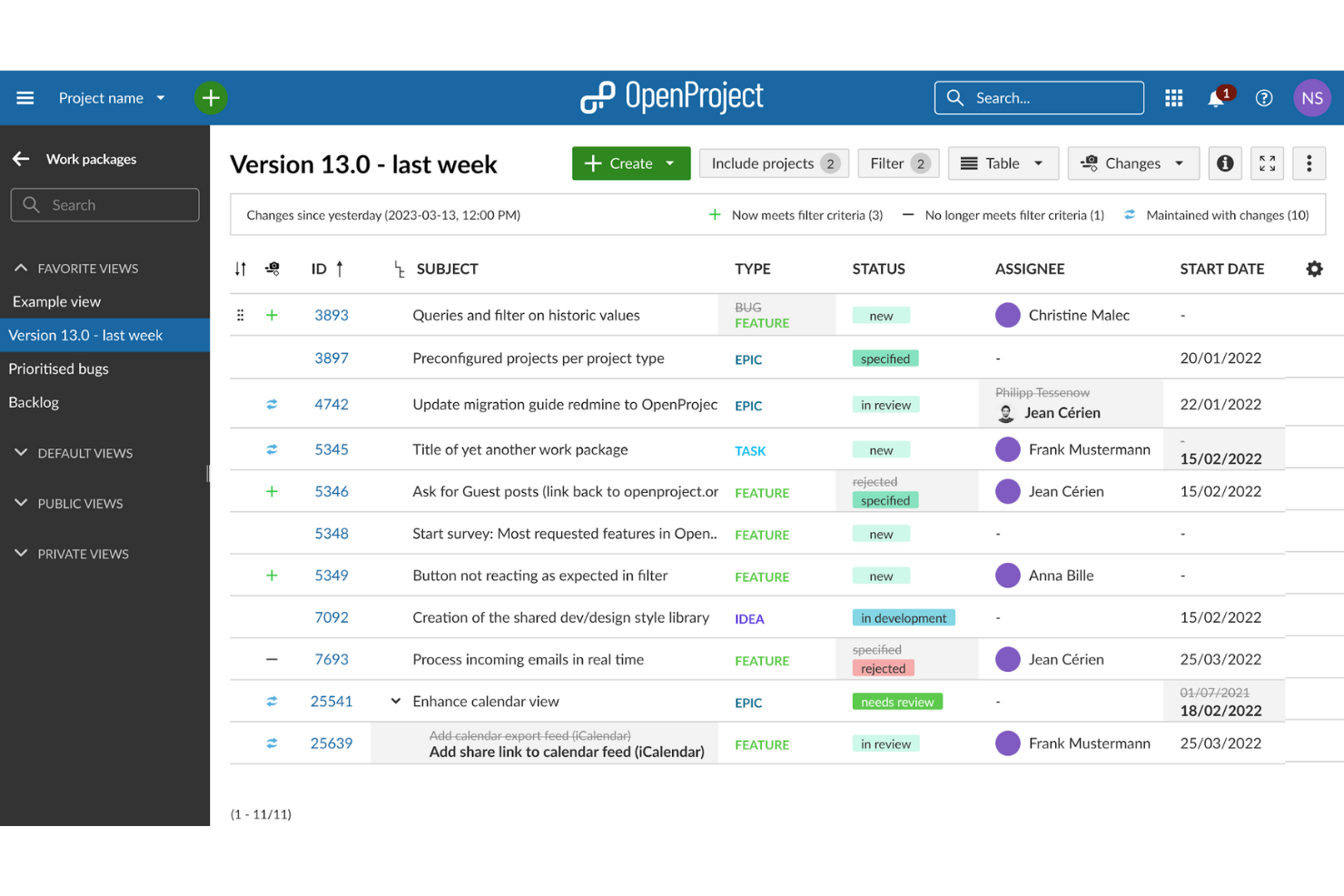
Open Project is an open-source project management software that provides top-grade security for your business critical and sensitive data.
Why I picked Open Project: This tool is an open source alternative to other tools on this list. Open Project is focused on improving and delivering on both their cloud-based and on-premise solutions. The on-premise deployment has two versions, community and enterprise.
The community edition is a free version of the software that includes a wide range of features and continuous developments and maintenance from the community. The enterprise edition offers professional support as well as additional features like white-labeling, graphs on project overviews, and custom notifications.
Open Project Standout Features & Integrations
Features include custom fields, placeholder users, help texts for additional information about features, a team planner with workload information, and advanced agile boards.
Integrations can be built using its API. This can help you connect to any other tool on your tech stack.

Best for portfolio-based work with personalized hosting
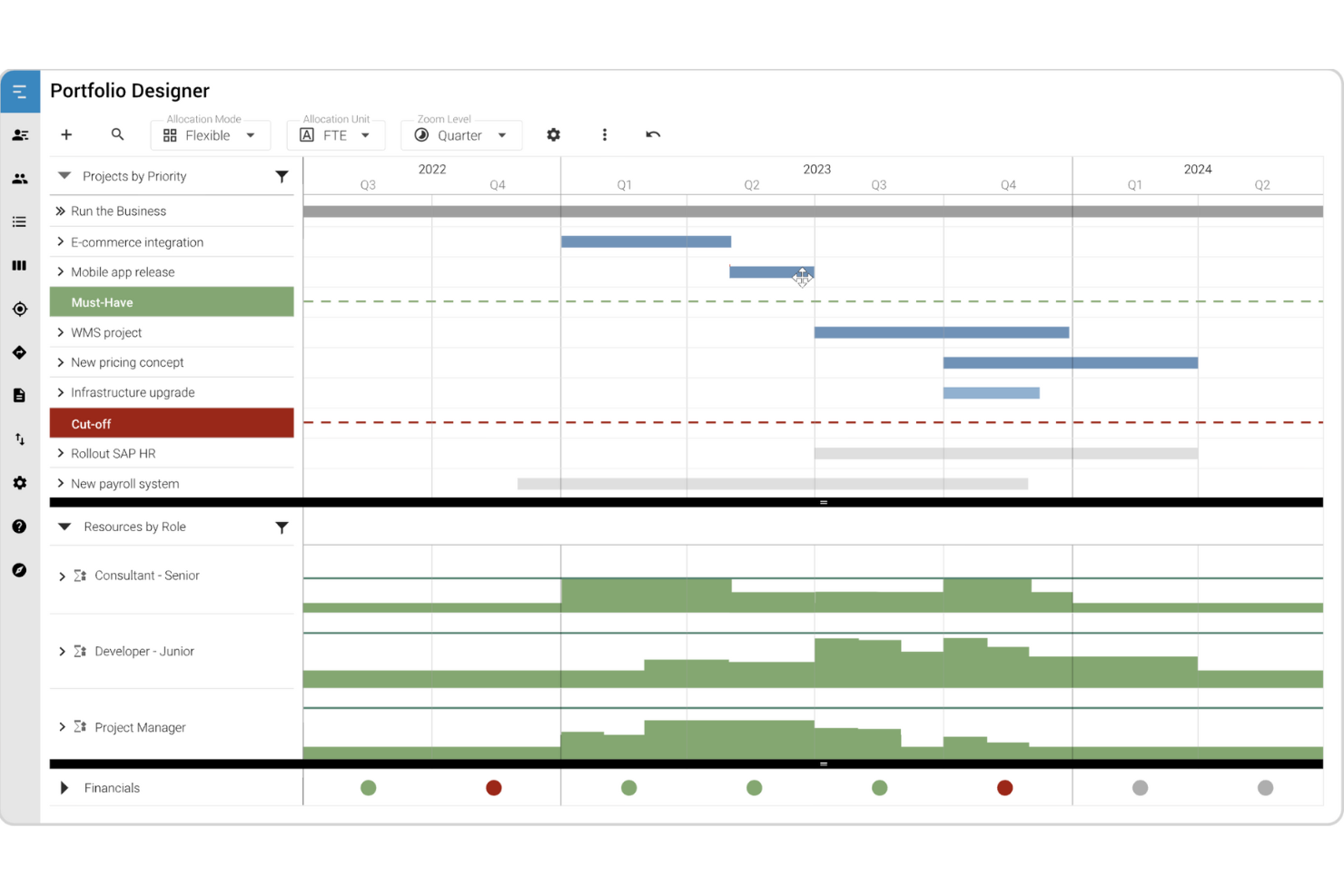
MeisterPlan is a portfolio-level resource management software that supports traditional and agile project work.
Why I picked MeisterPlan: Despite it being an online tool, MeisterPlan allows you to choose where to host your system. They have locations in the US and Germany. Additionally, they host with AWS and it offers all the security features you need to keep your information secure.
MeisterPlan’s portfolio focus lets you analyze resources, track financials, build roadmaps and display all your project information in straightforward lists that help you make high-level decisions.
MeisterPlan Standout Features & Integrations
Features include what-if scenarios to simulate realistic portfolio plans, Kanban-style portfolio boards, resource capacity information, and useful dashboards for quick decision making.
Integrations include Jira, Looker Studio, Azure, Power BI, Smartsheet, Tableau, and ServiceNow. Additionally, you can access thousands of apps using Zapier and build custom integrations using its API.

Best for teams that need to track time and invoice clients

ActiveCollab is a collaborative project management software that is focused on simplicity, so you can get work done faster.
Why I picked ActiveCollab: The tool has both an online and on-premise deployment. The self-hosted version of the software is installed on the server you choose. The team at ActiveCollab can train your system administrator, but after that, it’s all in your hands. The tools has a free trial of the online tool that can give you a good idea of the user experience in the on-premise version.
ActiveCollab Standout Features & Integrations
Features include task dependencies, automatic rescheduling, real-time collaboration using the in-app chat, project templates, time management, resource management, and reporting.
Integrations include Hubstaff and Timecamp for time tracking, plus thousands of additional apps through an integration with Zapier.

Taiga.io
Best free on-premise open source tool for agile teams

Taiga is an open-source agile project management platform that offers an intuitive user interface where agile teams can work together.
Why I picked Taiga: The tool’s on-premise solution is free, is available in more than 20 languages, and can be customized according to your needs. Teams can use Taiga to plan, execute, and track their projects using agile best practices, which can help them deliver better results more quickly.
The tool also offers a powerful search functionality that allows teams to quickly find and filter information, as well as customizable workflows and project templates. Additionally, Taiga provides real-time notifications and alerts, which can help team members stay up to date with the latest project developments.
Taiga Standout Features & Integrations
Features include custom tags and fields, team roles and permissions, personal dashboards, issue tracking, sprint support, an estimation tool, and swim lanes.
Integrations include some of the most popular tools, like GitHub, GitLab, Slack, and Trello. These integrations allow teams to sync data between Taiga and other tools and automate workflows. Additionally, Taiga offers an API that allows you to build custom integrations with other tools and platforms.

Best for teams looking for a tool that follows PMBOK guidelines

RationalPlan is a project management software that helps you plan projects, estimate costs, allocate resources, and measure workload effectively.
Why I picked RationalPlan: Its on-premise deployment includes several plans according to your needs. These range from a single project solution where you can handle independent projects to a project server option. With the server you can access all the features from the multi-project product, like portfolio management, plus enabling web and desktop access, concurrent use, and automatic email notifications.
RationalPlan includes free support and upgrades for a year and you can renew this maintenance pack after that.
RationalPlan Standout Features & Integrations
Features include dependencies, milestones, splitted tasks, Gantt charts, concurrent access with restricted permissions, portfolio management, workload management, document management, and reporting.
Integrations only include Microsoft Project. This integration means you can open and edit any Project file seamlessly.

Best for its extended on-premise tool trial

OrangeScrum is a project management software and task management tool that makes it easy to track and manage your resources and projects.
Why I picked OrangeScrum: Its enterprise self-hosted edition offers SSO & LDAP security, free data migration from your current solution, free training and a year of product updates.
Orangescrum offers a mobile app where you can review and approve project documentation and collaborate on the go. Additionally, the tool has features to support traditional and agile project management methodologies.
OrangeScrum Standout Features & Integrations
Features include epics, stories, backlogs, story points, multiple task views, checklist, subtasks, resource availability and allocation, custom workflows, billing rates, and advanced reporting.
Integrations include Slack, Zoom, Google Drive, Dropbox, and GitHub. It also includes and integration with Zapier that you can use to connect thousands of additional applications.

Best on-premise software for its free, unlimited extra plugins

Kendo Manager is a project management tool that provides a simple and intuitive way for teams to plan, execute, and track their projects.
Why I picked Kendo Manager: Kendo has an on-premise variant of its software. This option gives you access to a consultation with the tool’s team to help you figure out the workflows that work for you. One of the key benefits of using Kendo Manager is that it offers a visual and interactive project management experience that makes it easy for your team to collaborate and stay on the same page. The tool also offers a flexible and customizable approach to project management, which allows you to tailor the tool to their specific needs and workflows.
Kendo Manager offers a wide range of features that can help you manage your projects more effectively. The dashboard provides an overview of the project status, as well as detailed reports that can be used to track progress and identify areas for improvement. Additionally, Kendo Manager offers a mobile app that allows you to access the tool on the go and stay up to date with the latest project developments.
Kendo Manager Standout Features & Integrations
Features include task management, team collaboration, project timelines, project templates, and custom fields.
Integrations include Jira, Trello, Asana, and Zapier. This last one is a third-party service that helps you connect thousands of app if you subscribe. Additionally, Kendo Manager offers an API that allows teams to build custom integrations with other tools and platforms.
Andre alternativer
Her er andre verktøy du kanskje bør vurdere hvis du ikke fant det du lette etter ovenfor.
- Zoho Projects
Flexible work allocation tools
- OneDesk
On-premise helpdesk and project management software
- Smartsheet
For low-code project management automation
- monday AI Workspace
With AI-powered resource and risk insights
- ClickUp
For unlimited users/seats
- Height
For startups that need to build products faster


How I Evaluate On Premise Project Management Software
I split my evaluation into two layers: the baseline requirements a tool must meet—like true self-hosted deployment and RBAC—and the differentiators that separate the best options from the rest.
Core Functionality (Table Stakes For This List)
When I'm selecting tools for my list, I rank each one on a scale from 0 (does not offer the functionality) to 5 (excels in this area) for each core functionality listed below. Then, I calculate the tool's total score into a percentage. Each tool needs to achieve a minimum total score of 65% to be considered for inclusion.
- Self-Hosted Deployment Options: I check whether the tool installs on your own servers, private data centers, or private cloud infrastructure—and whether it can run independently of the vendor's hosted environment.
- Project Planning & Scheduling: Gantt charts, dependency mapping, milestones, and timeline views are what I evaluate here, since teams running complex waterfall or hybrid projects need clear scheduling control.
- Resource & Workload Management: I look for resource allocation, capacity views, and workload balancing features that let you assign the right people across multiple concurrent projects.
- Role-Based Access Control: Enterprise teams need granular permissions, so I evaluate support for custom role hierarchies, LDAP or Active Directory integration, and SSO capabilities.
- Team Collaboration Tools: Comments, file sharing, notifications, and document management all need to function within the on-premise environment—tools like Redmine and Planview handle this differently, so I compare how each vendor approaches it.
- Reporting & Portfolio Dashboards: I look at whether you can build custom dashboards, track KPIs, and roll up project-level data into portfolio views that give leadership real visibility into progress and budgets.
Once I have a list of tools that meet the criteria, I consider what sets each platform apart.
Differentiating Factors (What Sets Vendors Apart)
Here's how I compare and contrast different vendors:
Standout Features
Air-gapped deployment matters for teams in defense or critical infrastructure where servers can't touch the internet at all. I also evaluate custom workflow automation—configurable triggers and approval chains that mirror your actual project processes rather than forcing you into generic templates. Time tracking and budgeting round things out, especially when project managers need to tie logged hours directly to cost codes and client billing within the same on-premise instance.
Beyond Features
Licensing structure is a big differentiator—I check whether a vendor offers perpetual licenses or locks you into annual renewals, since this shapes total cost of ownership over time. Security and compliance certifications also weigh heavily; teams handling sensitive data need alignment with standards like HIPAA, ISO 27001, or FedRAMP. I evaluate infrastructure compatibility too, looking at supported operating systems, database backends, and whether containerized deployment via Docker or Kubernetes is an option for modern DevOps teams.
Slik velger du lokalt installert prosjektstyringsprogramvare
Det er lett å gå seg vill i lange funksjonslister og komplekse prismodeller. For å hjelpe deg med å holde fokus mens du arbeider deg gjennom den unike prosessen din for valg av programvare, får du her en sjekkliste over faktorer du bør ha i tankene:
| Faktor | Hva du bør vurdere |
|---|---|
| Skalerbarhet | Kontroller at programvaren kan vokse sammen med virksomheten din. Se etter støtte for flere brukere, større prosjekter og økende behov for datalagring uten store avbrudd. |
| Integrasjoner | Teamet ditt er sannsynligvis avhengig av andre verktøy, for eksempel ERP- eller dokumenthåndteringssystemer. Velg programvare som integreres sømløst med den eksisterende verktøystakken din, slik at du unngår problemer i arbeidsflyten. |
| Tilpasningsmuligheter | Alle team har unike prosesser. Se etter programvare som lar deg tilpasse arbeidsflyter, oversikter og tillatelser slik at de passer nøyaktig til behovene dine. |
| Brukervennlighet | Kompliserte systemer bremser innføringen. Kontroller at grensesnittet er intuitivt, og at teamet raskt kan lære å bruke og navigere på plattformen uten omfattende opplæring. |
| Budsjett | Vurder ikke bare startkostnaden, men også løpende vedlikehold, oppgraderinger og brukerstøtte. Kontroller at løsningen samsvarer med de langsiktige økonomiske planene dine. |
| Sikkerhetstiltak | Siden du drifter programvaren selv, trenger du sterke sikkerhetsfunksjoner. Se etter datakryptering, rollebasert tilgang, revisjonslogger og samsvar med bransjestandarder. |
| Implementering og brukerstøtte | Se etter hjelp med oppsett, opplæringsmateriell og responsiv kundestøtte. Jo smidigere implementeringen er, desto raskere kan teamet begynne å se verdien. |
| Ytelse og pålitelighet | Lokalt installerte løsninger krever serverressurser. Kontroller at systemet kjører effektivt på infrastrukturen din og kan håndtere høy belastning uten nedetid. |
Hva er lokalt installert prosjektstyringsprogramvare?
Lokalt installert prosjektstyringsprogramvare innebærer at prosjektstyringsprogramvare distribueres i en privat infrastruktur, altså på serverne dine. Som virksomhet kjøper du servere, kobler dem til internett, konfigurerer dem og installerer programvare som du skal bruke i organisasjonen. Dette gir deg bedre kontroll over dataene og bedre sikkerhet.
Lokalt installert programvare tilbyr vanligvis de samme funksjonene som skybasert programvare, med det forbeholdet at IT-teamet ditt må vedlikeholde programvaren ved å installere oppdateringer og sikkerhetsoppdateringer.
Funksjoner i lokalinstallert programvare for prosjektstyring
Vær oppmerksom på følgende viktige funksjoner når du velger lokalinstallert programvare for prosjektstyring:
- Oppgavehåndtering: Organiser, tildel og følg opp oppgaver for å sørge for at prosjektene holder tidsplanen, og at teammedlemmene kjenner ansvarsområdene sine.
- Ressursfordeling: Håndter arbeidsbelastning, følg med på tilgjengelighet og optimaliser ressursfordelingen for å forhindre flaskehalser og utbrenthet.
- Tilpassede arbeidsflyter: Tilpass prosjektprosessene til teamets unike behov ved å opprette skreddersydde godkjenningstrinn, oppgaveavhengigheter og automatiseringsregler.
- Gantt-diagrammer & tidslinjer: Visualiser prosjektfremdrift, tidsfrister og avhengigheter for å holde teamene samkjørte og unngå planleggingskonflikter.
- Tilgangskontroller basert på roller: Begrens tilgangen til sensitive data og funksjoner ved å tildele brukerroller og tillatelser basert på ansvarsområder.
- Frakoblet funksjonalitet: Sørg for at arbeidet ikke blir avbrutt ved å la brukerne få tilgang til og oppdatere prosjektdata selv når de ikke er tilkoblet nettverket.
- Rapportering & analyse: Generer detaljerte rapporter om prosjektresultater, ressursutnyttelse og oppgavefullføring for å ta datadrevne beslutninger.
- Revisjonslogger & samsvar: Oppretthold en sikker oversikt over brukerhandlinger og endringer for å oppfylle lovpålagte krav og sikre intern kontroll.
- Integrasjoner med lokalt installerte systemer: Koble sømløst til eksisterende programvare og databaser for å effektivisere arbeidsflyter uten å være avhengig av tredjeparts skytjenester.
- Skalerbarhet & ytelsesoptimalisering: Sørg for at systemet kan håndtere økende arbeidsmengder og finjusteres for høy ytelse på den interne infrastrukturen.
Fordeler med lokalinstallert programvare for prosjektstyring
Implementering av lokalinstallert programvare for prosjektstyring gir flere fordeler for teamet og virksomheten din. Her er noen av fordelene du kan se frem til:
- Større kontroll over data: Ved å lagre sensitiv prosjektinformasjon på egne servere reduserer du avhengigheten av tredjepartsleverandører og sikkerhetsrisikoen.
- Mer pålitelig ytelse: Siden programvaren kjører på infrastrukturen din, påvirkes du ikke av internettbrudd eller forstyrrelser i eksterne tjenester.
- Tilpassede konfigurasjonsmuligheter: Du kan konfigurere programvaren slik at den dekker teamets spesifikke behov, fra sikkerhetsinnstillinger til arbeidsflytautomatisering og rapportering.
- Lavere kostnader på lang sikt: Unngå løpende abonnementsavgifter ved å investere i en engangslisens og håndtere oppgraderinger og vedlikehold etter din egen tidsplan.
- Enklere samsvarshåndtering: Ha kontroll over sikkerhetsprotokoller og bransjeregler ved å oppbevare prosjektdataene i virksomhetens eget IT-miljø.
- Ingen påtvungne oppdateringer: Bestem selv når og hvordan systemet skal oppgraderes, i stedet for å håndtere automatiske skybaserte oppdateringer som kan forstyrre arbeidsflytene dine.
- Større fleksibilitet ved integrasjoner: Koble til interne verktøy og databaser uten å være avhengig av skybaserte API-er eller eksterne tjenesteleverandører.
Vanlige spørsmål om lokalinstallert programvare for prosjektstyring
Her er noen av spørsmålene andre stiller om dette emnet.
Er lokalinstallert programvare bedre enn skybasert programvare?
Lokalinstallert programvare for prosjektstyring er bedre enn skybasert programvare når det gjelder sikkerhet, men ikke når det gjelder budsjettet ditt.
Selvhostede løsninger gir deg alltid bedre kontroll over informasjonssikkerheten og tilgangen til kritisk informasjon. Dette kan imidlertid forsvinne dersom teamet ditt ikke følger beste praksis for å vedlikeholde og få tilgang til serverne.
Selvhostede løsninger krever imidlertid betydelige investeringer i både maskinvare og programvare. Mens et skybasert verktøy krever en månedlig avgift, innebærer det å ha egen programvare kostnader for plassen der serverne dine er plassert, lønn til personellet som vedlikeholder den, og kostnaden for programvaren. Derfor er selvhostede løsninger noen ganger for dyre.