

10 beste programmer for dokumentgenerering gjennomgått i 2026

Beste programvare for dokumentgenerering – utvalgte


Å administrere digitale prosjekter innebærer ofte å håndtere papirarbeid og repetitive oppgaver. Det kan imidlertid ta mye av den verdifulle tiden din å opprette, redigere og organisere dokumenter. Det er her programvare for dokumentgenerering blir avgjørende, siden den tilbyr en måte å automatisere og forenkle disse oppgavene på, slik at du kan utnytte tiden din bedre.
Basert på min erfaring med å teste og vurdere ulike verktøy kan riktig programvare forbedre teamets produktivitet betydelig. Derfor gir denne artikkelen en objektiv gjennomgang av de beste alternativene, med vekt på funksjonene deres, brukervennlighet og hva som gjør hvert enkelt verktøy unikt.
Målet er å hjelpe deg med å finne den riktige løsningen for behovene dine, slik at du kan konsentrere deg om å levere vellykkede prosjekter.
Hvorfor du kan stole på våre programvareanbefalinger
Teamet vårt har testet og anmeldt programvare siden 2012. Vi er selv prosjektledere, så vi vet hvor vanskelig og hvor viktig det er å velge riktig programvare.
I denne guiden har vi vurdert verktøyene gjennom praktisk testing og uavhengig research og gitt dem poeng ut fra våre utvelgelseskriterier. Vi bygger også på innsikt fra ledende eksperter i bransjen og erfarne prosjektledere.
Anmeldelsene våre bygger på vår egen redaksjonelle vurdering. De er ikke et salgsargument.
Ekspertanmeldere:
Sammenligningstabell for programvare for dokumentgenerering
Denne sammenligningstabellen oppsummerer prisopplysningene for mine beste utvalgte programmer for dokumentgenerering:
| Tool | Best For | Trial Info | Price | ||
|---|---|---|---|---|---|
| 1 | Best for automating guide creation | 10-day free trial + free demo available | From $40/month (billed annually) | Website | |
| 2 | Best with dynamic web forms for data capture | Free demo available | From $399/month (billed annually) | Website | |
| 3 | Best for AI-powered document intelligence | Free demo available | Pricing upon request | Website | |
| 4 | Best for electronic signatures | Free plan available | From $10/month (billed annually) | Website | |
| 5 | Best for multi-language support | Free trial available | From $49/user/month | Website | |
| 6 | Best for built-in form capture and approvals | 7-day free trial | From $19.99/user/month (billed annually) | Website | |
| 7 | Best for team collaboration | Free plan + 7-day trial available | From $5.78/user/month | Website | |
| 8 | Best for reducing document prep time | Free demo available | Pricing upon request | Website | |
| 9 | Best for sales teams | Free plan + 14-day free trial + free demo available | From $19/user/month | Website | |
| 10 | Best for custom forms | Free demo available | From $83/month (billed annually) | Website |
Anmeldelser av den beste programvaren for dokumentgenerering
Nedenfor finner du mine detaljerte sammendrag av den beste programvaren for dokumentgenerering som kom med på utvalgslisten min. Anmeldelsene mine gir en detaljert gjennomgang av de viktigste funksjonene, fordelene & ulempene, integrasjonene og ideelle bruksområdene for hvert verktøy, slik at du kan finne det beste alternativet for deg.


TruPeer caters to enterprises aiming to simplify and enhance their document generation and video creation processes. With its AI-driven capabilities, it turns screen recordings into professional guides and videos, making it an appealing solution for industries focused on training, marketing, and customer success. By automating complex tasks like script enhancement and multilingual translation, TruPeer addresses the challenge of creating consistent, high-quality content quickly.
Why I Picked TruPeer
I picked TruPeer for its unique ability to automate the creation of step-by-step guides and videos from simple screen recordings. This feature, combined with its customizable AI avatars and studio-quality voiceovers, allows your team to produce professional content without needing advanced editing skills. TruPeer also supports translation into over 65 languages, which is invaluable for global teams looking to maintain consistency across different markets. Its centralized knowledge base with AI video search capabilities ensures that all your content is easy to find and access.
TruPeer Key Features
In addition to its standout guide creation capabilities, TruPeer offers several other features:
- Automated Zoom Effects: This feature automatically enhances screen recordings by focusing on key areas, ensuring that your audience doesn't miss important details.
- Brand Personalization Options: Customize your documents and videos with your brand's colors and logos, maintaining a consistent brand image across all content.
- Engagement Analytics: Track how your audience interacts with your content, providing insights to refine your document and video strategies.
- Security and Compliance: With ISO 27001 and SOC2 compliance, TruPeer ensures that your data is secure, a critical feature for enterprises handling sensitive information.
TruPeer Integrations
Integrations include Monday.com, Make, Medium, Google Analytics, Repurpose.ai, Bigtincan, Cal.com, SurveyMonkey, and Pipedrive.
Pros and Cons
Pros:
- Strong branding and formatting controls
- Supports multilingual content creation
- Automates step by step documentation
Cons:
- Chrome dependent recording workflow
- Limited advanced manual editing
altaFlow
Best with dynamic web forms for data capture

altaFlow offers a document generation platform designed for teams that need to automate complex workflows and integrate data from multiple sources. It’s a strong fit for organizations in regulated industries or those managing high volumes of forms and contracts. With its focus on automation and integration, altaFlow helps businesses reduce manual data entry and streamline document processes.
Who Is altaFlow Best For?
altaFlow is a strong choice for mid-sized to large organizations in regulated industries that need to automate document workflows and integrate data across multiple business systems.
Why I Picked altaFlow
For document generation software, I picked altaFlow because of its advanced dynamic web forms that make data capture flexible and customizable. The platform lets you build forms that adapt to user input, which is especially useful for organizations handling complex or variable data requirements. I appreciate how altaFlow’s forms can trigger automated document creation based on the data collected, reducing manual steps and errors. This focus on dynamic data capture sets it apart for teams that need to generate accurate, tailored documents from diverse sources.
altaFlow Key Features
Some other altaFlow features that support document generation include:
- Automated workflow routing: Route documents and tasks automatically based on predefined rules and user actions.
- Template management: Store, edit, and reuse document templates to maintain consistency across your organization.
- E-signature integration: Collect legally binding electronic signatures directly within generated documents.
- Audit trails: Track every change and action taken on documents for compliance and transparency.
altaFlow Integrations
Integrations include Salesforce, NetSuite, SharePoint, and HubSpot.
Pros and Cons
Pros:
- Real-time audit trails and version control
- Conditional logic for dynamic document workflows
- Drag-and-drop template designer for documents
Cons:
- Credits-based pricing may limit high-volume use
- API access requires custom arrangements
Doxis
Best for AI-powered document intelligence
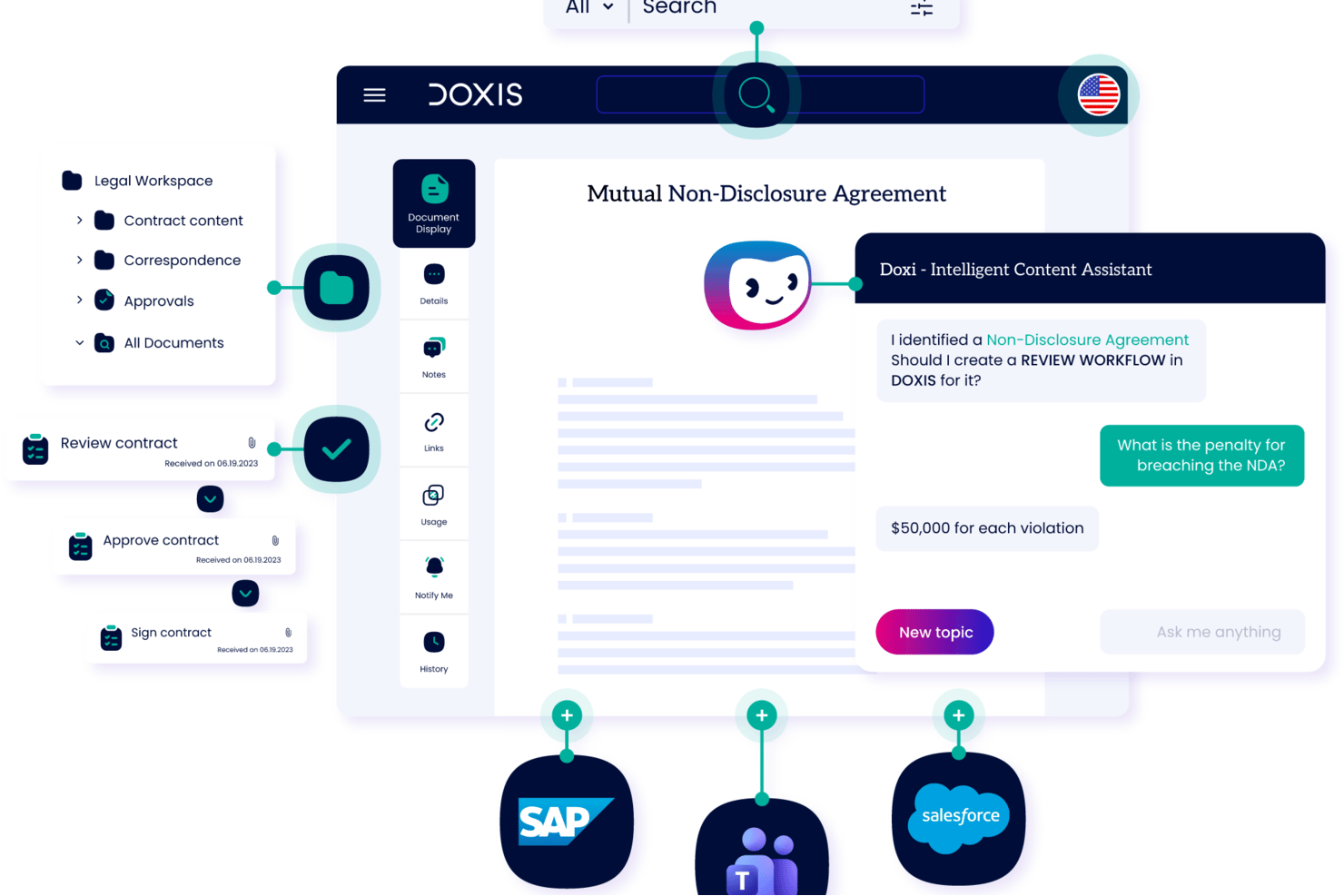
Doxis is an enterprise content services platform that combines document generation, intelligent document processing, AI-powered data extraction, and workflow automation across SAP, Salesforce, and Microsoft environments.
Who Is Doxis Best For?
Doxis is built for large enterprises in regulated industries like financial services, insurance, and manufacturing that need document intelligence at scale.
Why I Picked Doxis
Doxis earns its spot as one of the best on my shortlist because its AI-powered document intelligence goes well beyond standard generation. I particularly like Ask Doxis, an AI assistant that lets users query document content directly, and Doxis AI.dp, which classifies incoming documents and extracts structured data before feeding it into output templates. The result is a generation workflow where data capture and document output are handled as a single, connected process.
Doxis Key Features
- Template library: Store and reuse standardized templates for recurring business documents and process deliverables.
- Version control: Manage document versions and maintain audit trails for every template and generated file.
- Role-based access controls: Set granular permissions for viewing, editing, and approving content across teams.
- SAP and Microsoft integration: Connects directly with SAP and Microsoft platforms for seamless data access and document storage.
Doxis Integrations
Doxis offers native integrations with SAP, Salesforce, Microsoft 365, Sage, ADP, Oracle, AutoCad, Solid Edge, and Microsoft Dynamics 365, and provides an API for custom integrations.
Pros and Cons
Pros:
- Granular access controls for document governance
- Supports high-volume batch document generation runs
- Classifies and routes documents without manual intervention
Cons:
- Steeper learning curve for lightweight teams
- Complex initial configuration for template setup
Docusign
Best for electronic signatures

DocuSign is an electronic signature platform used by businesses in real estate, legal, finance, and other industries. It allows for secure signing and easy management of agreements and contracts, helping teams handle document transactions more efficiently.
Why I picked Docusign: DocuSign makes it easy for you and your team to handle electronic signatures. You can track document status in real time, so you know when something’s signed. It works with many file types, giving you flexibility. Built-in security helps keep your information safe.
Standout Features & Integrations
Features include real-time status tracking, which gives you updates on document progress. It supports multiple document formats, providing flexibility in what you can upload and manage. Security features like encryption and audit trails ensure your documents are protected throughout the process.
Integrations include Salesforce, Microsoft Office 365, Google Workspace, Dropbox, Box, SAP, Oracle, Slack, Zoom, and NetSuite.
Pros and Cons
Pros:
- Wide format support
- Real-time document tracking
- Strong security features
Cons:
- Complex initial setup
- Limited offline functionality
Docmosis
Best for multi-language support

Docmosis is a document generation tool built for developers and teams that need to create documents in multiple languages. It works well in industries like healthcare, legal, and finance, and you can easily add it to your existing apps.
Why I picked Docmosis: Docmosis lets your team create documents in different languages without extra steps. Its template system helps you keep things consistent. You can plug it into your current setup using a flexible API. It also handles complex formatting well, so your documents come out looking clean and accurate.
Standout Features & Integrations
Features include a template designer that simplifies document creation with a WYSIWYG interface. Conditional logic allows you to create dynamic documents that adapt to user input. The batch processing feature helps you generate large volumes of documents efficiently.
Integrations include Salesforce, Microsoft Dynamics, Google Workspace, Dropbox, Box, Slack, SAP, Oracle, QuickBooks, and HubSpot.
Pros and Cons
Pros:
- Handles complex formatting
- Easy template management
- Supports multiple languages
Cons:
- Requires technical expertise
- Initial setup complexity

Best for built-in form capture and approvals

Adobe Acrobat can support document generation workflows, but primarily as the final formatting, input collection, and distribution layer rather than a system that generates documents dynamically from structured data. It’s well suited for creating controlled templates, collecting inputs via forms, and producing consistent PDF outputs with security and compliance safeguards. For teams that rely on standardized documents and human review cycles, it helps maintain consistency and auditability.
Who Is Adobe Acrobat Best For?
Adobe Acrobat is a good fit for IT, legal, and operations teams in mid-size to large organizations that need secure, collaborative document workflows.It works best in environments where documents are assembled from templates and reviewed by people, rather than generated automatically from databases or business systems.
Why I Picked Adobe Acrobat
It stands out for teams that need to manage document workflows around shared files, especially where review, annotation, and controlled distribution are part of the process. Its integrations with cloud storage and content systems make it easier to organize and retrieve documents, while in-document commenting and tagging help capture context during reviews. This makes it more effective as a coordination layer for document workflows than as a system for generating documents programmatically.
Adobe Acrobat Key Features
- PDF form creation: Build interactive forms with fillable fields, dropdowns, and digital signatures.
- Batch document processing: Automate repetitive tasks like converting, combining, or watermarking multiple files at once.
- Redaction tools: Permanently remove sensitive information from documents before sharing.
- Version control: Track document revisions and maintain access to previous versions within shared workspaces.
Adobe Acrobat Integrations
Adobe Acrobat offers native integrations with Microsoft 365, SharePoint, Google Drive, Dropbox, Box, and OneDrive. An API is available for custom integrations.
Pros and Cons
Pros:
- Enables secure e-signature collection within documents
- Provides audit trails for document activity tracking
- Offers advanced PDF editing and redaction tools
Cons:
- API-based generation requires additional setup and is not core to the product
- Not designed for high-volume, data-driven document generation
Best for team collaboration

Confluence is a collaboration and knowledge management platform designed for teams needing a centralized space for project documentation and communication. It helps businesses organize, share, and collaborate on content, making it a valuable tool for project management and team coordination.
Why I picked Confluence: Confluence helps your team work together with shared spaces and real-time editing. Page versioning tracks changes, so everyone stays on the same page. You can use templates to create and organize content, which keeps things consistent. It also connects with other Atlassian tools to support your project work.
Standout Features & Integrations
Features include a rich content editor that allows you to create and format documents easily. Page versioning tracks changes and maintains a history for future reference. Collaborative editing lets multiple team members work on the same document simultaneously, enhancing productivity.
Integrations include Jira, Trello, Slack, Microsoft Teams, Google Drive, Dropbox, Salesforce, Zoom, GitHub, and Microsoft Office 365.
Pros and Cons
Pros:
- Extensive template library
- Collaborative editing capabilities
- Strong version control
Cons:
- Limited offline functionality
- Steep learning curve

Best for reducing document prep time

Mitratech HotDocs is a document generation platform designed to automate the creation of frequently used documents. It helps legal, compliance, and business teams save time by turning standard documents into intelligent templates while maintaining accuracy and regulatory compliance. This makes it especially useful for organizations managing complex workflows and large volumes of legal content.
Why I Picked Mitratech HotDocs: I chose Mitratech HotDocs because it can significantly reduce the time spent preparing legal documents while improving accuracy. By converting repetitive forms into intelligent templates, it minimizes manual data entry and the risk of human error. I also like that it centralizes document versions, making it easier to maintain compliance and ensure your team is always working with the latest approved materials.
Standout Features & Integrations
Features include intelligent document templates that adapt to different use cases, centralized version control for better compliance, and built-in tools that reduce errors during document assembly. HotDocs also offers dynamic dashboards and secure template management to keep your workflows organized.
Integrations include iManage, Mitratech TeamConnect, Managed Bill Review, AdvanceLaw, CaseCloud, LegalHold, InvoiceIQ, TAP for workflow automation, Alyne, Prevalent, Mitratech Mineral, and Mitratech AssureHire.
Pros and Cons
Pros:
- Centralized version control for consistent updates
- Built-in compliance tools for document accuracy
- Intelligent templates reduce repetitive manual work
Cons:
- Setup can be complex for new users
- Limited customization options in the basic package
PandaDoc
Best for sales teams

PandaDoc is a document management platform built for sales teams to efficiently create, manage, and eSign documents. It supports the sales process with features such as document generation, CPQ tools, and collaborative deal rooms.
Why I picked PandaDoc: PandaDoc helps your sales team manage documents more easily. Its CPQ feature supports accurate pricing and quotes. Deal rooms let your team work together on sales documents. You can customize content for each client, and tracking tools show how recipients interact with your files.
Standout Features & Integrations
Features include customizable signing orders, identity verification, and audit trails. Document metrics help you track performance, and integrated payment gateways make transactions easier. The platform also supports workflow automation for efficient processes.
Integrations include Salesforce, HubSpot, Google Workspace, Slack, Stripe, PayPal, Microsoft Dynamics, Zoho CRM, Pipedrive, and QuickBooks.
Pros and Cons
Pros:
- Smart content customization
- Integrated payment options
- Customizable signing workflows
Cons:
- Occasional integration hiccups
- Limited offline access


Formstack Documents is a document automation tool designed for businesses that require custom form creation and document generation. It helps industries like healthcare, finance, and education automate paperwork and efficiently manage data collection.
Why I picked Formstack Documents: Formstack Documents lets you build custom forms that match what your team needs. You can use the drag-and-drop builder to set them up fast. It cuts down on manual work by generating documents automatically. Conditional logic makes your forms adjust based on how people fill them out.
Standout Features & Integrations
Features include a drag-and-drop form builder that lets you customize forms easily. Conditional logic allows you to tailor forms to specific user responses. Automated workflows streamline document generation and delivery.
Integrations include Salesforce, Google Drive, Dropbox, Box, Microsoft Dynamics, Zapier, Stripe, PayPal, Mailchimp, and Slack.
Pros and Cons
Pros:
- Automated workflows
- Dynamic conditional logic
- Customizable form builder
Cons:
- Occasional integration issues
- Learning curve for beginners
Annen programvare for dokumentgenerering
Her er noen flere alternativer for programvare for dokumentgenerering som ikke kom med på utvalgslisten min, men som likevel er verdt å se nærmere på:
- Conga
For contract management
- Templafy
For brand compliance
- Docupilot
For workflow automation
- Documentero
For PDF generation
- Fynk
For small businesses
- Gamma
For AI-powered content creation
- Proposify
For proposal management
- Lark
For remote team collaboration
- Nutrient
For API integration
- EDocGen
For high-volume document generation


How I Evaluate Document Generation Software
I split my evaluation into baseline capabilities—auto-populating charters, SOWs, or status reports—and the differentiators that distinguish tools built for project teams from generic alternatives.
Core Functionality (Table Stakes For This List)
When I'm selecting tools for my list, I rank each one on a scale from 0 (does not offer the functionality) to 5 (excels in this area) for each core functionality listed below. Then, I calculate the tool's total score into a percentage. Each tool needs to achieve a minimum total score of 65% to be considered for inclusion.
- Template Creation & Management: I look for a structured template library where you can build, version, and reuse project deliverables like charters, SOWs, and close-out reports without starting from scratch each time.
- Dynamic Data Merging: Each tool should let you map merge fields to live data sources so documents like status reports auto-populate with project names, milestones, dates, and owner details.
- Conditional Content Logic: I evaluate whether the tool supports rule-based content blocks—for example, showing a risk section only when a project is flagged as high risk, or swapping payment terms by client type.
- Multi-Format Output: Generating polished PDFs for client delivery and editable DOCX files for internal review are baseline expectations. I check for additional formats like HTML and PPTX as well.
- PM & Data Source Integrations: The tool should connect to the platforms your team already uses. I look for native integrations with tools like Jira, Asana, Smartsheet, Salesforce, or Google Drive to pull project data directly.
- Collaboration & E-Sign Workflows: I evaluate whether the platform supports multi-user review cycles, approval routing, and either built-in or integrated e-signature capabilities to finalize documents like SOWs or change orders.
Once I have a list of tools that meet this criteria, I consider what sets each platform apart.
Differentiating Factors (What Sets Vendors Apart)
Here's how I compare and contrast different vendors:
Standout Features
AI-powered drafting is a big differentiator—tools that generate executive summaries or status narratives from raw project data save PMs real time during reporting cycles. I also evaluate bulk generation capabilities, especially for PMOs running monthly reports across dozens of projects. A no-code workflow builder matters here too. I check whether a PM can set up a document trigger, like auto-generating a change order when scope shifts, without filing a ticket with IT.
Beyond Features
Integration depth matters more than integration count. I check whether a tool offers two-way sync with PM platforms like Jira or Asana, not just a read-only connection. Pricing models vary widely in this space—some vendors charge per user while others bill per document generated, which changes the math for PMOs producing hundreds of reports monthly. I also evaluate security posture, specifically SSO support, role-based access, and SOC 2 compliance, since project documents often contain sensitive client data and contract terms.
Slik velger du programvare for dokumentgenerering
Det er lett å gå seg vill i lange funksjonslister og komplekse prismodeller. For å hjelpe deg med å holde fokus mens du går gjennom den unike prosessen med å velge programvare, har jeg laget en sjekkliste over faktorer du bør ha i bakhodet:
| Faktor | Hva bør vurderes |
|---|---|
| Skalerbarhet | Forsikre deg om at programvaren kan vokse med teamet ditt. Se etter løsninger som håndterer økende dokumentmengder uten at det går ut over ytelsen. |
| Integrasjoner | Sjekk om programvaren fungerer med de eksisterende verktøyene dine, for eksempel CRM, ERP eller skylagring. Gode integrasjoner kan spare tid og redusere behovet for manuell dataregistrering. |
| Tilpasningsmuligheter | Se etter verktøy som lar deg tilpasse maler og arbeidsflyter etter de spesifikke behovene dine. Tilpasning bidrar til å opprettholde en konsekvent merkevare på tvers av dokumenter |
| Brukervennlighet | Prioriter brukervennlige grensesnitt som reduserer læringskurven. Teamet ditt bør kunne navigere i og bruke programvaren effektivt med minimalt behov for opplæring |
| Budsjett | Ta hensyn til de totale eierkostnadene, inkludert abonnementsavgifter, oppsettkostnader og eventuelle tillegg. Forsikre deg om at det holder seg innenfor budsjettbegrensningene dine |
| Sikkerhetstiltak | Kontroller at programvaren tilbyr sterk kryptering og overholder personvernforordninger som GDPR. Sikkerhet er avgjørende ved håndtering av sensitive dokumenter. |
| Støttealternativer | Vurder tilgjengeligheten av kundestøtte og ressurser som veiledninger, vanlige spørsmål og direktechat. God støtte kan være uvurderlig under implementering og feilsøking |
| Funksjonssett | Identifiser viktige funksjoner som elektroniske signaturer, dokumentautomatisering og malbehandling. Sørg for at programvaren oppfyller de viktigste kravene dine. |
Trender innen programvare for dokumentgenerering
I arbeidet med undersøkelsen hentet jeg inn utallige produktoppdateringer, pressemeldinger og utgivelseslogger fra ulike leverandører av programvare for dokumentgenerering. Her er noen av de fremvoksende trendene jeg følger med på:
- AI-drevet dokumentoppretting: AI brukes til å forbedre dokumentopprettingen med funksjoner som prediktiv tekst og innholdsforslag. Dette hjelper brukerne med å generere dokumenter raskere og med færre feil. Noen leverandører bruker AI til å analysere tidligere dokumenter og foreslå forbedringer.
- Samarbeid i sanntid: Flere verktøy tilbyr samarbeid i sanntid, slik at team kan arbeide med dokumenter samtidig. Denne funksjonen blir stadig viktigere for eksterne team som trenger å redigere og gjennomgå dokumenter sammen, noe som forbedrer effektiviteten og kommunikasjonen.
- Avansert analyse: Dokumentanalyse gir innsikt i hvordan dokumenter brukes og samhandles med. Denne trenden hjelper virksomheter med å forstå dokumentenes ytelse og brukerengasjement, slik at de kan ta bedre beslutninger. Leverandører legger til kontrollpaneler for å visualisere disse målingene.
- Integrasjon av talegjenkjenning: Tale-til-tekst-funksjoner integreres i verktøy for dokumentsladding. Denne trenden lar brukerne diktere dokumenter, noe som gjør prosessen raskere og mer tilgjengelig, særlig for yrkesaktive på farten.
- Blokkjede for sikkerhet: Blokkjedeteknologi utforskes for å forbedre dokumentsikkerhet og -verifisering. Denne trenden sikrer at dokumenter ikke kan manipuleres, og gir et transparent revisjonsspor, noe som er spesielt nyttig i juridiske og økonomiske sektorer.
Hva er programvare for dokumentgenerering?
Programvare for dokumentgenerering brukes til å opprette dokumenter automatisk fra forhåndsdefinerte maler og datainndata. Markedsførere, juridiske team og salgsmedarbeidere bruker den til å effektivisere arbeidet og holde dokumentene konsekvente.
Funksjoner som malbehandling, samarbeid i sanntid og analyse gjør dokumentopprettingen mer effektiv og gir nyttig innsikt. Dette sparer tid, reduserer feil og lar teamet ditt fokusere på viktigere oppgaver.
Funksjoner i programvare for dokumentgenerering
Når du velger programvare for dokumentgenerering, bør du se etter følgende viktige funksjoner:
- Malbehandling: Lar deg opprette og lagre maler for konsekvent dokumentformatering og stil.
- Samarbeid i sanntid: Gjør det mulig for flere brukere å arbeide med et dokument samtidig, noe som forbedrer teamets produktivitet og kommunikasjon.
- Integrasjon med elektronisk signatur: Gjør det enklere å signere dokumenter digitalt, effektiviserer godkjenningsprosesser og reduserer papirbruken.
- Dataautomatisering: Fyller automatisk ut dokumenter med data fra integrerte systemer, noe som reduserer manuell registrering og antall feil.
- Versjonskontroll: Holder oversikt over endringer i dokumenter og oppretter en historikk, noe som sikrer åpenhet og gjør det enkelt å rulle tilbake ved behov.
- Analysedashbord: Gir innsikt i dokumentytelse og brukerengasjement, slik at team kan ta datadrevne beslutninger.
- Støtte for flere språk: Gjør det mulig å generere dokumenter på flere språk, slik at ulike team og internasjonale markeder ivaretas.
- Sikkerhetsoverholdelse: Sørger for at dokumenter lagres og deles på en sikker måte, i samsvar med regelverket for databeskyttelse.
- Betinget logikk: Gjør det mulig for dokumenter å tilpasses basert på brukerinndata, slik at de blir mer dynamiske og responsive overfor bestemte behov.
6 fordeler med programvare for dokumentgenerering
Implementering av programvare for dokumentgenerering gir flere fordeler for teamet og virksomheten din. Her er seks av dem du kan se frem til:
- Tidsbesparelser: Automatiserer repetitive oppgaver som dokumentoppretting og dataregistrering, slik at du får mer tid til strategiske aktiviteter.
- Færre feil: Bruker maler og dataautomatisering for å minimere feil ved manuell registrering og sikre konsekvente og nøyaktige dokumenter.
- Forbedret samarbeid: Samarbeidsverktøy i sanntid gjør det mulig for teammedlemmer å arbeide effektivt sammen, noe som forbedrer kommunikasjon og produktivitet.
- Bedre overholdelse av regelverk: Sikkerhetsfunksjoner og innstillinger for regelverksetterlevelse sørger for at dokumentene oppfyller regulatoriske standarder og beskytter sensitiv informasjon.
- Kostnadseffektivitet: Reduserer papirbruk og manuelle prosesser, noe som gir kostnadsbesparelser innen dokumenthåndtering.
- Skalerbarhet: Tilpasser seg de voksende behovene dine, slik at du kan håndtere økende dokumentmengder uten at det går ut over ytelsen.
Kostnader og priser for programvare for dokumentgenerering
Ved valg av programvare for dokumentgenerering er det nødvendig å forstå de ulike prismodellene og tilgjengelige abonnementene. Kostnadene varierer basert på funksjoner, teamstørrelse, tillegg og mer. Tabellen nedenfor oppsummerer vanlige abonnementer, gjennomsnittsprisene deres og typiske funksjoner som er inkludert i løsninger for dokumentgenerering:
Sammenligningstabell for abonnementer for programvare for dokumentgenerering
| Abonnementstype | Gjennomsnittspris | Vanlige funksjoner |
|---|---|---|
| Gratisabonnement | $0 | Grunnleggende dokumentmaler, begrenset lagringsplass og grunnleggende kundestøtte. |
| Personlig abonnement | $5-25/bruker/måned | Tilpassede maler, grunnleggende analyser, elektroniske signaturer og prioritert kundestøtte via e-post |
| Bedriftsabonnement | $25-$50/bruker/måned | Avanserte maler, samarbeid i sanntid, integrasjoner med CRM-systemer og avanserte analyser. |
| Virksomhetsabonnement | $50-$100/bruker/måned | Tilpassede arbeidsflyter, egen kundeansvarlig, forbedrede sikkerhetsfunksjoner og API-tilgang. |
Vanlige spørsmål om programvare for dokumentgenerering
Her er noen svar på vanlige spørsmål om programvare for dokumentgenerering:
Hvordan sparer programvare for dokumentgenerering penger for bedrifter?
Programvare for dokumentgenerering sparer penger ved å automatisere repetitive oppgaver som å opprette dokumenter og legge inn data. Dette reduserer manuelt arbeid og bidrar til å unngå feil, noe som reduserer kostnadene. Det hjelper også teamet ditt med å jobbe mer effektivt ved å frigjøre tid til oppgaver som støtter vekst og inntekter.
Er programvare for dokumentgenerering sikker?
Ja, mange verktøy for dokumentgenerering har sikkerhetsfunksjoner som kryptering og samsvar med personvernlover som GDPR. Disse funksjonene bidrar til å beskytte dokumentene dine mot uautorisert tilgang. Hvis du arbeider med sensitiv informasjon, er det viktig å velge programvare som prioriterer sikkerhet.
Kan programvare for dokumentgenerering integreres med andre verktøy?
Det meste av programvaren for dokumentgenerering kan integreres med verktøy som CRM-systemer, skylagring og plattformer for elektroniske signaturer. Disse koblingene hjelper deg med å automatisere arbeidsflyter og holde dataene konsistente på tvers av appene dine, slik at du sparer tid og reduserer manuell registrering.
Hvilken type brukerstøtte er tilgjengelig for programvare for dokumentgenerering?
Alternativene for brukerstøtte avhenger av leverandøren, men omfatter ofte veiledninger, vanlige spørsmål, direktechat og e-poststøtte. Noen tilbyr også dedikerte kundeansvarlige eller premiumstøtteplaner. Det er nyttig å velge en leverandør med god brukerstøtte, slik at du raskt kan løse problemer og få mest mulig ut av programvaren.
Hvor tilpasningsbare er verktøy for dokumentgenerering?
Mange verktøy for dokumentgenerering lar deg tilpasse maler, legge til merkevareelementer og konfigurere fleksible arbeidsflyter. Dette hjelper deg med å tilpasse programvaren til de spesifikke behovene dine og holde dokumentene i tråd med merkevaren din. Tilpasning er spesielt nyttig hvis teamet ditt har unike prosesser eller krav.
Hva er de typiske kostnadene forbundet med programvare for dokumentgenerering?
Kostnadene varierer avhengig av funksjonene, antallet brukere og eventuelle inkluderte tilleggstjenester. Mange leverandører tilbyr trinnvis prising, med kostnadsfrie abonnementer med begrensede funksjoner og betalte abonnementer med mer avanserte alternativer. For å få best mulig verdi er det viktig å tilpasse programvaren til teamets behov og budsjett.