

10 beste alternativer til Time Doctor for fjernteam i 2026

Beste alternativer til Time Doctor – kortliste


Å administrere produktiviteten i teamet ditt kan være en reell utfordring. Hvis Time Doctor ikke oppfyller behovene dine, ser du kanskje etter alternativer for å øke lønnsomheten. Det kan være funksjonene, prisen eller bare brukeropplevelsen som ikke helt passer for deg.
Etter min erfaring kan det å finne riktig verktøy utgjøre en stor forskjell. Programvare for tidsregistrering bør gjøre arbeidsbelastningen mindre, ikke større. Derfor har jeg testet og vurdert flere alternativer for å finne det som passer best for deg og teamet ditt.
I denne artikkelen deler jeg mine beste anbefalinger for alternativer til Time Doctor. Du får et upartisk innblikk i funksjonene og fordelene ved hvert verktøy. La oss finne den riktige løsningen som kan hjelpe teamet ditt med å jobbe smartere.
Hva er Time Doctor?
Time Doctor er en programvare for tidsregistrering og produktivitet som er utviklet for å hjelpe deg med å overvåke arbeidstimer og øke effektiviteten. Den brukes ofte av fagpersoner som prosjektledere, frilansere og fjernteam som trenger å holde oversikt over tiden de bruker på oppgaver.
Med funksjoner som enkel tidsregistrering, produktivitetsrapporter og varsler ved distraksjoner hjelper Time Doctor deg og teamet ditt med å holde fokus og ta ansvar. Alt i alt gir Time Doctor verdifull innsikt i hvordan teamet ditt bruker tiden sin, slik at du kan ta informerte beslutninger.
Sammenligningstabell over alternativer til Time Doctor
Tabellen nedenfor sammenligner prisopplysningene for mine beste alternativer til Time Doctor.
| Tool | Best For | Trial Info | Price | ||
|---|---|---|---|---|---|
| 1 | Best for visual activity monitoring | Free trial available | From $7/user/month | Website | |
| 2 | Best for privacy-conscious team monitoring | 14-day free trial + free demo available | From $3.99/user/month (billed annually) | Website | |
| 3 | Best for non-intrusive project time logging | Free plan + 7-day free trial available | From $4.99/user/month | Website | |
| 4 | Best for accounting integration | 30-day free trial | From $20/month + $10/user/month | Website | |
| 5 | Best for team collaboration focus | Free plan + 14-day free trial + free demo available | From $4/user/month (billed annually) | Website | |
| 6 | Best for facial recognition attendance | Free plan + free demo available | Pricing upon request | Website | |
| 7 | Best for project management integration | Free plan available + 14-day free trial | From $5.83/user/month (billed annually) | Website | |
| 8 | Best for real-time productivity insights | Free plan available; 14-day free trial | From ₹300/user/month | Website | |
| 9 | Best for monitoring over 60 activities | Free demo available | From $15/user/month (billed annually) | Website | |
| 10 | Best for offline use | Free demo + 30-day free trial available | From $7/month (billed annually) | Website |

Why Trust Our Software Recommendations
Our team has been testing and reviewing software since 2012. As project managers ourselves, we know how difficult—and important—it is to choose the right software.
For this guide, we evaluated tools using hands-on testing and independent research, scoring tools using our selection criteria. We also draw on insights from industry thought leaders and practicing project management experts.
Our reviews reflect our human editorial judgment, not a sales pitch.
Expert reviewers:
Vurderinger av de beste alternativene til Time Doctor
Nedenfor finner du mine detaljerte sammendrag av de beste alternativene til Time Doctor som kom med på kortlisten. Vurderingene mine gir en detaljert gjennomgang av de viktigste funksjonene, fordelene og ulempene, integrasjonene og ideelle bruksområdene for hvert verktøy, slik at du kan finne det som passer best for deg.

Apploye
Best for visual activity monitoring
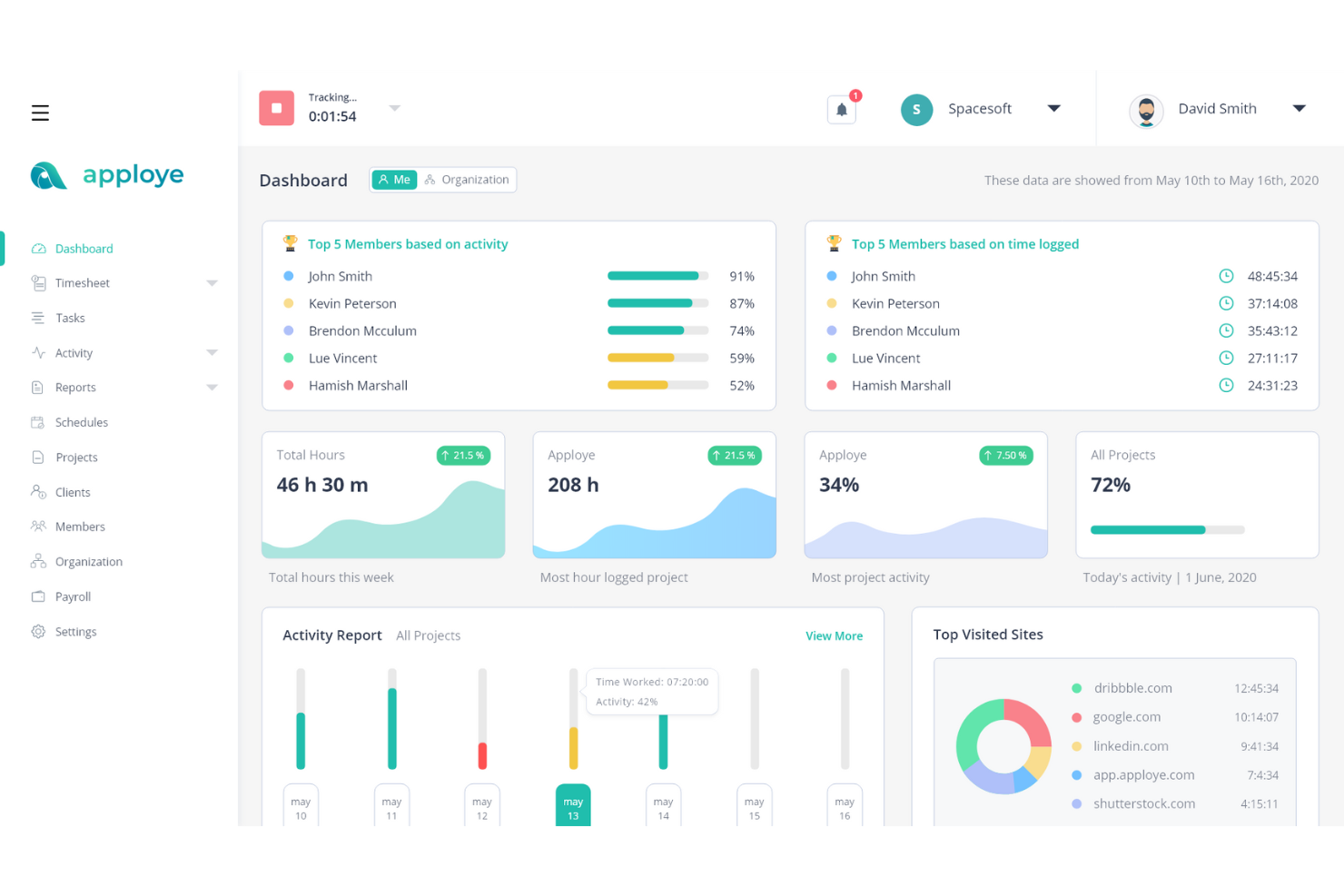
If you're looking for a tool to support your team's productivity while addressing workforce management needs, Apploye could be a practical option. Designed for industries such as agencies, freelancers, and call centers, it helps teams manage time tracking and project oversight while providing visual activity monitoring to better understand how work is progressing. Apploye also helps address issues like productivity gaps and payroll calculations with features that support clearer tracking of work hours and tasks.
Why I Picked Apploye
I picked Apploye as a Time Doctor alternative for its visual activity monitoring, which helps teams understand how work is progressing through screenshots and activity tracking. The platform records work hours automatically and monitors app usage, websites, and activity levels so managers can review how time is spent across tasks and projects. These features make it easier to track productivity and manage remote teams without relying on manual time entries.
Apploye Key Features
In addition to visual activity monitoring, Apploye offers:
- Screenshot Monitoring: This feature captures regular screenshots to provide a visual record of your team's activities.
- Automated Payroll Processing: Streamlines the payroll process by automatically generating payrolls based on tracked hours.
- Offline Tracking: Allows you to track time even when not connected to the internet, ensuring no data is lost.
- Pomodoro Timer: Helps your team manage their work intervals and breaks to boost productivity.
Apploye Integrations
Integrations include ClickUp, Trello, Jira, Asana, and more. Apploye also offers an API for custom integrations.
Pros and Cons
Pros:
- Tracks team activity clearly for remote productivity monitoring
- Monitors employees effectively without feeling overly invasive
- Automatic time tracking reduces manual data entry
Cons:
- Idle detection activates incorrectly during team conversations
- Activity detection sometimes misrepresents actual work engagement

Best for privacy-conscious team monitoring
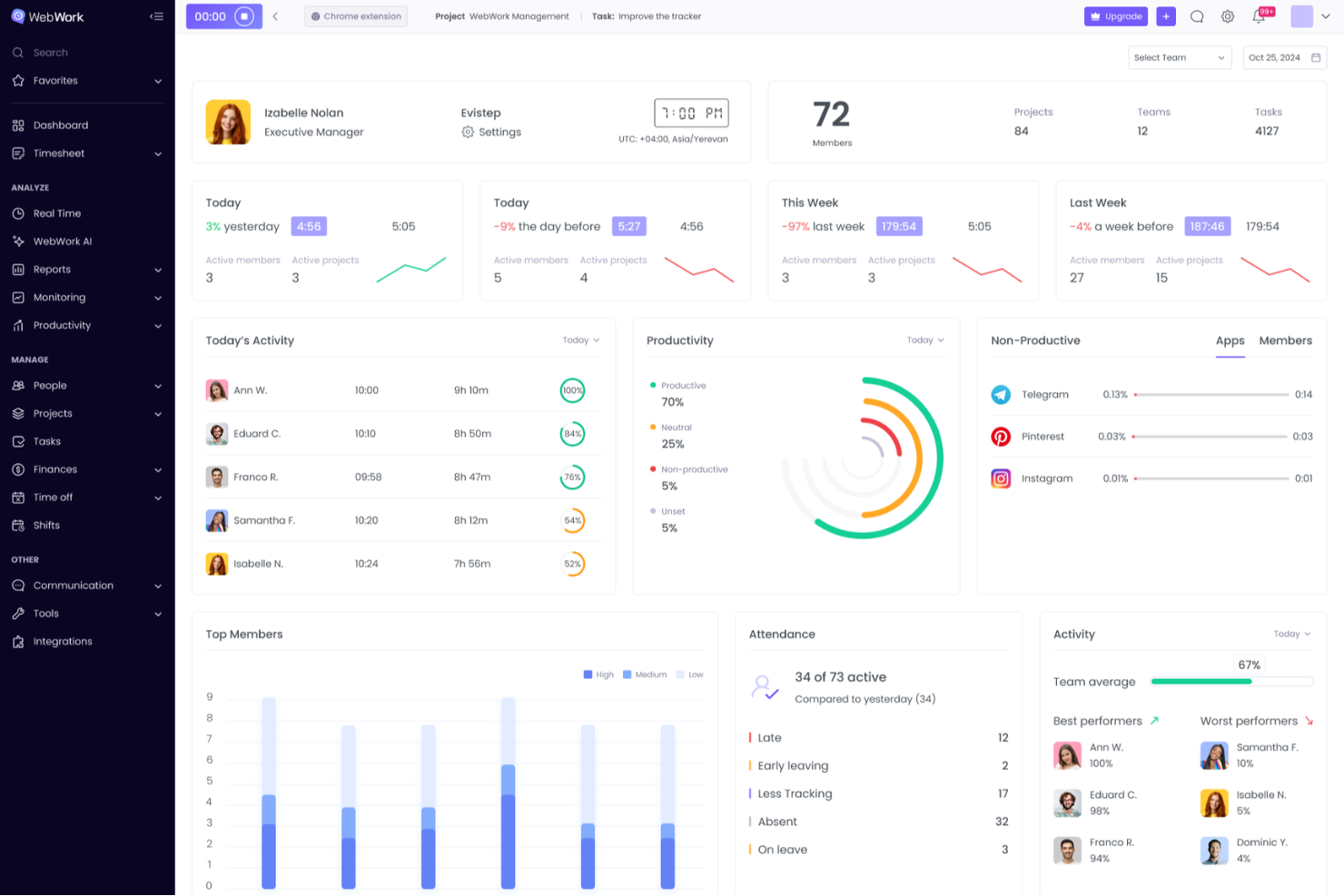
WebWork Time Tracker is a time tracking and employee monitoring platform that combines automated tracking, productivity monitoring, project and task management, and payroll features for remote, hybrid, and in-office teams.
Who Is WebWork Time Tracker Best For?
WebWork Time Tracker is a strong fit for remote team leaders and operations managers who need granular monitoring without making employees feel surveilled.
Why I Picked WebWork Time Tracker
I've included WebWork Time Tracker in my top picks because it gives teams real control over how monitoring actually works. I particularly like that you can blur screenshots by app category, so sensitive windows like a password manager or personal browser tab never appear in plain view. The silent tracker mode runs in the background on company devices without constant pop-ups, and role-based access means employees only see their own data, not their teammates'.
WebWork Time Tracker Key Features
- Offline time tracking: Records work time without an internet connection and syncs automatically once you're back online.
- GPS and geofencing: Tracks team location via mobile apps and can automatically clock people in and out when they enter or leave a designated job site.
- Two-way PM tool sync: Integrates with Jira, Asana, and ClickUp in real time, pushing tracked time directly into native worklogs and updating task statuses when timers start or stop.
- Automated payroll payouts: Processes team payments through partners like PayPal, Stripe, Wise, Gusto, and Deel directly from the platform.
WebWork Time Tracker Integrations
WebWork Time Tracker offers 10+ native integrations, including Jira, Asana, ClickUp, Trello, GitHub, Notion, QuickBooks, Gusto, and Deel. It also supports custom connections through its API and Zapier.
Pros and Cons
Pros:
- GPS supports distributed and field teams
- Offline tracking preserves disconnected work hours
- Blurred screenshots protect sensitive work
Cons:
- Monitoring can trigger employee privacy concerns
- Activity scores undervalue low-input knowledge work

Clockify
Best for non-intrusive project time logging

Clockify is time-tracking software designed for freelancers, small businesses, and large enterprises. It helps you track work hours, manage projects, and analyze productivity.
Why it's a good Time Doctor alternative: I selected Clockify as a Time Doctor alternative because it offers reliable project time tracking without invasive employee monitoring features like continuous webcam snaps or keystroke logging. Its clean interface allows team members to run simple timers, log hours manually, or utilize automated desktop tracking while respecting user privacy. This transparent approach helps teams maintain accurate project budgets and billable timesheets without damaging team trust or morale.
Standout features and integrations:
Features include time tracking, reporting, and project management. You can easily track time spent on projects and tasks, helping you stay organized. Reporting tools provide insights into team performance and productivity trends. Project management features allow you to allocate resources and monitor progress efficiently.
Integrations include Trello, Asana, Jira, Basecamp, Slack, QuickBooks, GitHub, monday.com, Todoist, Microsoft Teams, and more.
Pros and Cons
Pros:
- Suitable for teams of all sizes
- Flexible time-tracking options
- Five free user access
Cons:
- Lacks advanced shift-scheduling tools
- Basic invoicing tools

Best for accounting integration
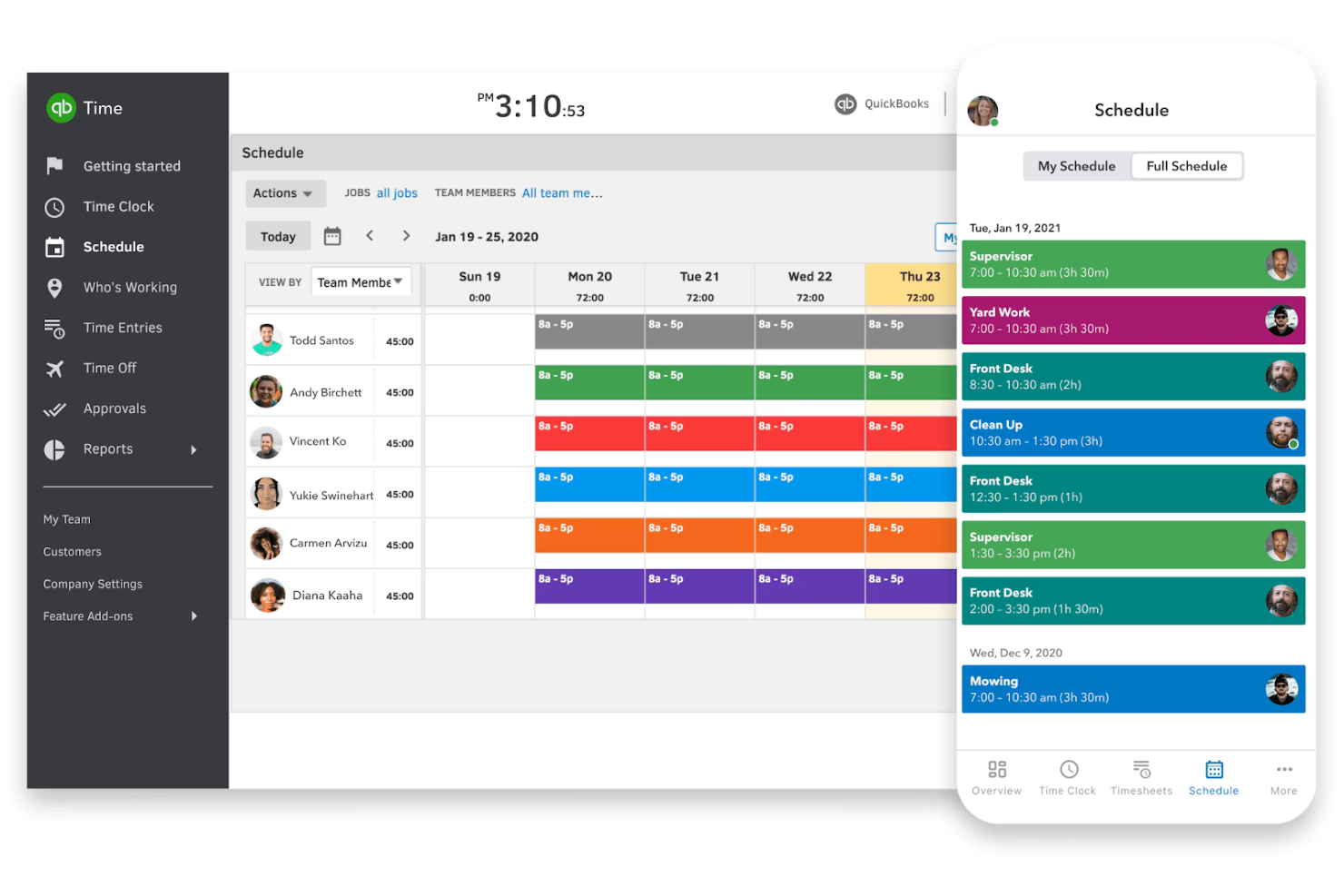
QuickBooks Time is a time-tracking solution with Android support and is designed for businesses of all sizes, from freelancers to large enterprises. It helps you track employee hours, manage payroll, and enhance project management.
Why it's a good Time Doctor alternative: QuickBooks Time offers smooth accounting integration, making it ideal for businesses already using QuickBooks for financial management. It provides GPS tracking, which is great for teams working in the field. With features such as scheduling and time-off management, you can easily coordinate team activities. These capabilities make QuickBooks Time an inclusive time-tracking solution.
Standout features and integrations:
Features include mobile time tracking, job costing, and alerts. You can track projects on the go with mobile apps, which is useful for remote teams. Job costing helps you understand project expenses better, and alerts keep you informed about timesheet submissions.
Integrations include QuickBooks Online, Xero, Square, Gusto, Expensify, Deputy, BambooHR, ADP, Paychex, and more.
Pros and Cons
Pros:
- Efficient scheduling tools
- GPS tracking for field teams
- Easy QuickBooks integration
Cons:
- Occasional app freezes
- No multi-level approval flows

My Hours
Best for team collaboration focus
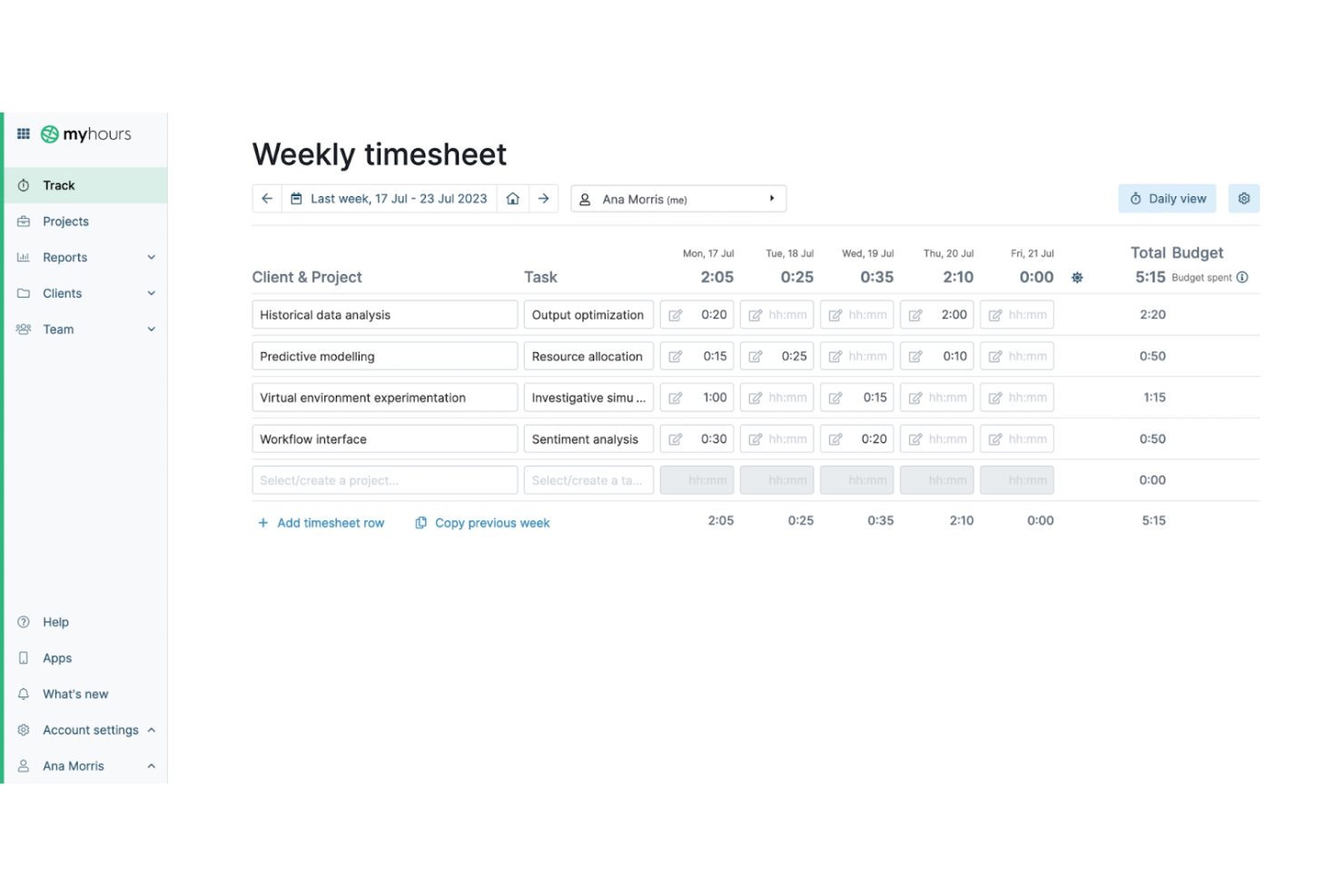
My Hours is a time-tracking software designed for freelancers, small businesses, and teams. It offers a free platform to help you track work hours, manage projects, and collaborate with your team effectively.
Why it's a good Time Doctor alternative: My Hours offers a strong focus on team collaboration, making it ideal for teams that need to work closely together. You can track billable hours and manage project budgets with ease. The tool also provides detailed reporting to help you analyze team performance. These features make My Hours a great choice for teams looking to enhance collaboration and employee productivity.
Standout features and integrations:
Features include project and time management, invoicing, and reporting. You can easily create and manage projects to keep track of tasks and deadlines. Invoicing allows you to generate accurate bills based on tracked time, simplifying client billing. The reporting feature provides insights into how time is spent, helping you make informed decisions.
Integrations include QuickBooks, Asana, Trello, Basecamp, monday.com, Xero, Zapier, FreshBooks, Slack, Google Calendar, and more.
Pros and Cons
Pros:
- Suitable for small businesses
- Detailed performance reports
- Strong focus on team collaboration
Cons:
- Hard to assign new projects
- Basic mobile app functionality

Jibble
Best for facial recognition attendance
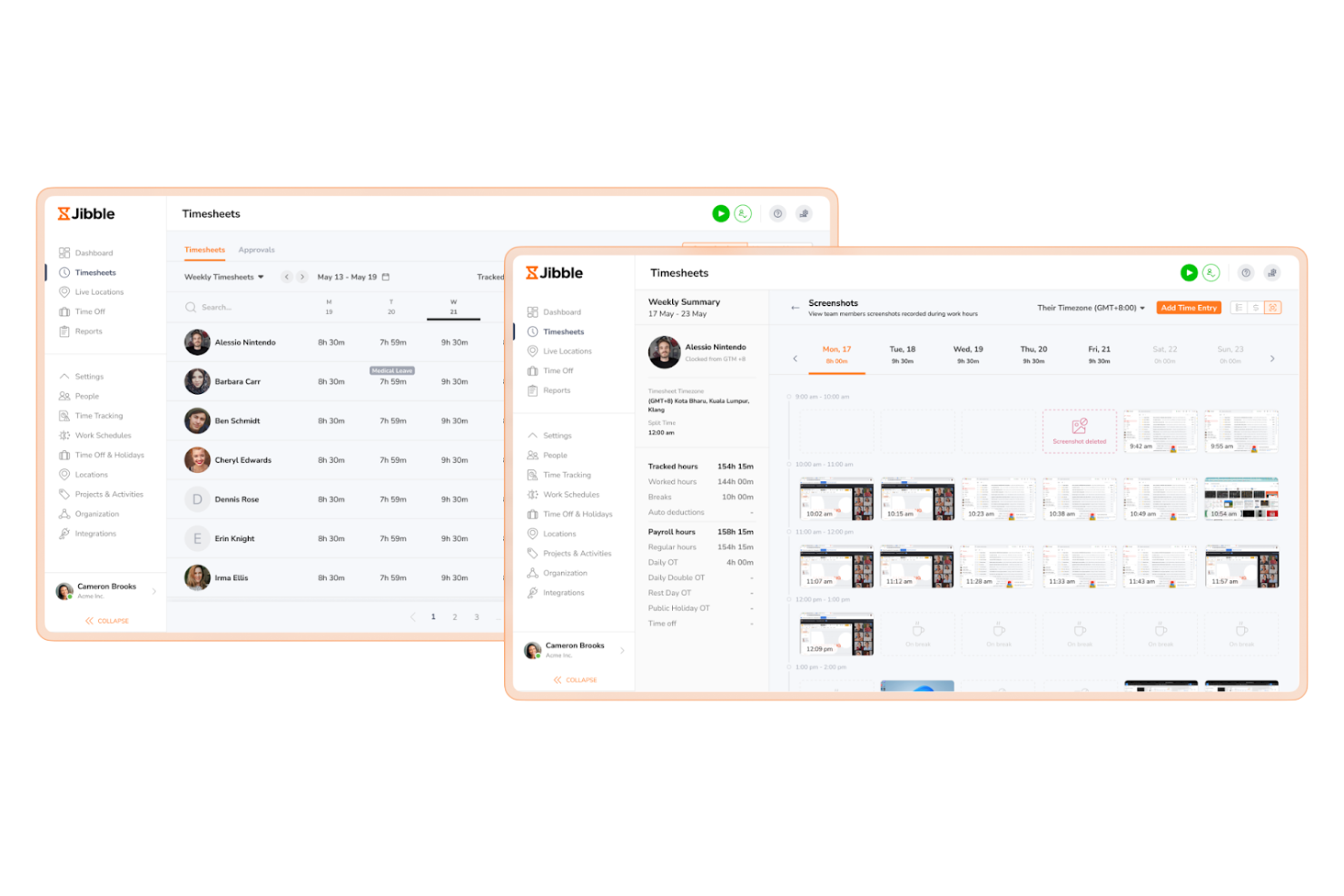
Jibble is a time and attendance tracking software designed for businesses of all sizes. It helps you track employee hours, manage timesheets, and monitor attendance efficiently.
Why it's a good Time Doctor alternative: Jibble offers facial recognition attendance, providing a secure and accurate way to clock in and out. This feature minimizes time theft and ensures that only authorized personnel can log hours. You can monitor attendance in real time, which is ideal for managing large teams. These capabilities make Jibble a reliable choice for businesses focusing on security and accuracy in time tracking.
Standout features and integrations:
Features include GPS tracking, timesheet management, and activity tracking. GPS tracking with geofencing allows you to verify employees' locations when they clock in while respecting their free time, which is useful for field teams. Time management simplifies payroll with accurate logging of hours worked. Activity tracking helps you understand how time is spent across various tasks.
Integrations include Slack, Microsoft Teams, Asana, Trello, Google Calendar, Zapier, QuickBooks, Xero, Gusto, BambooHR, and more.
Pros and Cons
Pros:
- Accurate time management
- GPS tracking for field teams
- Facial recognition for attendance
Cons:
- No built-in chat/communication
- Limited export/report formats
TMetric
Best for project management integration
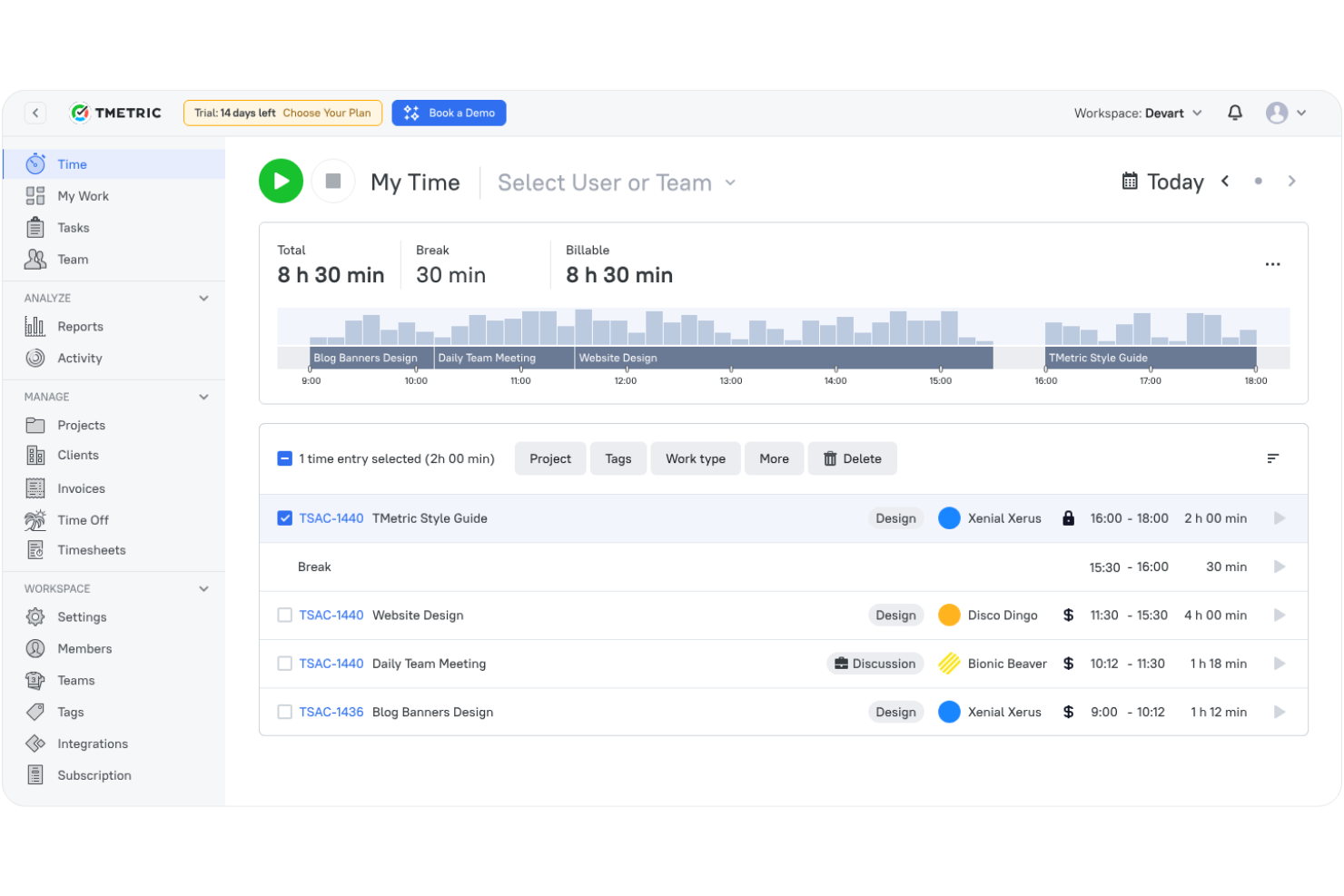
TMetric is time-tracking software designed for freelancers, small teams, and large enterprises. It helps you manage projects, track work hours, and analyze productivity effectively.
Why it's a good Time Doctor alternative: TMetric offers strong project management integration, allowing you to smoothly coordinate tasks and time tracking. You can monitor project progress and allocate resources efficiently. With features such as billable time tracking, you can ensure accurate client billing. These capabilities make TMetric a versatile choice for teams needing integrated project management tools.
Standout features and integrations:
Features include task management, invoicing, and detailed reporting. Task management helps you organize and prioritize work efficiently. Invoicing allows you to generate accurate bills for clients based on tracked time. Detailed reporting provides insights into team productivity and project progress.
Integrations include Asana, Trello, Jira, GitHub, QuickBooks, Todoist, Redmine, Wrike, Salesforce, and more.
Pros and Cons
Pros:
- Effective time management tools
- Accurate billable time tracking
- Strong project management integration
Cons:
- Reports need manual cleanup
- Limited mobile app features
Best for real-time productivity insights
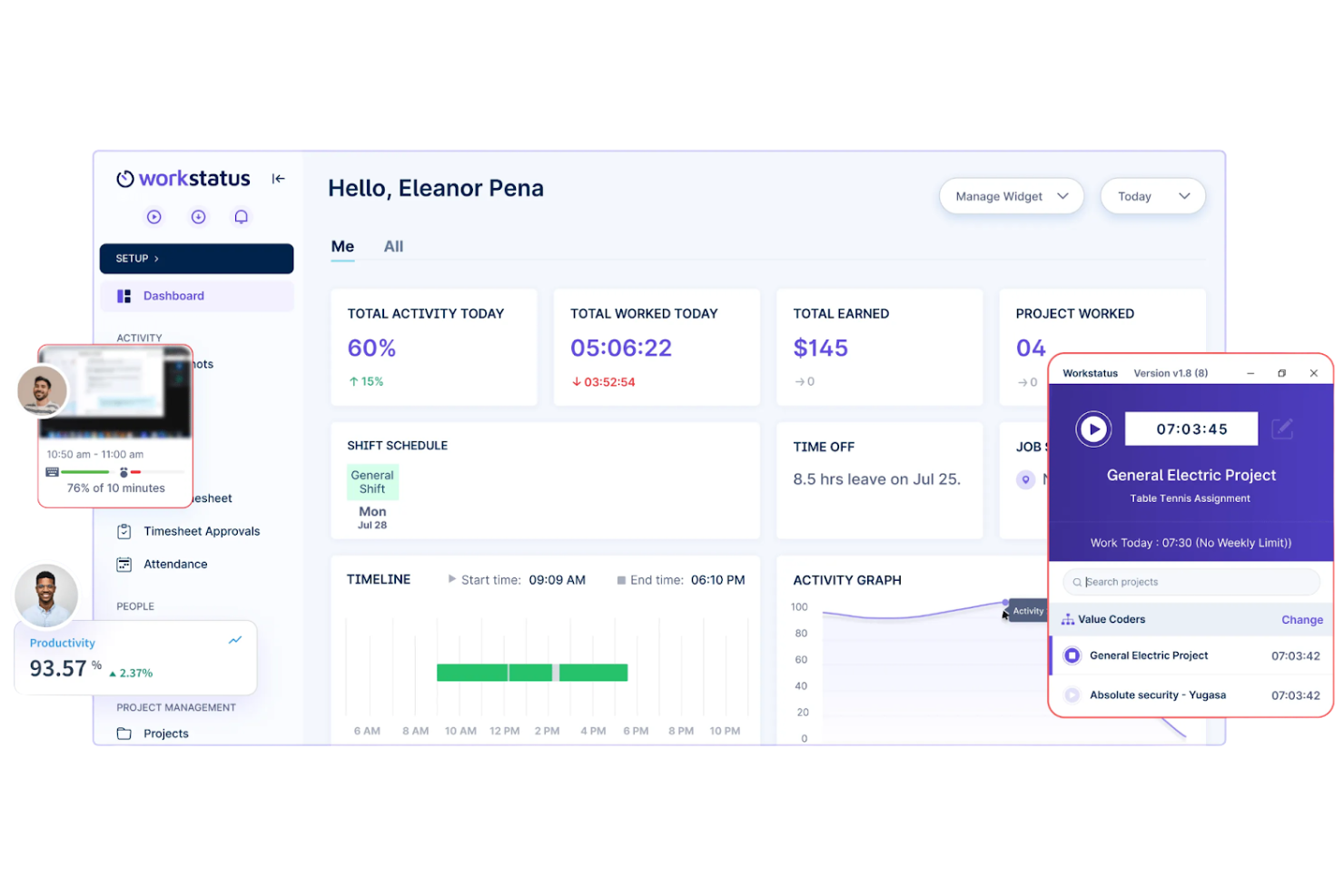
Workstatus is a time-tracking and workforce management tool aimed at businesses of all sizes, including remote teams and freelancers. It helps with productivity monitoring, project management, and employee time tracking.
Why it's a good Time Doctor alternative: Workstatus provides real-time productivity insights, allowing you to see how your team spends their time. With features such as activity tracking and automatic screenshots, you can ensure tasks are being performed efficiently. The tool also offers GPS tracking for teams on the move, making it versatile for various work environments. These features make Workstatus a compelling choice if you need real-time data on team performance.
Standout features and integrations:
Features include productivity tracking, timesheet management, and GPS monitoring. Productivity tracking shows you active and idle times, helping you assess team efficiency. Time management simplifies payroll by accurately tracking work hours. GPS monitoring provides location-based data, which is ideal for teams working in the field.
Integrations include Slack, Trello, Asana, Zapier, HubSpot, QuickBooks, Google Workspace, Jira, Basecamp, and more.
Pros and Cons
Pros:
- GPS tracking for field teams
- Automatic screenshot capabilities
- Real-time productivity tracking
Cons:
- GPS data updates slowly
- Limited dashboard personalization

Veriato is an employee monitoring and productivity analysis tool designed for businesses of various sizes. It helps you track employee activities, analyze productivity, and ensure policy compliance.
Why it's a good Time Doctor alternative: Veriato offers extensive monitoring capabilities, covering over 60 different activities, which provide a complete view of employee behavior. You can track keystrokes, emails, and web app usage to ensure productivity and security. The software also provides insider threat detection, helping you safeguard sensitive information. These features make Veriato a strong choice for organizations focused on detailed monitoring and security.
Standout features and integrations:
Features include user behavior analytics, activity dashboards, and real-time alerts. User behavior analytics help you understand patterns and identify potential issues. Activity dashboards provide a visual overview of productivity metrics. Real-time alerts notify you of any suspicious activity, allowing for a quick response.
Integrations include Microsoft 365, Salesforce, Dropbox, Microsoft Teams, Azure, AWS, Okta, and more.
Pros and Cons
Pros:
- Inclusive security features
- Real-time alert notifications
- Extensive activity monitoring
Cons:
- No iOS device support
- Complex initial setup


ManicTime is a time-tracking software that caters to freelancers, small businesses, and large organizations. It helps you track computer usage, manage projects, and analyze productivity without requiring constant manual input.
Why it's a good Time Doctor alternative: ManicTime excels with its automatic tracking capabilities, capturing your in-depth computer usage in the background. This feature ensures you don't miss tracking any activity, saving you time and effort. With offline functionality, you can track time even when you're not connected to the internet. These features make ManicTime a strong choice for those who need detailed usage reports without constant manual updates.
Standout features and integrations:
Features include timeline view, tagging, and detailed reports. The timeline view gives you a visual representation of your daily activities, making it easy to pick out your productivity patterns. Tagging allows you to categorize time entries for better organization, and detailed reports provide insights into your work habits.
Integrations include Asana, Jira, Basecamp, GitHub, Microsoft Excel, QuickBooks, FreshBooks, Office 365, and more.
Pros and Cons
Pros:
- Detailed visual reports
- Works offline effectively, enabling remote workflows
- Automatic tracking saves time
Cons:
- Basic project management tools
- Limited mobile app features
Andre alternativer til Time Doctor
Her er noen flere alternativer til Time Doctor som ikke kom med på kortlisten min, men som likevel er verdt å undersøke:
- Insightful
For real-time activity analysis
- Toggl
For user-friendly interface
- Monitask
For proof-of-work screenshots
- Connecteam
For deskless team management
- DeskTime
For automatic time tracking
- Paymo
For project accounting features
- ActivTrak
For detailed activity reports
- Teramind
For insider threat detection
- Buddy Punch
For use with Android
- ezClocker
For scheduling simplicity
- Beebole
For flexible time tracking
- Hubstaff
For remote team monitoring
- Deltek Replicon Time
For compliance tracking
- BusyBusy
For construction time tracking
- Harvest
For simple invoicing
- When I Work
For shift scheduling


How I Evaluate Time Doctor Alternatives
I split my evaluation into two layers: the baseline a tool must clear—time tracking, project allocation, productivity monitoring—and the differentiators that set strong options apart.
Core Functionality (Table Stakes For This List)
When I'm selecting tools for my list, I rank each one on a scale from 0 (does not offer the functionality) to 5 (excels in this area) for each core functionality listed below. Then, I calculate the tool's total score into a percentage. Each tool needs to achieve a minimum total score of 65% to be considered for inclusion.
- Automated Time Tracking: I check whether a tool offers built-in timers, idle detection, and auto-tracking so teams aren't stuck manually logging every client call or sprint task.
- Project & Task-Level Allocation: Each tool should let you assign tracked hours to specific projects, tasks, and clients—like splitting time across three retainers in a single day.
- Productivity Monitoring: I evaluate whether the platform tracks app and URL usage, activity levels, or screenshots, and how much control managers and employees have over those settings.
- Timesheets & Reporting: I look for customizable timesheets, approval workflows, and reports that can break down hours by team member, project, or date range for weekly standups or client reviews.
- Billing & Payroll Support: The tool should support billable rate configuration and integrate with payroll or invoicing systems so tracked hours translate directly into accurate client invoices or pay runs.
- PM Tool Integrations: Strong contenders sync natively with tools like Jira, Asana, or ClickUp, pulling in tasks and letting team members start timers without leaving their PM workspace.
Once I have a list of tools that meet this criteria, I consider what sets each platform apart.
Differentiating Factors (What Sets Vendors Apart)
Here's how I compare and contrast different vendors:
Standout Features
Privacy controls matter a lot here. I look for tools that let managers adjust monitoring intensity—blurred screenshots, opt-in tracking, or the ability to disable screen capture entirely—so teams feel trusted rather than surveilled. Offline time tracking is another differentiator I evaluate, especially for hybrid teams who lose connectivity during travel or fieldwork. Budget and capacity forecasting also separates the stronger options; tools that surface real-time burn rates against project budgets help PMs catch overservicing before it hits the invoice.
Beyond Features
Data privacy and compliance certifications weigh heavily in my evaluation, especially for distributed teams operating across regions with different regulations. I check whether a vendor offers data residency options and worker consent workflows. Pricing structure also matters—I look at how features are gated across tiers, since many tools lock screenshots or integrations behind higher plans that can balloon costs as your team scales. Cross-platform support rounds things out; a tool needs native desktop, mobile, and browser extension coverage so no one on the team is left without a way to track time.
Hvorfor se etter et alternativ til Time Doctor?
Selv om Time Doctor er et godt valg for tidsregistrering og produktivitetsstyring, finnes det flere grunner til at noen brukere ser etter alternative løsninger. Du ser kanskje etter et alternativ til Time Doctor fordi:
- Du trenger mer avanserte rapporteringsfunksjoner
- Teamet ditt trenger mulighet for registrering uten nett
- Du ønsker bedre integrasjon med eksisterende verktøy
- Du trenger en løsning for større team
- Du trenger et mer budsjettvennlig alternativ
- Teamet ditt trenger et enklere brukergrensesnitt
Hvis noe av dette høres kjent ut, har du kommet til riktig sted. Listen min inneholder flere apper for tidsregistrering og produktivitetsprogrammer som passer bedre for team som møter disse utfordringene med Time Doctor og ser etter alternative løsninger.
Viktige funksjoner i Time Doctor
Her er noen av de viktigste funksjonene i Time Doctor, som kan hjelpe deg med å sammenligne hva alternative løsninger tilbyr:
- Funksjon for tidsregistrering: Overvåker tiden som brukes på oppgaver og prosjekter, slik at du kan analysere og optimalisere produktiviteten.
- Produktivitetsrapporter: Gir detaljerte analyser av de ansattes prestasjoner, slik at du kan identifisere områder som kan forbedres.
- Oppgavehåndtering: Gjør det mulig å tildele og administrere oppgaver effektivt, slik at teammedlemmene holder seg på rett spor.
- Skjermbilder og skjermopptak: Registrerer de ansattes aktivitetsnivåer for å sikre ansvarlighet og etterlevelse.
- Varsler om inaktivitet: Varsler ledere når ansatte mister fokus, slik at du kan opprettholde produktiviteten.
- Integrasjoner: Fungerer med over 60 applikasjoner og forbedrer arbeidsflyten din.
- Dashbord for ledelsen: Gir innsikt i teamets produktivitet og resultatmålinger, noe som bidrar til bedre beslutningstaking.
- Måltall for balanse mellom arbeid og fritid: Bidrar til å opprettholde balanserte arbeidsmengder for å forebygge utbrenthet og ivareta de ansattes velvære.
- Mobilapp: Gjør det mulig å registrere tid på farten, slik at du kan overvåke arbeidet hvor som helst.
- Kundeadministrasjon: Registrerer tid brukt på kundeprosjekter, noe som gjør faktureringen mer nøyaktig og effektiv.
Hva skjer videre:
Hvis du undersøker programvare for tidsregistrering og produktivitet, kan du kontakte en SoftwareSelect-rådgiver for gratis anbefalinger.
Du fyller ut et skjema og tar en kort samtale der de går gjennom behovene dine i detalj. Deretter får du en kortliste over programvare du kan vurdere. De hjelper deg til og med gjennom hele kjøpsprosessen, inkludert prisforhandlinger.