

10 beste AI-verktøy for digital ressursforvaltning vurdert i 2026

Kortliste over de beste AI DAM-verktøyene


Det kan være en hodepine å administrere digitale ressurser. Du må håndtere utallige filer, sørge for at alle på teamet ditt har tilgang, og prøve å holde alt organisert. Det er lett å føle seg overveldet.
Det er her AI DAM-verktøy kommer inn i bildet. De hjelper deg med å administrere de digitale ressursene dine effektivt, spare tid og kategorisere og søke etter innhold i stor skala. Etter min erfaring kan disse verktøyene endre måten teamet ditt arbeider på.
Jeg har testet og vurdert mange programvareløsninger, og jeg er her for å dele mine beste anbefalinger. Du får en objektiv og grundig gjennomarbeidet vurdering av de beste AI DAM-verktøyene på markedet. La oss se nærmere på funksjonene, fordelene og de unike tilbudene til hvert av dem, slik at du kan finne det som passer best for teamet ditt.
Why Trust Our Software Recommendations
Our team has been testing and reviewing software since 2012. As project managers ourselves, we know how difficult—and important—it is to choose the right software.
For this guide, we evaluated tools using hands-on testing and independent research, scoring tools using our selection criteria. We also draw on insights from industry thought leaders and practicing project management experts.
Our reviews reflect our human editorial judgment, not a sales pitch.
Expert reviewers:
Sammenligningstabell for AI DAM-verktøy
Denne sammenligningstabellen oppsummerer prisopplysningene for mitt utvalg av de beste AI DAM-verktøyene:
| Tool | Best For | Trial Info | Price | ||
|---|---|---|---|---|---|
| 1 | Best for AI-powered DAM workflows | Free demo available | Pricing upon request | Website | |
| 2 | Best for templated content creation | Free demo available | Pricing upon request | Website | |
| 3 | Best for custom AI tagging | 30-day free trial available | From $250/month (billed annually) | Website | |
| 4 | Best for AI-driven asset tagging | Free plan available | From $99/month | Website | |
| 5 | Best for AI-powered tagging and review | 30-day free trial | From $29/month | Website | |
| 6 | Best for small businesses | Free demo available | Pricing upon request | Website | |
| 7 | Best for marketing teams | Free demo available | Pricing upon request | Website | |
| 8 | Best for cloud-native solutions | Free demo available | Pricing upon request | Website | |
| 9 | Best for brand consistency | Free demo available | Pricing upon request | Website | |
| 10 | Best for brand management | Free demo available | From $30/user/month | Website |
Anmeldelser av de beste AI DAM-verktøyene
Nedenfor finner du mine detaljerte sammendrag av de beste AI DAM-verktøyene som kom med på kortlisten min. Anmeldelsene mine gir et detaljert innblikk i de viktigste funksjonene, fordelene & ulempene, integrasjonene og de ideelle bruksområdene for hvert verktøy, slik at du kan finne det beste for deg.
Best for AI-powered DAM workflows
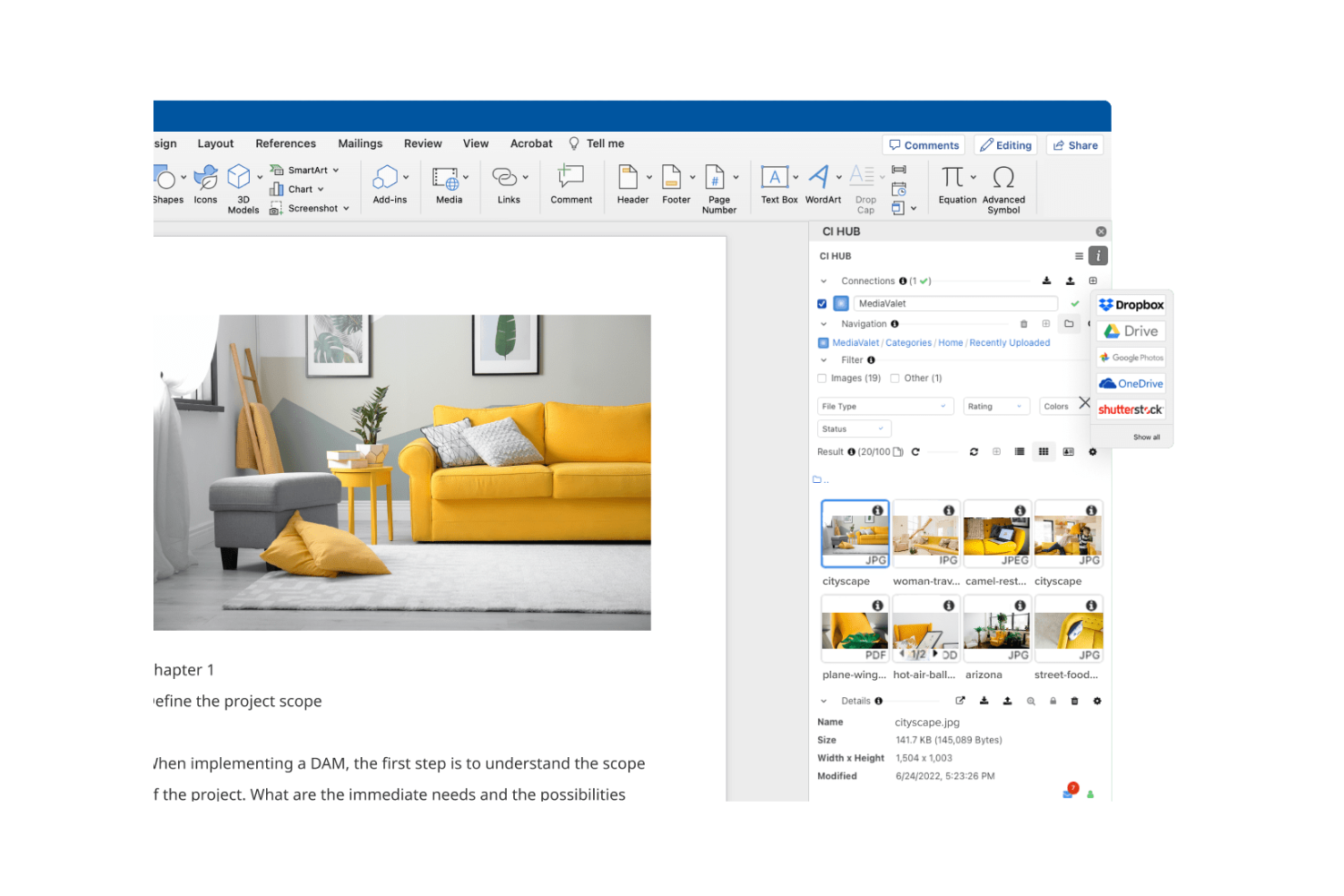
MediaValet is a Digital Asset Management (DAM) solution that caters to organizations looking for seamless Microsoft integration. It focuses on asset organization and distribution, making it ideal for teams that rely heavily on Microsoft tools.
Why I picked MediaValet: MediaValet is built for teams that rely heavily on Microsoft tools. You get direct integration with Office 365 and SharePoint, making your workflows smoother. Since it’s cloud-based, your team can access and collaborate on assets from anywhere. With strong security and data protection, it fits well if your company needs to keep information safe.
Standout Features & Integrations
Features include advanced search capabilities that help your team find assets quickly with metadata and keywords. Automated workflows streamline repetitive tasks, saving your team time and effort. The platform's scalability ensures that it grows with your organization, adapting to increasing demands.
Integrations include Microsoft Office 365, SharePoint, Adobe Creative Cloud, Slack, Box, Dropbox, Salesforce, Hootsuite, WordPress, and Google Analytics.
Pros and Cons
Pros:
- Focus on security and protection
- Automated workflow features
- Strong Microsoft integration
Cons:
- Dependence on the Microsoft ecosystem
- Requires training for new users

Papirfly
Best for templated content creation

Papirfly is an AI-driven DAM tool best known for its templated content creation, helping teams produce brand-ready assets quickly and consistently. It works well for industries like automotive, pharma, and retail that require strict brand consistency across multiple markets. With automated features like asset tagging and content translation, Papirfly reduces manual work, shortens time-to-market, and helps teams stay aligned with global brand standards.
Why I Picked Papirfly
I picked Papirfly for its templated content creation, which helps teams produce consistent, on-brand materials without relying heavily on design resources. Its AI-driven metadata tagging also streamlines the organization and retrieval of digital assets, reducing manual effort. Together, these features allow teams to maintain brand accuracy while improving the speed and efficiency of their creative workflows.
Papirfly Key Features
In addition to templated content creation, Papirfly offers:
- Campaign Management: This feature allows your team to plan, execute, and analyze marketing campaigns within a unified platform.
- Brand Portal: It provides a centralized space for storing and accessing brand guidelines and assets, ensuring consistency across all materials.
- GDPR Compliance: Papirfly ensures that all data handling processes meet regulatory standards, crucial for maintaining trust and legality.
- Data Analytics: This tool offers insights into asset usage and campaign performance, helping refine marketing strategies.
Papirfly Integrations
Papirfly integrates with Adobe Creative Cloud, Microsoft Office 365, Google Workspace, Salesforce, HubSpot, Marketo, Sitecore, WordPress, Drupal, and an API is available for custom integrations.
Pros and Cons
Pros:
- Supports multiple languages for global reach
- Auto-tags assets to speed up organization
- Easy to manage large libraries of assets
Cons:
- Some users experience slow loading at times
- Templates can be limiting or require adjustments
New Product Updates from Papirfly

Papirfly Point Adds Brand Assistant Admin Controls
Papirfly now lets admins configure Brand Assistant directly in Point, including enabling the assistant, accepting AI terms, tuning conversation style, and managing knowledge sources and documents. For more information, visit Papirfly's official site.
 .
.
Best for custom AI tagging

Tagbox is an AI-powered digital asset management platform built for teams in retail, events, nonprofits, and creative agencies. It helps businesses organize large media libraries using features like semantic search, face recognition, and automated tagging. By turning scattered assets into searchable libraries, Tagbox improves collaboration and long-term media management.
Why I Picked Tagbox
I picked Tagbox for its practical use of AI in media organization. Its semantic search makes it easy to find visuals based on people, objects, or context, saving teams time. Automated tagging further reduces manual work, making Tagbox a strong choice for teams managing growing asset libraries.
Tagbox Key Features
In addition to its core functionalities, Tagbox offers several other features that enhance its utility for digital asset management:
- Face Recognition: This feature allows your team to identify and categorize images based on facial data, improving organization.
- Custom AI Tagging: You can train an AI to detect your specific products, locations or other visual elements.
- Collaborative Tools: Facilitate teamwork and client interaction through media sharing and management.
- User-Friendly Interface: The intuitive design ensures that your team can easily navigate and utilize the tool without extensive training.
Tagbox Integrations
Connect Tagbox.io through Tagbox Desktop (drag-and-drop into any app), Zapier, Make, and a REST API. Custom workflows are available for Enterprise.
Pros and Cons
Pros:
- Custom tagging for video libraries
- Face recognition improves asset discovery
- AI-powered video asset organization
Cons:
- Limited offline access options
- No built-in video editing

Best for AI-driven asset tagging
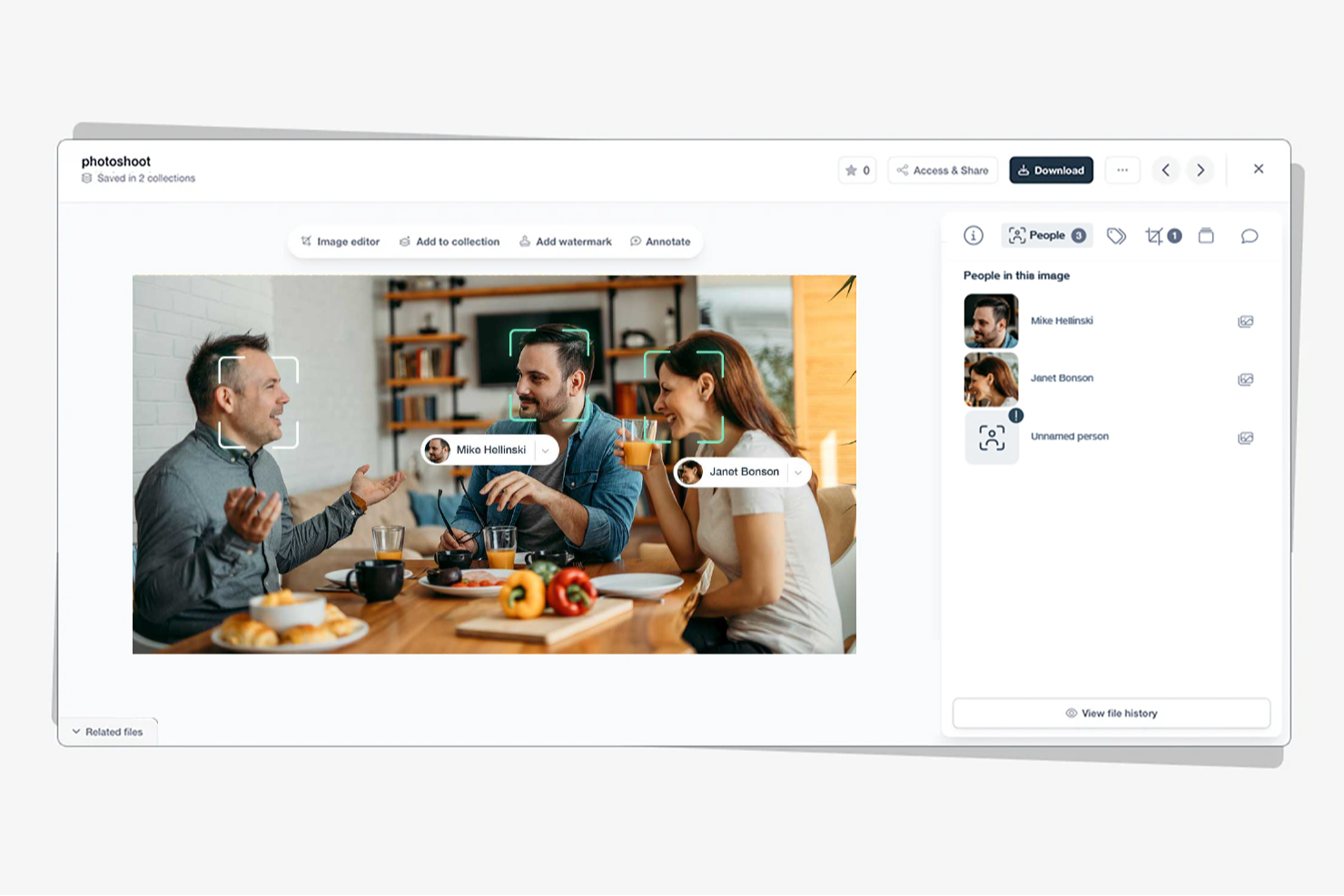
Stockpress is a digital asset management (DAM) tool that uses artificial intelligence to help teams organize, find, and share files more efficiently. It’s designed for companies of all sizes that want to simplify asset management without limiting user access or paying per seat.
Why I picked Stockpress: I picked Stockpress because its AI tagging and search capabilities make it incredibly easy for you to locate the right asset fast. The platform automatically applies intelligent metadata to your files, saving your team time on manual tagging and organization. You also get version control and duplicate detection tools, helping your team maintain clean, up-to-date asset libraries without confusion. What really stands out is how Stockpress combines collaboration and control—you can annotate, comment, and securely share files, all within an intuitive dashboard.
Stockpress standout features & integrations
Features include AI-driven tagging and visual search to improve asset discoverability, version control with duplicate detection to maintain file integrity, and customizable share links with user permissions for secure collaboration.
Integrations include Figma, Photoshop, Mailchimp, Slack, Dropbox, Google Drive, Okta, WordPress, Azure, Webflow, and Klaviyo.
Pros and Cons
Pros:
- Secure file access control
- Advanced tagging customization
- User-friendly interface
Cons:
- Few analytics tools
- Limited mobile support

Filecamp
Best for AI-powered tagging and review

Filecamp is a versatile digital asset management (DAM) tool designed to meet the needs of marketing teams and professionals across various industries, including media, non-profits, and web agencies. It offers a user-friendly platform that enhances workflow efficiency and brand consistency, making it an ideal choice for those looking to streamline asset management processes. With features like online proofing, customizable branding, and version control, Filecamp addresses the challenges of organizing and managing digital assets effectively.
Why I Picked Filecamp
I picked Filecamp for its robust online proofing tools and version control capabilities that are essential for managing digital assets in today's fast-paced environment. These features allow you to review and approve files seamlessly, ensuring that your team stays on the same page and maintains brand consistency. Additionally, the platform's secure file sharing ensures that sensitive information is protected while facilitating collaboration among remote teams. These functionalities make Filecamp a reliable choice for businesses looking to optimize their digital asset management processes.
Filecamp Key Features
In addition to its standout online proofing and version control, Filecamp offers several other features that enhance its usability as an AI DAM tool.
- Customizable Branding: Tailor the platform to match your brand’s identity, ensuring consistency across all digital assets.
- Secure File Sharing: Share files securely within your team or with external partners, maintaining control over access and permissions.
- Google Cloud Hosting: Benefit from data security and compliance with a platform hosted on Google Cloud, protecting your assets.
- Unlimited Users and Bandwidth: Manage your digital assets without worrying about user or bandwidth limitations, making it scalable for growing teams.
Filecamp Integrations
Native integrations are not currently listed by Filecamp.
Pros and Cons
Pros:
- Strong version control capabilities
- Unlimited users on all plans
- Built-in online proofing workflows
Cons:
- AI search is less advanced
- No native integrations available
New Product Updates from Filecamp
Filecamp Adds Analytics, AI Thumbnails, and CDN Embed Links
Filecamp adds Analytics, AI-powered thumbnails, and CDN-backed Embed links. These updates give teams more visibility into asset usage, improve thumbnail presentation, and make embedded images easier to manage. For more information, visit Filecamp’s official site.
 .
.
Canto
Best for small businesses

Canto is a Digital Asset Management (DAM) software designed for small businesses, focusing on simplifying asset organization and sharing. It offers features that help teams manage their digital content efficiently, making it a valuable tool for businesses with limited resources.
Why I picked Canto: Canto is built for small teams that want a simple way to manage digital assets. You get tools like visual search and smart albums, so your team can quickly find and organize files. The setup is fast and easy, which makes it practical if you don’t have extra time or resources. With a central space for sharing, your team can collaborate without digging through scattered folders.
Standout Features & Integrations
Features include a visual search that helps your team locate assets quickly using image recognition. Smart albums automatically organize assets based on metadata, saving time and effort. The customizable branding feature lets you personalize the platform to match your company's identity.
Integrations include Adobe Creative Cloud, Microsoft Office, Slack, Dropbox, Box, Google Drive, Salesforce, WordPress, Zapier, and Shopify.
Pros and Cons
Pros:
- Customizable branding options
- Visual search capabilities
- Quick setup process
Cons:
- May require initial training
- Pricing transparency issues

Aprimo
Best for marketing teams

Aprimo is a Digital Asset Management (DAM) platform designed for marketing teams, focusing on content management and campaign coordination. It helps teams organize, distribute, and optimize their marketing assets efficiently.
Why I picked Aprimo: Aprimo is built for marketing teams that need better control over campaigns and content distribution. You can set up workflows that match how your team operates instead of sticking to rigid processes. Its analytics tools give you clear insight into how content performs, so you can shape strategies around real data. With strong collaboration features, your team can stay connected and work together no matter where they’re located.
Standout Features & Integrations
Features include a content calendar that helps your team plan and track marketing campaigns. The version control feature ensures that your team always works with the most up-to-date assets. Collaboration tools support communication and coordination among team members, making it easier to manage projects.
Integrations include Adobe Creative Cloud, Salesforce, SAP, Microsoft Dynamics 365, Workfront, Sitecore, Marketo, Hootsuite, Drupal, and Optimizely.
Pros and Cons
Pros:
- Effective version control
- Strong analytics capabilities
- Tailored for marketing workflows
Cons:
- Requires training for full use
- Pricing transparency issues


Acquia is a Digital Asset Management (DAM) platform designed for businesses seeking cloud-native solutions, offering tools for content management and collaboration. It helps teams manage and distribute digital assets efficiently in a cloud environment.
Why I picked Acquia: Acquia is designed for cloud-native teams that need scalability and flexibility as they grow. Your team gets a central asset repository that keeps everything in one place and easy to access. You can set up customizable workflows that match how your team works instead of forcing a fixed process. With a strong focus on security and compliance, it’s a solid option if you’re in an industry with strict data rules.
Standout Features & Integrations
Features include a centralized asset repository that ensures your team can access files from anywhere. Customizable workflows allow you to design processes that suit your team's needs. Enhanced security features protect your assets and ensure compliance with industry standards.
Integrations include Adobe Creative Cloud, Drupal, Salesforce, Marketo, Sitecore, WordPress, Optimizely, Google Drive, Microsoft Teams, and Slack.
Pros and Cons
Pros:
- Suitable for compliance-focused industries
- Customizable workflows
- Strong security features
Cons:
- Learning curve for new users
- Complex initial setup


Frontify is a Digital Asset Management (DAM) platform designed for businesses focused on maintaining brand consistency. It serves marketing and branding teams, helping them manage brand assets and guidelines effectively to ensure uniform brand messaging.
Why I picked Frontify: Frontify excels at maintaining brand consistency with its brand guidelines feature, which keeps your team's messaging aligned. It offers a centralized hub for all brand assets, making it easy for your team to access and use the latest materials. The platform's collaboration tools enable effective teamwork on brand projects. Its focus on brand management ensures that your brand's identity remains consistent across all channels.
Standout Features & Integrations
Features include a brand guidelines feature that helps your team maintain consistent messaging. The centralized hub for brand assets ensures easy access to the latest materials. Collaboration tools support teamwork and communication, making it easier to manage brand-related projects.
Integrations include Adobe Creative Cloud, Sketch, Microsoft Teams, Slack, Figma, Trello, Jira, Dropbox, Google Drive, and Asana.
Pros and Cons
Pros:
- Efficient version control
- Centralized brand asset hub
- Strong brand consistency focus
Cons:
- Basic customization options
- Pricing transparency issues

Brandkit
Best for brand management

Brandkit is a Digital Asset Management (DAM) platform focused on brand management, serving marketing and branding teams. It helps teams organize and distribute brand assets effectively, ensuring consistent brand messaging across all platforms.
Why I picked Brandkit: Brandkit is ideal for brand management, offering features that maintain brand consistency across various channels. It provides tools for centralized asset storage and easy sharing, ensuring your team can access the latest brand materials. Customizable templates help your team maintain brand guidelines effortlessly. The platform facilitates collaboration, enabling teams to work together more effectively on brand-related projects.
Standout Features & Integrations
Features include customizable templates that help your team maintain brand consistency. The centralized asset library ensures that everyone has access to the latest materials. Brand guidelines can be easily managed and shared, keeping your messaging uniform across all platforms.
Integrations include Adobe Creative Cloud, Canva, Slack, Dropbox, Google Drive, Shopify, WordPress, Hootsuite, Mailchimp, and Trello.
Pros and Cons
Pros:
- Customizable brand templates
- Easy sharing capabilities
- Ideal for brand consistency
Cons:
- Basic customization options
- Requires training for new users
Andre AI DAM-verktøy
Her er noen flere AI DAM-verktøy som ikke kom med på kortlisten min, men som likevel er verdt å sjekke ut:
- Orange Logic
For large enterprises
- Storyteq
For dynamic content
- Pics.io
For Google Drive users
- Bynder
For creative teams
- Air
For AI-powered content search
- 4ALLPORTAL
For centralized product data management
- Connecter Suite
For instant access to local files
- Brandfolder
For visual asset management
- OpenAsset
For architecture and engineering
- Iconik
For cloud-based content collaboration


How I Evaluate AI DAM Tools
I look for AI that actually saves project teams time—auto-tagging thousands of assets on upload or surfacing the right file from a natural language query, not just a rebranded keyword search. From there, I split my evaluation into core functionality every AI DAM tool needs to qualify and differentiating factors that separate good options from great ones.
Core Functionality (Table Stakes For This List)
When I'm selecting tools for my list, I rank each one on a scale from 0 (does not offer the functionality) to 5 (excels in this area) for each core functionality listed below. Then, I calculate the tool's total score into a percentage. Each tool needs to achieve a minimum total score of 65% to be considered for inclusion.
- AI-Driven Auto-Tagging: I check whether the tool generates accurate metadata on upload across file types—think tagging a batch of 500 campaign images with usable keywords instead of dumping them into a folder.
- AI-Powered Asset Search: Search should go beyond filenames. I evaluate whether teams can run natural language or visual queries to find assets, like searching "person on a rooftop at sunset" and getting relevant results.
- Centralized Asset Repository: The platform needs to house all major file types—images, video, PDFs, design files—in a structured library with custom metadata schemas and scalable taxonomy.
- Version Control & Approval Workflows: I look for clear version histories and configurable approval routing, so a designer can push a revised banner ad through a multi-stage review without losing the original.
- Permissions & Rights Management: Role-based access and license tracking matter here. I evaluate how well a tool handles asset expiration dates, usage restrictions, and access scoping across internal and external users.
- PM & Creative Tool Integrations: The DAM should connect to the tools project teams already use. I look for native integrations with platforms like Asana, Monday, Adobe Creative Cloud, or Figma.
Once I have a list of tools that meet the criteria, I consider what sets each platform apart.
Differentiating Factors (What Sets Vendors Apart)
Here's how I compare and contrast different vendors:
Standout Features
AI brand compliance is a major differentiator—I look for tools that flag off-brand assets before they reach a client, saving project managers from catching those issues manually during review. Automated workflow triggers also add real value, especially when an asset approval can kick off downstream tasks like notifying stakeholders or updating project status. Generative AI capabilities matter too. Auto-resizing a hero image across multiple deliverable formats helps teams handling high-volume creative output move faster.
Beyond Features
I evaluate how well each platform handles external collaboration—agency partners and clients need guest access with expiring links and rights-aware sharing, not workarounds. Security and compliance also weigh heavily. I check for SOC 2 Type II certification, SSO support, and clear policies on how the vendor handles data used to train its AI models. Implementation timelines matter for project-driven teams too. A tool that offers migration support and taxonomy consulting gets teams to value faster than one that leaves you building metadata schemas from scratch.
Slik velger du AI DAM-verktøy
Det er lett å gå seg vill i lange lister over funksjoner og kompliserte prismodeller. For å hjelpe deg med å holde fokus mens du går gjennom den unike prosessen din for valg av programvare, får du her en sjekkliste over faktorer du bør ha i bakhodet:
| Faktor | Hva du bør vurdere |
|---|---|
| Skalerbarhet | Vurder om verktøyet kan vokse med teamet ditt. Spør om brukerbegrensninger og lagringskapasitet. Sørg for at det kan håndtere økt datamengde etter hvert som organisasjonen utvides. |
| Integrasjoner | Undersøk om verktøyet kan integreres med den eksisterende programvaren din. Se etter innebygde integrasjoner med verktøy som Adobe Creative Cloud, Slack og Google Drive for å unngå hull i arbeidsflyten. |
| Tilpasningsmuligheter | Vurder om verktøyet kan tilpasses dine spesifikke behov. Se etter maler og arbeidsflyter som kan tilpasses for å samsvare med teamets prosesser. |
| Brukervennlighet | Test brukergrensesnittet for å se om det er intuitivt. Sørg for at teammedlemmene kan navigere uten omfattende opplæring. Se etter et ryddig og enkelt oppsett som samsvarer med teamets tekniske ferdighetsnivå. |
| Implementering og onboarding | Vurder hvor enkelt det er å komme i gang. Spør om tilgjengelige opplæringsressurser, for eksempel videoer eller veiledninger. Sørg for en smidig overgang med minimale forstyrrelser i den daglige driften. |
| Kostnad | Sammenlign prisplanene med budsjettet ditt. Se etter åpenhet i prissettingen og eventuelle skjulte gebyrer. Vurder langsiktige kostnader, inkludert eventuelle kostnader for flere brukere eller funksjoner. |
| Sikkerhetstiltak | Undersøk om verktøyet oppfyller sikkerhetsstandardene dine. Se etter datakryptering, brukertillatelser og regelmessige sikkerhetsoppdateringer for å beskytte verdiene dine. |
| Tilgjengelig kundestøtte | Sørg for at leverandøren tilbyr pålitelig kundestøtte. Se etter flere kundestøttekanaler og raske svartider. Vurder hvor tilgjengelige selvbetjeningsressurser er for raske løsninger. |
Hva er AI DAM-verktøy?
AI DAM-verktøy er systemer for digital ressursforvaltning som er forbedret med kunstig intelligens, slik at digitale ressurser kan organiseres, lagres og hentes frem på en effektiv måte. Fagfolk som markedsførere, designere og innholdsprodusenter bruker disse verktøyene til å administrere digitale medier og sikre rask tilgang og godt samarbeid.
Funksjoner som metadata-merking, intelligent søk og automatiserte arbeidsflyter bidrar til å organisere ressurser, forbedre produktiviteten og opprettholde merkevarekonsistens. Alt i alt gir disse verktøyene brukerne effektiv ressursforvaltning og et mer strømlinjeformet samarbeid.
Funksjoner i AI DAM-verktøy
Når du velger AI DAM-verktøy, bør du se etter følgende viktige funksjoner:
- Metadata-merking: Merker automatisk ressurser med relevante metadata, slik at det blir enklere å søke etter og organisere digitale filer.
- Intelligent søk: Bruker kunstig intelligens til raskt å finne filer basert på nøkkelord eller tagger, noe som sparer tid og øker produktiviteten.
- Versjonskontroll: Håndterer ulike versjoner av ressurser for å sikre at teamene arbeider med de mest oppdaterte filene.
- Tilpassbare arbeidsflyter: Gjør det mulig for team å tilpasse prosesser etter sine spesifikke behov, noe som forbedrer effektiviteten og samarbeidet.
- Samarbeidsverktøy: Gjør det mulig for teammedlemmer å dele, gjennomgå og gi tilbakemeldinger på ressurser, noe som styrker teamarbeidet.
- Sentralisert ressursbibliotek: Gir ett samlet sted for lagring og tilgang til alle digitale ressurser, noe som sikrer konsistens og enkel tilgang.
- Sikkerhetstiltak: Beskytter digitale ressurser med funksjoner som kryptering og brukertillatelser, slik at datasikkerheten ivaretas.
- Automatiserte arbeidsflyter: Effektiviserer repetitive oppgaver og frigjør tid til mer strategisk arbeid.
- Analyse og rapportering: Gir innsikt i bruk og ytelse for ressurser, slik at teamene kan ta datadrevne beslutninger.
- Distribusjon i flere kanaler: Gjør det enklere å dele innhold på tvers av ulike plattformer, slik at man sikrer bred rekkevidde og konsistens.
Fordeler med AI DAM-verktøy
Implementering av AI DAM-verktøy gir flere fordeler for teamet og virksomheten din. Her er noen av fordelene du kan se frem til:
- Bedre organisering: AI-drevet metadata-merking og intelligent søk bidrar til å holde digitale ressurser godt organisert og enkle å finne.
- Bedre samarbeid: Funksjoner som sentraliserte ressursbiblioteker og samarbeidsverktøy gjør det enklere for team å arbeide sammen og dele tilbakemeldinger.
- Tidsbesparelser: Automatiserte arbeidsflyter og intelligent søk reduserer tiden som brukes på repetitive oppgaver og på å finne filer.
- Konsistens: Versjonskontroll og sentralisert ressursforvaltning sikrer at alle teammedlemmer bruker de mest oppdaterte og konsistente merkevareressursene.
- Datasikkerhet: Sikkerhetstiltak beskytter de digitale ressursene dine mot uautorisert tilgang og mulige datainnbrudd.
- Bedre beslutninger: Analyse og rapportering gir innsikt i ressursenes ytelse, slik at teamene kan ta datadrevne beslutninger.
- Bredere rekkevidde: Funksjoner for distribusjon i flere kanaler sikrer at innholdet ditt deles konsistent på tvers av ulike plattformer.
Kostnader og priser for AI DAM-verktøy
Ved valg av AI DAM-verktøy er det nødvendig å forstå de ulike prismodellene og abonnementene som er tilgjengelige. Kostnadene varierer basert på funksjoner, teamstørrelse, tillegg og mer. Tabellen nedenfor oppsummerer vanlige abonnementer, gjennomsnittsprisene deres og typiske funksjoner som er inkludert i AI DAM-verktøyløsninger:
Sammenligningstabell for abonnementer for AI DAM-verktøy
| Abonnementstype | Gjennomsnittspris | Vanlige funksjoner |
|---|---|---|
| Gratis abonnement | $0 | Grunnleggende lagring, begrenset brukertilgang og viktig metadatamerking. |
| Personlig abonnement | $5-$25/bruker/måned | Utvidet lagring, grunnleggende samarbeidsverktøy og standard søkefunksjoner. |
| Bedriftsabonnement | $30-$75/bruker/måned | Avansert samarbeid, tilpassbare arbeidsflyter og forbedrede sikkerhetsfunksjoner. |
| Abonnement for store virksomheter | $100+/bruker/måned | Ubegrenset lagring, full integrasjonsstøtte og omfattende analysefunksjoner. |
Vanlige spørsmål om AI DAM-verktøy
Her er noen svar på vanlige spørsmål om AI DAM-verktøy:
Hvordan forbedrer DAM teamsamarbeidet?
DAM-verktøy forbedrer teamsamarbeidet ved å effektivisere kommunikasjonen mellom medlemmene. Teamet ditt kan få tilgang til nødvendige ressurser, kommentere og godkjenne endelige versjoner direkte i systemet. Denne samlede tilgangen og muligheten til å gi tilbakemeldinger i sanntid hjelper teamet ditt med å samarbeide mer effektivt.
Hvordan forbedrer DAM merkevarekonsistensen?
En skybasert DAM-løsning sikrer merkevarekonsistens ved å gi alle tilgang til de nyeste merkevareressursene. Merkevareteamet ditt kan enkelt administrere og oppdatere ressurser, slik at utdaterte materialer fjernes. Denne kontrollen bidrar til å opprettholde et konsekvent merkevareuttrykk på tvers av alle kanaler og materialer.
Hva bør jeg vurdere når jeg velger AI DAM-verktøy?
Når du velger AI DAM-verktøy, bør du vurdere faktorer som skalerbarhet og integrasjon med eksisterende systemer. Evaluer hvor tilpassbar plattformen er for å dekke teamets behov. Vurder også brukervennligheten og kvaliteten på kundestøtten for å sikre en smidig implementering.
Kan AI DAM-verktøy håndtere store datamengder?
Ja, AI DAM-verktøy er utviklet for å håndtere store datamengder effektivt. De bruker intelligent søk og metadatamerking for å organisere og finne ressurser raskt. Når du vurderer et verktøy, bør du kontrollere om det kan skaleres i takt med økende databehov, slik at du unngår fremtidige begrensninger.
Er AI DAM-verktøy sikre?
AI DAM-verktøy prioriterer sikkerhet ved å tilby funksjoner som datakryptering og brukertillatelser. Når du velger et verktøy, bør du sørge for at det oppfyller organisasjonens sikkerhetsstandarder og jevnlig oppdaterer sikkerhetsprotokollene for å beskytte de digitale ressursene dine mot uautorisert tilgang.
Hvordan integreres AI DAM-verktøy med annen programvare?
AI DAM-verktøy tilbyr ofte integrasjoner med populær programvare som Adobe Creative Cloud, Slack og Google Drive. Disse integrasjonene bidrar til å opprettholde en smidig arbeidsflyt på tvers av ulike plattformer. Kontroller verktøyets integrasjonsmuligheter for å sikre kompatibilitet med eksisterende systemer.