

I 10 migliori strumenti di gestione agile dei progetti con IA recensiti nel 2026

I migliori strumenti di gestione dei progetti Agile basati sull'IA


Gestire i progetti non è sempre una navigazione tranquilla. Scadenze ravvicinate, risorse limitate e un coordinamento incessante possono trasformare rapidamente piani ben organizzati in caos. È qui che entrano in gioco gli strumenti di gestione dei progetti Agile basati sull'IA: aiutano a individuare i rischi prima che facciano deragliare i piani, a prendere decisioni più intelligenti su come impiegare il tempo e l'impegno del team e a occuparsi automaticamente delle attività ripetitive.
Ho testato personalmente diversi di questi strumenti per verificare come si comportano le loro funzionalità di IA nell'uso reale. Alcuni alleviano davvero il carico di lavoro e aiutano i team a lavorare in modo più intelligente, non più intenso.
In questo articolo analizzerò le mie scelte migliori e metterò in evidenza come le funzionalità di IA di ciascuno strumento possano risolvere i problemi quotidiani dei progetti e aiutare il tuo team a rimanere produttivo e concentrato.
Perché fidarsi dei nostri consigli sui software
Il nostro team testa e recensisce software dal 2012. In quanto project manager noi stessi, sappiamo quanto sia difficile — e importante — scegliere il software giusto.
Per questa guida, abbiamo valutato gli strumenti attraverso test pratici e ricerche indipendenti, assegnando un punteggio agli strumenti in base ai nostri criteri di selezione. Ci basiamo inoltre sulle competenze di leader di pensiero del settore e di professionisti attivi nella gestione dei progetti.
Le nostre recensioni riflettono il nostro giudizio editoriale umano, non un discorso di vendita.
Revisori esperti:
Tabella comparativa degli strumenti di gestione dei progetti Agile basati sull'IA
Questa tabella comparativa riassume i dettagli dei prezzi della mia selezione dei migliori strumenti di gestione dei progetti Agile basati sull’IA.
| Tool | Best For | Trial Info | Price | ||
|---|---|---|---|---|---|
| 1 | Ideale per il tracciamento dei progetti | Prova gratuita + demo gratuita disponibili | Da $10/utente/mese (fatturazione annuale) | Website | |
| 2 | Ideale per la gestione di portafogli di progetto | Prova gratuita di 14 giorni | Da $31/utente/mese (fatturazione annuale) | Website | |
| 3 | Ideale per dashboard in tempo reale | Prova gratuita di 14 giorni + piano gratuito disponibile | Da $10/utente/mese (fatturato annualmente) | Website | |
| 4 | Ideale per l'integrazione con Microsoft | Prova gratuita disponibile | A partire da $10/utente/mese (fatturazione annuale) | Website | |
| 5 | Ideale per team attenti al budget | Prova gratuita di 14 giorni | A partire da $1.49/utente/mese (fatturato annualmente) + piano gratuito disponibile | Website | |
| 6 | Ideale per il controllo delle versioni | Piano gratuito + prova gratuita di 30 giorni disponibile | Da $35/mese (fino a 30 utenti) | Website | |
| 7 | Ideale per la mappatura dei processi aziendali | Demo gratuita + prova gratuita di 14 giorni disponibili | Da $8/utente/mese (fatturazione annuale) | Website | |
| 8 | Ideale per la gestione delle attività con IA versatile | Piano gratuito disponibile | Da $7/utente/mese (fatturazione annuale) | Website | |
| 9 | Ideale per la collaborazione di squadra | Piano gratuito disponibile | Da $10.99/utente/mese (fatturato annualmente) | Website | |
| 10 | Ideale per la visualizzazione delle roadmap | Demo gratuita disponibile | Da $9/utente/mese | Website |


Recensioni dei migliori strumenti di gestione dei progetti Agile basati sull'IA
Di seguito sono riportati i miei riepiloghi dettagliati dei migliori strumenti di gestione dei progetti Agile basati sull’IA inclusi nella mia selezione. Le mie recensioni offrono uno sguardo approfondito sulle funzionalità principali, sui vantaggi & svantaggi, sulle integrazioni e sui casi d’uso ideali di ciascuno strumento, per aiutarti a trovare quello più adatto a te.

Celoxis
Ideale per il tracciamento dei progetti
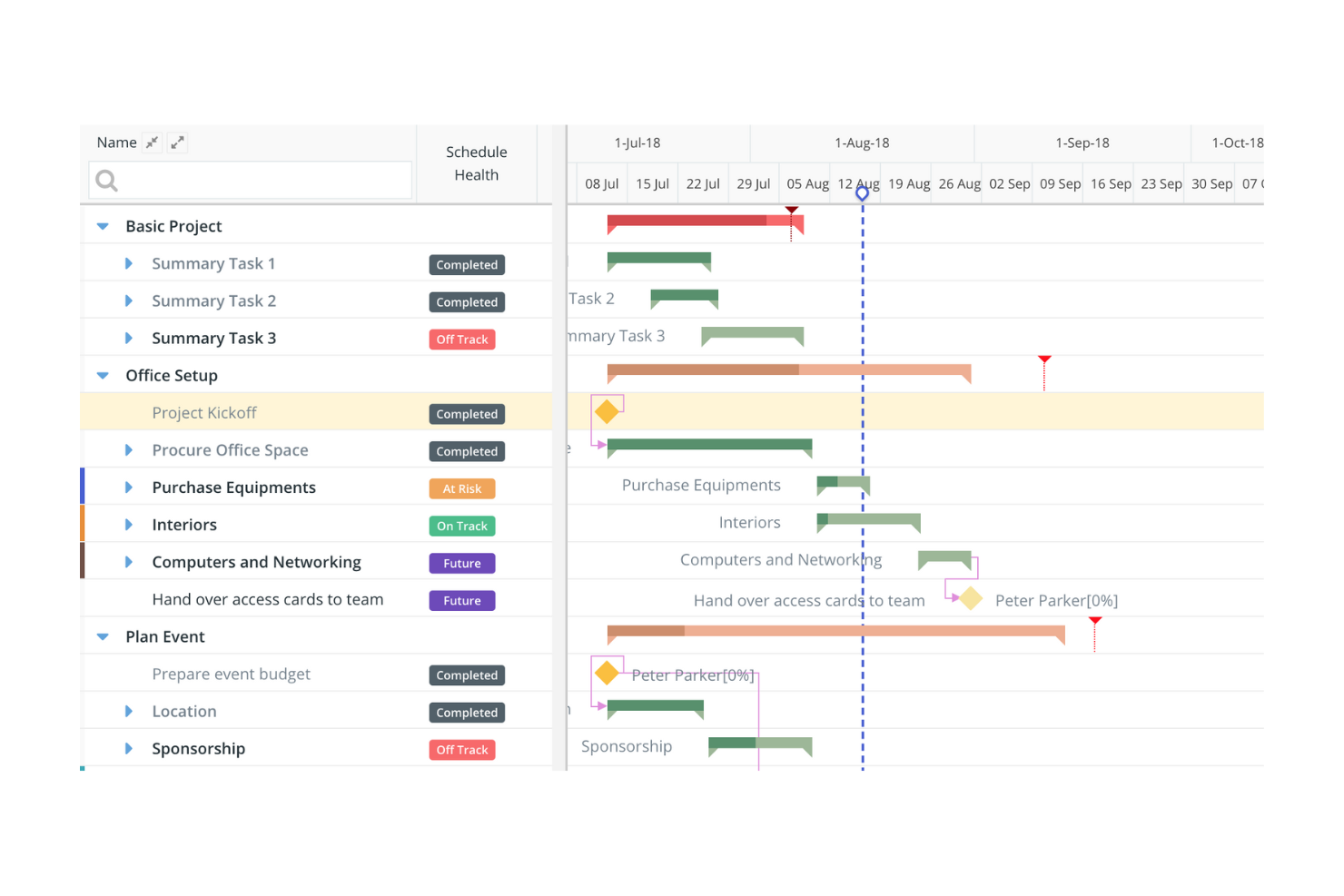
Celoxis è uno strumento di project management tutto-in-uno progettato per le aziende che necessitano di un monitoraggio dettagliato dei progetti e della gestione delle risorse. È popolare tra le organizzazioni di medie e grandi dimensioni per le sue funzionalità di analisi e reportistica guidate dall’IA, che migliorano la supervisione dei progetti.
Perché ho scelto Celoxis: Offre un eccellente focus sul tracciamento dei progetti, supportato da analisi predittive basate sull’IA e un assistente IA per interrogare i dati di progetto. La piattaforma include dashboard in tempo reale, approfondimenti su portfolio e carico di lavoro, pianificazione delle risorse e delle capacità, oltre a controlli sui rischi e sulle finanze che aiutano le organizzazioni a gestire progetti complessi. Queste capacità permettono ai team di anticipare ritardi, analizzare la salute dei progetti e prendere decisioni consapevoli su più iniziative attive.
Funzionalità e integrazioni principali:
Funzionalità includono analisi predittive basate sull’IA, Lex (assistente IA) per interrogare le informazioni di progetto, dashboard in tempo reale, monitoraggio di progetti e portfolio, pianificazione delle risorse, timesheet, controllo di budget e costi, e gestione del rischio.
Integrazioni includono Microsoft Project, QuickBooks, Salesforce, Slack, Google Drive, Excel e Outlook.
Pros and Cons
Pros:
- Eccellenti capacità di tracciamento dei progetti
- Funzionalità di reportistica personalizzabili
- Supporta la gestione di risorse e budget
Cons:
- Interfaccia poco intuitiva e inefficiente
- La complessità può disorientare i piccoli team

Ideale per la gestione di portafogli di progetto
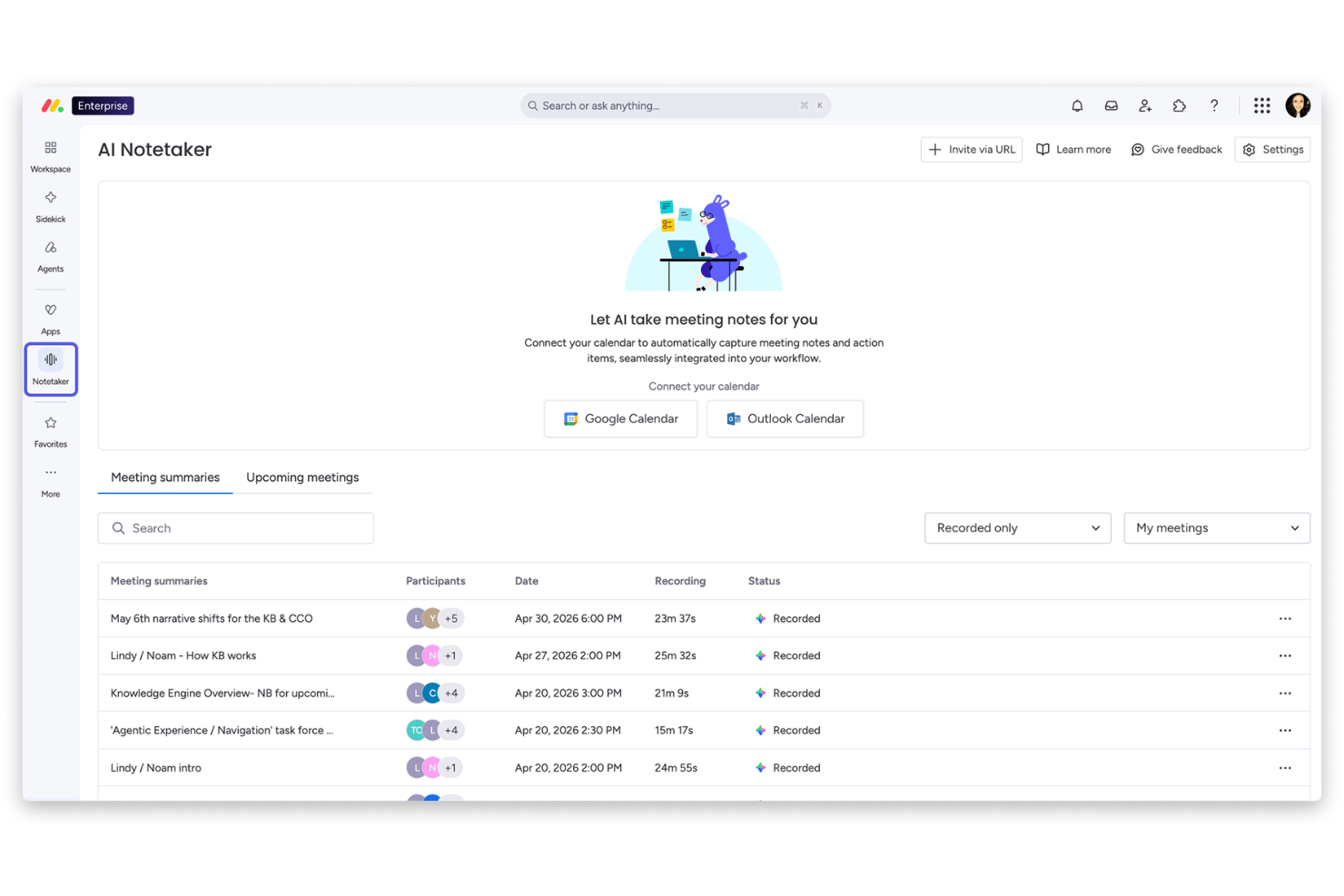
monday AI Workspace è una piattaforma di gestione del lavoro potenziata dall'IA che combina pianificazione agile degli sprint, supervisione del portafoglio, automazione dei flussi di lavoro e analisi predittiva in un'interfaccia unificata basata su board.
Per Chi è Ideale monday AI Workspace?
È particolarmente adatto per team di ingegneria e di prodotto di medie e grandi dimensioni che gestiscono contemporaneamente più progetti agili e hanno bisogno di una visibilità a livello di portafoglio.
Perché Ho Scelto monday AI Workspace
Ho inserito monday AI Workspace nella mia lista perché è uno dei pochi strumenti agili che offre un vero controllo a livello di portafoglio, non solo il monitoraggio progetto per progetto. Mi piace in particolare come le dashboard di portafoglio aggregano lo stato di avanzamento degli sprint, i rischi e la capacità attraverso centinaia di progetti in tempo reale. Il rilevamento dei rischi alimentato dall'IA segnala le dipendenze problematiche prima che si ripercuotano sui vari flussi di lavoro, che è proprio dove la maggior parte degli strumenti di portafoglio è carente.
Funzionalità Principali di monday AI Workspace
- Assistente AI Sidekick: Genera istantaneamente descrizioni delle attività, user story e contenuti per le board a partire da prompt in linguaggio naturale.
- Board di gestione degli sprint: Offre board pronte all'uso per gestire sprint, story point e la raffinazione del backlog.
- Dashboard delle performance ingegneristiche: Monitora la velocità del team, i tempi dei cicli e i colli di bottiglia con analisi agili in tempo reale e personalizzabili.
- Daily standup alimentato da IA: Riassume gli aggiornamenti del team e le prossime azioni, generando automaticamente un report giornaliero dagli aggiornamenti della board e dalle conversazioni.
Integrazioni di monday AI Workspace
monday AI Workspace offre oltre 200 integrazioni native, tra cui GitHub, GitLab, BitBucket, Jira, Slack, Microsoft Teams, Zendesk, Salesforce, Google Workspace e Zapier. È disponibile un'API per integrazioni personalizzate.
Pros and Cons
Pros:
- Dashboard di portafoglio che coprono più team agili
- Assistente AI che genera artefatti agili su richiesta
- Rilevamento in tempo reale di rischi e colli di bottiglia
Cons:
- Stima con AI degli story point non completamente nativa
- Supporto ai framework agili su larga scala limitato
New Product Updates from monday AI Workspace
monday AI Workspace Adds Human Approval Routing
monday AI Workspace adds a human-in-the-loop approval block to AI Workflows, sending approval requests and routing workflow paths based on responses. For more information, visit monday AI Workspace's official site.

Wrike
Ideale per dashboard in tempo reale
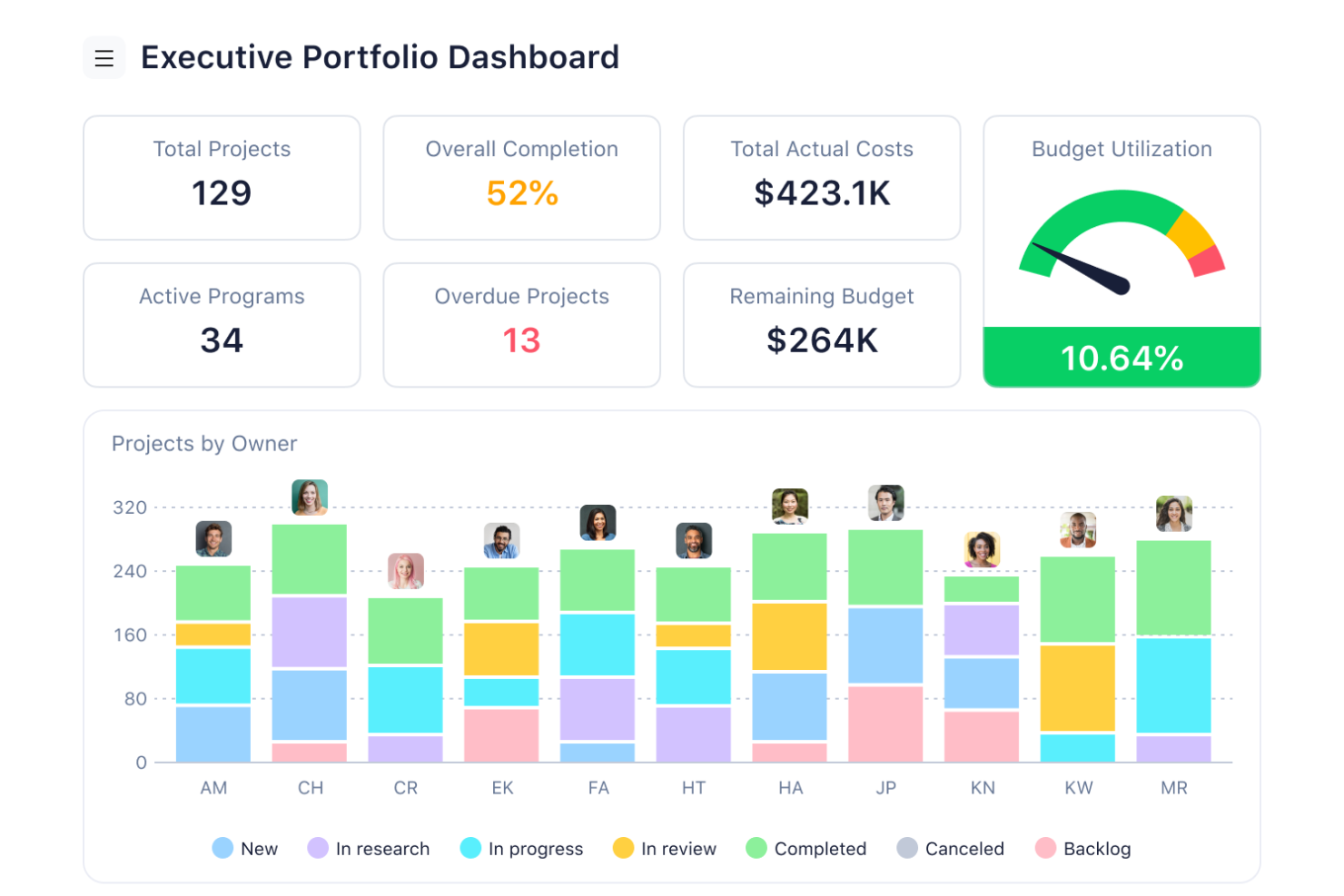
Wrike si distingue come uno strumento dinamico di gestione dei progetti progettato per soddisfare le esigenze dei team che desiderano aumentare la produttività e ottimizzare i flussi di lavoro. È particolarmente interessante per le aziende dei settori tecnologico e creativo, dove la gestione di progetti complessi e di team diversificati è fondamentale. Integrando avanzate capacità di intelligenza artificiale, Wrike aiuta ad affrontare le difficoltà nella gestione delle attività e nella pianificazione dei progetti, offrendo soluzioni che riducono il lavoro manuale e migliorano la collaborazione.
Perché ho scelto Wrike
Ho scelto Wrike per la sua capacità unica di sfruttare l'IA nella gestione dei progetti, in particolare attraverso le sue funzionalità di intelligenza artificiale generativa. Queste funzionalità permettono al tuo team di generare piani di progetto dettagliati e di individuare errori, elementi fondamentali per mantenere l'integrità dei progetti e rispettare le scadenze. Inoltre, le sue capacità di automazione delle attività riducono al minimo i compiti ripetitivi, consentendo al team di concentrarsi su lavori più strategici. I dashboard in tempo reale del tool offrono approfondimenti utili, aiutandoti a prendere decisioni informate rapidamente.
Caratteristiche principali di Wrike
Oltre alle capacità di IA, Wrike offre molte altre funzionalità che ne aumentano l'utilità per la gestione dei progetti:
- Mind Mapping: Visualizza idee e piani di progetto per garantire allineamento e chiarezza a tutto il team.
- Moduli di richiesta personalizzabili: Semplifica il processo di raccolta delle richieste adattando i moduli per acquisire esattamente ciò di cui il progetto ha bisogno.
- Dashboard in tempo reale: Ottieni informazioni sull'avanzamento dei progetti e sulle prestazioni del team con analisi sempre aggiornate.
- Comunicazione email integrata: Mantieni tutte le comunicazioni legate ai progetti centralizzate e accessibili all'interno di Wrike.
Integrazioni di Wrike
Le integrazioni includono Salesforce, Google Workspace, Microsoft Teams, HubSpot, NetSuite, QuickBooks, Adobe Creative Cloud, JIRA, Box e Dropbox. Wrike offre inoltre un'API per integrazioni personalizzate.
Pros and Cons
Pros:
- L'IA supporta la pianificazione basata sui dati
- Automazione avanzata per flussi di lavoro complessi
- Ampie integrazioni con strumenti aziendali
Cons:
- Interfaccia con curva di apprendimento per i team
- Le funzionalità avanzate di IA hanno un costo aggiuntivo
New Product Updates from Wrike

Wrike Adds Quick Search to Table View
Wrike adds Quick Search to Table View with full-table search across titles, descriptions, and fields, plus highlighted matches. This helps users find tasks faster in large tables. For more information, visit Wrike’s official site.
Ideale per l'integrazione con Microsoft
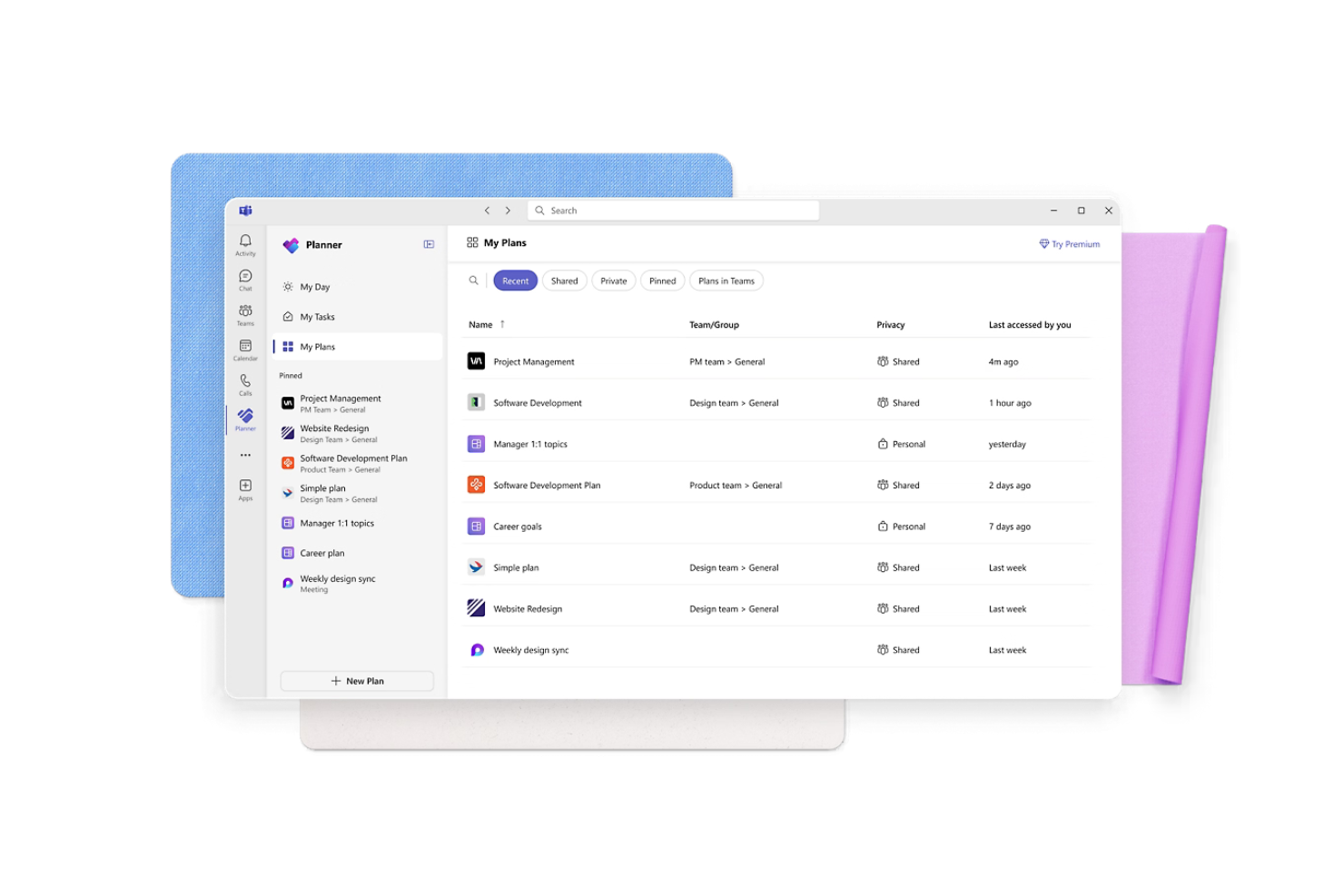
Microsoft Planner è uno strumento di gestione delle attività progettato per i team all'interno dell'ecosistema Microsoft, che offre organizzazione visiva delle attività e collaborazione. È popolare tra le aziende che hanno bisogno di gestire i progetti in modo efficiente utilizzando la suite di strumenti Microsoft, con funzionalità di intelligenza artificiale che migliorano la prioritizzazione dei compiti e l'automazione dei flussi di lavoro.
Perché ho scelto Microsoft Planner: Si integra con Microsoft 365 Copilot, rendendolo una piattaforma ideale all-in-one per i team che già utilizzano la suite Microsoft. Le funzionalità assistite dall'IA, come suggerimenti per le attività e promemoria automatici, aiutano il tuo team a rimanere organizzato. L'integrazione con Microsoft Teams migliora la comunicazione, mentre l'interfaccia familiare garantisce una transizione senza problemi. Queste caratteristiche lo rendono la scelta migliore per chi cerca una soluzione all'interno dell'ecosistema Microsoft.
Funzionalità principali e integrazioni:
Funzionalità includono una bacheca visiva delle attività che aiuta a organizzare compiti e progetti, notifiche delle scadenze per mantenere il team allineato e monitoraggio dell'avanzamento per seguire il completamento delle attività. Queste funzionalità migliorano la capacità del tuo team di gestire i progetti in modo efficace.
Integrazioni includono Microsoft Teams, Outlook, SharePoint, OneDrive, Excel, Power BI, Microsoft To Do, LinkedIn, Power Automate e Office 365.
Pros and Cons
Pros:
- Viste di monitoraggio dell'avanzamento utili
- Layout della bacheca attività semplice
- Supporta la collaborazione tra i membri del team
Cons:
- Opzioni di personalizzazione limitate
- Richiede un abbonamento Microsoft 365

Ideale per team attenti al budget
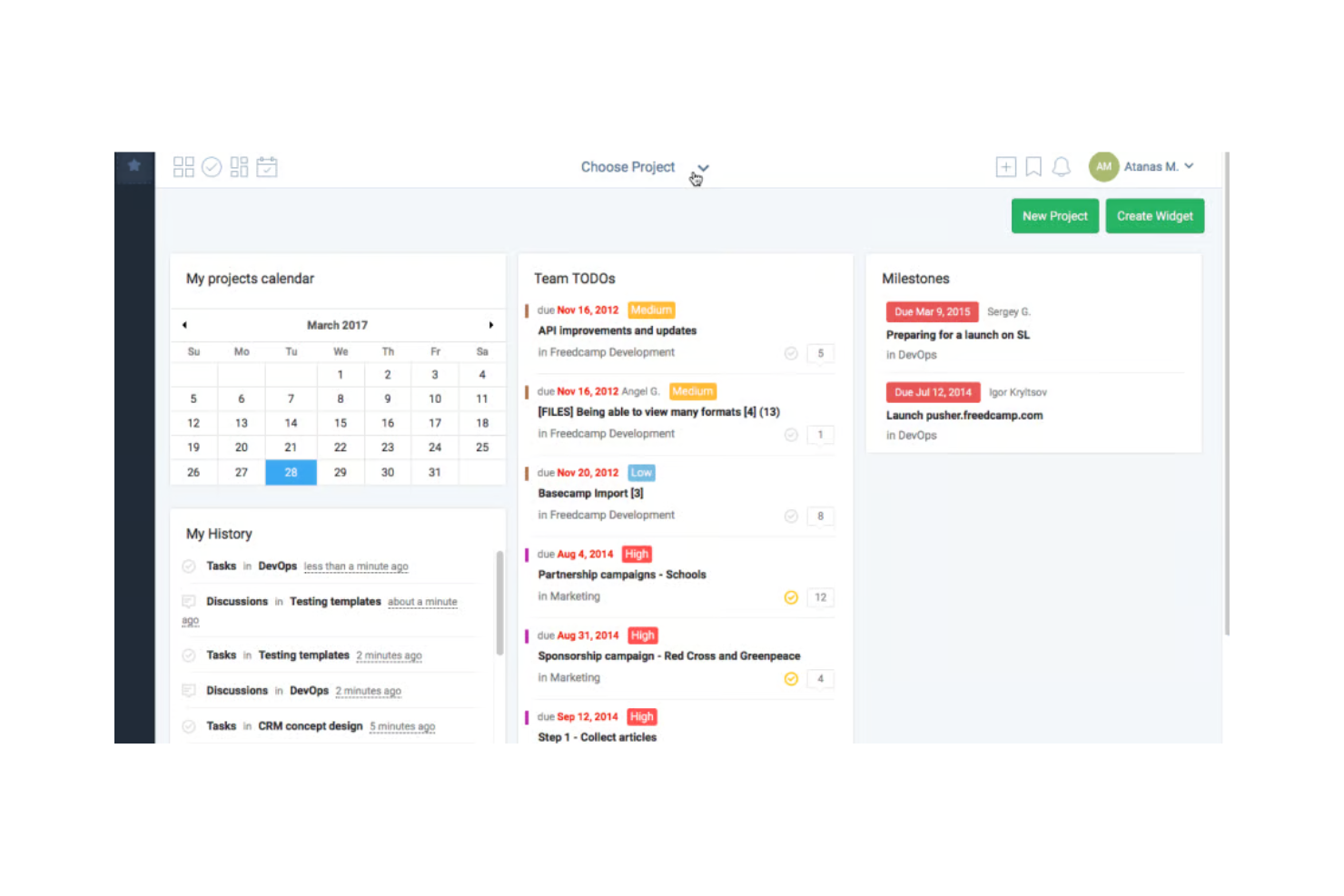
Freedcamp è uno strumento di gestione progetti pensato per i team che cercano soluzioni convenienti per la gestione delle attività e la collaborazione. È particolarmente utile per startup e piccole imprese che desiderano gestire progetti con funzionalità di intelligenza artificiale che aiutano nella priorità dei compiti e nel monitoraggio delle scadenze.
Perché ho scelto Freedcamp: Offre una gestione dei progetti economica con prioritizzazione dei compiti e promemoria delle scadenze basati su intelligenza artificiale. Queste funzionalità aiutano il tuo team a restare aggiornato sulle attività senza spendere troppo. L'interfaccia intuitiva di Freedcamp rende facile per i team adottarlo e utilizzarlo in modo efficace. È la scelta ideale per team più piccoli che necessitano di una gestione efficiente dei progetti senza costi elevati.
Funzionalità principali & Integrazioni:
Le funzionalità includono una bacheca per la gestione visiva dei progetti, monitoraggio del tempo per controllare la produttività e una visualizzazione a calendario per organizzare le scadenze. Questi strumenti aiutano il tuo team a gestire i progetti in modo efficiente e a rispettare le scadenze.
Le integrazioni comprendono Google Drive, Dropbox, Zapier, Google Calendar, Slack, Box, OneDrive, Trello, GitHub ed Evernote.
Pros and Cons
Pros:
- Prezzi accessibili per piccoli team
- Interfaccia intuitiva
- Strumenti tutto-in-uno per la gestione delle attività
Cons:
- Funzionalità avanzate limitate
- Potrebbe non essere adatto a grandi aziende
Backlog
Ideale per il controllo delle versioni
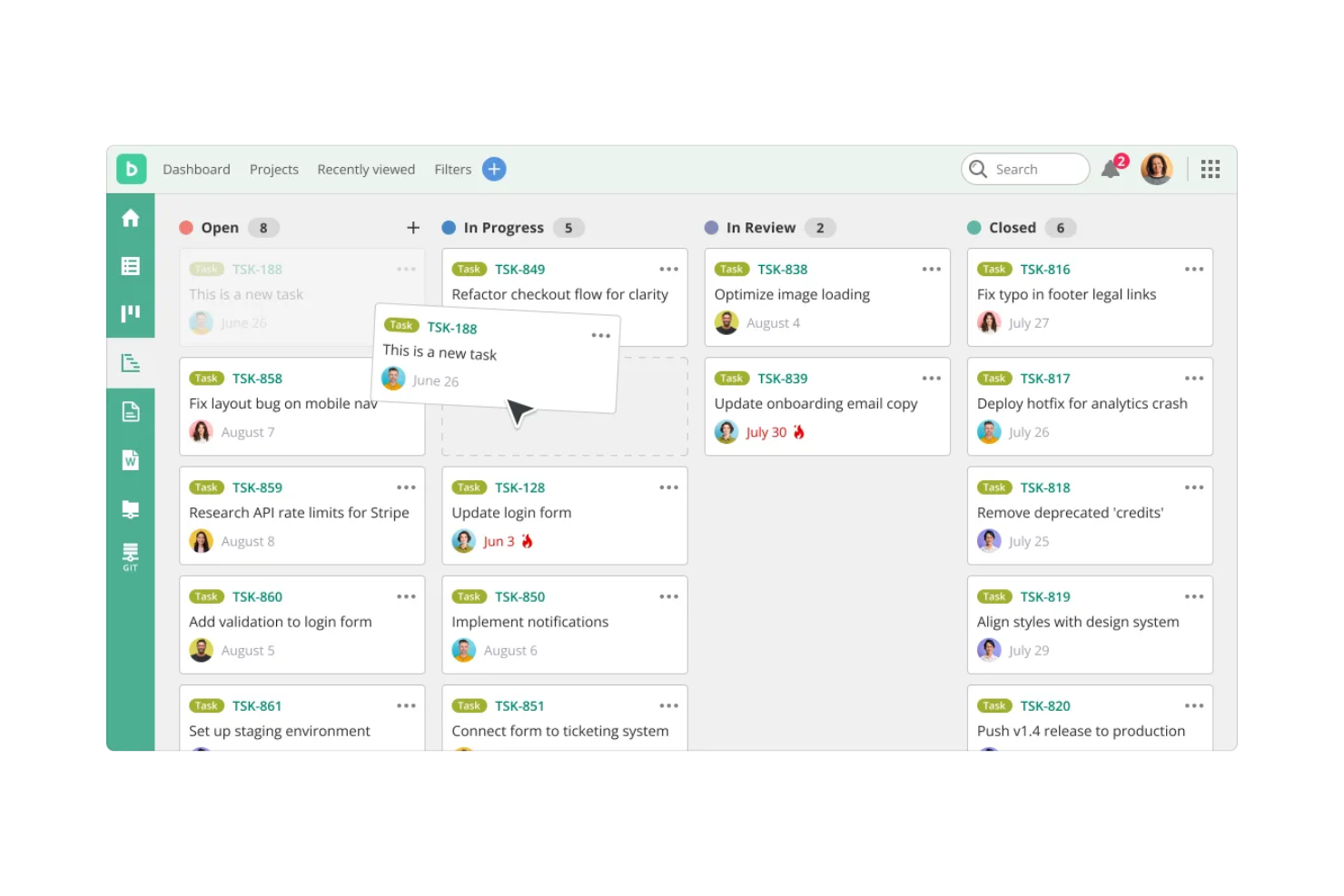
Backlog è uno strumento di gestione progetti e collaborazione pensato per i team di sviluppo, che offre funzionalità per il tracciamento dei task, la gestione delle segnalazioni e il controllo delle versioni. È ideale per gli sviluppatori che hanno bisogno di gestire il codice, monitorare i bug e collaborare in modo efficiente, con funzionalità di intelligenza artificiale che migliorano la priorità delle attività e automatizzano i flussi di lavoro.
Perché ho scelto Backlog: Offre potenti capacità di controllo delle versioni unite al monitoraggio Agile dei progetti in un'unica piattaforma. La piattaforma mette anche a disposizione una funzione di 'Riepiloghi delle segnalazioni' alimentata da intelligenza artificiale, che utilizza la tecnologia OpenAI (ChatGPT) per condensare segnalazioni e discussioni lunghe in brevi spiegazioni utili—aiutando i team a comprendere il lavoro più rapidamente e riducendo le incomprensioni.
Funzionalità e integrazioni principali:
Funzionalità includono repository Git e SVN integrati, bacheche Kanban, grafici di Gantt, grafici burndown, tracciamento delle segnalazioni, condivisione file, wiki di progetto e una funzione con IA che fornisce riepiloghi rapidi delle segnalazioni più lunghe.
Integrazioni includono GitHub, Jenkins, Redmine, Typetalk, Slack, Microsoft Teams, Google Drive, Dropbox, Zapier e Cacoo.
Pros and Cons
Pros:
- Potenti capacità di controllo delle versioni
- Funzionalità dettagliate di tracciamento dei task
- Favorisce la collaborazione dei team di sviluppo
Cons:
- Personalizzazione limitata per progetti di grandi dimensioni
- App mobile con funzionalità limitate

Ideale per la mappatura dei processi aziendali

Businessmap è un software di esecuzione aziendale progettato per le organizzazioni che mirano a migliorare l'efficienza operativa e l'allineamento strategico. Si rivolge alle aziende che desiderano potenziare la gestione dei progetti, la pianificazione guidata dall'IA e il monitoraggio dei flussi di lavoro.
Perché ho scelto Businessmap: Per la sua capacità di connettere i processi operativi con la strategia attraverso la pianificazione a livello di portfolio, la visualizzazione dei flussi di lavoro e l'analisi supportata dall'IA. La piattaforma include canvas intelligenti, board Kanban, OKR e KPI, e dashboard delle prestazioni che aiutano i team a mappare i processi e monitorare i risultati. Businessmap offre anche pianificazione e analisi dei processi supportate dall'IA, che aiutano i team a identificare rischi, prevedere gli esiti e ottimizzare i flussi di lavoro tra reparti.
Funzionalità principali e integrazioni:
Funzionalità includono canvas intelligenti per la pianificazione strategica, board Kanban, allineamento di portfolio e progetti, monitoraggio OKR e KPI, dashboard delle prestazioni e analisi dei processi supportata dall'IA.
Integrazioni includono Salesforce, Microsoft Azure, Slack, Google Workspace, Trello, Jira, Asana, monday.com, Dropbox e Microsoft Teams.
Pros and Cons
Pros:
- Eccellente per l'allineamento strategico
- Strumenti di pianificazione guidati dall'IA
- Supporta la visualizzazione dei processi
Cons:
- Funzionalità di integrazione limitate
- Personalizzazione limitata per utenti avanzati

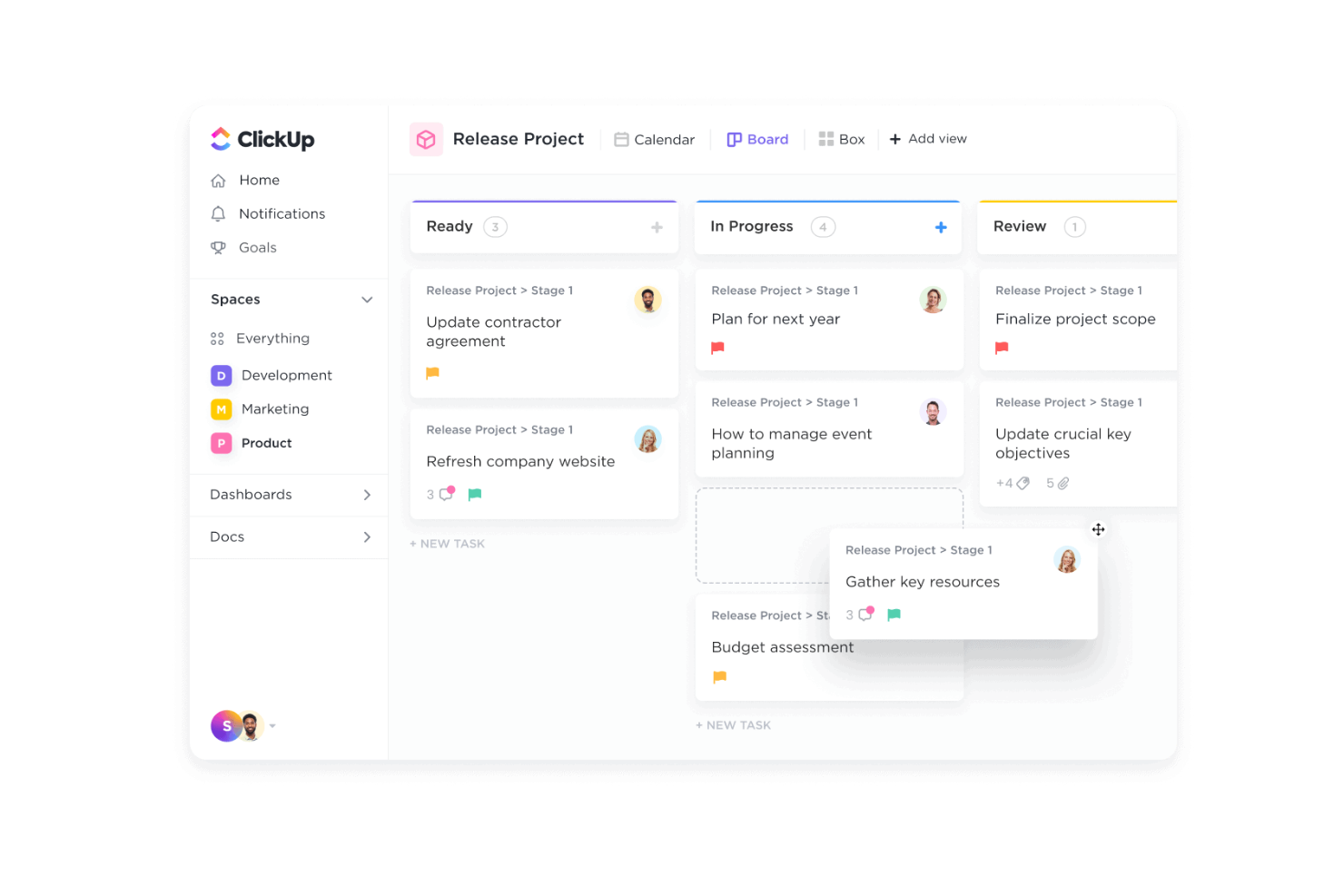
ClickUp è uno strumento di gestione progetti versatile pensato per team di tutte le dimensioni, che offre funzionalità per la gestione delle attività, la rilevazione dei tempi e la collaborazione. Si rivolge alle aziende che desiderano aumentare la produttività grazie a funzionalità potenziate dall’IA, tra cui un assistente intelligente 24/7 e una gestione delle attività integrata con l’IA.
Perché ho scelto ClickUp: ClickUp offre un approccio unico e guidato dall’IA alla gestione delle attività, rendendolo ideale per i team che cercano soluzioni versatili. Le funzionalità basate sull’IA includono ClickUp Brain, che aiuta in compiti come l’aggiornamento e la creazione di eventi. AI Talk to Text consente di scrivere più velocemente, risparmiando tempo nelle attività quotidiane. Queste funzionalità rafforzano la sua versatilità, permettendo al tuo team di lavorare in modo efficiente su diversi progetti.
Funzionalità e integrazioni principali:
Funzionalità come la gestione delle attività, la rilevazione dei tempi e i dashboard. Puoi personalizzare il tuo workspace con oltre 100 funzionalità per gestire i flussi di lavoro. Sono disponibili anche strumenti di automazione per ridurre le attività manuali e aumentare l’efficienza.
Integrazioni tra cui Slack, Google Drive, Dropbox, GitHub, Zoom, Microsoft Teams, Outlook, Asana, Trello e Salesforce.
Pros and Cons
Pros:
- Workspace personalizzabile con molte funzionalità
- Strumenti di IA per gestire le attività in modo efficiente
- Supporta una vasta gamma di integrazioni
Cons:
- Può risultare complesso per i nuovi utenti
- Richiede tempo per imparare tutte le funzionalità

Asana è uno strumento di gestione del lavoro che aiuta i team a organizzare le attività e a gestire i progetti. Supporta i flussi di lavoro Agile tramite viste flessibili e visibilità condivisa.
Perché ho scelto Asana: La chiara attenzione di Asana al coordinamento collaborativo delle attività si allinea bene con le esigenze dei team Agile. Le sue molteplici viste di progetto, come elenco, bacheca (Kanban), calendario, cronologia e Gantt, offrono ai team flessibilità nella pianificazione e nel monitoraggio degli sprint. Funzionalità come suggerimenti di attività generati dall'IA, panoramiche del carico di lavoro e campi personalizzati aiutano i membri del team a mantenere chiarezza e allineamento durante lo sviluppo iterativo. Asana include anche aggiornamenti di stato, notifiche in arrivo e monitoraggio del tempo, che supportano una comunicazione continua e una pianificazione adattiva durante l’intero ciclo di progetto.
Funzionalità e integrazioni principali:
Funzionalità includono le viste di progetto (elenco, bacheca, calendario, cronologia e Gantt), campi personalizzati per dettagli strutturati delle attività, gestione del carico di lavoro per bilanciare le assegnazioni, strumenti per aggiornamenti di stato rapidi, notifiche in arrivo e automazione dei flussi di lavoro supportata dall'IA.
Integrazioni includono Slack, Microsoft Teams, Google Drive, Dropbox, Zoom, Salesforce, Tableau, Adobe Creative Cloud, GitHub, Gmail, Outlook, Vimeo e Workplace.
Pros and Cons
Pros:
- Interfaccia intuitiva
- Opzioni di visualizzazione multiple dei progetti
- Flussi di lavoro personalizzabili
Cons:
- La complessità può aumentare per i team più numerosi
- Le funzionalità avanzate sono limitate ai piani di fascia superiore

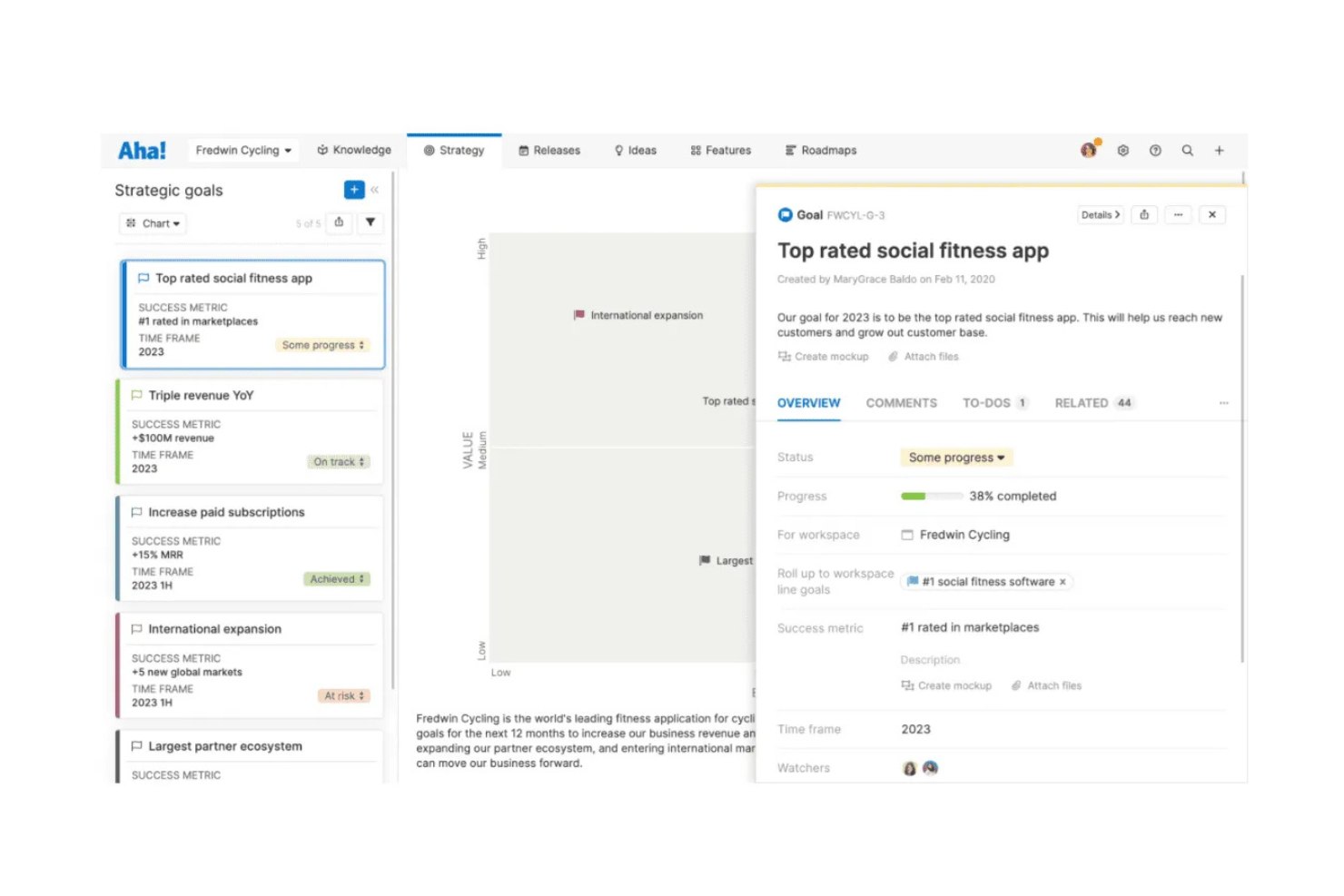
Aha! Develop è uno strumento di sviluppo Agile per team che necessitano di una pianificazione strutturata e visibilità sul lavoro di delivery. Supporta molteplici metodologie Agile e collega le attività di ingegneria alla strategia di prodotto.
Perché ho scelto Aha! Develop: Si distingue per la solida connessione tra la strategia della roadmap e l'esecuzione ingegneristica. La piattaforma supporta Scrum, Kanban e SAFe®, con strumenti per la pianificazione degli sprint, la prioritizzazione del backlog, il coordinamento PI e la reportistica Agile. Include anche un assistente alimentato da intelligenza artificiale generativa che può creare user story e aiutare nella stima del lavoro, rendendo più semplice per i team pianificare la capacità e perfezionare le attività. I team traggono ulteriore valore da funzionalità come pianificazione della capacità, monitoraggio dei rischi e backlog unificati che allineano le priorità ingegneristiche agli obiettivi di prodotto.
Caratteristiche principali e integrazioni:
Caratteristiche includono roadmap personalizzabili, backlog unificati, user story generate dall'IA, strumenti di stima del lavoro, pianificazione di sprint e PI, pianificazione della capacità, bacheche di workflow interattive, report Agile (velocità, burndown, tempo di ciclo) e lavagne per la pianificazione collaborativa.
Integrazioni includono Jira, Azure DevOps, GitHub, GitLab, Slack, Zendesk, Trello e Confluence.
Pros and Cons
Pros:
- Forte allineamento tra roadmap e strategia
- Utile supporto IA per la creazione delle user story
- Supporta Scrum, Kanban e SAFe®
Cons:
- Personalizzazione limitata per utenti avanzati
- Interfaccia complessa e affollata
Altri strumenti di gestione dei progetti Agile basati sull'IA
Ecco alcune ulteriori opzioni di strumenti di gestione dei progetti Agile basati sull’IA che non sono entrate nella mia selezione, ma che vale comunque la pena considerare:
- Jira
Ideale per lo sviluppo Agile
- Digital.ai
Ideale per l'agilità aziendale
- Zoho Sprints
Ideale per la pianificazione degli sprint


Come valuto le soluzioni di gestione progetti Agile con AI
Includo solo strumenti in cui l'IA va oltre una semplice chatbot aggiunta a una bacheca attività: deve davvero far risparmiare tempo nel modo in cui i team pianificano, eseguono e migliorano i loro sprint. Suddivido la mia valutazione tra funzionalità fondamentali che ogni strumento deve offrire per entrare nella lista e fattori differenzianti che distinguono un fornitore dall'altro.
Funzionalità fondamentali (Requisiti minimi per questa lista)
Quando seleziono gli strumenti per la mia classifica, valuto ciascuno su una scala da 0 (non offre la funzionalità) a 5 (eccelle in quest'area) per ogni funzionalità fondamentale elencata di seguito. Poi, calcolo il punteggio totale dello strumento in percentuale. Ogni soluzione deve raggiungere un punteggio totale minimo del 65% per essere presa in considerazione nell'elenco.
- Gestione backlog potenziata da AI: Cerco strumenti che impiegano l'IA per generare, prioritizzare e affinare user stories ed epic a partire da input in linguaggio naturale, invece di richiedere l'inserimento manuale.
- Supporto ai framework Agile: Lo strumento dovrebbe supportare nativamente almeno Scrum e Kanban, con lavagne sprint, backlog, burndown chart e monitoraggio della velocità integrati.
- Pianificazione Sprint & Stima AI: Valuto la capacità dell'IA di suggerire lo scope dello sprint e stimare i punti storia basandosi sulla capacità del team e sui dati di velocità precedenti.
- Analisi predittiva & Forecast: Controllo se lo strumento offre previsioni di consegna guidate dall'IA, segnalazioni di rischio e avvisi di colli di bottiglia su sprint e release.
- Automazione workflow AI: Attività Agile di routine come aggiornamenti di stato, sintesi dello standup e smistamento dei task dovrebbero essere automatizzate dall'IA invece di affidarsi a regole manuali.
- Integrazioni & Collaborazione: Gli strumenti devono collegarsi agli stack di sviluppo già in uso dai team—GitHub, Slack, Jira, pipeline CI/CD—e supportare la collaborazione in tempo reale.
Quando ho una lista di strumenti che soddisfano questi criteri, considero cosa distingue ciascuna piattaforma dalle altre.
Fattori differenzianti (Cosa distingue i fornitori)
Ecco come confronto i diversi fornitori:
Caratteristiche distintive
L'intelligenza sulle dipendenze è un elemento di grande differenziazione: cerco soluzioni che sfruttano l'IA per mappare le dipendenze tra team e segnalare rischi prima che compromettano lo sprint. Anche la possibilità di interrogare tramite linguaggio naturale si distingue. Poter chiedere "cosa blocca la funzionalità di checkout?" e ricevere subito una risposta reale fa risparmiare tempo rispetto all'analisi manuale delle bacheche. Valuto anche se uno strumento può partecipare a standup o alle pianificazioni, estrarre azioni e aggiornamenti e inserirli direttamente nel backlog.
Oltre le funzionalità
La trasparenza dei modelli AI conta: verifico se il fornitore spiega come la sua IA genera raccomandazioni e se i team possono scegliere di non far addestrare i modelli sui propri dati. La scalabilità è un altro fattore chiave, specialmente per le organizzazioni che adottano SAFe o LeSS su più squadre. Cerco riepiloghi a livello di portafoglio e reportistica trasversale che reggano alla scala. Anche il time-to-value è importante: strumenti di migrazione e template Agile precompilati aiutano i team che migrano da piattaforme legacy a essere produttivi velocemente, senza cicli di onboarding troppo lunghi.
Come scegliere gli strumenti di gestione dei progetti Agile basati sull'IA
È facile perdersi in lunghi elenchi di funzionalità e strutture tariffarie complesse. Per aiutarti a rimanere concentrato mentre affronti il tuo particolare processo di selezione del software, ecco una lista di fattori da tenere a mente:
| Fattore | Cosa considerare |
|---|---|
| Scalabilità | Lo strumento può crescere insieme al tuo team? Considera i limiti sul numero di utenti e i prezzi a livelli per assicurarti che possa gestire una domanda crescente senza un aumento significativo dei costi. |
| Integrazioni | Funziona con gli strumenti che già utilizzi? Verifica la compatibilità con il software attuale e cerca ampie opzioni API per soluzioni personalizzate. |
| Personalizzazione | Puoi adattarlo al tuo flusso di lavoro? Valuta il livello di personalizzazione disponibile per dashboard, report e campi delle attività, in modo da soddisfare le tue esigenze specifiche. |
| Facilità d'uso | L'interfaccia è intuitiva per il tuo team? Cerca un layout ordinato e una navigazione semplice per ridurre al minimo la formazione necessaria. |
| Implementazione e avvio | Con quale rapidità il tuo team può iniziare a utilizzarlo? Considera le risorse e il tempo necessari per la configurazione, inclusi i materiali di formazione e la disponibilità dell'assistenza. |
| Costo | Rientra nel tuo budget? Analizza la struttura dei prezzi, comprese eventuali commissioni nascoste o costi aggiuntivi per determinate funzionalità, per evitare spese impreviste. |
| Misure di sicurezza | I tuoi dati sono protetti? Assicurati che lo strumento sia conforme agli standard di sicurezza del settore e offra funzionalità come la crittografia e i controlli di accesso degli utenti. |
| Disponibilità dell'assistenza | Puoi ricevere aiuto quando ne hai bisogno? Verifica la disponibilità dell'assistenza 24 ore su 24, 7 giorni su 7, i tempi di risposta e la qualità della documentazione di supporto, per assicurarti di ricevere assistenza quando necessario. |
Cosa sono gli strumenti di gestione dei progetti Agile basati sull'IA?
Gli strumenti di gestione dei progetti Agile basati sull'IA sono soluzioni software che utilizzano l'intelligenza artificiale per migliorare la gestione dei progetti Agile. Questi strumenti vengono generalmente utilizzati da project manager, responsabili dei team e sviluppatori per migliorare la collaborazione e l'efficienza.
L'automazione, l'analisi predittiva e la definizione intelligente delle priorità delle attività aiutano a gestire i carichi di lavoro, prevedere le tempistiche dei progetti e ottimizzare l'allocazione delle risorse. Nel complesso, questi strumenti offrono agli utenti modalità più intelligenti per pianificare, eseguire e monitorare i progetti, rendendo i processi Agile più efficienti ed efficaci.
Funzionalità
Quando selezioni strumenti di gestione dei progetti Agile basati sull'IA, presta attenzione alle seguenti funzionalità principali:
- Analisi predittiva: fornisce informazioni sulle tempistiche dei progetti e sui potenziali rischi, aiutando i team a prendere decisioni informate.
- Definizione automatica delle priorità delle attività: assegna automaticamente un ordine alle attività in base all'urgenza e all'importanza, consentendo una gestione efficiente del flusso di lavoro.
- Ottimizzazione dell'allocazione delle risorse: utilizza l'IA per allocare le risorse in modo efficace, garantendo prestazioni ottimali del team e risultati migliori per i progetti.
- Reportistica intelligente: offre report basati sui dati che evidenziano le metriche principali e lo stato di salute del progetto, favorendo la pianificazione strategica.
- Collaborazione in tempo reale: facilita la comunicazione e gli aggiornamenti sui progetti tra i team, migliorando il lavoro di squadra e la produttività.
- Pannelli di controllo personalizzabili: consente agli utenti di adattare la propria interfaccia per visualizzare le informazioni più rilevanti, migliorando la concentrazione e l'efficienza.
- Integrazione del monitoraggio del tempo: monitora il tempo dedicato alle attività, aiutando i team a rispettare le tempistiche e a gestire efficacemente i carichi di lavoro.
- Strumenti di gestione dei rischi: identificano e mitigano i potenziali rischi dei progetti utilizzando le informazioni fornite dall'IA, garantendo un'esecuzione più fluida dei progetti.
Vantaggi
L'implementazione di strumenti di gestione dei progetti Agile basati sull'IA offre diversi vantaggi al tuo team e alla tua azienda. Ecco alcuni dei vantaggi che puoi aspettarti:
- Maggiore efficienza: l'automazione e la definizione delle priorità delle attività riducono il lavoro manuale, consentendo al tuo team di concentrarsi sulle attività ad alto impatto.
- Migliore processo decisionale: l'analisi predittiva e la reportistica intelligente offrono informazioni che aiutano il tuo team a prendere decisioni informate.
- Migliore gestione delle risorse: l'allocazione delle risorse basata sull'IA garantisce che il tuo team disponga del personale necessario e che i progetti procedano secondo i piani.
- Migliore collaborazione: gli aggiornamenti in tempo reale e gli strumenti di comunicazione mantengono il tuo team connesso e allineato agli obiettivi del progetto.
- Riduzione dei rischi: gli strumenti di gestione dei rischi basati sull'IA aiutano a identificare tempestivamente i potenziali problemi, riducendo al minimo le interruzioni dei progetti.
- Risparmio di tempo: il monitoraggio automatizzato del tempo e la pianificazione aiutano il tuo team a gestire i carichi di lavoro in modo più efficace, liberando tempo per altre attività.
- Informazioni personalizzabili: i pannelli di controllo personalizzati forniscono a colpo d'occhio le informazioni rilevanti, aiutando il tuo team a rimanere concentrato e informato.
Costi e prezzi
La scelta di strumenti di gestione dei progetti Agile basati sull'IA richiede la comprensione dei diversi modelli e piani tariffari disponibili. I costi variano in base alle funzionalità, alle dimensioni del team, ai componenti aggiuntivi e ad altri fattori. La tabella seguente riassume i piani più comuni, i relativi prezzi medi e le funzionalità tipicamente incluse nelle soluzioni di gestione dei progetti Agile basate sull'IA:
Tabella comparativa dei piani per gli strumenti di gestione dei progetti Agile basati sull'IA
| Tipo di piano | Prezzo medio | Funzionalità comuni |
|---|---|---|
| Piano gratuito | $0 | Gestione di base delle attività, numero limitato di utenti e assistenza della comunità. |
| Piano personale | $1-$25/user/month | Gestione delle attività, integrazioni di base e funzionalità di reportistica limitate. |
| Piano aziendale | $5-$175/user/month | Reportistica avanzata, gestione delle risorse e integrazioni migliorate |
| Piano per grandi aziende | $50-$1600+/user/month | Pannelli di controllo personalizzabili, analisi basate sull'IA, assistenza dedicata e sicurezza. |
Domande frequenti sulla gestione agile dei progetti con l'IA
Ecco alcune risposte alle domande comuni sugli strumenti di gestione agile dei progetti con l’IA:
In che modo il software di IA aiuta nella valutazione e nella mitigazione dei rischi durante i progetti Agile?
L’IA analizza continuamente le variabili del progetto per individuare i potenziali rischi e consigliare soluzioni. Queste possono includere la modifica delle tempistiche, la ridistribuzione dei carichi di lavoro o la riassegnazione delle attività per evitare futuri ritardi o insuccessi.
Gli strumenti di IA sono adatti ai piccoli team?
Sì, gli strumenti di IA possono essere vantaggiosi per i piccoli team, automatizzando le attività ripetitive e fornendo informazioni che potrebbero essere trascurate. Anche con meno risorse, i piccoli team possono utilizzare l’IA per gestire le attività in modo efficiente, stabilire le priorità del lavoro e migliorare la collaborazione. Gli strumenti basati sull’IA possono aiutare i piccoli team a ottenere risultati superiori alle proprie dimensioni, ottimizzando l’allocazione delle risorse e migliorando la comunicazione.
In che modo l'IA migliora la definizione delle priorità delle attività nei flussi di lavoro Agile?
L’IA analizza le dipendenze tra le attività, le prestazioni del team e i dati storici del progetto per classificare le attività in base all’urgenza e all’impatto. In questo modo, le attività di maggior valore vengono affrontate per prime, aiutando il team a rimanere allineato agli obiettivi e alle scadenze del progetto.